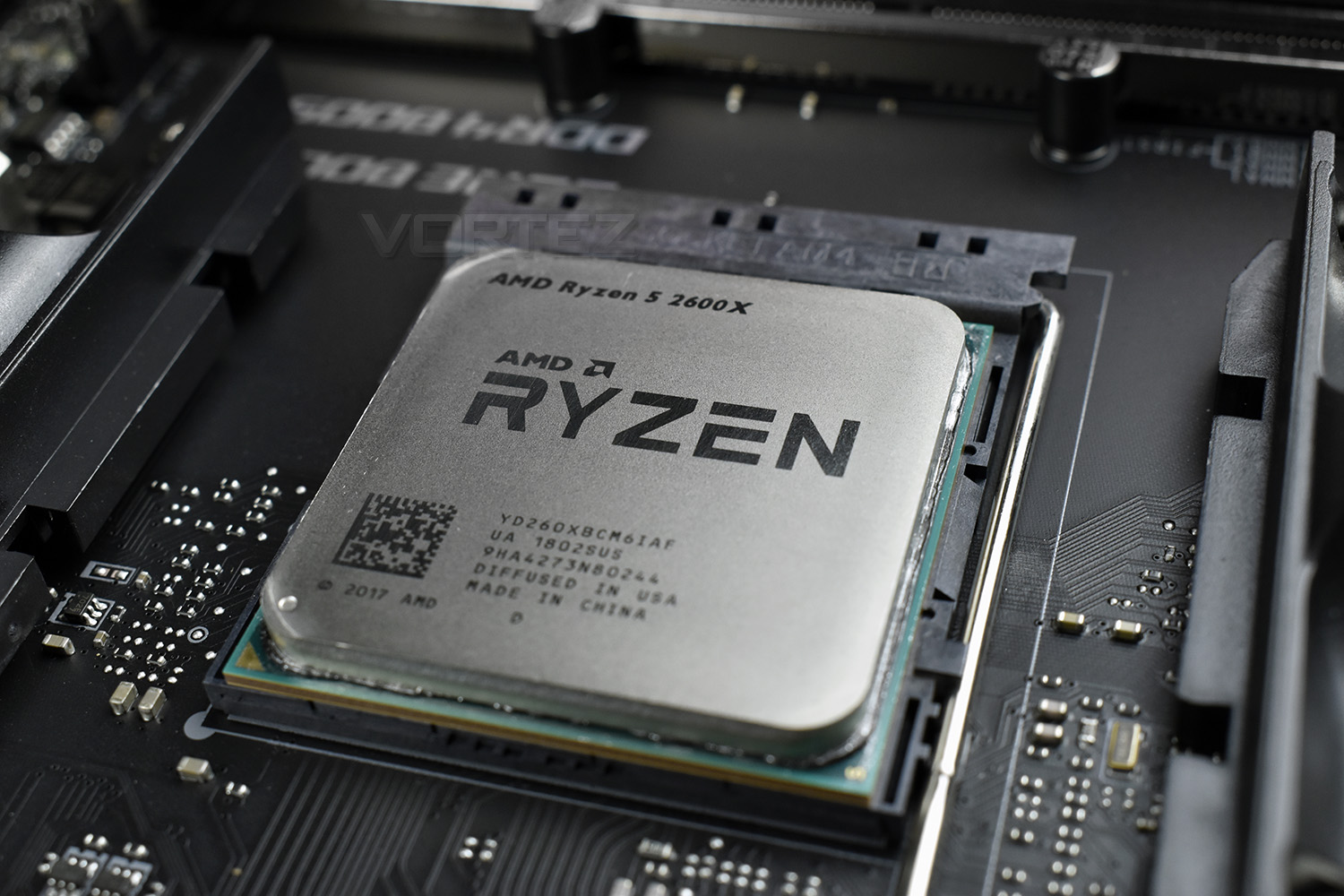
Today we present the AMD Ryzen 2600X, with 6 cores and 12 threads capable of a whopping 4200MHz, it certainly promises performance but how does it fare against the competition?

Product on Review: Ryzen 5 2600X
Manufacturer: AMD
Street Price: £209 / $229
Hot on the heels of the prosumer chip, the Ryzen 7 2700X, we’re back again with the AMD Ryzen 5 2600X, a 6 core, 12 thread chip with slightly-less-demanding customers in mind.
The launch of AMDs Ryzen 1st Gen chips went down a storm with the PC market last year, but outright clock speeds were somewhat lacking when compared to the blue corner. That’s where the Ryzen 5 2600X hopes to make up some ground, with a boost clock of 4.2GHz and base clocks of 3.6GHz.
The new Zen+, codenamed “Pinnacle Ridge”, utilises the new 12nm process from GLOBALFOUNDRIES offering slightly better transistor density and performance but it’s nothing revolutionary. Architectural differences aren’t huge over the previous Zen, but we do see focus placed on improving latency and memory speeds – these differences should translate directly into overall system improvements due to Zen’s reliance on AMD’s Infinity Fabric (The internal communication system used within the CPU die).
Last year, the 1600 and 1600X CPUs were a hot-pick for the budding gamer with casual streaming or content creation in mind, without spending mega-bucks on an 8-core model. The 2600X seems to promise that same level of value, while also providing huge clock speeds to help in single-threaded tasks.
We rated the Ryzen 5 series highly last year, will the 2600X manage to be the same bang-for-your-buck monster that the Ryzen 5 1st Gen CPUs were?
AMD on the 2600X:
Technical Specifications
CPU Cores – 6 Cores, 12 Threads
CPU Max Boost Clock – Up to 4.2GHz
CPU Base Clock – 3.6GHz
L1 Cache – 576KB
L2 Cache – 3MB
L3 Cache – 16MB
TDP – 95W
DRAM Supported – DDR4-2933MHz (Dual Channel)
Transistors and Die Size – 213mm2 / 4.8 billion
Zen+ Revisions
Zen, early in 2017, set an astounding starting block for AMD to build from. Today we get to see the fruits of their labour, with a full year of adjustments, tweaks and experience to improve their CPU range with Zen+.
The 12LP Process from GLOBALFOUNDRIES
The 12nm lithography of Zen+ improves on last year’s 14nm FinFET process, seeing improvements of 10-15% over preceding nodes. This helps to extend clock speeds and reduces the current required to perform a specific task. This delivers improved performance in all the ways that enthusiast customers requested: latency, overclocking, memory speed and clock speeds.
We also see a drop in core voltage across the operating range, vs. 14nm FinFET, as well as improved all-core overclocks.
L1, L2 and L3 cache all see improvements in latency, around 13%, 34% and 16% respectively. This should contribute to a system-wide performance improvement, ensuring the CPU can execute tasks more effectively.
AMD SenseMI Technology
AMDs Ryzen CPUs have a grid of interconnected sensors, monitoring every aspect of performance; they’re accurate to 1mA, 1mV, 1mW and 1°C and are monitored 1000 times every second, to ensure the optimal performance is attained at all times. These sensors feed information to the Infinity Fabric control loop, the “brain” of the CPU, making decisions based on information available to it right now, and predicting future workloads and operating conditions.
This smart grid of sensors allows Zen+ CPUs to fine-tune performance and power characteristics of the cores, manage cache pre-fetches and perform AI-based branch prediction.
Understanding these sensors is crucial to understanding how the CPU behaves.
Precision Boost 2
With AMDs first Gen Ryzen processors, we saw Precision Boost introduced for the first time, continually monitoring all aspects of the CPU, in real time, to ensure the optimal clock speeds and boost frequencies are applied at all times. However, this technology only applied when two of the 16 cores were “taxed” in lightly threaded applications.
Precision Boost 2 improves on this idea. AMD noticed that scenarios existed where 3 or more cores were in use, yet the overall workload was relatively small. This previously resulted in a huge drop in core frequency, when no imminent issues were actually present.
Thermal, electrical and utilisation headroom has been analysed in-depth, arriving at Precision Boost 2.
When a limit is encountered, in terms of power draw or heat generation, Precision Boost 2 will dither within the frequency range, in 25MHz increments, to attain a core frequency that is manageable at that exact moment in time. The process is continuous, with the CPU adjusting parameters 1000 times per second to ensure the Ryzen 2nd Gen CPU runs at the optimal core speed for any given task.
Precision Boost 2, then, could be considered as being greedy or opportunistic – if the clock speeds are there and they won’t cause any imminent problems to the thermals or power draw, the CPU will boost its frequency to as close to the 4.3GHz Boost Clock as possible.
Extended Frequency Range 2 (XFR2)
Now that you have a grasp of Precision Boost 2, XFR2 is aimed at the enthusiast who earns improved processing power by allowing the CPU a nicer place to live, for lack of a better term. Precision Boost 2 operates within a specific window, but that specification is conservative to allow for warmer or more humid climates, which would hamper CPU performance somewhat.
The thermal environment within a PC case is something the user can influence easily, usually by increasing airflow with the addition of fans, or purchasing a high-performance heatsink for the CPU; even running the PC within an air-conditioned room. These improvements will widen the thermal envelope and allow higher frequencies for longer periods of time, pushing the onus onto power delivery instead.
Essentially, if you can largely remove one of the two major contributing factors towards clock speed degradation, you will likely end up with a faster CPU.
These architecture improvements allows greater performance in a huge range of scenarios by allowing the CPU to run at the highest clock speed possible, providing it’s inside the thermal/electrical/load envelope, regardless of the number of cores and threads active. The improvements in moderately-threaded applications, such as games, could be as big as 500MHz when compared to the 1800X.
Improved Memory Support
Perhaps one of the largest issues with the Ryzen launch was memory compatibility issues, with expensive, high-performance memory sticks sometimes not working at all, or if they did, they had to be run at a much lower frequency than advertised on the packet.
With Ryzen 2000 series CPUs, memory support has been increased from DDR4-2667MHz to DDR4-2933MHz. This is something everyone expected from the 2nd Gen Ryzen launch due to the Infinity Fabric’s reliance on memory speed.
Better support for high-speed memory kits should provide a boost to cross-core and cross-CCX communication, improving CPU performance more than you would usually see on an Intel system, for example.
Test Setup & Software
For the purpose of testing AMD Ryzen 2600X we used the MSI X470 GAMING 7 AC – this motherboard is a strong offering and provides us with a good platform to analyse performance.CPU being tested
AMD Ryzen 2600X (3.6GHz – 4.2GHz Boost) Zen+
TEST SETUP
Cooling Corsair H150i Pro RGB
Motherboard MSI X470 GAMING 7 AC
Memory 32GB Corsair Vengeance LPX 3000MHz
Graphics Radeon RX 480 8GB
Storage Corsair LX 512GB SSD
PSU Corsair RM 1000 80 Plus Gold Certified PSU
COMPARED AGAINST
AMD Ryzen 3 2200G (3.5/3.7GHz) Raven Ridge
AMD Ryzen 5 2400G (3.6GHz/3.9GHz) Raven Ridge
AMD Ryzen 3 1200 (3.1/3.4GHz) Summit Ridge
AMD Ryzen 3 1300X (3.4/3.7GHz) Summit Ridge
AMD Ryzen 5 1400 (3.2GHz) Summit Ridge
AMD Ryzen 5 1600 (3.2GHz) Summit Ridge
AMD Ryzen 7 1700 (3.0GHz) Summit Ridge
AMD Ryzen 7 1700X (3.4GHz) Summit Ridge
AMD Ryzen 7 1800X (3.6GHz) Summit Ridge
AMD Ryzen 7 2700X (3.7GHz) Pinnacle Ridge
AMD FX-8350 (4.0GHz) PileDriver
Intel Core i7-8700K (4.5GHz) Coffee Lake
Intel Core i7-7900X (3.3GHz) Skylake-X
Intel Core i7-7800X (3.5GHz) Skylake-X
Intel Core i5-7700K (4.2GHz) Kaby Lake
Intel Core i7-6950X (3.0GHz) Broadwell-E
Intel Core 7-6900K (3.2GHz) Broadwell-E
BENCHMARKS
Cinebench R15 – CPU/OpenGL Score
x264 HD 4.0 – 1st and 2nd pass encoding
SiSoftware SANDRA – CPU & Memory benchmarks
POV-RAY – CPU benchmarks
TrueCrypt – CPU benchmarks
AIDA64 – CPU benchmarks & Memory
PCMark 8 – Creative & Photoshop
PCMark 10 – Extended
3DMark FireStrike – 3D Benchmark
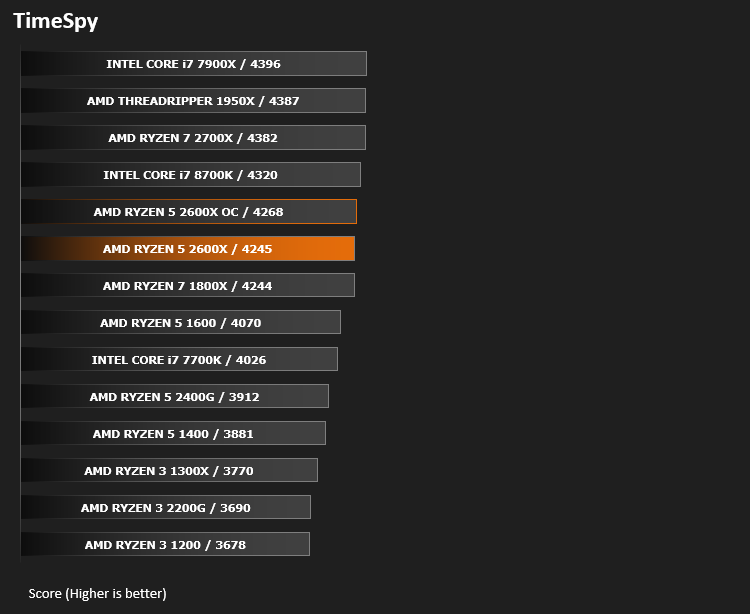
3DMark TimeSpy – 3D Benchmark
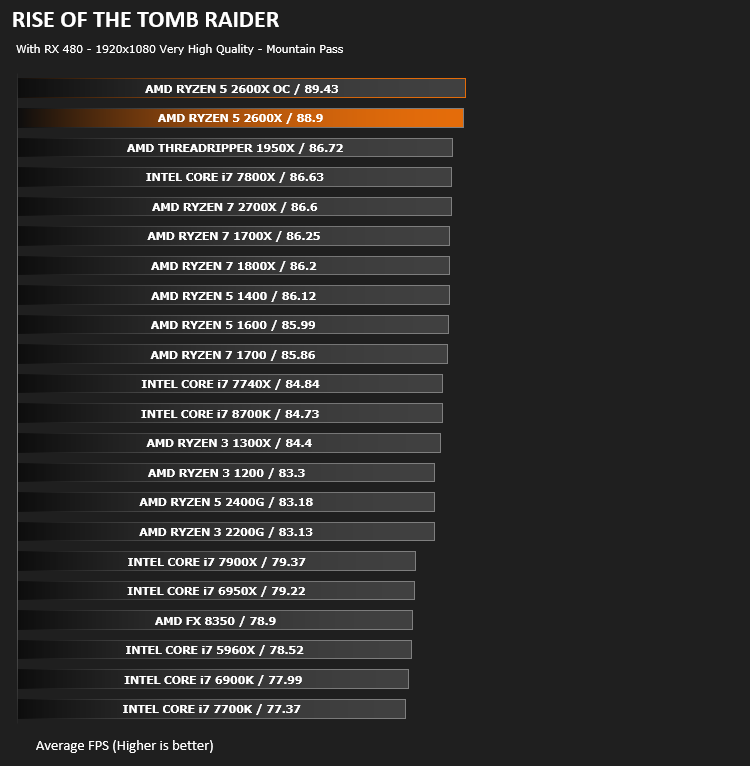
Games – Rise of the Tomb Raider & Total War: WARHAMMER
OTHER SOFTWARE
Temperature Analysis: Core Temp
Stress Testing Software: AIDA64 Stability Test
CPU Specification Monitoring: CPU-Z
Temperatures & Overclocking
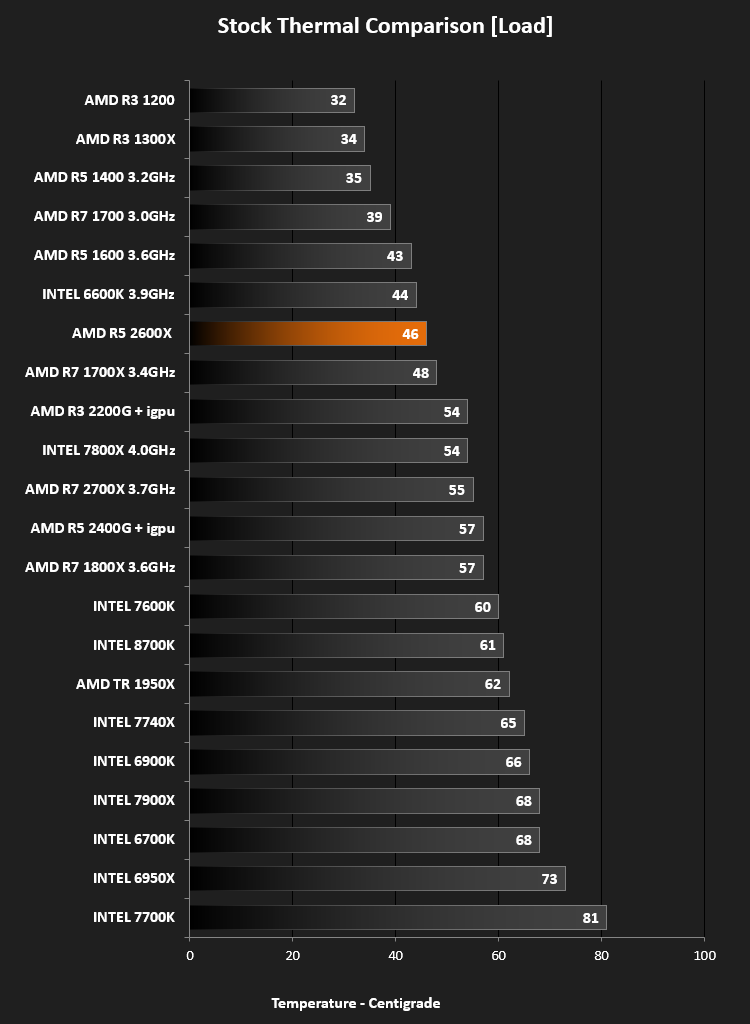
TemperaturesWe tested the CPU at stock settings, to gauge the headroom available to us without hitting any kind of thermal ceiling. The 2600X reached 46°C. This isn’t a direct comparison of thermal performances, but merely a guideline.
Overclocking
Obviously we had a lot of temperature headroom to play with, using a Corsair H150i Pro RGB cooler.
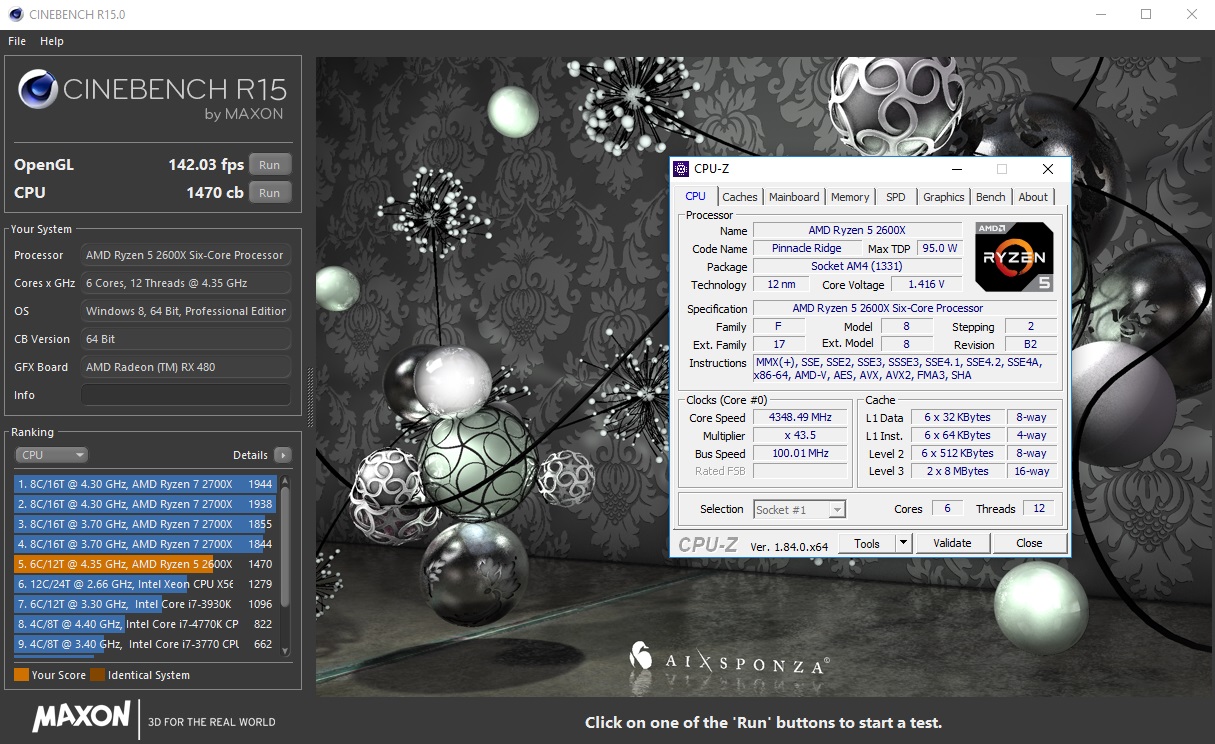
We set about aiming for a 4.20GHz overclock at first, which would equal the maximum XFR2 boost speed within stock specification. We met this easily with no increase in voltage required, temperatures barely budged either.
On ahead we went, aiming for 4.4GHz, but this pushed temperatures into the 80s, which we don’t deem as a solid 24/7 overclock, especially considering the cooler being used. We bumped things back down to 4.35GHz, where temperatures found themselves in the low 70s at the worst.
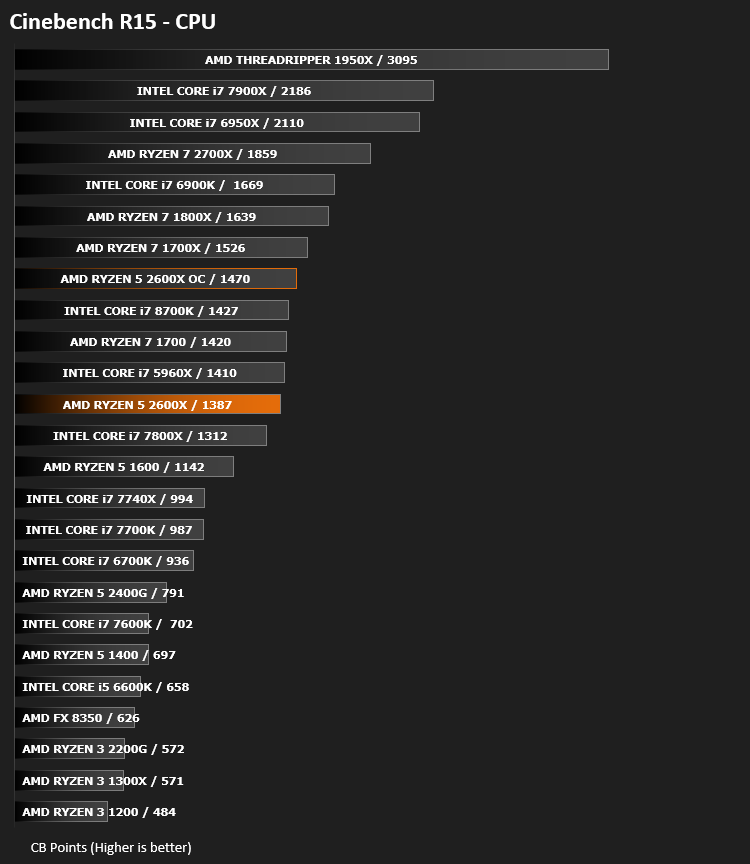
Cinebench heralded some pretty decent results at 4.35GHz.
Power Consumption
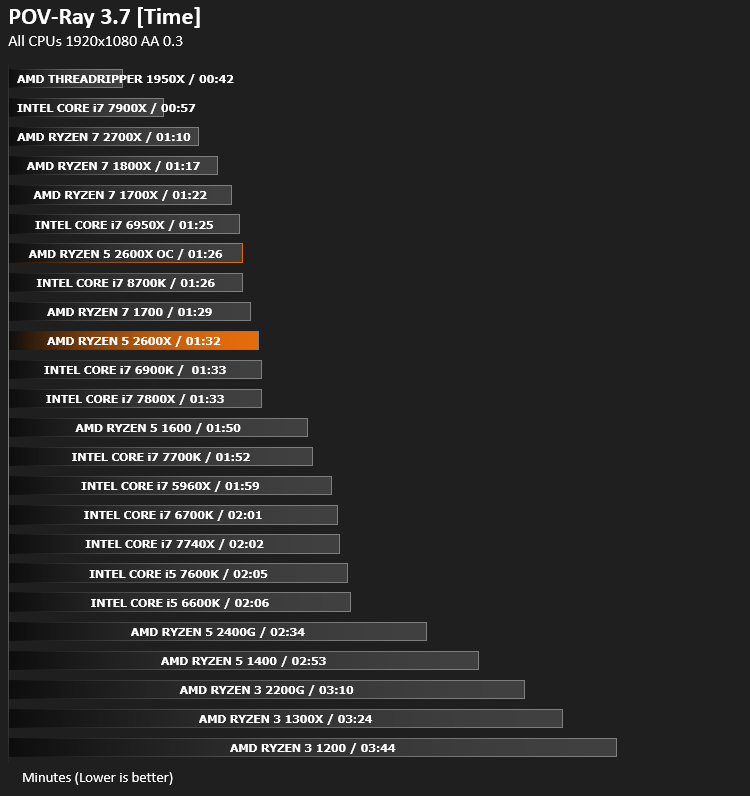
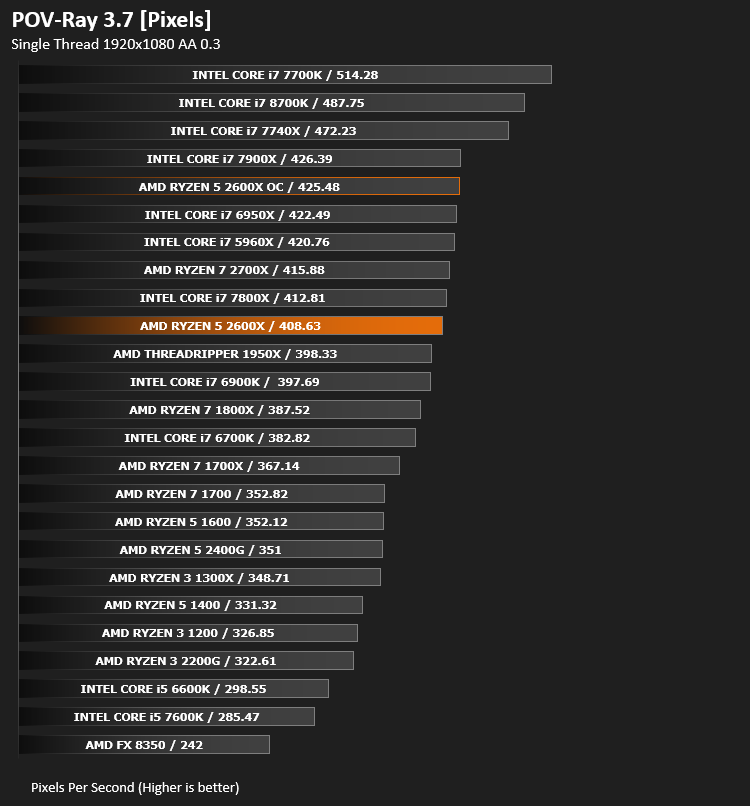
Ray Tracing Performance – POV-Ray 3.7
This product allows users to build their custom 3D worlds with excellent quality despite their computer’s hardware. It has adjustable options for levels of radiance, refraction, and reflection. Calculation time may vary depending on the computer model, but PovRay can adapt to many computer builds, and is supported by the open source community.
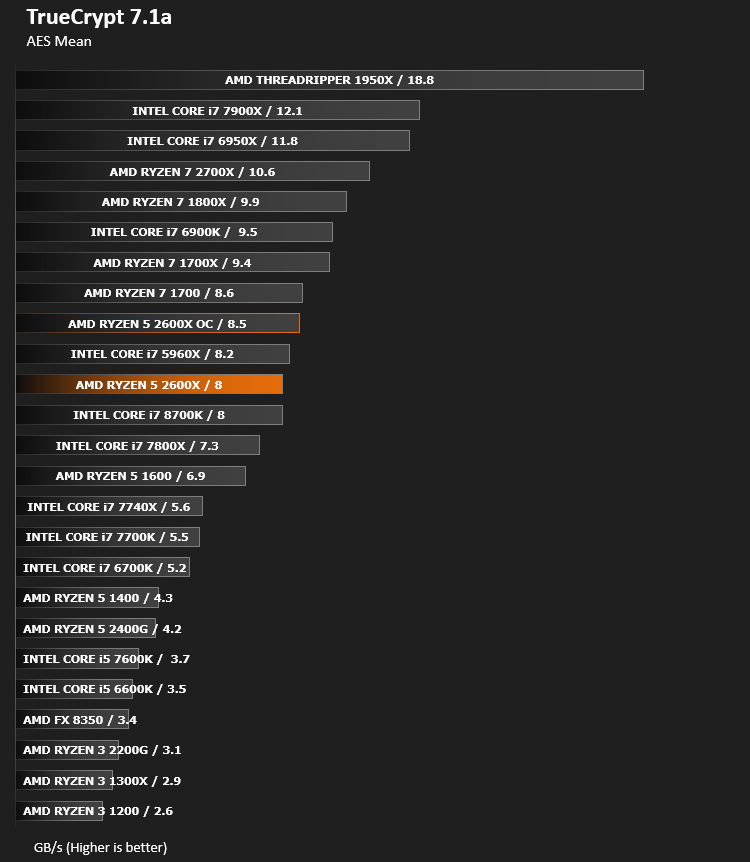
AES Encryption Performance – TrueCrypt 7.1a
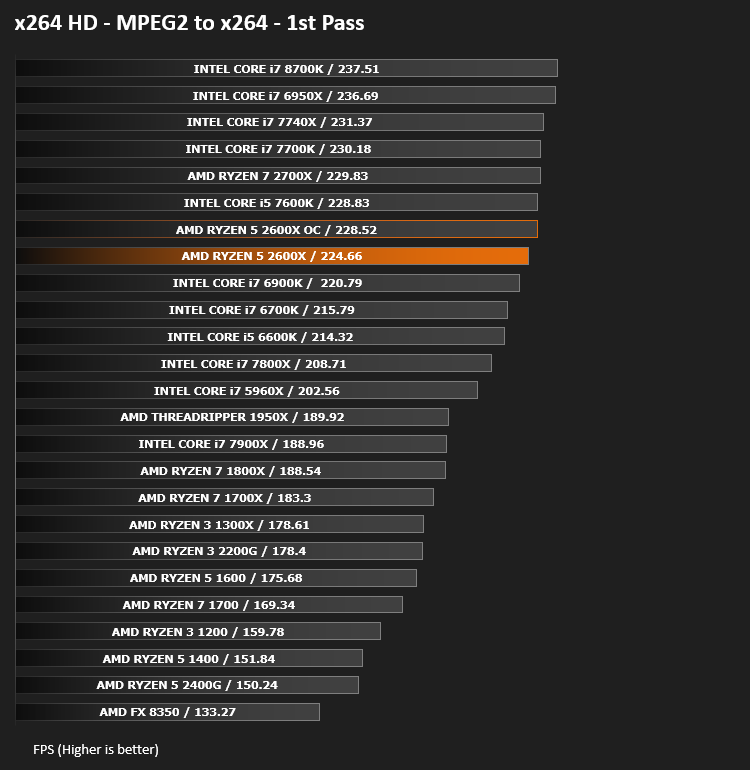
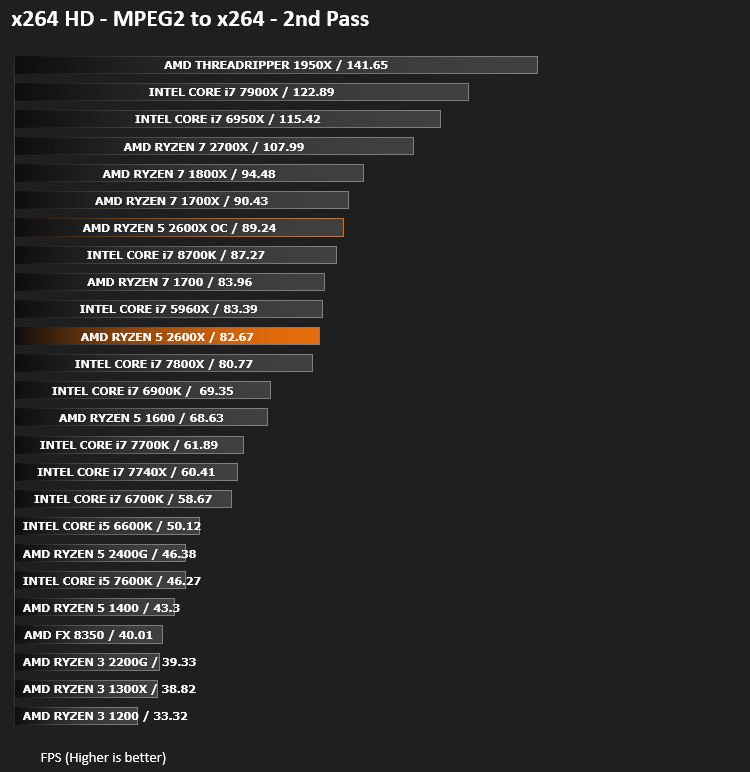
Encoding Performance – x264 HD
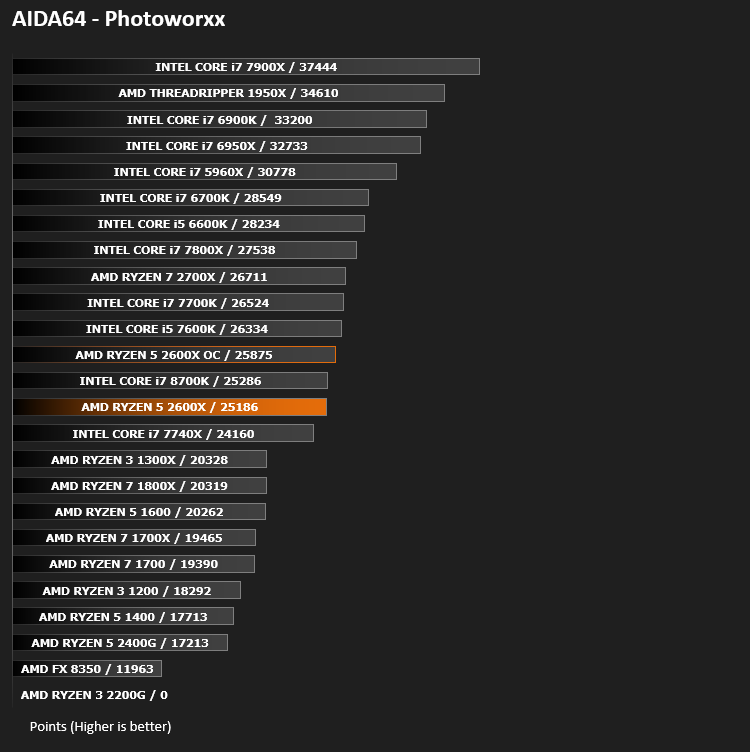
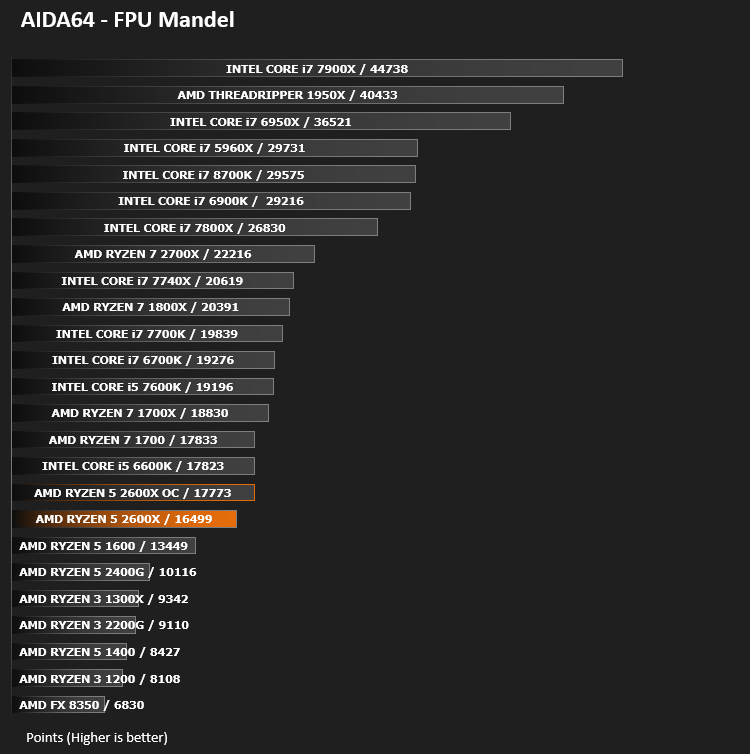
Processing Features Performance – AIDA64
AIDA64 Product Page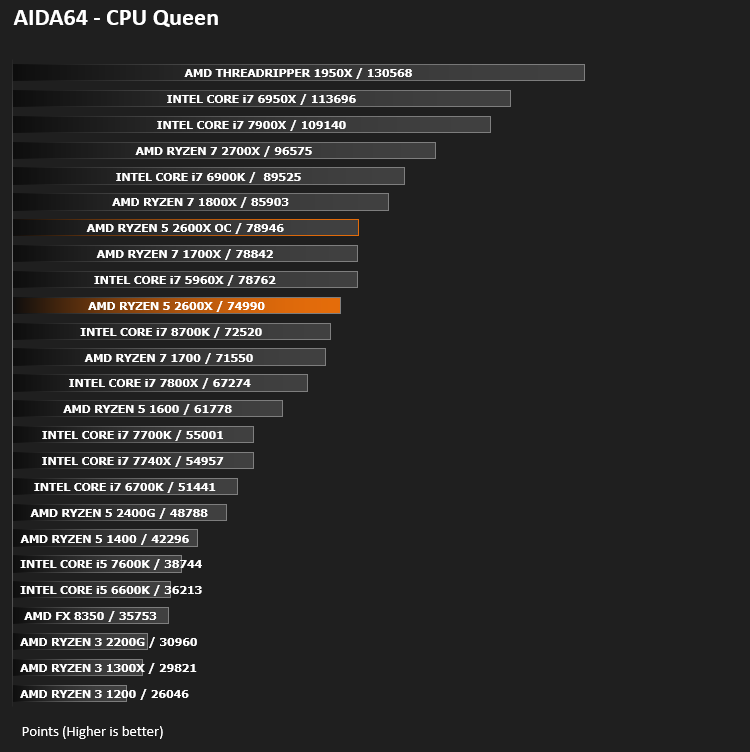
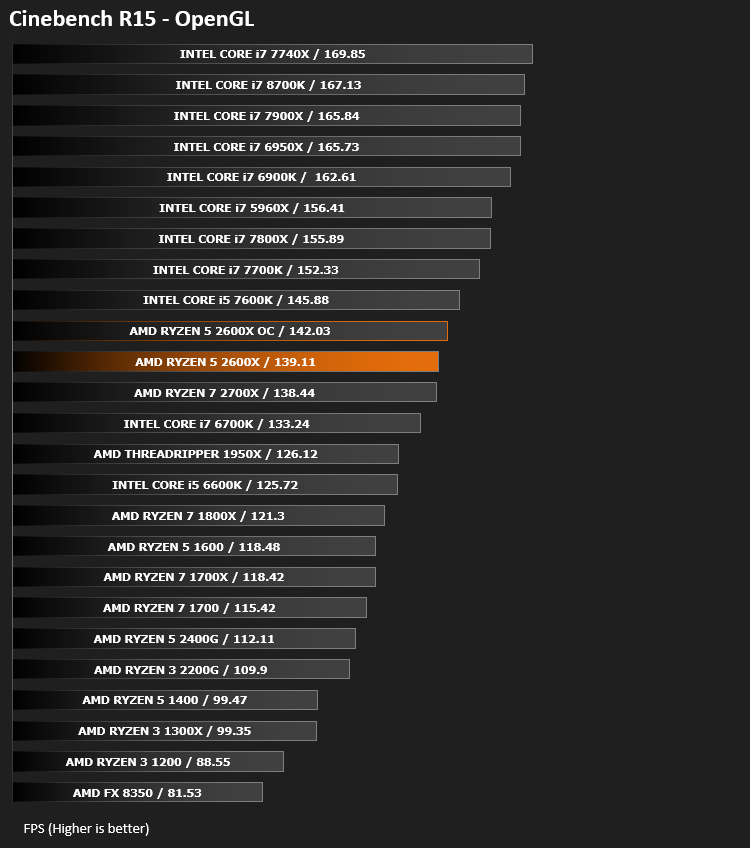
Processing Power Performance – Cinebench R15
Bandwidth Performance – SiSoftware SANDRA
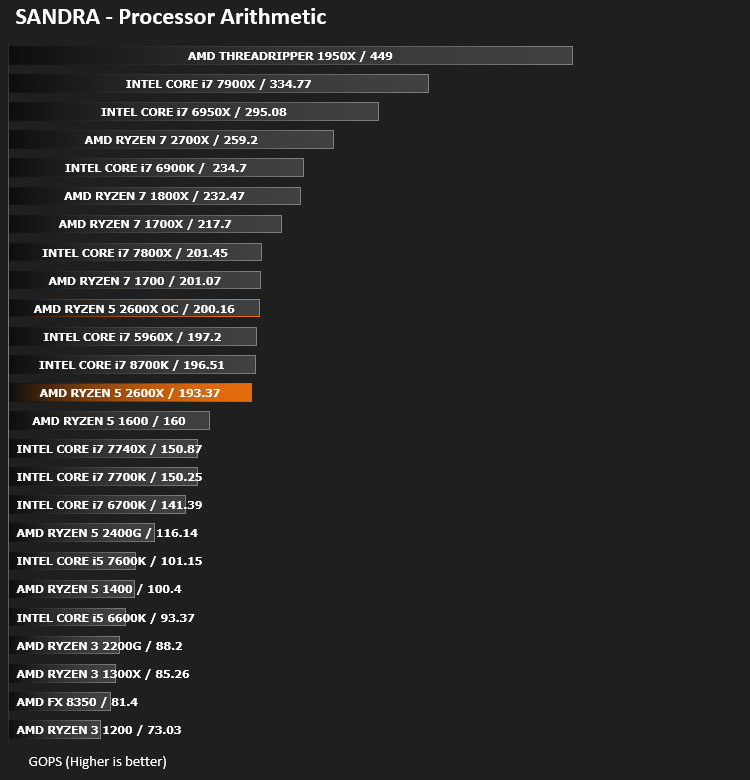
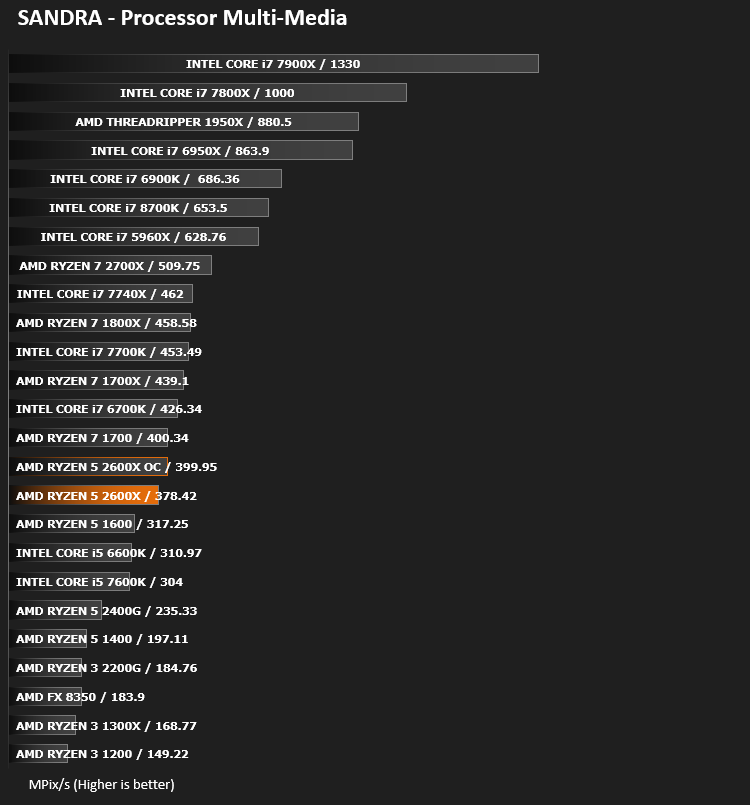
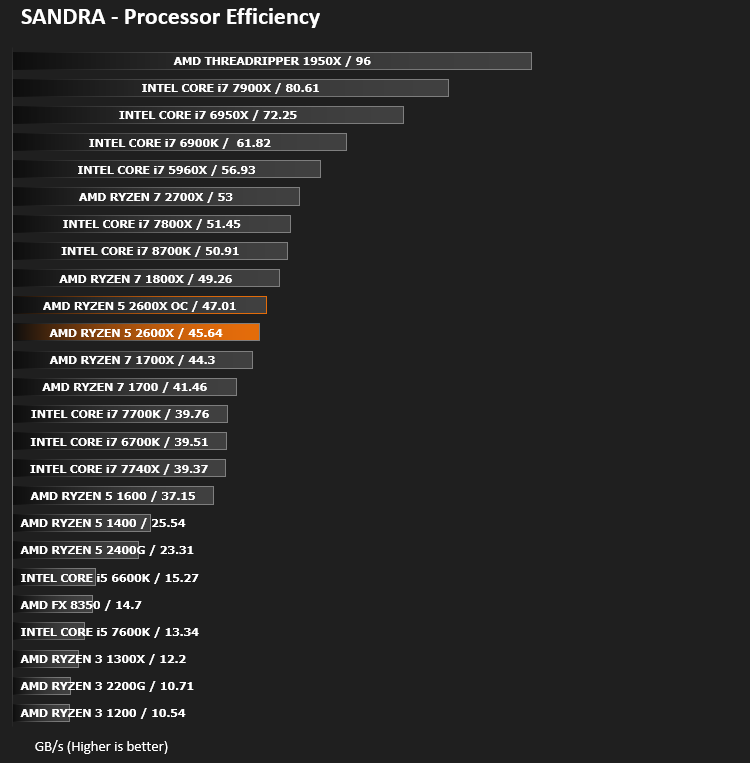
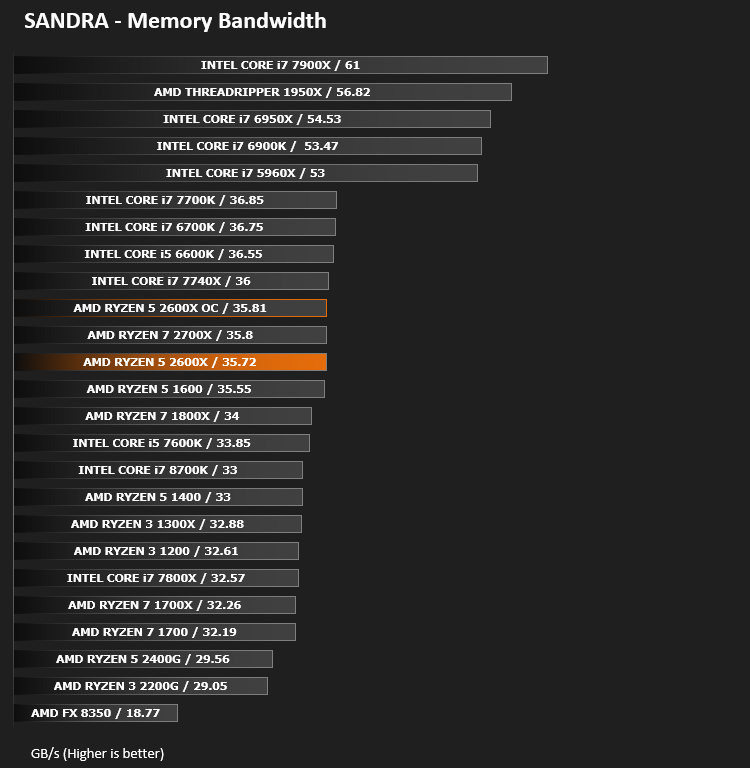
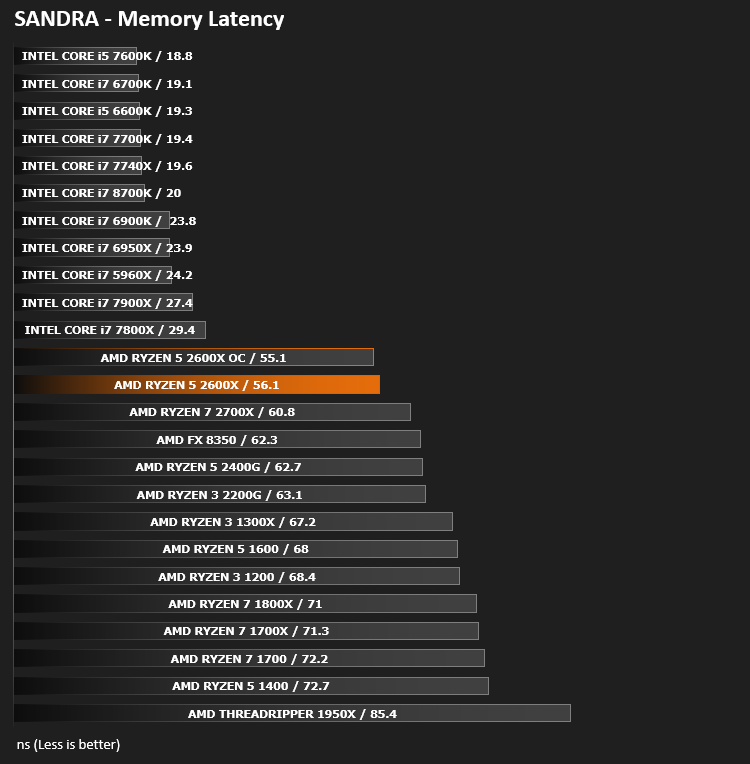
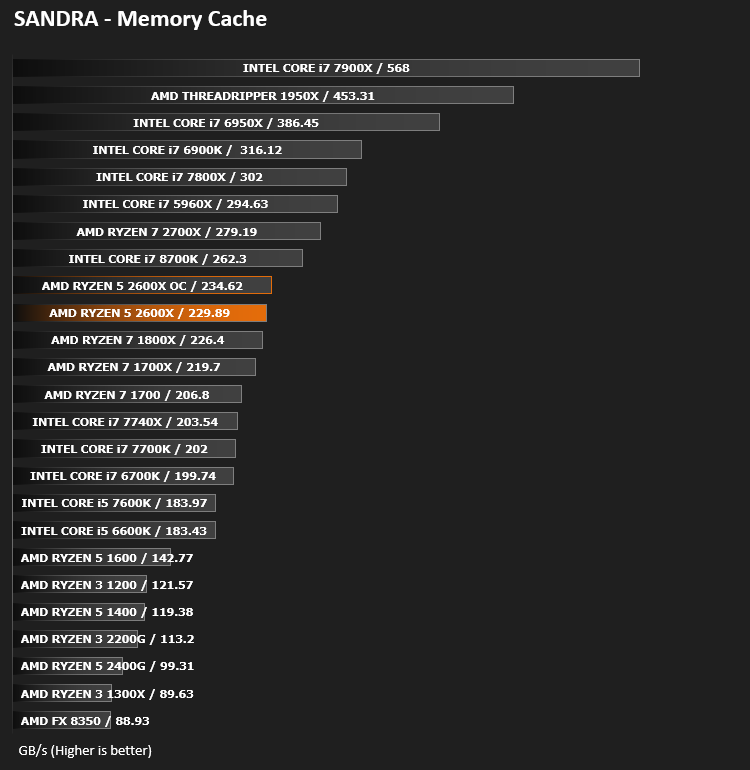
Image Editing Performance – PCMark 8 Photoshop
PCMark 8 Product Page

Overall System Performance – PCMark 8
PCMark 8 Product Page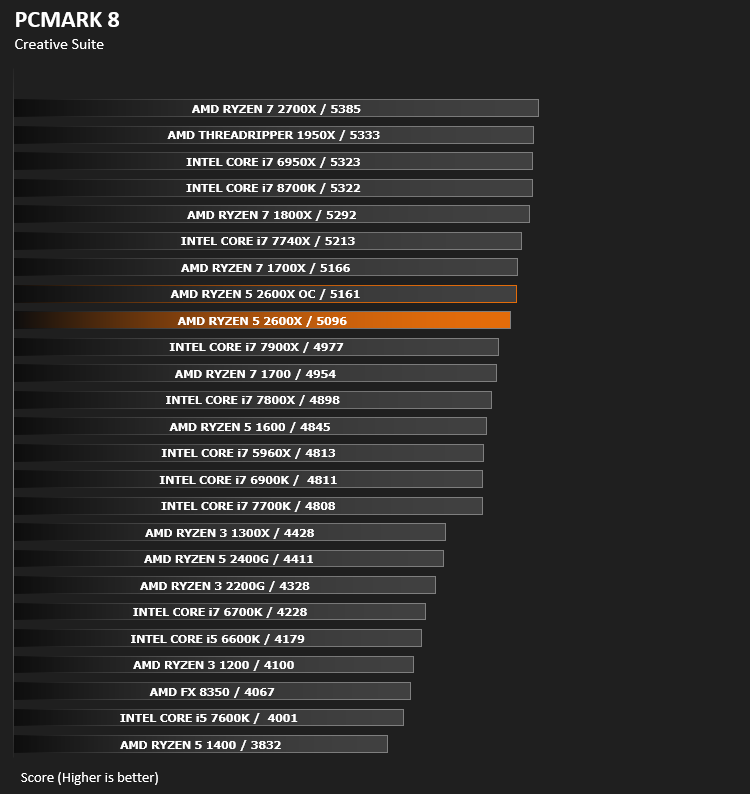
VR Performance – VRMark
VRMark Product Page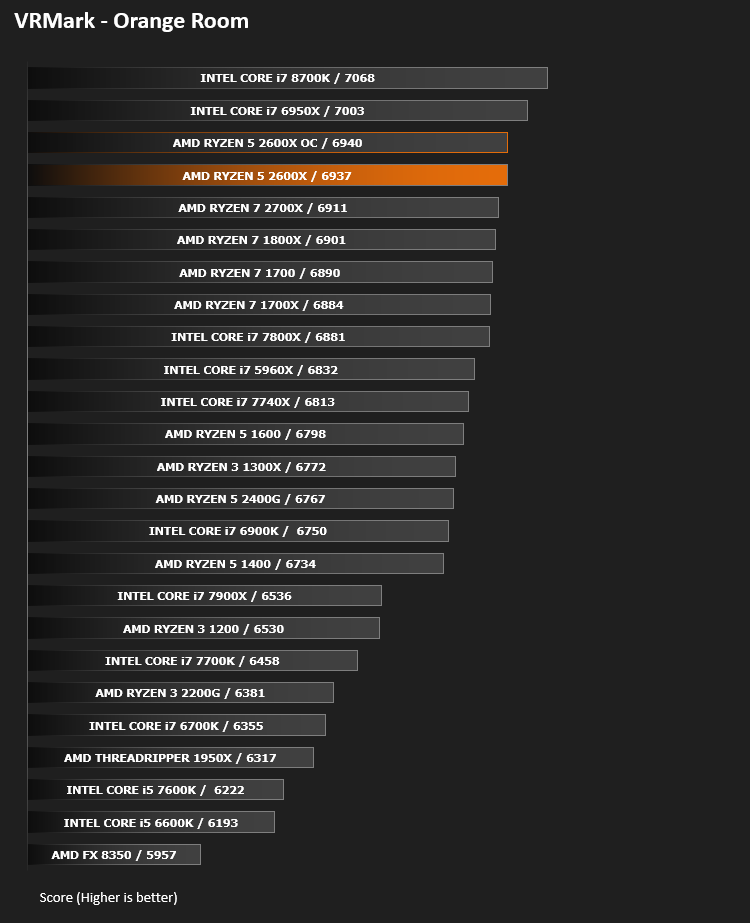
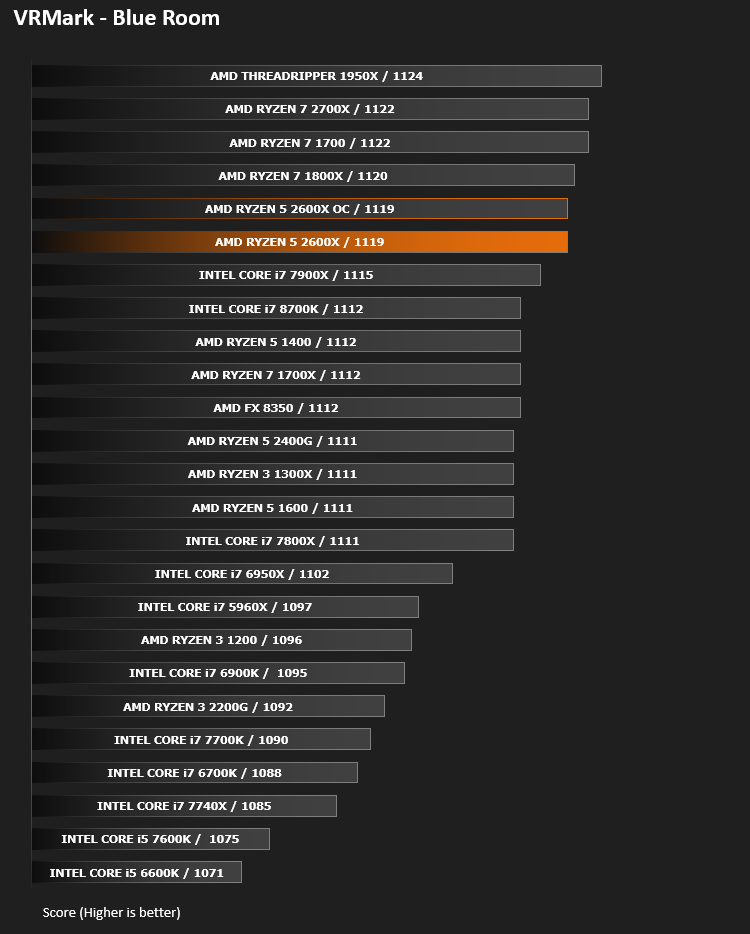
3D Performance – 3DMark FireStrike
3DMark FireStrike Product Page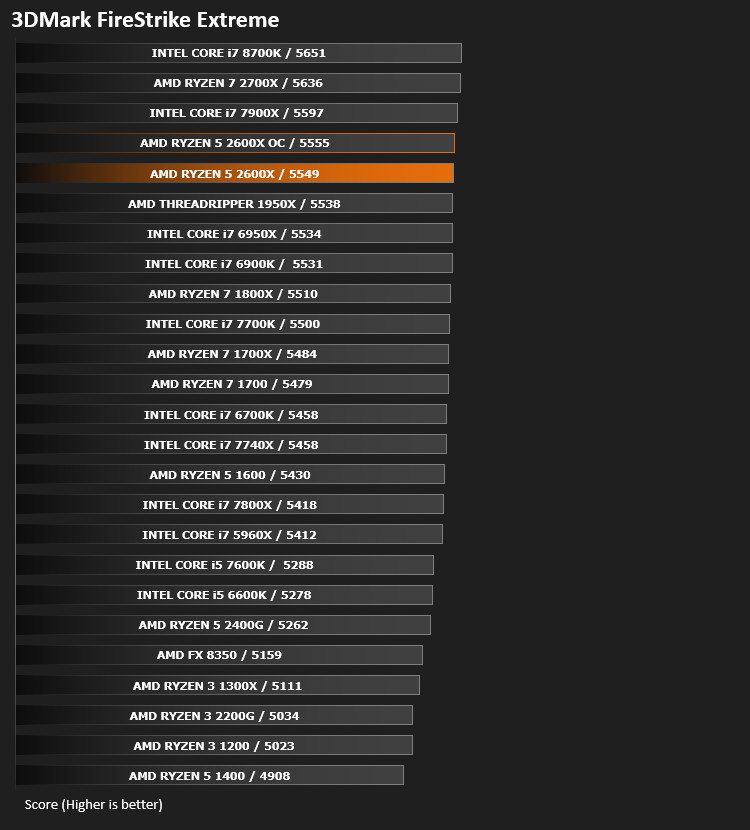
Gaming Performance – Rise of the Tomb Raider & Total War: WARHAMMER

Conclusion
Around this time last year, AMD had made quite the splash within the CPU market, giving Intel something to think about. However, their Ryzen 5 CPUs weren’t competitive on all fronts, especially outright clock speed; that’s where the 2nd Gen Ryzen CPUs have been improved mostly, allowing boost clocks up to 4.2GHz across all 12 threads, when thermals and other parameters allow.During our testing, when comparing it directly to the Ryzen 5 1600 and even the 1700X and 1800X, we’ve seen some incredible performance. The 2600X was often worrying the 1700X in our graphs, despite lacking 2 cores and 4 threads.
Taking the focus solely from AMD and looking at the blue team, we can even see the 2600X giving the much more expensive Core i7-8700K CPU a run for its money, which is surprising considering the gulf in core speed.
If you want to get handy with some overclocking, and possess a reasonably decent CPU cooler, the headroom is certainly there. We managed 4.35GHz all-core frequency which considerably boosted our scores in some benchmarks.
We feel those looking to use their PC for gaming, as well as light content creation, media usage and possibly even occasional streaming will find the 2600X more than ample for their needs; especially with the initial outlay being circa £200.
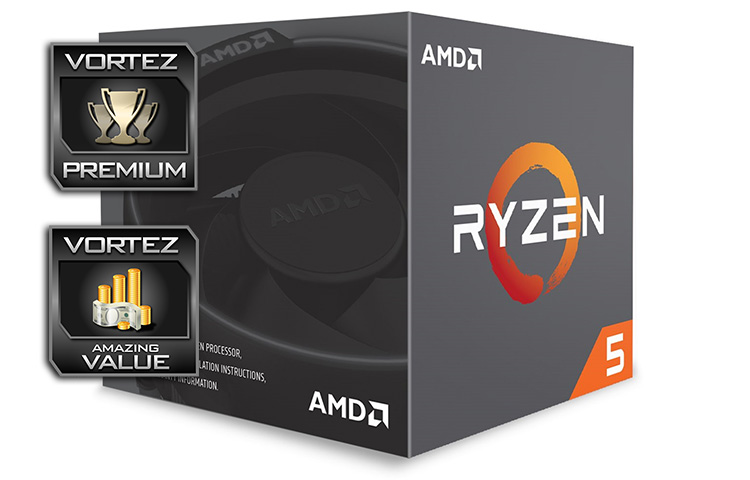
The Ryzen 1st Gen CPUs were good, but the 2nd Gen are great!
If value is high on your agenda, but you still require outright performance and speed, the Ryzen 5 2600X will deliver that in heaps.
+ Excellent value
+ Great performance
+ Runs cool
+ Uses AM4 socket
+ Ryzen: done correctly
+ Includes the Wraith cooler
Cons
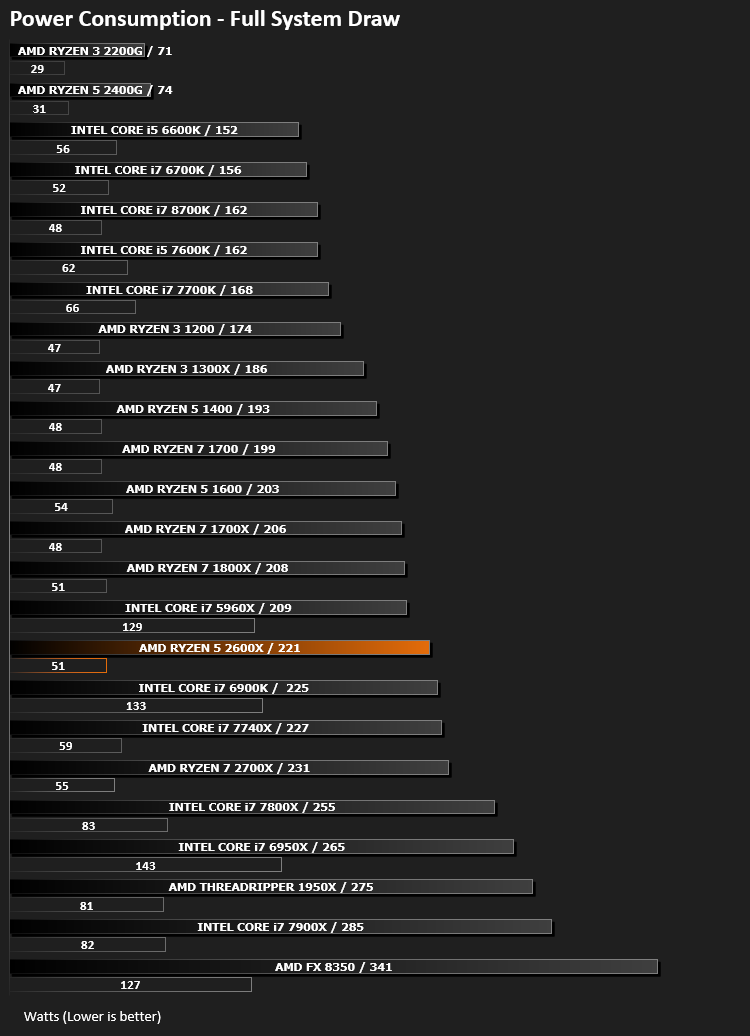
– High power draw
– No real reason to upgrade from the 1600X
Click here for an explanation of our awards at Vortez.net.
Stay connected with the Vortez Social Media pages:
Join in with the discussions on Discord