







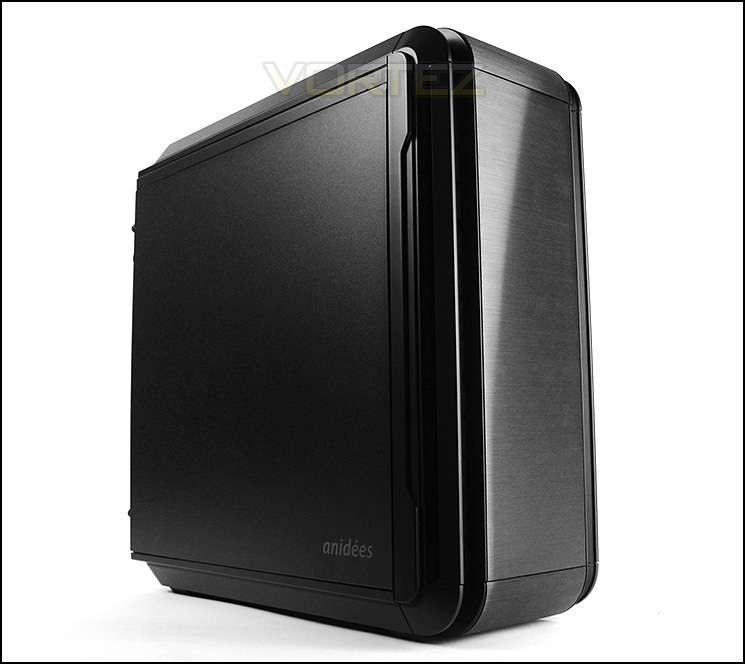
A stylish computer chassis which comes with brushed aluminium and a fan controller. Can this case survive in the competitive Micro ATX sector?

Product on Review: AI4 Silenced Chassis
Manufacturer and Sponsor: Anidees
Street Price: £80 (At time of review)
Anidees are a new player in the computer case department, having just two products in their portfolio. Their availability in many areas of the world may be limited at this time but over here in Europe access to Anidees products is good.
Today we are to look at Anidees first attempt at bringing to market a Micro ATX computer chassis. From the outside, AI4 looks very similar to its bigger brother, the AI6. A brushed aluminium external construction is appealing to the eye and noise damping material should help to keep those noise levels down to a minimum.
About Anidees
The story of Brand name anidees was from English first ” an idea ” but we play it to plural and it turns to ” an ideas but since the most idea we collected for our product are from Europe. thus we change idea to idee (Gernan ,Dutch, France) , with plural form it turns to ” anidees “
anidees is actually a design company, focus on product design and provide value add items to customers. Our slogan is ” Ideas from you”.
Our aim is to be a brand/Company who listen to users and make ” simple , elegant , with Quality ” products to our customers.
anidees is actually a design company, focus on product design and provide value add items to customers. Our slogan is ” Ideas from you”.
Our aim is to be a brand/Company who listen to users and make ” simple , elegant , with Quality ” products to our customers.
Technical Specifications
– Colour: Black
– Material: Steel body / AL, Plastic, Mesh bezel
– Motherboard: M-ITX, M-ATX
– 5.25″ Drive Bay: 2
– 3.5″ Hidden: 4
– 3.5″ Exposed: None
– 2.5″ Drive: 4
– I/O Panel: USB3.0 x 2, USB 2.0 x2, Audio x1, MIC x1, 3 Speed Fan Controller
– Expansion Slots: 5
– Power Supply: PS2(Optional)
– Removable HDD Cage: Yes
– Dimensions: 415(L) x 185(W) x 433(H) mm
Cooling System
– Front: 120mm x2 (Fan Included
– Rear: 120mm x1 (Included)
Maximum Compatibility
Graphics Card length : 340mm
CPU Cooler height: 168mm/mm(silent version)
– Material: Steel body / AL, Plastic, Mesh bezel
– Motherboard: M-ITX, M-ATX
– 5.25″ Drive Bay: 2
– 3.5″ Hidden: 4
– 3.5″ Exposed: None
– 2.5″ Drive: 4
– I/O Panel: USB3.0 x 2, USB 2.0 x2, Audio x1, MIC x1, 3 Speed Fan Controller
– Expansion Slots: 5
– Power Supply: PS2(Optional)
– Removable HDD Cage: Yes
– Dimensions: 415(L) x 185(W) x 433(H) mm
Cooling System
– Front: 120mm x2 (Fan Included
– Rear: 120mm x1 (Included)
Maximum Compatibility
Graphics Card length : 340mm
CPU Cooler height: 168mm/mm(silent version)
Packaging & First Look
The AI4 arrives in a small non-descript cardboard box. There is nothing to hint at the visual appearance of the case on either the front or back of the box, the only useful area is the side which gives some of the technical specifications.
Inside, the case is covered in a clear plastic cover and held in place with two polystyrene pillars.
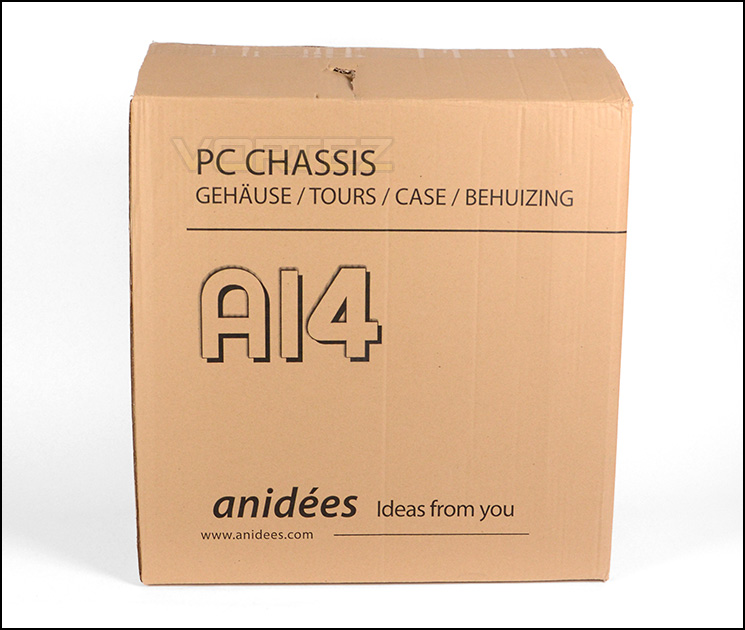
Packaging for AI4 is basic
Unveiling the AI4, it would be easy to mistake it for a standard ATX case in regards to its physical dimensions but this case is designed to house M-ATX motherboards. For scale, we have placed a smartphone next to the case to demonstrate just how big this case is.
The styling prides itself in being sleek and very classy. Both side panels are solid steel and have noise damping material on the underside. There are no significant features on the sides since this case is geared towards low-noise operation.
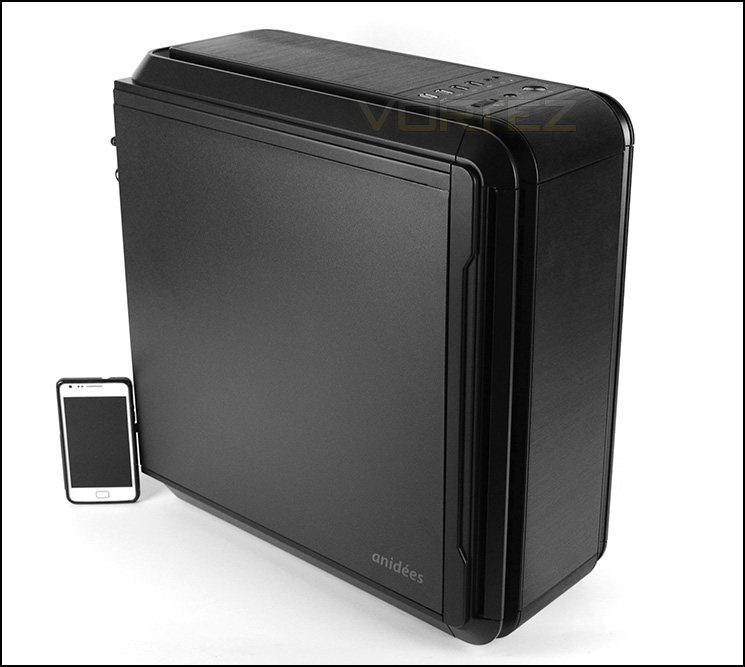
A miniature tower
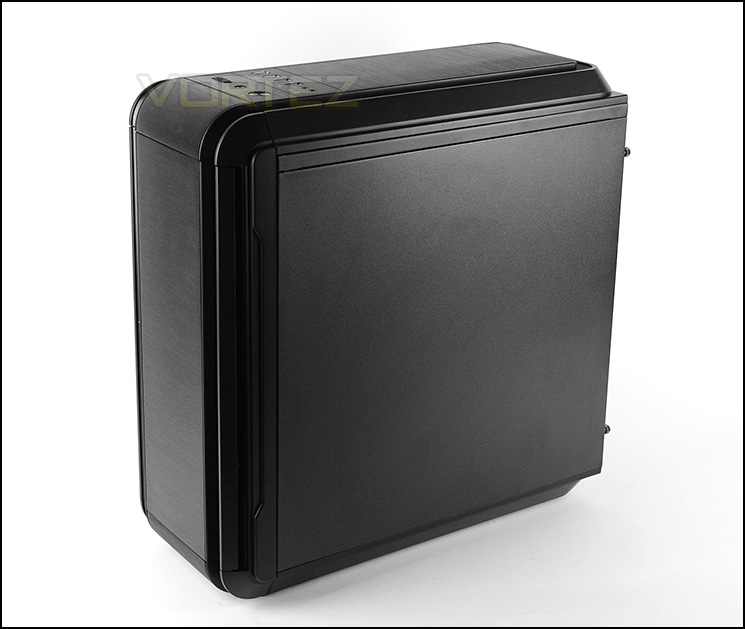
Sleek, professional styling
Exterior
The front of AI4 features a brush aluminium faceplate whilst the outer edge uses plastic for its construction. The front also acts as a door to gain access to 5.25” drive bays.
Around the back, at the bottom of the case reside the PCI expansion slot covers. There are a total of five covers, each of them have ventilation. Immediately above there is space the rear IO and a 120mm rear exhaust fan. At the very top of the case is a large opening for mounting the PSU.
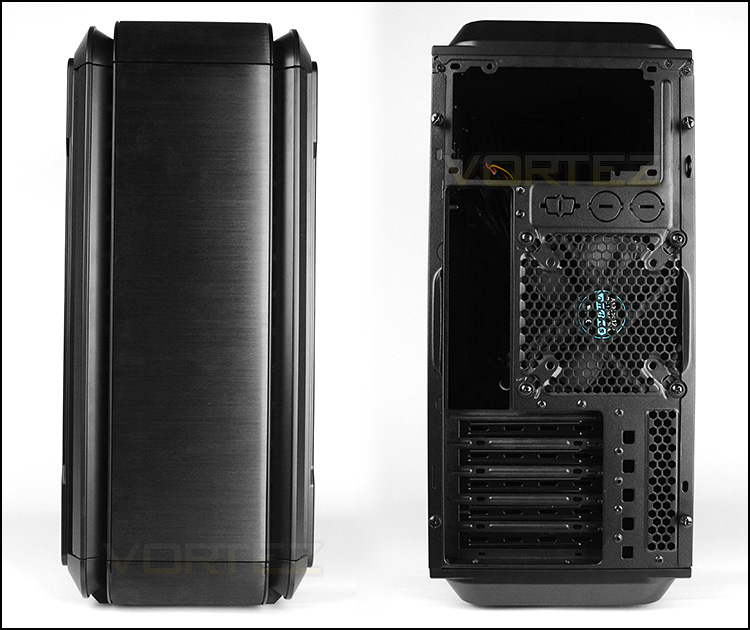
The front and back of AI4
The door pivots from the left side and has two magnets to help it close properly. On the inside of the door Anidees have attached some insulation foam to help keep noise levels down to a minimum.
Opening this door provides access to the two 5.25” drive bay covers which are removable from the outside of the case. In the lower region there is a perforated mesh area for the front cooling fans to pull in air.
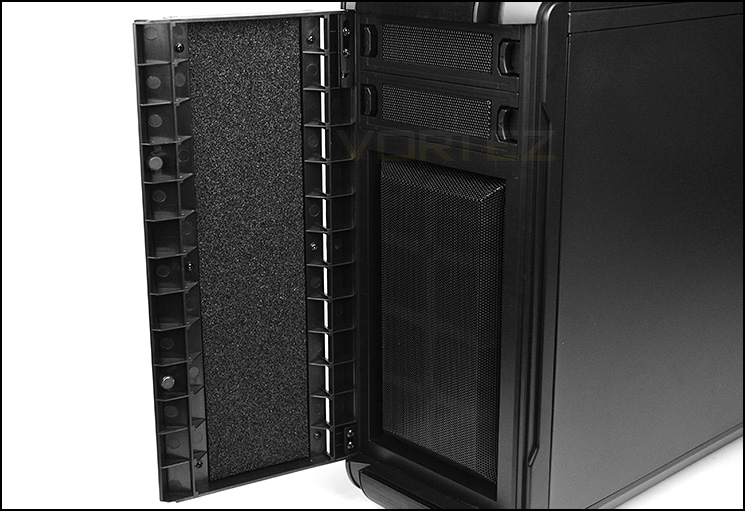
Door opens from left
At the top of AI4, Anidees have positioned various ports and buttons. At the top there are dual USB 2.0/3.0 ports, headphone and microphone jacks, fan controller and power/reset buttons.
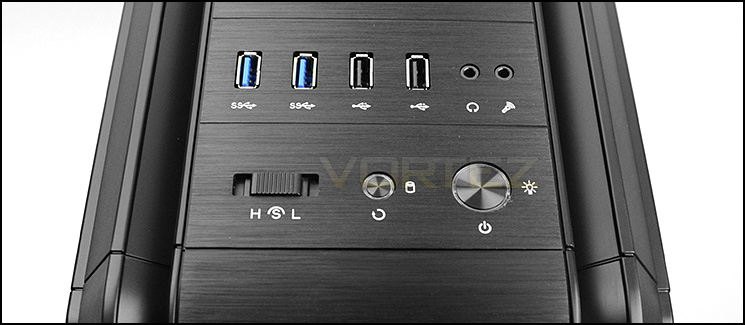
Front panel connectivity at the top
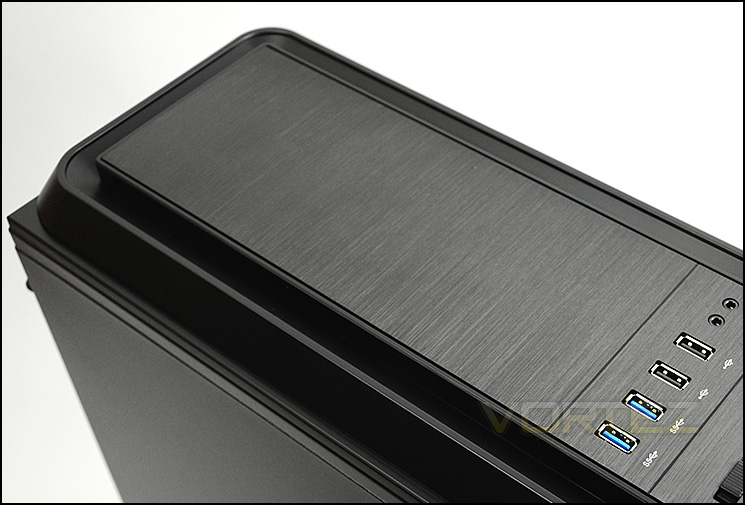
The top of AI4
Finally, on the underside of the case there are four rubber feet to help keep the AI4 from slipping on smooth surfaces – there are no dust filters at the bottom since the PSU is mounted at the top of the case instead.
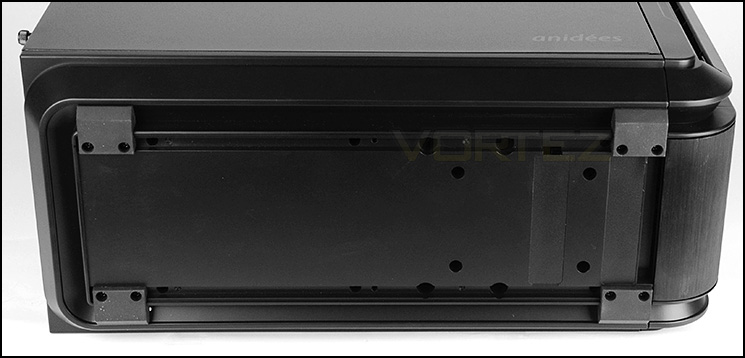
The underside of AI4
Interior
Both side panels on A14 are fixed with dual thumbscrews on either side. With this A14 being the silenced edition, both panels also have insulation foam on the inside.
Removing these panels gives us an overview of the internal layout and features. The prominent side can accommodate up to M-ATX form factor and has very few tool-free mechanisms for installing kit. Cable management could also be a concern since there is very little clearance behind the motherboard tray and no cut-outs.
Internal design can take up to M-ATX form factor
Behind the motherboard tray
Located at the top of A14 is the area to mount the PSU (Standard ATX form factor). This is a step away from conventional tower cases which have the PSU at the bottom of the case in favour of having cooling fans at the top of the case. There is no rubber padding for the PSU to rest on.
PSU mounting is at the top of the case
Below this sits a 120mm rear exhaust cooling fan and five PCI expansion slot covers which each have a thumbscrew for easy removal and ventilation for better airflow.
120mm rear exhaust fan at the back
At the front of A14 there are dual 120mm cooling fans which are positioned to be intakes, bringing in cool air. Next to these fans is a steel bracket which can accommodate up to four 2.5” or 3.5” drives.
On the other side Anidees have attached a series of plastic brackets to assist with cable management.
Front 120mm cooling fans
Plastic cable tidy system
Installation
Installing kit inside AI4 can be tricky due to the tight space inside the chassis. Due to there being limited clearance for cable management this can also be hard to arrange and keep tidy. There is actually no space behind the motherboard tray.
It is recommended to install the PSU first and to completely remove the HDD bracket in order to be able to fit the graphics card and other devices.
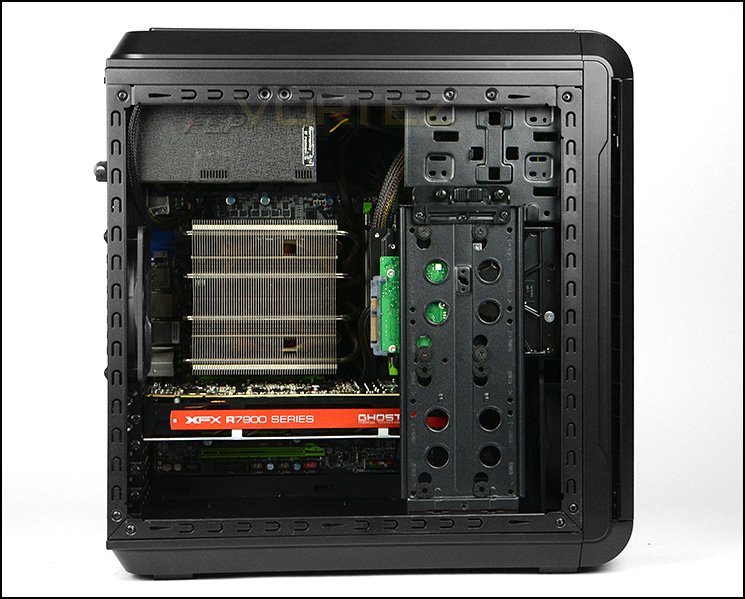
Installation complete – M-ATX system inside
Attaching a drive to the HDD bracket is quite simply – screws are simply attached to the inside as shown below. The HDD bracket can be completely removed, here are just three screws holding it in place.
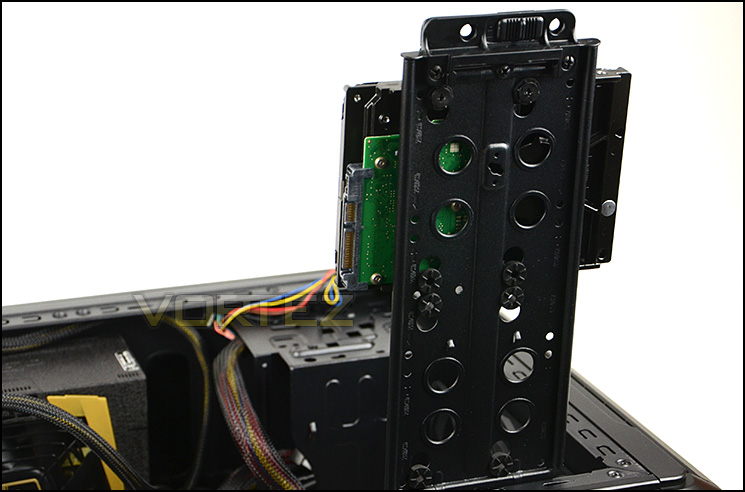
HDD bracket can house 2.5” and 3.5” drives
Clearance – CPU Cooler, GPU, Cable Management
The clearance options inside a case are vital for being able to determine which hardware can be installed.
Thankfully, AI4 has plenty of space for flagship CPU coolers and can accommodate coolers up to approximately 168mm in height. This covers a wide selection of offerings such as the popular Noctua NH-D14. Do bear in mind though, there is only 4mm of clearance between the top of the motherboard and PSU.
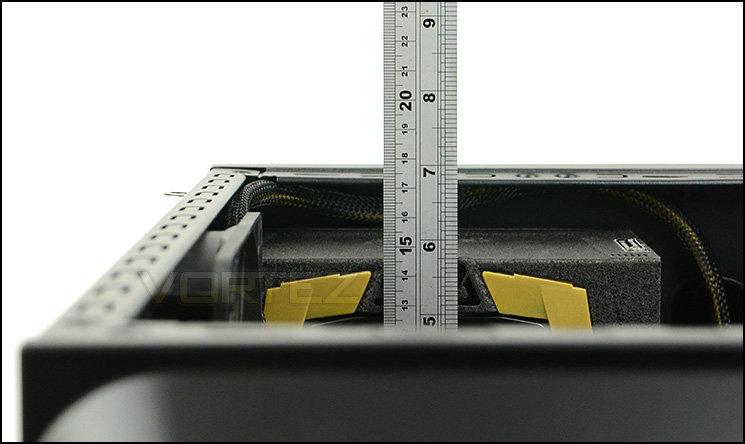
Good clearance for big CPU coolers
For graphics card clearance there is approximately 12” before the card will touch the front cooling fans. Pictured is our XFX 7970 DD which is around 10.5” in length.
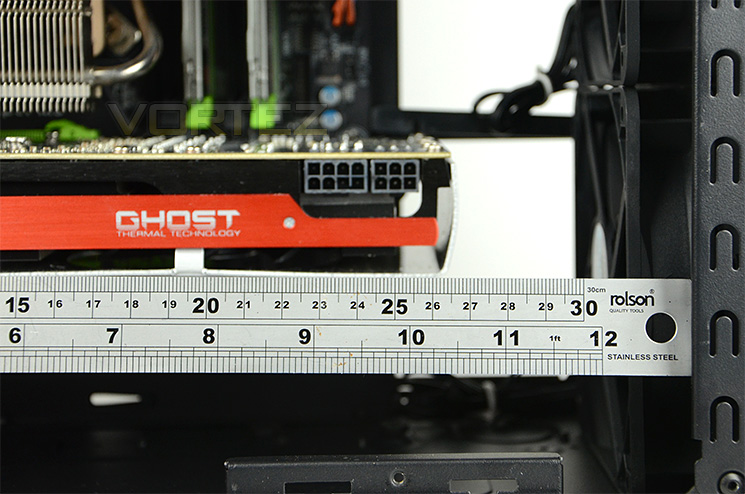
Approximately 12” in length for graphics cards
Cable management options and clearance is quite poor inside AI4 and it is hard to arrange a clean setup inside the case. If you aren’t planning to use the optical drive bay then cables can be stored here but there is no clearance behind the motherboard tray which is rather a disappointment.
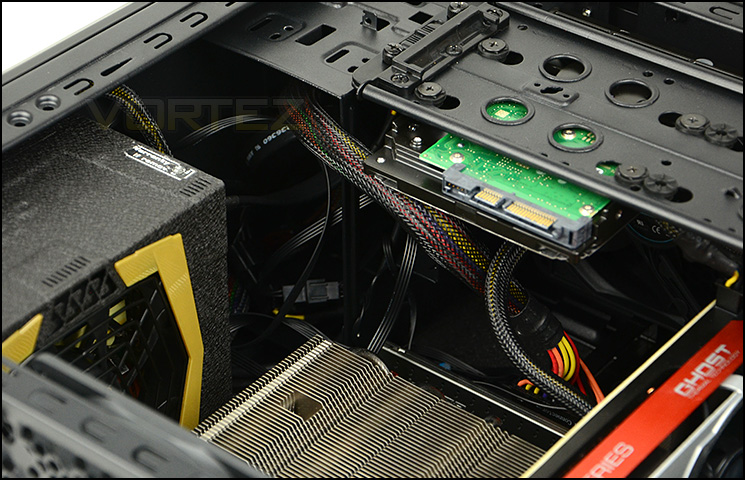
Cable management is difficult to organise
Thermal Performance Testing
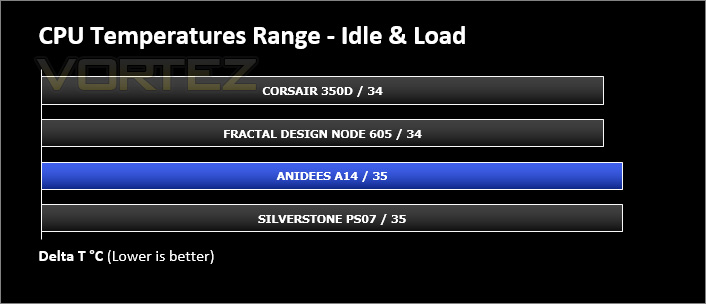
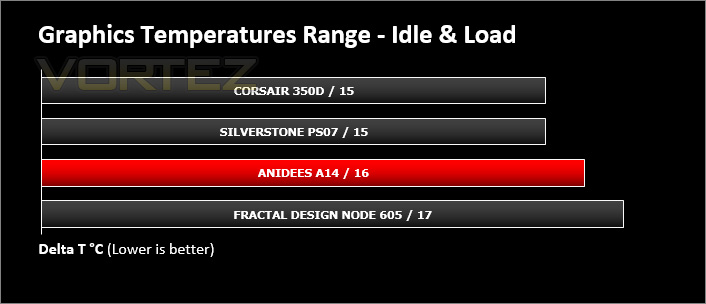
Inside AI4 there are three 120mm cooling fans – two intakes at the front and an exhaust positioned at the back. Push/pull configurations usually present good results.
To discover the thermal performance of the AI4 we will record idle temperatures after 20 minutes from a cold boot. We will then stress the system and temperatures will again be monitored after 30 minutes have elapsed.
For the purpose of accurate analysis the idle and load temperatures for CPU and motherboard will be recorded and the range between idle and load will be calculated to determine how efficient cooling is.
Fan controller is set to low.
NOTE: Ambient temperature is 20C
System Components
CPU Intel Core i5 3570K
CPU Cooler Noctua NH-L12
Motherboard GIGABYTE G1 Sniper M3
Graphics XFX HD7970 Black Edition
Memory 4GB Kingston HyperX 1600MHz
HDD Kingston HyperX 240GB
PSU FSP Aurum 650M
CPU Cooler Noctua NH-L12
Motherboard GIGABYTE G1 Sniper M3
Graphics XFX HD7970 Black Edition
Memory 4GB Kingston HyperX 1600MHz
HDD Kingston HyperX 240GB
PSU FSP Aurum 650M
Noise
Noise can be heard from the cooling fans inside AI4 but they are only faint and can be deemed quiet – this is thanks to the closed off panels and noise damping material. There is also a handy fan controller which helps to manage noise levels emitted from the fans too.
Conclusion
Micro ATX cases have become popular of late, due to motherboard manufacturers producing flagship products for this form factor. No longer do enthusiasts or gamers have to settle for a compromise on the hardware front.
Anidees attempt at bringing to market their first Micro ATX case is a good one. They have carried through the style concept from the AI6 by giving this case a brushed aluminium front and top section which looks and feels great. All of the panels on AI4 are closed off and noise damping material has been used on the front, sides and top in a bid to keep noise levels to a minimum. In this regard AI4 certainly achieves low-noise and the cooling fans also allow for good cooling potential.
There are however a few areas which we feel could be improved upon. Although AI4 boasts good clearance options for the CPU cooler and graphics card the same cannot be said for the cable management. Behind the motherboard tray there is no clearance whatsoever and what little space is available around the front cooling fans means organising these cables is cumbersome. Attaching such devices like the HDD or optical drive requires screws whilst a vast majority of offerings nowadays provide tool-free options instead.
The AI4 is priced at £80 which for a Micro ATX of this calibre, is overpriced. Slapping on a brushed aluminium faceplate at the front and top of the case does not justify this cost, especially since Anidees are relatively unheard of at this stage.
The AI4 is a good looking Micro ATX case with handy fan controller and generous clearance for flagship CPU coolers. There are however some areas for improvement and thus we award this case our bronze award.
Pros
+ Sleek visual appearance
+ Fan controller
+ Noise damping material
+ Compact layout
+ Good clearance for CPU coolers/graphics card
Cons
– Price
– Lack of tool-free design
– Poor cable management
+ Sleek visual appearance
+ Fan controller
+ Noise damping material
+ Compact layout
+ Good clearance for CPU coolers/graphics card
Cons
– Price
– Lack of tool-free design
– Poor cable management

Click here for an explanation of our awards at Vortez.net.


