The Dark Fleet range is a new series of case from Antec. We take a look at the DF-85 full tower case.
Product on Review: Antec DF-85
Manufacturer and Sponsor: Antec
Street Price: £135 / $209 / €165

Antec have been a forerunner in case design and power supply development for over 20 years and are one of the pioneers in quiet, reliable and efficient products. Personally I’ve always had a soft spot for Antec products, especially power supply units. In over 10 years I’ve been able to put confidence in a brand that certainly stands by its claim to reliability.
Back in June of this year, Antec showcased a new range of cases at Computex in Tapei. This unveiling revealed a new series named the Dark Fleet.
Today we will be taking a look at the largest of the cases within this new range – the DF-85. This case is a full tower chassis and follows a similar design concept to that of the LINK Antec Twelve Hundred gaming case. The Twelve Hundred divided quite a number of enthusiasts, its one of those cases that you either love or hate. The idea behind the DF-85 is that it addresses some of the concerns that were flagged up on the Twelve Hundred case such as tool-less functionality. Throughout this review we will be taking a good look at all the features on the DF-85 to discover if its worthy of a purchase.
Antec’s Take on the DF-85
Time to build a killer rig? Turn to Antec. The DF-85 is the gaming case re-envisioned, with all the award-winning build quality that made Antec cases famous and plenty of airy, wide-open expandability with 14 total drive bays and 7 expansion slots. Fleet-Release™ front drive bays allow swift customization of front fan and drive configurations and easy access to tool-less, washable fan filters. A top-mounted hot-swappable SATA (SSD-compatible) drive bay plus Fleet-Swap™ SATA drive interfaces offer blazing fast throughput with superb convenience. With pioneering design and world-first conveniences, the Dark Fleet DF-85 is the case of choice for your next flagship.
Specifications
• Three Fleet-Release™ access doors open separately for convenient entry to drives
• Three washable fan filters allow for easy cleaning
• Top 2.5″ hot-swap SATA (SSD-compatible) drive bay
• Bottom-mounted power supply isolates heat
– Mounts either a standard size power supply or an Antec exclusive CP Series power supply
• Lockable access doors ensure security
• CPU cutout allows for easy installation of CPU coolers
• 14 drive bays:
– Up to 9 x internal 3.5″
– 3 x external 5.25″
– 4 x internal 3.5″ Fleet-Swap™ drives (position changeable)
– 1 x external top 2.5″ hot-swap SATA drive bay
– 1 x internal bottom-mounted 2.5″ SSD drive
• Advanced cooling system:
– 2 x top 140mm TwoCool™ fans
– 2 x rear 120mm TwoCool™ red LED fans
– 3 x front 120mm red LED fans with speed control knobs
– 1 x side 120mm fan to cool graphics cards (optional)
– Water cooling capable
• 7 expansion slots to support multiple graphics cards
• Maximum graphics card size: 12.5″ / 318 mm
• Cable management ties help keep your case tidier
• Stylish blacked-out interior
• Windowed side panel
• Front ports:
– 1 x USB 3.0
– 3 x USB 2.0
– Audio (AC’97 and HDA compatible) In and Out
• Motherboards: Mini-ITX, microATX, Standard ATX
• Power supply not included
• Unit Dimension
– 596mm (H) x 213mm (W) x 505mm (D)
– 23.5″ (H) x 8.4″ (W) x 19.9″ (D)
• Package Dimension
– 577mm (H) x 288mm (W) x 510mm (D)
– 22.7″ (H) x 11.3″ (W) x 20.1″ (D)
• Weight
– Net : 11.0 kg / 24.2 lbs
– Gross : 11.3kg / 26.3 lbs
Exterior
As with all cases shipped these days the Antec DF-85 comes in a padded box, designed with the typical Antec colour scheme the DF-85 features are listed on all four sides of the box. The notable features listed are SSD support, 3.5″ drive hot swappable functionality, USB 3.0 and ‘Fleet Release’ doors.
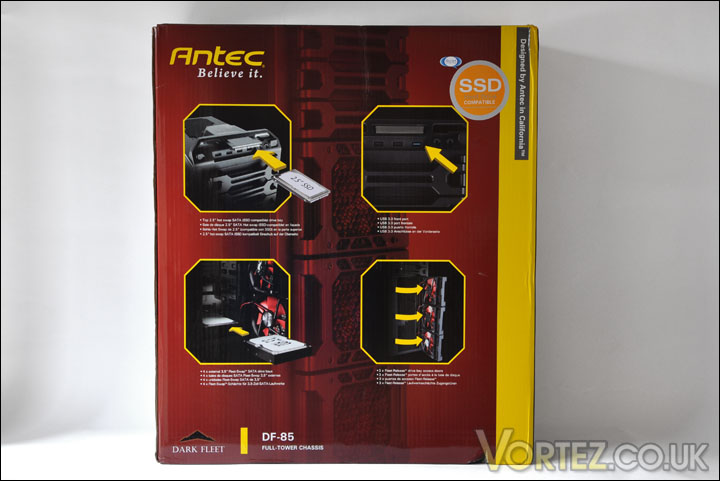
Taking the DF-85 out of the box, we can rest assured the case will not sustain any damage as there is more than adequate padding from within. The case itself has protective film covering all clear plastic surfaces – side window (inside and outside) and the SSD docking station box.
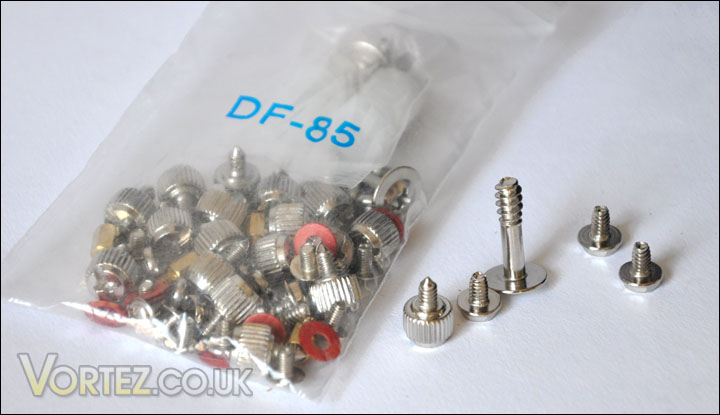
Bundled with the case is an instructions sheet, warranty form and a bag with screws and cable tidies.
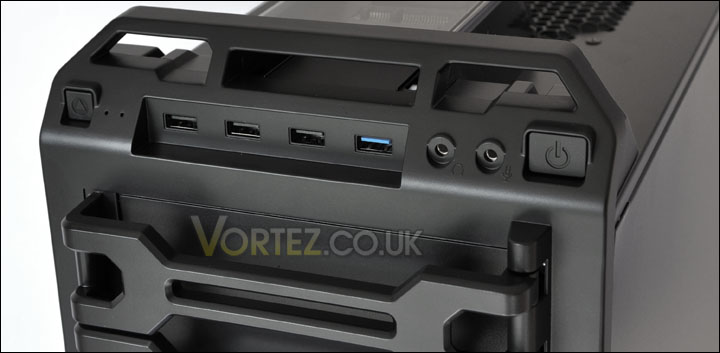
Firstly, the front panel. From left to right we have reset button, x3 USB 2.0 ports, x1 USB 3.0 port, headphone socket, microphone socket and a power button. Directly in the middle of these controls is an opening – from the top you can see a clear box. This is the SSD docking station, from here you can hot swap SSDs.
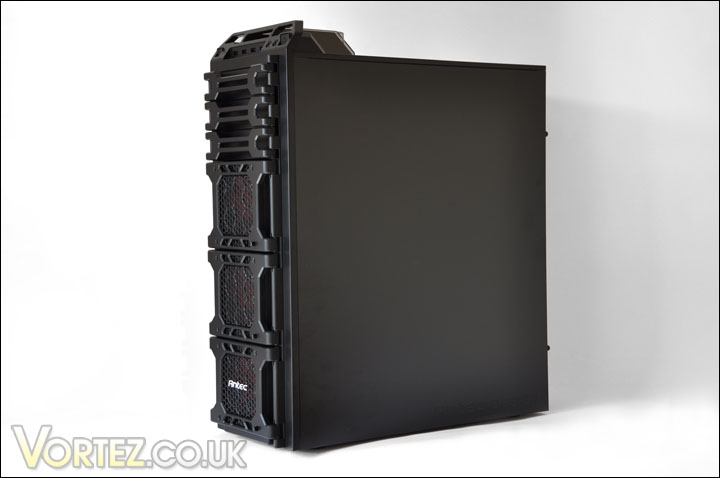
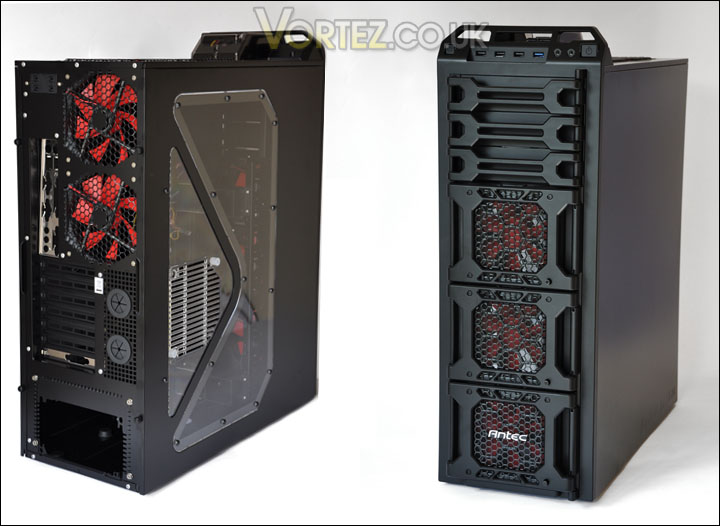
Now, quite a number of sites have criticised this case as being “hideous” in appearance. Of course, taste is down to personal preference. Personally I think it looks good. I did find the Twelve Hundred case a pleasant looking unit. The DF-85 is a mean looking case, those who like the military style enclosure with wide Perspex side panel and plenty of bright colours are going to really love the appearance of the DF-85. The front of the case has three distinct sections marked out as “Fleet Release” doors, each of these is covered in a metallic mesh surface with a fan control knob to the bottom right because behind these panels are 120mm LED fans.
Above this are three plastic arms that swing open allowing access to 5.25″ drive bays.
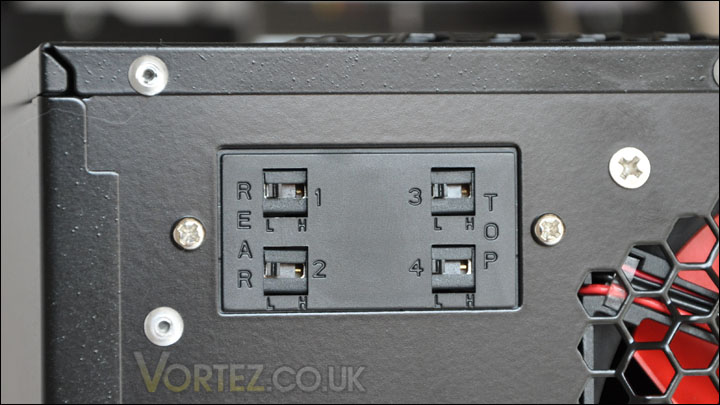
To the rear of the case there are two areas marked out for two 120mm exhaust fans. These too are LED ready. To control these fans and the other two fans that are located on the roof of the DF-85 there is a fan control panel at the top of the case (as was found on the Twelve Hundred too). Beneath the rear exhaust fans we have loop holes which can be used for a custom water-cooling solution, or you can make good use of this feature by cabling power supply leads – as I will be doing. The only other noticeable features on the back are the bracket on the expansion bay section and opening for mounting the PSU. This bracket incidentally can/will be used for routing the USB 3.0 cable from the front panel to the USB 3.0 socket on the motherboard. Thumbscrews hold the side panels securely on.
Interior
Now inside the case we can check out some of the features in a little more detail. Firstly, the rear and top mounted fans. The rear exhaust fans are 120mm LED ready. So when powered up, they will illuminate red. The top mounted fans are 140mm and are not LED ready. All four fans require molex connections, so routing cables up from your PSU might be a bit of a task. If you have molex to 3-pin adapter this might be the better option to go for. Aside from this though, the DF-85 is very spacious so it won’t feel cramped anyway.
Now we will take a look at the ‘Fleet Release’ doors. These are by default locked upon arrival. To get access to these doors they need to be unlocked, to do this there is a lever near the front on the inside of the prominent side panel. Knock this up to unlock the doors. Once opened you will be able to take a look at the fans that are installed inside the doors. The fans used are the same as the rear exhaust fans – 120mm LED ready. What’s great about this feature is you can easily gain access to HDDs installed within the case without too much hassle. In particular the top and bottom of the three units have the ability to hot swap 3.5″ drives. As I’ve already mentioned, the speed of each of these fans can be fully controlled via the knob’s at the front side.

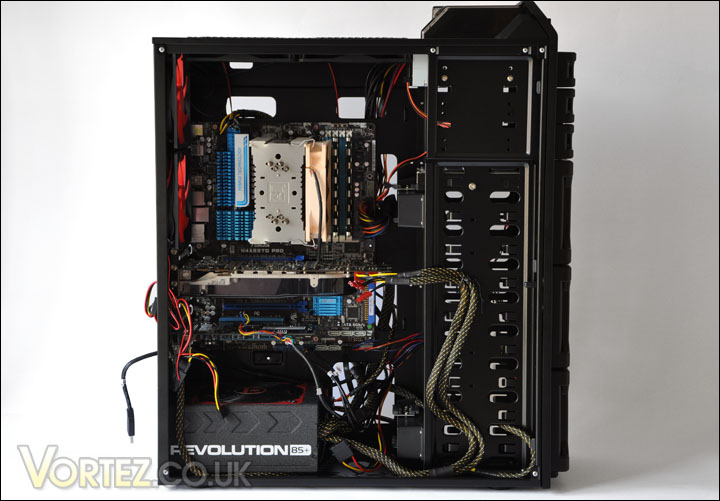
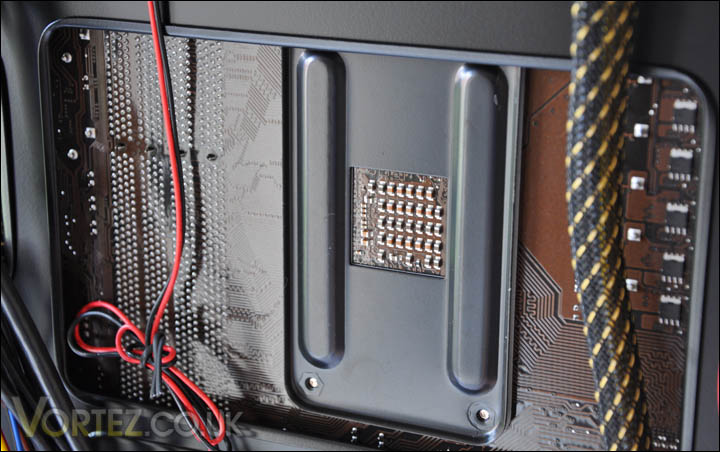
With the side panel off on the opposing side to the motherboard, there is clearly lots of space visible. Plenty of areas to loop cables through and conceal any untidy mess. Its pleasing to see the backplate cut-out for the CPU Cooler is a rather large and should allow swapping CPU Coolers to be a non-arduous task.
Installation
The installation is one of the DF-85’s strong points. There is nothing more irritating when coming to install components than to have problems fitting things into place and struggling for where to feed power cables etc. You will be pleased to know that the DF-85 has cable management on its list of agenda’s.
As previously mentioned, the DF-85 has four docking units for slotting in your 3.5″ drives. Installing couldn’t be easier, open one of the Fleet Release doors and slide the drive in. On the opposing side, just plug in SATA cable to motherboard and SATA power to PSU. This makes swapping drives in and out of the DF-85 an absolute doddle.
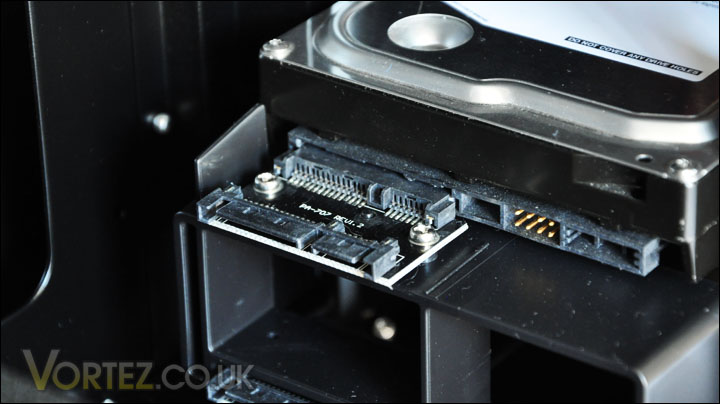
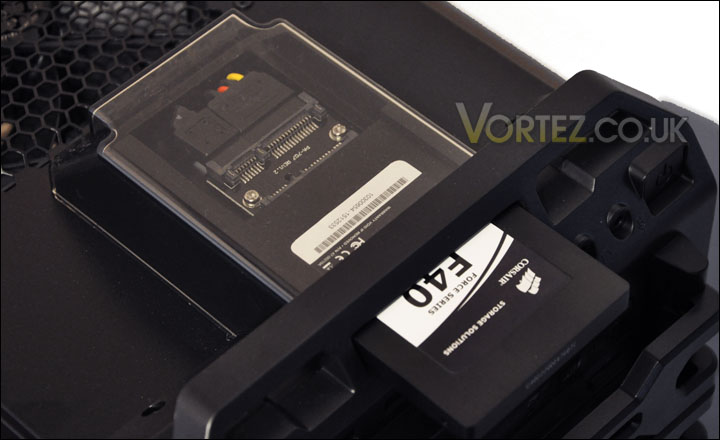
In like manner the SSD docking station situated on the top of the DF-85 uses the same technique. Just slide the SSD into place (make sure it is the right way round!).
With the motherboard securely fastened in and all other components in place, I took a look at that spacious backplate to find that it didn’t entirely allow full coverage to the socket AM3 backplate that was used. This is unfortunate but not the end of the world, its only a few mm’s that is enclosed – there is still probably enough room to successfully remove that backplate with the motherboard in place.
Video Tour DF-85
Below is a video tour of the DF-85 for those of you who want to get a better feel for how the case looks and how things install. Hope you enjoy – please leave comments/feedback. Thanks
Thermal Performance
A case with such a multitude of fans as the DF-85 should surely prompt you to ask the question – how well does this case cool the system? A total of 7 case fans should be more than adequate to comfortably shave off those degrees.
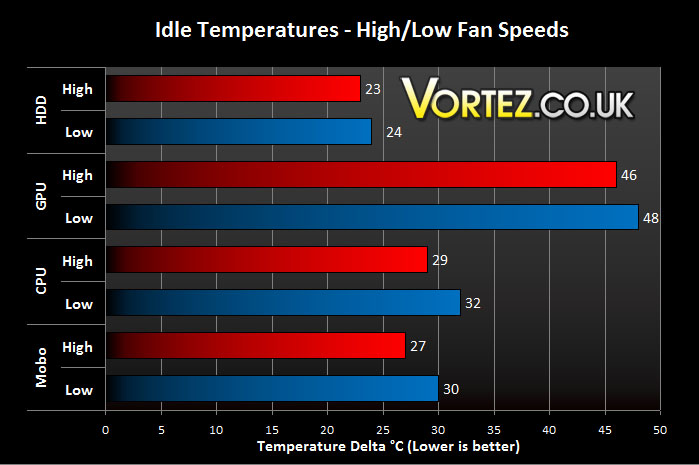
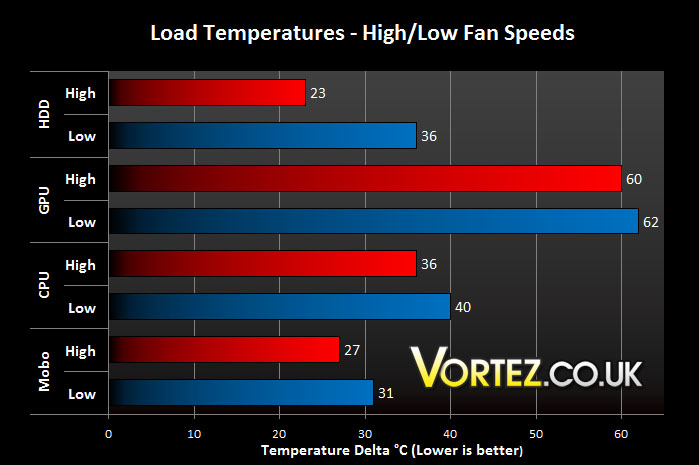
To determine this all fans will be switched to both full (max) and low (minimum) speeds. Temperatures will be noted at both idle and load states. Load state will be performed by using 3DMark Vantage as a means to provide a workout.
System Components
CPU AMD Phenom II X6 1055T 2.8GHz
Motherboard ASUS M4A89TD PRO (890FX)
Graphics MSI 8800GTX 798MB
Memory Mushkin EM3-10666 DDR3
HDD Samsung Spinpoint 500GB SATA-II
PSU Enermax Revolution85+
From the results its clear to see there are small gains to be had with having the fans at full speed. The good thing about the notch on each of the fans is that the control allows for linear setting so if it is slightly noisy just turn it down a few RPM. The fans at max setting are very disturbing and I wouldn’t recommend that anyone would settle for the noise levels coming from the case at this rating. It sounds like someone cooking a pizza in a microwave, but probably louder! It’s also unnecessary to have the fans spinning at this speed anyway when you can see the results aren’t ground-breaking.
Conclusion
Its been some time since Antec released a new product and the Dark Fleet series, whether you like it – is an interesting one. The DF-85 being the biggest in the Dark Fleet series is a great addition to an exciting range.
The DF-85 has great functionality and has bags of space, this is probably one of its strong points. In the time I spent installing all the system components I came against no problems. In fact I\’m of the impression that the DF-85 is an excellent case to work with because of areas of space. This space favours cable management, those who love to tuck things away and keep it all minimalist from within will enjoy having this case. It makes the task simply and easy. Bundled with the DF-85 are 7 fans, each with speed control so you can adjust acoustics as you see fit. All but two of these fans glow a warm red colour, transforming your room into a atmospheric den.
The only bad points about the DF-85 would be its aggressive looks. Some do not like it, some do. I personally have no problems with the visual aspect of the DF-85. In fact I quite like it. I used an AM3 motherboard in this review and the backplate wasn\’t entirely clear of the cutout that Antec have implemented which is a possibly flaw.
Priced higher than the comparable Twelve Hundred case the Antec DF-85 builds on functionality and provides support for the newer technologies that have come to our homes such as USB 3 and SSD. So justifiably the DF-85 sits at around £135 mark, which for a case of its calibre and feature set is a reasonable price.
Pros
+ Great functionality
+ Very spacious
+ Excellent for cable management
+ X7 120mm speed controlled fans
+ Good results in thermal performance
Cons
– Not to everyone\’s taste
– Backplate coverage for AM3 is poor
– Fans on max are rather disturbing
+ Great functionality
+ Very spacious
+ Excellent for cable management
+ X7 120mm speed controlled fans
+ Good results in thermal performance
Cons
– Not to everyone\’s taste
– Backplate coverage for AM3 is poor
– Fans on max are rather disturbing
Based on my findings It is my pleasure to award the DF-85 the Silver award.
We would like to thank Antec for providing the DF-85. You can discuss this review on our forums