







Ready to rock with the latest from AMD, we put ASRock’s A88X Extreme6+ motherboard to the test, is it worthy of your attention?

Product on Review: A88X Extreme6+
Manufacturer and Sponsor: ASRock
Street Price: £75 inc. VAT
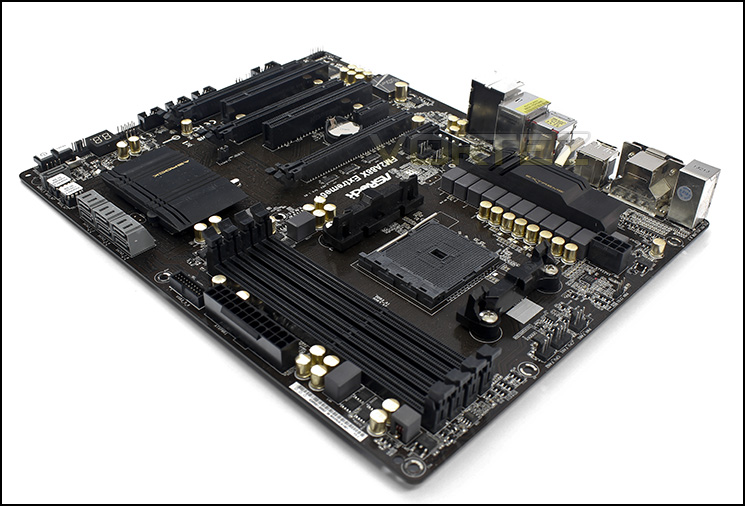
ASRock gear up ready for the latest APUs with the A88X Extreme6+ motherboard, supporting both FM2 and the new FM2+ APUs there is a lot to get excited for. Even though it only offers 2x USB 3.0 more outside the base chipset capability, it does sport various exclusive features such as Home Cloud and Purity Sound. Through these interesting implements, ASRock will be vying for attention from those seeking a competent, inclusive, yet affordable solution. Similar in appearance to the Intel Z87 Extreme4, the A88x Extreme6+ represents the high end of the scale for the FM2+ platform from ASRock, sitting just below the Fatal1ty FM2A88X+ Killer. Lets move on to take a look.
About ASRock
ASRock Inc. is established in 2002, specialized in the field of motherboards. ASRock strives to build up its own brand. With the 3C design concept, “Creativity, Consideration, Cost-effectiveness”, the company explores the limit of motherboards manufacturing while paying attention on the eco issue at the same time, developing products with the consideration of eco-friendly concept.
ASRock has been growing fast and become world third largest motherboard brand with headquarter in Taipei, Taiwan and branches in Europe and the USA. The young and vibrant company targets from mainstream to enthusiast MB segments for different kinds of users, owning reputation around the world market with its reliability and proficiency.
ASRock has been growing fast and become world third largest motherboard brand with headquarter in Taipei, Taiwan and branches in Europe and the USA. The young and vibrant company targets from mainstream to enthusiast MB segments for different kinds of users, owning reputation around the world market with its reliability and proficiency.
Specifications & Features
A-Style
– Home Cloud
– Purity Sound™
– HDMI-In
CPU
– Supports Socket FM2+ 95W / FM2 100W processors
– Digi Power design
– 8 + 2 Power Phase design
Chipset
– AMD A88X (Bolton-D4)
Memory
– Dual Channel DDR3 Memory Technology
– 4 x DDR3 DIMM Slots
– Supports DDR3 2600+(OC)*/2400(OC)/2133/1866/1600/1333/1066 non-ECC, un-buffered memory
– Max. capacity of system memory: 64GB**
– Supports Intel® Extreme Memory Profile (XMP) 1.3 / 1.2
– Supports AMD Memory Profile (AMP)
* DDR3 2600+ is only supported with two DIMMs.
**Due to the operating system limitation, the actual memory size may be less than 4GB for the reservation for system usage under Windows® 32-bit OS. For Windows® 64-bit OS with 64-bit CPU, there is no such limitation.
BIOS
– 2 x 64Mb AMI UEFI Legal BIOS with multilingual GUI support (1 x Main BIOS and 1 x Backup BIOS)
– Supports Secure Backup UEFI Technology
– Supports “Plug and Play”
– ACPI 1.1 Compliant wake up events
– Supports jumperfree
– SMBIOS 2.3.1 support
– DRAM, VDDP, VDDR Voltage multi-adjustment
Audio, Video and Networking
Graphics
– Integrated AMD Radeon™ R7/R5 Series Graphics in A-series APU
– DirectX 11.1, Pixel Shader 5.0 with FM2+ CPU. DirectX 11, Pixel Shader 5.0 with FM2 CPU.
– Max. shared memory 2GB
– Four graphics output options: D-Sub, DVI-D, HDMI and DisplayPort
– Supports Quad Monitor with FM2+ CPU. Supports Triple Monitor with FM2 CPU.
– Supports HDMI with max. resolution up to 4K x 2K (4096×2160) @ 24Hz
– Supports Dual-link DVI-D with max. resolution up to 2560×1600 @ 60Hz
– Supports D-Sub with max. resolution up to 1920×1200 @ 60Hz
– Supports DisplayPort 1.2 with max. resolution up to 4K x 2K (4096×2400) @ 60Hz or 4K x 2K (4096×2160) @ 60Hz
– Supports DP++
– Supports Multi-Streaming
– Supports Auto Lip Sync, Deep Color (12bpc), xvYCC and HBR (High Bit Rate Audio) with HDMI Port (Compliant HDMI monitor is required)
– Supports Blu-ray Stereoscopic 3D with HDMI Port
– Supports AMD Steady Video™ 2.0: New video post processing capability for automatic jitter reduction on home/online video
– Supports HDCP with DVI-D, HDMI and DisplayPort Ports
– Supports Full HD 1080p Blu-ray (BD) playback with DVI-D, HDMI and DisplayPort Ports
*Only FM2+ APU can support up to 4096×2160 resolution display via HDMI port.
Audio
– 7.1 CH HD Audio with Content Protection (Realtek ALC1150 Audio Codec)
– Premium Blu-ray Audio support
– Supports Purity Sound™
– 115dB SNR DAC with differential amplifier
– TI NE5532 Premium Headset Amplifier (Supports up to 600 ohm headsets)
– Direct Drive Technology
– EMI shielding cover
– PCB isolate shielding
– Supports DTS Connect
LAN
– PCIE x1 Gigabit LAN 10/100/1000 Mb/s
– Qualcomm Atheros AR8171
– Supports Qualcomm Atheros Security Wake On Internet Technology
– Supports Wake-On-LAN
– Supports Energy Efficient Ethernet 802.3az
– Supports PXE
Expansion / Connectivity
Slots
– 2 x PCI Express 3.0 x16 Slots (PCIE2/PCIE4: single at x16 (PCIE2); dual at x8 (PCIE2) / x8 (PCIE4))
– 1 x PCI Express 2.0 x16 Slot (PCIE5 @ x4 mode)
– 2 x PCI Express 2.0 x1 Slots
– 2 x PCI Slots
– Supports AMD Quad CrossFireX™, 3-Way CrossFireX™, CrossFireX™ and Dual Graphics
*PCIE 3.0 is only supported with FM2+ CPU. With FM2 CPU, it only supports PCIE 2.0.
Storage – 7 x SATA3 6.0 Gb/s Connectors, support RAID (RAID 0, RAID 1, RAID 5 and RAID 10), NCQ, AHCI and Hot Plug
Connector
– 1 x IR Header
– 1 x COM Port Header
– 1 x Chassis Intrusion Header
– 1 x Power LED Header
– 2 x CPU Fan Connectors (1 x 4-pin, 1 x 3-pin)
– 3 x Chassis Fan Connectors (1 x 4-pin, 2 x 3-pin)
– 1 x Power Fan Connector (3-pin)
– 1 x 24 pin ATX Power Connector
– 1 x 8 pin 12V Power Connector
– 1 x XFire Power Connector
– 1 x Front Panel Audio Connector
– 3 x USB 2.0 Headers (Support 6 USB 2.0 ports)
– 1 x USB 3.0 Header by AMD A88X (Bolton-D4) (Supports 2 USB 3.0 ports)
– 1 x Dr. Debug with LED
– 1 x Power Switch with LED
– 1 x Reset Switch with LED
– 1 x BIOS Selection Switch
Rear Panel I/O
– 1 x PS/2 Mouse/Keyboard Port
– 1 x D-Sub Port
– 1 x DVI-D Port
– 1 x HDMI-Out Port
– 1 x HDMI-In Port
– 1 x DisplayPort
– 1 x Optical SPDIF Out Port
– 2 x USB 2.0 Ports
– 1 x eSATA Connector
– 2 x USB 3.0 Ports (AMD A88X (Bolton-D4))
– 2 x USB 3.0 Ports (ASMedia ASM1042)
– 1 x RJ-45 LAN Port with LED (ACT/LINK LED and SPEED LED)
– HD Audio Jacks: Rear Speaker / Central / Bass / Line in / Front Speaker / Microphone
Other Features / Miscellaneous
Unique Feature
– ASRock A-Tuning
– ASRock Instant Boot
– ASRock Instant Flash
– ASRock APP Charger
– ASRock XFast USB
– ASRock XFast LAN
– ASRock XFast RAM
– ASRock Crashless BIOS
– ASRock OMG (Online Management Guard)
– ASRock Internet Flash
– ASRock UEFI System Browser
– ASRock UEFI Tech Service
– ASRock Dehumidifier Function
– ASRock Easy RAID Installer
– ASRock Easy Driver Installer
– ASRock Interactive UEFI
– ASRock Fast Boot
– ASRock X-Boost
– ASRock Restart to UEFI
– ASRock USB Key
– ASRock FAN-Tastic Tuning
– Hybrid Booster:
– ASRock U-COP
Support CD
– Drivers, Utilities, AntiVirus Software (Trial Version), CyberLink MediaEspresso 6.5 Trial, Google Chrome Browser and Toolbar, Start8 (30 days trial)
Accessories
– Quick Installation Guide, Support CD, I/O Shield
– 4 x SATA Data Cables
Hardware Monitor
– CPU temperature sensing
– Chassis temperature sensing
– CPU Fan Tachometer
– Chassis Fan Tachometer
– CPU/Chassis Quiet Fan
– CPU/Chassis Fan multi-speed control
– CASE OPEN detection
– Voltage monitoring: +12V, +5V, +3.3V, Vcore
Form Factor
– ATX Form Factor
– Premium Gold Capacitor design (100% Japan-made high-quality conductive polymer capacitors)
OS
– Microsoft® Windows® 8.1 32-bit / 8.1 64-bit / 8 32-bit / 8 64-bit / 7 32-bit / 7 64-bit
Certifications
– FCC, CE, WHQL
– ErP/EuP ready (ErP/EuP ready power supply is required)
– Home Cloud
– Purity Sound™
– HDMI-In
CPU
– Supports Socket FM2+ 95W / FM2 100W processors
– Digi Power design
– 8 + 2 Power Phase design
Chipset
– AMD A88X (Bolton-D4)
Memory
– Dual Channel DDR3 Memory Technology
– 4 x DDR3 DIMM Slots
– Supports DDR3 2600+(OC)*/2400(OC)/2133/1866/1600/1333/1066 non-ECC, un-buffered memory
– Max. capacity of system memory: 64GB**
– Supports Intel® Extreme Memory Profile (XMP) 1.3 / 1.2
– Supports AMD Memory Profile (AMP)
* DDR3 2600+ is only supported with two DIMMs.
**Due to the operating system limitation, the actual memory size may be less than 4GB for the reservation for system usage under Windows® 32-bit OS. For Windows® 64-bit OS with 64-bit CPU, there is no such limitation.
BIOS
– 2 x 64Mb AMI UEFI Legal BIOS with multilingual GUI support (1 x Main BIOS and 1 x Backup BIOS)
– Supports Secure Backup UEFI Technology
– Supports “Plug and Play”
– ACPI 1.1 Compliant wake up events
– Supports jumperfree
– SMBIOS 2.3.1 support
– DRAM, VDDP, VDDR Voltage multi-adjustment
Audio, Video and Networking
Graphics
– Integrated AMD Radeon™ R7/R5 Series Graphics in A-series APU
– DirectX 11.1, Pixel Shader 5.0 with FM2+ CPU. DirectX 11, Pixel Shader 5.0 with FM2 CPU.
– Max. shared memory 2GB
– Four graphics output options: D-Sub, DVI-D, HDMI and DisplayPort
– Supports Quad Monitor with FM2+ CPU. Supports Triple Monitor with FM2 CPU.
– Supports HDMI with max. resolution up to 4K x 2K (4096×2160) @ 24Hz
– Supports Dual-link DVI-D with max. resolution up to 2560×1600 @ 60Hz
– Supports D-Sub with max. resolution up to 1920×1200 @ 60Hz
– Supports DisplayPort 1.2 with max. resolution up to 4K x 2K (4096×2400) @ 60Hz or 4K x 2K (4096×2160) @ 60Hz
– Supports DP++
– Supports Multi-Streaming
– Supports Auto Lip Sync, Deep Color (12bpc), xvYCC and HBR (High Bit Rate Audio) with HDMI Port (Compliant HDMI monitor is required)
– Supports Blu-ray Stereoscopic 3D with HDMI Port
– Supports AMD Steady Video™ 2.0: New video post processing capability for automatic jitter reduction on home/online video
– Supports HDCP with DVI-D, HDMI and DisplayPort Ports
– Supports Full HD 1080p Blu-ray (BD) playback with DVI-D, HDMI and DisplayPort Ports
*Only FM2+ APU can support up to 4096×2160 resolution display via HDMI port.
Audio
– 7.1 CH HD Audio with Content Protection (Realtek ALC1150 Audio Codec)
– Premium Blu-ray Audio support
– Supports Purity Sound™
– 115dB SNR DAC with differential amplifier
– TI NE5532 Premium Headset Amplifier (Supports up to 600 ohm headsets)
– Direct Drive Technology
– EMI shielding cover
– PCB isolate shielding
– Supports DTS Connect
LAN
– PCIE x1 Gigabit LAN 10/100/1000 Mb/s
– Qualcomm Atheros AR8171
– Supports Qualcomm Atheros Security Wake On Internet Technology
– Supports Wake-On-LAN
– Supports Energy Efficient Ethernet 802.3az
– Supports PXE
Expansion / Connectivity
Slots
– 2 x PCI Express 3.0 x16 Slots (PCIE2/PCIE4: single at x16 (PCIE2); dual at x8 (PCIE2) / x8 (PCIE4))
– 1 x PCI Express 2.0 x16 Slot (PCIE5 @ x4 mode)
– 2 x PCI Express 2.0 x1 Slots
– 2 x PCI Slots
– Supports AMD Quad CrossFireX™, 3-Way CrossFireX™, CrossFireX™ and Dual Graphics
*PCIE 3.0 is only supported with FM2+ CPU. With FM2 CPU, it only supports PCIE 2.0.
Storage – 7 x SATA3 6.0 Gb/s Connectors, support RAID (RAID 0, RAID 1, RAID 5 and RAID 10), NCQ, AHCI and Hot Plug
Connector
– 1 x IR Header
– 1 x COM Port Header
– 1 x Chassis Intrusion Header
– 1 x Power LED Header
– 2 x CPU Fan Connectors (1 x 4-pin, 1 x 3-pin)
– 3 x Chassis Fan Connectors (1 x 4-pin, 2 x 3-pin)
– 1 x Power Fan Connector (3-pin)
– 1 x 24 pin ATX Power Connector
– 1 x 8 pin 12V Power Connector
– 1 x XFire Power Connector
– 1 x Front Panel Audio Connector
– 3 x USB 2.0 Headers (Support 6 USB 2.0 ports)
– 1 x USB 3.0 Header by AMD A88X (Bolton-D4) (Supports 2 USB 3.0 ports)
– 1 x Dr. Debug with LED
– 1 x Power Switch with LED
– 1 x Reset Switch with LED
– 1 x BIOS Selection Switch
Rear Panel I/O
– 1 x PS/2 Mouse/Keyboard Port
– 1 x D-Sub Port
– 1 x DVI-D Port
– 1 x HDMI-Out Port
– 1 x HDMI-In Port
– 1 x DisplayPort
– 1 x Optical SPDIF Out Port
– 2 x USB 2.0 Ports
– 1 x eSATA Connector
– 2 x USB 3.0 Ports (AMD A88X (Bolton-D4))
– 2 x USB 3.0 Ports (ASMedia ASM1042)
– 1 x RJ-45 LAN Port with LED (ACT/LINK LED and SPEED LED)
– HD Audio Jacks: Rear Speaker / Central / Bass / Line in / Front Speaker / Microphone
Other Features / Miscellaneous
Unique Feature
– ASRock A-Tuning
– ASRock Instant Boot
– ASRock Instant Flash
– ASRock APP Charger
– ASRock XFast USB
– ASRock XFast LAN
– ASRock XFast RAM
– ASRock Crashless BIOS
– ASRock OMG (Online Management Guard)
– ASRock Internet Flash
– ASRock UEFI System Browser
– ASRock UEFI Tech Service
– ASRock Dehumidifier Function
– ASRock Easy RAID Installer
– ASRock Easy Driver Installer
– ASRock Interactive UEFI
– ASRock Fast Boot
– ASRock X-Boost
– ASRock Restart to UEFI
– ASRock USB Key
– ASRock FAN-Tastic Tuning
– Hybrid Booster:
– ASRock U-COP
Support CD
– Drivers, Utilities, AntiVirus Software (Trial Version), CyberLink MediaEspresso 6.5 Trial, Google Chrome Browser and Toolbar, Start8 (30 days trial)
Accessories
– Quick Installation Guide, Support CD, I/O Shield
– 4 x SATA Data Cables
Hardware Monitor
– CPU temperature sensing
– Chassis temperature sensing
– CPU Fan Tachometer
– Chassis Fan Tachometer
– CPU/Chassis Quiet Fan
– CPU/Chassis Fan multi-speed control
– CASE OPEN detection
– Voltage monitoring: +12V, +5V, +3.3V, Vcore
Form Factor
– ATX Form Factor
– Premium Gold Capacitor design (100% Japan-made high-quality conductive polymer capacitors)
OS
– Microsoft® Windows® 8.1 32-bit / 8.1 64-bit / 8 32-bit / 8 64-bit / 7 32-bit / 7 64-bit
Certifications
– FCC, CE, WHQL
– ErP/EuP ready (ErP/EuP ready power supply is required)
Home Cloud – Remote Desktop Anytime, Anywhere
This motherboard supports Security Wake On Internet Technology with the onboard Qualcomm® Atheros® LAN, so you can connect with your PC from anywhere in the world. You will be able to power your PC on or turn it off, monitor and take control of it remotely with another smartphone, tablet or computer.
Imagine yourself as a desperado riding into the sunset, an outcast of the society exiled from your country, or simply at the groceries two blocks away from home. You miss your personal computer so much and you’ll need Home Cloud for the following real world scenarios:
Keep your stored mail near at hand whenever you need it.
Multimedia
Stream your secret stash of vids, music and pics.
TV
Watch your favorite local TV programs by connecting to your PC.
Documents
Access or send files remotely anywhere.
Monitor
Keep an eye on your pets or children when you are away from home.
Purity Sound™ – Bask in the Music
Purity Sound is a combination of several hardware, software audio solutions and technologies that will satisfy even the pickiest audiophiles. Including 7.1 CH HD audio with Realtek ALC1150 audio codec, 115dB SNR DAC with Differential Amplifier, TI® 5532 Premium Headset Amplifier which supports up to 600 ohm headphones, cap less Direct Drive technology, EMI shielding cover, PCB isolate shielding and support for DTS Connect.
Purity Sound™ brings you:
– 115dB SNR
– Excellent Bass
– Less Sound Distortion
– More Details
– Supports up to 600ohm headphones
Traditional Audio Solution:
– 110dB SNR
– Poor Bass
– More Sound Distortion
– Less Details
– Does not support high impedance headphones
This frequency response chart was tested with 32 ohm normal headphones. It indicates how traditional audio solution’s frequency response drops drastically at low frequencies. Compared to traditional audio solution’s (2.0dB) at 20 Hz bass low freq area, Purity Sound™ still maintains its frequency response (0.4dB) and provides better bass with the TI® NE5532 amplifier, improving the bass quality by 20% (1.6dB)!
HDMI-In – The Smart Way to Connect Your Devices
Tired of constantly switching devices to connect to your one and only monitor? From now on just connect the monitor to your motherboard, and connect your secondary device (such as a PS3 or Xbox) to the motherboard’s HDMI-In port. With HDMI-In users may conveniently toggle between the computer’s screen and the secondary device’s screen with a hotkey, or even use their secondary device without powering on the computer.
FM2/FM2+ APU Support
This motherboard is compatible with both AMD FM2 and FM2+ APUs. Please note that some new features may be only supported by FM2+ APUs.
Premium Gold Caps
This motherboard uses Premium Gold Caps that are 100% made in Japan. These solid capacitors are sleek, high gloss caps with a premium gold coating that represents its long lasting durability and ultra stable performance.
Digi Power
More Precise, More Efficient
Unlike traditional motherboards that use analog power, this motherboard uses a next generation digital PWM (Pulse-Width Modulation) design, which provides CPU Vcore voltage more efficiently and smoothly, so that the stability and lifespan of the motherboard is greatly enhanced.
8+2 Power Phase Design
Designed with a 8+2 Power Phase design, this motherboard features sturdy components and completely smooth power delivery to the CPU. Hence, this motherboard offers unmatched overclocking capabilities with the best system stability, plus enhanced performance with the lowest temperature for advanced gamers and extreme overclockers.
4K/2K
4K is a new standard for display resolutions with a minimum of 3840 x 2160 pixels, which is twice the horizontal and vertical resolution of the 1080p format and four times as many pixels overall. Get ready to lose yourself in this eye popping virtual reality.
* Only FM2+ APU can support up to 4096 x 2160 resolution display via HDMI port.
Quad Monitor
Graphics, graphics and even more graphics! You’ve demanded for more eye candy, so this motherboard supports Quad Monitor. You may choose up to four display interfaces from the rear i/o to connect monitors and use them simultaneously without installing another graphics card.
Next-Gen PCI-E 3.0 Support
This ASRock motherboard supports the Next-Gen PCI-E 3.0! PCI Express 3.0 can maximize the bandwidth of the next-gen PCI Express 3.0 VGA cards, thus providing ultimate graphics performance.
Get PCI-E 3.0 Benefits
• Higher bit rate – 8.0GT/s
• Higher bandwidth per lane – 1GB/s
• Higher efficiency – 98.5% encoding efficiency
• 100% backward compatible with previous PCI-E 2.0 / 1.0 standard
PCI-E architecture Raw bit rate Bandwidth per lane per direction Encoding Efficiency
PCI-E 2.0 5.0GT/s 500MB/s 80%
PCI-E 3.0 8.0GT/s 1GB/s 98.5%
Note: PCI-E 3.0 supported with FM2+ APUs
A-Tuning
A-Tuning is ASRock’s multi purpose software suite with a new interface, more new features and improved utilities, including EZ OC, Auto Tuning, XFast 555, OC Tweaker, System Browser, Live Update, Tech Service and a whole lot more!
X-Boost
Brilliantly designed for smart overclocking, ASRock X-Boost Technology is able to unleash the hidden power of your CPUs. Simply press “X” when turning on the PC, X-Boost will automatically overclock the relative components to get up to 15.77% performance boost! With the smart X-Boost, overclocking CPU can become a near one-button process.
X-Fast RAM
5X Faster for Photoshop Execution, XFast RAM will create a virtual disk from the system memory to boost the performance. For Photoshop, It can even perform 5X faster than before.
X-Fast LAN
XFast LAN can lower latency in the game after setting online game priority higher.
X-Fast USB
USB Performance Comparison ATTO Disk Benchmark 4K Read
USB Key
In a world where time is money, why waste precious time everyday typing usernames to log in to Windows? Why should we even bother memorizing those foot long passwords? Nobody has time for that! Just plug in the USB Key and let your computer log in to windows automatically!
UEFI Tech Service
Contact ASRock Tech Service by sending a support request from the UEFI setup utility if you are having trouble with your personal computer. Users may try to choose the category of the issue they have encountered, describe the problem in detail, and then attach an optional picture or log file for our technical support team.
Dehumidifier
Dampness kills most electronics, so it’s a better idea to keep your personal computer dry. Now users may prevent motherboard damages due to dampness by enabling Dehumidifier. When it is enabled, the computer will power on automatically to dehumidify the system after entering S4/S5 state.
Easy Driver Installer
For users that don’t have an optical disk drive to install the drivers from our support CD, Easy Driver Installer is a handy tool in the UEFI that installs the LAN driver to your system via an USB storage device, then downloads and installs the other required drivers automatically through the internet. Completely no CD or optical disk drive required!
Restart to UEFI
Fast Boot is so fast that it is impossible for users to enter the UEFI setup utility during POST. Therefore, ASRock Restart to UEFI technology allows users to easily enter the UEFI setup utility automatically when turning on the PC next time. It is designed for those who constantly need to enter the UEFI setup utility.
UEFI System Browser
UEFI system browser is a useful tool included in ASRock’s graphical UEFI. It can detect the devices and configurations that users are currently using on their motherboard. With UEFI system browser, you can easily examine the current system configuration in the UEFI setup without having to open the chassis and take everything apart.
Fast Boot
With ASRock’s exclusive Fast Boot technology, it takes less than 1.5 seconds* to logon to Windows® 8 from a cold boot. No more waiting! The speedy boot will completely change your user experience and behavior.
*The boot time may vary with a different configuration.
OMG
Limit and control your children’s time spent on the internet. ASRock OMG (Online Management Guard) technology allows you to establish an internet curfew or restrict internet access at specified times. Administrators are able to schedule the starting and ending hours of internet access granted to other users.
Interactive UEFI
Some people might complain that the BIOS configuration on old computers aren’t user friendly enough. Well, not any more! ASRock Interactive UEFI is a blend of system configuration tools with cool sound effects and stunning visuals. The unprecedented UEFI provides a more attractive interface and brings a lot more amusement.
Easy RAID Installer
Easy RAID Installer can help you install the RAID driver easily without floppy drive. It can copy the RAID driver from a support CD to your USB storage device with just one simple click in UEFI setup.
DTS Connect
Tired of listening to crappy audio that makes your ears bleed? Experience high-quality surround sound from your personal computer. DTS Connect is a blanket name for a two-part system, including DTS Interactive and DTS Neo:PC, it is used on the computer platform only, in order to convert PC audio into the DTS format.
Packaging & First Look
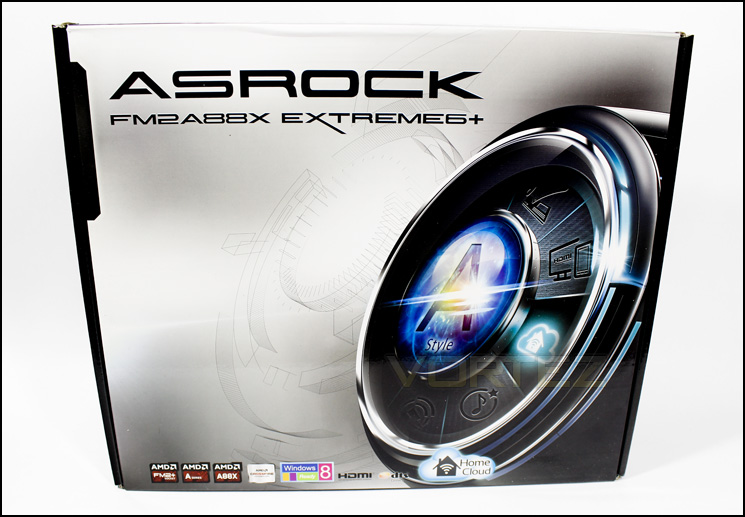
Box Front
The front of the box looks fairly minimal, with a graphic design that features various ASRock exclusive features, along the bottom there are various compulsory mentions such as FM2/2+ socket, A88X chipset, DTS and Home Cloud.
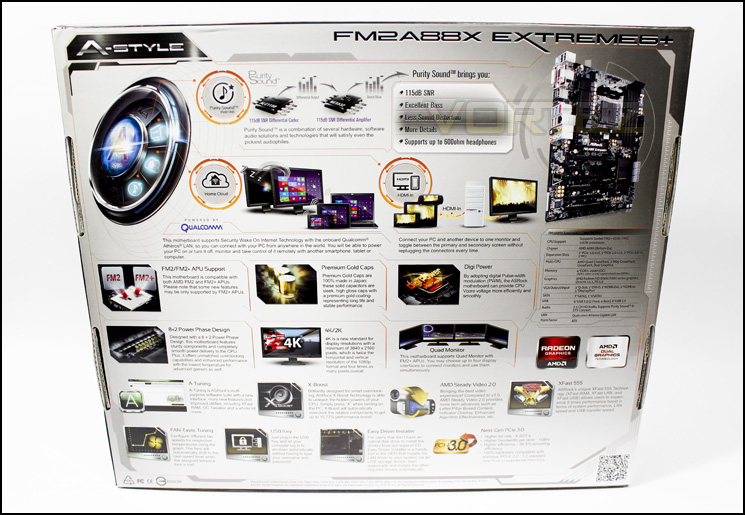
Rear side of box
At the back we find a neatly laid out list of features that is easy to read, alongside an image of the product and some listed specifications.
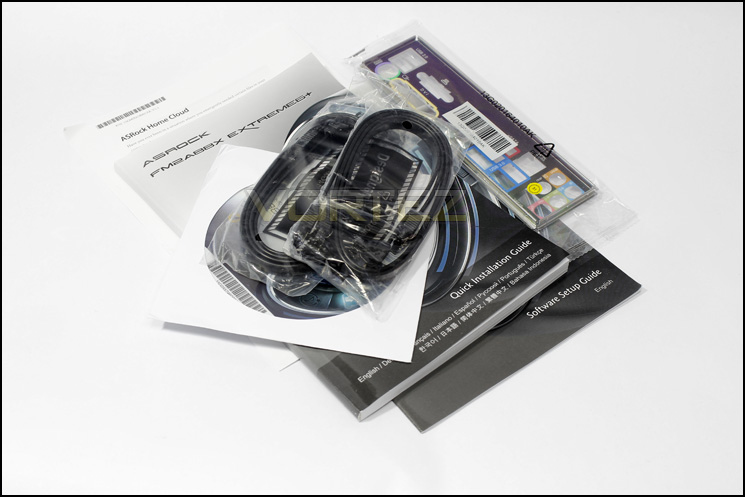
Included accessories
Included with the motherboard we find 4 SATA cables, an I/O shield, a multilingual installation guide, a software setup guide, A leaflet about the home cloud feature, and of course the driver disc.
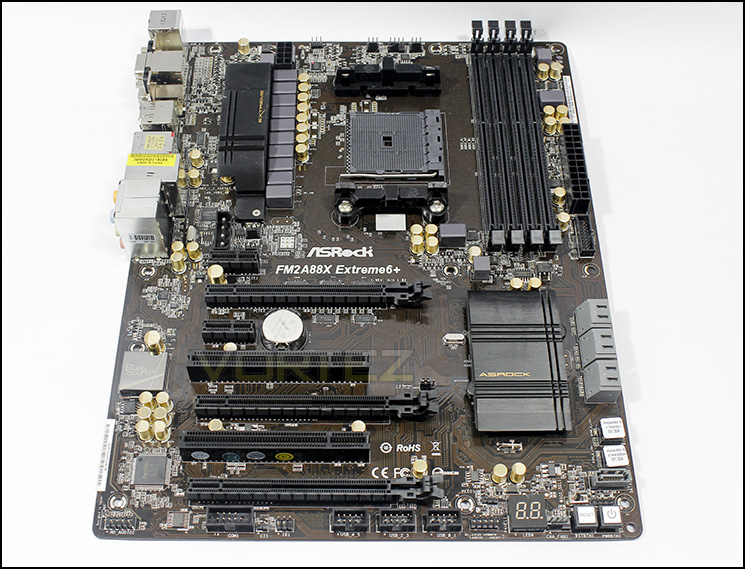
Overview of the A88X Extreme6+
Under the hard photography light we see that the motherboard is ‘brown’, however, to the eye and in natural lighting it is much darker and much more attractive, it would have been nicer if it was black, but at least it isn’t green! Overall the board looks well laid out with plenty of expansion options and some hefty phase power circuitry.
Closer Look
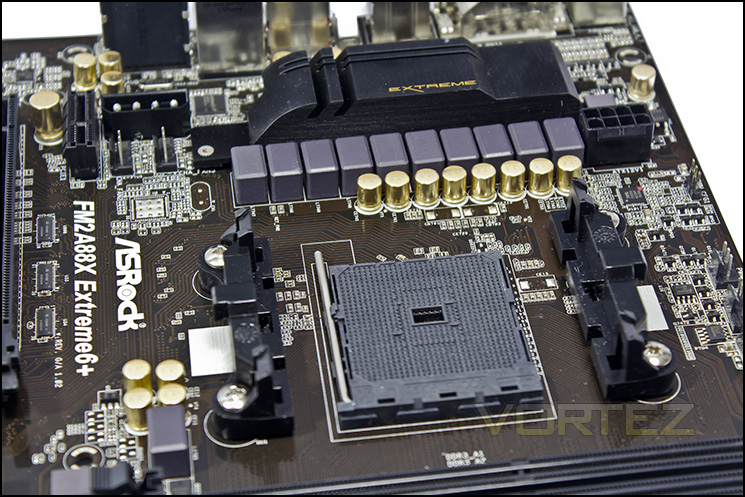
APU socket area
On the left you can find a dual 4pin PWM fan headers followed by the 8+2 power phases that accompany the FM2+ socket. On the right there is an 8 pin CPU power socket.
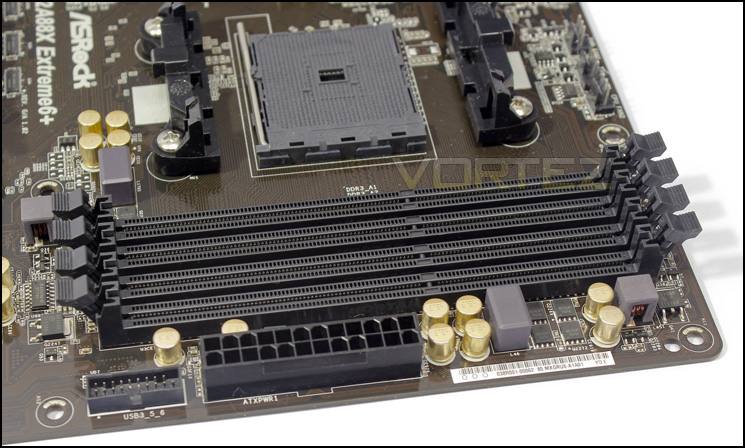
The A88X Extreme6+ can take up to 64GB memory
At the top of the motherboard, just above the APU socket, there are 2x 3pin and 1x 4pin fan headers. This motherboard features four memory slots, two of which is capable of supporting up to DDR3 2600MHz. Alongside the memory slots we find the 24pin ATX power socket and a USB 3.0 front panel header.
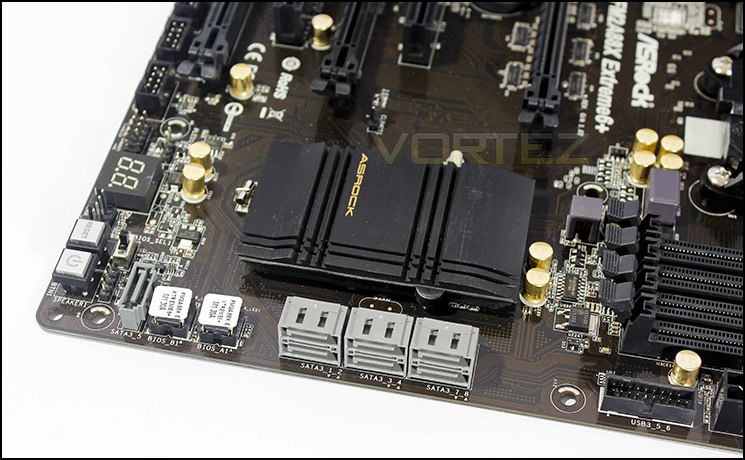
Bottom right section of the board
In this section, we find a welcome bank of 6 right angled SATA ports, the dual BIOS chips, an additional SATA port (it appears the A88X chipset can give a total of 8 SATA connections), a power and reset buttons, a BIOS selector switch, another 4pin PWM fan header and a debug LED indicator. The low profile chipset cooling looks simple but should be effective.
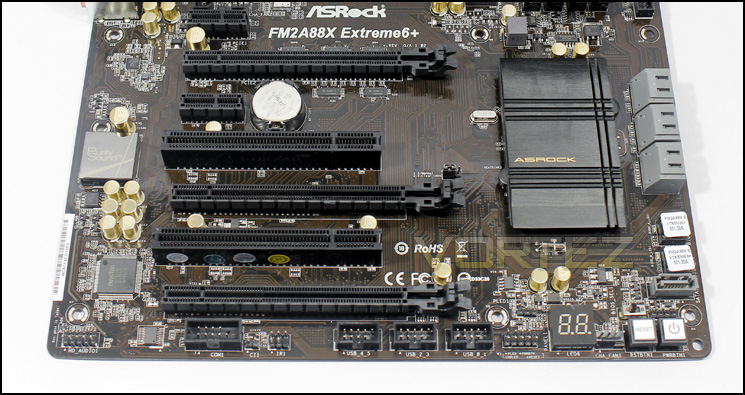
The internal I/O lined up along the bottom
From left to right there is the front panel audio, which will give access to the headphone amp supporting up to 600ohm impedance headphones via the front panel jacks, COM headers, IR sensor header, 3x 2 USB 2.0 headers and the front panel control headers.
The expansion slots are arranged intelligently, giving a clear two slot space between the first and second PCIe x16 slots, ASRock have also included 2x PCIe x1 and 2x PCI legacy, as well as a final PCIe x 4 to finish things off (physical x16).
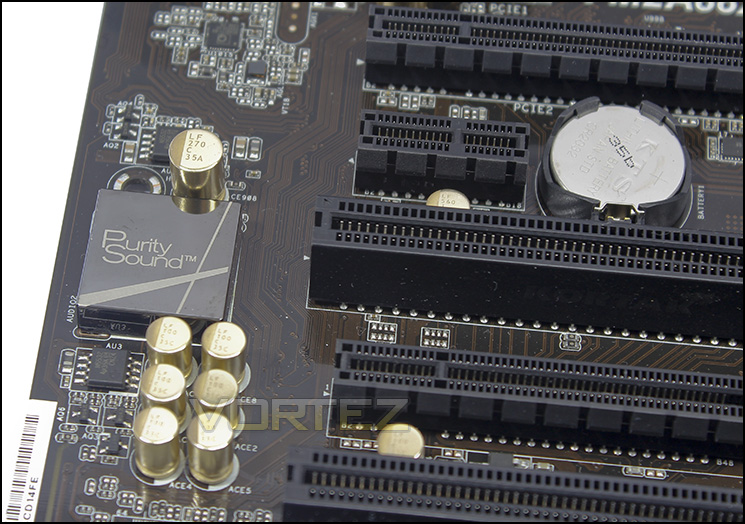
Purity Sound
Underneath the Purity sound EMI shield, is located the Realtek ALC 1150, one of the best audio codecs available, with the TI NE5532 headphone amp/ differential amp either side. Towards the top we find the Qualcomm Atheros AR8171 that supports remote power on via the internet, this is what allows the ASRock Home Cloud feature that enables remote access to your desktop via various devices, anytime, anywhere.
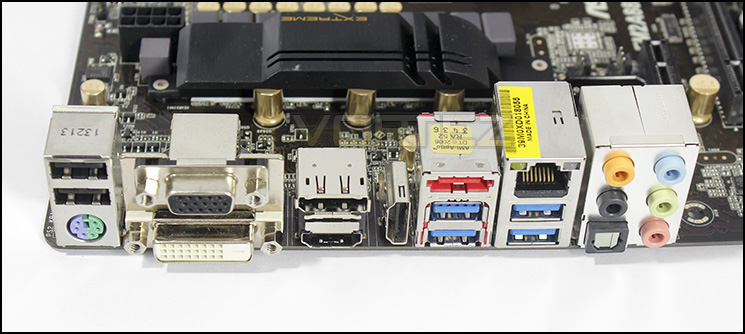
Rear I/O
From left to right, Universal PS2, 2xUSB 2.0. D-SUB, DVI, DP, HDMI, HDMI-IN, eSATA, 4x USB 3.0, gigabit lan, 1 x Optical SPDIF Out Port and HD audio jacks. The inclusion of an HDMI-IN is quite interesting and many could find useful, also using an FM2+ APU, the A88X Extreme6+ supports the use of up to four monitors.
BIOS & Software
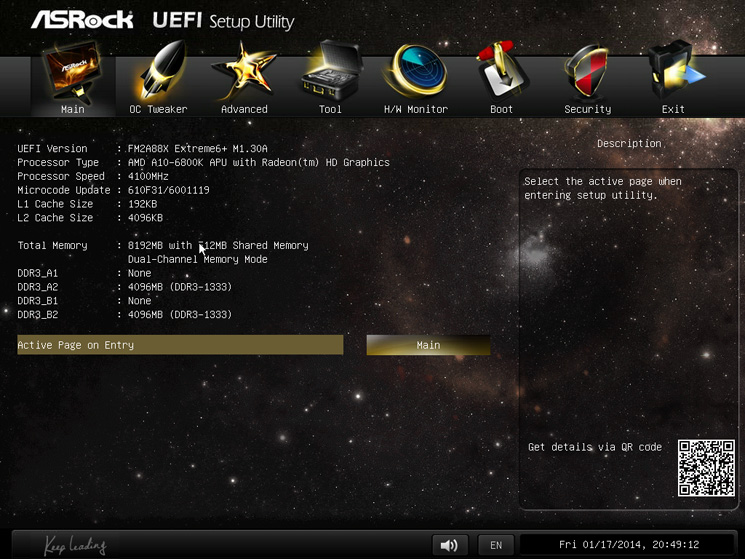
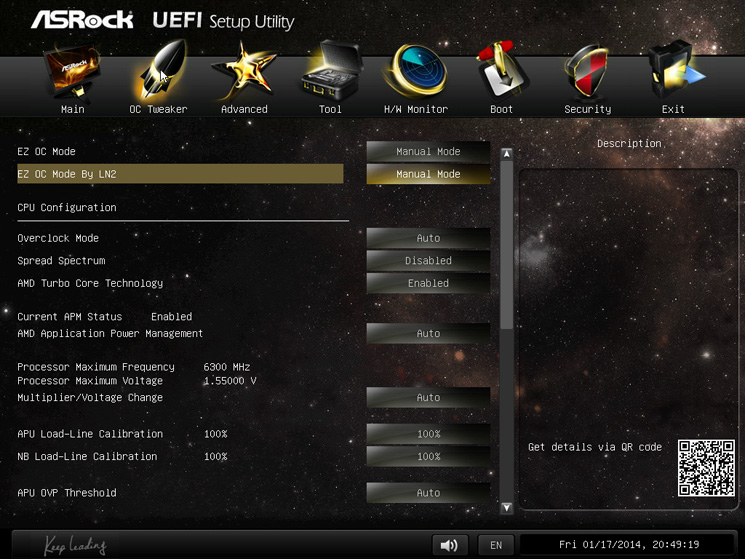
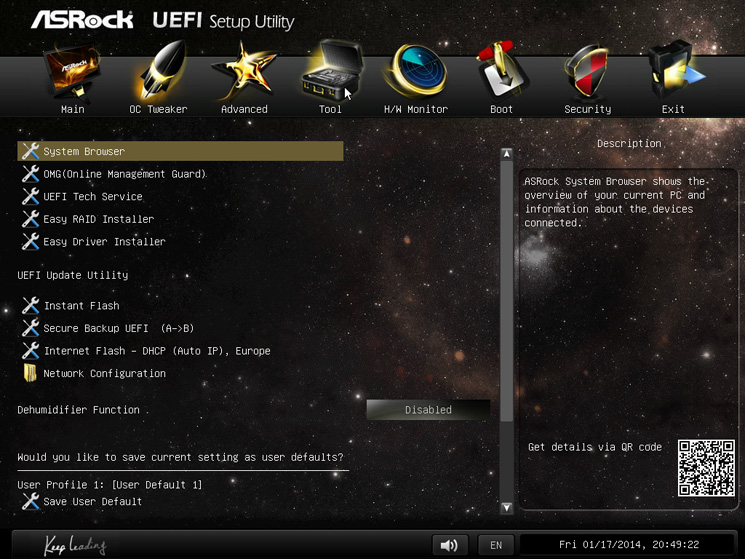
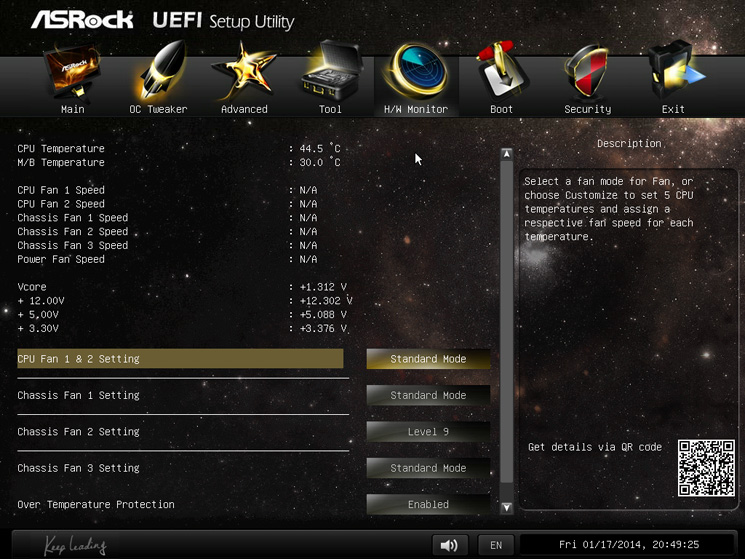
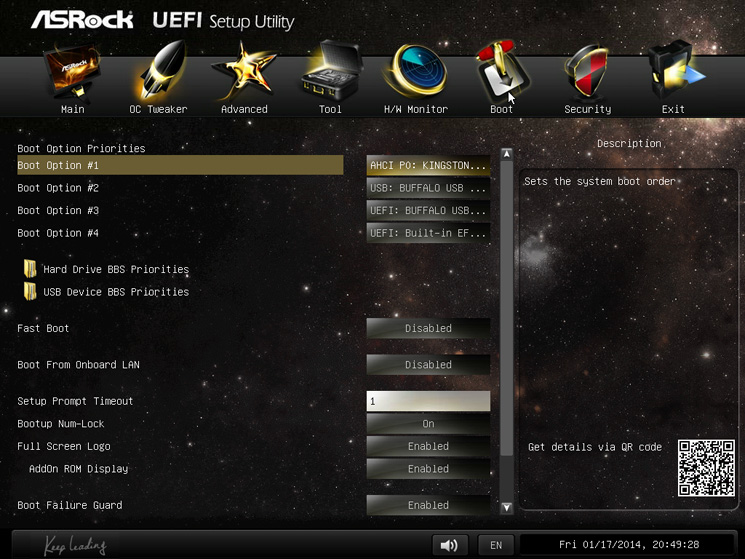
The BIOS is attractive and well laid out, though felt laggy and unintuitive using the mouse, it was fine using the keyboard though. The main thing I found frustrating, was there was no ‘current’ and ‘projected’ clock speed present that makes note of any changes you make while tweaking overclocking.
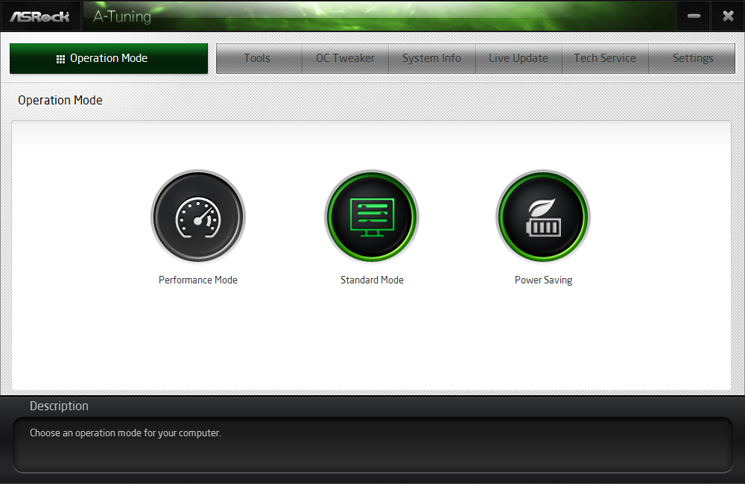
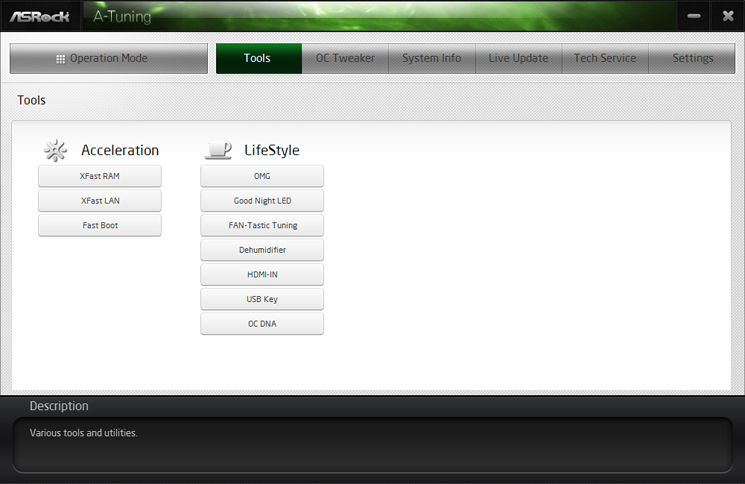
The ASRock A-Tuning utility when installed alongside the relevant software, is a (nearly) all encompassing UI for all of the ASRock exclusive technologies. It would have been good to see the ASRock Home Cloud and the Sun Login tool for remote access integrated with this to help make the setup process more streamlined.
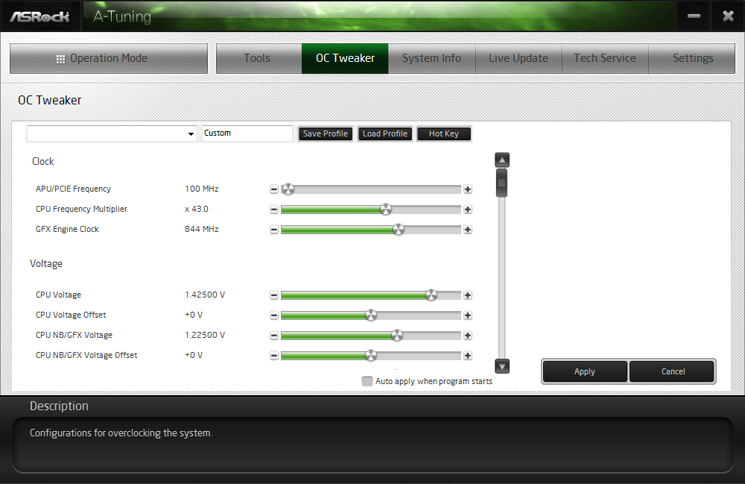
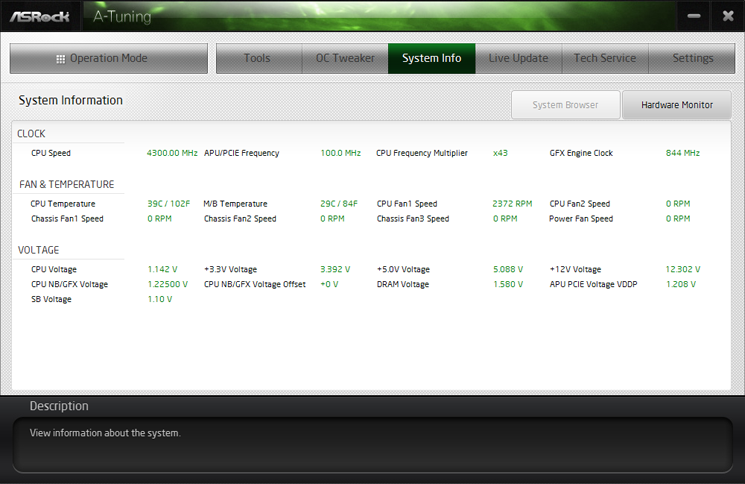
Generally, it looks clean and well laid out and offers something akin to what we see with ASUS motherboards, simplified performance, standard and power saving modes, access to ASRock exclusive technologies and software, an OC tweaker and live updates. Something I am very pleased to see, within the system information tab, you can find that the APU temperatures are read accurately and are clearly labelled along with the motherboard temperatures, while there are applications that do this for many AMD boards, they are often labelled vaguely like TMPin00 leaving the temperature labelled ‘CPU’ reading somewhere between -232 to 90 degrees C.
It is always fun to play with an OC tool within the operating system, yet some BIOS work will still be required to really allow any ‘on the fly’ changes, any ‘applied’ changes otherwise, will just cause a restart with no changes made, this is why it would be called an ‘OC Tweaker’, to tweak your already applied overclocks within the OS, handy to try and squeeze that little extra out of your benching sessions.
Test Setup
A88X Setup
APU – A10-6800K
Motherboard – ASUS A88X-PRO – ASRock A88X Extreme6+
RAM – Xtreem LV PC3 19200 DDR3 LV 2400
SSD – Kingston Hyper X 120GB
Power Supply – NZXT Hale82 650W
Cooler – Noctua
APU – A10-6800K
Motherboard – ASUS A88X-PRO – ASRock A88X Extreme6+
RAM – Xtreem LV PC3 19200 DDR3 LV 2400
SSD – Kingston Hyper X 120GB
Power Supply – NZXT Hale82 650W
Cooler – Noctua
APU Configurations
A10-6800K @ 4.1 GHz/4.4 GHz @ 100MHz x 41/44,
HD 8670D integrated graphics @ 844 MHz,
Memory @ 1333 MHz 9-9-9-24,
Power Consumption
It’s interesting to note the power consumption across all motherboards because energy results can fluctuate between manufacturers due to the features and specifications that are integrated. First of all, for the idle tests the system is cold booted into Windows and no additional applications are executed – the watts are noted on the external energy monitor we use. Then the system is loaded with LinX 0.6.4 and MSI Kombustor simultainiously – watts are again monitored throughout the period of testing and the highest rated watts are then noted down. Below are the results of this energy test.
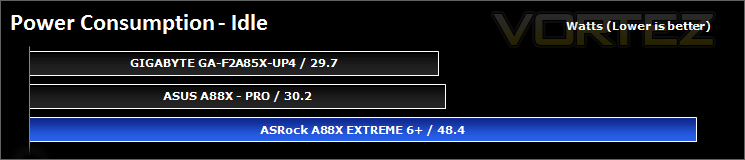
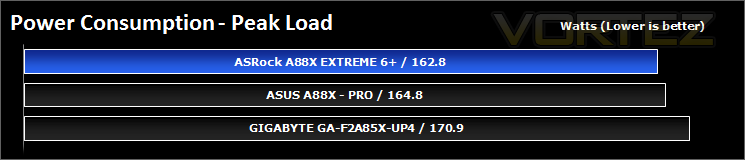
The idle power usage of the ASRock motherboard is significantly higher than the ASUS and GIGABYTE motherboards, however, it was able to keep control under extreme load.
Synthetic Benchmarks: AIDA64
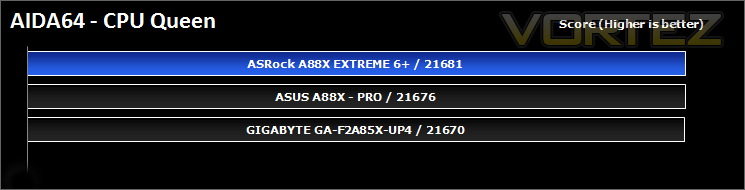
CPU Queen Benchmark
This simple integer benchmark focuses on the branch prediction capabilities and the misprediction penalties of the CPU. It finds the solutions for the classic “Queens problem” on a 10 by 10 sized chessboard. At the same clock speed theoretically the processor with the shorter pipeline and smaller misprediction penalties will attain higher benchmark scores. For example — with HyperThreading disabled — the Intel Northwood core processors get higher scores than the Intel Prescott core based ones due to the 20-step vs 31-step long pipeline. CPU Queen test uses integer MMX, SSE2 and SSSE3 optimizations.
CPU Photoworxx Benchmark
This benchmark stresses the integer arithmetic and multiplication execution units of the CPU and also the memory subsystem. Due to the fact that this test performs high memory read/write traffic, it cannot effectively scale in situations where more than 2 processing threads used. For example, on a 8-way Pentium III Xeon system the 8 processing threads will be “fighting” over the memory, creating a serious bottleneck that would lead to as low scores as a 2-way or 4-way similar processor based system could achieve. CPU PhotoWorxx test uses only the basic x86 instructions, and it is HyperThreading, multi-processor (SMP) and multi-core (CMP) aware.
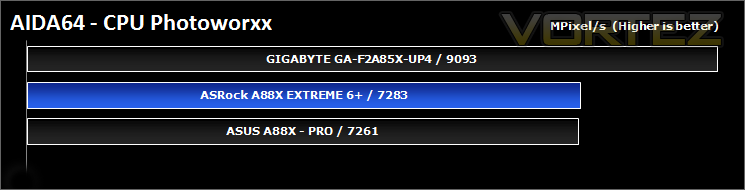
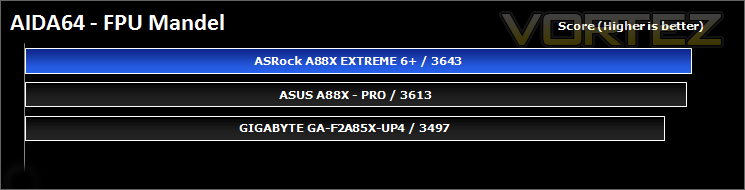
FPU Mandel Benchmark
This benchmark measures the double precision (also known as 64-bit) floating-point performance through the computation of several frames of the popular “Mandelbrot” fractal. The code behind this benchmark method is written in Assembly, and it is extremely optimized for every popular AMD, Intel and VIA processor core variants by utilizing the appropriate x87, SSE2, AVX or FMA4 instruction set extension. FPU Mandel test is HyperThreading, multi-processor (SMP) and multi-core (CMP) aware.
Synthetic Benchmarks: x264 HD
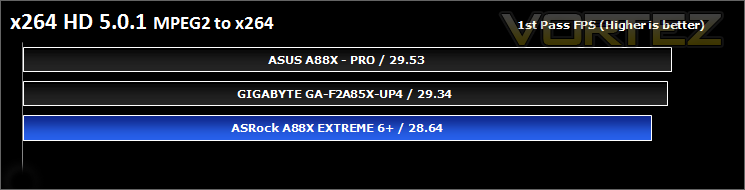
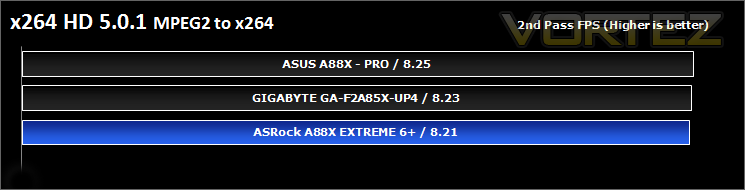
Simply put, this test measures how fast your machine can encode a short, DVD quality MPEG-2 video clip into a high-quality x264 video clip. What’s x264, you ask? It’s more or less the next-generation Xvid/DivX codec. I think it’s ideal for a benchmark because the application (x264.exe) reports fairly accurate compression results (in frames per second) for each pass of the video encoding process, and it uses multi-core processors very efficiently.
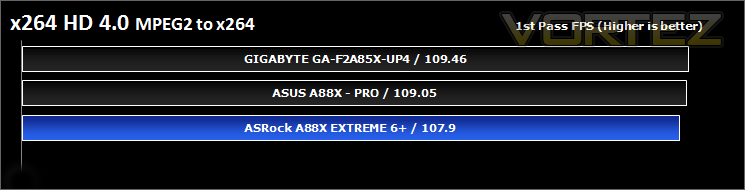
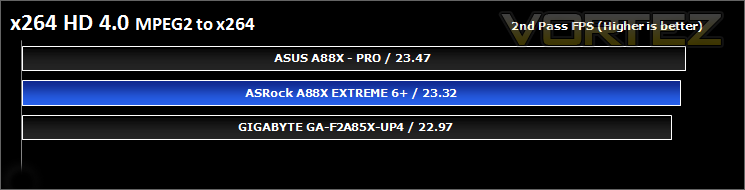
Synthetic Benchmarks: Cinebench 11.5
CPU Rendering
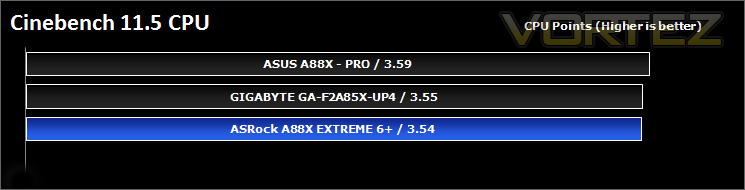
CINEBENCH can measure systems with up to 64 processor threads. This test scene contains approximately 2,000 objects which in turn contain more than 300,000 polygons in total, and uses sharp and blurred reflections, area lights, shadows, procedural shaders, antialiasing, and much more. The result is displayed in points (pts). The higher the number, the faster your processor.
Open GL Graphics Rendering
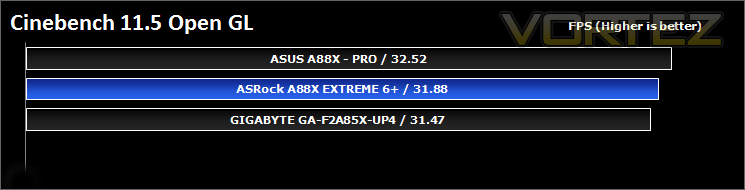
This procedure uses a complex 3D scene depicting a car chase (by renderbaron) which measures the performance of your graphics card in OpenGL mode. The performance depends on various factors, such as the GPU processor on your hardware, but also on the drivers used. The graphics card has to display a huge amount of geometry (nearly 1 million polygons) and textures, as well as a variety of effects, such as environments, bump maps, transparency, lighting and more to evaluate the performance across different disciplines and give a good average overview of the capabilities of your graphics hardware.
Synthetic Benchmarks: SiSoftware SANDRA
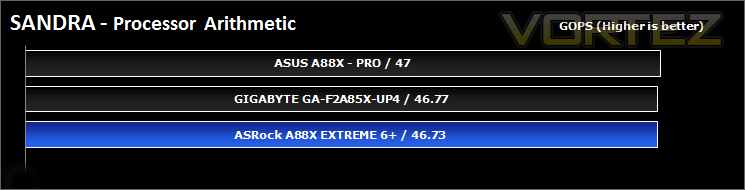
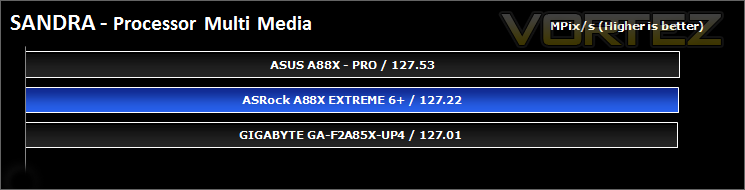
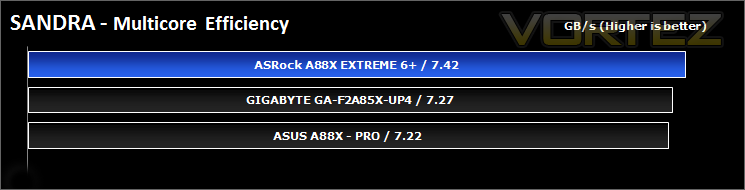
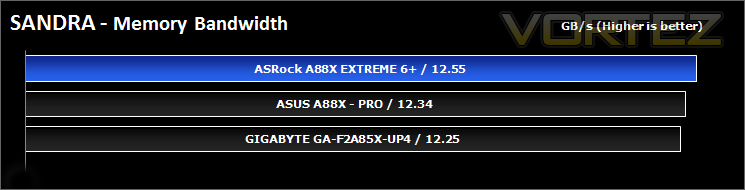
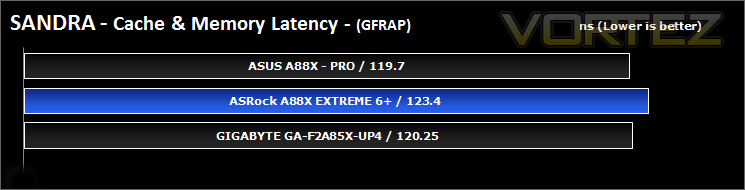
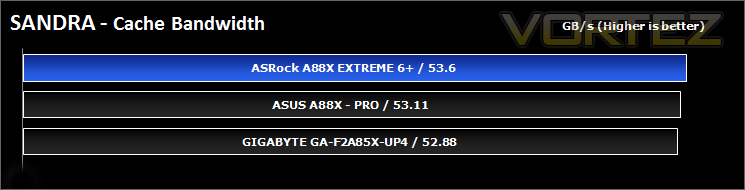
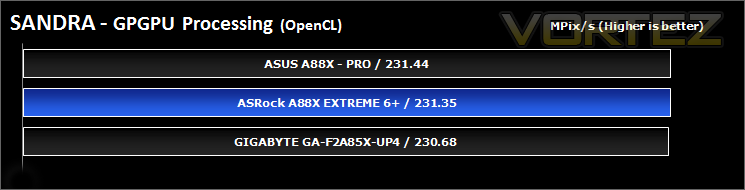
SANDRA isn’t always a benchmark that is included in hardware reviews but We believe it shouldn’t be ignored. SANDRA provides a vigorous package that tests your system in a rather large array of benchmarks. There are many aspects of benchmark that can be executed. We will be considering – CPU, memory and GPGPU tests.
Synthetic Benchmarks: 3DMark 11 & 3DMark – Fire Strike
3DMark 11
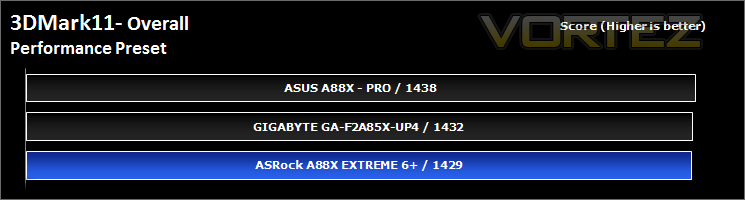
Designed to measure your PC’s gaming performance 3DMark 11 makes extensive use of all the new features in DirectX 11 including tessellation, compute shaders and multi-threading. Trusted by gamers worldwide to give accurate and unbiased results, 3DMark 11 is the best way to consistently and reliably test DirectX 11 under game-like loads.
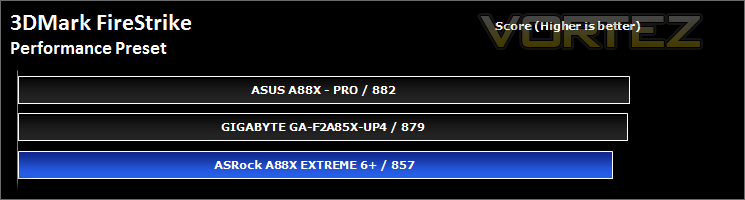
3DMark – Fire Strike
Fire Strike is our new showcase DirectX 11 benchmark designed for high-performance gaming PCs. It is our most ambitious and technical benchmark ever, featuring real-time graphics rendered with detail and complexity far beyond what is found in other benchmarks and games today. Fire Strike will only be available in the Windows editions of 3DMark initially.
Synthetic Benchmarks: UNIGINE Heaven 4.0 & Valley 1.0
UNIGINE Heaven 4.0
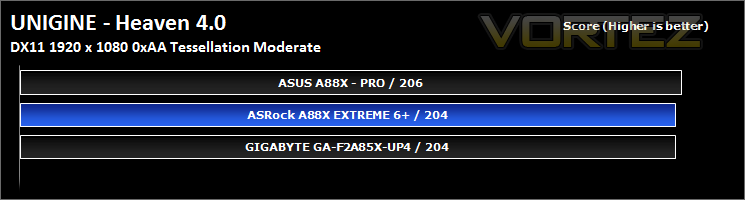
Heaven Benchmark with its current version 4.0 is a GPU-intensive benchmark that hammers graphics cards to the limits. This powerful tool can be effectively used to determine the stability of a GPU under extremely stressful conditions, as well as check the cooling system’s potential under maximum heat output. It provides completely unbiased results and generates true in-game rendering workloads across all platforms, such as Windows, Linux and Mac OS X.
UNIGINE Valley 1.0
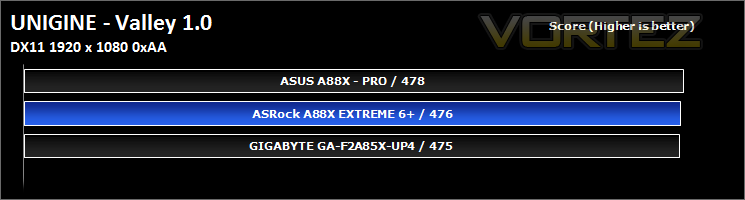
Valley Benchmark is a new GPU stress-testing tool from the developers of the very popular and highly acclaimed Heaven Benchmark. The forest-covered valley surrounded by vast mountains amazes with its scale from a bird’s-eye view and is extremely detailed down to every leaf and flower petal. This non-synthetic benchmark powered by the state-of-the art UNIGINE Engine showcases a comprehensive set of cutting-edge graphics technologies with a dynamic environment and fully interactive modes available to the end user.
Game Benchmarks: AVP, Deus Ex:HR, TESV, DiRT SD, DOTA 2
Alien Vs. Predator
Spawned from the popular Alien and Predator franchises, Rebellion have collaborated to bring the legendary war to us through the medium of a first-person shooter. The game forces you to hunt, prey and most importantly survive in the swamp colony of Freya’s prospect as a Predator, Alien or Marine. The stunning visuals add to the sense of dread and terror that we have become so accustomed to seeing with the series.
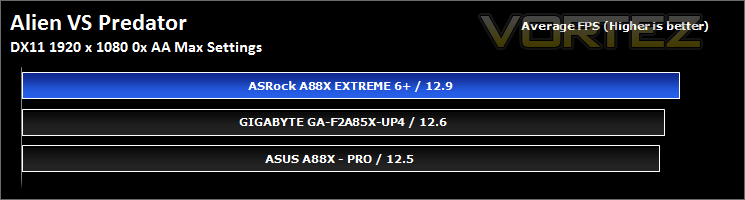
The stand-alone Alien VS Predator benchmark tool was used for testing here. All the settings were set to very high and Tessellation was applied. The average FPS was recorded at the end.
The stand-alone Alien VS Predator benchmark tool was used for testing here. All the settings were set to very high and Tessellation was applied. The average FPS was recorded at the end.
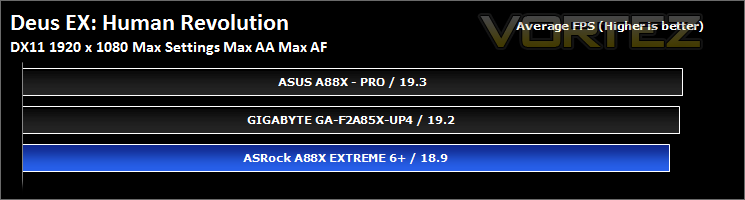
Deus Ex: Human Revolution
You play Adam Jensen, an ex-SWAT specialist who’s been handpicked to oversee the defensive needs of one of America’s most experimental biotechnology firms. Your job is to safeguard company secrets, but when a black ops team breaks in and kills the very scientists you were hired to protect, everything you thought you knew about your job changes.
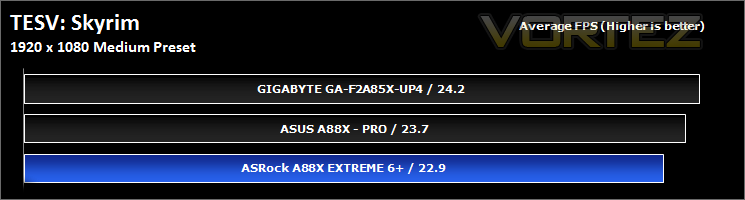
TESV: Skyrim
The Empire of Tamriel is on the edge. The High King of Skyrim has been murdered. Alliances form as claims to the throne are made. In the midst of this conflict, a far more dangerous, ancient evil is awakened. Dragons, long lost to the passages of the Elder Scrolls, have returned to Tamriel. The future of Skyrim, even the Empire itself, hangs in the balance as they wait for the prophesized Dragonborn to come; a hero born with the power of The Voice, and the only one who can stand amongst the dragons.
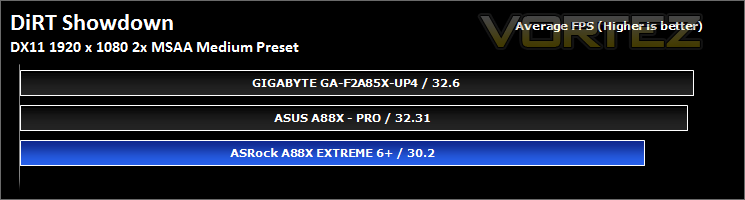
DiRT Showdown
DiRT Showdown is the new arcade racing game from the team that brought you the award-winning DiRT series, uncaged in 2012. Pick up and play controls combine with electrifying events, frenzied crowds and stunning graphics to deliver high octane, dive in and drive thrills from event one. DiRT Showdown comes with phenomenal graphical performance, bone-jarring damage, and social online and split-screen multiplayer as standard. Welcome to DiRT Showdown – a new world of driving delirium.
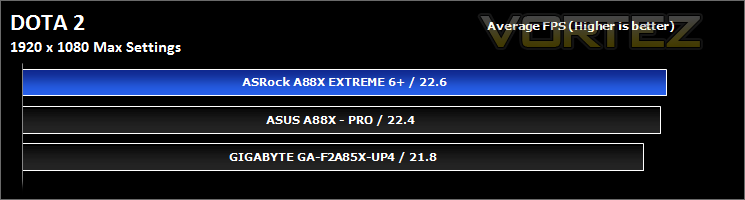
DOTA 2
Dota is a competitive game of action and strategy, played both professionally and casually by millions of passionate fans worldwide. Players pick from a pool of over a hundred heroes, forming two teams of five players. Radiant heroes then battle their Dire counterparts to control a gorgeous fantasy landscape, waging campaigns of cunning, stealth, and outright warfare.
Irresistibly colorful on the surface, Dota is a game of infinite depth and complexity. Every hero has an array of skills and abilities that combine with the skills of their allies in unexpected ways, to ensure that no game is ever remotely alike. This is one of the reasons that the Dota phenomenon has continued to grow.
Irresistibly colorful on the surface, Dota is a game of infinite depth and complexity. Every hero has an array of skills and abilities that combine with the skills of their allies in unexpected ways, to ensure that no game is ever remotely alike. This is one of the reasons that the Dota phenomenon has continued to grow.
Conclusion
Sitting at around £75, ASRock have created a very attractive A88X based motherboard that incorporates many well thought out features such as the LAN capable of remote power up and access, as well as the Purity Sound giving an impressive audio experience and support for high impedance headphones. However, it doesn’t stop there, gamers and enthusiasts will find sacks worth of potential for overclocking and performance tweaking, the ASRock A88X Extreme6+ is certified AMP 2400+ (supports AMD Memory Profile of 2400MHz+),and the stable power delivery to the APU via the 8+2 DIGI phases that helped contribute to its success with some current world records.
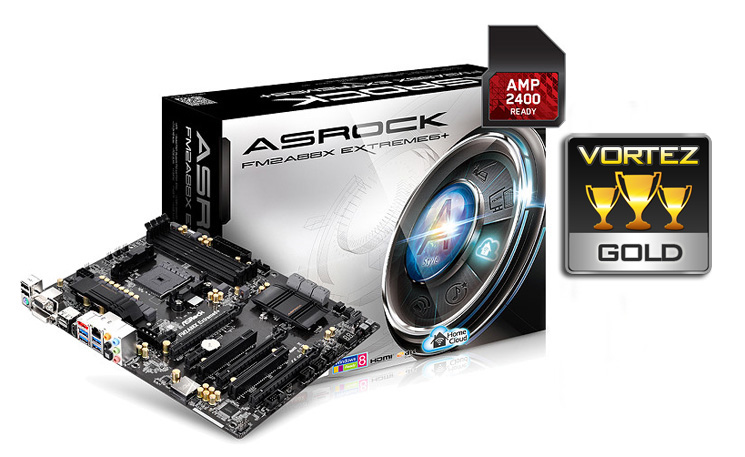
The downsides to this product are mostly oversights and do not affect the overall performance or value of this product, to list a few, this board suffers from a plasticky creaky noise while handling and installing, I am not sure if that is due to the manufacturing process used by ASRock and is of no concern, or if it is actually the sound of complex circuitry dying a death caused by inflexibility. Another note is, while the supporting software and utilities provided are fairly competent, it would be great to see the inclusion of the Home Cloud feature and Sun Login integrated into the A-Tuning utility as to simplify the use of such a fairly long winded, yet valuable process. Still on the subject of supporting software, it would be great to have a live update feature that works a little more reliably and doesn’t tell you that your software and BIOS are completely up to date when they aren’t.
Finally, aesthetics, though the A88X Extreme6+ is well laid out and has all the features and functions in the places many have come to expect, the overall aesthetic is fairly bland and uninteresting. This is not necessarily a downside, some may argue that once all components are plugged in, you will barely see the motherboard anyway, others may not really be interested in the aesthetics at all, which is also why this particular design may work in its favour. It has the ability to easily blend well with any build or design, fading into the background without any garish, bold colours.
Feature packed and ready to rock with the latest Kaveri APUs, ASRock go a little further with the A88X Extreme6+. This will come highly recommended and is deserving of our Gold award.
Pros.
+ Well laid out
+ Quality components
+ Home Cloud, remote wake and access
+ Purity Sound: ALC 1150 + 600ohm headphone amp
+ FM2+
+ Price
Cons.
– None
+ Well laid out
+ Quality components
+ Home Cloud, remote wake and access
+ Purity Sound: ALC 1150 + 600ohm headphone amp
+ FM2+
+ Price
Cons.
– None

Click here for an explanation of our awards at Vortez.net. Thanks to ASRock for providing today’s review sample.


