Boasting minimalist aesthetics, Taichi Lite brings affordability to ASRock’s B650E motherboard lineup by triming out some key features like RGB lighting.

Product on Review: B650E Taichi Lite
Manufacturer: ASRock
Street Price:
US:- $279.99 (excl. Tax)
UK:- £314.99 (inc. V.A.T.)
Editor: Tim Harmer
After 12 months the combination of AMD’s 600-series motherboards and Ryzen 7000-series processors is now a mature platform with a good selection of models throughout their respective product stack. Plenty of options now exist for each performance tier and most budget ranges, with a lot of competition for more mainstream consumers be they self-described gamers or more general users. Manufacturers have now begun to create more niche models as a result, catering to narrower segments of the market with specific needs not necessarily met otherwise.
With this ethos ASRock have brought together the B650E Taichi Lite, an EATX design oriented towards minimalist aesthetics combined with robust performance features core to the Taichi lineup. By removing many facia elements and user-customisable RGB LED zones they have been able to cut costs, thus releasing a design oriented towards gamers and overclockers at a more aggressive price point than the standard B650E Taichi.
AMD’s B650E chipset is central to the motherboards design. It incorporates support for AM5 processors, high performance power delivery, DDR5 memory, PCI-Express 5.0 signalling and USB 4.0 without pushing to the extremes I/O options of the X670 and X670E chipset. Unlike standard B650 it supports PCIe 5.0 through both graphics (via an x16 slot) and M.2 (via an M.2 PCIe Gen5 x4 slot), keeping an eye to the future with regards to future technological expectations.
As a Socket AM5 platform, the B650E Taichi Lite is compatible with Ryzen 7000-series CPUs including the 16-core Ryzen 9 7950X and 3D V-Cache SKUs. That represents eleven discrete performance tiers at the time of writing, but no backwards compatibility with prior processor generations. Similarly DDR5 memory is required rather than recommended, but with prices having dropped significantly since the standard was introduced, the cost implication isn’t nearly as eye-watering as it once was.
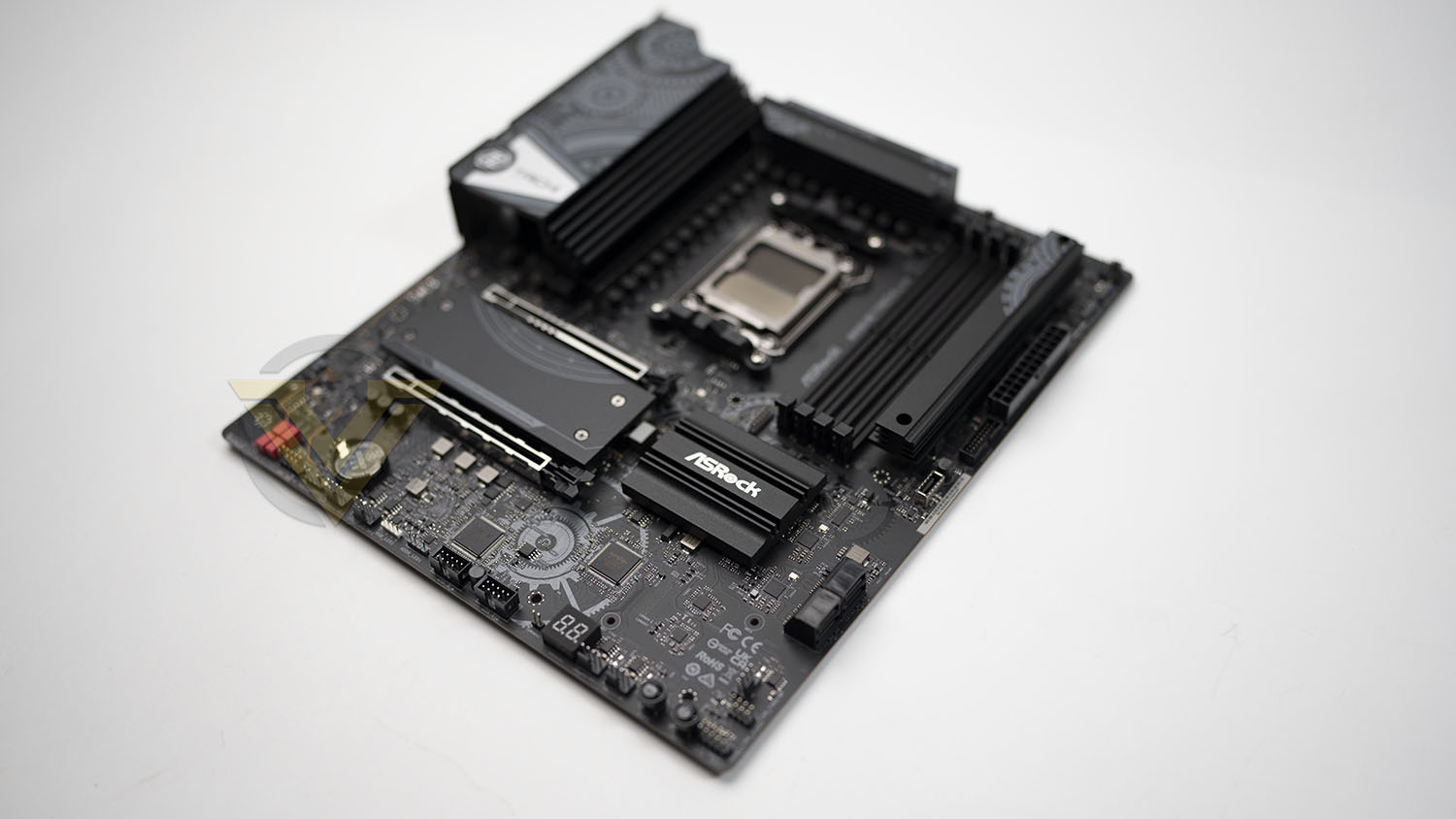
Where the Taichi Lite sets itself apart is its strong 24+2+1-phase power delivery design. A somewhat over-engineered power delivery system is a hallmark of ASRock’s Taichi range, arguably justifying the Lite’s existence alone.
However, while the RGB options are certainly muted compared to the fully-fledged Taichi, the Lite model still incorporates a limited amount of edge lighting and onboard headers for 4-pin and 3-pin RGB LED header standards with bundled control software. So perhaps it’s best to think of the Taichi Lite as a blank canvas, ready to put your personal stamp on.
The B65E Taichi Lite comes in at $280 in the US and £315 (inc. V.A.T.) in the UK, significantly lower than the almost £500 asking price of the standard B650E Taichi. There is however plenty of competition, not only from other AM5 motherboards but also the comprehensive range of models for Intel’s 12th and 13th Gen Core processors. Time to see how it shapes up.
Technical Specifications
Form Factor: EATX (30.5 cm x 26.7 cm)
Chipset: AMD B650
CPU Support: AMD Socket AM5 Ryzen 7000 Series Processors
Memory:
– 4 x DDR5 DIMM Slots (Dual Channel)
– Supports DDR5 non-ECC, un-buffered memory up to 6600+(OC)
– Max. capacity of system memory: 192GB
– Supports Extreme Memory Profile (XMP) and EXTended Profiles for Overclocking (EXPO) memory modules
Graphics/Video:
– Support for integrated AMD RDNA™ 2 graphics (capabilities varies by CPU)
– 1 x HDMI 2.1 TMDS/FRL 8G Compatible, supports HDR, HDCP 2.3 and max. resolution up to 4K 120Hz
– 1 x USB4, supports HDCP 2.3 and max. resolution up to 8K 60Hz
Audio:
– 5.1 CH HD Audio with Content Protection (Realtek ALC4082 Audio Codec)
– ESS SABRE9218 DAC for Front Panel Audio (130dB SNR)
– Individual PCB Layers for R/L Audio Channel
– Impedance Sensing on Rear Out port
– Nahimic Audio
LAN:
– 2.5 Gigabit LAN 10/100/1000/2500 Mb/s
– Killer E3100G
Wireless LAN:
– 802.11ax Wi-Fi 6E Module
– Supports IEEE 802.11a/b/g/n/ac/ax
– 2 antennas to support 2 (Transmit) x 2 (Receive) diversity technology
– Supports Bluetooth 5.3 + High speed class II
– Supports MU-MIMO
PCIe Provision
CPU:- 1 x PCIe 5.0 x16 Slot (PCIE1), supports x16 mode
Chipset:
– 1 x PCIe 4.0 x16 Slot (PCIE2), supports x4 mode*
– 1 x Vertical M.2 Socket (Key E), supports type 2230 WiFi/BT PCIe WiFi module
Storage
CPU:- 1 x M.2 Socket supports PCIe Gen5x4 (128 Gb/s) mode up to type 22110
Chipset:
– 1 x M.2 Socket (M2_2, Key M), supports type 2280 PCIe Gen4x4 (64 Gb/s) mode
– 1 x M.2 Socket (M2_3, Key M), supports type 2280 PCIe Gen4x4 (64 Gb/s) mode*
– 4 x SATA3 6.0 Gb/s Connectors
*Use of the PCIe 4.0 x16 slot and M.2 socket M2_3 is mutually exclusive.
RAID:- RAID 0, RAID 1 and RAID 10 for M.2 NVMe storage devices*
USB
– 1 x USB4 Type-C (Rear)
– 1 x USB 3.2 Gen2x2 Type-C (Front)
– 3 x USB 3.2 Gen2 Type-A (Rear)
– 10 x USB 3.2 Gen1 (8 Rear, 2 Front)
– 4 x USB 2.0 (Front)
Additional Connectors:
– 1 x Power LED and Speaker Header
– 1 x RGB LED Header
– 3 x Addressable LED Headers
– 1 x CPU Fan Connector (4-pin)
– 7 x CPU/Chassis/Water Pump Fan Connector (4-pin)
– 1 x 24 pin ATX Power Connector
– 2 x 8 pin 12V Power Connectors
– 1 x Front Panel Audio Connector
– 2 x USB 2.0 Headers
– 1 x USB 3.2 Gen1 Header
– 1 x Front Panel Type C USB 3.2 Gen2x2 Header (20 Gb/s)
– 1 x Dr. Debug code LED display
Rear Panel I/O
– 2 x Antenna Ports for WiFi Connectivity
– 1 x HDMI Port
– 1 x Optical SPDIF Out Port
– 1 x USB4 Type-C Port (40 Gb/s)*
– 3 x USB 3.2 Gen2 Type-A Ports (10 Gb/s)
– 8 x USB 3.2 Gen1 Ports (ASMedia ASM1074 hub)
– 1 x RJ-45 LAN Port
– 1 x Clear CMOS Button
– 1 x BIOS Flashback Button
– 1 x Line Out Jack (Gold Audio Jack)
– 1 x Microphone Input Jack (Gold Audio Jack)
Chipset: AMD B650
CPU Support: AMD Socket AM5 Ryzen 7000 Series Processors
Memory:
– 4 x DDR5 DIMM Slots (Dual Channel)
– Supports DDR5 non-ECC, un-buffered memory up to 6600+(OC)
– Max. capacity of system memory: 192GB
– Supports Extreme Memory Profile (XMP) and EXTended Profiles for Overclocking (EXPO) memory modules
Graphics/Video:
– Support for integrated AMD RDNA™ 2 graphics (capabilities varies by CPU)
– 1 x HDMI 2.1 TMDS/FRL 8G Compatible, supports HDR, HDCP 2.3 and max. resolution up to 4K 120Hz
– 1 x USB4, supports HDCP 2.3 and max. resolution up to 8K 60Hz
Audio:
– 5.1 CH HD Audio with Content Protection (Realtek ALC4082 Audio Codec)
– ESS SABRE9218 DAC for Front Panel Audio (130dB SNR)
– Individual PCB Layers for R/L Audio Channel
– Impedance Sensing on Rear Out port
– Nahimic Audio
LAN:
– 2.5 Gigabit LAN 10/100/1000/2500 Mb/s
– Killer E3100G
Wireless LAN:
– 802.11ax Wi-Fi 6E Module
– Supports IEEE 802.11a/b/g/n/ac/ax
– 2 antennas to support 2 (Transmit) x 2 (Receive) diversity technology
– Supports Bluetooth 5.3 + High speed class II
– Supports MU-MIMO
PCIe Provision
CPU:- 1 x PCIe 5.0 x16 Slot (PCIE1), supports x16 mode
Chipset:
– 1 x PCIe 4.0 x16 Slot (PCIE2), supports x4 mode*
– 1 x Vertical M.2 Socket (Key E), supports type 2230 WiFi/BT PCIe WiFi module
Storage
CPU:- 1 x M.2 Socket supports PCIe Gen5x4 (128 Gb/s) mode up to type 22110
Chipset:
– 1 x M.2 Socket (M2_2, Key M), supports type 2280 PCIe Gen4x4 (64 Gb/s) mode
– 1 x M.2 Socket (M2_3, Key M), supports type 2280 PCIe Gen4x4 (64 Gb/s) mode*
– 4 x SATA3 6.0 Gb/s Connectors
*Use of the PCIe 4.0 x16 slot and M.2 socket M2_3 is mutually exclusive.
RAID:- RAID 0, RAID 1 and RAID 10 for M.2 NVMe storage devices*
USB
– 1 x USB4 Type-C (Rear)
– 1 x USB 3.2 Gen2x2 Type-C (Front)
– 3 x USB 3.2 Gen2 Type-A (Rear)
– 10 x USB 3.2 Gen1 (8 Rear, 2 Front)
– 4 x USB 2.0 (Front)
Additional Connectors:
– 1 x Power LED and Speaker Header
– 1 x RGB LED Header
– 3 x Addressable LED Headers
– 1 x CPU Fan Connector (4-pin)
– 7 x CPU/Chassis/Water Pump Fan Connector (4-pin)
– 1 x 24 pin ATX Power Connector
– 2 x 8 pin 12V Power Connectors
– 1 x Front Panel Audio Connector
– 2 x USB 2.0 Headers
– 1 x USB 3.2 Gen1 Header
– 1 x Front Panel Type C USB 3.2 Gen2x2 Header (20 Gb/s)
– 1 x Dr. Debug code LED display
Rear Panel I/O
– 2 x Antenna Ports for WiFi Connectivity
– 1 x HDMI Port
– 1 x Optical SPDIF Out Port
– 1 x USB4 Type-C Port (40 Gb/s)*
– 3 x USB 3.2 Gen2 Type-A Ports (10 Gb/s)
– 8 x USB 3.2 Gen1 Ports (ASMedia ASM1074 hub)
– 1 x RJ-45 LAN Port
– 1 x Clear CMOS Button
– 1 x BIOS Flashback Button
– 1 x Line Out Jack (Gold Audio Jack)
– 1 x Microphone Input Jack (Gold Audio Jack)
Closer Look
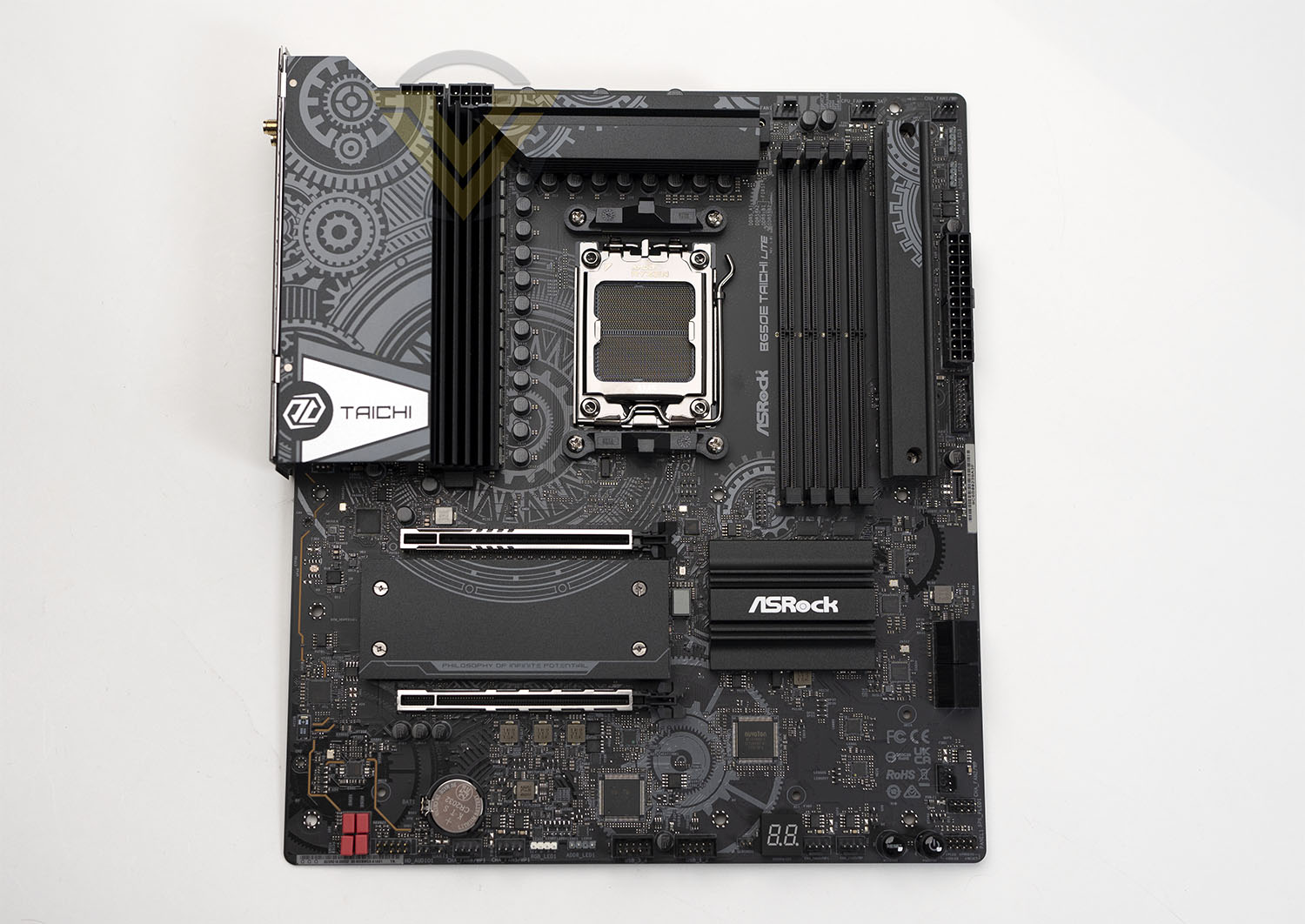
ASRock’s B650E Taichi Lite conforms to the same wide EATX form factor with 305mm x 267mm footprint as the X670E Taichi Carrara we previously reviewed. EATX is a somewhat ‘fuzzy’ standard that case manufacturers often have a somewhat loose interpretation of, but in essence it’s arbitrarily wider than standard ATX ans so necessitates a longer case. If possible, double-check compatibility with your specific case prior to purchase rather than rely on on-paper conformance.
The motherboard’s AM5 socket supports the whole range of Ryzen 7000-series CPUs, but double-check with your retailer to ensure that the UEFI BIOS is up to date if you’re pairing with processor SKUs released after September 2023. At the time of writing the shipped UEFI BIOS supports AMD’s entire 7000-series range. Older AM4 CPU coolers which utilise the clip retainer system should be compatible with the new AM5 socket, but other AM4 styles may not be supported. Check with the cooler manufacturer prior to installation; some manufacturers also offer upgrade kits to those who need it.
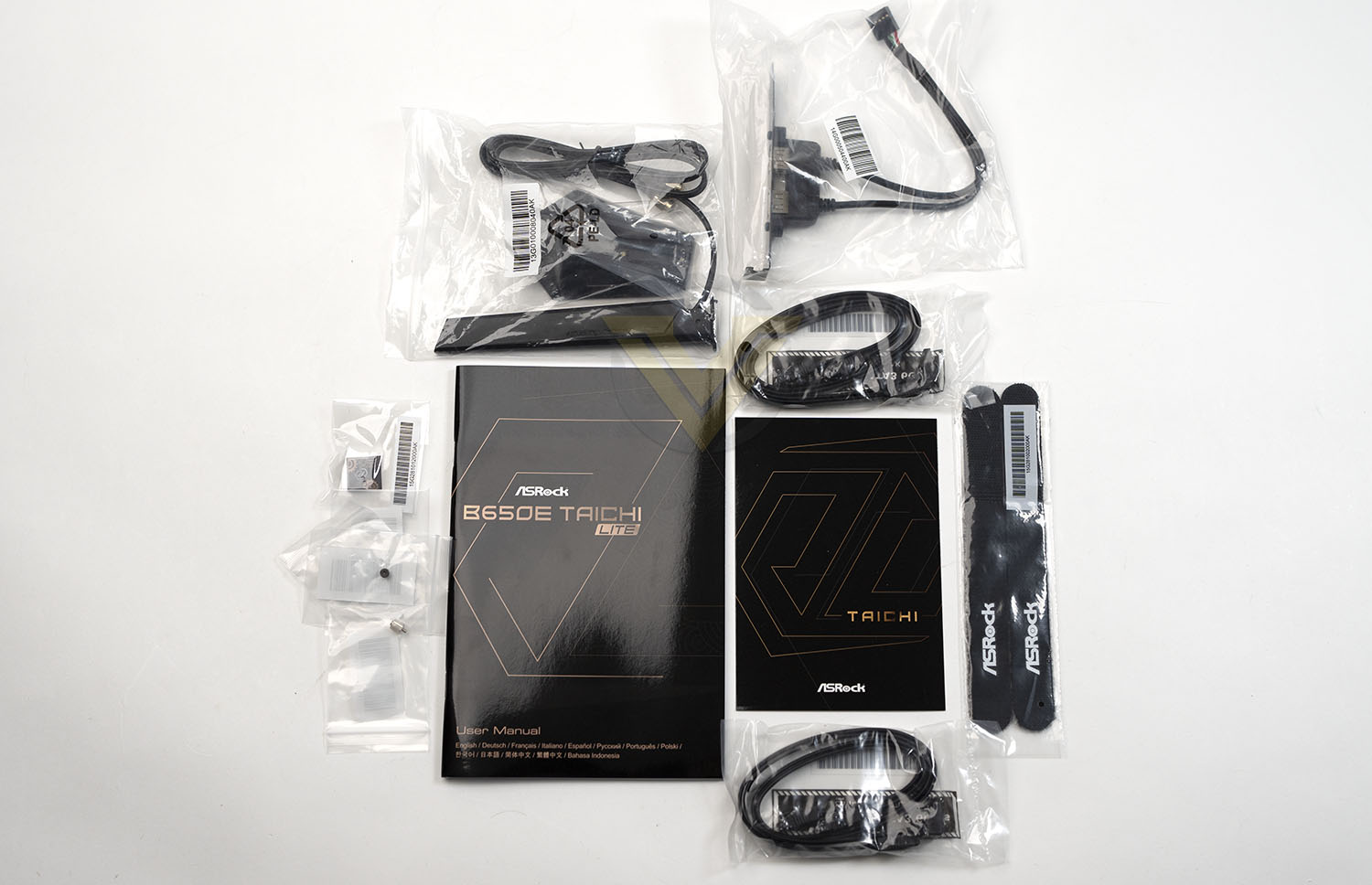
This motherboard optionally arrives with the following accessories (depending on exact SKU and region):
– 1 x User Manual
– 4 x SATA Data Cables
– 1 x Wireless Dongle USB Bracket
– 1 x ASRock WiFi 2.4/5/6 GHz Antenna
– 3 x Screws for M.2 Sockets
– 1 x Standoff for M.2 Socket
– 4 x SATA Data Cables
– 1 x Wireless Dongle USB Bracket
– 1 x ASRock WiFi 2.4/5/6 GHz Antenna
– 3 x Screws for M.2 Sockets
– 1 x Standoff for M.2 Socket
Unlike the full-fat Taichi this model doesn’t ship with a fan-assisted heatsink cooler for the PCIe Gen 5 M.2 slot. Solid air flow over this area of the motherboard will be essential to keep drive temperatures under control when operating under heavy store I/O loads.
With modern motherboards typically bedecked in covers that act as facias to hide the surface-mounted components underneath, the Taichi Lite keeps much more bare and in so doing also reduces RGB LED lighting options. There’s still a theme here though: cogs, as iconography, are present on heatsinks, heatspreaders and even printed on the PCB itself. Some are going to love it, others hate it, but it’s noteworthy that ASRock didn’t choose to keep the design completely without distinguishing features in this respect.
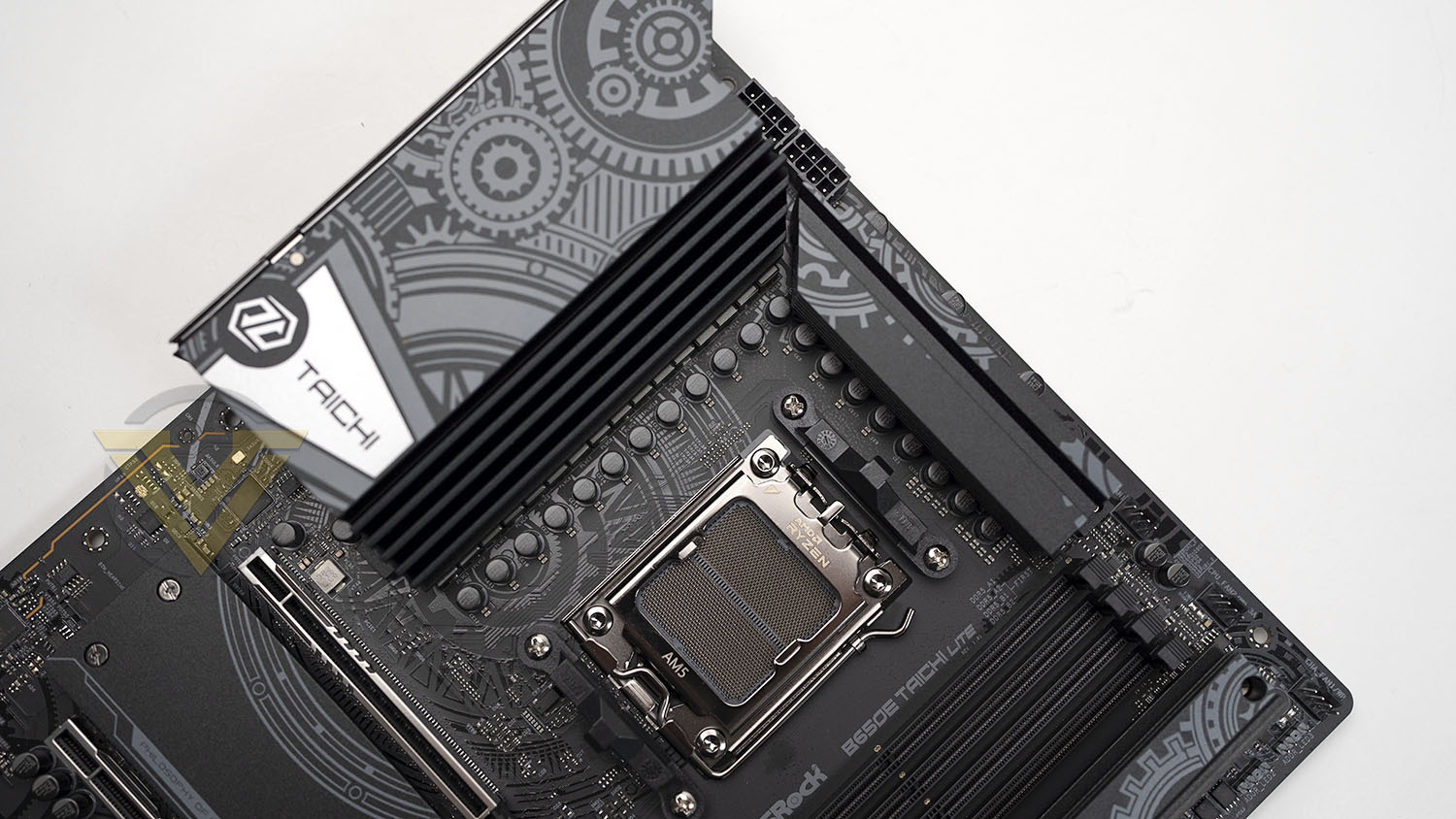
Twin 8-pin 12v connectors feed power directly to the CPU for factory and overclocked performance modes, an aspect of the design that will slightly limit your selection of compatible PSUs. Directly below is a large heatsink fin array cooling the 24+2+1 power stage design, whereas a skinnier fin stack sits just north of the CPU socket. Due to having only a single chipset chip (as compared to two on the X670 boards) just a single heatsink over the chipset is needed rather than additional heatpipes connecting it to the larger VRM stack. Good internal air flow and any incidental flow from the CPU cooler will be necessary to maintain optimal VRM temperatures.
Above and to the right of the CPU socket sits three 4-pin fan headers, the central of which is a 3A header for delivering up to 36W to a system watercooling pump. Four DDR5 DIMM slots sit below these headers but these are not advertised as being ‘reinforced’, unlike on other Taichi models. Just to the right of these slots and covered by a removable heatspreader is the PCIe Gen 5 x4 M.2 slot, supporting M.2 SSDs as long as 110mm (22110 standard).
Note that ASRock do not advertise support for the wider (but very rarely used) 24xxx M.2 SSD drive size standard on this motherboard.
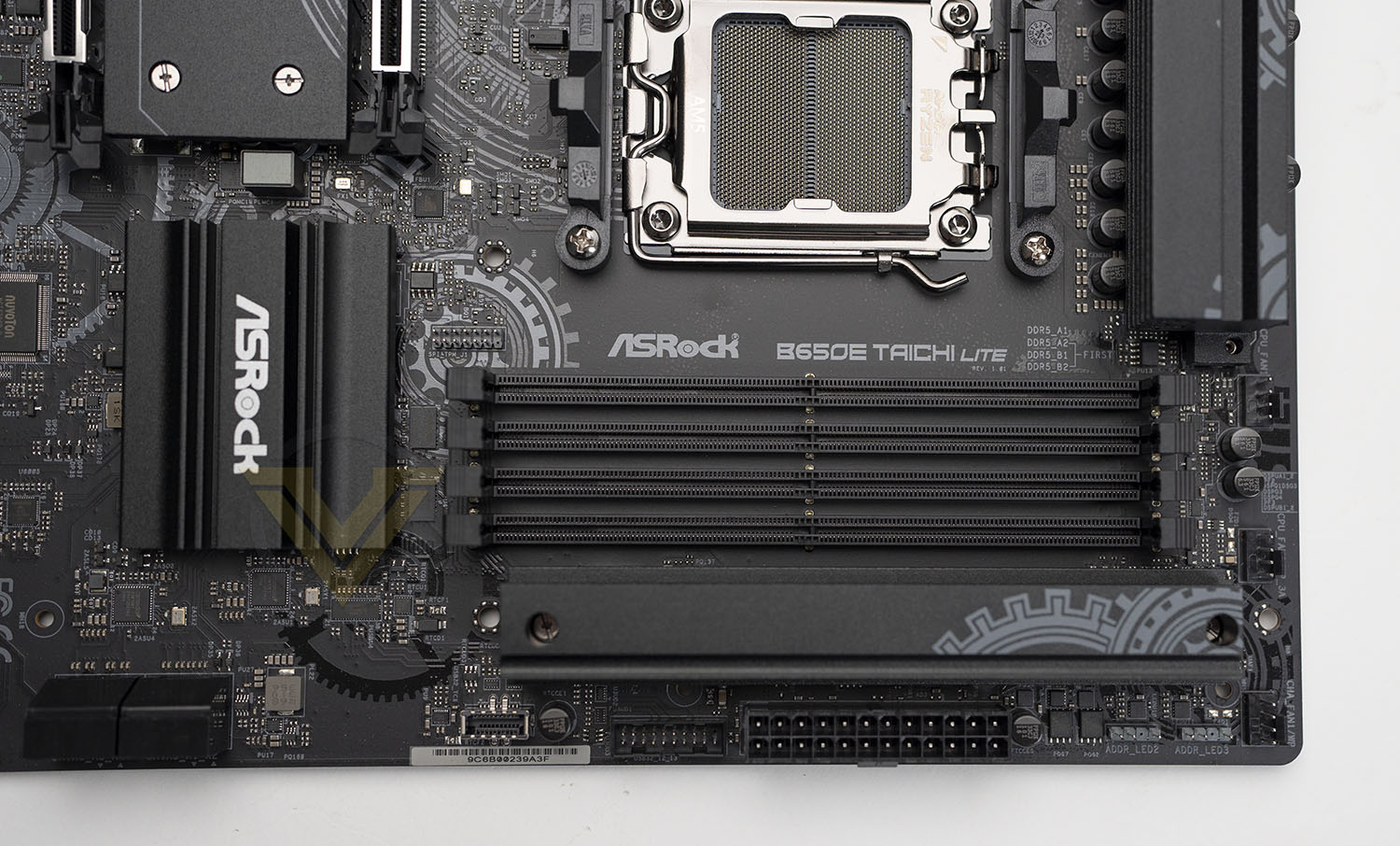
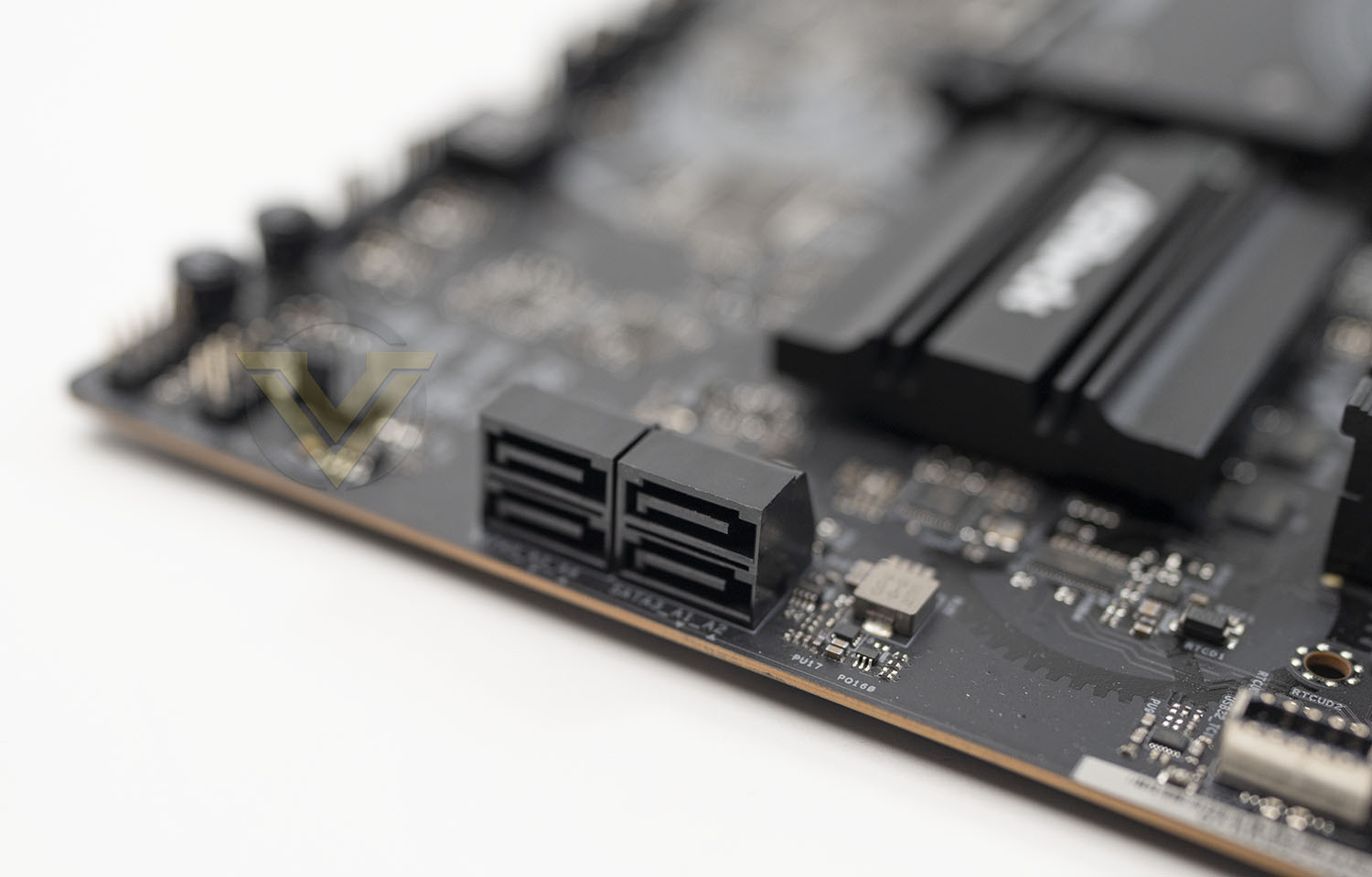
Moving down the right hand side of the motherboard there are two 3-pin ARGB headers, the 24-pin ATX connector, a USB 3.0 header, a USB 3.2 Type-C header, four (2×2) edge-mounted SATA III connectors, a further 4-pin fan header, and the Power LED & Speaker Header. A smaller chipset heatspreader means that this edge looks a little more sparse than its siblings despite having near identical connector configurations.
Just underneath the SATA ports, running underneath the edge of the PCB, is an extended RGB LED zone that offers edge lighting that’s configurable in software. It’s not much in this day and age of ubiquitous RGB but does add a little bit of flair to an otherwise quite dark design.
Running along the bottom edge from left to right is an HD Audio Front Panel connector, two 4-pin PWM chassis fan headers, 4-pin RGB LED header, two USB 2.0 headers, a two-digit Dr. Debug display for error code troubleshooting, two further 4-pin PWM fan headers, and surface mounted power and reset switches.
The digital troubleshooting display and surface-mounted power switches are nods to the overclocking capabilities of the board, but they’re also excellent additions for non-power users having problems with their configuration and boot sequence. We really appreciate their inclusion, no matter the price bracket or intended audience of the board.
The PCI-Express area is a little different from some B650 and most X670 boards. The primary X16 slot, wired for 16 PCI-Express lanes, isn’t separated from the CPU socket by an M.2 slot and so it’s a little higher on the board than it otherwise would. Two M.2 slots separate it from the secondary PCIe x16 slot, both of which support PCIe Gen4 x4 signalling and 2280 form factor M.2 drives. While physically accommodating cards with x16 connectors, the secondary x16 slot is only wired for 4 lanes of PCIe 4.0; dual-graphics operation won’t be on the cards with this motherboard.
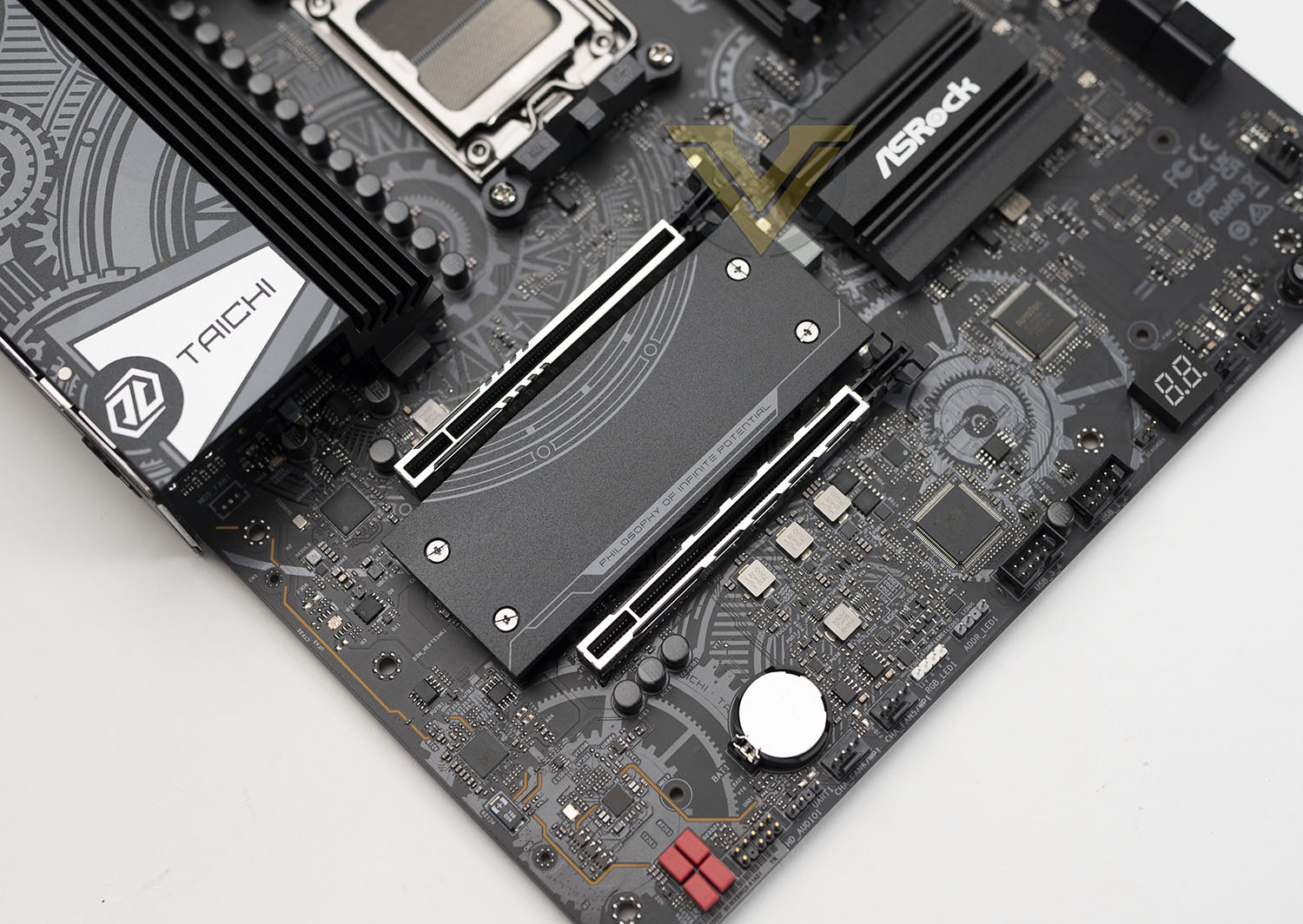
When an SSD populates the lower M.2 slot the secondary PCIe slot is disabled. That’s a consequence of the limited number of PCIe lanes available on B650E compared to X670 (36 vs 44).
The Taichi Lite has plenty of connectivity options on the rear I/O panel.
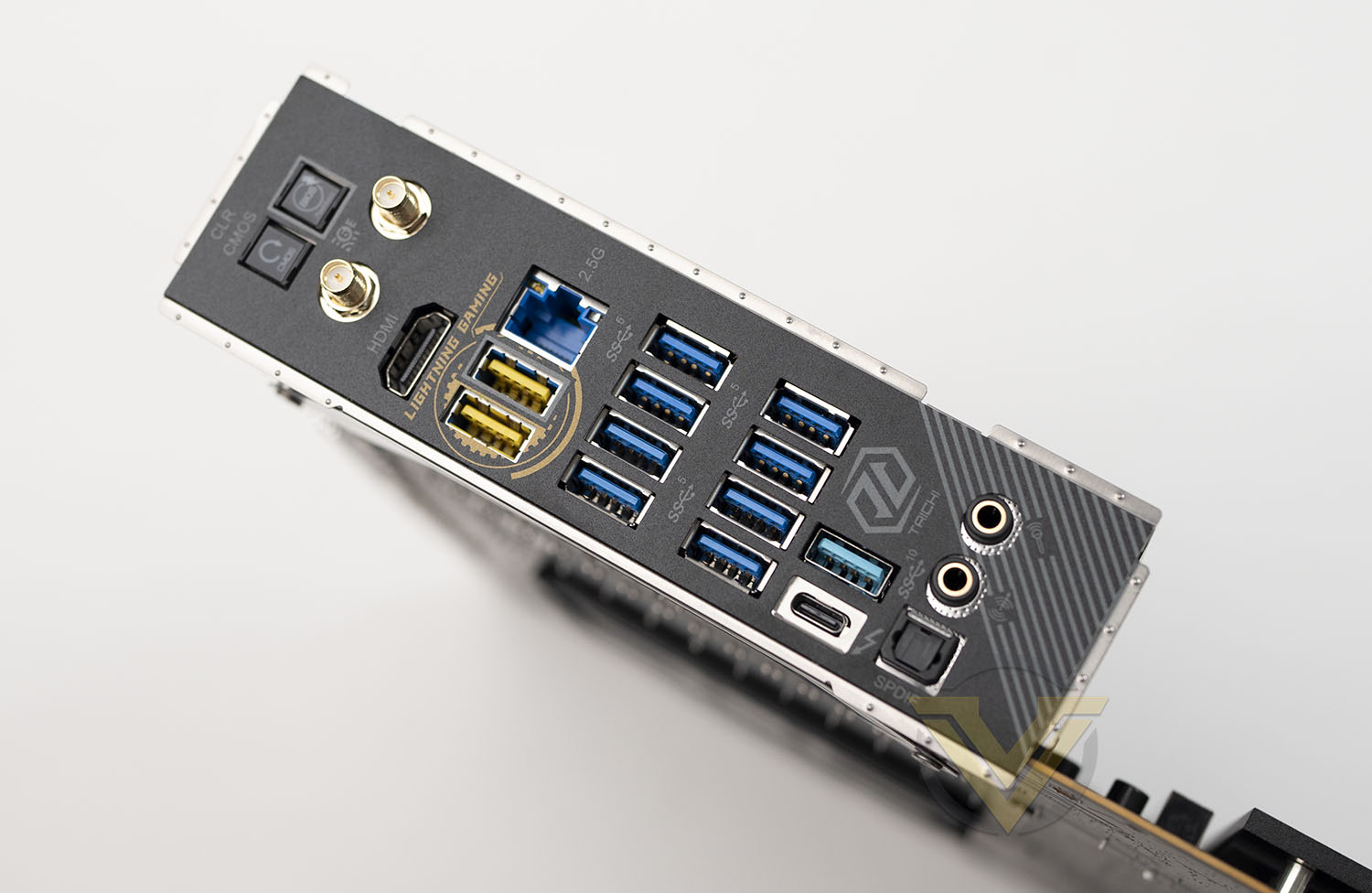
– Clear CMOS & BIOS Flashback buttons,
– WiFi 6E (802.11ax) antenna sockets,
– HDMI for on-board VGA
– 2x USB 3.2 Gen2 (Yellow), 2.5G Ethernet
– 8 x USB 3.2 Gen 1 (5Gbps)
– USB 3.2 Gen 2 (10Gbps) & USB 4 Type-C
– SPDIF Out, Line out and Mic Out
– WiFi 6E (802.11ax) antenna sockets,
– HDMI for on-board VGA
– 2x USB 3.2 Gen2 (Yellow), 2.5G Ethernet
– 8 x USB 3.2 Gen 1 (5Gbps)
– USB 3.2 Gen 2 (10Gbps) & USB 4 Type-C
– SPDIF Out, Line out and Mic Out
The overall connectivity options offered is the major difference between B650 and X670 chipsets. The dual vs single chipset design of X670 as compared to B650 effectively doubles the resources available for I/O, and that translates to a pair of USB 4 Type-C connectors and more 10 and 20Gbps USB 3.2 Gen2x1 and Gen2x2 ports. If lots of exceptionally high speed internal and external storage is part of your requirements the senior members of ASRock’s 600-series would be more appropriate.
The B650E Taichi Lite represents a strong compromise between price and features that will draw the eye of any budget-conscious consumer who would have been looking at not only the full-fat B650E Taichi but also most X670 designs. It’s not the most attractive, and there are one or two puzzling omissions, but that won’t be a problem for its target niche.
Test Setup & Methodology
Notes: We’ve revamped our benchmark regime by removing a number of tests which reveal little, to no difference between each motherboard model. Gaming performance is one such area which has been removed due to the inability for each motherboard to offer any advantage over another. Instead, we have focussed on meaningful/tangible analysis which examines the VRM/chipset design, and the storage performance which will be far more informative to the end user.
TEST SETUP
CPU AMD Ryzen 9 7950XCooling: Corsair Hydro Series H110i
Memory: 32GB Kingston FURY 5200 MHz
Storage: Crucial MX300 SATA SSD + Kingston KC2500 PCIe 3.0 SSD
PSU: Corsair HX1050 80 Plus Gold Certified PSU
Monitor: AOC U2879VF
BENCHMARKS
PCMark 10 – Overall Extended ScoreSiSoftware SANDRA – SATA/PCIe Storage Tests
SiSoftware SANDRA – Processor Image Processing
OTHER SOFTWARE
Temperature Analysis: HWMonitorStress Testing Software: AIDA64 Stability Test
CPU Specification Monitoring: CPU-Z
Benchmarks: Power Consumption
In this first test we analyse the power efficiency from the wall for each motherboard (Minus the GPU). While each model uses the same chipset/platform, energy results can fluctuate between manufacturers due to the features and specifications that are integrated. First of all, for the idle tests the system is cold booted into Windows and no additional applications are executed – wattage is noted on the external energy monitor we use and then we open Aida64 stability test and execute a stress test, noting the highest reading on the monitor. Below are the results of this energy test.
Benchmarks: VRM Cooling
Each motherboard manufacturer designs their board with a unique set of heatsinks to cover key areas like the VRM/mosfets and the chipset itself. We load up Aida64 stability test again and perform a 20 minute run, recording the maximum value for both attributes.
Benchmarks: PCMark 10
PCMark 10 features a comprehensive set of tests that cover the wide variety of tasks performed in the modern workplace. With a range of performance tests, custom run options, and the new Battery Life Profile, PCMark 10 is the complete PC benchmark for the modern office.
Benchmarks: SATA Performance
In order to ascertain the SATA performance for our motherboards we use SiSoftware SANDRA and the File System Bandwidth performance test. This allows us to obtain the sequential read/write transfer rates for the drive being tested – Crucial MX300 SSD.
Benchmarks: PCIe M.2 Performance
In order to ascertain the PCIe M.2 performance for our motherboards we use SiSoftware SANDRA and the File System Bandwidth performance test. This allows us to obtain the sequential read/write transfer rates for the drive being tested – Kingston KC2500.
Benchmarks: CPU Image Processing
In our last test we observe the Image Processing performance from the CPU attached to the motherboard. For this we use SiSoftware SANDRA and the benchmark specifically designed for measuring the common algorithms associated with processing imagery.
Conclusion
Having spent some time with ASRock’s B650E Taichi Lite it’s time to bring together our thoughts on one of the more focused motherboard designs currently available in the AMD 600-series landscape. It will probably come as no surprise to hear us describe this motherboard as not for everyone, but it’s true even within the narrower field of B650E designs under US$350 / £350.
There’s little doubt that there’s no issue with the Taichi Lite’s benchmark attainment, where it dukes it out with X670E competitors using otherwise similar system components. It’s also able to argue its spot against the significantly more affordable B650 non-E designs, a fact that’s always nice to see given the yawning gulf in price between the cheapest and most expensive 600-series designs on the market today.
The issue that this motherboard will have is in comparison to some of its B650E rivals. The Taichi Lite broadly justifies its price point through the Taichi’s range key advantage: a 22-phase power system compared to usually 16-phase power for those boards in its price range. This will make a difference for stability while running overclocks towards the higher end of a CPU’s capability, in theory, but practically speaking relatively few interested parties are likely to push to that extreme.
Furthermore, if a user did engage in genuinely high-end overclocking then the VRM temperatures may be a concern. These rather anaemic heatsinks would ideally want greater air-flow than can really be offered by our standard test setup, or replacement with a full-cover waterblock. The former might require getting creative with fan placement and CPU cooler choice, whereas the latter adds significant expense even if aftermarket brands supported the board layout.
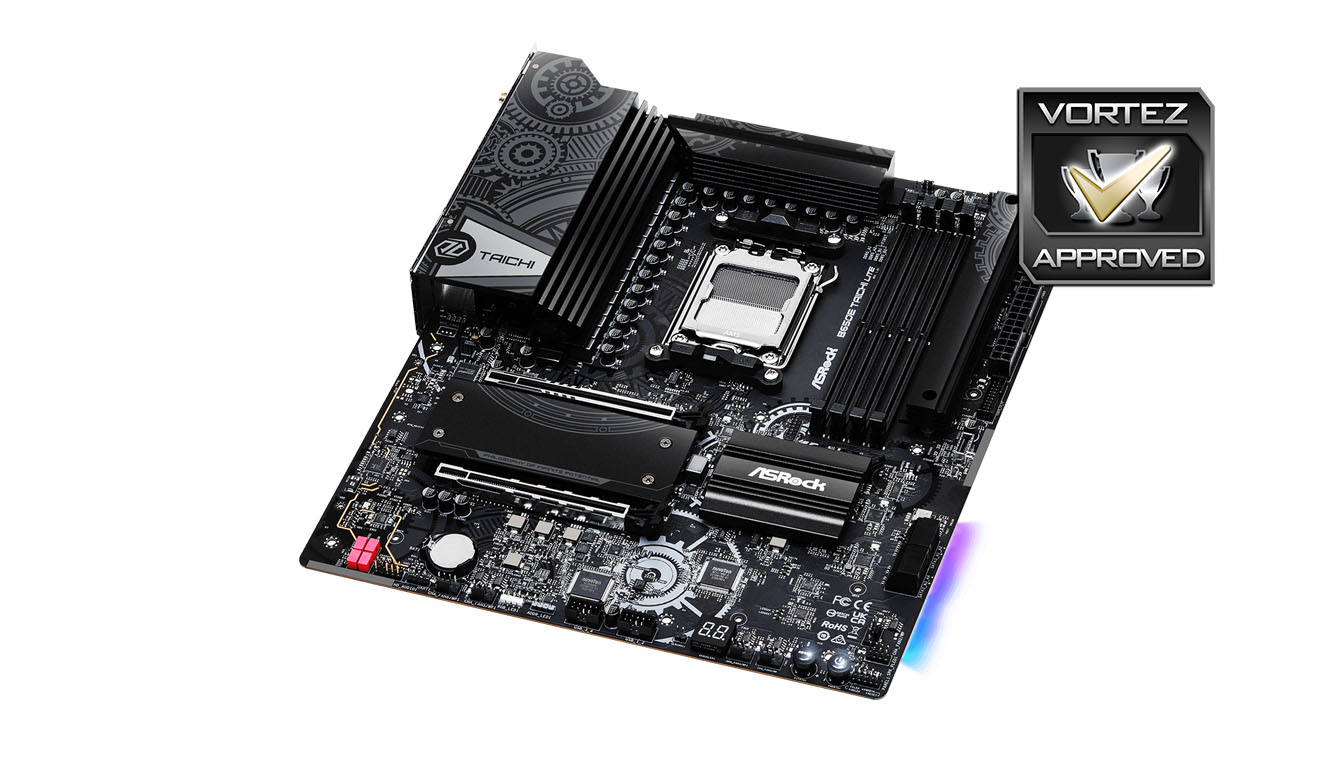
A solid core feature-set that includes WiFi 6E, USB 4 and ‘future-proof’ PCIe 5.0 support through both an x16 slot and long M.2 storage is extended with a few tools catering towards hobbyist overclockers. An explicitly allocated 36W water pump header and surface-mounted power buttons sound minor to some but will be key factors for others. Indeed, the digital troubleshooting display for boot codes is great for anyone and especially valuable for those who tinker with BIOS settings to hit just the right performance sweet-spot.
Speaking of troubleshooting, it’s great to see ASRock’s ongoing adoption of BIOS Flashback functionality without needing to have a CPU installed or (in this instance) even power on the system. It offers genuine peace of mind to experienced users who purchase the board deep into the platform’s generation when a particular new CPU might not be recognised by the shipped BIOS.
Trouble arises for the Taichi Lite however in comparisons with other boards, such as ASRock’s own B650E Steel Legend, that push more mainstream features and/or aesthetics at the same or slightly lower price points. They might not be quite so robust from an overclocking standpoint, but they might offer more high-speed storage, flexible expansion options, or just might be more keyed into being conventionally attractive (as motherboard go); all at a slightly lower price point.
So, can we give the Taichi Lite a vocal recommendation? Only if you’re enthusiastic about overclocking with AMD’s 7000-series CPUs and maintaining a modern feature-set, yet view aesthetics as a very minor convenience. For the mainstream user there are too many other B650E boards that will do more for less to give it more than a modest endorsement, but those who fit in the niche outlined above will welcome the B650E Taichi Lite with the widest of smiles.
ASRock’s B650E Taichi Lite joins an increasingly packed AMD 600-series lineup to cater to platform overclockers at a far lower price point than X670E would allow. It boasts PCIe 5.0, USB 4 and PCIe Gen5 x4 storage as features for the future but is far from the most attractive of designs, even at the ~US $300 price point. The end result is for those whom ‘CPU VRM’ are the six most important letters on the technical sheet, not ‘RGB LED’.
Pros
+ Support for entirety of AMD’s Ryzen 7000-series lineup
+ Cutting-edge features such as PCI-Express 5.0
+ 22-phase CPU power
+ Additional tools for overclocking and troubleshooting
+ Considerably less expensive than most comparable X670E designs
Cons
– Not the most attractive of designs
– VRM cooling might need to be augmented in some system setups
– Remains to be seen if M.2 cooling is adequate for upcoming M.2 PCIe Gen5 x4 drives.
+ Support for entirety of AMD’s Ryzen 7000-series lineup
+ Cutting-edge features such as PCI-Express 5.0
+ 22-phase CPU power
+ Additional tools for overclocking and troubleshooting
+ Considerably less expensive than most comparable X670E designs
Cons
– Not the most attractive of designs
– VRM cooling might need to be augmented in some system setups
– Remains to be seen if M.2 cooling is adequate for upcoming M.2 PCIe Gen5 x4 drives.