A micro ATX motherboard based around the H55 chipset. The first of our LGA1156 reviews.
Product on Review: ASRock H55M-LE
Manufacturer: ASRock
Expected Price: £50-60
At Vortez we have been mostly focussing on Intel X58 and AMD AM3 based motherboards but today I will be delving into a new category of board. LGA1156. New to Vortez, but certainly not new to the market, the LGA1156 platform first debuted Q3 2009/Q1 2010 and supports 45nm and 32nm processors in the flavour of Intel’s Core i5 and Core i7 lineup – dual-core (Intel Core i5 650-760) and quad-core (Intel Core i7 860-880).
Coming in at a much lower price-tag to that of the big brother LGA1366, the LGA1156 platform allows consumers to channel into the Core i7 family of processors and get some quad-core goodness. In this first review of the LGA1156 category of motherboards I will be taking a close look at the H55M-LE from ASRock. A micro ATX sized board with one PCI-E x16 slot, one PCI-E x1 slot, integrated VGA and support for up to DDR3-2600+ (OC). Great for HTPC consumers on a budget, well at least so it seems!

ASRock Take:
The ASRock H55M-LE supports Intel LGA1156 processors including the Core i3 and Core i5 series. Dual Channel DDR3 2600 memory support, Dual VGA Output options: Support DVI-D and D-Sub ports by independent display controllers and PCIE Gigabit LAN.
Specficiations
CPU
– Supports the Intel® Core™ i7 / i5 / i3 and Pentium® G6950 Processors in the LGA1156 Package
– Solid Capacitor for CPU power
– Supports Intel® Turbo Boost Technology
Chipset
– Intel® H55 Chipset
Memory
– Supports Dual Channel DDR3 2600+ (OC)/2133(OC)/1866(OC)/1600/1333/1066 non-ECC, un-buffered memory, 2 x DIMM slots, Max. capacity up to 8GB
Graphics
– Supports Intel® HD Graphics
– 1 x PCI Express 2.0 x16 slot (at x16 mode)
– Dual VGA Output options: support DVI-D and D-Sub ports by independent display controllers
– Supports HDCP function with DVI port
– Supports Full HD 1080p Blu-ray (BD) / HD-DVD playback with DVI port
Audio
– 7.1 CH HD Audio (VIA® VT1718S Audio Codec)
LAN
– Gigabit LAN 10/100/1000 Mb/s
– Realtek RTL8111DL
– Supports Wake-On-LAN
Slots
– 1 x PCI Express 2.0 x16 slot (at x16 mode)
– 1 x PCI Express 2.0 x1 slot (2.5GT/s)
– 2 x PCI slots
Connector
– 4 x SATAII 3.0 Gb/s connectors, support NCQ, AHCI and Hot Plug functions
– 1 x IR header
– 1 x Print Port header
– 1 x COM port header
– 1 x HDMI_SPDIF header
– 1 x Chassis Intrusion header
– CPU/Chassis/Power FAN connector
– 24 pin ATX power connector
– 4 pin 12V power connector
– Front panel audio connector
– 2 x USB 2.0 headers (support 4 USB 2.0 ports)
Rear Panel I/O
– 1 x PS/2 Keyboard Port
– 1 x VGA/D-Sub Port
– 1 x VGA/DVI-D Port
– 6 x Ready-to-Use USB 2.0 Ports
– 1 x RJ-45 LAN Port with LED (ACT/LINK LED and SPEED LED)
– HD Audio Jack: Side Speaker / Rear Speaker / Central / Bass / Line in / Front Speaker / Microphone
Packaging and First Look
The H55M-LE is packaged within a colourful little box. All of the main features are placed on the front showing that this board supports Core i7, Core i5, Core i5 and holds the Intel H55 chipset. Up to DDR3-2600+, Combo Cooler (meaning you can install LGA1366 coolers on this board) and ASRock have integrated Turbo 50 via the BIOS with the H55M-LE allowing you to overclock the CPU at preset ratings. Turbo 50 basically alters BCLK, voltages and memory automatically.
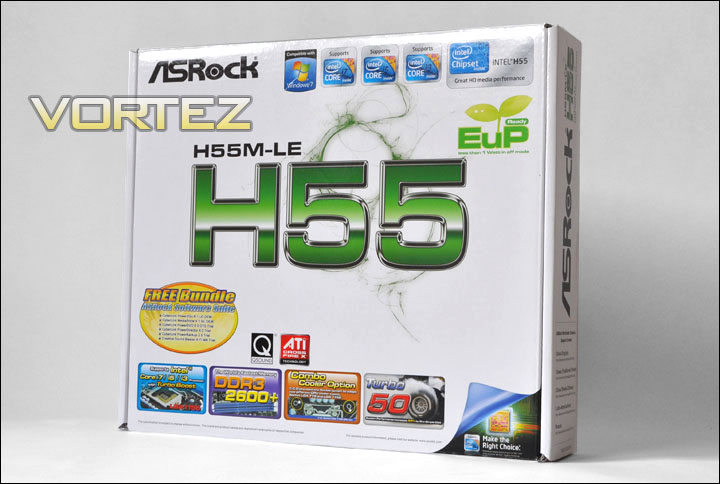
ASRock H55M-LE packaging
Included within the box, there are items that you would typically expect. Such as:
• ASRock Quick Installation Guide
• ASRock H55M-LE Software/Driver Disc
• 2x Serial ATA Data cables
• 1x I/O Shield
Bundled with the software is CyberLink DVD Suite – OEM as well as Creative Sound Blaster X-Fi MB trial. Providing a good kick-start to HTCP usage.
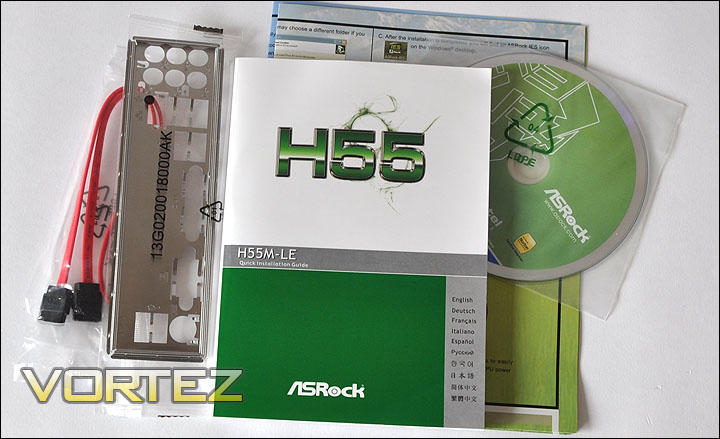
The small bundle included with the H55M-LE
The motherboard is protected within an anti-static bag, removing this reveals the H55M-LE. This board might be small, but it certainly has plenty of features. Included are 2x legacy PCI slots for older devices such as sound cards. Around the CPU socket are two sets of mounting holes for each of the 4 corners. This is because the H55M-LE offers the consumer both LGA1156 and LGA1366 designed coolers. For a micro ATX board everything seems to be well spaced out, and there is nothing lacking.
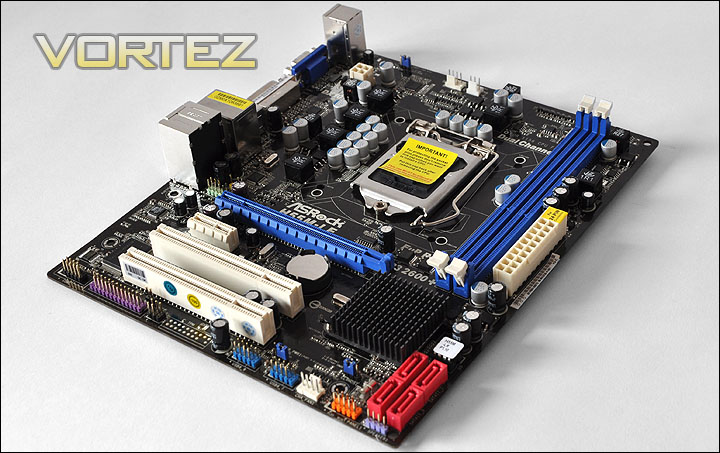
An overview of the H55M-LE
Closer Look
First off, lets take a quick look at the I/O panel. Here we have PS2 support for keyboards, and on the same unit 2xUSB2 ports. With regards to graphics support the H55M-LE comes with onboard VGA socket and an onboard DVI connector. Moving along, there are a further 4xUSB2 ports and a single RJ45 that provides Gigabit LAN connectivity. Next to this we have the audio input/output sustained by the VIA VT1718S chipset.
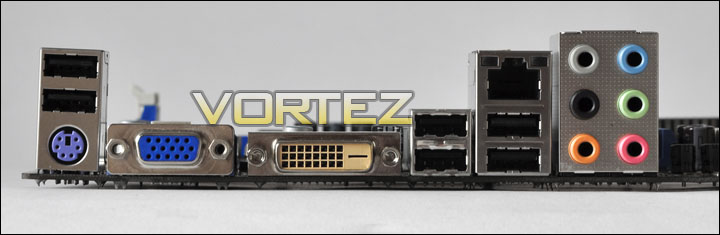
The I/O panel on the motherboard
Looking at the CPU region there are plenty of capacitors and phases. The H55M-LE requires the 4-pin power connector and in the image below you can see the dual CPU mounting holes for attaching LGA1156/LGA1366 CPU coolers.
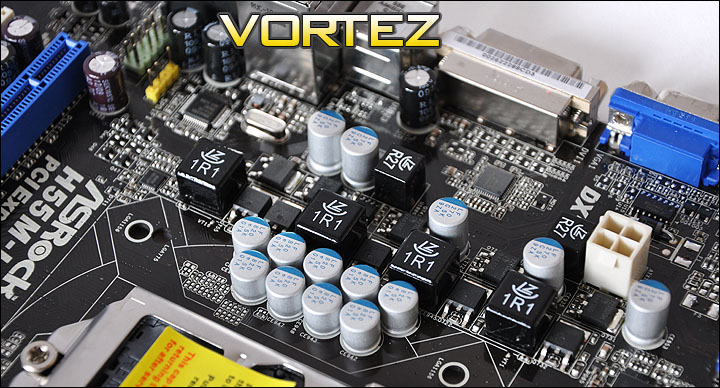
CPU Phase/power and 4-pin power connector
Dual channel is the LGA1156’s forte, so the H55M-LE comes with two blue dual channel DDR3 slots that will host up to 2600+ (OC) memory. As with most motherboards the 24-pin connector socket is positioned right next to the DDR3 sockets.
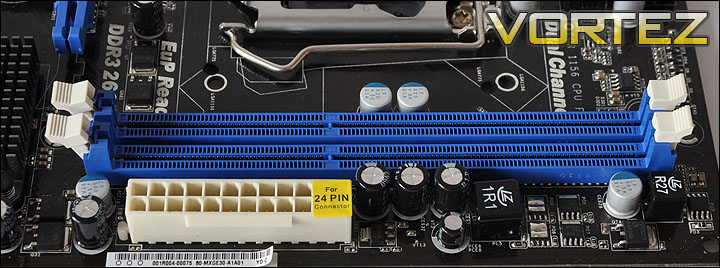
Dual channel DDR3 – up to 2600+(OC)
Further down the board there are just 4 SATA-II ports each supporting 3 Gb/s transfer rate. This should be enough for those wanting to build a HTCP. This board doesn’t support RAID though. Immediately above the SATA ports is the heatsink that is placed onto the H55 chip for PCH. Resetting the CMOS on the H55M-LE requires the traditional method of moving a jumper around.
There are two fan header 4-pin sockets on the H55M-LE. This is not including the CPU fan header of course. These two sockets are position at the very bottom of the board and at the very top (near the CPU socket). Beside the fan header at the bottom of the board are two USB headers that will supply USB2.0 functionality.
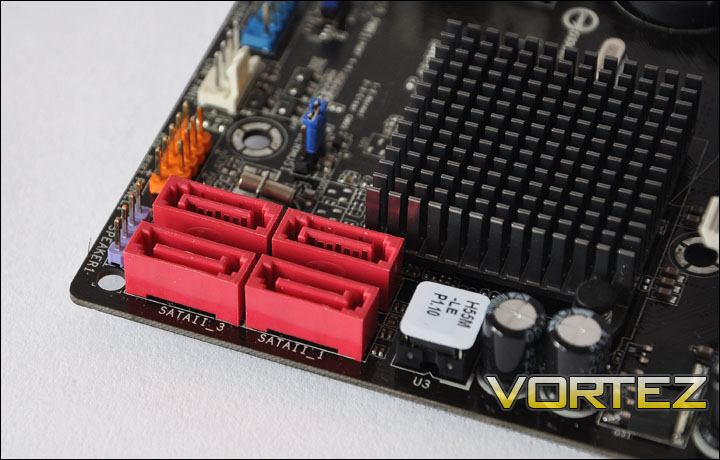
SATA ports, heatsink for H55 and USB headers
Lastly the expansion sockets. Here we have 2 legacy PCI slots, a single PCI-e x1 and a PCI-e 16x slot (blue) for high-end graphics solutions. It goes without saying the H55M-LE is certainly equipped for high-end usage. In the proceeding pages I will be observing the board through a series of benchmarks.
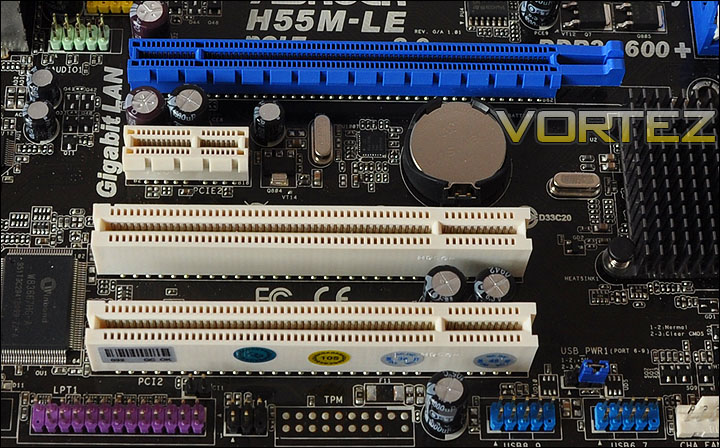
Up-to-date graphics functionality as well as support for older PCI devices
Software
As with most motherboards you can buy today, the H55M-LE comes with a fully fledged software suite that offers a lot of functionality. Aside from the drivers for chipset, audio, lan and other aspects of the ASRock board, there is a software suite we can take advantage of when booting up the included disc.
On this disc there is Norton Internet Security, Adobe Reader, Intel Turbo Boost Monitor, Creative Sound Blaster X-Fi Trial – which you can use to enhance the system especially if you are planning a HTCP build and lastly Cyberlink DVD Suite. Quite a nice little bundle there, but be warned, Norton, Creative and Cyberlink software are all trials and require subscription for the full packages.
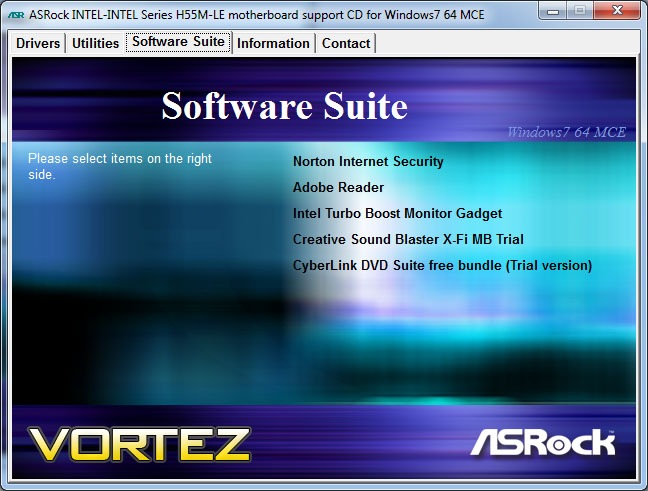
Software Suite that comes with the ASRock H55M-LE
Within the Utilities tab there is a whole host of applications such as the OC Tuner, allowing you to alter the overclock on the fly. Other useful tools such as Instant Boot are also present, allowing you to get into important applications from bootup within 10 seconds.
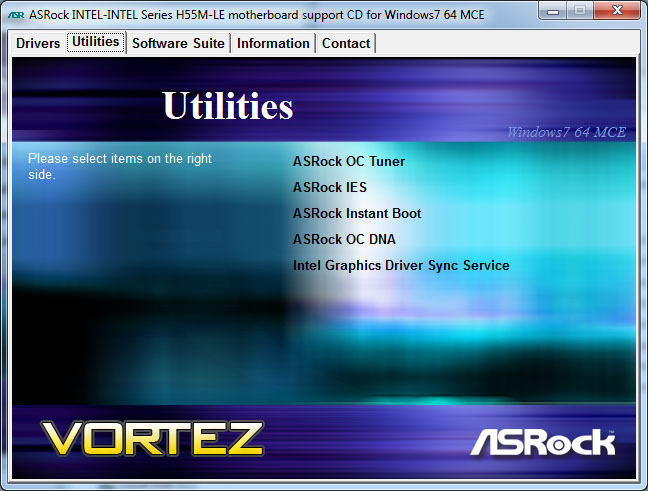
Utilities available offer a lot of usability
Testing and Overclocking
Whilst the H55M-LE isn’t considered a motherboard with overclocking as its primary objective it doesn’t hurt to try to ascertain how far this board will go with regards to performance overclocking. Afterall, coming in at a lower price-tag the H55 chipset and Core i5/i7 offerings could provide some ‘bang for buck’ – allowing us to push it up to a configuration that at stock would cost much more.
For this overclocking exercise, I simply disabled some of the settings in CPU Configuration and applied a ‘Manual’ modification within the BIOS. I then began notching the BCLK up. CPU voltages were set at 1.4v, VTT 1.35v and I made sure the DRAM frequency and voltage was below stock parameters (so that we don’t head into instability).
I spent what seemed like an entire day altering BIOS settings to try to squeeze out of the Intel Core i7 875K as much bus frequency as possible. But I soon realised that I was at the very peak of overclocking performance when I hit 3.74GHz. Prior to getting to the concluding result via overclocking I had tried many different combinations of CPU voltage, VTT and multiplier but I seemed to hit a wall at 3.74GHz.
The settings for the overclock where:
CPU Voltage 1.4v
DRAM Voltage 1.65v
VTT Voltage 1.36v
BCLK 150
Multiplier 25
Whilst this overclock isn’t especially phenomenal, it is conservative and shows that there is some headroom for overclocking. The great thing about the Intel Core i7 875K that was used is that it has unlocked multipliers so any combination could and was tried.
Test Setup
CPU Intel Core i7 875K (2.93GHz)
CPU Cooler Alpenfohn Matterhorn
Motherboard ASRock H55M-LE
Memory 4GB Mushkin EM3-10666 DDR3
Graphics XFX HD5870
HDD 250GB Samsung Spinpoint SATA-II
PSU OCZ Fatal1ty 750W
To understand how well the ASRock H55M-LE performs the below benchmarks will be conducted, both at stock CPU speed (2.93GHz) and the above overclocked speed of 3.74GHz.
Testing Suite
Windows 7 Professional 64-bit
Everest Ultimate
Cinebench
3DMark Vantage x64
SiSoftware SANDRA 2009
Unreal Tournament 3
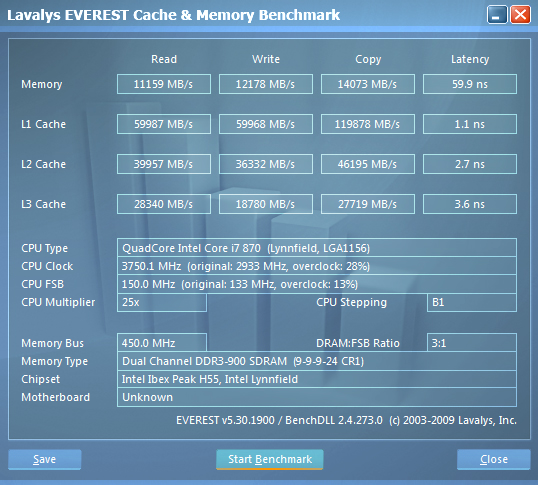
EVEREST Ultimate 5.50
This is a tool used primarily as a system diagnostic application. For years now it has been a reliable source for generating up to date information on systems. Not only does it generate information about the system but there is a benchmark division to Everest. In particular we will be looking at the Cache/memory benchmark.
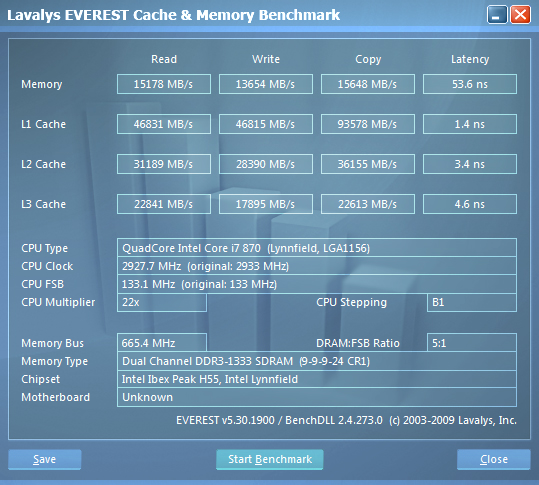
Overclock 3.74GHz
Cinebench
This is powerful real-world test suite that analyses system performance. It is used by professionals the world over to measure full system performance – results are scored in ‘points’.
3DMark Vantage x64
Needing little introduction the 3DMark suite is notorious amongst hardware enthusiasts around the world for measuring 3D performance of a computer system. It is a comprehensive benchmarking tool and our tests would be incomplete without including this suite.
SiSoftware SANDRA
SANDRA isn’t always a benchmark that is included in hardware reviews but I believe it shouldn’t be ignored. SANDRA provides a vigorous package that tests your system in a rather large array of benchmarks. There are many aspects of benchmark that can be executed. We will be considering – CPU, memory/motherboard tests.
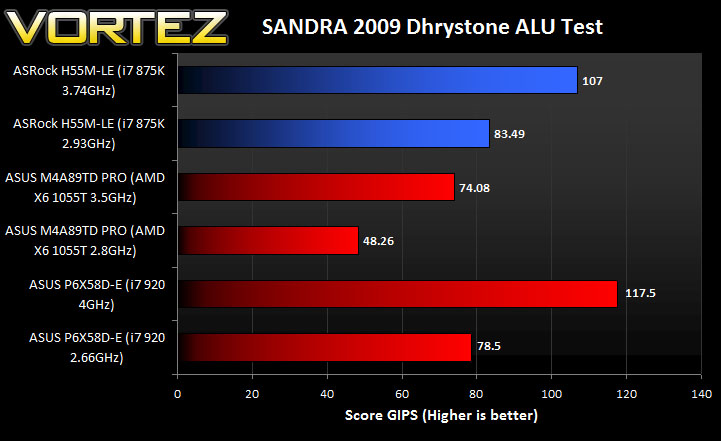
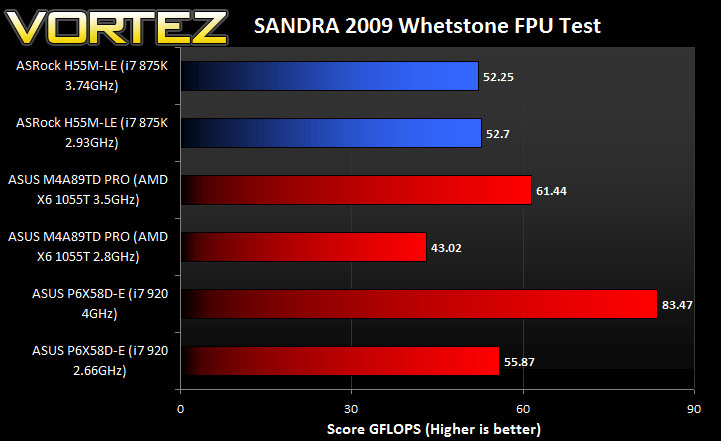
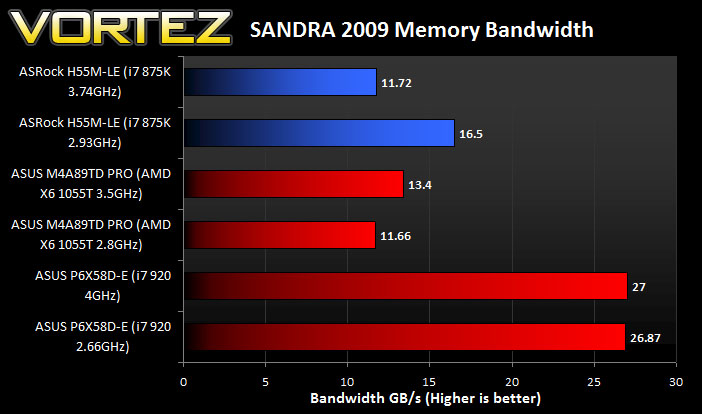
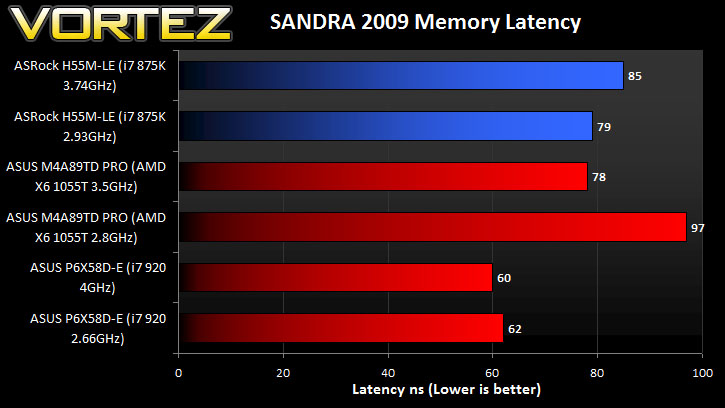
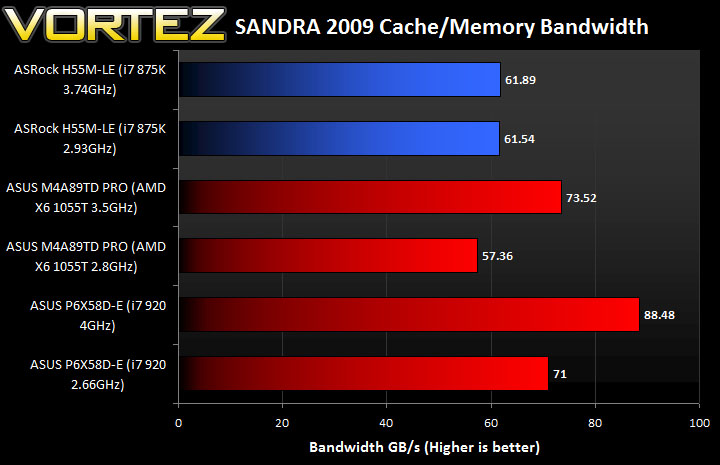
Unreal Tournament 3 Benchmark
http://downloads.guru3d.com/Unreal-Tournament-3-Benchmark-Tool-download-1816.html
Unreal Tournament is a popular FPS for the PC and has always featured highly in benchmarks. It’s engine is testing, and will endeavour to separate performance where performance is due. This benchmark tool by Guru3D allows benchmarks on many maps/environments within the game and outputs minimum, maximum and average FPS making it an excellent tool to determine performance gains.
Power Consumption
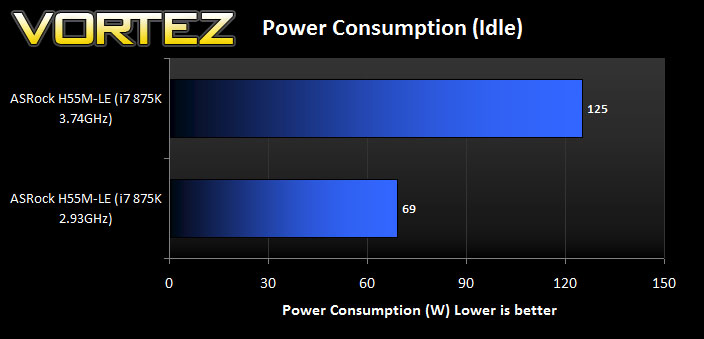
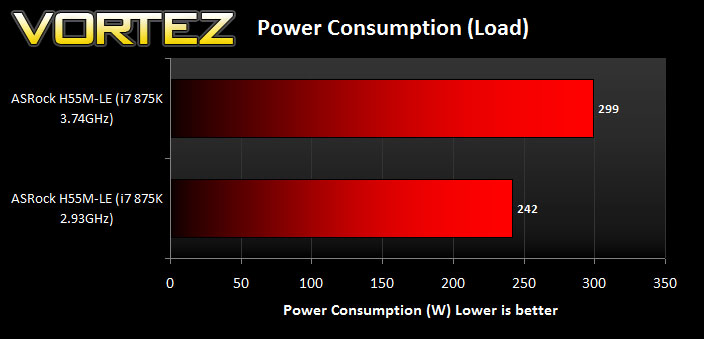
The power consumption is measured by an energy monitor. Idle consumption is monitored upon resting within Windows without any applications open. Load consumption is then measured by a sustained 3DMark Vantage test. The highest wattage throughout the test is noted.
Conclusion
If you want to move to LGA1156 you are faced with the decision between H55 or P55 chipsets. The H55 offers elements that the P55 doesn’t such as a lower price-tag, integrated VGA and so on. So for those on a budget, and hoping to build a HTPC perhaps, the H55 chipset is a good choice.
Today we have seen some impressive performance from such a small motherboard. The ASRock H55M-LE is able to harbour up to DDR3-2600, has a 16x PCIe lane, and fully supports Intel’s Core i3, i5 and i7 lineup of 1156 processors. Overclocking wasn’t as impressive as I had imagined, (although there are enough tools to get you on the way to boosting the CPU both in BIOS and windows) the H55M-LE allowed for a 28% overclock which is fairly conservative. Pushing the chip further would require a decent cooling solution – often the larger of the heatsinks are essential nowdays for a more extreme overclock.
At around £50 you can’t really go wrong with this board, it may not come with the exclusive features we have become accustomed with in the ASUS, MSI and Gigabyte high-performance representatives but then the H55M-LE isn’t designed for this kind of usage.
Pros
+ Amazing value
+ Good performance
+ Ideal for HTPC
+ Takes LGA1366 CPU Coolers
Cons
– Restricted overclock
+ Amazing value
+ Good performance
+ Ideal for HTPC
+ Takes LGA1366 CPU Coolers
Cons
– Restricted overclock