Aimed at content creators, designers and professionals, the TRX40 Creator is packed with high-performance features with a reasonable price-tag. Should this be on the AMD Threadripper build list?

Product on Review: TRX40 Creator
Manufacturer: ASRock
Street Price: $449 USD
AMD’s Ryzen Threadripper Gen. 3 is predominantly intended for designers and content creators. A brief look at the feature-set quickly confirms this. Quad-channel DDR4, PCI Express 4.0 driven SSDs and USB 3.2 Gen2x2 are all technologies/standards that such a user will undoubtedly monopolize on.
In a bid to dial down on dazzling RGB lighting, ASRock’s new TRX40 Creator opts for a clean aesthetic which is more in keeping with the professional. Along with the sleek styling comes a plethora of features and tools which should satisfy the needs of those wanting to knuckle down and get creative. One of the standout features is 10GbE networking via AQANTIA – offering blazing fast transfer rates across the network.
Can the TRX40 Creator tick all the boxes for those in the design field? Let’s find out!
About ASRock
ASRock Inc. is established in 2002, specialized in the field of motherboards. ASRock strives to build up its own brand. With the 3C design concept, “Creativity, Consideration, Cost-effectiveness”, the company explores the limit of motherboards manufacturing while paying attention on the eco issue at the same time, developing products with the consideration of eco-friendly concept.
ASRock has been growing fast and become world third largest motherboard brand with headquarter in Taipei, Taiwan and branches in Europe and the USA. The young and vibrant company targets from mainstream to enthusiast MB segments for different kinds of users, owning reputation around the world market with its reliability and proficiency.
ASRock has been growing fast and become world third largest motherboard brand with headquarter in Taipei, Taiwan and branches in Europe and the USA. The young and vibrant company targets from mainstream to enthusiast MB segments for different kinds of users, owning reputation around the world market with its reliability and proficiency.
Technical Specifications
Below are the technical specifications concerning the TRX40 Creator:CPU
– Supports AMD Socket sTRX4
– Intersil Digital PWM
– 8 Power Phase design
– Supports ASRock Hyper BCLK Engine II
Chipset
– AMD TRX40
Memory
– Quad Channel DDR4 Memory Technology
– 8 x DDR4 DIMM Slots
– Supports DDR4 4666(OC)+ / 4600(OC) / 4533(OC) / 4466(OC) / 4400(OC) / 4333(OC) / 4266(OC) / 4200(OC) / 4133(OC)
4000(OC) / 3866(OC) / 3800(OC) / 3733(OC) / 3600(OC) / 3466(OC) / 3200 / 2933 / 2667
2400 / 2133 ECC & non-ECC, un-buffered memory (U-DIMM)
– Max. capacity of system memory: 256GB
– 15μ Gold Contact in DIMM Slots
Audio
– 7.1 CH HD Audio (Realtek ALC4050H+ALC1220)
– Premium Blu-ray Audio support
– Supports Surge Protection
– Supports Purity Sound™ 4
– Nichicon Fine Gold Series Audio Caps
– NE5532 Premium Headset Amplifier for Front Panel Audio Connector (Supports up to 600 Ohm headsets)
– Pure Power-In
– Direct Drive Technology
– PCB isolate shielding
– Impedance Sensing on Rear Out port
– Individual PCB Layers for R/L Audio Channel
– Gold Audio Jacks
– 15μ Gold Audio Connector
– Supports DTS Connect
LAN
1 x 10 Gigabit LAN 100/1000/2500/5000/10000 Mb/s (AQUANTIA® AQC107):
– Supports Lightning/ESD Protection
– Supports PXE
1 x 2.5 Gigabit LAN 10/100/1000/2500 Mb/s (Dragon RTL8125AG):
– Supports Dragon 2.5G LAN Software
– Smart Auto Adjust Bandwidth Control
– Visual User Friendly UI
– Visual Network Usage Statistics
– Optimized Default Setting for Game, Browser, and Streaming Modes
– User Customized Priority Control
– Supports Wake-On-LAN
– Supports Lightning/ESD Protection
– Supports Energy Efficient Ethernet 802.3az
– Supports PXE
Wireless LAN
– Intel® 802.11ax WiFi Module
– Supports IEEE 802.11a/b/g/n/ax
– Supports Dual-Band (2.4/5 GHz)
– Supports WiFi6 802.11ax (2.4Gbps)
– 2 antennas to support 2 (Transmit) x 2 (Receive) diversity technology
– Supports Bluetooth 5.0 + High speed class II
– Supports MU-MIMO
Slots
– 4 x PCI Express 4.0 x16 Slots (PCIE1/PCIE2/PCIE3/PCIE4: single at x16 (PCIE1); dual at x16 (PCIE1) / x16 (PCIE3); triple at x16 (PCIE1) / x16 (PCIE3) / x8 (PCIE4); quad at x16 (PCIE1) / x8 (PCIE2) / x16 (PCIE3) / x8 (PCIE4))*
– Supports AMD 4-Way CrossFireX™, 3-Way CrossFireX™ and CrossFireX™
– Supports NVIDIA® 4-Way SLI™, 3-Way SLI™ and SLI™
– Support NVIDIA® SLI™ with NVIDIA® Quadro graphics cards
– Supports NVIDIA® NVLink™ with dual NVIDIA® GeForce RTX series graphics cards**
– 1 x Vertical M.2 Socket (Key E) with the bundled WiFi-802.11ax module (on the rear I/O)
– 15μ Gold Contact in VGA PCIe Slots (PCIE1 and PCIE3)
Storage
– 8 x SATA3 6.0 Gb/s Connectors, support RAID (RAID 0, RAID 1 and RAID 10), NCQ, AHCI and Hot Plug
– 2 x Hyper M.2 Sockets (M2_1 and M2_2), support M Key type 2260/2280 M.2 PCI Express module up to Gen4x4 (64 Gb/s)*
– 1 x Hyper M.2 Socket (M2_3), supports M Key type 2230/2242/2260/2280/22110 M.2 SATA3 6.0 Gb/s module and M.2 PCI Express module up to Gen4x4 (64 Gb/s)
Connector
– 1 x TPM Header
– 1 x Power LED and Speaker Header
– 2 x RGB LED Headers*
– 2 x Addressable LED Headers**
– 1 x CPU Fan Connector (4-pin)***
– 1 x CPU/Water Pump Fan Connector (4-pin) (Smart Fan Speed Control)****
– 3 x Chassis/Water Pump Fan Connectors (4-pin) (Smart Fan Speed Control)*****
– 1 x 24 pin ATX Power Connector (Hi-Density Power Connector)
– 2 x 8 pin 12V Power Connectors (Hi-Density Power Connector)
– 1 x 6 pin 12V Power Connector (Hi-Density Power Connector)
– 1 x Front Panel Audio Connector (15μ Gold Audio Connector)******
– 1 x Right Angle Front Panel Audio Connector******
– 1 x USB 2.0 Header (Supports 2 USB 2.0 ports) (Supports ESD Protection)
– 2 x USB 3.2 Gen1 Headers (Support 4 USB 3.2 Gen1 ports) (Supports ESD Protection)
– 1 x Front Panel Type C USB 3.2 Gen2 Header (Supports ESD Protection)
– 1 x Dr. Debug with LED
– 1 x Power Button
– 1 x Reset Button
– 1 x CPU Xtreme OC Switch
Rear Panel I/O
– 2 x Antenna Ports
– 1 x PS/2 Mouse/Keyboard Port
– 1 x Optical SPDIF Out Port
– 2 x USB 3.2 Gen2 Type-A Ports (10 Gb/s) (Supports ESD Protection)*
– 1 x USB 3.2 Gen2x2 Type-C Port (20 Gb/s) (Supports ESD Protection)
– 4 x USB 3.2 Gen1 Ports (Supports ESD Protection)
– 2 x RJ-45 LAN Ports with LED (ACT/LINK LED and SPEED LED)
– 1 x Clear CMOS Button
– 1 x BIOS Flashback Button
– HD Audio Jacks: Rear Speaker / Central / Line in / Front Speaker / Microphone (Gold Audio Jacks)
Accessories
– Quick Installation Guide, Support CD, I/O Shield
– 4 x SATA Data Cables
– 1 x ASRock SLI_HB_Bridge_3S Card
– 1 x ASRock WiFi 2.4/5 GHz Antenna
– 3 x Screws for M.2 Sockets
– 3 x Standoffs for M.2 Sockets
Hardware Monitor
– Temperature Sensing: CPU, CPU/Water Pump, Chassis/Water Pump Fans
– Fan Tachometer: CPU, CPU/Water Pump, Chassis/Water Pump Fans
– Quiet Fan (Auto adjust chassis fan speed by CPU temperature): CPU, CPU/Water Pump, Chassis/Water Pump Fans
– Fan Multi-Speed Control: CPU, CPU/Water Pump, Chassis/Water Pump Fans
– Voltage monitoring: +12V, +5V, +3.3V, CPU Vcore, CPU VDDCR_SOC, DRAM, VPPM, PREM VDDCR_SOC, +1.8V
Form Factor
– ATX Form Factor: 12.0-in x 9.6-in, 30.5 cm x 24.4 cm
– 8 Layer PCB
– 2oz Copper PCB
– Supports AMD Socket sTRX4
– Intersil Digital PWM
– 8 Power Phase design
– Supports ASRock Hyper BCLK Engine II
Chipset
– AMD TRX40
Memory
– Quad Channel DDR4 Memory Technology
– 8 x DDR4 DIMM Slots
– Supports DDR4 4666(OC)+ / 4600(OC) / 4533(OC) / 4466(OC) / 4400(OC) / 4333(OC) / 4266(OC) / 4200(OC) / 4133(OC)
4000(OC) / 3866(OC) / 3800(OC) / 3733(OC) / 3600(OC) / 3466(OC) / 3200 / 2933 / 2667
2400 / 2133 ECC & non-ECC, un-buffered memory (U-DIMM)
– Max. capacity of system memory: 256GB
– 15μ Gold Contact in DIMM Slots
Audio
– 7.1 CH HD Audio (Realtek ALC4050H+ALC1220)
– Premium Blu-ray Audio support
– Supports Surge Protection
– Supports Purity Sound™ 4
– Nichicon Fine Gold Series Audio Caps
– NE5532 Premium Headset Amplifier for Front Panel Audio Connector (Supports up to 600 Ohm headsets)
– Pure Power-In
– Direct Drive Technology
– PCB isolate shielding
– Impedance Sensing on Rear Out port
– Individual PCB Layers for R/L Audio Channel
– Gold Audio Jacks
– 15μ Gold Audio Connector
– Supports DTS Connect
LAN
1 x 10 Gigabit LAN 100/1000/2500/5000/10000 Mb/s (AQUANTIA® AQC107):
– Supports Lightning/ESD Protection
– Supports PXE
1 x 2.5 Gigabit LAN 10/100/1000/2500 Mb/s (Dragon RTL8125AG):
– Supports Dragon 2.5G LAN Software
– Smart Auto Adjust Bandwidth Control
– Visual User Friendly UI
– Visual Network Usage Statistics
– Optimized Default Setting for Game, Browser, and Streaming Modes
– User Customized Priority Control
– Supports Wake-On-LAN
– Supports Lightning/ESD Protection
– Supports Energy Efficient Ethernet 802.3az
– Supports PXE
Wireless LAN
– Intel® 802.11ax WiFi Module
– Supports IEEE 802.11a/b/g/n/ax
– Supports Dual-Band (2.4/5 GHz)
– Supports WiFi6 802.11ax (2.4Gbps)
– 2 antennas to support 2 (Transmit) x 2 (Receive) diversity technology
– Supports Bluetooth 5.0 + High speed class II
– Supports MU-MIMO
Slots
– 4 x PCI Express 4.0 x16 Slots (PCIE1/PCIE2/PCIE3/PCIE4: single at x16 (PCIE1); dual at x16 (PCIE1) / x16 (PCIE3); triple at x16 (PCIE1) / x16 (PCIE3) / x8 (PCIE4); quad at x16 (PCIE1) / x8 (PCIE2) / x16 (PCIE3) / x8 (PCIE4))*
– Supports AMD 4-Way CrossFireX™, 3-Way CrossFireX™ and CrossFireX™
– Supports NVIDIA® 4-Way SLI™, 3-Way SLI™ and SLI™
– Support NVIDIA® SLI™ with NVIDIA® Quadro graphics cards
– Supports NVIDIA® NVLink™ with dual NVIDIA® GeForce RTX series graphics cards**
– 1 x Vertical M.2 Socket (Key E) with the bundled WiFi-802.11ax module (on the rear I/O)
– 15μ Gold Contact in VGA PCIe Slots (PCIE1 and PCIE3)
Storage
– 8 x SATA3 6.0 Gb/s Connectors, support RAID (RAID 0, RAID 1 and RAID 10), NCQ, AHCI and Hot Plug
– 2 x Hyper M.2 Sockets (M2_1 and M2_2), support M Key type 2260/2280 M.2 PCI Express module up to Gen4x4 (64 Gb/s)*
– 1 x Hyper M.2 Socket (M2_3), supports M Key type 2230/2242/2260/2280/22110 M.2 SATA3 6.0 Gb/s module and M.2 PCI Express module up to Gen4x4 (64 Gb/s)
Connector
– 1 x TPM Header
– 1 x Power LED and Speaker Header
– 2 x RGB LED Headers*
– 2 x Addressable LED Headers**
– 1 x CPU Fan Connector (4-pin)***
– 1 x CPU/Water Pump Fan Connector (4-pin) (Smart Fan Speed Control)****
– 3 x Chassis/Water Pump Fan Connectors (4-pin) (Smart Fan Speed Control)*****
– 1 x 24 pin ATX Power Connector (Hi-Density Power Connector)
– 2 x 8 pin 12V Power Connectors (Hi-Density Power Connector)
– 1 x 6 pin 12V Power Connector (Hi-Density Power Connector)
– 1 x Front Panel Audio Connector (15μ Gold Audio Connector)******
– 1 x Right Angle Front Panel Audio Connector******
– 1 x USB 2.0 Header (Supports 2 USB 2.0 ports) (Supports ESD Protection)
– 2 x USB 3.2 Gen1 Headers (Support 4 USB 3.2 Gen1 ports) (Supports ESD Protection)
– 1 x Front Panel Type C USB 3.2 Gen2 Header (Supports ESD Protection)
– 1 x Dr. Debug with LED
– 1 x Power Button
– 1 x Reset Button
– 1 x CPU Xtreme OC Switch
Rear Panel I/O
– 2 x Antenna Ports
– 1 x PS/2 Mouse/Keyboard Port
– 1 x Optical SPDIF Out Port
– 2 x USB 3.2 Gen2 Type-A Ports (10 Gb/s) (Supports ESD Protection)*
– 1 x USB 3.2 Gen2x2 Type-C Port (20 Gb/s) (Supports ESD Protection)
– 4 x USB 3.2 Gen1 Ports (Supports ESD Protection)
– 2 x RJ-45 LAN Ports with LED (ACT/LINK LED and SPEED LED)
– 1 x Clear CMOS Button
– 1 x BIOS Flashback Button
– HD Audio Jacks: Rear Speaker / Central / Line in / Front Speaker / Microphone (Gold Audio Jacks)
Accessories
– Quick Installation Guide, Support CD, I/O Shield
– 4 x SATA Data Cables
– 1 x ASRock SLI_HB_Bridge_3S Card
– 1 x ASRock WiFi 2.4/5 GHz Antenna
– 3 x Screws for M.2 Sockets
– 3 x Standoffs for M.2 Sockets
Hardware Monitor
– Temperature Sensing: CPU, CPU/Water Pump, Chassis/Water Pump Fans
– Fan Tachometer: CPU, CPU/Water Pump, Chassis/Water Pump Fans
– Quiet Fan (Auto adjust chassis fan speed by CPU temperature): CPU, CPU/Water Pump, Chassis/Water Pump Fans
– Fan Multi-Speed Control: CPU, CPU/Water Pump, Chassis/Water Pump Fans
– Voltage monitoring: +12V, +5V, +3.3V, CPU Vcore, CPU VDDCR_SOC, DRAM, VPPM, PREM VDDCR_SOC, +1.8V
Form Factor
– ATX Form Factor: 12.0-in x 9.6-in, 30.5 cm x 24.4 cm
– 8 Layer PCB
– 2oz Copper PCB
Packaging & First Look
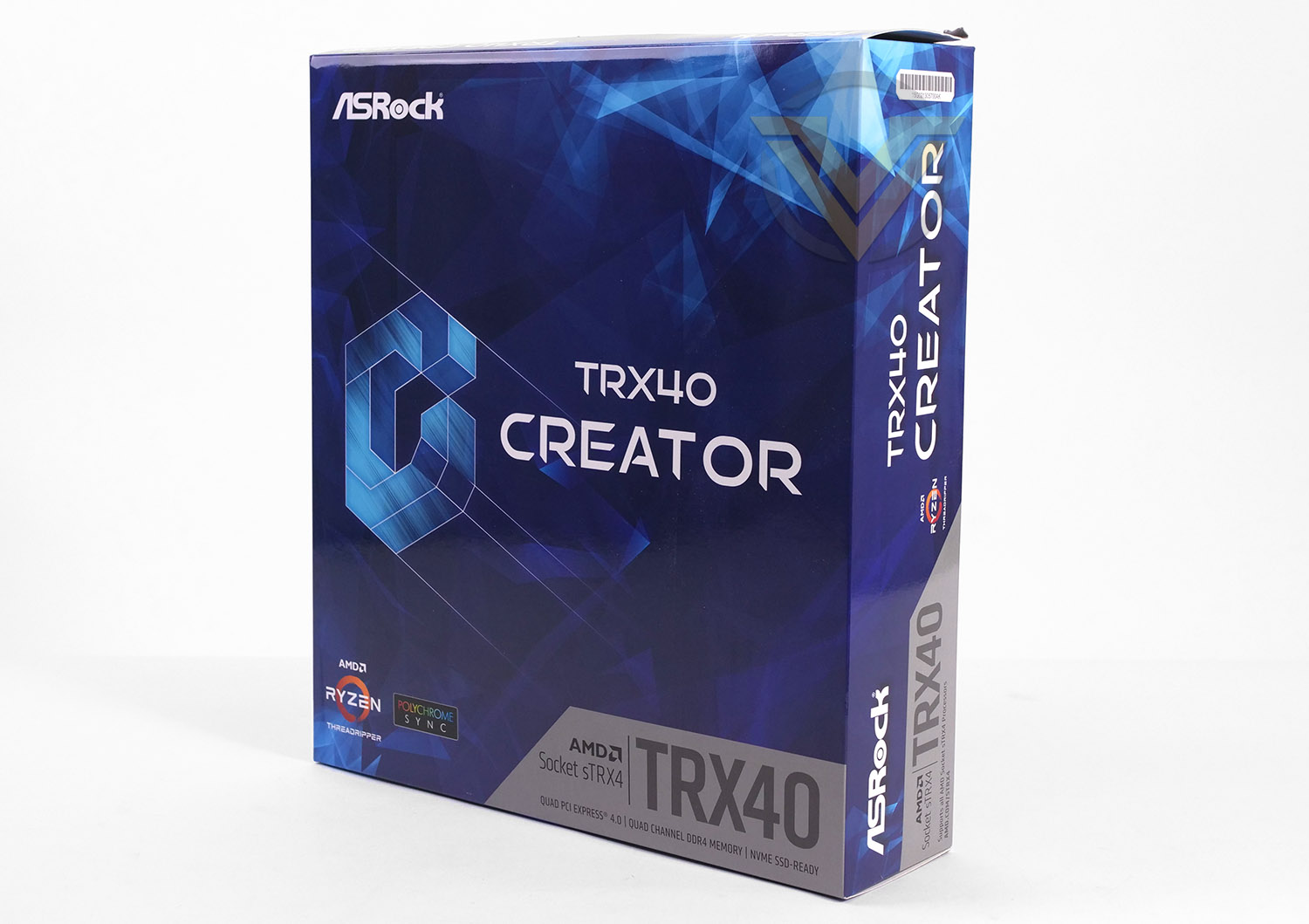
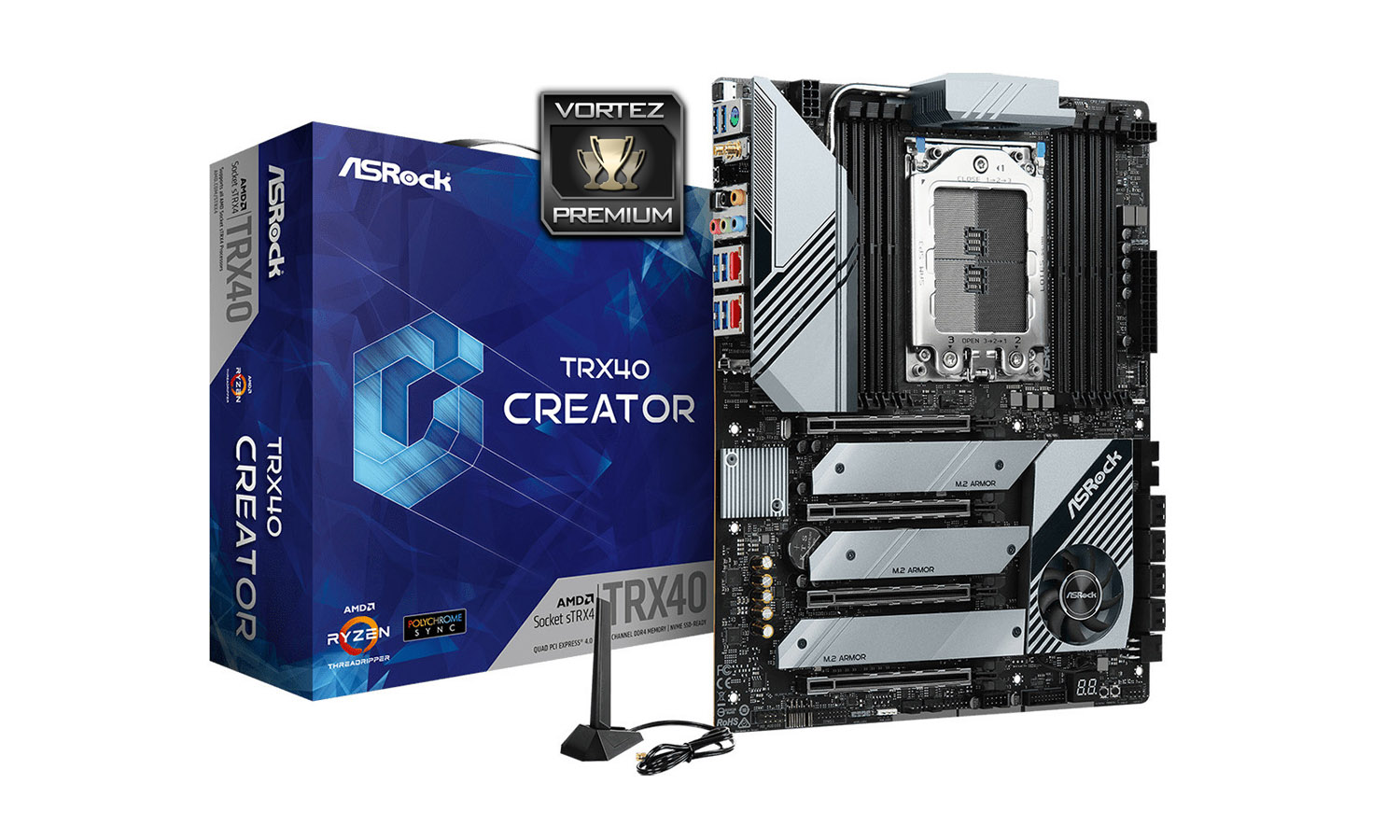
Creator arrives in a professionally designed box which as you would expect lists the features and specifications. The reverse of the packaging reveals a diagram of the board. ASRock has designed the box to have a carry handle at the top for easy transportation.
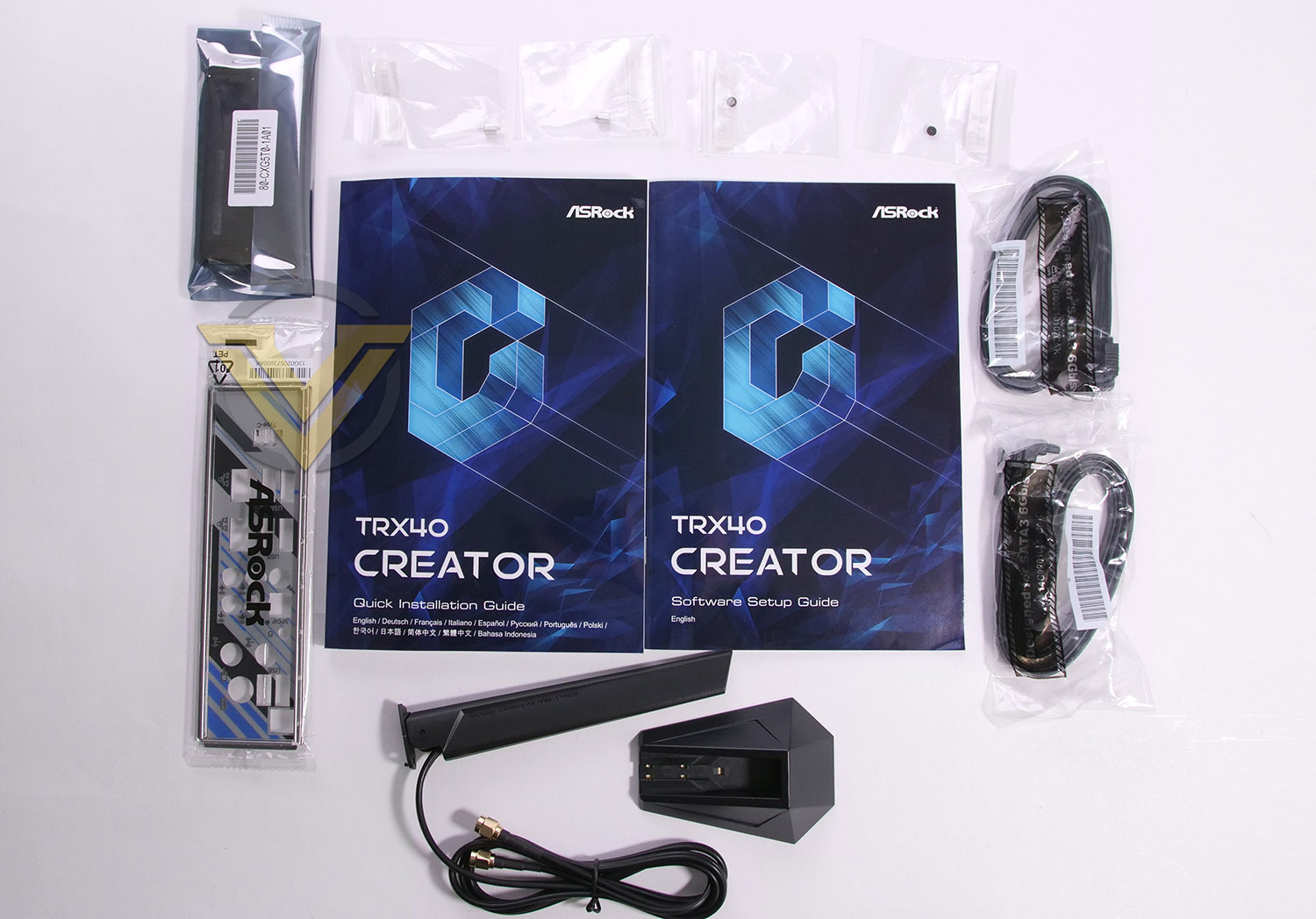
Inside the box there are a small selection if items which form the bundle. These include the following:
– Quick Installation Guide, Support CD, I/O Shield
– 4 x SATA Data Cables
– 1 x ASRock SLI_HB_Bridge_3S Card
– 1 x ASRock WiFi 2.4/5 GHz Antenna
– 3 x Screws for M.2 Sockets
– 3 x Standoffs for M.2 Sockets
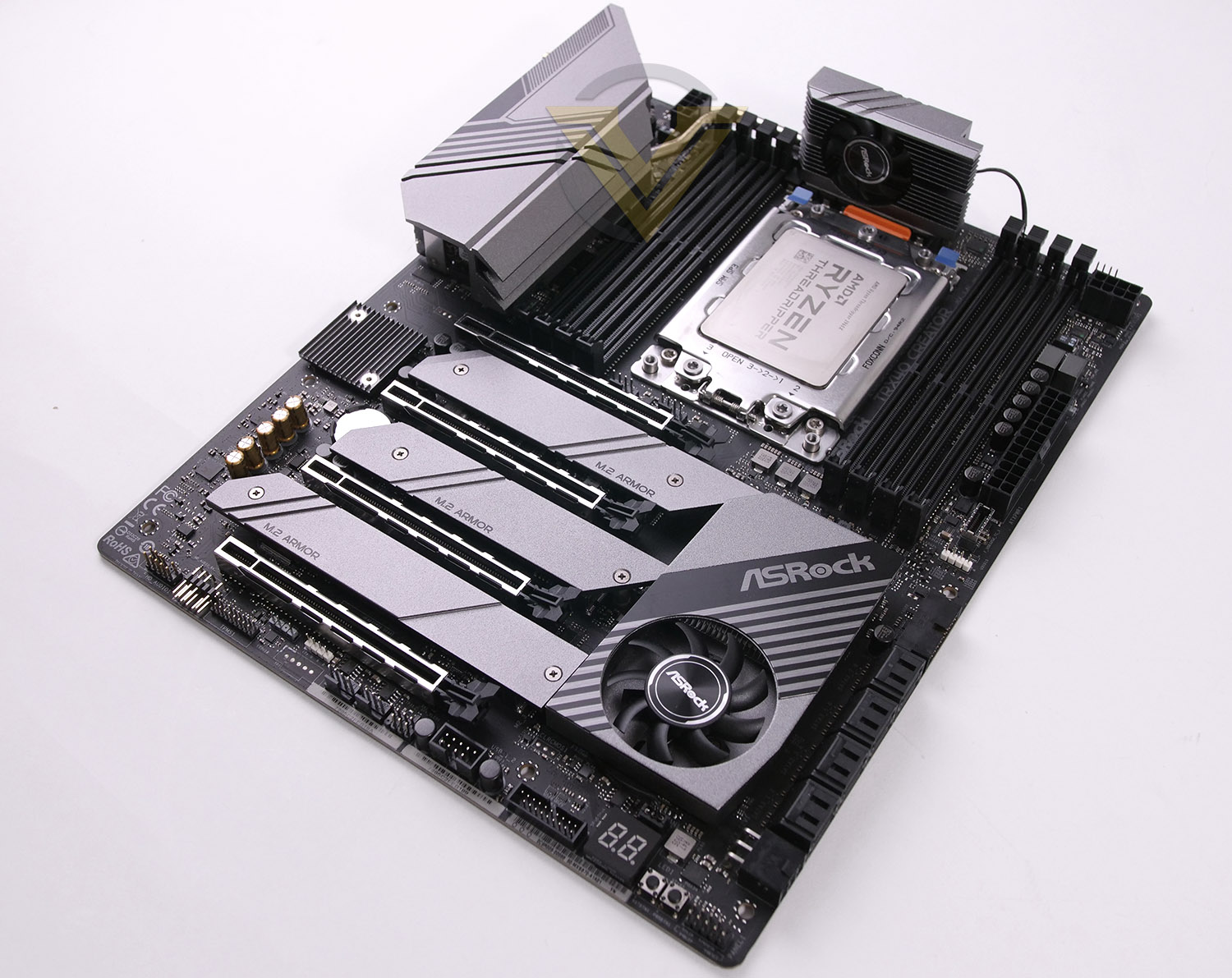
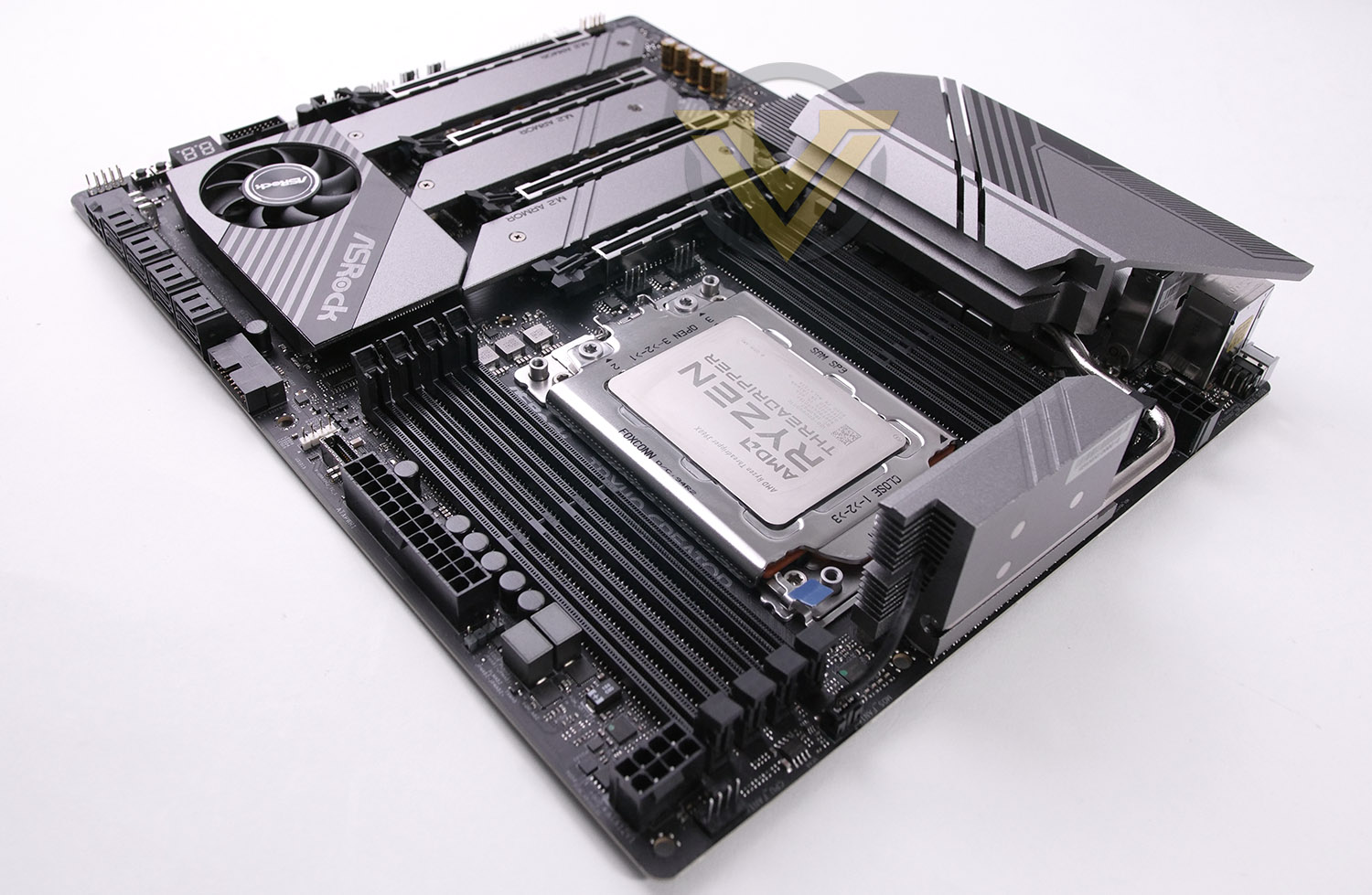
Taking the board out of its packaging reveals the design which lends itself to offering a neutral theme with gunmetal and black used throughout for the heatsinks, ports and slots.
Overall we’re happy with the design that ASRock has adopted for Creator – it skips out on the heavily RGB-lit motherboard which we are accustomed to seeing nowadays.
Creator conforms to the ATX form factor.
Closer Look
Total fan headers: 5
Total RGB headers: 2x Addressable, 2x RGB
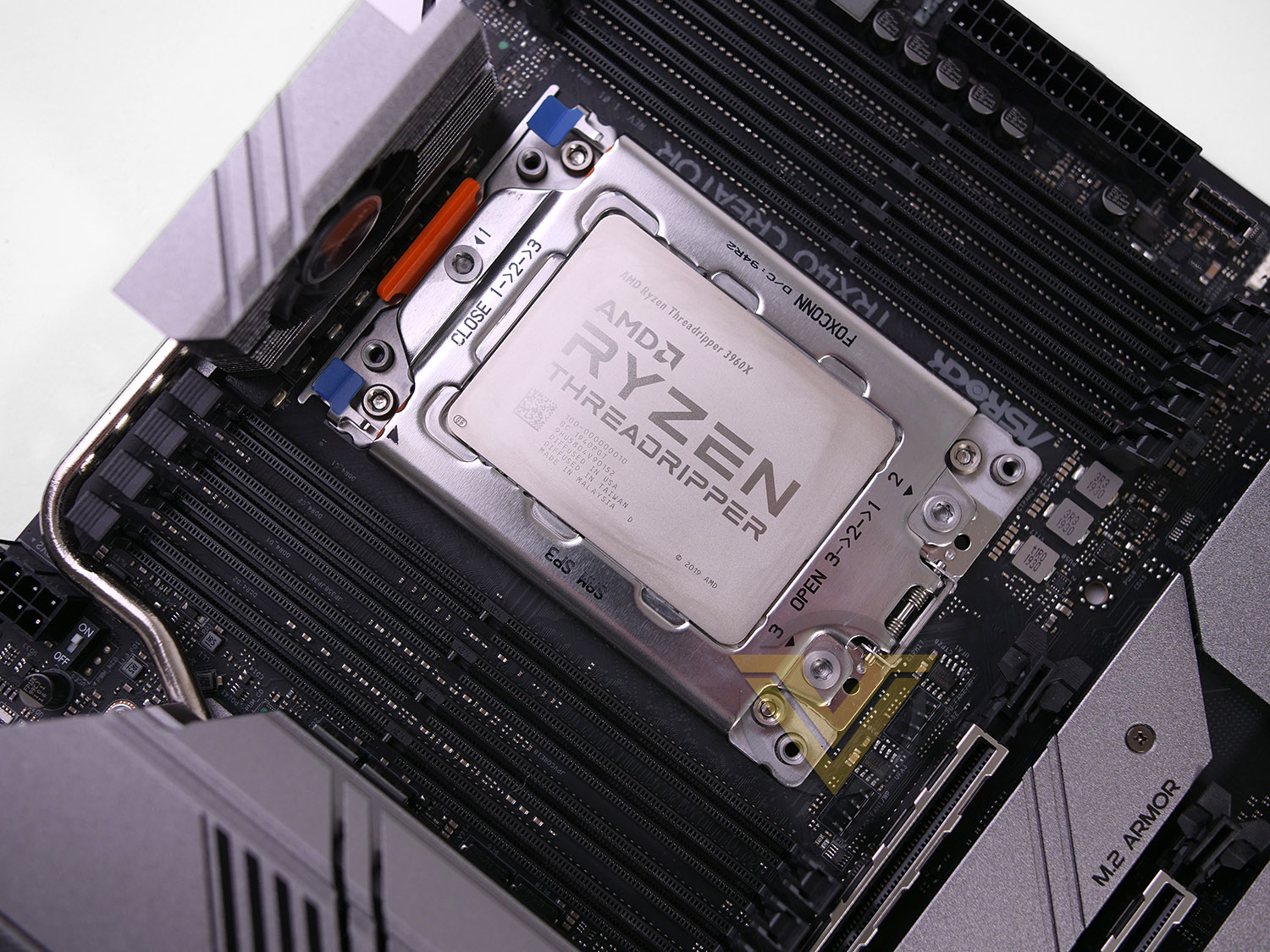
As we move in for a closer look at the features on this board, we first of all arrive at the most important area – Socket sTRX4. While the footprint remains the same as previous generations of Threadripper, this socket is not backwards compatible with TR Gen 1 or 2, however the CPU still benefits from the slot-loading design we’ve experienced before. Such a large surface area for the CPU requires additional thermal paste and a sTRX4 compatible CPU cooler such as the Noctua NH-U14 TR4 SP3.
The CPU has been given 2x 8-pin connectors for power delivery from the PSU – hinting that 3rd Gen. Threadripper demands a lot of juice for sustained loads.
Quad-channel DDR4 finds its way onto our Creator board – supporting up to 256GB and 4666MHz.
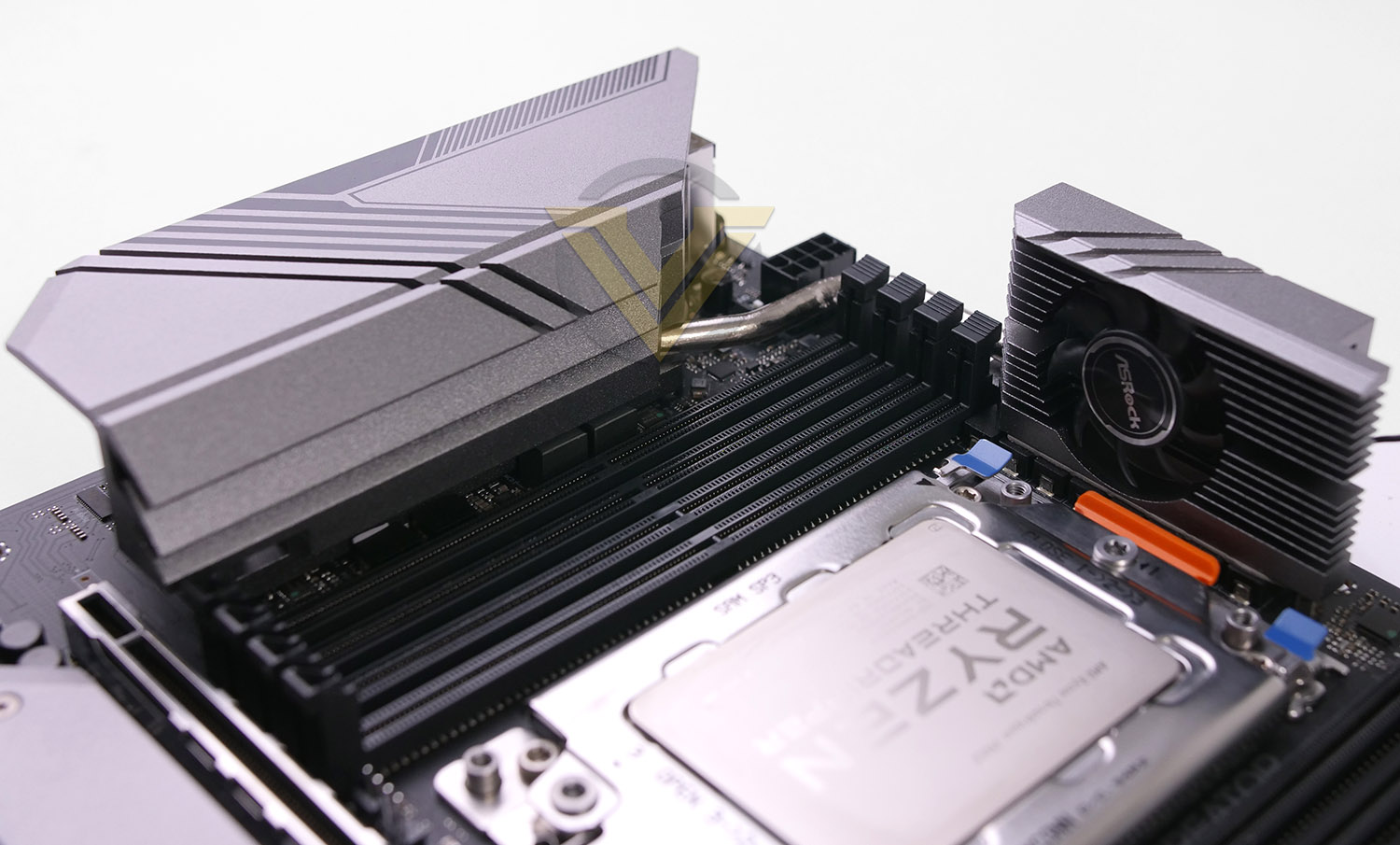
Creator uses an 8-phase design for the CPU delivery. A number of board manufacturers have opted for passive cooling of the VRMs but ASRock has designed on a twin-heatsink design with accompanying cooling fan. This, along with the chipset fan will obviously introduce noise and due to the size of these fans, this can be easily heard. In our benchmark tests we’ll be exploring how effective this cooling system is.
Around the socket we also have the use of ASRock’s Super Alloy components – 90A power chokes, DRMos, Nicihon 12K black CAPs and an 8-layer PCB.
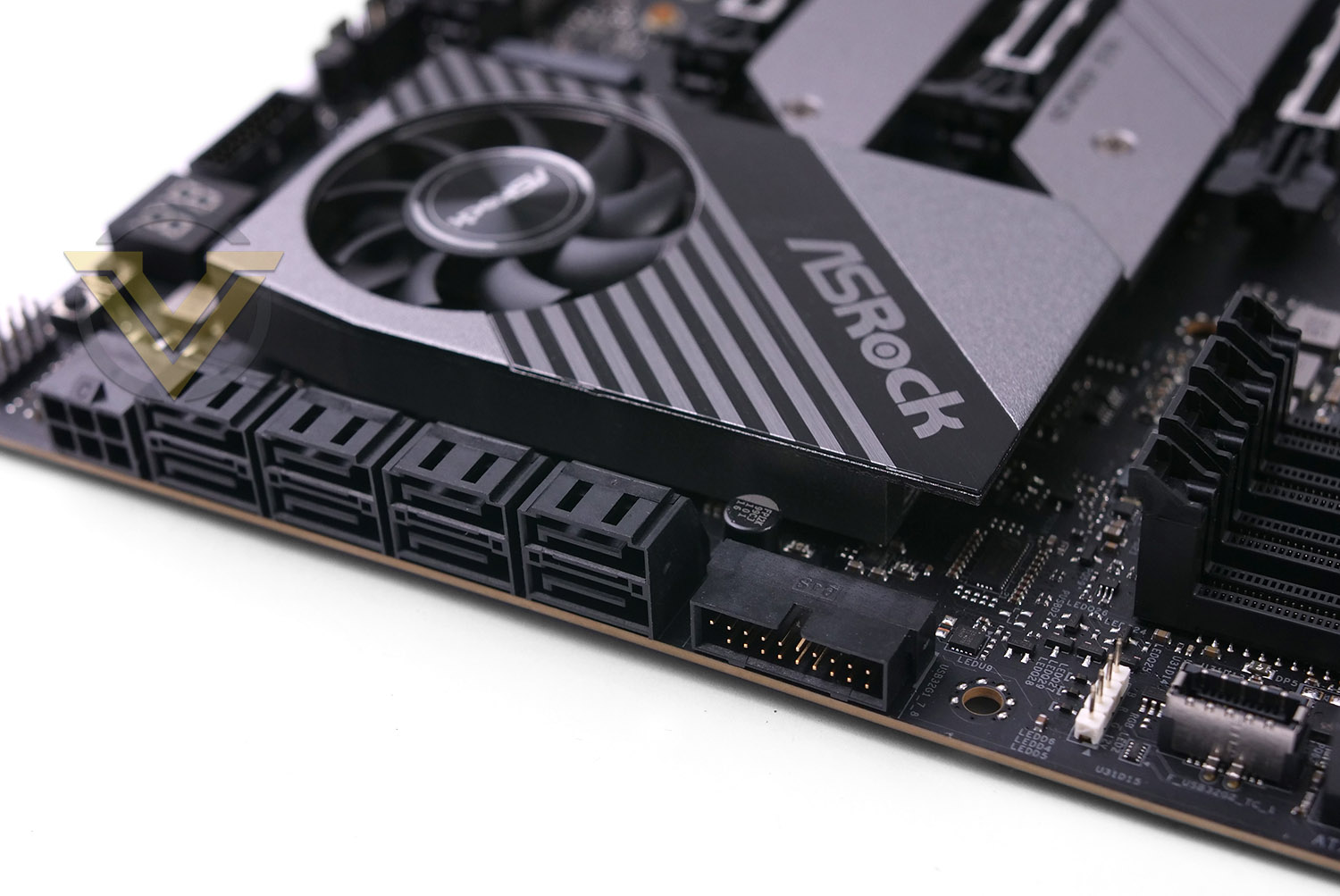
Creator is packed with storage options which include a number of different technologies/standards. For the front panel connectivity we have 1x USB 3.2 Gen 2 (Type-C) and 1x USB 3.2 Gen 1 headers. Next to both of these ports there are 8x SATA 3 (6Gbps) ports and auxiliary PCIe for additional power to the GPU.
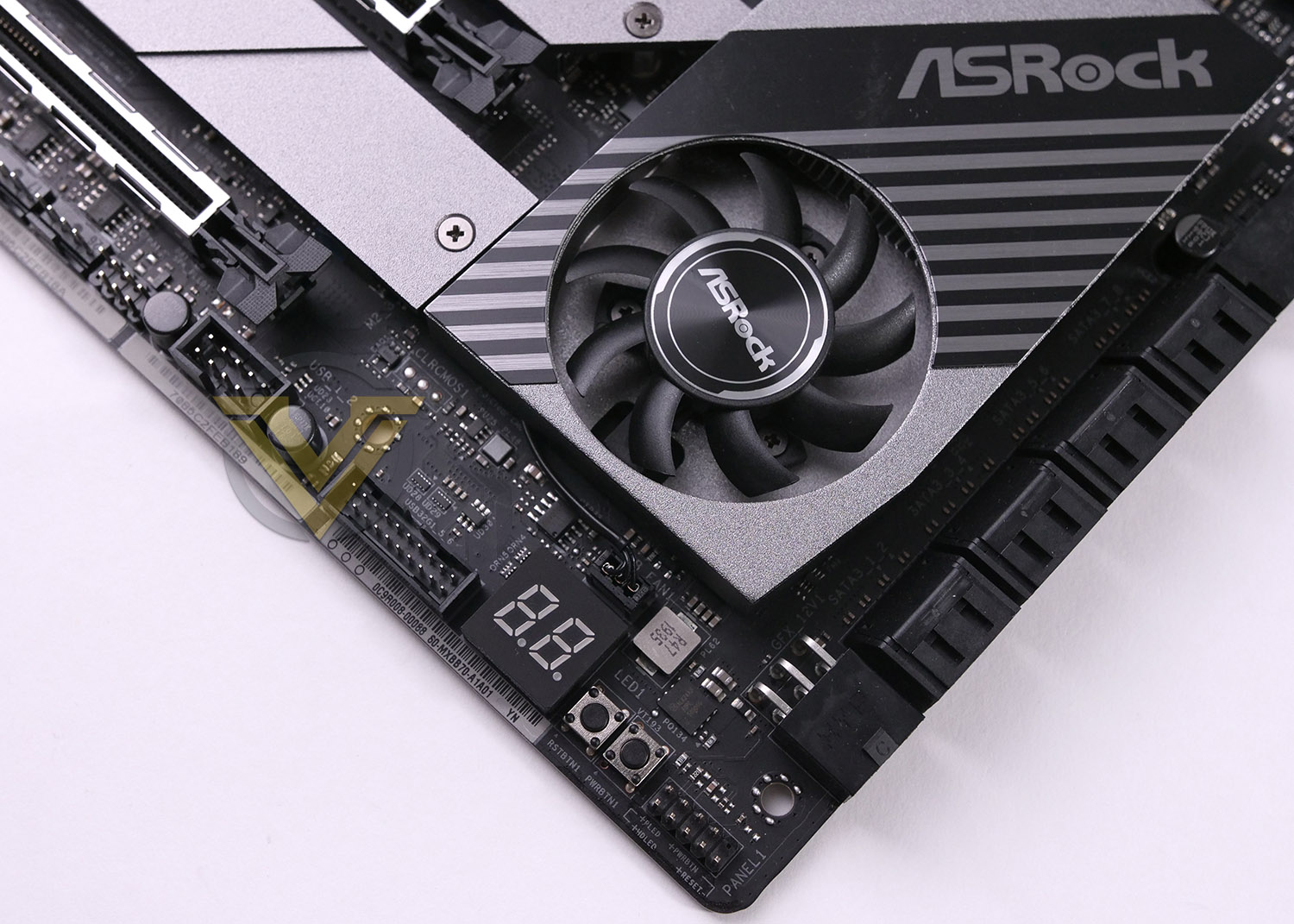
On the other side of the SATA ports we have the TRX40 chipset and a substantial heatsink with integrated cooling fan. TRX40 is a huge leap forwards from the previous X399 chipset inasmuch as it introduces the PCIe 4.0 interface, up to 72 lanes, up to 8x USB 3.2 Gen 2 ports, up to 20x SATA 3 ports and native 3200MHz DDR4 support. As such this chipset needs enhanced cooling as shown above. The only downside to this is that noise emission can be heard from the small fan during sustained loads.
In the bottom corner of the motherboard there is an additional USB 3.2 Gen1 front panel header, LED debug for diagnostics and onboard power/reset buttons.
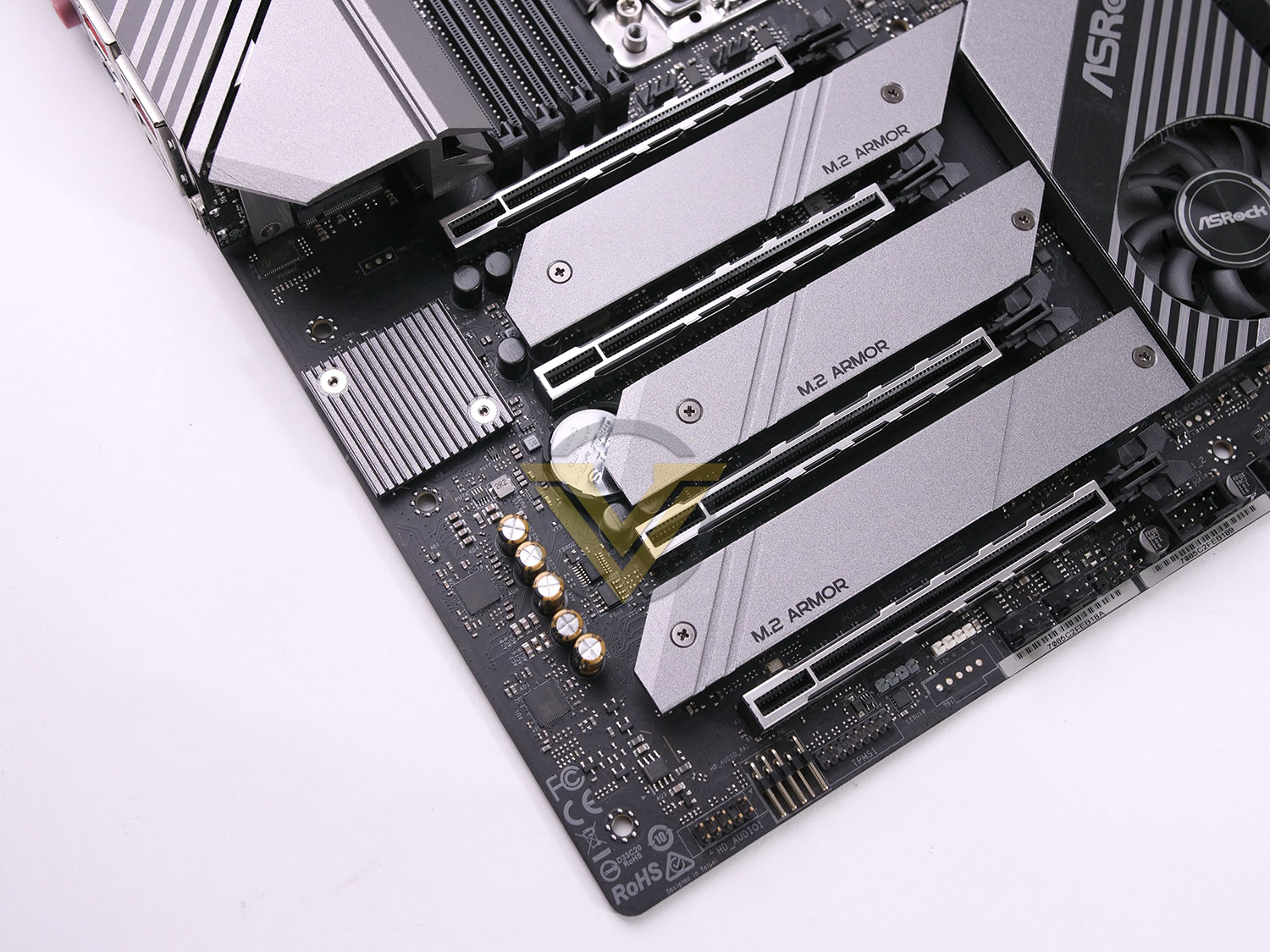
Following in the footsteps of the X570, we have a lineup of 4x PCIe x16 4.0 slots. All of the slots have been given ASRock’s “Steel Slot” treatment and receive extra anchor points for longevity. The modes for each of the PCie are: 16, 8, 16, 8. AMD CrossfireX, NVIDIA NVLink and NVIDIA SLI are all supported.
Underneath the lower PCIe slot there are two headers – one is addressable RGB and the other 12v RGB.
In between each of the slots there are 4x M.2 SSD slots which are obviously PCIe Gen4 x4 ready. ASRock has equipped each slot to feature a full coverage heatsink to dissipate heat.
The audio section is found immediately to the left of this region and combines Realtek’s ALC4050H and ALC1220. ASRock’s audio package is named Purity Sound 4 and we’ve experienced this before on other boards.
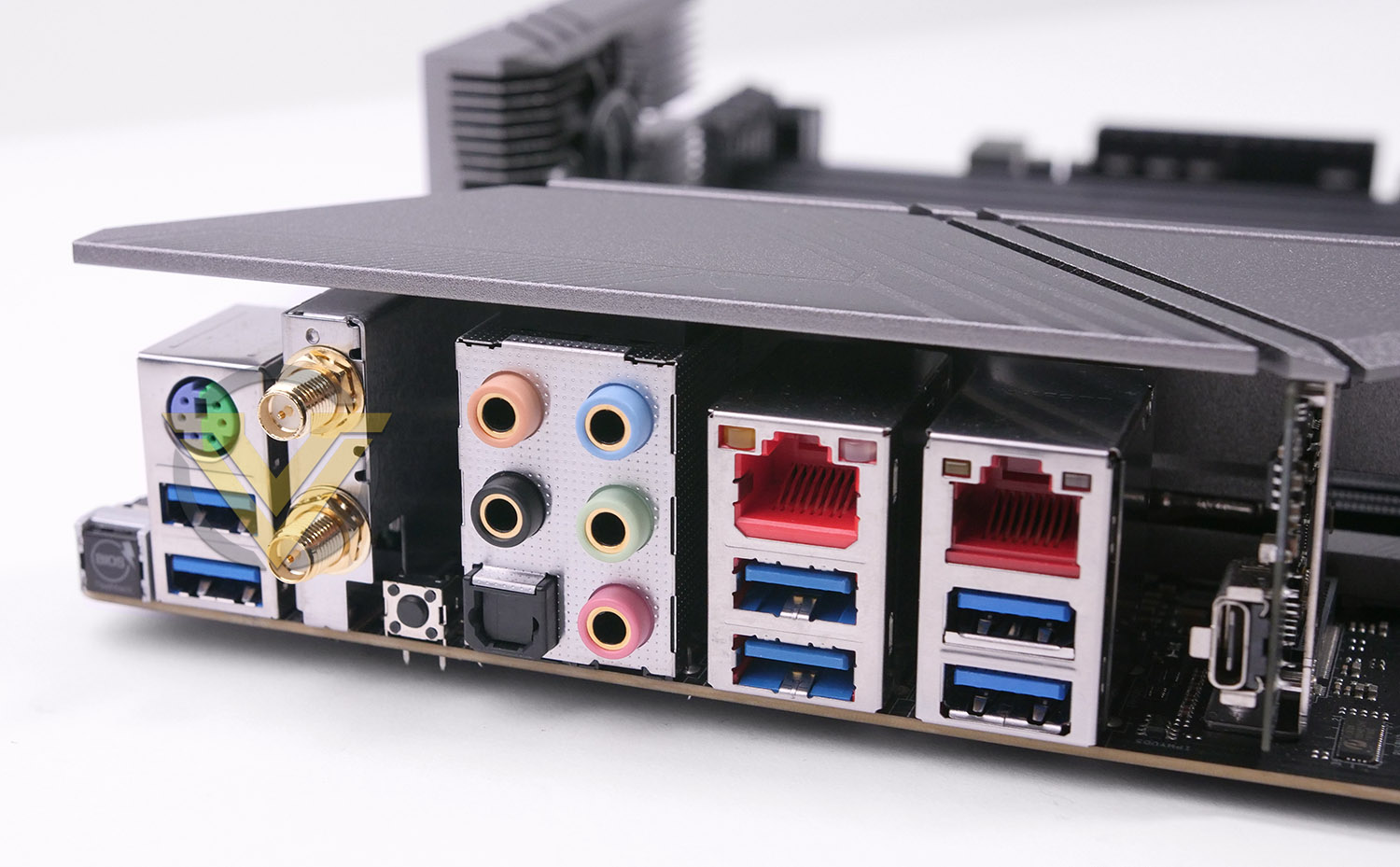
Lastly, we have the rear IO section of Creator which includes the following (Left to right):
• BIOS Flashback
• PS2 Keyboard mouse combo port
• 2x USB 3.2 Gen1
• Antenna ports
• Clear CMOS
• Audio ports
• 2.5G LAN port
• 2x USB 3.2 Gen1
• 10G LAN port (Aquantia)
• 2x USB 3.2 Gen2
• 1x USB 3.2 Gen2x2 Type-C
We’re slightly disappointed to not see more USB 3.2 Gen2 ports on the rear panel, once a USB keyboard and mouse are connected we only have four type-A ports to utilise.
Creator includes WiFi 6 as part of the network connectivity which delivers 802.11ax – offering up to 2.4Gbps on 2.4GHz and 5GHz. The module within the bundle corresponds to the antenna ports on the rear panel here. Bluetooth 5.0 is also available.
Test Setup & Methodology
Notes: We’ve revamped our benchmark regime by removing a number of tests which reveal little, to no difference between each motherboard model. Gaming performance is one such area which has been removed due to the inability for each motherboard to offer any advantage over another. Instead, we have focussed on meaningful/tangible analysis which examines the VRM/chipset design, and the storage performance which will be far more informative to the end user.TEST SETUP
CPU AMD Ryzen Threadripper 3960X
Cooling Noctua NH-U14 TR4 SP3
Motherboard ASRock TRX40 Creator
Memory 16GB Crucial Ballistix 2666MHz DDR4
Graphics AMD Radeon RX 480
Storage Kingston HyperX 240GB SSD + Samsung 960 Pro 512GB SSD
PSU Corsair HX1050 80 Plus Gold Certified PSU
Monitor AOC U2879VF
Capture Device Avermedia Live Gamer ULTRA
Cooling Noctua NH-U14 TR4 SP3
Motherboard ASRock TRX40 Creator
Memory 16GB Crucial Ballistix 2666MHz DDR4
Graphics AMD Radeon RX 480
Storage Kingston HyperX 240GB SSD + Samsung 960 Pro 512GB SSD
PSU Corsair HX1050 80 Plus Gold Certified PSU
Monitor AOC U2879VF
Capture Device Avermedia Live Gamer ULTRA
BENCHMARKS
PCMark 10 – Overall Extended Score
SiSoftware SANDRA – SATA/PCIe Storage Tests
SiSoftware SANDRA – Processor Cryptography
SiSoftware SANDRA – SATA/PCIe Storage Tests
SiSoftware SANDRA – Processor Cryptography
OTHER SOFTWARE
Temperature Analysis: HWMonitor
Stress Testing Software: AIDA64 Stability Test
CPU Specification Monitoring: CPU-Z
Stress Testing Software: AIDA64 Stability Test
CPU Specification Monitoring: CPU-Z
Benchmarks: Power Consumption
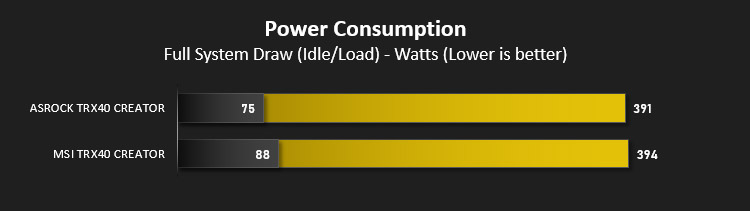
In this first test we analyse the power efficiency from the wall for each motherboard. While each model uses the same chipset/platform, energy results can fluctuate between manufacturers due to the features and specifications that are integrated. First of all, for the idle tests the system is cold booted into Windows and no additional applications are executed – wattage is noted on the external energy monitor we use and then we open Aida64 stability test and execute a stress test, noting the highest reading on the monitor. Below are the results of this energy test.
Benchmarks: VRM & Chipset Cooling
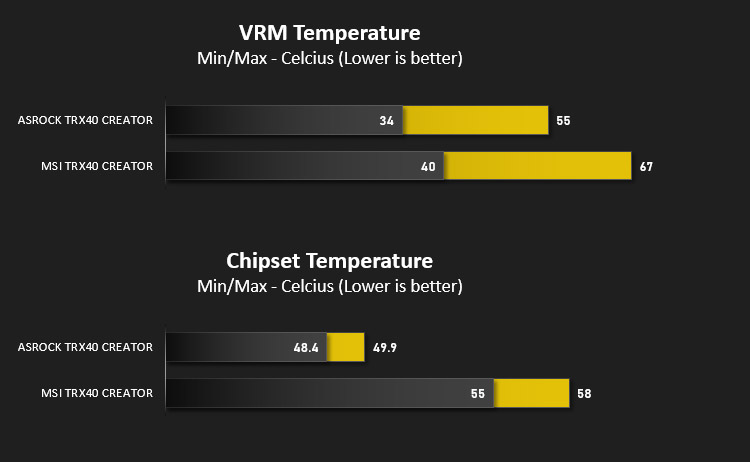
Each motherboard manufacturer designs their board with a unique set of heatsinks to cover key areas like the VRM/mosfets and the chipset itself. In these test we use HWMonitor to identify the minimum values for VRM and chipset and then we load up Aida64 stability test again and perform a 20 minute run, recording the maximum value for both attributes.
Benchmarks: PCMark 10
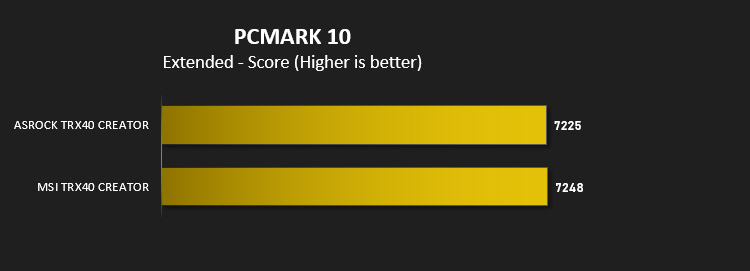
PCMark 10 features a comprehensive set of tests that cover the wide variety of tasks performed in the modern workplace. With a range of performance tests, custom run options, and the new Battery Life Profile, PCMark 10 is the complete PC benchmark for the modern office.
Benchmarks: SATA Performance
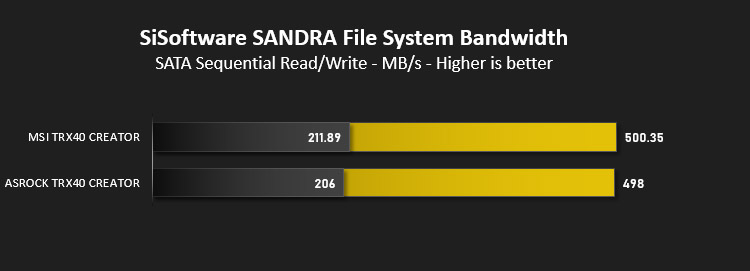
In order to ascertain the SATA performance for our motherboards we use SiSoftware SANDRA and the File System Bandwidth performance test. This allows us to obtain the sequential read/write transfer rates for the drive being tested – Kingston HyperX 240GB SSSD.
Benchmarks: PCIe M.2 Performance
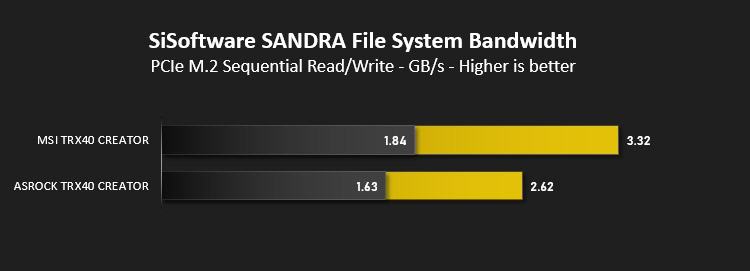
In order to ascertain the PCIe M.2 performance for our motherboards we use SiSoftware SANDRA and the File System Bandwidth performance test. This allows us to obtain the sequential read/write transfer rates for the drive being tested – Samsung 960 Pro 512GB.
Benchmarks: CPU Cryptography
AIDA64 Product Page
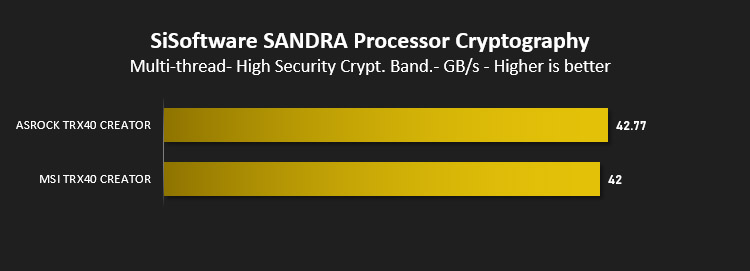
In our last tests we observe the Cryptographic performance from the CPU attached to the motherboard. For this we use SiSoftware SANDRA and the benchmark specifically designed for Crypotography – this measures the cryptographic performance in the most popular algorithms today: AES for encryption/decryption (AES256/AES128) and SHA for signing (SHA256/SHA1).
Overclocking
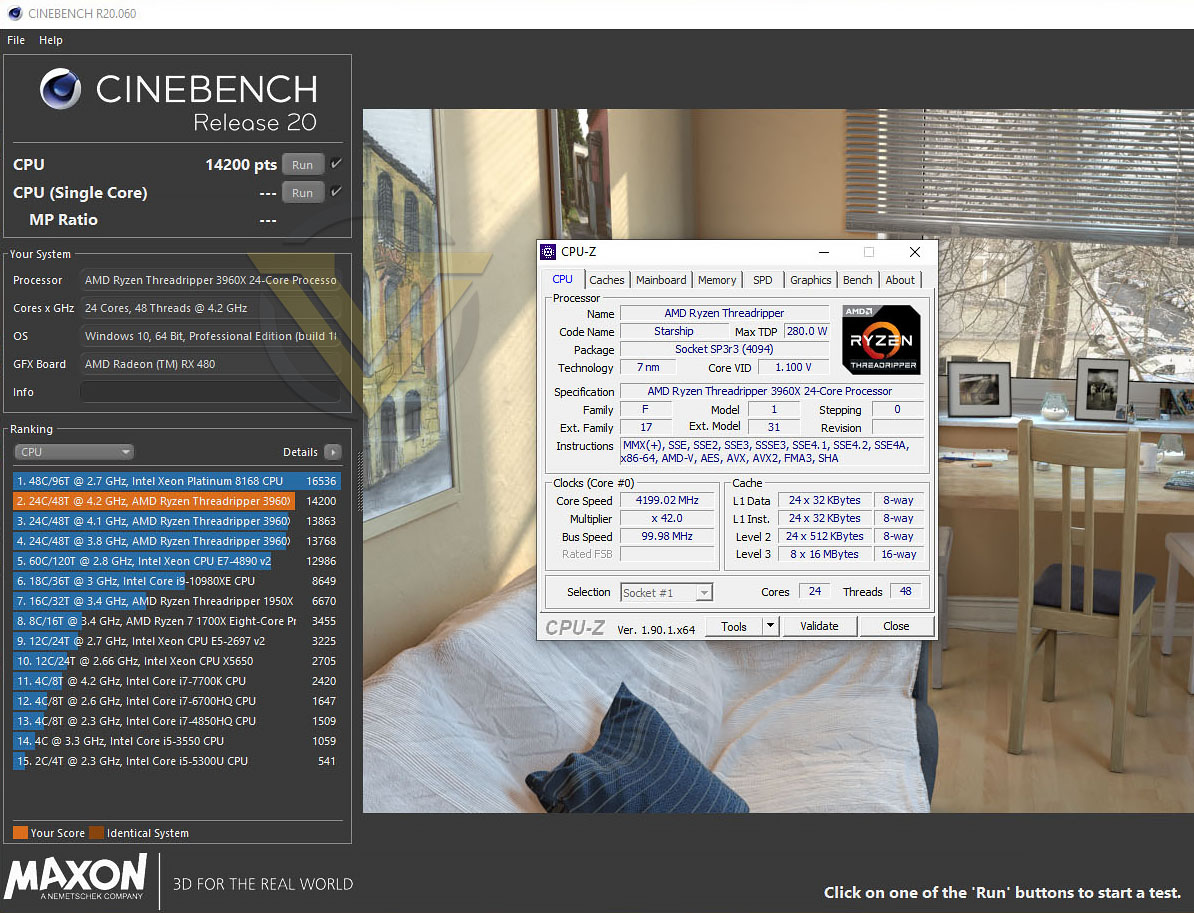
There isn’t a lot of headroom available for overclocking AMD’s Ryzen Threadripper 3rd Gen. but our ASRock motherboard managed to achieve a decent result. For our testing we are using the 3960X with 24 cores and 48 threads, operating at a base clock of 3.8GHz.
We were able to push the 3960X to 4.2GHz across all cores with just 1.15v. As we’ll see with other boards in the near future, this is a great result.
Conclusion
Content creation and the TRX40 chipset go hand-in-hand, so it isn’t any wonder that we see ASRock using this platform to cater for such a user with the plethora of high-speed features available.
While some designers will see the absence of Thunderbolt 3 a serious pitfall, there are plenty of other features to take advantage of – triple PCI Express M.2 Gen4 and USB 3.2 Gen2x2 to name just a few. The availability of PCIe 4.0 and 802.11ax is welcomed and both these technologies may not be mainstream just yet but that doesn’t matter – their existence future-proofs the system.
We found the performance on offer very good and were surprised to see ASRock’s Creator topple MSI’s Creator in the overclocking arena. There isn’t a lot of headroom for Threadripper Gen.3 CPUs but this board can certainly push things to the limit, and performing such a task is very easy too. Options inside the UEFI BIOS require minor modification to achieve a good result.
This new platform requires an overhaul to VRM and chipset cooling due to the higher TDP and we’re pleased to report that ASRock has done a superb job with the thermal solution on for both components. Against MSI’s TRX40 Creator, ASRock’s offering provides lower temperatures. The only downside to this thermal design is the inclusion of an additional fan for the VRM region, which inevitably adds extra noise to the overall system.
Checking prices for motherboards bearing the TRX40 chipset highlights that ASRock’s TRX40 Creator is reasonably priced against the competition. We feel it offers good value for money!
Are you a designer, content creator or power user who is keen to improve your workflow? Creator offers the tools you’ll need and provides rock solid performance
Pros
+ Refined aesthetic
+ Offers great performance
+ Supports WiFi 6 (802.11ax)
+ Overclocking is easy
+ Overclocks Threadripper beyond rivals
+ Uses strengthened PCI Express slots
+ Offers triple M.2 slots
+ Superior heatsink cooling – VRM/chipset
+ Reasonably priced for TRX40 platform
Cons
– No Thunderbolt support
– Rear IO could use more USB
– Twin cooling fans introduce noise
+ Refined aesthetic
+ Offers great performance
+ Supports WiFi 6 (802.11ax)
+ Overclocking is easy
+ Overclocks Threadripper beyond rivals
+ Uses strengthened PCI Express slots
+ Offers triple M.2 slots
+ Superior heatsink cooling – VRM/chipset
+ Reasonably priced for TRX40 platform
Cons
– No Thunderbolt support
– Rear IO could use more USB
– Twin cooling fans introduce noise
Click here for an explanation of our awards at Vortez.net.
Stay connected with Vortez social media pages: