In the spotlight, ASRock’s top AMD X670E motherboard which aims to satisfy both overclockers and gamers. Should you consider it?

Product On Review: X670E Taichi Carrara
Manufacturer: ASRock
Street Price:
US: $529.00
UK: £599.99 (inc. V.A.T.)
AUS: $879
AMD will be launching a swathe of new Ryzen 7000-series CPUs in the coming months, bringing with them the 3D V-CACHE technology last seen on the Ryzen 7 5800X3D, but the fundamentals for their desktop computing platform will remain unchanged. The 600-series motherboards – supporting Socket AM5, PCIe 5.0 and DDR5 RAM – won’t be going anywhere, offering a range of features across a wide budgetary range alongside compatibility for the entire 7000-series (UEFI BIOS updates notwithstanding).
ASRock’s X670E Taichi Carrara operates within the context of this reality. It’s the highest positioned 600-series in ASRock’s AM5 motherboard range, featuring the most comprehensive feature set available from the Taiwanese company and a design that aims to satisfy both enthusiast overclockers and gamers with an eye to aesthetics.
The landscape of 600-series motherboards starts at a hair under $200 for B650 design, pushing up to $300 for B650E boards that support both PCIe 5.0 graphics and NVMe storage (rather than just storage, and that optionally). X670 boards from $300 offer only PCIe 4.0 graphics but PCIe 5.0 storage and the full suit of ancillary I/O offered by the X670 dual-chipset approach, whereas $350+ X670E is the deluxe design with PCIe 5.0 Graphics and NVMe storage alongside a full I/O options.
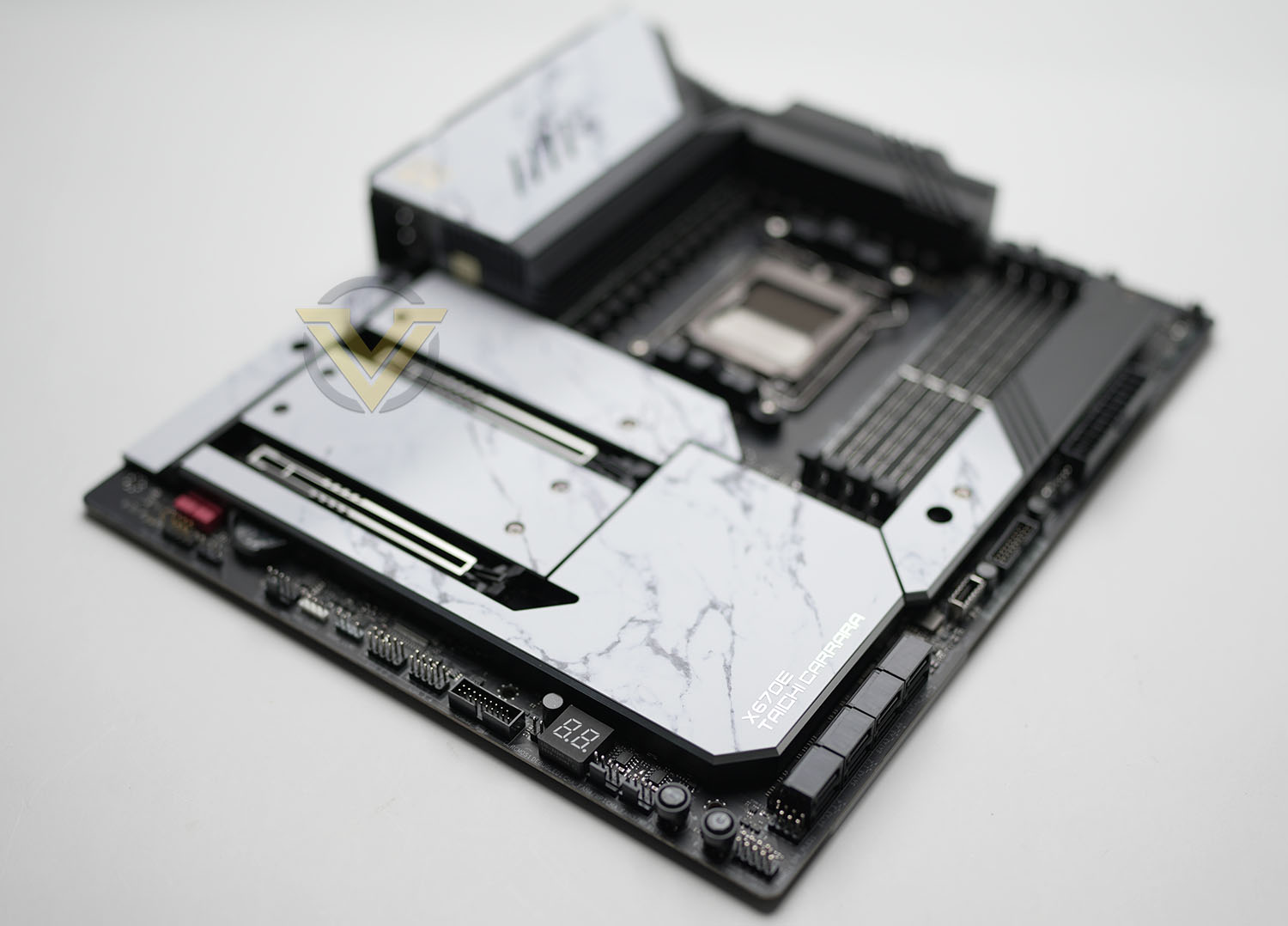
As an X670E motherboard this SKU supports the full suite of next generation technologies: DDR5 DRAM, PCIe 5.0 Graphics and PCIe 5.0 M.2 NVMe storage. Furthermore, the motherboard also has access to dual graphics operation through two PCIe x16 slots wired for x16 or x8/x8 operation, a feature that’s becoming increasingly rare in even enthusiast models. However it’s true claim to excellence is a power delivery system that almost stretches credulity: a 24+2+1 VRM design that will immediately peak the interest of overclockers assuming it can live up to its billing.
A single M.2 PCIe 5.0 slot for cutting edge storage is supported by three PCIe 4.0 slots (one of which is in a very unorthodox location), while networking is provided by KILLER WiFi 6E and 2.5G Ethernet controllers from Intel. Two USB 4 40Gbps Type-C ports are highlights of the integrated I/O options, backed up by ample USB 3.2 Gen2 and Gen1 ports on both rear and front panel I/O, while as many as eight SATA III 6Gbps drives are also supported depending on system configuration. Plus, a surfeit of managed RGB connections are also provided for personal customisation.
Despite this wide selection of features the ASRock X670E Taichi Carrara is far from the most expensive of X670E on the market. At over $500/AUD$879 it’s still a very considered purchase, but it comes in under flagships from ASUS, ROG, GIGABYTE and MSI. It’s also available as an all-black X670E Taichi variant if that’s more to your aesthetic tastes. Nonetheless it comes in well over $250 more than the much more affordable ASRock X670E Steel Legend, so it has a lot to prove to justify its premium status.
Closer Look
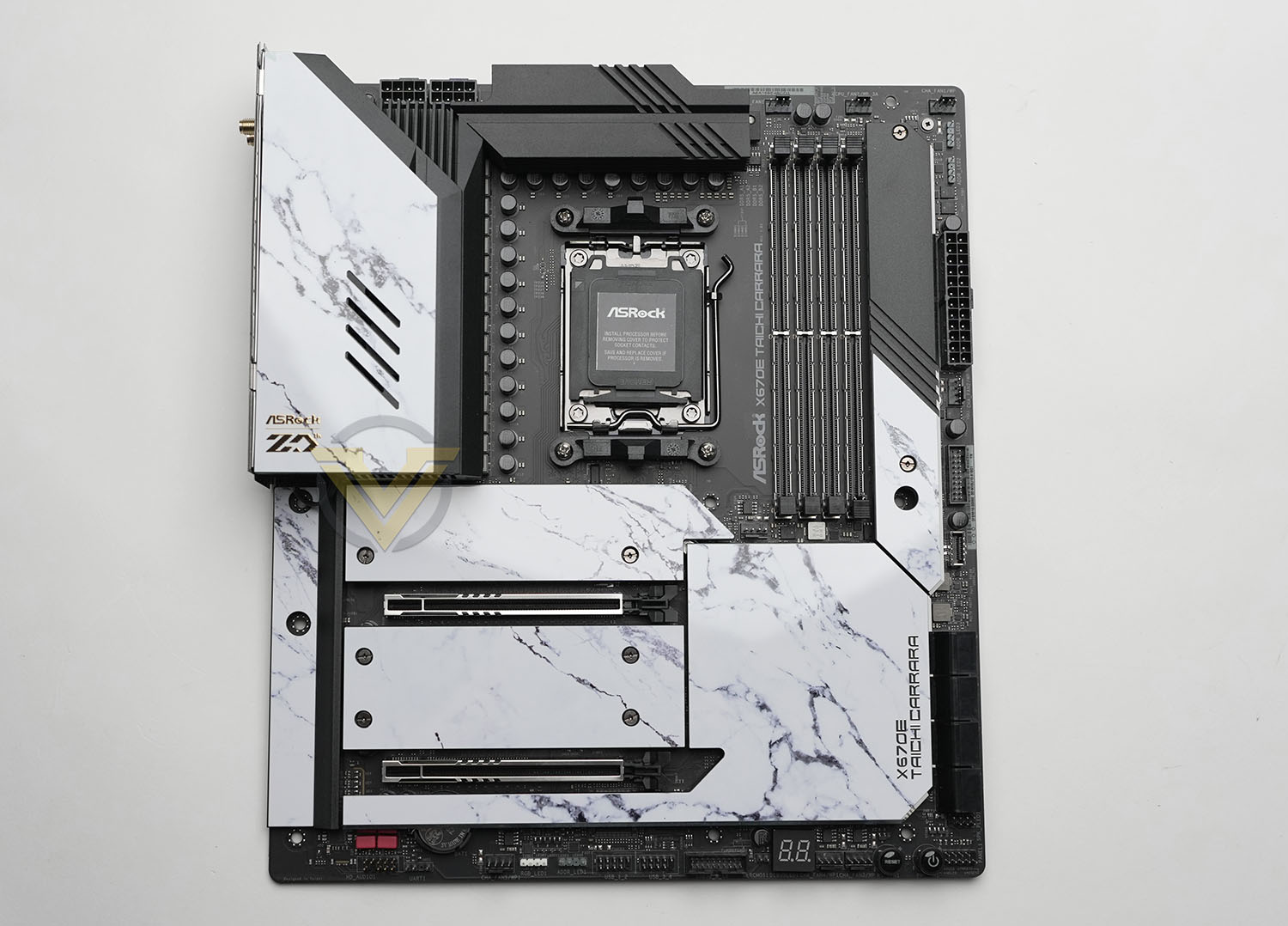
ASRock’s X670E Taichi Carrara conforms to an EATX form factor with a footprint of 305 mm x 267 mm, which is as tall as but slightly wider than standard ATX. EATX is a somewhat fuzzy standard which isn’t always well covered by chassis manufacturers; so while most full tower ‘EATX’ cases should accommodate the motherboard without difficultly, more compact mid-tower ‘EATX’ enclosures might result in misaligned cable management holes and other frustrations. In these instances it’s best to double-check placement within the case you’re partnering the X670E Taichi Carrara with beforehand.
The motherboard’s AM5 socket supports the whole range of Ryzen 7000-series CPUs, although the recently announced X3D models will likely require an UEFI BIOS update. Older AM4 coolers which utilise the clip retainer system should be compatible with the new AM5 socket, but other styles may not be supported. Check with the cooler manufacturer prior to installation; some manufacturers also offer upgrade kits to those who need it.
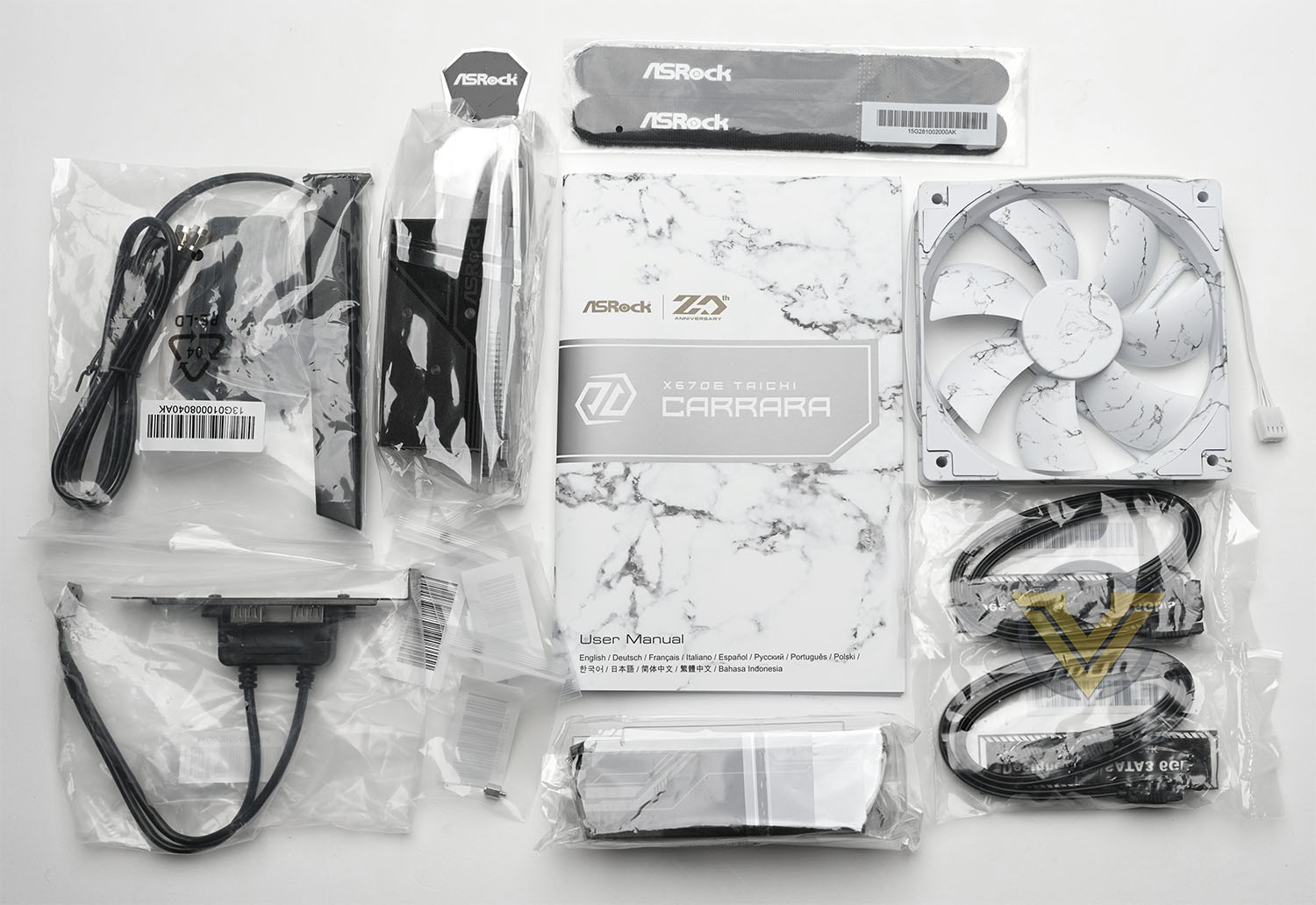
This motherboard optionally arrives with the following accessories (depending on exact SKU and region):
– 4 x Serial ATA (SATA) Data Cables
– 1 x Wireless Dongle USB Bracket
– 1 x M.2 Gen5 Fan Heatsink
– 1 x 12CM Carrara Edition Cooling FAN
– 1 x ASRock WiFi 2.4/5/6 GHz Antenna
– 4 x Screws for M.2 Sockets
– 1 x Standoff for M.2 Socket
– 1 x Wireless Dongle USB Bracket
– 1 x M.2 Gen5 Fan Heatsink
– 1 x 12CM Carrara Edition Cooling FAN
– 1 x ASRock WiFi 2.4/5/6 GHz Antenna
– 4 x Screws for M.2 Sockets
– 1 x Standoff for M.2 Socket
There aren’t any major omissions in this package, but the M.2 heatsink is a notable inclusion. Most manufacturers lean heavily on the heatspreading capabilities of their slot covers or the cooling supplied by the drive manufacturer, ASRock must be more than a little concerned that long-term cooling of latest generation NVMe storage can’t be left to the whims of a standardised solution.
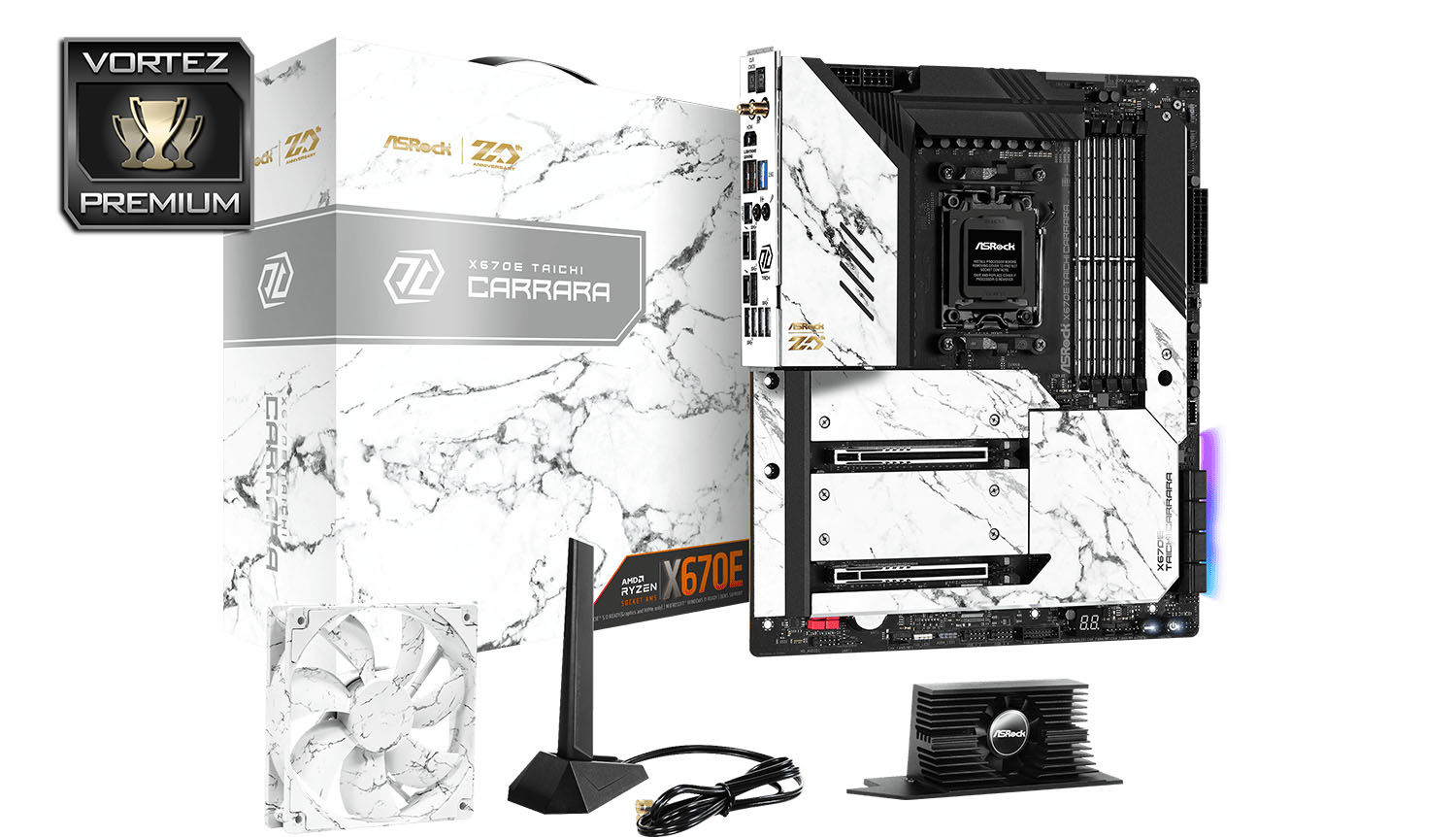
ASRock’s Taichi Carrara takes its name and aesthetic inspiration from a city in the Italian region of Tuscany. The white motherboard fascia has a marbling effect evocative of Carrara’s traditional export going as far back as ancient Rome, giving it a unique style all of its own. If supplied, the 120mm Carrara fan can continue this marbling look to the rear case fan position; unfortunately the fans themselves don’t appear to be sold separately.
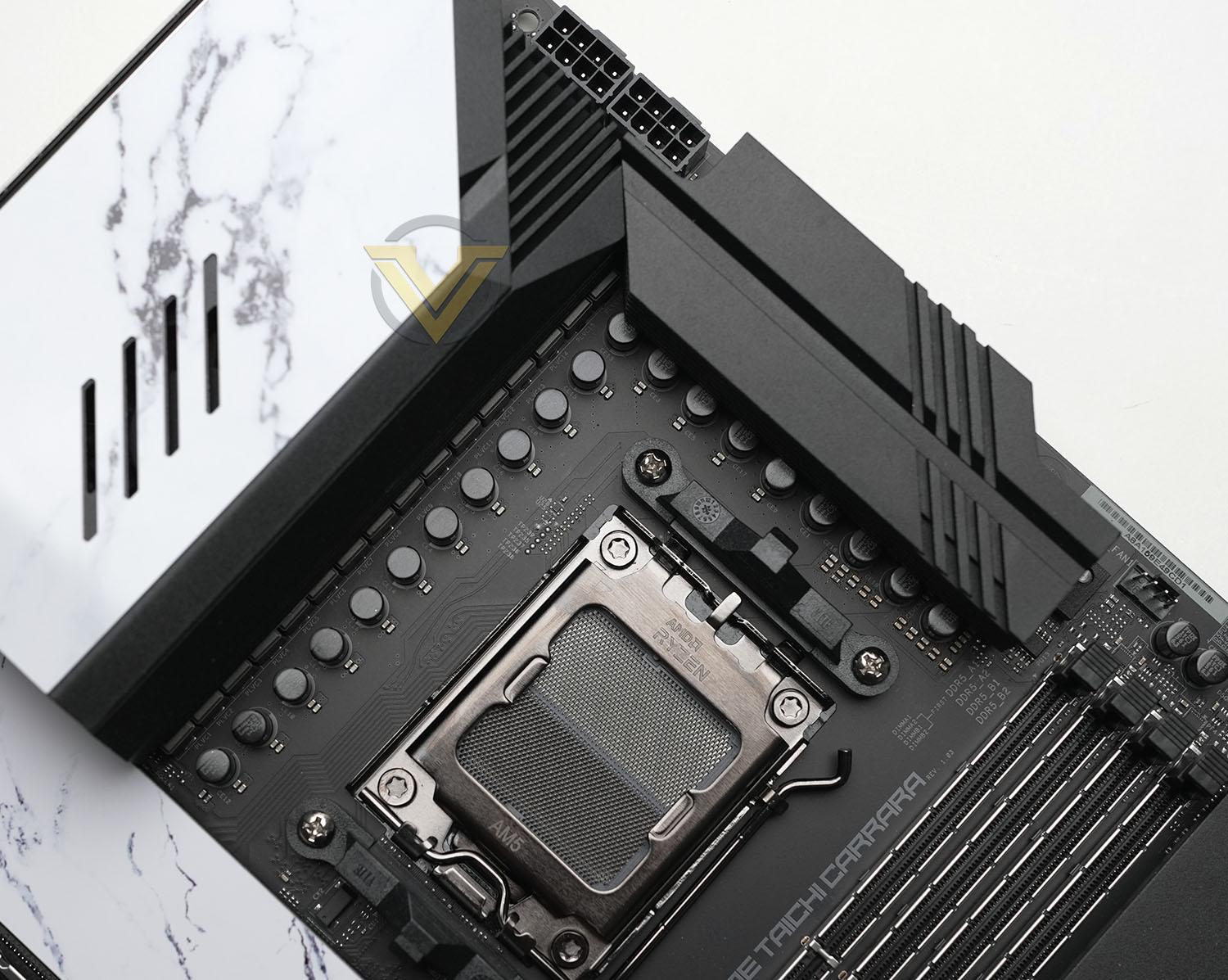
Underneath the fascia is an all-black PCB that provides a stark contrast to the white finish, as do the predominantly black VRM heatsinks. The manufacturer branding is much less self-indulgent than many of the competition models, and as a result the board looks smarter and more refined despite its performance oriented features. Those who want to augment its looks with RGB LED lighting can take advantage of the four RGB headers on the motherboard; with the exception of some edge lighting near the SATA ports there’s not much built-in illumination of consequence to see here.
Twin 8-pin 12v connectors feed power direct to the CPU for both conventional and overclocked performance modes, an aspect of the design that will limit your selection of compatible PSUs. Directly below and to the right are two large heatsink fin arrays, cooling the 24+2+1 power stage design. Air is channelled through these heatsinks thanks to a small fan integrated into the left-hand stack, and both heatsink stacks are connected to the chipset heatsink via an elongated and flattened heatpipe that will serve to draw heat to where it can be dissipated.
Past the AM5 socket and just above the reinforced DDR5 DIMM slots are a trio of 4-pin PWM fan connectors. The reinforced DIMM slots should offer greater long-term durability and slot stability, something that is critical for the more sensitive electrical signalling required of DDR5 memory.’
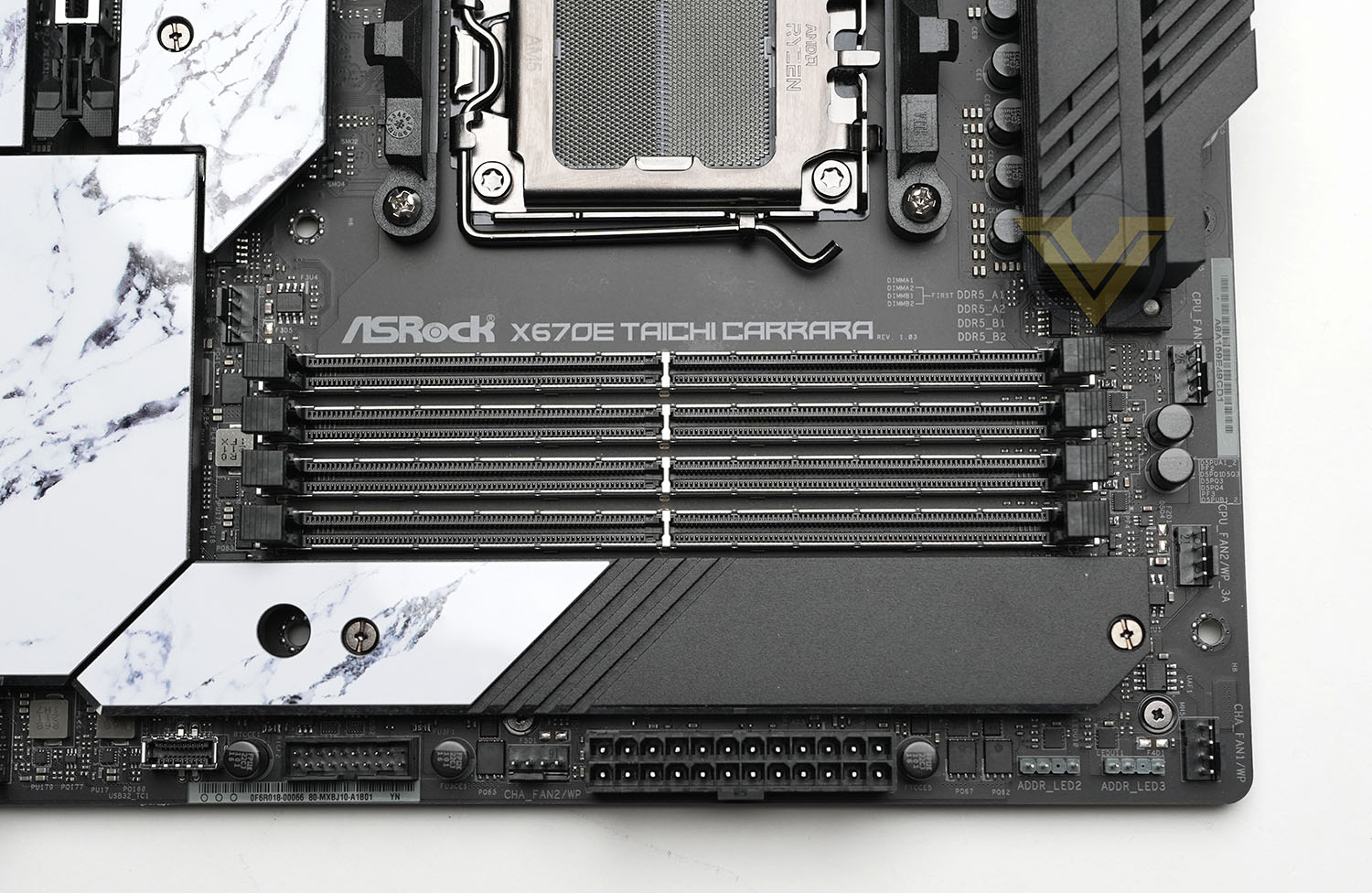
Just past the DIMM slots is the motherboard major layout idiosyncracy: an M.2 slot that supports drives up to the long 22110 form factor. This is one of the off-chipset PCIe 4.0 M.2 slots, and it’s one of the major factors in the Tachi Carrara’s increased width. This slot is much easier to access than any near the PCIe slots, and that might be a consideration depending on your personal use case.
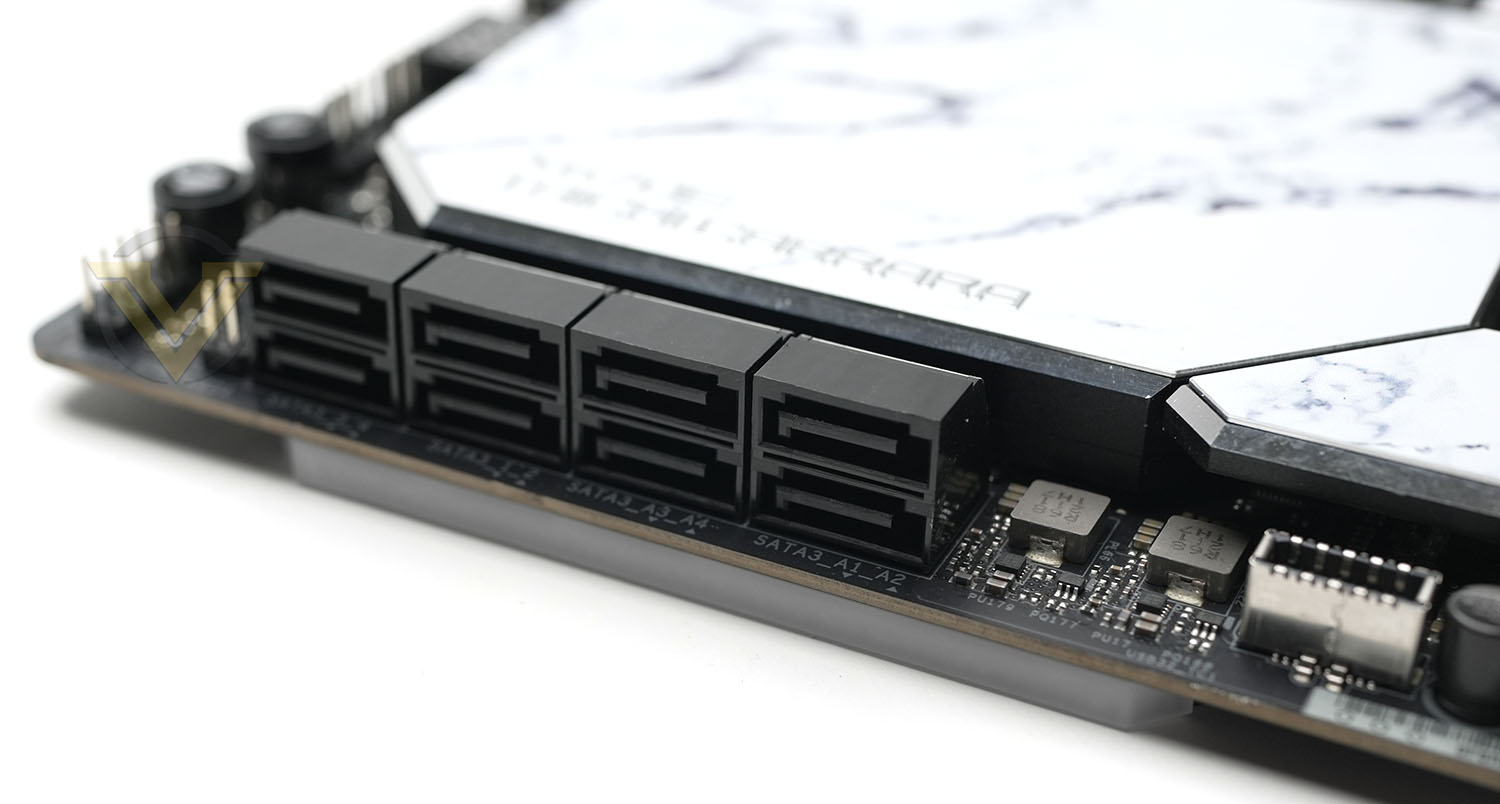
Moving down the right hand side of the motherboard there are two 3-pin ARGB headers, the 24-pin ATX connector, a further PWM fan connector, a USB 3.0 header, a USB 3.2 Type-C header, eight (4×2) edge-mounted SATA III connectors and the Power LED & Speaker Header. The large heatspeaders of the chipsets and M.2 slot make this edge appear to be a little more cramped than it is, and some common functionality has been moved to the bottom edge.
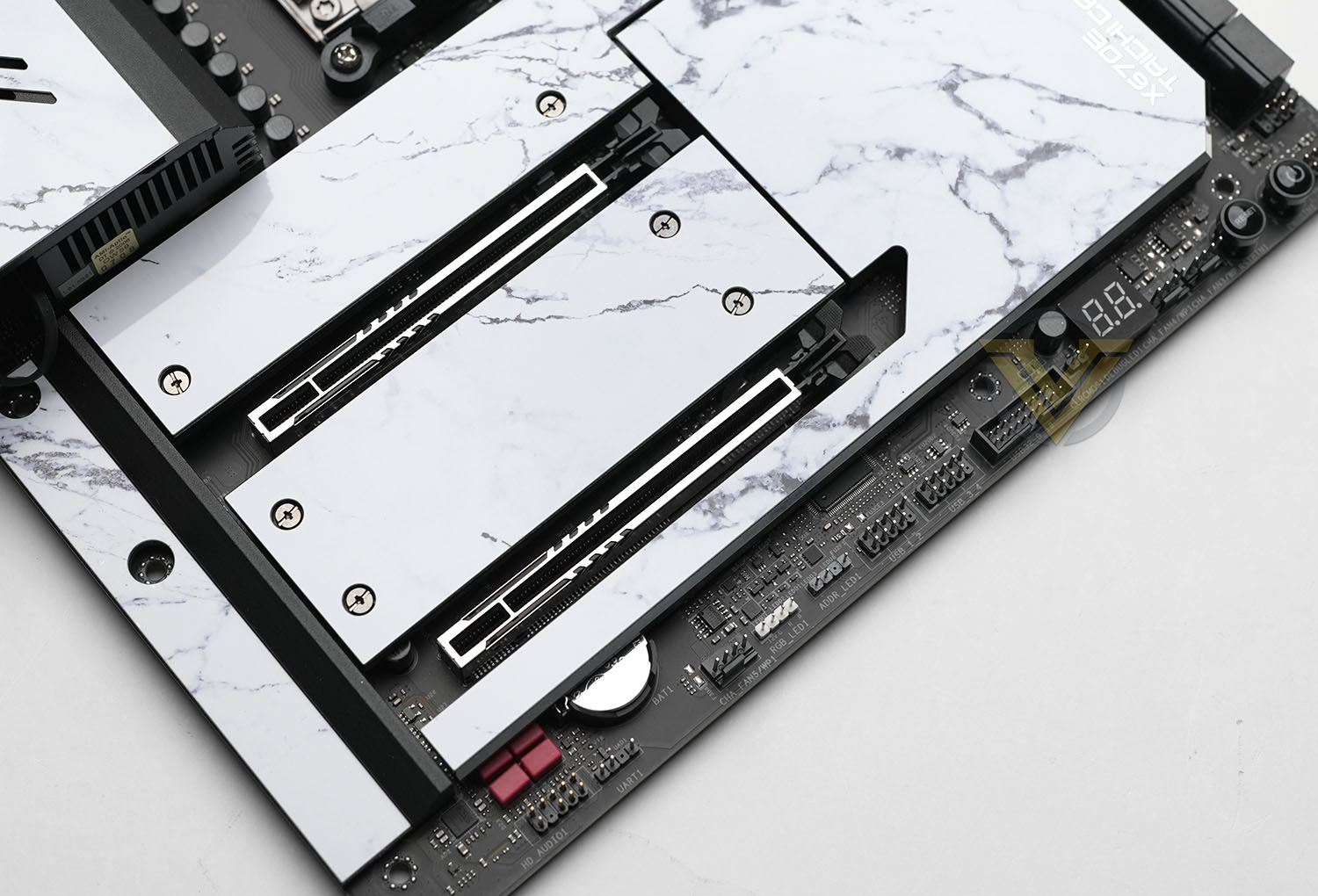
Along that bottom edge from right to left are a front panel header array (for Power/Reset switches and status LEDs), ‘board mounted power and reset buttons, two more PWM fan headers, digital troubleshooting display, one USB 3.0 header, two USB 2.0 headers, 3-pin ARGB and 4-pin RGB headers, another PWM fan header, and an HD Audio header. That’s a lot of optional I/O which ideally would be accompanied by cable management channels in the chassis motherboard try.
Once again we’re very happy to see a digital display for troubleshooting, and the surface mounted switches helps with both troubleshooting and system operation if installed on a test bench.
Perhaps the one feature missing that we’d normally expect to see on a design intended for high-end enthusiast overclocking are voltage probe points. For the vast majority of expected users that’s not really a factor, but in niche cases may be enough to take this board off a very short list of options.
Transitioning down the left hand side past the rear I/O are the first M.2 slot – wired for four lanes of PCIe 5.0 signalling up to 128Gbps direct from the CPU, followed by the first of two PCI-Express slots for discrete GPUs. This slot is wired for the full 16 PCIe 5.0 lanes and has been reinforced to provide better support for the weight of today’s cards. Note also that the spacing places it further away from the CPU socket than some ‘board layouts, which might help with cooling. Two further NVMe M.2 slots, each wired for PCIe 4.0 x4 operation off the chipset, span the distance to the second PCIe x16 slot. This secondary PCIe slot is wired for up-to x8 operation, and can be used in tandem with the primary for x8/x8 dual-GPU operation.
Finally, one further PWN fan header is located between the DDR5 DIMM slots and top PCIe x16 slot, which might be a little awkward for cable management but can be useful for short-length AIO pumps or CPU cooler fans.
As with all X670E motherboards, the X670E Taichi Carrara features a wide selection of I/O from both chipset and the CPU SOC:
– Clear CMOS & BIOS Flashback buttons,
– WiFi 6E (802.11ax) antenna sockets,
– HDMI for on-board VGA
– 2x USB 3.2 Gen2 (Yellow), 2.5G Ethernet
– SPDIF Out, Line out and Mic Out
– USB 4 Type-C (40Gbps) & USB 3.2 Gen 2 (10Gbps)
– USB 4 Type-C (40Gbps) & USB 3.2 Gen 1 (5Gbps)
– 2x USB 3.2 Gen 2 (10Gbps) & 2x USB 3.2 Gen 1 (5Gbps)
– WiFi 6E (802.11ax) antenna sockets,
– HDMI for on-board VGA
– 2x USB 3.2 Gen2 (Yellow), 2.5G Ethernet
– SPDIF Out, Line out and Mic Out
– USB 4 Type-C (40Gbps) & USB 3.2 Gen 2 (10Gbps)
– USB 4 Type-C (40Gbps) & USB 3.2 Gen 1 (5Gbps)
– 2x USB 3.2 Gen 2 (10Gbps) & 2x USB 3.2 Gen 1 (5Gbps)
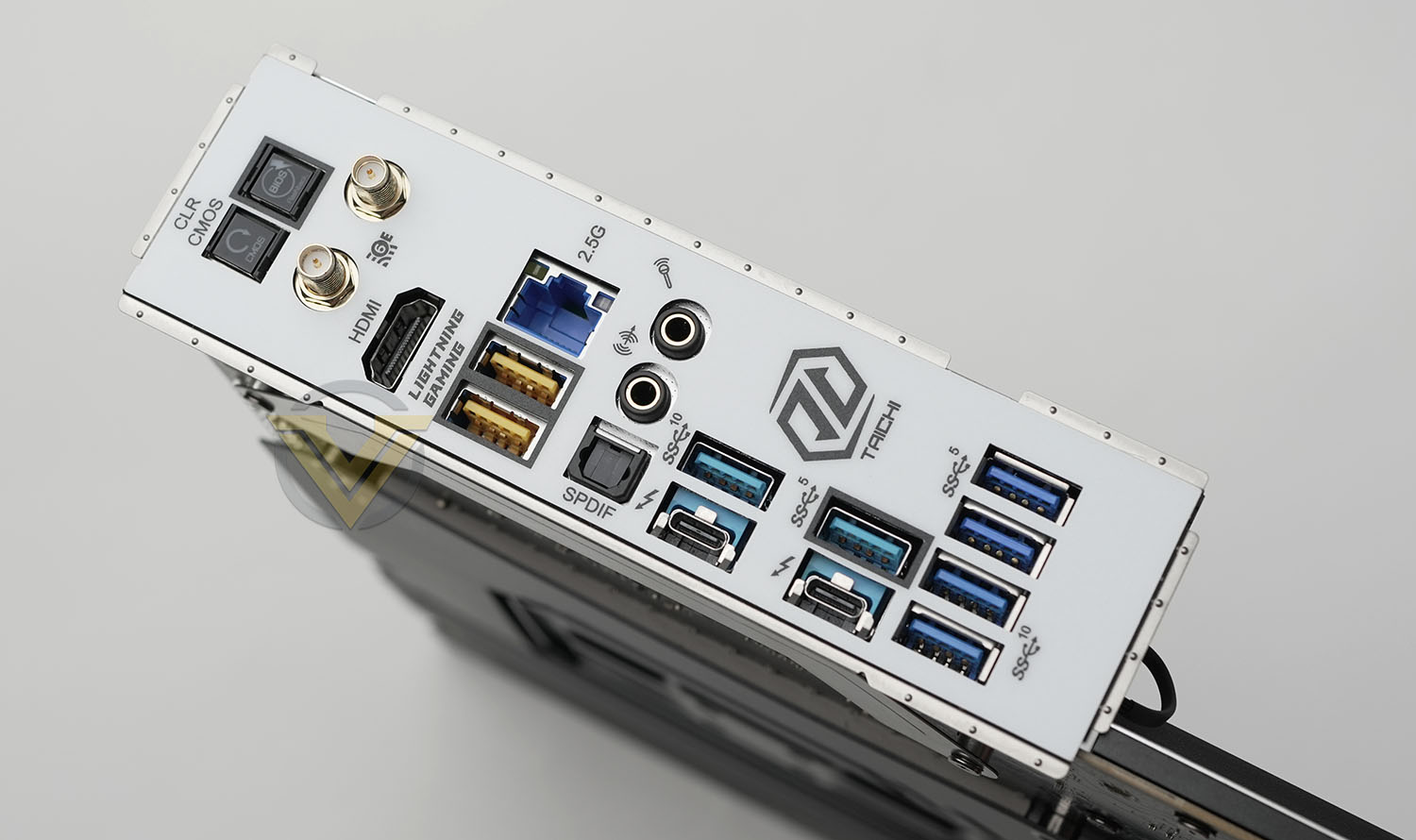
By including USB 4 ASRock are immediately ahead of many competitors at the same price point, even if the selection of peripherals that can take advantage of these supercharged speeds is tiny at present. On the other hand they’ve integrated only a single 2.5G Ethernet port, rather than dual or 10G Ethernet. All in all, the motherboard has comprehensive I/O well aligned to enthusiast consumer requirements with more than an eye towards technologies likely to become widespread in the foreseeable future.
Overall, we’re very well disposed towards the X670E Taichi Carrara. It’s a smart looking motherboard with some excellent features sure to tempt mainstream users, gamers and PC enthusiasts, though there are meaningful trade-offs compared to other X670E models. While USB4 is included, it’s still only equipped with a single PCIe 5.0 M.2 drive. You don’t get 10GbE, but you do have dual-GPU support. It’s a question of which is the right balance of features for your use case.
Test Setup & Methodology
Notes: We’ve revamped our benchmark regime by removing a number of tests which reveal little, to no difference between each motherboard model. Gaming performance is one such area which has been removed due to the inability for each motherboard to offer any advantage over another. Instead, we have focussed on meaningful/tangible analysis which examines the VRM/chipset design, and the storage performance which will be far more informative to the end user.TEST SETUP
CPU AMD Ryzen 9 7950XCooling: Corsair Hydro Series H110i
Memory: 32GB Kingston FURY 5200 MHz
Storage: Crucial MX300 SATA SSD + Kingston KC2500 PCIe 3.0 SSD
PSU: Corsair HX1050 80 Plus Gold Certified PSU
Monitor: AOC U2879VF
BENCHMARKS
PCMark 10 – Overall Extended ScoreSiSoftware SANDRA – SATA/PCIe Storage Tests
SiSoftware SANDRA – Processor Image Processing
OTHER SOFTWARE
Temperature Analysis: HWMonitorStress Testing Software: AIDA64 Stability Test
CPU Specification Monitoring: CPU-Z
Benchmarks: Power Consumption
In this first test we analyse the power efficiency from the wall for each motherboard (Minus the GPU). While each model uses the same chipset/platform, energy results can fluctuate between manufacturers due to the features and specifications that are integrated. First of all, for the idle tests the system is cold booted into Windows and no additional applications are executed – wattage is noted on the external energy monitor we use and then we open Aida64 stability test and execute a stress test, noting the highest reading on the monitor. Below are the results of this energy test.
Benchmarks: VRM Cooling
Each motherboard manufacturer designs their board with a unique set of heatsinks to cover key areas like the VRM/mosfets and the chipset itself. We load up Aida64 stability test again and perform a 20 minute run, recording the maximum value for both attributes.
Benchmarks: PCMark 10
PCMark 10 features a comprehensive set of tests that cover the wide variety of tasks performed in the modern workplace. With a range of performance tests, custom run options, and the new Battery Life Profile, PCMark 10 is the complete PC benchmark for the modern office.
Benchmarks: SATA Performance
In order to ascertain the SATA performance for our motherboards we use SiSoftware SANDRA and the File System Bandwidth performance test. This allows us to obtain the sequential read/write transfer rates for the drive being tested – Crucial MX300 SSD.
Benchmarks: PCIe M.2 Performance
In order to ascertain the PCIe M.2 performance for our motherboards we use SiSoftware SANDRA and the File System Bandwidth performance test. This allows us to obtain the sequential read/write transfer rates for the drive being tested – Kingston KC2500.
Benchmarks: CPU Image Processing
In our last test we observe the Image Processing performance from the CPU attached to the motherboard. For this we use SiSoftware SANDRA and the benchmark specifically designed for measuring the common algorithms associated with processing imagery.
Conclusion
The buy-in price of AMD’s latest Ryzen platform continues to fall as the weeks go by, and the red team are planning to release new CPUs in the coming months to take advantage of their exceptional 3D V-Cache technology, but the question remains of whether X670E in general – and today the ASRock X670E Taichi Carrara specifically – can justify its initial cost of ownership. As ever, the picture is mixed.
In fairness we were immediately impressed by the future-looking featureset offered by this flagship motherboard. USB4 and dual-GPU operation barely get a look-in amongst the competition but both are present and accounted for here. The power delivery system is exceptional on paper and awaits experts who can stretch its potential into something special. In these respects it squares up very well against similarly priced alternatives from ostensibly bigger brands around the $500/AU$850 price point
The design team have also not been afraid to experiment with unorthodox solutions. Locating an M.2 slot next to the DIMM slots has plenty of possibilities as it makes this M.2 slot trivially accessible, in stark contrast to M.2’s typical location next to the GPU. Coupled with the surface-mounted power buttons, it certainly makes running the system on a test bench and infrequently swapping out drives easier.
Positive vibes started to fall apart however in testing. Two major weaknesses became apparent, both of which are shared by ASRock’s other major X670E design, the Steel Legend.
Performance-wise, ASRock’s board both have glaring issues with M.2 sequential read speeds tested through the SiSoft Sandra File System Bandwidth benchmark. They are each considerably slower – on the order of 15% – than their 600-series counterparts, with no obvious reason why. It’s possible that this is a problem slated to be fixed in a future UEFI BIOS release, but the disparity is stark.
Perhaps more worrying however are high VRM temperatures under load. The Taichi Carrara should have one of the best thermal profiles thanks to its active cooling integrated into the heatsink, but the design is considerably hotter than all other models despite similar loads. We were surprised by just how poorly ASRock’s cooling solution dissipated heat, pointing to either bad cooling or a particularly inefficient power delivery design that generates more heat than necessary.
Aesthetically, the motherboard looks great. It harkens back to the white ASUS Deluxe motherboards of old which were some of the most attractive for their time, whilst still having a twist in the form of the marbling veins running through each white panel. Also thanks to a lack of integrated RGB, it feels at home in a gaming PC or a smart and professional office space that needs a little bit of personality stamped on it.
Unarguably, if you’re in a position to take advantage of USB 4 and want a Ryzen powered system then the X670E Taichi Carrara is a compelling design. Shortfalls could wear some of the sheen off the decision however, and canny consumers may find more appropriate models at a lower price and with features that make them more useable on a day-to-day basis..
ASRock’s $530 Flagship X670E motherboard boasts exciting technologies such as USB4 and dual-GPU PCIe 5.0 graphics. However, with demand for these features unproven and some weak fundamentals uncovered in testing, the nonetheless attractive X670E Taichi Carrara is a hard design to recommend even to enthusiastic early adopters in the Desktop PC space.
Pros
+ Attractive
+ USB4 connectivity
+ 24+2+1 power phase design
+ Dual-GPU (Crossfire) PCIe 5.0 Graphics
Cons
– Price
– High VRM temperatures
– Poor M.2 read bandwidth
+ Attractive
+ USB4 connectivity
+ 24+2+1 power phase design
+ Dual-GPU (Crossfire) PCIe 5.0 Graphics
Cons
– Price
– High VRM temperatures
– Poor M.2 read bandwidth
Click here for an explanation of our awards at Vortez.net.
Stay connected with the Vortez Social Media pages:
Join in with the discussions on Discord