







Costing almost half that of the range toppers while still retaining many popular features, our 4th X99 motherboard review focuses on the mid range Extreme4 from ASROCK.

Product on Review: X99 Extreme4
Manufacturer and Sponsor: ASRock
Street Price: £170.14 GBP / $240 USD
Our three previous reviews featured high end motherboards from the major manufacturers of MSI, GIGABYTE and ASUS but these motherboards had hefty price tags attached to them, so much so that they will be out of reach for many. Each of those manufacturers do have lower priced motherboards of course but the first mid range X99 motherboard to land on our desk came courtesy of ASROCK. The mATX Extreme based the X79 chipset thoroughly impressed us, not least because of the cost but also because of the performance matching capabilities it had when pitched against the ‘big boys’. We were therefore very eager to get ASROCK’s latest incarnation onto the test bench to see how it compared, hoping that it could replicate previous success.
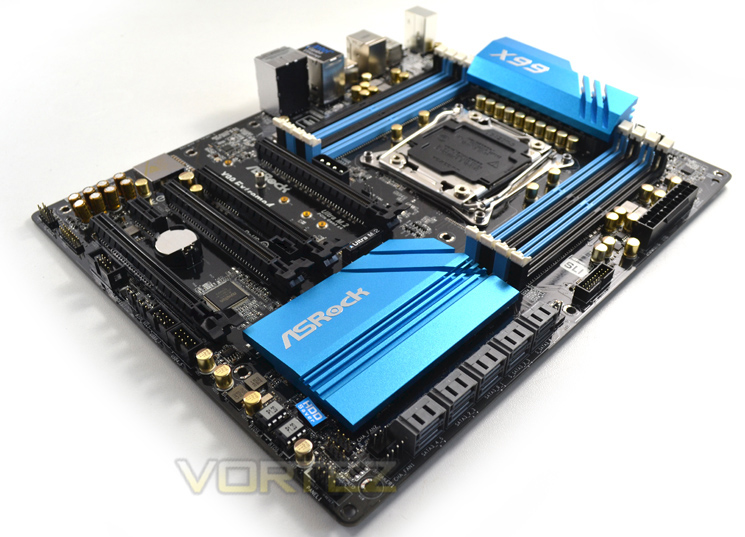
ASROCK should not be disregarded as a ‘budget brand’ though. While it is true there product do usually weigh in slightly less than the competition it is rarely at the cost of using cheaper components. Like the aforementioned manufacturers, ASROCK too have their own flagship models in the guise of the Fatality Professional and OC Formula motherboards so if you are looking for something a little more special then keep an eye out for these reviews which we hope to write shortly. In the meantime, sit back and let us take you through an interesting proposition from ASROCK that won’t break the bank.
ASRock has been growing fast and become world third largest motherboard brand with headquarter in Taipei, Taiwan and branches in Europe and the USA. The young and vibrant company targets from mainstream to enthusiast MB segments for different kinds of users, owning reputation around the world market with its reliability and proficiency.
Chipset Features
irst and foremost, Intel’s latest chipset is aimed at the home ‘power’ user, be this performance enthusiast (read overclocker), extreme gamer or indeed for those who require the ultimate media encoding platform. So whatever your vice, Intel have all the bases covered with their latest chipset. This isn’t, of course, to say the Z97 based chipset is poor by comparison (it’s not), but if you want the ultimate – the very best of the best supporting Intel’s 8 core processor (5960X) – then X99 is the only option.So what’s new with X99?
DDR4 Quad Channel Memory
The above block diagram shows us that DDR4 is natively supported. Note that DDR3 is NOT supported (more on this later). While the block diagram shows a rated speed of up to 2133MHz, our test bench happily ran 16GB (4x4GB) Quad channel Corsair Vengeance LPX at 2666MHz. More recently niche 3000MHz and even 3333MHz DDR4 DIMMs are entering the market requiring high voltages and far deeper pocket, but it’s anticipated that eventually 4GHz DIMMs will be the high watermark at retail.
40 x PCI Express (PCIe) Lanes
Depending on CPU choice, the X99 chipset can support up to 40 lanes of PCIe in combinations of 2×16, 1×8 or 5×8. We also expect this figure to increase on some motherboards with the addition of PLX chips given sufficient demand. All of the PCIe lanes are now PCIe 3.0 compliant; while current generation GPU’s rarely saturate PCIe 2.0 it is nice to have that future proofing available, especially for SLI/Crossfire configurations.
USB 3.0
One of the heaviest criticisms of X79 was the lack of natively support USB 3.0 ports, especially when compared to its Z87/97 brethren. We are now happy to report that X99 will support 6 USB 3.0 ports along with 8 USB 2.0 ports. Of course, most motherboard manufacturers will also add the usual ‘aftermarket’ USB 3.0 support from components such as ASMedia and Marvel so transfer speeds of up to 5GB/s and port numbers in the double-digits can theoretically be achieved.
SATA 3.0 And Next Generation Storage
Despite having huge computational benefits, X79 was oft criticised by the lack of high speed SATA 6Gbps ports. This has been rectified with the X99 chipset supporting 10 x SATA 3.0 ports attaining a theoretical speed of 6Gb/s which can be enhanced using the latest Intel Rapid Storage driver to speeds of 10 Gb/s!
SATA of course has its limitations, which is where newer next generation storage technologies come in. First seen in limited quantities on Z87 and more widely on Z97, M.2 and SATA Express technologies unlock transfer speeds far in excess of SATA III. Support for PCIE storage remains sporadic – M.2 is starting to pick up but SATA Express is exceptionally rare – but it’s slowly proving to be a valid alternative to SATA 3 and mSATA. Many X99 motherboards support M.2 X4, which makes use of four PCIE lanes for up to a stunning 32Gbps bandwidth; however few M.2 drives come close to saturating even Gen 1’s ~8Gbps.
We must say that Intel have pulled out all the stops here. Clearly they have taken on board user feedback regarding the deficiencies of X79 by incorporating more modern storage and expansion options. No longer is the Enthusiast flagship the poor I/O brother to Z87/97. Perhaps the biggest draw though is the introduction of DDR4. This will see huge speed gains in almost every aspect of personal computing. With 8x8GB Dimms supported a mammoth 64GB of DDR4 will make the X99 chipset massively future proofed.
We will cover the overclocking capabilities of the new chipset and each motherboard specifically in the overclocking section but this area failed to disappoint too.
Overall, there is little to criticise here. While we would have liked 40 PCIe lanes regardless of CPU, we understand there has to be some compromise to keep costs down for the budget conscious so how many PCIe lanes you have available will be dictated by CPU choice and not the motherboard. The entry level 6 core i7-5820 will have 28 PCIe lanes at a cost of £299 (At the time of release), while the flagship 8 core i7-5960X and 6 core i7-5930K will both have the full blown 40 lanes available. Aside from lanes, cores cache and clockspeed, all of the X99 features will be available regardless of CPU choice and to this end we are grateful. We suspect that future additions to the CPU range will hit the middle ground while the 5960X will receive a speed bump although this is pure speculation at this point.
Which chip would we go for? Obviously if money was no object then the i7-5960X is the way to go, not only does it have the full 40 lanes available but it is a true 8 core (16 threads) CPU. The 5930K would be the obvious choice for the consumer and the CPU that we think will prove most popular due to the balance of speed vs. cost.
Whichever CPU you opt for though, you can be assured that the X99 chipset offers the very best available. It is powerful, feature packed and as you will see, the unrivalled component of choice for enthusiast users.
Specification
General
Unique Feature ASRock Super Alloy
– XXL Aluminum Alloy Heatsink
– Premium 60A Power Choke
– Premium Memory Alloy Choke (Reduces 70% core loss compared to iron powder choke)
– Ultra Dual-N MOSFET (UDM)
– Nichicon 12K Platinum Caps (100% Japan made high quality conductive polymer capacitors)
– Sapphire Black PCB
ASRock Ultra M.2 (PCIe Gen3 x4 & SATA3)
ASRock HDD Saver Technology
ASRock Full Spike Protection
ASRock APP Shop
CPU – Supports Intel® Core™ i7 and Xeon® 18-Core Processors Family for the LGA 2011-3 Socket
– Digi Power design
– 12 Power Phase design
– Supports Intel® Turbo Boost 2.0 Technology
– Supports Untied Overclocking Technology
Chipset – Intel® X99
Memory – Quad Channel DDR4 Memory Technology
– 8 x DDR4 DIMM Slots
– Supports DDR4 3000+(OC)*/2933+(OC)/2800(OC)/2400(OC)/2133/1866/1600/1333/1066 non-ECC, un-buffered memory
– Supports non-ECC RDIMM (Registered DIMM)
– Supports DDR4 ECC, un-buffered memory/RDIMM with Intel® Xeon® processors E5 series in the LGA 2011-3 Socket
– Max. capacity of system memory: 128GB
– Supports Intel® Extreme Memory Profile (XMP) 2.0
– 15μ Gold Contact in DIMM Slots
*Due to the operating system limitation, the actual memory size may be less than 4GB for the reservation for system usage under Windows® 32-bit OS. For Windows® 64-bit OS with 64-bit CPU, there is no such limitation.
** Please refer to Memory Support List on ASRock’s website for more information.
BIOS – 2 x 128Mb AMI UEFI Legal BIOS with multilingual GUI support (1 x Main BIOS and 1 x Backup BIOS)
– Supports Secure Backup UEFI Technology
– ACPI 1.1 Compliant wake up events
– SMBIOS 2.3.1 Support
– CPU, DRAM, PCH 1.05V, PCH 1.5V, VPPM Voltage Multi-adjustment
Audio
Audio – 7.1 CH HD Audio with Content Protection (Realtek ALC1150 Audio Codec)
– Premium Blu-ray Audio support
– Supports Surge Protection (ASRock Full Spike Protection)
– Supports Purity Sound™ 2
– Nichicon Fine Gold Series Audio Caps
– 115dB SNR DAC with differential amplifier
– TI® NE5532 Premium Headset Amplifier (Supports up to 600 ohm headsets)
– Direct Drive Technology
– EMI shielding cover
– PCB isolate shielding
– Supports DTS Connect
Networking
LAN – Gigabit LAN 10/100/1000 Mb/s
– Giga PHY Intel® I218V
– Supports Wake-On-LAN
– Supports Lightning/ESD Protection (ASRock Full Spike Protection)
– Supports Energy Efficient Ethernet 802.3az
– Supports PXE
Expansion / Connectivity
Slots – 3 x PCI Express 3.0 x16 Slots (PCIE1 @ x16 mode; PCIE3 @ x16 mode; PCIE5 @ x8 mode)*
– 1 x PCI Express 2.0 x16 Slot (PCIE2 @ x4 mode)
– 1 x PCI Express 2.0 x1 Slot
– Supports AMD Quad CrossFireX™, 3-Way CrossFireX™ and CrossFireX™
– Supports NVIDIA® Quad SLI™, 3-Way SLI™ and SLI™***
– 15μ Gold Contact in VGA PCIe Slot (PCIE1 and PCIE3)
*If you install CPU with 28 lanes, PCIE1/PCIE3/PCIE5 will run at x16/x8/x4.
**If M.2 PCI Express module is installed, PCIE5 slot will be disabled.
***If you install CPU with 28 lanes, 3-Way SLI™ is not supported.
Storage – 10 x SATA3 6.0 Gb/s Connectors, support RAID (RAID 0, RAID 1, RAID 5, RAID 10 and Intel® Rapid Storage 13), NCQ, AHCI, Hot Plug and ASRock HDD Saver Technology
– 1 x eSATA Connector, supports NCQ, AHCI and Hot Plug
– 1 x Ultra M.2 Socket, supports M.2 SATA3 6.0 Gb/s module and M.2 PCI Express module up to Gen3 x4 (32 Gb/s)
*S_SATA3_3 connector is shared with the eSATA port, S_SATA3_2 connector is shared with Ultra M.2 Socket
**RAID is supported on SATA3_0 ~ SATA3_5 ports only.
Connector
– 1 x COM Port Header
– 1 x TPM Header
– 1 x Power LED Header
– 2 x CPU Fan Connectors (1 x 4-pin, 1 x 3-pin)
– 3 x Chassis Fan Connectors (1 x 4-pin, 2 x 3-pin) (Smart Fan Speed Control)
– 1 x Power Fan Connector (3-pin)
– 1 x 24 pin ATX Power Connector
– 1 x 8 pin 12V Power Connector (Hi-Density Power Connector)
– 1 x HDD Saver Connector
– 1 x PCIe Power Connector
– 1 x Front Panel Audio Connector
– 1 x Thunderbolt™ AIC Connector
– 2 x USB 2.0 Headers (support 4 USB 2.0 ports) (Supports ESD Protection (ASRock Full Spike Protection))
– 1 x USB 3.0 Header (Supports 2 USB 3.0 ports) (Supports ESD Protection (ASRock Full Spike Protection))
Rear Panel I/O
– 1 x PS/2 Mouse Port
– 1 x PS/2 Keyboard Port
– 1 x eSATA Connector
– 1 x Optical SPDIF Out Port
– 4 x USB 2.0 Ports (Supports ESD Protection (ASRock Full Spike Protection))
– 4 x USB 3.0 Ports (Supports ESD Protection (ASRock Full Spike Protection))
– 1 x RJ-45 LAN Port with LED (ACT/LINK LED and SPEED LED)
– 1 x Clear CMOS Switch
– HD Audio Jacks: Rear Speaker / Central / Bass / Line in / Front Speaker / Microphone
Other Features / Miscellaneous
Software and UEFI Software
– ASRock A-Tuning
– ASRock Disk Health Report
– ASRock USB Key
– ASRock APP Charger
– ASRock XFast LAN
– ASRock XFast RAM
– ASRock Restart to UEFI
UEFI
– ASRock Full HD UEFI
– ASRock Instant Flash
– ASRock Internet Flash
– ASRock Crashless BIOS
– ASRock OMG (Online Management Guard)
– ASRock UEFI System Browser
– ASRock UEFI Tech Service
– ASRock Dehumidifier
– ASRock Easy RAID Installer
– ASRock Easy Driver Installer
Support CD
– Drivers, Utilities, AntiVirus Software (Trial Version), Google Chrome Browser and Toolbar, Start8 (30 days trial)
Accessories – 1 x ASRock SLI_Bridge_2S Card
– 1 x ASRock 3-Way SLI-2S1S Bridge Card
– Quick Installation Guide, Support CD, I/O Shield
– 4 x SATA Data Cables
– 1 x HDD Saver Cable
– 1 x Screw for Ultra M.2 Socket
Hardware Monitor – CPU/Chassis temperature sensing
– CPU/Chassis/Power Fan Tachometer
– CPU/Chassis Quiet Fan (Auto adjust chassis fan speed by CPU temperature)
– CPU/Chassis Fan multi-speed control
– Voltage monitoring: +12V, +5V, +3.3V, CPU Input Voltage, CPU Internal Voltages
Form Factor – ATX Form Factor
– 2oz Copper PCB
– High Density Glass Fabric PCB
OS
– Microsoft® Windows® 8.1 32-bit / 8.1 64-bit / 8 32-bit / 8 64-bit / 7 32-bit / 7 64-bit
Certifications – FCC, CE, WHQL
– ErP/EuP ready (ErP/EuP ready power supply is required)
ASROCK Features
ASRock Super Alloy
– XXL Aluminum Alloy Heatsink
The extra large aluminum alloy heatsinks take away heat dramatically. As the MOSFETs and chipsets areas are well covered by these heatsinks to protect them from overheating, MOSFET and chipsets can perform with lower temperature, and your motherboard and system will be more stable and reliable.
– Premium 60A Power Choke
Compared to traditional chokes, ASRock’s new-gen premium power chokes effectively increase up to 3 times better saturation current, providing enhanced and improved Vcore voltage to the motherboard.
– Premium Memory Alloy Choke
Specially designed for memory power delivery, the new-gen alloy chokes feature a highly magnetic and heat resistant design, thus delivering more stable and reliable power to the motherboard.
– Ultra Dual-N MOSFET (UDM)
Combining with two silicon dies into one MOSFET, Ultra Dual-N MOSFET provides larger die area and lower Rds(on), so the power supply for the CPU Vcore is more efficient.
– Nichicon 12K Platinum Caps
Supreme 12K platinum capacitors with lifespans of at least 12,000 hours. Compared to other counterparts on high-end motherboards that merely have lifespans of around 10,000 hours, ASRock applied Nichicon 12K Platinum Caps that offer 20% longer lifespans and provide more stability and reliability.
– Sapphire Black PCB
ASRock does not overlook any details, even those tiny ones. With pure black PCB appearance, the new Sapphire Black PCB represents rock-solid quality and gives the motherboard a more mysterious touch.
– Xfast Ram
ASRock XFast RAM fully utilizes the memory space that cannot be used under Windows® 32-bit operating systems. It shortens the loading time of previously visited websites, making web surfing faster than ever. And it also boosts the speed of Adobe Photoshop 5 times faster. Another advantage of ASRock XFast RAM is that it reduces the frequency of accessing your SSDs or HDDs in order to extend their lifespan
– Gold Contact in DIMM & VGA PCIe Slot
Unlike other motherboards come with only 3-4µ gold contact, this motherboard is coated with 15µ gold contact in the DRAM slots and PCIe x16 slot, thus providing better anti-oxidation protection than usual.
– 12 Power Phase Design
Designed with a 12 Power Phase design, this motherboard features sturdy components and completely smooth power delivery to the CPU. Plus, it offers unmatched overclocking capabilities and enhanced performance with the lowest temperature for advanced gamers as well.
– Dehumidifier
Dampness kills most electronics, so it’s a better idea to keep your personal computer dry. Now users may prevent motherboard damages due to dampness by enabling Dehumidifier. When it is enabled, the computer will power on automatically to dehumidify the system after entering S4/S5 state.
– Purity Sound™ 2
Purity Sound™ 2 includes 7.1 CH HD audio with Realtek ALC1150 audio codec, 115dB SNR DAC with Differential Amplifier, TI® NE5532 Premium Headset Amplifier, cap less Direct Drive technology, EMI shielding cover, PCB isolate shielding and DTS Connect. As Nichicon audio capacitors are what every audiophile has been longing for on a PC, ASRock applied these high quality capacitors for Purity Sound™ 2.
– XXL Aluminum Alloy Heatsink
The extra large aluminum alloy heatsinks take away heat dramatically. As the MOSFETs and chipsets areas are well covered by these heatsinks to protect them from overheating, MOSFET and chipsets can perform with lower temperature, and your motherboard and system will be more stable and reliable.
– Premium 60A Power Choke
Compared to traditional chokes, ASRock’s new-gen premium power chokes effectively increase up to 3 times better saturation current, providing enhanced and improved Vcore voltage to the motherboard.
– Premium Memory Alloy Choke
Specially designed for memory power delivery, the new-gen alloy chokes feature a highly magnetic and heat resistant design, thus delivering more stable and reliable power to the motherboard.
– Ultra Dual-N MOSFET (UDM)
Combining with two silicon dies into one MOSFET, Ultra Dual-N MOSFET provides larger die area and lower Rds(on), so the power supply for the CPU Vcore is more efficient.
– Nichicon 12K Platinum Caps
Supreme 12K platinum capacitors with lifespans of at least 12,000 hours. Compared to other counterparts on high-end motherboards that merely have lifespans of around 10,000 hours, ASRock applied Nichicon 12K Platinum Caps that offer 20% longer lifespans and provide more stability and reliability.
– Sapphire Black PCB
ASRock does not overlook any details, even those tiny ones. With pure black PCB appearance, the new Sapphire Black PCB represents rock-solid quality and gives the motherboard a more mysterious touch.
– Xfast Ram
ASRock XFast RAM fully utilizes the memory space that cannot be used under Windows® 32-bit operating systems. It shortens the loading time of previously visited websites, making web surfing faster than ever. And it also boosts the speed of Adobe Photoshop 5 times faster. Another advantage of ASRock XFast RAM is that it reduces the frequency of accessing your SSDs or HDDs in order to extend their lifespan
– Gold Contact in DIMM & VGA PCIe Slot
Unlike other motherboards come with only 3-4µ gold contact, this motherboard is coated with 15µ gold contact in the DRAM slots and PCIe x16 slot, thus providing better anti-oxidation protection than usual.
– 12 Power Phase Design
Designed with a 12 Power Phase design, this motherboard features sturdy components and completely smooth power delivery to the CPU. Plus, it offers unmatched overclocking capabilities and enhanced performance with the lowest temperature for advanced gamers as well.
– Dehumidifier
Dampness kills most electronics, so it’s a better idea to keep your personal computer dry. Now users may prevent motherboard damages due to dampness by enabling Dehumidifier. When it is enabled, the computer will power on automatically to dehumidify the system after entering S4/S5 state.
– Purity Sound™ 2
Purity Sound™ 2 includes 7.1 CH HD audio with Realtek ALC1150 audio codec, 115dB SNR DAC with Differential Amplifier, TI® NE5532 Premium Headset Amplifier, cap less Direct Drive technology, EMI shielding cover, PCB isolate shielding and DTS Connect. As Nichicon audio capacitors are what every audiophile has been longing for on a PC, ASRock applied these high quality capacitors for Purity Sound™ 2.
Packaging & Accessories
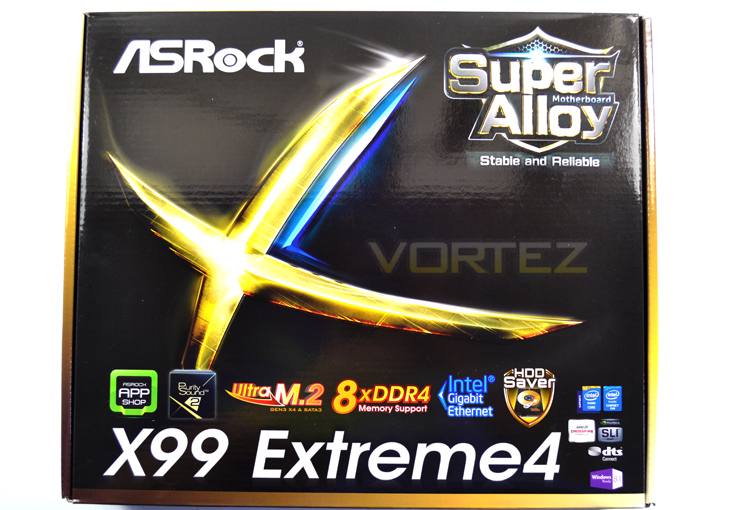
The exterior packaging is attractive yet much smaller than what were are used to. A glossy black box is highlighted with gold along with the main featureset atop of the product title.
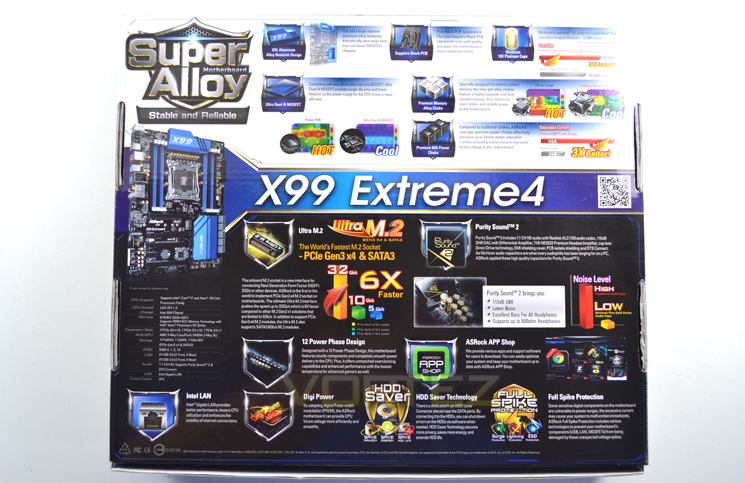
To the rear of the package, ASROCK go into fine detail regarding their features along with the usual standard features of the X99 chipset.
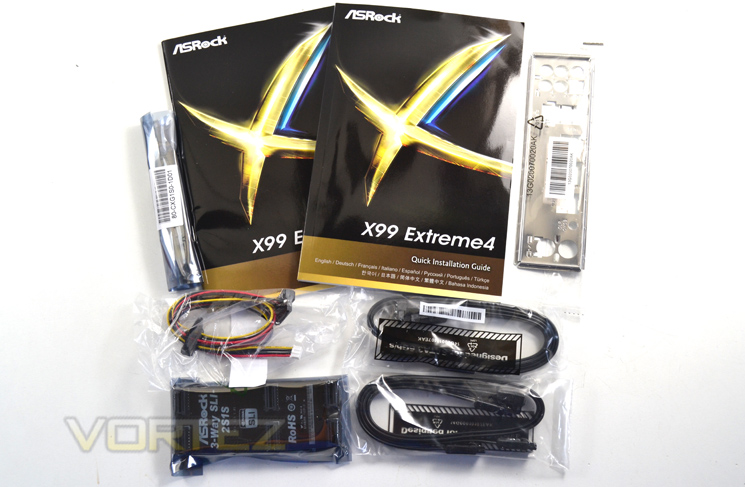
Breaking open the box we were surprised to find a very basic method of protection for the accessories which were bagged separately atop of a cardboard brace, itself covering the motherboard which was tie wrapped to a foam base. While the packaging was adequate, we would have liked to have seen a greater amount of protection to the motherboard.
The accessories followed on from the basic theme which can only be described as spare in comparison to the other motherboards we have reviewed thus far. For you money you get a couple of manuals, two SLI bridges, 4 SATA cables along with a SATA power cable. The obligatory I/O backplate rounds off the basic accessory list which other than the necessities, comprises of little extra to make it stand out.
First Look
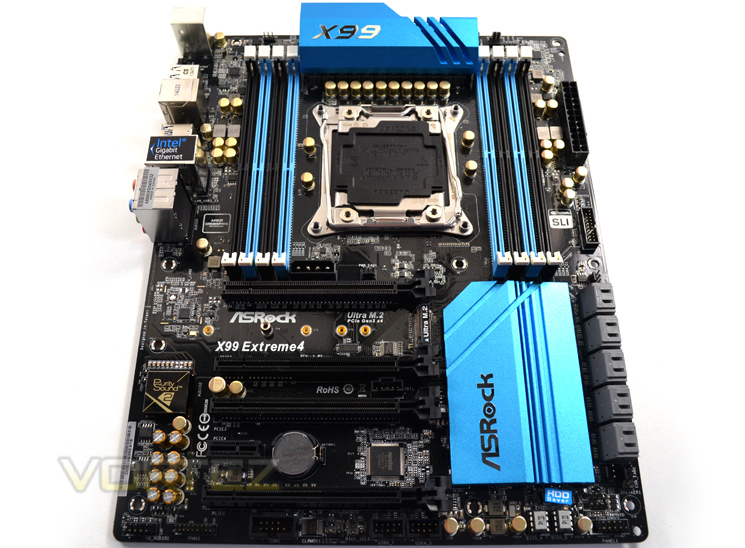
Here we see ASRock have changed the colour scheme of their range of motherboards. While we are not overt to the metallic sky blue theme on this particular example we fail to see the reasoning behind changing from the previous black and gold theme we adored on the X79 varient which, in our opinion was infinitely more pleasing to the eye. As it stands this new blue theme is hard to describe as anything other than ‘basic’. It neither repulses or engages you, instead it is forgetable which is a great shame considering how good looking their previous incarnation was.
Aside from the aesthetics, the motherboard is well laid out with pretty much everything where you would expect to find it with ASROCK sticking closely to the Intel specification. You will note that there is no I/O shielding which appears to be the latest fad in motherboard design. This we can forgive ASROCK for as we see little point in such extravagances other than for looks. EMI shielding is all good and well but can you honestly say any of you I/O devices have suffered due to electrical interference? Thought not!
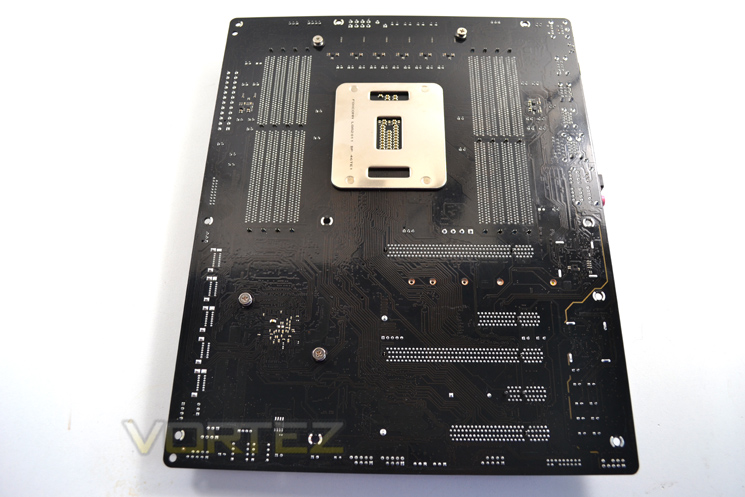
The back of the mainboard has very few components which we liked. From this view we can see that ASROCK have opted for a black PCB but instead of the preferred matt black, the motherboard is very glossy in appearance. We can also see that the PCIe layout is a (top to bottom) 16x, 4x, 16x, 1x, 8x.
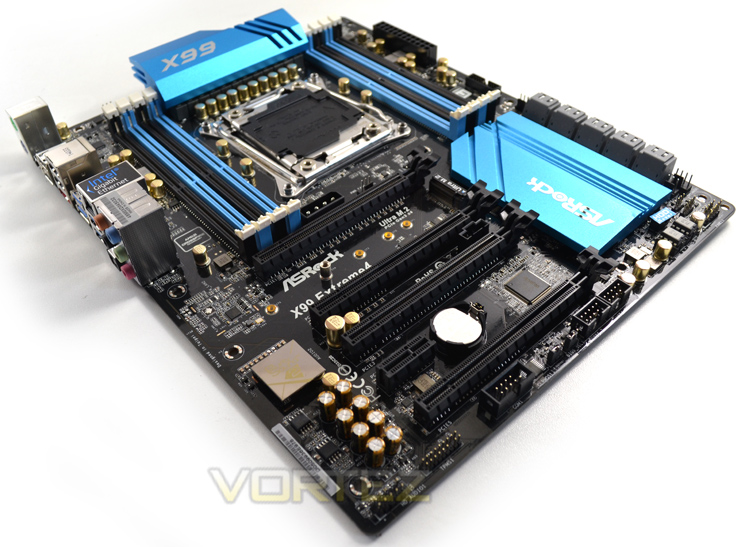
Overall we neither liked nor disliked the looks of the motherboard. It certainly pales in comparison to the previous version and perhaps more pertinently, against the current crop of motherboards on the market. If blue isn’t you thing though, ASROCK do over two alternatives in the Fatality range (red/black) and OC Formula (Yellow/Black), the latter of which we think looks very interesting.
Closer look: Socket Area
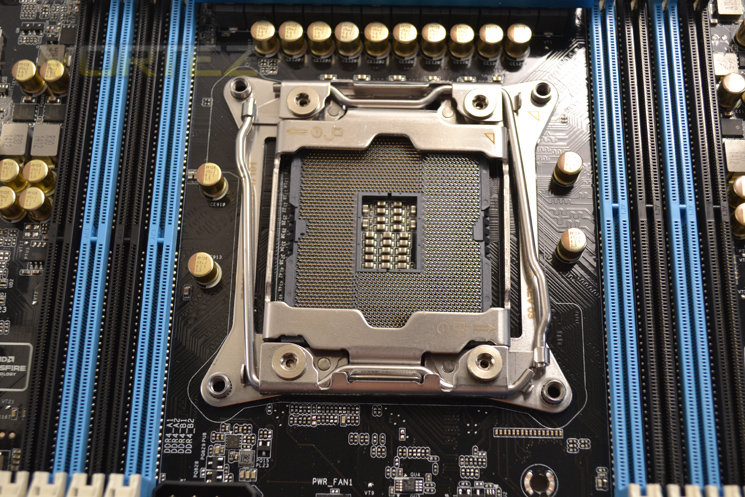
As with the X79 varient, the socket area has a smattering of capacitors below the VRM area along with a few more dropped around the socket which may hinder insulation for extreme overclockers not using putty. The socket supports both Intel Xeon Haswell-EP and i7 Haswell-E processors.
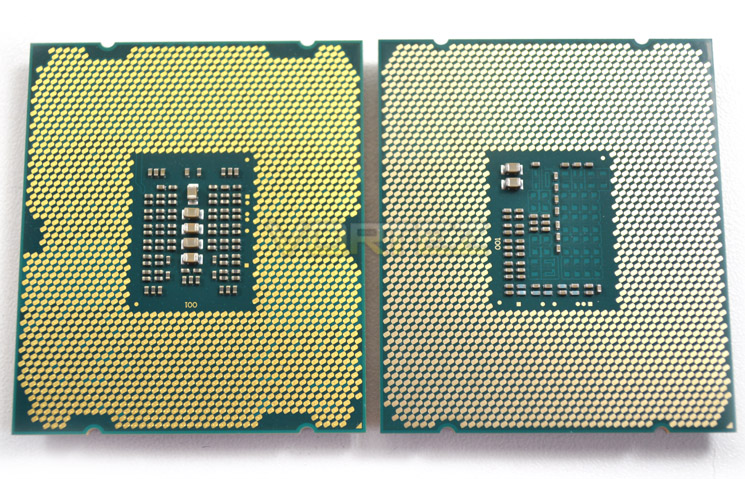
A quick comparison of the pad arrangement of the i7-5960X against the i7-4960X. The ASROCK cannot access the additional pads on the core as with the ASUS range of OC-Socket enabled boards but other than memory overclocking we don’t see this as a major disadvantage. It is also worth noting that Sadybridge-E and Ivybridge-E CPU’s will not fit this new socket. Aside from the different pin layout, the new LGA2011-3 socket clamp is also slightly different from previous LAG 2011-0 but still relatively easy to use.
Closer look: DDR4
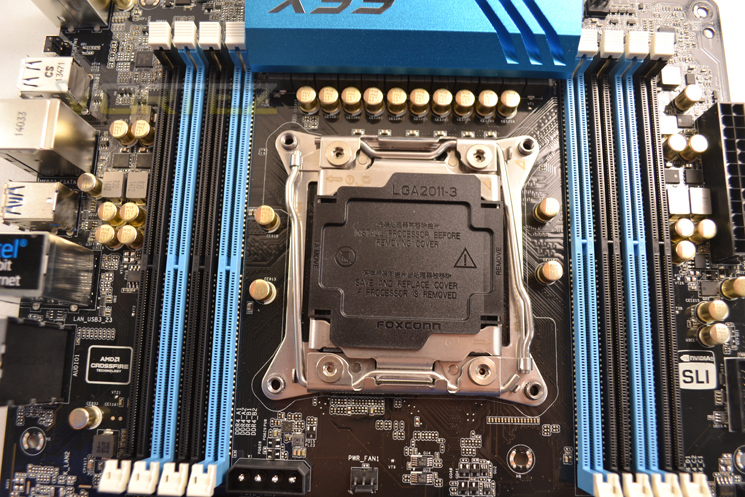
A unique feature to ASROCK is the introduction of 15μ Gold Contact in both the DIMM and PCIe slots. Most manufacturers only employ 3-4μ Gold Contact spec so the ASROCK is less likely to suffer oxidation affects. This motherboard will also support up to 128GB of memory at speeds upwards of 3000MHz (OC) along with support for DDR4 ECC and RDIMM (Registered DIMM) memory modules.
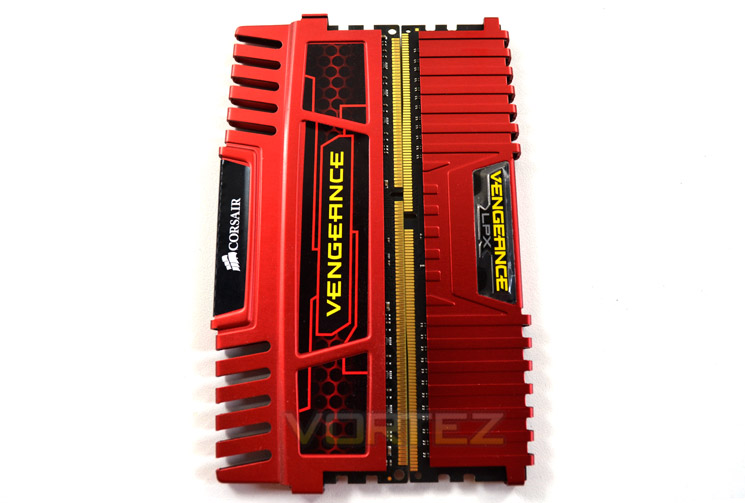
Memory choice is an important factor to consider when choosing which motherboard to base your system upon so you will be glad to know that ASROCK support most good manufacturers of memory. We tried both GSKILL Ripjaws and Corsair LPX and both ran fine without any issues.
Closer Look (Motherboard Features)
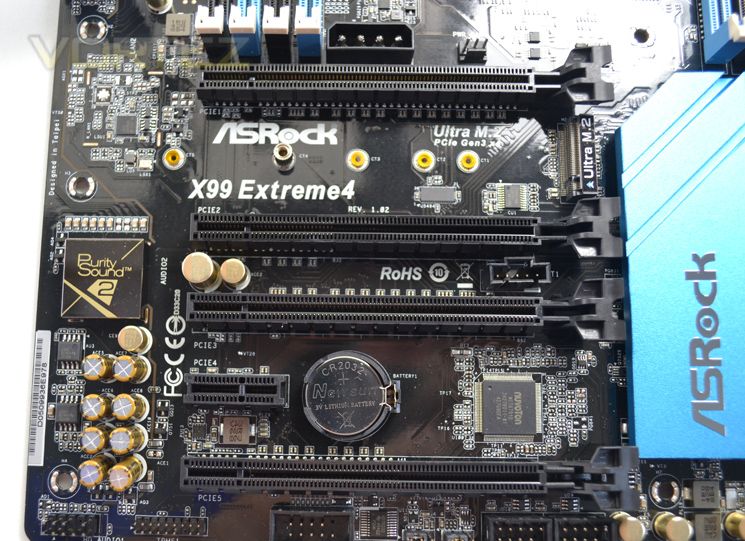
The ASROCK Extreme 4 features a relatively normal layout with lanes divided as follows (top to bottom)
16x
4x
16x
1x
8x
If the M.2 slot is used the 8x slot will be automatically disabled. It is unlikely that anything other than SLI/CrossfireX will be used on this motherboard so the layout should not present may issues to anyone other than the most extreme.
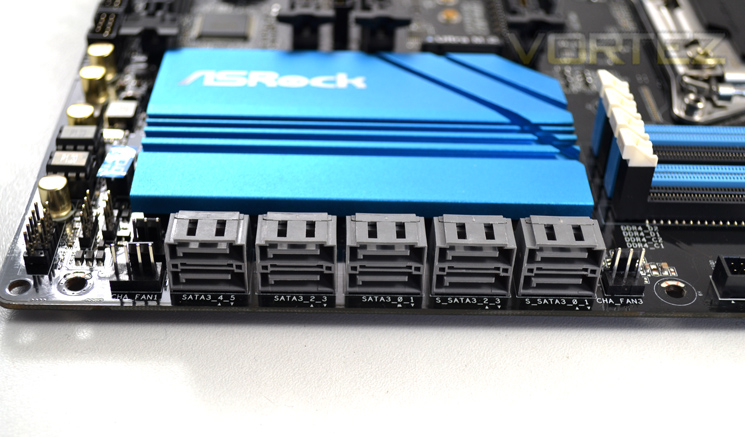
DATA storage comes courtesy of 10 SATA3, 1 eSATA, 1 Ultra M.2 (PCIe Gen3 x4 & SATA3). This motherboard also has a neat little feature whereby you can turn the Hard drives off via a dedicated 4-pin HDD Saver Connector saving power and increasing security (you can’t steal it if you don’t know its there!).
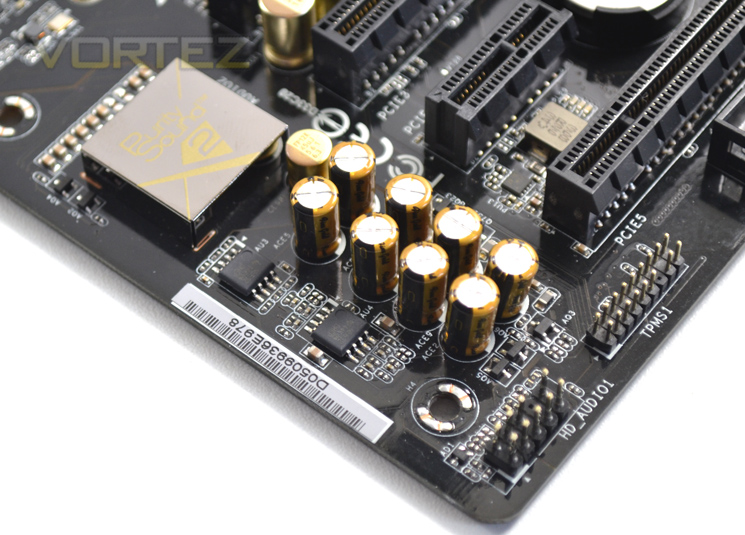
Audio is provided by the Realtek ALC1150 audio codec in the form of ASROCK’s Purity Sound. Purity sound is a 7.1 channel HD 115dB SNR DAC with Differential Amplifier, TI® NE5532 Premium Headset Amplifier, cap less Direct Drive technology, EMI shielding cover, PCB isolate shielding and DTS Connect. In short this setup provides low noise with high bass – perfect for those using headphones.
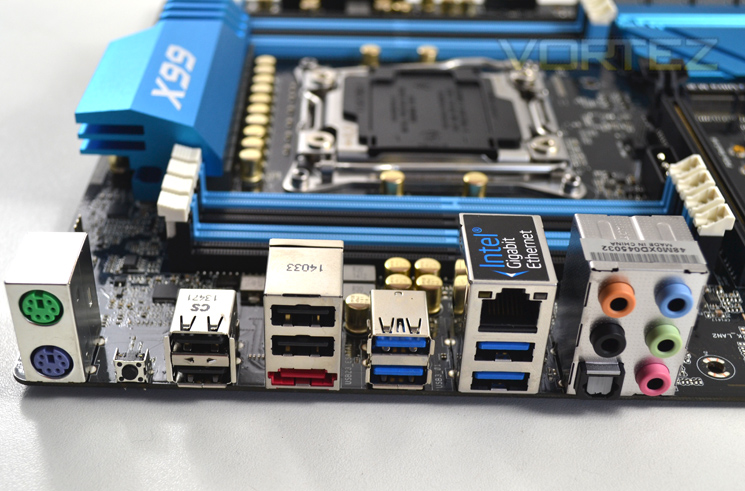
The I/O area provides something we haven’t seen in a while and that is the old PS/2 keyboard and mouse ports – not something we expected to see on a PC in 2014!. A CMOS reset button resides next to the ports. The remainder is comprised of – 1 x eSATA Connector
– 1 x Optical SPDIF Out Port
– 4 x USB 2.0 Ports (Supports ESD Protection (ASRock Full Spike Protection))
– 4 x USB 3.0 Ports (Supports ESD Protection (ASRock Full Spike Protection))
– 1 x RJ-45 LAN Port with LED (ACT/LINK LED and SPEED LED)
– HD Audio Jacks: Rear Speaker / Central / Bass / Line in / Front Speaker / Microphone
Detailed Look
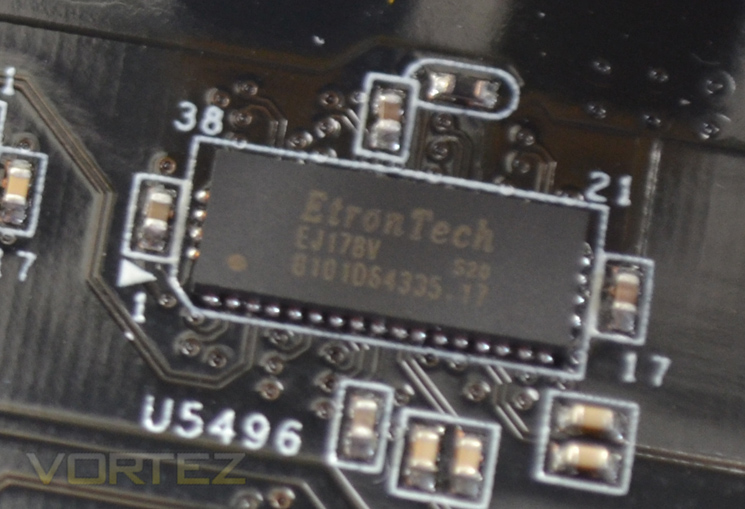
The EtronTech EJ178V chips are 16 to 8 PCIe channel multiplexer / demultiplexer. They are esentially used to switch the operation of PCI-Express 2.0 / 3.0 slot from 16x to 8x mode, when using SLI / CrossfireX mode.
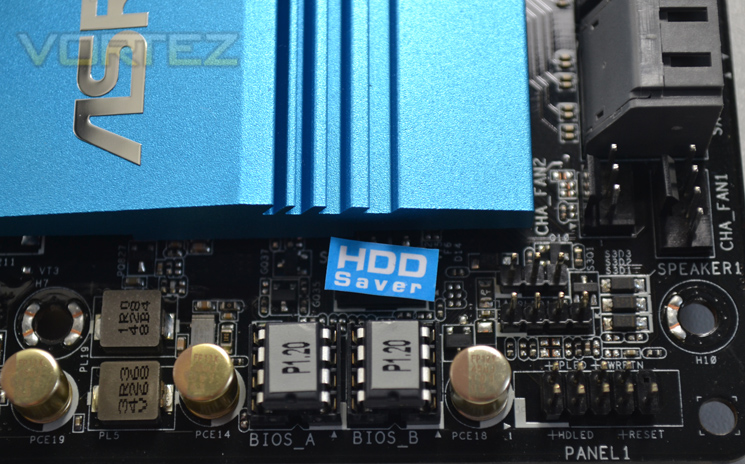
SPI chips are used to store both BIOS with the HD SAver port placed above with a sticker covering the port for ease of identification.
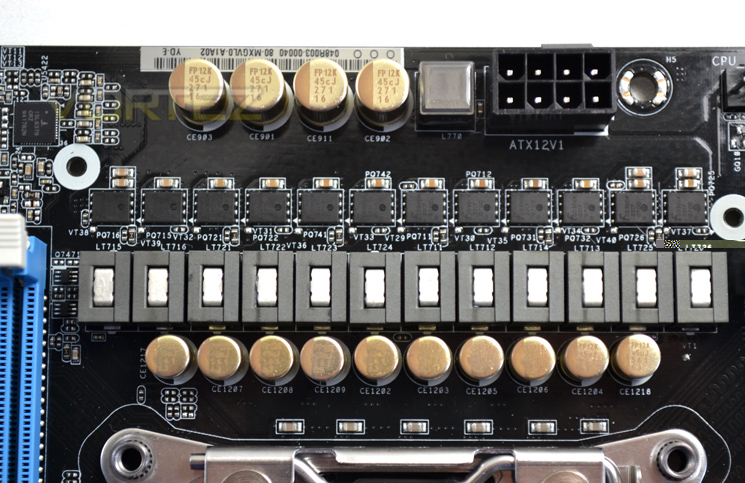
Powering the motherboard we see that ASROCK have gone for a massive 12 phase power design comprising of 60A power chokes which are 3x more powerful than older ferrite chokes. Coupled with the main power chokes are alloy chokes specifically for the memory which deliver more stable power to the mainboard.
Combined with the chokes are Ultra Duan-N MOSFETs which have a larger die area than norma along with a lower RDS(On) which means the voltage provided to the CPU is more efficient.
Rounding off the VRM area are the Nichicon 12k Platinum capacitors. This solid caps offer around 20% higher lifespan that traditional capacitors.
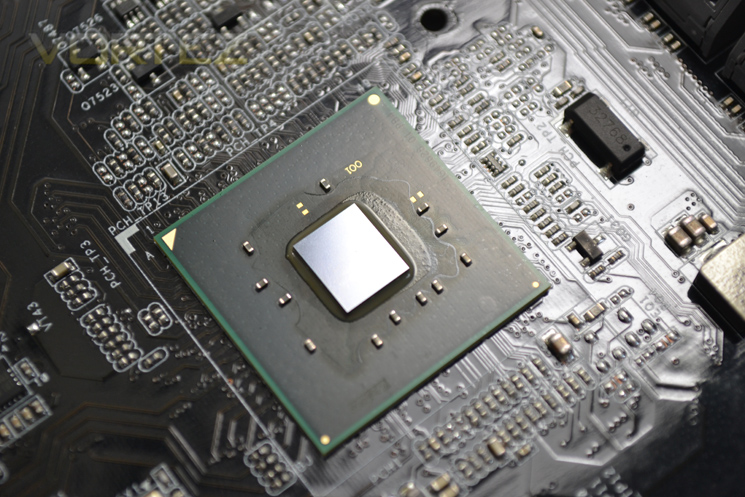
..and finally we come to the chipset itself. We have covered the features of this new sliver of silicon previously so won’t regurgitate the same information here and if you are reading this motherboard review you will likely be well aware of what it is capable of! For more information please read our Haswell-E review.
Test Setup & Methodology
RAM: 16GB Corsair Vengeance LPX DDR4 @ 2666MHz 16-17-17-35 (CMK16GX4M4A2666C15R)
GPU: NVIDIA GTX 760
Power Supply: Corsair RM1000
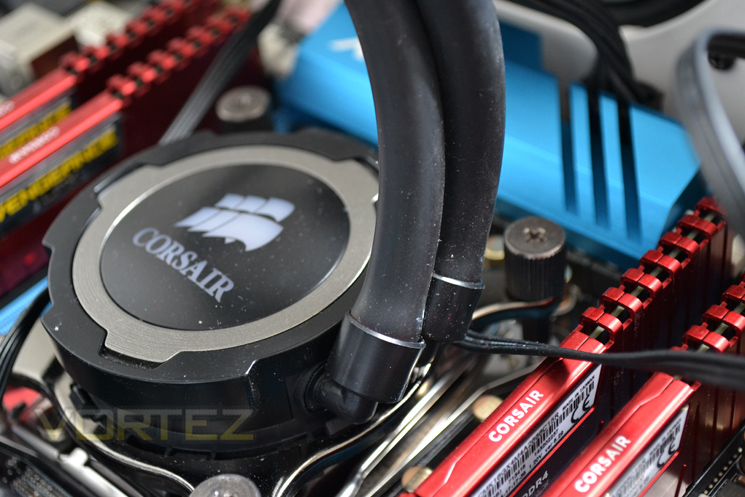
Cooler: Corsair H105
Motherboards
GIGABYTE X99 SOC FORCE
ASUS X99 Deluxe
MSI X99S Gaming 9 AC
ASROCK X99 Extreme4
GIGABYTE X99 SOC FORCE
ASUS X99 Deluxe
MSI X99S Gaming 9 AC
Benchmarks
AIDA 64 – CPU & Memory/Cache Performance
SiSoft Sandra – Compute & Memory Performance
HandBrake – Encoding Performance
Pov-Ray – 3D Image processing Performance
Cinebench R15 – Image processing Performance
AS SSD SATA Performance
Futuremark 3DMark (Firestrike) – Graphical Performance
Futuremark PCMark 8 – Overall PC Performance
Battlefield 4, THIEF, Company Of Heroes 2 & GRID:2 – Gaming Performance
AIDA 64 – CPU & Memory/Cache Performance
SiSoft Sandra – Compute & Memory Performance
HandBrake – Encoding Performance
Pov-Ray – 3D Image processing Performance
Cinebench R15 – Image processing Performance
AS SSD SATA Performance
Futuremark 3DMark (Firestrike) – Graphical Performance
Futuremark PCMark 8 – Overall PC Performance
Battlefield 4, THIEF, Company Of Heroes 2 & GRID:2 – Gaming Performance
BIOS Exploration
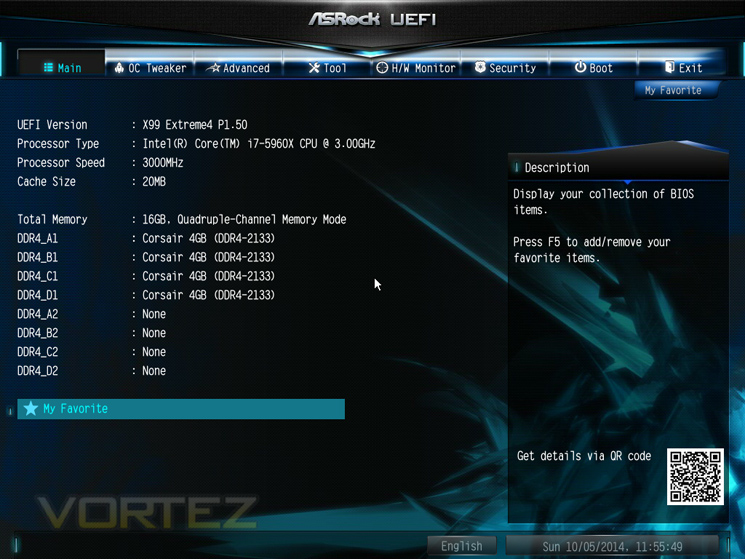
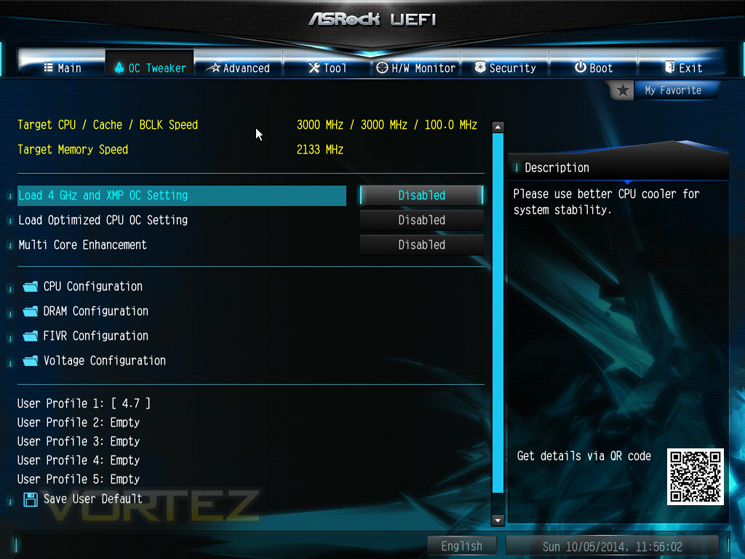
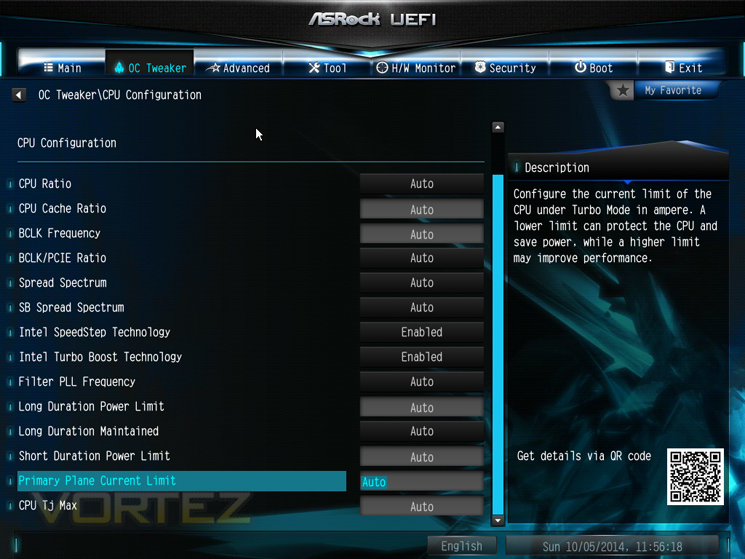
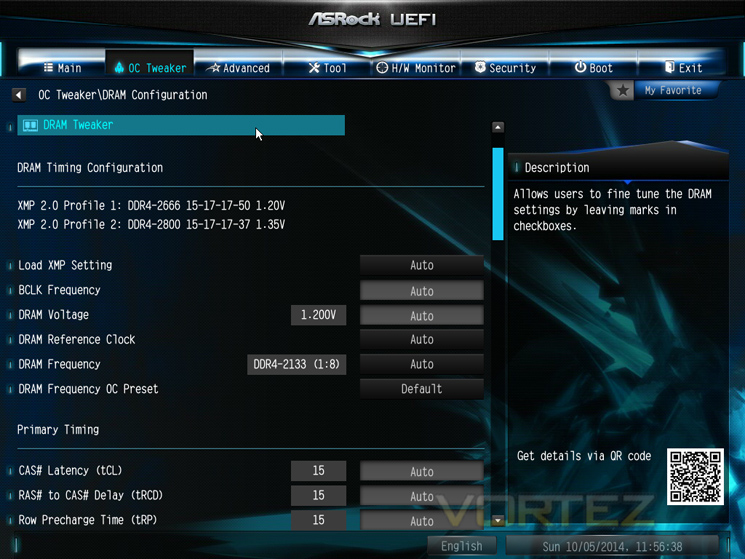
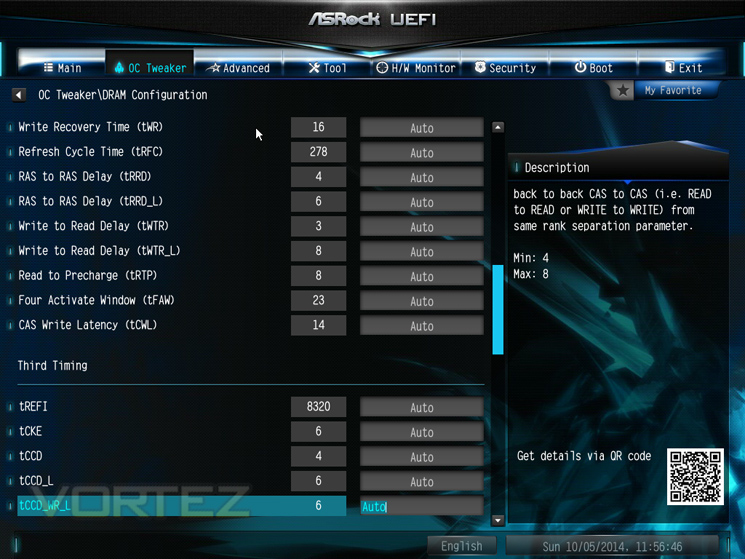
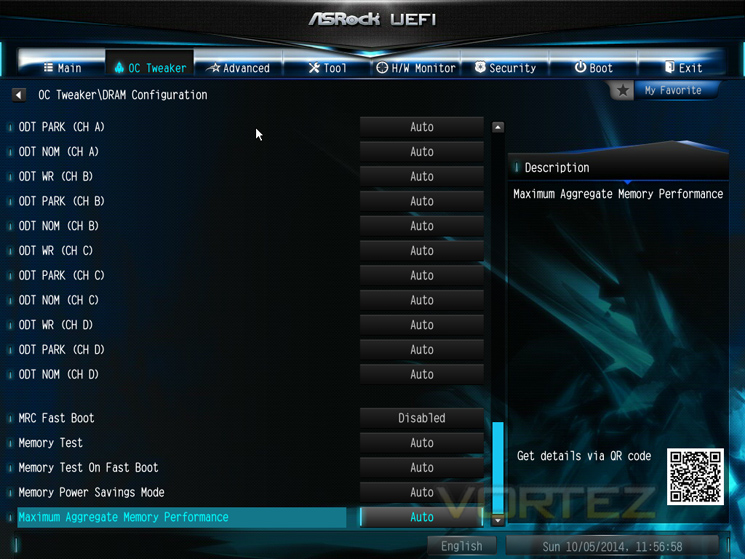
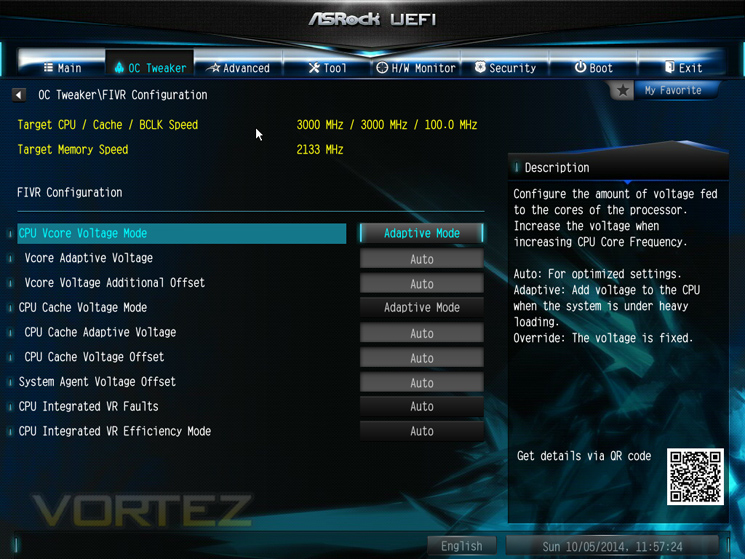
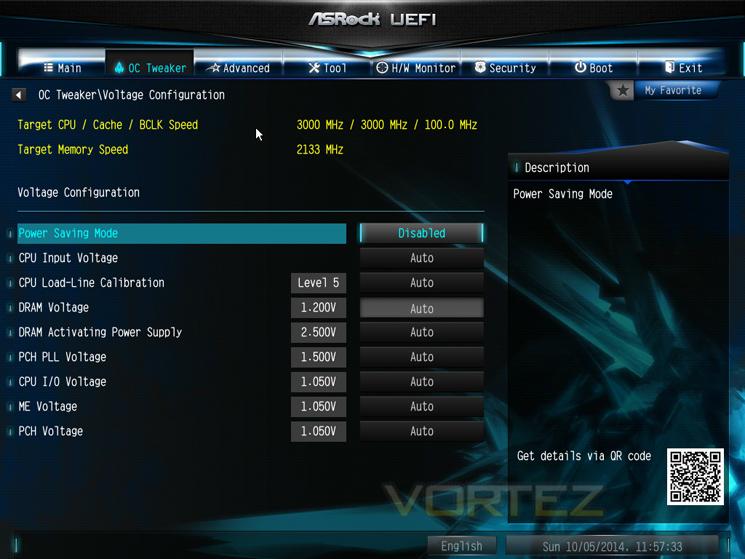
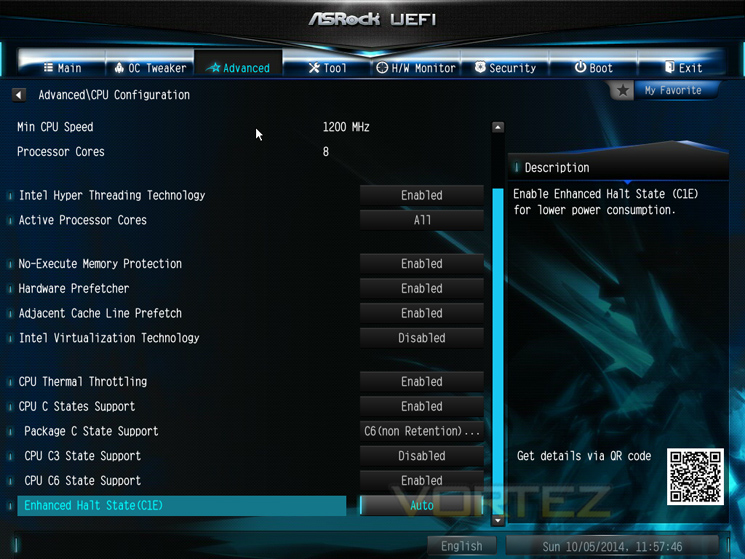
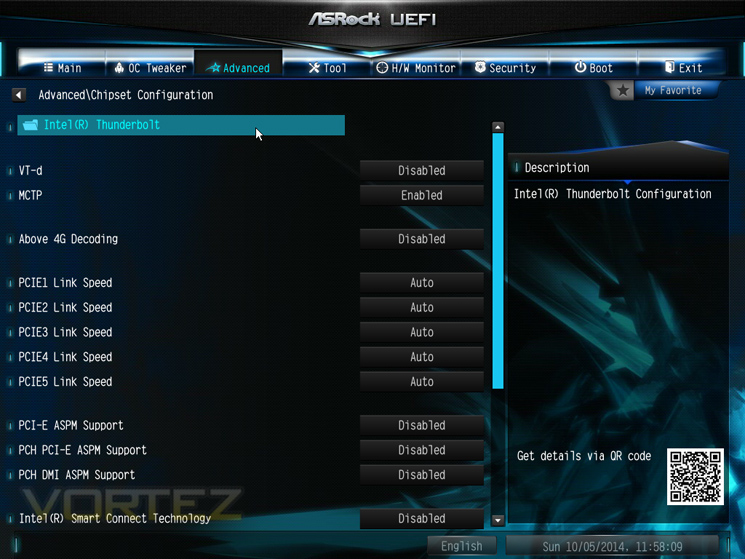
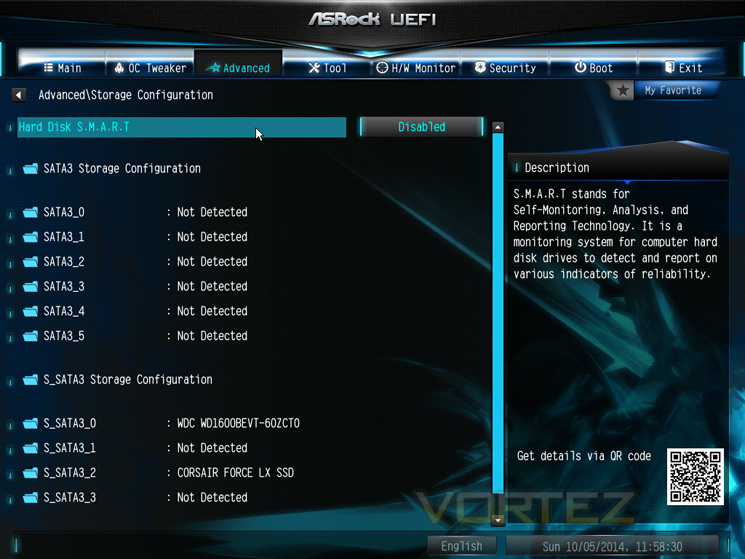
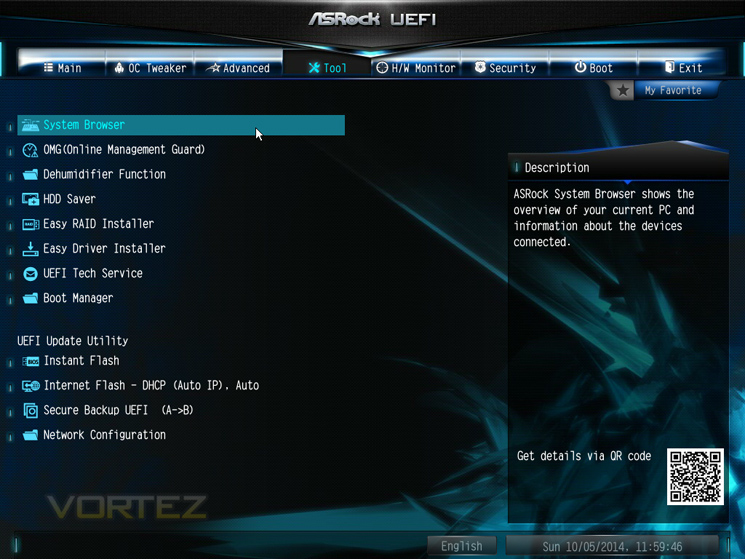
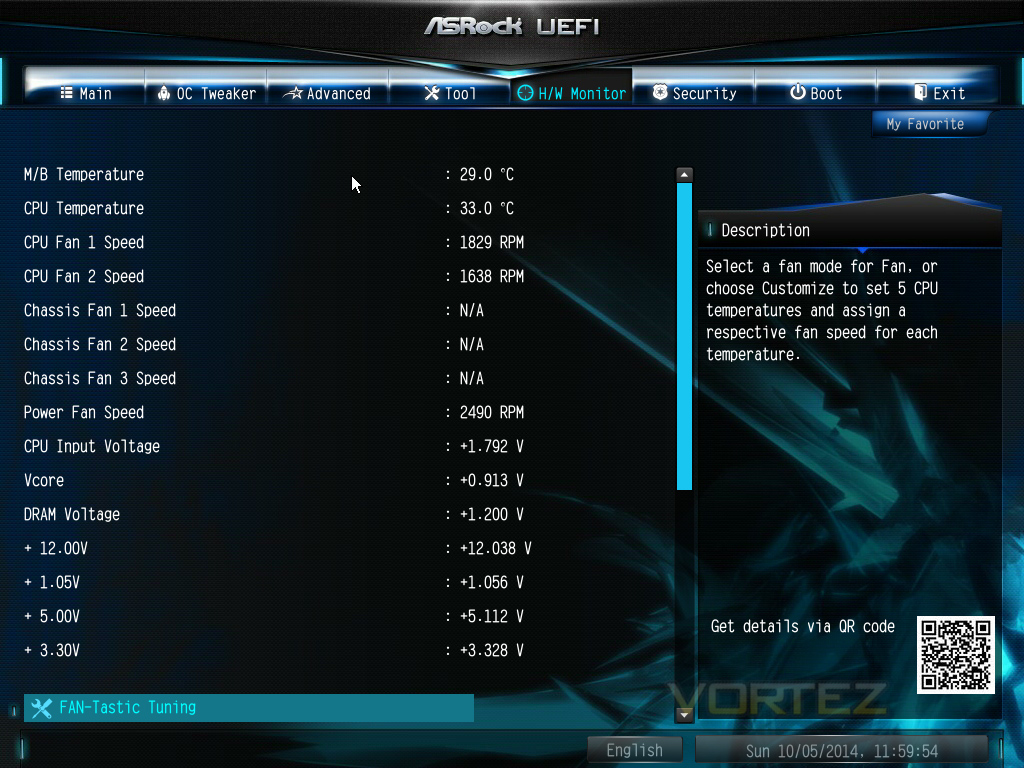
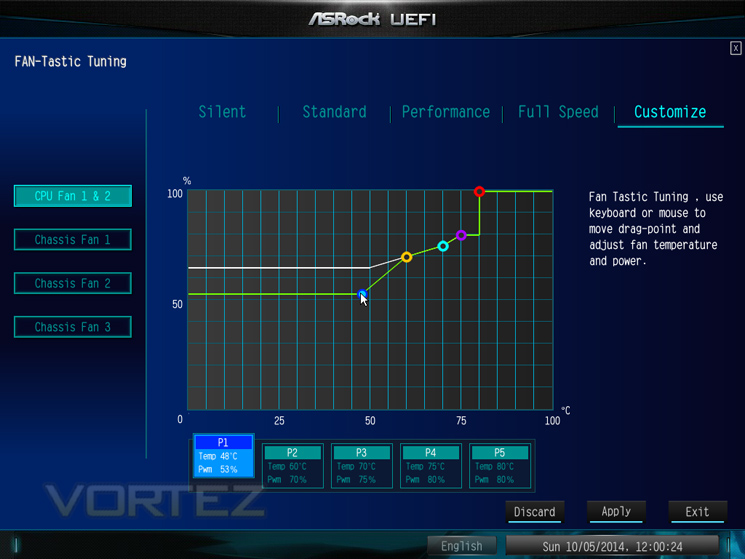
We always try and use the most up to date BIOS when reviewing a motherboard. The BIOS update utility, which checks for updates without having to load windows is a great addition to the ASROCK BIOS, and is a simple yet very useful and effective feature, one which we’re sure will be copied eventually by other manufacturers. It will check for any updated BIOS, download it to a USB stick (not supplied), and upon agreement, install it for you with just a couple of clicks of the mouse. Brilliant.
We found the ASROCK BIOS on the X79 motherboards to be basic but powerful. The X99 UEFI BIOS is a different beast in that it is more complex, more powerful and altogether better looking. It is fair to say it isn’t quite as attractive or in-depth as the more overclocking biased motherboard BIOS’ available but it ‘does the job’. We liked the ease at which we could find settings which was both intuitive and yet basic by design. If you think of tradition 8bit BIOS glossed over with pretty graphics and mouse control and you get the picture.
There were other features which we found interesting such as the humidifier function which powers the PC on automatically to dehumidify the system after entering S4/S5 state and other settings which were very useful such as the ‘Restart to UEFI’ saving you from mashing your .del key.
Overall, the BIOS is not intimidating, easy on the eye and simple to navigate. A higher resolution option would have been useful as it looked a little blurry on our 4k screen but for the most part we found the BIOS up to the job.
Overclocking
Overclocking the ASROCK was very easy, that is, once the BIOS had been updated. It is fair to say the reference BIOS on our motherboard was terrible. After checking the ASROCK support site, we couldn’t find an updated BIOS which was disappointing. Thankfully, the useful utility in the BIOS that checks for a BIOS update, did pick up a updated version and after agreeing to install this update the change in both feel and performance of the BIOS was transformed.
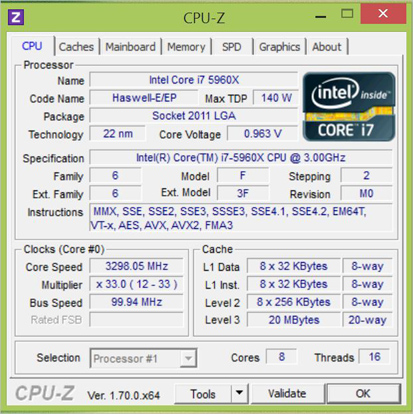
We already knew what out CPU was capable of so we dialled those settings in and sure enough, it loaded fine, ran a few benchmarks including a stress test and all passed fine. We tried increasing the clockspeed both by adjusting the baseclock frequency and lowing the multiplier and by multiplier adjustment alone. We did manage to get into windows at 4.9GHz but this was by no means stable. We therefore lowered back to 4.75GHz and still encountered a few issues despite increasing a number of voltages to try and attain stability.
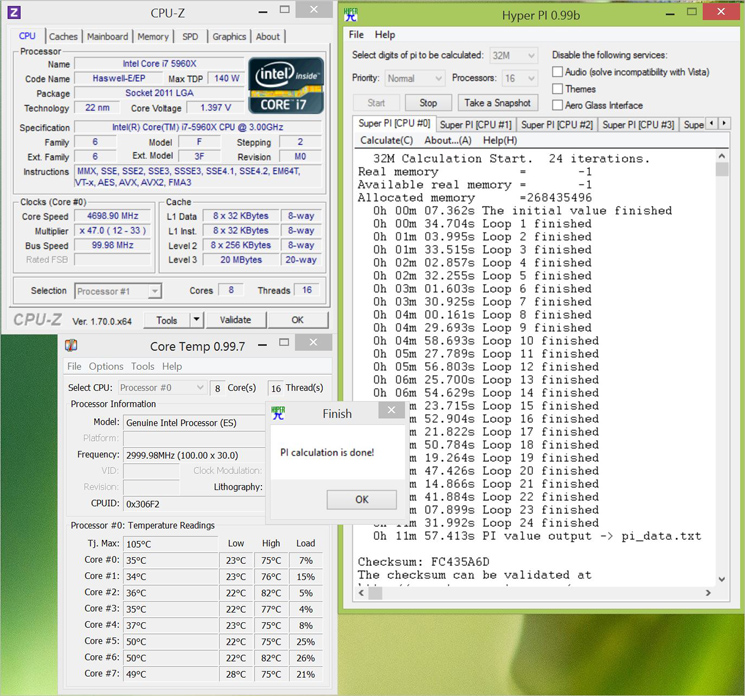
Eventually we settled on 4.7GHz which as a shame after so much promise but not shameful by any stretch of the imagination as it is just 500MHz below what motherboards costing twice as much have achieved!
Benchmarks: Power Consumption
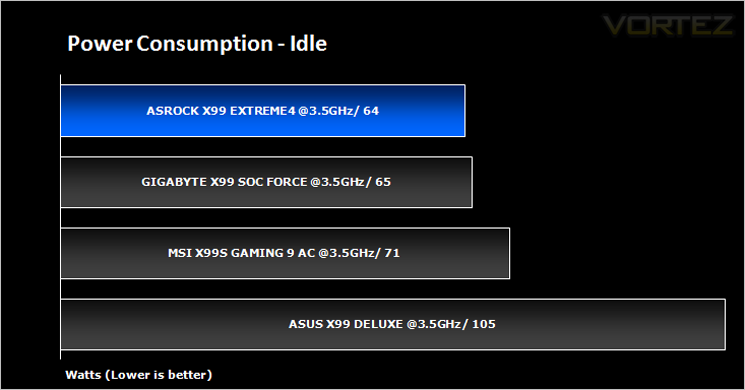
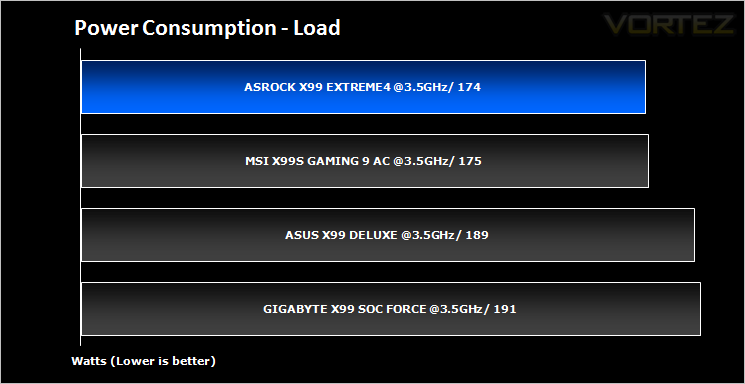
System idle readings were taken by enabling all of the key features on the mainboard and letting the system rest for 10 minutes within a windows environment before taking a reading from the plug to the PSU. To obtain our load results we ran HyperPI (32m) on all cores taking a reading after 5 minutes with all CPU cores loaded to 100%.
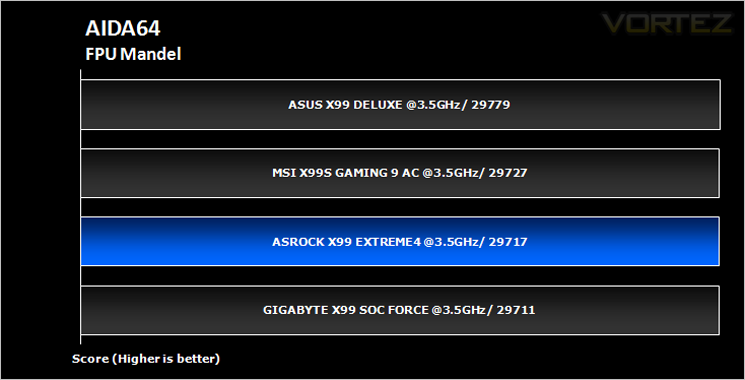
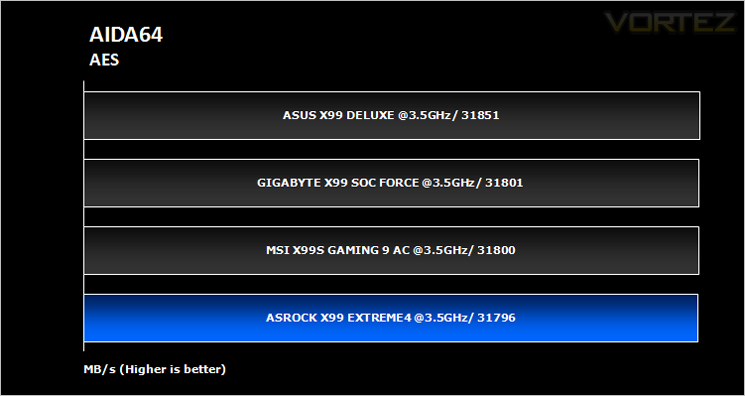
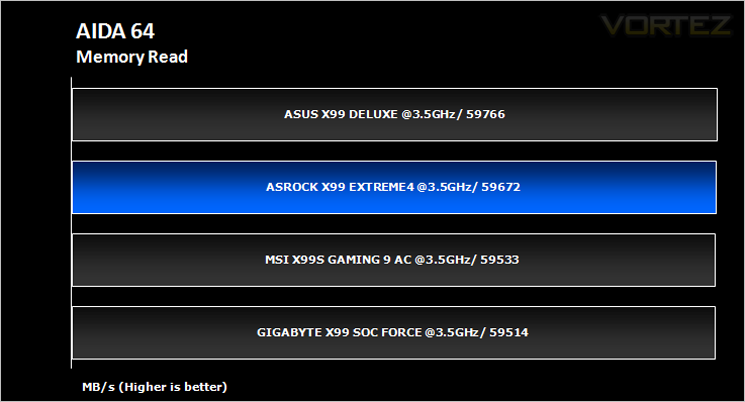
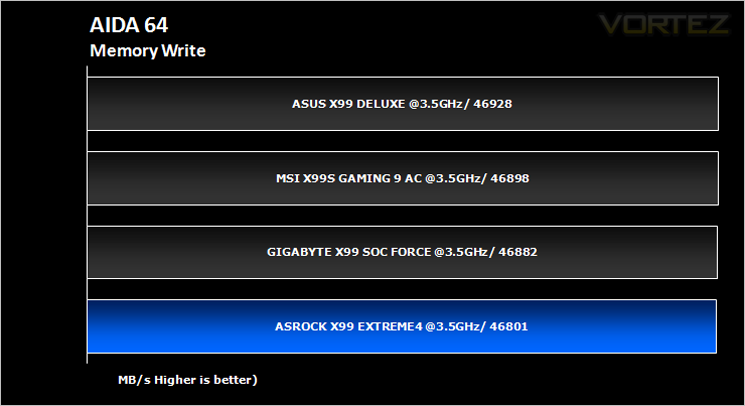
Benchmarks: AIDA64 CPU & Memory
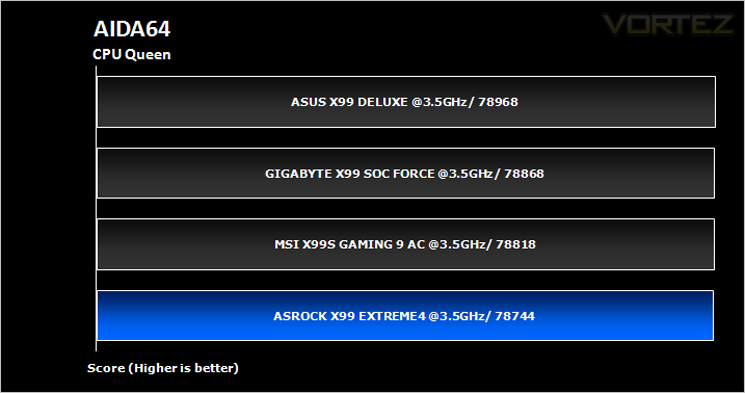
This simple integer benchmark focuses on the branch prediction capabilities and the misprediction penalties of the CPU. It finds the solutions for the classic “Queens problem” on a 10 by 10 sized chessboard. At the same clock speed theoretically the processor with the shorter pipeline and smaller misprediction penalties will attain higher benchmark scores. For example — with HyperThreading disabled — the Intel Northwood core processors get higher scores than the Intel Prescott core based ones due to the 20-step vs 31-step long pipeline. CPU Queen test uses integer MMX, SSE2 and SSSE3 optimizations.
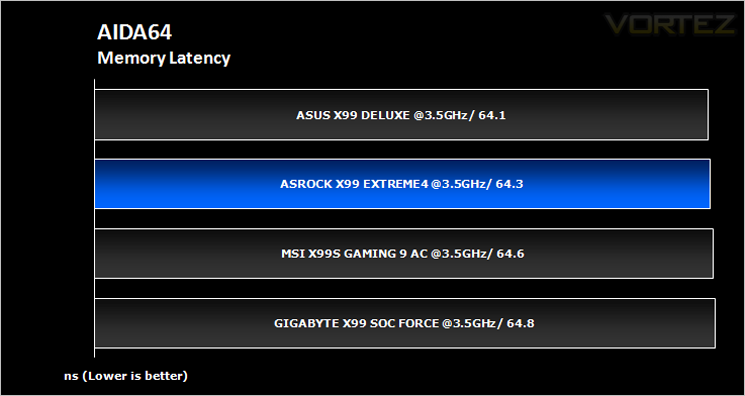
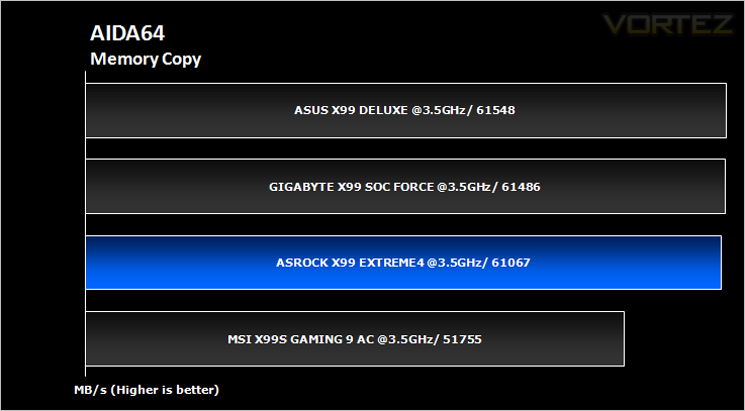
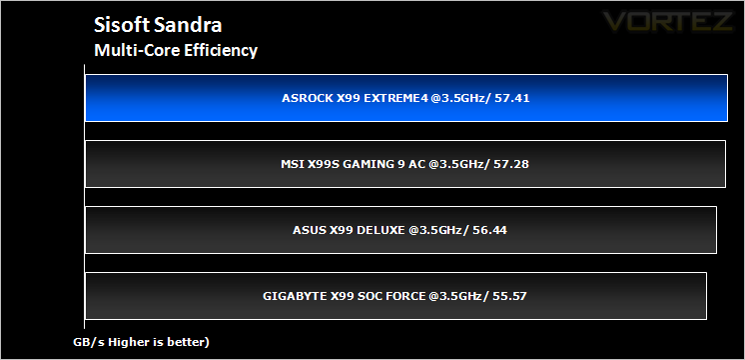
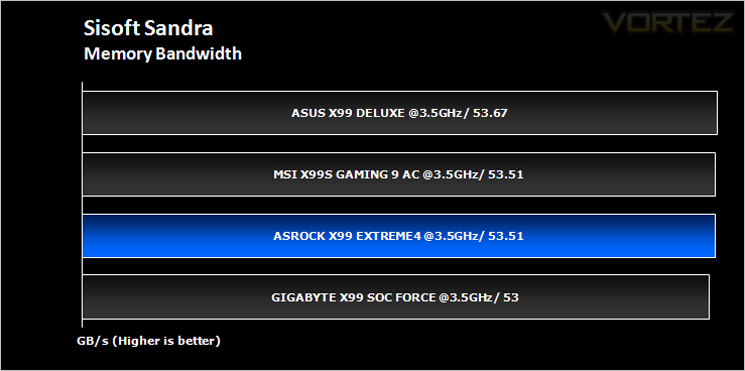
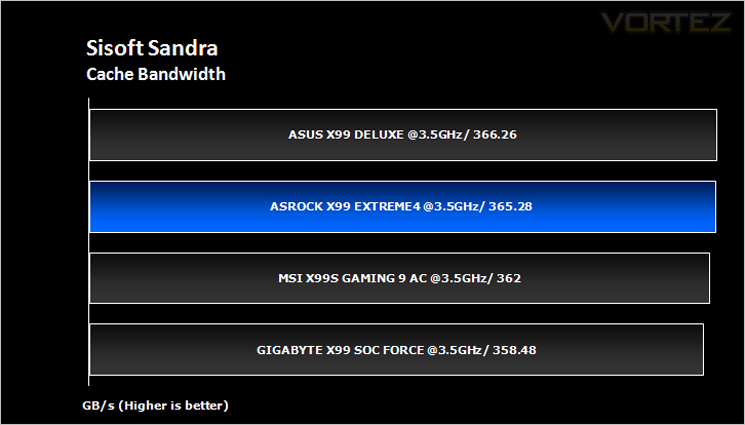
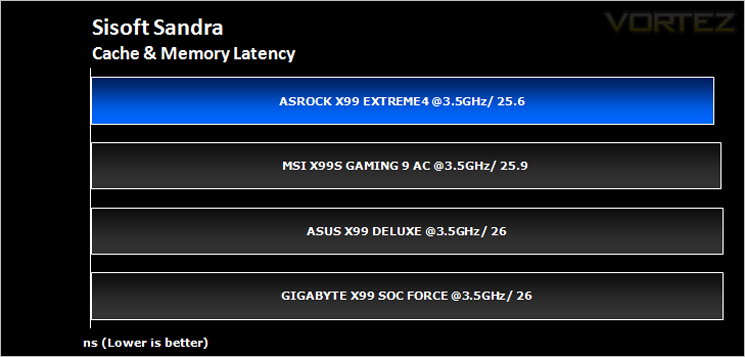
Benchmarks: SiSoft Sandra: CPU and Memory
SANDRA isn’t always a benchmark that is included in hardware reviews but I believe it shouldn’t be ignored. SANDRA provides a vigorous package that tests your system in a rather large array of benchmarks. There are many aspects of benchmark that can be executed. We will be considering – CPU and memory tests.
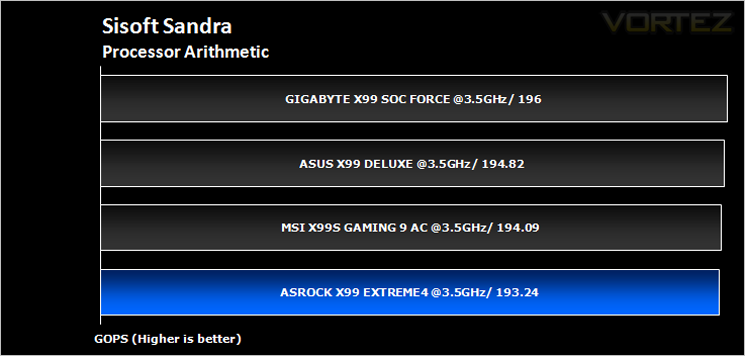
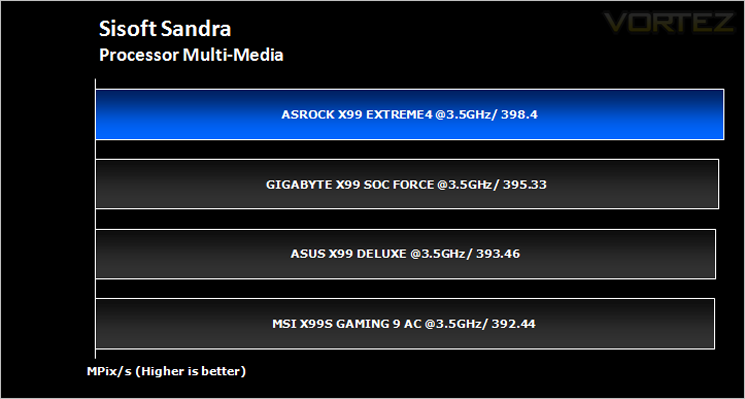
Benchmarks: Cinebench R15
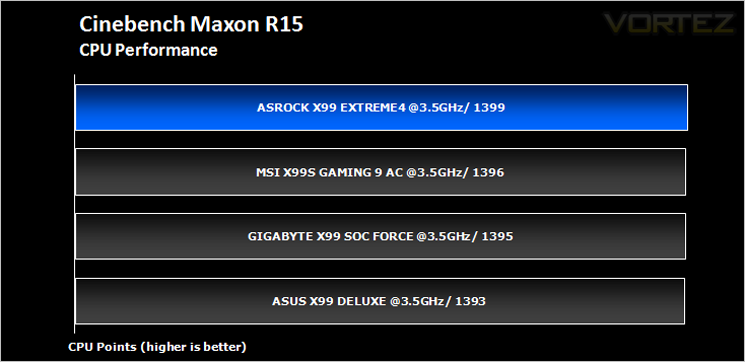
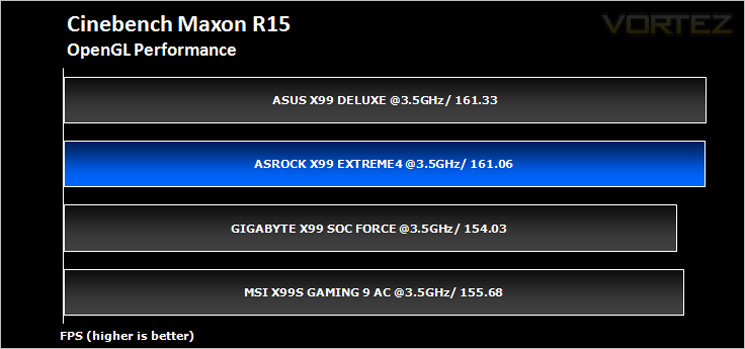
CINEBENCH can measure systems with up to 64 processor threads. This test scene contains approximately 2,000 objects which in turn contain more than 300,000 polygons in total, and uses sharp and blurred reflections, area lights, shadows, procedural shaders, antialiasing, and much more. The result is displayed in points (pts). The higher the number, the faster your processor.
Benchmarks: Pov-Ray
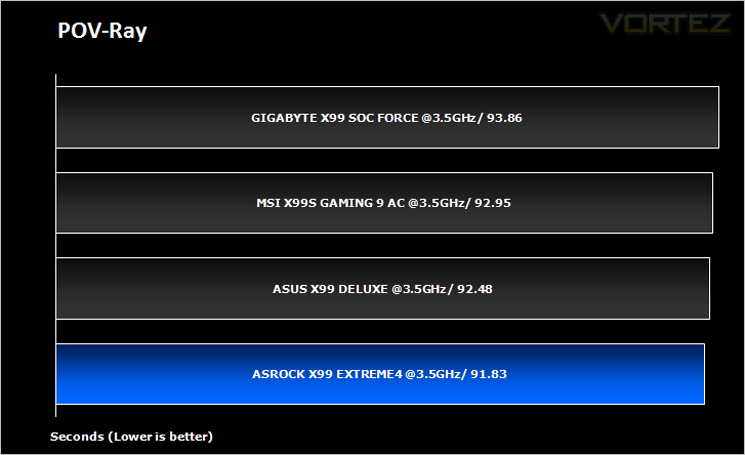
The Persistence of Vision Raytracer, or POV-Ray, is a ray tracing program which generates images from a text-based scene description, and is available for a variety of computer platforms. It was originally based on DKBTrace, written by David Kirk Buck and Aaron A. Collins for the Amiga computers.
Benchmarks: Handbrake 0.9.9.1
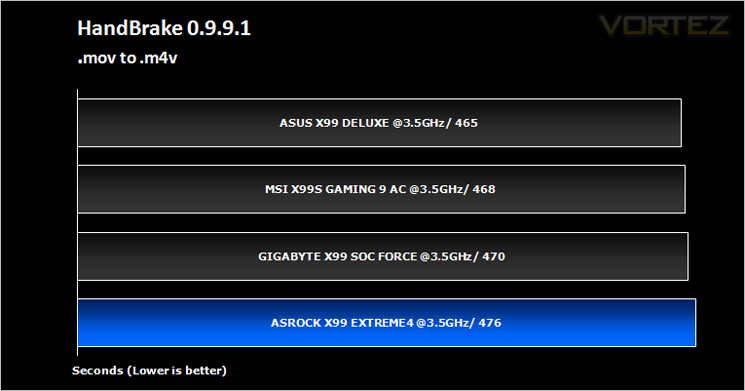
HandBrake is an open source trancoding tool for converting video from nearly any format to a selection of modern, widely supported codecs. Strong multi-threading support tends to favour high core counts and hyperthreading support.
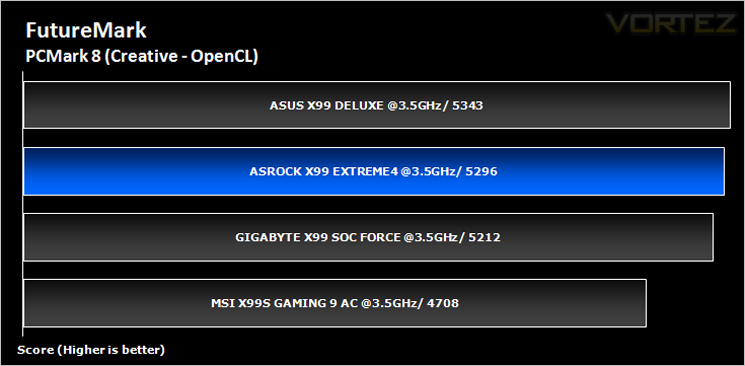
Benchmarks: Futuremark PCMark 8
PCMark 8 combines performance benchmarking with battery life measurement and includes tests based on popular Adobe and Microsoft applications. Whether you are looking for long battery life, or maximum power, PCMark 8 will help you find the devices that offer the perfect combination of efficiency and performance for your needs. It’s the complete PC performance benchmark for home and business.
Benchmarks: AS SSD
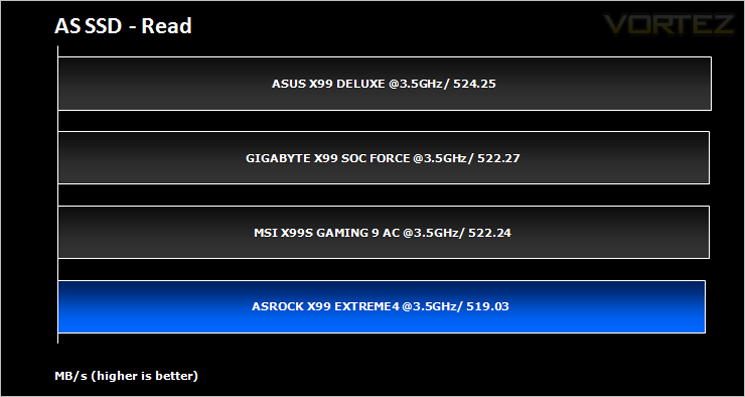
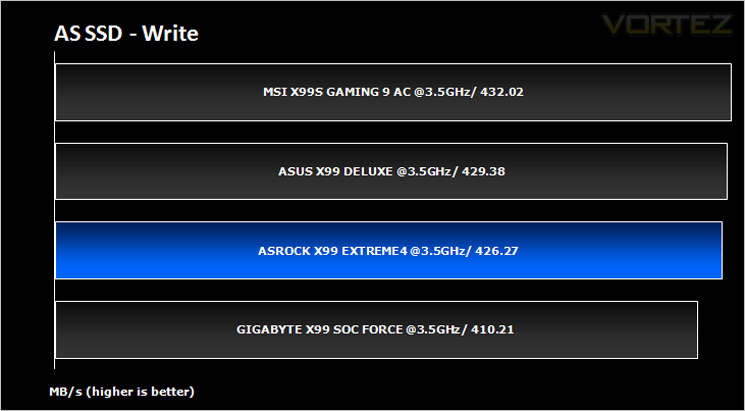
AS SSD Benchmark is a straightforward tool for measuring the speed of your SSD drive.
Simply launch the program, choose your drive, click Start, and it’ll test your SSD’s read and write speed in a variety of ways, delivering a score for each when it’s done. And if that’s not enough, there are also additional file copy and compression-related benchmarks available from the Tools menu. (The author’s support page is German only, but if you need further English explanations then there’s a thread on the program at the OCZ Technology forum.).
Simply launch the program, choose your drive, click Start, and it’ll test your SSD’s read and write speed in a variety of ways, delivering a score for each when it’s done. And if that’s not enough, there are also additional file copy and compression-related benchmarks available from the Tools menu. (The author’s support page is German only, but if you need further English explanations then there’s a thread on the program at the OCZ Technology forum.).
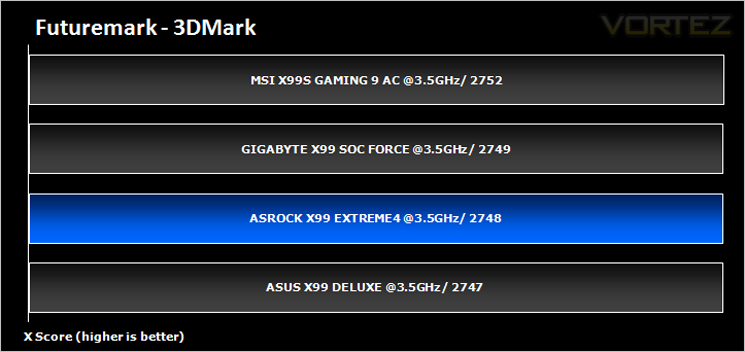
Benchmarks: Futuremark 3DMark Fire Strike
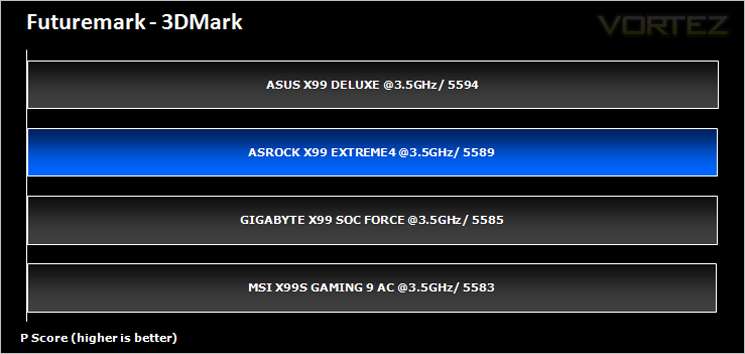
3DMark FireStrike Product PageFire Strike is Futuremark’s new showcase DirectX 11 benchmark designed for high-performance gaming PCs. It is our most ambitious and technical benchmark ever, featuring real-time graphics rendered with detail and complexity far beyond what is found in other benchmarks and games today. Fire Strike will only be available in the Windows editions of 3DMark initially.
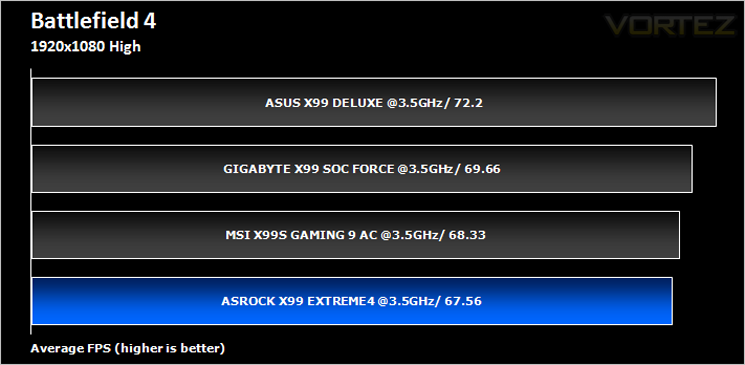
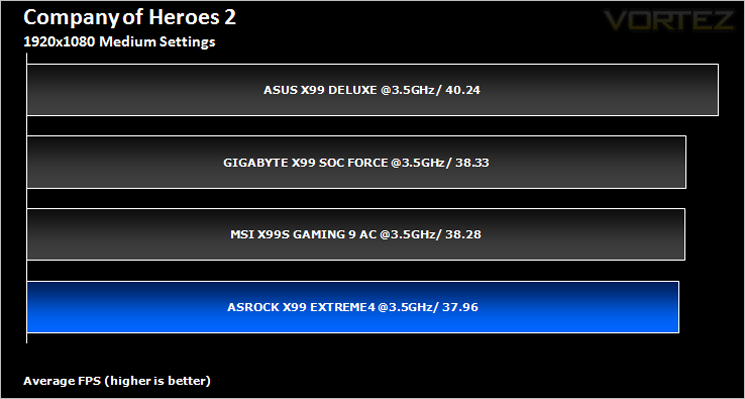
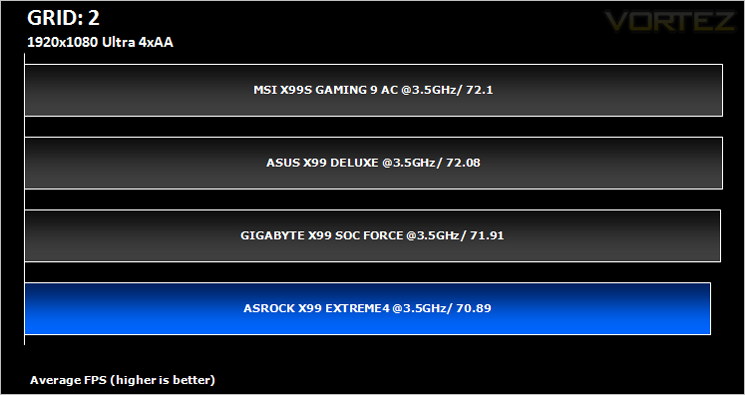
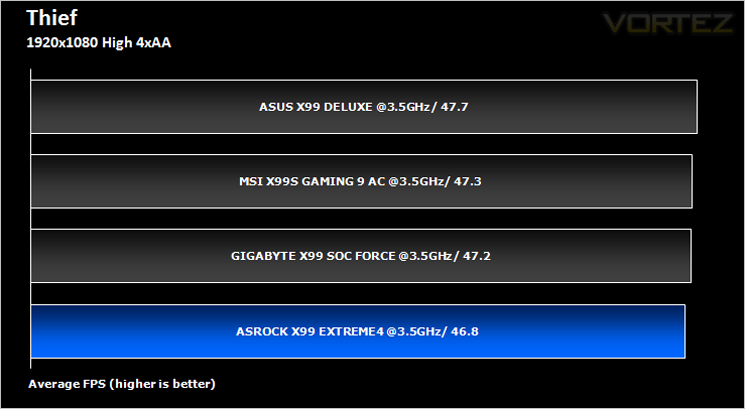
Benchmarks: Battlefield 4, THIEF, Company of Heroes 2, GRID 2
It’s important for us to perform a number of game benchmarks as well as the synthetic tests because gamers will want to know if there are any significant benefits. So here we have a selection of popular gaming titles, critically acclaimed and action-packed.
Conclusion
It would be easy to dismiss the ASROCK X99 motherboard as an ‘also ran’ simply due to the fact it brings little extra to the table. Yes it has all the main features you would expect of a motherboard based upon the X99 chipset and yes it can clearly overclock almost to the levels of the very best, dedicated overclocking motherboards however, this motherboard costs half the price which is a fantastic achievement and in some ways embarrasses those boards which are more heavily featured. It can do pretty much what the other higher end motherboards can do. Sadly though, this is where the attraction ends.
Firstly, to conclude our thoughts on the aesthetics, the motherboard looks ‘OK’. We really aren’t sold on the blue black and gold instead much preferring the previous generation black grey and gold. We can understand ASROCK wanting to freshen up the design but the sky blue heatsinks and matching memory slots cheapen the look of the mainboard in our opinion.
Feature wise, the Extreme4 has the key attractions of X99 such as USB3, M.2, SATA 6GB/s, Quad channel ram etc but little more. The 12 phase VRM is a welcome addition but in our testing, it did not enhance the overclocking level of our CPU. The remaining features so as extra gold on the connections and Audio Purity are a much of a muchness and are unlikely to sway public opinion one way or the other. They are a nice to have for sure but hardly a deal breaker.
Finally and you may think obtusely we come to the packaging. While there is nothing inherently wrong with the packaging, it does a great job of summarising what you can expect from the mainboard: Adequate. Herein lays the theme of the ASROCK X99 Extreme 4. It is a motherboard that does everything expected of it but offers little else. If you are looking for a cheapo entry into X99 then you should give this mainboard fair consideration because it isn’t a bad motherboard, far from it and it is certainly one of the cheaper ones on the market. Our issue here is that it could have been so much better with a little extra tweaking because there are moments of genius, such as using the BIOS to get your drivers, check for BIOS updates etc but this is let down by the overall budget feel of the product. The manufacturer’s website is also not the best to navigate which only adds to the perception that you may have bought second best.
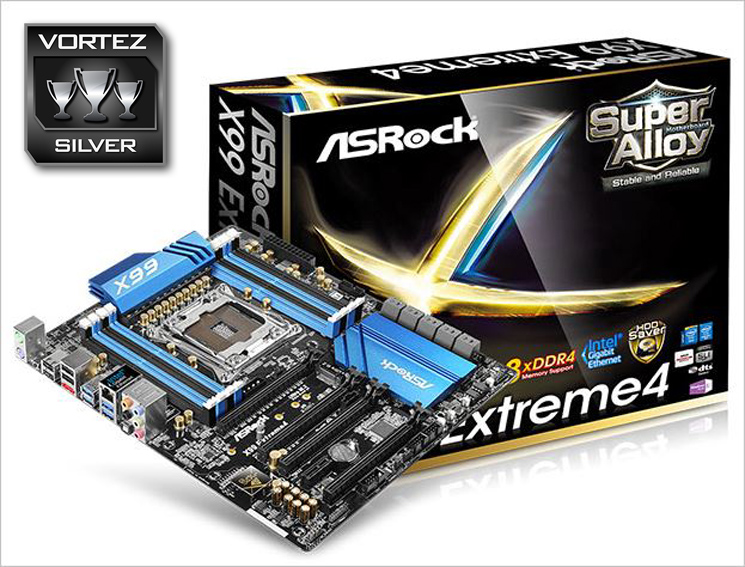
Perhaps the key feature of the Extreme4 though is the price. When all of the above is taken into consideration you may feel deterred. You shouldn’t because the main attraction here is the price. At £170 / $240 it is a decent price point and while much of the fat and glitter has been trimmed away, it is after all a solid performer, proven in our testing so if you can get along with the colour scheme and do not need the extravagances of higher end motherboards then we see no reason not to buy this product.
The ASROCK X99 Extreme4 is a fair motherboard. It is a mid-range motherboard with mid-range capabilities at an entry level price point. If you are looking to gain a foothold in X99 you could do a lot worse than this as your foundation for your next PC build.
Pros
+ Good value
+ ‘Super Alloy’ features
+ Easy driver installer
+ Internet flash
+ XFast Ram
Cons
– Dated looks
– Basic packaging
+ Good value
+ ‘Super Alloy’ features
+ Easy driver installer
+ Internet flash
+ XFast Ram
Cons
– Dated looks
– Basic packaging

Click here for an explanation of our awards at Vortez.net.
Our thanks to ASUS, Corsair and Intel for providing some of the components crucial to this review
Our thanks to ASUS, Corsair and Intel for providing some of the components crucial to this review


