







Voltage tweak and DirectCU right from launch. AMD HD6850 courtesy of none other than ASUS.
Product on Review: ASUS EAH6850 DirectCU 2DIS/1GD5
Manufacturer and Sponsor: ASUS
MSRP: £160
Street Price: £159.99 @ Overclockers UK Price at time of review
A year on from the release of the Cypress based HD5870 and HD5850, AMD are looking at refreshing their line-up of cards with some new offerings. Any graphics card release is met by a certain level of hype and following the huge success of the HD5XXX series, consumers have every right to expect more great things from AMD. However, in a confusing turn of events, today’s release is aimed at targeting the mid-range market as opposed to the traditional method of releasing the high end cards first to create a halo effect. More confusing is AMD’s bold choice of renaming their new series of cards to reflect an entirely refreshed product range, as opposed to intuitively carrying the moniker we’ve been accustomed to seeing since the HD3870 launched a few years back. Typically, the X850 naming convention has been reserved for ATI’s budget high end offerings, but under the new AMD logo rebrand, they have decided that the moniker will now symbolise their mid-range segment instead. The confusion arises in the fact that consumers accustomed to the old naming scheme will confuse this new card as the replacement to the Cypress based HD5850, when in fact it will replace the Juniper based HD5750.
Naming scheme aside, it is the price/performance ratio that we are most interested in and readers should hold their prejudice until this becomes clearer later in the review. At £150, AMD are targeting Nvidia’s highly popular GTX460 768/1024MB with their HD6850/6870 respectively. Comparing them to their rightful Juniper predecessor, the Barts core has undergone a number of architectural tweaks to provide much better performance. Firstly, the number of shader processors has increased from 720/800 to 960/1120 and a wider 256bit bus will no doubt alleviate the low memory bandwidth of the old mid-range cards. Furthermore, AMD are claiming significantly improved tessellation performance, an issue that had plagued the 5 series in comparison to Nvidia’s outstanding performance in this department. With the promise of high performance at a low price point and low power consumption, AMD’s new cards will no doubt prove to be a success.

The card we have received from ASUS is the cheaper of the two Barts based graphics cards variants, the HD6850. By default, it comes with a mild overclock from 775MHz on the core to 790MHz. ASUS have also tried to differentiate themselves from the competition by releasing a custom built card from the onset, hence the re-introduction of the famed and functional DirectCU cooler. Furthermore, the card comes bundled with ASUS’s SmartDoctor application for voltage tweaking capabilities, a feature not yet seen on other manufacturer’s cards.
A bit about ASUS:
ASUS pursues technological and aesthetic perfection through continuous innovation. We place ourselves in our customers’ shoes to develop a deep understanding of, and genuine empathy for, their needs—enabling us to create user experiences that transcend the norm.
ASUS Design Philosophy
ASUS Design develops high-quality solutions our customers will enjoy.
Our design process is built on thorough research, early anticipation and well-planned execution.
We act with a global vision and a focus on local strengths, conditions and heritage.
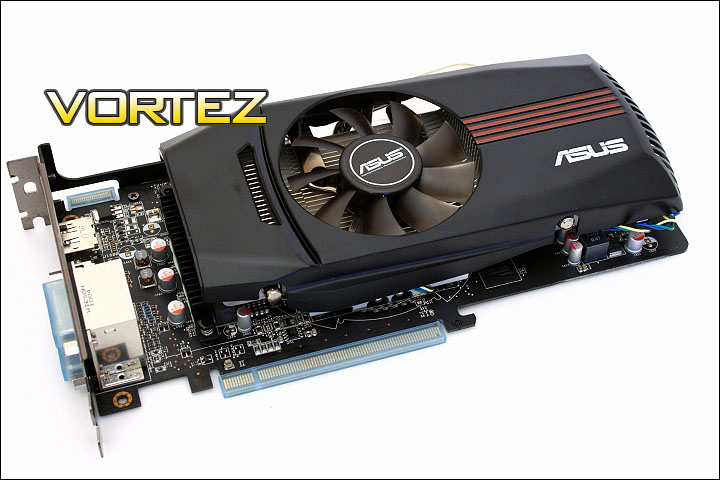
The review will focus on how the HD6850 compares to its more expensive brother and the GTX460 1GB. Unfortunately, we didn’t have the 768MB variant for testing but based on current pricing, the 1GB proves to be rightful competitor.
Specifications
The Barts core is aimed at the upper mid-range market and I have to emphasise again at this point that both the HD6870 and HD6850 are replacements to the old Juniper core, with a substantial enough boost and tweaking to make them compete with the older generation high end HD5850. Naming scheme aside, it’s exactly what we should have expected for a refreshed mid-range card. It’s akin to the position of the HD5770 lying between the previous high end HD4850 and HD4870, when it came out last year. The confusion comes with AMD’s choice of nomenclature but consumers should focus on the price/performance ratio rather than the implied performance based on the graphics card name. In my opinion, it’s an Nvidia-esque move and will certainly not prove popular at first but if we look at this new generation of card on its own, it does make sense. Caymen and Antilles will represent the high end HD69XX series next month on their release. These cores make up the Northern Island GPUs that AMD have been touting for a while now. It could be deemed strange that AMD didn’t release their high end cards first followed by the mid-range offerings for a halo effect but in reality, AMD needed a product that would be more competitive with Nvidia’s GTX460 hence the introduction of Barts to compete for the upcoming holiday season.
So what does this new core actually bring to the table? There are two variations of the core, Barts Pro and Barts XT, the former sporting 960 stream processors and the latter having 1120 of them. These do not match the configuration on the Cypress core but they are derivatives with various tweaks to improve efficiency. Sporting 1.7 billion transistors on a 255mm squared die size, the Barts core is significantly smaller than Cypress but a major improvement on Juniper. A welcoming feature is the 256bit bus and 1GB of on-board memory for much higher memory bandwidth than previously found on AMD’s mid-range offerings.
Architecturally, Barts builds on the same VLIW5 design found in previous DX11 cards. The core uses a number of SIMD clusters, each sporting 80 stream processors and 4 texture units. The different configurations produce the two Barts variant. The number of ROPs on both cards remains at 32.
HD6850: 12 SIMD clusters, 48 texture units, 960 stream processors.
HD6870: 14 SIMD clusters, 56 texture units, 1120 stream processors.
Compared to Nvidia, AMD has been lacking in tessellation performance but with the Northern Island GPUs, they have tried to address the issue with a more robust tessellation engine. Clearly AMD’s aim has been to bring a large fraction of Cypress’s performance on a much smaller die size. The results later will cover whether they have achieved this goal.
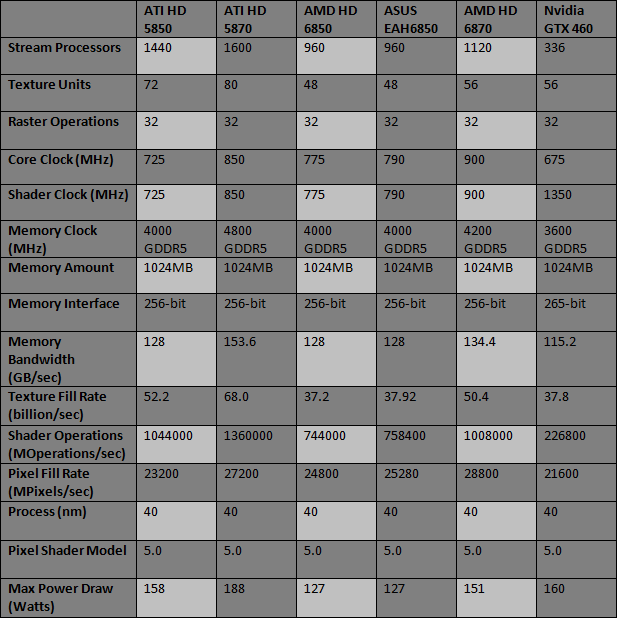
The main aspects where the Barts core lose out are texture fill rate and shader operation due to the much lower stream processors. The clock speed boost isn’t enough to compensate for those but again we have to remember that their market segment is at a lower end. On the plus side, they do contribute to higher pixel fill rates. Comparing them to the GTX460, AMD’s offerings appear more favourable. The HD6870 looks to be significantly faster whilst the HD6850 shares some similar figures. More interestingly is Barts’s impressively low power consumption, 127W for the HD6850 and 151W for the HD6870. The overclock on the HD6850 is a mere 2%, which is reflected in the fill rates and shader operations. This may not be much initially but the ASUS card has voltage tweaking capabilities to allow users to take it much further.
| Product Specifications Graphics Engine: AMD HD6850 Model: ASUS EAH6850 DirectCU 2DIS/1GD5 Bus Standard: PCI Express x16 2.1 (Compatible with 1.1) Memory Size(MB): 1024 GDDR5 Memory Interface: 256-bits Core Clock Speed (MHz): 790 Stream Processors: 1120 Shader Clock (MHz): 790 Memory Clock Speed (MHz): 4000 3D API: Direct X 11 & OpenGL 4.0 DVI Output: 2 (1 Single-Link DVI & 1 Dual-Link DVI) HDMI: 1 (HDMI 1.4a w/audio (8 channel LPCM & bitstream)) DisplayPort: 1 DP1.2 VGA: Supported using DVI-to-VGA adapter Display Output (Max Resolution): 2560 x 1600 Crossfire Support: Yes Card Dimension (mm): 240 x 115 x 35 |
Features
| ASUS Exclusive Innovations •Voltage Tweak: Full throttle overclocking with exclusive ASUS Voltage Tweak via Smart Doctor – boosting 50% more speed, performance and satisfaction! (The quoted figure of 50% is based on the increased headroom as opposed to actual 50% better performance) •DirectCU: Precision mounted DirectCU copper heat pipes in direct contact with the GPU for rapid heat dissipation – creating 20% cooler and quiet performance in idle. •Overclocked: Factory overclocked to perform at 790MHz, higher than stock performance, resulting in higher frame rates in games. •ASUS Smart Doctor: Intelligent system monitoring for efficient overclocking with an intuitive slide bar •ASUS Gamer OSD: Real-time overclocking, benchmarking and video capturing in any PC game! •Splendid Video Intelligence Technology: Optimizes colours in various entertainment scenarios with five special modes — standard, game, scenery, night view and theatre. Graphics GPU Features •AMD Eyefinity Technology: Unlocks the power of the GPU’s processor cores to accelerate the most demanding system tasks •AMD HD3D Technology: Optimise stereoscopic 3D gaming and movie watching entertainment •Microsoft DirectX 11 Support: Bring new levels of visual realism to gaming on the PC and get top notch performance •AMD CrossfireX Technology: Gets up to 1.8x of a graphics performance boost in dual mode |
Packaging and Content
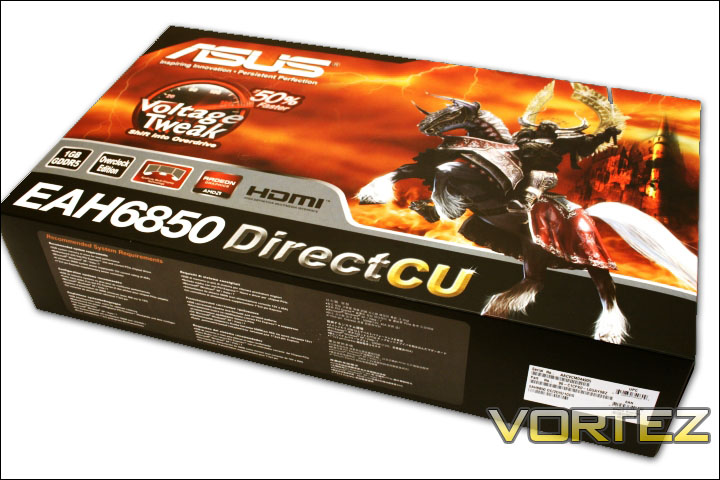
The front of the box
The ASUS HD6850 goes back to using the traditional orange and black box seen in our HD5870″>ASUS EAH5870 1GB Graphics Card Review – Introduction review a year ago. The packaging is visually appealing and depicts a horseman, clearly portraying ASUS’s duty of ravaging the competition and delivering power to the user. And their way of delivery power is through their unique Voltage Tweak feature which they claim will potentially increase performance by 50%. The front of the box has the model name of the card printed at the bottom and the DirectCU moniker refers to their custom direct touch cooler. A few of the card’s key features are also illustrated such as support for Eyefinity and HDMI.
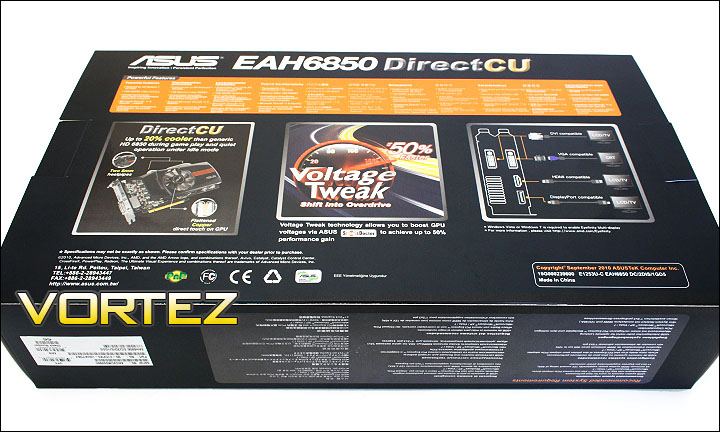
The back of the box
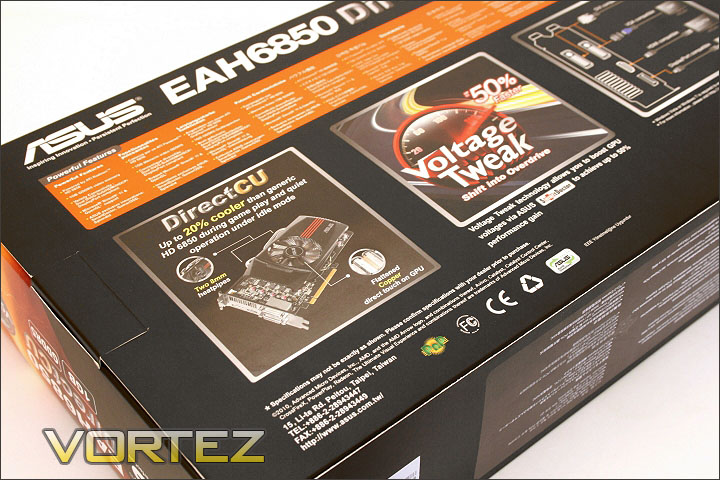
The back of the box is more informative and covers some of the card’s key characteristics is greater depth. At the top, the features are listed in 11 languages whilst below that are illustrations of the custom DirectCU cooler and the Voltage Tweak tool, as well a short description of their benefits. Additionally there is an illustration of the different display connectors that can be found at the back of the card.
Looking at the features
Looking closer, we can see that the DirectCU cooler promises to deliver up to 20% cooler operation and consequently quieter running. We will have a more in depth look at the actual cooler later and temperature results. The 50% faster performance is preceded by a small “up to” but in reality it will be very hard to get such an increase even with voltage tweaking.
Openign the box
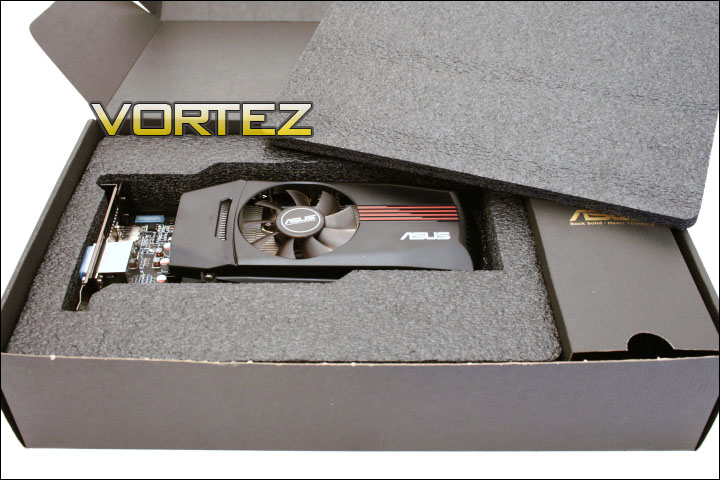
Upon opening the box, we are greeted with another sleeker looking one with the gold ASUS emblem right in the middle. Inside, we are quickly greeted by the graphics card enclosed in foam cut out for protection. The box on the side contains all the extra cables and accessories. The documentations and installation discs are found in another box below the foam enclosure.
The bundle
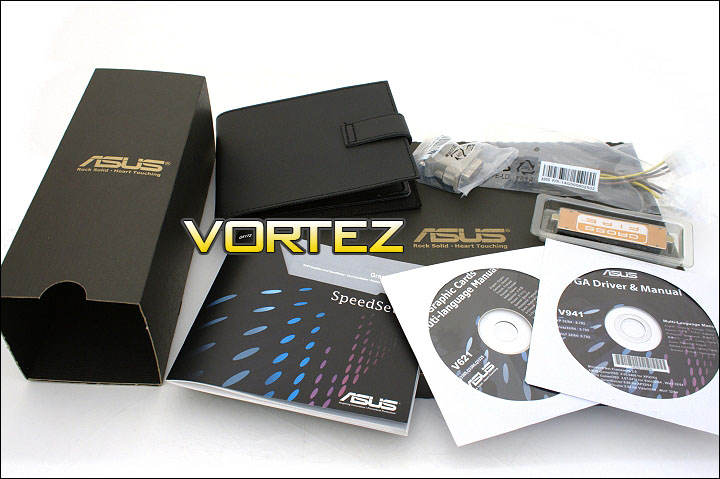
The whole bundle contains:
– the utility and driver discs
– the setup manual
– 1 x Molex to 6 pin PCIe power connector
– 1 x DVI to D-Sub adaptor
– 1 x Crossfire cable
– 1 x leather CD wallet
– the HD6850 graphics card
The CD wallet is an excellent and unique addition to the bundle, becoming very handy given the inclusion of 2 discs.
The HD6850
The graphics card uses a very attractive black PCB and custom cooler design. The shroud of the cooler uses a tough plastic construction and the shape is reminiscent of a sports car with its aerodynamic shape. The shroud is more for aesthetic purposes than actual cooling performance but it does act to protect the fan. The card itself is 24cm and compared to the EAH5850 TOP reviewed, the PCB doesn’t extend further than the shroud. For comparison, the reference MSI HD6870 is 24.5cm long. Thankfully, ASUS keeps their tradition of not using tacky stickers to deface the shroud and instead settle on a small ASUS badge. The connectors and ports are protected by a thin blue plastic cover.
Closer Look
The back of the card
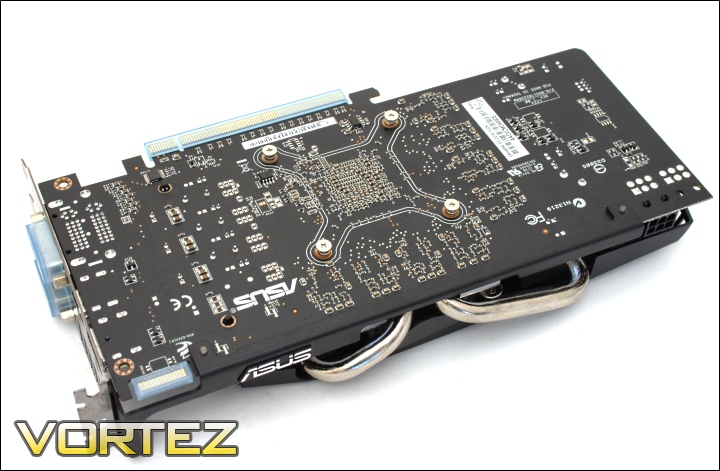
The black PCB is fully exposed when we turn to the back of the card. There aren’t any components to cool on the back so ASUS avoided using a metal back plate. We can also see the mounting mechanism for the heatsink above, which uses 4 spring loaded screws for security and optimal pressure on the GPU core.
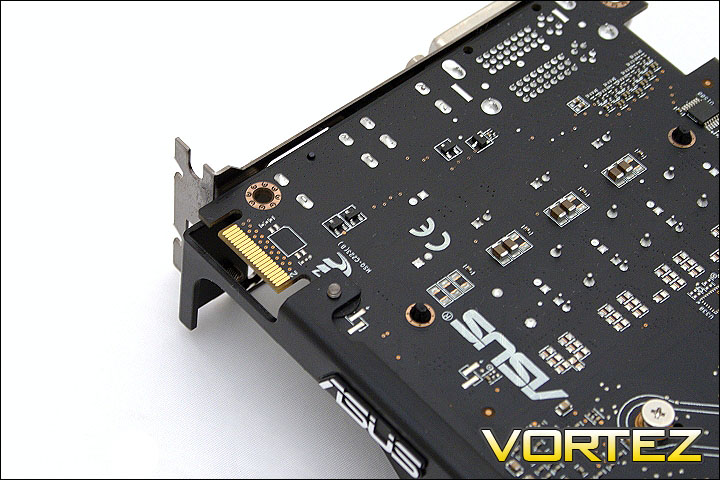
The single Crossfire connector
On the side of the card is a single Crossfire connector, similarly to the GTX460. It means that the HD6850 is limited to a dual Crossfire configuration.
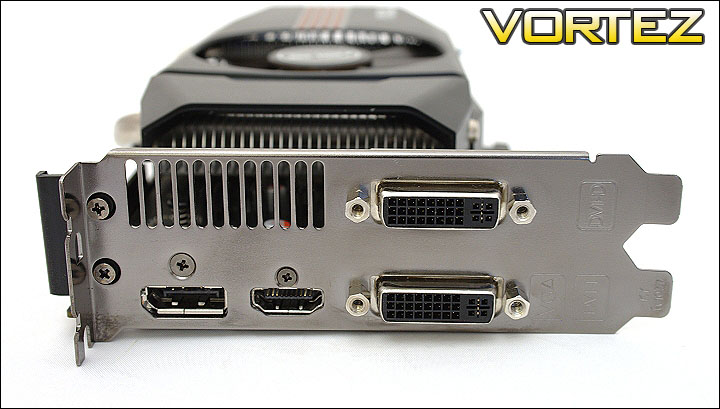
The I/O panel
The rear I/O panel has a wide selection of connectors, more so than on previous reference cards. On the right are two traditional Dual Link DVI-I connectors and for those still using VGA outputs, an adapter is provided. Furthermore, a single HDMI 1.4a port is built in one DisplayPort supporting the latest 1.2 standard. The ports are an example of AMD’s evolution on their display and video decoding features over the HD5XXX series. The main advantage of the new DisplayPort standard is the double bandwidth over the previous 1.1 ports, taking it from 10.8Gbps to 21.6Gbps. In real world applications, it means that a single port can support up to 2 2560×1600 monitors and 4 1920×1200 monitors through daisy chaining or by using an MST hub. The benefit of the hub is that the card itself no longer has to sport up to 6 individual ports on-board as was the case on Eyefinity6 special edition cards. Unlike the HD6870 and reference HD6850 models, the ASUS HD6850 is limited to a single DisplayPort but three monitors can still be supported in Eyefinity without the hub or daisy chaining thanks to the three other ports. The higher bandwidth of the DP is also relied on for AMD’s new 3D stereoscopy initiative, dubbed HD3D. The I/O panel also has a small vent from which hot air can be extracted.
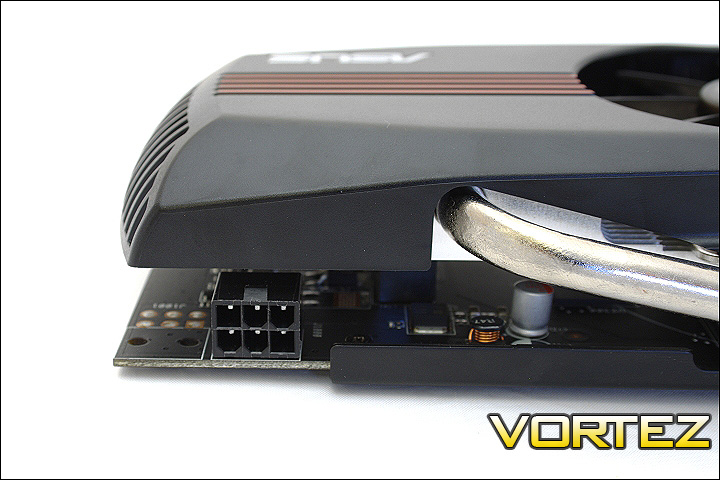
The single 6-pin PCIe power connector
The HD6850 only requires a single PCIe 6 pin connector, a factor that’s attributed to its low 127W maximum power draw. The placement of the connector at the side of the graphics card is welcomed despite its short size since it ensures compatibility in the smallest of cases, including micro ATX ones which this card will be suited to. We can also see that the PCB has been designed to accommodate two connectors so it is possible that ASUS will release further overclocked variants of this card. Those with 450W power supplies should manage to run the HD6850 comfortably.
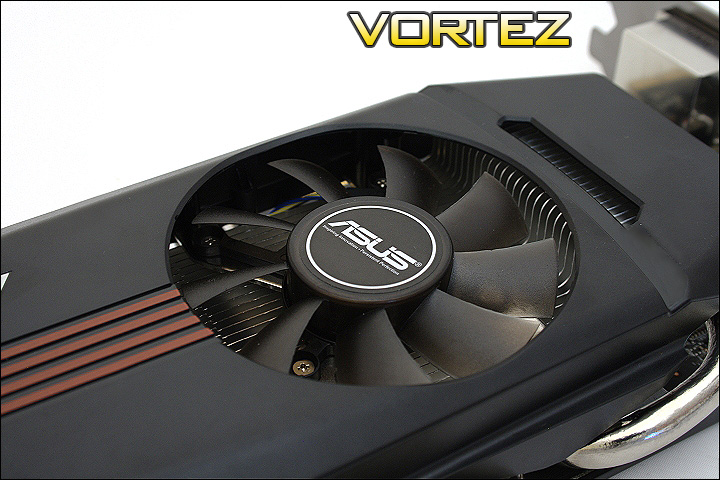
The fan
The fan uses a bladed design to push cool air onto the heatsink. It has PWM functionality and can thus be manually controlled or otherwise users can set their own automated profile to change fan speed based on temperatures.
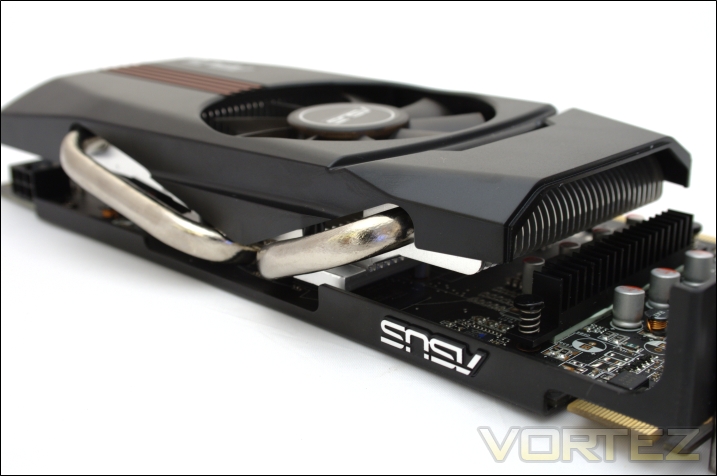
The support bar and heat pipes
The card sports a side bar support to keep the PCB rigid. This is an excellent feature, factoring in the card’s length and the cooler’s weight. Here, we can also have a closer look at the two thick copper heat pipes running from the GPU core to the heatsink.
Closer Look (Continued)
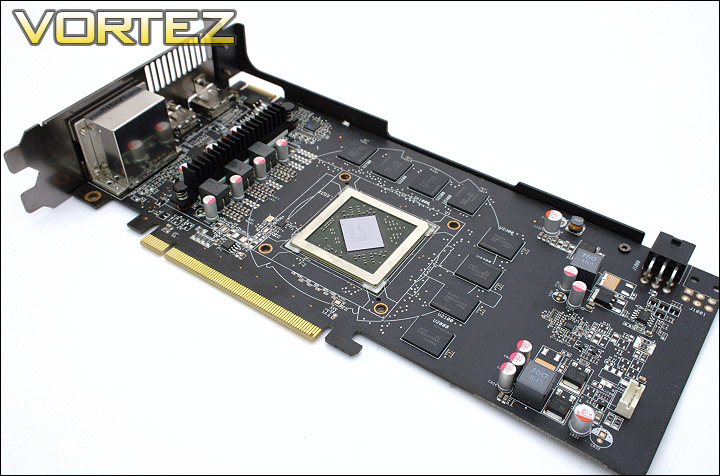
Removing the cooler
Removing the cooler and shroud, we are left with the PCB and its the smooth matt black finish. The layout is very similar to the MSI HD6870 in that the VRM circuitry is towards the I/O panel side of the PCB leaving the other end less cluttered with plenty of empty space. The GPU area is set in the middle and surrounded by 8 memory modules. Since it has been built as a mid-range card, the emphasis on better VRM circuitry isn’t as important but that is also down to the greater efficiency of the core itself. To the right of the memory modules is a bare area of the PCB. It suggests that the same PCB may be used for other cards in the future which may require extra components to fill the gap.
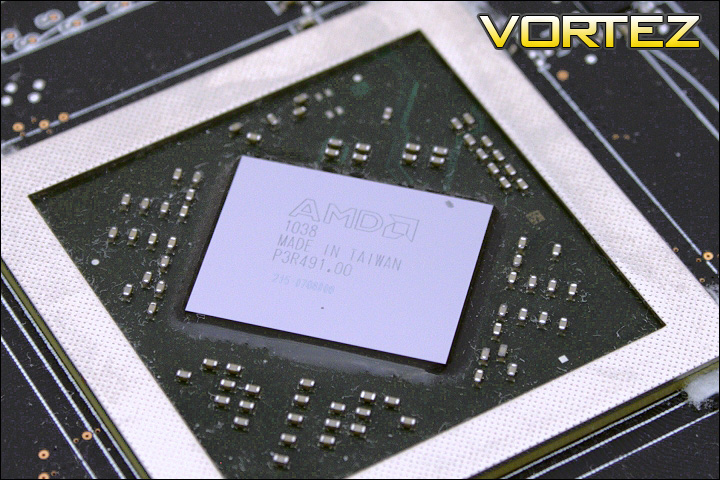
The 255mm squared Barts die
The Barts core seen here has a die size of 255mm squared, smaller than the 334mm squared of the Cypress core but significantly higher than the 166mm squared of the Juniper core it is replacing. The fabrication is still on the 40nm process due to the lack of readily available 32nm or 28nm manufacturing. The code number on the HD6850 is P3R491 00 as opposed to P3R496 00 on the HD6870.
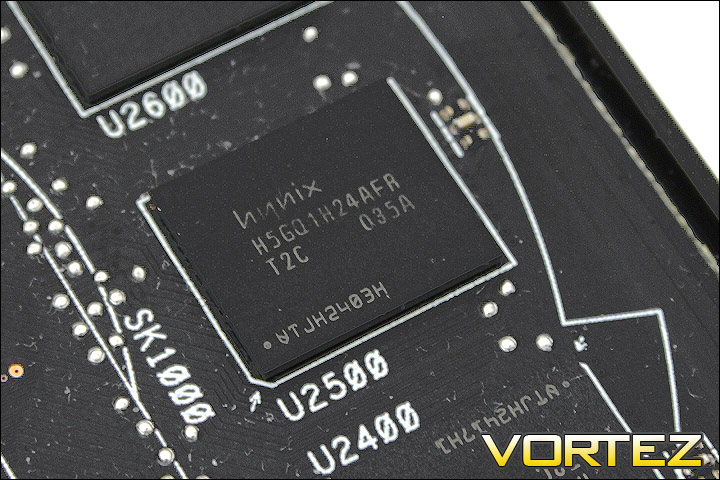
The Hynix H5GQ 1H24AFRT2C030A memory module
The memory modules used here are GDDR5 chips sourced from Hynix rather than Samsung. AMD have opted for a different memory controller codenamed Redwood, significantly smaller and less complex than on Cypress to improve efficiency. The down side is that lower memory speeds are supported, hence the default memory clock speed of 4.2GHz. The “T2” in the module code denotes the rated speed of 5GHz, so plenty of headroom remains. Altogether, the eight modules give 1GB of VRAM. For more information on Hynix’s naming convention, check here.
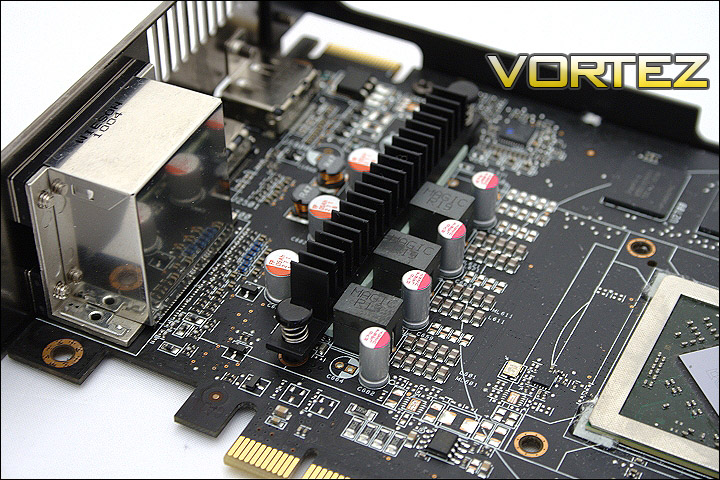
The power circuitry
The VRM circuitry uses a 3 phase PWM design and solid capacitors. The MOSFETs are cooled with a small thin aluminium heatsink which is installed uses a push pin mechanism.
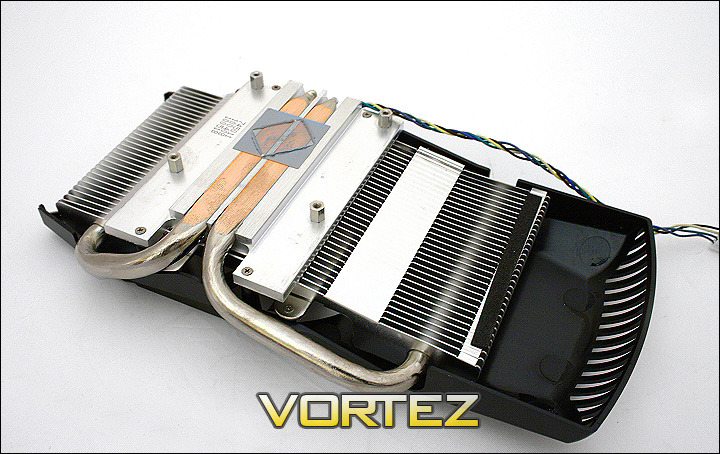
The cooler
The DirectCU heatsink is composed of 32 densely packed fins, two copper heat pipes and a PWM fan. The two heat pipes have been milled at the base for direct contact to the core. This innovation can be seen in numerous CPU coolers nowadays under the H.D.T moniker, ensuring more efficient heat transfer to the heatsink. The aluminium base plate has four stand offs for the screws to install into from the back of the PCB. One complaint I have is that the fan cable isn’t braided as that would have given the card a neater finish.
Software Bundle
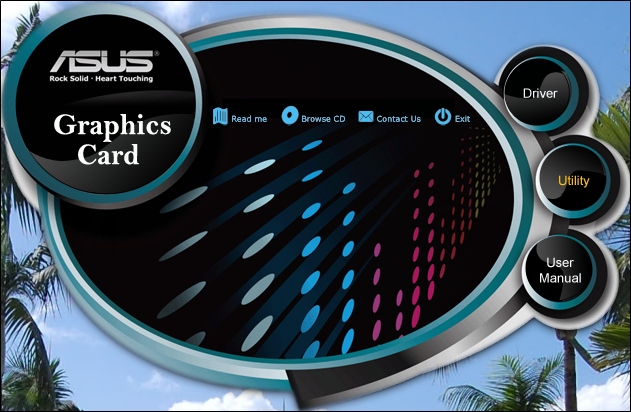
The driver CD includes the user manual, drivers and ASUS utilities, presenting them in an attractive bubbly user interface. The CD came with the 10.10 Catalyst drivers but for the latest 10.10a hotfix driver, visit AMD’s website. This set introduces support for the new Morphological Anti-Aliasing feature.
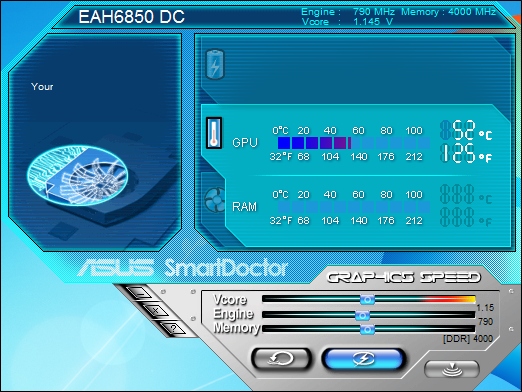
The ASUS SmartDoctor tool is an overclocking utility that has the unique capability of allowing users to increase the GPU core voltage. The user interface isn’t as sophisticated as MSI’s Afterburner application but keeping it simple is not always a disadvantage. At the bottom are three slider bars where users can select the VCore and clock speeds. The maximum limit for the voltage is 1.35V while the clock speed is limited to 1000/5000MHz, plenty of headroom for this card. On the main screen, the application displays the temperature or selecting the fan tab will show you the fan speed. Going into the settings, it’s possible to create a fan profile based on temperatures.
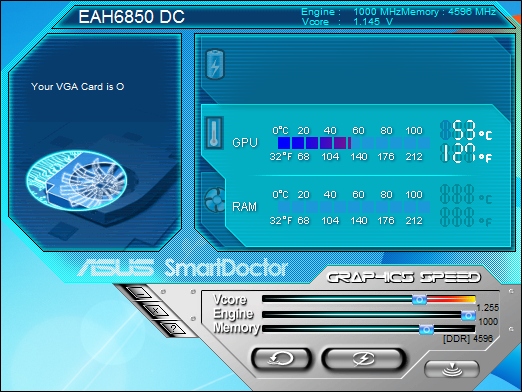
Here, we can see how easy it is to overclock. Simply use the sliders to set the desired clocks and it’s good to go. Of course, this doesn’t imply that all clock speeds will work and users will still have to go through the usual steps of testing for stability. Voltage wise, ASUS have set a safe maximum limit of 1.35V which translates to 1.343V when applied. This voltage will have an impact on temperatures so make sure to watch them when overclocking.
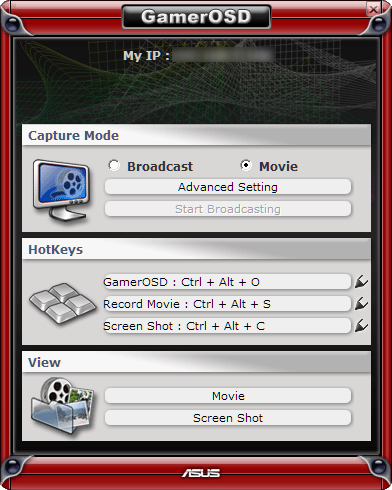
The GamerOSD utility is akin to the popular FRAPS application allowing users to record gameplay movies and take screenshots. It also handily displays the user’s IP at the top.
Test Setup
CPU – Intel Core i7 920
RAM – 6GB (3x2GB) OCZ platinum DDR3 1333mhz
Motherboard – ASUS Rampage III Extreme
Power Supply – Enermax Revolution 85+ 850W
Hard Drive – OCZ Vertex 2E 120GB
Samsung F3 1TB
Samsung F1 320GB
Cooler – Noctua NH-D14
Graphics Cards:
MSI R6870 2PM2D1GD5 1024MB – ATI Catalyst 10.10
ASUS EAH6850 DirectCU 1024MB – ATI Catalyst 10.10
ZOTAC GeForce GTX460 1024MB – ForceWare 258.96
ASUS EAH5850 TOP 1024MB – ATI Catalyst 10.5
XFX HD5870 1024MB – ATI Catalyst 10.9
Benchmark Suite
MSI Afterburner & Kombustor
GPU-z
Crysis Warhead using the FRAMEBUFFER Crysis benchmark tool
Far Cry 2
Resident Evil 5
Street Fighter IV
Unreal Tournament 3 using the HOC Bench tool
Colin McRae DIRT 2
Batman: Arkham Asylum
Battlefield Bad Company 2
Mafia II Demo
Colin McRae DIRT 2
Alien VS Predator
3DMark 06
3DMark Vantage
Unigine V2.1 DX 11 Benchmark
Note
The new AMD cards have been bundled with the latest 10.10 Catalyst drivers. Unfortunately, those were unreleased prior to receiving the cards so the HD5870 results are based on last month’s 10.9 drivers. You might also notice that the HD5850 was tested using Catalyst 10.5 drivers. Based on my own tests and collected, there was little to no difference going from the 10.5 drivers to the 10.9 ones except in Street Fighter IV. The change will be marked later in the review.
Temperature & Overclocking
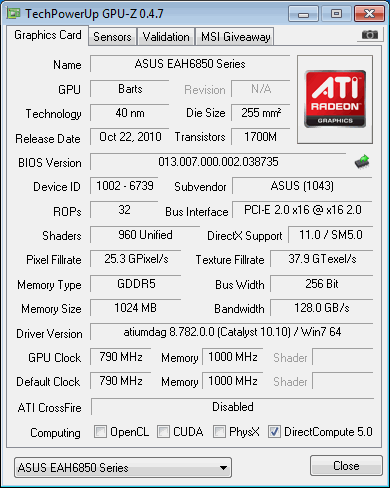
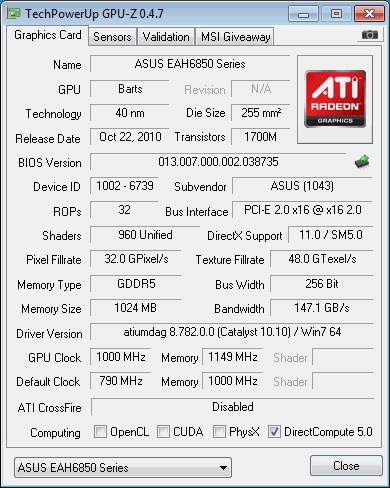
The ASUS HD6850 DirectCU comes pre-overclocked at 790MHz on the core. This is a rather tame overclock of 15MHz but the beauty of the ASUS card is its unique voltage tweak feature. No other cards on the market currently support this so ASUS have to be commended for their implementation. Teamed up with their DirectCU cooler, the HD6850 looked promising from the onset and the results did not disappoint in the slightest. At a stock speed of
Stock
Overclocked
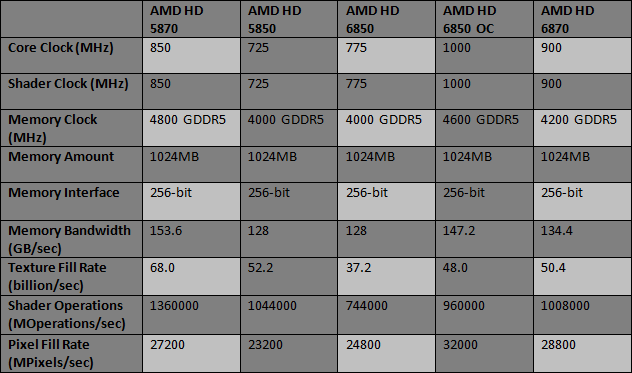
Looking at the benefits of overclocking, the 29% increase in core clock speed is mirrored by the same boost in texture fill rate, shader operation and pixel fill rate over reference specifications. Likewise, the 600MHz increase in memory speed results in a 15% boost in bandwidth. The card thus ends up being comparable to the HD6870, where the latter’s shader advantage is reflected in the higher operations.
In real world situations, the 29% core increase and 15% memory clock boost resulted in an average performance rise of 20%, not quite a linear trend but still a significant increase. This will become clearer from the following games’ benchmarks.
Temperature
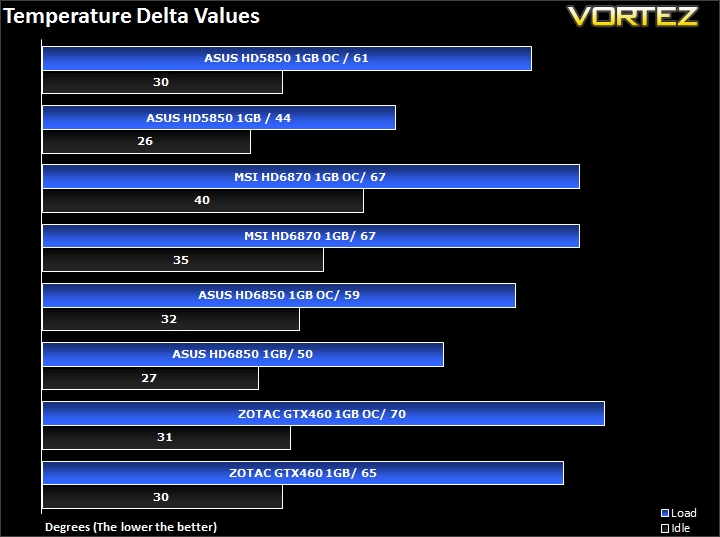
The DirectCU may only have a 2 heat pipe design compared to the HD6870’s three, but from experience, it has proved to be a winner. So it made perfect sense for ASUS to use the cooler on the Barts core. At stock clock speed, the temperature delta is a mere 50C under load and 27C at idle, comparable to the results of the same cooler on the HD5850. The slightly higher temperature is down to the fan functioning at a lower speed, 24% at idle and 40% under load. The DirectCU cooler remains very quiet at those speeds.
When overclocked, the idle temperature rose to a delta value of 32C and a fan speed of 28%. Under full load, it did ramped up to 56% to keep the temperature delta at a stable 59C, cooler than any the other cards on test here. The fan became audible at 50% but wasn’t intrusive until it hit 60% or above.
Crysis Warhead
Following the success of Crysis, the stand alone expansion “Warhead” was hotly anticipated to bring more game play, more weapons, improved visuals whilst maintaining better performance, the latter being what gamers wanted most. After all how many people upgraded their rigs just to play this game… In the game, you play as the upbeat Brit Sergeant “Psycho” Sykes, chasing down a Korean nuclear warhead. Throw in some ice shooting aliens and we’re bound to have a great game. It sure delivered.
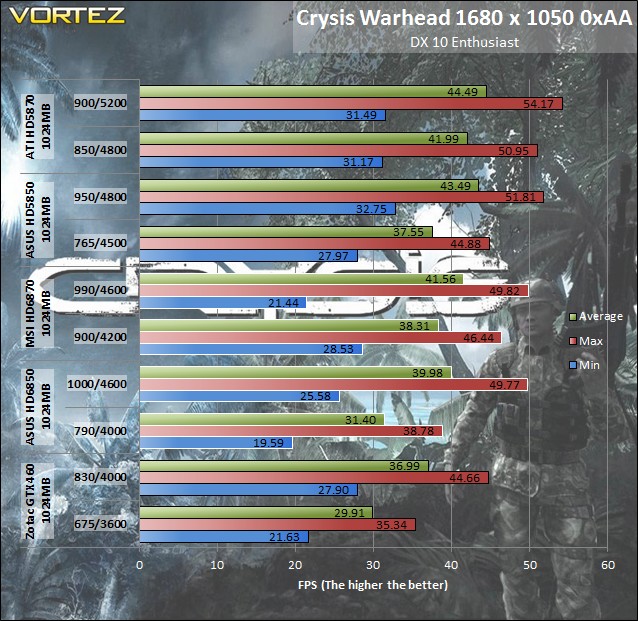
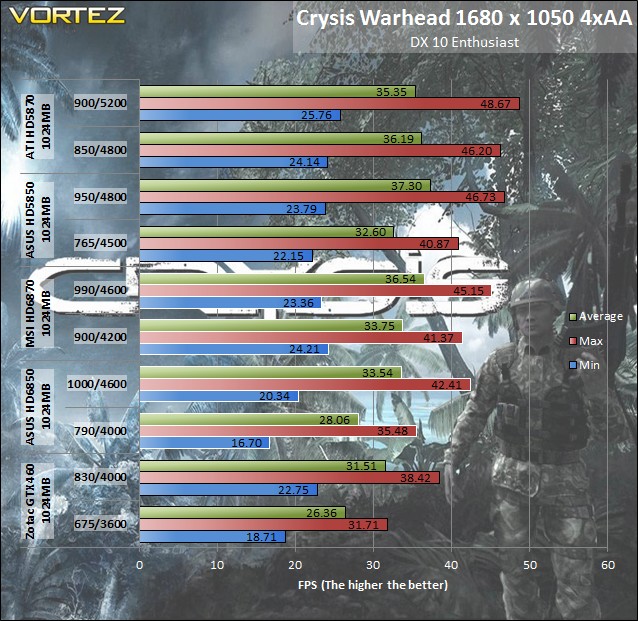
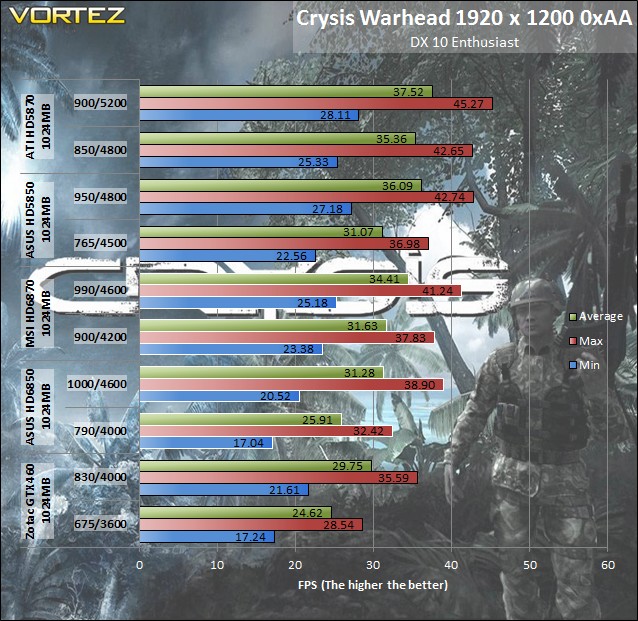
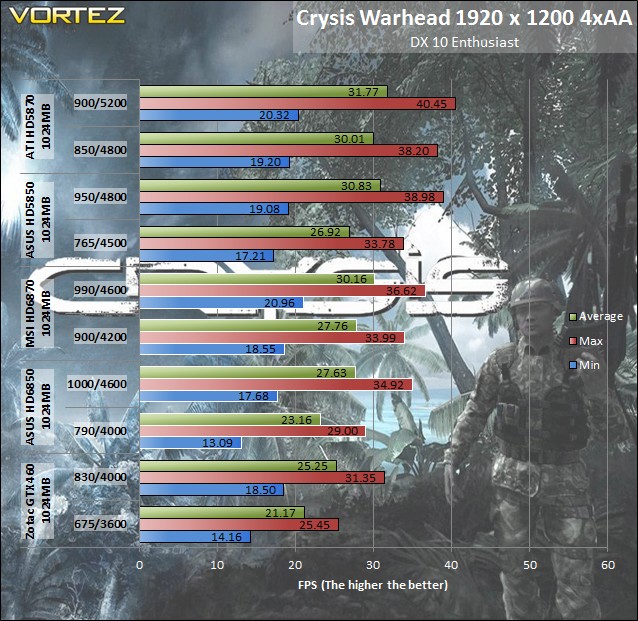
The HD6870 gets off to an interesting start with Crysis Warhead. Immediately, we notice that at stock speed, it marginally beats the slightly pre-overclocked HD5850. The 1FPS difference translates to a 2-4% performance lead on AMD’s new card. Once the HD6870 is overclocked, the performance is more akin to a stock HD5870. The overclocked HD5850 has a slight advantage thanks to extra voltage tuning. Given the price difference however, it’s impressive to see AMD’s new mid-range card matching their previous high end offering.
Shifting our focus to the HD6850, its performance is around 82% of its sibling’s. Overclocked, it gets close to matching the HD6870. We have to remember that this particular HD6850 has voltage tweak capability, hence the large overclock over stock speed. The HD6850 is around 5-9% faster than the Nvidia GTX460, its key rival in this market segment. With both overclocked, the difference is around 8%.
Far Cry 2
One of the most hyped games of 2008, Far Cry 2 had some big shoes to fill. It was built to be the next best thing since well… Far Cry I suppose. Combining an open-world game play with highly detailed graphics, physics and AI, what more could we possibly want? The game puts us in the body of a malaria inflicted mercenary hunting down the “Jackal” in the heart of Africa, in a bid to stop an ongoing conflict between two rival factions. The storyline can be hard to follow sometimes but I’m no game reviewer, so let’s concentrate on the graphics and performance. After all, we all need to know if our hardware will be able to handle the scorching savannah burning at the hands of our flamethrowers.
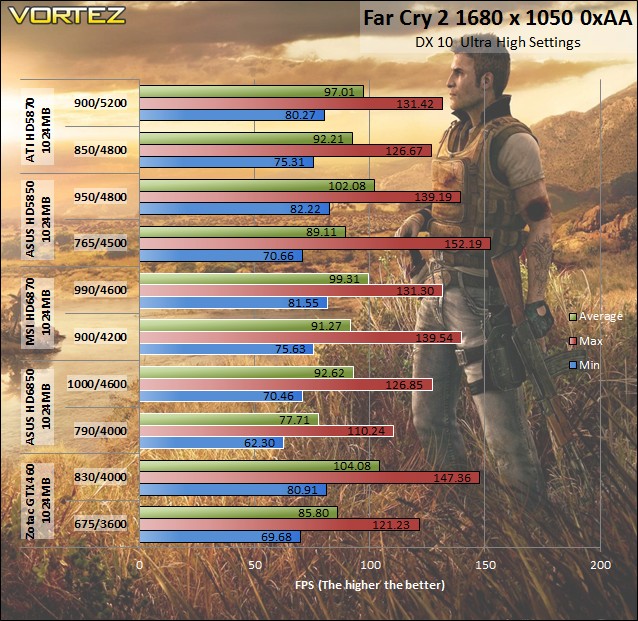
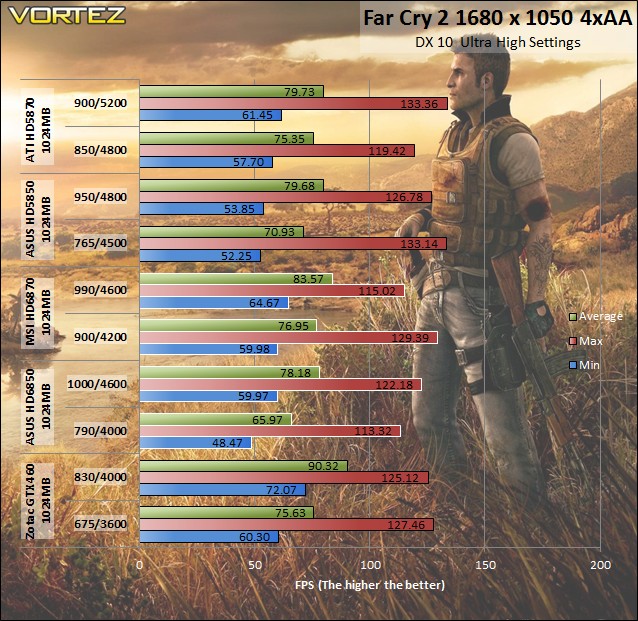
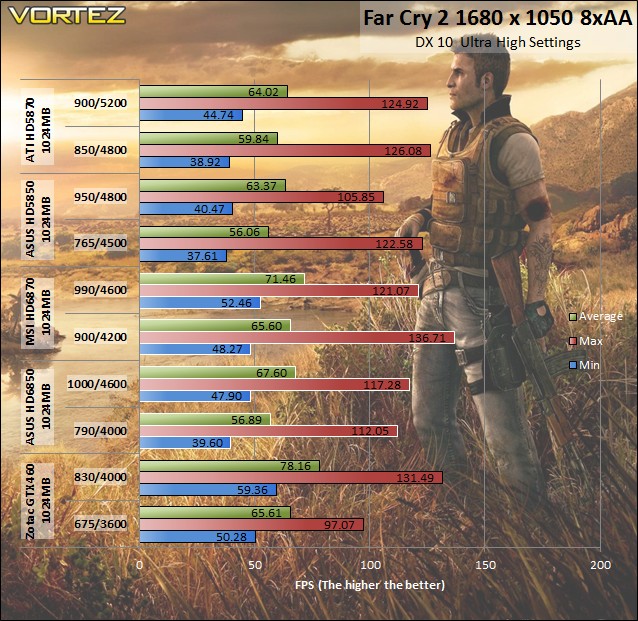
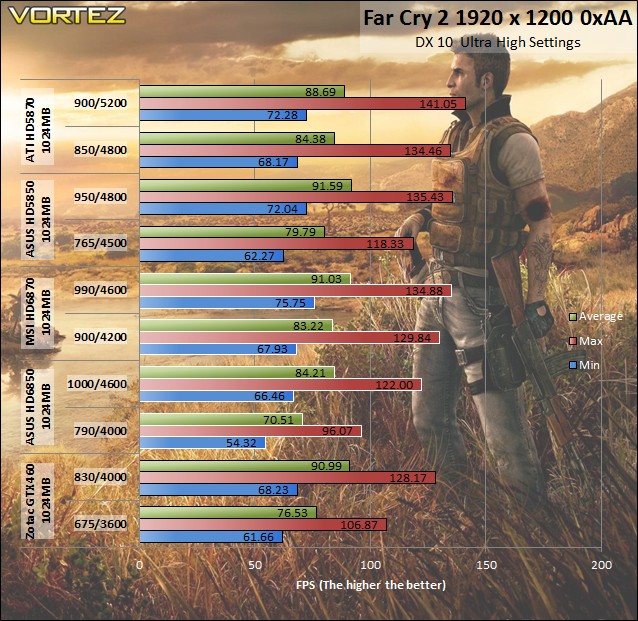
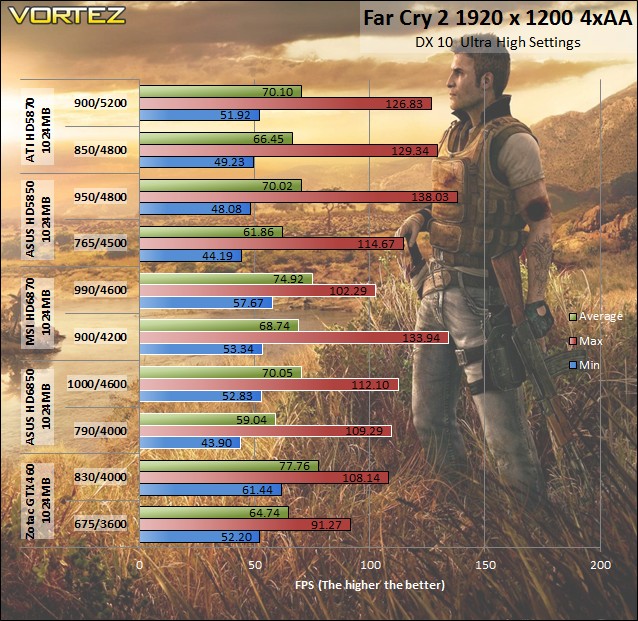
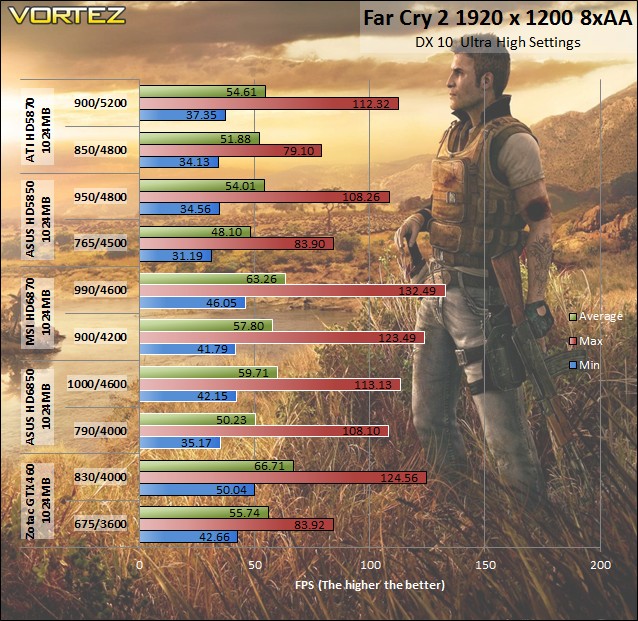
The new AMD cards get off to an impressive start in Far Cry 2. The HD6870 pulls ahead of the HD5870 marginally at stock speed, especially with AA applied. This ranges from 1% to 10% at 8xAA. A similar pattern can be seen with the two cards overclocked.
The HD6850 also impresses by closely matching or even outperforming the HD5850 at stock speed with 8xAA. At the lower settings however, it falls behind. It suggests that improvements in the core favour AA more than the previous architecture despite less stream processors present. The GTX460 still manages to retain its crown throughout, marking Nvidia as the champion in Far Cry 2.
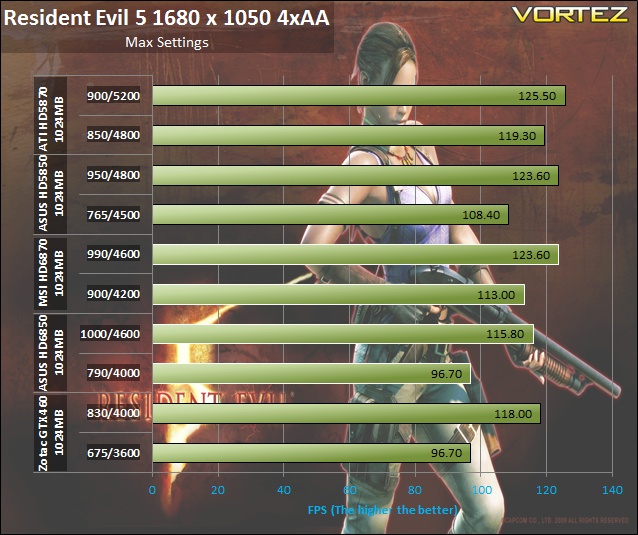
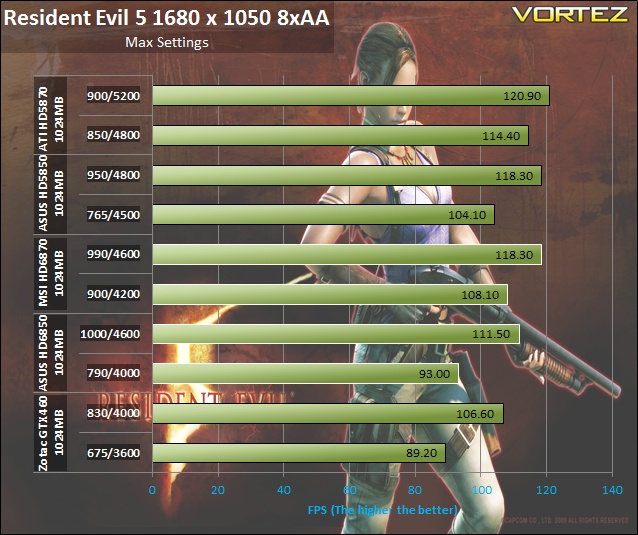
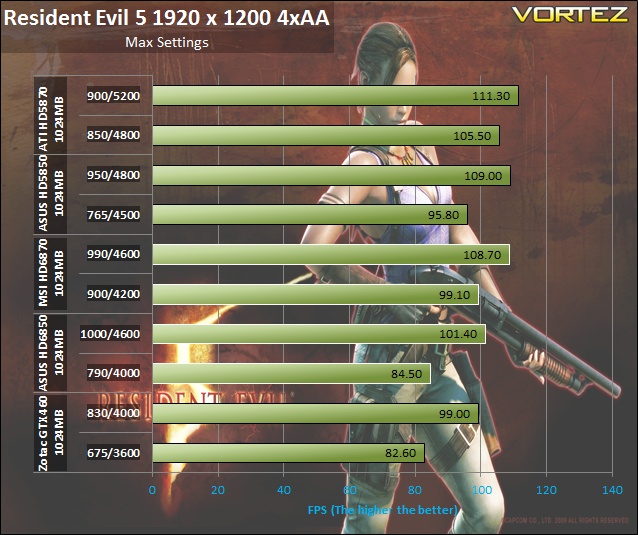
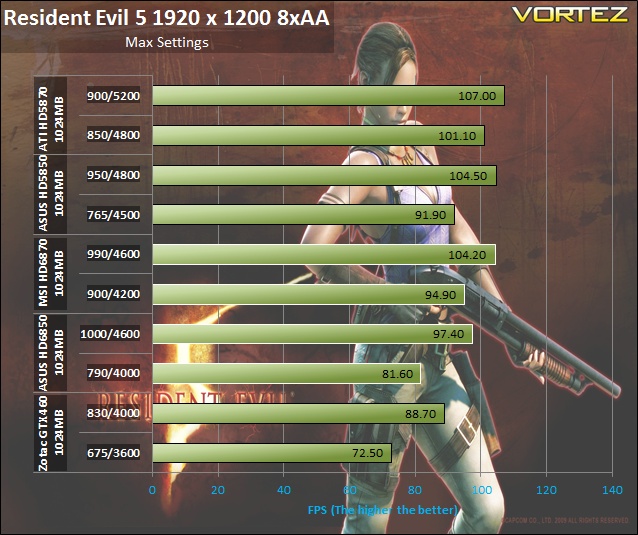
Resident Evil 5
Resident Evil 5 is the sequel to the Resident Evil series, exploring the life of main protagonist, Chris Redfield. You play as either Chris Redfield or Sheva Alomar in an African desert area in Kijuju. In true Resident Evil fashion, your main objective is to investigate a terrorist bio-organic weapon threat whilst killing infected “Majinis” on your way.
Street Fighter IV
Street Fighter is back in its 4th iteration and its bigger and better than ever. Combining fluid, fast based sparring with stunning artistic visuals, the game delivers tremendous game play. Be reacquainted with some of the most popular characters in video game history while you battle your way to the top, be it with Ryu or the mighty Bison. The game might be frustratingly hard in some cases but there’s nothing like the satisfaction of K.O’ing your opponent with a well stringed death bringing combo.
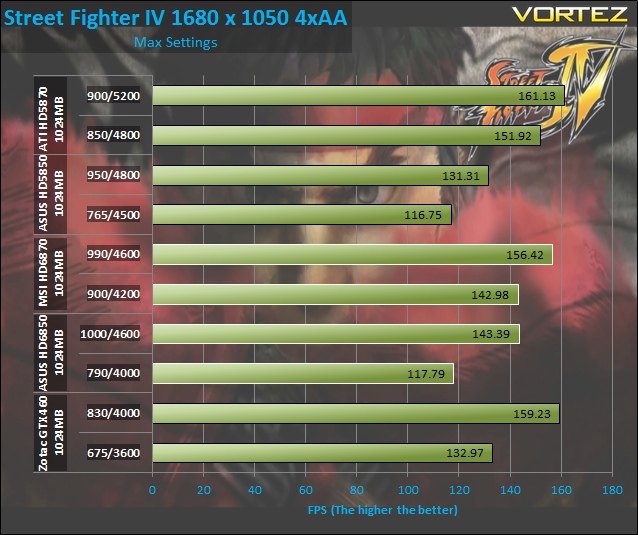
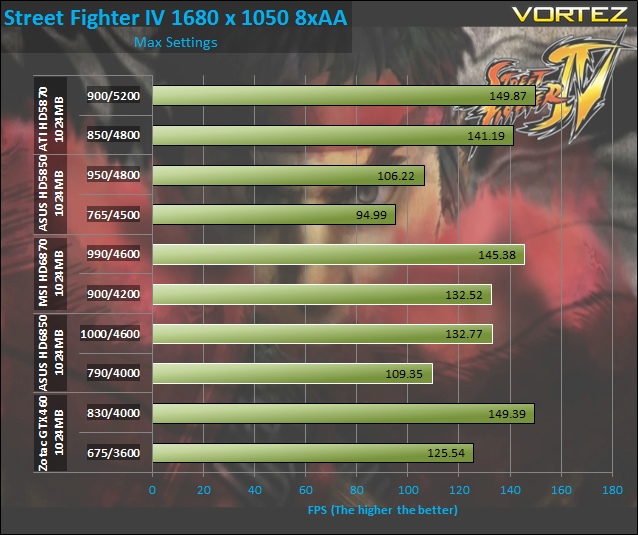
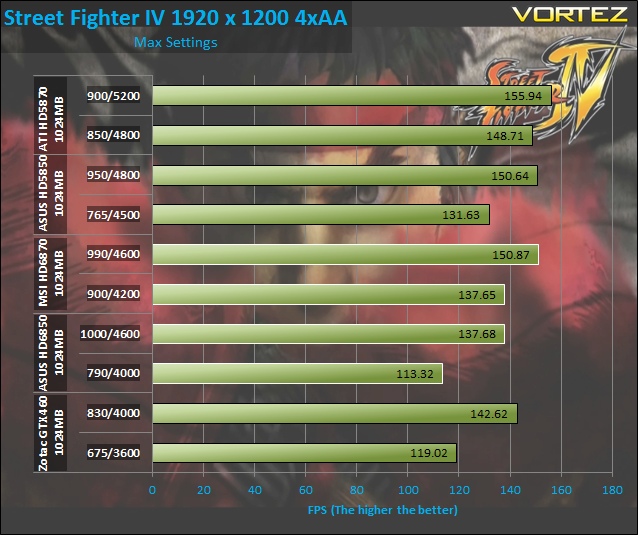
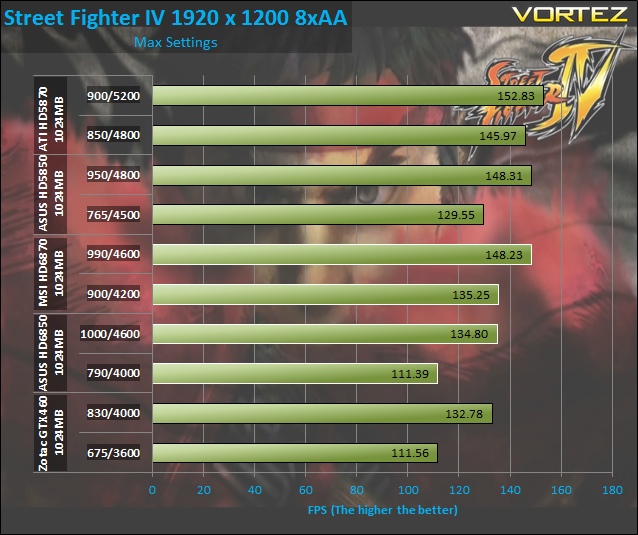
Performance between the HD6870 and HD5870 is very close here, with the latter holding an average lead of 7%. Overclocking is more beneficial to the HD6870 which manages to close the gap to 3%. I mentioned earlier that the transition from Catalyst 10.5 to 10.9 yielded some interested results in Street Fighter and we can finally see that the low performance at the lower resolution is finally fixed on the AMD cards. Since the HD5850 results are based on the older drivers, performance is significantly lower at that setting.
Moving on to the HD6850, it falls behind the GTX460 by up to 10% but applying AA works in its favour to reduce the difference. The relative difference between the two cards is similar at both stock and overclocked speeds.
Unreal Tournament 3 & Batman Arkham Asylum
Unreal Tournament 3
Built around the unreal 3 engine, Unreal Tournament is all about mindless fast paced shooting, decapitation with a plethora of game modes to so in. Not much else can be said really except that it promises hours of enjoyment on multiplier whether it be against bots, your friends at a LAN or online. It was one of the more popular games out there to adopt PhysX in the form of partially destructible maps, tornadoes and hail.
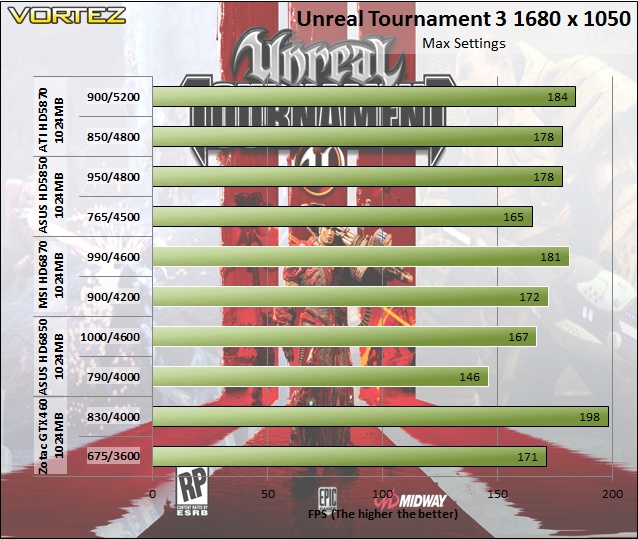
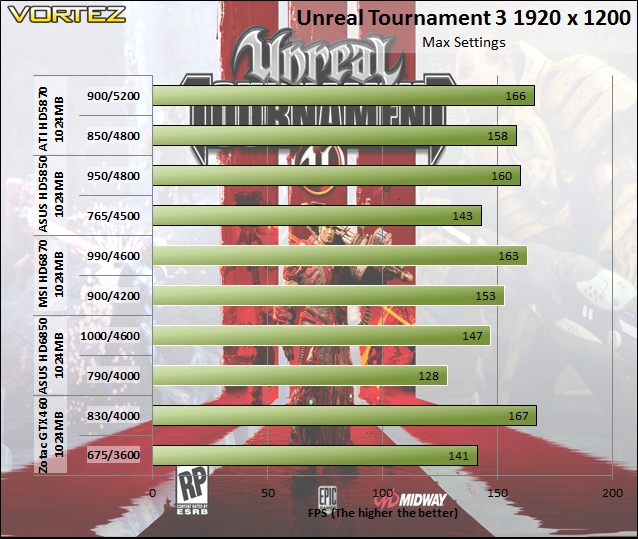
In Unreal Tournament 3, there is again very little difference between the HD6870 and the HD5870, the latter leading by around 3% at stock and 2% when overclocked.
The GTX460 leads the Unreal Tournament 3 chart with excellent performance. It beats the HD6850 by around 10-15% at both clock speeds although the difference is lower at the higher resolution. Between the two Barts cards, the HD6870 is clearly the better solution, with a lead of 20% at stock speeds. Since the HD6850 has been overclocked relatively more, the difference falls to around 8% at the higher clock speeds.
Batman: Arkham Asylum
The Dark Knight takes on his greatest challenge yet when he becomes trapped with all of his most dangerous villains inside the insane asylum of Gotham City – Arkham Asylum. The game exposes you to a unique, dark and atmospheric adventure that takes you to the depths of Arkham Asylum, Gotham’s psychiatric hospital for the criminally insane.
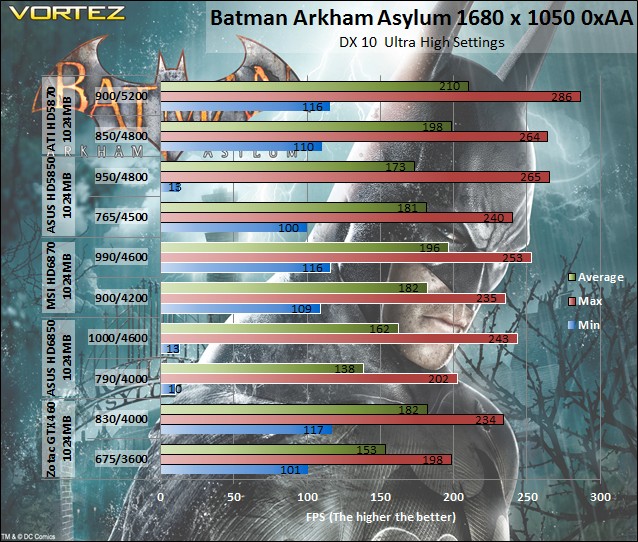
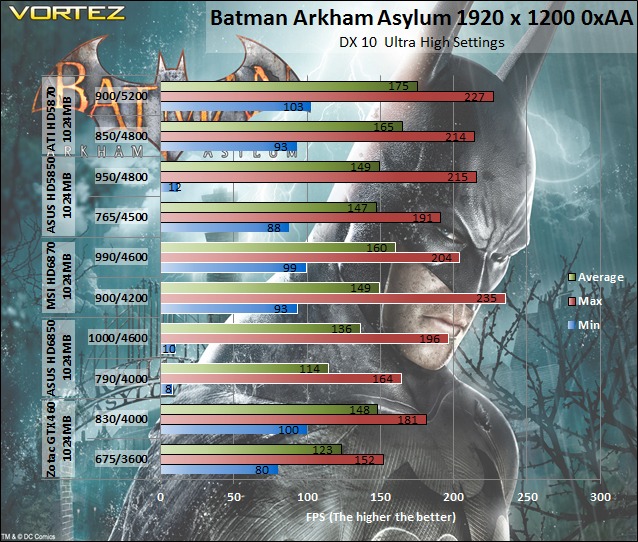
Batman follows the same trends we’ve seen before. The new HD6870 cannot match up to the sheer performance of the HD5870 with a 9 % performance deficit both at stock and overclocked. Similarly the HD6850 lags behind the GTX460 by around the same percentage.
The difference between the HD6870 and its smaller sibling is quite remarkable with the latter losing out by up to 30% at stock speed and 20% when overclocked.
Colin McRae DIRT 2
DIRT is back and it’s bigger than ever. With an onslaught of famous X-Games competitors such as Ken Block and Dave Mirra, extreme is being brought back to rally. The game not only delivers outstanding gameplay in lush environments but also stunning visuals in the form of Direct X 11 implementation. If you want some fast paced, arcade style racing, then look no further than Colin McRae DIRT 2.
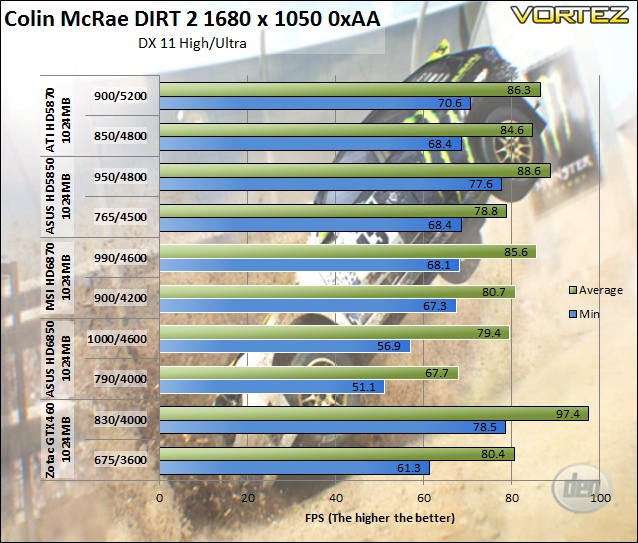
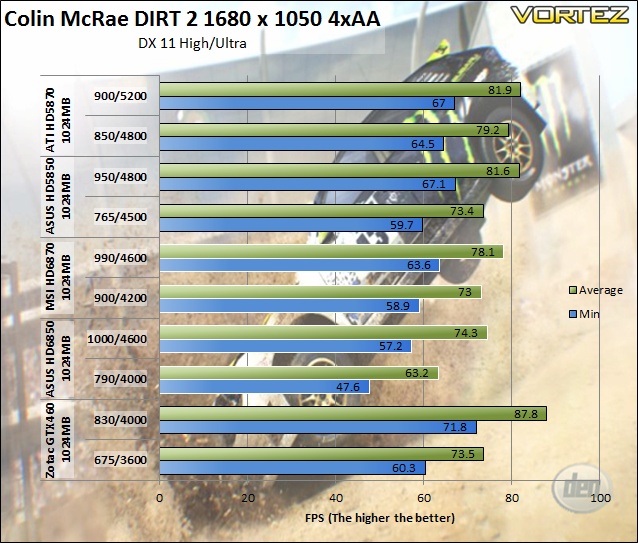
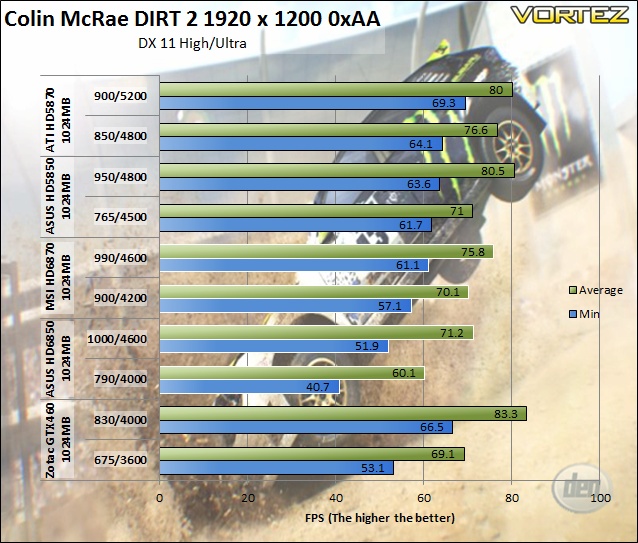
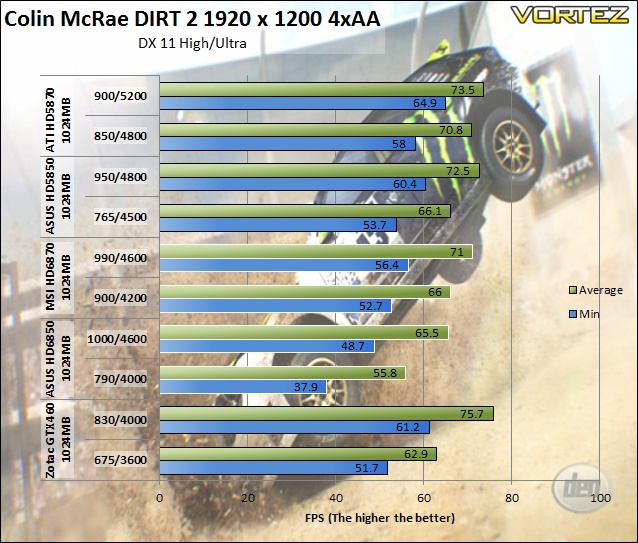
DIRT 2 is a game that has previously favoured Nvidia’s cards with their superior tessellation engine. This can be seen from its lead, especially when overclocked. As such the HD6850 drops behind by up to 15% at stock and up to 18% at overclocked speeds. The gap does reduce to around 10% at higher AA settings.
The HD5870 still retains a slight lead over the HD6870, ranging from 5-9%. Overclocked, it becomes a very marginal 0-5%. Comparing the HD6870 to the HD6850, the former holds an advantage of 15-20% at stock speed and 5-8% under the overclocked conditions.
Battlefield Bad Company 2
Battlefield Bad Company 2 is the new rendition of the widely successful Battlefield series of game. Having more in common with the console release of Bad Company, the sequel hopes to inject the DNA of the timeless Battlefield 2 online experience with the witty action packed single player shooting adventure of the original. As Private Preston Marlowe, your goal as a member of Bad Company is to once again save the world by securing a scalar weapon device.
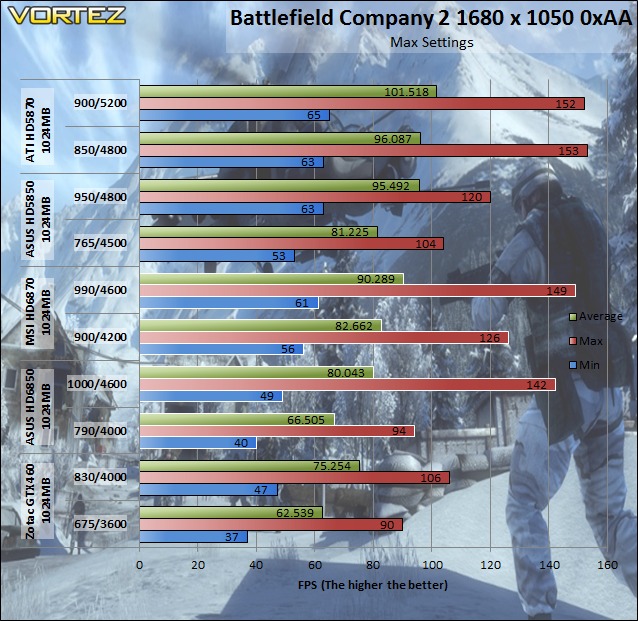
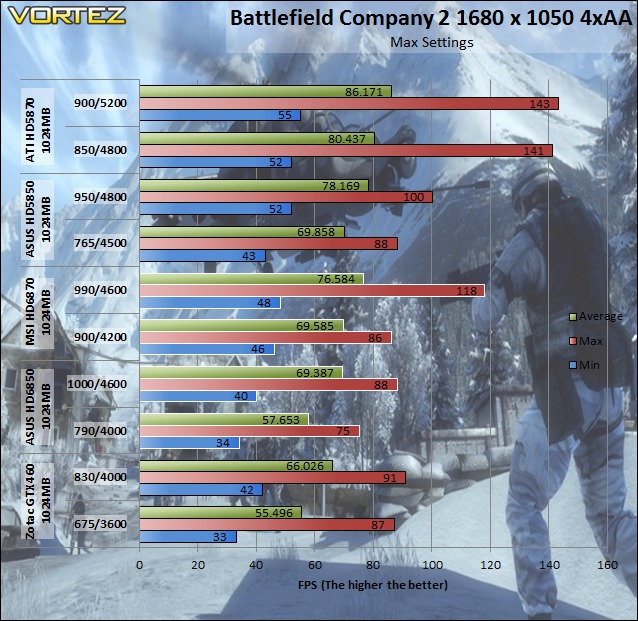
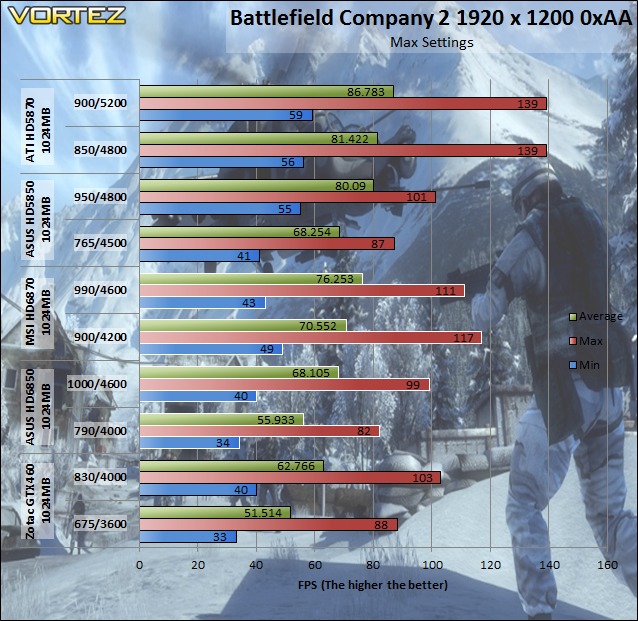
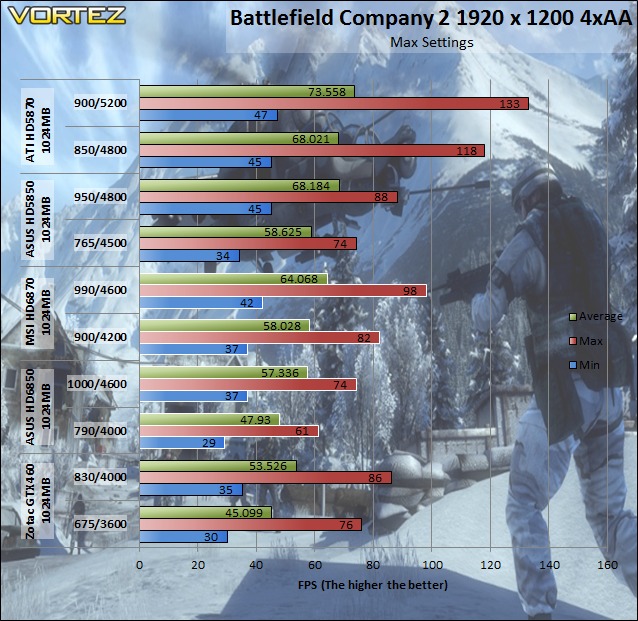
The margin between the HD5870 and HD6870 widens in this game, suggesting that the raw shader power of the former gives the card an advantage. The difference here is around 15% and falls to 13% when overclocked, favouring the HD5870 still.
Between the GTX460 and the lower Barts variant, the AMD comes out on top with a 4-8% performance lead at stock and 5-9% lead when overclocked. The HD6870 commands a healthy 20-25% FPS advantage over the HD6850 although this reduces to around 11% thanks to the HD6850’s higher relative overclock.
Mafia II Demo
Following the success of Mafia back in 2002, the third person action adventure game is back with a new grittier and darker world. As Vito Scaletta, an aspiring made man, your job is to work through the twist and turns of Mafia lifestyle. The more blood spilt, the more you get in return but the lifestyle was never meant to be an ideal one. Set in the visually stunning Empire City, the wartime references provide the ever present back drop to a rife period in America’s history, in which potential for exploitation becomes Vito’s key focus.
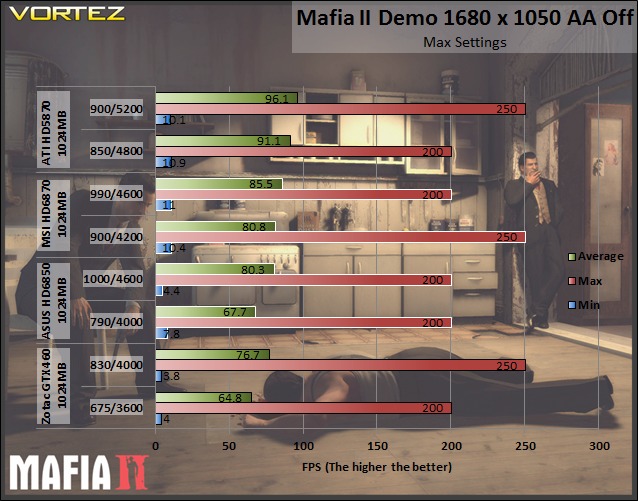
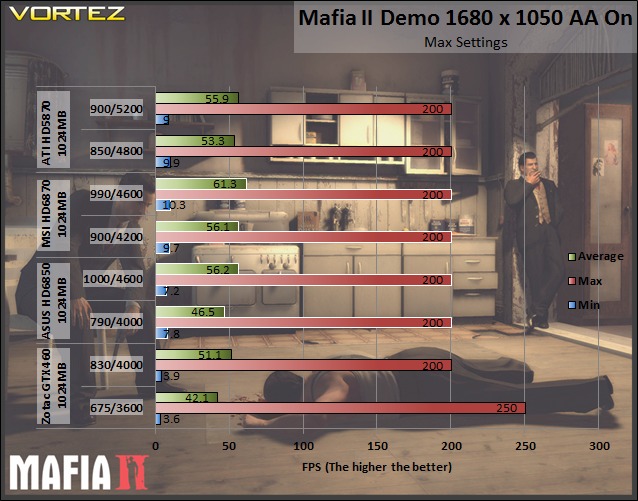
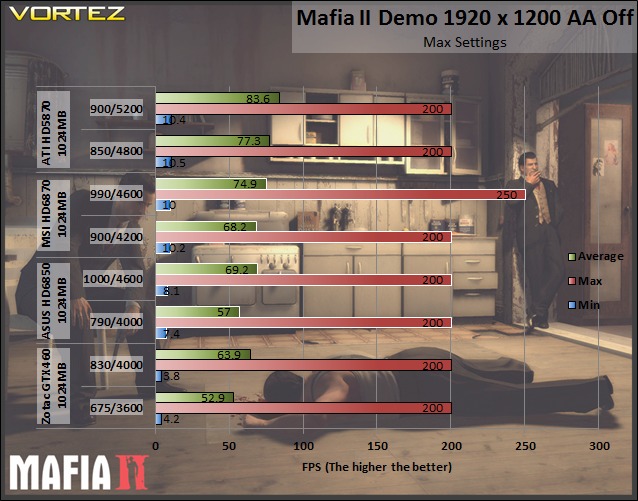
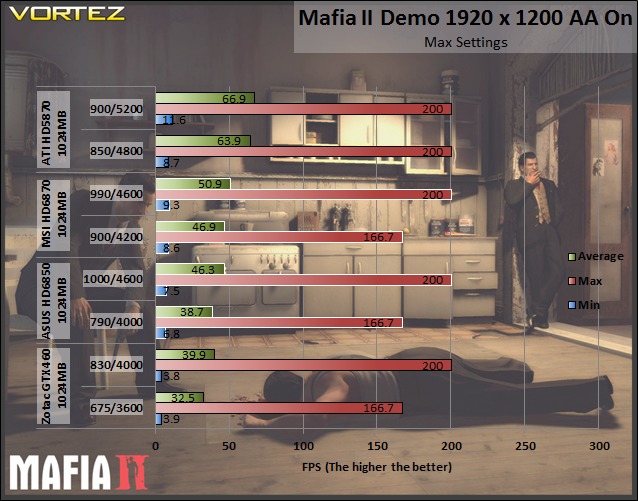
The HD5870 leads the HD6870 by an average of 12% at both stock and overclocked speeds. Strangely at 1920×1200 and AA applied the HD6870 sees a significant drop in performance which is reflected by the 30% deficit compared to the HD5870. Over the HD6850, it holds a 20% lead at stock which turns down to 9% when overclocked.
The HD6850 proves to be the winner when pitted against Nvidia’s GTX460, commanding an advantage of around 10% on average and up to 20% at the highest resolution and settings.
Alien VS Predator
Spawned from the popular Alien and Predator franchises, Rebellion have collaborated to bring the legendary war to us through the medium of a first-person shooter. The game forces you to hunt, prey and most importantly survive in the swamp colony of Freya’s prospect as either a Predator, Alien or Marine. The stunning visuals add to the sense of dread and terror that we have become so accustomed to seeing with the series.
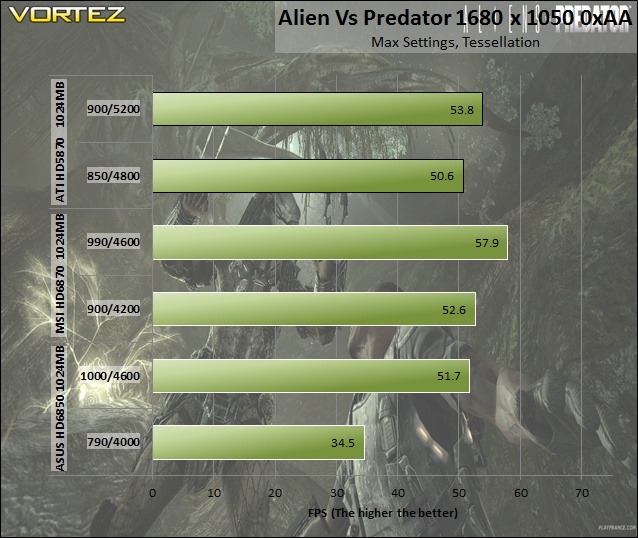
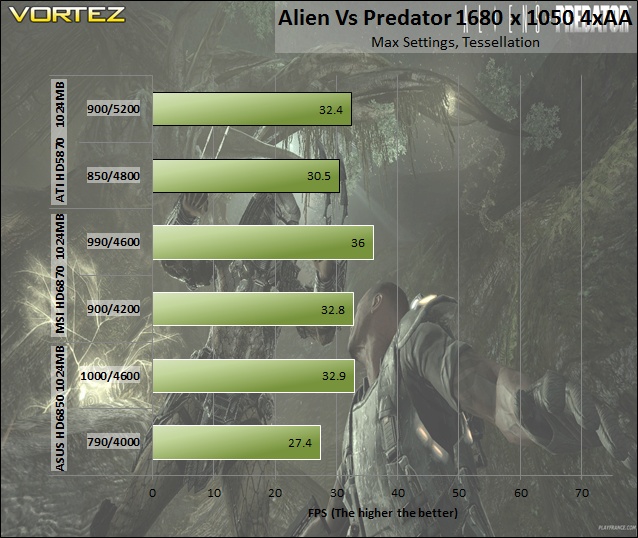
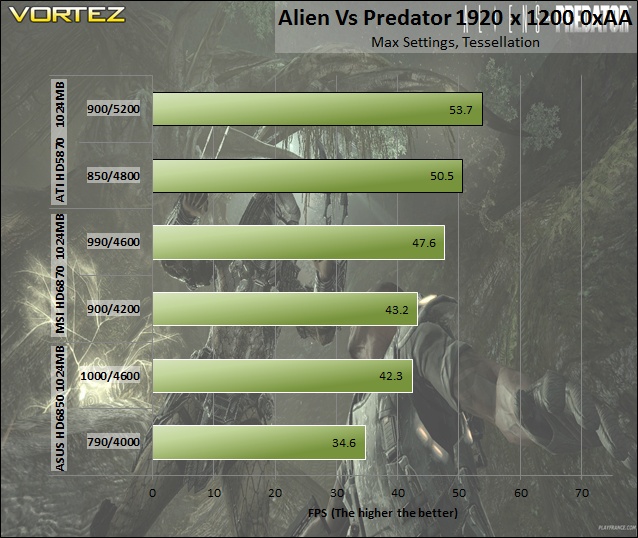
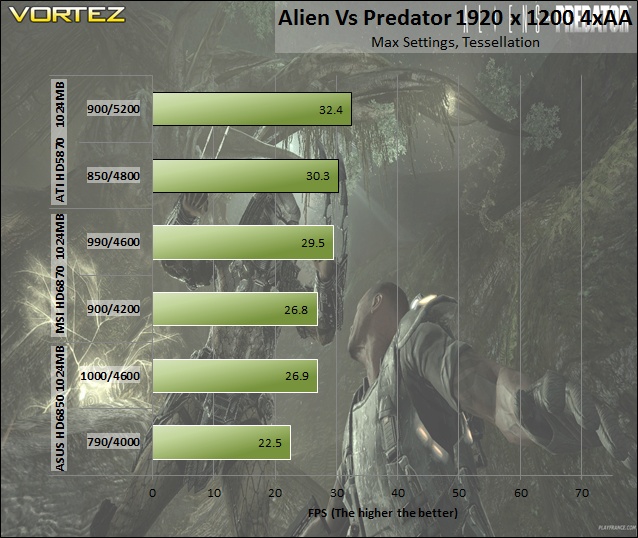
The HD6870 gets off to a good start at the lower resolution, beating the HD5870 by up to 10% thanks to its superior tessellation performance. However, it soon loses its lead at 1920×1200.
The difference between the HD6870 and HD6850 is similarly to previous observations, 20% at stock speed and around 10% when overclocked.
3DMark 06 & Vantage
3DMark 06
Futuremark has been the testing ground for enthusiasts ever since their first release in 1999! While 2006 is long gone, it’s still very popular amongst benchers.
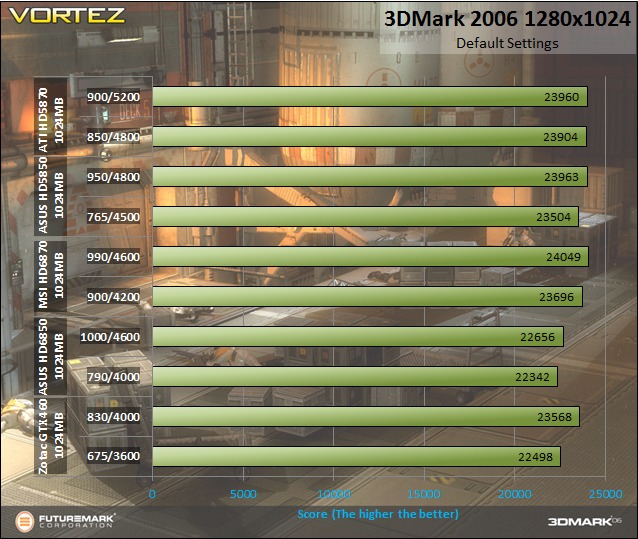
3DMark06 highlights just how CPU dependent it has become over the years. Nonetheless, we can still see the difference between the cards. The HD6870 falls between HD5850 and HD5870 performance and manages to take the lead when overclocked.
The HD6850 is a bit more disappointing in that regards, being unable to match Nvidia’s GTX460 and likewise when both are overclocked.
3DMark Vantage
This latest benchmark suite from Futuremark introduces DX 10 & PhysX support. Despite being on the verge of DX 11 games arriving, Vantage is still the chosen benchmark amongst enthusiasts these days.
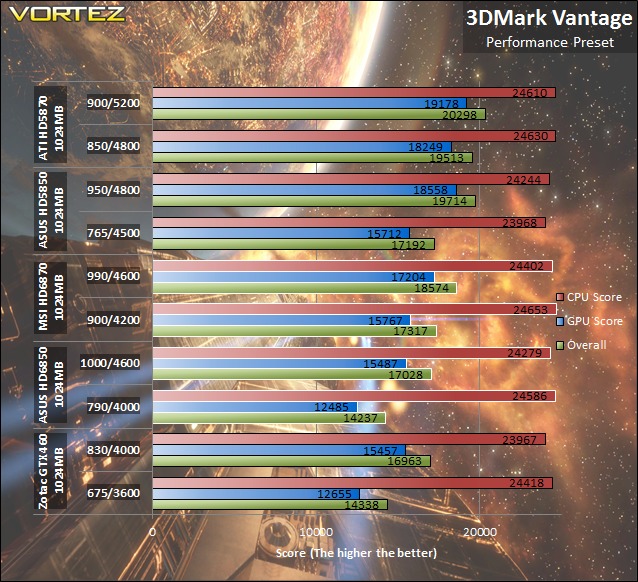
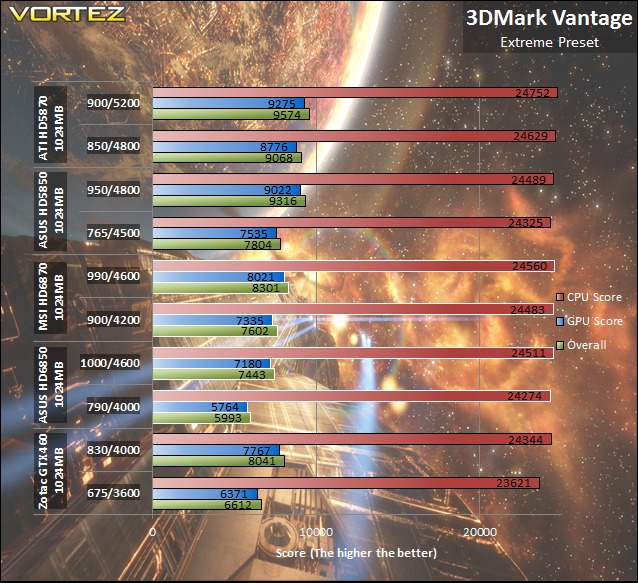
The latest Futuremark benchmark tool is more adept at differentiating the cards. The HD6870 closely mirrors the HD5850 results and far exceeds the GTX460 performance. Unfortunately, the gains aren’t significant enough when overclocked to match an overclocked HD5850 or a stock HD5870. The HD6870 has a clear 15-20% performance lead over the GTX460 at stock speed but this reduces to around 9% under overclocked speeds.
The HD6850 trades blows with the GTX460 in the performance pre-set at both stock and overclocked speeds. In the extreme pre-set however, it falls short of the HD6850 by 9% at stock speed and 7.5% with both overclocked.
Unigine V2.1 Benchmark
Unigine’s benchmark is to showcase the benefits of DX 11 and the use of tessellation as opposed to normal rendering techniques. The demo has impressive visuals that gives an insight into what we can expect from gaming in the future.
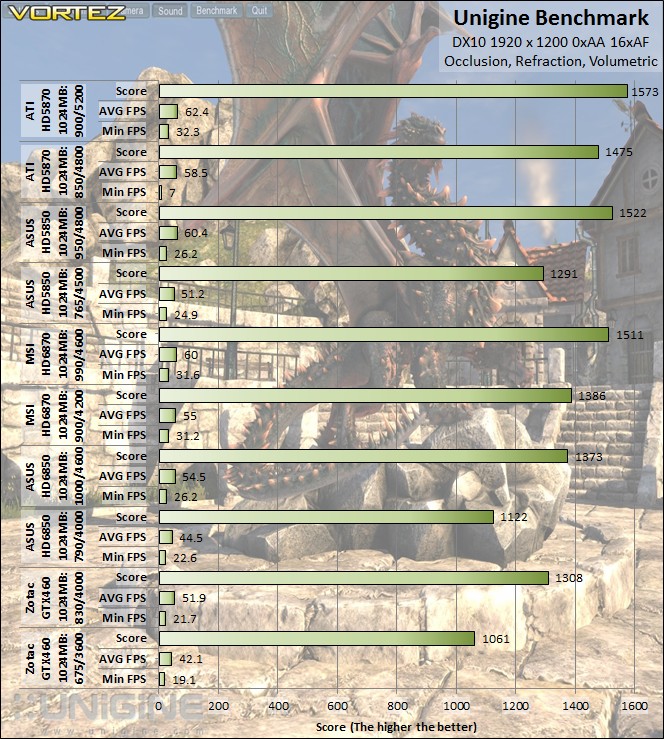
The benchmark is a good indicator of the positioning of the cards performance wise. The HD6870 is right between the HD5850 and HD5870 at stock speed whilst the HD6850 outperforms the HTX460 but cannot quite touch the HD5850.
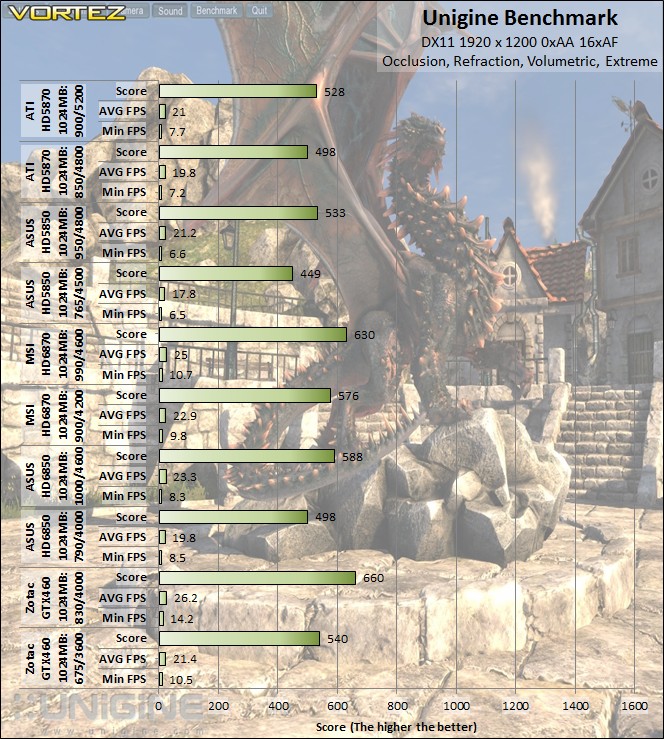
This is where we see a marked improvement in AMD’s new Bart’s architecture. Looking at the DX11 tessellation performance, the HD6870 outshines the HD5870 by 20% and even the HD6850 matches latter. As such, AMD has become more competitive with Nvidia’s offerings. The HD6870 outperforms the GTX460 by 6% but conversely, the HD6850 fall 7% behind the Nvidia card. Overclocked, the higher relative overclock on the GTX460 allows it to gain back the crown from the HD6870.
Tessellation
DX 10
DX 11 Tessellation off
DX 11 Tessellation off – wireframe mode
DX 11 Tessellation on

DX 11 Tessellation on – wireframe mode
Let’s focus on a few characteristics of tessellation in the first image. Firstly, when we compare the wireframe mode, it is clear that tessellation, triangular in this case, is adding a lot more features and details, which may at first not be recognisable. The surfaces are divided in many more triangles, allowing the objects to replicate more complex structures. The ground for example is one of the features that benefits from it. To make it as efficient as possible, tessellation becomes a function of distance, generating more polygons closer to the viewer.
Now let’s look at the application of this. If we gaze at the rock pillar closest to us, we can immediately notice that with tessellation, they are not just mere square blocks but instead have irregular surfaces, more representative of a natural rock. Now, let’s move on to the stairs, which again is a notable improvement on past rendering methods. Rather than being flat, they have depth, giving the impression of real steps as opposed to a slide. The same applies to the cobbled road although the compressed/downsized pictures make it hard to judge. The last thing I’ll point out are the tiled roofs. With tessellation, the individual tiles form a more complex/realistic shape instead of appearing flat with repeated textures. You’ll have to take my word for it if you don’t notice them or try the demo for yourself!
Power Consumption
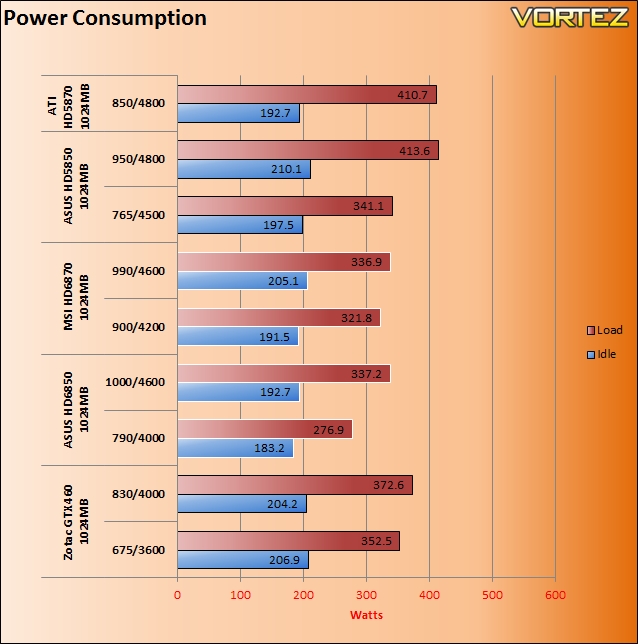
Where the Barts core really shines is in power consumption. Despite the 40nm process still being used, the core packs 1.7 billion transistors on it 255mm squared die, around 450 million less than the Cypress core. The result is much lower power consumption. At stock the HD6870 draws a mere 321.8W of power and overclocking only increases the maximum load by a small 15W. The HD6850 only sports one single PCIe connector already suggesting lower power draw. The results reflect this very well with a lowly consumption of under 300W. The load power draw is slightly higher the HD6870 when overclocked due to voltage tweaking on the HD6850. Nvidia’s GF104 based GTX460 just cannot compete in this department.
Conclusion
As with the HD6870 conclusion, it’s important to analyse the results on the basis of the pricing. The HD6850 was meant to compete with the 768MB variant of the GTX460 and yet at around £150 or £160 in ASUS’s case, it is being pitted against the 1GB card. This is mainly due to aggressive pricing on Nvidia’s behalf but nonetheless price/performance is the most important factor in the highly competitive mid-range market. To get a better overall idea of the performance difference between the GTX460 1GB and the HD6850, a wide selection of game was use to ensure less bias in the result. It’s not mystery that some games tend to prefer either AMD or Nvidia. Unfortunately for AMD, the GTX460 1GB came out top in the majority of games. The HD6850 could only grab a lead in Crysis Warhead, Resident Evil 5, Battlefield Bad Company 2 and Mafia. In those 4 games, it lead by approximately 7% at both stock speed and when overclocked. In other cases, the Nvidia card lead by around 10%. For an overall figure, the GTX460 1GB performed 4% better and it exceeded the HD6850 when it came to tessellation performance by 7-10%. AMD might be right in targeting the 768MB GTX460 with their HD6850 but pricing will have to come down to make it a worthy competitor. The main advantage of the Barts core is its power efficiency drawing an impressive 75W less at stock speed.
Based on the specifications alone, the HD6870 has up to 33% more shader power than its sibling and looking at the real world performance, the difference was much less. With both at stock speed, the HD6870 manages to pull ahead by an average of 20%. At overclocked speed, the HD6850 closes the gap to 10% thanks to the ASUS’s card outstanding 27% overclock. When the performance/price ratio is evaluated, the HD6870 ends up 30% more expensive for a 20% gain in performance, highlighting the excellent value for money that the HD6850 offers. Unfortunately, the same conclusion is reached here and Nvidia have to be commended for offering the best performance/price ratio of the cards tested today. We can take into account the diminishing returns of the more expensive HD6870 but consumers looking to buy a mid-range card will no doubt have value in the minds instead of sheer performance. For those wondering how an overclocked HD6850 fares against a stock HD6870, the difference is a mere 1.2% favouring the latter.
The ASUS card was a joy to work with. Its sleek design follows previous DirectCU models and teamed with the Barts core, it provides tremendous cooling potential. Consequently, it makes sense to have the Voltage Tweak utility to get the most of the HD6850 and boy did it deliver! The result was a sky high core clock of 1GHz, the golden barrier that eludes most cards on the market. A small voltage bump to 1.25V was all that was needed to attain the clock speed and best of all is that no other current HD6850 offers the same custom design and tweak-ability. For a £10 premium, it is definitely worth it over standard models.
+Decent performance
+Very Efficient and low power consumption
+Very cool and quiet operation
+Eyefinity support
+Stable and very high overclocking headroom
+Excellent & intuitive bundled software
+Aesthetically pleasing
+Pre-overclocked and Voltage tweak capability
+3 years warranty
Cons
-Naming scheme
-Nvidia’s GTX460 offers better performance for the money
ASUS have done a good job with their EAH6850 DirectCU TOP and earn themselves the Vortez Hardware Silver Award.


