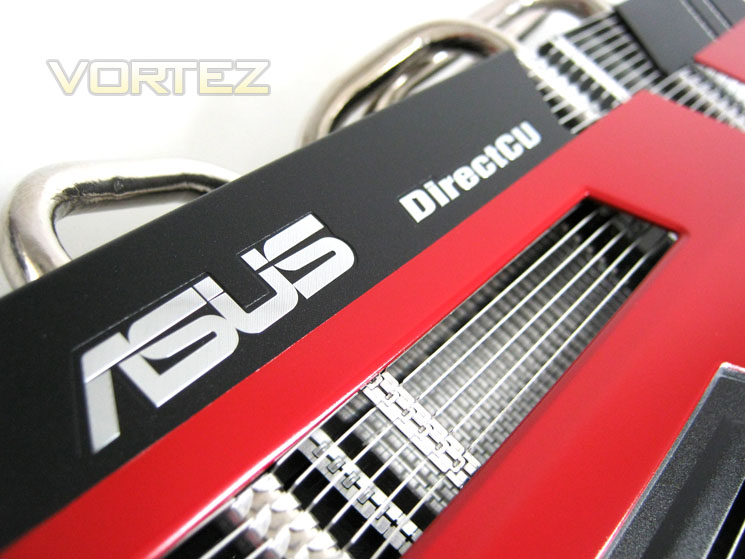
If you prize silence above all else then the ASUS HD6770 DirectCU Silent could be just the graphics card you are looking for…

Product on Review: EAH6770 DC SL/2DI/1GD5
Manufacturer and Sponsor: ASUS
Street Price: £111.94 Inc. VAT
While many enthusiasts are looking for the most powerful GPU for their money, often overlooked is the cooling it takes to keep temperatures under control. Inevitably this usually means fans need to rotate at high rpm’s which in turn leads to excessive noise. While there are now examples of modern graphics cards on the market today that operate quietly, none can claim to be totally silent. As such, the engineers at ASUS have produced a graphics card that is passively cooled. Having no rotating parts, it is understandable why ASUS claim the HD6770 DirectCU Silent emits 0dB. The HD6770 GPU may not be the hottest chip on the block, nor the most powerful but keeping temperatures under control with just a passive heatsink will take some achieving so it will be interesting to see if ASUS’ claim is found to be truthful.
The HD6770 DirectCU Silent is not the only HD6770 core GPU in their line-up though as it has two other stable mates, one with DirectCU cooling and one without. Both of these cards however have a fan to assist cooling however it is the passive version we will be looking at today.
The HD6770 is little more than a rebranding exercise sadly as it offers virtually the same performance save for some video enhancements as the older HD5770, both being Juniper core examples so it is odd that ASUS have gone to the trouble to design a passively cooled card which by today’s standards, is old technology. Obviously they believe there is a demand for such a product and while I do agree that silent cards are always going to be sought after, performance is also a primary attraction when choosing a graphics card and in that respect I hope ASUS have not overlooked this key aspect.
It remains to be seen then if ASUS have succeeded in releasing a graphics card that is not only silent, but can perform to the high standards enthusiasts will expect.
About ASUS
ASUS comes from the last four letters of Pegasus, the winged horse in Greek mythology that represents the inspiration of art and learning. ASUS embodies the strength, creative spirit and purity symbolized by this regal and agile mythical creature, soaring to new heights of quality and innovation with each product it introduces to the market.
ASUS pursues technological and aesthetic perfection through continuous innovation. We place ourselves in our customers’ shoes to develop a deep understanding of, and genuine empathy for, their needs—enabling us to create user experiences that transcend the norm.
ASUS Design develops high-quality solutions our customers will enjoy. Our design process is built on thorough research, early anticipation and well-planned execution. We act with a global vision and a focus on local strengths, conditions and heritage.
ASUS comes from the last four letters of Pegasus, the winged horse in Greek mythology that represents the inspiration of art and learning. ASUS embodies the strength, creative spirit and purity symbolized by this regal and agile mythical creature, soaring to new heights of quality and innovation with each product it introduces to the market.
ASUS pursues technological and aesthetic perfection through continuous innovation. We place ourselves in our customers’ shoes to develop a deep understanding of, and genuine empathy for, their needs—enabling us to create user experiences that transcend the norm.
ASUS Design develops high-quality solutions our customers will enjoy. Our design process is built on thorough research, early anticipation and well-planned execution. We act with a global vision and a focus on local strengths, conditions and heritage.
Let’s see how the product specification matches up to the rest of the field…
Specification
The HD6770 is a rebranding of the same core placed on the HD5770, the Juniper XT. This isn’t the first time rebranding of GPU cores as manufacturers look to lengthen a GPU’s lifespan. Both AMD and NVIDIA are equally guilty of this procedure, especially with lower end GPU’s.
The Juniper core architecture was originally launched October 13th 2009 with the much praised Radeon HD5770. The HD5770 is widely regarded as the workhorse of AMD so it is clear why they are looking to extend the cores lifespan. It is manufactured down to 40nm and utilises 1.04 billion transistors and was originally perceived as a mid-range offering from AMD, capable of delivering DirectX 11 gaming.
The Juniper XT is a trimmed down version of the then flagship HD5870’s Cypress core affording 800 stream processors, 40 texture units, 16 ROPs and a 128bit memory bus. This trimming of the Juniper cores yield meant that AMD were able to compete in the mid-range market without sacrificing too much grunt. Many people took advantage of the HD5770’s cost and instead of opting for the pricier HD5870, they crossfired the two lesser cards with money saved. Thus the popularity of the HD5770 was born.
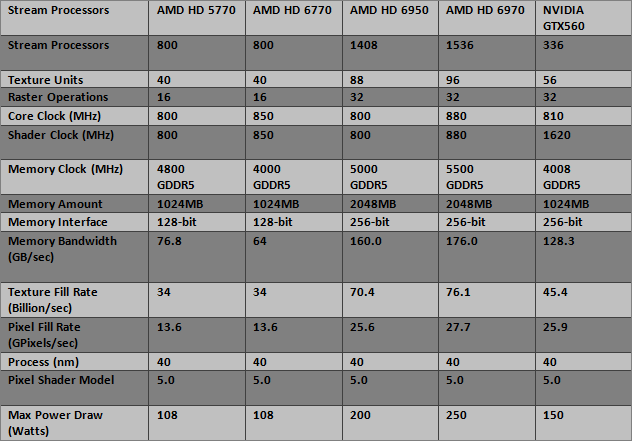
As you can see from the specifications above, the HD5770 and HD6770 are identical save for the 50MHz increase in clockspeed. This is no bad thing of course as the HD5770 was a phenomenal card by offering great value for money but I do worry as to how it will compare, especially at higher resolutions to our previous combatants. Of course, the HD6770 was never meant to be a graphics card capable of HD gaming at the highest resolutions despite it being able to support a 2560×1600 resolution so I will be looking at a popular mid-range resolution of 1920×1200 in this review.
Product Specification
Graphics Engine: AMD Radeon HD 6770
Bus Standard: PCI Express 2.1
Video Memory: GDDR5 1GB
Engine Clock: 850 MHz
Memory Clock: 4000 MHz ( 1000 MHz GDDR5 )
RAMDAC: 400 MHz
Memory Interface: 128-bit
D-Sub Max Resolution : 2048×1536
DVI Max Resolution : 2560×1600
D-Sub Output: Yes x 1
DVI Output: Yes x 1 , Yes x 1 (via HDMI to DVI adaptor x 1)
HDMI Output: Yes x 1
HDCP Support : Yes
Dimensions: 11.42 ” x 6.69 ” x 1.97 ” Inch
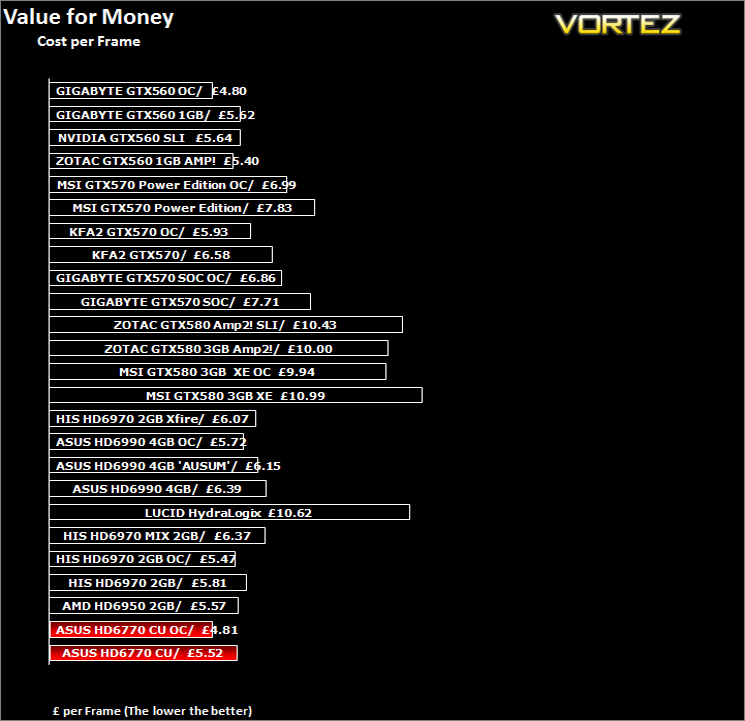
One point worthy of note is that this card will take up 2.5 slots thanks to the huge cooler. With an expected price point of around £100 it’s edging into GTX560 territory so it will be interesting to see how the two compare. Before we arrive at the testing of the HD6770, let’s first take a look at what features the ASUS card has to offer…
Features
76.8 GB/s memory bandwidth (maximum)
Up to 1.36 TFLOPs compute power
TeraScale 2 Unified Processing Architecture
– 800 Stream Processors
– 40 Texture Units
– 64 Z/Stencil ROP Units
– 16 Color ROP Units
PCI Express® 2.1 x16 bus interface
Full DirectX® 11 support
– Shader Model 5.0
– DirectCompute 11
– Programmable hardware tessellation unit
– Accelerated multi-threading
– HDR texture compression
– Order-independent transparency
OpenGL 4.1 support
Image quality enhancement technology
– Up to 24x multi-sample and super-sample anti-aliasing modes
– Adaptive anti-aliasing
– 16x angle independent anisotropic texture filtering
– 128-bit floating point HDR rendering
AMD Eyefinity multi-display technology1
Native support for up to 5 simultaneous displays
Independent resolutions, refresh rates, color controls, and video overlays
Display grouping
– Combine multiple displays to behave like a single large display
AMD App Acceleration2
– OpenCL 1.1
– DirectCompute 11
– Accelerated video encoding, transcoding, and upscaling
UVD 2 dedicated video playback accelerator
– H.264
– VC-1
– MPEG-2
– H.264 MVC (Blu-ray 3D)4
– Adobe Flash
– Enhanced Video Quality features
– Advanced post-processing and scaling
– Dynamic contrast enhancement and color correction
– Brighter whites processing (Blue Stretch)
– Independent video gamma control
– Dynamic video range control
– DXVA 1.0 & 2.0 support
AMD HD3D technology4
– Stereoscopic 3D display/glasses support
– Blu-ray 3D support
– Stereoscopic 3D gaming
– 3rd party Stereoscopic 3D middleware software support
AMD CrossFireX™ multi-GPU technology5
– Dual GPU scaling
Cutting-edge display support
– Integrated DisplayPort Output
– Max resolution: 2560×1600 per display
– Integrated HDMI 1.4a with Stereoscopic 3D Frame Packing Format, Deep Color, xvYCC wide gamut support, and high bit-rate audio
– Max resolution: 1920×1200
– Integrated Dual-link DVI with HDCP
– Max resolution: 2560×1600
– Integrated VGA
– Max resolution: 2048×1536
Integrated HD audio controller
– Output protected high bit rate 7.1 channel surround sound over HDMI or DisplayPort with no additional cables required
– Supports AC-3, AAC, Dolby TrueHD and DTS Master Audio formats
AMD PowerPlay™ power management technology3
– Dynamic power management with low power idle state
– Ultra-low power state support for multi-GPU configurations
AMD Catalyst™ graphics and HD video configuration software
– Unified graphics display drivers
– Certified for Windows 7, Windows Vista, and Windows XP
– AMD CatalystTM Control Center
Packaging & Contents
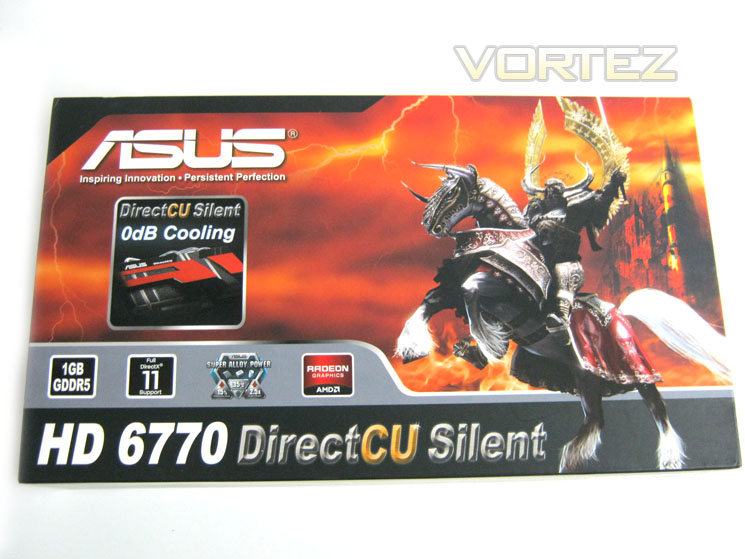
Box Front
The box is presented in the now very familiar ASUS/AMD theme of black knight upon a flame orange backdrop. Other than the product title and basic run down of the cards features the most striking aspect of the front of the package is a sticker claiming the ASUS HD6770 DirectCU Silent has 0dB cooling. Note that ASUS do not claim the GPU is 0dB only the cooling. As the card has no moving parts it will not emit noise true? Well, I’ll come back to this later in the review.
Box Rear
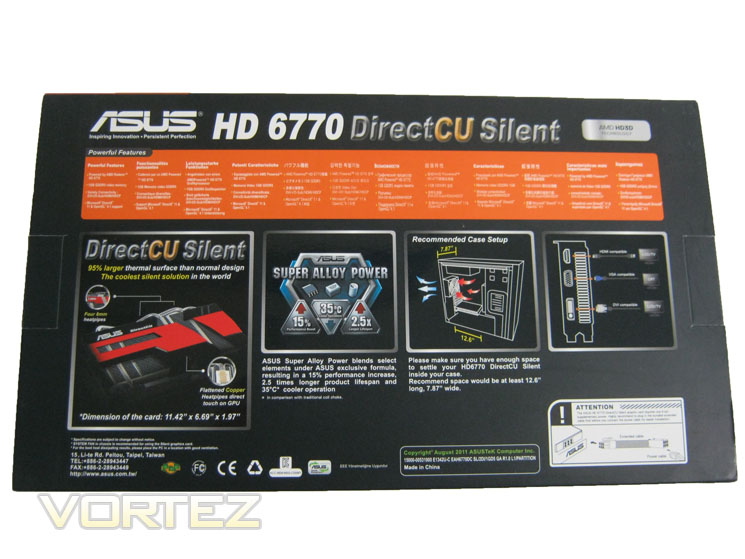
The rear of the box has a rundown of the HD6770’s features at the top of the package and to the middle, ASUS focus on the 3 main features of the card, DirectCU cooling, Super Alloy Power and multiple display ports. Interestingly, ASUS make a big issue of emphasising that good case cooling will be required for this card. Credit to ASUS on this point, as while it may seem like common sense to have good case cooling for a passive GPU, some people will inevitably think that the card is capable of cooling itself down without the need for air passing over the card.
Inner Packaging
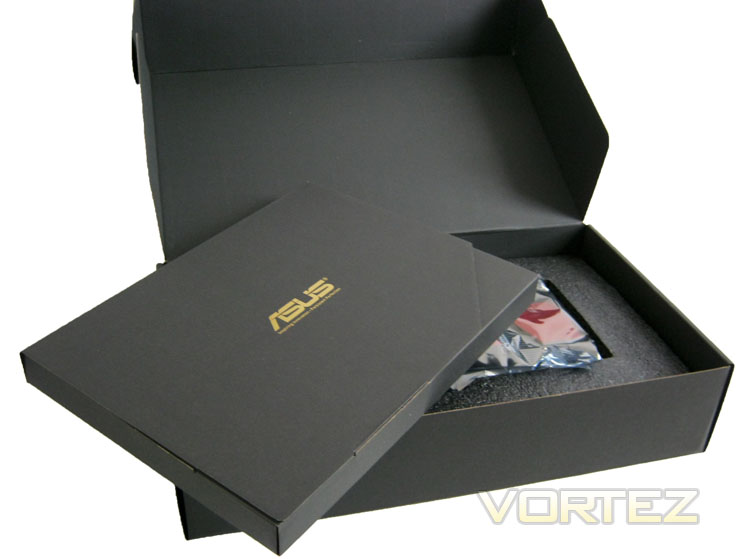
We do like the way ASUS package their GPU’s here at Vortez and the HD6770 is no different. After removing the outer sleeve we are greeted with a plush corrugated cardboard box with a golden ASUS logo printed upon its midriff. This box then flips open to reveal a further accessory box and the main GPU, itself held fast in a rigid polystyrene bracket. This type of packaging will ensure your product arrives safely in one piece and thanks to the anti-static bag around the GPU, there should be no electrical damage to the card either.
Accessories
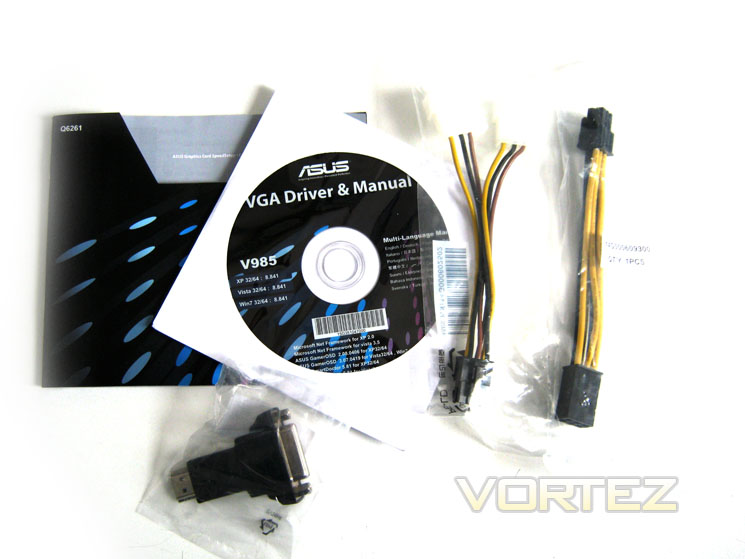
Included in the package are a driver/utility CD, installation manual/quick guide and DVI-mini HDMI adapter, twin Molex-6pin PCIe power adapter and a 6pin PCIe extension cable. I wouldn’t have expected a free game with a mid-range card and as expected, there is none with this release. The PCIe power extension is a cheap, simple yet thoughtful inclusion to the product package though.
Let’s take a look at the card itself…
Closer Look
Card Top
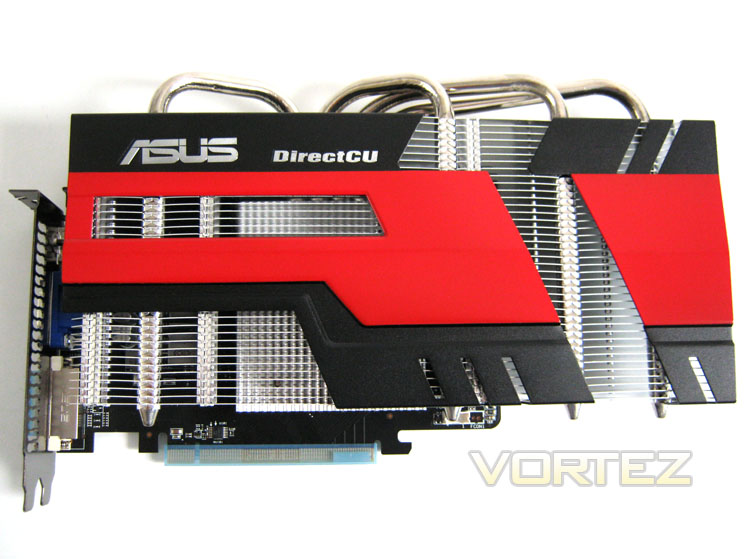
The cooler dominates proceedings and while subjective, looks very good in my opinion. The cooler has two small shrouds on the card which serve to decorate rather than offer any performance benefit. Aesthetically, the shrouds do add to the cards appeal but I can’t help feeling that performance will actually be hindered slightly by having the passively cooled aluminium fins of the cooler covered.
Card Bottom
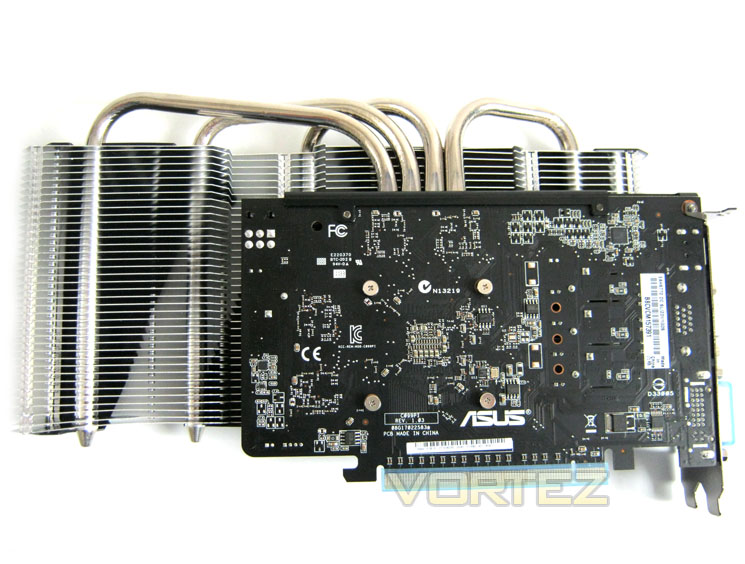
The card itself is actually relatively small as you can see. As with all ASUS cards in their current line-up, the PCB is a matt black affair which will be conducive to any PC colour scheme. The massive cooler dwarfs the PCB and overhangs the card, adding to its length by at least a third. The cooler also adds to the width of the card thanks to the 4 heat pipes jutting out from the cards edge. The dimensions of the HD6770 DirectCU Silent are 11.42″ x 6.69″ x 1.97″.
I/O area
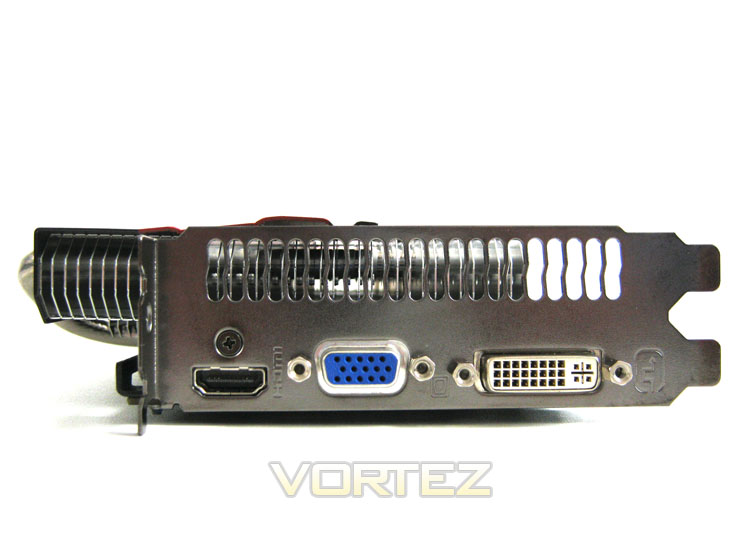
The I/O area is a step away from the norm and adds the older VGA port instead of the now all too familiar twin DVI. DVI of course is still present along with a HDMI port. Above these is the vented panel which serves no purpose other than for ventilation as hot air is not exhausted directly due to there being no fan.
PCIe Power
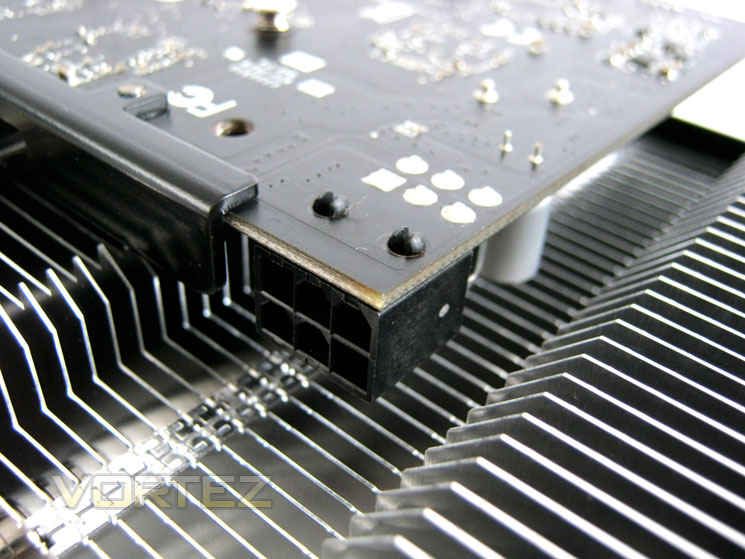
The card requires a 6pin PCIe power cable with a PSU . The PCIe power slot is difficult to get to and may also be restrictive due to the width of the card due to the heatsink size however thanks to the power extension cable, the whole process is made a little easier.
Heatpipes
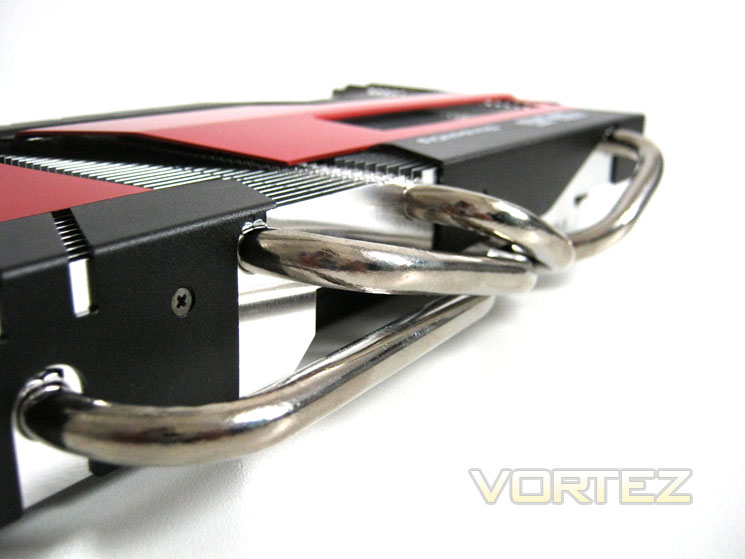
The cards cooler has four 8mm heatpipes that help spread the heat dump from the card across the whole of the cooler. While the nickel coated copper heatpipes certainly look the part, I can’t help feeling the card would be better served by being smaller as the heatpipes could cause difficulties in small enclosures. Effective the cooler may be but the card pays for this cooling in its sheer size!
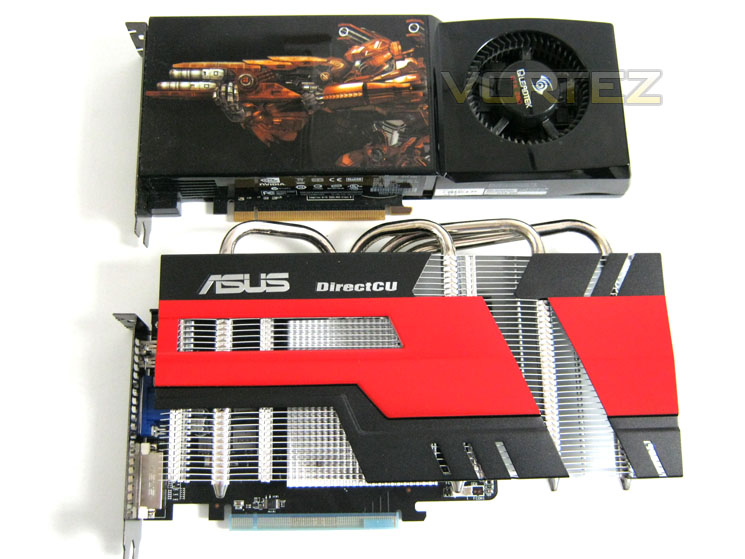
Comparison
As you can see above, the HD6770 is as long as a GTX280 and wider still. This may prove to be a big turn off for some, especially those looking for a discreet yet powerful GPU for a HTPC or media center.
Let’s take a look at the cooler and on board components in greater detail…
Closer Look Pt.2
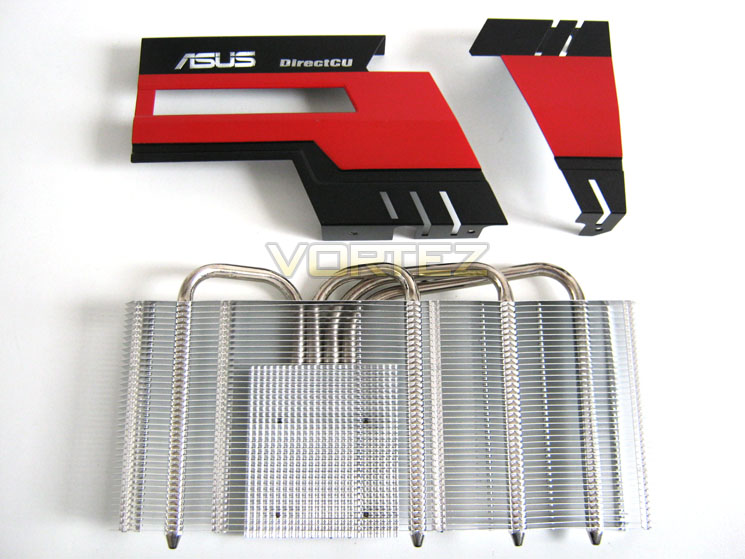
Card Top
Removing the cooler was a relatively simple affair with the just four spring-loaded screws holding the cooler to the PCB. The two separate shrouds screw directly into the heatsink so are easy to remove should that be your preference.
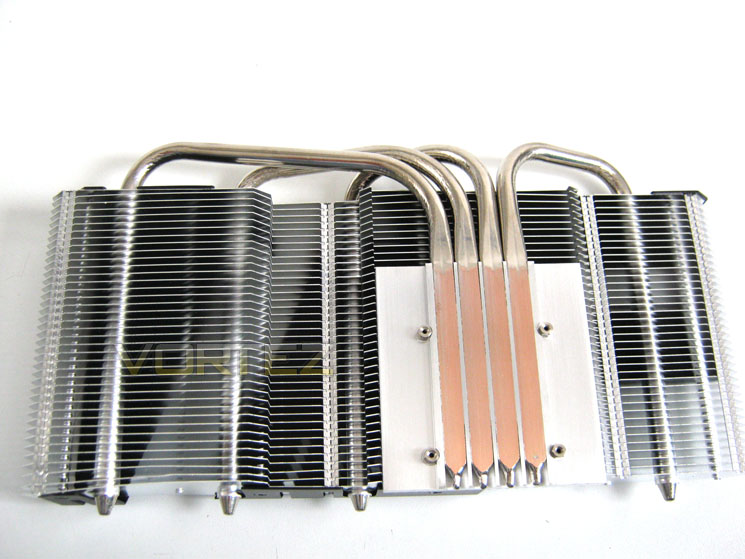
Heatsink
Flipping the cooler over we see just how big it is when compared to the baseplate area which features the flattened direct contact heatpipes. The heatpipes stretch out across the aluminium fin array to equalise heat dissipation.
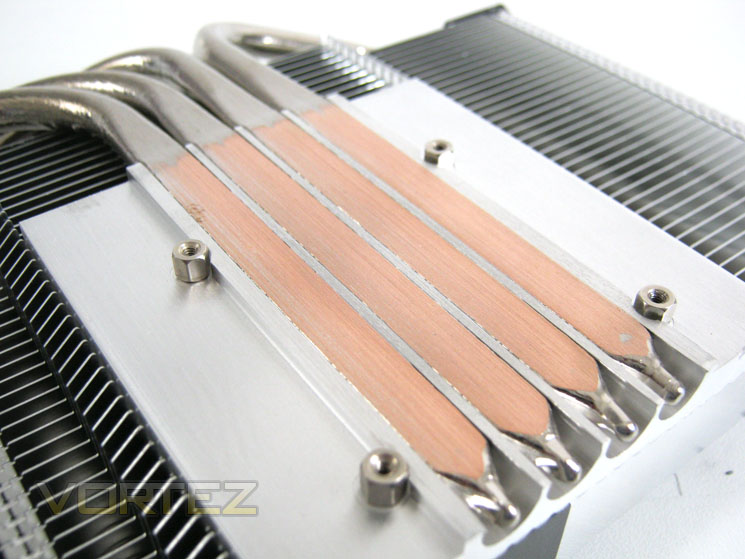
DirectCU
Having the heatpipes making direct contact with the GPU core ensures the most efficient method of heat transfer. Unlike NVIDIA who use an integrated heat spreader AMD have an exposed core which serves to further the efficient cooling process. Sadly having an exposed core also means the silicon can easily be chipped which is even more likely when using a large heatsink such as the one ASUS have used on this sample so great care should be used should you remove the cooler yourself.
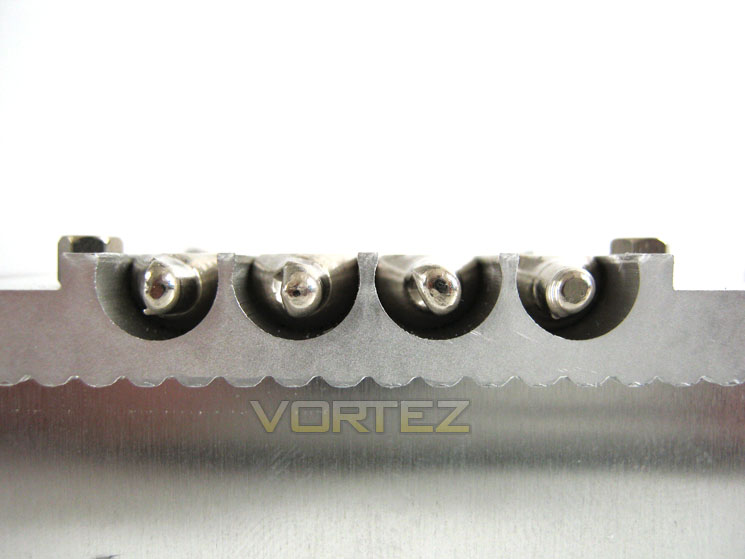
DirectCU Profile
Here you can see how flat the copper heatpipes are milled. The pipes are then soldered to the heatsink fins which then dissipate the heat.
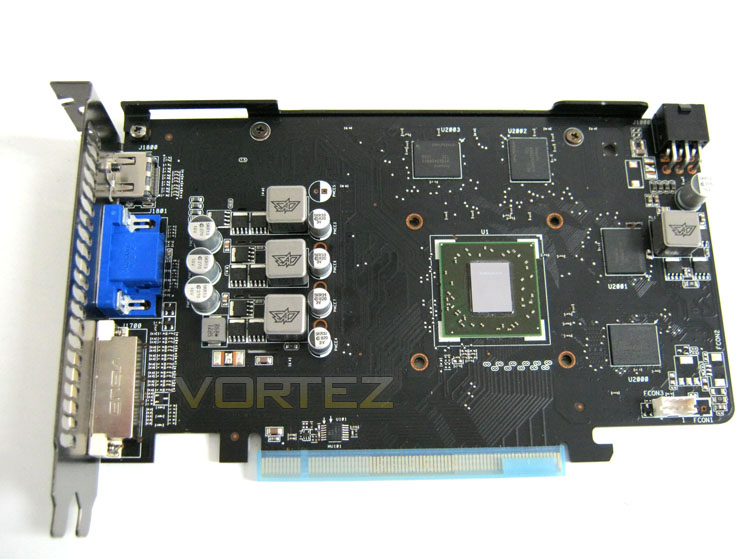
Naked HD6770
Neither the memory nor the VRM module is in contact with the massive heatsink. Instead, they rely totally on passive cooling. The layout of the card is relatively sparse in comparison to more powerful and therefore complex GPU’s. The four 256MB GDDR5 modules frame the exposed Juniper XT core and unusually for a GPU card, the power module however is situated to the left rather than the right.
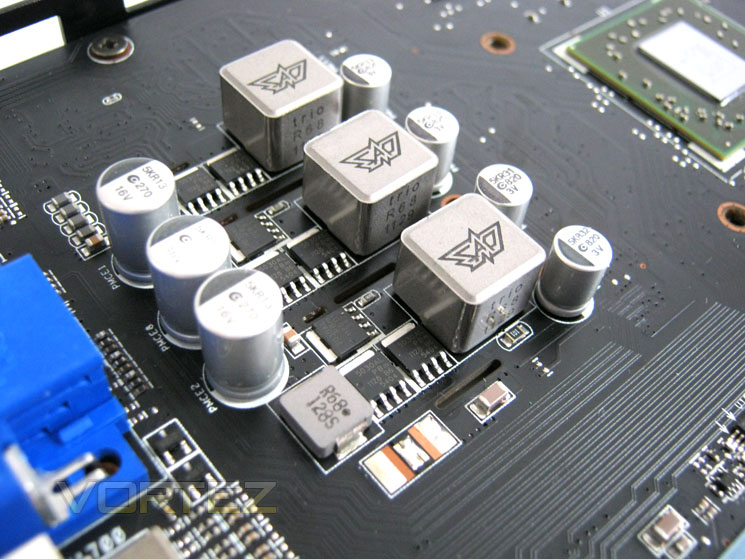
Power Delivery
The power regulation is a 3+1 affair and features ‘Super Alloy Power’ which ASUS claim delivers stable, noise free operation with a 35c reduction in temperatures. The Super Alloy Capacitors last up to 90,000 hours longer than traditional capacitors which equates to more than 2.5 times the lifespan normally expected by GPU capacitors.
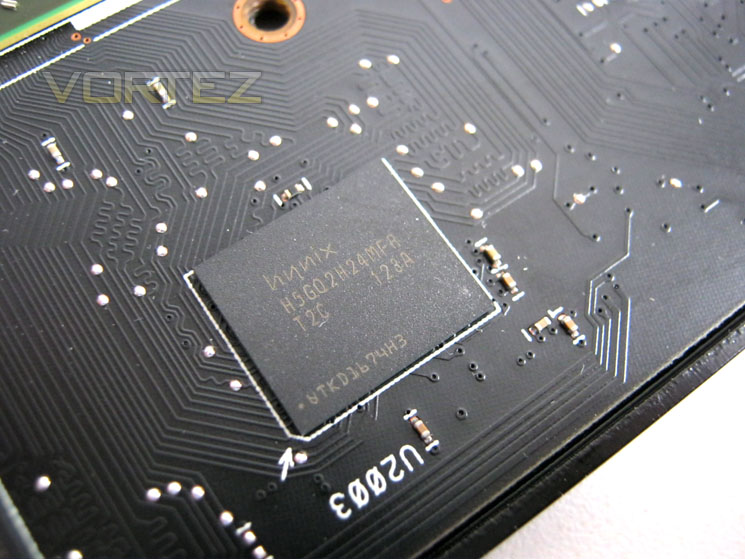
1GB Hynix GDDR5
The four Hynix modules (H5GQ2H24MFA) are rated to 5Ghz yet run at 1250MHz (4GHz effective). Hopefully we will be able to overclock the memory past its stock clocked speed later in the review.
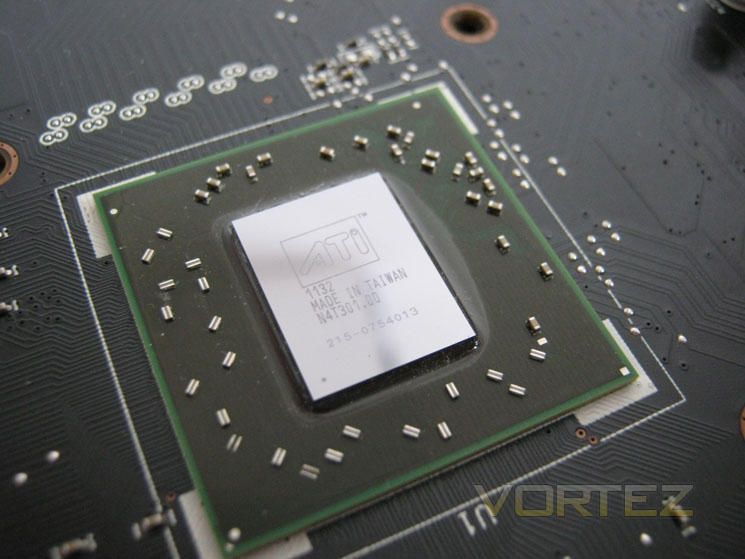
Juniper XT Core
Finally we reach the heart of the graphics card, the Juniper XT core. Stock clocks are set to 850MHz , 50MHz higher than a HD5770 so like the memory, it remains to be seen just how far we can increase this value in our overclocking session.
Before we get to the overclocking section though, let’s take a look at today’s test setup…
Test Setup
We have recently made a slight amendment to our selection of hardware and our test setup. The reason for this is that we felt the current crop of resolutions were not stressing the latest generation of graphics cards enough. With this in mind, we have added a Dell 3007 WFP-HC to our system, allowing us to stress the cards by utilising a 2560×1600 resolution. We will however, still include 1920×1200 results as this is one of the most popular resolutions used by gamers.Display – Dell 3007 WFP-HC
Case – Corsair 650D
CPU Cooler – Corsair H100
CPU – Intel Core i7 920 @ 4GHz
RAM – 6GB (3x2GB) Kingston DDR3 1600mhz 8-8-8-20 C1
Motherboard – ASUS Rampage III Extreme
Power Supply –Antec High Current Pro 1200W
Hard Drive – GSkill Falcon 128GB & Hitachi 250GB
Please note: PSU requirements
While a 550w PSU is recommended by MSI for a single card configuration I feel it is important to stress the need to use a quality PSU. All to often we are contacted by people encountering difficulties in powering and overclocking high spec systems who insist they are using a high wattage PSU. Do not be fooled by inferior, poor quality power supply units that claim high wattage figures. At best a poor PSU will not be able to maintain those values and perhaps more importantly could potentially be a fire hazard! PSU rail stability can have a dramatic effect on overclocking too so while it may appear that the component is at fault, it could very easily be the PSU that has high amounts of ripple which is causing the hardware/overclocking errors.
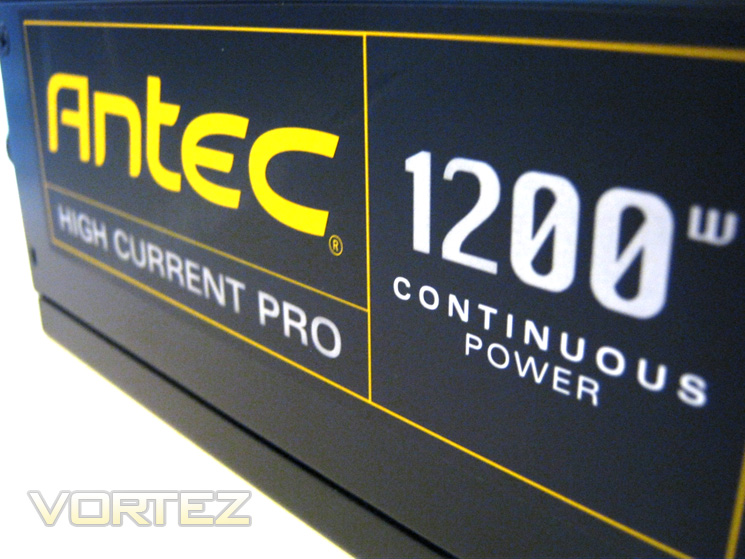
A PSU is the single most important component in a modern high powered PC. If you are going to spend money in any area of your PC, the PSU should be considered first as a quality sample will likely out last any other aspect of your PC and thus investment in a good example is a very wise decision. For this reason ANTEC have kindly sponsored our test bed by providing the immense, top quality High Current Pro 1200W PSU which will satisfy even the most power hungry of PC configurations! PSU’s of this calibre are at the very top of the performance hierachy and while they may seem expensive compared to inferior quality PSUs, they are worth their weight in gold as a PSU such as the ANTEC High Current Pro 1200W provides both future proofing and perhaps most importantly, piece of mind that your valuable PC components are in safe hands.
Graphics Cards:
ASUS HD6770 DirectCU Silent 1024MB – ATI Catalyst 11.9
KFA2 GTX570 1280MB – Forceware 280.26
MSI GTX570 1280MB Power Edition OC – Forceware 280.26 – **NOTE – New Driver Installed**
ZOTAC GTX580 3GB AMP2! + SLI – Forceware 275.33
GIGABYTE GTX570 1280MB ‘SOC’ Edition – Forceware 275.33
ZOTAC GTX560 1GB AMP! Edition 950/4200MHz – Forceware 275.33
SLI NVIDIA GTX560 1GB 950/4200MHz – Forceware 275.33
HIS HD6970 2GB IceQ Mix@ 880/5500MHz – ATI Catalyst 11.5
Lucid HydraLogix = HIS HD6970 2GB IceQ Mix & MSI nGTX580 3072MB Lightning Xtreme Edition @ Factory clockspeeds
MSI nGTX580 3072MB Lightning Xtreme Edition Overclocked – Forceware 275.33
ASUS HD6990 @830/5000MHz & AWSUM enabled (pre-overclocked) – ATI Catalyst 11.5
HIS HD6970 2048MB IceQ Turbo – ATI Catalyst 11.5
Gigabyte GTX560 1024MB – Forceware 275.27
MSI R6970 2048MB Lightning– ATI Catalyst 11.4 (8.840.3.0)
Inno3D GTX560Ti 1024MB – Forceware 266.66
Inno3D GTX570 1280MB – Forceware 263.09
ASUS GTX580 1536MB – Forceware 262.99
ASUS HD6970 2048MB – ATI Catalyst 11.4 (8.840.3.0)
Driver versions are extremely important when comparing a graphics card. It is however often important to update a driver version, especially when a new GPU is released and thus any change in driver will be clearly stated.
Overclocking
For today’s review we will use the Afterburner utility from the MSI to overclock the test subject.
Games:
Crysis 2
Crysis Warhead
Metro 2033
Dirt 3
Mafia II
Battlefield: Bad Company 2
Far Cry 2
Alien vs. Predator
The games above represent equal bias toward both AMD and NVidia and are among the most demanding games available at present. Future releases will be evaluated for consistency and accuracy and then potentially added to the list when they become available
Synthetic benchmarks:
Futuremark 3DMark 11
Unigine Heaven 2.5
Tessmark 0.2.2
Furmark 1.9.0
Synthetic benchmarks are used to stress each feature of a GPU which may not be present in today’s games. While nothing is certain, the benchmarks above do at least give us an insight into the possible future performance of the graphics card on test, invaluable when evaluating the potential lifespan of a graphics card.
Temperature, power consumption and acoustics:
Furmark 1.9.0
The above application is feared by most manufacturers as it has been known to destroy GPU’s. While it is not indicative of ‘real world’ performance, it does represent the maximum possible stress your GPU could be placed under making it the hardest test to pass. For that reason alone, it is worthy of inclusion in our suite of benchmarks. Power consumption will be evaluated from the wall and will be a total system draw of the specification above.
Sound will be measured from a distance of 20 cm from the actual GPU with the case open. All system fans will be set to their lowest settings. Readings will be taken at both idle and 100% load.
Bundled Software

The Driver CD comes bundled with the typical ASUS suite found on most of their graphics cards accessory list.
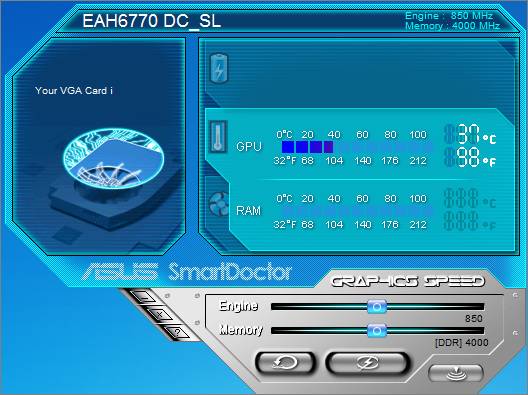
The SmartDoctor application has been around for sometime now and for all intents and purposes has the same functionality of MSI’s Afterburner in that both clockspeeds of the memory and cores can be adjusted. The GPU temperature is displayed in both Celcius and Fahrenheit. Fan speed can also be seen (though not adjusted) on a separate tab. To adjust fan speed you have to delve deeper into the settings. Apply and reset buttons are found beneath the monitoring screen adjacent to the settings button.
Due to the lack of a fan, some of the sections are greyed out as SmartDoctor allows full control of the fan. As this graphics has no fan there is no such need for this feature!
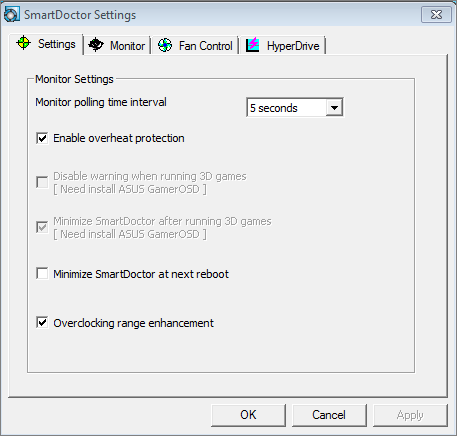
A handy feature in the settings allows the user to unlock the graphics cards overclocking limits (default set to 950MHz). With this setting unlocked, the core core theoretically be pushed upto 1700MHz! That is if your core will allow such a stupendous clockspeed of course.
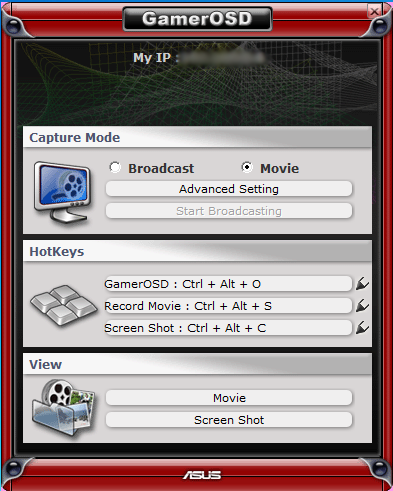
GamerOSD is a utility very similar yet a little less complex than FRAPS. It allows the user to record movies and take screenshots using adjustable HotKeys.
Overclocking & Temperature Analysis
Overclocking
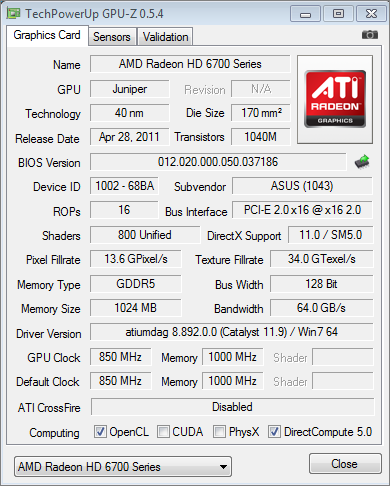
As you can see from the GPU-Z screenshot above, the ASUS HD6770 1GB CU Silent weighs in at a respectable 850/1000MHz. This is 50MHz higher on the core than a stock HD5770. With the Hynix memory chips I was intrigued to know just how far we could push the memory so on with the overclocking. Using AMD’s Overdrive utility, I slowly increased the core clockspeed until I encountered difficulties.
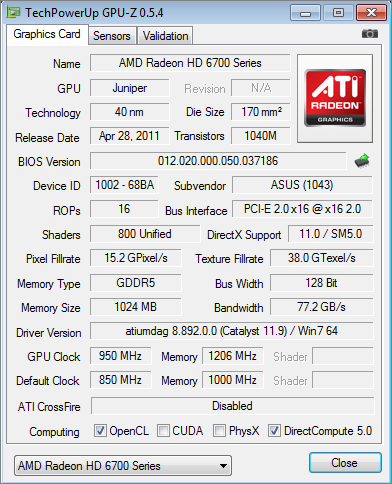
The maximum overclock I achieved was a very good 950MHz on the core and 1206MHz (4824MHz effective) on the memory. The clockspeed was almost the maximum possible affordable given the slider limit in overdrive so this was a great result. The memory too was, as expected, excellent in the overclocking department.
Core temperatures
To measure the temperature of the card we first measure the ambient temperature. Our review station resides in an air conditioned room with the temperature set to a comfortable 23c.
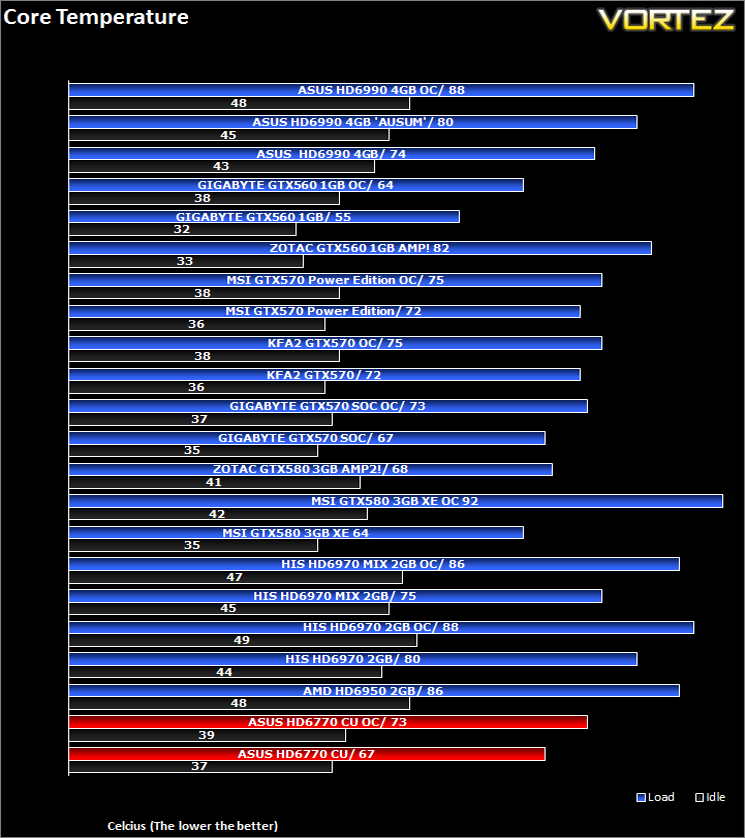
An excellent showing from ASUS on this occasion. I was pleasantly surprised with this result as I honestly expected the card to cook when placed under Furmark. Granted the temps were quite a lot higher when the card was used on the test bench but in an enclosed environment with good case airflow, the cooler performed extremely well by keeping temperatures well within safe boundaries
Let’s move on to the acoustics and power consumption of today’s review sample…
Acoustics & Power Consumption
Acoustics
A feature often overlooked when purchasing a graphics card is the noise that it emits. We all hear (no pun intended) of graphics cards that run like a jet engine which can have a detrimental effect on a gaming session, regardless of the FPS it churns out. It is therefore extremely important that a graphics card should operate as quietly as possible.
To test for this we will be using a sound meter and microphone setup which will be placed 20cm away from the GPU. The test will take place in a quiet (not sound proof) room with the results for the GPU fan at low (30%) and highest (100%) settings.
Results
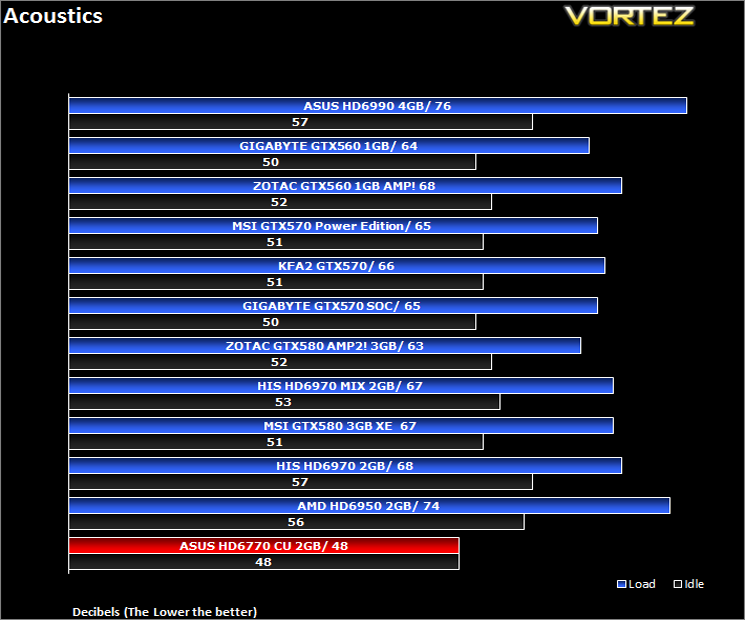
As expected the card was by far the best card on test here. The 40dB reading is simply the case fans doing their job as for all intents and purposes the ASUS card was a silent performer. I would however note that there was some capacitor squeal when the card was placed under load which should not happen according to ASUS and there Super Alloy technology, nevertheless it did and so the card cannot truly call itself 100% silent. Here is the kicker though; ASUS never actually claimed the WHOLE card was silent, rather the cooling is silent – very sneaky!
All in all though you will struggle to find a graphics car quieter than this so congratulations should be given to them as their cooling and acoustic performance on the HD6770 1GB CU Silent is nothing short of exemplary.
Power Consumption
For this test, we will be using a wall meter with the test setup plugged in minus the Monitor. Readings were taken at both stock and overclocked conditions each having readings also taken in idle and 100% load (Furmark). Furmark is perhaps not indicative of a true gaming environment and indeed is not recommended by NVIDIA or AMD to test stability of a card but in my view, much like Prime95 for CPU’s, it puts the graphics card under the highest possible stress and presents a good ‘worst case’ scenario. So while it is unlikely your card will ever be stressed as much under normal conditions, it is a good indicator of a theoretical maximum.
Results
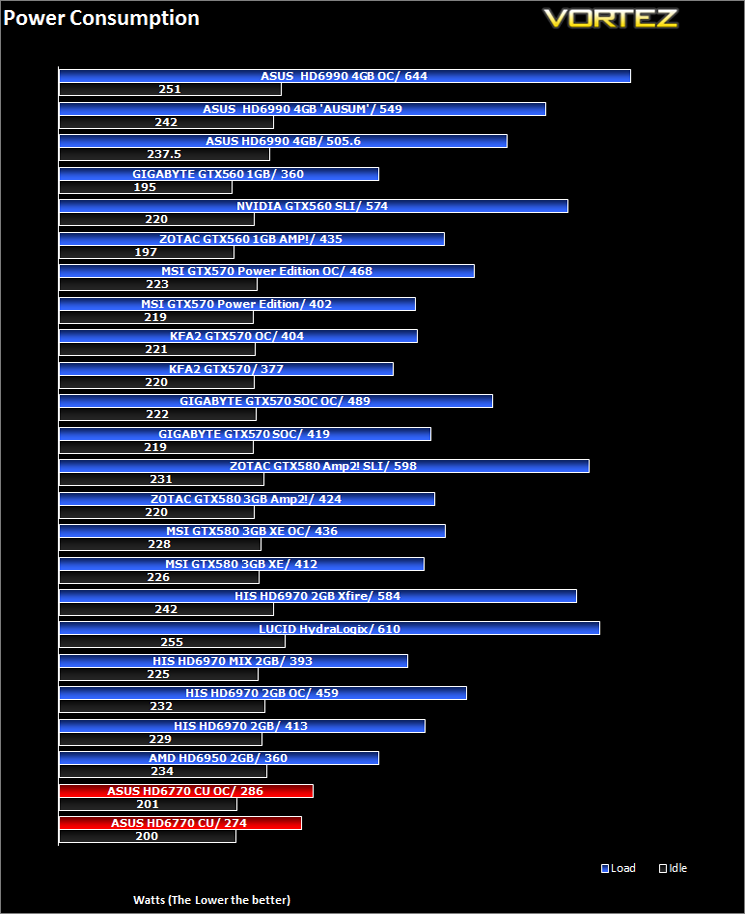
Being the least power hungry card on test it comes as no surprise that it also used the least power of all of the samples on test today. With the whole system consuming less than 300W of power a card like this would be perfect for a HTPC…should you have a case large enough to house it.
Let’s see if the card performs in our suite of benchmarks…
Crysis 2
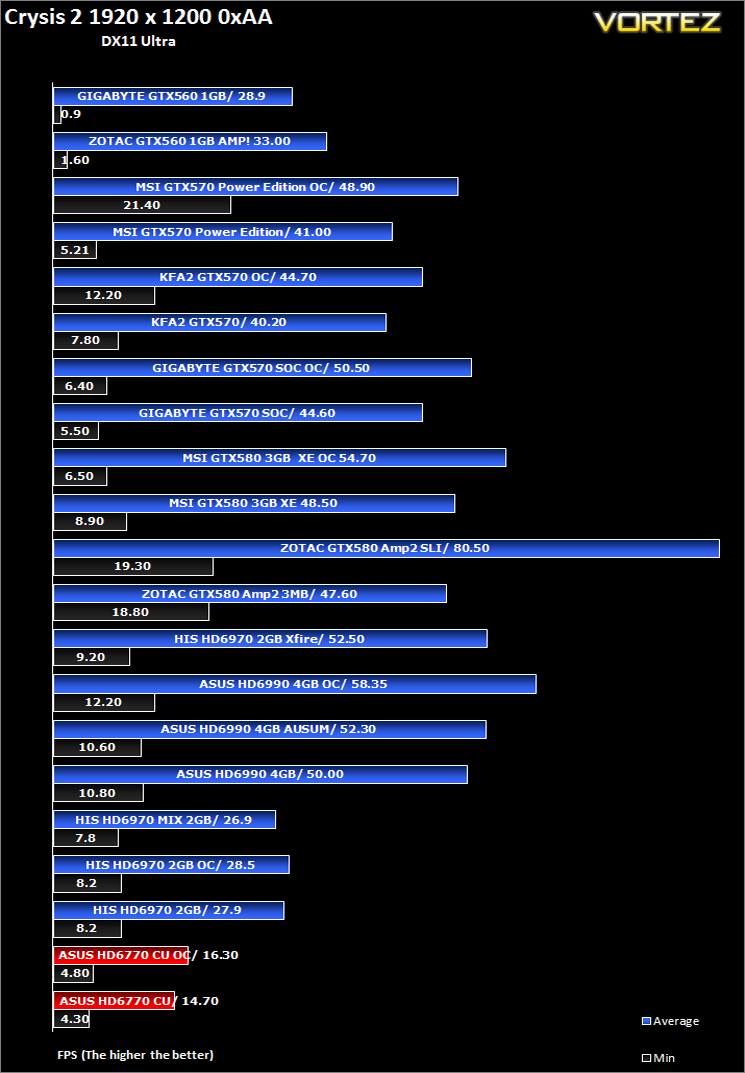
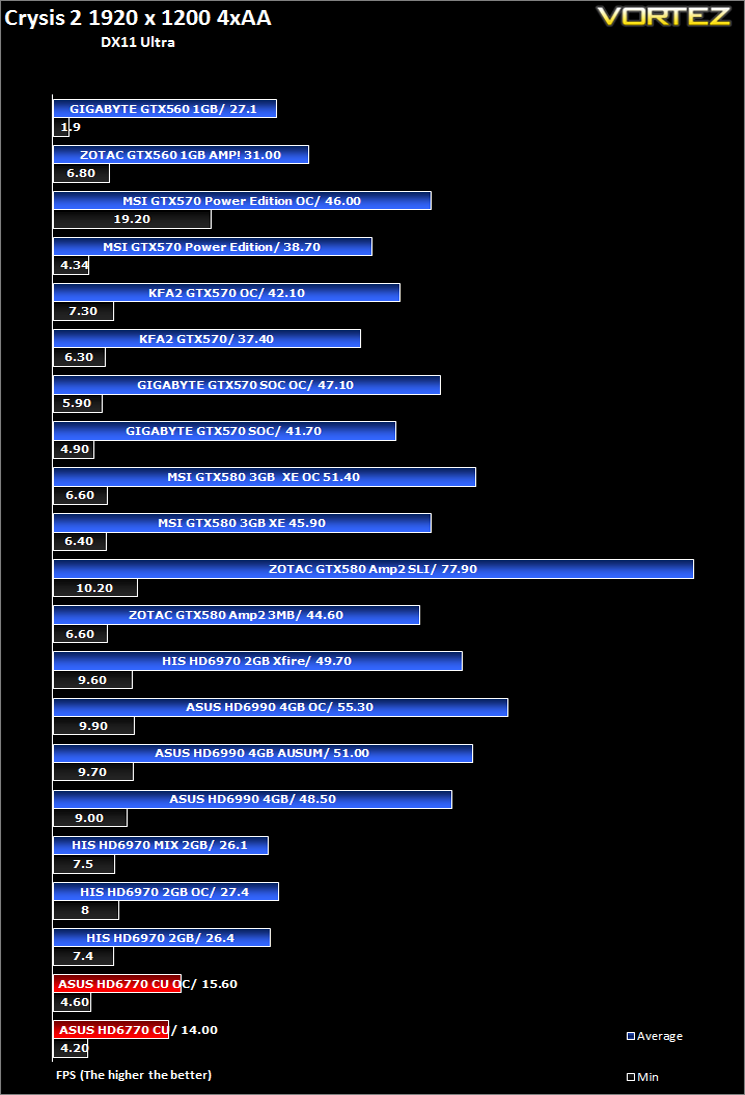
Crytek took an internet beating from its loyal fans due to the fact that they pandered to the console masses and dumbed down the graphics to DirectX 9. Fortunately, fans of the PC version of Crysis managed to force Cryteks hand and they have since developed a DX11 patch and have also enhanced the textures with added tesselation. It is for this reason that we have decided to include it in our suite of benchmarks.To test the cards we used the Crysis 2 benchmark courtesy of Adrenaline with both the 1.9 patch, DX11 update and Hi-res texture pack. Settings were manually placed to Ultra, DX11 and tessellation enabled with the Central Park map being run 3 times per resolution benchmark test.
Crysis Warhead
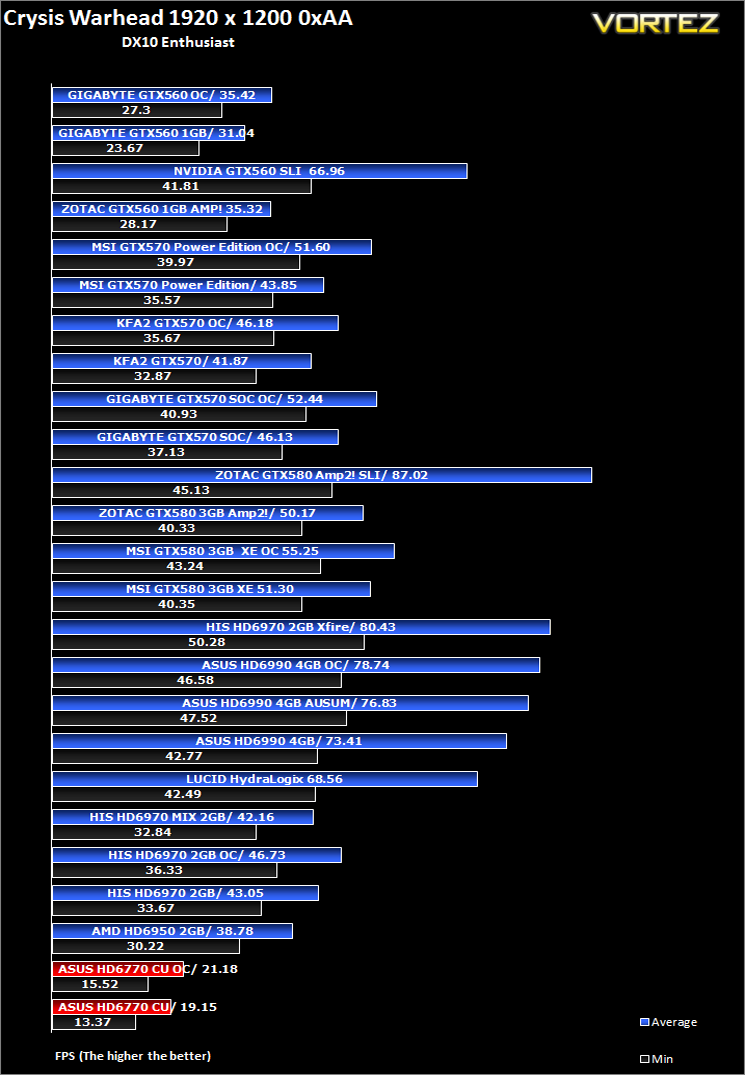
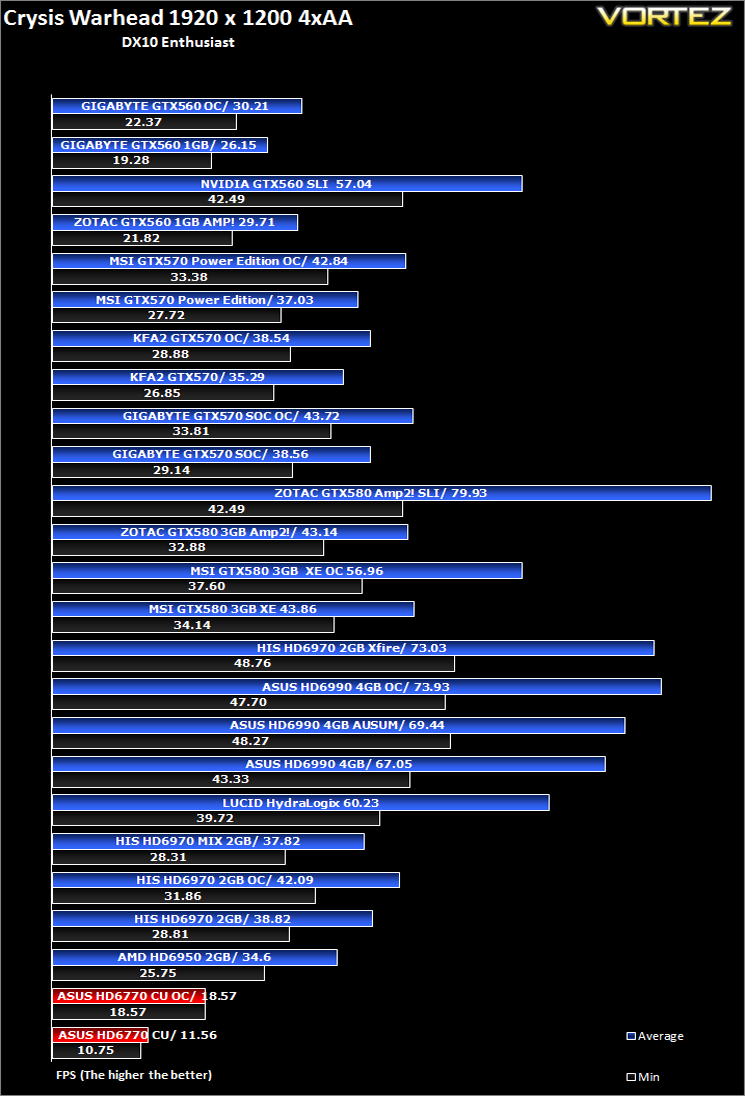
Following the success of Crysis, the stand alone expansion “Warhead” was hotly anticipated to bring more game play, more weapons, improved visuals whilst maintaining better performance, the latter being what gamers wanted most. After all how many people upgraded their rigs just to play this game… In the game, you play as the upbeat Brit Sergeant “Psycho” Sykes, chasing down a Korean nuclear warhead. Throw in some ice shooting aliens and we’re bound to have a great game. It sure delivered.Testing was done using Framebuffer’s Crysis Warhead benchmarking tool. The tests were configured to DirectX 10 at Enthusiast levels. Each test on the Ambush map was looped three times from which the average FPS was recorded.
Far Cry 2
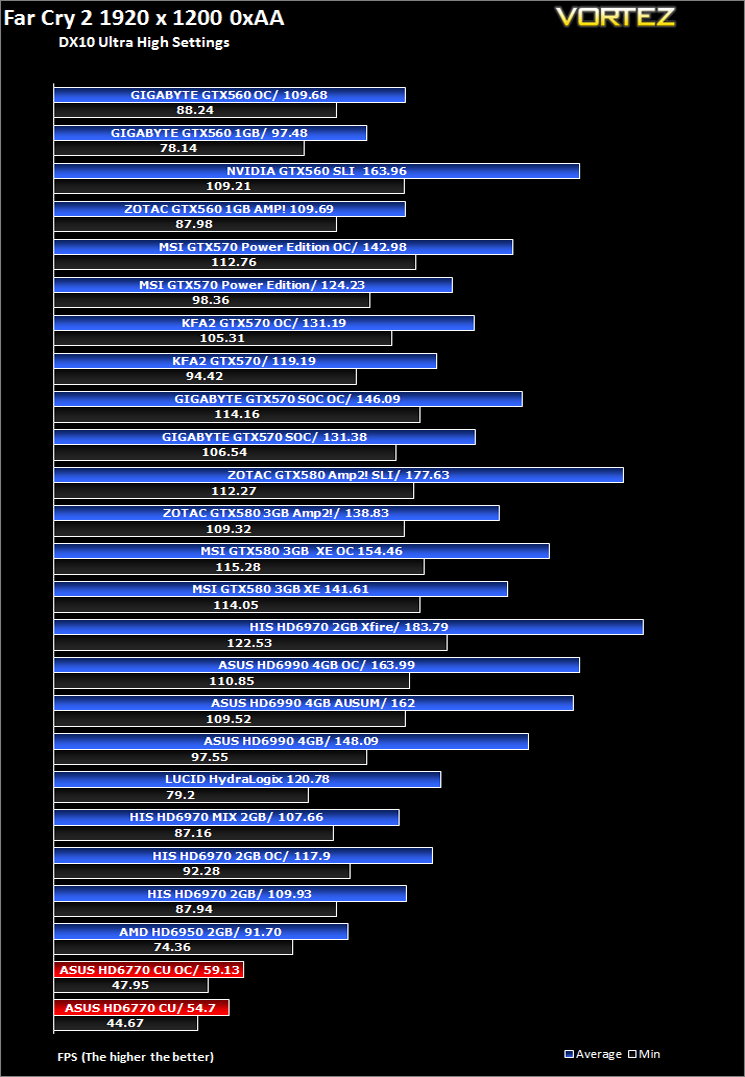
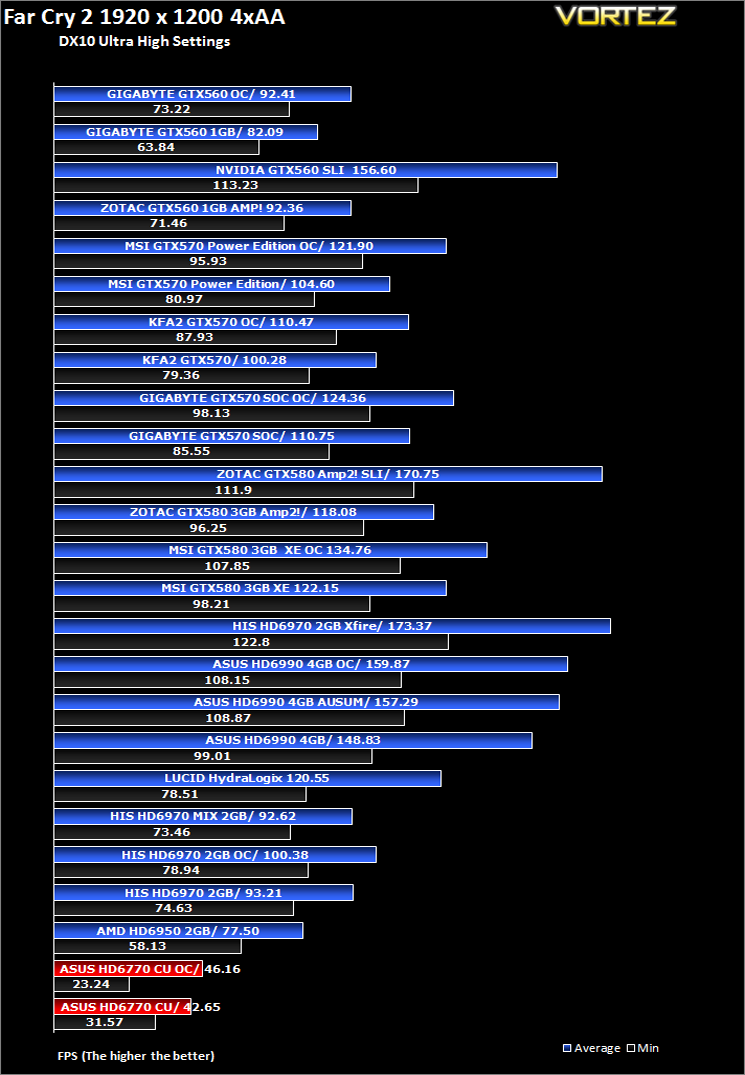
One of the most hyped games of 2008, Far Cry 2 had some big shoes to fill. It was built to be the next best thing since well… Far Cry I suppose. Combining an open-world game play with highly detailed graphics, physics and AI, what more could we possibly want? The game puts us in the body of a malaria inflicted mercenary hunting down the “Jackal” in the heart of Africa, in a bid to stop an on-going conflict between two rival factions. The storyline can be hard to follow sometimes but I’m no game reviewer, so let’s concentrate on the graphics and performance. After all, we all need to know if our hardware will be able to handle the scorching savannah burning at the hands of our flamethrowers.The bundled benchmarking tool was used on Far Cry 2, configuring the settings to Ultra and DX10. The small ranch level was chosen and each configuration was looped three times from which the average FPS was recorded.
Metro 2033
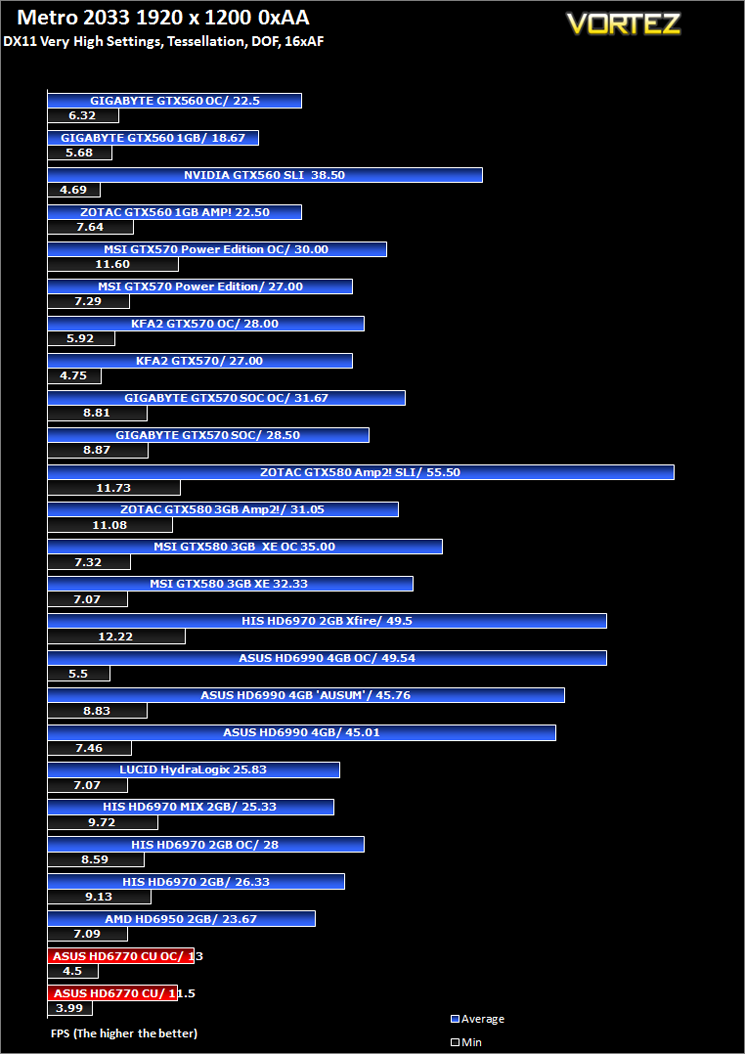
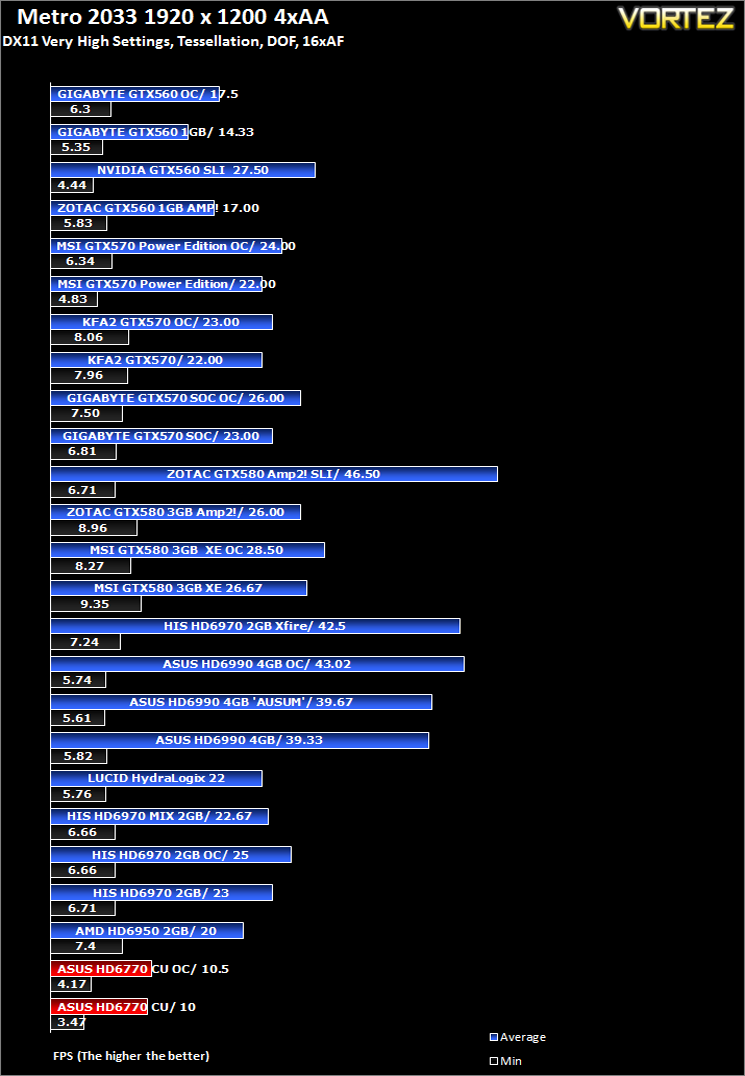
Based on the novel by the same name, Metro 2033 is a first person shooter with elements of survival horror. As Artyom, you trawl through the mutant infested metro systems of post-apocalyptic Moscow. The game delivers presents a grim ambience that reflects on the overall atmosphere of the underground setting. Metro 2033 uses the setting as a back drop to showcase some of the best visuals of any games out now, making it the ideal benchmark for those looking for the best graphics card.The bundled benchmarking tool was used on Metro 2033, configuring the settings to Very High and making use of DirectX 11. The frontline scene was looped 3 times for each configuration. The average FPS was recorded at the end.
Alien Vs. Predator
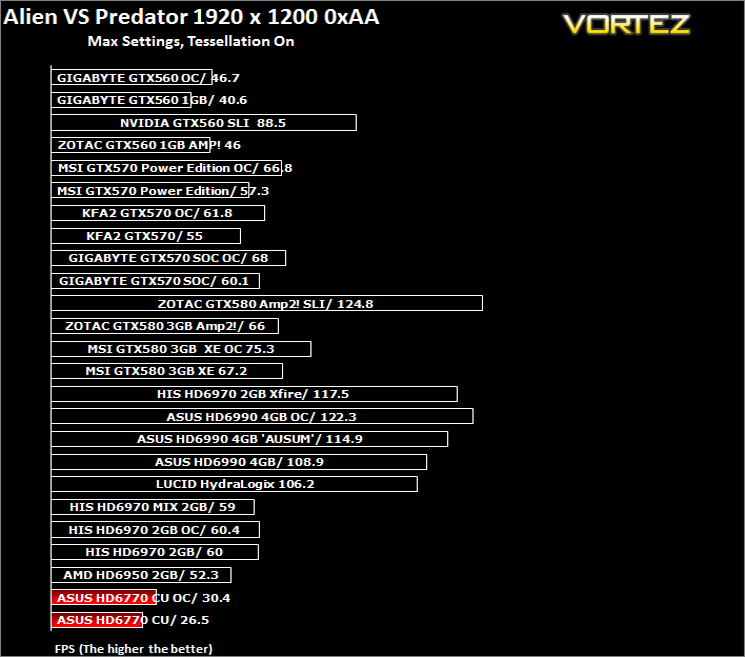
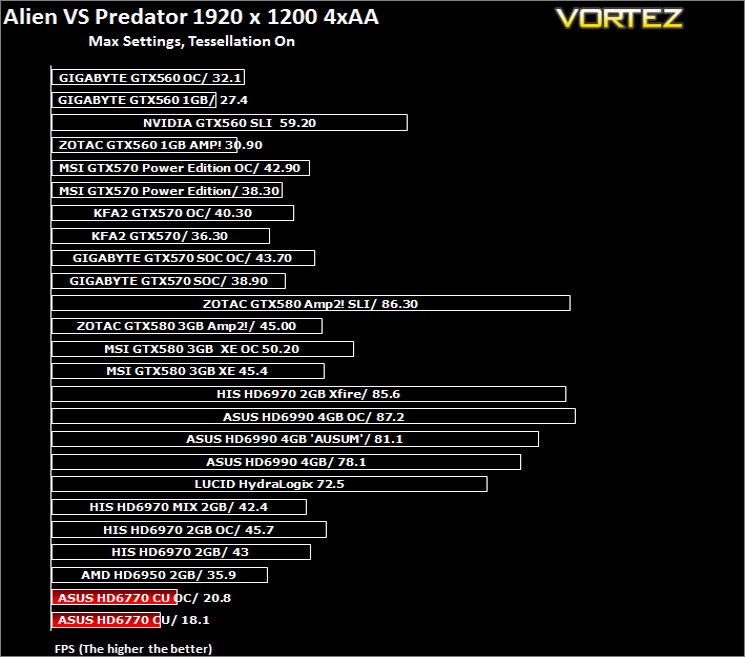
Spawned from the popular Alien and Predator franchises, Rebellion have collaborated to bring the legendary war to us through the medium of a first-person shooter. The game forces you to hunt, prey and most importantly survive in the swamp colony of Freya’s prospect as a Predator, Alien or Marine. The stunning visuals add to the sense of dread and terror that we have become so accustomed to seeing with the series.The stand-alone Alien VS Predator benchmark tool was used for testing here. All the settings were set to very high and Tessellation was applied. The average FPS was recorded at the end.
Battlefield: Bad Company 2
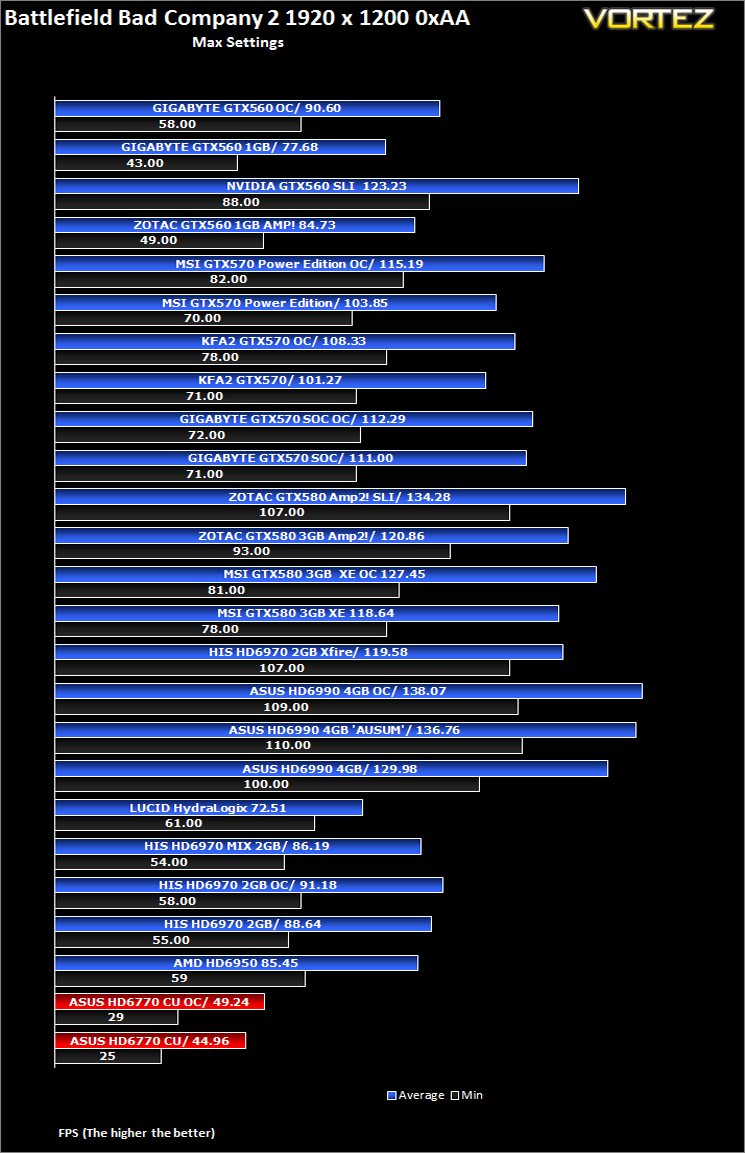
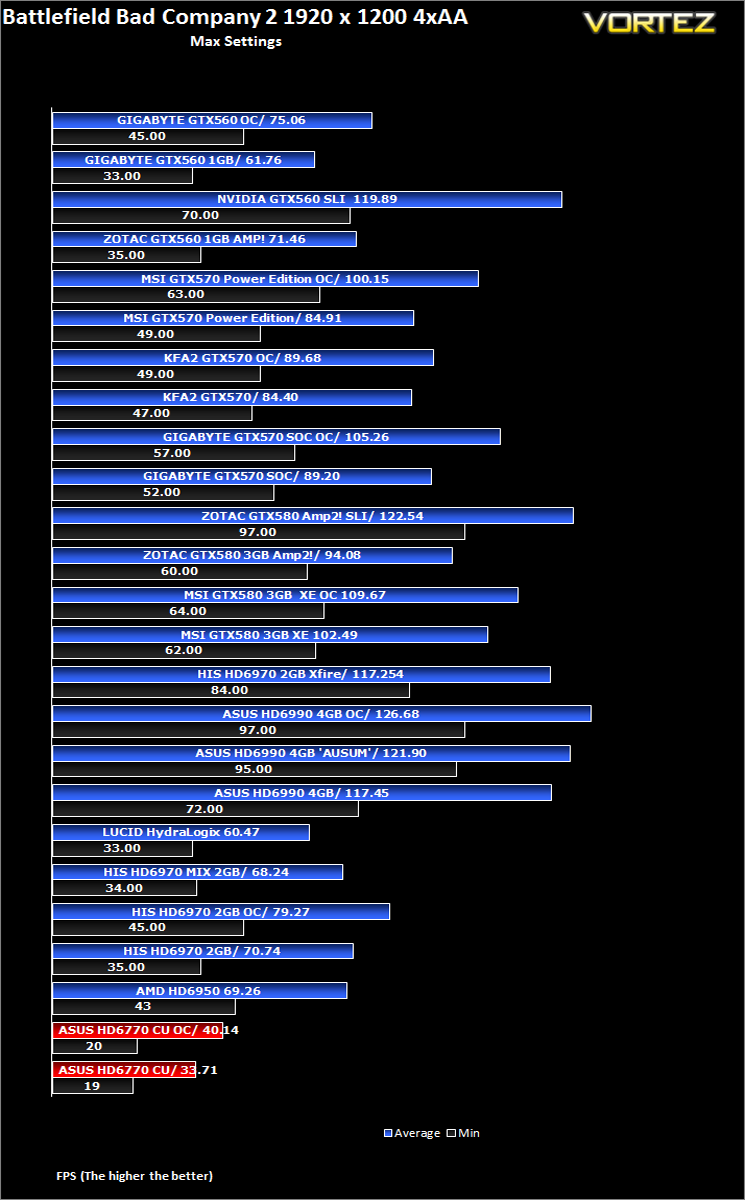
Battlefield Bad Company 2 is the new rendition of the widely successful Battlefield series of game. Having more in common with the console release of Bad Company, the sequel hopes to inject the DNA of the timeless Battlefield 2 online experience with the witty action packed single player shooting adventure of the original. As Private Preston Marlowe, your goal as a member of Bad Company is to once again save the world by securing a scalar weapon device.Fraps was used to test performance. Each test was conducted at the start of the ‘Cold War’ level ensuring that the same actions and paths were taken during the 2 minute sample. All settings were set to the highest available in game with AF set to 16x and HBAO turned on. The average FPS was recorded by FRAPS at the end of each walk through.
DiRT 3
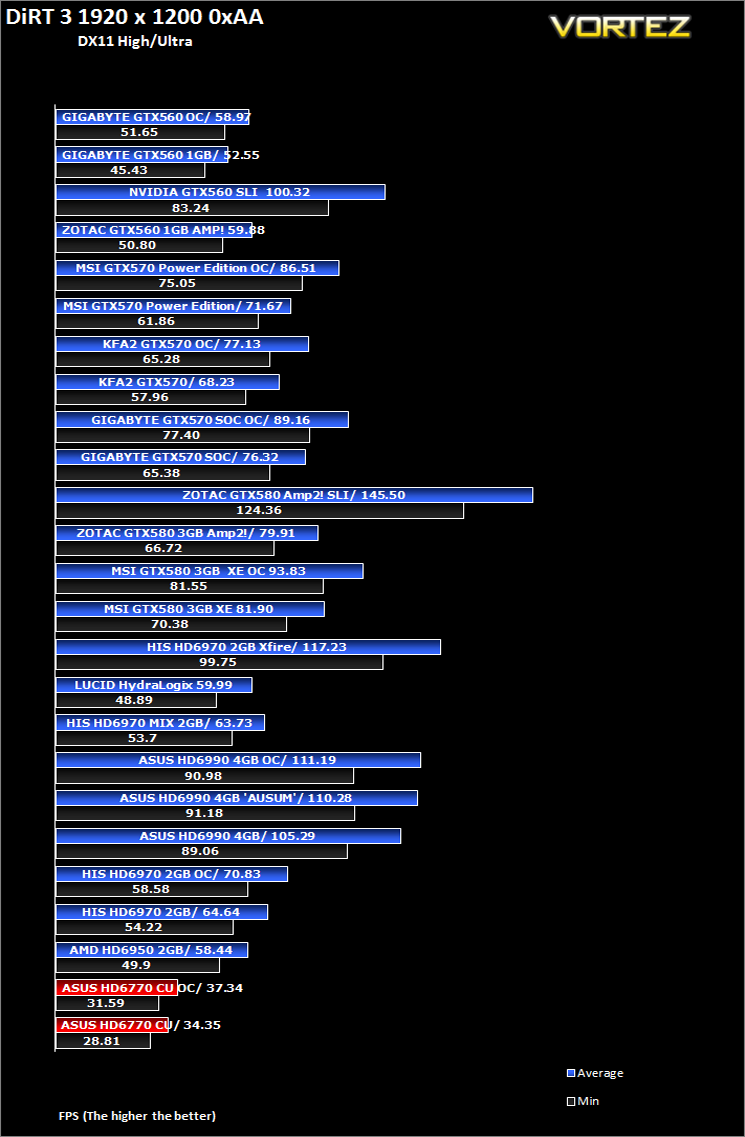
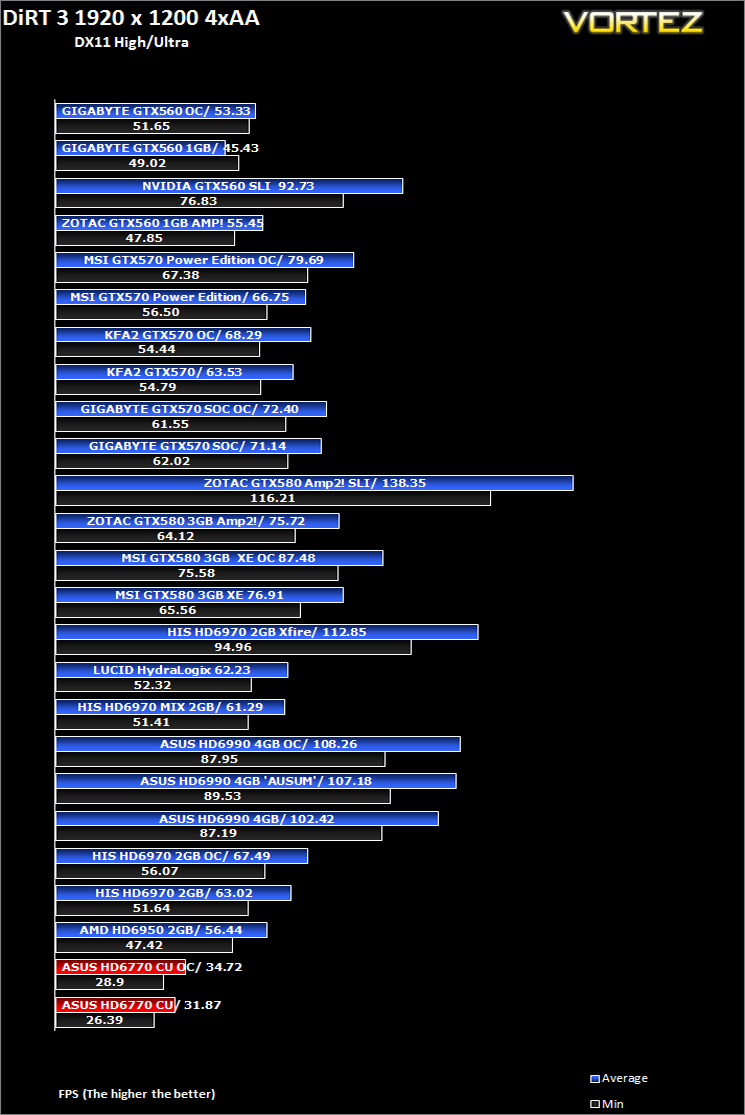
As players race to elevate their global standing, DiRT 3 is back delivering mud, sweat and gears world over: from the intense weather-beaten rally stages of Europe, Africa and the US, to executing performance driving showcases and career challenges where car control is pushed to spectacular limits.The in-game benchmarking tool was used to test performance. All the display settings were set to the maximum available and DirectX 11 was applied. The average FPS was recorded at the end.
Mafia II
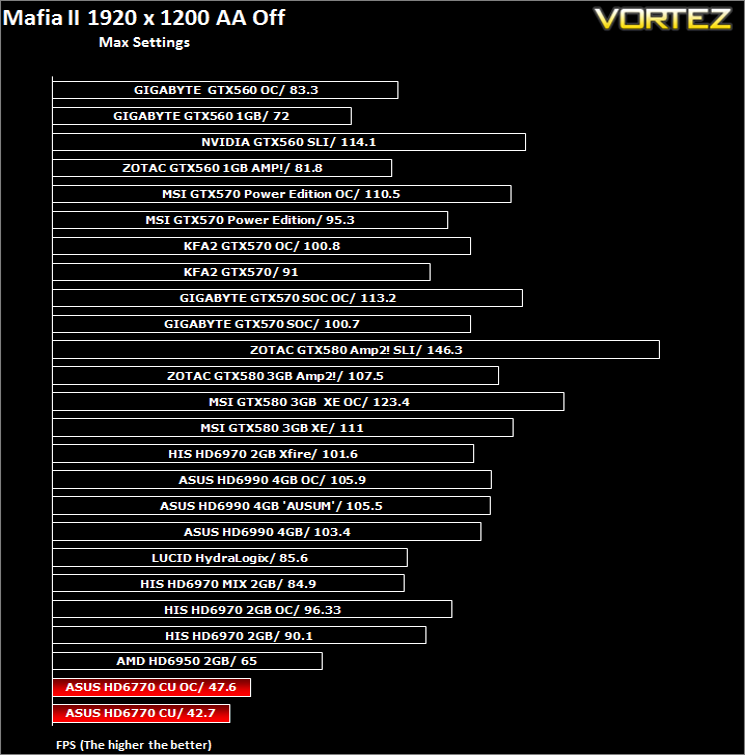
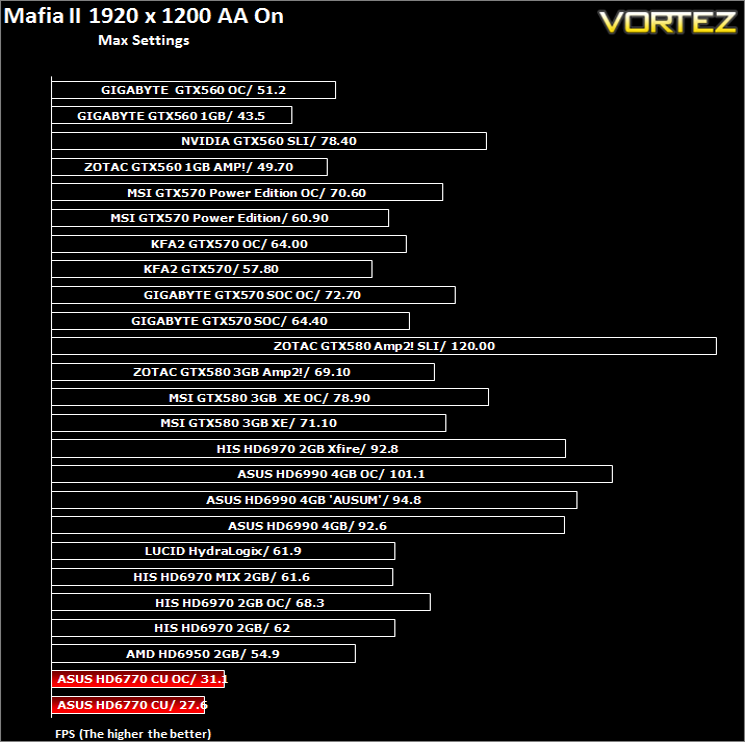
Following the success of Mafia back in 2002, the third person action adventure game is back with a new grittier and darker world. As Vito Scaletta, an aspiring made man, your job is to work through the twist and turns of Mafia lifestyle. The more blood spilt, the more you get in return but the lifestyle was never meant to be an ideal one. Set in the visually stunning Empire City, the wartime references provide the ever present back drop to a rife period in America’s history, in which potential for exploitation becomes Vito’s key focus.The in-game benchmarking tool was used to test performance. All the display settings were set to the maximum available in-game. PhsyX was only enabled if specified in the charts. The average FPS was recorded at the end.
TessMark 0.2.2
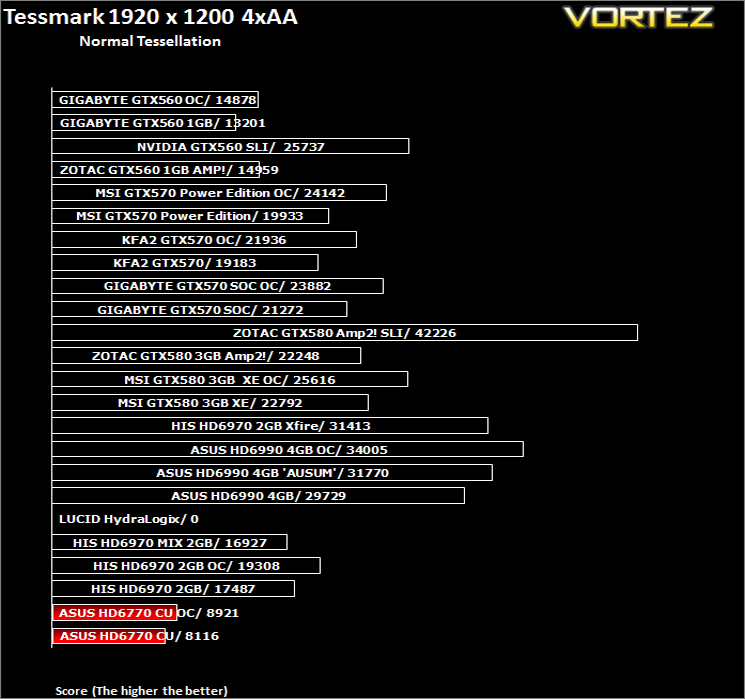
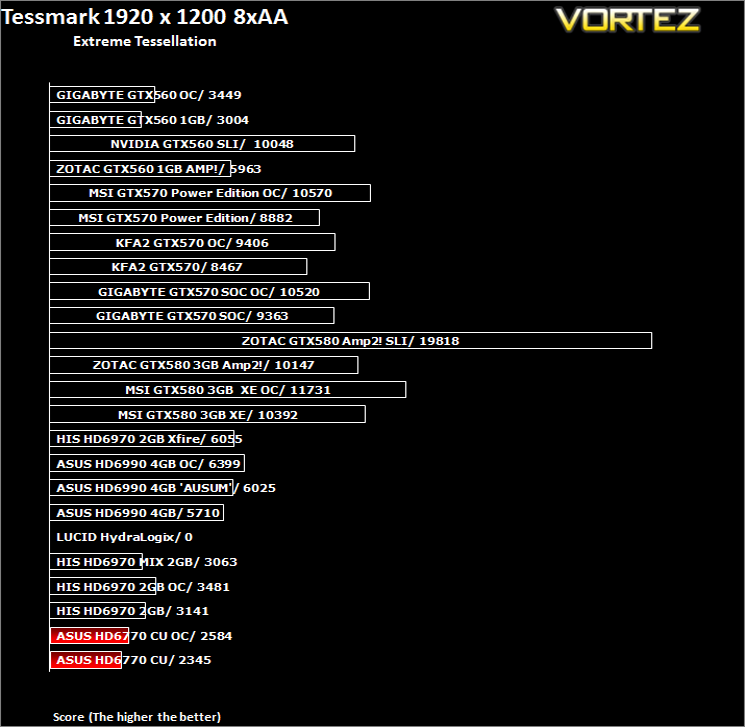
TessMark 0.2.2 is an OpenGL benchmark and tech demo that uses the new hardware tessellation (or GPU tessellation) features exposed by the OpenGL 4 API. Hardware tessellation makes it possible to divide a polygon into smaller ones (according to the tessellation level factor) in order to increase polygons density: the higher the tessellation level, the higher the polygon density. A high tessellation level requires much GPU processing power.TessMark was run in fullscreen, benchmark mode using map set 1 and configured to use OpenGL 4.
3DMark 2011 & Unigine Heaven 2.5
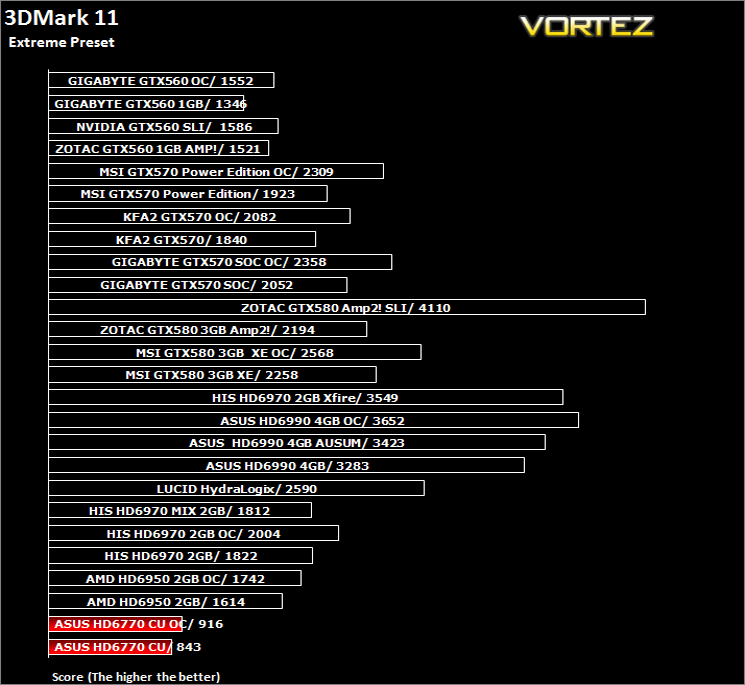
3DMark 11 is the latest version of the world’s most popular benchmark. Designed to measure your PC’s gaming performance 3DMark 11 makes extensive use of all the new features in DirectX 11 including tessellation, compute shaders and multi-threading.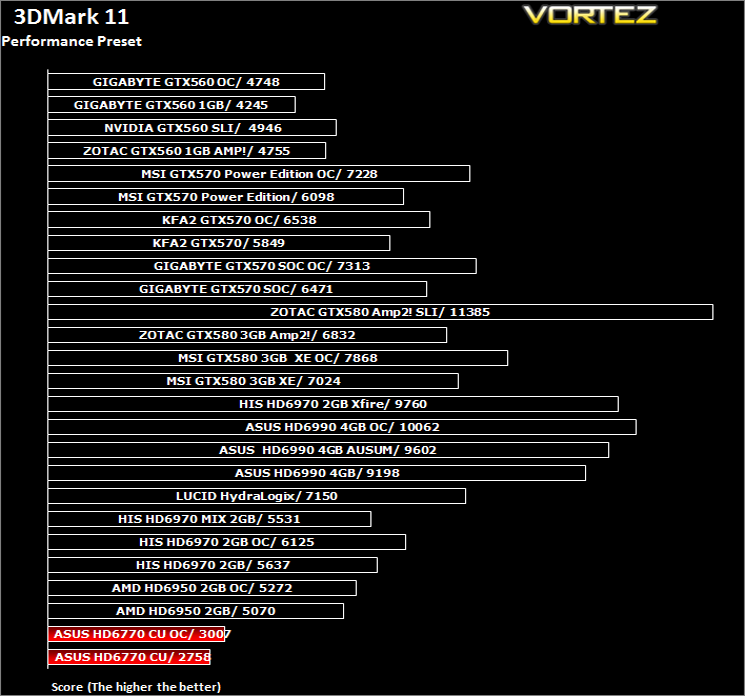
Unigine Heaven 2.5
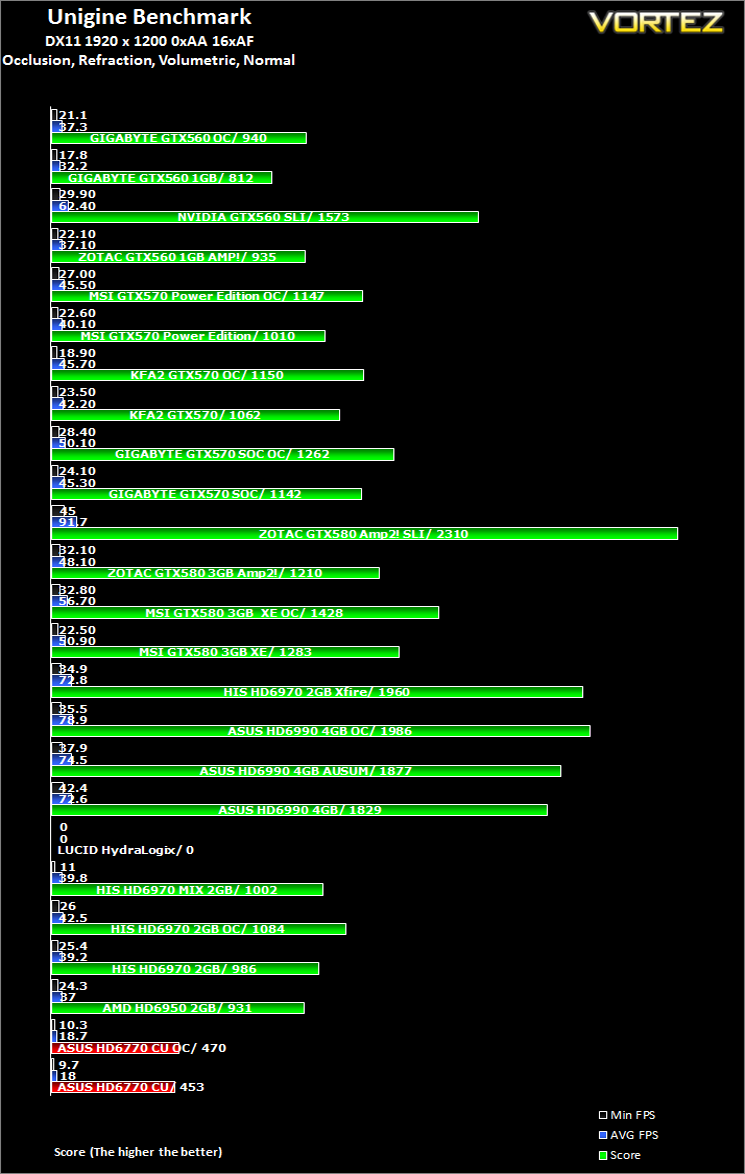
Heaven Benchmark is a DirectX 11 GPU benchmark based on advanced Unigine™ engine from Unigine Corp. It reveals the enchanting magic of floating islands with a tiny village hidden in the cloudy skies. Interactive mode provides emerging experience of exploring the intricate world of steampunk.
Conclusion
There can be no doubting the ASUS HD6770 DirectCU Silent is a great looking card. Not only that but it is also very effective at cooling, especially if you have a case with moderate airflow. So it’s mission successful for ASUS then? Well not quite.
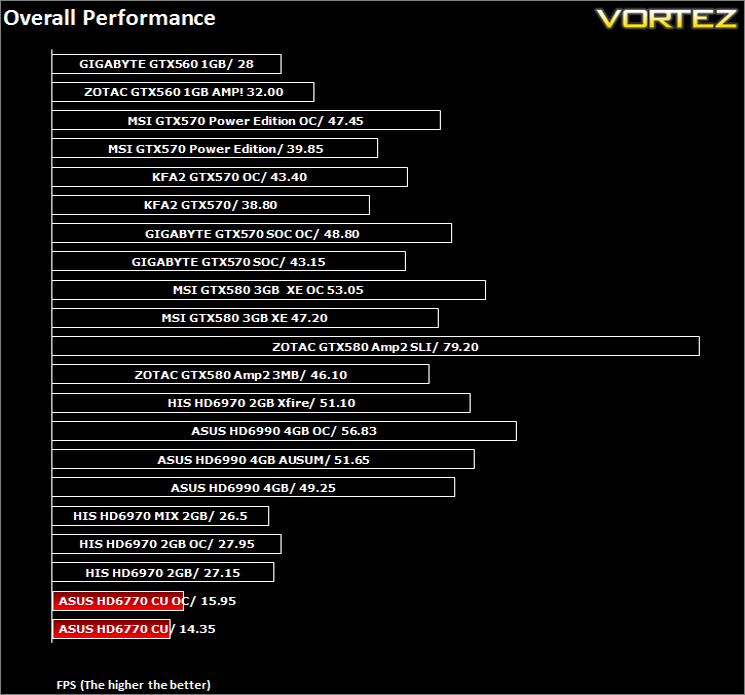
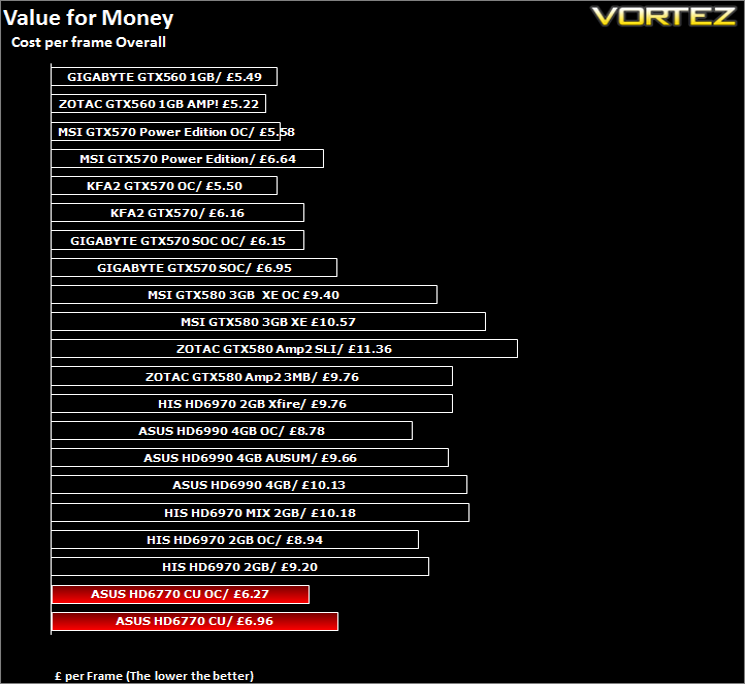
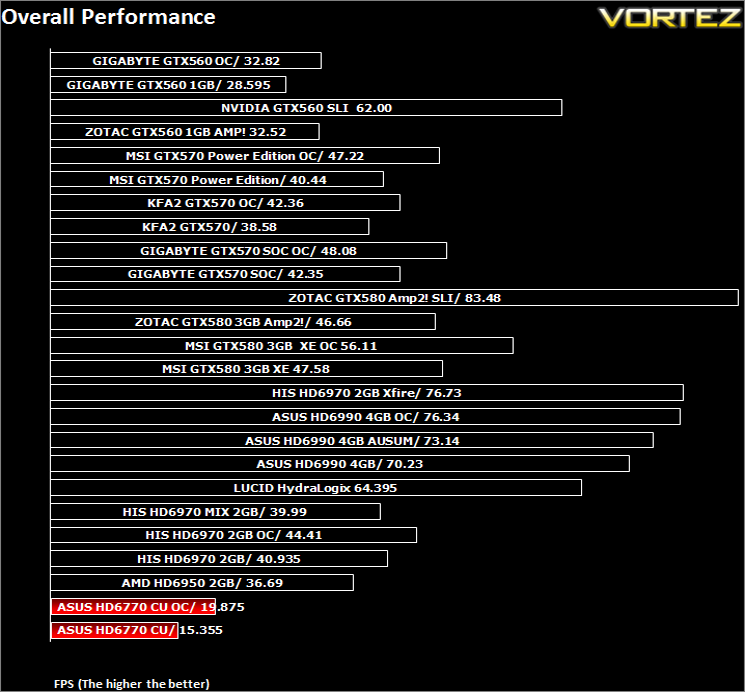
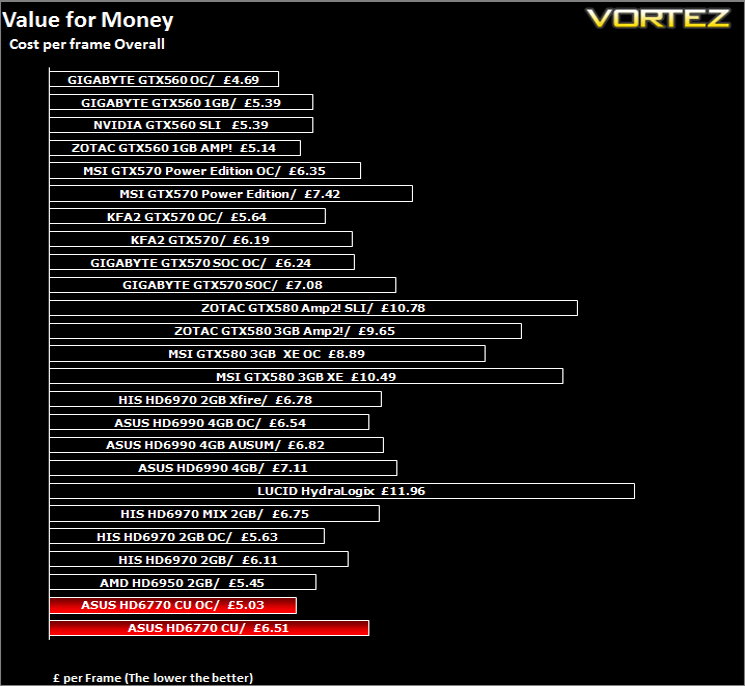
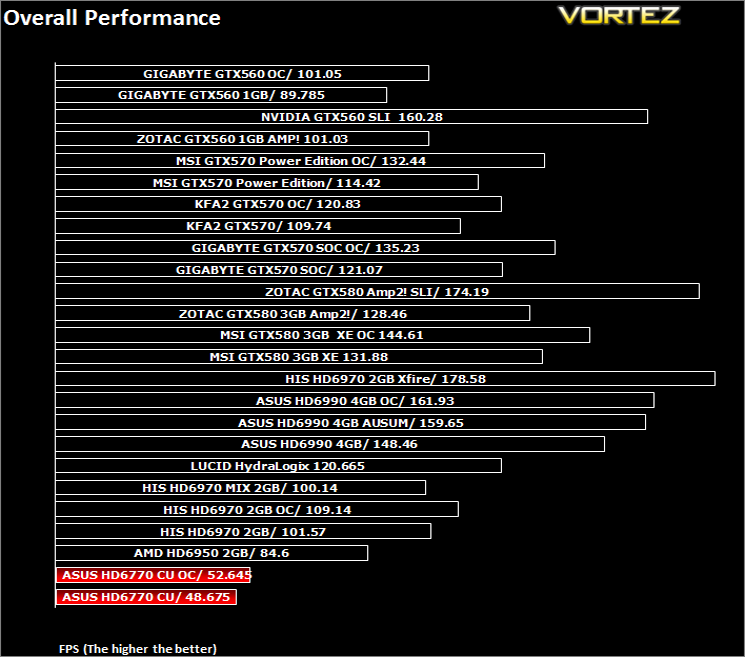
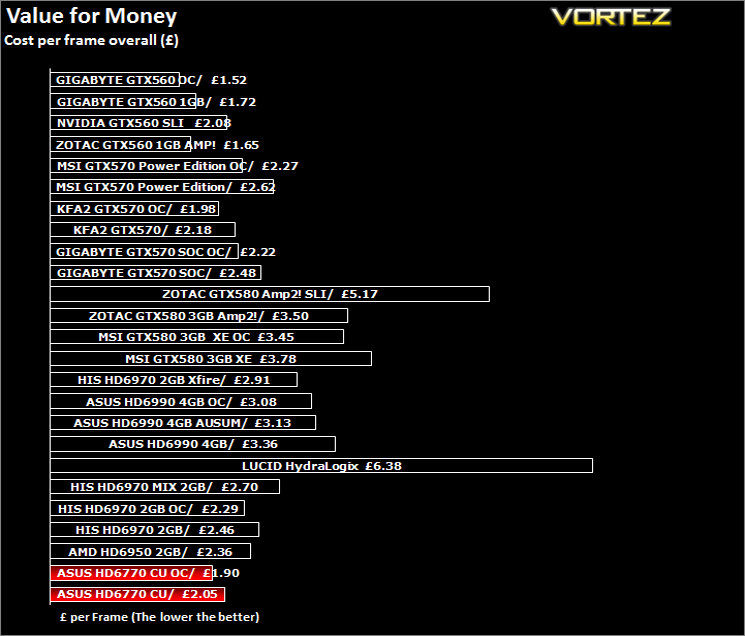
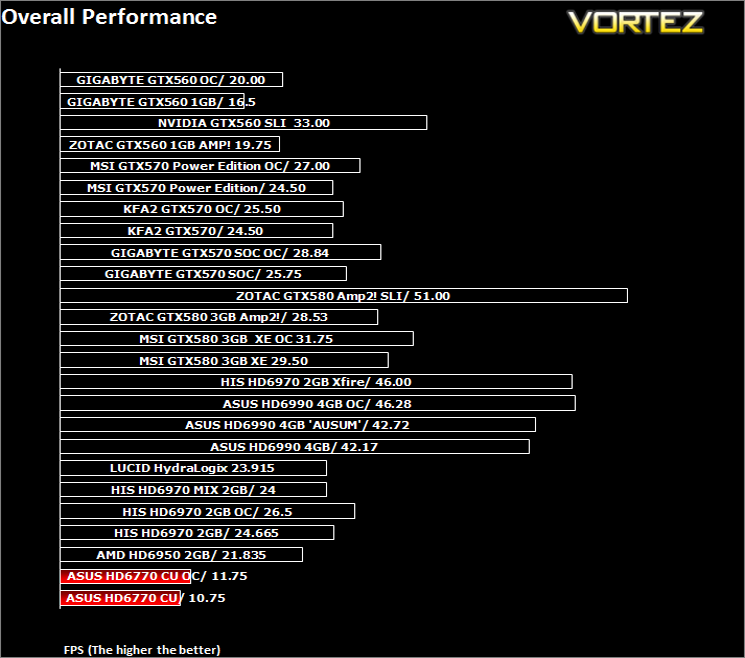
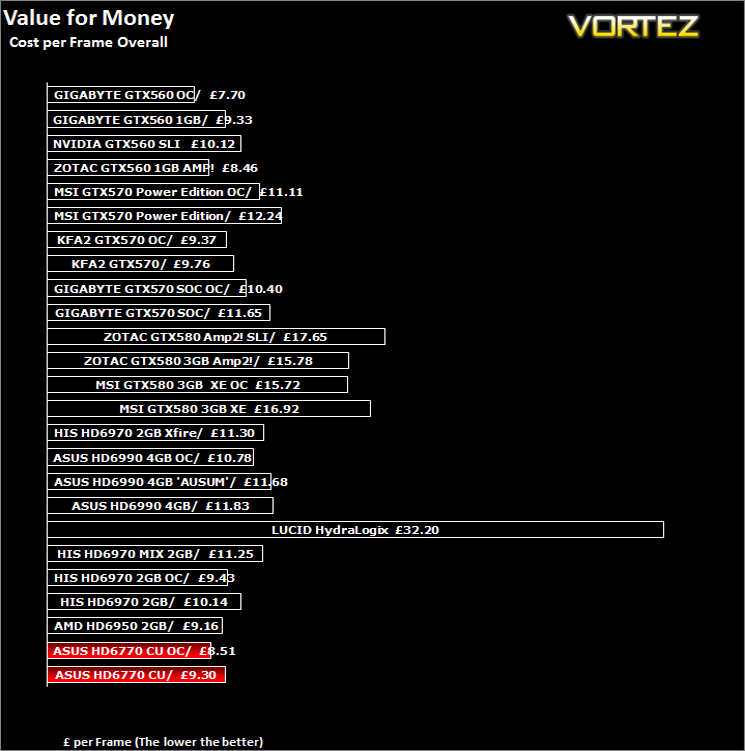
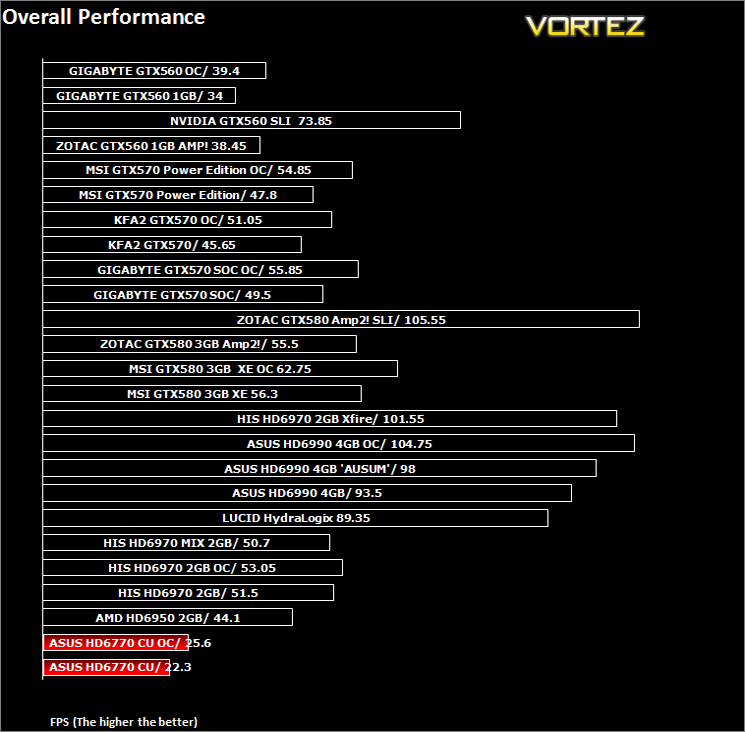
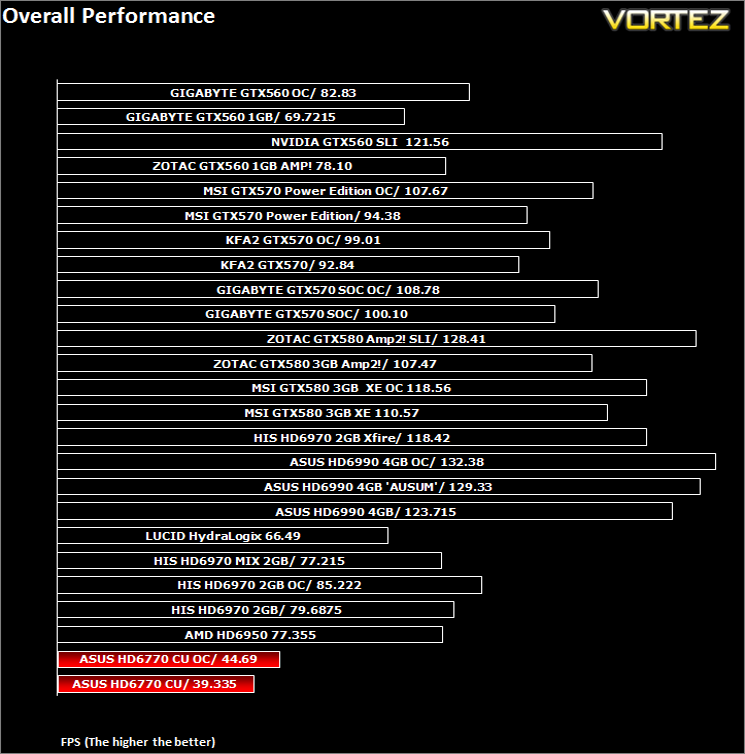
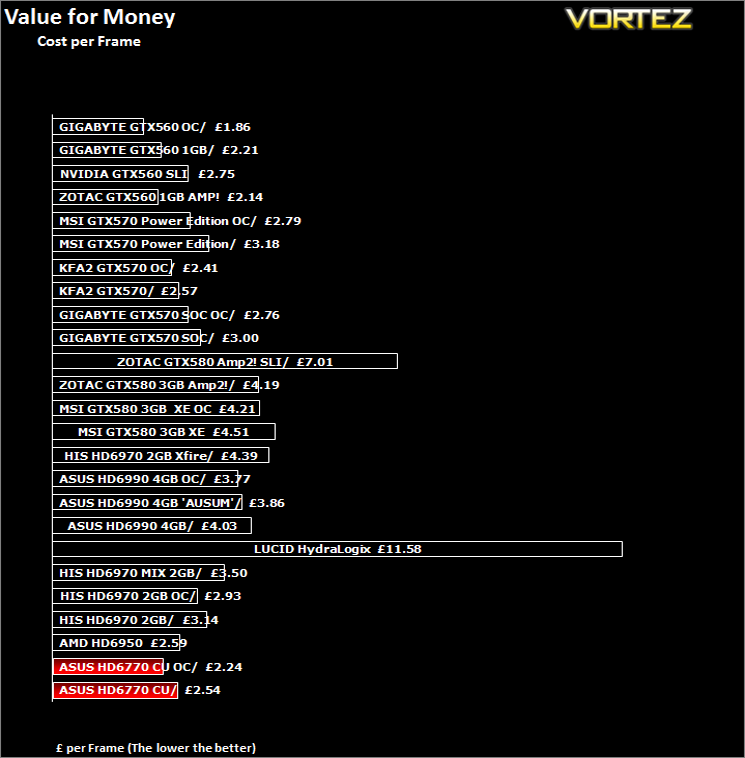
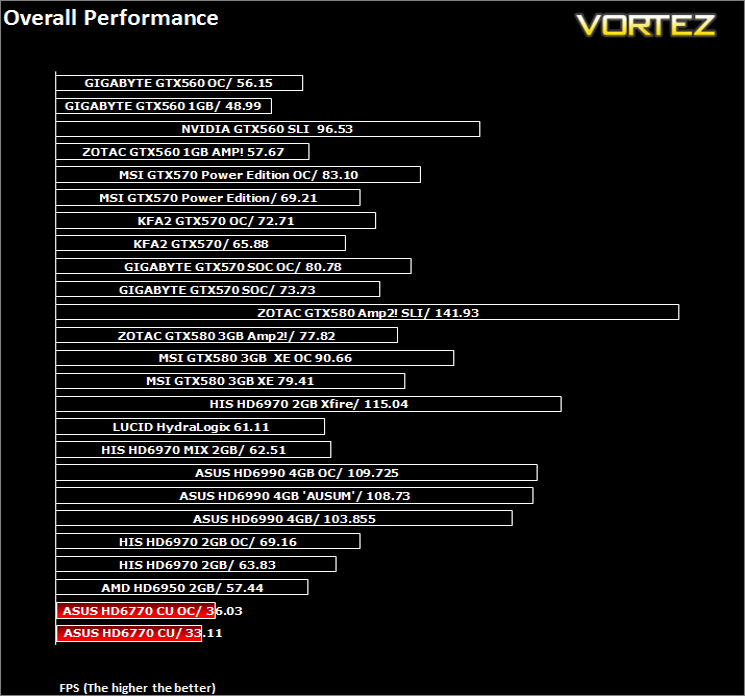
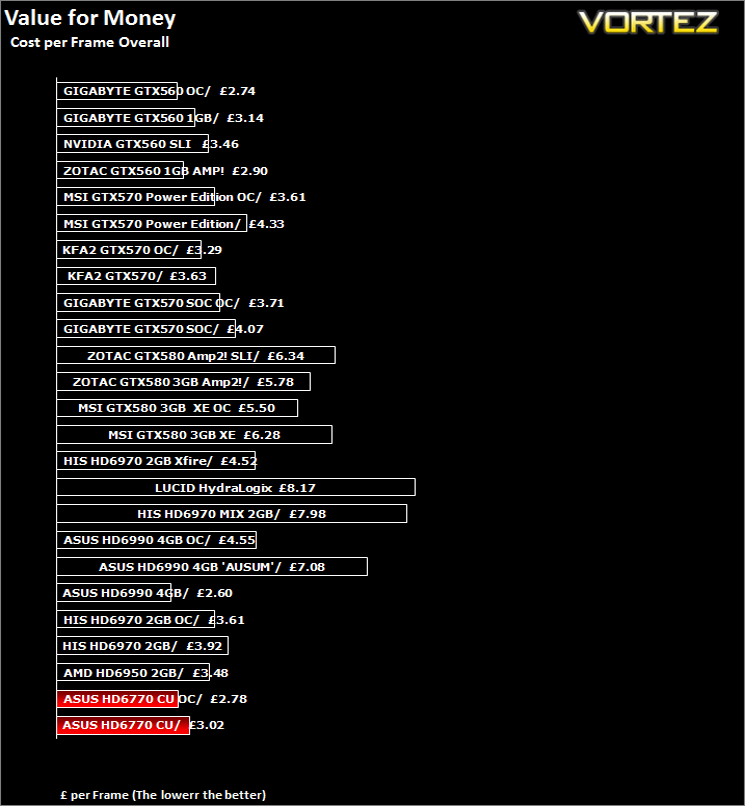
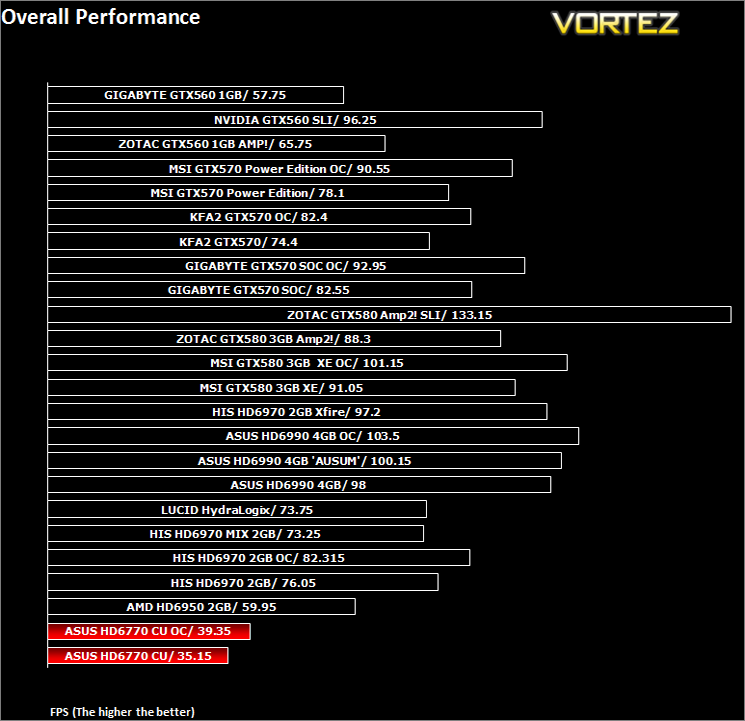
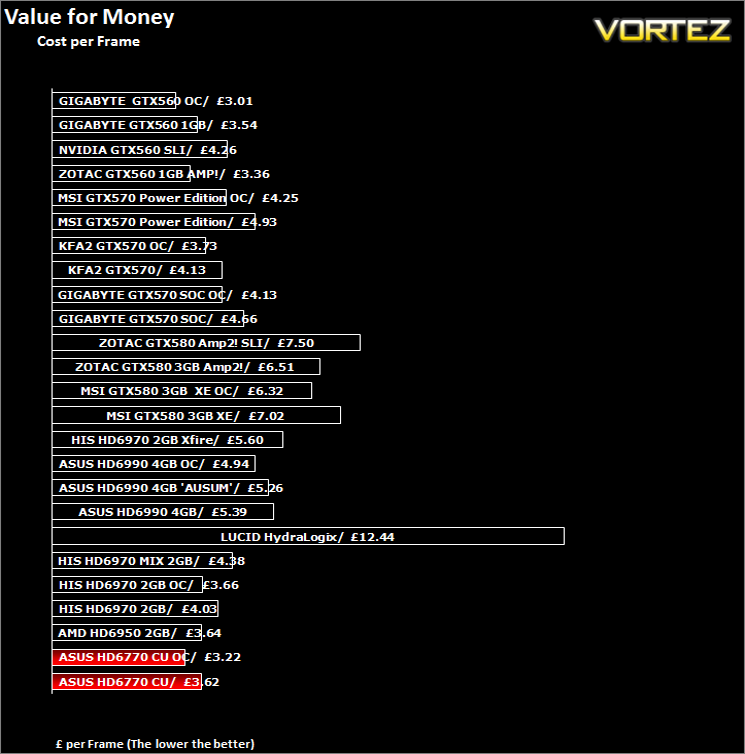
The HD5770 was great, a bargain for the most part and while it was never meant to compete with the big boys, it was quite a capable unit considering the price. Move forward two years to today and we see a rehash of the HD5770 with little performance increase in the form of the HD6770. So while the HD6770 is a good card, it cannot hope to compete with todays mid/high range graphics cards. Not that I expected it to you understand but what worked with the HD5770, bang per buck and able to punch above its weight, todays graphics cards have had two years to improve their performance while the HD5770/6770 have stood still. The gap in performance has therefore widened to such an extent which makes the HD6770 a difficult proposition to recommend. At 1920×1200 the card clearly struggled in most of the tests, I began to test at 2560×1600 for giggles but the encompassing slideshow was just too much for my poor eyes to take. I did run the card at 1680×1050 and it fared much better with most games resulting in playable framerates however, anything above this resolution, especially with AA enabled, the card really began to struggle with framerates dropping below what I would regards as being playable. With today’s most popular resolution (According the Steam) being 1900×1080, the card doesn’t quite cut it for the ‘majority’.
So who is this card for? Well, I would like to say it’s ideal for a HTPC due to the low noise. Note I said low not 0dB for the card did emit a slight electrical buzz when placed under load despite the Super Alloy VRM. Fortunately for ASUS, the case fans in the test rig all but drowned that little noise out but in a HTPC, which are inherently quieter setups than an enthusiast setup, a buzz like that would soon become very irritating. Not only that but the sheer size of the card would restrict its use to a large HTPC chassis.
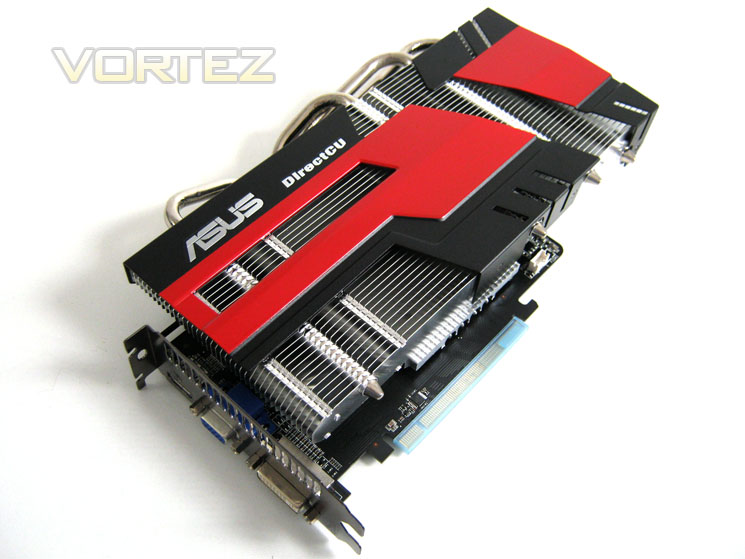
What the card does offer is very good cooling at (almost) 0dB levels. It can perform adequately at mid-range resolutions and it’s also capable of playable framerates in some titles at higher resolutions. Just don’t expect miracles, certainly if you value AA in the upper range on the most demanding games. If you are happy at gaming with a resolution of 1650×1080 or below then the card will serve you very well, especially if you value silence above all else. For the enthusiast who is looking to future proof there system then I would recommend you look elsewhere though as for a small increase in budget, the GTX560 or HD6850 make much more sense.
The one area that impressed me most about the ASUS HD6770 DirectCU Silent was the massive heatsink. With a couple of fans on there this would be a phenomenal cooling design and I have little doubt it could easily outperform other custom cooling designs on the market today. Sadly, cooling and looks amount to little if it doesn’t have the performance to match so while I am happy to award todays review sample with our creative award for the cooling design, I cannot recommend the overall package as for the enthusiast it just doesn’t quite produce the performance required by todays or indeed tomorrows consumer.
Pros:
+Excellent passive cooling
+Great looking
+Class leading packaging
+Small PCB
+Almost silent
+Good overclocking
Cons:
-Poor performance at mid-high resolutions
-Large cooler might be restrictive for some
-Electrical noise under high stress
+Excellent passive cooling
+Great looking
+Class leading packaging
+Small PCB
+Almost silent
+Good overclocking
Cons:
-Poor performance at mid-high resolutions
-Large cooler might be restrictive for some
-Electrical noise under high stress


Click here for an explanation of our awards at Vortez.net. Thanks to ASUS for providing todays review sample.