







The ASUS M5A99X EVO is a mid-ranged AMD motherboard based on the AMD RD990X chipset. How will it do once it is put through our benchmarking suite?

Product on Review: ASUS M5A99X EVO
Manufacturer and Sponsor: ASUS
Street price: ~£90 inc. VAT (At time of review)
Today, we have a motherboard from ASUS which is their take on the 990X chipset. There are not many 990X motherboards on the market today. In fact, there are only a couple. The ASUS is the most expensive one on the market from what we have found but let that not deter us. Lets put it through its paces and push it to the limits to find out how it performs.
The M5A99X EVO is quite feature packed for its price. It offers the latest USB 3.0 and SATA 6Gbps connectivity which are native to the chipset. The onboard JMicron controller takes care of additional features such as eSATA and powered eSATA for your external storage requirements. CrossFireX and SLI are available to make the most of whichever multi GPU setup you may have, albeit at x8/x8 rather than x16/x16. There are six SATA 6Gbps ports, all of which can be used to build RAID arrays.
ASUS on M5A99X EVO
The ASUS M5A99X EVO is a mid-high end motherboard which is designed for those who want great performance but cannot afford the likes of a Crosshair V Formula. It offers both SLI and CrossFire options for those who want to use a dual graphics configuration as well as featuring full support for all AM3 and AM3+ CPUs on the market today.
Features
CPU
AMD AM3+ FX™/Phenom™ II/Athlon™ II/Sempron™ 100 Series Processors
Supports AM3+ 32 nm CPU
Supports CPU up to 8 cores
Supports CPU up to 140 W
AMD Cool ‘n’ Quiet™ Technology
Chipset
AMD 990X/SB950
Memory
4 x DIMM, Max. 32GB, DDR3 2133(O.C.)/1866/1600/1333/1066 MHz ECC, Non-ECC, Un-buffered Memory
Dual Channel Memory Architecture
* Refer to www.asus.com or user manual for the Memory QVL (Qualified Vendors Lists).
* Due to OS limitation, when installing total memory of 4GB capacity or more, Windows® 32-bit operation system may only recognize less than 3GB. Install a 64-bit Windows® OS when you want to install 4GB or more memory on the motherboard.
* Due to CPU spec., AMD 100 series CPUs support up to DDR3 1066MHz. With ASUS design, this motherboard can support up to DDR3 1333MHz.
System Bus: Up to 5.2 GT/s HyperTransport™ 3
Multi-GPU Support
Supports NVIDIA® Quad-GPU SLI™ Technology
Supports AMD Quad-GPU CrossFireX™ Technology
Expansion Slots
2 x PCIe 2.0 x16 (x16 or dual x8)
1 x PCIe 2.0 x16 (x4 mode, black)
2 x PCIe 2.0 x1
1 x PCI
Storage
AMD SB950 controller:
6 x SATA 6Gb/s port(s), gray
Support Raid 0, 1, 5, 10
JMicron® JMB362 controller:
2 x SATA 3Gb/s port(s), black
1 x Power eSATA 3Gb/s port(s), green
1 x eSATA 3Gb/s port(s), red
LAN
Realtek® 8111E , 1 x Gigabit LAN Controller(s)
Audio
Realtek® ALC892 8-Channel High Definition Audio CODEC
– Supports : Jack-detection, Multi-streaming, Front Panel Jack-retasking
Audio Feature:
– Absolute Pitch 192kHz/ 24-bit True BD Lossless Sound
– DTS Surround Sensation UltraPC
– ASUS Noise Filter
– Optical S/PDIF out port(s) at back panel
IEEE 1394 VIA® 6308P controller
2 x IEEE 1394a port(s)
(1 at mid-board, 1 at back panel)
USB Ports
ASMedia® USB 3.0 controller:
4 x USB 3.0 port(s) (2 at back panel, blue, 2 at mid-board)
AMD SB950 controller:
14 x USB 2.0 port(s) (8 at back panel, black+red, 6 at mid-board)
Overclocking Features
Overclocking Protection:
– ASUS C.P.R.(CPU Parameter Recall)
Special Features
ASUS Dual Intelligent Processors 2 with DIGI+ VRM :
ASUS TPU:
– Auto Tuning
– TurboV
– TPU switch
ASUS EPU:
– EPU
– EPU switch
ASUS Digital Power Design :
– Industry leading Digital 6 +2 Phase Power Design
– ASUS DIGI+ VRM Utility
ASUS Exclusive Features
– MemOK!
– AI Suite II
– Ai Charger+
– Front Panel USB 3.0 Support
– ASUS UEFI BIOS EZ Mode featuring friendly graphics user interface
– USB 3.0 Boost
ASUS Quiet Thermal Solution
– Stylish Fanless Design Heat-pipe solution
– ASUS Fan Xpert
ASUS EZ DIY
– ASUS Q-Shield
– ASUS O.C. Profile
– ASUS EZ Flash 2
– ASUS MyLogo 2
– Multi-language BIOS
ASUS Q-Design
– ASUS Q-LED (CPU, DRAM, VGA, Boot Device LED)
– ASUS Q-Slot
– ASUS Q-DIMM
– ASUS Q-Connector
Back I/O Ports
1 x PS/2 keyboard/mouse combo port(s)
1 x eSATA 3Gb/s
1 x Power eSATA 3Gb/s
1 x IEEE 1394a
1 x LAN (RJ45) port(s)
2 x USB 3.0
8 x USB 2.0
1 x Optical S/PDIF out
6 x Audio jack(s)
Internal I/O Ports
1 x USB 3.0 connector(s) support(s) additional 2 USB 3.0 port(s) (19-pin, blue)
3 x USB 2.0 connector(s) support(s) additional 6 USB 2.0 port(s)
1 x COM port(s) connector(s)
6 x SATA 6Gb/s connector(s)
2 x SATA 3Gb/s connector(s)
1 x IEEE 1394a connector(s)
1 x CPU Fan connector(s) (4 -pin)
3 x Chassis Fan connector(s) (1 x 4 -pin, 2 x 3 -pin)
1 x Power Fan connector(s) (1 x 3 -pin)
1 x S/PDIF out header(s)
1 x 24-pin EATX Power connector(s)
1 x 8-pin ATX 12V Power connector(s)
1 x Front panel audio connector(s) (AAFP)
1 x System panel(s) (Q-Connector)
1 x MemOK! button(s)
1 x TPU switch(es)
1 x EPU switch(es)
1 x Clear CMOS jumper(s)
Accessories
User’s manual
I/O Shield
4 x SATA 6Gb/s cable(s)
1 x SLI bridge(s)
1 x Q-connector(s) (2 in 1)
BIOS
32 Mb Flash ROM, UEFI BIOS, PnP, DMI2.0, WfM2.0, SM BIOS 2.6, ACPI 2.0a, Multi-language BIOS, ASUS EZ Flash 2
Manageability WfM 2.0, DMI 2.0, WOL by PME, WOR by PME, PXE
Support Disc Drivers
ASUS Utilities
ASUS Update
Anti-virus software (OEM version)
Form Factor
ATX Form Factor
12 inch x 9.6 inch ( 30.5 cm x 24.4 cm )
AMD AM3+ FX™/Phenom™ II/Athlon™ II/Sempron™ 100 Series Processors
Supports AM3+ 32 nm CPU
Supports CPU up to 8 cores
Supports CPU up to 140 W
AMD Cool ‘n’ Quiet™ Technology
Chipset
AMD 990X/SB950
Memory
4 x DIMM, Max. 32GB, DDR3 2133(O.C.)/1866/1600/1333/1066 MHz ECC, Non-ECC, Un-buffered Memory
Dual Channel Memory Architecture
* Refer to www.asus.com or user manual for the Memory QVL (Qualified Vendors Lists).
* Due to OS limitation, when installing total memory of 4GB capacity or more, Windows® 32-bit operation system may only recognize less than 3GB. Install a 64-bit Windows® OS when you want to install 4GB or more memory on the motherboard.
* Due to CPU spec., AMD 100 series CPUs support up to DDR3 1066MHz. With ASUS design, this motherboard can support up to DDR3 1333MHz.
System Bus: Up to 5.2 GT/s HyperTransport™ 3
Multi-GPU Support
Supports NVIDIA® Quad-GPU SLI™ Technology
Supports AMD Quad-GPU CrossFireX™ Technology
Expansion Slots
2 x PCIe 2.0 x16 (x16 or dual x8)
1 x PCIe 2.0 x16 (x4 mode, black)
2 x PCIe 2.0 x1
1 x PCI
Storage
AMD SB950 controller:
6 x SATA 6Gb/s port(s), gray
Support Raid 0, 1, 5, 10
JMicron® JMB362 controller:
2 x SATA 3Gb/s port(s), black
1 x Power eSATA 3Gb/s port(s), green
1 x eSATA 3Gb/s port(s), red
LAN
Realtek® 8111E , 1 x Gigabit LAN Controller(s)
Audio
Realtek® ALC892 8-Channel High Definition Audio CODEC
– Supports : Jack-detection, Multi-streaming, Front Panel Jack-retasking
Audio Feature:
– Absolute Pitch 192kHz/ 24-bit True BD Lossless Sound
– DTS Surround Sensation UltraPC
– ASUS Noise Filter
– Optical S/PDIF out port(s) at back panel
IEEE 1394 VIA® 6308P controller
2 x IEEE 1394a port(s)
(1 at mid-board, 1 at back panel)
USB Ports
ASMedia® USB 3.0 controller:
4 x USB 3.0 port(s) (2 at back panel, blue, 2 at mid-board)
AMD SB950 controller:
14 x USB 2.0 port(s) (8 at back panel, black+red, 6 at mid-board)
Overclocking Features
Overclocking Protection:
– ASUS C.P.R.(CPU Parameter Recall)
Special Features
ASUS Dual Intelligent Processors 2 with DIGI+ VRM :
ASUS TPU:
– Auto Tuning
– TurboV
– TPU switch
ASUS EPU:
– EPU
– EPU switch
ASUS Digital Power Design :
– Industry leading Digital 6 +2 Phase Power Design
– ASUS DIGI+ VRM Utility
ASUS Exclusive Features
– MemOK!
– AI Suite II
– Ai Charger+
– Front Panel USB 3.0 Support
– ASUS UEFI BIOS EZ Mode featuring friendly graphics user interface
– USB 3.0 Boost
ASUS Quiet Thermal Solution
– Stylish Fanless Design Heat-pipe solution
– ASUS Fan Xpert
ASUS EZ DIY
– ASUS Q-Shield
– ASUS O.C. Profile
– ASUS EZ Flash 2
– ASUS MyLogo 2
– Multi-language BIOS
ASUS Q-Design
– ASUS Q-LED (CPU, DRAM, VGA, Boot Device LED)
– ASUS Q-Slot
– ASUS Q-DIMM
– ASUS Q-Connector
Back I/O Ports
1 x PS/2 keyboard/mouse combo port(s)
1 x eSATA 3Gb/s
1 x Power eSATA 3Gb/s
1 x IEEE 1394a
1 x LAN (RJ45) port(s)
2 x USB 3.0
8 x USB 2.0
1 x Optical S/PDIF out
6 x Audio jack(s)
Internal I/O Ports
1 x USB 3.0 connector(s) support(s) additional 2 USB 3.0 port(s) (19-pin, blue)
3 x USB 2.0 connector(s) support(s) additional 6 USB 2.0 port(s)
1 x COM port(s) connector(s)
6 x SATA 6Gb/s connector(s)
2 x SATA 3Gb/s connector(s)
1 x IEEE 1394a connector(s)
1 x CPU Fan connector(s) (4 -pin)
3 x Chassis Fan connector(s) (1 x 4 -pin, 2 x 3 -pin)
1 x Power Fan connector(s) (1 x 3 -pin)
1 x S/PDIF out header(s)
1 x 24-pin EATX Power connector(s)
1 x 8-pin ATX 12V Power connector(s)
1 x Front panel audio connector(s) (AAFP)
1 x System panel(s) (Q-Connector)
1 x MemOK! button(s)
1 x TPU switch(es)
1 x EPU switch(es)
1 x Clear CMOS jumper(s)
Accessories
User’s manual
I/O Shield
4 x SATA 6Gb/s cable(s)
1 x SLI bridge(s)
1 x Q-connector(s) (2 in 1)
BIOS
32 Mb Flash ROM, UEFI BIOS, PnP, DMI2.0, WfM2.0, SM BIOS 2.6, ACPI 2.0a, Multi-language BIOS, ASUS EZ Flash 2
Manageability WfM 2.0, DMI 2.0, WOL by PME, WOR by PME, PXE
Support Disc Drivers
ASUS Utilities
ASUS Update
Anti-virus software (OEM version)
Form Factor
ATX Form Factor
12 inch x 9.6 inch ( 30.5 cm x 24.4 cm )
Packaging & Accessories
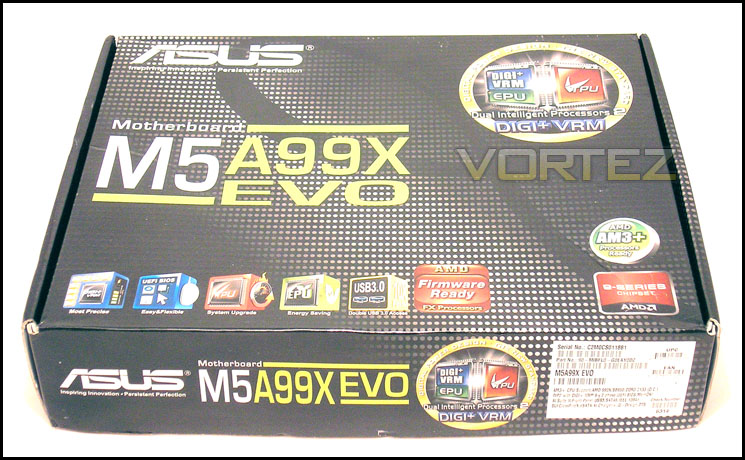
Initially, the front of the box does not look all that exciting. As you can see from the image below, it has the name of the motherboard taking up a good portion of the visual space. ASUS have also opted to show that this board uses their DIGI+ VRM EPU and TPU processors. In short, the EPU is engineered for power saving and the TPU is there to give your system a bit of a speed boost when it is required. The logos down at the bottom of the box speak for themselves. They just list the features on this motherboard such as USB 3.0, SATA 6Gbps and so on.
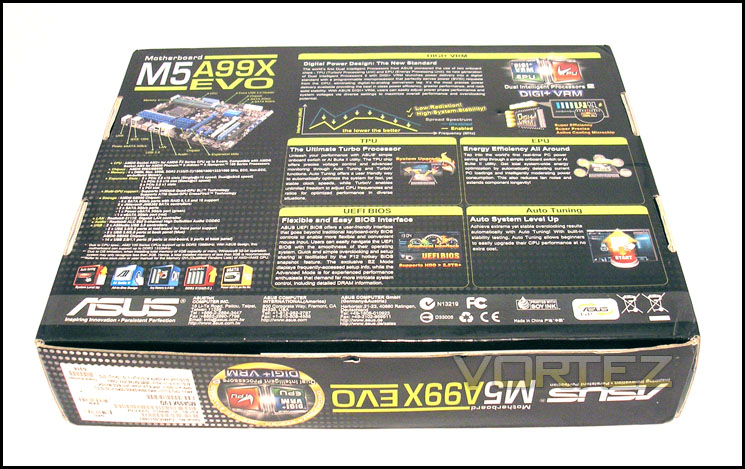
On the reverse side of the box, we have a list of the motherboards features as well as explanations for the EPU and TPU processors, the UEFI explanation and the Auto Tuning feature on this motherboard.
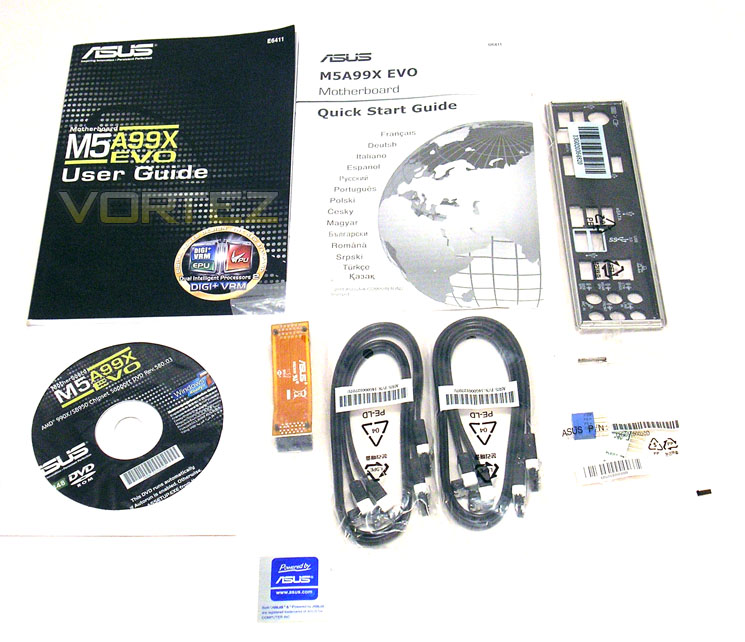
Inside the box we are given the following accessories:
• Four SATA 6Gbps cables, all of which are angled at 90° on one end
• A flexible NVIDIA SLI bridge
• Rear IO shield
• 2-in-1 ASUS Q-Connector kit
• Documentation consisting of the User manual and a multilingual Quick Start Guide
• Software DVD
• ASUS sticker
• A flexible NVIDIA SLI bridge
• Rear IO shield
• 2-in-1 ASUS Q-Connector kit
• Documentation consisting of the User manual and a multilingual Quick Start Guide
• Software DVD
• ASUS sticker
A Closer Look
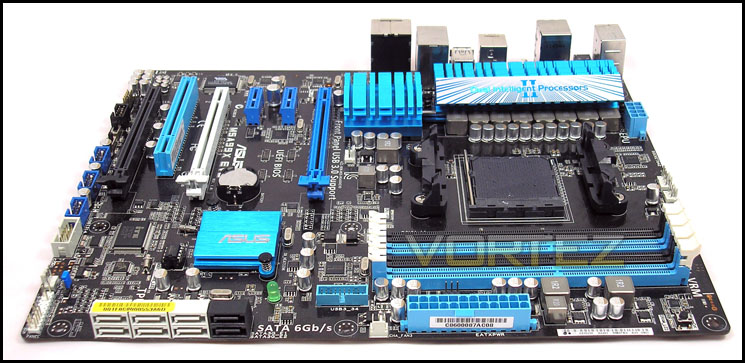
The motherboard itself is built on a black PCB which has become highly favourable within the PC community. ASUS opted to use their black and blue colour scheme with a little bit of white/grey thrown in for a PCIe slot and a few other little things. This is a common colour scheme found on their motherboards today, except for the ROG series which use black and red.
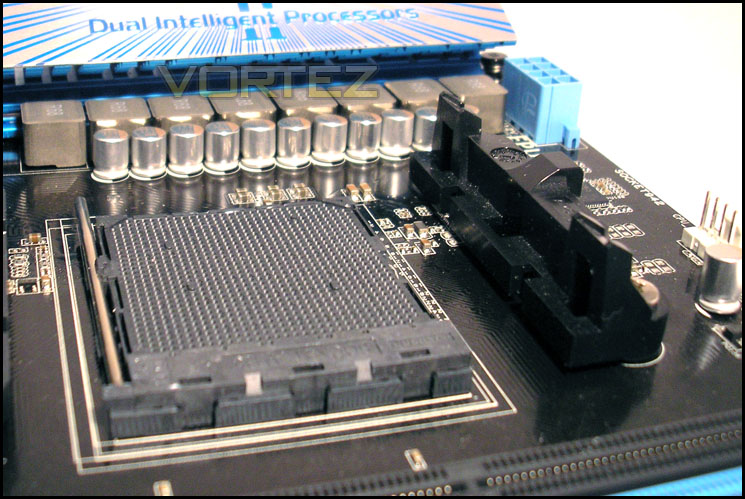
The CPU socket is designed for processors of up to 140W, and the heatsink has been developed to be able to cope with high loads. The heatsink directly south to the VRM cooling system is to take care of the heat from the Northbridge/chipset. It is linked to the VRM cooling via one heat pipe. The range of processors range from the AMD Sempron CPUs, right the way up to the latest AMD octo-core FX CPUs. The power delivery consists of a 6 + 2 phase design. It takes the power from an 8-pin EPS/CPU power socket.
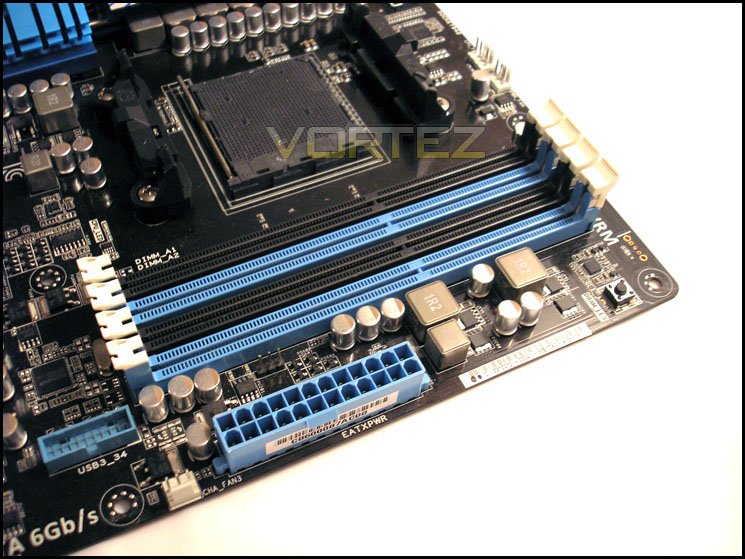
The DIMM slots can take up to 1866MHz RAM by default and they support a maximum of 32GB of un-buffered memory in total. There are two power phases which control the voltage delivery for your RAM modules and towards the south end of the slots, you will find an internal USB 3.0 header. There is a MemOK! button on the top right-hand-side of the motherboard.
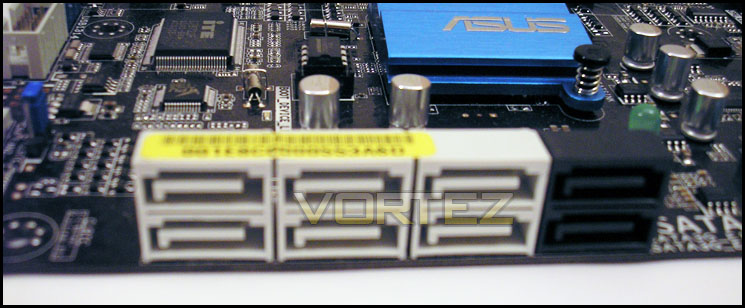
The SATA configuration consists of six SATA 6Gbps ports and two SATA 3Gbps ports. They are all at right angles to make the routing of cables easier, and so that none of them will be obstructed when large graphics cards are used. On the SATA 6Gbps ports, RAID 0, 1, 5 and 10 are supported. The two internal SATA 3Gbps ports are controlled by a JMicron JMB362 controller. It also powers the Power eSATA 3Gbps port (green) and the eSATA 3Gbps port (red) on the IO panel.
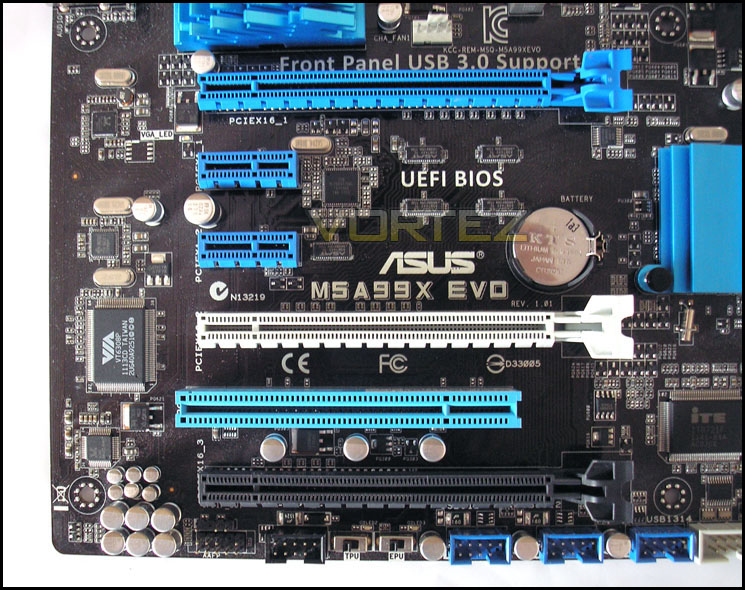
The expansion consists of two PCIe 2.0 x16 slots which runs in either x16 or x8 + x8, one PCIe 2.0 x16 (black) slot which runs at x4 speeds, two PCIe 2.0 x1 slots and a legacy PCI slot to finish off. NVIDIA Quad-GPU SLI and AMD Quad-GPU CrossFireX are both supported on this motherboard using the blue and white slots. The slots are spaced with a dual GPU configuration in mind. If you are using a GPU which is cooled by a dual slot cooler, there is one slot worth’s of space to allow the top card to breathe a little better.
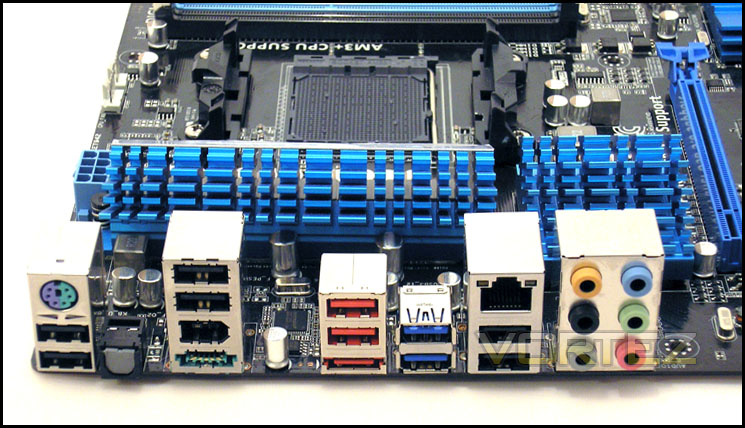
To finish off, lets take a look at the IO panel. Going form left to right, we have a PS2 port which can be used for either a keyboard or a mouse, but not both at the same time. Two USB 2.0 ports are beneath it and a optical S/PDIF connection is next in line, followed by two more USB 2.0 ports, a IEEE 1394a port and the Power eSATA 3Gbps port. Carrying on, in red, we have two USB 2.0 ports and an eSATA 3Gbps connection, two USB 3.0 ports with a 1Gbps LAN port and a further two USB 2.0 ports next to it, which leaves us the six audio jacks, which are powered by the Realtek ALC892 audio chip to finish it all off.
Test Setup & Benchmarks
We would like to give special thanks to the following manufacturers for supplying their parts to make up our test bench.
Corsair
Noctua
ZOTAC
FSP
Noctua
ZOTAC
FSP
AMD Bulldozer FX-8120 Test Bench
CPU – AMD FX-8120 Eight-Core Processor
Cooling – Noctua NH-D14
Motherboard – ASUS M5A99X EVO
Memory – G.SKILL RipJawX DDR3-1866MHz CL9
Graphics – ZOTAC GTX 570 1280MB
Storage – Corsair Force F120
PSU – FSP Aurum CM Series 750W 80PLUS Gold
CPU – AMD FX-8120 Eight-Core Processor
Cooling – Noctua NH-D14
Motherboard – ASUS M5A99X EVO
Memory – G.SKILL RipJawX DDR3-1866MHz CL9
Graphics – ZOTAC GTX 570 1280MB
Storage – Corsair Force F120
PSU – FSP Aurum CM Series 750W 80PLUS Gold
Before we start any overclocking, we will be setting the BIOS to the following defaults before beginning any overclocking.
Overclocking Settings
CPU Multiplier – 13.5x
RAM speed – 1066MHz
CPU/NB and HT Links – 1600MHz (8x CPU bus)
CPU Multiplier – 13.5x
RAM speed – 1066MHz
CPU/NB and HT Links – 1600MHz (8x CPU bus)
As with all of our AMD Bulldozer reviews, we will be running the following benchmark suite to give you a variety of results.
AIDA64 – CPU benchmarks
X264 HD 5.0.1 – 1st and 2nd pass encoding
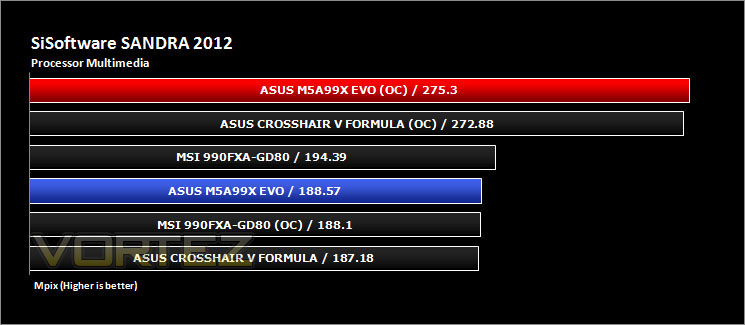
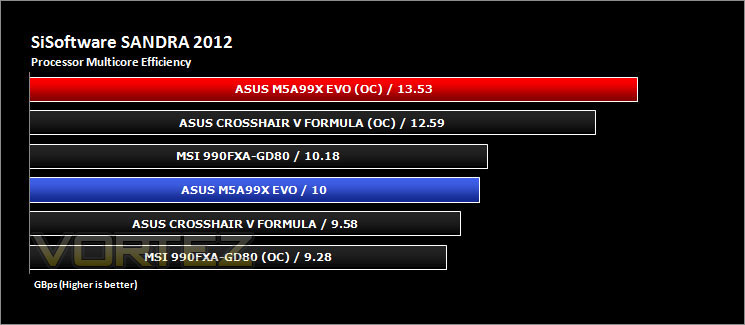
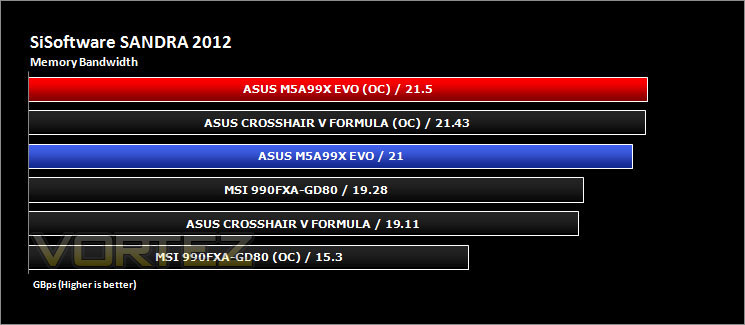
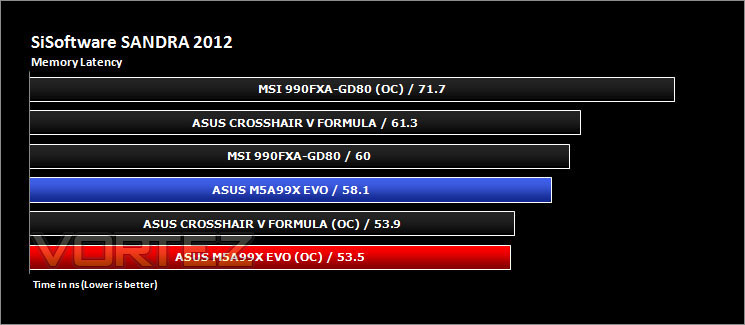
SiSoftware Sandra 2012 – CPU and Memory benchmarks
CineBench 11.5 – CPU score
3DMark 11 – DX11 3D Performance and Extreme preset
Games – Crysis 2, DiRT Showdown, Skyrim and Sleeping Dogs
X264 HD 5.0.1 – 1st and 2nd pass encoding
SiSoftware Sandra 2012 – CPU and Memory benchmarks
CineBench 11.5 – CPU score
3DMark 11 – DX11 3D Performance and Extreme preset
Games – Crysis 2, DiRT Showdown, Skyrim and Sleeping Dogs
Overclocking
With AMD processors, you have a choice of overclocking via the multiplier alone (provided you have an unlocked chip), via the CPU bus alone if you wish to do so. If you have a locked multiplier, you will be limited to CPU bus overclocking only as well. If you have an unlocked chip like we do, you can choose to use a combination of the two as well. Overclocking with a combination of the two is generally a preferred method as it will provide increased benefits compared to just overclocking via the multiplier alone. It allows the chip to run quicker internally as well as overall.
One vital bit of information to remember is that voltage is key to getting a successful overclock. Too much voltage can harm the stability and subsequently it will produce lower scores than it is capable of. Too little voltage and it will be unstable. Finding the sweet spot is essential on Bulldozer and it may take some time until you get it just right.
During the overclocking, we will be testing the following:
Default speeds
We will be using the BIOS defaults to see how the motherboard manufacturer has configured their BIOS for comparison reasons.
Maximum CPU bus overclocking
This is tested to show you which motherboard can take your CPU to the highest bus speed and hold it there. This is not strictly for 24/7 use, it is just to set the benchmark to compare motherboards against each other.
We will be using the BIOS defaults to see how the motherboard manufacturer has configured their BIOS for comparison reasons.
Maximum CPU bus overclocking
This is tested to show you which motherboard can take your CPU to the highest bus speed and hold it there. This is not strictly for 24/7 use, it is just to set the benchmark to compare motherboards against each other.
We won’t be overclocking via the multiplier alone because there is not much chance that swapping a motherboard out will allow us to get another 100 or 200MHz out of the CPU.
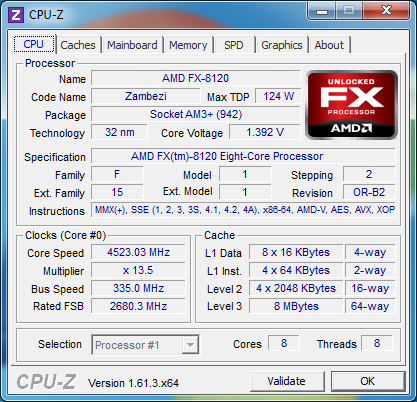
Getting the system to boot at 300MHz on the CPU bus was a doddle, and even higher than that required little effort to get the machine stable. We managed to get the CPU to top out at 335MHz and after tweaking to no end, it would not go any further. We have most likely hit the limit for the CPU and/or motherboard on the current cooling we have. With that in mind, our final clock speed which was benchmark stable and could handle over an hour of continuous loading by the x264HD benchmark was a respectable 4523MHz or in other words, a 46% overclock.
Benchmarks: AIDA64
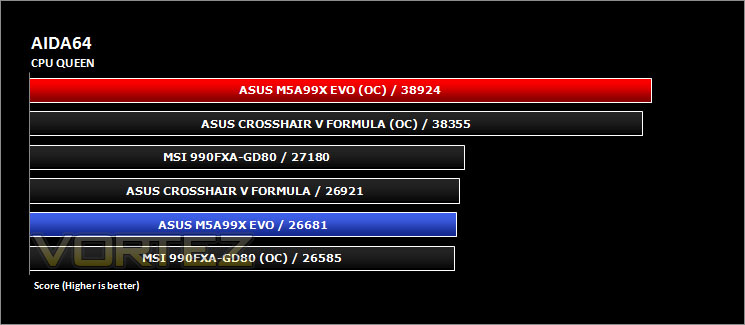
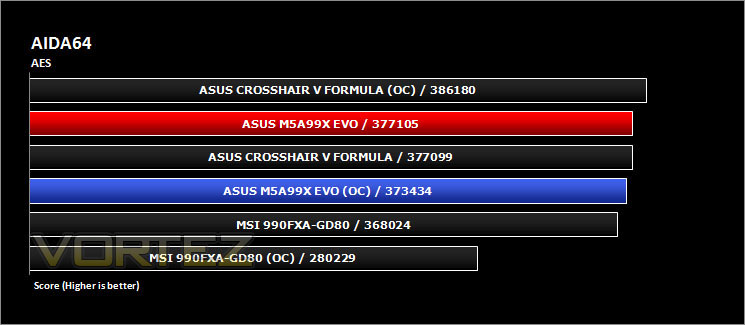
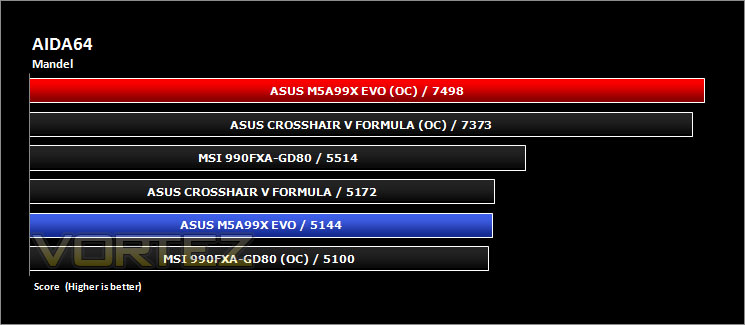
This simple integer benchmark focuses on the branch prediction capabilities and the misprediction penalties of the CPU. It finds the solutions for the classic “Queens problem” on a 10 by 10 sized chessboard. At the same clock speed theoretically the processor with the shorter pipeline and smaller misprediction penalties will attain higher benchmark scores. For example – with HyperThreading disabled – the Intel Northwood core processors get higher scores than the Intel Prescott core based ones due to the 20-step vs. 31-step long pipeline. The CPU Queen test uses integer MMX, SSE2 and SSSE3 optimizations.
Benchmarks: CINEBENCH 11.5
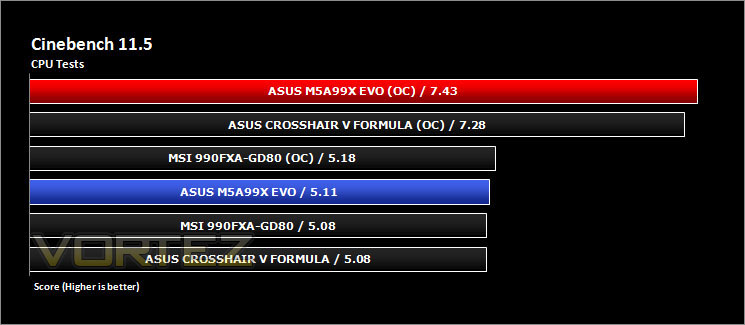
CINEBENCH can measure systems with up to 64 processor threads. This test scene contains approximately 2,000 objects which in turn contain more than 300,000 polygons in total, and uses sharp and blurred reflections, area lights, shadows, procedural shaders, antialiasing, and much more. The result is displayed in points (pts). The higher the number, the faster your processor is.
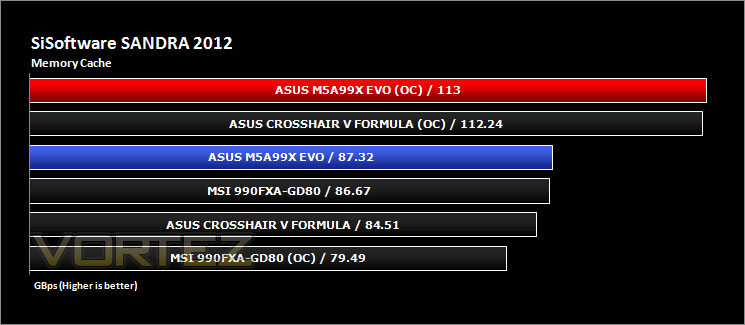
Benchmarks: SiSoftware SANDRA 2012
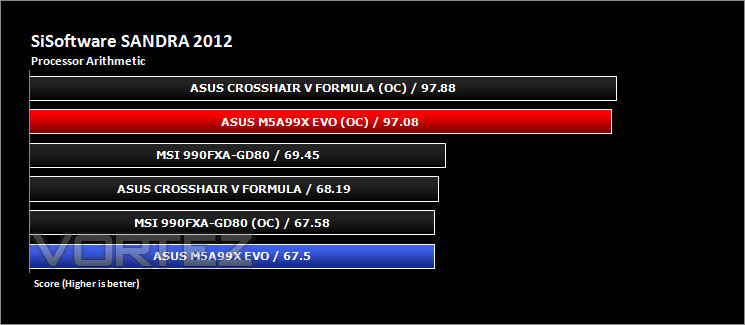
SANDRA isn’t always a benchmark that is included in hardware reviews but we believe it shouldn’t be ignored. SANDRA provides a vigorous package that tests your system in a rather large array of benchmarks. There are many aspects of benchmark that can be executed. We will be considering the CPU and memory tests.
Benchmarks: x264 HD 5.0.1
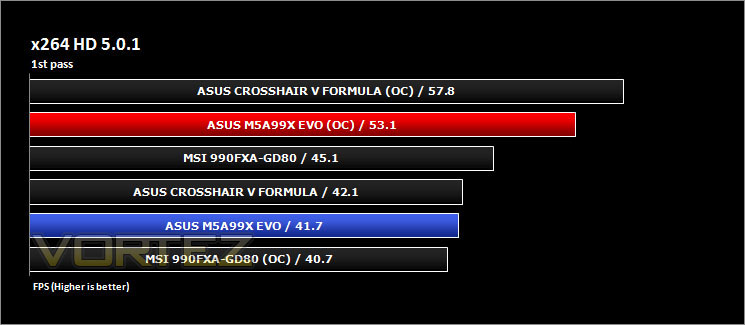
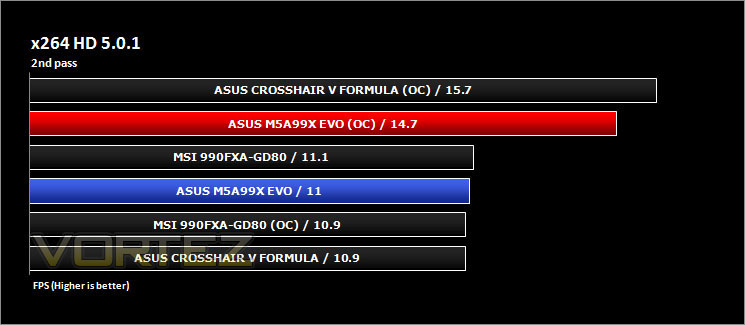
Simply put, this test measures how fast your machine can encode a short, DVD quality MPEG-2 video clip into a high-quality x264 video clip. What’s x264, you ask? It’s more or less the next-generation Xvid/DivX codec. We think it’s ideal for a benchmark because the application (x264.exe) reports fairly accurate compression results (in frames per second) for each pass of the video encoding process and it uses multi-core processors very efficiently
3D Benchmarks: 3DMark 11
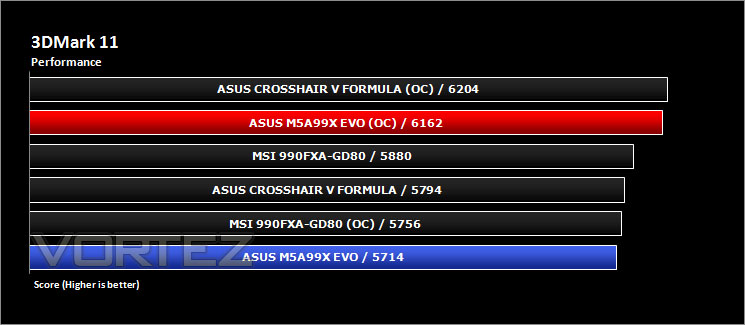
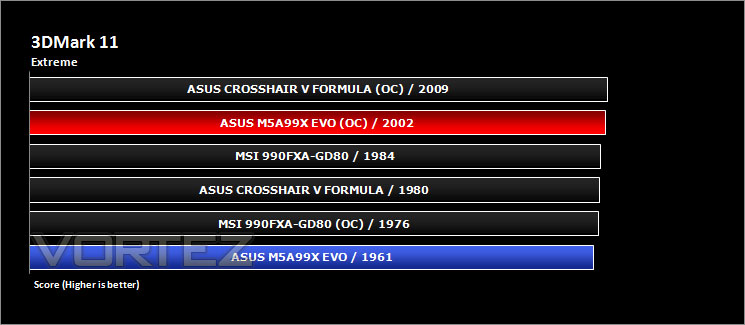
Designed to measure your PC’s gaming performance 3DMark 11 makes extensive use of all the new features in DirectX 11 including tessellation, compute shaders and multi-threading. Trusted by gamers worldwide to give accurate and unbiased results, 3DMark 11 is the best way to consistently and reliably test DirectX 11 under game-like loads.
3D Benchmarks: Unigine Heaven 3.0
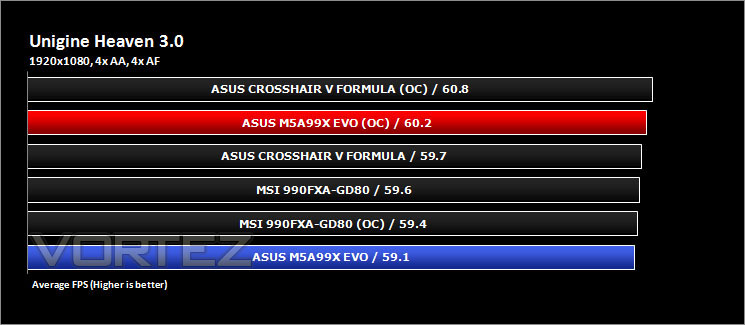
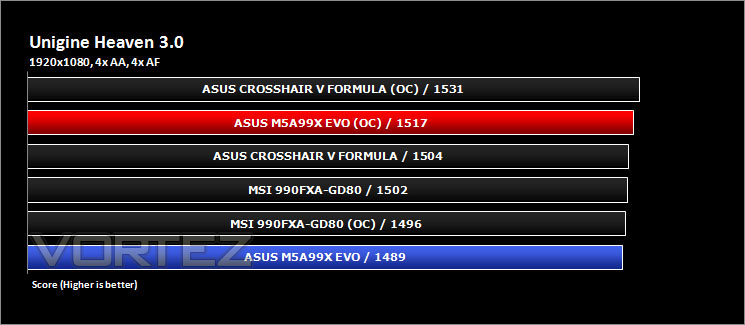
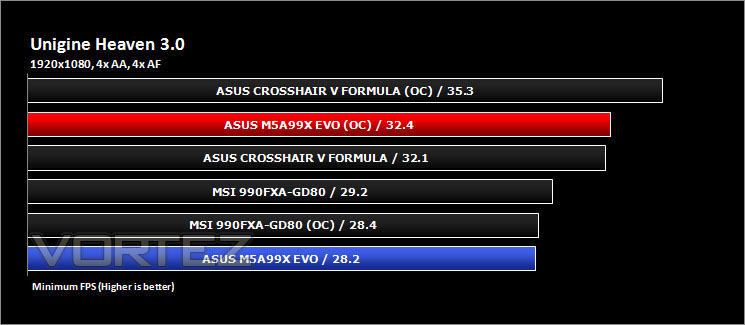
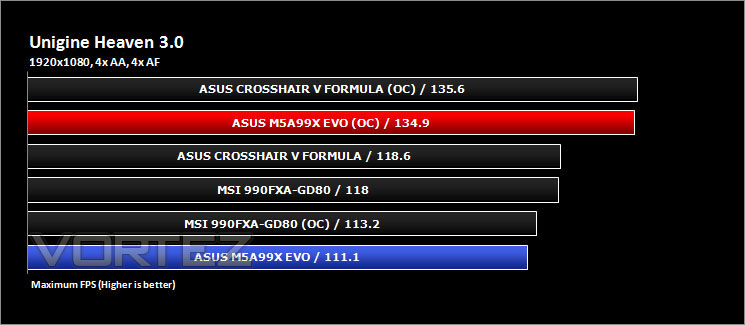
Unigine’s benchmark is to showcase the benefits of DX 11 and the use of tessellation as opposed to normal rendering techniques. The demo has impressive visuals that give an insight into what we can expect from gaming in the future.
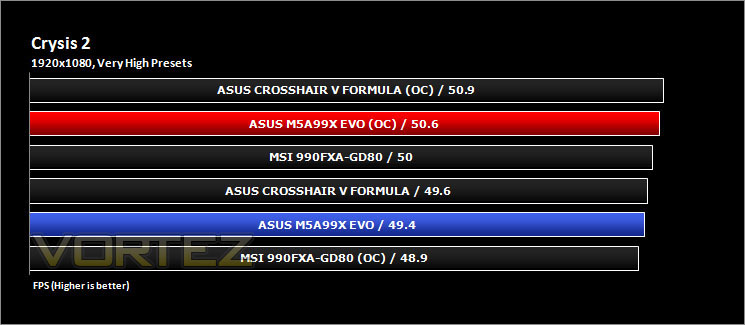
Gaming Benchmarks: Crysis 2 & DiRT Showdown
It’s important for us to perform a number of game benchmarks as well as the synthetic tests because it allows us to test the 3D performance. So here we have some popular titles, critically acclaimed and action-packed. FRAPS and in-house benchmarking tools were used to capture average FPS.
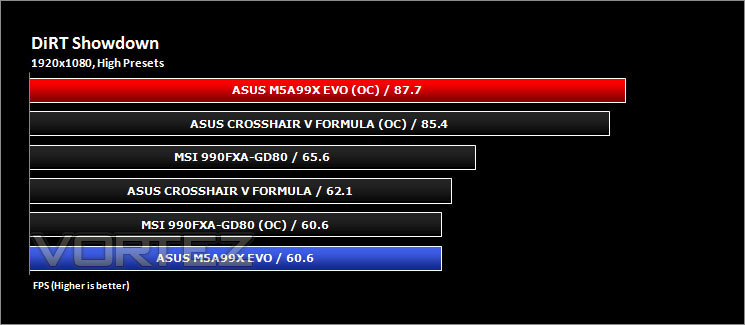
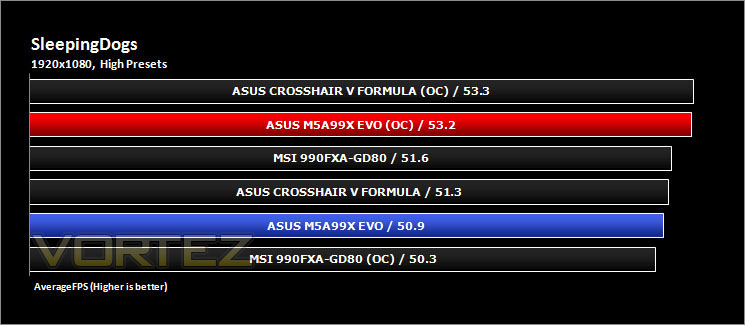
Gaming Benchmarks: Skyrim & SleepingDogs
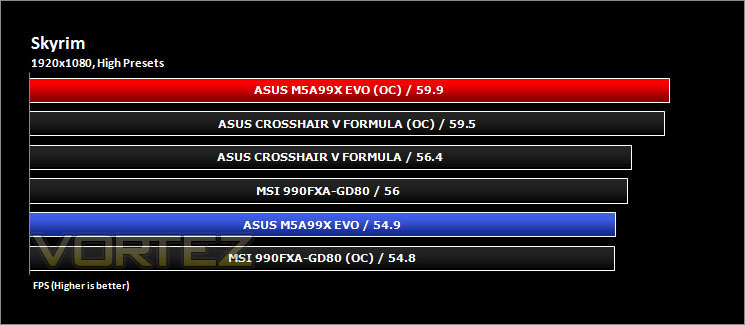
It’s important for us to perform a number of game benchmarks as well as the synthetic tests because it allows us to test the 3D performance. So here we have some popular titles, critically acclaimed and action-packed. FRAPS and in-house benchmarking tools were used to capture average FPS.
Conclusion
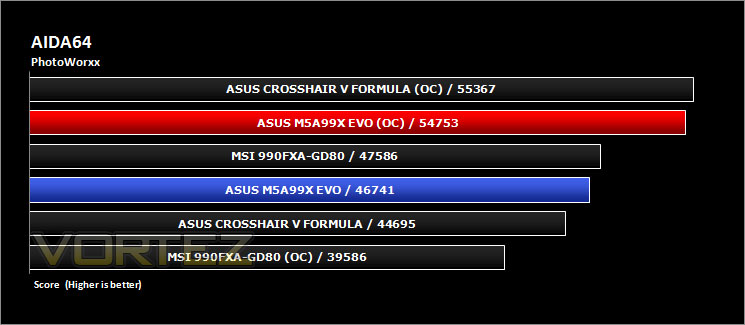
In a nut shell, the ASUS M5A99X EVO is a motherboard worthy of your thought if you are considering a mid to high range AMD system. From our testing, the motherboard can handle just about whatever you throw at it and still come out with its head held high. It even gave the Crosshair V Formula a good run for its money in a number of the benchmarks which we ran.
The BIOS is just like any other UEFI which ASUS have produced for their other products on both their AMD and Intel product lines. It is easy to navigate and it is very smooth to chop and change through menus as well. From a personal stand point, I find the BIOS to be amongst the best, if not the best that I have used so far.
The M5A99X EVO is a monster overclocker when you pair it with the AMD Bulldozer FX-8120, it certainly has set the benchmark very high for other motherboards to try and best it. In terms of overclocking, we managed to get a 335MHz bus speed out of our CPU sample which is most likely more or less as high as it will go with our voltage and cooling limitations. Other sources show that anywhere between 280MHz and 300MHz is a very reasonable overclock to achieve, and therefore, being able to take 335MHz is a point worth talking about. As with any overclocking, your results may vary from what we have achieved and this is not necessarily an overclock which you will be able to run 24/7, but the motherboard is capable to perform our tests which is what we set out to achieve.
The board is currently priced at roughly the £90 mark. Considering how it performs and what features are available, it is fair to say that the M5A99X EVO performs brilliantly. You are backed with a three year warranty too for peace of mind.
This motherboard is worthy of no less than a golden award from us at Vortez. It ticks all of the right boxes in every catagory.

Pros
+ Great overclocking ability
+ Plenty of features
+ Good value
+ Very stable, even at highly overclocked speeds
+ Well layed out
Cons
– No CMOS reset button (only minor!)
+ Great overclocking ability
+ Plenty of features
+ Good value
+ Very stable, even at highly overclocked speeds
+ Well layed out
Cons
– No CMOS reset button (only minor!)


