







Featuring the new Intel Z97 chipset, ASUS Republic of Gamers introduce the Maximus VII Ranger – their most affordable ATX motherboard yet.

Product on Review: Maximus VII Ranger
Manufacturer & Sponsor: ASUS
Street Price: £130 GBP
The Republic of Gamers division has brought many great products to the table of the years and we can’t deny that their success has come about by careful implementation and willingness to appeal to both enthusiasts and gamers. In the motherboard arena each generation of Maximus and Rampage products have always been the topic of discussion on message boards the world-over and today we are looking at one such product which has plenty of anticipation attached to it.
Ranger is ROG’s most aggressive price/performance motherboard in the Intel Z97 lineup. It comes furnished with the ever popular black and red theme and is packed with numerous innovative features. But does such a low price-tag mean there are also plenty of cut-backs? Join us as we explore this exciting new ROG Z97 motherboard.
About ASUS
ASUS is a worldwide top-three consumer notebook vendor and maker of the world’s best-selling, most award-winning, motherboards. A leading enterprise in the new digital era, ASUS designs and manufactures products that perfectly meet the needs of today’s digital home and office, with a broad portfolio that includes motherboards, graphics cards, optical drives, displays, desktop and all-in-one PCs, notebooks, netbooks, servers, multimedia devices, wireless solutions, networking devices, tablets and smartphones. Driven by innovation and committed to quality, ASUS won 4,256 awards in 2013 and is widely credited with revolutionizing the PC industry with its Eee PC™. ASUS has more than 13,600 employees around the globe with a world-class R & D team of 4,500 engineers. Company revenue for 2013 was approximately US$14 billion.
Technical Specifications
CPU
Intel® Socket 1150 for the 5th/New 4th/4th Generation Core™ i7/Core™ i5/Core™ i3/Pentium®/Celeron® Processors
Supports Intel® 22 nm CPU
Supports Intel® Turbo Boost Technology 2.0
Chipset
Intel® Z97
Memory
4 x DIMM, Max. 32GB, DDR3 3200(O.C.)/3100(O.C.)/3000(O.C.)/2933(O.C.)
2800(O.C.)/2666(O.C.)/2600(O.C.)/2500(O.C.)/2400(O.C.)
2200(O.C.)/2133(O.C.)/2000(O.C.)/1866(O.C.)/1800(O.C.)/1600/1333 MHz
Dual Channel Memory Architecture
Supports Intel® Extreme Memory Profile (XMP)
Graphic
Integrated Graphics Processor
Multi-VGA output support : HDMI/DVI-D/RGB ports
– Supports HDMI with max. resolution 4096 x 2160 @ 24 Hz / 2560 x 1600 @ 60 Hz
– Supports DVI-D with max. resolution 1920 x 1200 @ 60 Hz
– Supports RGB with max. resolution 1920 x 1200 @ 60 Hz
Supports Intel® InTru™ 3D, Quick Sync Video, Clear Video HD Technology, Insider™
Multi-GPU Support
Supports NVIDIA® Quad-GPU SLI™ Technology
Supports AMD Quad-GPU CrossFireX™ Technology
Expansion Slots
2 x PCIe 3.0/2.0 x16 (x16 or dual x8, red)
1 x PCIe 2.0 x16 (x4 mode, black) *1
3 x PCIe 2.0 x1
Storage
Intel® Z97 chipset :
6 x SATA 6Gb/s port(s), gray,
Support Raid 0, 1, 5, 10
Supports Intel® Smart Response Technology, Intel® Rapid Start Technology, Intel® Smart Connect Technology *2
LAN
Intel® I218V, 1 x Gigabit LAN Controller(s)
Audio
ROG SupremeFX 8-Channel High Definition Audio CODEC
– Supports : Jack-detection, Multi-streaming, Front Panel Jack-retasking
– SupremeFX Shielding Technology
– ELNA® premium audio capacitors
Audio Feature :
– DTS Connect
– Optical S/PDIF out port(s) at back panel
– Sonic SoundStage
– Sonic SenseAmp
– Sonic Studio
– Sonic Radar II
USB Ports
Intel® Z97 chipset : *3
6 x USB 3.0 port(s) (4 at back panel, blue, 2 at mid-board)
Intel® Z97 chipset :
7 x USB 2.0 port(s) (2 at back panel, , 5 at mid-board)
ROG Exclusive Features
Extreme Engine Digi+ III :
– NexFET™ Power Block MOSFET
– New Alloy Chokes
– 10K Black Metallic Capacitors
KeyBot
– CPU Level Up
– XMP
– Direct Key
ROG RAMDisk
GameFirst III
Extreme Tweaker
Special Features
ASUS Dual Intelligent Processors 5-Way Optimization by Dual Intelligent Processors 5 :
– Whole system optimization with a single click! 5-Way Optimization tuning key perfectly consolidates TPU, EPU, DIGI+ Power Control, Fan Xpert 3, and Turbo App together, providing better CPU performance, efficient power saving, precise digital power control, whole system cooling and even tailor your own app usages.
ASUS Exclusive Features :
– AI Suite 3
– Ai Charger
– USB Charger+
– USB 3.0 Boost
– Disk Unlocker
ASUS EZ DIY :
– ASUS CrashFree BIOS 3
– ASUS EZ Flash 2
– ASUS USB BIOS Flashback
– Push Notice
ASUS Q-Design :
– ASUS Q-Shield
– ASUS Q-Code
– ASUS Q-LED (CPU, DRAM, VGA, Boot Device LED)
– ASUS Q-Slot
– ASUS Q-DIMM
– ASUS Q-Connector
Overclocking Protection :
– ASUS C.P.R.(CPU Parameter Recall)
Operating System Support
Windows® 8.1
Windows® 8
Windows® 7
Back I/O Ports
1 x PS/2 keyboard/mouse combo port(s)
1 x DVI-D
1 x D-Sub
1 x HDMI
1 x LAN (RJ45) port(s)
4 x USB 3.0 (blue)
2 x USB 2.0
1 x Optical S/PDIF out
6 x Audio jack(s)
1 x USB BIOS Flashback Button(s)
Internal I/O Ports
1 x USB 3.0 connector(s) support(s) additional 2 USB 3.0 port(s)
3 x USB 2.0 connector(s) support(s) additional 5 USB 2.0 port(s)
1 x TPM connector(s)
6 x SATA 6Gb/s connector(s)
1 x CPU Fan connector(s) (1 x 4 -pin)
1 x CPU OPT Fan connector(s) (1 x 4 -pin)
3 x Chassis Fan connector(s) (3 x 4 -pin)
1 x 24-pin EATX Power connector(s)
1 x 8-pin ATX 12V Power connector(s)
1 x Front panel audio connector(s) (AAFP)
1 x System panel(s)
1 x MemOK! button(s)
1 x Thermal sensor connector(s)
0 x Power-on button(s)
0 x Reset button(s)
1 x Clear CMOS jumper(s)
0 x ROG extension (ROG_EXT) header(s)
1 x KeyBot Button
1 x Sonic SoundStage Button
BIOS
64Mb UEFI AMI BIOS, PnP, DMI2.7, WfM2.0, SM BIOS 2.7, ACPI5.0a, Multi-Language BIOS
Manageability
WfM 2.0, DMI 2.7, WOL by PME, PXE
Operating System
Windows® 8.1 32/64-bit
Windows® 8 32/64-bit
Windows® 7 32/64-bit
Form Factor
ATX Form Factor
12 inch x 9.6 inch ( 30.5 cm x 24.4 cm )
Intel® Socket 1150 for the 5th/New 4th/4th Generation Core™ i7/Core™ i5/Core™ i3/Pentium®/Celeron® Processors
Supports Intel® 22 nm CPU
Supports Intel® Turbo Boost Technology 2.0
Chipset
Intel® Z97
Memory
4 x DIMM, Max. 32GB, DDR3 3200(O.C.)/3100(O.C.)/3000(O.C.)/2933(O.C.)
2800(O.C.)/2666(O.C.)/2600(O.C.)/2500(O.C.)/2400(O.C.)
2200(O.C.)/2133(O.C.)/2000(O.C.)/1866(O.C.)/1800(O.C.)/1600/1333 MHz
Dual Channel Memory Architecture
Supports Intel® Extreme Memory Profile (XMP)
Graphic
Integrated Graphics Processor
Multi-VGA output support : HDMI/DVI-D/RGB ports
– Supports HDMI with max. resolution 4096 x 2160 @ 24 Hz / 2560 x 1600 @ 60 Hz
– Supports DVI-D with max. resolution 1920 x 1200 @ 60 Hz
– Supports RGB with max. resolution 1920 x 1200 @ 60 Hz
Supports Intel® InTru™ 3D, Quick Sync Video, Clear Video HD Technology, Insider™
Multi-GPU Support
Supports NVIDIA® Quad-GPU SLI™ Technology
Supports AMD Quad-GPU CrossFireX™ Technology
Expansion Slots
2 x PCIe 3.0/2.0 x16 (x16 or dual x8, red)
1 x PCIe 2.0 x16 (x4 mode, black) *1
3 x PCIe 2.0 x1
Storage
Intel® Z97 chipset :
6 x SATA 6Gb/s port(s), gray,
Support Raid 0, 1, 5, 10
Supports Intel® Smart Response Technology, Intel® Rapid Start Technology, Intel® Smart Connect Technology *2
LAN
Intel® I218V, 1 x Gigabit LAN Controller(s)
Audio
ROG SupremeFX 8-Channel High Definition Audio CODEC
– Supports : Jack-detection, Multi-streaming, Front Panel Jack-retasking
– SupremeFX Shielding Technology
– ELNA® premium audio capacitors
Audio Feature :
– DTS Connect
– Optical S/PDIF out port(s) at back panel
– Sonic SoundStage
– Sonic SenseAmp
– Sonic Studio
– Sonic Radar II
USB Ports
Intel® Z97 chipset : *3
6 x USB 3.0 port(s) (4 at back panel, blue, 2 at mid-board)
Intel® Z97 chipset :
7 x USB 2.0 port(s) (2 at back panel, , 5 at mid-board)
ROG Exclusive Features
Extreme Engine Digi+ III :
– NexFET™ Power Block MOSFET
– New Alloy Chokes
– 10K Black Metallic Capacitors
KeyBot
– CPU Level Up
– XMP
– Direct Key
ROG RAMDisk
GameFirst III
Extreme Tweaker
Special Features
ASUS Dual Intelligent Processors 5-Way Optimization by Dual Intelligent Processors 5 :
– Whole system optimization with a single click! 5-Way Optimization tuning key perfectly consolidates TPU, EPU, DIGI+ Power Control, Fan Xpert 3, and Turbo App together, providing better CPU performance, efficient power saving, precise digital power control, whole system cooling and even tailor your own app usages.
ASUS Exclusive Features :
– AI Suite 3
– Ai Charger
– USB Charger+
– USB 3.0 Boost
– Disk Unlocker
ASUS EZ DIY :
– ASUS CrashFree BIOS 3
– ASUS EZ Flash 2
– ASUS USB BIOS Flashback
– Push Notice
ASUS Q-Design :
– ASUS Q-Shield
– ASUS Q-Code
– ASUS Q-LED (CPU, DRAM, VGA, Boot Device LED)
– ASUS Q-Slot
– ASUS Q-DIMM
– ASUS Q-Connector
Overclocking Protection :
– ASUS C.P.R.(CPU Parameter Recall)
Operating System Support
Windows® 8.1
Windows® 8
Windows® 7
Back I/O Ports
1 x PS/2 keyboard/mouse combo port(s)
1 x DVI-D
1 x D-Sub
1 x HDMI
1 x LAN (RJ45) port(s)
4 x USB 3.0 (blue)
2 x USB 2.0
1 x Optical S/PDIF out
6 x Audio jack(s)
1 x USB BIOS Flashback Button(s)
Internal I/O Ports
1 x USB 3.0 connector(s) support(s) additional 2 USB 3.0 port(s)
3 x USB 2.0 connector(s) support(s) additional 5 USB 2.0 port(s)
1 x TPM connector(s)
6 x SATA 6Gb/s connector(s)
1 x CPU Fan connector(s) (1 x 4 -pin)
1 x CPU OPT Fan connector(s) (1 x 4 -pin)
3 x Chassis Fan connector(s) (3 x 4 -pin)
1 x 24-pin EATX Power connector(s)
1 x 8-pin ATX 12V Power connector(s)
1 x Front panel audio connector(s) (AAFP)
1 x System panel(s)
1 x MemOK! button(s)
1 x Thermal sensor connector(s)
0 x Power-on button(s)
0 x Reset button(s)
1 x Clear CMOS jumper(s)
0 x ROG extension (ROG_EXT) header(s)
1 x KeyBot Button
1 x Sonic SoundStage Button
BIOS
64Mb UEFI AMI BIOS, PnP, DMI2.7, WfM2.0, SM BIOS 2.7, ACPI5.0a, Multi-Language BIOS
Manageability
WfM 2.0, DMI 2.7, WOL by PME, PXE
Operating System
Windows® 8.1 32/64-bit
Windows® 8 32/64-bit
Windows® 7 32/64-bit
Form Factor
ATX Form Factor
12 inch x 9.6 inch ( 30.5 cm x 24.4 cm )
Packaging & First Look
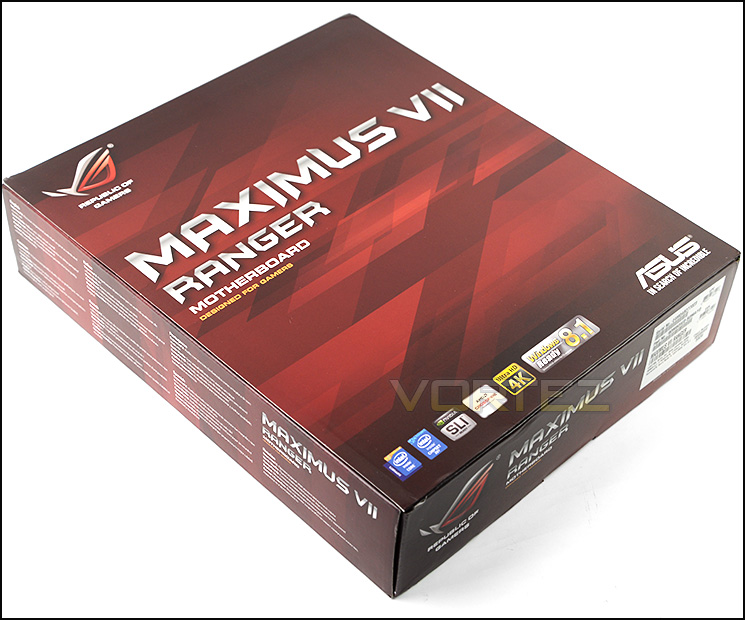
Packaging for Ranger
Maximus VII Ranger is presented in the typical Republic of Gamers dressing – a large red box with a flip-cover. This box has a list of supporting features on the front and on the reverse the technical specifications can be explored.
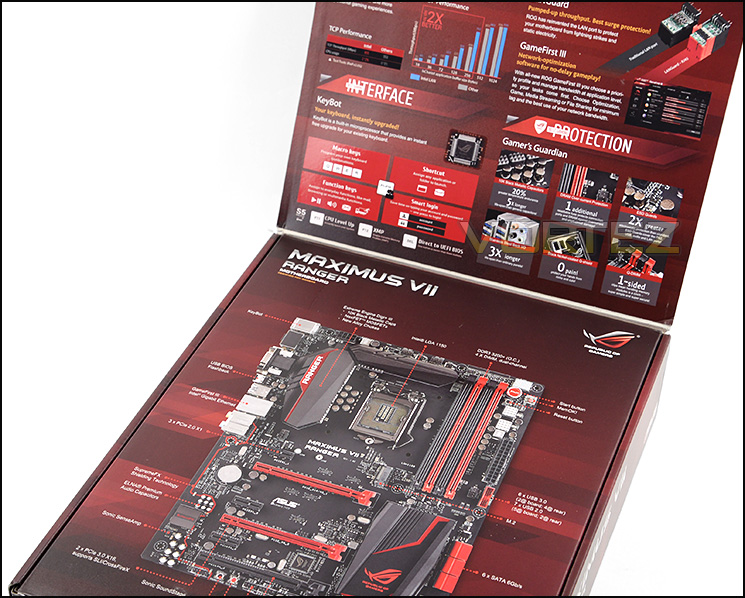
Box with features lid
ASUS have given the Ranger packaging a lid, which upon opening reveals further insight into the fundamental features of this motherboard. There is also a large diagram of Ranger with all of the significant features pinpointed.
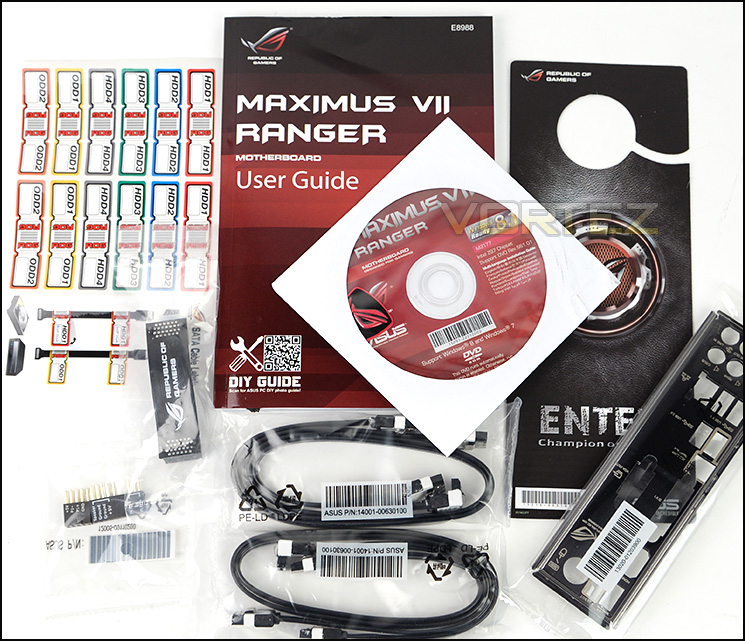
A generous selection of bundled accessories
Inside the box ASUS include a number of items which include the following:
• User’s manual
• I/O Shield
• 4 x SATA 6Gb/s cables
• 1 x SLI bridge (Flexible)
• 1 x Q-connector (2 in 1)
• 1 x 12 in 1 ROG Cable labels
• 1 x ROG Door Hanger
For a full unboxing on Ranger, check our video review.
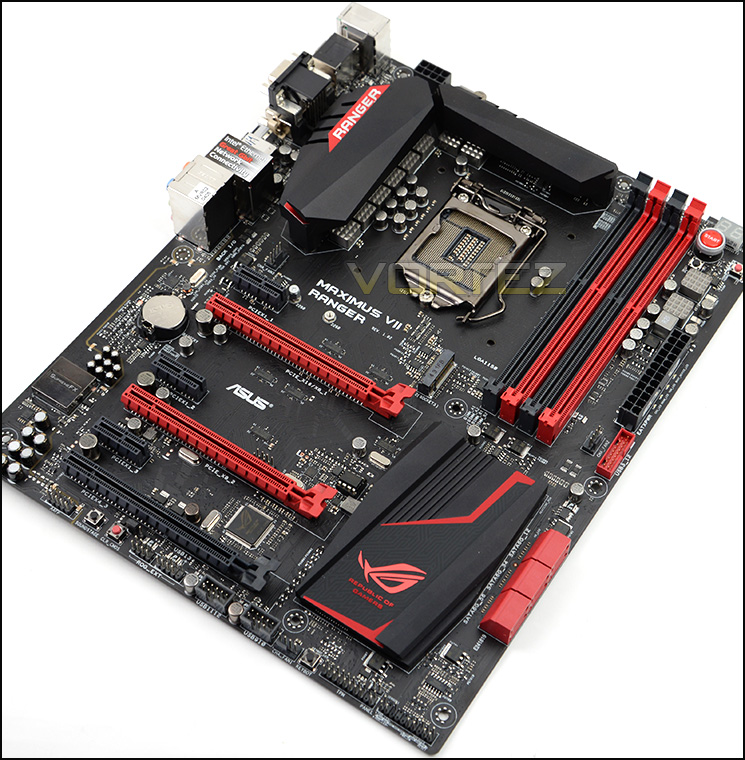
An overview of Maximus VII Ranger
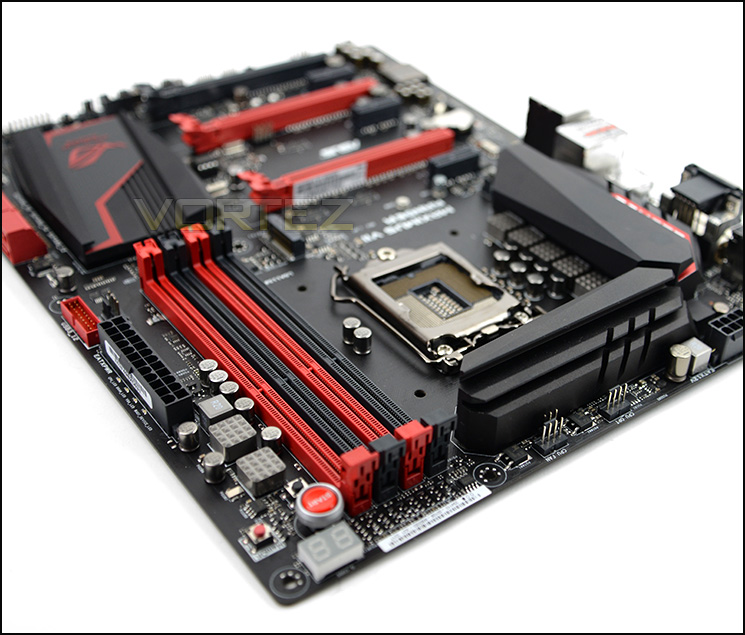
As can be expected from a Republic of Gamer’s motherboard, Ranger is laden with the traditional black and red theme throughout. The board itself sports a smooth matt black finish. The overall appearance of Ranger lends itself to pairing up with other components very easily.
Ranger conforms to the standard ATX form factor but still packs in a multitude of features which we’ll explore on the proceeding pages.
Closer Look
Digi+3 Semi 8-Phase VRM design
Ranger uses a semi-8 Phase power design via Digi+3. ROG has given the motherboard alloy chokes which are a slight downgrade from the Hero which has the BlackWing version – this cheaper alternative is just one component choice which ensures Ranger remains affordable.
Over the MOSFETs sit two large and distinct heatsinks which are not interconnected. Just behind the heatsinks resides an 8-pin CPU power socket and as is common nowadays, there are two designated CPU fan headers for flagship air coolers and ALCs.
Ranger uses Socket 1150 and supports Intel’s 4th and 5th Generation Processors.
Dual-Channel DDR3 slots
Moving on there are 4x DDR3 DIMM slots which can accommodate up to 32GB of memory and 3200 (OC).
Also in the memory region are a number of overclocking features – MemOK! makes an appearance and is now regarded as an integral ASUS feature, MemOK! ensures memory compatibility and a successful boot up. There are also onboard power and reset buttons for those using Ranger on a test bench and LED debug for diagnosing any issues on POST.
ROG has placed a USB 3.0 header near to the memory slots and 24-pin ATX socket. This supplies USB 3.0 functionality for the front panel.
SATA and SATA Express ports
Most partner Z97 boards are combining SATA, SATA Express and M.2 for storage but for the ROG line we have just SATA and M.2. So there are six SATA III 6GB/s ports further along the board.
Large Intel Z97 heatsink and KeyBot
Ranger features a rather substiantial heatsink over the Intel Z97 chip just behind the SATA ports. This heatsink compliments the board very well, ROG (as per usual) have carefully thought about the aesthetics on Ranger.
Below this heatsink there is a button called KeyBot. This button allows you to assign macros and functions to a standard USB keyboard. By plugging the keyboard in and pressing this button, the microprocessor on the reverse initiates and allows a variety of commands to be applied via proprietary software which is included. This kind of feature is very useful for users who do not have access to a keyboard with macro functionality built-in.
Closer Look (Continued)
A plethora of options for expansion slots
Turning our attention to the expansion slot area there are a number of options available here. This gives plenty of flexibility for using graphics cards, network cards, SCSI and other such devices. The ports available are:
3x PCI-E 2.0 x1 slots
2x PCI-E 3.0/2.0 x16 slots (Running @ x16 / x8)
1x PCI-E 2.0 x16 slot (Running @ x4)
An M.2 slot for even more storage choice
Above the top PCI-E slot ROG has included an M.2 slot for use with M key and SSD storage device which are type 2260/2280. Not all manufacturers have chosen to include such functionality on the motherboard but it’s great to see it making an appearance because there are a number of brands currently developing modules for this form factor. The M.2 slot also supports Intel’s Rapid Storage Technology, allowing it to operate as a cache for slower mechanical drives in a manner which is invisible to the OS.
SupremeFX 2014 for top-class audio
Not only is storage and video very well design on Ranger but audio is an aspect of noteworthy integration. ROG has equipped Ranger with SupremeFX 2014 which encapsulates a number of new features.
Premium ELNA Japanese-capacitors are a key inclusion. Both these components and the chip are sectioned off from the rest of the board by an EMI shield to prevent any unnecessary electrical interference.
SupremeFX 2014 brings in a number of audio features which include:
– DTS Connect
– Optical S/PDIF out port(s) at back panel
– Sonic SoundStage
– Sonic SenseAmp
– Sonic Studio
– Sonic Radar II
– Optical S/PDIF out port(s) at back panel
– Sonic SoundStage
– Sonic SenseAmp
– Sonic Studio
– Sonic Radar II
Rear IO has plenty of functionality
Lastly, we come to the Rear IO panel which has a generous selection of ports to take advantage of. From the left to right we have the following:
• PS2 Keyboard/Mouse
• Optical SPD/IF
• HDMI (Up to 4K Resolution)
• D-Sub port
• DVI port
• BIOS USB Flashback
• 4x USB 3.0 ports
• Gigabit LAN port
• 8-Channel Audio
ASUS Z97 ROG BIOS Video Tour
Below is a video tour showing the interface of ASUS ROG UEFI BIOS and the options which are available. As you can see, movement is very smooth and the overall look is refined and professional. Advanced tweaking and customisation options are available:
Test Setup, Methodology & Overclocking
Test Setup
CPU Intel Core i7 4770K (Haswell) 3.50GHz
Cooling Corsair Hydro Series H105
Motherboard ASUS Maximus VII Ranger
Memory 16GB Corsair Vengeance Pro 2800MHz CL12 DDR3
Graphics XFX R7970 Black Edition
Storage Corsair Neutron GTX 480GB
PSU Corsair HX1050 80 Plus Gold Certified PSU
Cooling Corsair Hydro Series H105
Motherboard ASUS Maximus VII Ranger
Memory 16GB Corsair Vengeance Pro 2800MHz CL12 DDR3
Graphics XFX R7970 Black Edition
Storage Corsair Neutron GTX 480GB
PSU Corsair HX1050 80 Plus Gold Certified PSU
Benchmarks
Cinebench R15 – CPU/OpenGL Score
x264 HD 4.0 – 1st and 2nd pass encoding
SiSoftware SANDRA 2014 – CPU & Memory benchmarks
AIDA64 – CPU benchmarks
PCMark 8 – Home Suite
3DMark FireStrike – DX11 3D Benchmark
Games – Tomb Raider, THIEF
x264 HD 4.0 – 1st and 2nd pass encoding
SiSoftware SANDRA 2014 – CPU & Memory benchmarks
AIDA64 – CPU benchmarks
PCMark 8 – Home Suite
3DMark FireStrike – DX11 3D Benchmark
Games – Tomb Raider, THIEF
Other Software
Temperature Analysis: Core Temp
Stress Testing Software: LinX
CPU Specification Monitoring: CPU-Z
Stress Testing Software: LinX
CPU Specification Monitoring: CPU-Z
Overclocking
Since the introduction of Z87 back in 2013, there has been a return to BCLK overclocking. This type of functionality ensures flexibility for Overclockers compared to previous generations were the BCLK was locked to 100MHz and only the ratio could be adjusted. As many of you will know, Haswell CPUs get very hot with little voltage increase therefore the flexibility and headroom for overclocking can be limited. For the Z97 launch, we are testing with the Intel Core i7-4770K which from previous, extensive testing, has a maximum overclock of 4.6GHz.
Ranger achieved that milestone of 4.6GHz without any problems so we began lowering the Core Voltage to establish minimum required voltage to deliver such an overclock. The Ranger managed to give us the best result we have yet had – 1.27v. This result is testament to the capabilities of this board and having lowered the Core Voltage the temperatures are much lower when stress is applied, compared to other motherboards which demand 1.3v.
Benchmarks: Power Consumption
It’s interesting to note the power consumption across all motherboards. Although they are using Z97 chipsets, energy results can fluctuate between manufacturers due to the features and specifications that are integrated. First of all, for the idle tests the system is cold booted into Windows and no additional applications are executed – the watts are noted on the external energy monitor we use and then the system is loaded with 3DMark FireStrike – watts are again monitored for the duration of the test and the highest rated wattage result is then noted down. Below are the results of this energy test.
Benchmarks: X264 HD
Simply put, this test measures how fast your machine can encode a short, DVD quality MPEG-2 video clip into a high-quality x264 video clip. What’s x264, you ask? It’s more or less the next-generation Xvid/DivX codec. I think it’s ideal for a benchmark because the application (x264.exe) reports fairly accurate compression results (in frames per second) for each pass of the video encoding process, and it uses multi-core processors very efficiently.
Benchmarks: AIDA64
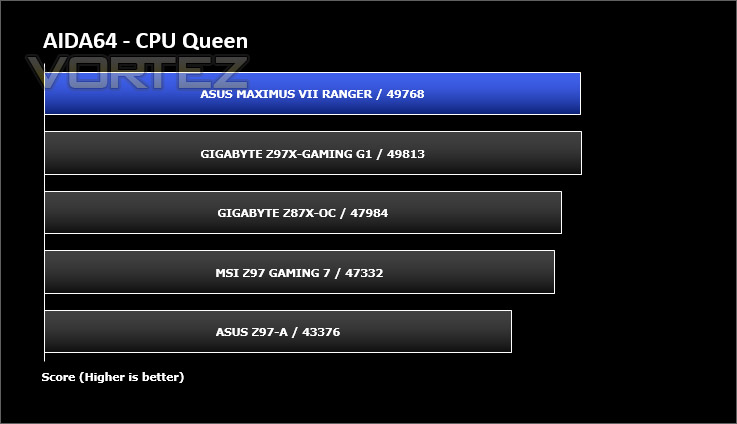
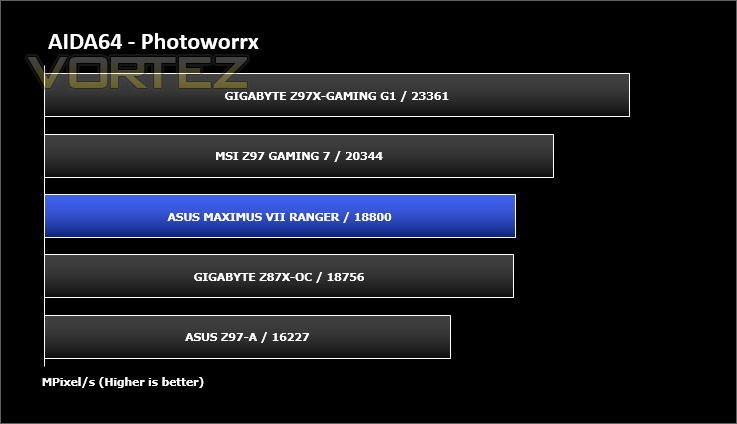
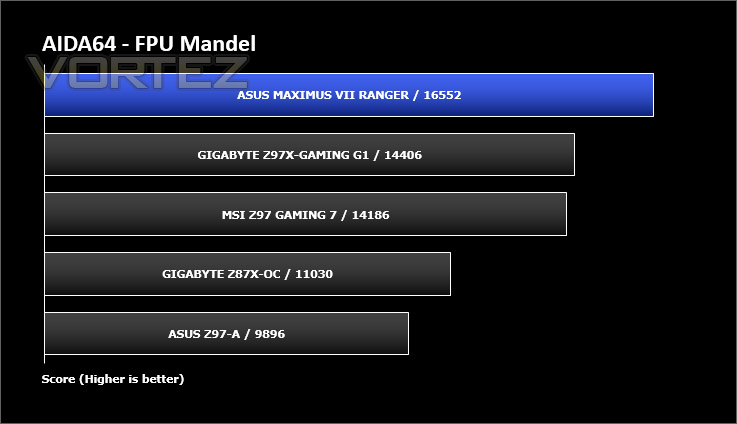
AIDA64 Product PageThis simple integer benchmark focuses on the branch prediction capabilities and the misprediction penalties of the CPU. It finds the solutions for the classic “Queens problem” on a 10 by 10 sized chessboard. At the same clock speed theoretically the processor with the shorter pipeline and smaller misprediction penalties will attain higher benchmark scores. For example — with HyperThreading disabled — the Intel Northwood core processors get higher scores than the Intel Prescott core based ones due to the 20-step vs 31-step long pipeline. CPU Queen test uses integer MMX, SSE2 and SSSE3 optimizations.
Benchmarks: Cinebench
CINEBENCH is a real-world cross platform test suite that evaluates your computer’s performance capabilities. CINEBENCH is based on MAXON’s animation software CINEMA 4D 3D content creation.
Benchmarks: SiSoftware SANDRA
SANDRA isn’t always a benchmark that is included in hardware reviews but I believe it shouldn’t be ignored. SANDRA provides a vigorous package that tests your system in a rather large array of benchmarks. There are many aspects of benchmark that can be executed. We will be considering – CPU and memory tests.
Benchmarks: 3DMark
3DMark FireStrike Product PageFire Strike is our new showcase DirectX 11 benchmark designed for high-performance gaming PCs. It is our most ambitious and technical benchmark ever, featuring real-time graphics rendered with detail and complexity far beyond what is found in other benchmarks and games today. Fire Strike will only be available in the Windows editions of 3DMark initially.
Benchmarks: PCMark 8
PCMark 8 combines performance benchmarking with battery life measurement and includes tests based on popular Adobe and Microsoft applications. Whether you are looking for long battery life, or maximum power, PCMark 8 will help you find the devices that offer the perfect combination of efficiency and performance for your needs. It’s the complete PC performance benchmark for home and business.
Benchmarks: Tomb Raider & THIEF
It’s important for us to perform a number of game benchmarks as well as the synthetic tests because gamers will want to know if there are any significant benefits. So here we have two popular and recent gaming titles which feature a dedicated benchmark tool within them to display results.
Conclusion
The Republic of Gamers product line has always been highly regarded in hardware circles. In the past this reverence has been justified by Pro Overclocking Teams achieving profound milestones with such motherboards, but to the end user purchasing a ROG board is generally deemed an indulgence due to the premium price-tag but today’s offering changes all this.
Maximus VII Ranger is ROG’s most aggressive price/performance motherboard and although it may not cost very much it still packs in some incredible features. Throughout the testing phase, Ranger performed admirably and the combination of a well-designed UEFI BIOS and premium componentry paved the way for great overclocking capabilities.
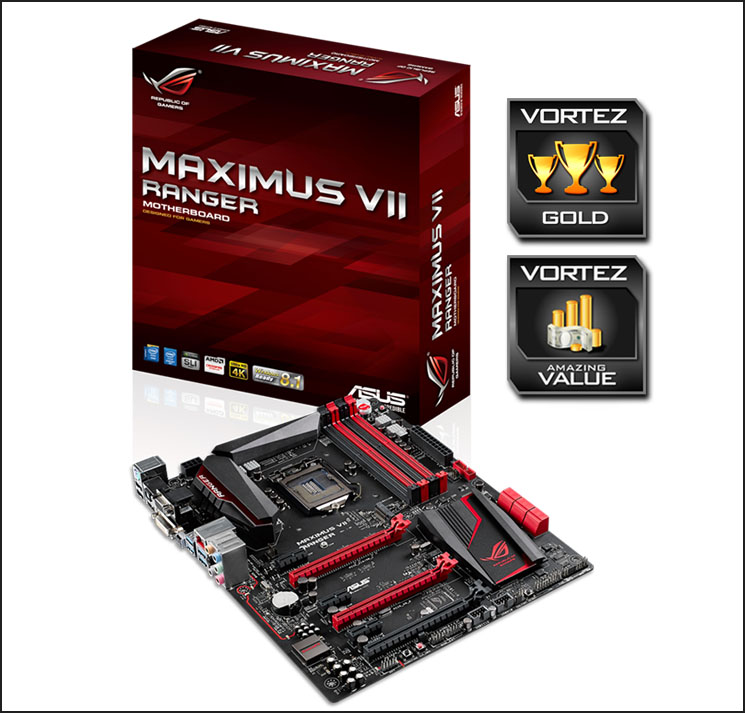
The price of Ranger is one of its best attributes. Coming in at just £130 (or less in some cases), there is no longer this misconception that ROG motherboards are for the wealthy. Being so affordable does mean there are some minor cutbacks but in all honesty a vast majority of enthusiasts will not notice these omissions anyway.
Maximus VII Ranger is one of the best price/performance motherboards we have tested. Loaded with a multitude of innovative features, we can foresee Ranger being a big success and have no reservations in highly recommending this exceptional motherboard.
VIDEO REVIEW – VORTEZ TV
Pros
+ Delightful visual appearance
+ Packed with innovative features
+ Great performance
+ Includes M.2 support
+ Brilliant overclocker
+ Clean & easy to use BIOS
+ Excellent value for money
Cons
– Lacks SATA Express
+ Delightful visual appearance
+ Packed with innovative features
+ Great performance
+ Includes M.2 support
+ Brilliant overclocker
+ Clean & easy to use BIOS
+ Excellent value for money
Cons
– Lacks SATA Express

Click here for an explanation of our awards at Vortez.net.


