







We take a look at a mainstream P67 LGA1155 Sandy Bridge board from ASUS, discovering its strengths and weaknesses.
With Intel finally launching Sandy Bridge we can now reveal the performance aspect of the much anticipated ASUS P8P67 motherboard that will operate within the mainstream segment of the LGA1155 lineup. Some weeks ago now we gave readers a preview of the ASUS P8P67 and we were forced to withhold any performance related results until now. Yesterday we published the current range of Intel 6 Series / Sandy Bridge processors 2300, 2400 & 2500K Review. That article revealed some rather significant results, showing that the 2500K chip in particular is a ‘diamond in the rough’. Those tests were made possible by the ASUS P8P67 which we will be looking at today. It’s great that we have a comparison to analysis with regards to the processors, but the real question now is – how does this P8P67 compare against other P67 motherboards?
The ASUS P8P67 is pitched as ASUS’ mainstream P67 motherboard. So in terms of the P67 lineup this board is coming in at the bottom with regards to feature-set. That isn’t to say it lacks features, because as we will come to learn – even a product placed at the bottom of the range still oozes character and finesse. The P8P67 is a product with an an impressive arrangement of attributes such as – EFI BIOS, DIGI+ VRM, BT GO!, AI Suite II, TPU and EPU and much more!
Within the P8P67 range we have the following boards:
+ ASUS P8P67 Deluxe – £195
+ ASUS P8P67 PRO – £160
+ ASUS P8P67 EVO – £150
+ ASUS P8P67 – £130

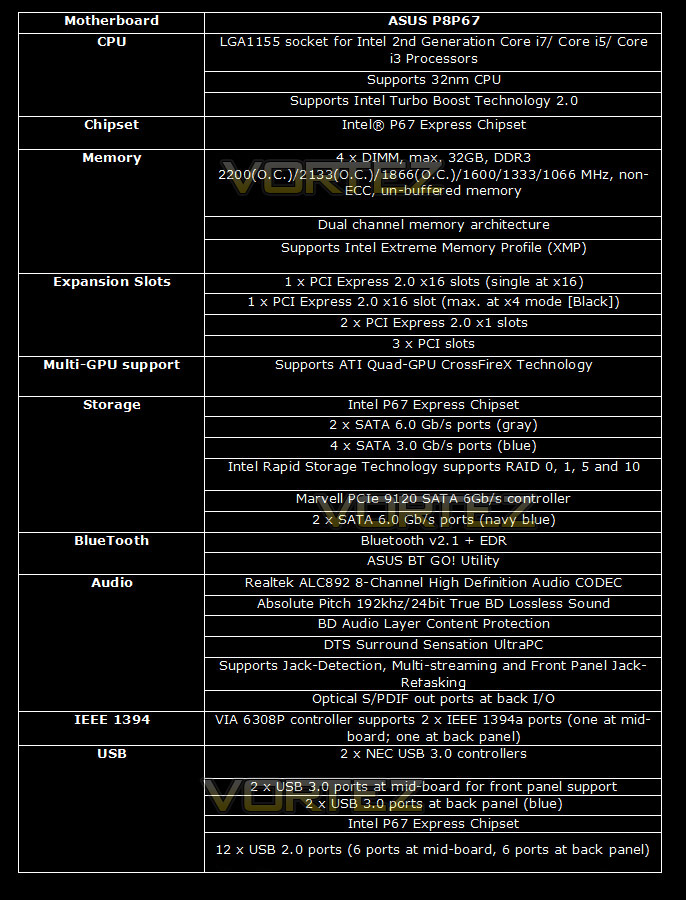
ASUS P8P67 Specifications
Packaging & Bundle
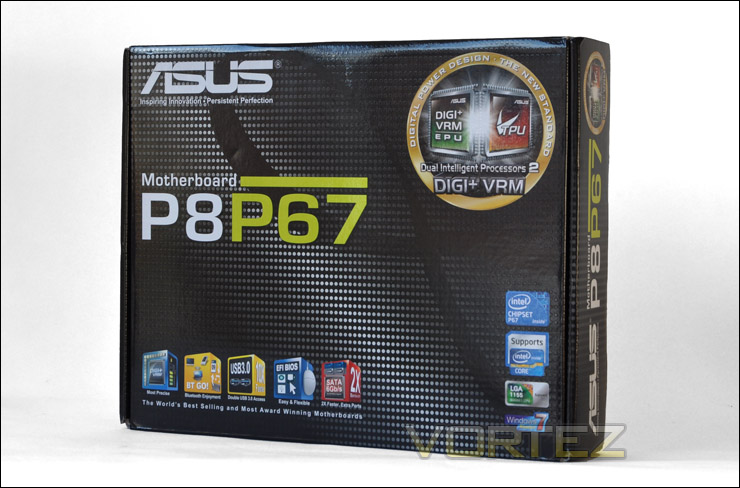
The ASUS P8P67 is presented in an attractive box. The features are printed on the front and back, highlighting that this board is designed for the Intel 6 Series processor, being LGA1155 and featuring the P67 chipset. ASUS are very vocal about their DIGI+VRM EPU and TPU – Dual Intelligent Processors 2. This is printed on the packaging rather largely. The highlighted features on the front certainly engage well, BT GO! USB3, EFI BIOS, and SATA 6G amongst the essential elements.
Prior to Sandy Bridge launch we did a preview of this motherboard and this video below clearly shows the bundle included, with an unboxing video and quick tour of the major features. Rather than post pictures showing the bundle, this video should give you a good idea of what is included within the box.
Closer Look
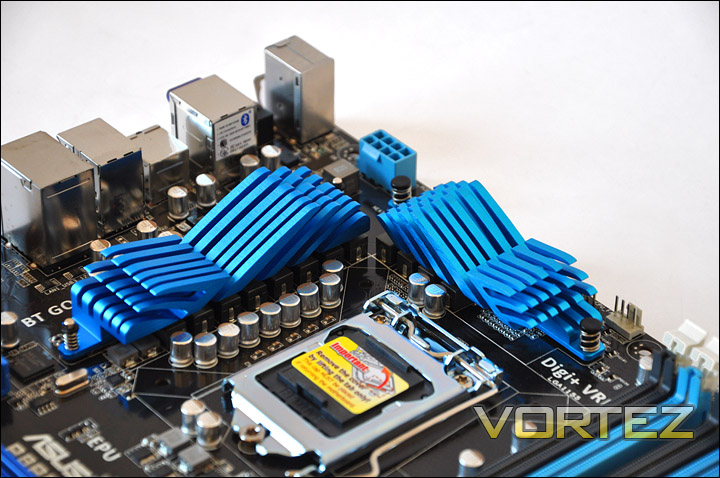
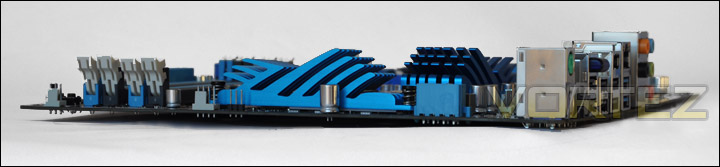
The P8P67 follows on from previous boards with the blue theme throughout. The heatsinks are aluminium and are designed in the shape of waves. Underneath is a 12 phase power design. (12+2)
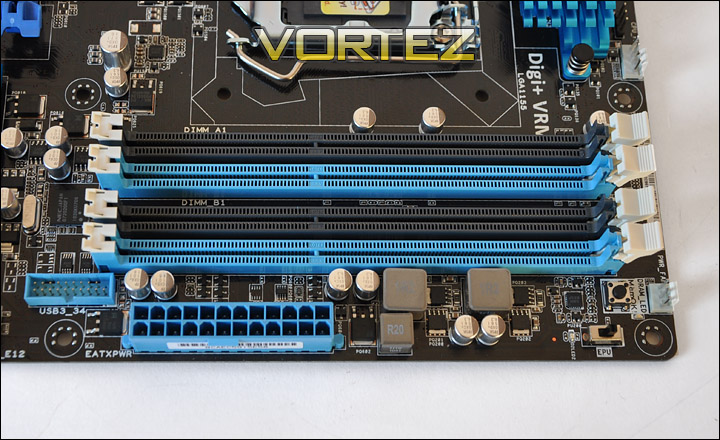
As with previous LGA1156 boards we have DDR3 dual channel memory lanes. There are 4 in total giving a maximum of 32GB. Supporting modules from 1066MHz right through to the high-end 2400MHz (OC). Note that the lanes themselves only have a latch on one side rather than both sides.
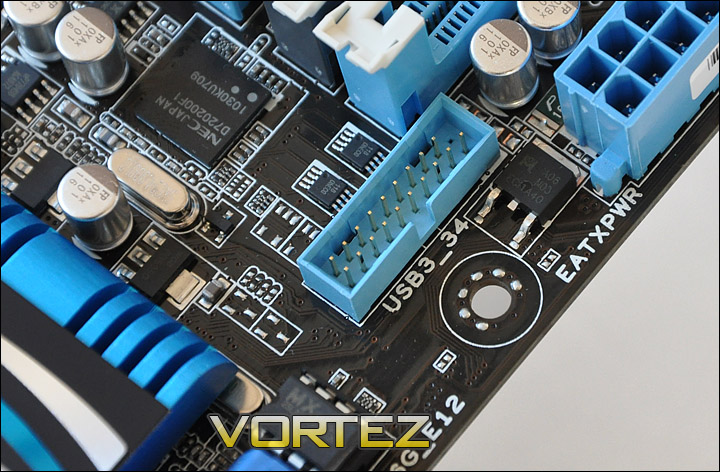
With USB3.0 very much in the forefront of computing. Going into 2011 we will see a real surge with this new standard, the aim is to get USB3.0 mainstream. We know the bandwidth is there to be had. This header located by the 24-pin power provides 2 x USB3.0 ports up front, ASUS supply a bracket with the Deluxe version of this board that gives you USB3.0 functionality right where you need it – at the front of your case.
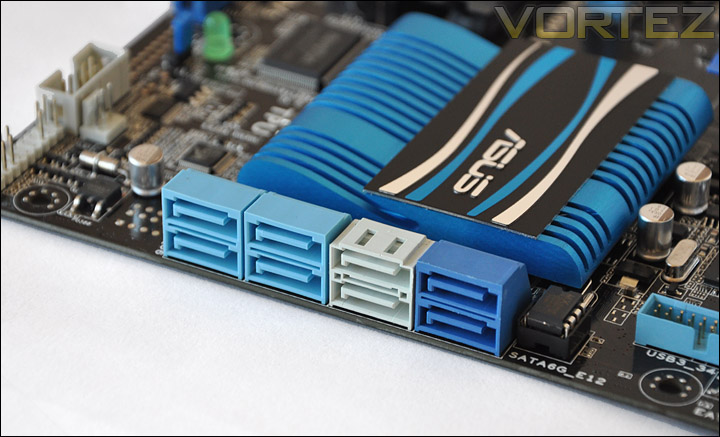
Taking a look at storage we can see there are up to 8 x SATA ports. The pale blue ports provide 3G transfer rate whilst the white and darker blue ports supply 6G transfer rate. Plenty of options there both for the standard drive and future-proof.
Closer Look (Continued)
The PCI-e lanes on the P8P67 give Crossfire support. The top lane operates at 16x whilst the lower lane just 4x because its bandwidth is shared with the smaller lanes at the top. We also have 3 PCI lanes for legacy devices. Perhaps those with older soundcards can still continue to use those on this setup.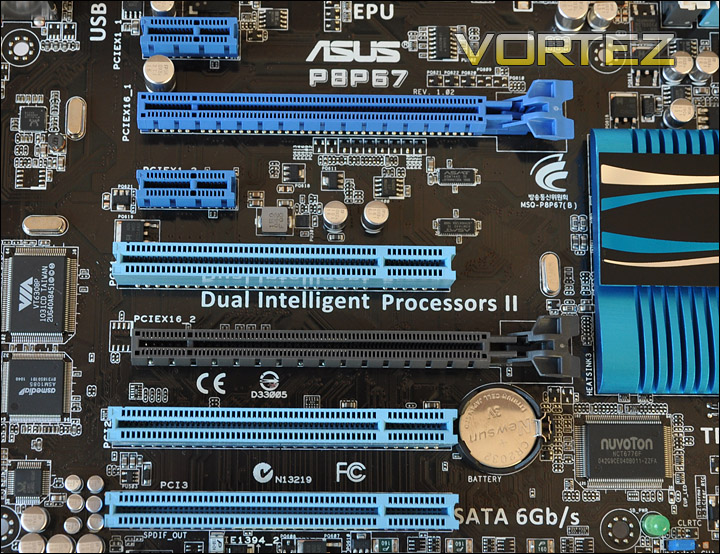
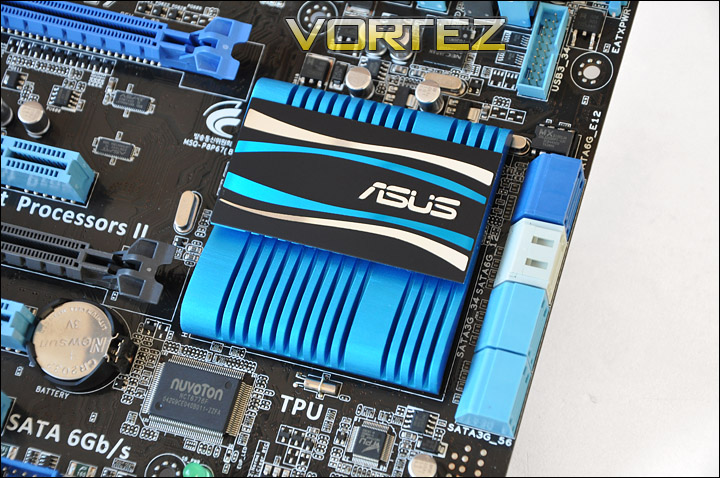
The P8P67 has a rather large Southbridge heatsink covering the chip. Larger than we have seen on previous ASUS boards. There is no Northbridge on this board or the Deluxe version.
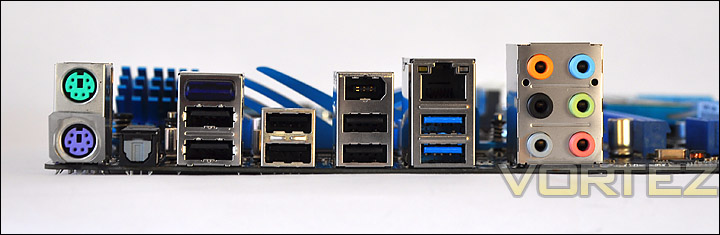
I/O panel provides some top class functionality. We have PS2 ports for keyboard and mouse, SPDIF for digital audio devices, BT GO (Blue LED) for connecting a blue-tooth device to the board/system. This in turn provides similar functionality to that of the iROG on ASUS Extreme boards. With BT GO! we now have an increased feature-set. Overclock from your phone, control media player on your machine, access personal data such as contacts and calendars and even synchronize your phone to your PC. Additionally we have 6 x USB2 ports, 2 x USB3.0 ports, Gigabit LAN provided by Realtek 8111E and audio ports via Realtek ALC892 which supplies “DTS Surround Sensation Ultra PC”.
ASUS EFI BIOS Quick Look VIDEO
ASUS have taken advantage of EFI (Extensible Firmware Interface) BIOS with the release of the new Sandy Bridge motherboards. For those who have had no experience with this BIOS interface, it is a radical step away from the conventional BIOS that we have come to use since computing really began. With EFI we can now point and click with the mouse, drag and drop, and instead of having a DOS type interface with just plain background colour and white text to scroll using the keyboard, we now have a flashy GUI that responds in a totally different manner to its aged predecessor.
Inside the ASUS EFI BIOS there are lots of features, some of which will differ to other boards that incorporate EFI – so below is a video showing the interface, which should give you a clear idea of how it looks and responds.
Dual Intelligent Processors 2, TPU & EPU, DIGI+VRM, BT GO!
For an entry level motherboard the ASUS P8P67 comes with a bountiful array of included technologies, that will allow budget minded enthusiasts to channel in to some fantastic features. The included features we have integrated with the P8P67 are: Dual Intelligent Processors 2, TPU and EPU. Sounds great doesn’t it? But what are these technologies? Let us explain.
Dual Intelligent Processors 2
ASUS have been very vocal about their two unique on board processors that they have named TPU and EPU. They have now brought the two together and named the concept ‘Dual Intelligent Processors II’ (DIP II for short). In our recent interview with Jack Cheng from ASUS’s motherboard interview, he mentioned that TPU is a highly customizable micro-processor targeted at performance tuning through dynamic control of key variables. TPU has been integrated into their motherboards to give users easy access to performance tuning utilities that would often be daunting to first time overclockers attempting to delve into BIOS. There are several ways users can use the benefits of the chip to gain extra performance. The first is through auto-tuning, which when selected will let the motherboard intelligently overclock the CPU, RAM, and iGPU, stress testing to make sure everything is stable. This can either be done in Windows using the TurboV EVO application or via an on-board switch for users that hate the thought of installing bundled motherboard software.

TPU
TurboV is something we have encountered a number of times in previous reviews. It’s a Windows based utility that provides a comprehensive list of voltage and clock settings akin to what we normally find in BIOS. The key advantage of the utility is that changes are made in real time so users don’t even have to enter BIOS. The EVO version is superior in that changes are applied to BIOS in real time and will therefore be saved on reboot. My assumption is that the P8P67P board will be bundled with the regular TurboV application and the EVO will be reserved to the Deluxe. Throughout our reviews, we have seen the ASUS software suite gradually improving into a unified tool. Initially, Turbo V EVO, AI Expert, AI Suite and Fan Expert were separate utilities with different functionalities but in the Rampage III Formula Review, we saw that ASUS had made tremendous progress in incorporating all these features into one easy to use software, AI SUITE II. Their upcoming P67 motherboards will bundle their most up to date rendition of the application, amalgamating all the above utilities into an easily manageable suite. Another addition to the suite is power management, brought by the on-board EPU chip.
EPU
Shifting our attention to power management and efficiency, ASUS implement their EPU microprocessor for real time energy saving. Again, this is something we have previously covered but continuing on their trend, they have improved both its functionality and the Windows interface. EPU optimises power efficiency by dynamically or manually regulating voltages and CPU speeds based on the load applied. Marketed as a complete solution, it can control the GPU/iGPU/Fan/HDD/DRAM and chipset. An additional feature which stems from Fan Expert is EPU’s ability to reduce fan speeds automatically under idle conditions, promising quieter operation. Enabling EPU can be achieved in two ways, either by using the bundled software or by using an on-board switch, bypassing the need for the Windows utility.
DIGI+VRM
Many overclockers will be familiar with voltage tweaking and adjusting clock speeds on their motherboards to get the most out of their CPU. Whilst the benefits of better performance have always be a yearning of overclockers around the world, they are often also met with instability and lower power efficiency. In response to the growing emphasis of lower power consumption and efficiency, ASUS have developed the DIGI+ VRM, a programmable microprocessor capable of intelligently managing the motherboards’ power circuitry to reduce power transfer loss and thereby improving stability. A similar concept was first introduced on the Rampage III Extreme by the name of Extreme Engine Digi+ which allowed the board to operate at a lower switching frequency to minimize power usage whilst still maintaining high overclocking headroom. Now, ASUS have decided to share the technology on their P8P67 line of motherboards.
Typically, any clock adjustments made are made using the clock generator which then affects the CPU through the base clock. The CPU Spread Spectrum then acts to stabilise frequencies if enabled. DIGI+ VRM is unique in that it implements a spread spectrum in the Vcore area to stabilise the voltages attributed to the core, PCIe bus and other parts of the VRM circuitry. It can also adjust the VRM frequency intelligently based on load to improve power efficiency. Similarly, the microprocessor will detect hot VRM areas and activate cooling accordingly. I’m unsure how cooling can be activated on the passive heatsinks but more will become clear on release. The main benefit of DIGI+ VRM is higher system stability and lower EMI radiation. Stability is achieved by using a switching frequency of 300kHz and it can be increased to 500kHz for improved overclocking range. For more precise adjustments to the VRM power management, users will have all the options available to tweak in BIOS or in the Windows.
BT GO!
When I was first introduced to RC TweakIt software bundled with the Extreme variants of the ROG motherboards, I had nothing but praise for it. My only complaint was that it was reserved to those boards for overclocking purposes despite the potential for a similar concept to be used for media purposes on more mainstream motherboards. Quoting my conclusion of RC TweakIt on the Maximus III Extreme review, I wrote; “ASUS have put a lot of thought into the concept and I hope we see it become more mainstream in the future…” and it appears that ASUS have listened to our prayers. The new addition, known as BT GO incorporates a Bluetooth dongle on the P8P67 and P8P67 Deluxe motherboards. This time, functionality has increased to more than just overclocking purposes. To make the most of the feature, users with Symbian/Microsoft Mobile/Android equipped phones can connect to their PCs remotely via Bluetooth. Unlike previous renditions of RC TweakIt, iPhones will also be supported from launch.
BT GO enables three functions; ‘File Sharing’ through which the phone can be synchronised and backed up to the PC, ‘Remote Control’ allowing the phone to control Windows Media Player on the PC or overclock through the BT Turbo Remote utility, and finally for ‘Life Entertainment’. The latter is useful in that it allows personal data on the phone to be synchronised with the PC, such as personal contacts or calendars. Furthermore, users can gain access to the internet by simply using the 3G signal on their phones, all that across the Bluetooth connection. BT Turbo remote is akin to RC TweakIt in that it allows voltages and clocks to be monitored or tweaked remotely. The main difference is that RC TweakIt does the whole process through the iROG chip on such motherboards to alleviate latency issues and to reduce CPU loads during intense overclocking sessions. BT GO acts through the CPU and thus produces a small load. While that isn’t an issue for mundane media tasks, it can affect benchmarking sessions at high clock speeds.
Test Setup & Overclocking
CPU Intel Core i5 2500K (3.3GHz)
Motherboards
ASUS P8P67 (LGA1155)
Foxconn P67A-S
ECS P67H2-A (Black Extreme)
Memory 4GB OCZ Reaper 1600MHz 8-8-8-26
CPU Cooler Alpenfohn Matterhorn
Graphics ZOTAC GTX 460
PSU OCZ Fatal1ty 750W
Motherboards
ASUS P8P67 (LGA1155)
Foxconn P67A-S
ECS P67H2-A (Black Extreme)
Memory 4GB OCZ Reaper 1600MHz 8-8-8-26
CPU Cooler Alpenfohn Matterhorn
Graphics ZOTAC GTX 460
PSU OCZ Fatal1ty 750W
All P67 Sandy Bridge motherboards will be benchmarked against each other using the Intel Core i5 2500K. The maximum overclock will also be included within the proceding benchmark tests to identify performance gains as a result of tweaking CPU clock speed via the multiplier.
Overclocking
As previously mentioned in our Intel Core i5 Sandy Bridge Roundup – overclocking is achieved by altering the multiplier rather than the BCLK. So the BCLK stays at 100MHz and the multiplier is modified. So if we have 100MHz on the BCLK and 40 for the multiplier this will obviously output 4GHz. We chose to use the Intel Core i5 2500K across each of the motherboard tests and indeed for the overclocking due to its unlocked multiplier. Since the P8P67 is a mainstream board and the CPU is also mainstream this is probably going to be a popular combination (if the results are positive of course!)
With overclocking simplified on Sandy Bridge, this means that achieving the best overclock couldn’t be easier. CPU voltage and multiplier just need to be modified accordingly. I began slowly nudging up the multiplier from 33 (3.3GHz). Ultimately I managed to overclock the 2500K by 1000MHz giving a clock-speed of 4.3GHz. Please bear in mind that at this stage many of the motherboards we have been using to test the chips are premature and some are even beta BIOS versions. So, whilst we did hit a wall with 4.3GHz this isn’t the end of the road by any means.

Power Consumption
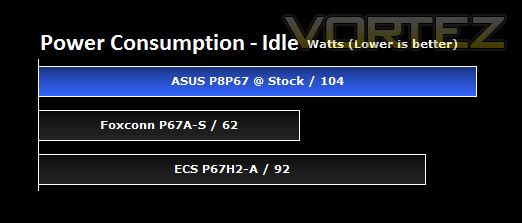
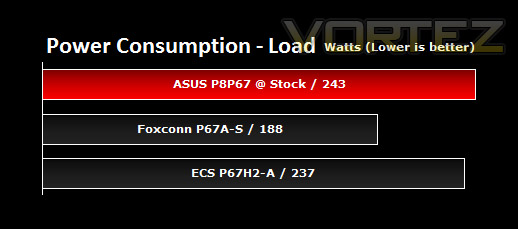
It’s interesting to note the power consumption across all motherboards. Although they are all using the P67 chipset, energy results can fluctuate between manufacturers due to the features and specifications that are integrated. First of all, for the idle tests the system is cold booted into Windows and no additional applications are executed – the watts are noted on the external energy monitor we use and then the system is loaded with 3DMark 11 – watts are again monitored for the duration of the test and the highest rated wattage result is then noted down. Below are the results of this energy test.
As you can see from the graphs the ASUS P8P67 requires more power at idle and load states. Bear in mind though that these results were obtained under the “normal” setting for energy efficiency within the BIOS. You can of course alter this to lower the power consumption. Overall though, the power consumption for the P8P67, whilst being the most demanding doesn’t highlight any issues. The difference in watts between the manufacturers isn’t worrying.
AIDA64
CPU Queen
This simple integer benchmark focuses on the branch prediction capabilities and the misprediction penalties of the CPU. It finds the solutions for the classic “Queens problem” on a 10 by 10 sized chessboard. At the same clock speed theoretically the processor with the shorter pipeline and smaller misprediction penalties will attain higher benchmark scores. For example — with HyperThreading disabled — the Intel Northwood core processors get higher scores than the Intel Prescott core based ones due to the 20-step vs 31-step long pipeline. CPU Queen test uses integer MMX, SSE2 and SSSE3 optimizations.
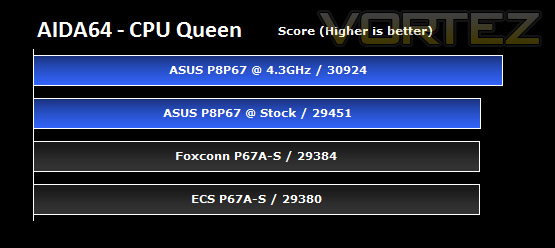
There is really little to separate the three boards on test here at stock settings, mainly because this benchmark is very CPU-centric with not a large amount of involvement from the various components of the motherboard that will alter the score.
The ASUS P8P67 comes out slightly on top, with the Foxconn behind, closely followed by the ECS. Overclocking the Sandy Bridge CPU does yeild tangible benefits here, as to be expected.
CPU Photoworrx
This benchmark stresses the integer arithmetic and multiplication execution units of the CPU and also the memory subsystem. Due to the fact that this test performs high memory read/write traffic, it cannot effectively scale in situations where more than 2 processing threads used. For example, on a 8-way Pentium III Xeon system the 8 processing threads will be “fighting” over the memory, creating a serious bottleneck that would lead to as low scores as a 2-way or 4-way similar processor based system could achieve. CPU PhotoWorxx test uses only the basic x86 instructions, and it is HyperThreading, multi-processor (SMP) and multi-core (CMP) aware.
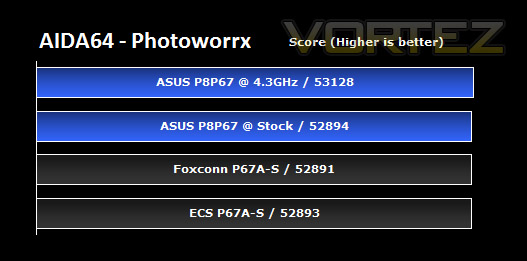
The scores in this test are extermely closely matched, not much to pick and choose between for any of the boards here. This may be due to the hardware bottleneck issue described in the test description above.
CPU AES
This benchmark measures CPU performance using AES (Advanced Encryption Standard) data encryption. In cryptography AES is a symmetric-key encryption standard. AES is used in several compression tools today, like 7z, RAR, WinZip, and also in disk encryption solutions like BitLocker, FileVault (Mac OS X), TrueCrypt.
CPU AES test uses only the basic x86 instructions, and it’s hardware accelerated on VIA PadLock Security Engine capable VIA C3, VIA C7 and VIA Nano processors; and on Intel AES-NI instruction set extension capable processors. The test is HyperThreading, multi-processor (SMP) and multi-core (CMP) aware.
CPU AES test uses only the basic x86 instructions, and it’s hardware accelerated on VIA PadLock Security Engine capable VIA C3, VIA C7 and VIA Nano processors; and on Intel AES-NI instruction set extension capable processors. The test is HyperThreading, multi-processor (SMP) and multi-core (CMP) aware.
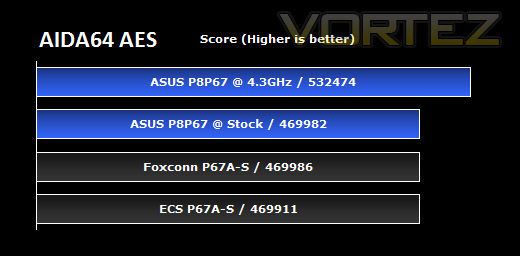
For those of you who love to ZIP all your files, this is the test to look at. You can see that the overclock is the only change that brings significant gains, with the three motherboards on test all being quite closely matched in performance. There are good gains to be had in getting that Sandy Bridge CPU to 4GHz+, if the board allows. See the overclocking section for more information on that.
FPU Mandel
This benchmark measures the double precision (also known as 64-bit) floating-point performance through the computation of several frames of the popular “Mandelbrot” fractal. The code behind this benchmark method is written in Assembly, and it is extremely optimized for every popular AMD, Intel and VIA processor core variants by utilizing the appropriate MMX, MMX+/SSE, SSE2, SSSE3, or AVX instruction set extension. FPU Mandel test is HyperThreading, multi-processor (SMP) and multi-core (CMP) aware.
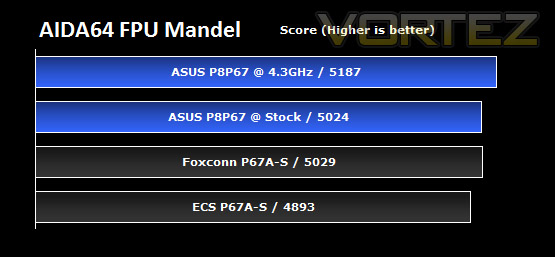
In this test, the ASUS board comes out on top again, with a decent boost in performance for the ~30% overclock. The Foxconn board actually outperforms the Asus at stock here, though I believe the figures are so close that this is within the reals of experiemental error. The ECS board follows not too far behind, but certainly far enough out of the error margin to be tangible, unlike the other two.
x264 HD
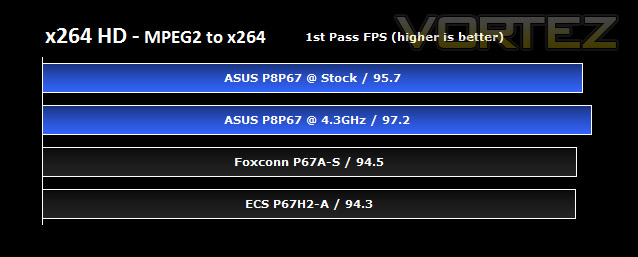
Simply put, this test measures how fast your machine can encode a short, DVD quality MPEG-2 video clip into a high-quality x264 video clip. What’s x264, you ask? It’s more or less the next-generation Xvid/DivX codec. I think it’s ideal for a benchmark because the application (x264.exe) reports fairly accurate compression results (in frames per second) for each pass of the video encoding process, and it uses multi-core processors very efficiently.
x264 HD gives results for 2 passes when compressing an MPEG-2 clip into x264. It presents 4 seperate results for each pass giving a total of 8 – all results are given in FPS. For each pass I have averaged out the results. The results reveal that the P8P67 can handle video encoding slightly better than its rivals. Although there isn’t very much in it, its another clear win for the ASUS P8P67.
Cinebench
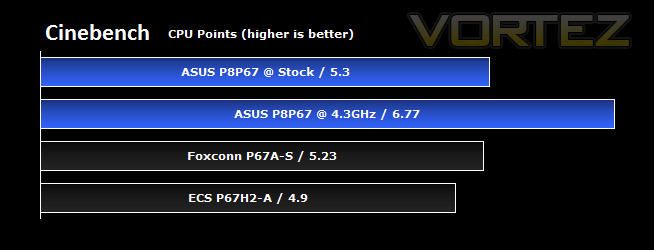
CINEBENCH can measure systems with up to 64 processor threads. ThIS test scene contains approximately 2,000 objects which in turn contain more than 300,000 polygons in total, and uses sharp and blurred reflections, area lights, shadows, procedural shaders, antialiasing, and much more. The result is displayed in points (pts). The higher the number, the faster your processor.
This test provides nice easy, neat results to compare processor performance, and we can see that there are very clear differences across the three motherboards on test, and with the overclocked CPU.
The ASUS P8P67 once again grabs the top spot, but only by a small margin over the Foxconn P67A-S. The ECS board slips backwards by around 0.4 (~8%) over the competition.
Overclocked, there is a very nice ~28% gain for a ~30% overclock, showing the test is apparently tied quite closely to the clock speed of the chip.
SiSoftware SANDRA
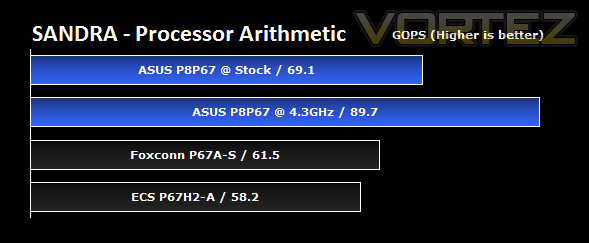
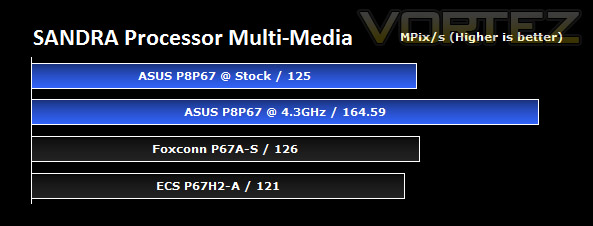
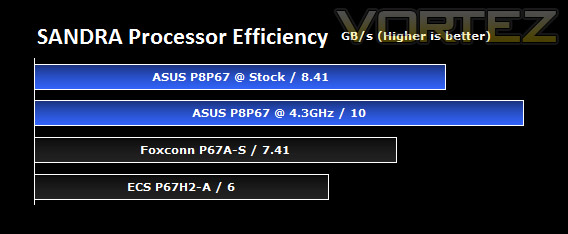
SANDRA isn’t always a benchmark that is included in hardware reviews but I believe it shouldn’t be ignored. SANDRA provides a vigorous package that tests your system in a rather large array of benchmarks. There are many aspects of benchmark that can be executed. We will be considering – CPU and memory tests.
Processor tests
The processor results produced by SANDRA all tell a similar story, like the others we’ve seen so far. The ASUS board and Foxconn boards are closely matched, with the ASUS winning out in almost all, and the ECS P67 offering falls back a bit in comparison.
Overclocked performance gives similar gains to those we’ve seen in other tests and gives a nice boost over stock. With 4GHz+ clocks so easily attainable with Sandy Bridge, you’d almost be crazy not to.
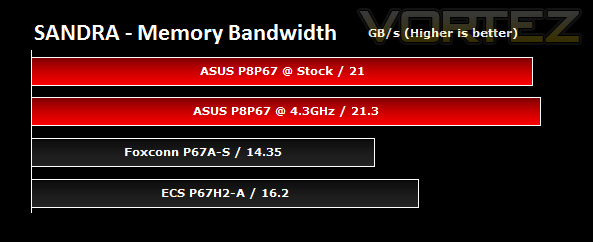
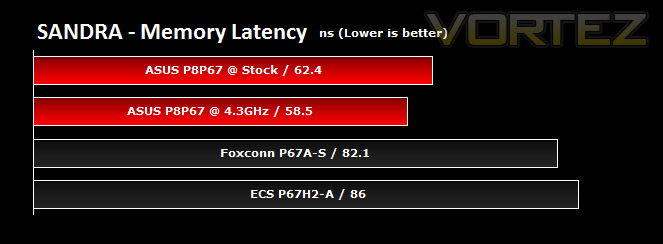
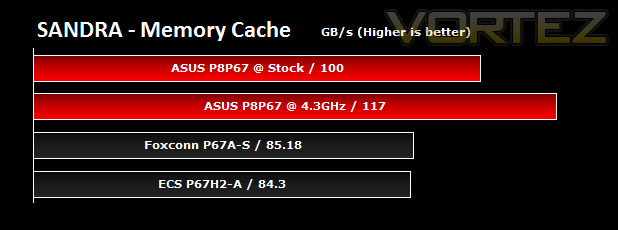
Memory tests
The memory tests further highlight the same trend, though the ASUS P8P67 does particularly well here, with really rather good margins over the other boards on test.
The only reversal of observed trends so far is the ECS board giving a higher memory bandwidth than the Foxconn, though neither can match the ASUS P8P67 for performance.
3DMark 11
3DMark 11 is the latest version of the world’s most popular benchmark. Designed to measure your PC’s gaming performance 3DMark 11 makes extensive use of all the new features in DirectX 11 including tessellation, compute shaders and multi-threading. Trusted by gamers worldwide to give accurate and unbiased results, 3DMark 11 is the best way to consistently and reliably test DirectX 11 under game-like loads.
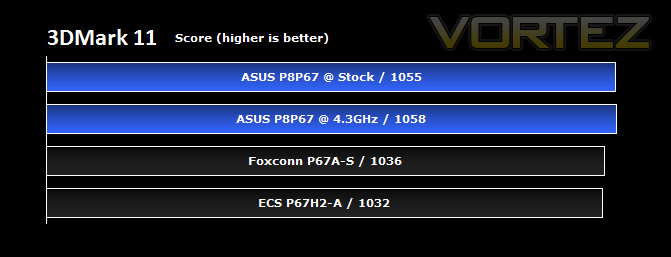
3DMark 11 was released at the end of last year and needs little introduction. For the test settings the Extreme preset is run with ‘benchmark only’ being selected.
The first test of what we could consider gaming performance holds one main surprise, which is the performance of the P8P67; the P8P67 tops the chart with the overclock and then at stock, with the Foxconn and ECS high end offerings a short way behind, separated quite closely for this test.
All of the tests are relatively close, suggesting the test is certainly putting the GTX 460 to work. The ASUS would appear to make the best job of bringing the Nvidia card and Intel CPU together here.
DIRT 2
DiRT 2, released in December 2009, is a popular arcade rallying game, which makes use of DirectX 11 features such as tessellation on the highest settings. You can rally and compete in many multi-car events across four lavishly-realised continents in single player or multi-player over the web. Despite its arcade handling and now, age, DiRT 2 still remains immensely popular with all types of gamers.
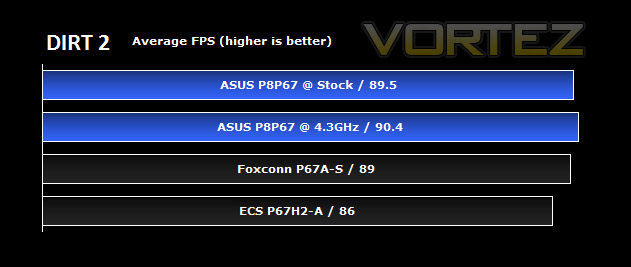
Here we can see the average frames per second for each P67 motherboard tested. The game was tested in maximum settings at 1680×1050 with 0xAA and 0xAF.
DiRT 2 is a favourite here at Vortez, and we can see that, even with the modestly powered GTX 460, it is giving us super smooth framerates across all the boards on test. No major issues with any in terms of raw performance.
Again, though, we see the P8P67 pull out over the other two boards on test by a few frames or so. Overclocking the CPU doesn’t yeild a massive boost at these settings, though we know that DiRT 2 is quite well optimised for PC and puts the graphics to work more so than CPU.
Call of Duty Black Ops
Call of Duty: Black Ops is the latest instalment in the immensely popular first person shooter Call of Duty series. In this latest game, set in the Cold War, you blast your way through detailed locations such as Russia, Cuba, Laos and Vietnam using a large variety of weapons, all realised in very high detail. Breaking all sorts of records, CoD: BO has been a massive success worldwide, and is set to remain an extremely popular online FPS.
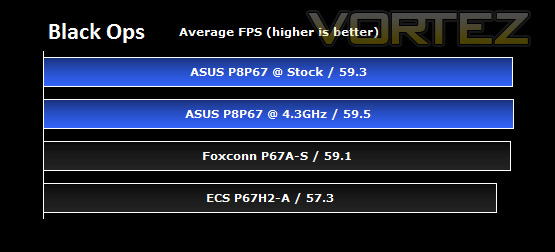
The game was tested on the highest settings at 1680×1050 0xAA 0xAF.
Here, there is not a lot to separate the P8P67 over the Foxconn P67A-S, well within the margin of error on these tests. The ECS lags behind by around 2 frames per second here, and like with DiRT 2, overclocking doesn’t give massive gains when the graphics card is being worked hard. The ASUS still comes out on top, dealing with the demands of this new game slightly better than the other boards on test. That said, none of the boards here are going to lose you a lot of frames in a firefight, with all giving good performance.
Metro 2033
Metro 2033 is a first person shooter and survival horror game based on the popular Russian book of the same name. It’s set in a post apocalyptic Russia, capturing all the grit and grime of the location in stunning DirectX 11 graphics. It is widely regarded to be one of the most graphically demanding titles so far released on PC.
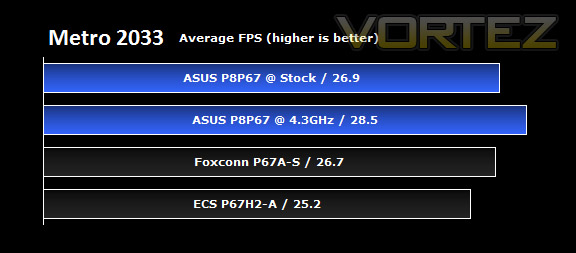
Tests were run at 1680×1050 0xAA 0xAF on the highest settings possible.
The demanding nature of this game has separated the boards a little more than in previous tests, with the benefits of overclocking the CPU becoming more clear and a larger percentage of overall performance. Once again, the mainstream ASUS board tops the other two, though there’s not much in it to the Foxconn offering, the ECS brings up the rear by more of a margin.
This shows us once more that the ASUS P8P67 is making the best use of the components we’ve given it to perform with. The margins aren’t outstanding, but certainly worthy of praise.
Unreal Tournament 3
Unreal Tournament 3 was released in November 2007, making it by some margin, the oldest title tested here, but it still remains very popular as an online FPS and is still the most recent title of the Epic series. Using the Unreal Engine 3, the game is traditionally CPU limited, and provides an interesting insight into CPU gaming performance, especially as a large number of titles have since utilised its friendly game engine since.
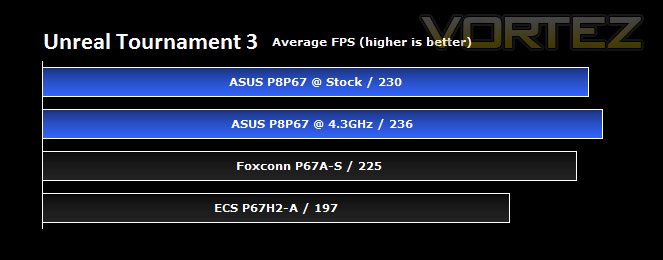
Immediately you’ll notice that at the highest settings at 1680×1050 0xAA 0xAF the frame rates are extremely high.
Thus, all the boards will give a super-slick playable experience at these settings. However, as mentioned above, the game relies quite a lot on raw CPU power and this seems to have created the largest disparity in the boards seen so far. As we’ve become accustomed to, the ASUS P8P67 tops the charts again, giving well over 200 FPS. Overclocking yeids a small 6 FPS gain, and the difference down to the Foxconn board is just 5 FPS, a tiny percentage at such high frames per second.
The ECS P67H2-A doesn’t fare so well, being a whole 33 frames per second behind the ASUS P8P67, equating to roughly 15% drop in performance. This shows the design of the P8P67 fares particularly well in CPU intensive games, as it has done throughout all the tests.
Conclusion
A big thanks to Alex Hull for once again assisting with the publishing of this review
The ASUS P8P67 is a remarkable motherboard. It may well be lacking some of the prowess present on some of the higher end P67 boards currently available but there are many other boards within the P8P67 family to accommodate this. The P8P67 is the entry level motherboard that will suitably entertain the mainstream market. Certain features have been left out in order to ensure that the price-tag is attractive. If you want more features they are available with the P8P67 EVO and Deluxe models.
Performance-wise the P8P67 is fantastic. We put it up against ECS’s flagship performance P67 board the P67H2-A Black Extreme and the P8P67 left it in limbo. I was certainly very surprised to see an entry level board from ASUS take on a performance level board from ECS so confidently. In almost every test we featured the P8P67 motherboard in it managed to come out triumphant. This board is perfect for the enthusiast on a budget.
With features like USB3, SATA6G, CrossfireX, TPU, EPU, Digi+VRM and the added functionality EFI BIOS brings its clear to see that the P8P67 is a brilliant buy. If you don’t need the high-end feature but want to submerge in Sandy Bridge then the P8P67 is a great choice. Retailing at around £130 it will definitely be receiving our “Amazing Value” award.
One of aspects of the P8P67 that will draw in lots of attention is the fact that it comes with EFI BIOS. Even some of the high-end boards like the ECS P67H2-A only feature a standard BIOS. Inside EFI, as shown in the video it is quick and easy to manage settings. Overclocking is simple, and the benefits from a moderate overclock as shown in the benchmarks are significant to performance gains.
The P8P67 is a great all-round board, and I would urge anyone considering moving to Sandy Bridge to take a look at this board. Especially if you are on a budget but want excellent performance. Remember, you also get 3 years warranty. What a deal!
Pros
+ Entry level board with high-end performance
+ Amazing value
+ EFI BIOS
+ Great feature-set
+ Overclocks well
Cons
– Power consumption on normal mode
– Immature BIOS
+ Entry level board with high-end performance
+ Amazing value
+ EFI BIOS
+ Great feature-set
+ Overclocks well
Cons
– Power consumption on normal mode
– Immature BIOS

