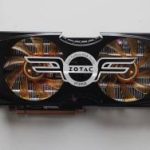
With Computex 2010 creeping on us, let’s see what ASUS will have in store for us.
Computex, held every year in Taipei, Taiwan, provides a platform for hardware manufacturers, big and small, to showcase their latest, greatest and most innovative technologies yet. First held in 1981, Computex has grown over the past 29 years with the ever rising popularity in consumer electronics and our reliance on Information Technology. Taiwan has become the centre of technological development since its emergence as an industrial powerhouse in the 1960s and the country is now home to some of the biggest computer manufacturers in the world, including ASUS. So it is very fitting to have the world’s second largest computer expo (after CeBIT, Hannover) in the home of consumer electronics.

It has become almost customary for companies to hold small events prior to Computex itself to demonstrate to journalists some of the latest products that will eventually be on show at the expo. Today, we will be having an early look at what ASUS will be showcasing in the following days in Taipei. Following the invitation to attend the seminar at the Soho Hotel in London, I didn’t hesitate to accept the offer. On arrival at the luxurious hotel, I was greeted by none other than -VK- who many of you may know from the many online forums he frequents. He is of course the Technical PR and the marketing representative for ASUS UK. And with him were two other representatives from ASUS, one of whom, Josh, was in charge of briefing us with motherboard development and ASUS’s design philosophy. His claim to fame came with the introduction of the much revered Sabertooth motherboard last year, for which he was responsible. With everyone gathered, it wasn’t long before we were lead to the rather grandiose theatre room. The appeal was of course not the room itself or the sofa armchairs but the open system they had on display. The main attractions were four pieces of hardware sitting on a desk that greeted us on entry.
Before I go into further details, let’s remind ourselves exactly what brought ASUS success:
A bit about ASUS:
ASUS comes from the last four letters of Pegasus, the winged horse in Greek mythology that represents the inspiration of art and learning. ASUS embodies the strength, creative spirit and purity symbolized by this regal and agile mythical creature, soaring to new heights of quality and innovation with each product it introduces to the market.
ASUS pursues technological and aesthetic perfection through continuous innovation. We place ourselves in our customers’ shoes to develop a deep understanding of, and genuine empathy for, their needs—enabling us to create user experiences that transcend the norm.
ASUS Design Philosophy
ASUS Design develops high-quality solutions our customers will enjoy.
Our design process is built on thorough research, early anticipation and well-planned execution.
We act with a global vision and a focus on local strengths, conditions and heritage.
ASUS comes from the last four letters of Pegasus, the winged horse in Greek mythology that represents the inspiration of art and learning. ASUS embodies the strength, creative spirit and purity symbolized by this regal and agile mythical creature, soaring to new heights of quality and innovation with each product it introduces to the market.
ASUS pursues technological and aesthetic perfection through continuous innovation. We place ourselves in our customers’ shoes to develop a deep understanding of, and genuine empathy for, their needs—enabling us to create user experiences that transcend the norm.
ASUS Design Philosophy
ASUS Design develops high-quality solutions our customers will enjoy.
Our design process is built on thorough research, early anticipation and well-planned execution.
We act with a global vision and a focus on local strengths, conditions and heritage.
With that covered, let’s see what ASUS wanted us there for.
ASUS Crosshair IV Extreme + Lucid
The seminar focussed a lot on ASUS’s innovations in the AMD market. With features such as Core Unlocker, Turbo Unlocker and Turbo Key II forming the premise of their TPU core logic, ASUS are bringing overclocking into the mainstream market. When I reviewed the Rampage III Extreme, I mentioned how the motherboard had a plethora of methods to overclock the CPU and ASUS has taken this to the next step on their AMD line of ROG motherboards. Those above features have already been covered in depth by James in his Crosshair IV Formula review and what impressed us the most was the board’s ability to not only unlock the Phenom x2 555 into a fully fledged quad core, but to also overclock it to 4GHz. However, a few features were missing from the Crosshair IV Formula that were present on ASUS’s flagship Intel motherboards. Enter the Crosshair IV Extreme!
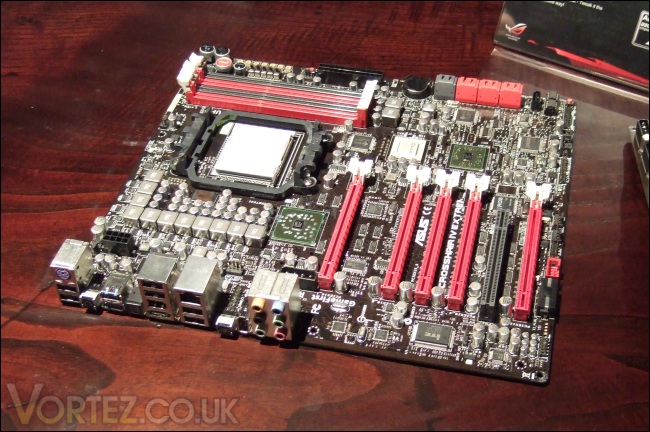
The ASUS Crosshair IV Extreme bare
The Crosshair IV Extreme is built around the AMD 890FX chipset, sporting the SB850 southbridge. The socket AM3 motherboard supports the AMD Phenom II, Athlon II and Sempron 100 Series processors. As the Extreme moniker would denote, this board offers ASUS’s latest and greatest innovations in one package. These include their unique ROG Connect/RC Bluetooth features and the Extreme OC zone tools. The board was created to emphasise to users that ASUS haven’t forgotten about manual overclocking and while TPU has gone on a long way to automate the process, there is still a strong community of overclockers who want to do so the traditional way. Other features that have also made the transition from the Intel ROG Extreme boards are the dual BIOS and Probelt tool. As standard, USB 3.0 and SATA3 6 Gbps are present thanks to the NEC chip and Marvell controllers.
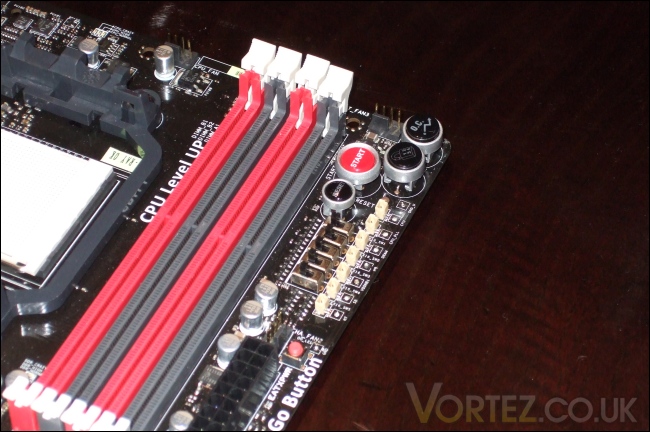
Core Unlocker, Turbo Key II and ASUS Probelt
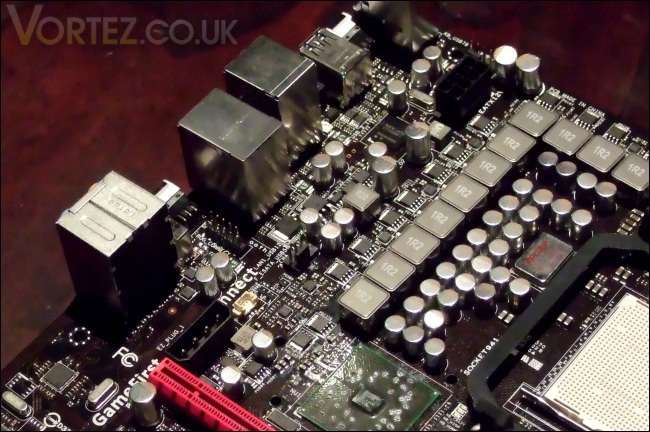
The motherboard boasts an impressive 8+2 Phase PWR with ML Cap
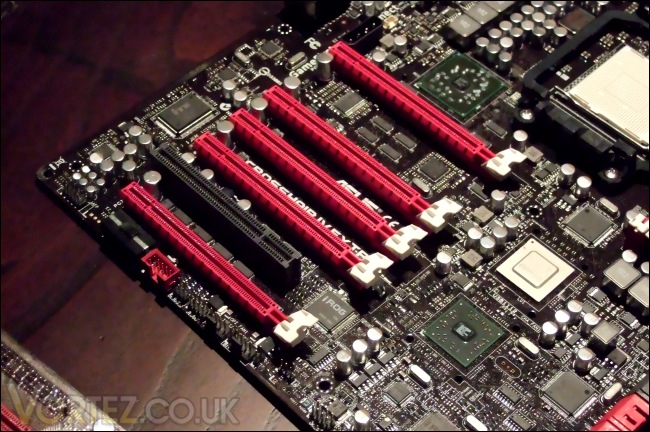
5 PCIe 2.0 x16 slots and the iROG chips
We have already talked endlessly about the features presented on this board such as ROG Connect and ASUS EPU/TPU in our past reviews so I will now shift your attention to something unique to this board; the Lucid Hydra chip.
ASUS Crosshair IV Extreme + Lucid (Continued)
Some may recall two years ago a small company, by the name of Lucid, were developing a chip that would enable a multi-GPU solution on any platform and using any graphics card. It didn’t bode well for AMD or Nvidia who saw their own multi-GPU implementation being threatened, more so for Nvidia who required license fees for SLI. But for the consumer it was looking promising, and the prospect of being able to add any additional GPU to their system for a boost in performance was close to becoming a reality. However, Lucid’s first chip, the Hydra 100, failed to scale well and was plagued by lacklustre drives. Backing and funding from Intel meant that company wasn’t going to give up and at the end of last year, the Lucid Hydra 200 chip was developed. It wasn’t long before MSI adopted it in their flagship motherboards but performance was still not on par with native Crossfire and SLI implementation, which was delivering almost 100% scalability with two GPUs.
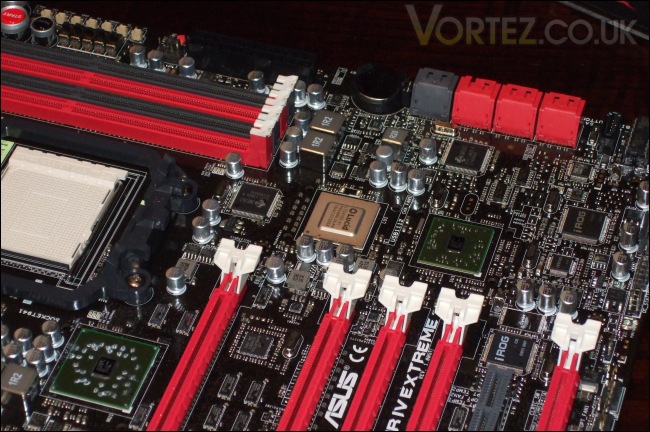
At this point you might be asking yourself what ASUS’s motives are for adopting the Lucid Hydra chip given its uninspired performance. We have to realise at this point that we’re dealing with an AMD chipset and historically SLI has always been absent for obvious reasons. ASUS wanted to break that barrier and bring SLI support back onto the AMD platform (a potent combination back in the nforce 4 days) and their solution was the Lucid Hydra 200 chips. Rather than opting for the hot running NF200 chip or dealing with licensing issues between Nvidia and AMD, the Lucid Hydra was the preference. With Lucid, the Crosshair IV Extreme offers flexibility for multiple GPUs from both vendors and ASUS also claims a performance gain compared to AMD’s native crossfire solution.
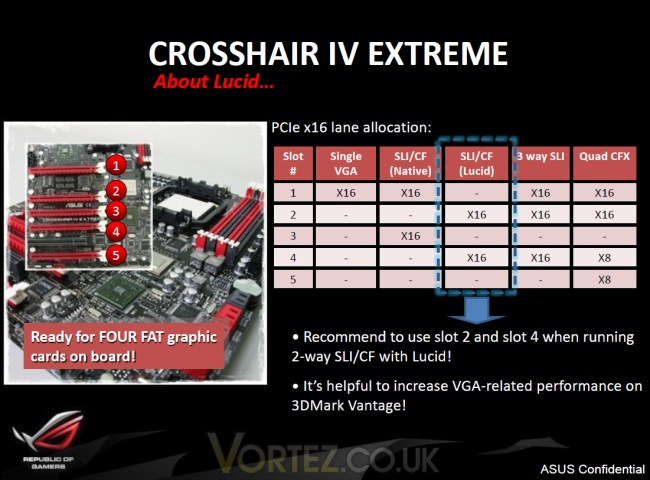
The Crosshair IV Extreme has a tweaked layout compared to the Formula, sporting 5 PCIe 2.0 x16 slots that can fit up to 4 dual slotted graphics cards. With additional lanes from the Lucid Hydra chip, the motherboard allows three cards to run at the full x16 link width in for tri SLI/CrossfireX. For quad CrossfireX, two cards will run at x16 and the other two at x8. Note that quad SLI isn’t supported due to the lack of NF200 chips but having SLI is already a major breakthrough on the AMD platform that we shouldn’t complain.
There are two different configurations that support dual-GPUs; the first requires the cards to be installed in the 1st and 3rd PCIe slots, relying on the board’s native support for Crossfire in this case, and the second method is to use the 2nd and 4th slots instead whereby multi-GPU support comes from the Hydra 200 chip. The latter is necessary for SLI but is also recommended by ASUS for ATI Crossfire over the native solution for performance gains of around 1-4%. The reason for the performance benefits are not clear but ASUS emphasised that they have been working very closely with Lucid for two years to optimise their drivers. Immature drivers prevented ASUS from being early adopters of the Lucid IC but they now believe that the drivers have progressed far enough to surpass native SLI/Crossfire. There is one caveat in that driver updates from ATI will no doubt improve native Crossfire performance so users will have to wait a week or so for Lucid to update their own drivers.
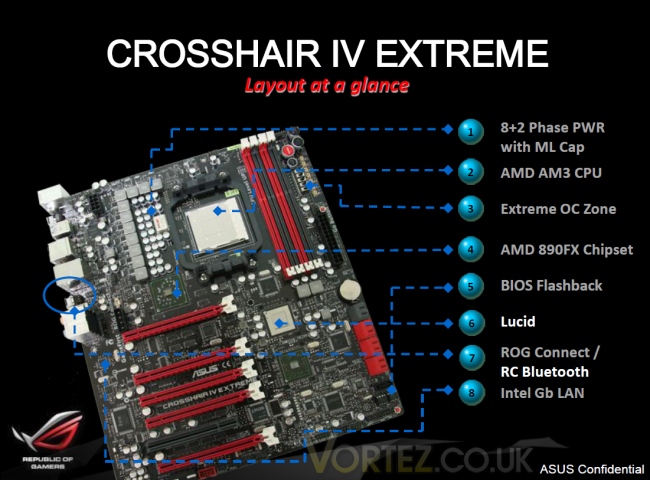
For too long, AMD have lived in the shadow of Intel’s dominance from a performance perspective. Their 890FX chipset is designed to change this, coupled with the recently released Thuban Phenom II X6 CPUs. ASUS are also taking the opportunity to showcase many of their unique features on the Crosshair IV Extreme to leverage AMD into a successful gaming and performance platform without the costs normally attributed to an Intel set-up.
ASUS Ares HD5970
If there is one word to describe ASUS’s latest attempt at resurrecting the Olympian God of War, Ares, it would be ‘heavy’. That is no hyperbole given that all who attended the seminar were taken back by its sheer weight. The closest people will get to experiencing this £1000 monster of a graphics card would be to actually hold a brick. But ASUS know that already. What Ares represents is much more. It is a window into the company’s design philosophy and ingenuity, the former being a recurrent theme throughout the event. If the card looks familiar to you, it’s because the Ares takes its design cue for ASUS’s first attempt at a dual GPU board, the ASUS EN7800GT Dual.
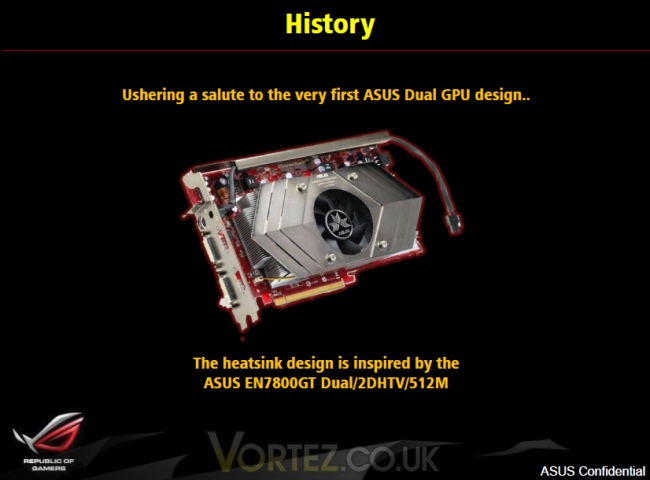
ASUS EN7800GT Dual
So what exactly is Ares? Following in the footstep of the ASUS Mars (Roman God of War), which was two GTX285 cores on one card to create a superior GTX295 (rather than two GTX275 cores), the company has decided to shift its attention to ATI. The current flagship HD5970 is made of two HD5870 cores on a single PCB but to stay within the ATX power specifications, the cores had to be clocked down to HD5850 levels at 750MHz. The brilliance behind the HD5970 is that it retains all the 1600 stream processors of the HD5870 core and its other attributes. However, ASUS decided that they had to create a card which wasn’t compromised in any way, hence the birth of the Ares HD5970.
Specfications:
-Dual Radeon HD5870
-2x 1600 stream processors
-850MHz engine clock
-4.8GHz memory clock
-4096MB GDDR5
The most notable changes to the reference HD5970 specifications are the higher engine clock at 850MHz and the 4GB of GDDR5 memory as opposed to 2GB.
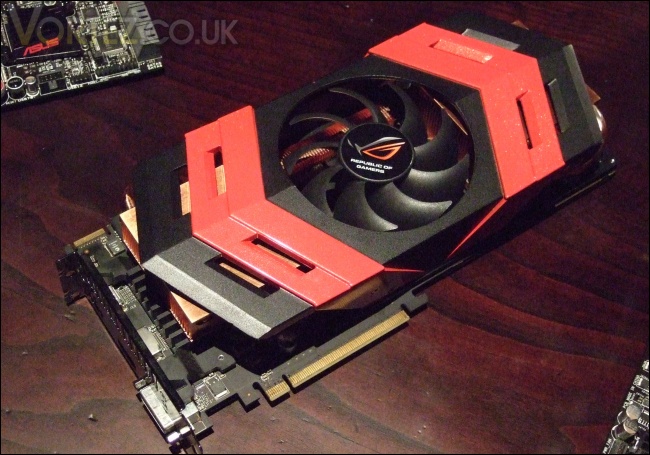
The ASUS Ares HD5970
The ASUS Ares may not boast the most impressive HD5970 specifications (The new Sapphire HD5970 Toxic holds that crown) but it certainly holds the best designs and features. Instead of opting for third party coolers, ASUS designed their own cooler to meet their needs. Beneath the shroud are two large copper heatsinks on each core and 4 thick heat pipes on each for more efficient heat transfer (now you know why it’s heavy!). The central fan has been optimised for much higher airflow than the reference HD5970 while still delivering lower acoustics. The card boasts 1x HDMI, 1x DisplayPort and 1x dual link DVI-I display connectors, akin to the reference HD5870 I/O plate as opposed to the HD5970’s.
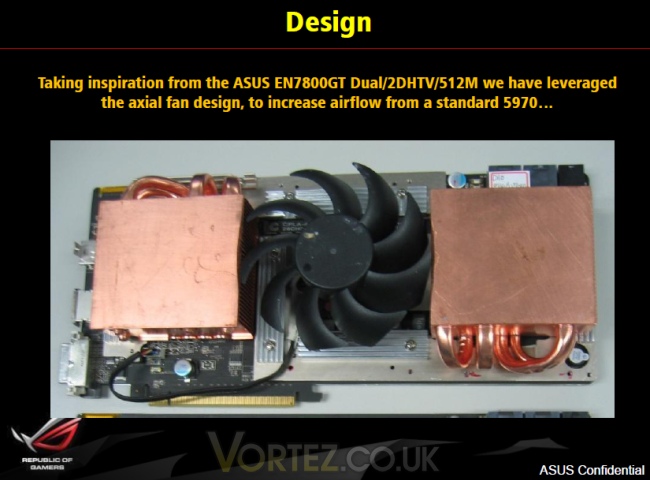
Two large copper heatsinks with 4 heat pipes each
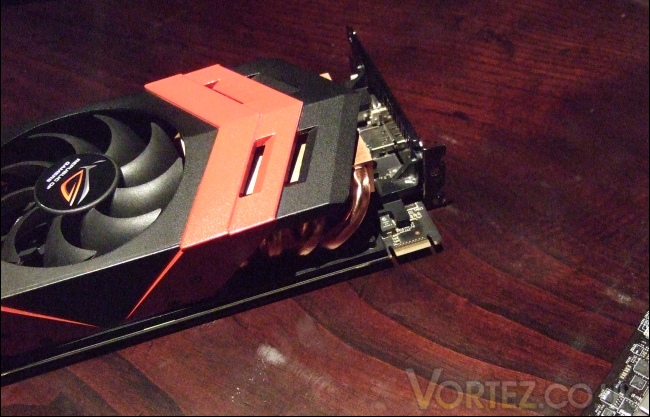
Notice that the card is wider to minimise its length

It seems ASUS learnt a lot from the GTX295 experience to deliver a much better cooling solution on Ares. Their claims of significantly improved performance are yet to be tested but if I have learnt anything from my cooler reviews, it’s that large copper blocks and heat pipes are very efficient at taming the hottest components.
ASUS Ares HD5970 (Continued)
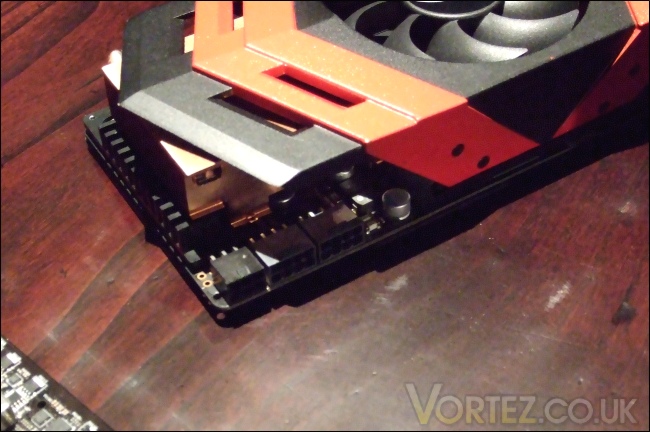
2×8 pin + 1×6 pin PCIe power connectors
Obviously, power requirements will be absurdly high with such a card and if the fact that the card is essentially an overclocked HD5970 wasn’t a giveaway, then the power connectors will put things into perspective. Bearing two 8 pin PCIe connectors and one extra 6 pin connector, Ares will require a hefty power supply. The three connectors indicate that Ares will also be a monster on the overclocking front making it worthy of the Republic of Gamers badge.
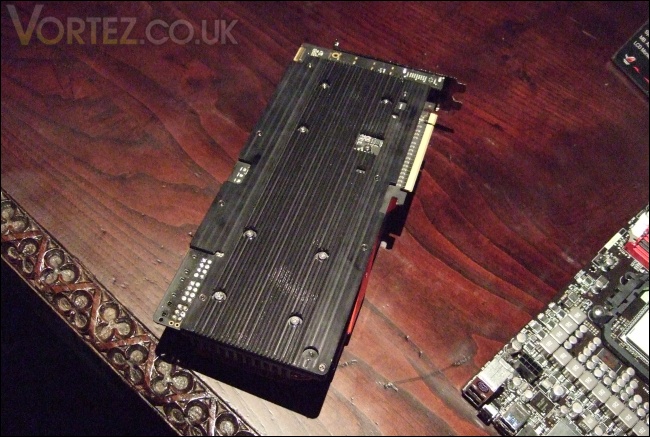
Additional cooling at the back
The back is fully covered by a metallic plate to both support the two heatsinks and provide additional cooling. The fin like design creates a larger surface area for better heat dissipation.
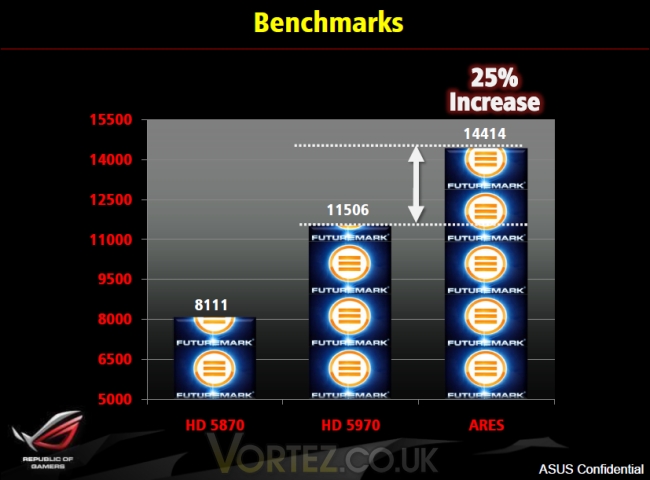
Benchmark results on 3DMark Vantage Extreme preset
Finally, we can see how the design improvements translate to a 25% increase in performance in 3DMark Vantage’s Extreme test.

ASUS Xpander
If we go back a couple of weeks, I talked about the Gigabyte GA-X58A-UD9 which was being showcased at the channel expo. This was Gigabyte’s attempt at creating the ultimate enthusiast motherboard. Its most striking feature was its size and XL-ATX form factor to house the two NF200 chips, and enough PCIe 2.0 x16 slots and lanes for quad SLI support. Despite the cumbersome size, it did something the Rampage III Extreme couldn’t. Several sites also discovered the Rampage’s lack of quad SLI support through trial and it didn’t bode well for ASUS who also wanted the ultimate board for the benchmark performance crown. Quad SLI support requires the NF200 chips to be present onboard even if a motherboard has enough slots to accommodate 4 dual slotted graphics card, or else it is locked at driver level. Their solution, the ASUS Xpander.
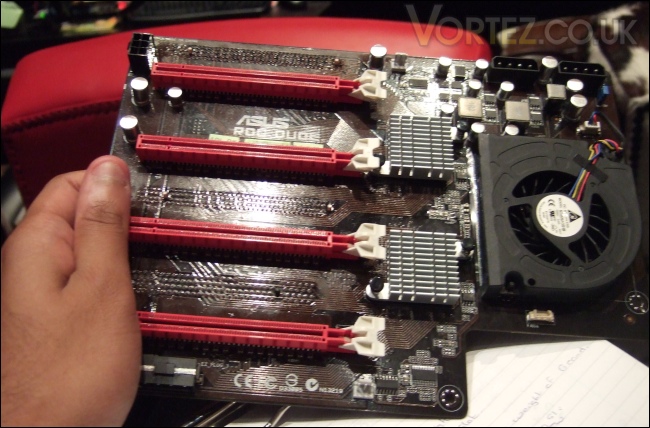
In my hands
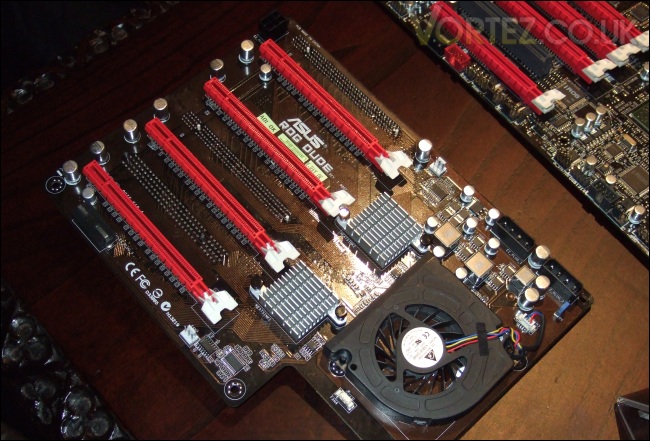
The ASUS ROG DUDE
The ASUS Xpander is an ingenious solution at tackling a problem that will only affect the elite few amongst us. It is an additional daughter board to the Rampage III Extreme that boasts 4 PCIe 2.0 x16 slots and two NF200 chips for quad SLI support. The two chips are cooled by two small separate heatsinks on top and a blower styled low profile fan on the side. The cooling is merely a prototype for now but will be re-evaluated following further testing, given the heat output of the chips and 12W power consumption. Furthermore, the board has three Molex power connectors for extra power and one 6 pin PCIe power connection.
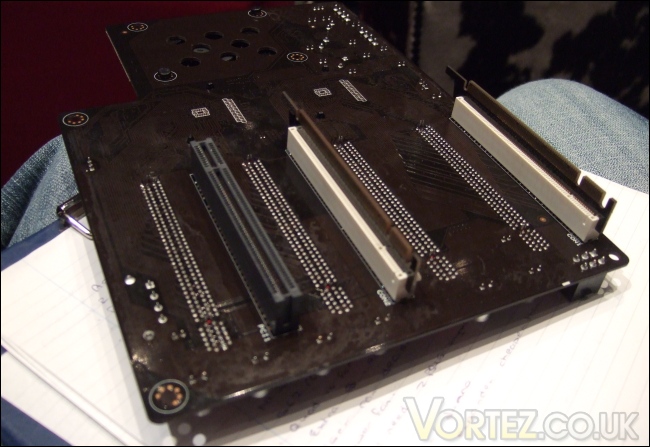
PCI slot?
The riser board can be slotted onto the Rampage III Extreme thanks to two PCBs at the back allowing installation into the first and third PCIe x16 slots of the motherboard. The extra PCI slot underneath has no electrical function and has the sole role of supporting the board on top of the Rampage under the weight of four Fermi cards. This clever addition should prevent it from flexing even when additional components are installed such as LN2 pots.
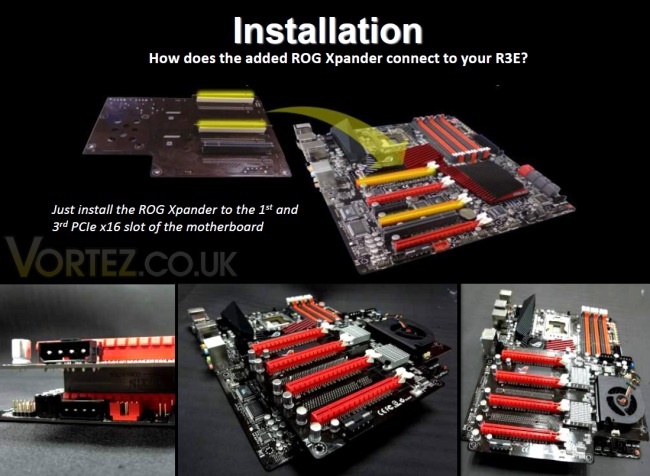
ASUS claim that the solution is the ideal one and that it yields even better performance results than the competition, the Gigabyte UD9 and the EVGA Classified Quad SLI. While the latter statement will require further proof, we can immediately see their reasoning in opting for a riser board rather than implementing the NF200 chip natively on board the Rampage.
Cost: Only a handful of people will have the opportunity to use quad SLI with four Fermi cards so producing a board that caters solely for those people will reduce the number of boards sold. The design to have the NF200 chips on board also drives the cost of R&
 while the extra PCB increases manufacturing costs for XL-ATX boards such as the Gigabyte GA-X58A-UD9 and the EVGA Quad SLI. It’s no surprise that both cost upwards of £450. The end result is that the price makes such board inaccessible to the general public. ASUS, on the other hand, wanted a solution that catered for both the public and the ultra enthusiasts so they created two boards. Those who simply want an excellent overclocking board with a boat load of features can buy the relatively cheaper Rampage III Extreme while the enthusiasts who want the best performance and quad SLI can buy the daughter card at an additional cost. Furthermore, ASUS are claiming that the cost of the Rampage III Extreme and the Xpander together will cost less than the competition.
Space: The Gigabyte GA-X58A-UD9 and the EVGA Quad SLI are both XL-ATX motherboards which won’t fit in the majority of cases. But then again, they weren’t designed to. Instead, they were designed to be used on test benches where an open environment is ideal for LN2 usage and quad SLI. Again, this alienates regular users who might have been interested in the features of those flagship motherboards but don’t require quad SLI. Conversely, ASUS still provides a board that’s readily accessible to all users and can fit inside most ATX cases, thereby bringing their most innovative features to a wider audience. The Xpander, as the name suggests, expands on the Rampage’s capabilities making the combination an attractive prospect for record breakers as well. Sure, the Xpander won’t be compatible in cases but as already mentioned, this set-up is reserved to the ultra enthusiast and test benches. So, unlike Gigabyte and EVGA, ASUS caters for both the home user and the extreme overclockers.
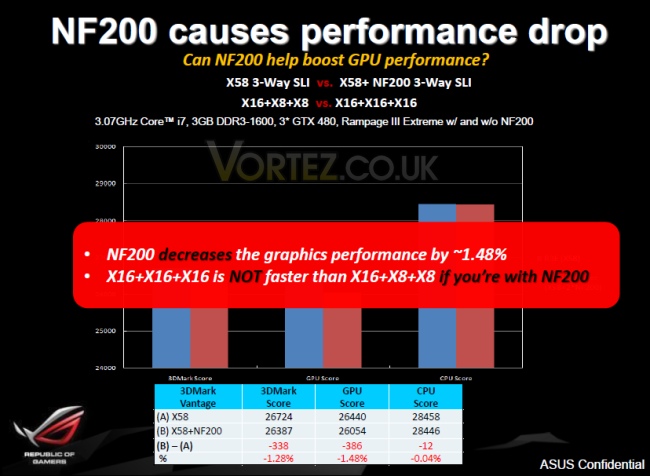
Performance: ASUS also claim that their Xpander has a performance advantage over the competition. This has yet to be confirmed but if true, it gives them another advantage. This also takes us nicely to their other reason for excluding the NF200 chip. Based on internal testing, ASUS found that the Rampage III Extreme with tri SLI at x16/x16/x16 using an NF200 chip performed worse than a regular board operating at x16/x8/x8. From the graph, the difference is a mere 1.48% but for benchers across the world, Tesco’s motto certainly holds true; “Every little helps”. The overhead from higher latencies on the NF200 chip is to blame for this so by opting it out, the Rampage III Extreme promises to run cooler, perform better and cost less.
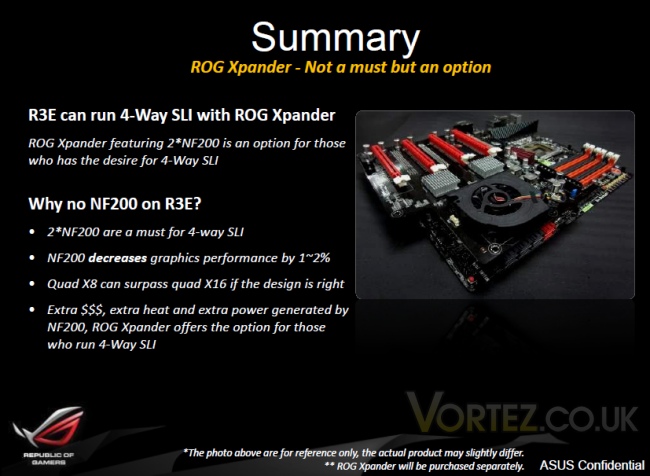
A final thing to note is that Xpander connects up to the motherboard through the first and third PCIe x16 slots and there’s nothing physically stopping it from working on other boards . As of yet, there is no official word from ASUS concerning compatibility on other motherboards but watch this space…
ASUS Rampage III Gene
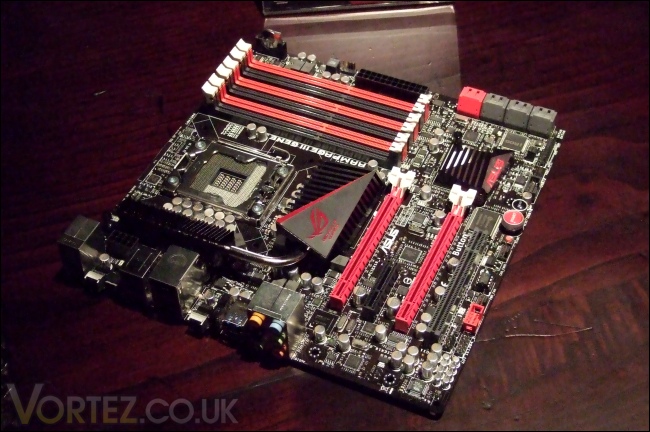
The last revelation of the day came in the form of the new mATX Rampage III Gene. Sporting Intel’s X58 chipset for Core i7 9xx compatibility, the Rampage III Gene is an evolution of the widely successful Rampage II Gene. For a long time, the mATX form factor was reserved to the entry level market but it soon became clear that the form factor was becoming growingly popular in the expanding HTPC market. However, the most significant audience were gamers who wanted a portable LAN box and yet didn’t want to sacrifice performance and overclockability. The solution came from ASUS and soon many manufacturers followed suite but without the success ASUS had attained with their uncompromising board. Today, ASUS have announced the introduction of the Rampage III Gene, a board that aims to follow on its predecessors footstep while delivering new innovative features in tune with their new line of ROG motherboards.
The ASUS Rampage III Gene
ASUS have crammed a lot of features into this board. As the name denotes, the Rampage sports the Intel’s most high end chipset, the X58 and the ICH10R Southbridge. Thanks to the additional Marvell controller and NEC D720200F1 chip, the board also supports SATA III 6 Gbps and USB 3.0 respectively. Like its older brother, it has the full 6 RAM slots with the nifty Q-DIMM feature to prevent conflicts with any graphics card installed in the top PCIe x16 slots. The board claims to support memory modules with speeds of up to 2200MHz through overclocking, which is fast becoming a common sight on most X58 motherboards.
For additional devices, the Rampage III Gene has two PCIe 2.0 x16 slots for SLI/Crossfire, one open ended PCIe x4 slot and a PCI slot. ASUS’s design philosophy also focuses on delivering an aesthetically pleasing product, hence the use of red and black colour scheme and the ‘Crystal Clash’ chipset heatsink. It wouldn’t be a ROG board without the relevant features so ROG Connect makes a comeback, allowing users to connect a laptop to the motherboard for remote overclocking. Another ROG feature is the GameFirst application which is designed to prioritise important data flow in conjunction with the motherboard’s Gigabit LAN. These two features were covered in greater depth in the Rampage III Extreme review and the Crosshair IV Formula review respectively.
This board is advertised as ‘Min Size, Max Power’ and we can already see why.
Closing Thoughts
There was certainly quite a range of new hardware on display at the ASUS pre-Computex Seminar. All of them provide an insight into ASUS’s design philosophy, one that targets a wide audience ranging from casual users to gamers and of course the ultra enthusiast crowd. Our article today has focused mostly on the Republic of Gamers line of products but as with all manufacturers, the flagship products have a halo effect that sees features trickling down to consumer levels. Looking at the Crosshair IV Extreme and Rampage III Gene, we can immediately see how ASUS are differentiating their products from the competition and bringing greater appeal to satisfy the growing enthusiast and HTPC markets.
ASUS has demonstrated that it has some fantastic products lined up. We have managed to grab an exclusive first look at some of the things that will be shown at Computex next week, so for that I would like to thank ASUS and their representatives for the opportunity. Unfortunately, none of us on the Vortez team will be able to attend but we will do our best to bring you coverage nonetheless.
To discuss this article, please visit our forums.