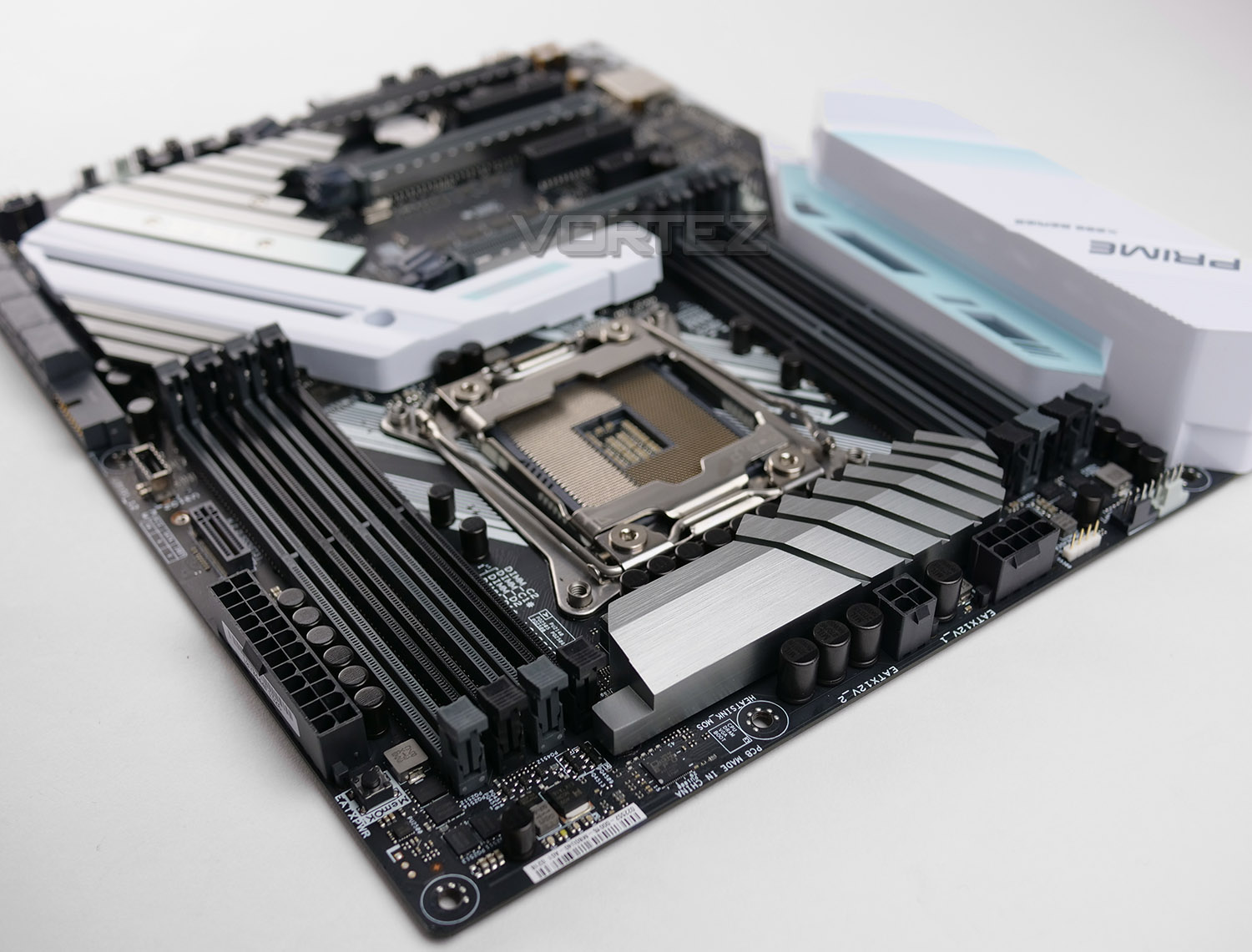
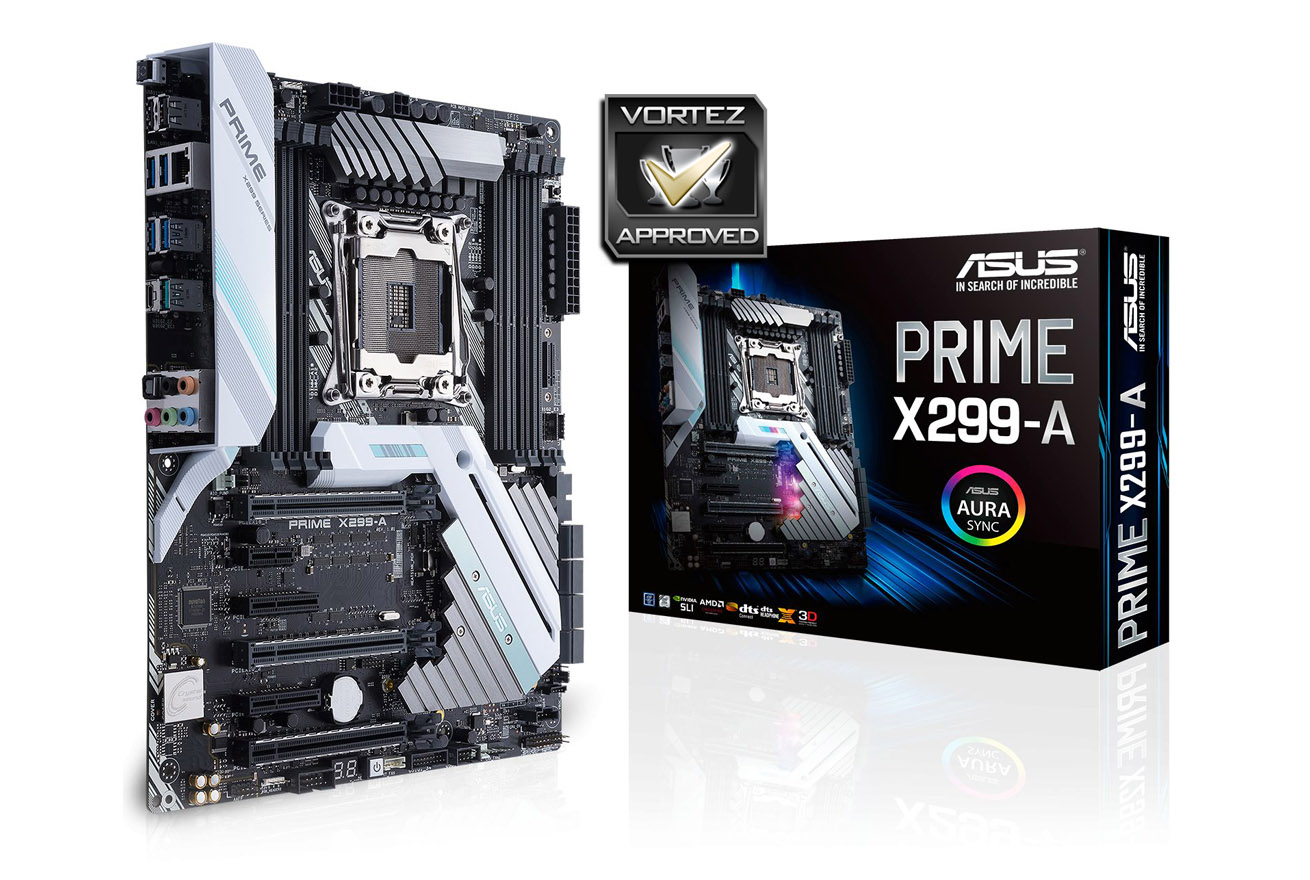
The PRIME X299-A is a mid-range Intel X299 motherboard, equipped with trademark ASUS features and adorned in a stylish mint/white design.

Product on Review: PRIME X299-A
Manufacturer: ASUS
Street Price: £274 GBP / $309 USD
Activity in the motherboard and CPU industry has hit an all-time high after the success of AMD’s Ryzen 5/7 launches and while reception for Intel’s most recent Core X Series may not have been a serious head turner, it’s great to see the marketplace alive once again!
Today we turn to ASUS for a look at what they have to offer by way of the PRIME X299-A. Positioned as a mid-range offering in the X299 arena, this motherboard is laden with a good selection of features and thanks to a design overhaul, a fresh aesthetic is one of its major talking points.
At a cost of £274 GBP in the UK and $309 USD in the United States, can the PRIME X299-A offer anything extra over the other X299 motherboards we’ve already checked out? Let’s find out!
ASUS on their PRIME X299-A
ASUS Prime X299-A is the ATX motherboard that’s been expertly engineered for professional content creators and power users who work hard by day and play harder by night. This powerful, innovative board puts a friendly face on advanced enthusiast controls, enabling you to maximize performance, cooling and personalization with ease. So, if you live to create, to explore, to enjoy and to push the boundaries, look no further than Prime X299-A.
Technical Specifications
Below are the technical specifications concerning the PRIME X299-A:
CPU
Support for Intel® Core™ X series processors in the LGA2066 package
L3 cache varies with CPU
Intel® X299 Express Chipset
MEMORY
8 x DDR4 DIMM sockets supporting up to 128 GB of system memory. (6-Core + Above).
4 x DDR4 DIMM sockets supporting up to 64 GB of system memory. (4-Core).
4 channel memory architecture.
Support for DDR4 4000(O.C.)/3600(O.C.)/2666/2400/2133 MHz memory modules
Support for non-ECC Un-buffered DIMM memory modules
Support for Extreme Memory Profile (XMP) memory modules
AUDIO
Realtek® ALC1220 codec
High Definition Audio 8-channel
Support for Optical S/PDIF Out
LAN
Intel® i219V Gigabit LAN (10/100/1000 Mbit) with ASUS Turbo Lan/Guard.
EXPANSION SLOTS
44-Lane CPU-
3 x PCIe 3.0/2.0 x16 (x16, x16/x16, x16/x16/x8)
2 x PCIe 3.0 x4 (max at x4 mode) *1
1 x PCIe 3.0/2.0 x1 *3
28-Lane CPU-
3 x PCIe 3.0/2.0 x16 (x16, x16/x8, x16/x8/x1) *4
2 x PCIe 3.0 x4 (max at x4 mode) *1
1 x PCIe 3.0/2.0 x1 *3
16-Lane CPU-
3 x PCIe 3.0/2.0 x16 (x16, x8/x8, x8/x8/x1) *4
2 x PCIe 3.0 x4 (max at x4 mode) *1
1 x PCIe 3.0/2.0 x1 *3
1 x PCIe 3.0/2.0 x1 (x1 mode)
STORAGE INTERFACE
Intel® X299 Chipset :
1 x M.2 x4 Socket 3, with M key, type 2242/2260/2280 storage devices support (SATA & PCIE 3.0 x 4 mode)
1 x M.2 x4 Socket 3, with M key, type 2242/2260/2280/22110 storage devices support (PCIE 3.0 x 4 mode)
8 x SATA 6Gb/s port(s)
Support Raid 0, 1, 5, 10
Supports Intel® Smart Response Technology, Intel Rapid Start Technology
Intel® Optane™ Memory Ready
MULTI-GRAPHICS TECHNOLOGY
Supports NVIDIA® Quad-GPU SLI™ Technology
Supports NVIDIA® 3-Way SLI™ Technology
Supports NVIDIA® 2-Way SLI™ Technology
Supports AMD Quad-GPU CrossFireX™ Technology
Supports AMD 3-Way CrossFireX™ Technology
USB
ASMedia® USB 3.1 Gen 2 controller :
1 x USB 3.1 Gen 2 port(s) (1 at mid-board)
ASMedia® USB 3.1 Gen 2 controller :
2 x USB 3.1 Gen 2 port(s) (Type-A + USB Type-CTM)
Intel® X299 Chipset :
8 x USB 3.1 Gen 1 port(s) (4 at back panel, , 4 at mid-board)
Intel® X299 Chipset :
4 x USB 2.0 port(s) (4 at back panel, , 2 at mid-board)
INTERNAL I/O CONNECTORS
1 x AAFP connector
2 x Aura RGB Strip Header
2 x USB 3.1 Gen 1 connector(s) support(s) additional 4 USB 3.1 Gen 1 port(s)
1 x USB 2.0 connector(s) support(s) additional 2 USB 2.0 port(s)
1 x M.2 Socket 3 with M key, type 2242/2260/2280 storage devices support (SATA & PCIE 3.0 x 4 mode)
1 x M.2 Socket 3 with M key, type 2242/2260/2280/22110 storage devices support (PCIE 3.0 x 4 mode)
8 x SATA 6Gb/s connector(s)
1 x M.2_FAN connector
1 x VROC_HW_Key
1 x CPU Fan connector(s)
1 x CPU OPT Fan connector(s)
2 x Chassis Fan connector(s)
1 x AIO_PUMP connector
1 x W_PUMP+ connector
1 x Thunderbolt header(s)
1 x 24-pin EATX Power connector(s)
1 x 8-pin ATX 12V Power connector(s)
1 x 4-pin ATX 12V Power connector(s)
1 x System panel(s) (Q-Connector)
1 x 5-pin EXT_FAN(Extension Fan) connector
1 x MemOK! button(s)
1 x Thermal sensor connector(s)
1 x Power-on button(s)
1 x Clear CMOS jumper(s)
1 x USB 3.1 Gen 2 front panel connector
1 x CPU_OV jumper
BACK PANEL CONNECTORS
1 x LAN (RJ45) port(s)
2 x USB 3.1 Gen 2 Type-A + USB Type-CTM
4 x USB 3.1 Gen 1
2 x USB 2.0 (one port can be switched to USB BIOS Flashback)
1 x Optical S/PDIF out
5 x Audio jack(s)
1 x USB BIOS Flashback Button(s)
h2]BIOS
128 Mb Flash ROM, UEFI AMI BIOS, PnP, DMI3.0, WfM2.0, SM BIOS 3.0, ACPI 6.0, Multi-language BIOS,
ASUS EZ Flash 3, CrashFree BIOS 3, F11 EZ Tuning Wizard, F6 Qfan Control, F3 My Favorites, Last Modified log, F12 PrintScreen and ASUS DRAM SPD (Serial Presence Detect) memory information
OPERATING SYSTEM
Support for Windows 10 64-bit
FORM FACTOR
• 12 in. x 9.6 in. (30.5 cm x 24.4 cm)
• ATX Form Factor
Closer Look
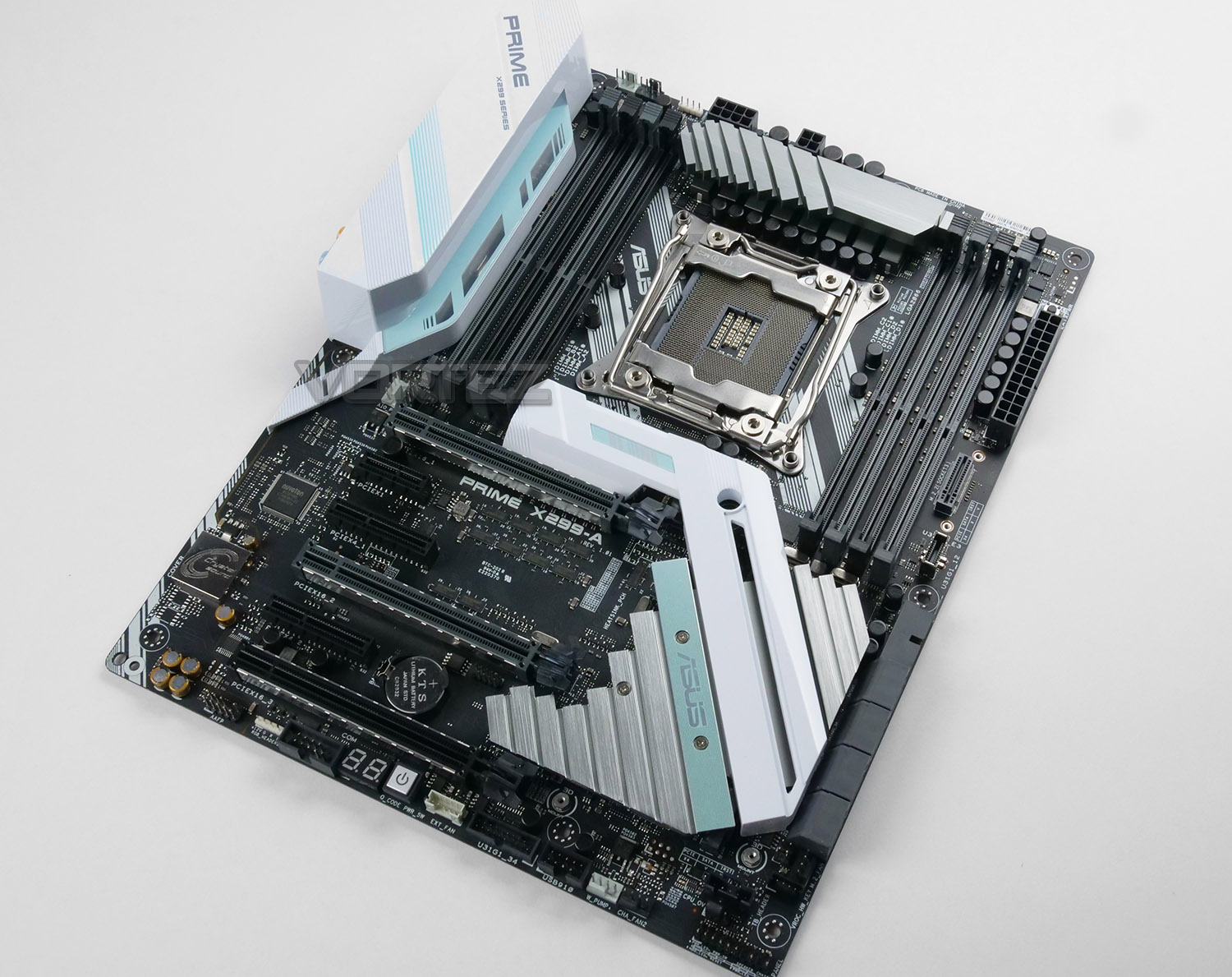
The first thing which is immediately apparent after removing the PRIME X299-A from its packaging is the exciting new design to which ASUS has chosen to use. Opting for a mint/white colour scheme is a new approach for the company and indeed for any other brand across the motherboard manufacturers, such a theme will clearly offer an alternative to the lack-lustre neutral styling which is rampant at the moment.
The PRIME X299-A looks stunning and is among the most attractive X299 motherboards we’ve seen so far – it also conforms to the standard ATX Form factor, allowing it to fit into vast majority of mid-tower cases.
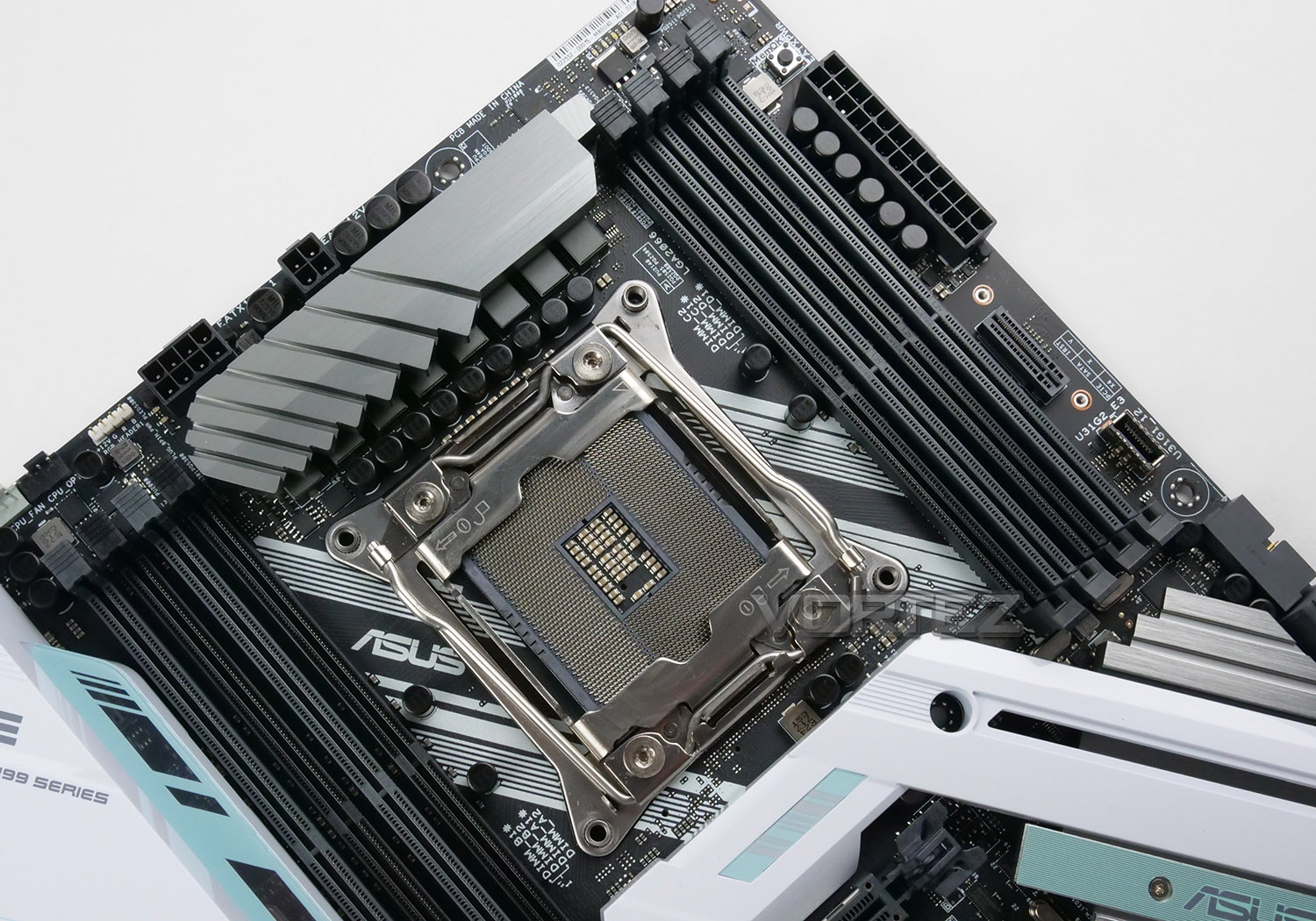
Since we are dealing with X299 – the PRIME X299-A uses socket LGA 2066, carrying support for the new Kaby Lake-X and Skylake-X processors. While you will need a new HEDT CPU for this motherboard, current coolers supporting LGA 2011 will actually fix into place without any problems as the mounting holes in the corners of the socket are the same diameter.
Covering the VRMs at the top of the motherboard, ASUS has installed a single, silver heatsink which also conceals the 8-phase design; this utilises Digi+ and we have 10K black solid caps used throughout too. Behind the VRMs there is an 8+4pin connector for CPU power delivery and there are two CPU fan headers located at the top also, along with a 12V RGB LED header for case lighting.
For memory, there are eight slots which support quad-channel DDR4 – supporting up to 128GB and 4000MHz. To take advantage of the full-quad channel arrangement and that 128GB you will need a Skylake-X CPU – Kaby Lake-X only supports dual channel. ASUS include a MemOK! Button which is a long-standing feature found on their motherboards, assisting with troublesome memory compatibility issues.
Immediately next to the 24-pin ATX connector there is a PCIE 3.0 x4 M.2 slot, due to the nature of this slot, the drive will stand in a vertical orientation rather than sitting flush to the motherboard. Mounting screws/attachments are provided for a more secure fitment.
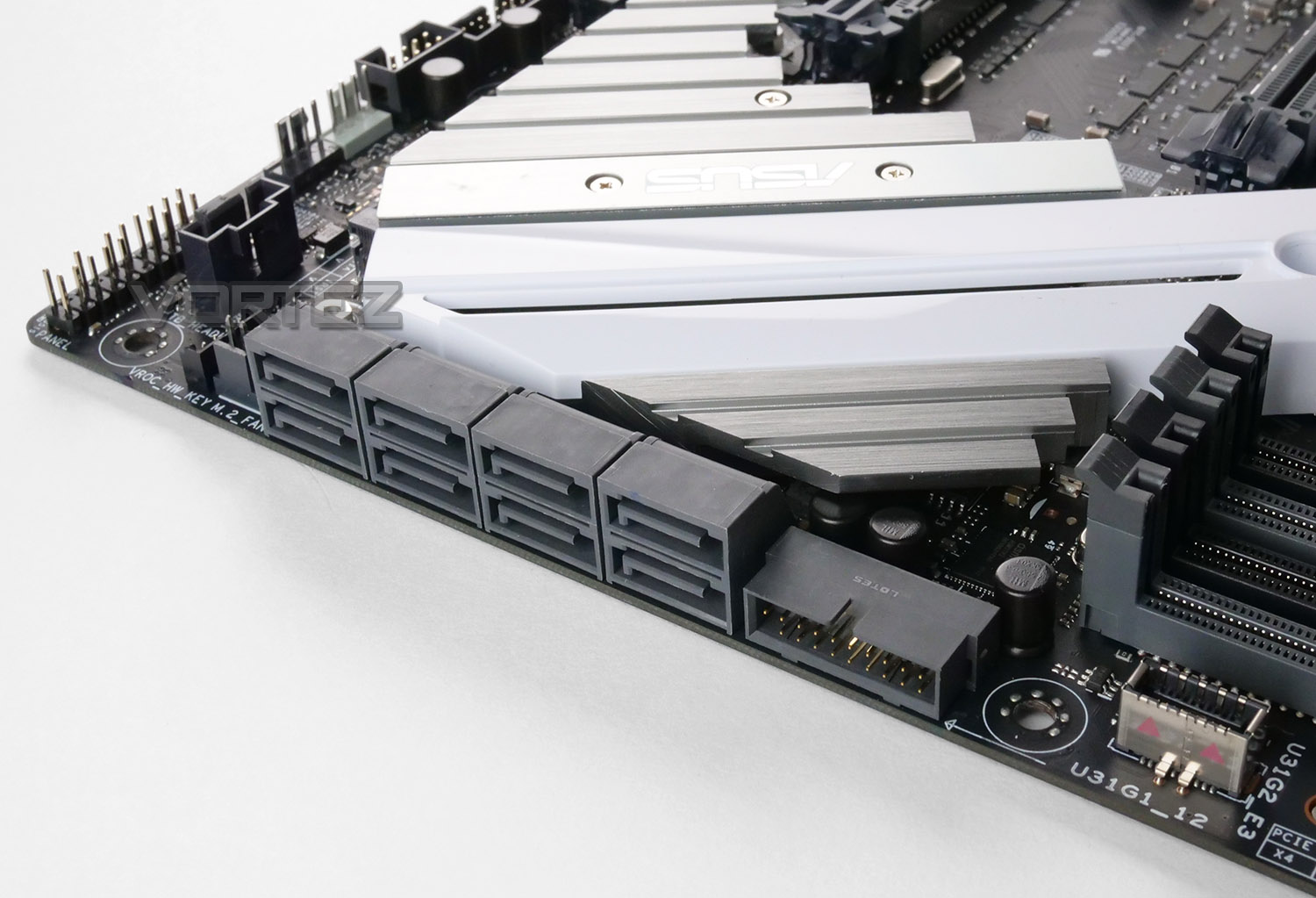
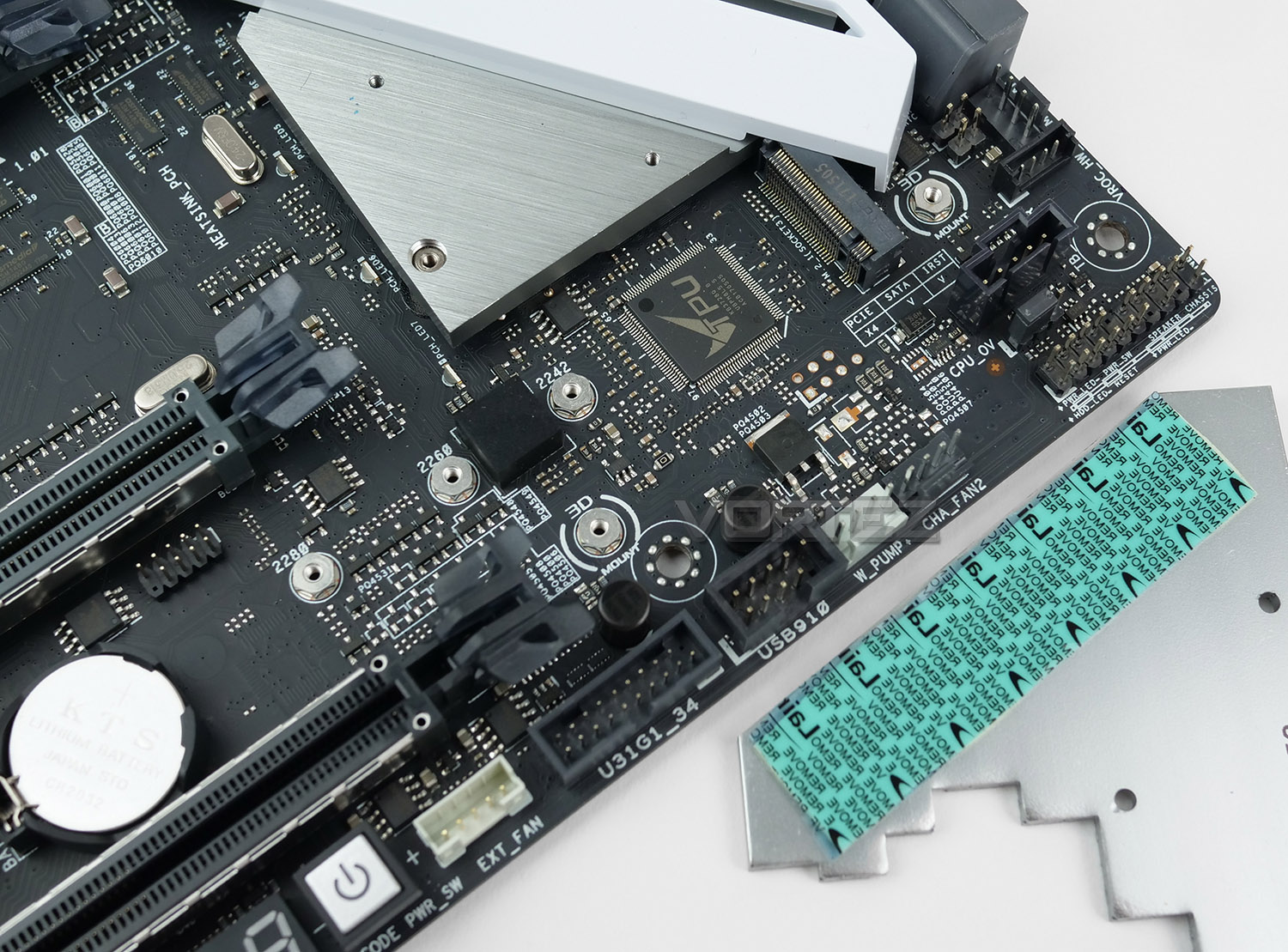
Over in the SATA area there is a single USB 3.0 header along with a USB 3.1 Gen2 header for front panel connectivity.
Storage on the PRIME X299-A is largely made up of SATA-based options with up to eight SATA III 6GB/s ports. Along with the upwards facing M.2 slot, ASUS also include a horizontal slot which is found on the underside of the heatsink – which also marries up to the X299 chipset heatsink. This M.2 is once again PCIE 3.0 x4 and capable of delivering up to 32GB/s.
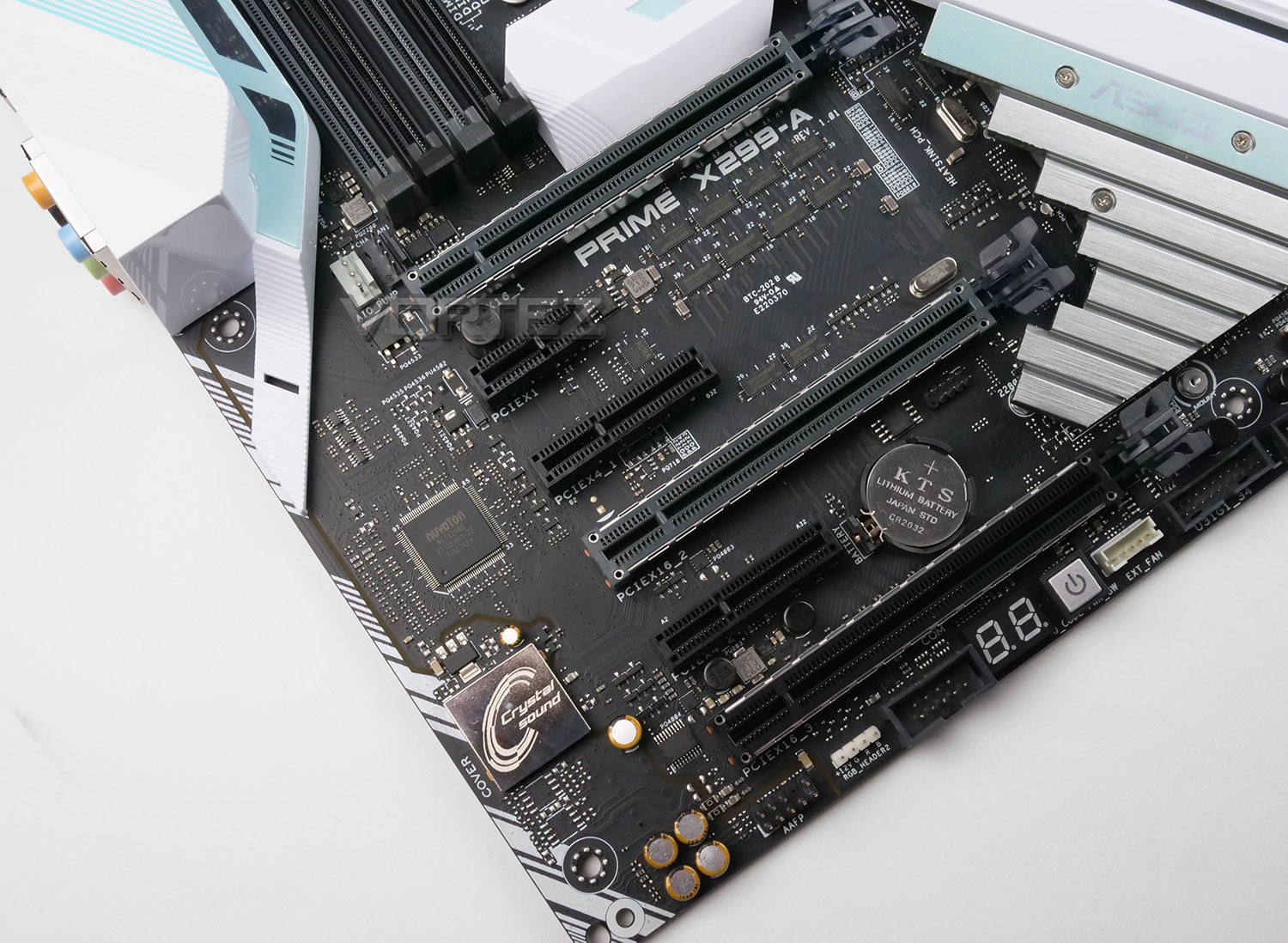
Casting an eye over the PCI Express region there is quite an assortment of different slots available. The configuration is as follows:
34-Lane CPU-
3 x PCIe 3.0/2.0 x16 (x16, x16/x16, x16/x16/x8)
2 x PCIe 3.0 x4 (max at x4 mode) *1
1 x PCIe 3.0/2.0 x1 *3
28-Lane CPU-
3 x PCIe 3.0/2.0 x16 (x16, x16/x8, x16/x8/x1) *4
2 x PCIe 3.0 x4 (max at x4 mode) *1
1 x PCIe 3.0/2.0 x1 *3
16-Lane CPU-
3 x PCIe 3.0/2.0 x16 (x16, x8/x8, x8/x8/x1) *4
2 x PCIe 3.0 x4 (max at x4 mode) *1
1 x PCIe 3.0/2.0 x1 *3
1 x PCIe 3.0/2.0 x1 (x1 mode)
NVIDIA’s SLI and AMD’s CrossFireX technology are both compatible on this motherboard for those wanting to add in more than one graphics card.
Underneath the PCIE slots there is an RGB header for adding LED strips to your computer chassis – this header is designed to work in conjunction with ASUS Aura software. We also have LED debug and an onboard power button for users who might have this configuration on a test bench.
Immediately next to the PCIE slots we have the audio solution which takes the form of ASUS’ Crystal Sound. The codec being used is the Realtek ALC 1220 – providing us with 8-channel high definition audio. ASUS also include a few other additional features to solidify the package – premium Japanese solid CAPs, de-pop circuit, EMI shielding and separated layers for left/right tracks.
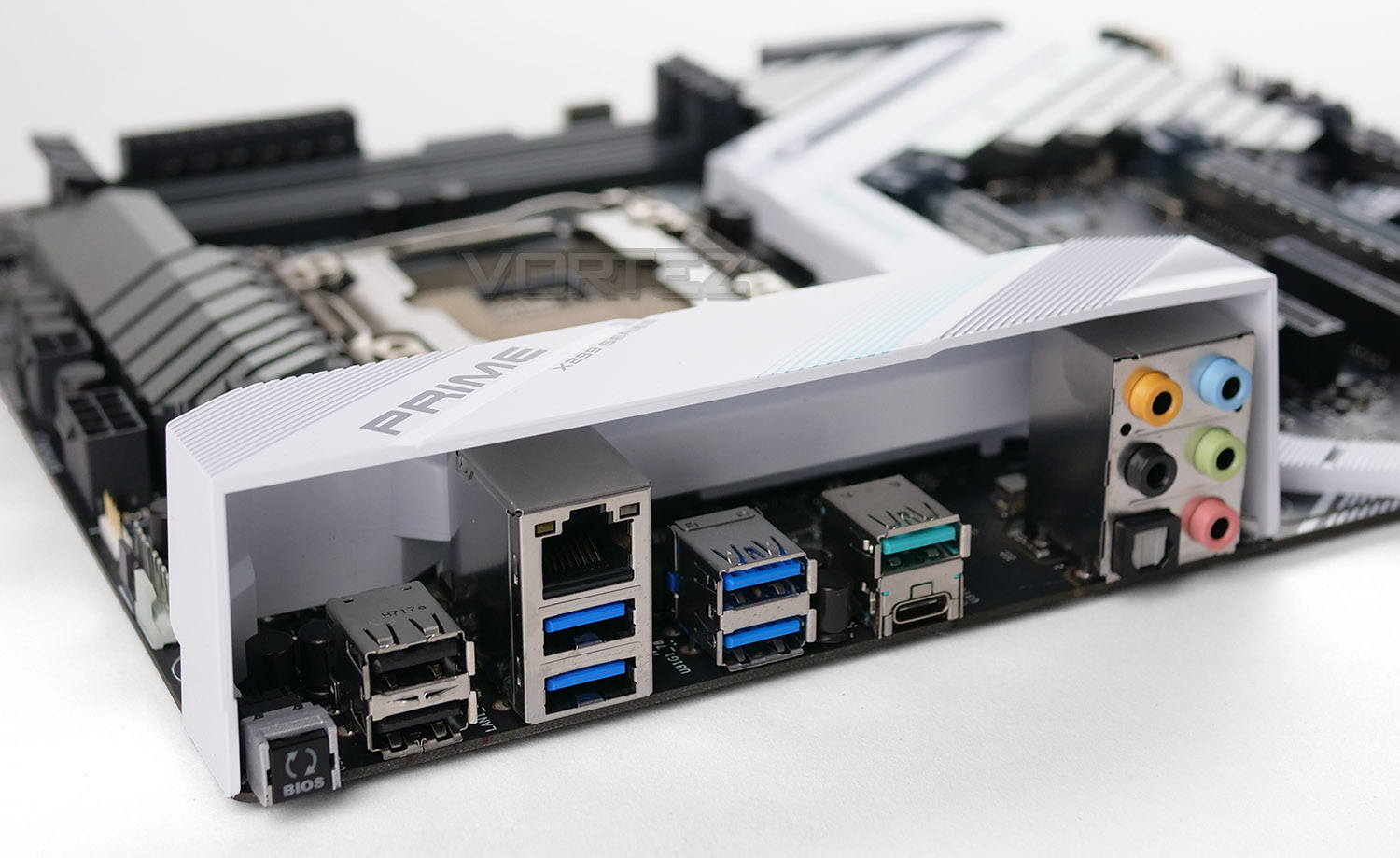
Turning to the rear IO panel on the PRIME X299-A, we have a selection of ports that we can take advantage of. The ports available here are as follows:
• USB BIOS Flashback button
• 2x USB 2.0 ports
• 4x USB 3.1 Gen1 ports (Blue)
• 1x Gigabit LAN (via Intel i219V)
• 2x USB 3.1 Gen2 ports – Type A and C (Green)
• Audio jacks including Optical S/PDIF Out
Test Setup, Methodology & Overclocking
TEST SETUP
Cooling NZXT Kraken X62Motherboard ASUS PRIME X299-A
Memory 32GB Corsair Vengeance LPX 3000MHz
Graphics Radeon RX 480 8GB
Storage Kingston HyperX 240GB
PSU Corsair RM 1000 80 Plus Gold Certified PSU
Monitor AOC U2879VF
Capture Device Epiphan AV.iO 4K
BENCHMARKS
Cinebench R15 – CPU/OpenGL Scorex264 HD 4.0 – 1st and 2nd pass encoding
SiSoftware SANDRA – CPU & Memory benchmarks
POV-RAY – CPU benchmarks
TrueCrypt – CPU benchmarks
AIDA64 – CPU benchmarks & Memory
PCMark 8 – Home Suite & Photoshop
3DMark FireStrike – 3D Benchmark
Games – Rise of the Tomb Raider & Total War: WARHAMMER
OTHER SOFTWARE
Temperature Analysis: RealTempStress Testing Software: AIDA64 Stability Test
CPU Specification Monitoring: CPU-Z
Performance Monitoring: MSI Afterburner
OVERCLOCKING
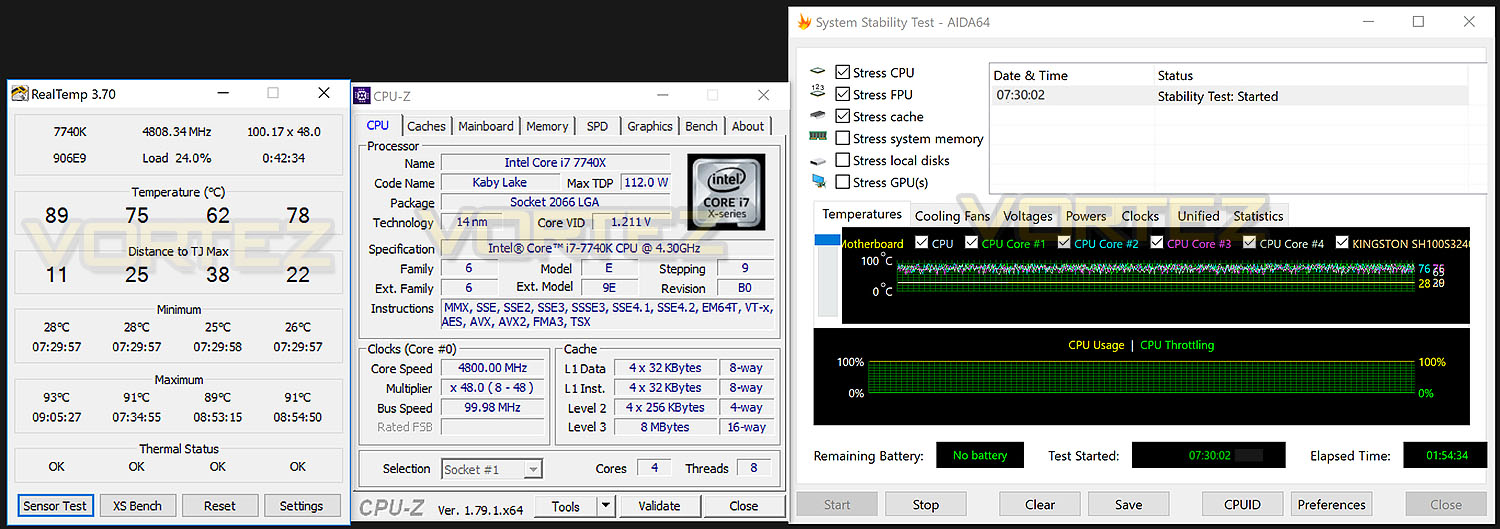
Much like previous generations of Intel platforms, the X299/LGA2066 allows us to apply overclocks to unlocked processors easily. Many variables can be adjusted including BCLK and ratios.Our current record for the best overclock with Core i7-7740X is 5.2GHz. Unfortunately, sadly the ASUS board was only able to achieve 4.8GHz. To reach this point we had to modify the CPU voltage to 1.34v. Moving beyond 1.34v (regardless of the temperature) prevented us from nudging beyond 4.8GHz – nevertheless this is still a reasonable result.
For a look at the ASUS BIOS, please check out the next page for a video tour of the interface.
Video Tour: BIOS
To demonstrate the options and navigation across the ASUS BIOS, we’ve captured usage with the Epiphan AV.iO 4K. To view the video simply click on this link or click on the video below:
Benchmarks: Power Consumption
It’s interesting to note the power consumption across all motherboards. Although they are using the X299 chipset, energy results can fluctuate between manufacturers due to the features and specifications that are integrated. First of all, for the idle tests the system is cold booted into Windows and no additional applications are executed – the watts are noted on the external energy monitor we use and then the system is loaded with 3DMark FireStrike – watts are again monitored for the duration of the test and the highest rated wattage result is then noted down. Below are the results of this energy test.
Benchmarks: Cinebench R15
CINEBENCH is a real-world cross platform test suite that evaluates your computer’s performance capabilities. CINEBENCH is based on MAXON’s award-winning animation software CINEMA 4D, which is used extensively by studios and production houses worldwide for 3D content creation. MAXON software has been used in blockbuster movies such as Iron Man 3, Oblivion, Life of Pi or Prometheus and many more.
Benchmarks: X264 HD
Simply put, this test measures how fast your machine can encode a short, DVD quality MPEG-2 video clip into a high-quality x264 video clip. What’s x264, you ask? It’s more or less the next-generation Xvid/DivX codec. I think it’s ideal for a benchmark because the application (x264.exe) reports fairly accurate compression results (in frames per second) for each pass of the video encoding process, and it uses multi-core processors very efficiently.
Benchmarks: SiSoftware SANDRA
SANDRA isn’t always a benchmark that is included in hardware reviews but we believe it shouldn’t be ignored. SANDRA provides a vigorous package that tests your system in a rather large array of benchmarks. There are many aspects of benchmark that can be executed. We will be considering – CPU and memory tests.
Benchmarks: POV-RAY
Persistence of Vision Raytracer’s PovRay is a free and open source 3D animator application with versions for computers with different operating systems.
This product allows users to build their custom 3D worlds with excellent quality despite their computer’s hardware. It has adjustable options for levels of radiance, refraction, and reflection. Calculation time may vary depending on the computer model, but PovRay can adapt to many computer builds, and is supported by the open source community.
This product allows users to build their custom 3D worlds with excellent quality despite their computer’s hardware. It has adjustable options for levels of radiance, refraction, and reflection. Calculation time may vary depending on the computer model, but PovRay can adapt to many computer builds, and is supported by the open source community.
Benchmarks: TrueCrypt
TrueCrypt is a discontinued source-available freeware utility used for on-the-fly encryption (OTFE). It can create a virtual encrypted disk within a file or encrypt a partition or (under Microsoft Windows except Windows 8 with GPT) the entire storage device (pre-boot authentication).
Benchmarks: AIDA64
AIDA64 Product PageThis simple integer benchmark focuses on the branch prediction capabilities and the misprediction penalties of the CPU. It finds the solutions for the classic “Queens problem” on a 10 by 10 sized chessboard. At the same clock speed theoretically the processor with the shorter pipeline and smaller misprediction penalties will attain higher benchmark scores. For example — with HyperThreading disabled — the Intel Northwood core processors get higher scores than the Intel Prescott core based ones due to the 20-step vs 31-step long pipeline. CPU Queen test uses integer MMX, SSE2 and SSSE3 optimizations.
Benchmarks: PCMark 8
PCMark 8 combines performance benchmarking with battery life measurement and includes tests based on popular Adobe and Microsoft applications. Whether you are looking for long battery life, or maximum power, PCMark 8 will help you find the devices that offer the perfect combination of efficiency and performance for your needs. It’s the complete PC performance benchmark for home and business.
Benchmarks: PCMark 8 Photoshop
The PCMark 8 Applications benchmark measures system performance using popular applications from the Adobe Creative Suite and Microsoft Office. You can choose which tests to run based on the applications installed on your system. Each test automatically steps through a series of actions such as opening, editing and saving a file. The results are used to calculate the PCMark 8 Applications scores for the system.
Benchmarks: 3DMark FireStrike
3DMark FireStrike Product PageFire Strike is our new showcase DirectX 11 benchmark designed for high-performance gaming PCs. It is our most ambitious and technical benchmark ever, featuring real-time graphics rendered with detail and complexity far beyond what is found in other benchmarks and games today. Fire Strike will only be available in the Windows editions of 3DMark initially.
Benchmarks: Tomb Raider & Total War: WARHAMMER
It’s important for us to perform a number of game benchmarks as well as the synthetic tests because gamers will want to know if there are any significant benefits. So here we have two recent gaming titles benchmarked with a Radeon RX 480 installed.
Conclusion
While the initial release from Intel and their Core-X Series has been met with mixed receptions, enthusiasts who choose to go down the Intel route for the HEDT platform would be well-advised to take a look at the PRIME-X299 A.
We really like what ASUS has done with the aesthetics on this motherboard – breaking away from the current monochrome trend will settle well with users who want to make an impact. The visual design of a configuration is often one of the fundamental elements to factor into a build and this motherboard certainly received top marks for styling.
Across PRIME-X299 A there are a good selection of features which should satisfy the needs of a variety of different users. ASUS has included supplementary features like MemOK!, LED Debug, an onboard power button and BIOS flashback. We even get a USB 3.1 header which, along with the numerous storage options will supply ample expansion for future usage.
Pitting the ASUS motherboard against similar rivals identified a strong candidate at the given price point, the PRIME X299-A offered up consistent results in a range of different tests. Performance is good, but unfortunately we weren’t quite able to smash the 5.2GHz record we achieve with a competitor – we expect future BIOS updates to rectify this and optomize the overclocking prowess shortly.
The PRIME X299-A can be purchased for £279 GBP / $309 USD and therefore positions itself in a mid-range type of position inside the X299 category. At this price point, we’re edging away from affordability compared to rival solutions – though we are reassured of a rock-solid product for the Core-X Series.
ASUS makes a significant impact with the PRIME X299-A – this motherboard is a visual masterpiece and has a bag full of bells and whistles to keep designers and power users content.
Pros
+ Truly unique appearance
+ RGB customisation & headers
+ Great overall performance
+ Arrives with USB 3.1 front header
+ Advanced features – LED Debug, MemOK!
+ Includes heatsink for M.2
+ Uses strengthened PCI Express slots
+ Decent audio solution
Cons
– Expensive
– USB 3.0/3.1 should replace USB 2.0 ports
+ Truly unique appearance
+ RGB customisation & headers
+ Great overall performance
+ Arrives with USB 3.1 front header
+ Advanced features – LED Debug, MemOK!
+ Includes heatsink for M.2
+ Uses strengthened PCI Express slots
+ Decent audio solution
Cons
– Expensive
– USB 3.0/3.1 should replace USB 2.0 ports
Click here for an explanation of our awards at Vortez.net.