







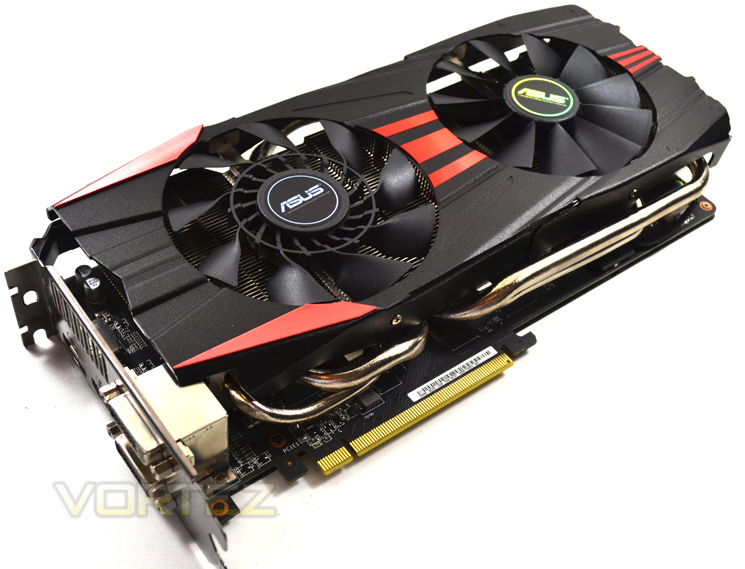
With a modest factory overclock and DirectCU II cooling, we take a look at the ASUS R9 290 Direct CU II OC. A card for the masses or one to be missed?
Product on Review: ASUS Radeon R9 290 DirectCU II OC
Manufacturer and Sponsor: ASUS
Street Price: £389.99 At time of review
The AMD R9 290 follows in the footsteps of the flagship R9 290X by being equipped with the same Hawaii XT core. While the R9 290 features 256 less shaders than its bigger brother and a slightly trimmed clockspeed ASUS are looking to close the gap on the R9 290X by giving the clockspeed of this particular 290 a bump to 1GHz from 947MHz meaning that this card is running at the same speed as the 290X but with a few less shaders. The card does however come with a very healthy 4GB of GDDR5, the same as the R9 290X. In fact, one could say this is the very same card with just a few shaders disabled and you would be right. Some R9 290’s are un-lockable to a full fat R9 290X with a simple BIOS flash which just goes to show how little there is to choose between the two. Sadly, not all R9 290’s are un-lockable though so you will just have to play the retail lottery on that one I’m afraid.
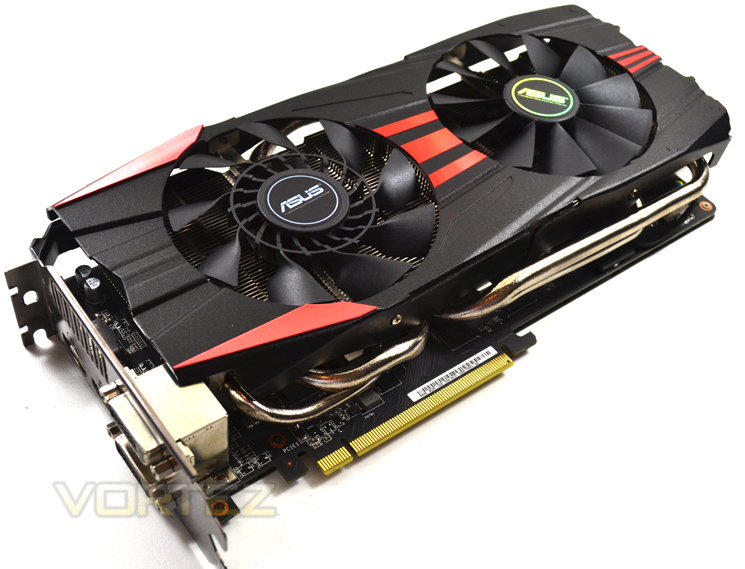
ASUS are renown for making some serious PC components and this sample appears to be no different. They have laid a high performance foundation and built upon this with their own high end cooling solution in the DirectCU II. Couple this with a factory over clock and you shouldn’t be surprised to hear this card flies. We have taken the liberty of pitching it against the best there is currently available from the GTX780Ti to the R9 290X and we were impressed by the results. Is it worth the asking price? Is it silent? How well does it overclock? These and many more questions will be answered in this full, in-depth analysis.
About ASUS
This visionary approach is the reason ASUS is able to bring high-quality innovation and design to all, and the reason for its widespread acclaim. ASUS products won 4,168 international awards and accolades in 2012 – that’s over 11 a day, every day. ASUS has consistently achieved significant year-on-year growth in terms of consumer notebook units shipped too, and closed 2011 on a high with revenues hitting US$11.9 billion.
Specification
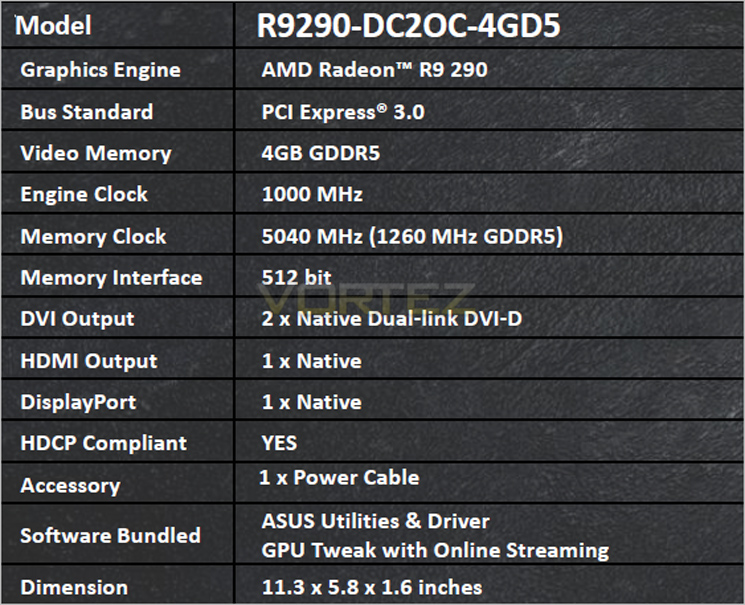
Compared to the HD7970, the R9 290 features 1.4x as many stream processors and twice as many render backends (ROPS). This card in particular features a base clockspeed of 1GHz, 53MHz over reference stock speed and while it may have a handful of shaders less than the flagship R9 290X, the boost in clockspeed and enhanced cooling power should see this card come close to the R9 290X performance.
Bus Standard: PCI Express 3.0
Video Memory: GDDR5 4GB
Engine Clock: 1000 MHz
Memory Clock: 5040 MHz ( 1260 MHz GDDR5 )
Memory Interface: 512-bit
Interface: DVI Output : Yes x 2 (DVI-D)
HDMI Output : Yes x 1
Display Port : Yes x 1 (Regular DP)
HDCP Support : Yes
Power Consumption: Up to 300Wadditional 6+8 pin PCIe power required
Accessories: 1 x Power cable
Software: ASUS GPU Tweak & Driver
ASUS Features: DirectCU Series, OC Series, Super Alloy Power
Dimensions: 11.3 ” x 5.8 ” x 1.6 ” Inch
28.7 x 14.73 x4.06 Centimeter
GCN (Graphics Core Next)
The AMD Radeon R9 290 family feature an evolution of Graphics Core Next Architecture (GCN).AMD has taken great strides to ensure that the GCN Architecture is capable of efficiently using its hardware resources. This seems like such a simple idea, but designing a GPU to frequently approach its peak theoretical performance is a challenge the GCN Architecture tackles with ease.
The GCN Architecture is designed for improved utilization, which ensures that the GPU is making optimal use of its resources for maximum performance.
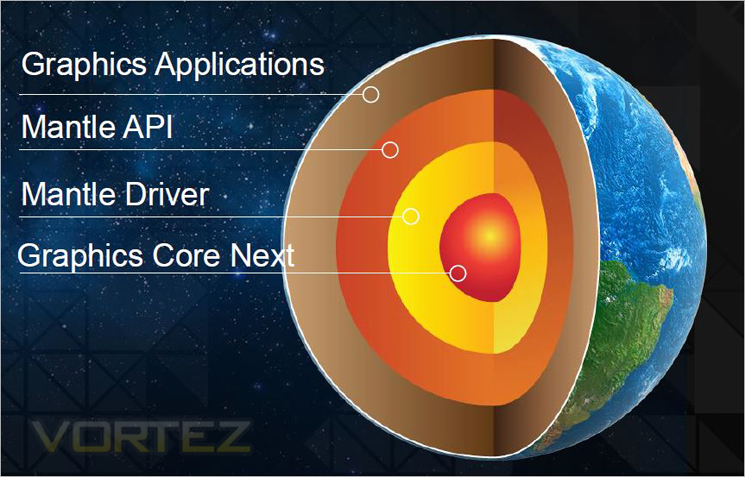
The GCN Architecture also benefits from dramatically improved tessellation performance. Games featuring this DirectX® 11 technology are considerably faster than they were on the previous generation of AMD Radeon™ products. There is also the new Mantle API which promises to dominate NVIDIA, especially in titles such as Battlefield 4. Project Mantle is one of AMD’s most innovative and game-changing features, delivered with the Radeon™ R9 and R7 Series product line. Mantle is a new application programming interface (API), leveraging the commonality between the next-gen consoles and Radeon™. It enables game developers direct communication to our GPUs, unlocking the true potential of GCN and resulting in significantly higher gaming performance at all segments. We will be looking at Mantle in a separate article but if what we hear is correct, Microsoft (who are responsible for DirectX) should be very worried.
Every gamer knows that the GPU’s clockspeed also has a big impact on the performance of a graphics card, and the GCN Architecture keeps that in mind.
But what many don’t know is that every graphics card is designed to draw only a certain amount of power from your PC’s power supply. This is called the Thermal Design Profile, or TDP, and it’s critical that the GPU architecture is capable of making the most of every watt. The GCN Architecture can do that thanks to a technology called AMD PowerTune technology.
AMD PowerTune is an intelligent system that performs real-time analysis of the games and applications that utilize a GPU. Examples of such software might include Battlefield 3 or Furmark. In the event that an application is not making the most of the power available to the GPU, AMD PowerTune can improve that application’s performance by raising the GPU’s clockspeed by up to 30%! Best of all, this technology is completely automatic and is designed specifically to improve gaming performance.
Available on all 28nm AMD Radeon™ products, AMD PowerTune is designed to enable significantly higher clockspeeds in your favorite games-automatically!
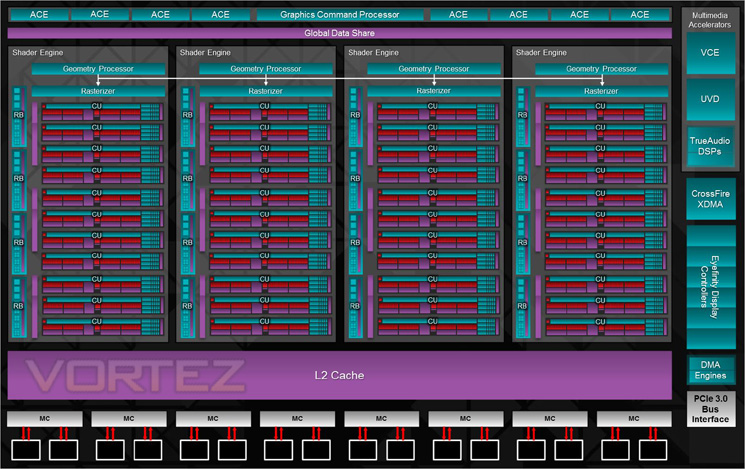
The block diagram above shows us that the R9 290X has the following features:
– Up to 44 Compute Units
– 4 Geometry Processors
– 64 Pixel Output/Clock
– 1 MB L2 cache
– 512-bit GDDR5 memory interface
– AMD TrueAudio technology
– New AMD CrossFire™ technology
– 6 AMD Eyefinity technology Display Controllers
– 6.2 billion transistors
– 28nm process node
The GPU has 4 shader engines, with each shader comprising of one geometry processor per shader engine which is load balanced with other shader engines on die. The 4x Geometry Processors feature a geometry assembler, a tessellator and vertex assembler. Performance is improved on the geometry shader and tesselation thanks to a reduction in off-chip bandwidth by LDS utilisation along with off-chip buffering.
The shader engine also features scalable compute resources with the new architecture supporting a possible 9 compute units. The instruction set and cache can be shared by up to 4 compute units each. The new GCN features 44 of these compute units equating to 2816 shaders on the 290X! In addition to the the scalable compute resources, there is one rasteriser unit per shader engine and 16 render back ends, each with 64b pixels per cycle and 256 Z/Stencil operations resulting in a massive pixel fill rate.
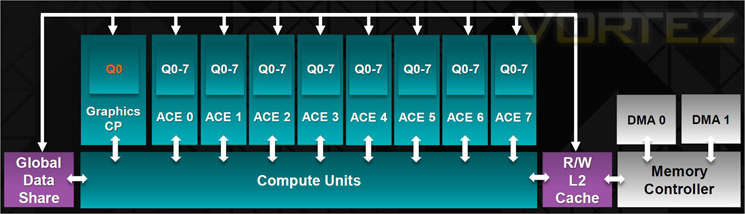
Finally, the GPU features asynchronous compute with up to 8 of these ACE per GPU. With independent scheduling and work item dispatch for ultra efficient multi tasking operations. Each ACE can manage up to 8 queues and has access to both L2 cache and GDS.
GCN Architecture is now the foundation of a common architecture that spans PC’s, next generation consoles and the new Mac Pro. The industry has spoken and resoundingly endorsed GCN for high performance graphics platforms.
Let’s take a look at some of the more familiar features of the Radeon card…
AMD Zerocore Power Efficiency
Enabling the World’s Most Power Efficient GPUs
When a discrete GPU is in a static screen state it works to minimize idle power by enabling a host of active power saving functions including (but not limited to); clock gating, power gating, memory compression, and a host of other features. However, GPUs with AMD’s exclusive AMD ZeroCore Power technology can take energy savings to entirely new heights by completely powering down the core GPU while the rest of the system remains active.
Nearly all PCs can be configured to turn off their displays after a long period of inactivity. This is known as the long idle state; where the screen is blanked but the rest of the system remains in an active and working power state (ACPI G0/S0). As soon as the system goes into long idle state and applications are not actively changing the screen contents, the GPU enters the AMD ZeroCore power state. In the AMD ZeroCore power state, the GPU core (including the 3D engine / compute units, multimedia and audio engines, displays, memory interfaces, etc.) is completely powered down.
However, one cannot simply remove the GPU and its associated device context completely; particularly when it is the only GPU in the system as is the case in many enthusiast platforms. The operating system and SBIOS must still be aware that a GPU is still present in the system. For this reason, the AMD ZeroCore Power state maintains a very small bus control block to ensure that GPU context is still visible to the operating system and SBIOS. The AMD ZeroCore power state also manages the power sequencing of the GPU to ensure that the power up/down mechanism is self-contained and independent of the rest of the system.
The enablement of the AMD ZeroCore Power feature is controlled by the driver. The driver monitors the display contents and allows the GPU to enter the AMD ZeroCore Power in the condition that the GPU enters long idle and subsequent work requests are no longer being submitted to the engine. If any applications update the screen contents, AMD ZeroCore Power technology can periodically wake the GPU to update the framebuffer contents and put the GPU back into the AMD ZeroCore Power state. Furthermore, applications such as Windows 7 desktop gadgets are architected to minimize activity and save power in the long idle state. These applications are active during screen-on mode to display dynamic content such as weather, RSS feeds, stock symbols, system status, etc. but also have the intelligence to suspend any updates and activity when the system enters long idle. These applications will not wake the GPU from the AMD ZeroCore Power state in long idle.
AMD ZeroCore Power technology delivers tremendous energy savings. Many PCs remain in the long idle state for a variety of use cases that are highly relevant to everyday consumers, enthusiasts and professionals. In AMD ZeroCore Power mode, users can still enjoy non-graphics activities such as file serving/streaming, motherboard audio and music, and remote access while the GPU core is essentially powered off.
AMD ZeroCore Power technology also scales with AMD CrossFire™ technology. With an AMD CrossFire platform, all non-primary GPUs are in the AMD ZeroCore Power state when not in use. For AMD CrossFire workloads, the driver will engage the non-primary GPUs to deliver full performance on-demand. The primary GPU can also enter the AMD ZeroCore Power state during long idle as well. This delivers scalable benefits for the enthusiast. First, it effectively removes the power increase for users of AMD CrossFire under idle and light (single GPU) workloads. Second, it removes the noise penalty multiGPU users have always had to endure since the GPU fans are off in AMD ZeroCore Power mode.
4K Ultra HD Gaming
Commonly addressed as Ultra HD, UHD or 4K, this new resolution refers to the ultra-high resolutions with approximately 4000 horizontal pixels. Ultra HD resolution also has four times the number of pixels of a typical 1920×1080 resolution.
With four times the pixels, an unprecedented level of immersion can be created for gamers on a single display. Gamers will be able to experience richer details and a new sense of realism with the next generation of gaming on Ultra HD displays.
Your AMD Radeon™ R9 290X features support for Ultra HD resolutions over both HDMI 1.4b (low refresh) and DisplayPort 1.2. We recommend you do all performance testing at Ultra HD resolution to truly test what the product is capable of.
Many UltraHD/4K monitors can achieve a 60 Hz refresh rate using a tiled display configuration. AMD Eyefinity technology can be leverage to support these tiled displays by making two 2Kx2K tiles act as one 4Kx2K monitor. AMD has taken steps to make this easy for end users by providing an Automatic AMD Eyefinity Configuration features. This feature allows an automatic “plug and play” configuration of supported UltraHD/4K tiled displays when a Display Port cable is connected.
When a user hotplugs a tiled 4K monitor (such as the Sharp PN-K321 or Asus PQ321Q), a 2×1 display group will be automatically created and the two tiles will be combined to act as one monitor. This configuration will be remembered and re-enabled when the display is unplugged or the system is rebooted. It is also possible to manually disable the display group in CCC, and have the two tiles act as independent monitors. It should be noted that once the display group is manually disabled, it can no longer be automatically configured as a tiled display via the Automatic AMD Eyefinity Configuration feature.
Additionally, AMD is supporting a new industry standard for tiled displays in VESA DisplayID v1.3. The “Tiled Display Topology Data Block” describes additional display capabilities that can be leveraged to enable the plug and play experience with tiled displays. Tiled displays supporting this data block can be supported by the Automatic AMD Eyefinity Configuration with no driver update required.
Packaging & Accessories
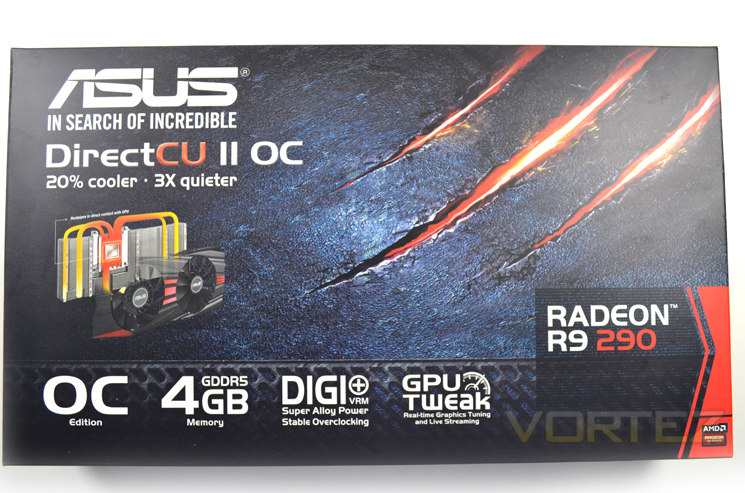
The external packaging looks near identical to other cards in the DirectCU II range. The graphite/rock face back ground is highlighted with 3 claw marks beneath which there is a 3D diagram showing the DirectCU II cooler with the main feature set found beneath.
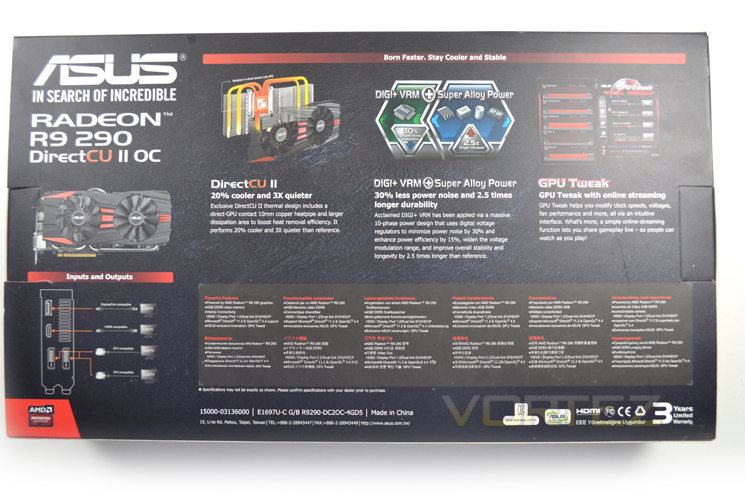
Flipping the box over we see that ASUS have broken down the features of this particular card into 3 sections: Direct CU II cooling, DIGI+ VRM and GPU Tweak. To the bottom left we see and ASUS input/outputs available on this card.
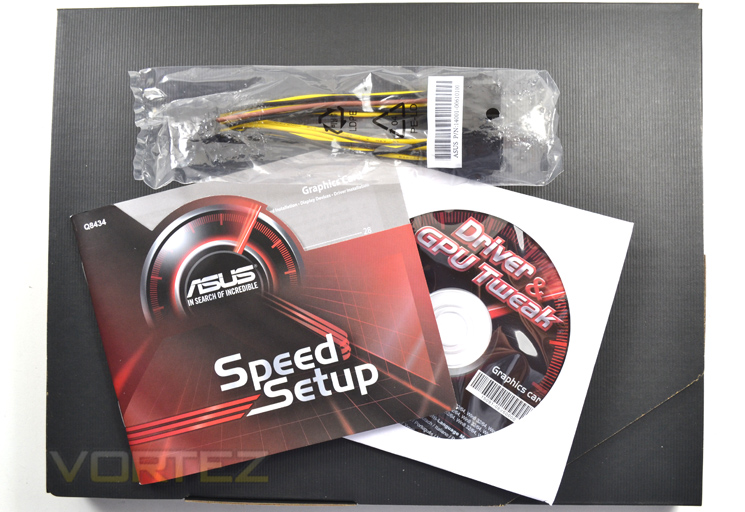
After removing the outer sleeve we find a well presented ribbed cardboard box embossed with a gold ASUS insignia. The accessories are in a separate box to the well padded GPU holding area and include a quick setup guide, driver and software CD along with twin 6 pin PCIe – MOLEX power adaptor.
All in all, a well presented package if somewhat lacking in the accessory area.
First Look
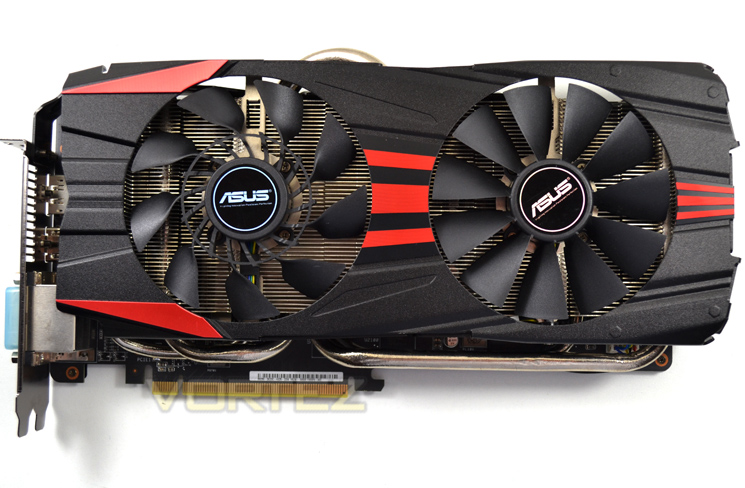
We first saw the DirectCU II cooling with the GTX770 we reviewed previously and despite there being no improvements here we still love the look of the design with a svelte black shroud with metallic red highlighting.
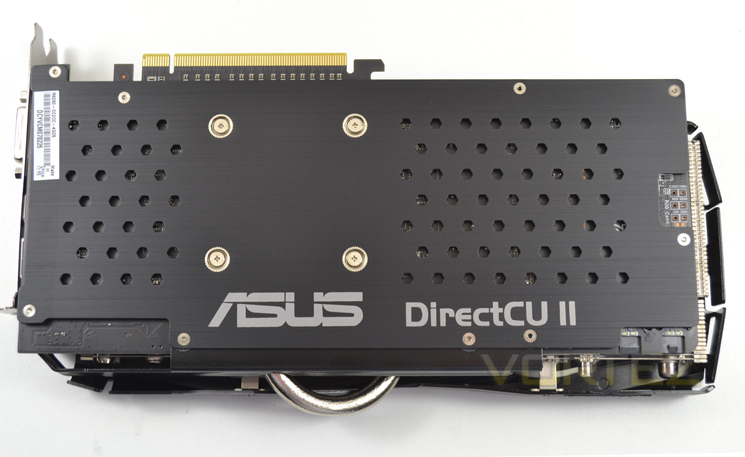
Back plates seem to be a rarity these days but we are happy to report that ASUS have seen fit to adorn the R9 290 DirectCU II with one. We like back plates because they afford some protection to the back (top) of the card, strengthen it thus preventing it from bowing while also assisting with cooling.
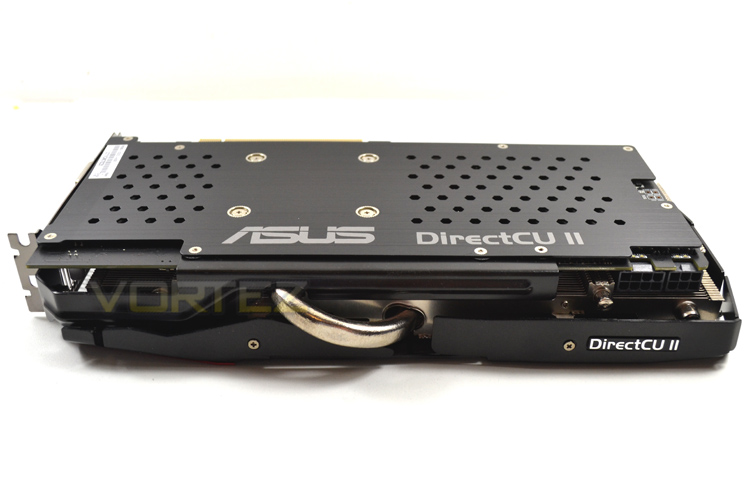
Just a single fat heatpipe is visible from the side of the graphics card. hinting at the cooling power beneath. As we will see on the next page, there are more heatpipes which are the main selling point of the DirectCU II cooler.
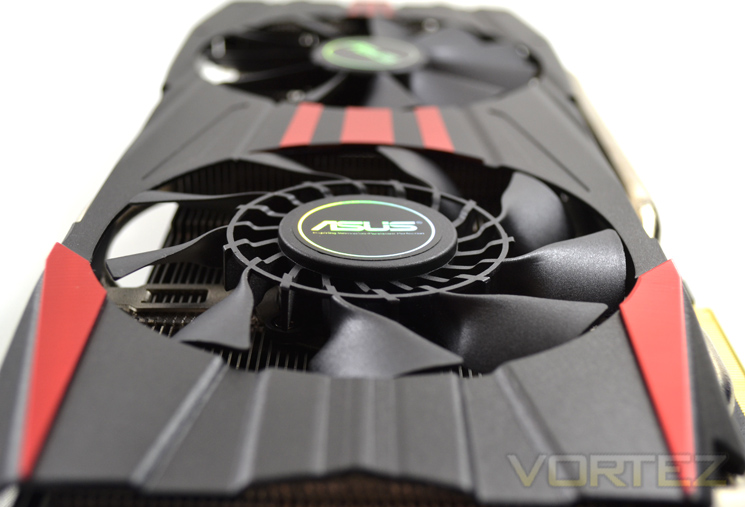
The card measures 28.7cm x 14.73cm x 4.06cm which is a little smaller than other high end cards on the market so should you have a smaller enclosure; this card may be more suited than those offered by alternative manufacturers.
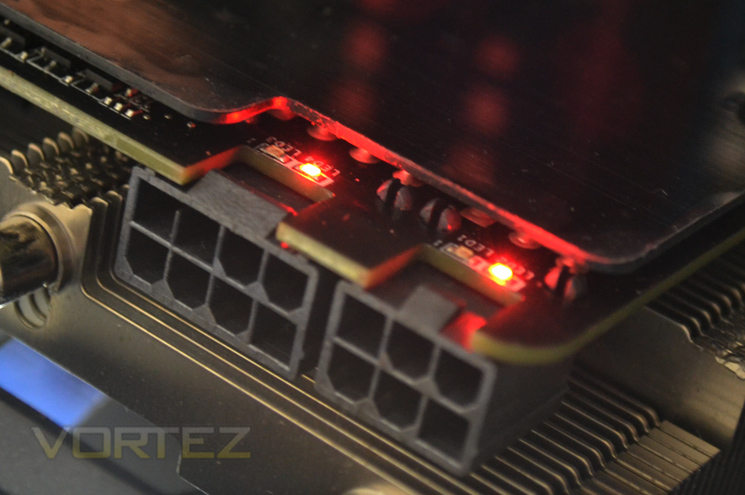
We love this little feature as it allows the user to immediately identify if there is problem with power delivery. As you can see we have omitted to plug in both PCIe power connectors so rather than looking at the card with distress thinking it is faulty we can see where our issues lay.
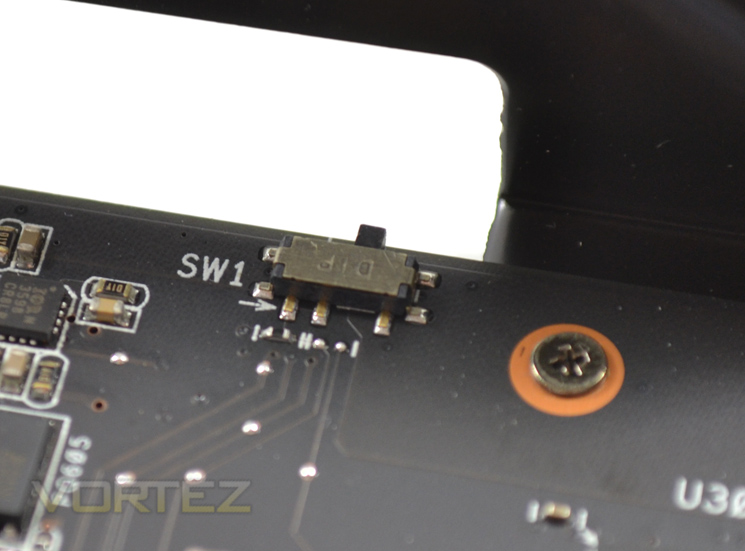
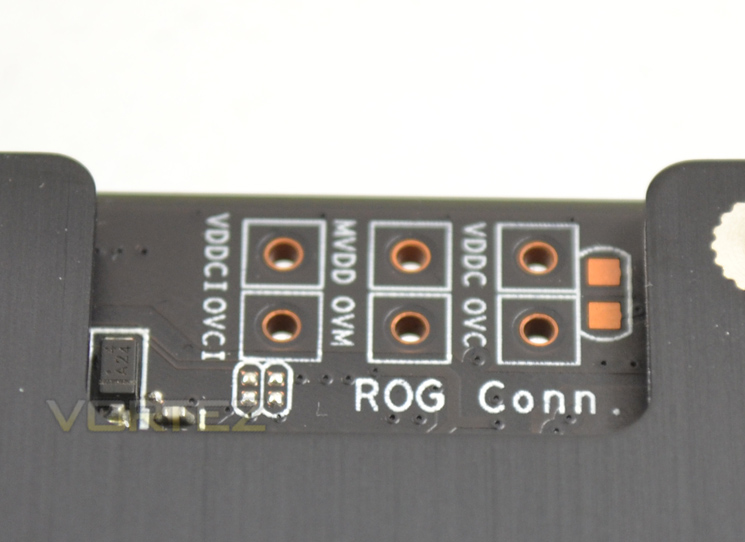
Two neat features of this card are the ability to manually monitor voltages using a multi-meter. The second feature is a BIOS switch which will allow you to try out alternative BIOS’ without bricking the card thanks to the backup BIOS.
Closer Look
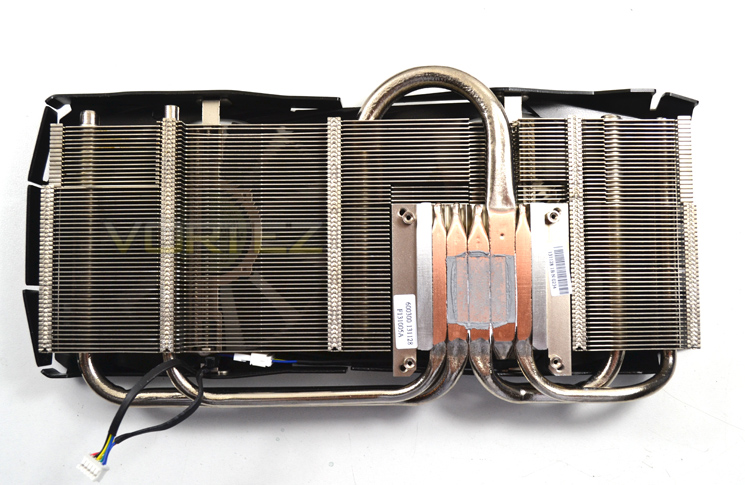
Removing the main cooler was a cinch thanks to just four spring loaded screws holding the DirectCU II cooler to the core. Removing the backplate would require the removal of more screws but for a simple GPU paste change this would be unnecessary.
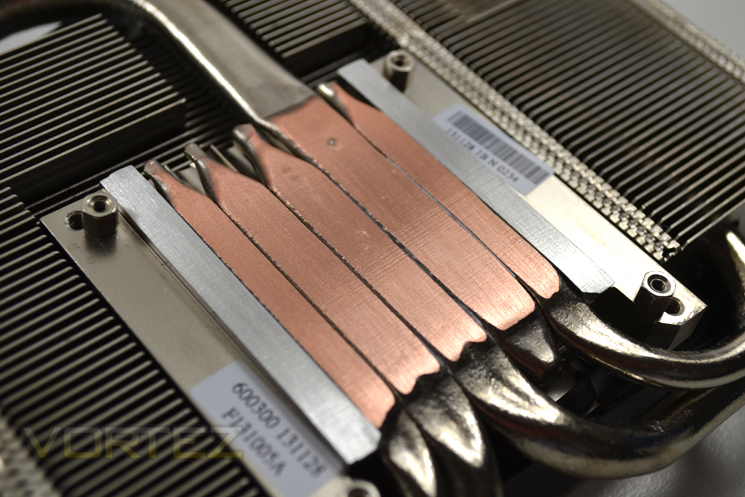
As you can see, the baseplate (or lack of one) makes direct contact with the core. There are 5 heatpipes in total and while only 3 make direct contact with the core, they will all assist in spreading the heatdump to the single piece aluminium finned heatsink array.
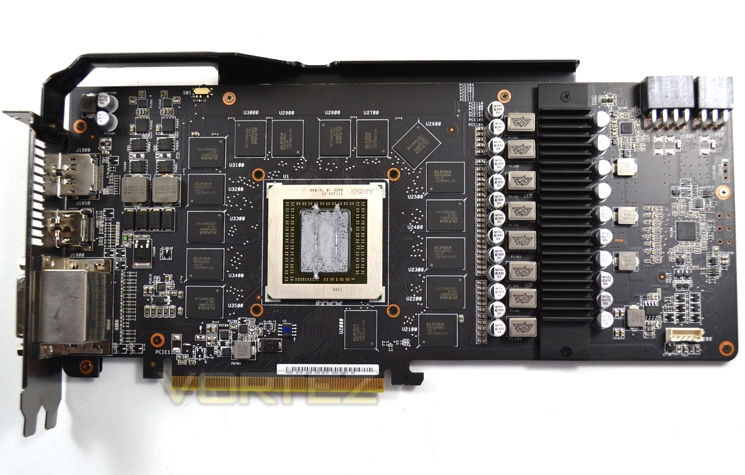
All four Gigabytes of Vram are found on the inside of the card with 16x256mb making up the total 4096MB GDDR5 available. The VRM area features a separate cooling plate and is made up of DIGI+ components.
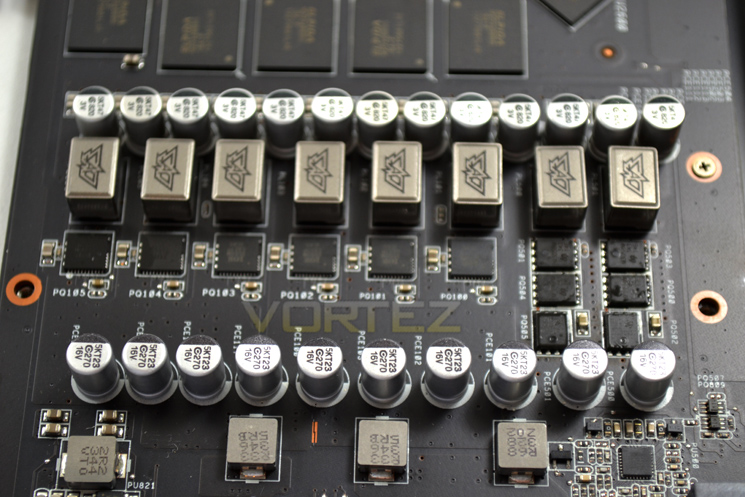
The cooling plate is removed by a further two screws and has a thermal interface pad to assist in heat transfer from the 8 phase power VRM. A separate 2 phases are afforded on the adjacent end of the card that do not receive direct cooling. All of the components make up ASUS’ DIGI+ Super Alloy Power which reduces electrical noise by 30% while increasing power efficiency by 15%.
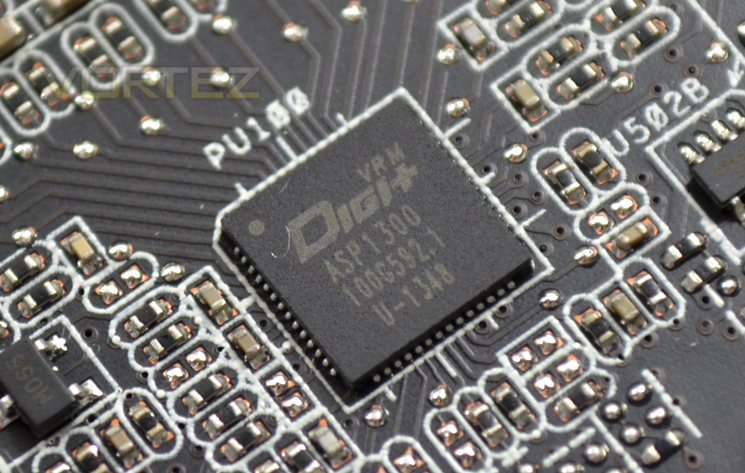
Keeping the voltages in check (or indeed allowing the end user to adjust them is this little DIGI+ voltage controller.
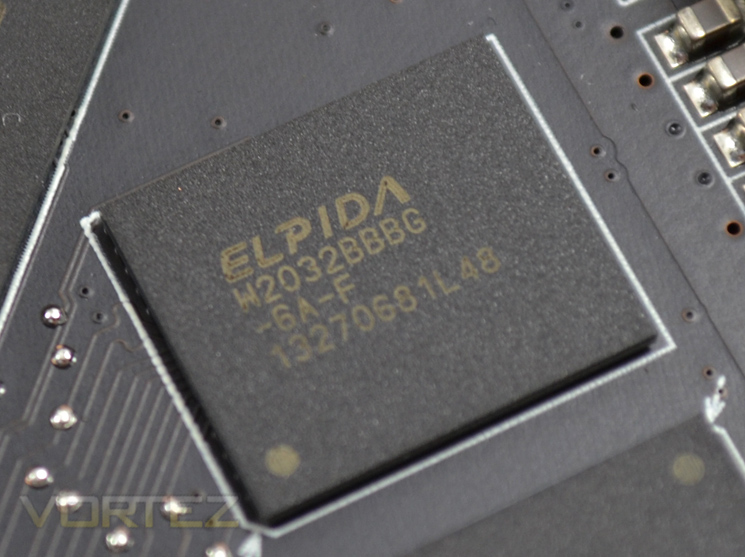
The memory chips are provided by Elpida which are not as well received as Sk Hynix but we will reserve our judgement for the overclocking section.
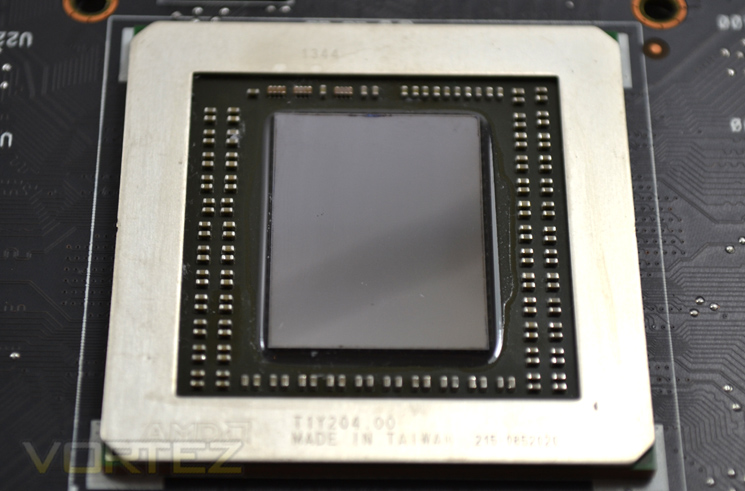
Lastly, we reach the core which for all intents and purposes is the same Hawaii core used on the flagship R9 290X with a few shaders disabled. We did check to see if these shaders could be unlocked but sadly it wasn’t to be on this sample.
Let’s take a look at our test setup…
Test Setup & Methodology
How we test graphics cardsTesting a graphics card is an extremely lengthy process. We sometimes see reviews where a graphic card has been tested using out of date equipment, out of date games and out of date drivers. While the latter can be excused due to the sheer amount of driver updates making a thorough review impossible we will however notify the reader when we have used a different driver to the normal for example a pre-release driver. For the most part however we will always use the same hardware and where possible the same drivers unless a newer driver rectifies an issue we have encountered or significantly improves performance to such an extent that continuing with an outdated driver is not feasible.
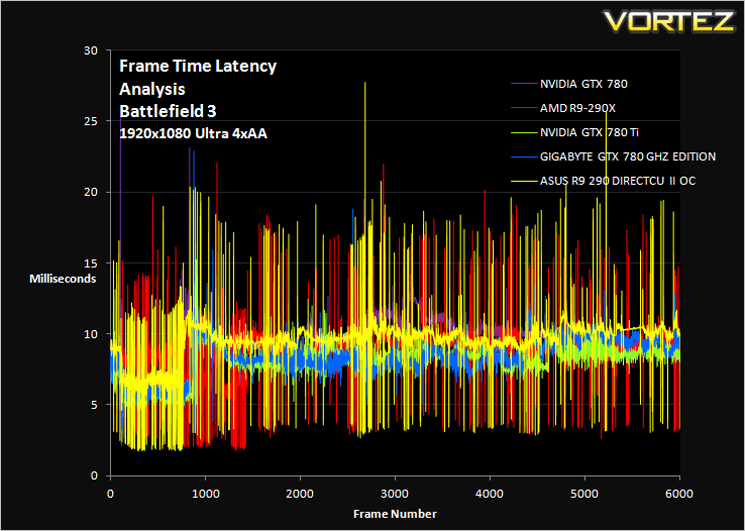
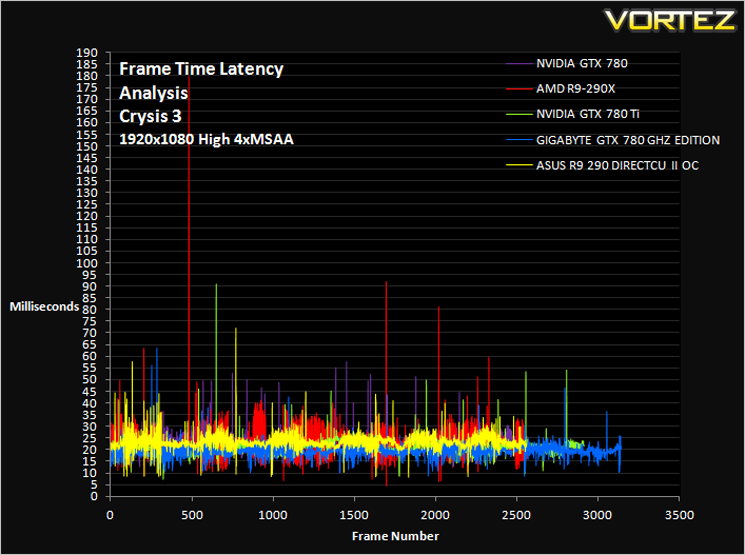
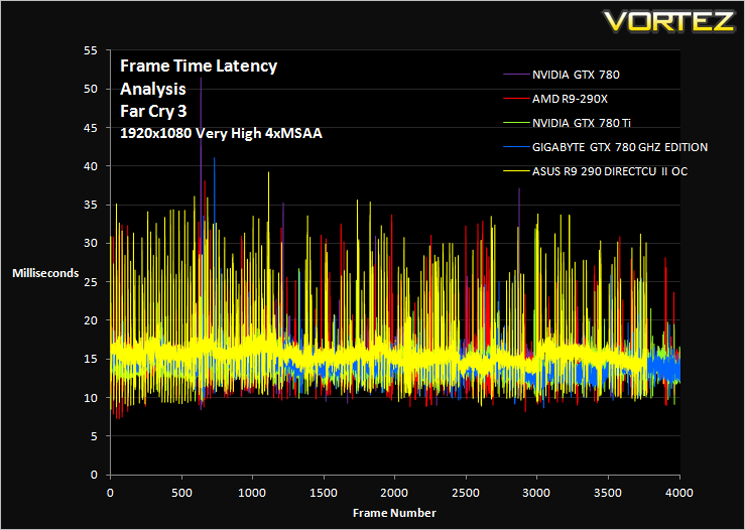
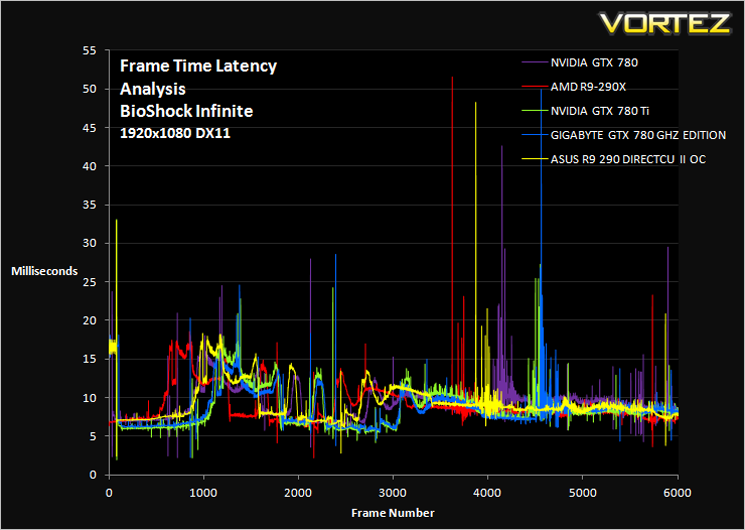
Frame Time Analysis
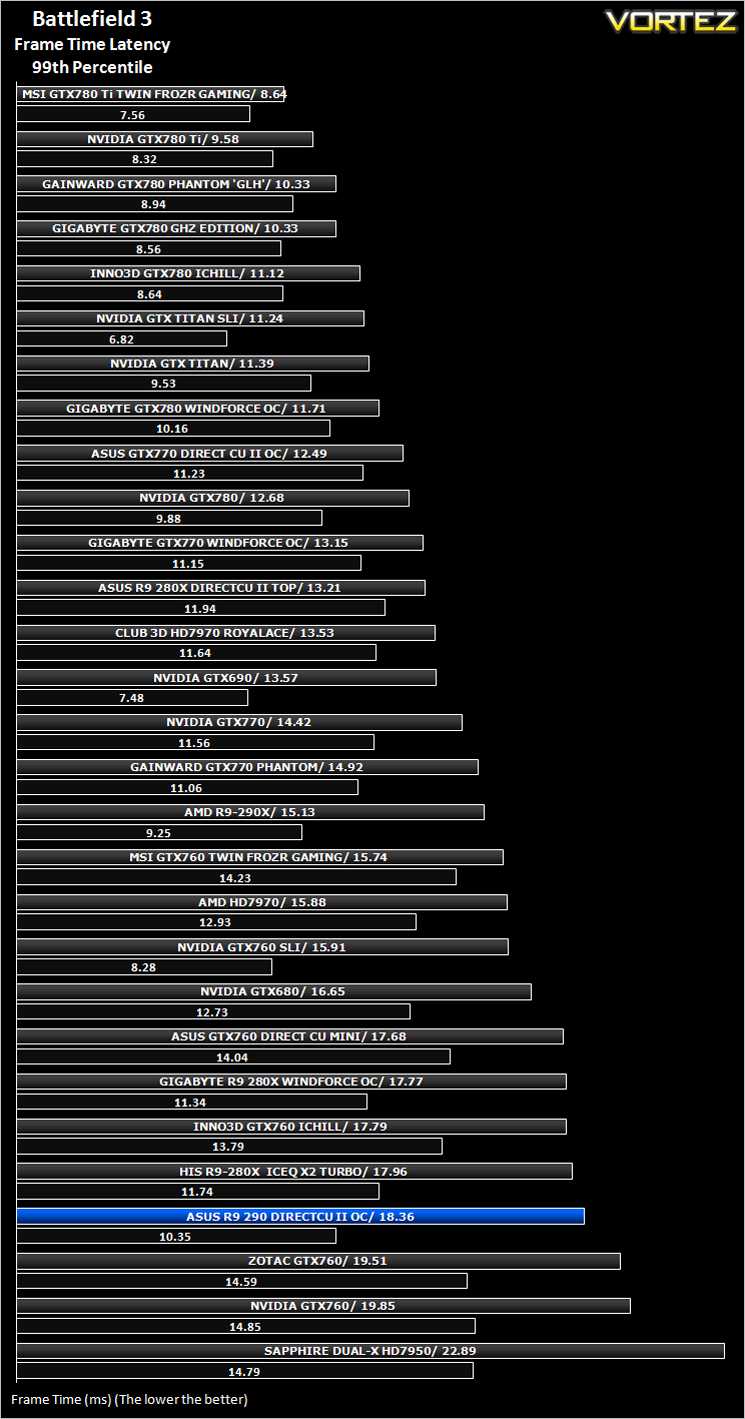
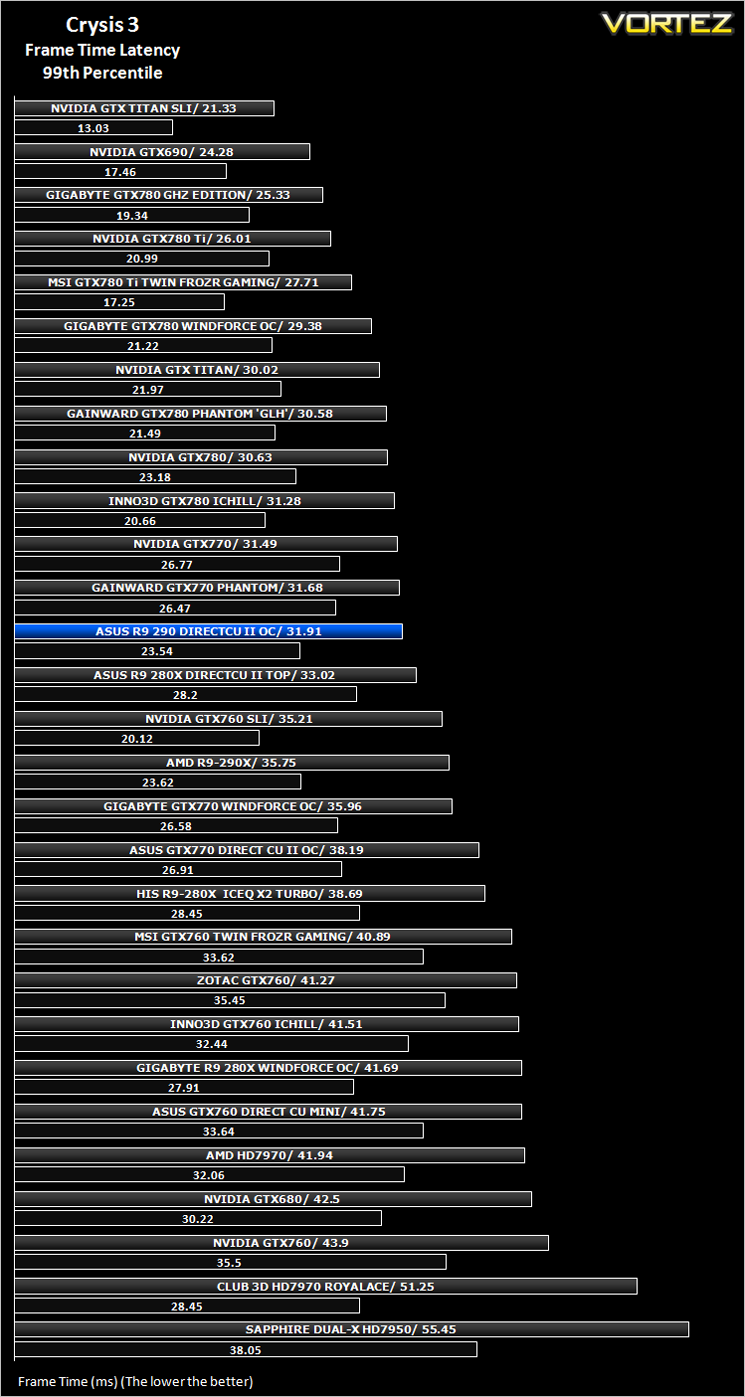
We have also seen the emergence of frame time analysis. We covered this in a separate article here: GPU Reviews: Why Frame Time Analysis is important so we won’t go into the reasoning again but to summarise, our testing comprises both FPS testing and perhaps arguably more importantly, frame time analysis. We also look at overall performance by equating averages across the games and finally before concluding our review we take a look at value for money.
HardwareWith the latest Intel chipset release we decided to update our ageing X58 setup to the new X79 chipset. Not only that but we will be using the flagship Core i7-3960X Extreme Edition processor clocked to 4.5GHz to ensure we have no CPU bottlenecks. With 16GB of ram on board there should be minimal paging so the benchmarks we run today will hopefully give a true reflection of the graphics card’s performance.
High End Graphics cards on test:
MSI GTX 780 Ti Twin Frozr OC GAMING 3GB GDDR5(Forceware 331.70)
GIGABYTE GTX 780 GHz Edition 3GB GDDR5(Forceware 331.70)
HIS R9 280X ICEQ X2 TURBO 3GB GDDR5](CAT 13.11)
GIGABYTE R9 280X WINDFORCE 3X OC 3GB GDDR5(CAT 13.11)
AMD RADEON R9 290X 4GB GDDR5(CAT 13.11 Beta v5)
ASUS R9 280X DirectCU II 3GB GDDR5(CAT 13.11 Beta v1)
ASUS GTX760 DirectCU Mini OC 2GB GDDR5(Forceware 320.49)
Inno3D iChill GTX 780 HerculeZ X3 Ultra 3GB GDDR5(Forceware 320.49)
ASUS GTX770 DIRECT II CU OC 2GB GDDR5(Forceware 320.49)
MSI GTX760 Twin Frozr Gaming 2GB GDDR5(Forceware 320.49)
GIGABYTE GTX780 Windforce x3 OC 3GB GDDR5(Forceware 320.49)
GAINWARD GTX780 PHANTOM ‘GLH’ 3GB GDDR5(Forceware 320.49)
INNO3D GTX760 ICHILL HERCULEZ 2GB GDDR5(Forceware 320.49)
GIGABYTE GTX770 WINDFORCE 3X OC 2GB GDDR5(Forceware 320.49)
ZOTAC GTX760 2GB GDDR5(Forceware 320.39)
NVIDIA GTX760 2GB GDDR5(Forceware 320.39)
]NVIDIA GTX760 2GB GDDR5 SLI(Forceware 320.39)
SAPPHIRE DUAL-X HD7950 3GB GDDR5 (Catalyst 13.6 beta)
CLUB 3D HD7970 royalAce 3GB GDDR5 (Catalyst 13.6 beta)
GAINWARD PHANTOM GTX 770 2GB GDDR5 (Forceware 320.18)
NVIDIA GeForce GTX 770 2GB GDDR5 (Forceware 320.18)
NVIDIA GeForce GTX 780 3GB GDDR5 (Forceware 320.18)
NVIDIA GeForce GTX 690 4GB GDDR5 (Forceware 314.22)
NVIDIA GeForce GTX TITAN 6GB GDDR5 (Forceware 314.22)
NVIDIA GeForce GTX TITAN SLI 12GB(2x6GB) GDDR5 (Forceware 314.22)
NVIDIA GTX680 2GB GDDR5 (Forceware 314.22)
AMD HD7970 3GB GDDR5 (AMD CAT 13.3 beta)
CPU: Intel Core i7-3960X Extreme Edition @ 4.5GHz
RAM – 16GB (4x4GB) Corsair Vengeance (Red) DDR3 @ 1866MHz 9-10-9-27
Power Supply – Thortech Thunderbolt Plus 1200W
Hard Drive – Kingston HyperX 240GB
Cooler – Corsair H100
Benchmarks
If you are a regular reader of our reviews you will know we like to test the latest hardware with the latest games and benchmarks on the market. Here are the games we have chosen:
Crysis 3
Far Cry 3
BioShock Infinite
DiRT: Showdown
The Elder Scrolls: Skyrim
We also take into consideration the benchmarkers out there so have included 3 of the more popular synthetic benchmarks available:
Unigine: Heaven 4
Futuremark 3DMark Firestrike
Let’s see how today’s graphics card performed…
Overclocking
For overclocking today’s sample we will be using ASUS’ own GPU Tweak tool as this gives us all of the options we require.
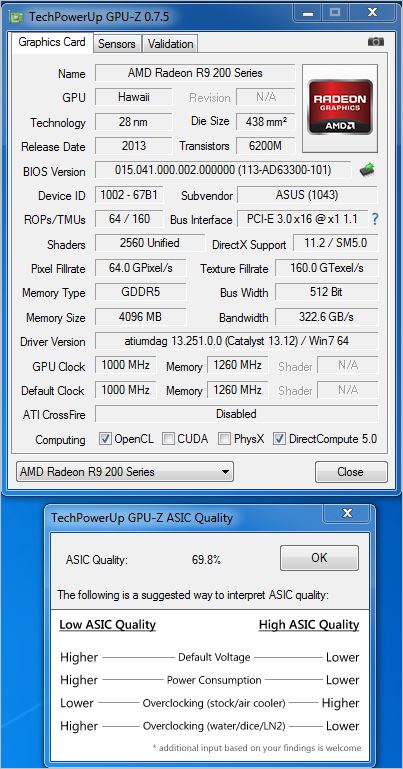
Above is a screenshot of GPU-Z showing the reference (factory overclocked) speeds and reference boost clocks. We have also included the ASIC rating of our sample. The ASIC rating basically tells us how good the overclock will be. The higher the ASIC rating, the better the overclock is likely to be, particularly on air cooling at a given voltage.
In truth, we are still dubious as to the real value of this reading but time will tell. As we have been asked on numerous occasions to include it in our reviews we felt it only right to show it although please take any of these values with a pinch of salt until we can confirm whether it does actually mean a higher or lower overclock will be achieved.
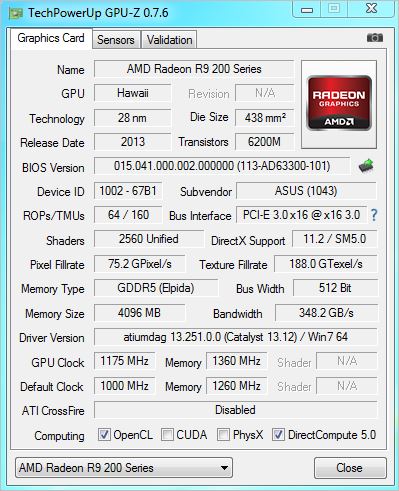
We had some fun overclocking the R9 290 DirectCU II. We did initially manage to break the 1200MHz on the core but after a lengthy period of benchmarking and stress testing we started to encounter anomalies so we reduced this back to 1175 which is still an excellent overclock by any standards. As expected, the memory overclock was not so great but we did manage a respectable 100MHz (400 effective) overclock.
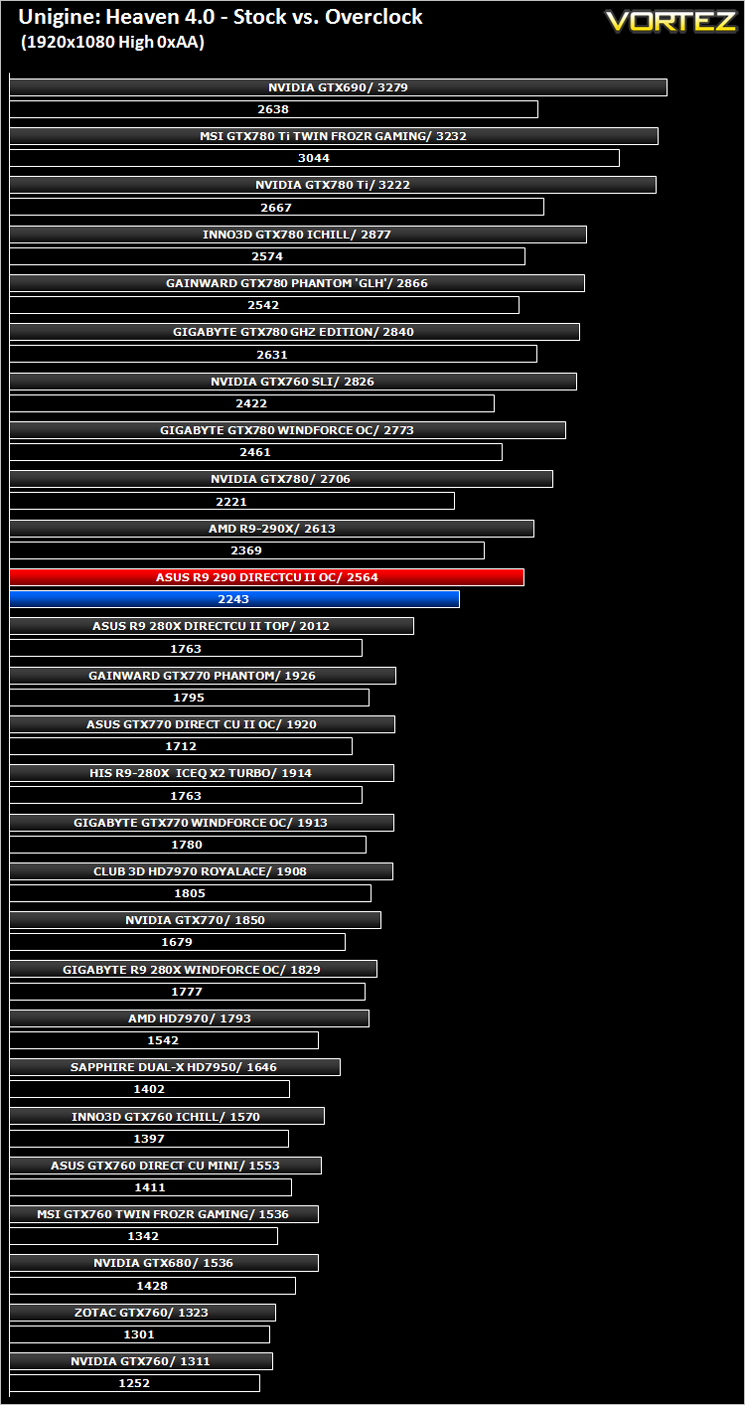
After settling on our stable clockspeed which was verified by multiple runs of Unigine Heaven and 3DMark we benchmarked the overclock and compared it to stock results with Unigine Heaven 4.0 to evaluate the benefits of overclocking the GPU.
Temperature, Acoustics and Power Consumption
Power Consumption
To test for power consumption we use the included iPower Meter found with our Thortech PSU. As system load figures obviously differ from idle it is extremely difficult to get an accurate figure of system draw and then simply take this figure away from the overall amount because each game will generate varying levels of CPU and hard drive activity. Dynamic power adjustments which fluctuate in game will also affect accurate power figures thus rendering any such power consumption calculations redundant at worst and approximate at best.
We will therefore take our system readings averaged over a benchmark run of Tessmark (100% load) and after 20 minutes of being idle in Windows 7. These can then be used as a comparison to other graphics cards to determine how much more or less power you can expect a GPU to consume.
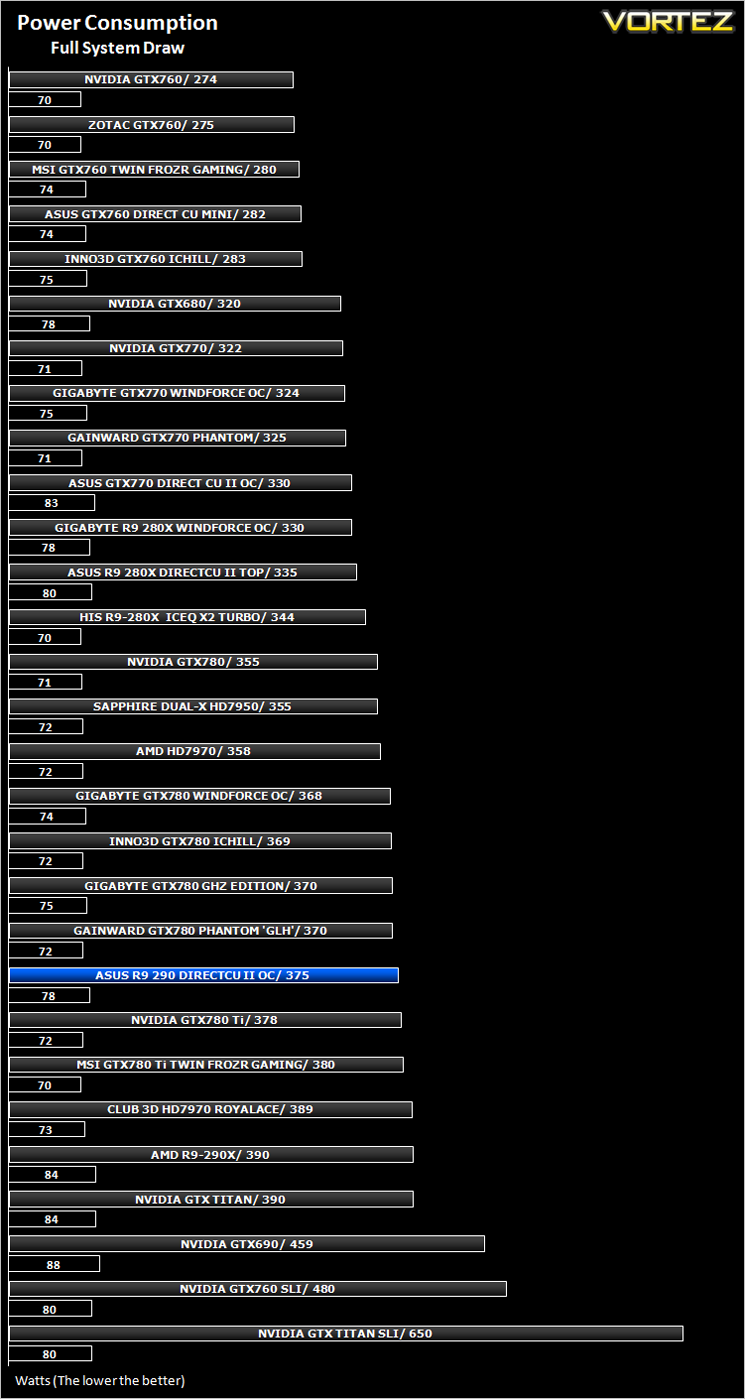
The ASUS R9 290 DirectCU II found itself consuming a little more power than an overclocked GTX780 but as expected less than it’s bigger brother, the R9 290X.
Temperature
To test temperatures we measured idle temperatures after booting windows, letting all applications finish loading and ran a few benchmarks. Once the benchmarks were complete we left the card to reach a cooling plateau where we then took the idle temperatures. For the load tests, we would normally run Furmark for 20 minutes, taking the absolute maximum temperature attained however we found that this throttled the card and resulted in spurious results. So we set Heaven running continuously for 20 minutes and used this as a temperature result as the card did not throttle with this application.
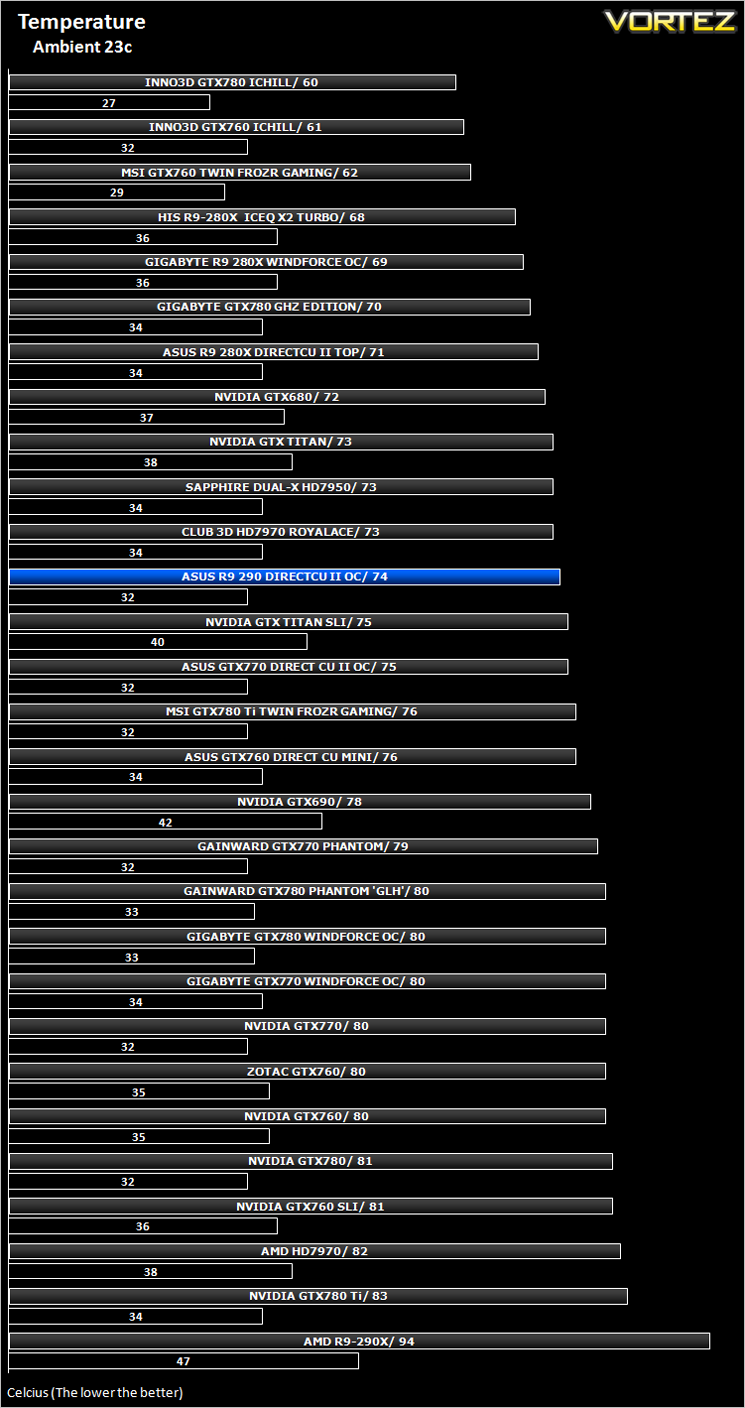
Temperatures were very good. Throughout testing the card barely broke above 74c however it needs to be considered that this was in an open environment with an ambient temperature of 23c so your own experiences may vary. Compared to the competition, especially the reference R9 290X, this is a great result.
Acoustics
The DirectCU II cooling not only looks good, cools very well but it is also near silent for the most part. IT wasn’t until we manually adjusted the fan speed for our stress testing that the fans became noticeably loud and intrusive. In normal gaming conditions though, the card performed admirably by hardly making any noise at all. Thankfully we did not notice any capacitor squeal with this sample either.
Gaming Experience (Frame Time Analysis)
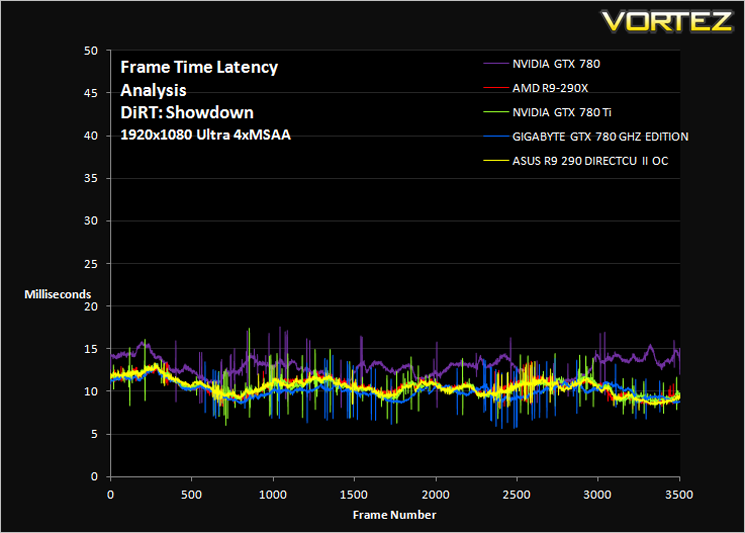
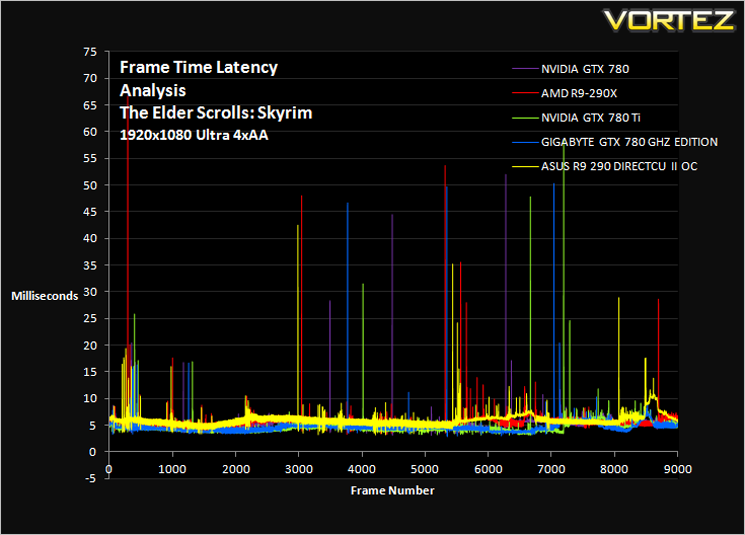
Comment
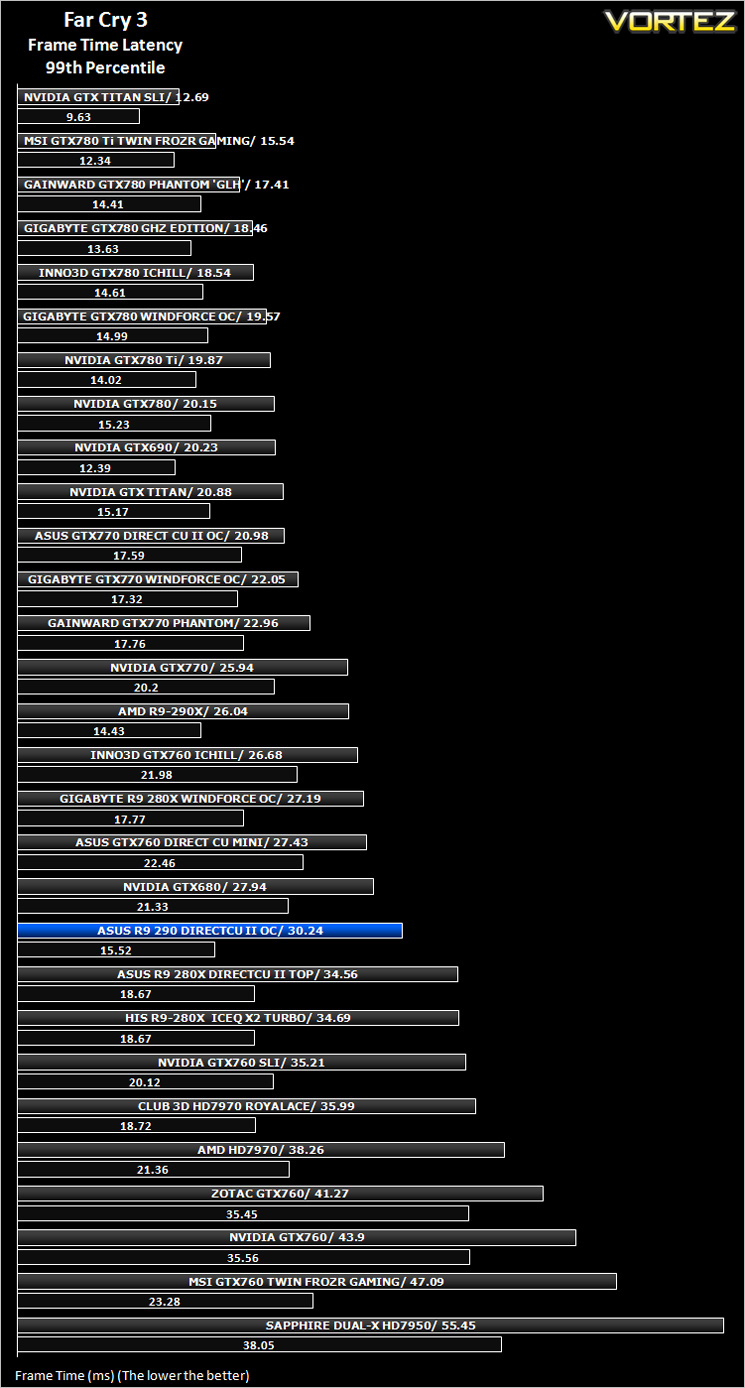
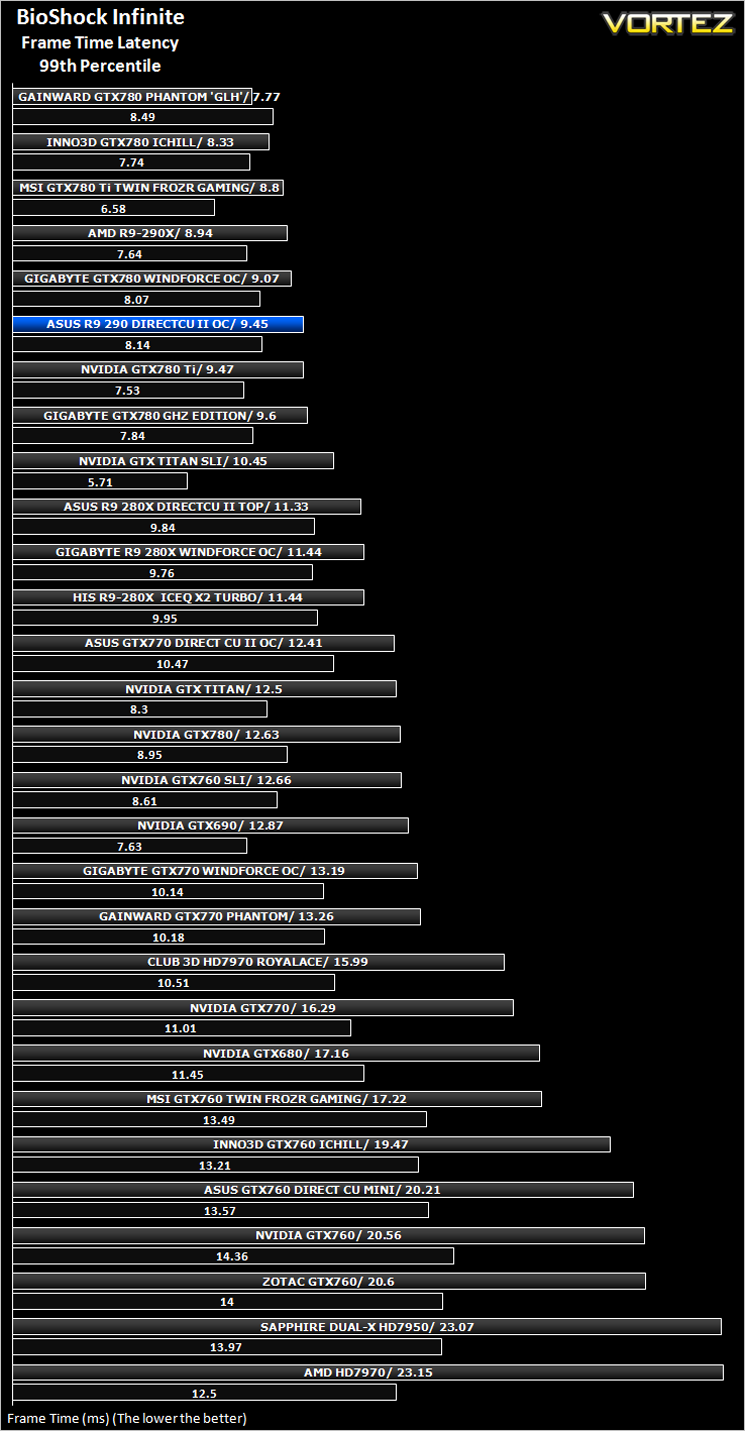
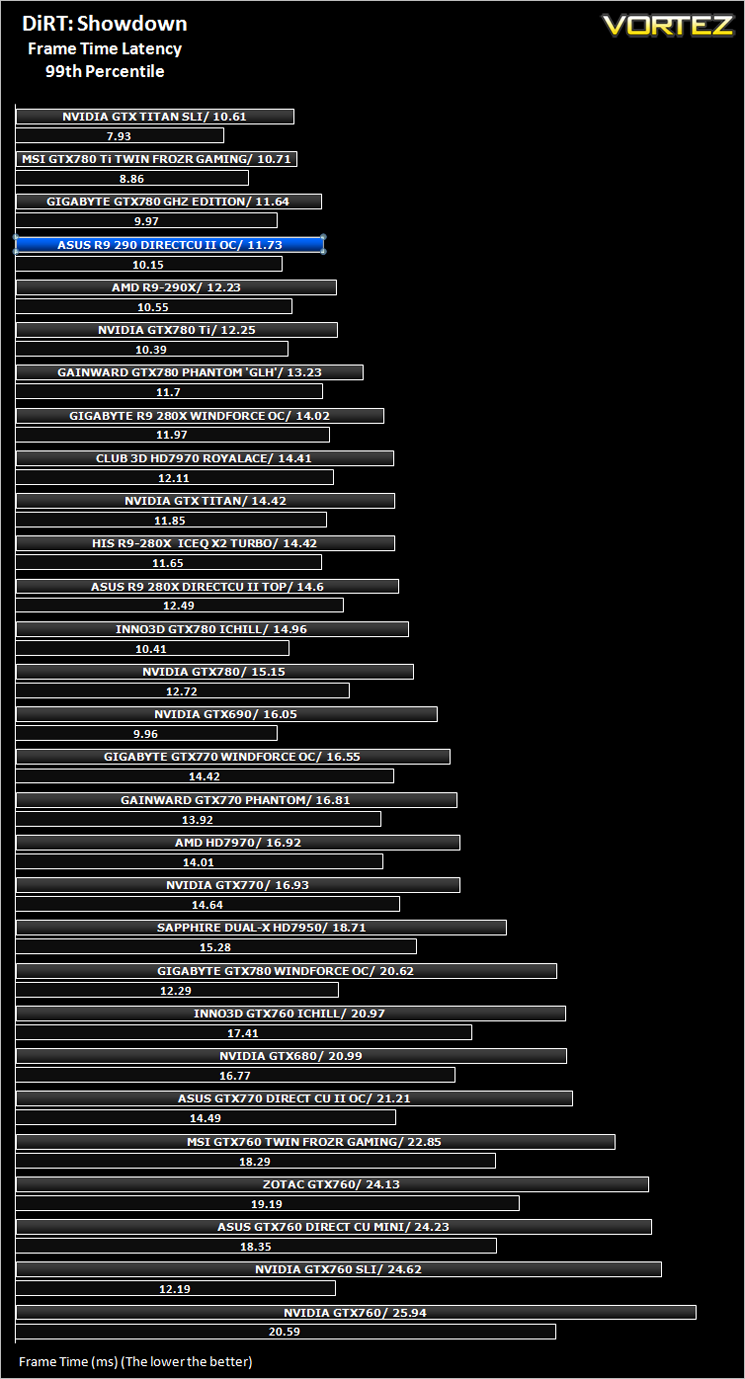
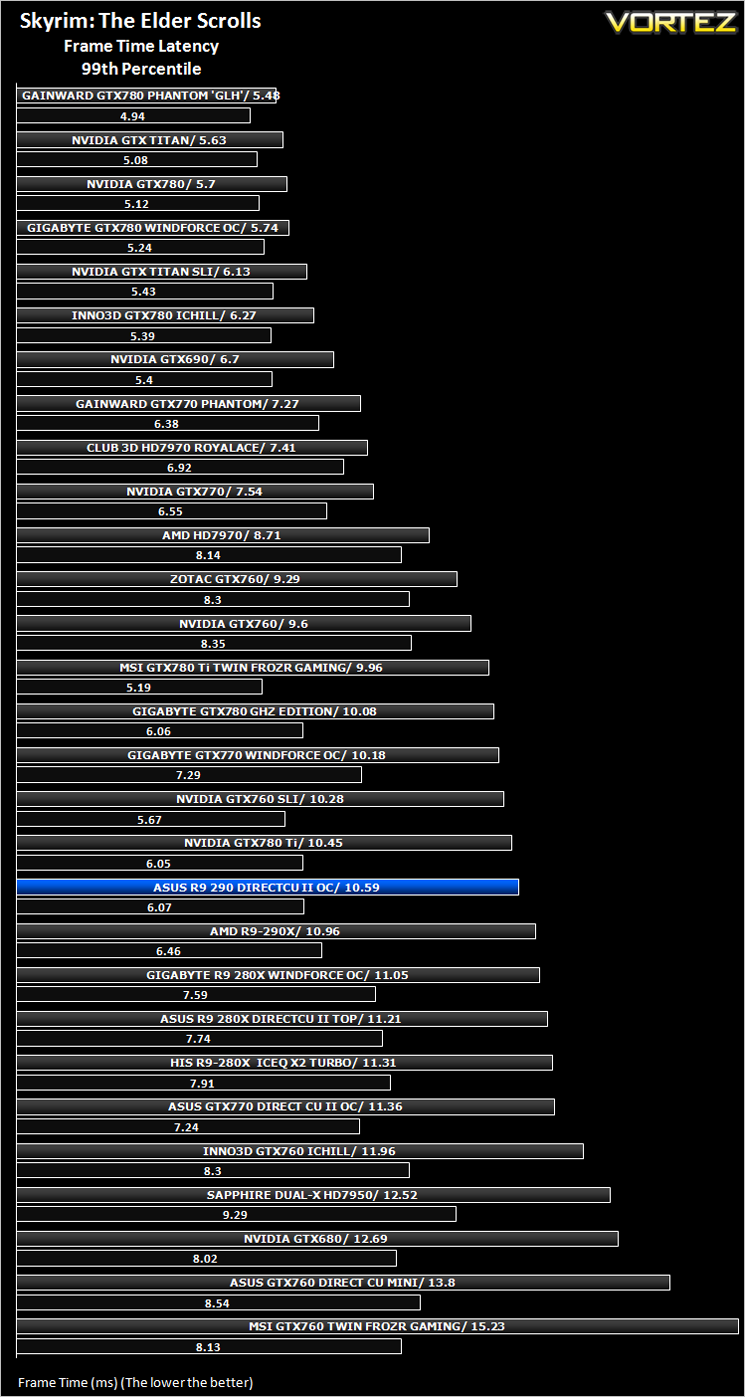
Average and 99th Percentile response times (Frame Time Analysis)
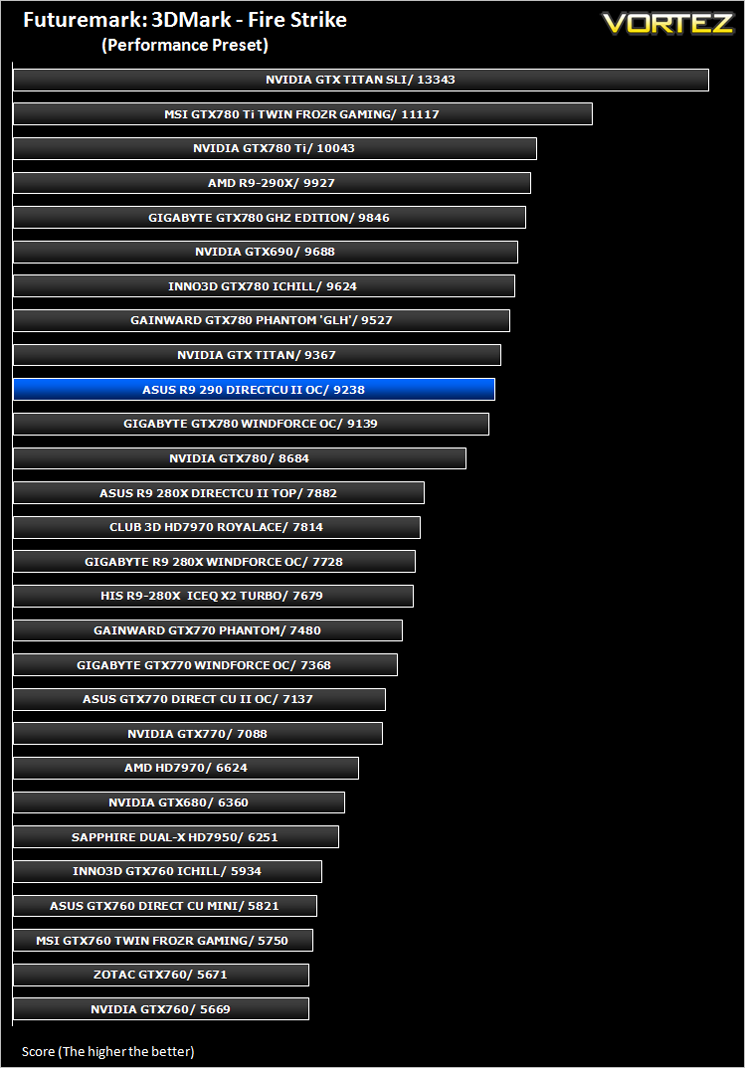
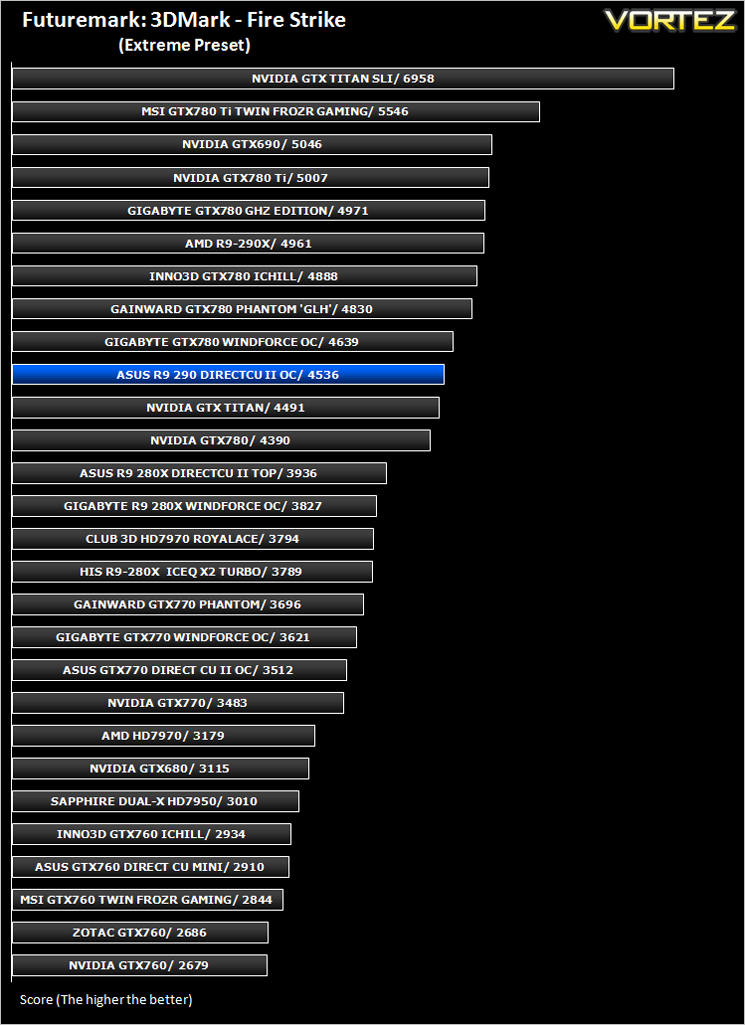
Futuremark 3DMark Fire Strike (Synthetic)
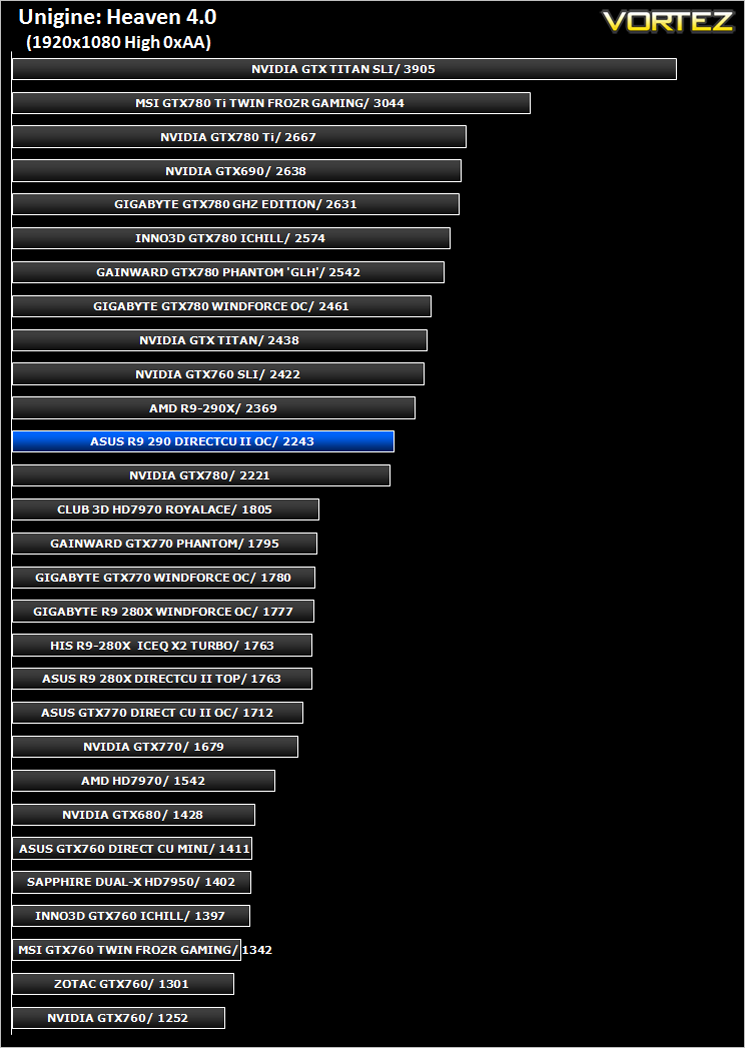
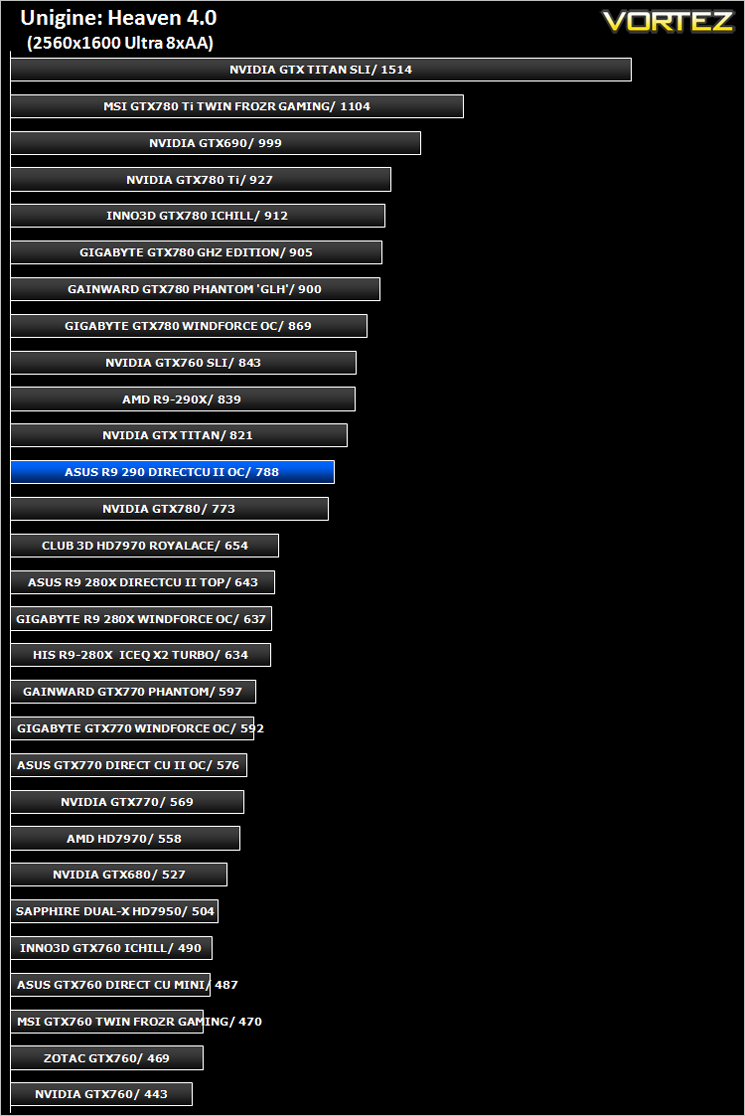
Unigine: Heaven 4 (Synthetic)
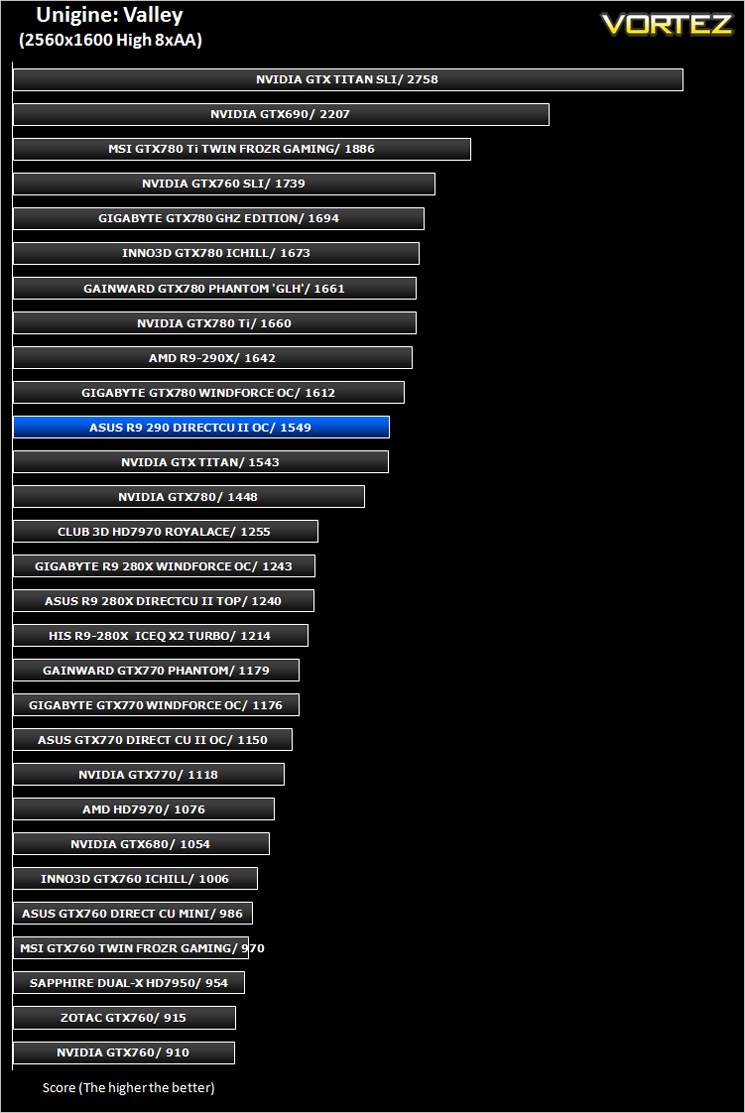
Unigine: Valley (Synthetic)

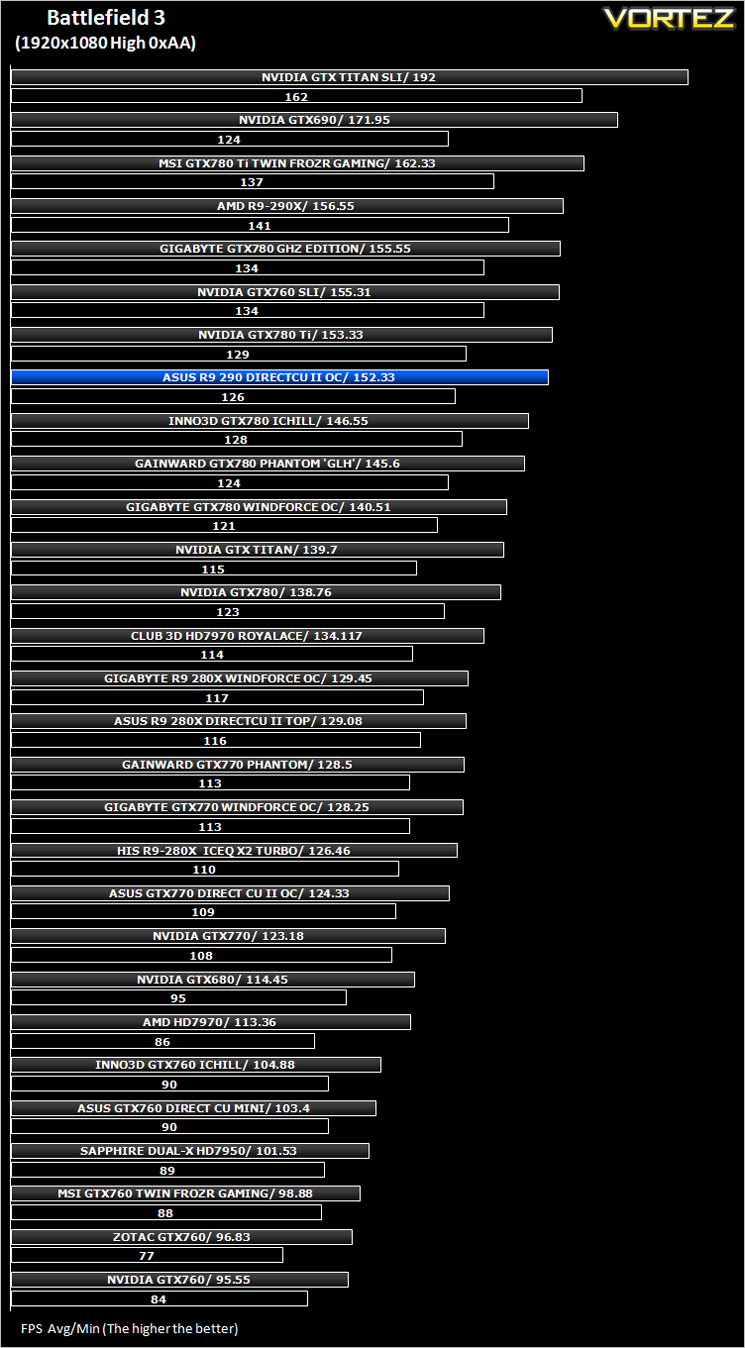
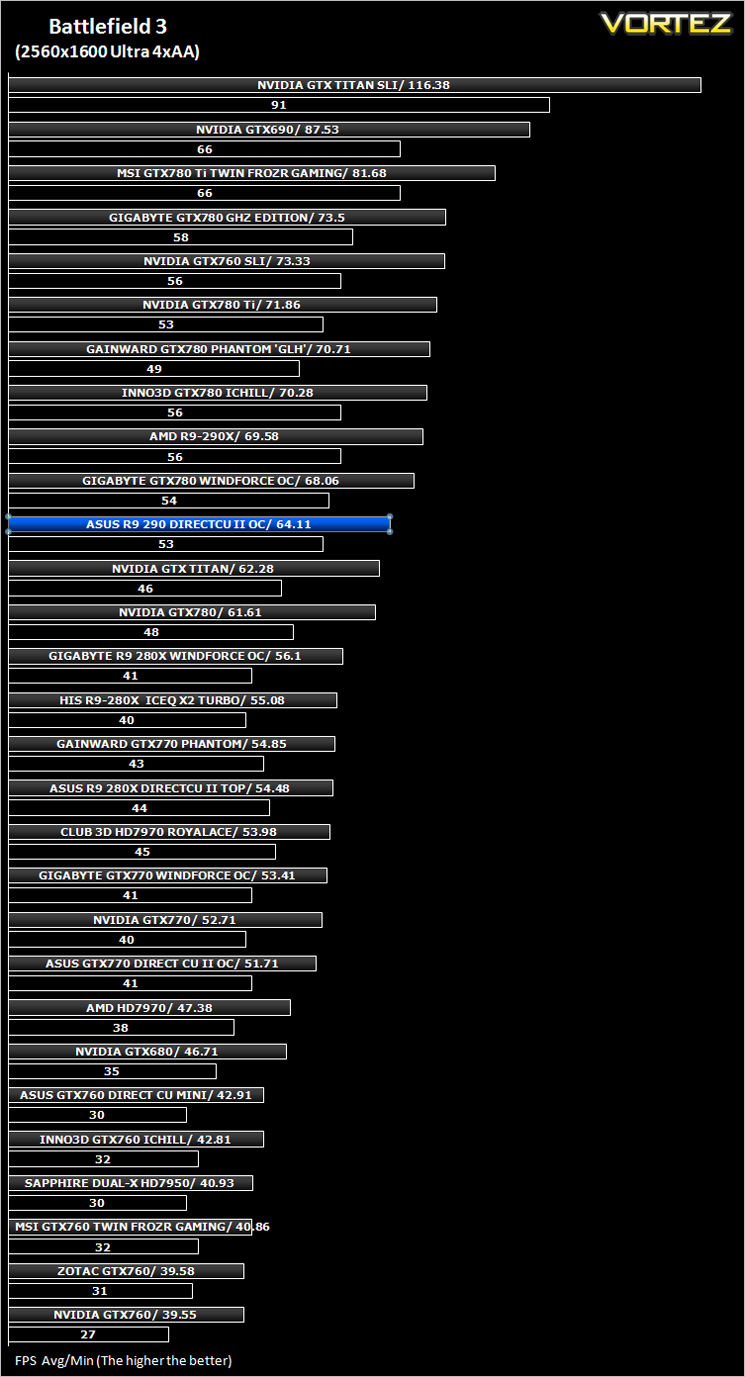
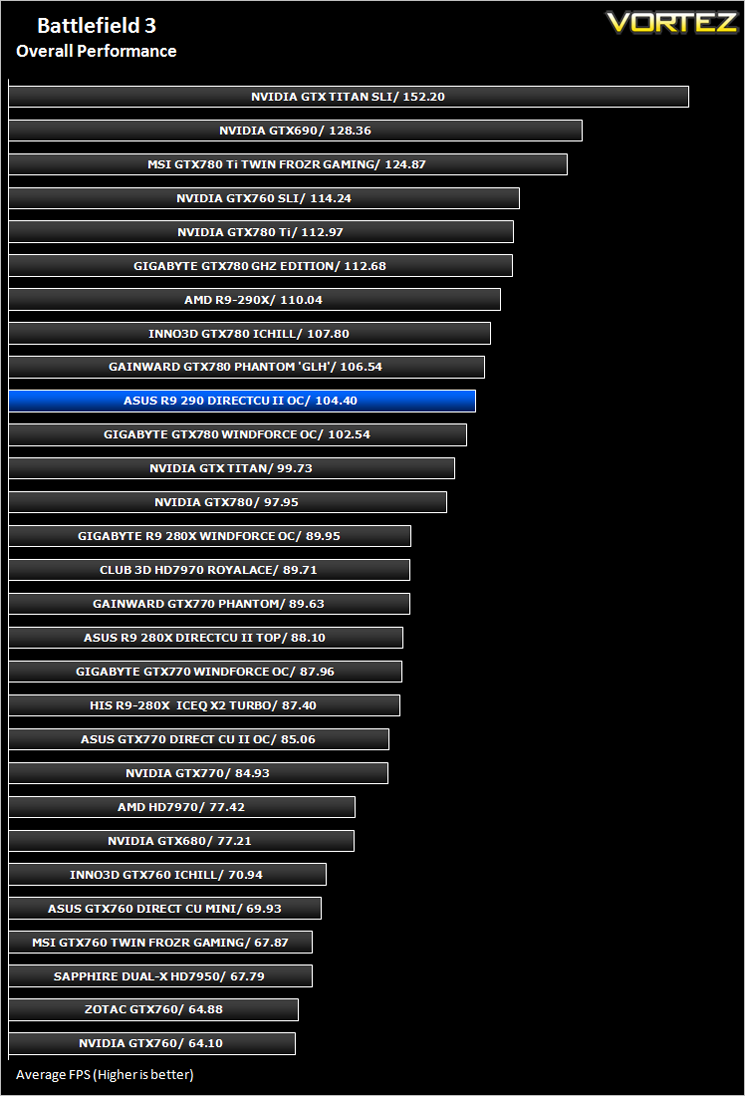
Battlefield 3 (FPS)
Average and minimum frames per second were measured using Fraps during the parking lot scene on Operation Sword Breaker. High and Ultra presets were loaded at both resolutions.
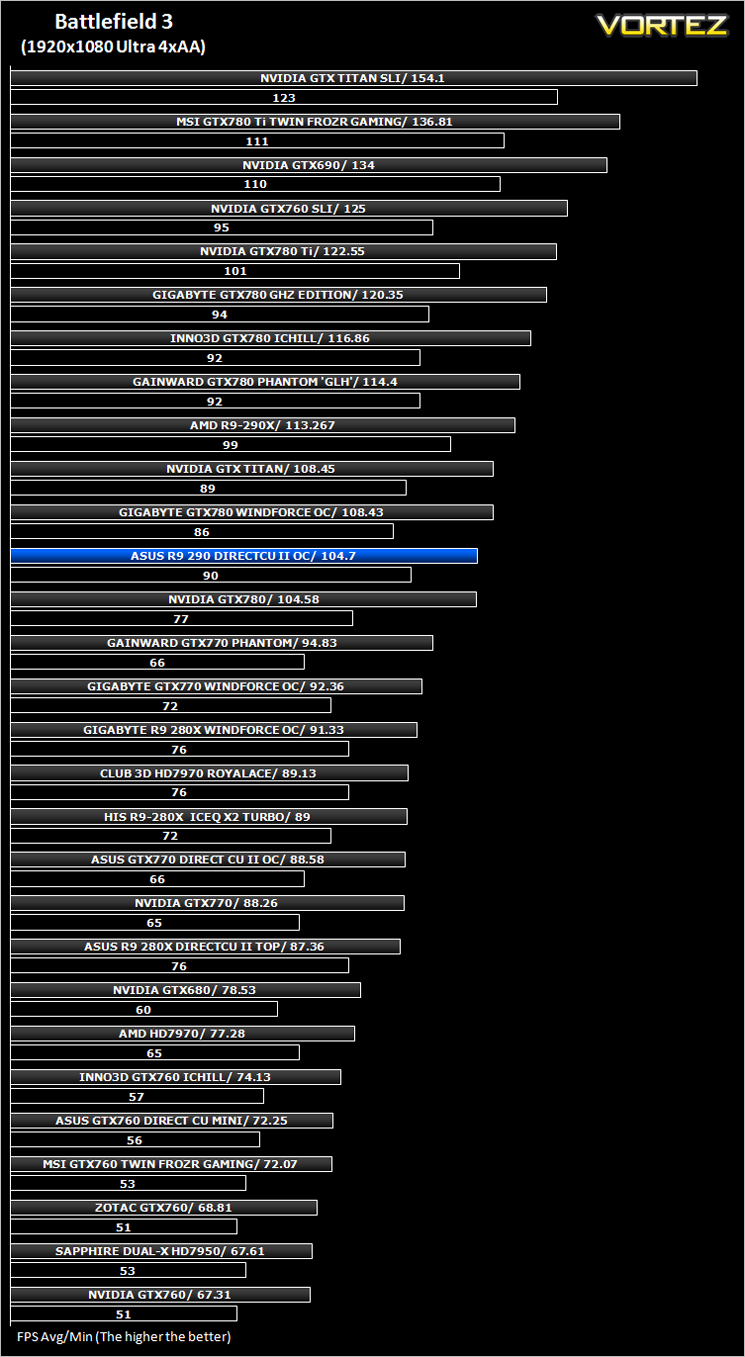
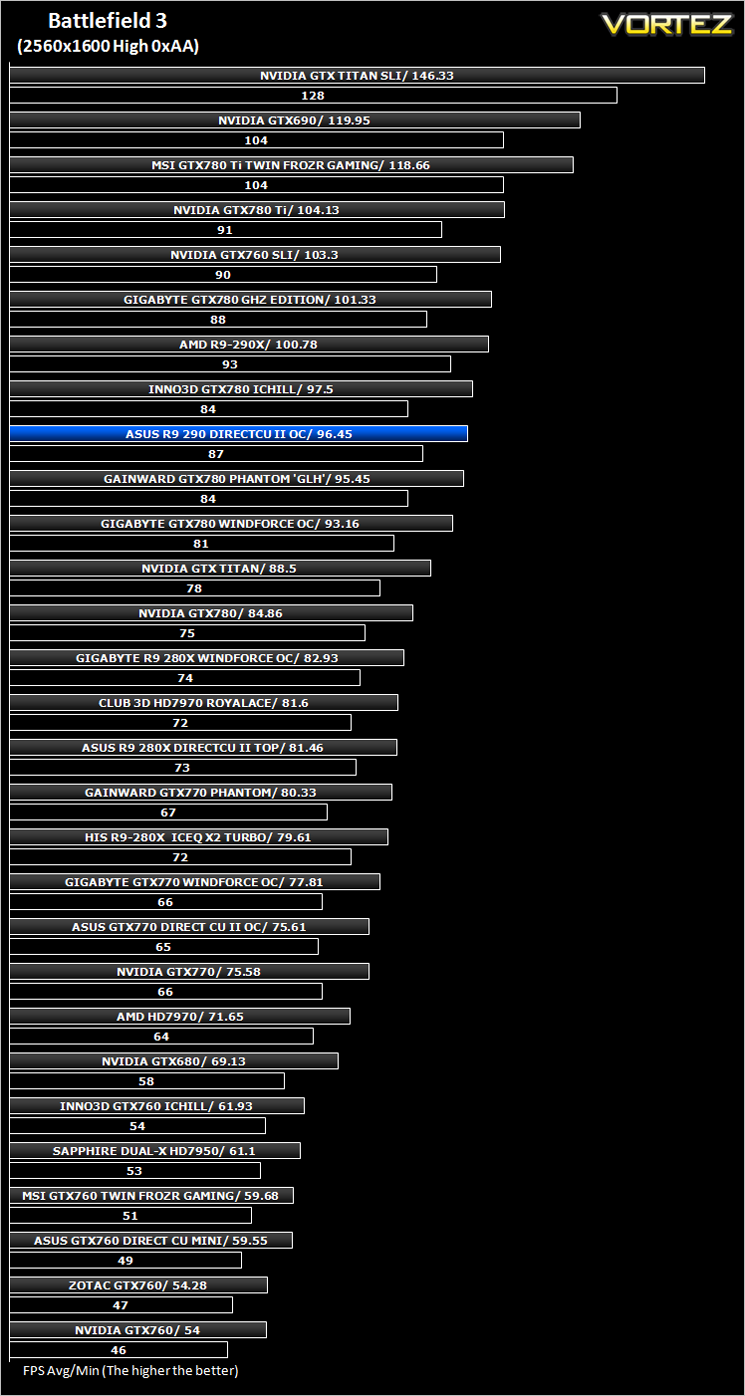
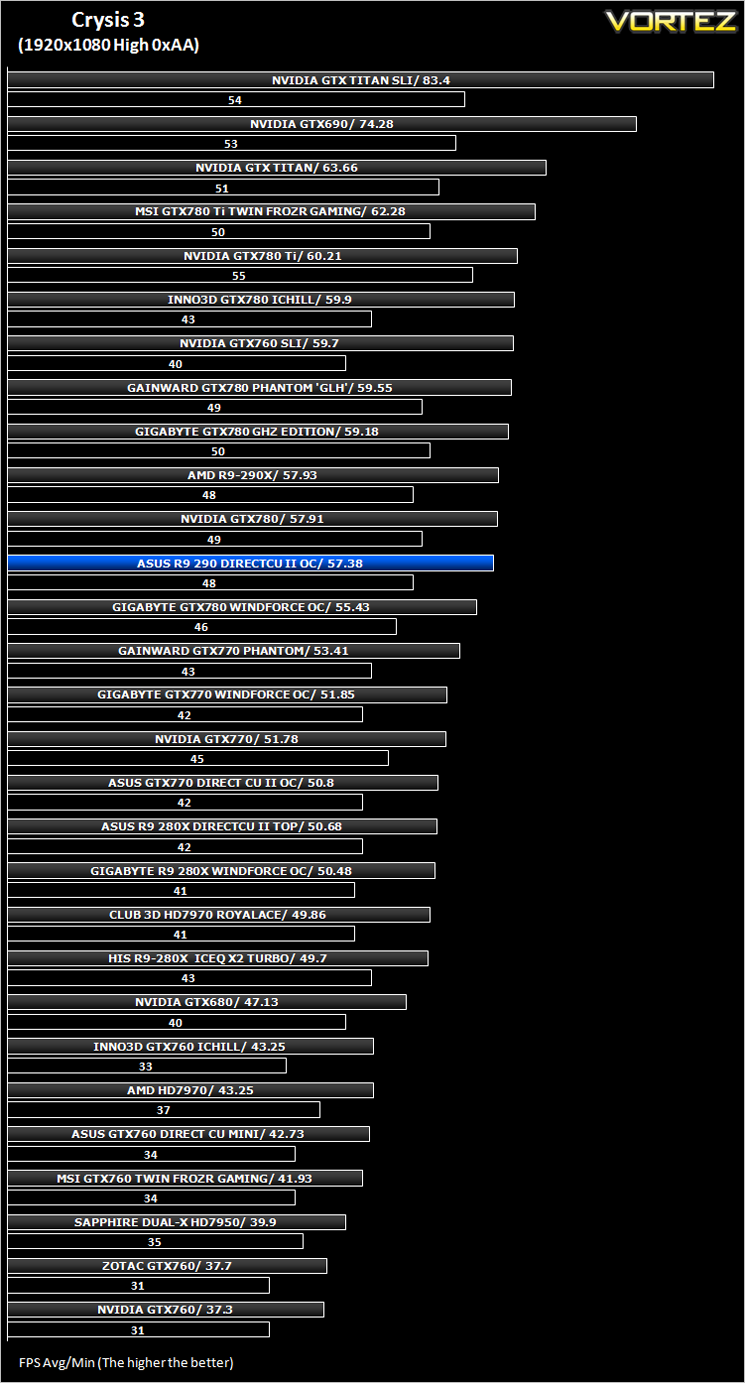
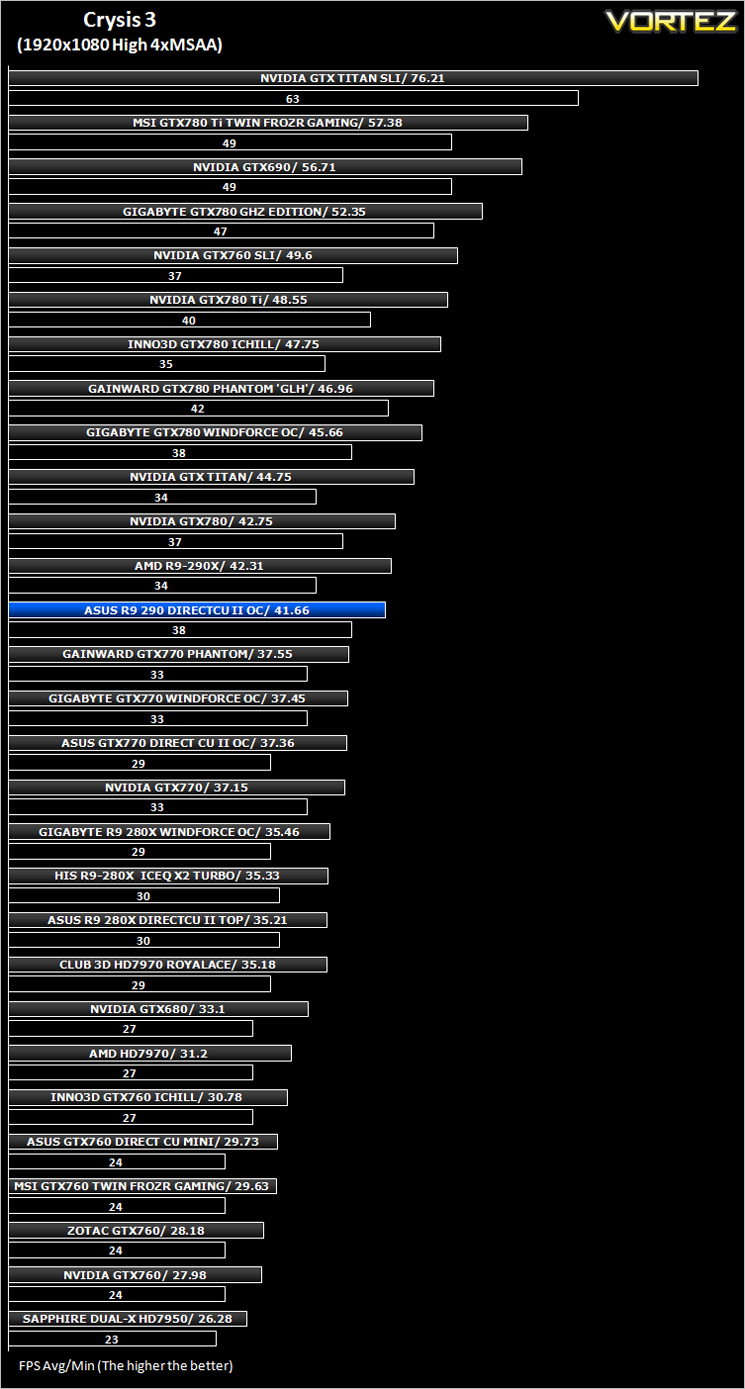
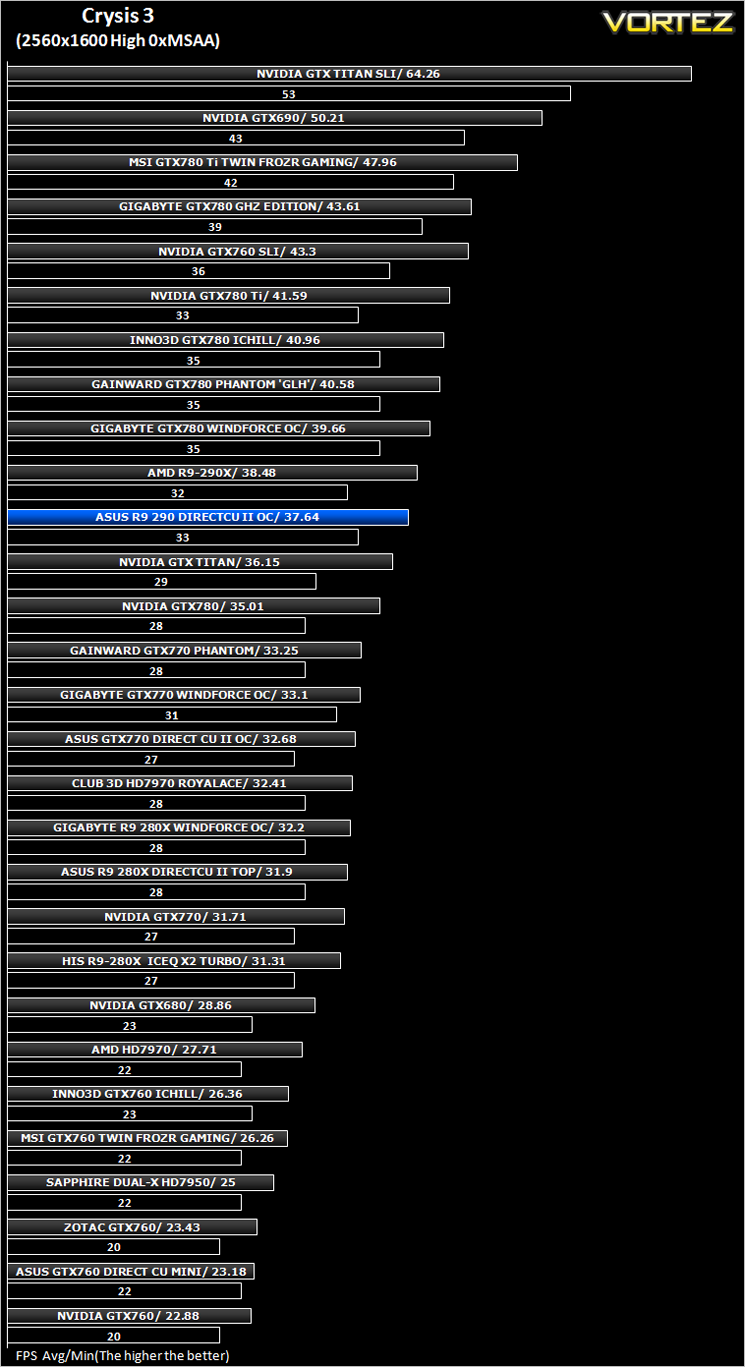
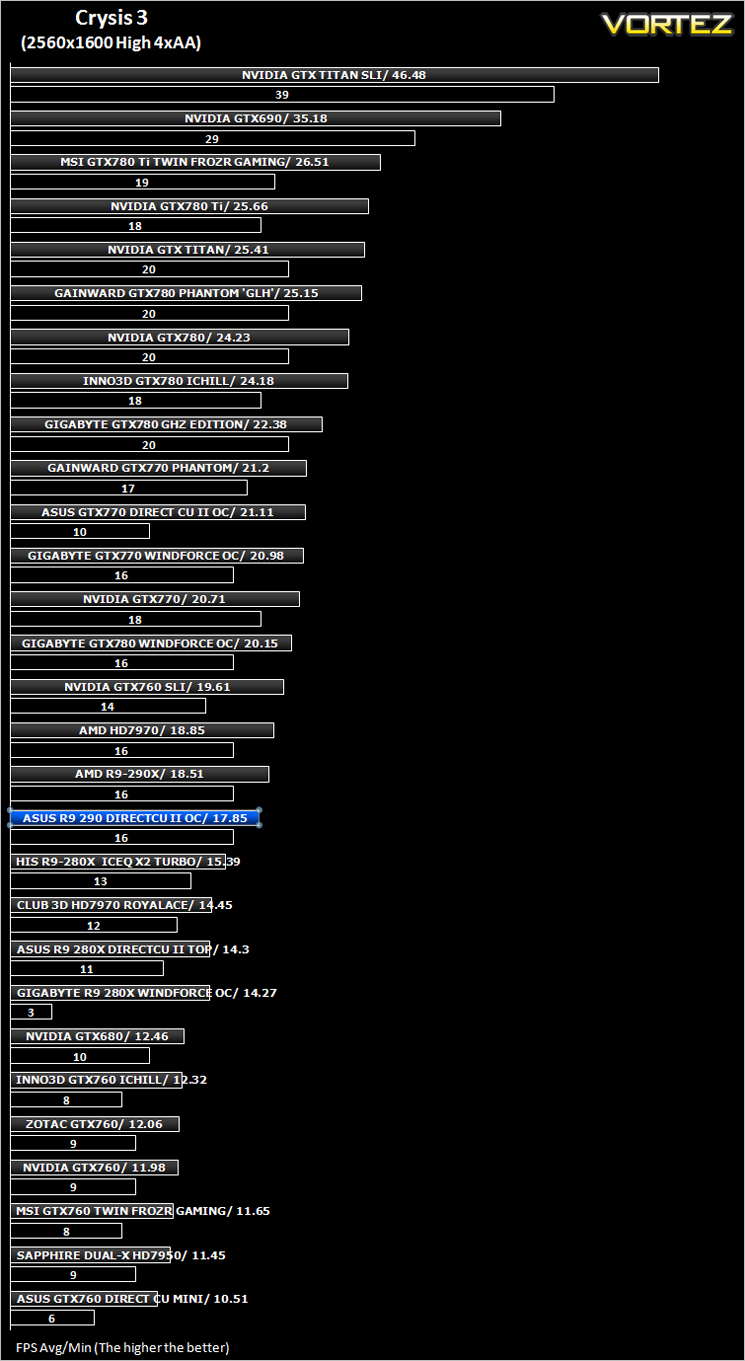
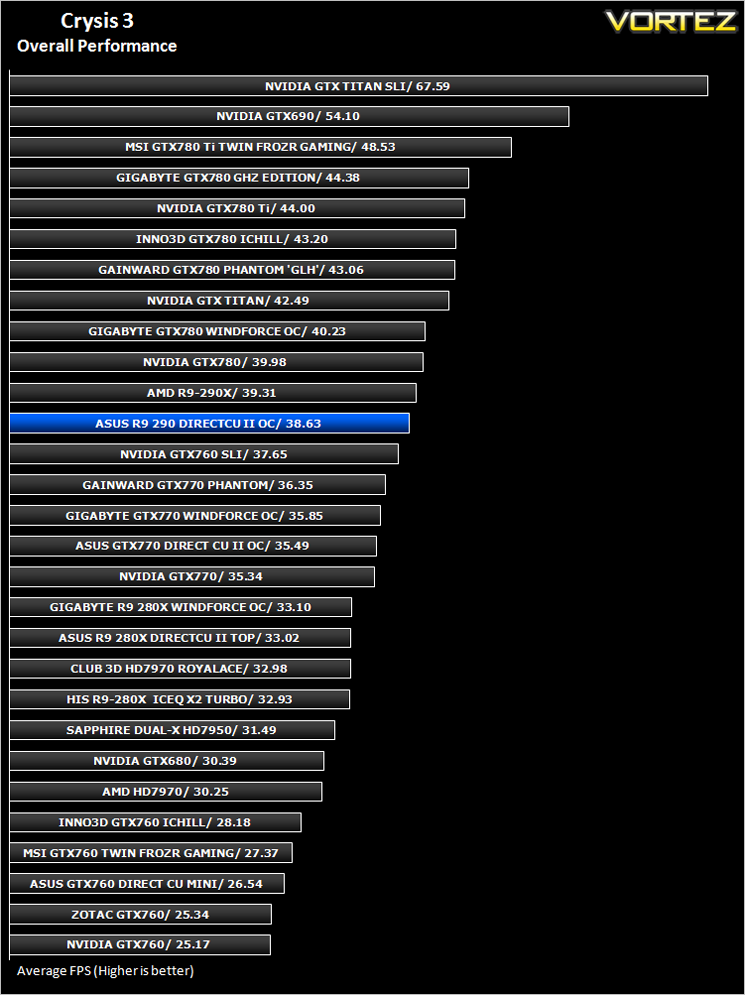
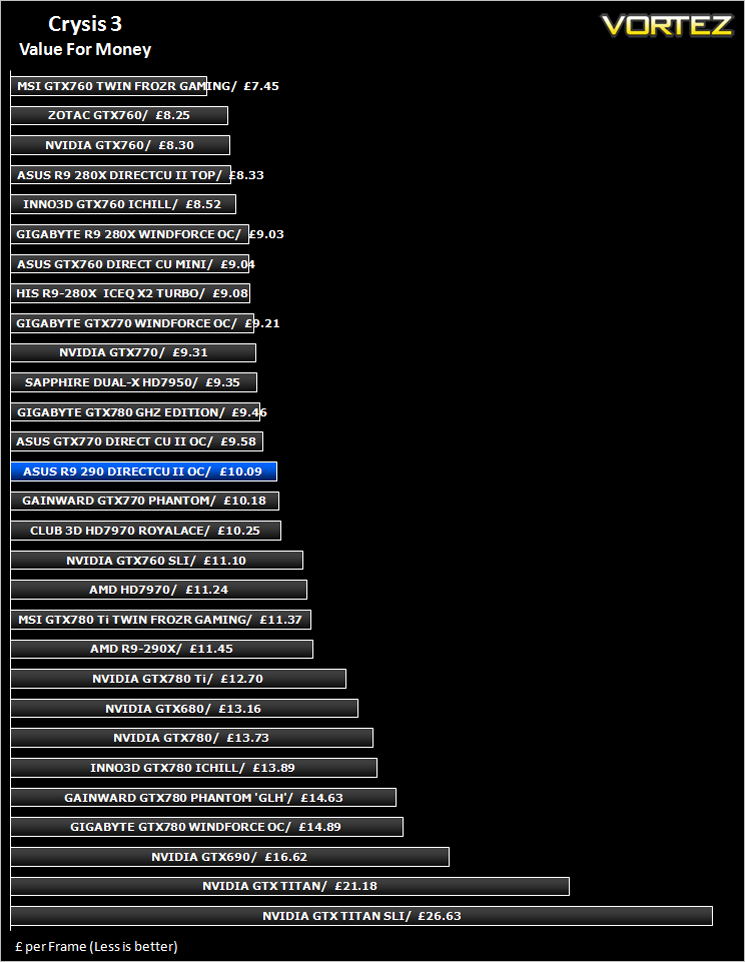
Crysis 3 (FPS)
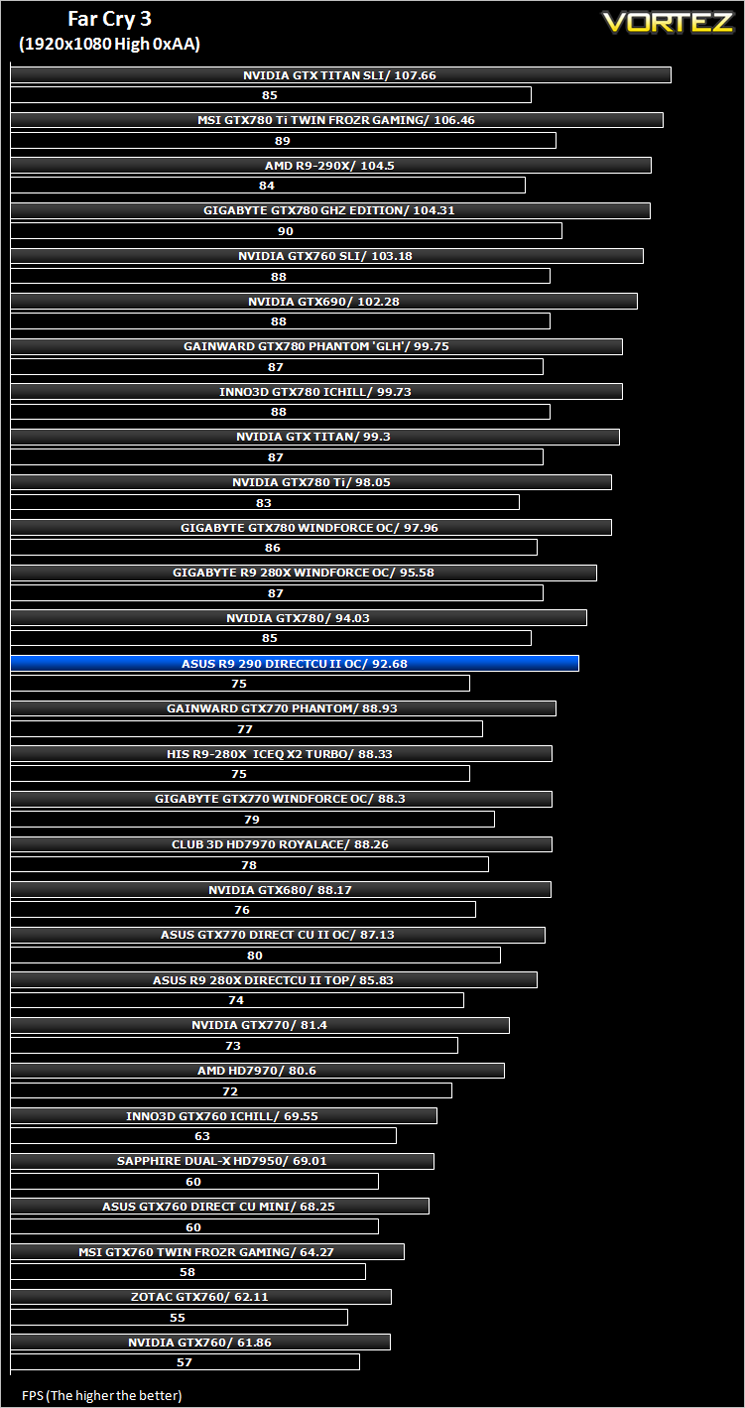
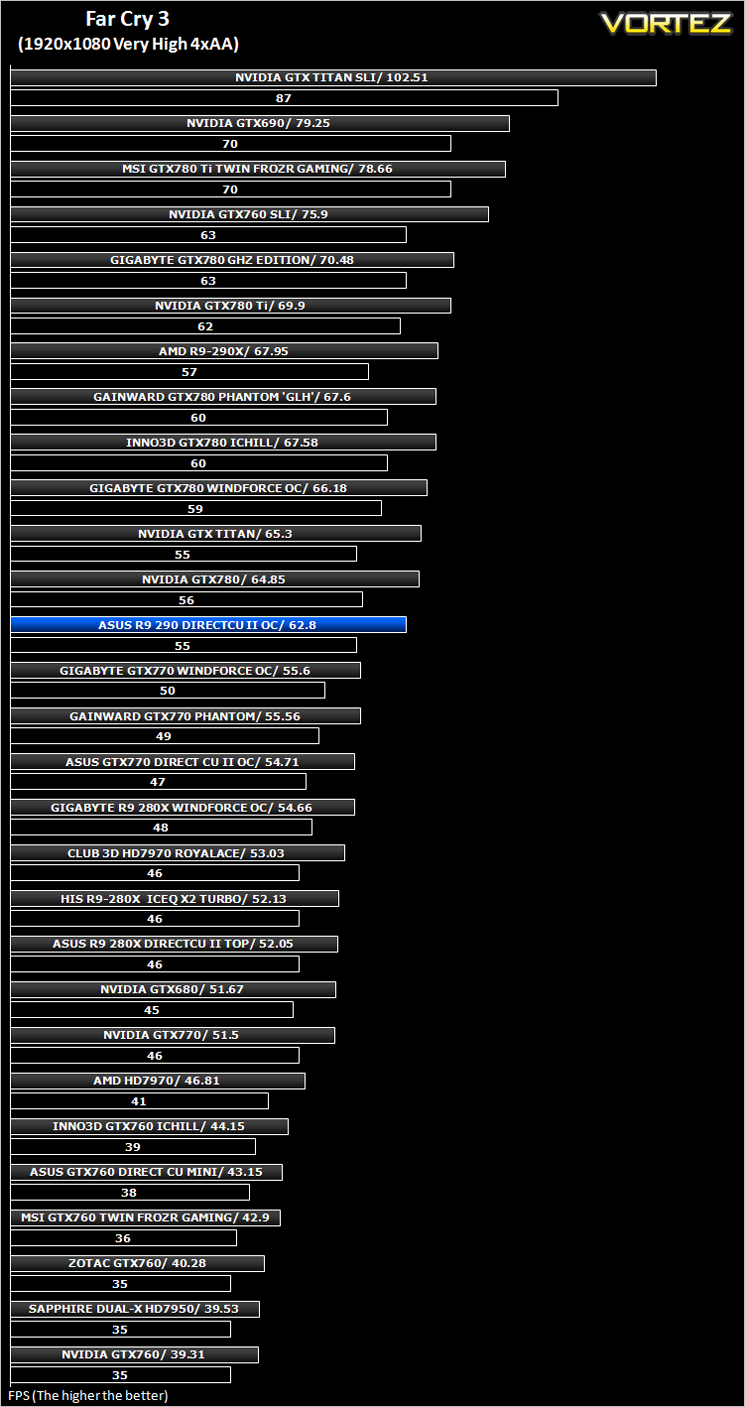
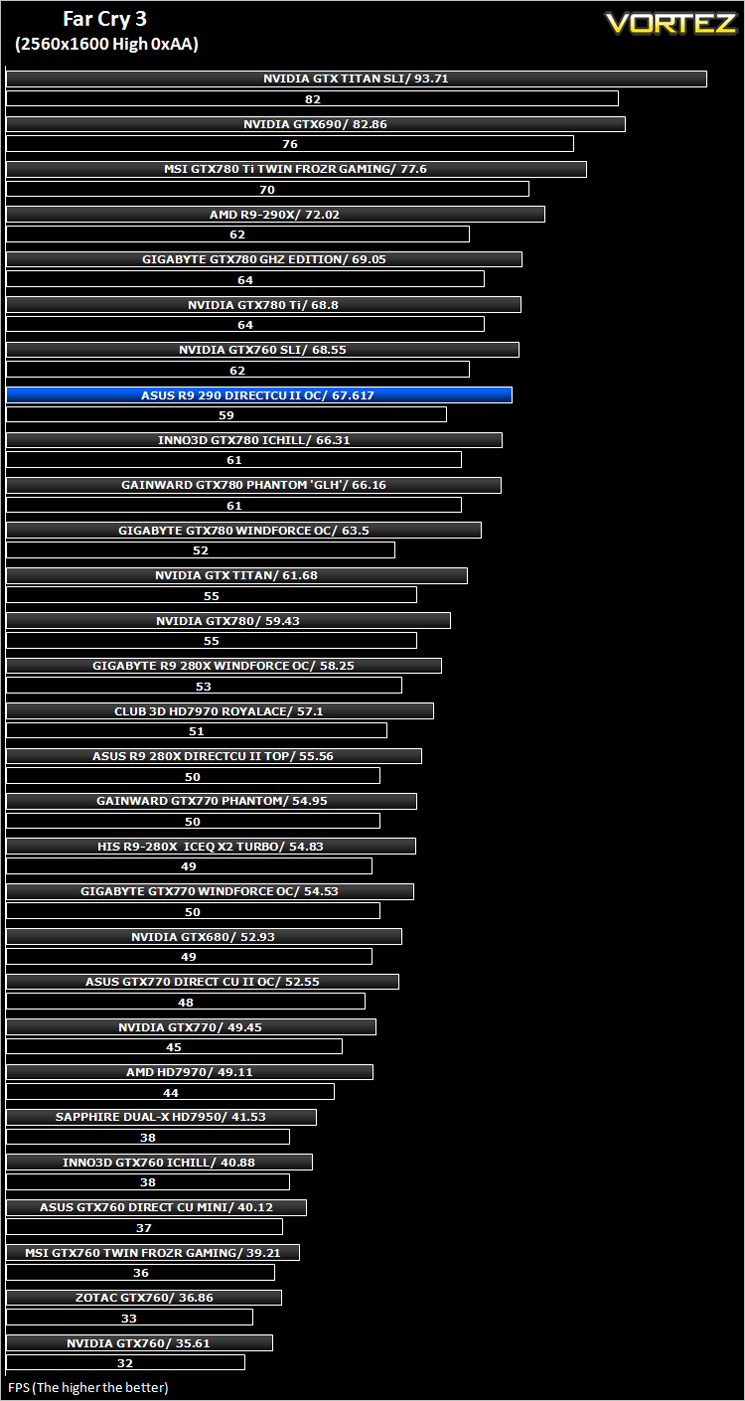
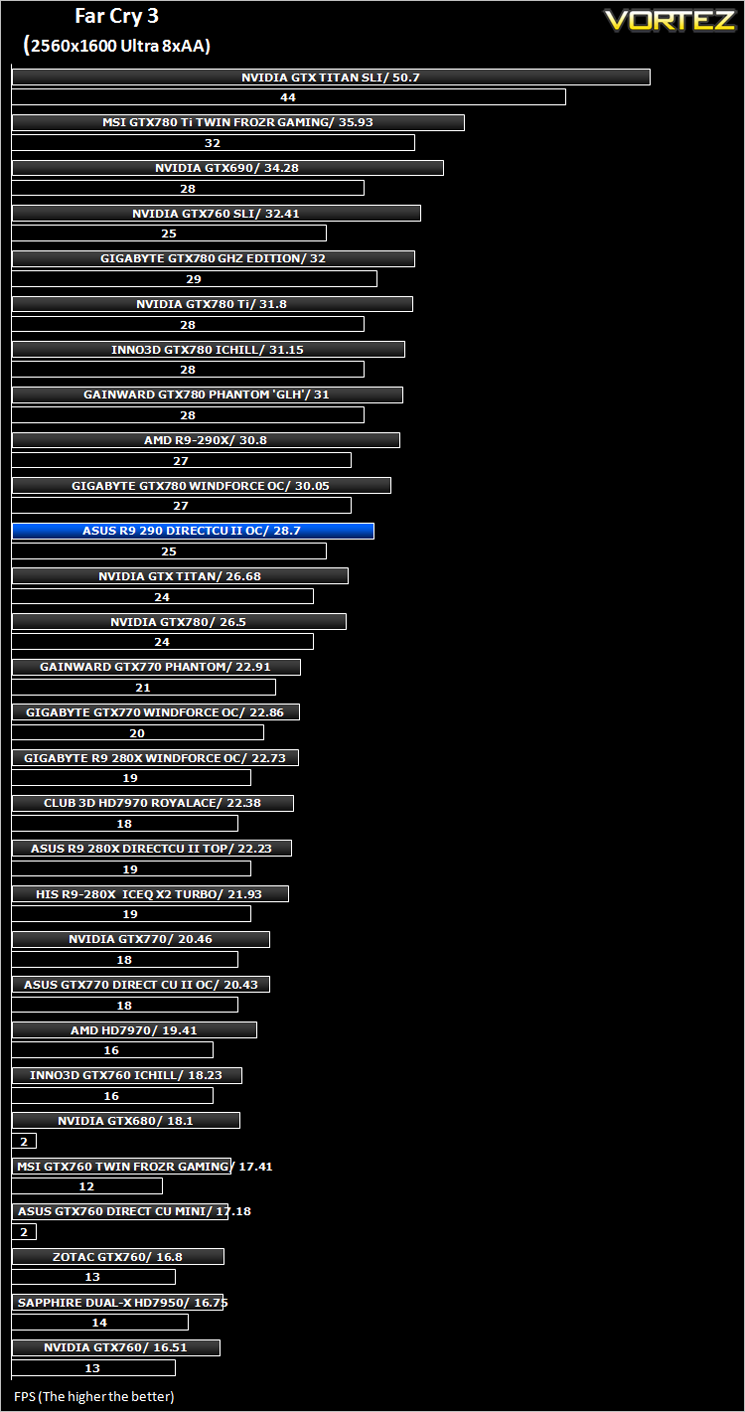
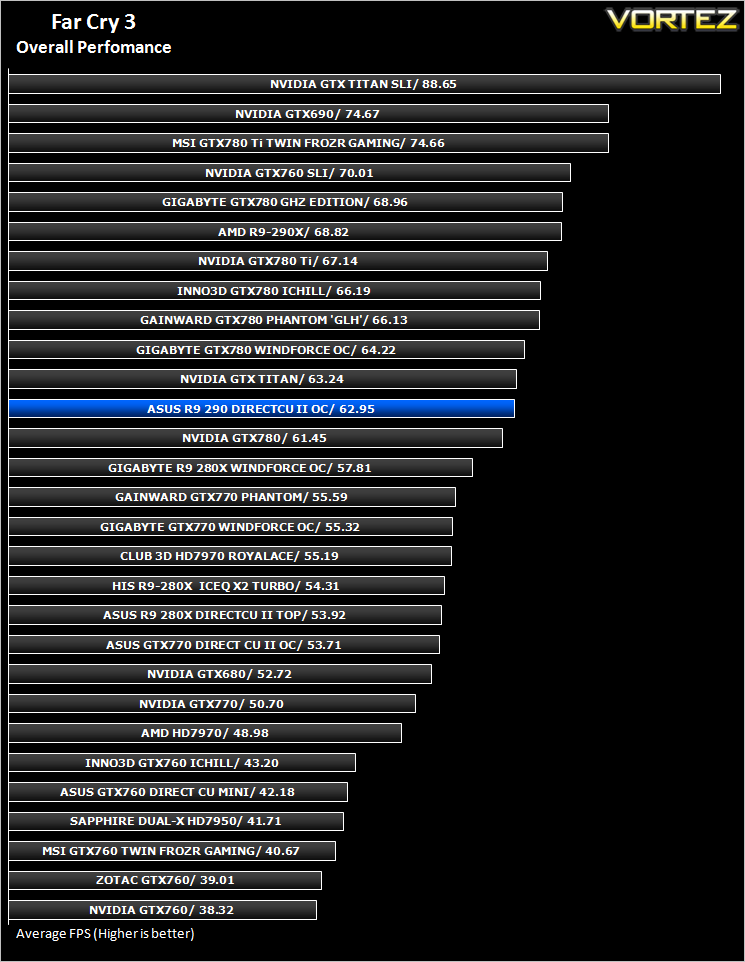
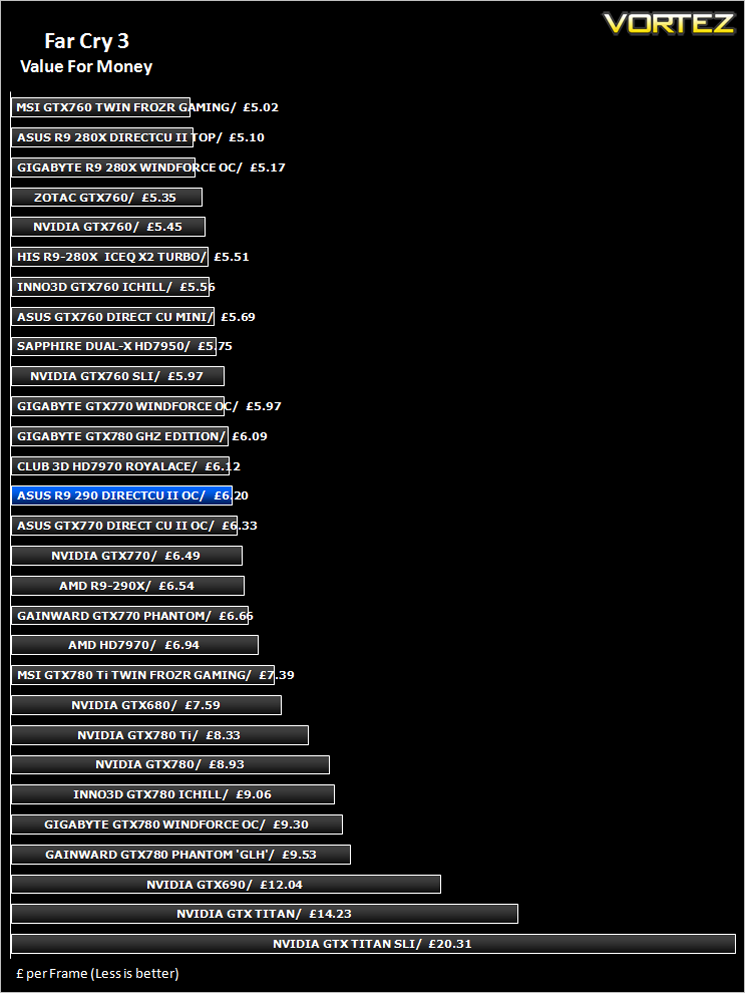
Far Cry 3 (FPS)
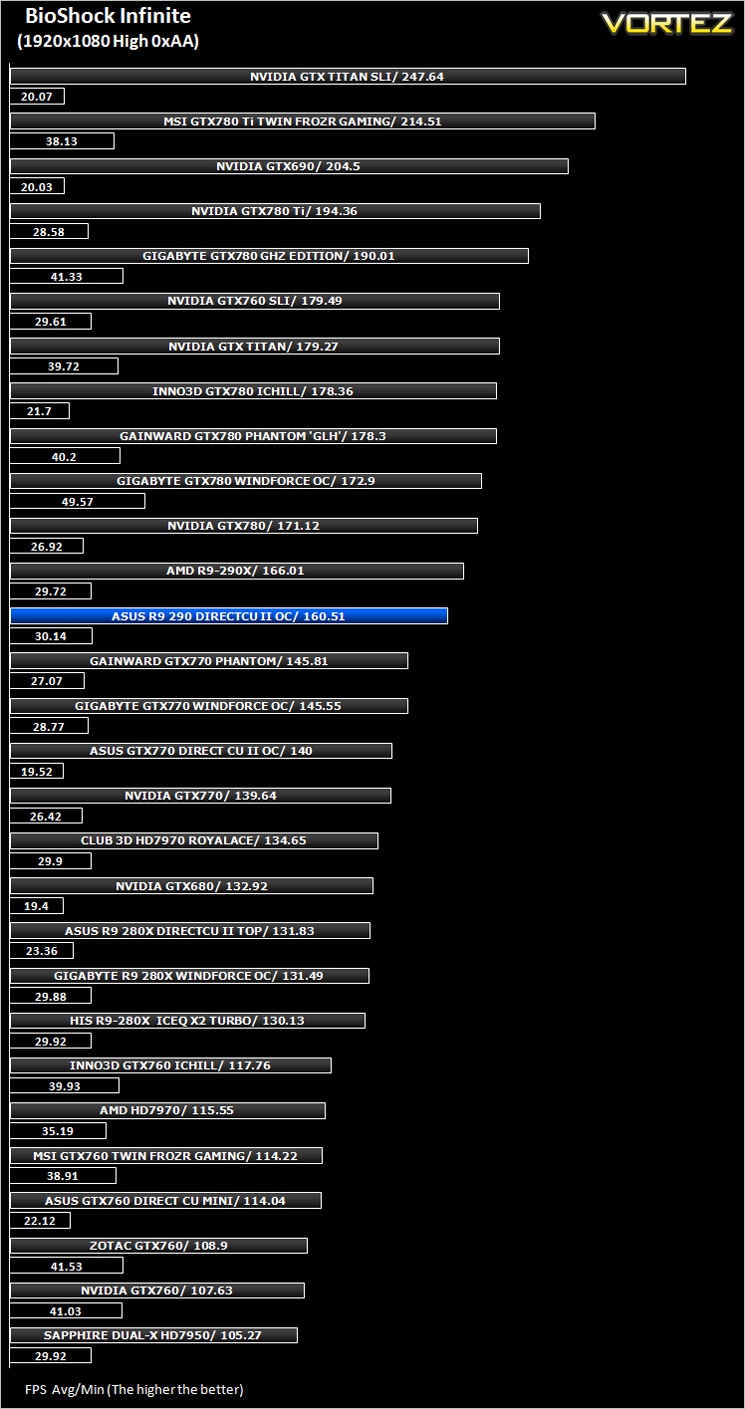
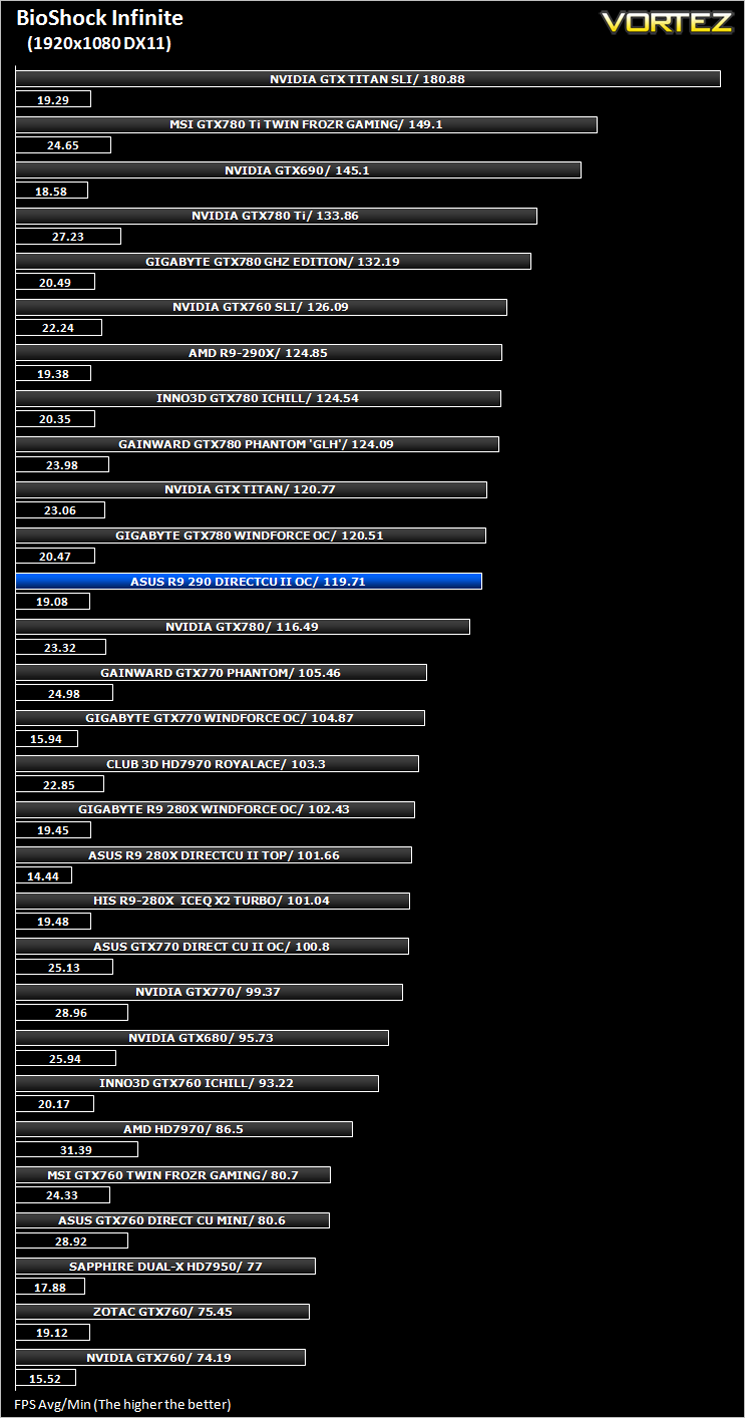
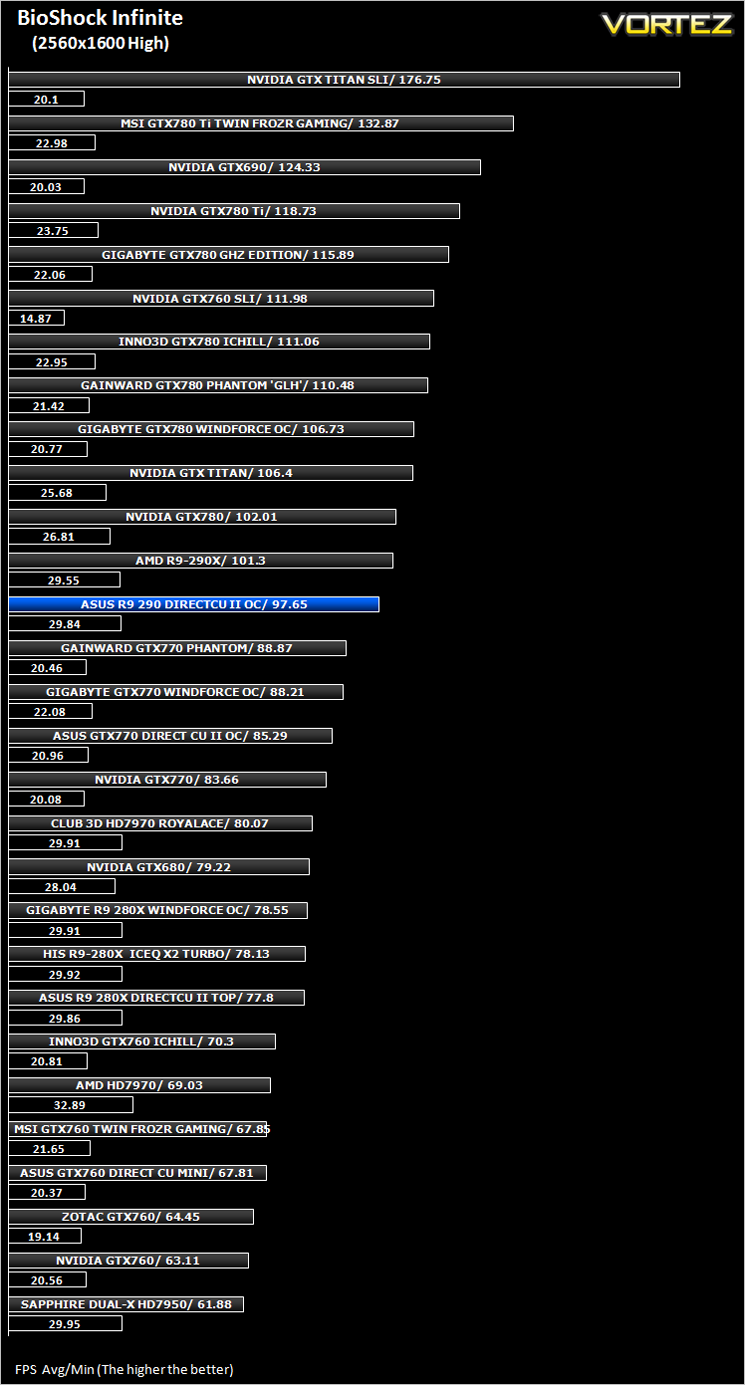
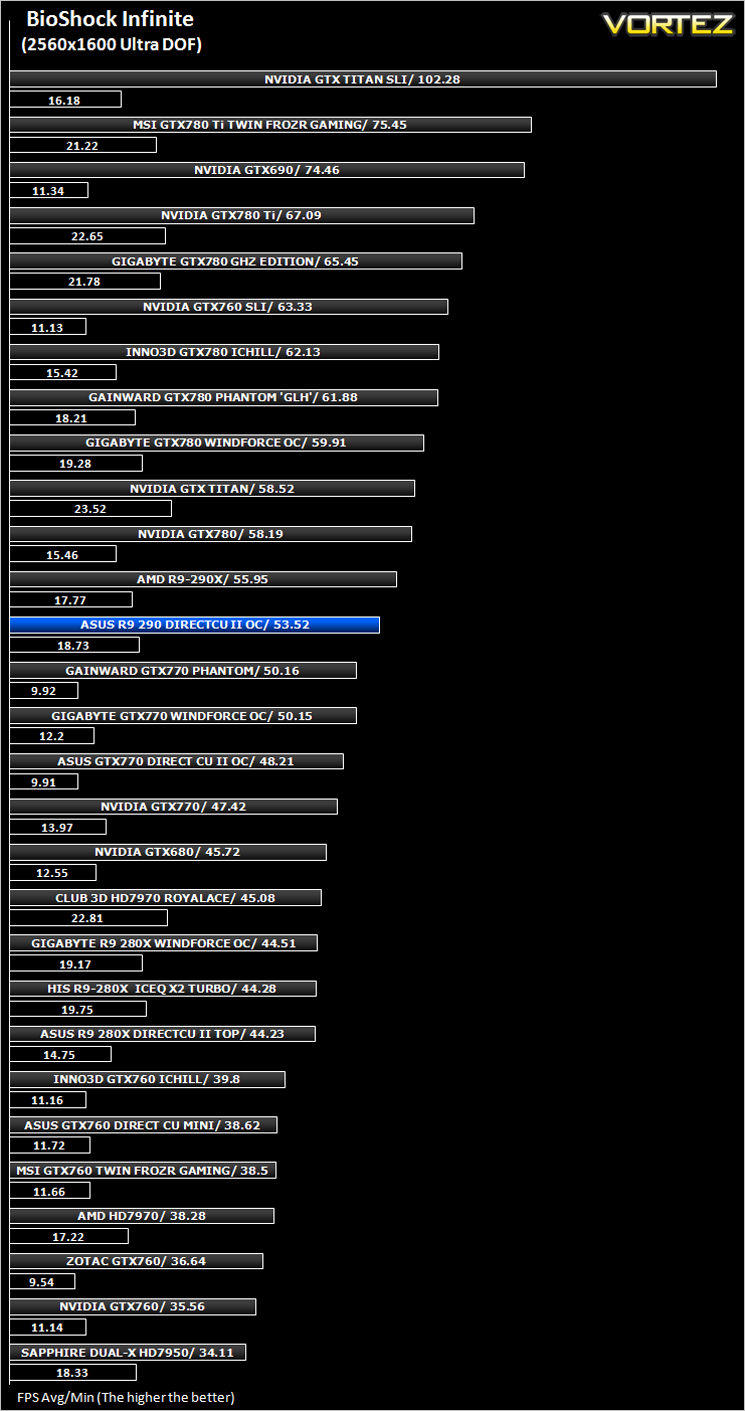
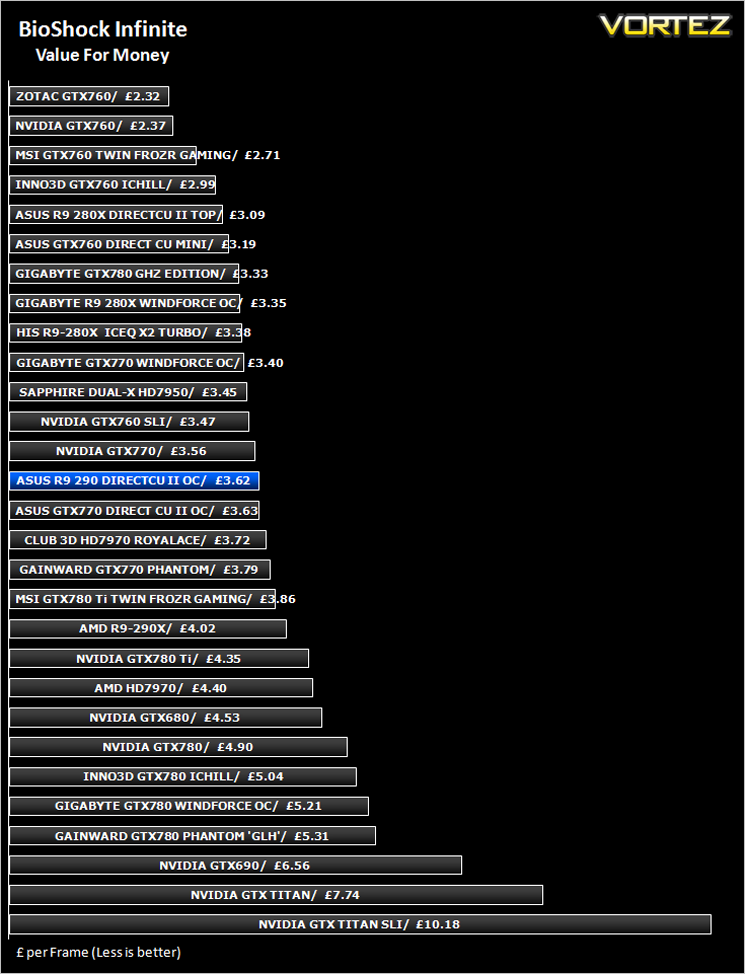
BioShock Infinite (FPS)
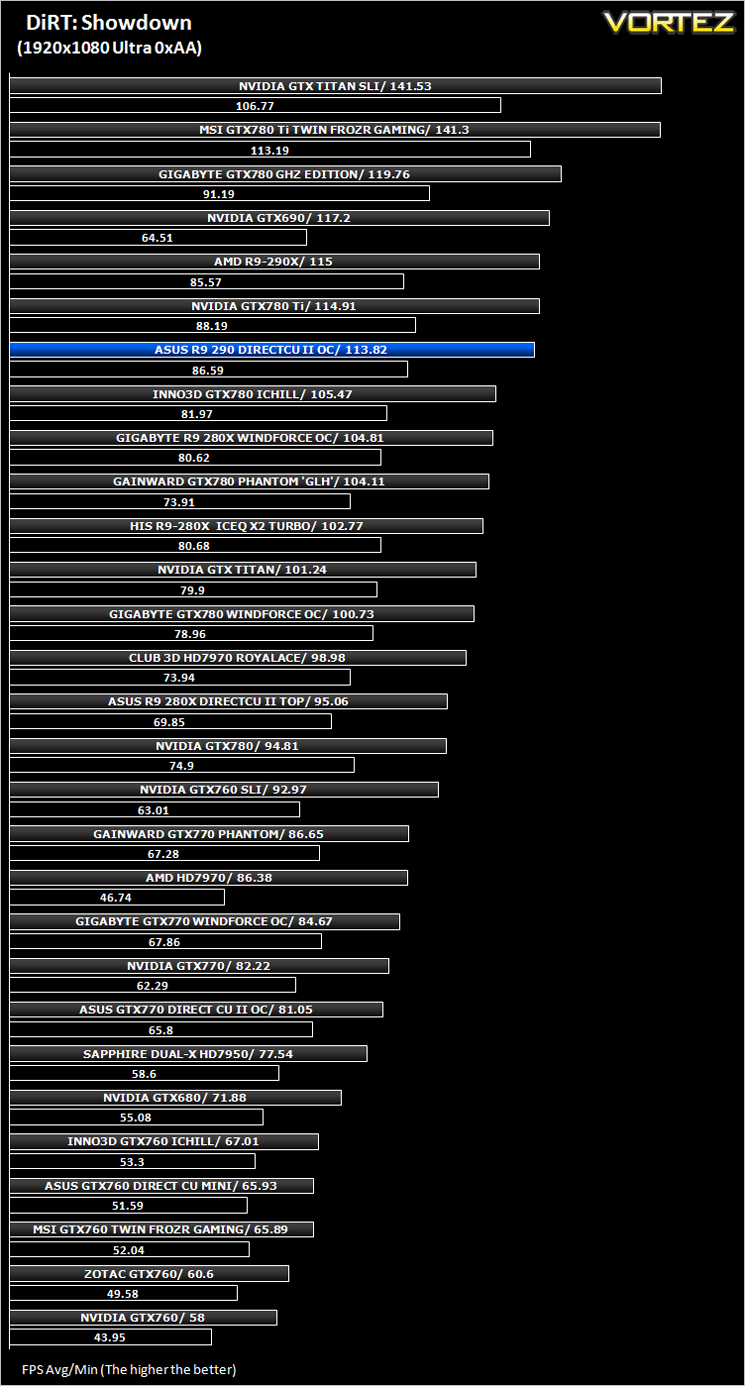
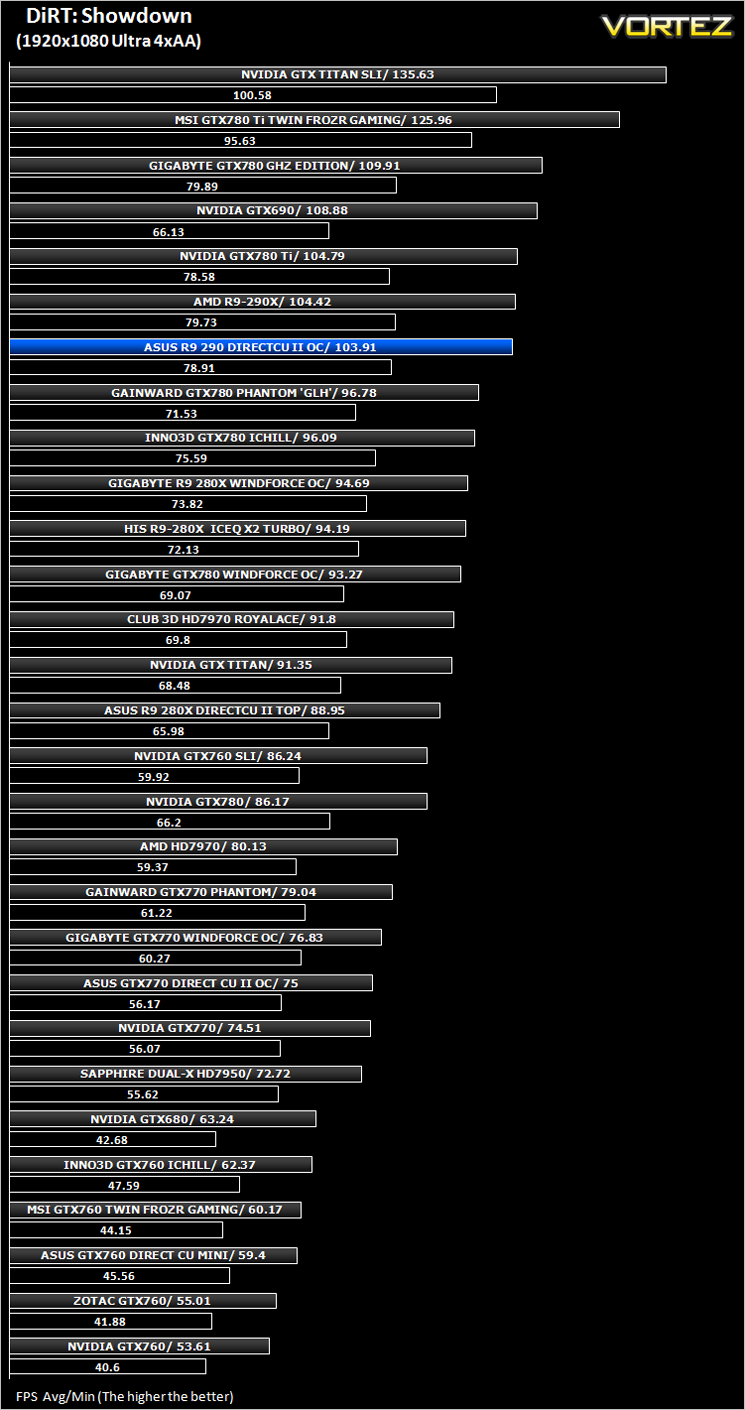
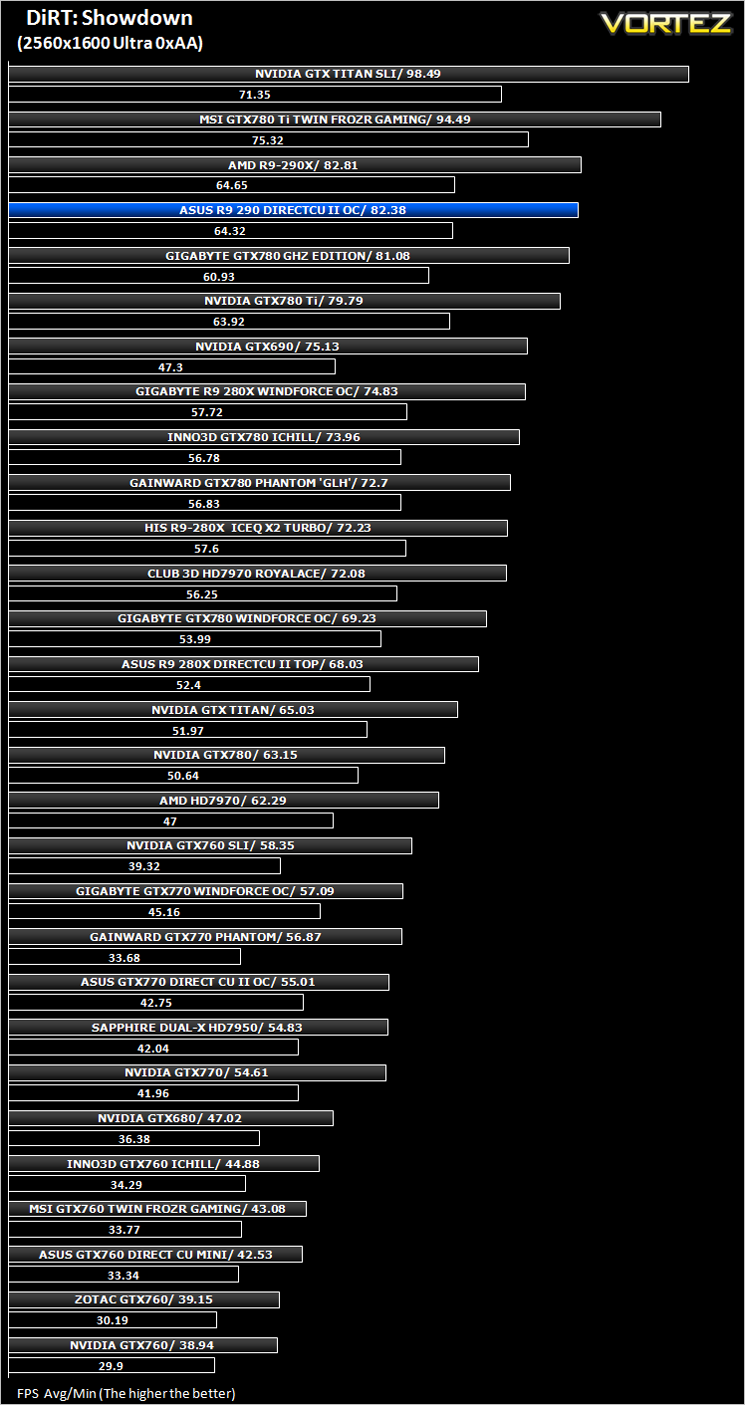
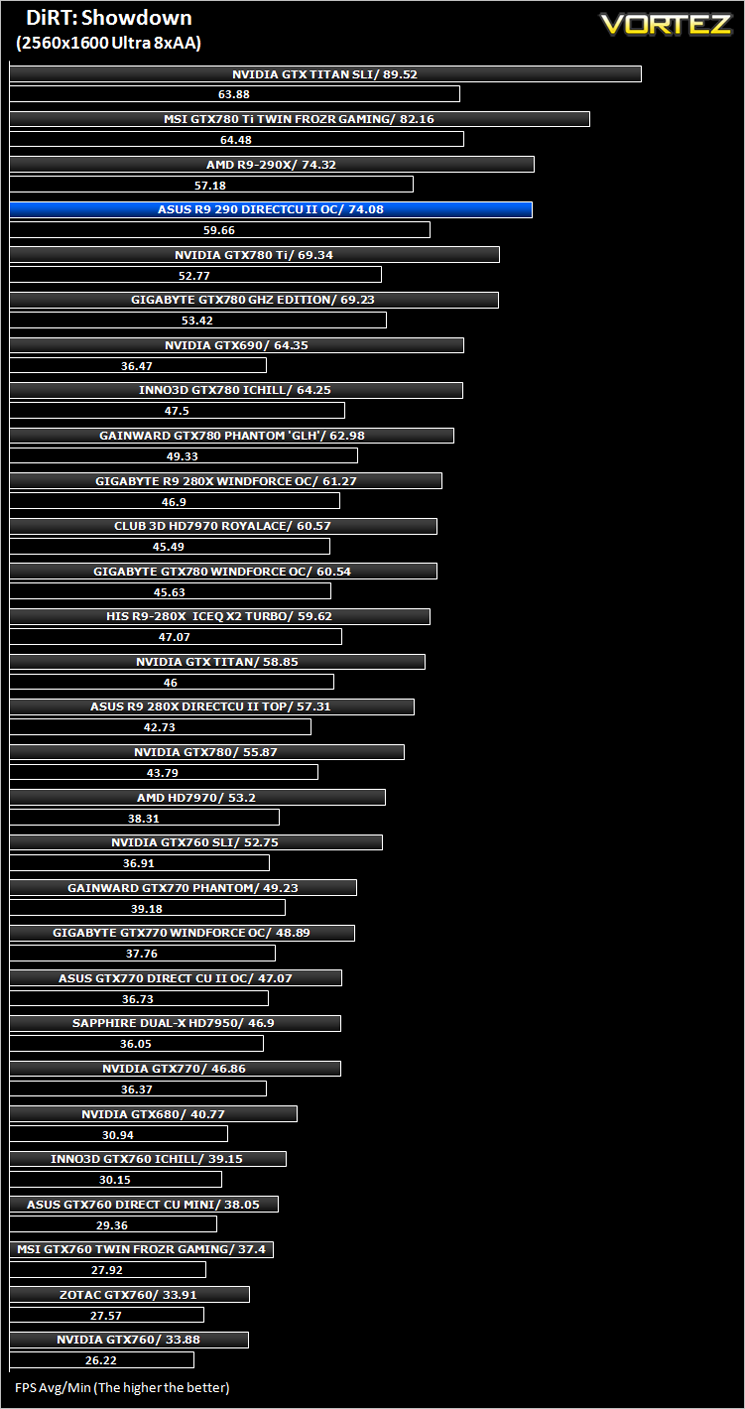
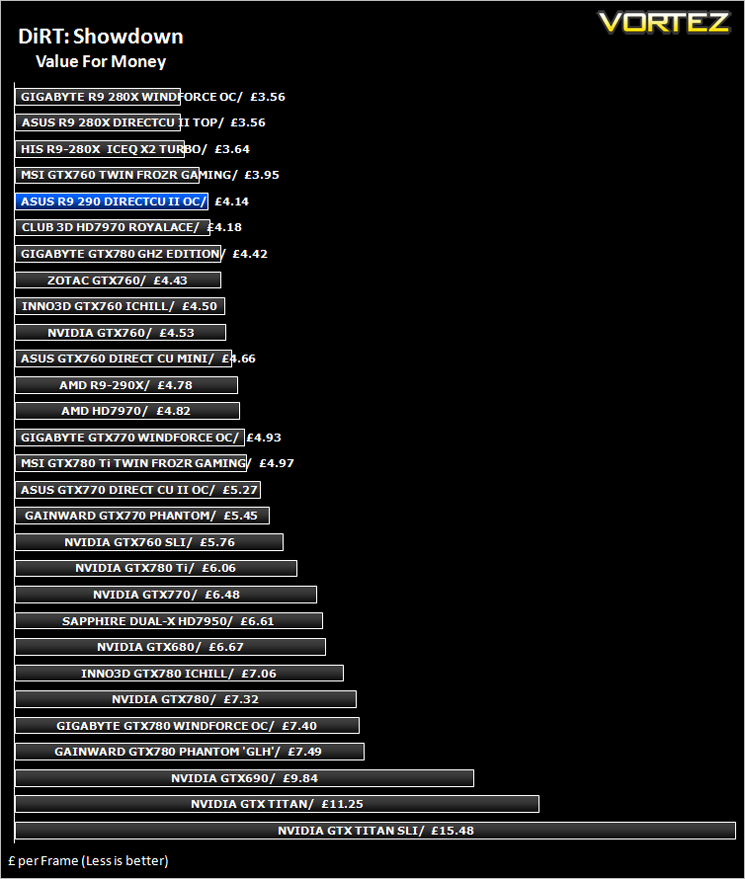
DiRT: Showdown (FPS)
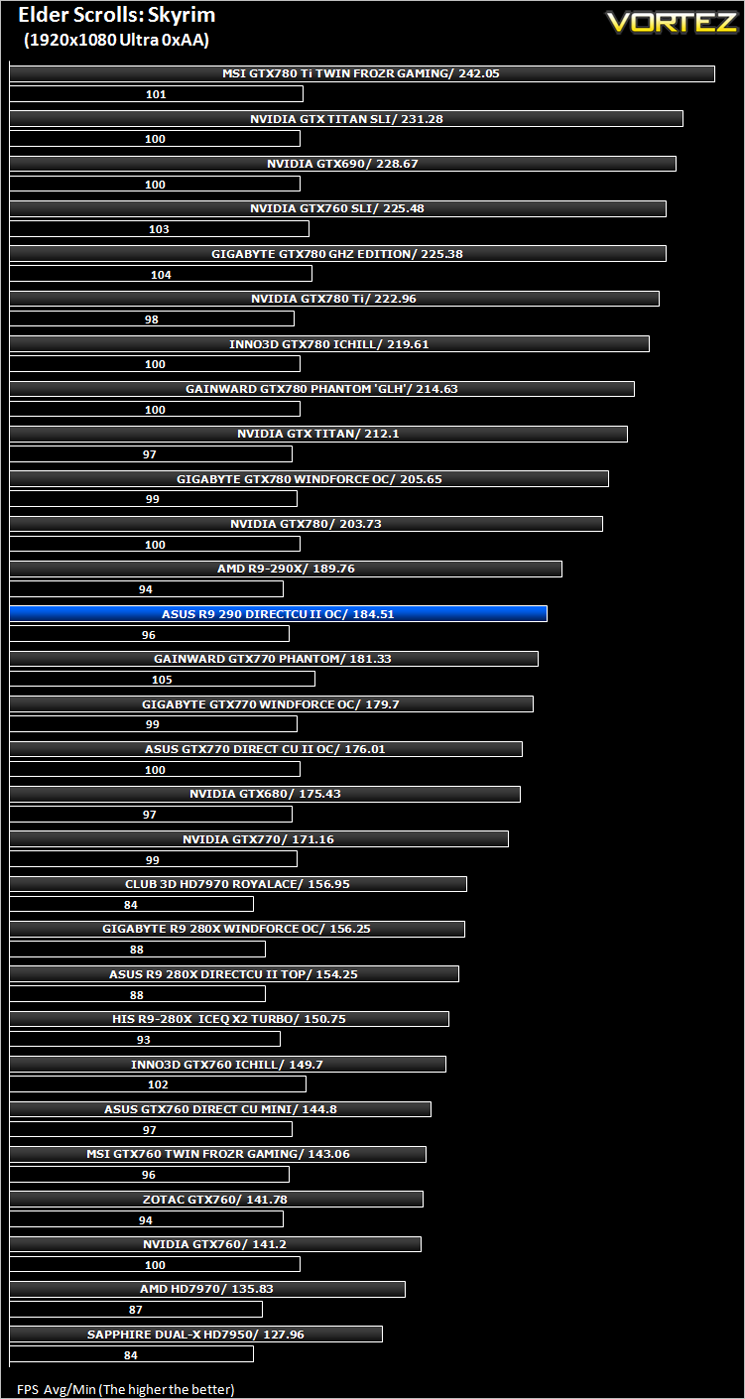
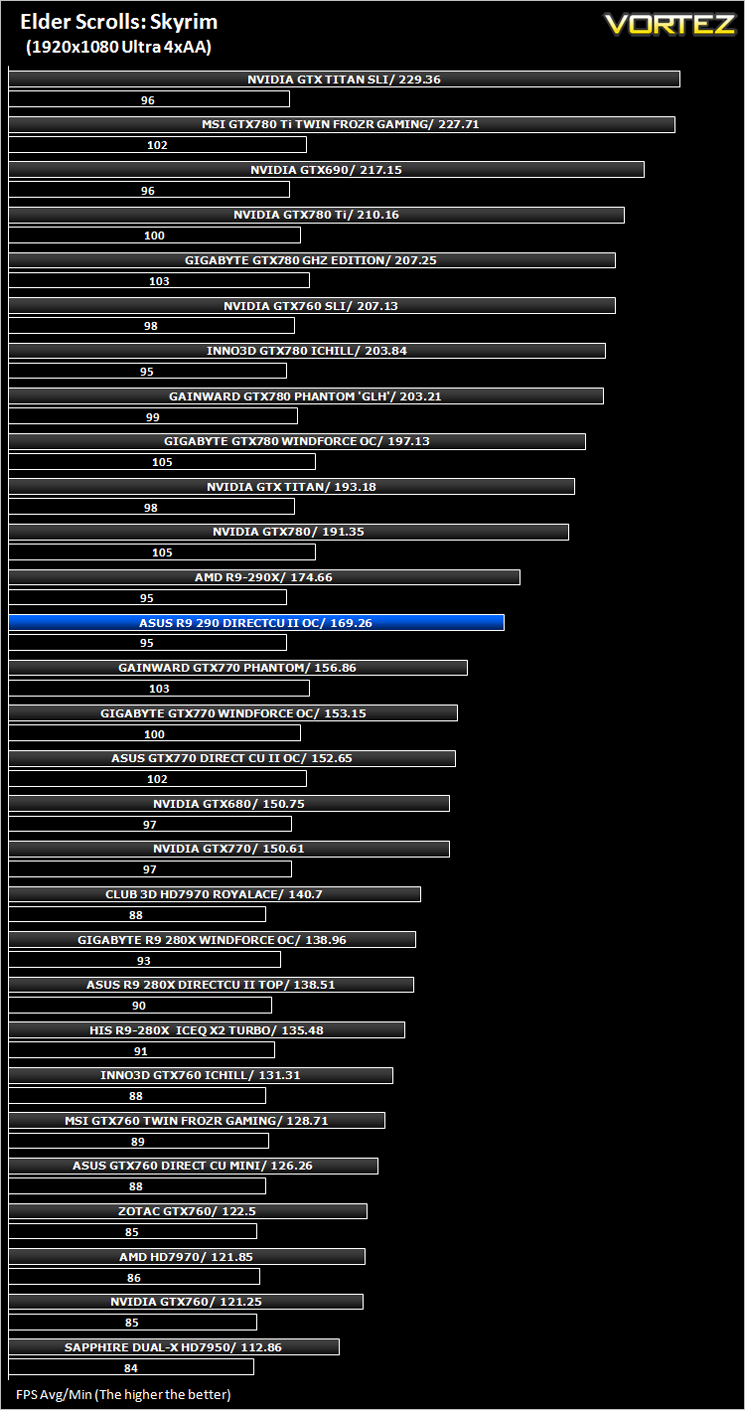
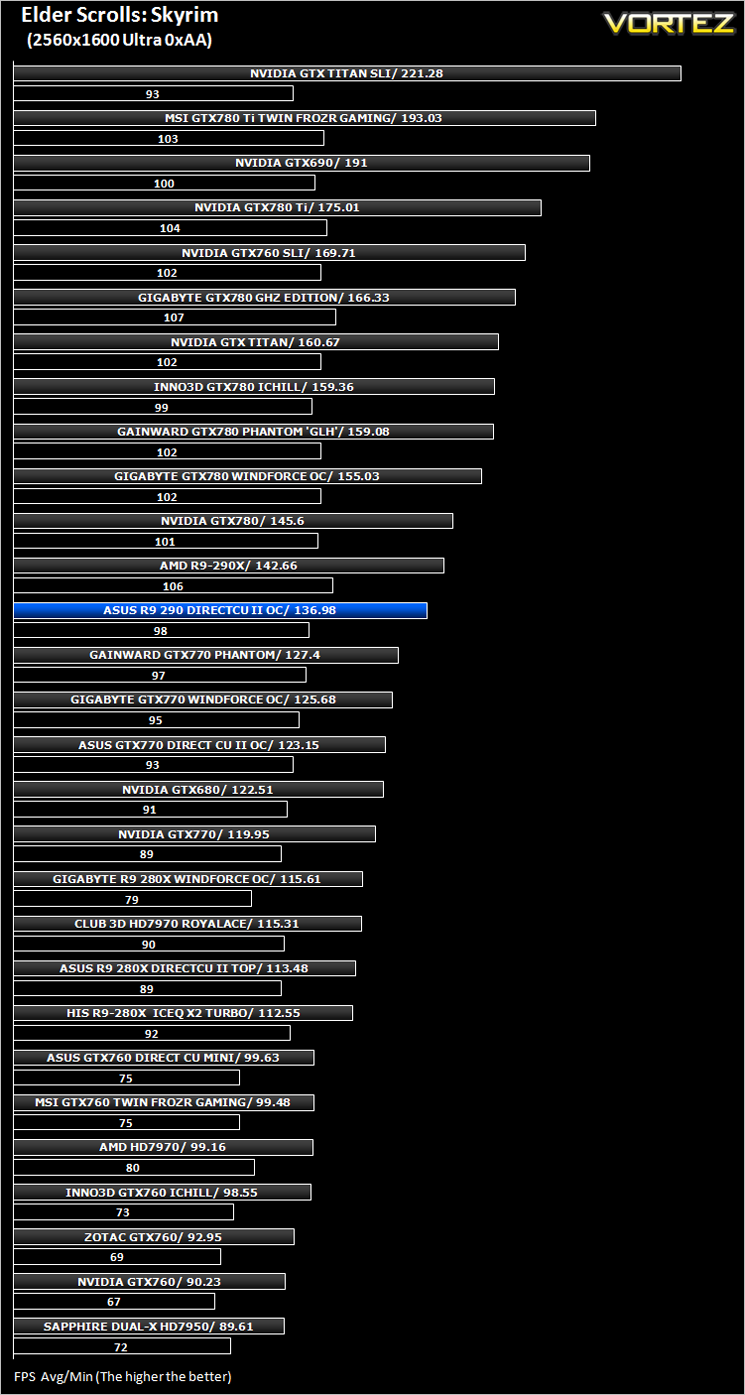
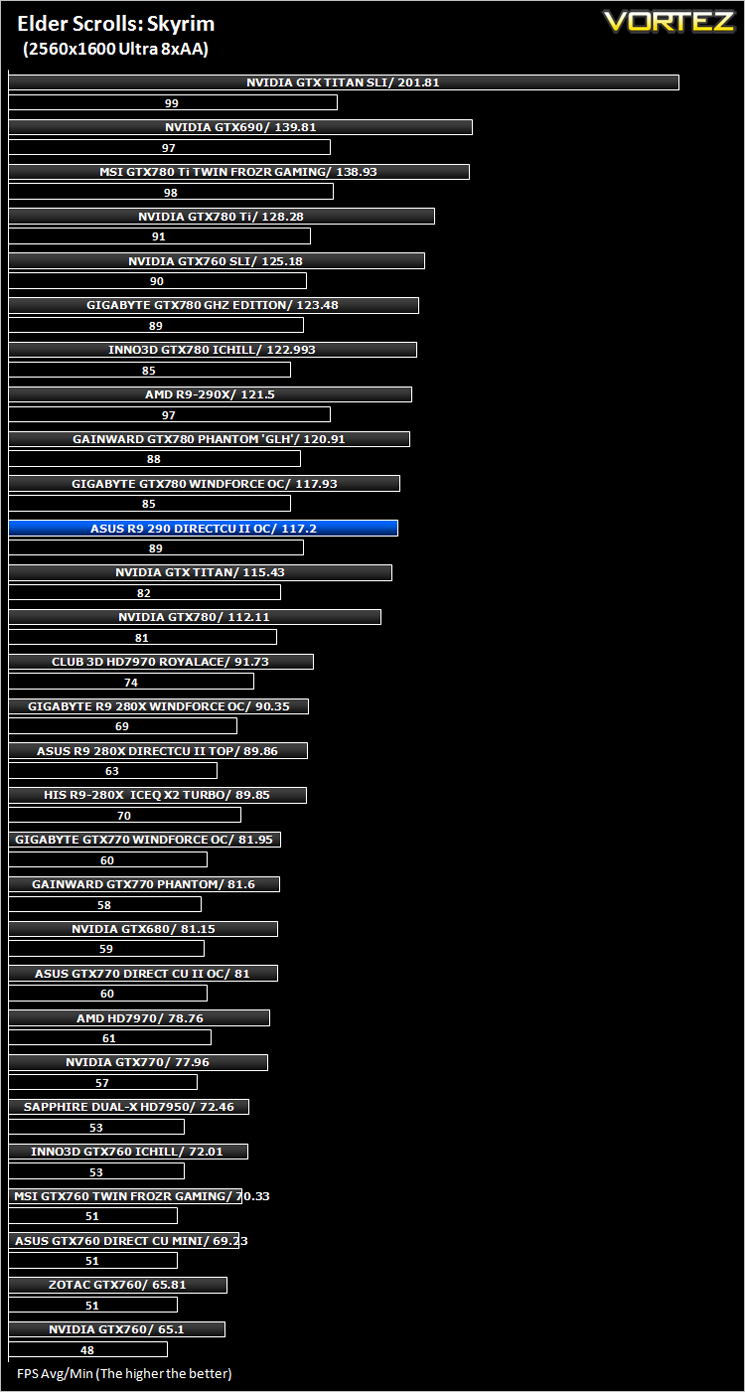
The Elder Scrolls: Skyrim (FPS)
Average and minimum frames per second were measured using Fraps during the drop down passage to Riverwood. V-sync was disabled to allow fluctuating (higher the 60) FPS for these runs. It is however recommended that v-sync is left enabled during normal gameplay due to the games dynamics.
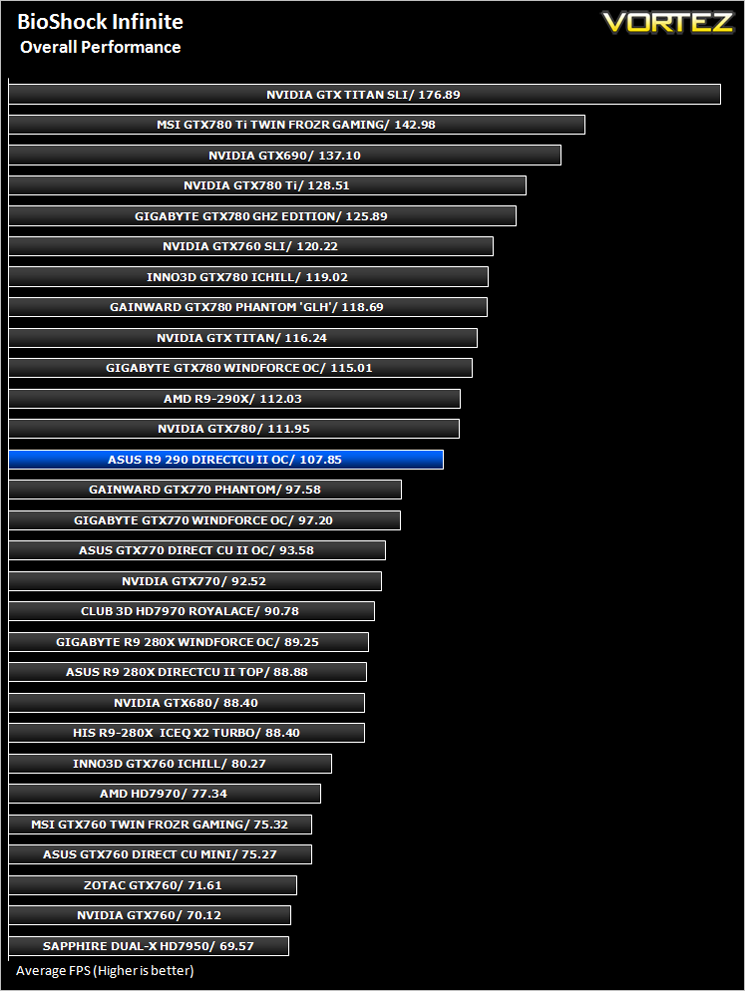
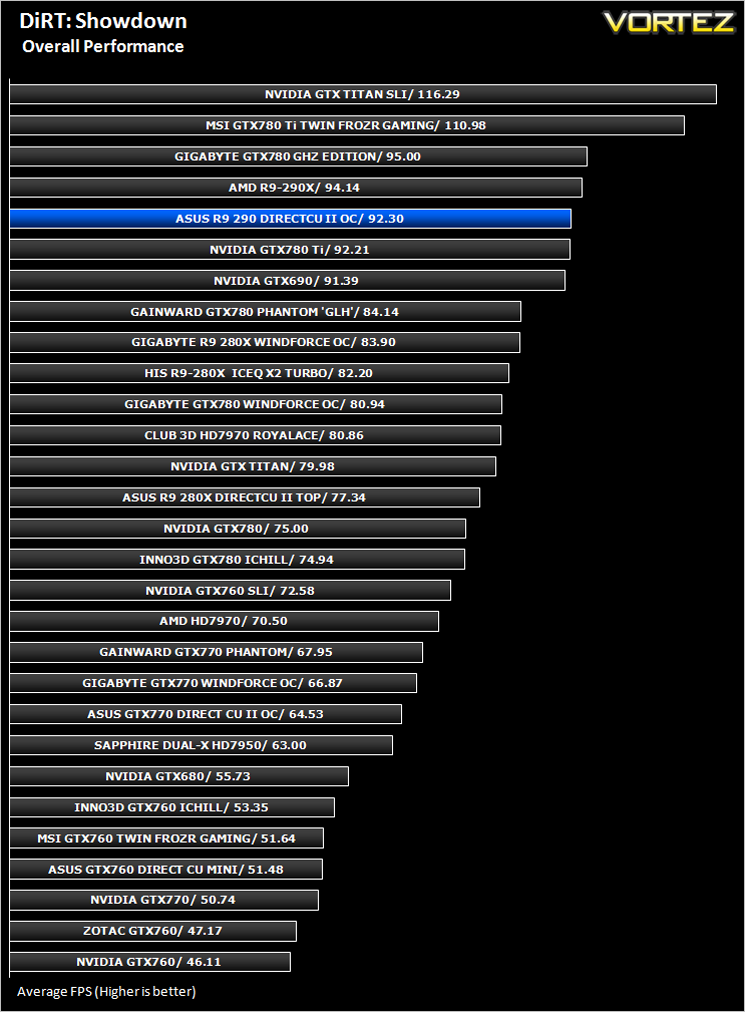
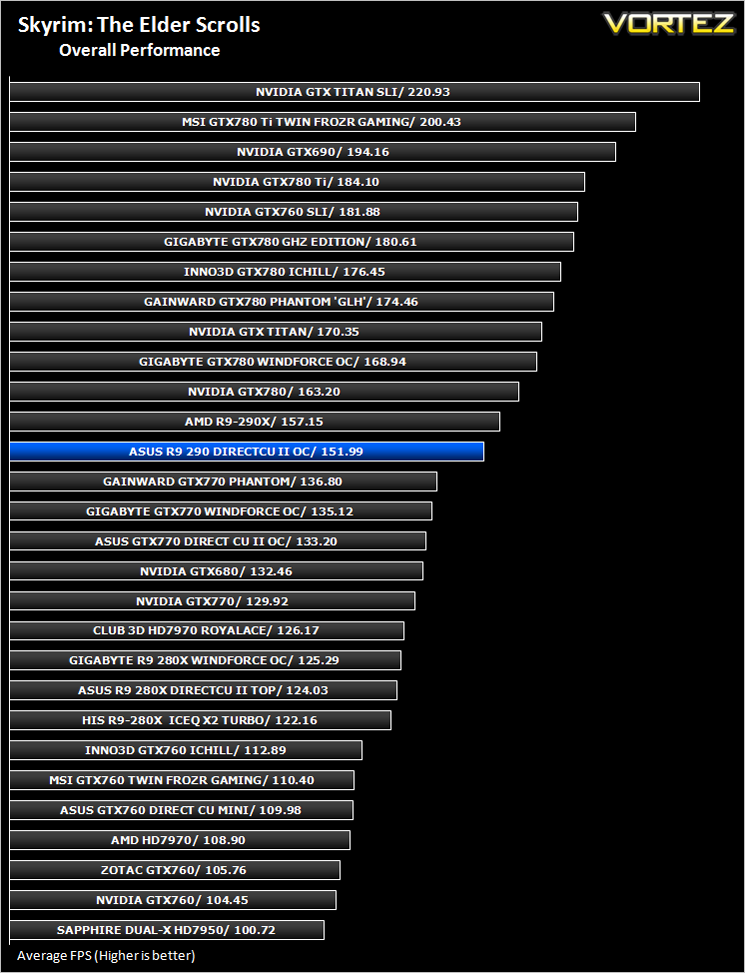
Overall Performance
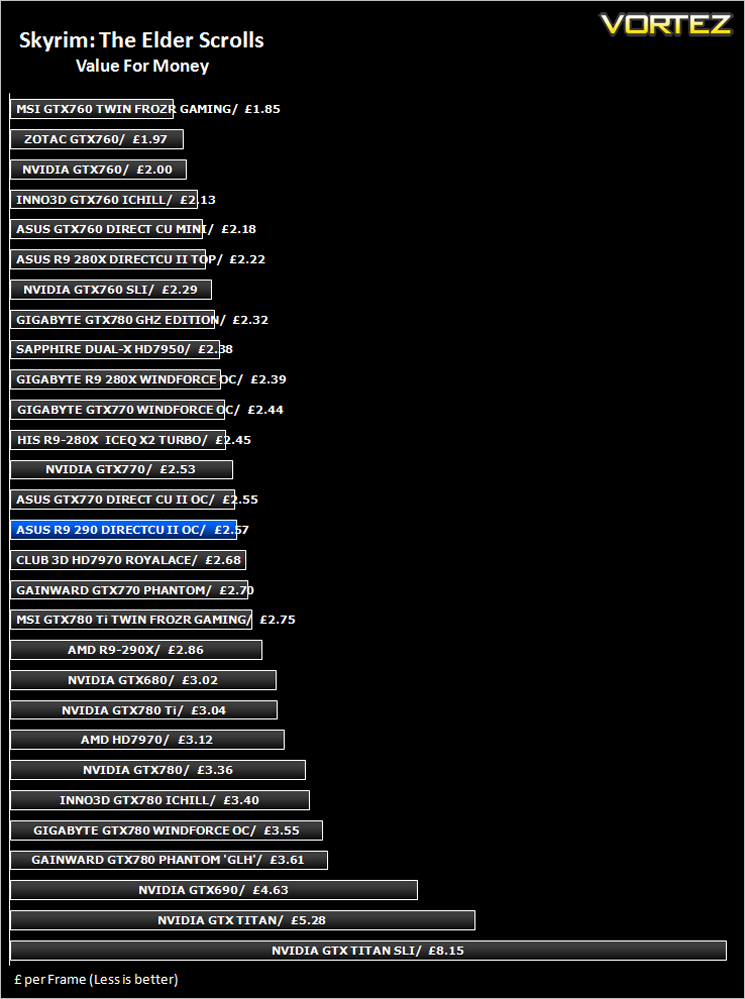
Value For Money
Conclusion
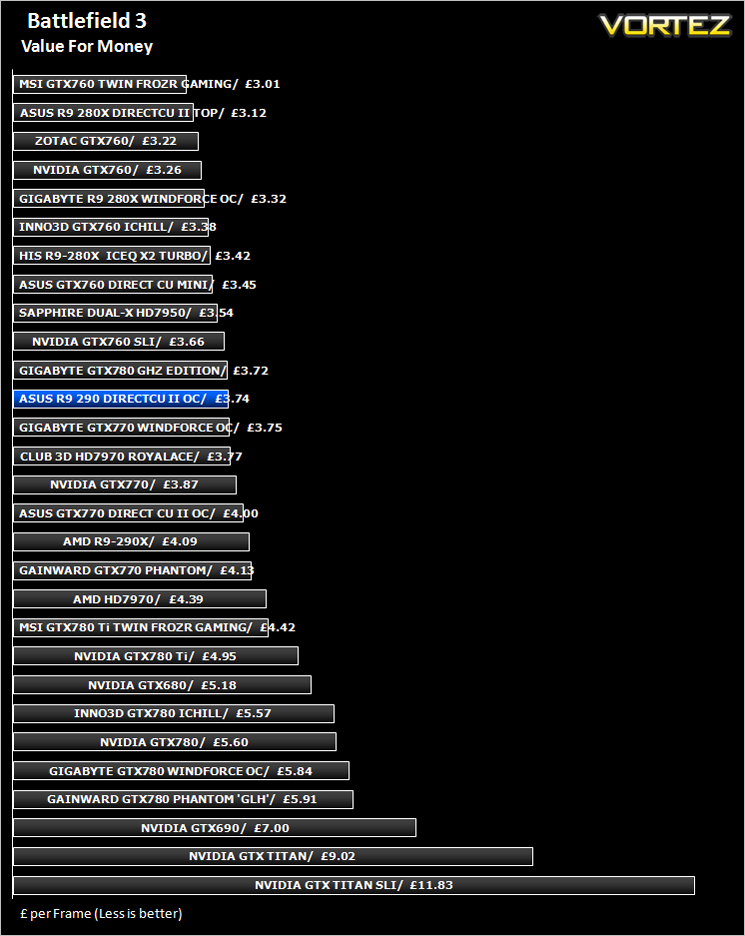
There’s just something about ASUS. Be it a graphics card, motherboard or laptop. There is an air of ‘eliteness’, an aura of supremacy in their products that make other products of similar ilk pale in comparison. Take for example today’s subject. Now we are not for one minute saying the R9 290 is a poor performer – it isn’t but before writing this review we looked lovingly at the flagship cards from both NVIDIA and AMD and wondered would we consider this card we were reviewing in our own machine? After all, at £360 it is certainly not cheap. It wasn’t so long ago that this price would get you a flagship card. So we have to confess, we dismissed it out of hand as a ‘high end’ card. That was a little naive on our part because thanks to the sprinkling of ASUS magic, the R9 290 makes the transition from being an also ran to a serious contender.It’s not just the aesthetics, the cooling performance, acoustics or the overclocking ability of this card (all of which are excellent) that makes the card so appealing. It is the combination of all things. While it doesn’t particularly blow any other card out of the water in any one area, it covers all bases very well indeed. It is consistently very good in all but one discipline and while this is only a minor point, it is valid nonetheless.
The accessories need beefing up for a card that costs in excess of £300. While we have zero complaints about the product itself, nor the packaging, we felt a little short changed by the lack of included accessories. Some manufacturers throw in a mouse mat, others a key ring or a case badge. Sadly, we don’t so much as get a VGA adaptor with the ASUS card.
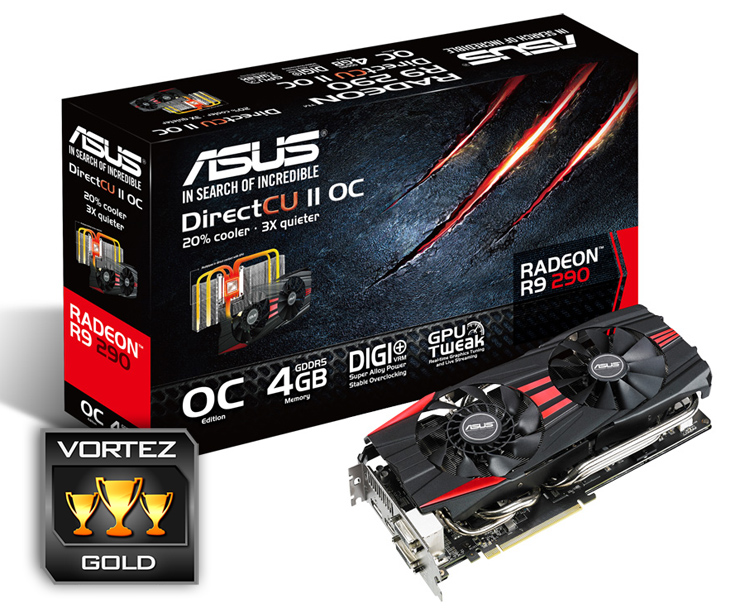
Overall though, this card is bound to impress whoever owns one because it performs well in all areas. We could find little to fault in the ASUS R9 290 DirectCU II as it is very nearly a perfect graphics card. We loved the inclusion of a backplate, the aesthetics were very good, it was near silent and performed admirably all at a competitive cost. For these reasons, it is worthy of no less than our Gold award.
To summarise:
Does everything right and does it well. If you are looking for high end performance but can’t stomach the cost of a flagship card, we highly recommend the ASUS R9 290 DirectCU II OC.
+ Great cooling
+ High end performance
+ Silent but powerful fans
+ Good overclocking headroom
Cons
– Lacking accessories


