







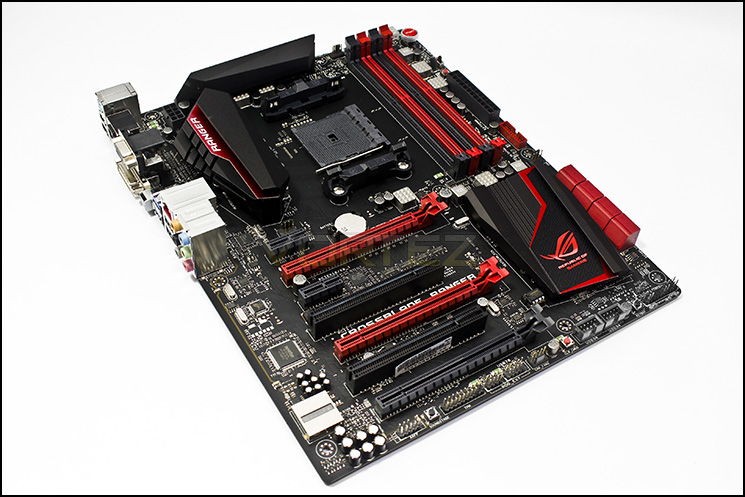
As the FM2+ platform kicks into gear, ASUS crash the party with their first ROG board to support an AMD APU. Allow us to present the ROG Crossblade Ranger.

Product on Review: Crossblade Ranger
Manufacturer & Sponsor: ASUS
Street Price: £118 GBP
ASUS Republic of Gamers (ROG) products are often extreme, and highly capable and their refined aesthetic has become recognised the world over. So stepping down into the relatively lowly realms of the APU, the FM2+ platform has become an ideal opportunity to take what is currently considered to be a mainstream platform more seriously. The latest Kaveri based APUs sport AMDs GCN GPU architecture as well as HSA features that are evolving rapidly. As the ROG want to support all gamers whatever their creed, we see a new branding for a relatively new platform for AMD. Even the naming, Crossblade, quite wittily resonates with its older brother, the Crosshair Series, while the new ‘Ranger’ suffix seems to represent ‘entry level’, so there may be concessions in regards to a more expensive ROG motherboard. Coming in at around £115-120 GBP, it is a fair bit more expensive than some already established A88X motherboards, but this series will always tend to hold a fair amount of prestige.
About ASUS
ASUS is a worldwide top-three consumer notebook vendor and maker of the world’s best-selling, most award-winning, motherboards. A leading enterprise in the new digital era, ASUS designs and manufactures products that perfectly meet the needs of today’s digital home and office, with a broad portfolio that includes motherboards, graphics cards, optical drives, displays, desktop and all-in-one PCs, notebooks, netbooks, servers, multimedia devices, wireless solutions, networking devices, tablets and smartphones. Driven by innovation and committed to quality, ASUS won 4,256 awards in 2013 and is widely credited with revolutionizing the PC industry with its Eee PC™. ASUS has more than 13,600 employees around the globe with a world-class R & D team of 4,500 engineers. Company revenue for 2013 was approximately US$14 billion.
Specifications & Features
CPU
AMD Socket FM2+ Athlon™/A- Series Processors
Supports CPU up to 4 cores
Supports AMD® Turbo Core 3.0 Technology
* Refer to www.asus.com for CPU support list
Chipset
AMD A88X (Bolton D4)
Memory
4 x DIMM, Max. 64GB, DDR3 2666(O.C.)/2400(O.C.)/2250(O.C.)/2200(O.C.)/2133/1866/1600/1333 MHz Non-ECC, Un-buffered Memory *
Dual Channel Memory Architecture
Support AMD Memory Profile (AMP) memory
* The Max. 64GB memory capacity can be supported with DIMMs of 16GB (or above). ASUS will update QVL once the DIMMs are available on the market.
* Hyper DIMM support is subject to the physical characteristics of individual CPUs.
* Refer to www.asus.com for the Memory QVL (Qualified Vendors Lists).
Graphic
Integrated AMD Radeon™ R/HD8000/HD7000 Series Graphics in the A-Series APU
Multi-VGA output support : HDMI/DVI-D/RGB ports
– Supports HDMI with max. resolution 4096 x 2160 @ 24 Hz / 1920 x 1200 @ 60 Hz*1
– Supports DVI-D with max. resolution 2560 x 1600 @ 60 Hz
– Supports RGB with max. resolution 1920 x 1600 @ 60 Hz
Maximum shared memory of 2048 MB
AMD® Dual Graphics technology support
Multi-GPU Support
Supports AMD 3-Way CrossFireX™ Technology
Expansion Slots
2 x PCIe 3.0/2.0 x16 (Single at x16, dual at x8/x8, red) *2
1 x PCIe 2.0 x16 (max at x4 mode, black)
2 x PCIe 2.0 x1
2 x PCI
Storage
AMD A88X FCH(Bolton D4) chipset :
8 x SATA 6Gb/s port(s),
Support Raid 0, 1, 5, 10, JBOD
LAN
Intel® I211-AT, 1 x Gigabit LAN Controller(s)
Audio
ROG SupremeFX 8-Channel High Definition Audio CODEC
– Supports : Jack-detection, Multi-streaming, Front Panel Jack-retasking
– SupremeFX Shielding Technology
– ELNA® premium audio capacitors
Audio Feature :
– DTS Connect
– Optical S/PDIF out port(s) at back panel
– Sonic SoundStage
– Sonic SenseAmp
– Sonic Studio
– Sonic Radar II
USB Ports
ASMedia® USB 3.0 controller :
2 x USB 3.0 port(s) (2 at back panel, blue)
AMD A88X FCH(Bolton D4) chipset :
4 x USB 3.0 port(s) (2 at back panel, blue, 2 at mid-board)
AMD A88X FCH(Bolton D4) chipset :
8 x USB 2.0 port(s) (2 at back panel, , 6 at mid-board)
ROG Exclusive Features
Extreme Engine Digi+ III :
– Full Digital CPU/DRAM Power
– NexFET™ Power Block MOSFET
– New Alloy Chokes
– 10K Black Metallic Capacitors
ROG Extreme OC kit :
– Slow Mode
– LN2 Mode
ProbeIt
KeyBot
– CPU Level Up
– XMP
– Direct Key
UEFI BIOS features:
– GPU.DIMM Post
– Tweakers’ Paradise
– ROG SSD Secure Erase
– Graphic Card Information Preview
ROG RAMDisk
GameFirst III
Extreme Tweaker
USB BIOS Flashback
Special Features
ASUS Dual Intelligent Processors 5-Way Optimization by Dual Intelligent Processors 5 :
– The tuning key perfectly consolidates ASUS-exclusive DIGI+ Power Control, TPU, EPU, and Fan Xpert 3 optimize the digital power setting, system performance, power saving and whole system cooling configuration
ASUS Exclusive Features :
– MemOK!
– AI Suite 3
– Ai Charger+
– USB Charger+
– USB 3.0 Boost
– Disk Unlocker
Interactive HomeCloud
– Media Streamer
ASUS Quiet Thermal Solution :
– Stylish Fanless Design Heat-sink solution & MOS Heatsink
– ASUS Fan Xpert 3
ASUS EZ DIY :
– ASUS CrashFree BIOS 3
– ASUS EZ Flash 2
– ASUS UEFI BIOS EZ Mode
– Push Notice
ASUS Q-Design :
– ASUS Q-Shield
– ASUS Q-Code
– ASUS Q-LED (CPU, DRAM, VGA, Boot Device LED)
– ASUS Q-Slot
– ASUS Q-DIMM
– ASUS Q-Connector
Operating System Support
Windows® 8.1
Windows® 8
Windows® 7
Back I/O Ports
1 x PS/2 keyboard/mouse combo port(s)
1 x DVI-D
1 x D-Sub
1 x HDMI
1 x LAN (RJ45) port(s)
4 x USB 3.0 (blue)
2 x USB 2.0
1 x Optical S/PDIF out
6 x Audio jack(s)
1 x USB BIOS Flashback Button(s)
Internal I/O Ports
1 x USB 3.0 connector(s) support(s) additional 2 USB 3.0 port(s)
3 x USB 2.0 connector(s) support(s) additional 6 USB 2.0 port(s)
1 x TPM header
8 x SATA 6Gb/s connector(s)
1 x CPU Fan connector(s) (1 x 4 -pin)
1 x CPU OPT Fan connector(s) (1 x 4 -pin)
3 x Chassis Fan connector(s) (3 x 4 -pin)
1 x 24-pin EATX Power connector(s)
1 x 8-pin ATX 12V Power connector(s)
1 x Front panel audio connector(s) (AAFP)
1 x System panel(s)
1 x DRCT header(s)
1 x MemOK! button(s)
1 x Slow Mode switch(es)
7 x ProbeIt Measurement Points
1 x Power-on button(s)
1 x Reset button(s)
1 x Clear CMOS button(s)
1 x LN2 Mode jumper(s)
1 x ROG extension (ROG_EXT) header(s)
1 x KeyBot Button
1 x Sonic SoundStage Button
Accessories
User’s manual
I/O Shield
4 x SATA 6Gb/s cable(s)
1 x Q-connector(s) (2 in 1)
1 x 12 in 1 ROG Cable Label(s)
1 x ROG Door Hanger(s)
1 x ROG Mouse Mat
BIOS
64Mb UEFI AMI BIOS, PnP, DMI2.7, WfM2.0, SM BIOS 2.7, ACPI5.0a, Multi-Language BIOS
Manageability
WfM 2.0, DMI 2.7, WOL by PME, PXE
Support Disc
Drivers
ROG GameFirst III
ROG RAMDisk
ROG CPU-Z
Kaspersky® Anti-Virus
DAEMON Tools Pro Standard
ASUS WebStorage
HomeCloud
ASUS Utilities
Operating System
Windows® 8.1 32/64-bit
Windows® 8 32/64-bit
Windows® 7 32/64-bit
Form Factor
ATX Form Factor
12 inch x 9.6 inch ( 30.5 cm x 24.4 cm )
Management Solution
WfM 2.0, DMI 2.7, WOL by PME, PXE
Note
1: Only FM2+ APU can support up to 4096 x 2160 resolution display via HDMI port.
2: Only FM2+ processors can support PCIe 3.0.
3: 1 x USB 2.0 connectors support additional 2 USB 2.0 ports(2 ports share with ROG_EXT header).
AMD Socket FM2+ Athlon™/A- Series Processors
Supports CPU up to 4 cores
Supports AMD® Turbo Core 3.0 Technology
* Refer to www.asus.com for CPU support list
Chipset
AMD A88X (Bolton D4)
Memory
4 x DIMM, Max. 64GB, DDR3 2666(O.C.)/2400(O.C.)/2250(O.C.)/2200(O.C.)/2133/1866/1600/1333 MHz Non-ECC, Un-buffered Memory *
Dual Channel Memory Architecture
Support AMD Memory Profile (AMP) memory
* The Max. 64GB memory capacity can be supported with DIMMs of 16GB (or above). ASUS will update QVL once the DIMMs are available on the market.
* Hyper DIMM support is subject to the physical characteristics of individual CPUs.
* Refer to www.asus.com for the Memory QVL (Qualified Vendors Lists).
Graphic
Integrated AMD Radeon™ R/HD8000/HD7000 Series Graphics in the A-Series APU
Multi-VGA output support : HDMI/DVI-D/RGB ports
– Supports HDMI with max. resolution 4096 x 2160 @ 24 Hz / 1920 x 1200 @ 60 Hz*1
– Supports DVI-D with max. resolution 2560 x 1600 @ 60 Hz
– Supports RGB with max. resolution 1920 x 1600 @ 60 Hz
Maximum shared memory of 2048 MB
AMD® Dual Graphics technology support
Multi-GPU Support
Supports AMD 3-Way CrossFireX™ Technology
Expansion Slots
2 x PCIe 3.0/2.0 x16 (Single at x16, dual at x8/x8, red) *2
1 x PCIe 2.0 x16 (max at x4 mode, black)
2 x PCIe 2.0 x1
2 x PCI
Storage
AMD A88X FCH(Bolton D4) chipset :
8 x SATA 6Gb/s port(s),
Support Raid 0, 1, 5, 10, JBOD
LAN
Intel® I211-AT, 1 x Gigabit LAN Controller(s)
Audio
ROG SupremeFX 8-Channel High Definition Audio CODEC
– Supports : Jack-detection, Multi-streaming, Front Panel Jack-retasking
– SupremeFX Shielding Technology
– ELNA® premium audio capacitors
Audio Feature :
– DTS Connect
– Optical S/PDIF out port(s) at back panel
– Sonic SoundStage
– Sonic SenseAmp
– Sonic Studio
– Sonic Radar II
USB Ports
ASMedia® USB 3.0 controller :
2 x USB 3.0 port(s) (2 at back panel, blue)
AMD A88X FCH(Bolton D4) chipset :
4 x USB 3.0 port(s) (2 at back panel, blue, 2 at mid-board)
AMD A88X FCH(Bolton D4) chipset :
8 x USB 2.0 port(s) (2 at back panel, , 6 at mid-board)
ROG Exclusive Features
Extreme Engine Digi+ III :
– Full Digital CPU/DRAM Power
– NexFET™ Power Block MOSFET
– New Alloy Chokes
– 10K Black Metallic Capacitors
ROG Extreme OC kit :
– Slow Mode
– LN2 Mode
ProbeIt
KeyBot
– CPU Level Up
– XMP
– Direct Key
UEFI BIOS features:
– GPU.DIMM Post
– Tweakers’ Paradise
– ROG SSD Secure Erase
– Graphic Card Information Preview
ROG RAMDisk
GameFirst III
Extreme Tweaker
USB BIOS Flashback
Special Features
ASUS Dual Intelligent Processors 5-Way Optimization by Dual Intelligent Processors 5 :
– The tuning key perfectly consolidates ASUS-exclusive DIGI+ Power Control, TPU, EPU, and Fan Xpert 3 optimize the digital power setting, system performance, power saving and whole system cooling configuration
ASUS Exclusive Features :
– MemOK!
– AI Suite 3
– Ai Charger+
– USB Charger+
– USB 3.0 Boost
– Disk Unlocker
Interactive HomeCloud
– Media Streamer
ASUS Quiet Thermal Solution :
– Stylish Fanless Design Heat-sink solution & MOS Heatsink
– ASUS Fan Xpert 3
ASUS EZ DIY :
– ASUS CrashFree BIOS 3
– ASUS EZ Flash 2
– ASUS UEFI BIOS EZ Mode
– Push Notice
ASUS Q-Design :
– ASUS Q-Shield
– ASUS Q-Code
– ASUS Q-LED (CPU, DRAM, VGA, Boot Device LED)
– ASUS Q-Slot
– ASUS Q-DIMM
– ASUS Q-Connector
Operating System Support
Windows® 8.1
Windows® 8
Windows® 7
Back I/O Ports
1 x PS/2 keyboard/mouse combo port(s)
1 x DVI-D
1 x D-Sub
1 x HDMI
1 x LAN (RJ45) port(s)
4 x USB 3.0 (blue)
2 x USB 2.0
1 x Optical S/PDIF out
6 x Audio jack(s)
1 x USB BIOS Flashback Button(s)
Internal I/O Ports
1 x USB 3.0 connector(s) support(s) additional 2 USB 3.0 port(s)
3 x USB 2.0 connector(s) support(s) additional 6 USB 2.0 port(s)
1 x TPM header
8 x SATA 6Gb/s connector(s)
1 x CPU Fan connector(s) (1 x 4 -pin)
1 x CPU OPT Fan connector(s) (1 x 4 -pin)
3 x Chassis Fan connector(s) (3 x 4 -pin)
1 x 24-pin EATX Power connector(s)
1 x 8-pin ATX 12V Power connector(s)
1 x Front panel audio connector(s) (AAFP)
1 x System panel(s)
1 x DRCT header(s)
1 x MemOK! button(s)
1 x Slow Mode switch(es)
7 x ProbeIt Measurement Points
1 x Power-on button(s)
1 x Reset button(s)
1 x Clear CMOS button(s)
1 x LN2 Mode jumper(s)
1 x ROG extension (ROG_EXT) header(s)
1 x KeyBot Button
1 x Sonic SoundStage Button
Accessories
User’s manual
I/O Shield
4 x SATA 6Gb/s cable(s)
1 x Q-connector(s) (2 in 1)
1 x 12 in 1 ROG Cable Label(s)
1 x ROG Door Hanger(s)
1 x ROG Mouse Mat
BIOS
64Mb UEFI AMI BIOS, PnP, DMI2.7, WfM2.0, SM BIOS 2.7, ACPI5.0a, Multi-Language BIOS
Manageability
WfM 2.0, DMI 2.7, WOL by PME, PXE
Support Disc
Drivers
ROG GameFirst III
ROG RAMDisk
ROG CPU-Z
Kaspersky® Anti-Virus
DAEMON Tools Pro Standard
ASUS WebStorage
HomeCloud
ASUS Utilities
Operating System
Windows® 8.1 32/64-bit
Windows® 8 32/64-bit
Windows® 7 32/64-bit
Form Factor
ATX Form Factor
12 inch x 9.6 inch ( 30.5 cm x 24.4 cm )
Management Solution
WfM 2.0, DMI 2.7, WOL by PME, PXE
Note
1: Only FM2+ APU can support up to 4096 x 2160 resolution display via HDMI port.
2: Only FM2+ processors can support PCIe 3.0.
3: 1 x USB 2.0 connectors support additional 2 USB 2.0 ports(2 ports share with ROG_EXT header).
Best gaming networking
Crossblade Ranger is fitted with state-of-the-art Intel Gigabit Ethernet that delivers better throughput with lower processing power for superior speed and increased efficiency.
The new motherboard’s networking capabilities additionally benefit from ROG-exclusive GameFirst III technology for no-delay gameplay. This advanced network-optimization software assigns top priority to game-data packets, allocating them more bandwidth to ensure the best online-gaming experience and clear, stutter-free online team-chat — all controlled with ROG’s usual intuitive flair.
ROG has even reinvented the RJ45 socket, with LANGuard technology. Advanced signal-coupling technology and premium surface-mounted capacitors improve throughput, while surge-protected and electrostatically-guarded components (ESD Guards) protect against lightning strikes and static-electricity discharges.
Best gaming audio
Flawless audio is essential for immersive gaming, so Crossblade Ranger is engineered with SupremeFX 2014. Cutting-edge isolation technologies minimize electromagnetic interference (EMI), while premium ELNA® audio capacitors and eight-channel gold-plated audio outputs provide precision-engineered audio that’s as great as a dedicated soundcard.
SupremeFX 2014 also features exclusive Sonic SenseAmp and Sonic SoundStage technologies. Sonic SenseAmp automatically detects analog-audio front-panel (AAFP) headphone impedance and adjusts the built-in amp accordingly, while Sonic SoundStage applies the best audio settings for popular game genres — just one click is all it takes to generate the perfect sound for first-person shooter (FPS), racing, combat and sports games.
Crossblade Ranger’s gaming-audio credentials include Sonic Radar II technology. Designed for first-person shooters (FPS), Sonic Radar II displays a stealthy overlay that shows what opponents and teammates are up to. Players see the precise direction and origin of in-game sounds such as gunshots, footsteps and call-outs, enabling them to hone enemy-pinpointing skills. Exclusive audio enhancement further improves in-game sound for superb hearing awareness, and the all-new Sonic Radar II includes a redesigned control panel with customizable game list.
Best gaming interface
Crossblade Ranger includes KeyBot, a clever tool that lets users instantly ‘upgrade’ an existing keyboard simply by attaching it to the dedicated USB socket.
Once connected, the KeyBot microprocessor is activated and the user is able to use their current keyboard to control multimedia playback, launch favorite applications or assign macros to specific keys — just perfect for automating complicated in-game key sequences.
Best gaming performance
ROG’s Auto Tuning technology enables Crossblade Ranger to unleash the true power of AMD APUs with just few clicks. Enabled by the TurboV Processing Unit (TPU), Auto Tuning adjusts the CPU frequencies and ratios to offer precise voltage control and advanced CPU-performance monitoring, efficiently enhancing system performance with the most stable overclocking profile — so gamers enjoy superb stability and high speeds while playing.
Crossblade Ranger is also compatible with ROG’s brilliant Front Base dual-bay gaming panel. When added to Crossblade Ranger, Front Base enables one-click performance boosting and real-time system monitoring to make gaming experiences even more enjoyable.
Packaging & First Look
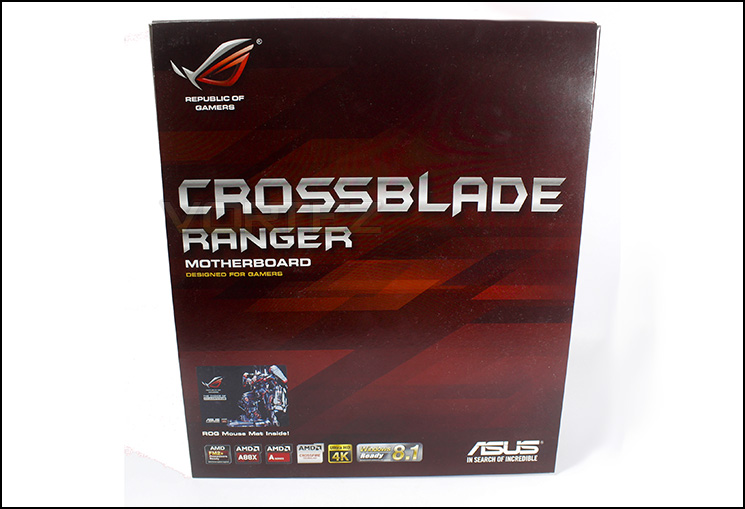
The Crossblade Ranger packaging
The packaging keeps in line with the ROG series aesthetics with only the badges at the bottom to let you know of the product compatibility.
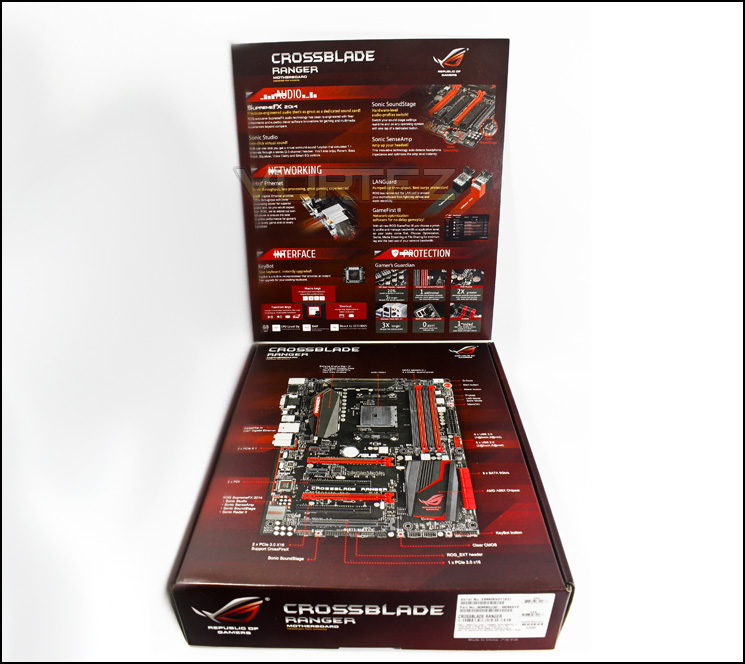
ROG packaging
Opening up the top flap reveals information about the numerous features included with the Crossblade Ranger. Of those it notes the Supreme FX 2014 audio processor, the Intel Ethernet with LAN Guard and GameFirst to provide ‘best possible performance’ for gamers, keybot along with a host of hardware features.
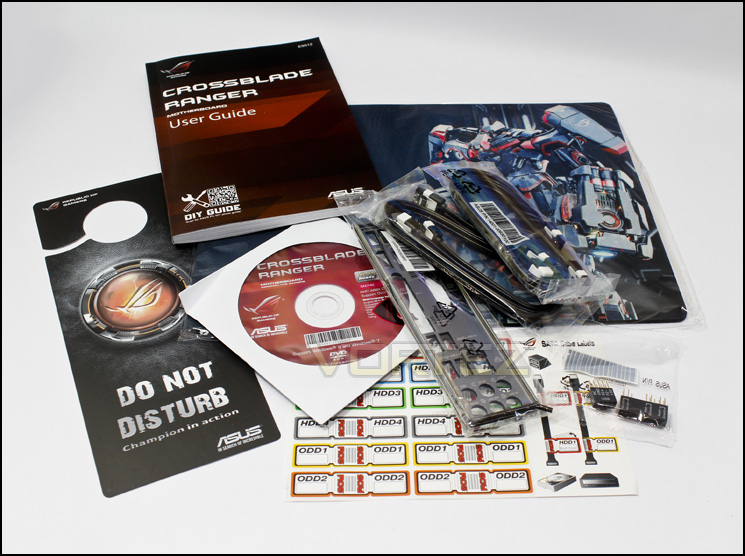
Included accessories
As you would expect, there are no fancy gadgets included with the Crossblade Ranger as part of keeping the price down, but what we do see is fairly standard selection, with the added bonus of a nice ROG Mouse mat.
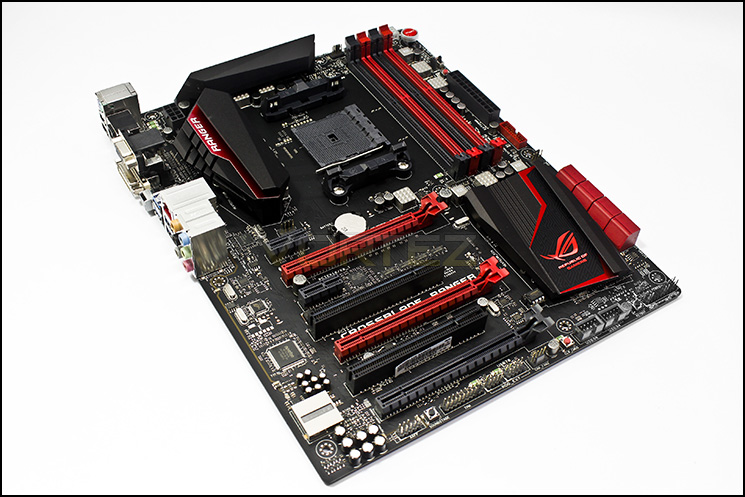
The ROG Crossblade Ranger
Aesthetically, the Crossblade ranger is as every bit ROG as you could imagine. Matt black PCB, deep red features with impressive chipset cooling.
Closer Look
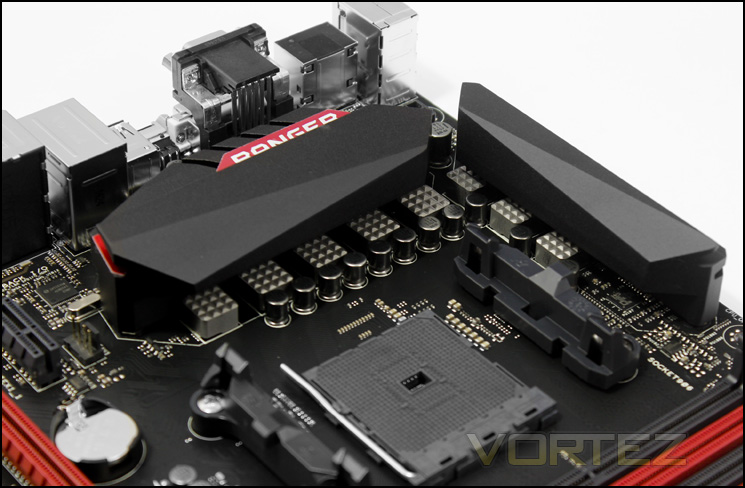
Socket and power delivery
Using the Extreme DIGI+ Engine III, comprised of ‘New Alloy Chokes’ that look like meat tenderisers, NexFETTMMOSFET and 10K Black Metallic Caps allowing for a fully digitised power supply to the CPU and DRAM.
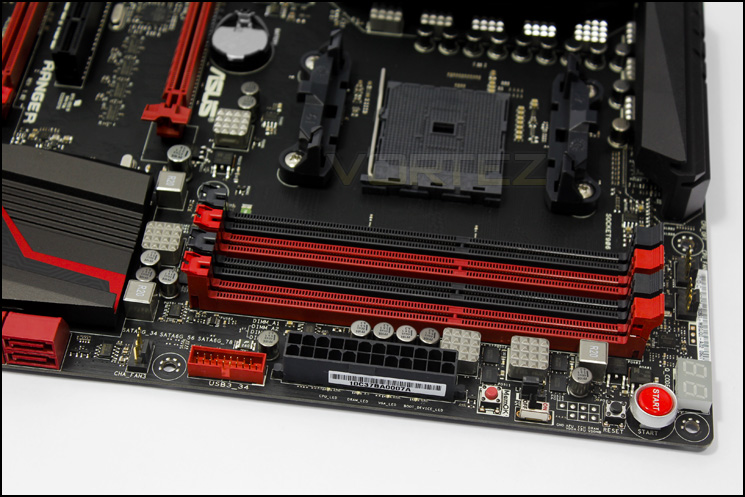
DIMM slots
The top right area of the motherboard is very busy with features, starting with a pair of CPU 4 pin PWM fan headers for push/pull cooling, the Q-Code LED debugging indicator, power and reset buttons, followed by the ‘probelt’ area which is a row of voltage reading points followed by a LN2 mode jumper and ‘slow mode switch’ which are useful features for pro/enthusiast overclockers. Finishing up with the MemOK button followed by the 24pin ATX and the USB 3.0 front header connection.
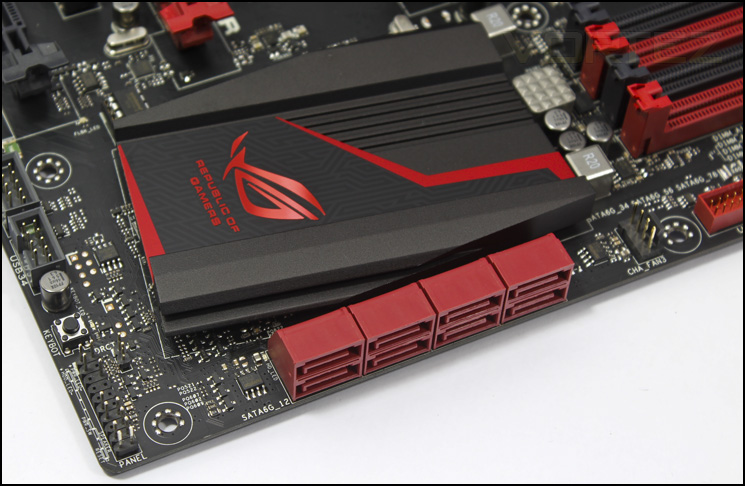
8 right angle SATA
Getting down to some no nonsense business, ASUS offer all available SATA in a uniform right angle position, best for cabling, neatness and space. This may be considered a triviality, but when you consider that the popularity of eSATA is dwindling in light of the speeds offered by USB 3.0 and Thunderbolt, the tendency to waste space on a feature that the majority of people will not use, ends up complicating matters where there are many more who would rather all available SATA ports internal, neatly laid out. This can be seen in various other boards in the FM2+ upper echelon such as the MSI Gaming G45 and the ASRock Killer A88X. On the right there is another 4 pin PWM fan header, while in the background the infamous ROG logo is seen on a large chipset cooler.
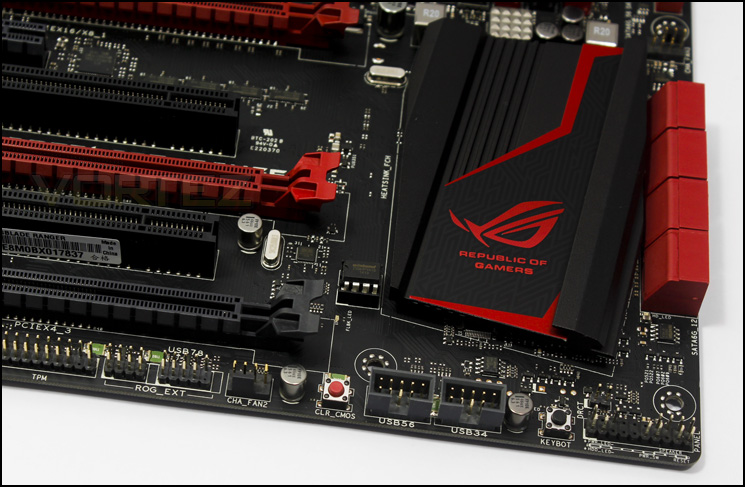
Bottom right area
From right to left there are headers for the ROG EXT, which also comprises of a USB 2.0 header, a 4 pin PWM fan header, a clear CMOS button, a pair of USB 2.0 headers, the keybot button and the front panel headers for your case.
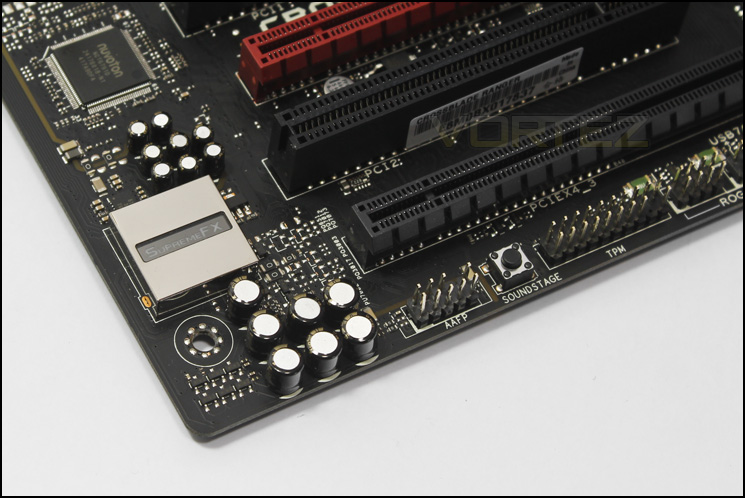
Bottom left corner
In the audio area, the Crossblade Ranger has a dedicated audio section that is shielded and highlighted by red LEDs, which is becoming a common practice for higher end motherboards, we see the use of audio grade capacitors alongside the Supreme FX 2014 audio processor, which is also accompanied by a front audio panel header that is isolated with the rest of the audio components. There is also a button for on the fly ‘soundstage’ changes which is associated with the audio software in conjunction with the use of the frontpanel headset connection. When pressing the button, the LED Q-Code indicator will display which setting is selected (by displaying numbers).
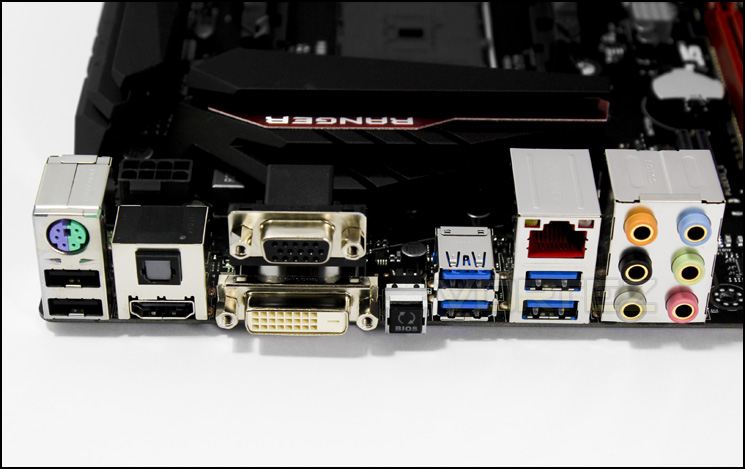
Back panel I/O
Though there is no display port out, the VGA, DVI and HDMI outs should be suitable for most. There is a universal PS2 port, two USB 2.0 ports, the one closer to the PS2 port is specifically designated for the use of the Keybot function so if you want to take advantage of this feature, use this USB port with your keyboard. There is also a BIOS flashback button, allowing for quick and easy BIOS updates/ retrodate without the need for any system components to be installed. This is particularly handy for those with Kaveri APUs as they may get a board with an older BIOS that may not support the Kaveri APU, however at this point, it is likely that the ROG Crossblade Ranger will come ready out the box, but it’s there should it be needed. Next up there is a foursome of USB 3.0 ports, the LAN connection, fitted out with LANGuard for an extra robust network connection and to finish off there are gold plated 8 channel audio jacks.
BIOS
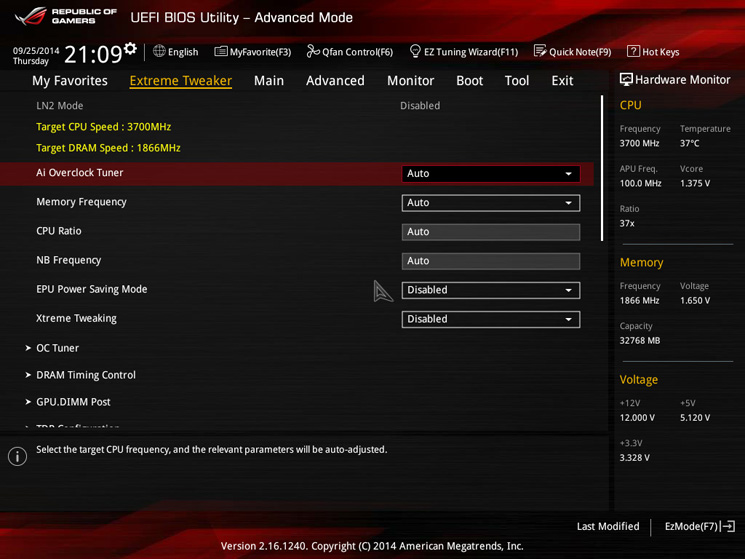
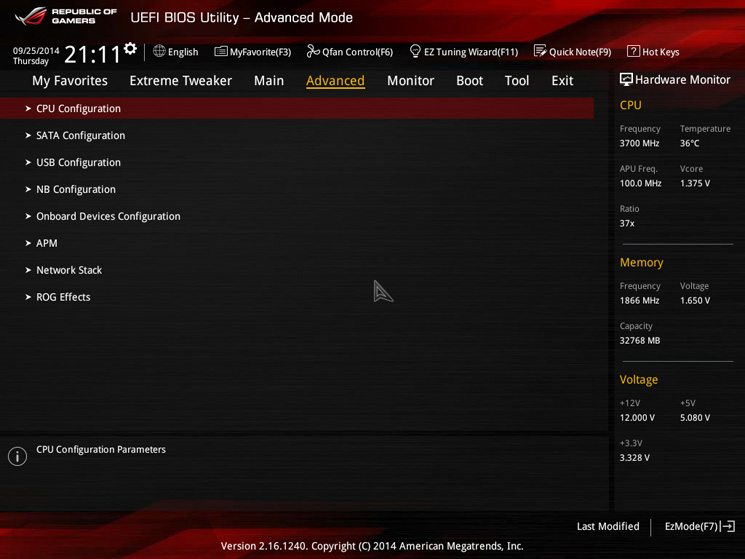
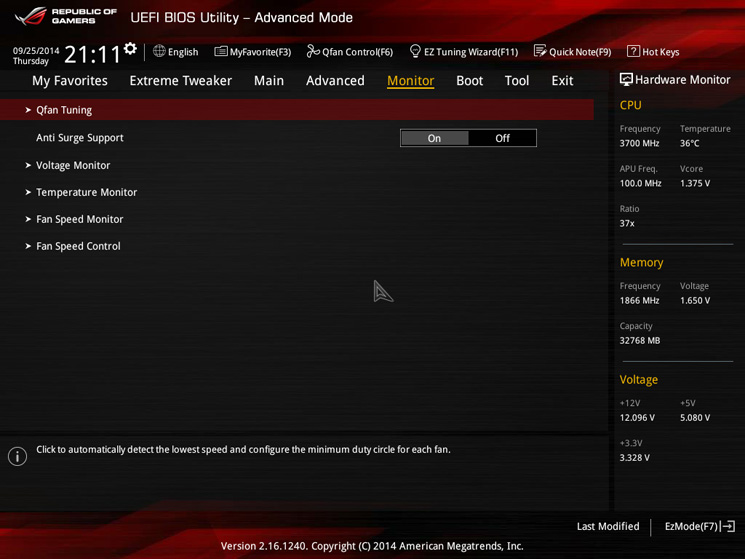
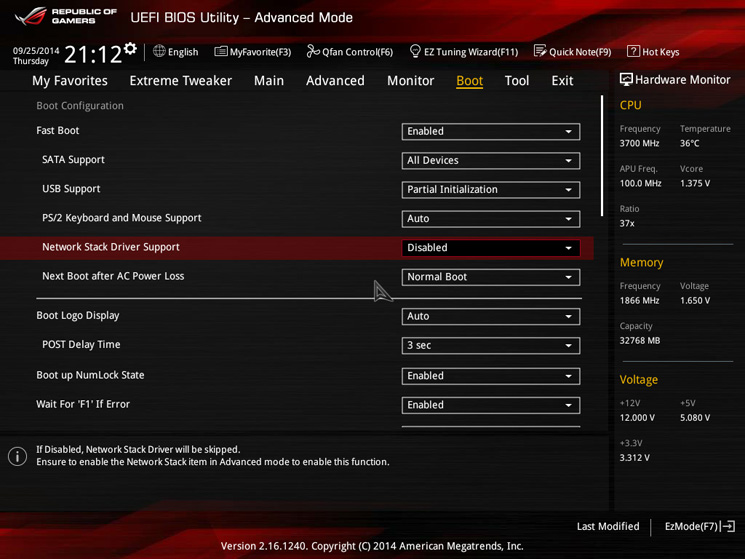
These screens scratch the surface of the BIOS supplied with the Crossblade Ranger and they are very full of control measures from various voltage tweaks to CPU/GPU changes, it is all there and more. It is easy to find all the features and you can even switch to an easy mode should you not need to dance around the inner workings. There is no lag in mouse or transition in regards to browsing each tab and it generally looks great.
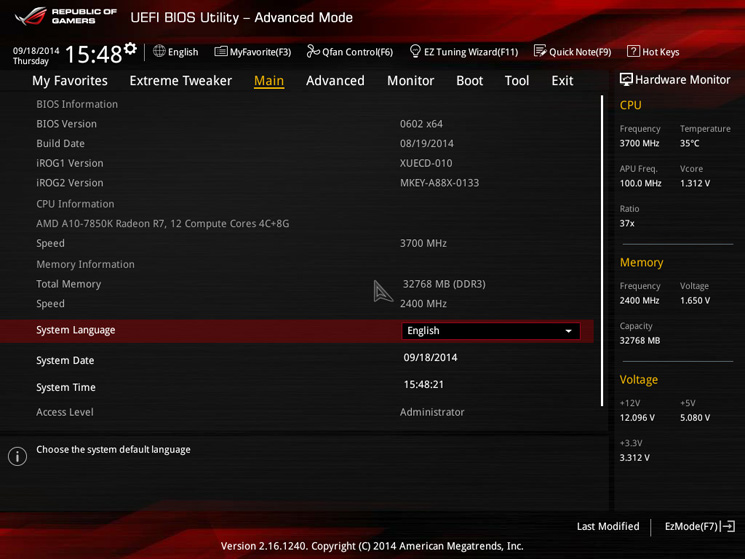
Test Setup
A88X Setup
APU – A10-7850K
Motherboard – ASUS ROG Crossblade Ranger – GIGABYTE G1.Sniper A88X
RAM – Xtreem LV PC3 19200 DDR3 LV 2400 – AMD Radeon R9 2400MHz
SSD – Kingston Hyper X 120GB
Power Supply – NZXT Hale82 650W
Cooler – Noctua NH-U12S
APU – A10-7850K
Motherboard – ASUS ROG Crossblade Ranger – GIGABYTE G1.Sniper A88X
RAM – Xtreem LV PC3 19200 DDR3 LV 2400 – AMD Radeon R9 2400MHz
SSD – Kingston Hyper X 120GB
Power Supply – NZXT Hale82 650W
Cooler – Noctua NH-U12S
APU Configurations
A10-7850K @ 3.7 GHz/4.0 GHz @ 100 MHz x 37/40, (OC @ 4247 MHz)
Radeon R7 integrated graphics @ 720 MHz, (OC @ 1000 MHz)
Memory @ 2133 MHz 9-9-9-24, (OC @ 2400 MHz 11-12-12-31)
Overclocking
In the BIOS, ASUS have a GPU boost mode, to which if set to manual you can choose the GPU frequency you desire, however there are also ‘turbo’ and ‘extreme’ modes available, to which turbo changes the GPU frequency to match the task, and extreme sets the GPU clock speed at around 900MHz. Handy for a hassle free GPU boost.
Kaveri, unlike Trinity/Richland, has a fairly limited CPU OC headroom, so when using the ASUS OC Tuner to which booted the A10-7850K in @ 4.1GHz, it did seem a little hopeful and ended in a corrupt visual experience followed by a swift BSOD. Maybe it is this particular chip that doesn’t like to OC too well, however, from previous experience, I know that 4.1GHz can be stable with some hefty voltage increases. Using my judgement from previous experience the Crossblade Ranger was eventually able to beat my previous stable record CPU OC however this came at a loss of a few MHz on the GPU. Generally speaking, as with the majority of APUs, you get a much better advantage by boosting the GPU frequencies, as this results in a good power/performance and is relatively easy to do even on stock cooling. However we wanted to get outright performance for testing purposes and the Crossblade Ranger handled the overclocking with ease.
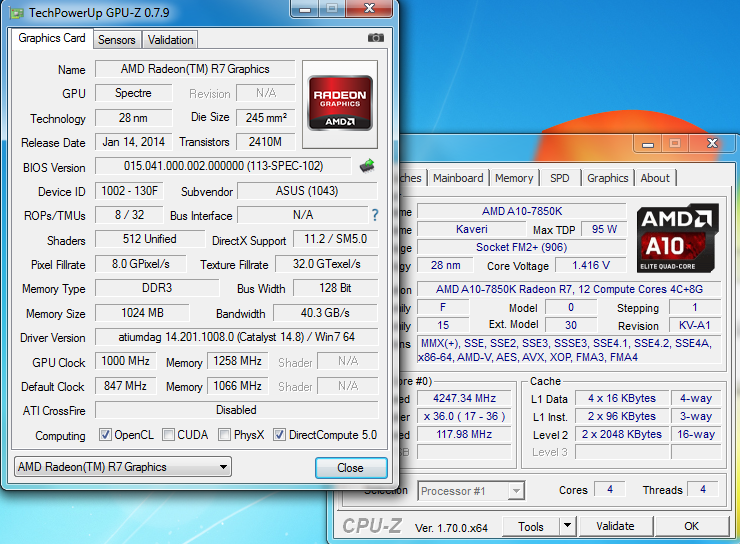
Final OC settings
Power Consumption
It’s interesting to note the power consumption across all motherboards because energy results can fluctuate between manufacturers due to the features and specifications that are integrated. First of all, for the idle tests the system is cold booted into Windows and no additional applications are executed – the watts are noted on the external energy monitor we use. Then the system is loaded with LinX 0.6.4 and MSI Kombustor simultainiously – watts are again monitored throughout the period of testing and the highest rated watts are then noted down. Below are the results of this energy test.
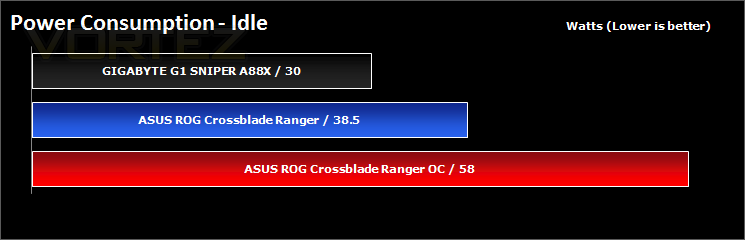
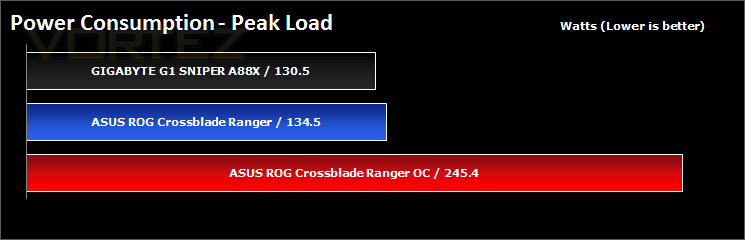
The XBR (Crossblade Ranger) seems to burn a little more power over the GIGABYTE G1, however, this was with various EPU settings disabled (as default), the chances are you could tweak various settings which could save you a few Watts to bring the XBR back in line with other motherboards.
Synthetic Benchmarks: AIDA64
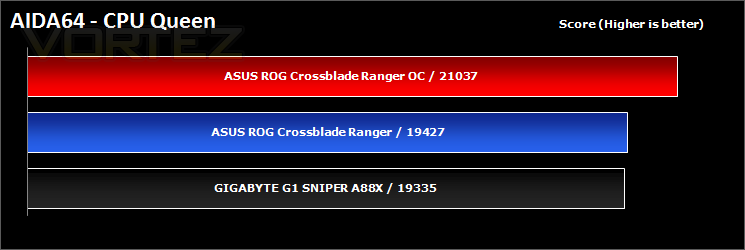
CPU Queen Benchmark
This simple integer benchmark focuses on the branch prediction capabilities and the misprediction penalties of the CPU. It finds the solutions for the classic “Queens problem” on a 10 by 10 sized chessboard. At the same clock speed theoretically the processor with the shorter pipeline and smaller misprediction penalties will attain higher benchmark scores. For example — with HyperThreading disabled — the Intel Northwood core processors get higher scores than the Intel Prescott core based ones due to the 20-step vs 31-step long pipeline. CPU Queen test uses integer MMX, SSE2 and SSSE3 optimizations.
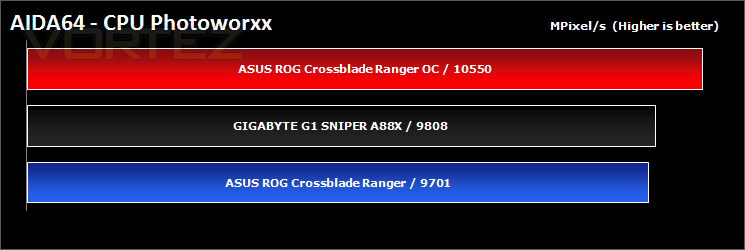
CPU Photoworxx Benchmark
This benchmark stresses the integer arithmetic and multiplication execution units of the CPU and also the memory subsystem. Due to the fact that this test performs high memory read/write traffic, it cannot effectively scale in situations where more than 2 processing threads used. For example, on a 8-way Pentium III Xeon system the 8 processing threads will be “fighting” over the memory, creating a serious bottleneck that would lead to as low scores as a 2-way or 4-way similar processor based system could achieve. CPU PhotoWorxx test uses only the basic x86 instructions, and it is HyperThreading, multi-processor (SMP) and multi-core (CMP) aware.
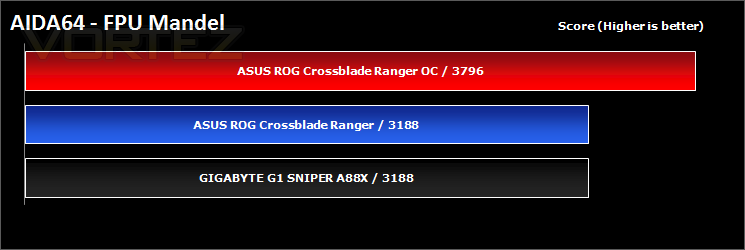
FPU Mandel Benchmark
This benchmark measures the double precision (also known as 64-bit) floating-point performance through the computation of several frames of the popular “Mandelbrot” fractal. The code behind this benchmark method is written in Assembly, and it is extremely optimized for every popular AMD, Intel and VIA processor core variants by utilizing the appropriate x87, SSE2, AVX or FMA4 instruction set extension. FPU Mandel test is HyperThreading, multi-processor (SMP) and multi-core (CMP) aware.
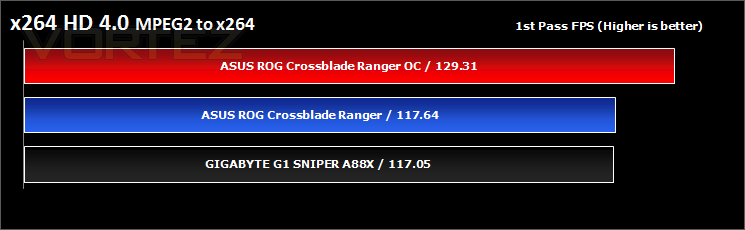
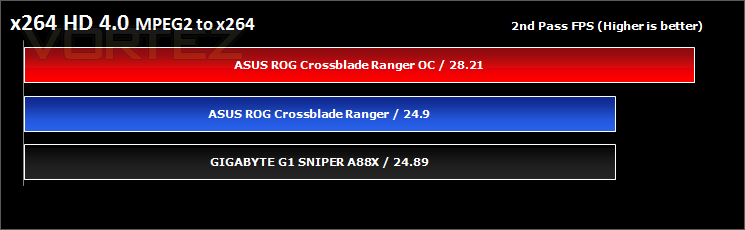
Synthetic Benchmarks: x264 HD
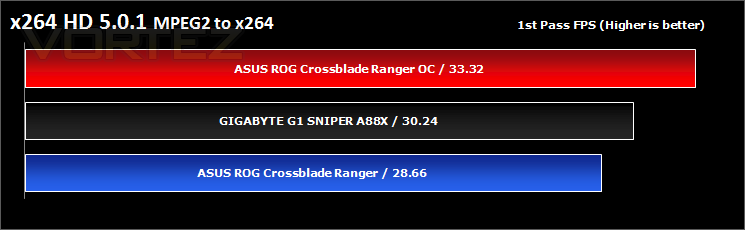
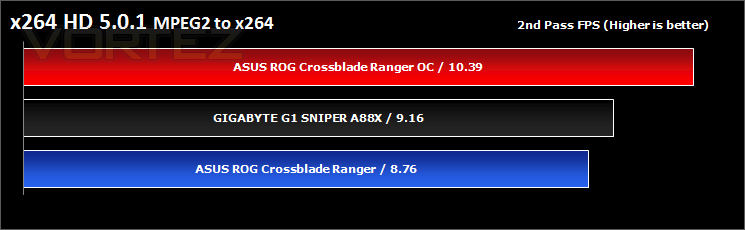
Simply put, this test measures how fast your machine can encode a short, DVD quality MPEG-2 video clip into a high-quality x264 video clip. What’s x264, you ask? It’s more or less the next-generation Xvid/DivX codec. I think it’s ideal for a benchmark because the application (x264.exe) reports fairly accurate compression results (in frames per second) for each pass of the video encoding process, and it uses multi-core processors very efficiently.
Synthetic Benchmarks: Cinebench
CPU Rendering
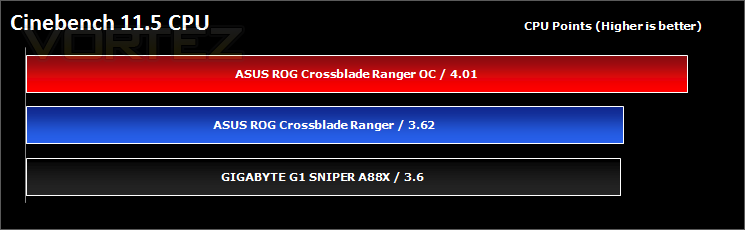
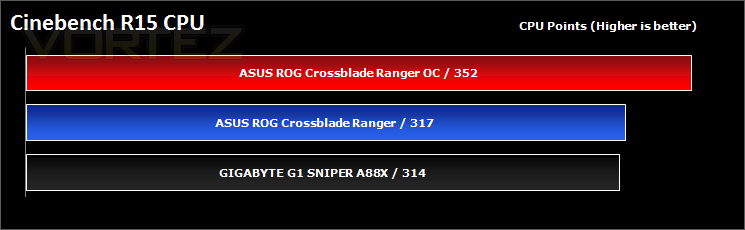
CINEBENCH can measure systems with up to 64 processor threads. This test scene contains approximately 2,000 objects which in turn contain more than 300,000 polygons in total, and uses sharp and blurred reflections, area lights, shadows, procedural shaders, antialiasing, and much more. The result is displayed in points (pts). The higher the number, the faster your processor.
Open GL Graphics Rendering
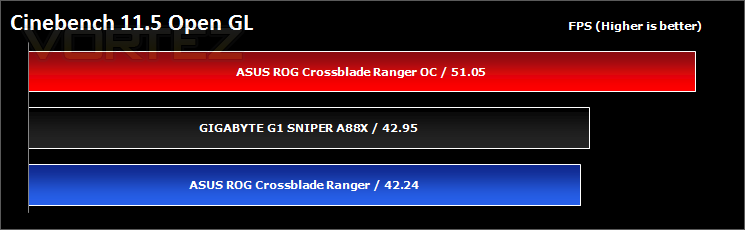
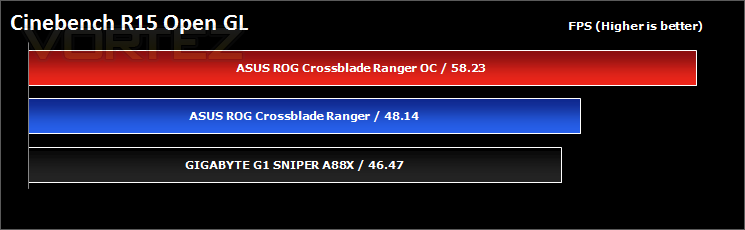
This procedure uses a complex 3D scene depicting a car chase (by renderbaron) which measures the performance of your graphics card in OpenGL mode. The performance depends on various factors, such as the GPU processor on your hardware, but also on the drivers used. The graphics card has to display a huge amount of geometry (nearly 1 million polygons) and textures, as well as a variety of effects, such as environments, bump maps, transparency, lighting and more to evaluate the performance across different disciplines and give a good average overview of the capabilities of your graphics hardware.
Synthetic Benchmarks: SiSoftware SANDRA
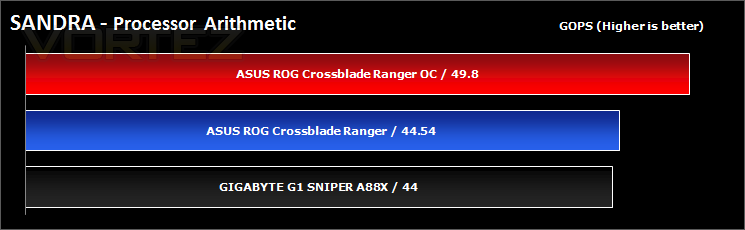
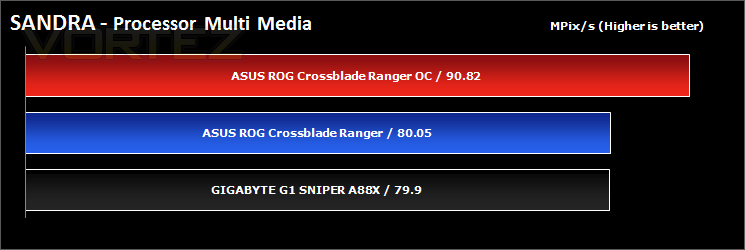
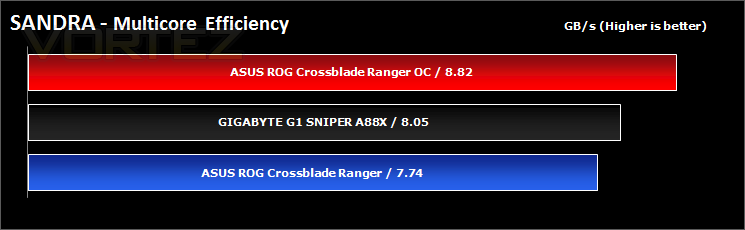
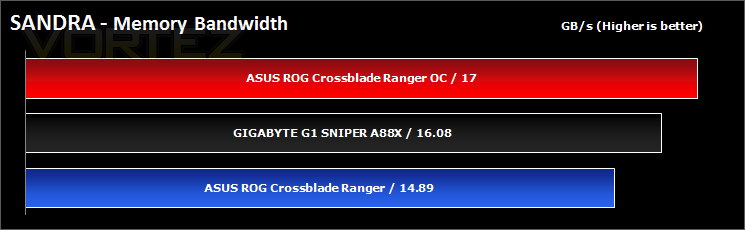
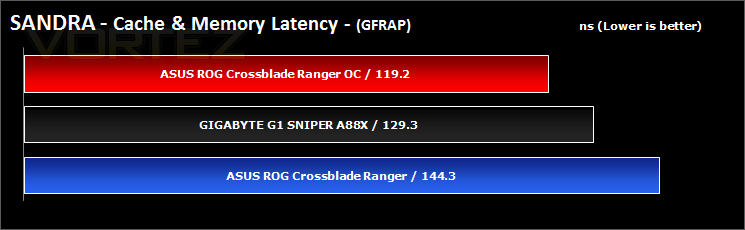
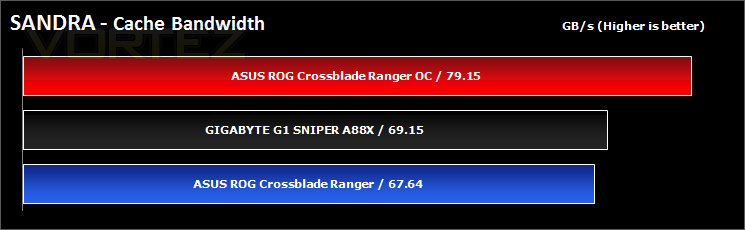
SANDRA isn’t always a benchmark that is included in hardware reviews but We believe it shouldn’t be ignored. SANDRA provides a vigorous package that tests your system in a rather large array of benchmarks. There are many aspects of benchmark that can be executed. We will be considering – CPU, memory and GPGPU tests.
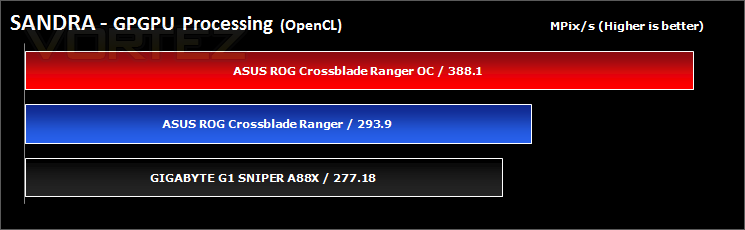
Synthetic Benchmarks: 3DMark – Fire Strike & Basemark CL
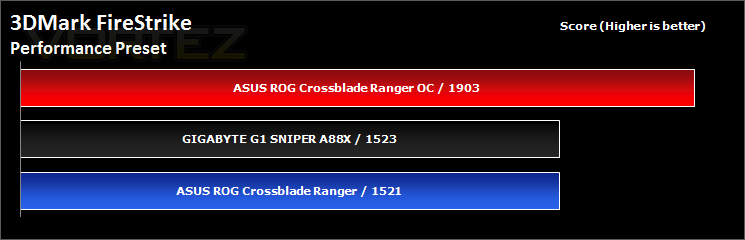
3DMark – Fire Strike
Fire Strike is our new showcase DirectX 11 benchmark designed for high-performance gaming PCs. It is our most ambitious and technical benchmark ever, featuring real-time graphics rendered with detail and complexity far beyond what is found in other benchmarks and games today. Fire Strike will only be available in the Windows editions of 3DMark initially.
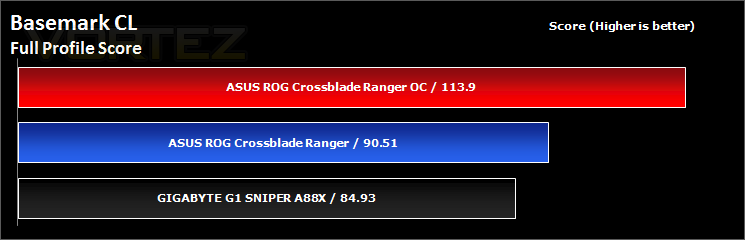
Basemark CL
Basemark CL by Rightware is a comprehensive benchmark tool designed to measure the performance of OpenCL 1.1 implementations on various devices ranging from desktops to embedded systems. Basemark CL uses OpenGL ES 2.0 or OpenGL 2.1 for rendering, depending on the platform.
Synthetic Benchmarks: UNIGINE Heaven 4.0 & Valley 1.0
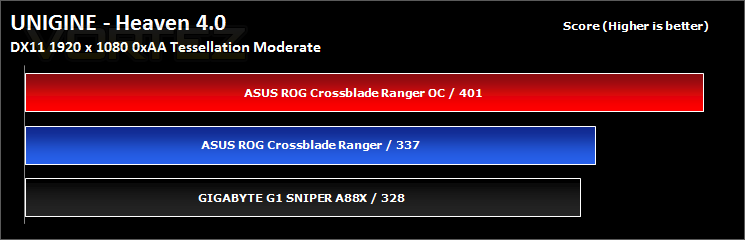
UNIGINE Heaven 4.0
Heaven Benchmark with its current version 4.0 is a GPU-intensive benchmark that hammers graphics cards to the limits. This powerful tool can be effectively used to determine the stability of a GPU under extremely stressful conditions, as well as check the cooling system’s potential under maximum heat output. It provides completely unbiased results and generates true in-game rendering workloads across all platforms, such as Windows, Linux and Mac OS X.
UNIGINE Valley 1.0
Valley Benchmark is a new GPU stress-testing tool from the developers of the very popular and highly acclaimed Heaven Benchmark. The forest-covered valley surrounded by vast mountains amazes with its scale from a bird’s-eye view and is extremely detailed down to every leaf and flower petal. This non-synthetic benchmark powered by the state-of-the art UNIGINE Engine showcases a comprehensive set of cutting-edge graphics technologies with a dynamic environment and fully interactive modes available to the end user.
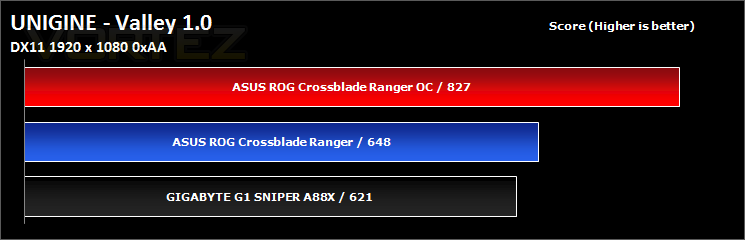
Game Benchmarks: Tomb Raider, Thief, DOTA 2
Tomb Raider
Tomb Raider explores the intense and gritty origin story of Lara Croft and her ascent from a frightened young woman to a hardened survivor. Armed only with raw instincts and the ability to push beyond the limits of human endurance, Lara must fight to unravel the dark history of a forgotten island to escape its relentless hold.
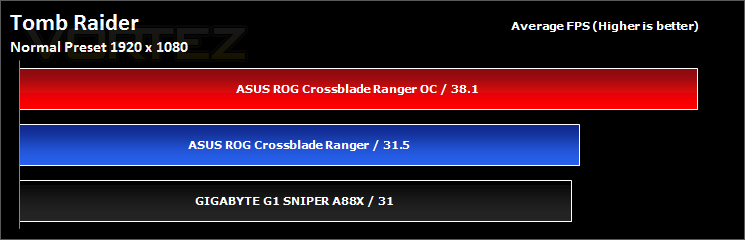
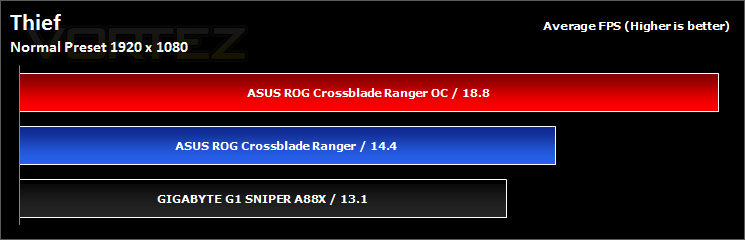
Thief
Garrett, the Master Thief, steps out of the shadows into the City. In this treacherous place, where the Baron’s Watch spreads a rising tide of fear and oppression, his skills are the only things he can trust. Even the most cautious citizens and their best-guarded possessions are not safe from his reach.
As an uprising emerges, Garrett finds himself entangled in growing layers of conflict. Lead by Orion, the voice of the people, the tyrannized citizens will do everything they can to claim back the City from the Baron’s grasp. The revolution is inevitable. If Garrett doesn’t get involved, the streets will run red with blood and the City will tear itself apart.
As an uprising emerges, Garrett finds himself entangled in growing layers of conflict. Lead by Orion, the voice of the people, the tyrannized citizens will do everything they can to claim back the City from the Baron’s grasp. The revolution is inevitable. If Garrett doesn’t get involved, the streets will run red with blood and the City will tear itself apart.
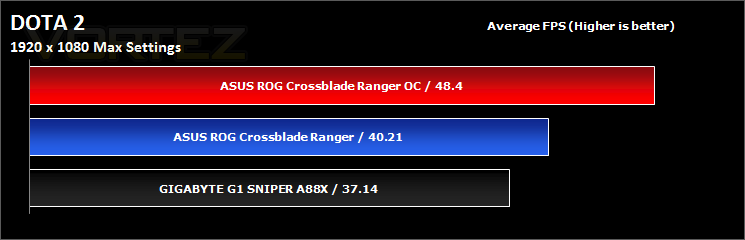
DOTA 2
Dota is a competitive game of action and strategy, played both professionally and casually by millions of passionate fans worldwide. Players pick from a pool of over a hundred heroes, forming two teams of five players. Radiant heroes then battle their Dire counterparts to control a gorgeous fantasy landscape, waging campaigns of cunning, stealth, and outright warfare.
Irresistably colorful on the surface, Dota is a game of infinite depth and complexity. Every hero has an array of skills and abilities that combine with the skills of their allies in unexpected ways, to ensure that no game is ever remotely alike. This is one of the reasons that the Dota phenomenon has continued to grow.
Irresistably colorful on the surface, Dota is a game of infinite depth and complexity. Every hero has an array of skills and abilities that combine with the skills of their allies in unexpected ways, to ensure that no game is ever remotely alike. This is one of the reasons that the Dota phenomenon has continued to grow.
Conclusion
On setting the XBR up, it turned out that our standard test memory (TeamXtreem LV 2400MHz) was incompatible with this board, and remained so even after updating the BIOS. So we resorted to using the performance R9 AMD memory, also rated for 2400MHz, however due to loose timings and a larger capacity, memory performance would undoubtedly take a hit. This is a fairly important area considering the nature of the Kaveri APU. This isn’t the end of the story either during some random testing, we observed that when all memory slots were populated, the memory would begin to overheat to a point that they were scalding hot (60°+). So it would seem that there could potentially be some deeper underlying issue that may be fixable with a BIOS update or maybe it is a one off problem. Though in our standard testing with a dual channel kit, memory temperatures and performance was fine and no anomalies were noticed or recorded. Another issue that was sensed was that the XBR was singing. A singing ranger may paint a strange image, however the XBR isn’t actually a guy carrying a sword through a forest, it’s a motherboard that was emitting high pitched, ear piercing squeals. Again, it could be this particular sample, but it is difficult to adopt that position when I had looked at two different samples to which both had a song to sing. This kind of noise can range from unnoticeable to extremely disruptive, and from my experience these were certainly more on the disruptive side of things.
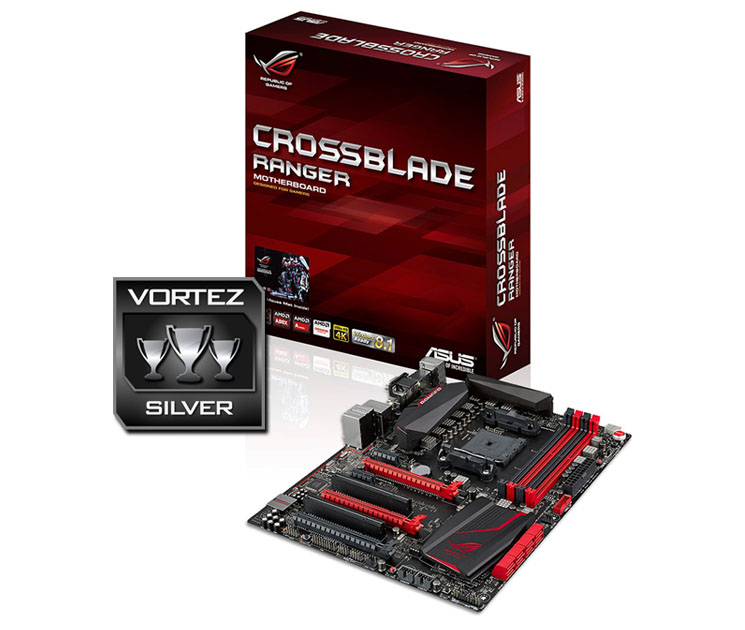
In regards to performance analysis, except where performance hits would be predictable due to using different memory modules, such as the memory/latency testing, the XBR does an excellent job in matching and even beating off the G1. Despite my questionable choice of words there, this does go to show that the XBR is actually packing in quite a heavy punch and is wrenching out every last drop of performance the APUs have to offer. This is exemplified by the stable overclocking and other BIOS features that really make the most of the platform. As the debut Republic of Gamers motherboard that supports the humble AMD APU, there are no shortages of gamer orientated features too, the low latency Intel NIC supported by the Gamefirst software really adds an extra bit of magic for your online games and should you wish to go to extreme levels to gain every last advantage, you can also use the provided SonicSonar software that gives a transparent visual indicator HUD in game that tells you what sorts of sounds can be heard in which direction. The dedicated audio circuitry will certainly give a good boost in fidelity over a standard motherboard solution, however, the headphone features are limited to being used on the front audio jack, even if you set the rear jack to be known as a headphone. This was exacerbated by the fact that the front panel audio header didn’t seem to work, instead I was fed electronic interference.
Visually, the XBR is a full fledged ROG motherboard, matt black and deep red at the ready. Though it does without some of the flashier components that would be found on the more expensive brethren, the layout, the overclocking features, the switches and buttons, and heatsink design is all purebred ASUS ROG and it is a calibre that many aspire to. Though there are a few kinks that need working on, the ASUS Crossblade Ranger allows you to get the best out of the current FM2+ platform.
‘Those who game using an AMD APU can now join the Republic of Gamers’, that is quite a powerful statement of recognition and it is one made by the Crossblade Ranger.
Pros.
+ Attractive aesthetic, great layout: Debut ROG motherboard for AMD APU
+ Quality components
+ A load of ASUS exclusive features
+ Smooth and easy to use UEFI BIOS
+ Intel NIC + ROG Gamefirst III
+ Great for overclocking
+ Free mouse mat
Cons.
– Memory compatibility/stability issues
– You may get a Singing Ranger
+ Attractive aesthetic, great layout: Debut ROG motherboard for AMD APU
+ Quality components
+ A load of ASUS exclusive features
+ Smooth and easy to use UEFI BIOS
+ Intel NIC + ROG Gamefirst III
+ Great for overclocking
+ Free mouse mat
Cons.
– Memory compatibility/stability issues
– You may get a Singing Ranger

Click here for an explanation of our awards at Vortez.net. Thanks to ASUS for providing today’s review sample.


