Classified as ASUS ROG’s top-end Intel Z590 motherboard, the Maximus XIII Hero seeks to offer an excellent balance of features and performance for Intel’s Core i9-11900K. Is it worth the big price-tag though?

Product on Review: ROG Maximus XIII Hero
Manufacturer: ASUS Republic of Gamers
Street Price: GBP £459 | USD $500 | AUD $800
In the aftermath of the Intel 11th Gen. launch, we’re left with a multitude of Intel Z590 motherboards to examine. To take full advantage of Rocket Lake, it is advised to indulge in one of these new motherboards so that the very latest tech/features are available.
Classified as one of their flagship solutions, the ASUS ROG team are back with the next instalment of the Maximus lineup. The Maximus XIII Hero is decked out with ROG’s finest features – such as AI-powered enchancements for overclocking, cooling, networking and audio.
Hero has been tailored to provide top-end performance with a 14+2 digital phase design, support for up to 5333MHz DDR4 and has an abundance of storage/connectivity which should satisfy most tech enthusiasts.
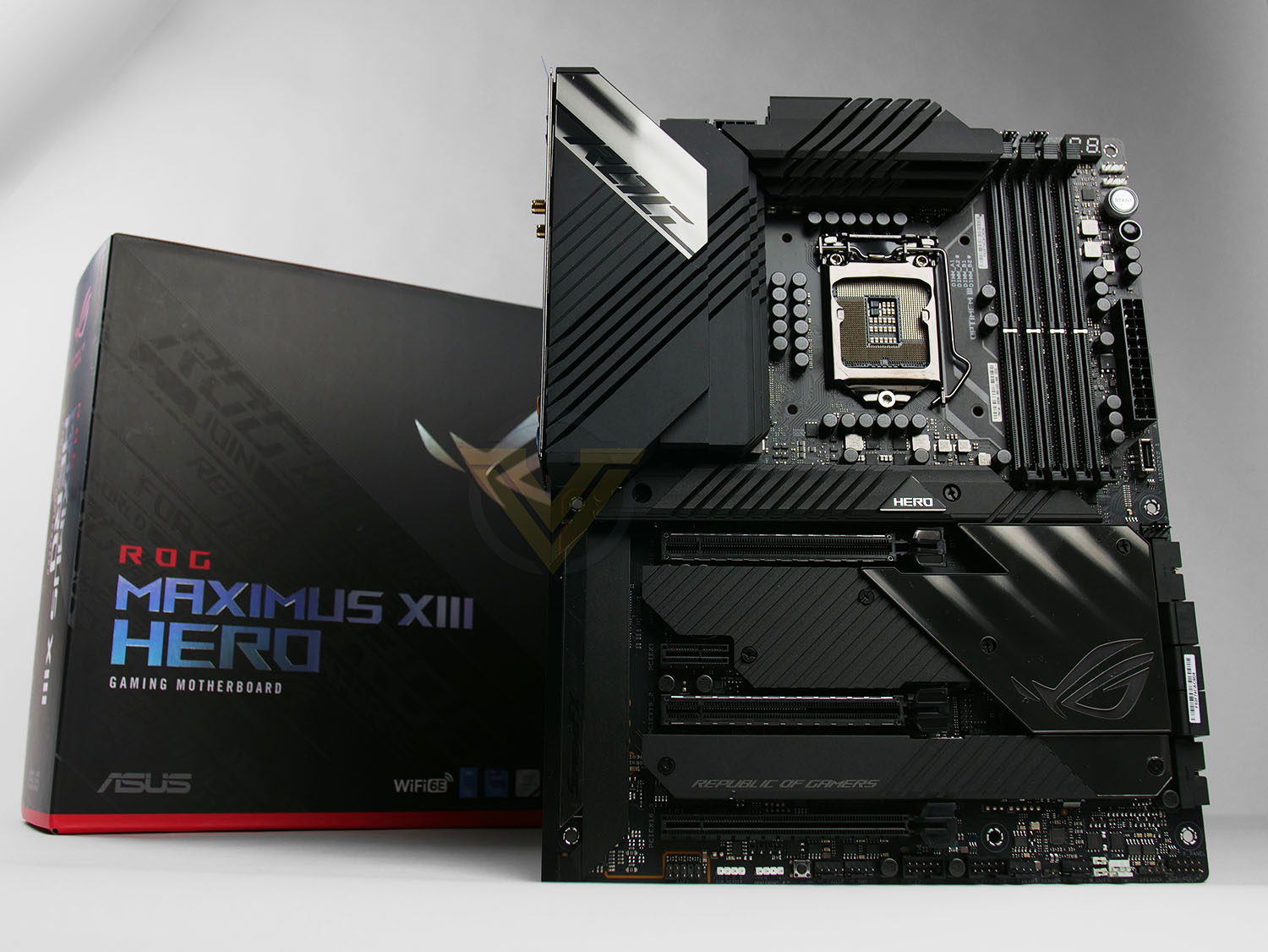
ASUS ROG on the Maximus XIII Series
ROG Maximus XIII Hero continues to build on the legacy of its predecessors by packing upgraded power, smart cooling and lightspeed connectivity under a stealthy exterior. Bristling with renowned ROG features such as AI-enhanced controls and customizable Aura Sync illumination, the latest Hero is ready to take the helm of your high-end gaming build.
Technical Specifications
Below are the technical specifications concerning the Hero:
CPU
Intel 10th and 11th Generation Core Processors
Chipset
Intel Z590 Chipset
Memory
DDR4 5333(OC)/5133(OC)/5000(OC)/4800(OC)/4700(OC)/4600(OC)/4500(OC)/4400(OC)/4266(OC)/4133(OC)/4000(OC)/3866(OC)/3733(OC)/3600(OC)/3466(OC)/3400(OC)/3333(OC)/3200/3000/2933/2800/2666/2400/2133 MHz Non-ECC, Un-buffered Memory*
Dual Channel Memory Architecture
Supports Intel® Extreme Memory Profile (XMP)
OptiMem III
* 10th Gen Intel® Core™ i7/i9 processors support 2933/2800/2666/2400/2133 natively, others will run at the maximum transfer rate of DDR4 2666MHz.
* 11th Gen Intel® Core™ processors support 3200/2933/2800/2666/2400/2133 natively.
* Refer to www.asus.com for the Memory QVL (Qualified Vendors Lists), and memory frequency support depends on the CPU types.
Graphics
2 x HDMI 2.0
2 x Intel® Thunderbolt™ 4 ports
1 x HDMI™ 2.0**
2 x Intel® Thunderbolt™ 4 ports (USB Type-C®) support DisplayPort 1.2/1.4 and Thunderbolt™ video outputs *
* Graphics specifications may vary between CPU types.
** Only Intel® 11th Core™ processors support HDMI™ 2.0 with max. resolution of 4K@60Hz, others will only support HDMI™ 1.4 with max. resolution of 4K@30Hz .Please refer to www.intel.com for any updates.
Expansion Slots
2 x PCIe 4.0/3.0 x16 (x16, x8/x8, x8/x4) + 1 x PCIe 3.0 x16 (max. x4)
Intel® 11th &10th Gen Processors
2 x PCIe 4.0/3.0 x16 slot(s)*
– Intel® 11th Core™ processors support PCIe 4.0 x16 or x8/x8 or x8/x4 mode(s)
– Intel®10th Core™ processors support PCIe 3.0 x16 or x8/x8 or x8/x4 mode(s)
Intel® Z590 Chipset
1 x PCIe 3.0 x16 slot (supports x4 mode)**
1 x PCIe 3.0 x1 slots
* Supports PCIe bandwidth bifurcation for RAID on CPU function.
**PCIEX16_3 shares bandwidth with SATA6G_12 and SATA6G_34. When PCIEX16_ 3 is populated SATA6G_12 and SATA6G_34 will be disbabled.
When PCIEX16_3 run at default (x2) mode, SATA6G_34 is disabled.
When PCIEX16_3 run at x4 mode, SATA6G_12 and SATA6G_34 are disabled.
Multi-GPU Support
Supports NVIDIA 2-Way SLI® Technology*
*Support varies with different graphics cards
Storage
Supports 4 x M.2 slots and 6 x SATA 6Gb/s ports
Intel®11th &10th Gen Processors
M.2_1 slot (Key M), type 2242/2260/2280/22110
– Only Intel® 11th Core™ processors support PCIe 4.0 x4 mode, this slot will be disabled for other CPUs
M.2_2 slot (Key M), type 2242/2260/2280**
– Intel® 11th Core™ processors support PCIe 4.0 x4 mode
– Intel® 10th Core™ processors support PCIe 3.0 x4 mode
Intel® Z590 Chipset
M.2_3 slot (Key M), type 2242/2260/2280 (supports PCIe 3.0 x4 mode)
M.2_4 slot (Key M), type 2242/2260/2280/22110 (supports PCIe 3.0 x4 & SATA modes)*
6 x SATA 6Gb/s ports
*When M.2_4 is pupulated, SATA6G_56 will be disabled.
**M.2_2 shares bandwidth with PCIEX16_1 and PCIEX16_2. When M.2_2 is enabled, PCIEX16_1 will run at x8 mode and PCIEX16_2 will run at x4 mode.
Ethernet
2 x Intel® I225-V 2.5Gb Ethernet
ASUS LANGuard
Wireless & Bluetooth
2×2 Tri-Band Intel Wi-Fi a/b/g/n/ac/ax/az + BT5.2
USB
Rear USB: Total 10 ports
2 x Thunderbolt™ 4 port(s) (2 x USB Type-C®) with up to 5V/3A, 15W charging support
6 x USB 3.2 Gen 2 port(s) (6 x Type-A)
2 x USB 2.0 port(s) (2 x Type-A)
Front USB: Total 9 ports
1 x USB 3.2 Gen 2×2 connector(s) (suppport(s) USB Type-C®)
2 x USB 3.2 Gen 1 header(s) support(s) additional 4 USB 3.2 Gen 1 ports
2 x USB 2.0 header(s) support(s) additional 4 USB 2.0 ports
Audio
ALC4082
– SupremeFX Shielding Technology
– ESS® SABRE9018Q2C DAC/AMP
– Gold-plated audio jacks
– Rear optical S/PDIF out port
– Premium Japanese audio capacitors
– Audio cover
Back Panel I/O Ports
2 x Thunderbolt™ 4 USB Type-C® port(s)
6 x USB 3.2 Gen 2 port(s) (6 x Type-A)
2 x USB 2.0 port(s) (2 x Type-A)
1 x HDMI™ port
1 x ASUS Wi-Fi Module
2 x Intel® I225-V 2.5Gb Ethernet
5 x Gold-plated audio jacks
1 x Optical S/PDIF out port
1 x BIOS FlashBack™ button
1 x Clear CMOS button
Intrernal I/O Connectors
2 x Thunderbolt™ 4 port(s) (2 x USB Type-C®) with up to 5V/3A, 15W charging support
Fan and Cooling related
1 x 4-pin CPU Fan header(s)
1 x 4-pin CPU OPT Fan header(s)
1 x 4-pin AIO Pump header(s)
3 x 4-pin Chassis Fan header(s)
1 x 4-pin H_AMP Fan header(s)
1 x W_PUMP+ header(s)
1 x 2-pin Water In header
1 x 2-pin Water Out header
1 x 3-pin Water Flow header
Power related
1 x 24-pin Main Power connector
2 x 8-pin +12V Power connector
Storage related
4 x M.2 slots (Key M)
6 x SATA 6Gb/s ports
USB
1 x USB 3.2 Gen 2×2 connector (support(s) USB Type-C®)
2 x USB 3.2 Gen 1 header(s) support(s) additional 4 USB 3.2 Gen 1 ports
2 x USB 2.0 header(s) support(s) additional 4 USB 2.0 ports
Miscellaneous
3 x AURA Addressable Gen 2 header(s)
1 x AURA RGB header(s)
1 x FlexKey button
1 x Front Panel Audio header (AAFP)
1 x ReTry button
1 x Speaker header
1 x SPI TPM header (14-1pin)
1 x Start button
1 x 10⁻¹ pin System Panel header
1 x Thermal Sensor header
BIOS
256 Mb Flash ROM, UEFI AMI BIOS
Manageability
WOL by PME, PXE
Accessories
Cables
1 x ARGB RGB extension cable
1 x RGB extension cable
4 x SATA 6Gb/s cables
Miscellaneous
1 x ASUS Wi-Fi moving antennas
1 x M.2 SSD screw package(s)
1 x Q-connector
1 x ROG key chain
1 x ROG Graphics card holder
1 x ROG stickers
1 x ROG thank you card
Installation Media
1 x Support DVD
Documentation
1 x User manual
Operating System
Windows 10 64bit
Form Factor
ATX
12 inch x 9.6 inch ( 30.5 cm x 24.4 cm )
Intel 10th and 11th Generation Core Processors
Chipset
Intel Z590 Chipset
Memory
DDR4 5333(OC)/5133(OC)/5000(OC)/4800(OC)/4700(OC)/4600(OC)/4500(OC)/4400(OC)/4266(OC)/4133(OC)/4000(OC)/3866(OC)/3733(OC)/3600(OC)/3466(OC)/3400(OC)/3333(OC)/3200/3000/2933/2800/2666/2400/2133 MHz Non-ECC, Un-buffered Memory*
Dual Channel Memory Architecture
Supports Intel® Extreme Memory Profile (XMP)
OptiMem III
* 10th Gen Intel® Core™ i7/i9 processors support 2933/2800/2666/2400/2133 natively, others will run at the maximum transfer rate of DDR4 2666MHz.
* 11th Gen Intel® Core™ processors support 3200/2933/2800/2666/2400/2133 natively.
* Refer to www.asus.com for the Memory QVL (Qualified Vendors Lists), and memory frequency support depends on the CPU types.
Graphics
2 x HDMI 2.0
2 x Intel® Thunderbolt™ 4 ports
1 x HDMI™ 2.0**
2 x Intel® Thunderbolt™ 4 ports (USB Type-C®) support DisplayPort 1.2/1.4 and Thunderbolt™ video outputs *
* Graphics specifications may vary between CPU types.
** Only Intel® 11th Core™ processors support HDMI™ 2.0 with max. resolution of 4K@60Hz, others will only support HDMI™ 1.4 with max. resolution of 4K@30Hz .Please refer to www.intel.com for any updates.
Expansion Slots
2 x PCIe 4.0/3.0 x16 (x16, x8/x8, x8/x4) + 1 x PCIe 3.0 x16 (max. x4)
Intel® 11th &10th Gen Processors
2 x PCIe 4.0/3.0 x16 slot(s)*
– Intel® 11th Core™ processors support PCIe 4.0 x16 or x8/x8 or x8/x4 mode(s)
– Intel®10th Core™ processors support PCIe 3.0 x16 or x8/x8 or x8/x4 mode(s)
Intel® Z590 Chipset
1 x PCIe 3.0 x16 slot (supports x4 mode)**
1 x PCIe 3.0 x1 slots
* Supports PCIe bandwidth bifurcation for RAID on CPU function.
**PCIEX16_3 shares bandwidth with SATA6G_12 and SATA6G_34. When PCIEX16_ 3 is populated SATA6G_12 and SATA6G_34 will be disbabled.
When PCIEX16_3 run at default (x2) mode, SATA6G_34 is disabled.
When PCIEX16_3 run at x4 mode, SATA6G_12 and SATA6G_34 are disabled.
Multi-GPU Support
Supports NVIDIA 2-Way SLI® Technology*
*Support varies with different graphics cards
Storage
Supports 4 x M.2 slots and 6 x SATA 6Gb/s ports
Intel®11th &10th Gen Processors
M.2_1 slot (Key M), type 2242/2260/2280/22110
– Only Intel® 11th Core™ processors support PCIe 4.0 x4 mode, this slot will be disabled for other CPUs
M.2_2 slot (Key M), type 2242/2260/2280**
– Intel® 11th Core™ processors support PCIe 4.0 x4 mode
– Intel® 10th Core™ processors support PCIe 3.0 x4 mode
Intel® Z590 Chipset
M.2_3 slot (Key M), type 2242/2260/2280 (supports PCIe 3.0 x4 mode)
M.2_4 slot (Key M), type 2242/2260/2280/22110 (supports PCIe 3.0 x4 & SATA modes)*
6 x SATA 6Gb/s ports
*When M.2_4 is pupulated, SATA6G_56 will be disabled.
**M.2_2 shares bandwidth with PCIEX16_1 and PCIEX16_2. When M.2_2 is enabled, PCIEX16_1 will run at x8 mode and PCIEX16_2 will run at x4 mode.
Ethernet
2 x Intel® I225-V 2.5Gb Ethernet
ASUS LANGuard
Wireless & Bluetooth
2×2 Tri-Band Intel Wi-Fi a/b/g/n/ac/ax/az + BT5.2
USB
Rear USB: Total 10 ports
2 x Thunderbolt™ 4 port(s) (2 x USB Type-C®) with up to 5V/3A, 15W charging support
6 x USB 3.2 Gen 2 port(s) (6 x Type-A)
2 x USB 2.0 port(s) (2 x Type-A)
Front USB: Total 9 ports
1 x USB 3.2 Gen 2×2 connector(s) (suppport(s) USB Type-C®)
2 x USB 3.2 Gen 1 header(s) support(s) additional 4 USB 3.2 Gen 1 ports
2 x USB 2.0 header(s) support(s) additional 4 USB 2.0 ports
Audio
ALC4082
– SupremeFX Shielding Technology
– ESS® SABRE9018Q2C DAC/AMP
– Gold-plated audio jacks
– Rear optical S/PDIF out port
– Premium Japanese audio capacitors
– Audio cover
Back Panel I/O Ports
2 x Thunderbolt™ 4 USB Type-C® port(s)
6 x USB 3.2 Gen 2 port(s) (6 x Type-A)
2 x USB 2.0 port(s) (2 x Type-A)
1 x HDMI™ port
1 x ASUS Wi-Fi Module
2 x Intel® I225-V 2.5Gb Ethernet
5 x Gold-plated audio jacks
1 x Optical S/PDIF out port
1 x BIOS FlashBack™ button
1 x Clear CMOS button
Intrernal I/O Connectors
2 x Thunderbolt™ 4 port(s) (2 x USB Type-C®) with up to 5V/3A, 15W charging support
Fan and Cooling related
1 x 4-pin CPU Fan header(s)
1 x 4-pin CPU OPT Fan header(s)
1 x 4-pin AIO Pump header(s)
3 x 4-pin Chassis Fan header(s)
1 x 4-pin H_AMP Fan header(s)
1 x W_PUMP+ header(s)
1 x 2-pin Water In header
1 x 2-pin Water Out header
1 x 3-pin Water Flow header
Power related
1 x 24-pin Main Power connector
2 x 8-pin +12V Power connector
Storage related
4 x M.2 slots (Key M)
6 x SATA 6Gb/s ports
USB
1 x USB 3.2 Gen 2×2 connector (support(s) USB Type-C®)
2 x USB 3.2 Gen 1 header(s) support(s) additional 4 USB 3.2 Gen 1 ports
2 x USB 2.0 header(s) support(s) additional 4 USB 2.0 ports
Miscellaneous
3 x AURA Addressable Gen 2 header(s)
1 x AURA RGB header(s)
1 x FlexKey button
1 x Front Panel Audio header (AAFP)
1 x ReTry button
1 x Speaker header
1 x SPI TPM header (14-1pin)
1 x Start button
1 x 10⁻¹ pin System Panel header
1 x Thermal Sensor header
BIOS
256 Mb Flash ROM, UEFI AMI BIOS
Manageability
WOL by PME, PXE
Accessories
Cables
1 x ARGB RGB extension cable
1 x RGB extension cable
4 x SATA 6Gb/s cables
Miscellaneous
1 x ASUS Wi-Fi moving antennas
1 x M.2 SSD screw package(s)
1 x Q-connector
1 x ROG key chain
1 x ROG Graphics card holder
1 x ROG stickers
1 x ROG thank you card
Installation Media
1 x Support DVD
Documentation
1 x User manual
Operating System
Windows 10 64bit
Form Factor
ATX
12 inch x 9.6 inch ( 30.5 cm x 24.4 cm )
Board layout, features and RGB
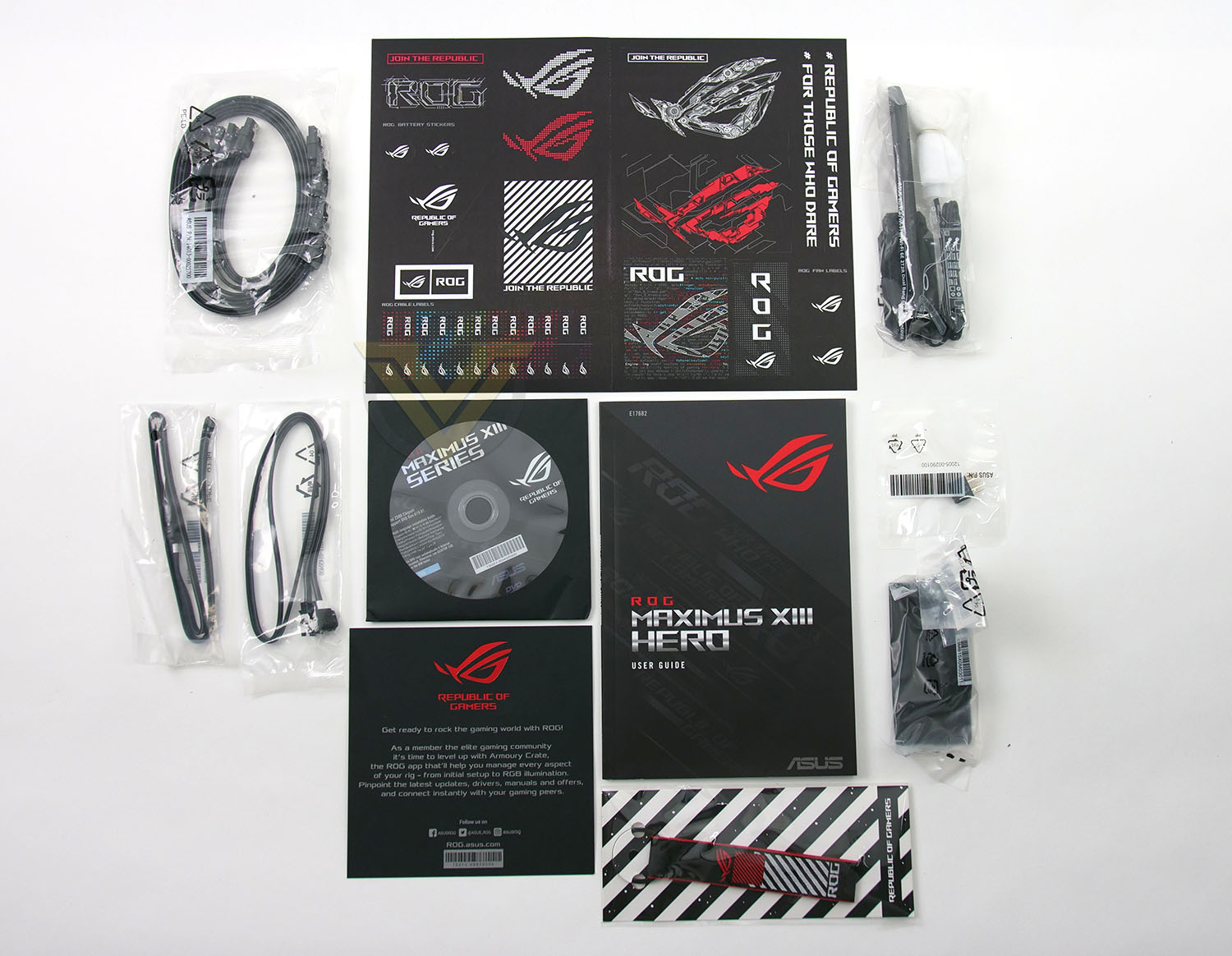
ROG motherboards are known for arriving with a plethora of bundled accessories and the Hero is no exception, the included items are as follows:
1 x ARGB RGB extension cable
1 x RGB extension cable
4 x SATA 6Gb/s cables
1 x ASUS Wi-Fi moving antennas
1 x M.2 SSD screw package(s)
1 x Q-connector
1 x ROG key chain
1 x ROG Graphics card holder
1 x ROG stickers
1 x ROG thank you card
1 x Support DVD
1 x User manual
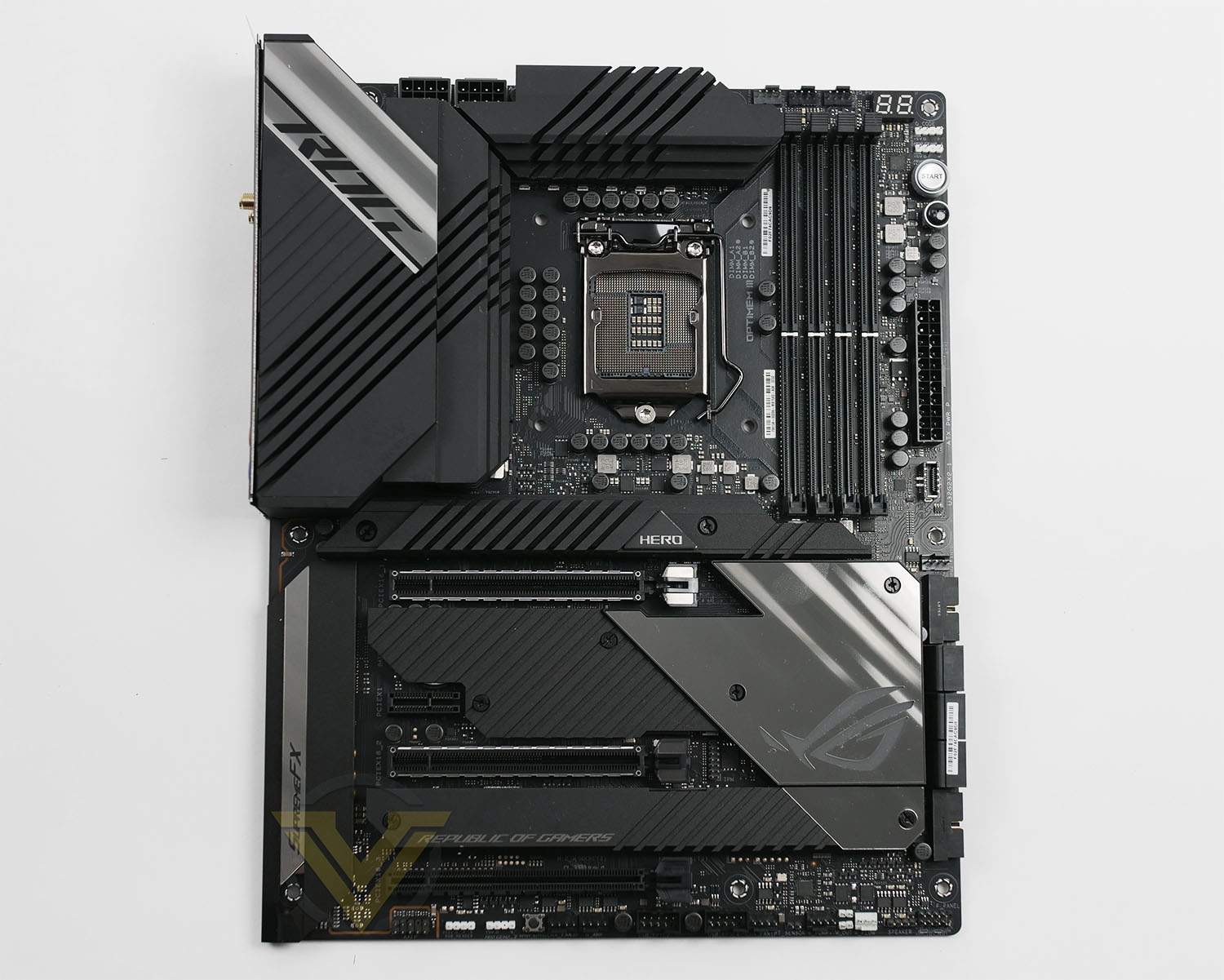
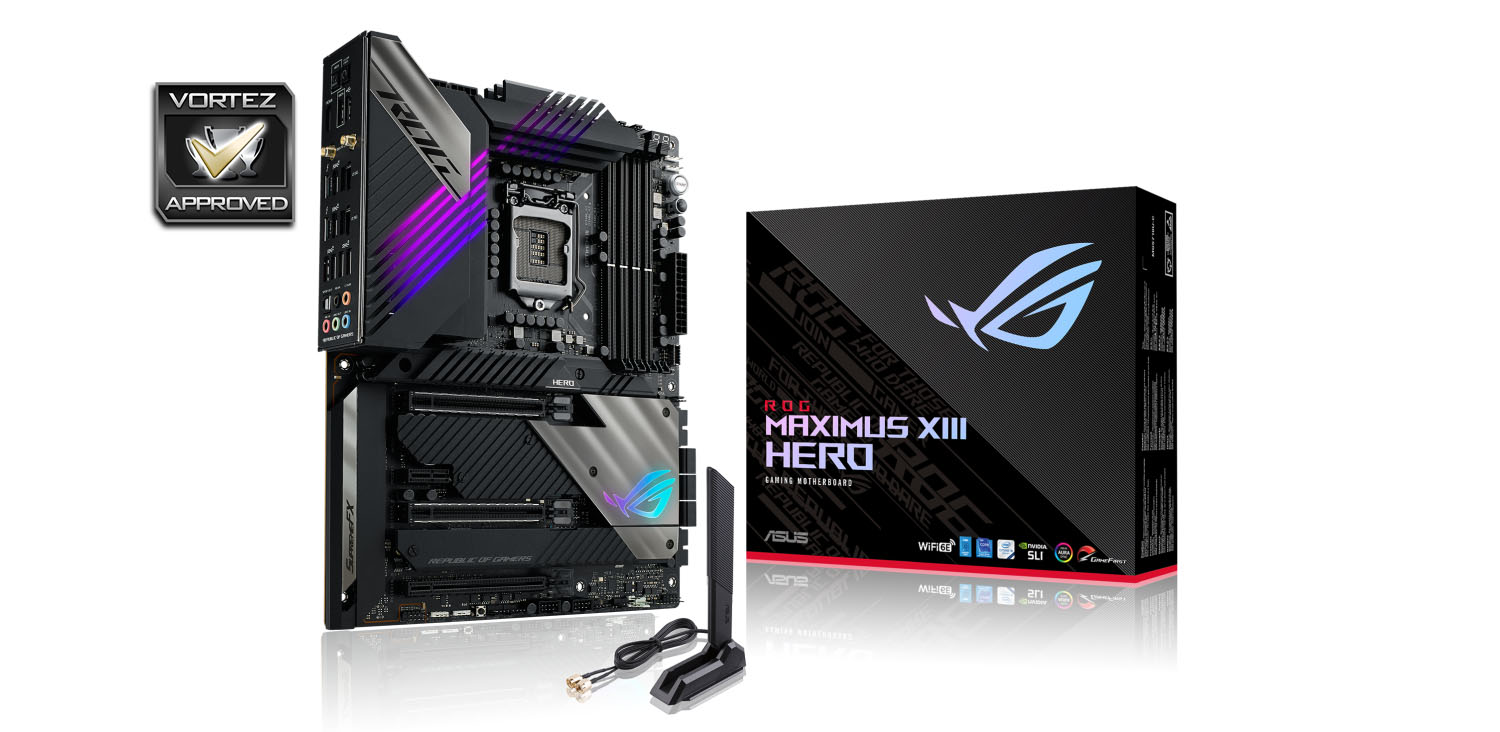
Hero conforms to the ATX form factor and follows a traditional layout. Across the board, ASUS has stuck with a familiar design to last seasons Z490 ROG lineup. It looks stylish, professional and retains a monochrome theme.
Being a Z590 motherboard, we have supported for the Intel 11th Gen. Processors (as well as support for 10th Gen. too) with LGA1200. Hero comes in with a 14+2 digital phase design which includes 90A stages, ProCool II power connectors (CPU power comes in the form of 8+8), MicroFine alloy chokes and 10K black solid CAPs are used throughout. There are 7 fan headers spread out at the top, side and bottom of Hero with designated compatibility for water pumps. 4 RGB LED headers are also present for lighting strips and other devices.
Memory support sees us able to use up to 128GB of DDR4 and up to 5333MHz. As is usually on this class of board, there are physical buttons for power/reset – making this offering a nice choice if you do happen to be making use of a test bench. LED debug makes an appeared in the top-right too, which is always handy for quick diagnostics on POST.
Connectivity and storage is comprehensive, with 1x USB 3.2 Gen 2 header and 2x USB 3.2 Gen 1 header for the front panel, Up to 8 SATA 6GB/s ports and 4x PCIe M.2 slots. Two of these are PCIe 4.0 x4 ready while the other two are PCIe 3.0 x4 – having four slots on one board is an astounding achievement.
For graphics delivery there are 2x PCIe 4.0 X16 slots, 1x PCIe 3.0 x4 slot and 1x PCIe 3.0 x1 slot. As usual the uppermost X16 is wired for the full 16 lanes and should be used for a single GPU configuration. The two upper 16 slots benefit from “Safe Slot” which includes steel reinforced slots and extra anchor points for longevity.
The audio solution is somewhat different for this generation and is based on the ALC4082 codec. The audio package itself includes:
– SupremeFX Shielding Technology
– ESS® SABRE9018Q2C DAC/AMP
– Gold-plated audio jacks
– Rear optical S/PDIF out port
– Premium Japanese audio capacitors
– Audio cover
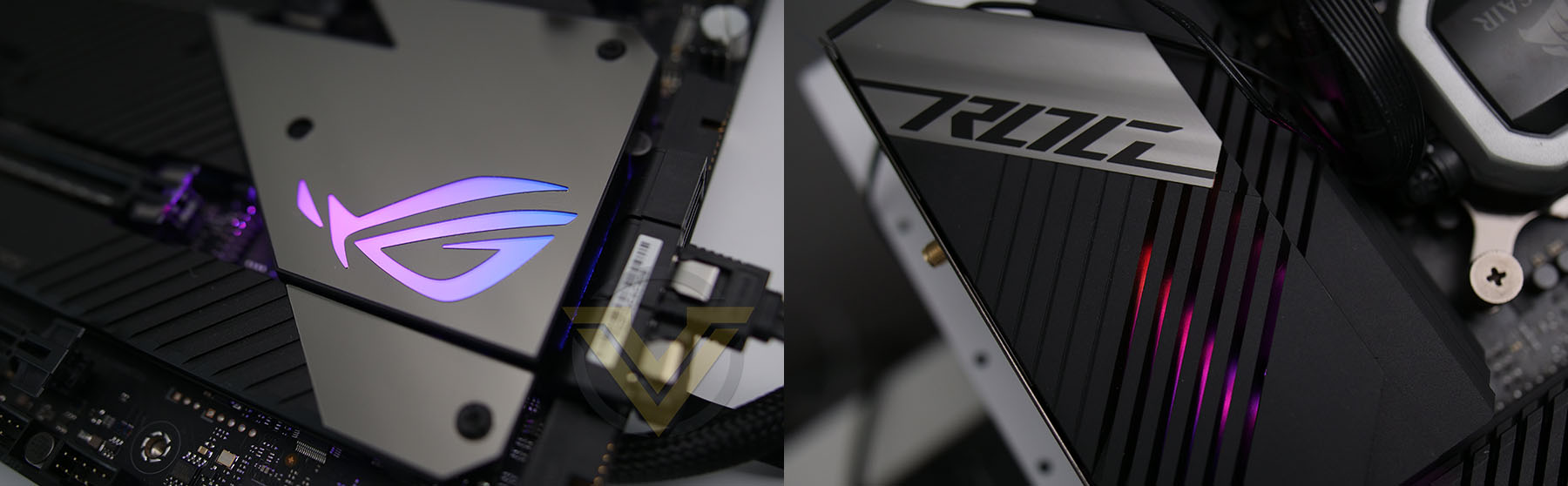
The Maximus XIII Hero benefits from integrated RGB LED lighting which can be found on the heatsinks. This lighting taps into the ASUS Aura Sync eco-system and can be controlled using ASUS software – with the possibility to pair up and synchronise the RGB with other ASUS devices.
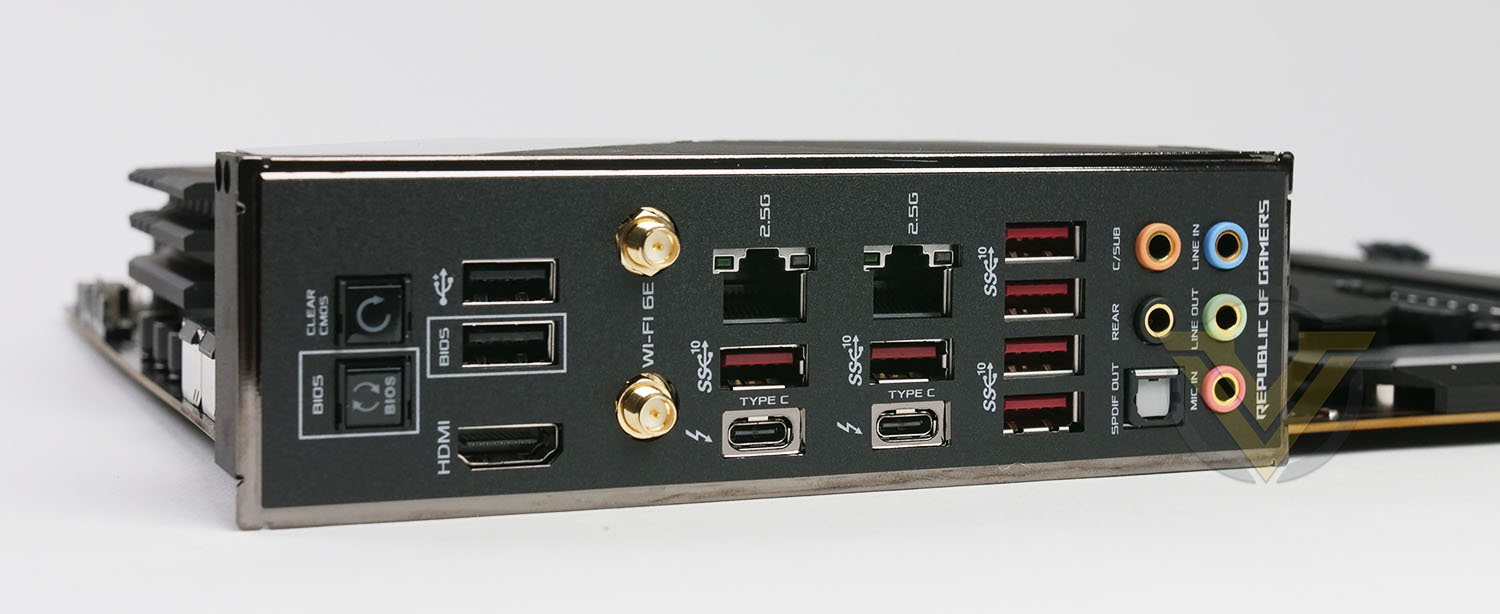
Hero leaves no stone unturned on the back panel, with a huge selection of functionality – providing a plethora of USB and other features such as clear CMOS. Below are the ports available:
2 x Thunderbolt™ 4 USB Type-C® port(s)
6 x USB 3.2 Gen 2 port(s) (6 x Type-A)
2 x USB 2.0 port(s) (2 x Type-A)
1 x HDMI™ port
1 x ASUS Wi-Fi Module
2 x Intel® I225-V 2.5Gb Ethernet
5 x Gold-plated audio jacks
1 x Optical S/PDIF out port
1 x BIOS FlashBack™ button
1 x Clear CMOS button
Test Setup & Methodology
Notes: We’ve revamped our benchmark regime by removing a number of tests which reveal little, to no difference between each motherboard model. Gaming performance is one such area which has been removed due to the inability for each motherboard to offer any advantage over another. Instead, we have focussed on meaningful/tangible analysis which examines the VRM/chipset design, and the storage performance which will be far more informative to the end user.
TEST SETUP
CPU Intel Core i9-11900KCooling: Corsair Hydro Series H110i
Motherboard: ASUS ROG Maximus XIII Hero
Memory: 16GB Corsair Vengeance RGB PRO SL 3600MHz
Storage: Crucial MX300 SATA SSD + Kingston KC2500 PCIe 3.0 SSD
PSU: Corsair HX1050 80 Plus Gold Certified PSU
Monitor: AOC U2879VF
BENCHMARKS
PCMark 10 – Overall Extended ScoreSiSoftware SANDRA – SATA/PCIe Storage Tests
SiSoftware SANDRA – Processor Image Processing
OTHER SOFTWARE
Temperature Analysis: HWMonitorStress Testing Software: AIDA64 Stability Test
CPU Specification Monitoring: CPU-Z
Benchmarks: Power Consumption
In this first test we analyse the power efficiency from the wall for each motherboard (Minus the GPU). While each model uses the same chipset/platform, energy results can fluctuate between manufacturers due to the features and specifications that are integrated. First of all, for the idle tests the system is cold booted into Windows and no additional applications are executed – wattage is noted on the external energy monitor we use and then we open Aida64 stability test and execute a stress test, noting the highest reading on the monitor. Below are the results of this energy test.
Benchmarks: VRM & Chipset Cooling
Each motherboard manufacturer designs their board with a unique set of heatsinks to cover key areas like the VRM/mosfets and the chipset itself. In these test we use HWMonitor to identify the minimum values for VRM and chipset and then we load up Aida64 stability test again and perform a 20 minute run, recording the maximum value for both attributes.
Benchmarks: PCMark 10
PCMark 10 features a comprehensive set of tests that cover the wide variety of tasks performed in the modern workplace. With a range of performance tests, custom run options, and the new Battery Life Profile, PCMark 10 is the complete PC benchmark for the modern office.
Benchmarks: SATA Performance
In order to ascertain the SATA performance for our motherboards we use SiSoftware SANDRA and the File System Bandwidth performance test. This allows us to obtain the sequential read/write transfer rates for the drive being tested – Crucial MX300 SSD.
Benchmarks: PCIe M.2 Performance
In order to ascertain the PCIe M.2 performance for our motherboards we use SiSoftware SANDRA and the File System Bandwidth performance test. This allows us to obtain the sequential read/write transfer rates for the drive being tested – Kingston KC2500.
Benchmarks: CPU Image Processing
AIDA64 Product PageIn our last test we observe the Image Processing performance from the CPU attached to the motherboard. For this we use SiSoftware SANDRA and the benchmark specifically designed for measuring the common algorithms associated with processing imagery.
Overclocking
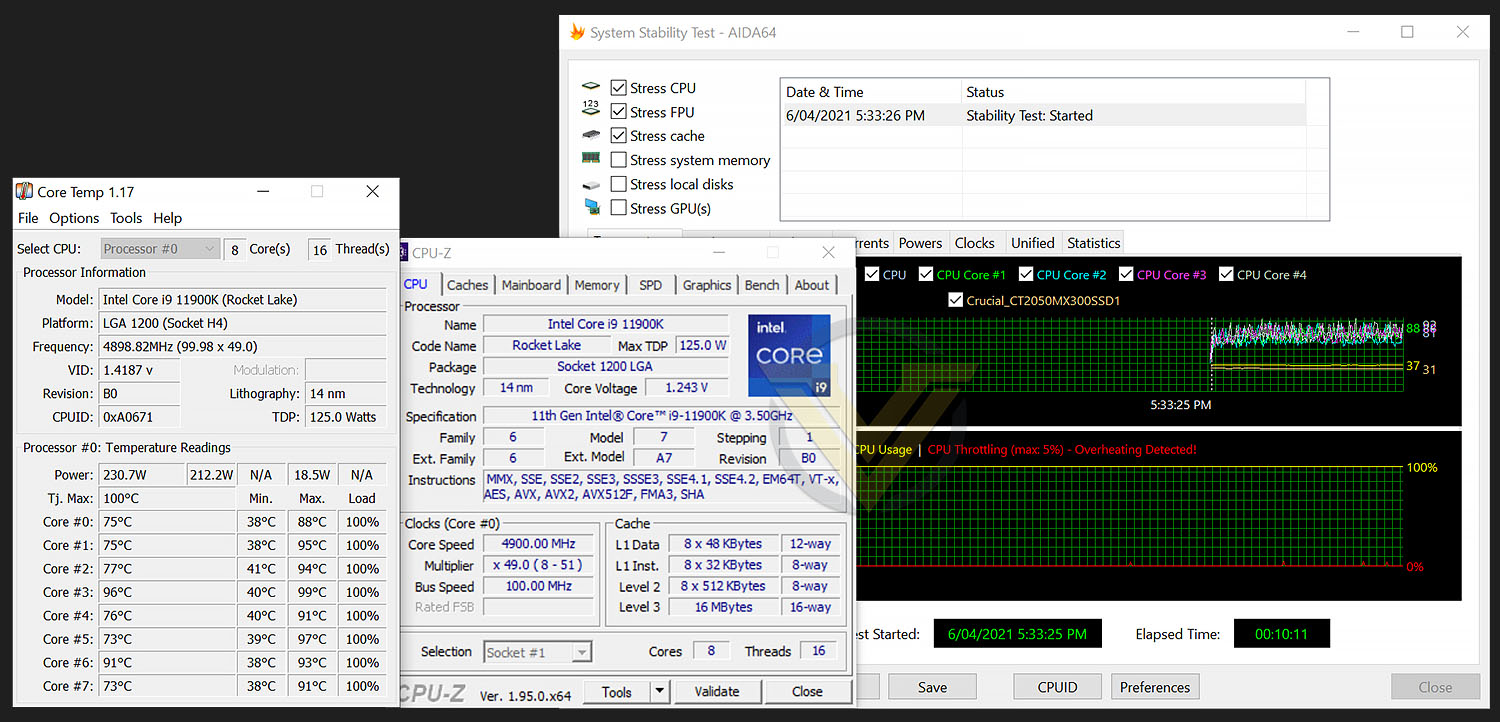
For the overclocking phase, we already know that our CPU (Intel Core i9-11900K) is capable of having all cores operate at 5.3GHz without any stress being applied, and at 5.0GHz with stress/stability test approval, so this is the target which we aimed for with Hero.
Unfortunately, Hero struggled to hit 5GHz across all cores and instead, the best we could validate as stable was 4.9GHz. This required 1.39v (Which is a considerably more than other models we’ve tested).
Conclusion
For those of you wanting to jump over to Intel’s new 11th Gen. Processors, lining yourself up with an Intel Z590 motherboard may not be an absolute necessity but it is highly recommended to utilise all the very latest technology – including PCIe 4.0 support.
As part of ASUS ROG’s design evolution, the aesthetics have had a slight adjustment for this generation of the Maximus lineup. The overall look is pleasing to the eye and with engaging RGB lighting it will be ideal to tie all of your hardware together into a cohesive theme – especially if you have other ASUS hardware.
There is no denying that Hero is feature-rich. Some features may not be strictly essential for every user (Such as the Q-Code and Debug LED) but this motherboard does an excellent job in providing a well-rounded platform for a move to Rocket Lake. There is an abundance of USB connectivity, a total of four M.2 SSD slots, and compatibility for the likes of DDR4-5333MHz.
Adoption of Thunderbolt 4 – and two ports at that, is very encouraging. While this technology may not be high up on every user’s list of requirements, it future proofs the system and it will be one specific feature which will sway some folks over to Intel since AMD’s support for TR is lacking.
As anticipated, Hero provides some great results when we applied our benchmarks. The cooling design for both the VRM and chipset configurations are very good. Overall, this board is a great performer.
Our Intel Core i9-11900K struggles with stability once we exceed 5GHz on all cores, but Hero wasn’t able to achieve 5GHz across all cores – instead, we had to settle for 4.9GHz with substantial CPU voltage of 1.39v. This surprised us, cheaper boards managed to squeeze out higher frequency with less voltage.
ROG motherboards are never on the cheap side, so as expected, Hero sits at GBP £459 | USD $500 | AUD $800. This marks Hero as one of the more expensive models available. Is it worth it? From a performance standpoint, no. But, if you require the advanced features/ports and favour the design, then it is something to consider.
Maximus XIII Hero is laden with features and is a solid option if you want to get the most out of Intel’s 11th Gen.
Pros
+ Pleasing design
+ Equipped with plenty of RGB lighting
+ Offers solid performance
+ Offers plenty of USB 3.2 Gen1/2 on back panel
+ Great selection of fan headers/sensors
+ Features two PCIe 4.0 X16 slots
+ Dual Thunderbolt 4 ports
+ Includes WiFi 6E
+ Support for up to 5333MHz DDR4 memory
+ Benefits from a protective backplate
+ Offers four M.2 slots (including PCIe 4.0)
+ VRM/chipset cooling is good
Cons
– Still being supplied with USB 2.0 ports
– Expensive!
+ Pleasing design
+ Equipped with plenty of RGB lighting
+ Offers solid performance
+ Offers plenty of USB 3.2 Gen1/2 on back panel
+ Great selection of fan headers/sensors
+ Features two PCIe 4.0 X16 slots
+ Dual Thunderbolt 4 ports
+ Includes WiFi 6E
+ Support for up to 5333MHz DDR4 memory
+ Benefits from a protective backplate
+ Offers four M.2 slots (including PCIe 4.0)
+ VRM/chipset cooling is good
Cons
– Still being supplied with USB 2.0 ports
– Expensive!
Click here for an explanation of our awards at Vortez.net.
Stay connected with Vortez social media pages: