The 3000-series AMD CPUs are out of the bag and with that comes the X570 chipset, here we bring you the lowdown on ASUSes answer to the midfield options, the X570-E Gaming.

Product on Review: ASUS ROG X570-E Gaming
Manufacturer: ASUS
Street Price: £299.99 / $329.99
The ASUS Republic of Gamers (ROG) brand covers many different aspects of the gaming sector, from mice and keyboards through to monitors, laptops and of course, internal components. Being a key selling point for ASUS, they obviously couldn’t leave out the latest X570 chipset, launching with 5 models; today we look at the middle option, with a price of $329 (to be confirmed), the ASUS ROG STRIX X570-E Gaming.
The X570 chipset, released in tandem with the AMD 3000-series CPUs, of which we’ve reviewed the 3700X and 3900X, offers for the first time PCI Express 4.0 connectivity, with double the bandwidth of the previous generation.
The X570-E Gaming sports a pair of NVMe M.2 slots and a trio of x16 PCI-E adaptors, all running on the aforementioned 4.0 specification. Alongside that we get dual LAN with 2.5G and 1G as well as WiFi 6 support.
Helping to keep the platform cool is an extensive VRM heatsink arrangement, joined by an 8mm heatpipe, as well as something that is commonplace across every X570 motherboard, a cooling fan and heatsink atop the FCH; this is down to the increased power drawn by the PCI-E 4.0 interface.
The styling of the board is very typical of a STRIX model, featuring street-style graffiti and a dark/metallic theme. The dark grey heatsinks around the CPU socket and those connected to the FCH as M.2 heatsinks contrast nicely against the otherwise all-black colour scheme.
The ASUS ROG STRIX X570-E Gaming arrives at around £299/$330, this puts it considerably higher than the closest model from the previous generation, the ASUS ROG STRIX X470-F Gaming which was available at launch for a little over half the price, which in itself was a reduction on the X370 equivalent.
ASUS on the ROG STRIX X570-E Gaming:
Technical Specifications
AMD AM4 Socket 3rd and 2nd AMD Ryzen™/2nd and 1st Gen AMD Ryzen™ with Radeon™ Vega Graphics Processors
* Refer to www.asus.com for CPU support list
Chipset
AMD X570
Memory
3rd Gen AMD Ryzen™ Processors
4 x DIMM, Max. 128GB, DDR4 MHz Un-buffered Memory *
2nd Gen AMD Ryzen™ Processors
4 x DIMM, Max. 128GB, DDR4 MHz Un-buffered Memory *
2nd and 1st Gen AMD Ryzen™ with Radeon™ Vega Graphics Processors
4 x DIMM, Max. 128GB, DDR4 MHz Un-buffered Memory
Dual Channel Memory Architecture
* Refer to www.asus.com for the Memory QVL (Qualified Vendors Lists).
Graphic
Integrated Graphics in the 2nd and 1st Gen AMD Ryzen™ with Radeon™ Vega Graphics Processors
Multi-VGA output support : HDMI/DisplayPort ports
– Supports HDMI 2.0b with maximum resolution of 4096 x 2160 @ 60 Hz
– Supports DisplayPort 1.2 with max. resolution 4096 x 2160 @ 60 Hz
Multi-GPU Support
3rd and 2nd Gen AMD Ryzen™ Processors
Supports NVIDIA® 2-Way SLI® Technology
Supports AMD 3-Way CrossFireX™ Technology
2nd and 1st Gen AMD Ryzen™ with Radeon™ Vega Graphics Processors
Supports AMD 2-Way CrossFireX™ Technology
Expansion Slots
3rd Gen AMD Ryzen™ Processors
2 x PCIe 4.0 x16 (x16 or dual x8)
2nd Gen AMD Ryzen™ Processors
2 x PCIe 3.0 x16 (x16 or dual x8)
2nd and 1st Gen AMD Ryzen™ with Radeon™ Vega Graphics Processors
1 x PCIe 3.0 x16 (x8 mode)
AMD X570 chipset
1 x PCIe 4.0 x16 (max at x4 mode) *1
2 x PCIe 4.0 x1
Storage
3rd Gen AMD Ryzen™ Processors :
1 x M.2 Socket 3, with M Key, Type 2242/2260/2280/22110(PCIE 4.0 x4 and SATA modes) storage devices support
2nd Gen AMD Ryzen™/2nd and 1st Gen AMD Ryzen™ with Radeon™ Vega Graphics Processors :
1 x M.2 Socket 3, with M Key, Type 2242/2260/2280/22110(PCIE 3.0 x4 and SATA modes) storage devices support
AMD X570 chipset :
1 x M.2 x4 Socket 3, with M Key, Type 2242/2260/2280/22110(PCIE 3.0 x4 and SATA modes) storage devices support
8 x SATA 6Gb/s port(s),
Support Raid 0, 1, 10
LAN
Intel® I211-AT, 1 x Gigabit LAN Controller(s)
Realtek® RTL8125-CG 2.5G LAN
Anti-surge LANGuard
ROG GameFirst Technology
Wireless Data Network
2 x 2 Wi-Fi 6 (802.11 a/b/g/n/ac/ax) with MU-MIMO supports dual frequency band 2.4/5GHz
Bluetooth
Bluetooth® 5.0
Audio
SupremeFX 8-Channel High Definition Audio CODEC S1220A
– Dual OP Amplifiers
– Impedance sense for front and rear headphone outputs
– Supports : Jack-detection, Multi-streaming, Front Panel Jack-retasking
– High quality 120 dB SNR stereo playback output and 113 dB SNR recording input
– SupremeFX Shielding Technology
– Supports up to 32-Bit/192kHz playback *2
Audio Feature :
– Optical S/PDIF out port(s) at back panel
– Sonic Radar III
– Sonic Studio III + Sonic Studio Link
USB Ports
3rd Gen AMD RyzenTM Processors :
4 x USB 3.2 Gen 2 port(s) (4 at back panel, )
2nd Gen AMD RyzenTM/2nd and 1st Gen AMD Ryzen™ with Radeon™ Vega Graphics Processors :
4 x USB 3.2 Gen 1 port(s)
AMD X570 chipset :
1 x USB 3.2 Gen 2 front panel connector port(s)
AMD X570 chipset :
4 x USB 3.2 Gen 2 port(s) (4 at back panel, , 3 x Type-A+1 x Type-C)
AMD X570 chipset :
2 x USB 3.2 Gen 1 port(s) (2 at mid-board)
AMD X570 chipset :
4 x USB 2.0 port(s) (4 at mid-board)
ROG Exclusive Features
ROG Exclusive Software
– RAMCache III
– CPU-Z
– GameFirst V
– Sonic Studio III + Sonic Studio Link
– Sonic Radar III
– Overwolf
Special Features
5-Way Optimization by Dual Intelligent Processors 5
– Whole system optimization with a single click! 5-Way Optimization tuning key perfectly consolidates TPU, EPU, DIGI+ VRM, Fan Xpert 4, and Turbo App together, providing better CPU performance, efficient power saving, precise digital power control, whole system cooling and even tailor your own app usages.
TPU
– Auto Tuning, TurboV, GPU Boost
Gamer’s Guardian:
– DRAM Overcurrent Protection
– Stainless Steel Back I/O
– Highly Durable Components
– DIGI+ VRM
– SafeSlot
– ESD Guards on LAN, Audio,and USB ports
ASUS EPU :
– EPU
AURA :
– Aura Lighting Control
– Addressable Gen 2 Header
ASUS Exclusive Features :
– USB BIOS Flashback®
– AI Suite 3
– Ai Charger
– ASUS NODE : hardware control interface
– BIOS Flashback® Button
ASUS EZ DIY :
– ASUS CrashFree BIOS 3
– ASUS EZ Flash 3
ASUS Q-Design :
– ASUS Q-Code
– ASUS Q-LED (CPU, DRAM, VGA, Boot Device LED)
– ASUS Q-Slot
– ASUS Q-DIMM
Gaming Aesthetics :
– AURA-RGB Lighting
Back I/O Ports
1 x DisplayPort
1 x HDMI
5 x USB 3.1 Gen 1 Type-A
8 x USB 2.0
1 x Optical S/PDIF out
5 x Audio jack(s)
1 x Anti-surge 2.5G LAN (RJ45) port
1 x USB BIOS Flashback® Button(s)
1 x ASUS Wi-Fi Module
7 x USB 3.2 Gen 2 (up to 10Gbps) ports (Type-A)
1 x USB 3.2 Gen 2 (up to 10Gbps) ports (Type-C)
Anti-surge LAN (RJ45) port
Internal I/O Ports
1 x PCH_FAN
1 x AAFP connector
2 x Aura RGB Strip Header(s)
2 x Addressable Gen 2 header(s)
2 x USB 2.0 connector(s) support(s) additional 4 USB 2.0 port(s)
2 x M.2 Socket 3 with M key, type 2242/2260/2280/22110 storage devices support
1 x SPI TPM header
8 x SATA 6Gb/s connector(s)
1 x CPU Fan connector(s)
1 x CPU OPT Fan connector(s)
2 x Chassis Fan connector(s)
1 x AIO_PUMP connector
1 x W_PUMP+ connector
1 x 24-pin EATX Power connector(s)
1 x 8-pin ATX 12V Power connector(s)
1 x 4-pin ATX 12V Power connector(s)
1 x Front panel audio connector(s) (AAFP)
1 x Thermal sensor connector(s)
1 x Clear CMOS jumper(s)
1 x Node Connector(s)
1 x System panel connector
1 x T_Sensor Connector
1 x M.2 Fan Header
1 x USB 3.2 Gen 2 (up to 10Gbps) connector
1 x USB 3.2 Gen 1 (up to 5Gbps) connector support additional 2 USB ports
Accessories
User’s manual
4 x SATA 6Gb/s cable(s)
1 x M.2 Screw Package
1 x Supporting DVD
1 x Strix door hanger
1 x ROG Strix stickers
1 x Cable ties pack(s)
1 x Wi-Fi Antenna(s)
1 x Extension Cable for RGB strips (80 cm)
1 x Extension cable for Addressable LED
1 x Thermistor cable(s)
1 x ROG Thank you card
BIOS
256 Mb Flash ROM, UEFI AMI BIOS, PnP, WfM2.0, SM BIOS 3.2, ACPI 6.2.
Manageability
WOL, PXE
Support Disc
Overwolf
Anti-virus software (OEM version)
WinRAR
Operating System
Windows® 10 64-bit
Form Factor
ATX Form Factor
12 inch x 9.6 inch ( 30.5 cm x 24.4 cm )
Note
*1 PCIeX16_3 slot shares bandwidth with PCIeX1_2.
*2 Due to limitations in HDA bandwidth, 32-Bit/192kHz is not supported for 8-Channel audio.
X570 Overview
X570 – A Brief Aside
Launching alongside Ryzen 3000-series CPUs is the new X570 motherboard range. Manufactured by AMD’s extensive array of partners including industry mainstays ASRock, ASUS, GIGABYTE and MSI, X570 motherboards are the most feature complete of those available on day one.
First generation Ryzen launched with single-figure motherboard support across all manufacturers, and the second generation was only a little better. Third generation Ryzen marks a sea-change in attitudes and model variety. Dozens of X570 variants are planned across all partners, including some exceptionally high-end designs such as the £777.77 MSI X570 God Like or limited edition ASRock X570 Aqua.
In addition to all the features you expect on premium motherboards, including a plethora of IO options, storage flexibility, networking, audio and RGB lighting systems, the motherboard (specifically the chipset) will also offer up to 16 PCIe 4.0 lanes for connected components (NVMe storage etc.) which don’t require direct connection to the CPU (as in the case of discrete graphics).
The most notable pre-launch commonality has been the inclusion of a chipset/FCH fan, reflecting the increased demands these components are put under in this generation. Some motherboard manufacturers have dealt with it well, whereas others have regressed to small high-speed fans without a means of RPM control – manual or automatic. For all their bluster and high-end features, such glaring flaws will tend to rule them out of contention for approval given the pricing is far from budget.
Indeed, these motherboards are all pitched at a far higher price than the X470 series you might think they replace. That’s justified through the exclusive features – highest among them being exclusive out-the-box PCIe 4.0 support – and is excused as B450 and X470 models will continue to be sold for the time being. However, their positioning makes the next-generation Ryzen platform as a whole a little more expensive an upgrade than many would have thought just a few months ago.
Furthermore, these motherboards have limited support (i.e. typically none) for first generation Ryzen CPUs and 2000-series APUs (based on Zen rather than Zen+ architecture). As a result they may not be suitable for piecemeal upgrades. By the same token, they appear to have extremely robust power delivery systems even compared to their X470 counterparts, potentially making them excellent overclocking candidates for the higher 12 and 16-core count 3000-series processors.
Nonetheless, the vast ecosystem of X570 motherboards should mean that, if your budget is flexible enough, you’ll find exactly what you need for your use case.
Packaging & Bundle
ASUS have packaged the ROG STRIX X570-E Gaming using their trademark colours of pink transitioning to blue. There’s a full-size image of the motherboard on the front and an extensive row of features along the bottom.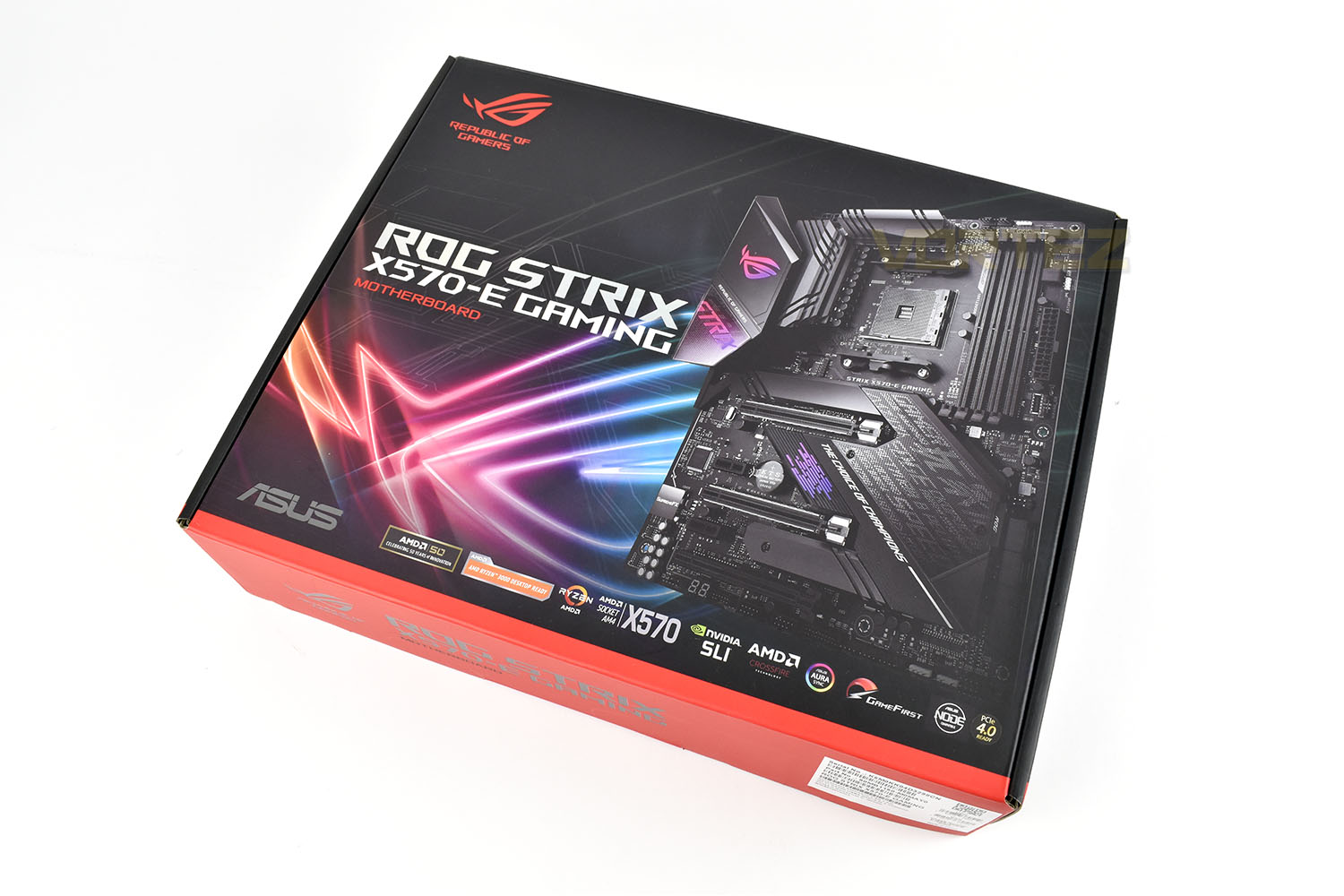
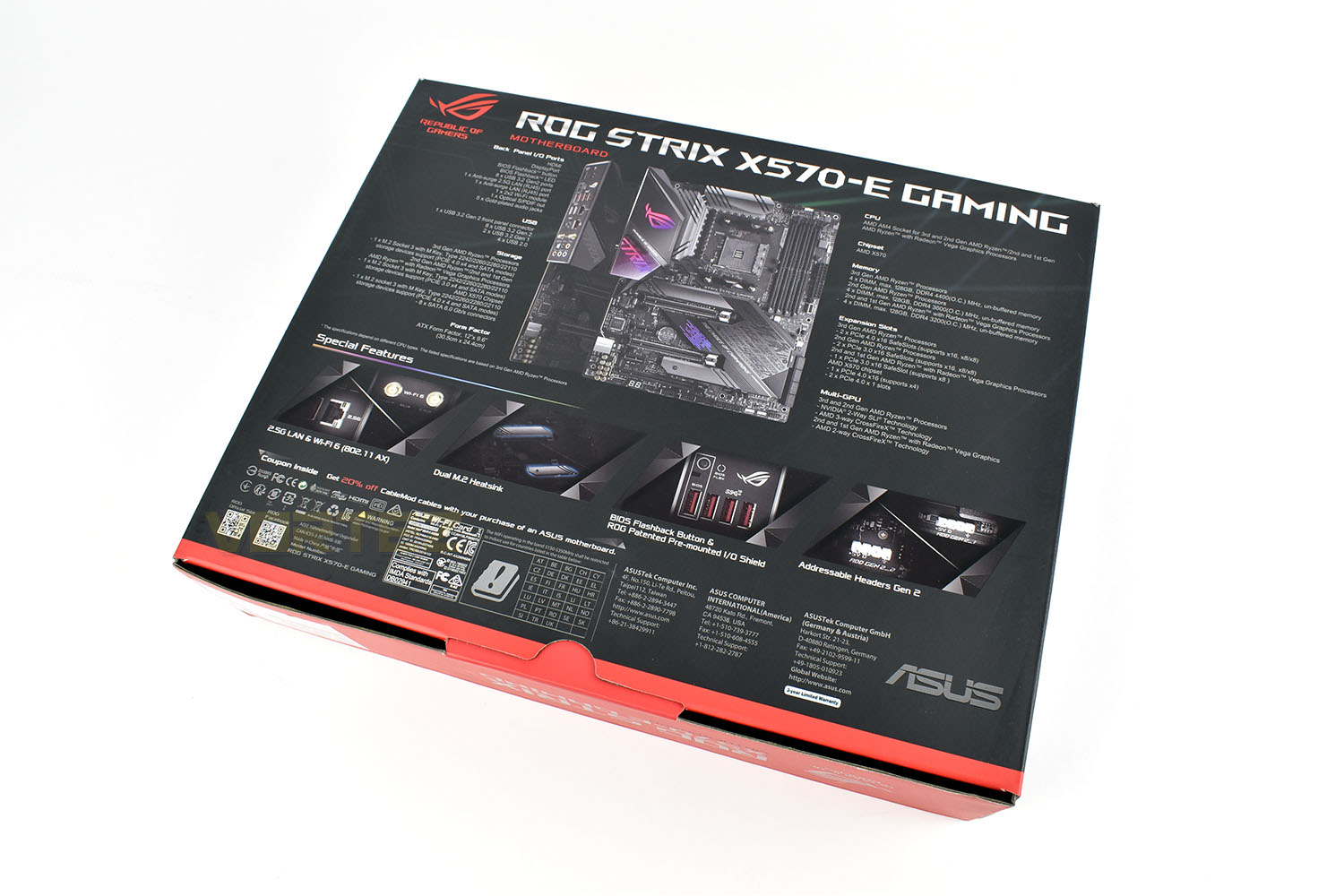
Flipping things over, the rear lists the motherboard’s features alongside an image of the motherboard and rear IO. Beneath that is four of the main features of the motherboard with illustrations.
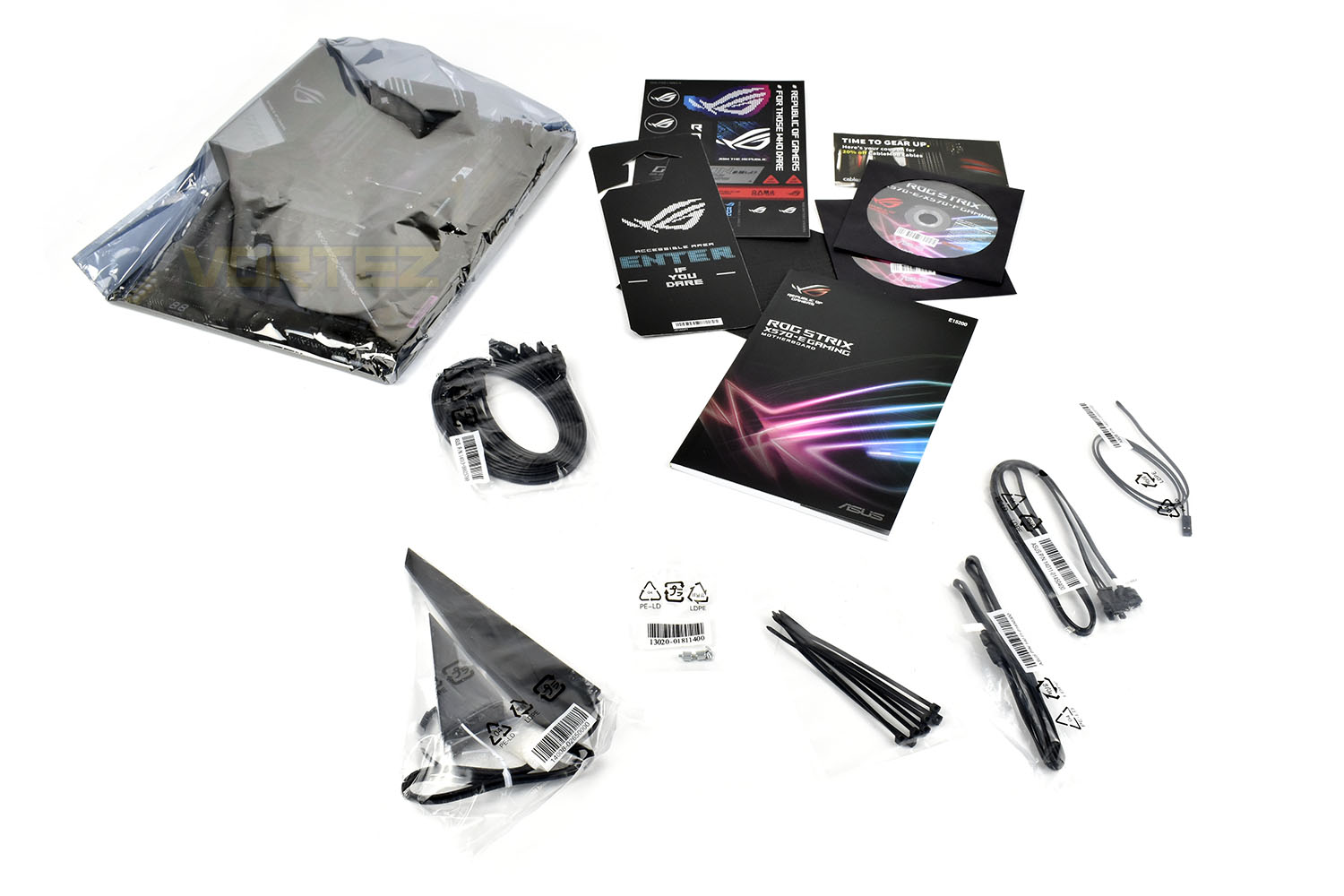
Included with your motherboard is a door handle entry sign, software discs, a set of ROG stickers and an instruction manual. RGB extension cables, thermal probe, cable ties, and four SATA cables are also bundled. Finally, there’s the antenna for WiFi 6 connectivity if you can’t wire your PC into your network.
Closer Look
Conforming to the ATX form factor (305mm x 244mm), the ROG STRIX X570-E Gaming appears as a well laid out motherboard with a gigantic FCH heatsink, including cooling fan. The rear IO is covered by a large cover and is joined directly to the beefy VRM heatsink.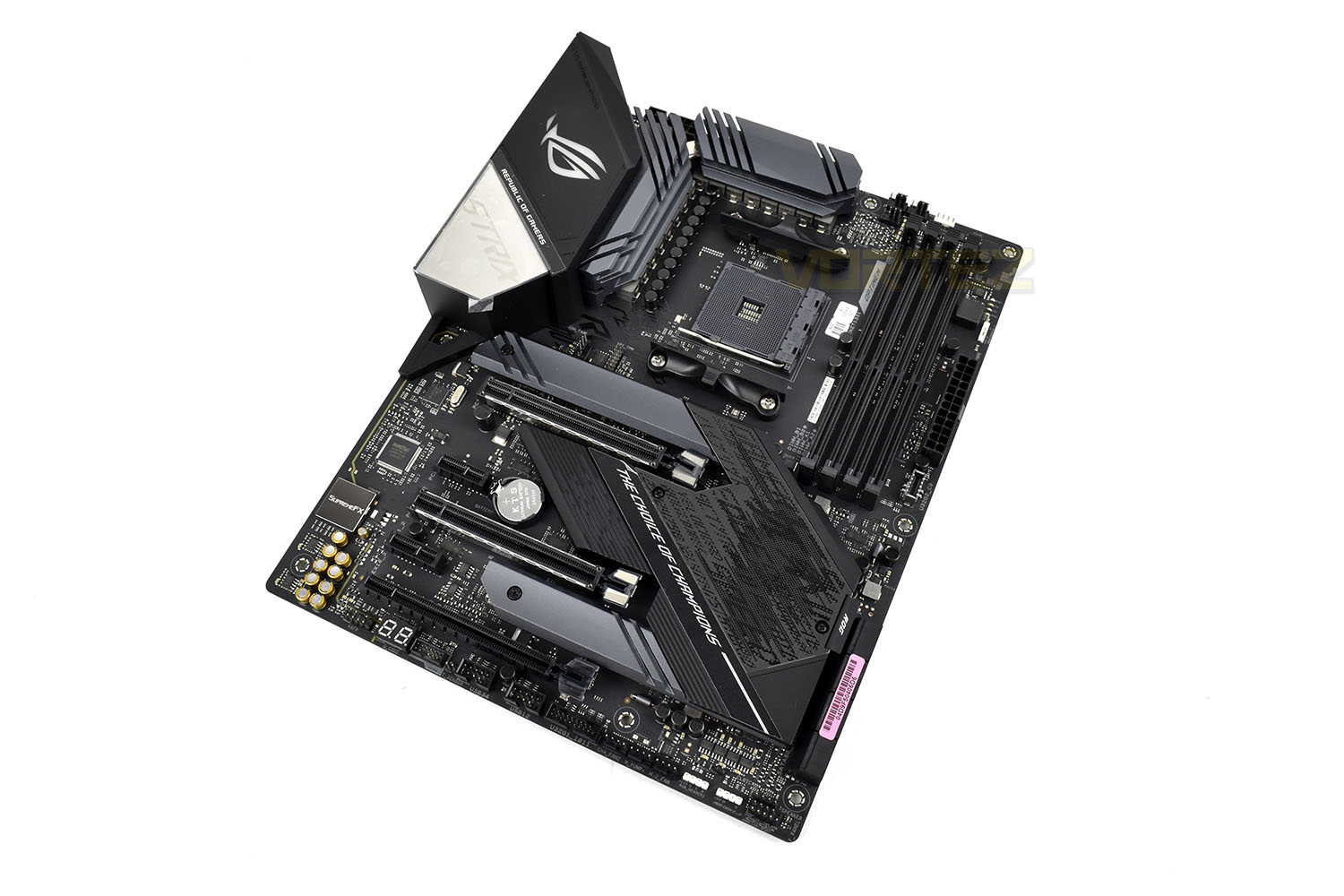
The AM4 socket, compatible with 2000-series Zen+ and the latest 3000-series Zen 2 processors, is supplied by a 12+4 power phase with a ProCool II power connector, alloy chokes and durable capacitors. Keeping the delivery system cool is a pair of all-metal Voltage Regulation heatsinks that are joined by an 8mm heatpipe.
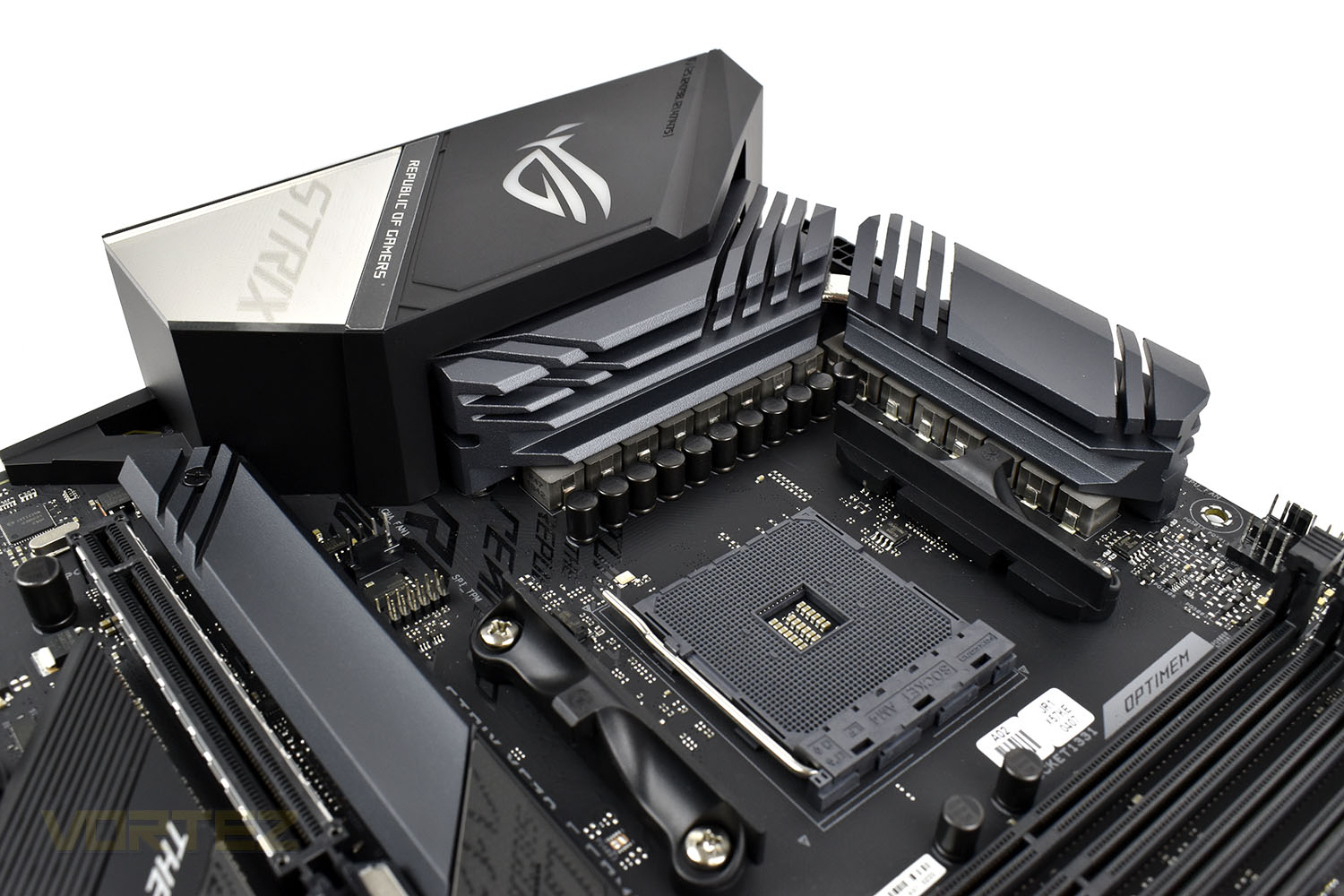
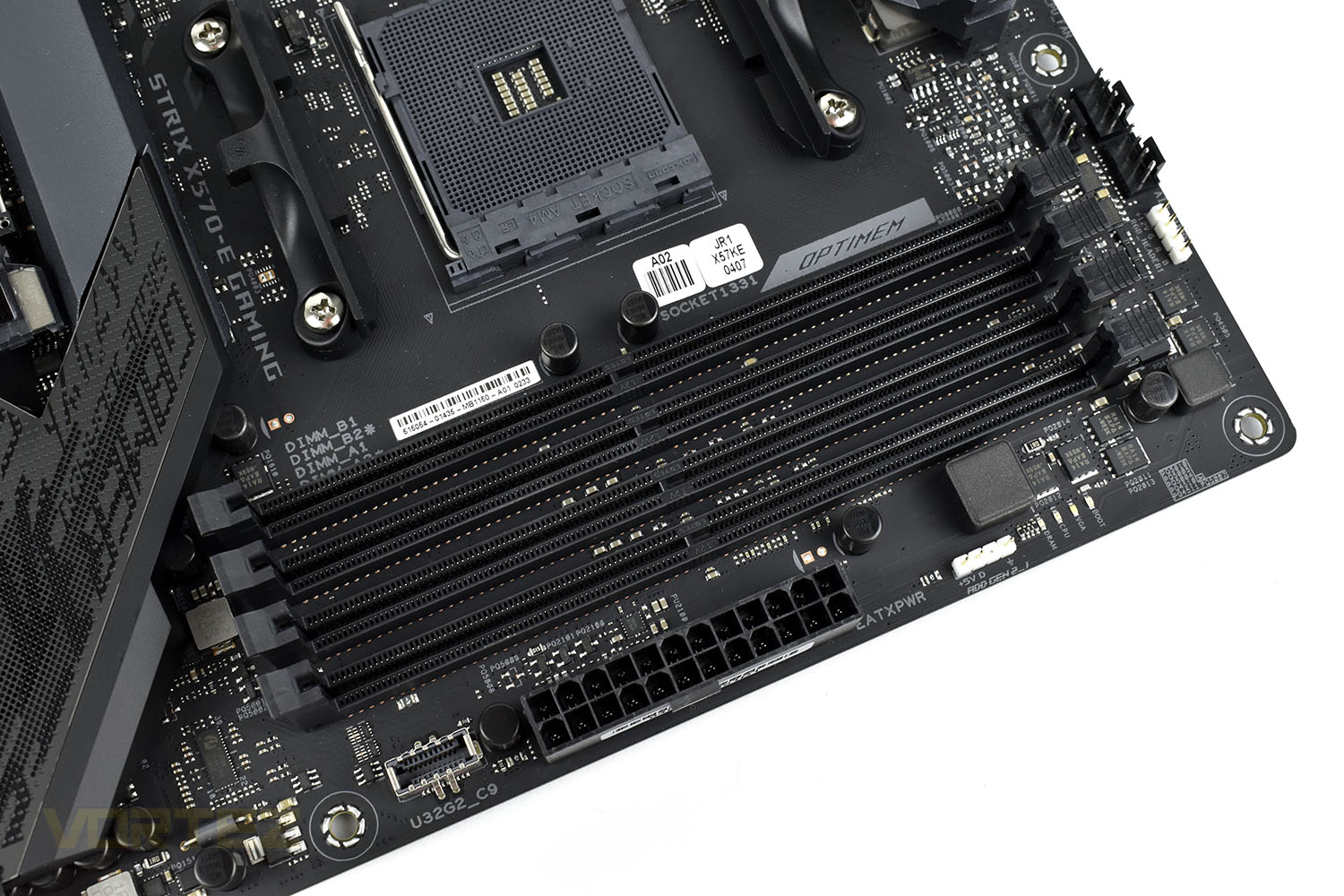
To the right of the AM4 socket are four DIMM slots featuring OPTIMEM. Each slot can accommodate 32GB sticks allowing up to 128GB of DDR4 memory to be installed.
Above the DIMMs are three 4-pin PWM fan headers and an RGB 4-pin header. Further to the right is the EATX 24-pin motherboard power connection and a USB 3.2 front panel header.
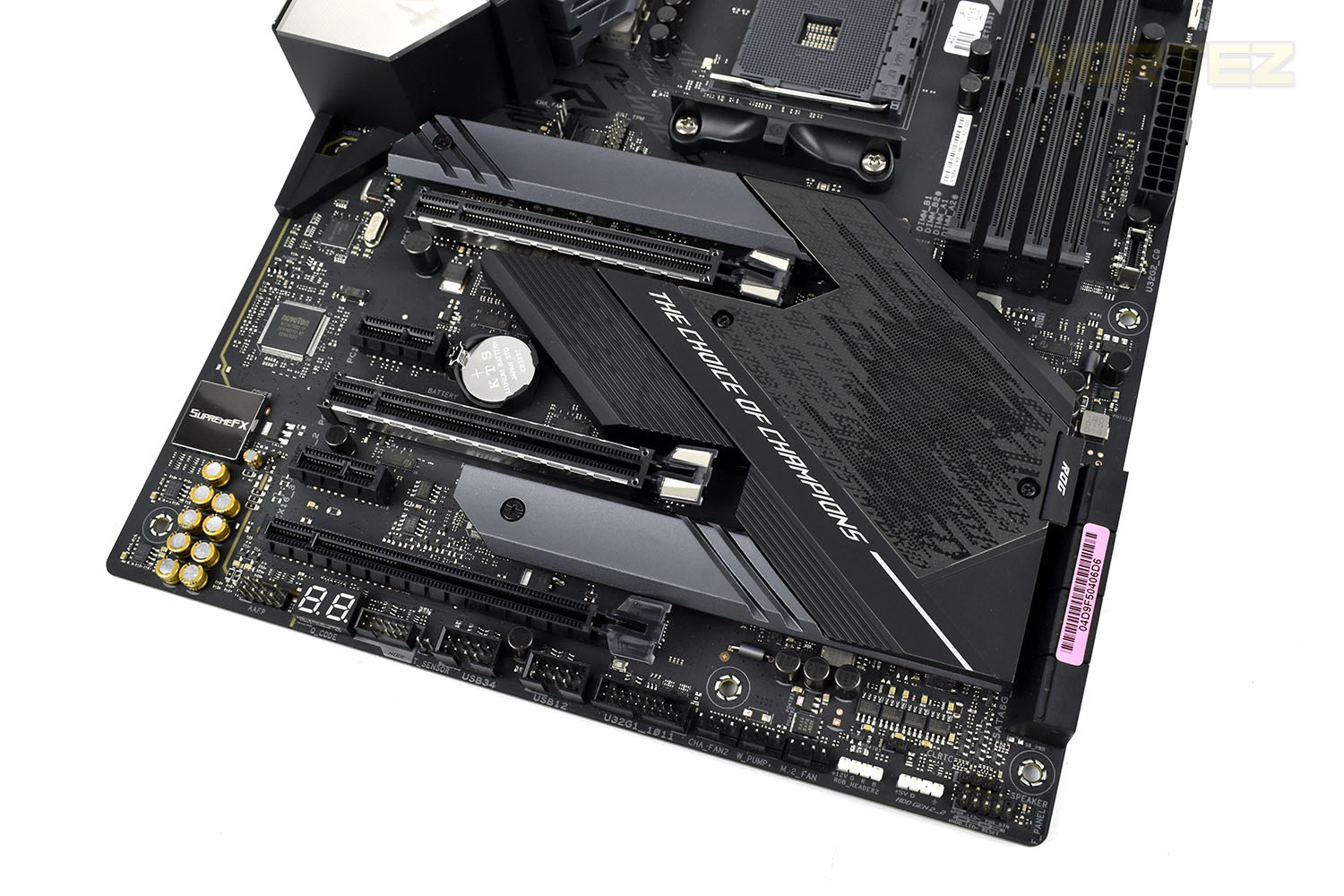
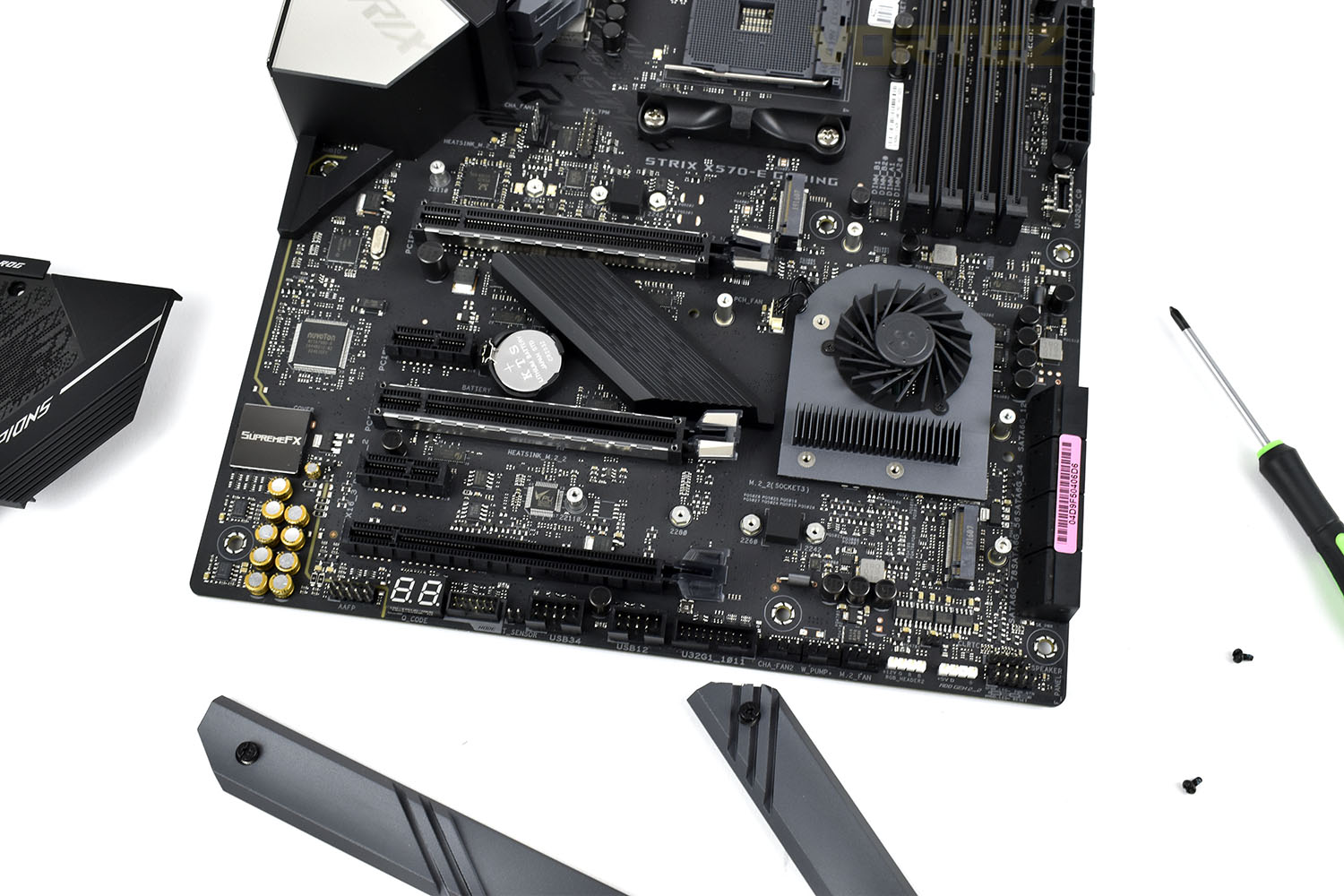
Focussing on the lower portion of the board, the large heatsink extends across most of the area, wrapping around the two upper PCI-E x16 slots and over the top of the M.2 NVMe heatsinks. Under the large section on the right is a small 40mm fan, used to keep the new PCI-E 4.0 interface cool under heavy loads. In total there are 5 PCI-E slots, three of which are x16 and two are x1.
There are 6 screws to undo to remove the heatsink. This is necessary to allow access to either of the M.2 slots.
Closer Look (Continued)
While six SATA 3.0 ports is the norm ASUS have managed to accommodate eight from the neighbouring FCH, all arranged at 90° from the motherboard. This will be good news for those who like to keep large storage libraries for films, music or games.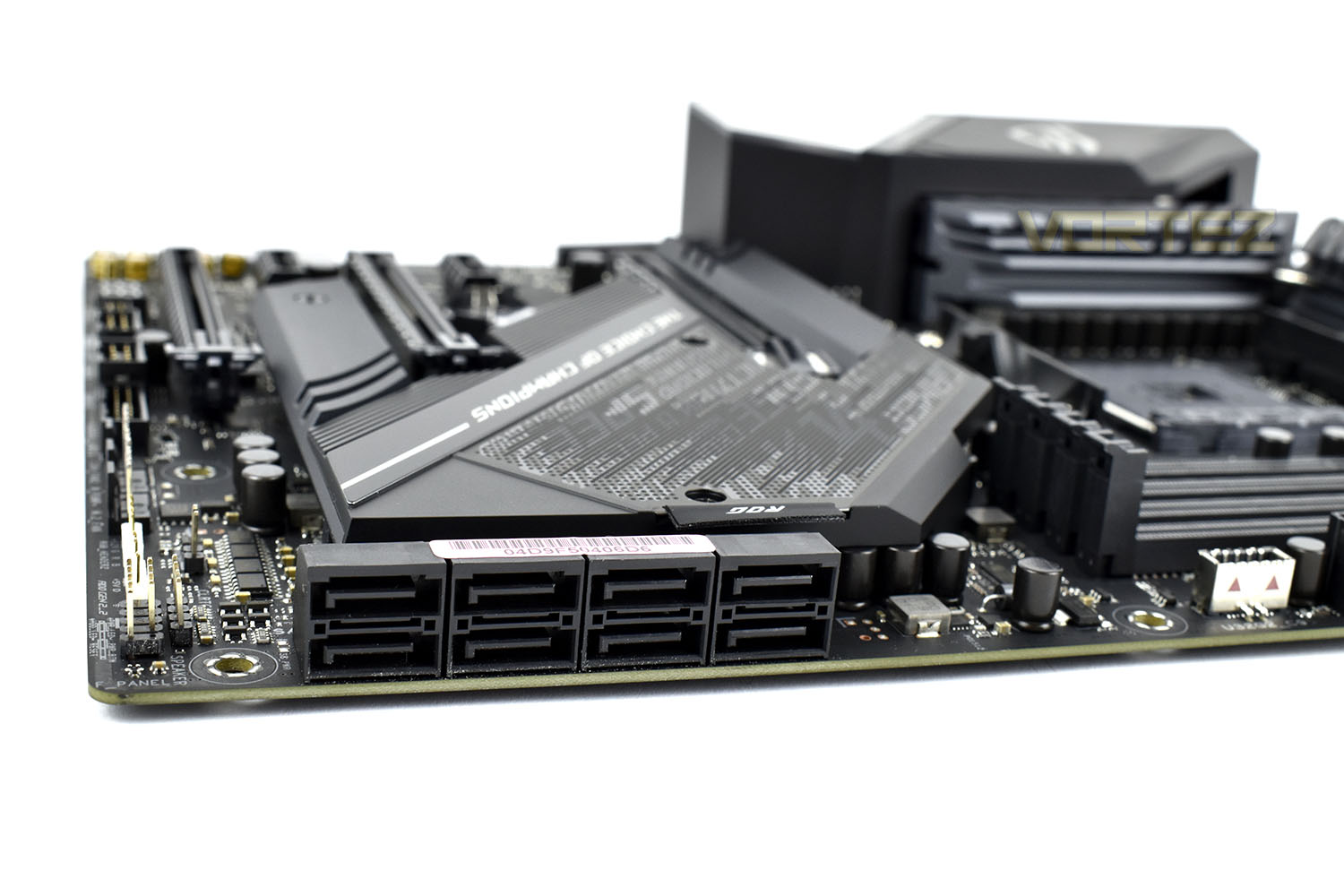
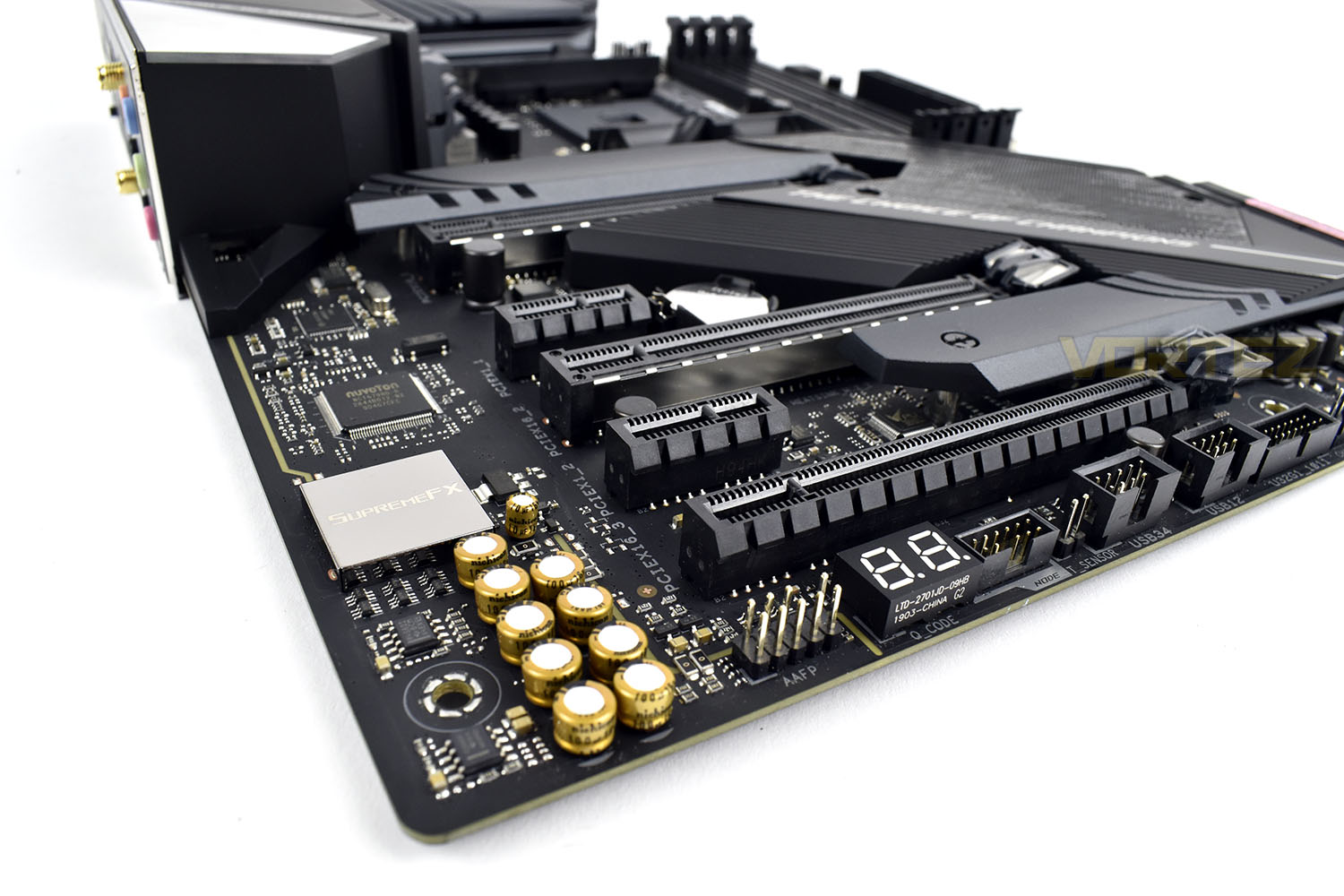
The bottom-left region is isolated from the motherboard, helping to avoid crosstalk and interference, an important feature for ensuring the sound quality from the onboard 7.1 chip isn’t affected. The SupremeFX S1220A offers DTS Sound Unbound and Sonic Studio III support to provide high-fidelity sound.
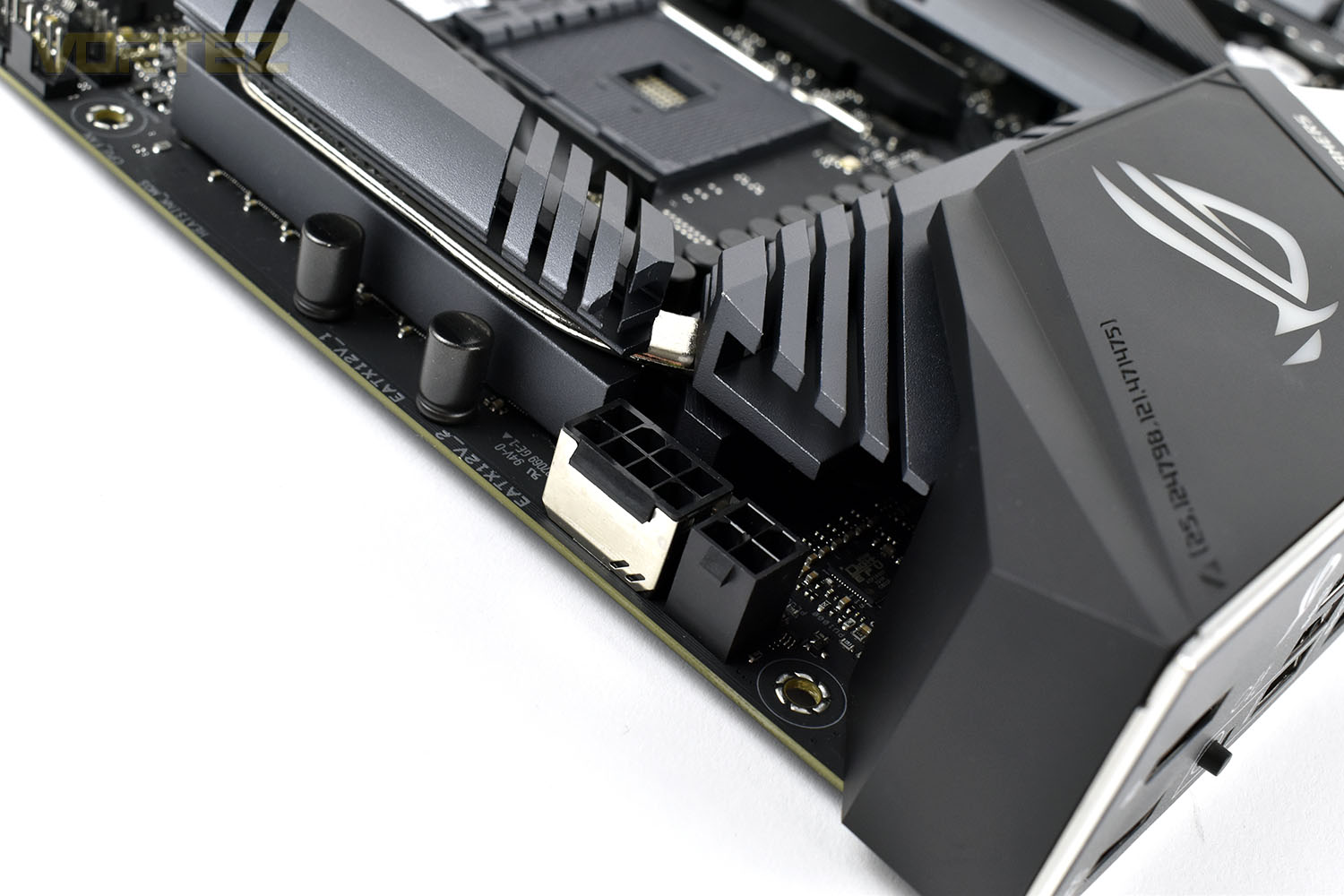
Around the top of the rear IO, hidden away behind the VRM heatsinks are the CPU power connections. An 8 + 4 arrangement is entirely optional but will be useful to those who wish to overclock their CPU to the upper regions of what is possible, particularly if you plan to adopt an AMD Ryzen 9 3950X later in the summer.
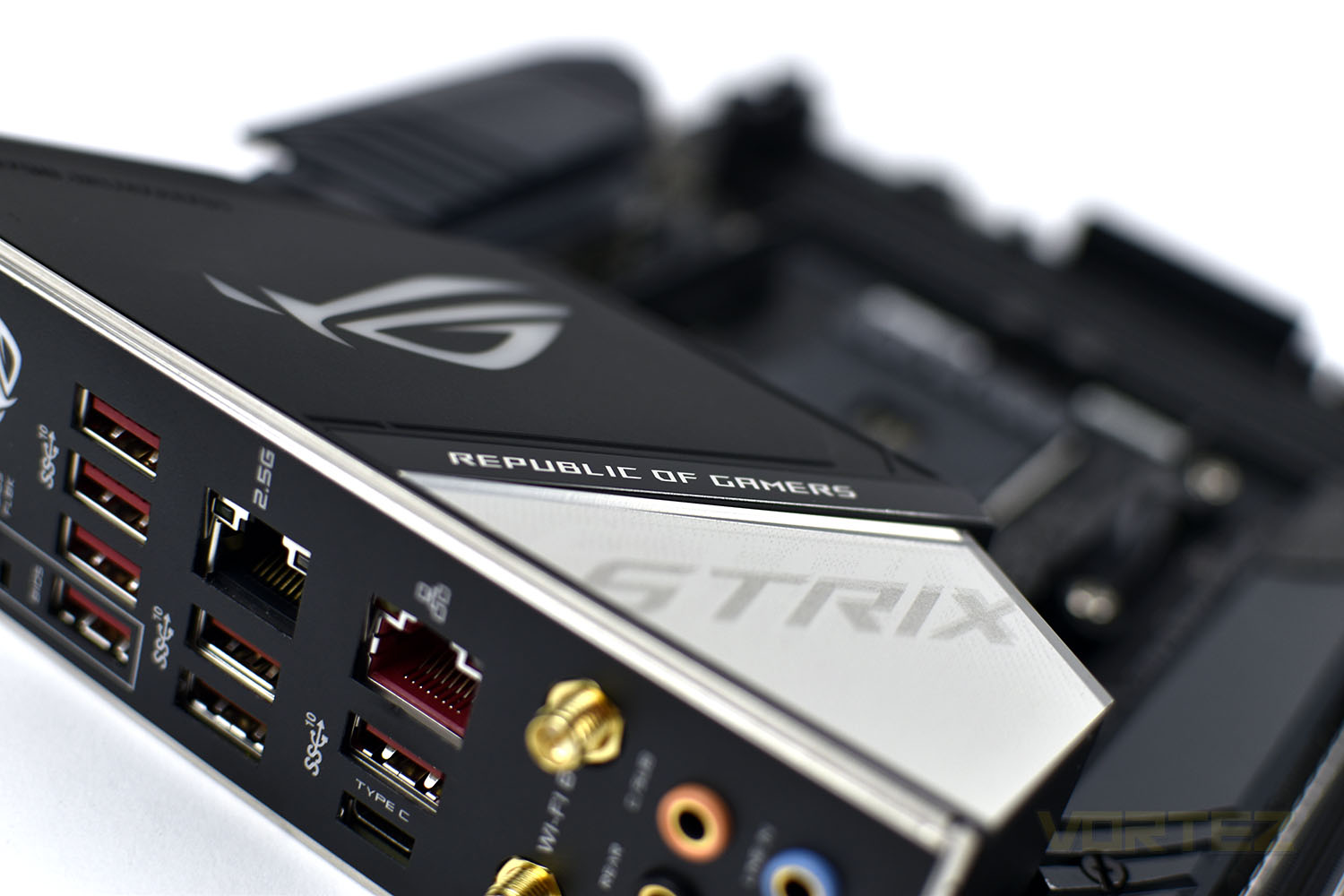
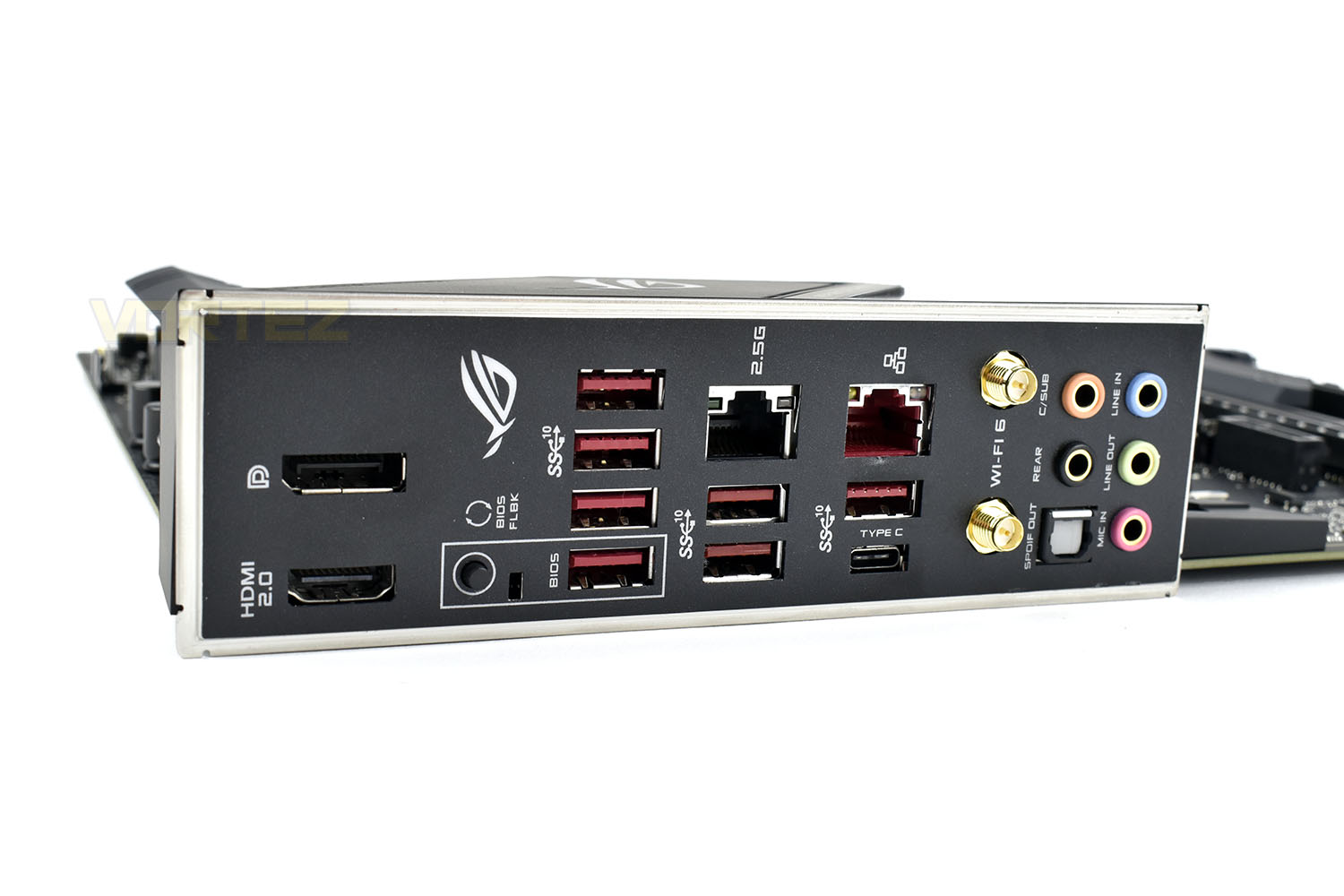
Finally, the rear IO with its pre-mounted IO-shield, saving the annoyingly embarrassing moment of forgetting to install it, is equipped with multiple outputs, they are as follows:
You will notice the lack of a PS/2 keyboard/mouse port which we’ve noticed have begun to be phased out of high-end motherboards.
1x DisplayPort 1.4
1x HDMI 2.0b
7x USB 3.2 Gen 2 ports (Type-A)
1x USB 3.2 Gen 2 port (Type-C)
1x 2.5G LAN
1x 1G LAN
2x WiFi 6 antenna connections
5x 7.1 audio
1x SPDIF optical out
Test Setup & Software
Test SetupCooling Noctua NH-U12S-SE-AM4
Motherboard ASUS ROG STRIX X570-E Gaming
Memory 16GB Corsair Vengeance LPX 3200MHz @ 3000MHz @ 15-17-17-38-58
Graphics AMD Radeon RX 480 8GB
Storage Corsair Force LE 480GB
PSU Corsair RM750X 80 Plus Gold Certified PSU
Benchmarks
x264 HD 4.0 – 1st and 2nd pass encoding
SiSoftware SANDRA – CPU & Memory benchmarks
POV-RAY – CPU benchmarks
TrueCrypt – CPU benchmarks
AIDA64 – CPU benchmarks & Memory
PCMark 8 – Home Suite & Photoshop
3DMark FireStrike – 3D Benchmark
Games – Rise of the Tomb Raider & Total War: WARHAMMER
Other Software
Stress Testing Software: AIDA64 Stability Test
CPU Specification Monitoring: CPU-Z
Performance Monitoring: MSI Afterburner
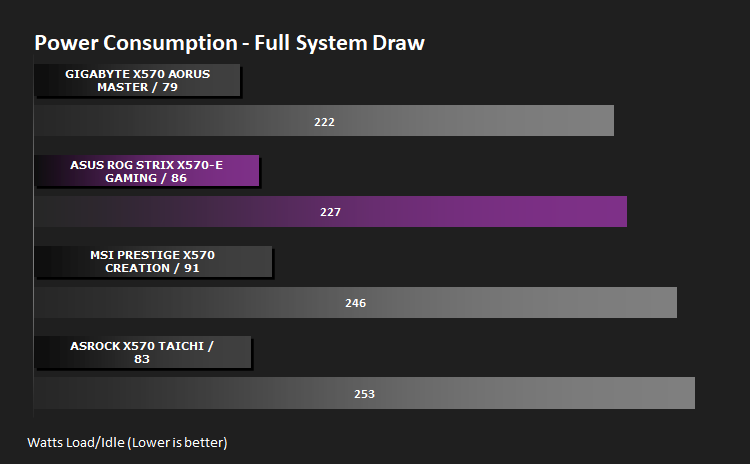
Benchmarks: Power Consumption
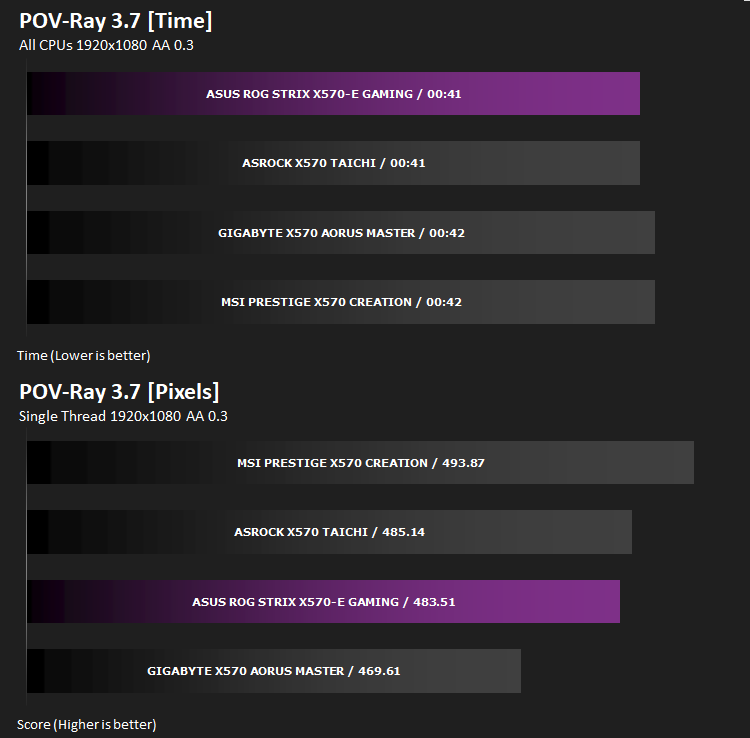
Ray Tracing Performance – POV-Ray 3.7
This product allows users to build their custom 3D worlds with excellent quality despite their computer’s hardware. It has adjustable options for levels of radiance, refraction, and reflection. Calculation time may vary depending on the computer model, but PovRay can adapt to many computer builds, and is supported by the open source community.
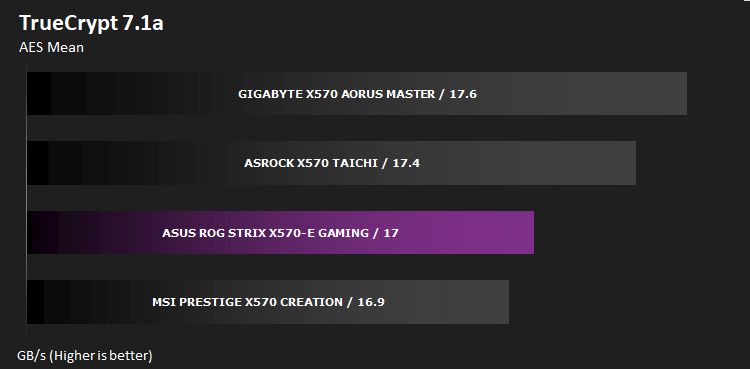
AES Encryption Performance – TrueCrypt 7.1a
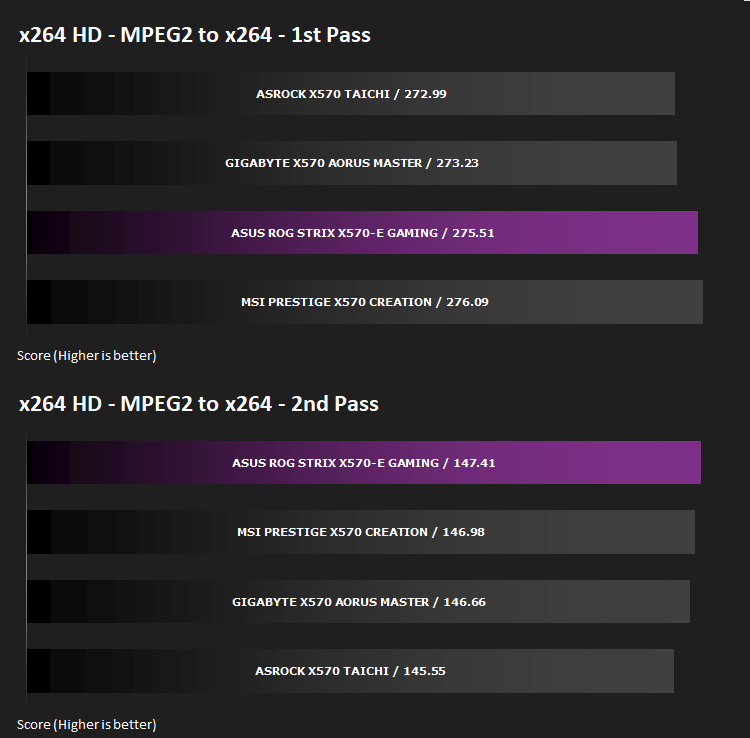
Encoding Performance – x264 HD
Processing Features Performance – AIDA64
AIDA64 Product Page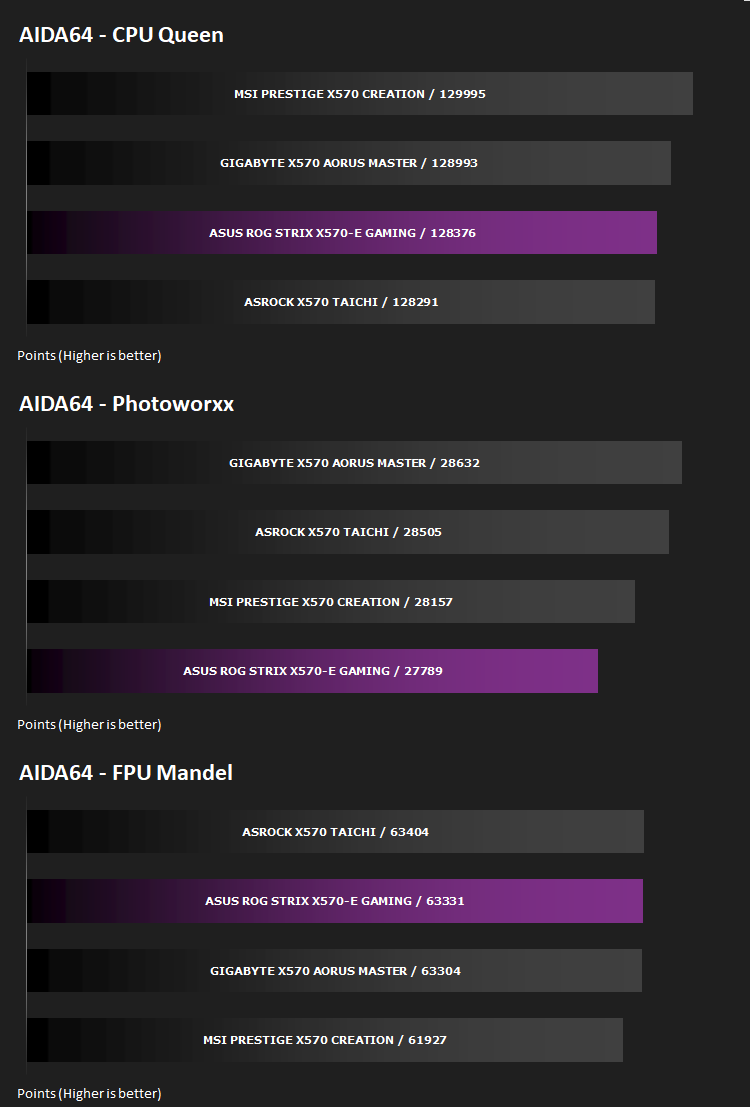
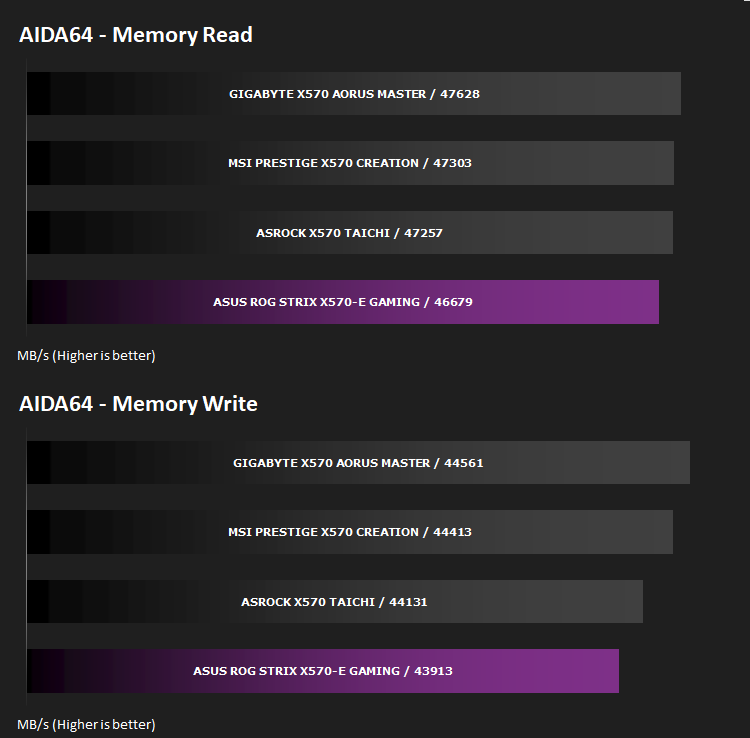
Memory Transfer Performance – AIDA64
AIDA64 Product PageThe Memory Latency benchmark measures the typical delay when the CPU reads data from system memory. Memory latency time means the penalty measured from the issuing of the read command until the data arrives to the integer registers of the CPU.
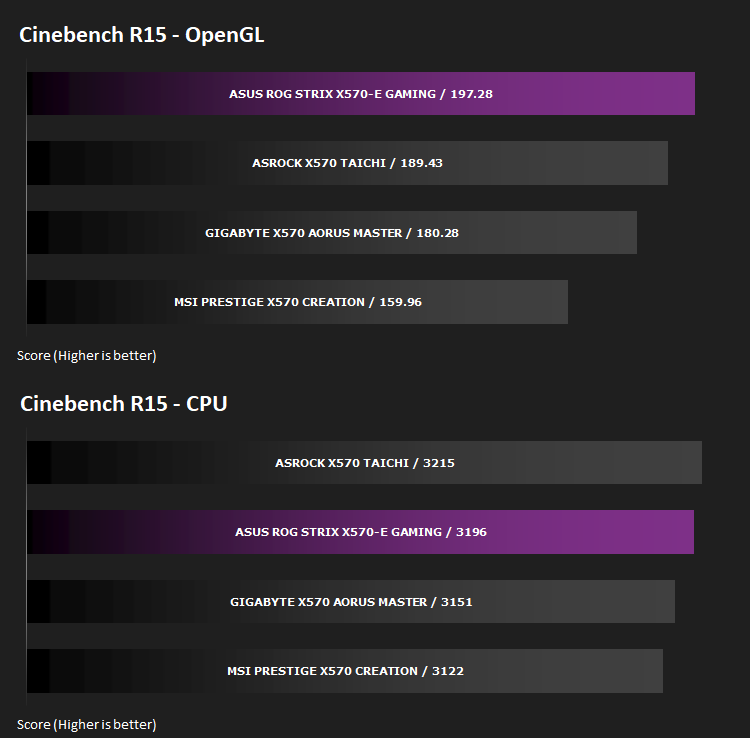
Processing Power Performance – Cinebench R15
Bandwidth Performance – SiSoftware SANDRA
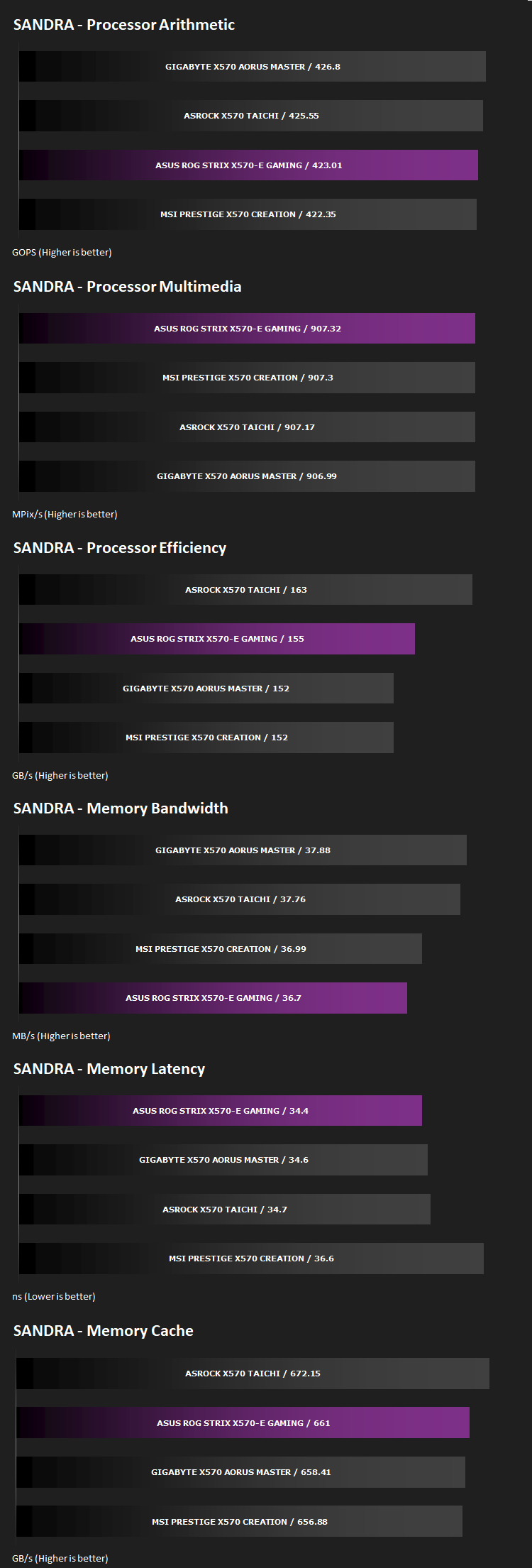
Image Editing Performance – PCMark 8 Photoshop
PCMark 8 Product Page
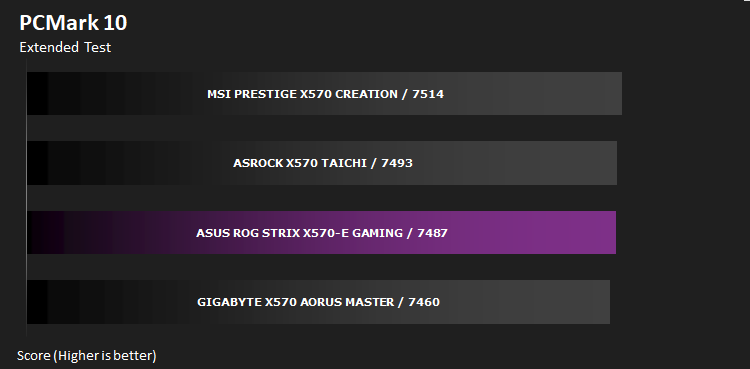
Overall System Performance – PCMark 10
PCMark 10 features a comprehensive set of tests that cover the wide variety of tasks performed in the modern workplace. With a range of performance tests, custom run options, and the new Battery Life Profile, PCMark 10 is the complete PC benchmark for the modern office.
VR Performance – VRMark
VRMark Product Page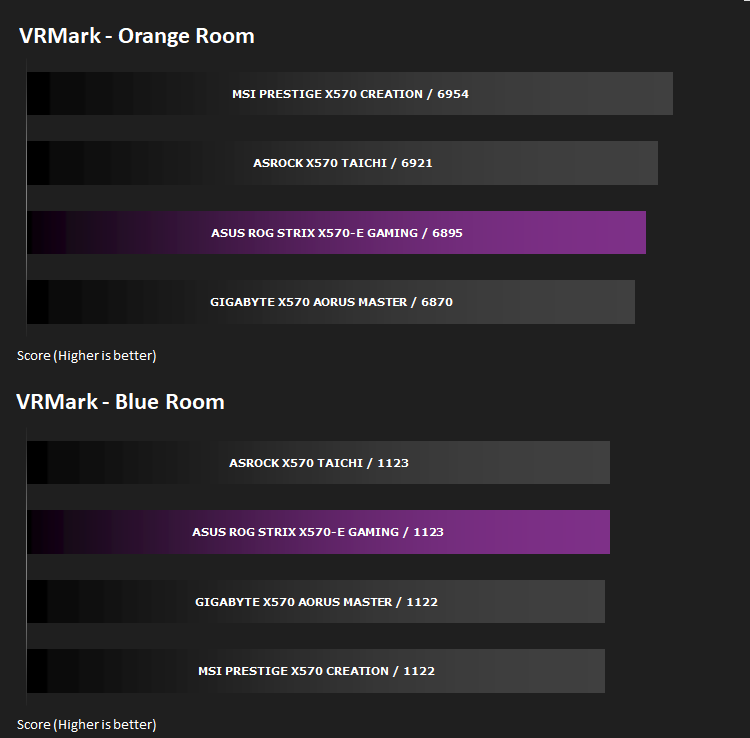
3D Performance – 3DMark
3DMark FireStrike Product Page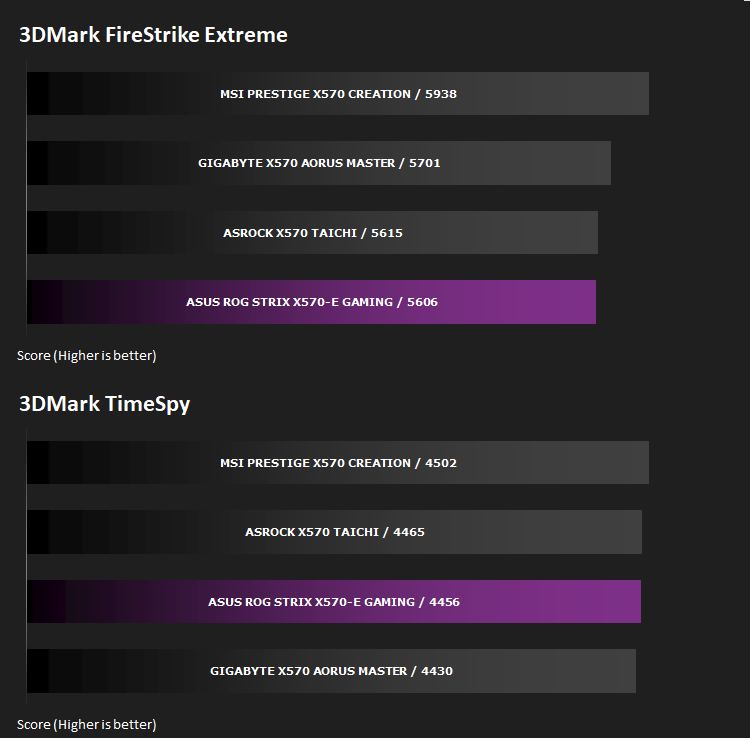
Gaming Performance – Rise of the Tomb Raider & Total War: WARHAMMER

Conclusion
Compared to many launches from the ROG STRIX team, the X570-E Gaming’s overall appearance is quite tame and understated, leaving the rest of the system and installed components to add flair. While that may work in the favour of some users, particularly if your RAM modules are bright orange, for example, we don’t really feel that it’s what the STRIX brand has typically been about. We liked the graffiti everywhere with multiple RGB accents.Performance isn’t chart-topping across the board but it definitely mingles with the other 3 boards that we’ve tested so far, and is never more than a few percent away from the top score anyway. Considering it’s £300/$330 price-tag, that strikes very decent value if looking at the board from purely a performance metric.
Having said that, the board only sports a pair of M.2 storage slots, which you could argue is somewhat made up for with 8 SATA connections, and with the increased adoption and decreasing cost of NVMe SSD drives, particularly with the speeds PCI-E 4.0 drives are already offering, with more to come, this does detract from the value of the motherboard. While we’re on the topic of NVMe storage, installing the drives is unnecessarily difficult, having to remove the FCH heatsink cover and then the M.2 heatsink separately to get to the drive; this is something you may only have to do very rarely but it could be simpler.
The rear IO is well equipped for its price point, with the inclusion of a 2.5G and 1G LAN port in particular, as well as the WiFi 6 connectivity. It’s also good to see ASUS get rid of USB 2.0 functionality and move over to 3.2 entirely. The removal of the PS/2 port is unlikely to upset anyone either.
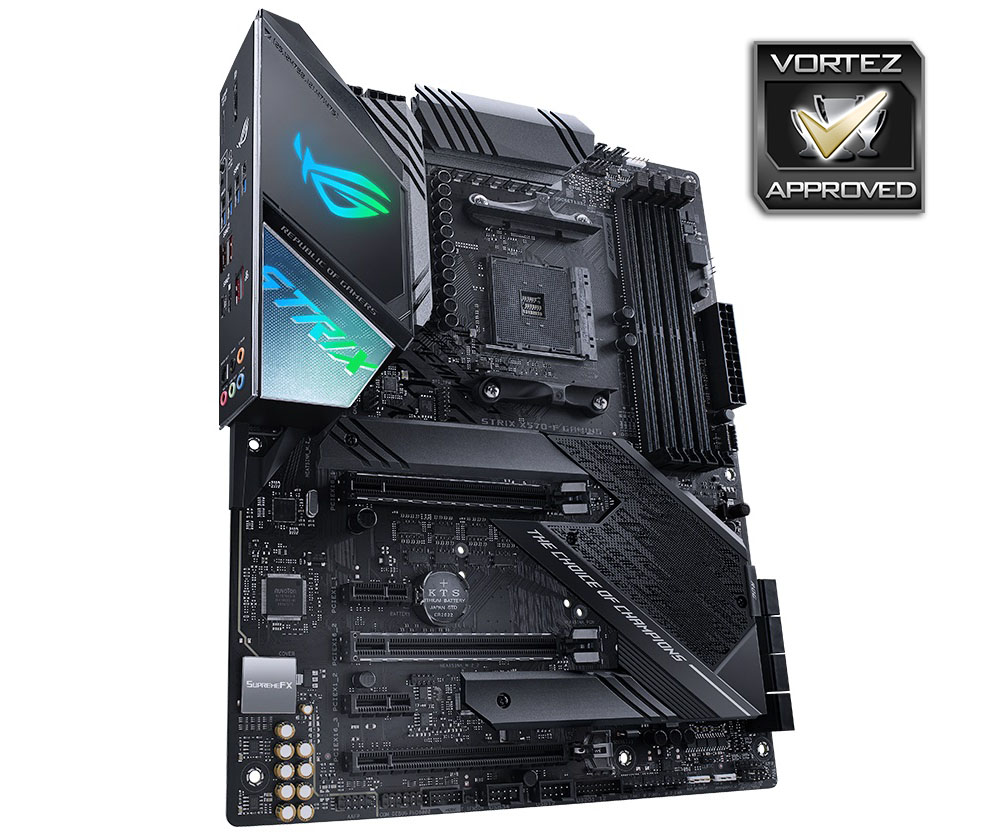
Overall, the ROG STRIX X570-E Gaming offers gamers a good value option and will suit most builds very nicely
+ Solid performance
+ Good power consumption
+ Removed USB 2.0 and PS/2 ports from the rear IO.
+ 8x SATA 3.0 ports
+ SupremeFX audio
+ Understated appearance won’t clash with other components
Cons
– Appearance isn’t as fancy as we’d like
– Only 2 NVMe slots
– Awkward to install NVMe drives
Click here for an explanation of our awards at Vortez.net.
Stay connected with the Vortez Social Media pages:
Join in with the discussions on Discord