Wanting to squeeze the very best out of AMD Ryzen Threadripper and its X399 chipset? Extreme combines advanced overclocking, cooling and lighting to push the limits of any dream build…
Product On Review: ASUS ROG X399 Zenith Extreme
Manufacturer: ASUS ROG
UK Street Price: $549.99 USD / £496.49 GBP (inc. V.A.T.)
August was a particular highlight in the 2017 tech calendar, not least of which due to the launch of AMD’s Threadripper platform. The first CPU and motherboard combination to go toe-to-toe with Intel’s HEDT range, which was then only recently refreshed to the Skylake X/X299 platform (more generally known under the Core X umbrella branding), it brought with it 16 cores, 32 threads and a massive 64 PCI-Express 3.0 lanes. Safe to say it made an impact.
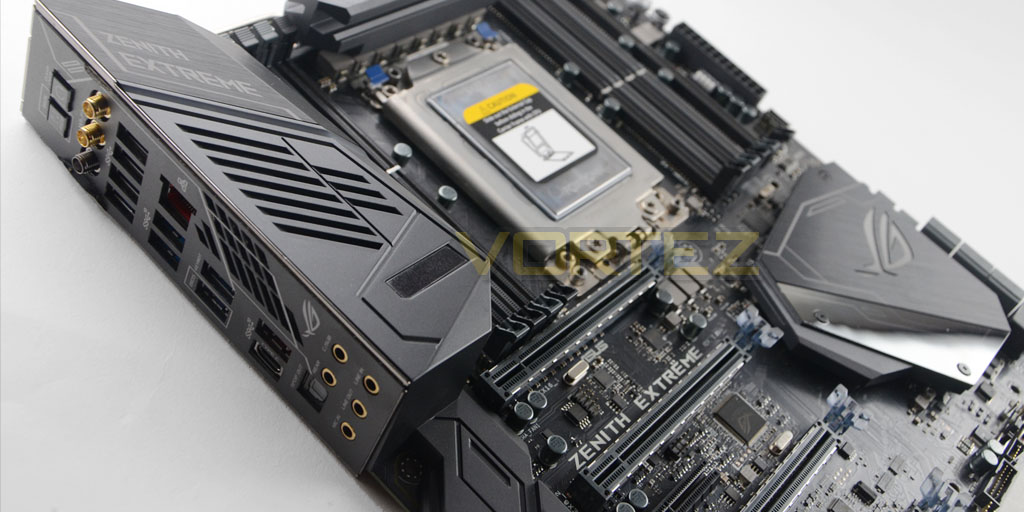
Launching alongside Threadripper CPUs were of course motherboards based on the AMD X399 chipset. Featuring the TR4 socket, including the somewhat controversial installation system into that socket which is shared by all motherboard vendors, X399 implements features which can exploit the Threadripper architecture most effectively. These especially include support for quad-channel DDR4 memory and a means to effectively utilise an astounding number of PCIe lanes from what is still a consumer product.
ASUS Republic of Gamers were a launch partner for AMD Threadripper, and their premier (and current flagship) X399 motherboard is the ROG Zenith Extreme. This premium SKU is billed as a Threadripper alternative to the Rampage VI Extreme, a similarly fully-featured motherboard for Intel’s Core X lineup that will suit gamers and content creators with deep pockets and a penchant for overclocking.
Since August AMD have subsequently released an 8-core Threadripper variant and the initially fairly hefty price tag has undergone a correction. Furthermore, seasonal sales may well move the platform towards greater value and perhaps push up the adopter’s motherboard budget. Our look at the Zenith Extreme may then prove timely for your purchasing decisions this Christmas.
The Zenith Extreme is currently one of two motherboards in ASUS ROG X399 range. The Strix X399-E GAMING is certainly more aggressively priced, but lacks many of the features of its more high-end value-added sibling. Amongst them is support for bleeding edge overclocking, for which the Zenith Extreme is expected to be much more accomplished.
Currently the ROG X399 Zenith Extreme is available for a street price of around the £500 mark, depending on retailer. With that in mind, lets take a closer look.
Technical Specifications
Official ROG X399 Zenith Extreme Specs.
Chipset:- Build in AMD X399
CPU Support:- AMD Ryzen™ Threadripper™ Processors
CPU Socket:- TR4
Motherboard Form Factor: EATX
Memory:
– 8 x DIMM, Max. 128GB, DDR4 3600(O.C.)/3200(O.C.)/2800(O.C.)/2666/2400/2133 MHz ECC and non-ECC, Un-buffered Memory
– Quad Channel Memory Architecture
Multi-GPU Support:
– Supports NVIDIA® 4-Way SLI™ Technology
– Supports AMD 4-Way CrossFireX Technology
Expansion Slots:
– Via AMD Ryzen™ Threadripper™ Processors: 4 x PCIe 3.0 x16 (x16, x16/x16, x16/x8/x16, x16/x8/x16/x8)
– Via AMD X399 chipset: 1 x PCIe 2.0 x4, 1 x PCIe 2.0 x1
Storage (via AMD Ryzen™ Threadripper™ Processors):
– 2 x M.2 Socket 3, with M Key design, type 2242/2260/2280/22110 storage devices support (Supports both SATA & PCIE SSD)
– 1 x M.2 Socket 3, with M key, type 2242/2260/2280 storage devices support (both SATA & PCIE mode)
– 1 x U.2 port
Storage (via AMD X399 chipset:
– 6 x SATA 6Gb/s port(s),
– Support Raid 0, 1, 10
LAN:
– Intel® I211-AT, 1 x Gigabit LAN Controller(s)
– Anti-surge LANGuard
– ROG GameFirst IV
Wireless Data Network:
– Wi-Fi 802.11 a/b/g/n/ac+ WiGig 802.11ad*4
– Supports MU-MIMO
– Supports dual band frequency 2.4/5 GHz+ 60GHz
– Up to 4600Mbps transfer speed
Bluetooth:- Bluetooth V4.1
Audio:
– ROG SupremeFX 8-Channel High Definition Audio CODEC S1220
– Impedance sense for front and rear headphone outputs
– Supports : Jack-detection, Multi-streaming, Front Panel Jack-retasking
– High quality 120 dB SNR stereo playback output 113 dB SNR recording input
– ESS® ESS9018Q2C
– Supports up to 32-Bit/192kHz playback
Audio Features:
– Optical S/PDIF out port(s) at back panel
– Sonic Radar III
– Sonic Studio III
USB Ports:
– 8 x USB 3.1 Gen 1 port(s) (8 at back panel, blue, via CPU)
– 4 x USB 3.1 Gen 1 port(s) (4 at mid-board)
– 2 x USB 2.0 port(s) (Type-A + USB Type-CTM, 2 at mid-board)
– 1 x USB 3.1 Gen 2 front panel connector port(s)
– 2 x USB port(s) (2 at back panel, , Type-A + USB Type-CTM) (via ASMedia® USB 3.1 Gen 2 controller)
Back I/O Ports
– 1 x LAN (RJ45) port(s)
– 1 x USB 3.1 Gen 2 (black)USB Type-CTM
– 1 x USB 3.1 Gen 2 (red)Type-A
– 8 x USB 3.1 Gen 1 (blue)
– 1 x Optical S/PDIF out
– 1 x Clear CMOS button(s)
– 1 x USB BIOS Flashback Button(s)
– 1 x ASUS Wi-Fi GO! module (Wi-Fi 802.11 a/b/g/n/ac+ WiGig 802.11ad and Bluetooth v4.1)
– 5 x LED-illuminated audio jacks
Internal I/O Ports
– 1 x Aura Addressable Strip Header(s)
– 1 x ReTry jumper
– 1 x Safe Boot jumper
– 1 x U.2 port
– 2 x Aura RGB Strip Headers
– 2 x USB 3.1 Gen 1 connector(s) support(s) additional 4 USB 3.1 Gen 1 port(s)
– 1 x USB 2.0 connector(s) support(s) additional 2 USB 2.0 port(s)
– 1 x M.2 Socket 3 with M Key design, type 2242/2260/2280 storage devices support (Supports both SATA & PCIE SSD)
– 6 x SATA 6Gb/s connector(s)
– 1 x CPU Fan connector(s)
– 1 x CPU OPT Fan connector(s)
– 2 x Chassis Fan connector(s)
– 1 x H_AMP fan connector
– 1 x W_PUMP+ connector
– 2 x 8-pin EATX 8 V Power connector
– 1 x 24-pin EATX Power connector(s)
– 1 x Front panel audio connector(s) (AAFP)
– 1 x System panel(s) (Q-Connector)
– 1 x 5-pin EXT_FAN(Extension Fan) connector
– 1 x Slow Mode switch(es)
– 2 x Thermal sensor connector(s)
– 1 x LN2 Mode header(s)
– 1 x EZ Plug connector(s) (4-pin Molex power connector)
– 1 x Reset button(s)
– 1 x LN2 Mode switch(es)
– 1 x LN2 Mode jumper(s)
– 1 x Safe Boot button
– 1 x ReTry button
– 1 x U.2 connector*4
– 1 x Slow Mode jumper(s)
– 1 x System panel connector
– 1 x PCIe x16 lane switch
– 2 x T_Sensor Connector
– 1 x W_IN header
– 1 x W_OUT header
– 1 x W_FLOW header
– 1 x Start button
– 1 x USB 3.1 Gen 2 front panel connector
– 1 x PCIe x16 Lane Switch
– 1 x 9 pin Monoblock sensor
CPU Support:- AMD Ryzen™ Threadripper™ Processors
CPU Socket:- TR4
Motherboard Form Factor: EATX
Memory:
– 8 x DIMM, Max. 128GB, DDR4 3600(O.C.)/3200(O.C.)/2800(O.C.)/2666/2400/2133 MHz ECC and non-ECC, Un-buffered Memory
– Quad Channel Memory Architecture
Multi-GPU Support:
– Supports NVIDIA® 4-Way SLI™ Technology
– Supports AMD 4-Way CrossFireX Technology
Expansion Slots:
– Via AMD Ryzen™ Threadripper™ Processors: 4 x PCIe 3.0 x16 (x16, x16/x16, x16/x8/x16, x16/x8/x16/x8)
– Via AMD X399 chipset: 1 x PCIe 2.0 x4, 1 x PCIe 2.0 x1
Storage (via AMD Ryzen™ Threadripper™ Processors):
– 2 x M.2 Socket 3, with M Key design, type 2242/2260/2280/22110 storage devices support (Supports both SATA & PCIE SSD)
– 1 x M.2 Socket 3, with M key, type 2242/2260/2280 storage devices support (both SATA & PCIE mode)
– 1 x U.2 port
Storage (via AMD X399 chipset:
– 6 x SATA 6Gb/s port(s),
– Support Raid 0, 1, 10
LAN:
– Intel® I211-AT, 1 x Gigabit LAN Controller(s)
– Anti-surge LANGuard
– ROG GameFirst IV
Wireless Data Network:
– Wi-Fi 802.11 a/b/g/n/ac+ WiGig 802.11ad*4
– Supports MU-MIMO
– Supports dual band frequency 2.4/5 GHz+ 60GHz
– Up to 4600Mbps transfer speed
Bluetooth:- Bluetooth V4.1
Audio:
– ROG SupremeFX 8-Channel High Definition Audio CODEC S1220
– Impedance sense for front and rear headphone outputs
– Supports : Jack-detection, Multi-streaming, Front Panel Jack-retasking
– High quality 120 dB SNR stereo playback output 113 dB SNR recording input
– ESS® ESS9018Q2C
– Supports up to 32-Bit/192kHz playback
Audio Features:
– Optical S/PDIF out port(s) at back panel
– Sonic Radar III
– Sonic Studio III
USB Ports:
– 8 x USB 3.1 Gen 1 port(s) (8 at back panel, blue, via CPU)
– 4 x USB 3.1 Gen 1 port(s) (4 at mid-board)
– 2 x USB 2.0 port(s) (Type-A + USB Type-CTM, 2 at mid-board)
– 1 x USB 3.1 Gen 2 front panel connector port(s)
– 2 x USB port(s) (2 at back panel, , Type-A + USB Type-CTM) (via ASMedia® USB 3.1 Gen 2 controller)
Back I/O Ports
– 1 x LAN (RJ45) port(s)
– 1 x USB 3.1 Gen 2 (black)USB Type-CTM
– 1 x USB 3.1 Gen 2 (red)Type-A
– 8 x USB 3.1 Gen 1 (blue)
– 1 x Optical S/PDIF out
– 1 x Clear CMOS button(s)
– 1 x USB BIOS Flashback Button(s)
– 1 x ASUS Wi-Fi GO! module (Wi-Fi 802.11 a/b/g/n/ac+ WiGig 802.11ad and Bluetooth v4.1)
– 5 x LED-illuminated audio jacks
Internal I/O Ports
– 1 x Aura Addressable Strip Header(s)
– 1 x ReTry jumper
– 1 x Safe Boot jumper
– 1 x U.2 port
– 2 x Aura RGB Strip Headers
– 2 x USB 3.1 Gen 1 connector(s) support(s) additional 4 USB 3.1 Gen 1 port(s)
– 1 x USB 2.0 connector(s) support(s) additional 2 USB 2.0 port(s)
– 1 x M.2 Socket 3 with M Key design, type 2242/2260/2280 storage devices support (Supports both SATA & PCIE SSD)
– 6 x SATA 6Gb/s connector(s)
– 1 x CPU Fan connector(s)
– 1 x CPU OPT Fan connector(s)
– 2 x Chassis Fan connector(s)
– 1 x H_AMP fan connector
– 1 x W_PUMP+ connector
– 2 x 8-pin EATX 8 V Power connector
– 1 x 24-pin EATX Power connector(s)
– 1 x Front panel audio connector(s) (AAFP)
– 1 x System panel(s) (Q-Connector)
– 1 x 5-pin EXT_FAN(Extension Fan) connector
– 1 x Slow Mode switch(es)
– 2 x Thermal sensor connector(s)
– 1 x LN2 Mode header(s)
– 1 x EZ Plug connector(s) (4-pin Molex power connector)
– 1 x Reset button(s)
– 1 x LN2 Mode switch(es)
– 1 x LN2 Mode jumper(s)
– 1 x Safe Boot button
– 1 x ReTry button
– 1 x U.2 connector*4
– 1 x Slow Mode jumper(s)
– 1 x System panel connector
– 1 x PCIe x16 lane switch
– 2 x T_Sensor Connector
– 1 x W_IN header
– 1 x W_OUT header
– 1 x W_FLOW header
– 1 x Start button
– 1 x USB 3.1 Gen 2 front panel connector
– 1 x PCIe x16 Lane Switch
– 1 x 9 pin Monoblock sensor
Proprietary/Exclusive Features
ROG Exclusive Features
Clear CMOS button
ROG RAMCache II
ROG CPU-Z
ROG CloneDrive
Pre-mounted I/O Shield
Overwolf
GameFirst IV
Extreme Engine Digi+ :
– IR3555 PoweIRstage®
– MicroFine Alloy Chokes
– NexFET™ Power Block MOSFET
– 10K Black Metallic Capacitors
ROG Extreme OC kit :
– ReTry button
– Safe Boot button
– Start button
– Reset button
– Slow Mode
– LN2 Mode
– PCIe x16 Lane Switch
– EZ Plug
KeyBot II
– One-click Overclocking
– DirectKey
– ClrCMOS
– Power On
UEFI BIOS features :
– O.C. Profile
– Tweakers’ Paradise
– ROG SSD Secure Erase
ROG RAMDisk
Extreme Tweaker
USB BIOS Flashback
Overclocking Protection:
– ASUS C.P.R.(CPU Parameter Recall)
ROG RAMCache II
ROG CPU-Z
ROG CloneDrive
Pre-mounted I/O Shield
Overwolf
GameFirst IV
Extreme Engine Digi+ :
– IR3555 PoweIRstage®
– MicroFine Alloy Chokes
– NexFET™ Power Block MOSFET
– 10K Black Metallic Capacitors
ROG Extreme OC kit :
– ReTry button
– Safe Boot button
– Start button
– Reset button
– Slow Mode
– LN2 Mode
– PCIe x16 Lane Switch
– EZ Plug
KeyBot II
– One-click Overclocking
– DirectKey
– ClrCMOS
– Power On
UEFI BIOS features :
– O.C. Profile
– Tweakers’ Paradise
– ROG SSD Secure Erase
ROG RAMDisk
Extreme Tweaker
USB BIOS Flashback
Overclocking Protection:
– ASUS C.P.R.(CPU Parameter Recall)
Special Features
ASUS Dual Intelligent Processors 5-Way Optimization by Dual Intelligent Processors 5 :
– 5-Way Optimization tuning key perfectly consolidates TPU, EPU, DIGI+ VRM, Fan Expert 4, and Turbo App
TPU
– Fan Xpert 4 featuring Fan Auto Tuning function and multiple thermistors
Gamer’s Guardian:
– SafeSlot
LiveDash OLED
AURA :
– Aura Lighting Control
– Aura RGB Strip Headers
– Aura Lighting Effects Synchronization with compatible ASUS ROG devices
– Aura Addressable Strip Header(s)
ASUS Exclusive Features :
– AI Suite 3
ASUS EZ DIY :
– ASUS CrashFree BIOS 3
– ASUS EZ Flash 3
ASUS Q-Design :
– ASUS Q-LED (CPU, DRAM, VGA, Boot Device LED)
– ASUS Q-DIMM
– ASUS Q-Connector
Overclocking Protection :
– ASUS C.P.R.(CPU Parameter Recall)
– 5-Way Optimization tuning key perfectly consolidates TPU, EPU, DIGI+ VRM, Fan Expert 4, and Turbo App
TPU
– Fan Xpert 4 featuring Fan Auto Tuning function and multiple thermistors
Gamer’s Guardian:
– SafeSlot
LiveDash OLED
AURA :
– Aura Lighting Control
– Aura RGB Strip Headers
– Aura Lighting Effects Synchronization with compatible ASUS ROG devices
– Aura Addressable Strip Header(s)
ASUS Exclusive Features :
– AI Suite 3
ASUS EZ DIY :
– ASUS CrashFree BIOS 3
– ASUS EZ Flash 3
ASUS Q-Design :
– ASUS Q-LED (CPU, DRAM, VGA, Boot Device LED)
– ASUS Q-DIMM
– ASUS Q-Connector
Overclocking Protection :
– ASUS C.P.R.(CPU Parameter Recall)
Packaging and First Look
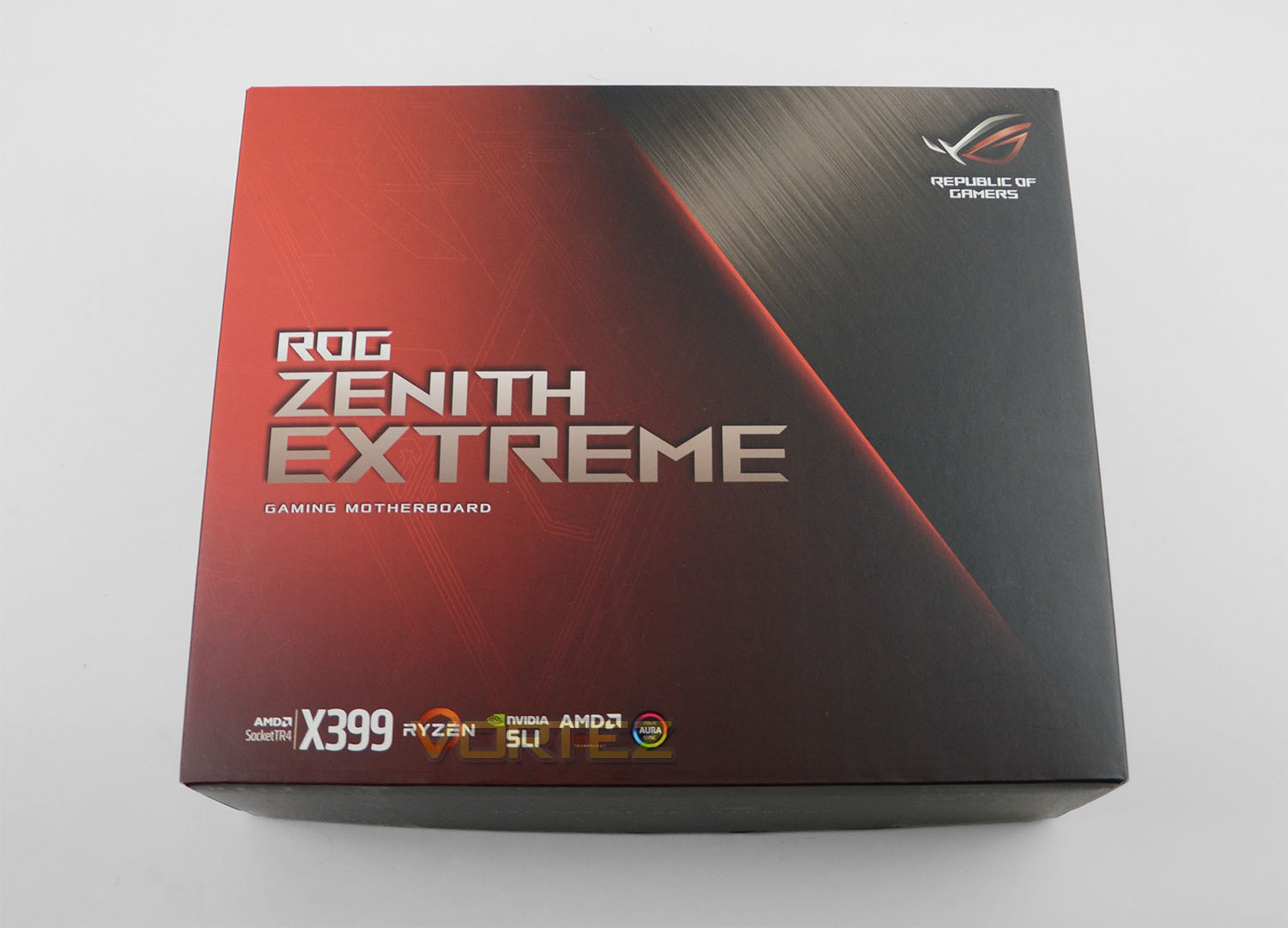
Simple style, belying the potential inside. ROG’s packaging for the X399 Zenith Extreme is understated as motherboards go, at least those not aimed at the business and enterprise sector. All you get is ROG’s red/black livery, the board game, and clarification of the chipset and various certifications.
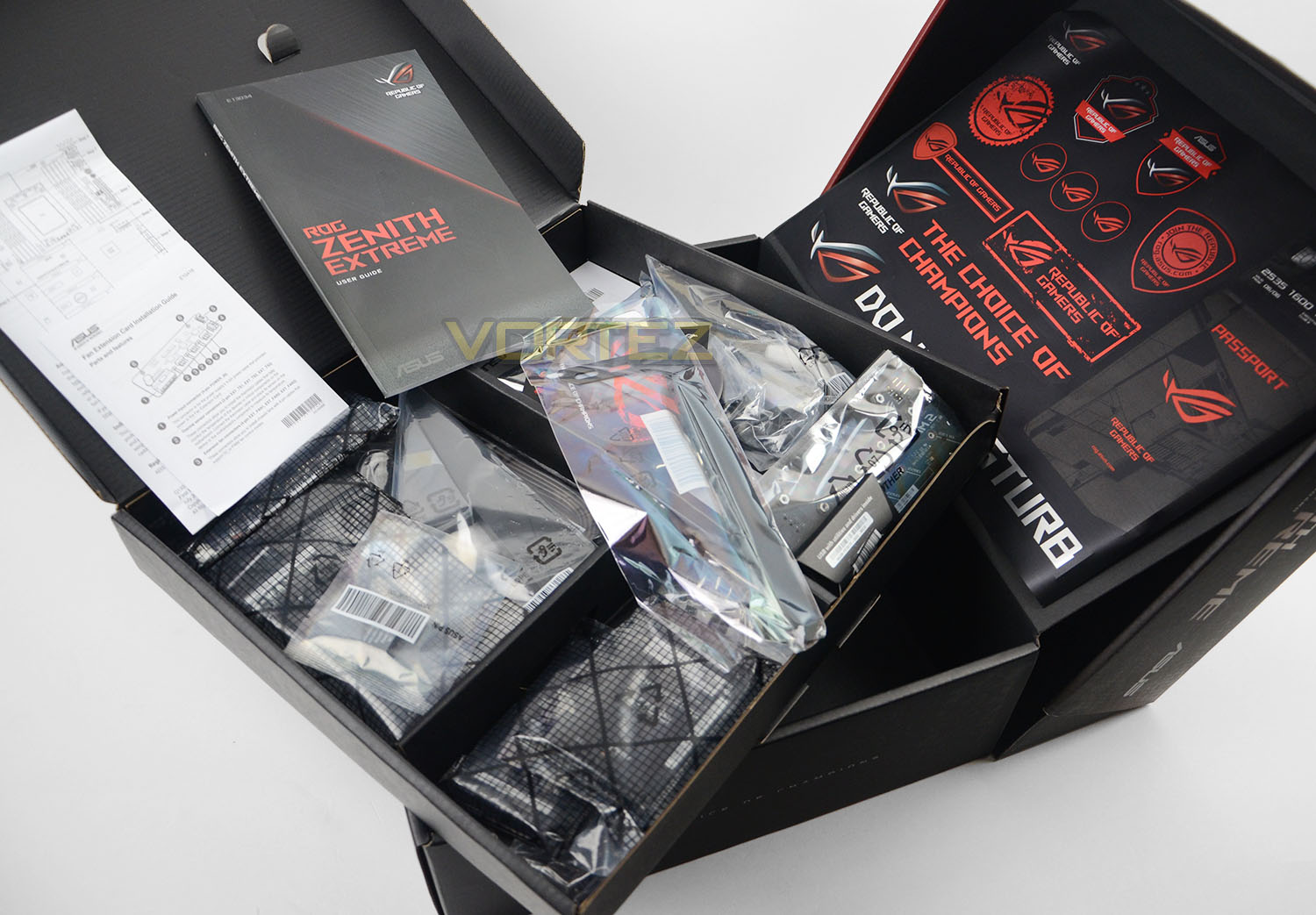
Opening up reveals the contents, and my are they juicy. Included is a 10Gbit Ethernet card (PCI-Express x4) which is a very premium add-on to the bundle, and a GPU support bracket for those weighty graphics cards. You’ll also be provided with the usual plethora of SATA 3 cables, Multi-GPU bridges and drivers on a USB stick.
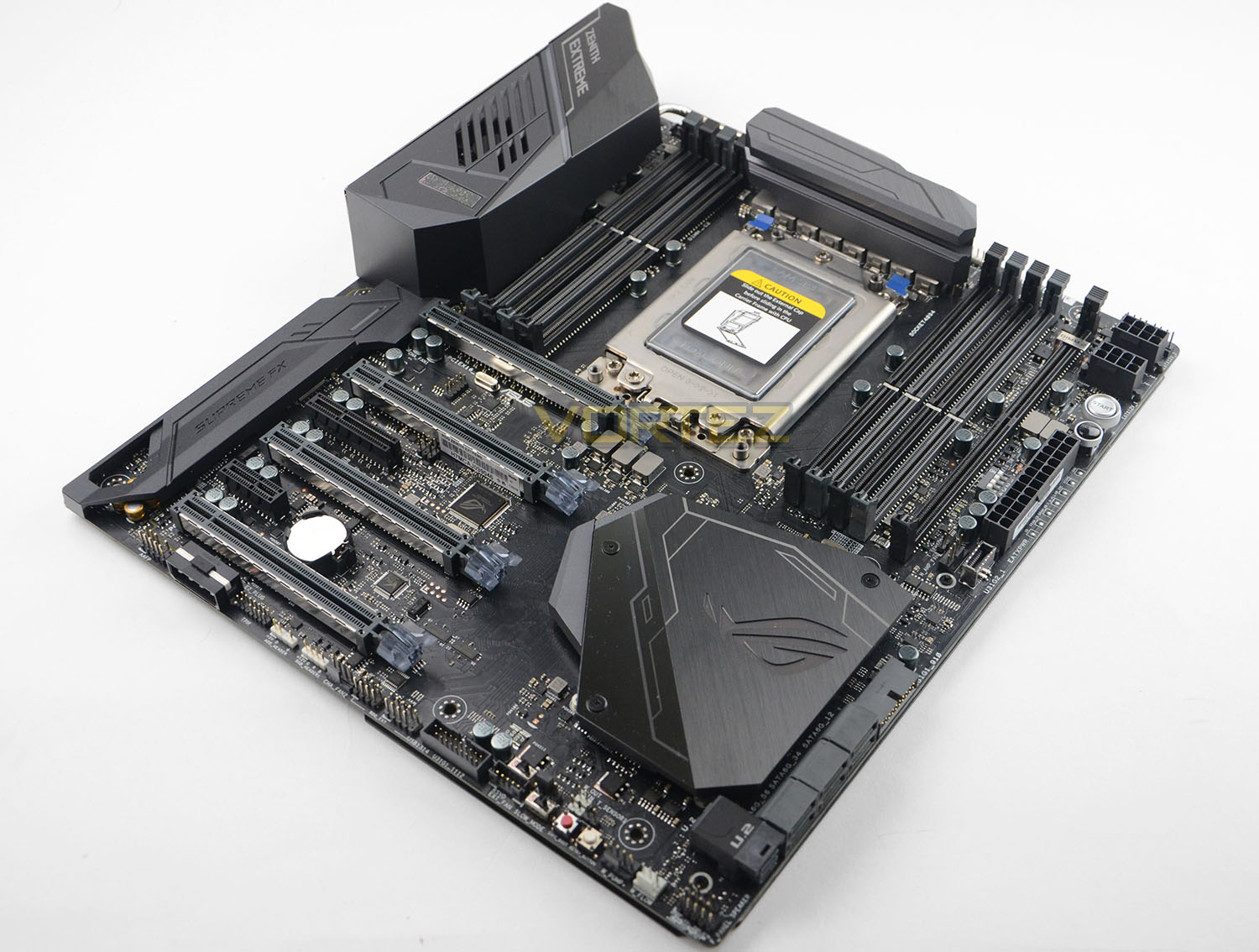
And that’s our first look at the Zenith Extreme in the silicon. As boards go it’s quite an unassuming one at first glance, eschewing the garish colour schemes of some high-end and gaming boards in favour of a generally matte black livery. Fear not however, the RGB LED lighting is ready to help you personalise the look one the system is installed and operational.
A Closer Look
As is tradition, let’s take a closer look from the top of the motherboard down.
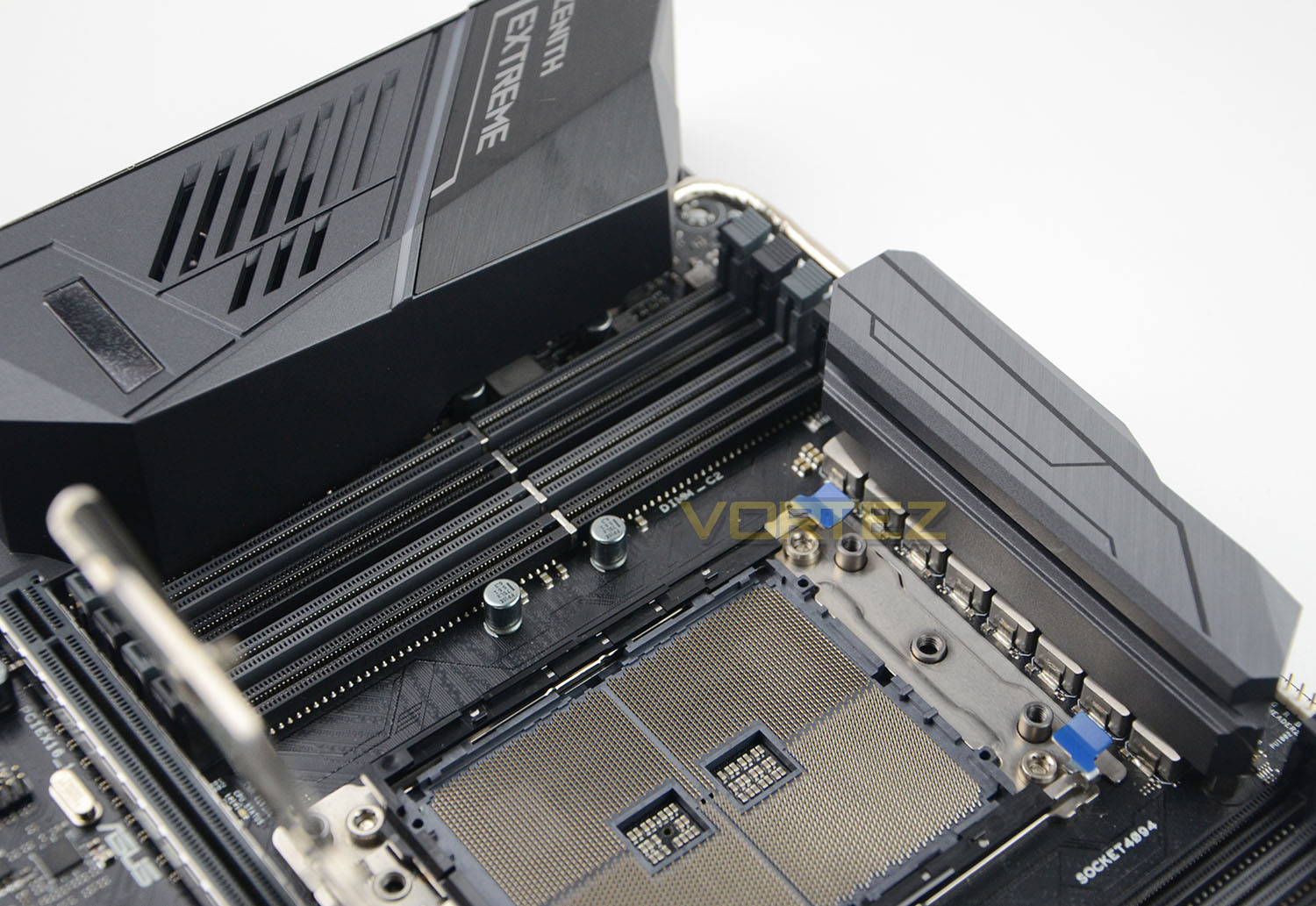
There’s AMD’s TR4 socket with the retention bracket lifted. In total there are a little over 4000 pins, the same number as their EPYC server socket, which will feed the two active Threadripper dies on each CPU package.
Also noteworthy is the very robust cooling solution for the VRMs arrayed around the socket. A sizeable heatpipe connects both heatsinks, with the one above the I/O zone being actively cooled thanks to a small fan. Assuming ROG have done their homework there should be no VRM-specific temperature issues when overclocking.
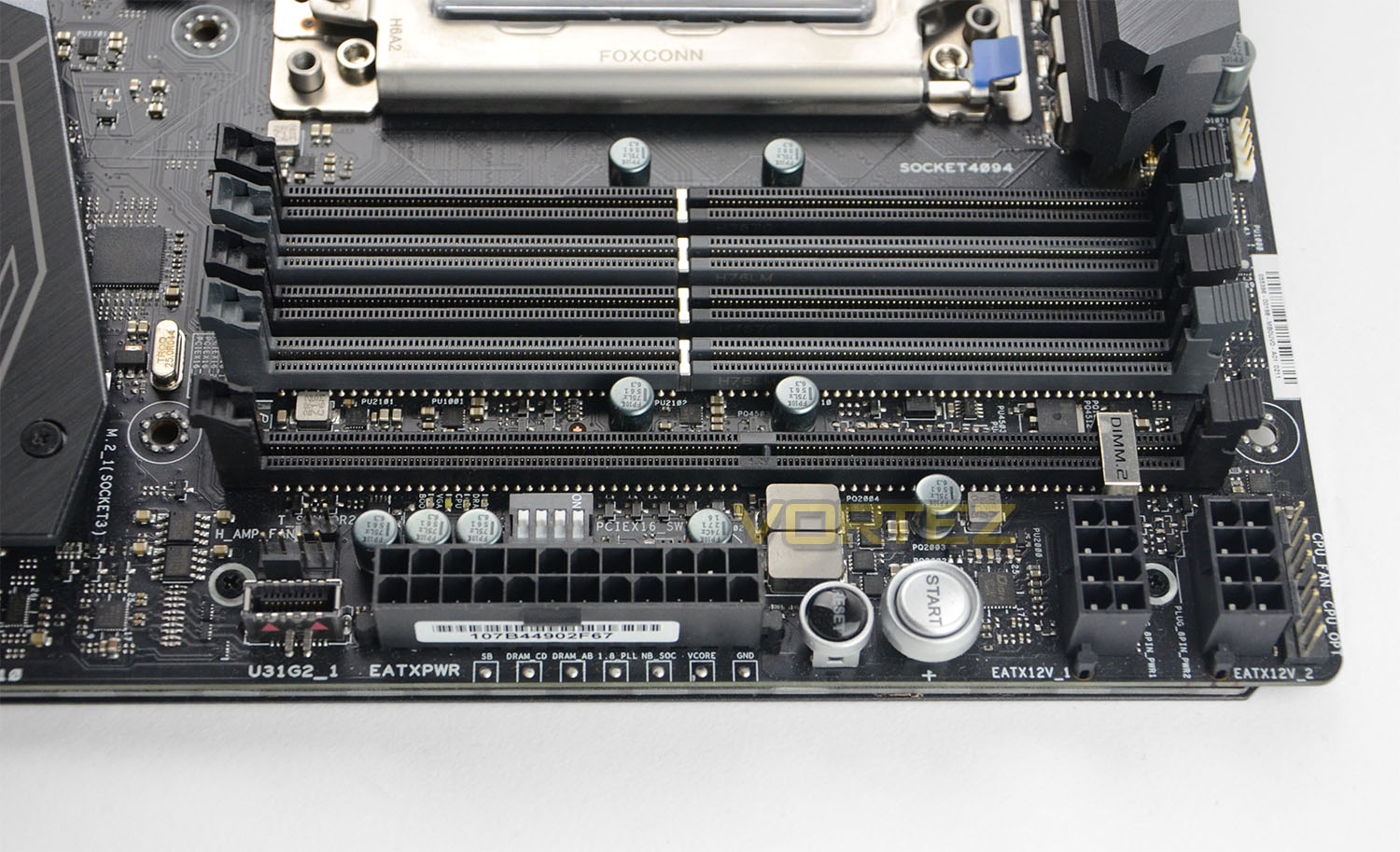
On the opposite side to the I/O we can see the four addition slots which allow the motherboard to support eight DDR4 DIMMs in quad-channel mode. You’ll also note a fifth slot slightly separated from the rest… that’s the ASUS DIMM.2 slot, which holds a bracket on which you can install M.2 storage drives. Currently something of a space-saving device, we wouldn’t be shocked if functionality was expanded out to include other features in the fullness of time.
This position zone is also the unorthodox position of two 8-pin CPU power connectors. Although physically distant from the socket compared to the usual place in the top-left of the board, it makes some sense from a space-saving perspective as well as improving cable management. Plus, it de-clutters the area directly around the CPU socket, which is no bad thing considering how exotic some of the cooling solutions may get.
Furthermore, note the PCI-Express DIP switches to selectively disable slots, potentially a lifesaver for troubleshooting multi-GPU configurations when one or more card is water-cooled. You’ll also note the compact USB 3.1 Gen2 Header, for the as-yet uncommon chassis which support it.
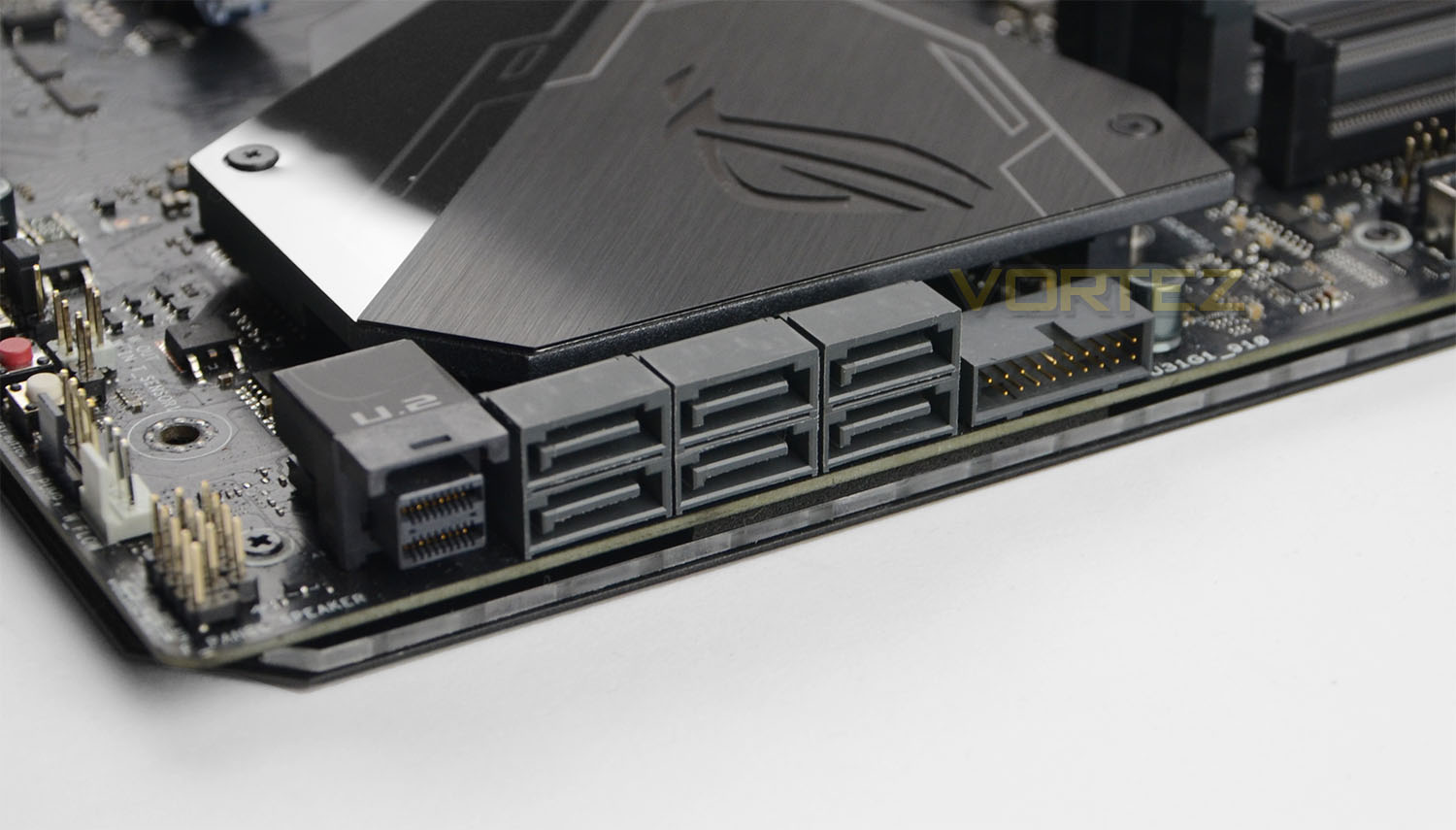
Moving further down the edge we come to the usual spot for storage I/O. Six SATA 3 and one U.2 port are located here – not exceptional amongst high-end motherboards – in addition to a USB 3.1 Gen1 front panel header. Under the ROG logo is another M.2 slot supporting drives up to 80mm long, effectively hidden away.
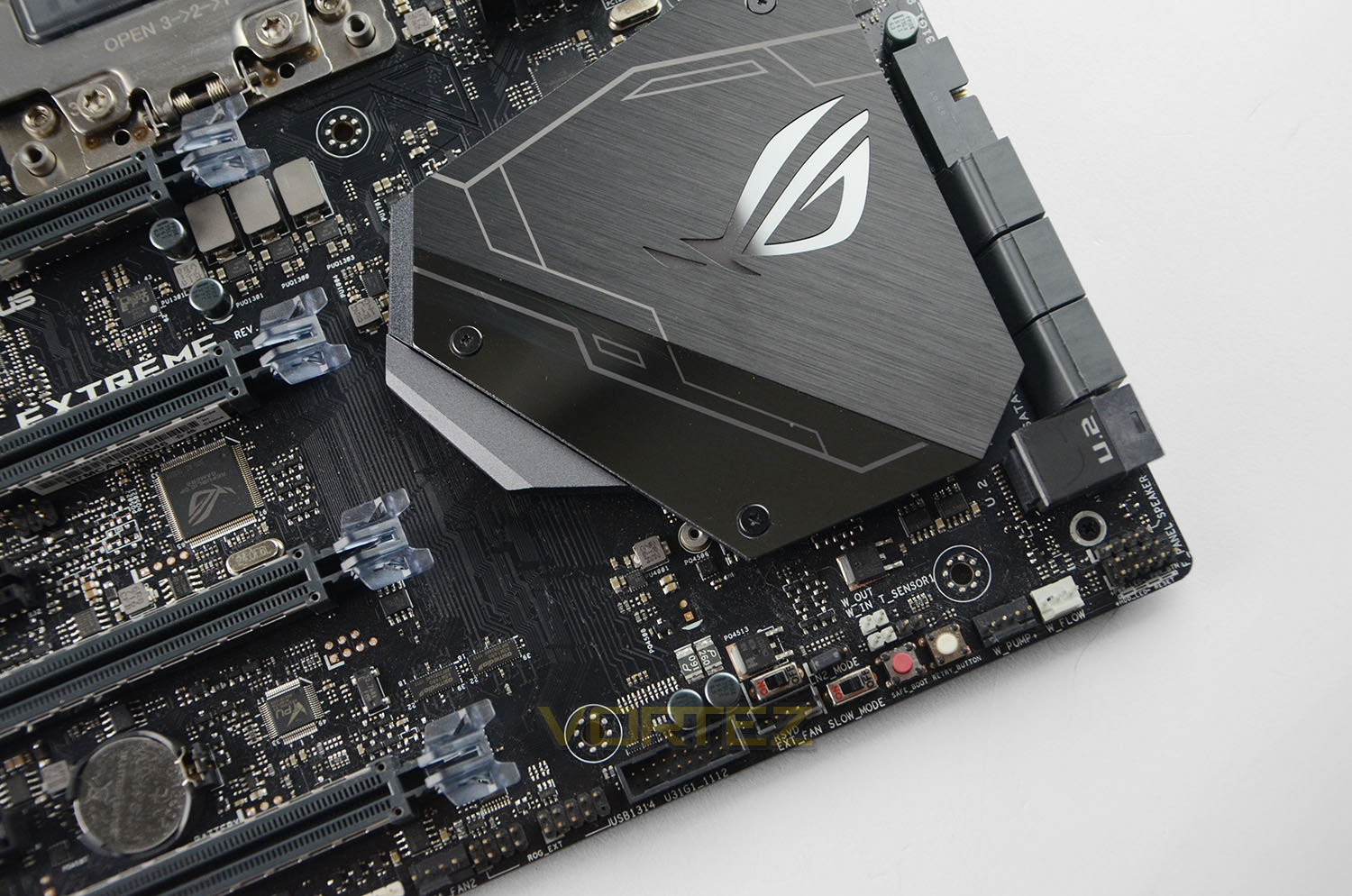
An overhead shot of the same zone more clearly shows the water cooling headers as well as a USB header. Of interest to extreme overclockers, this location also contains tools for LN2 OCs (including a switch to alleviate the ‘cold boot bug’) and a means for booting with known safe settings.
A Closer Look Pt. 2
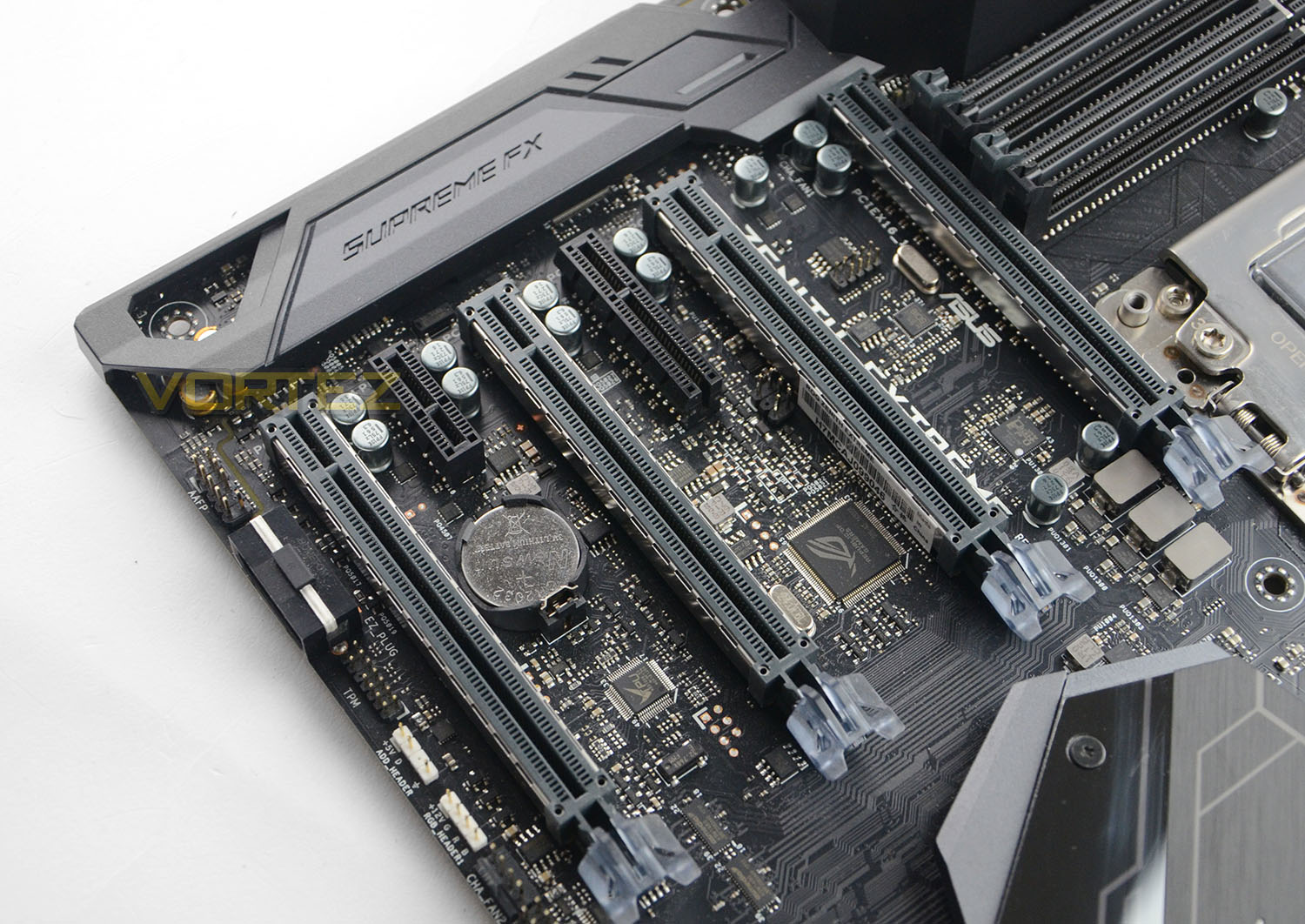
Next up on our tour is the PCI-Express slot zone. The presence of four x16 slots isn’t unique, but it is highly uncommon for more than one to be wired to support full x16 lane operation. For the Zenith Extreme, the first and third support x16, whilst the second and fourth support x8; however thanks to Threadripper CPUs offering 64 PCI-Express lanes, support for a simultaneous x16/x8/x16/x8 operation is possible.
All four long PCIe slots are reinforced by ASUS SafeSlot, which provides additional strength rigidity for those pesky heavy graphics cards.
The shielded SupremeFX zone is where ASUS locate the majority of audio components, which are typically shielded as much as possible from additional electrical noise. Meanwhile towards the bottom there are two RGB headers, as well as a single 4-pin chassis fan header.
Interestingly, there’s no additional provision for motherboard-supplied PCI-Express power (either through 6-pin PCIe, 4-pin Molex or SATA power). Although not strictly necessary, it is notable given how common that feature is for high-end overclocking motherboards. Clearly they have a lot of confidence in their power delivery system.
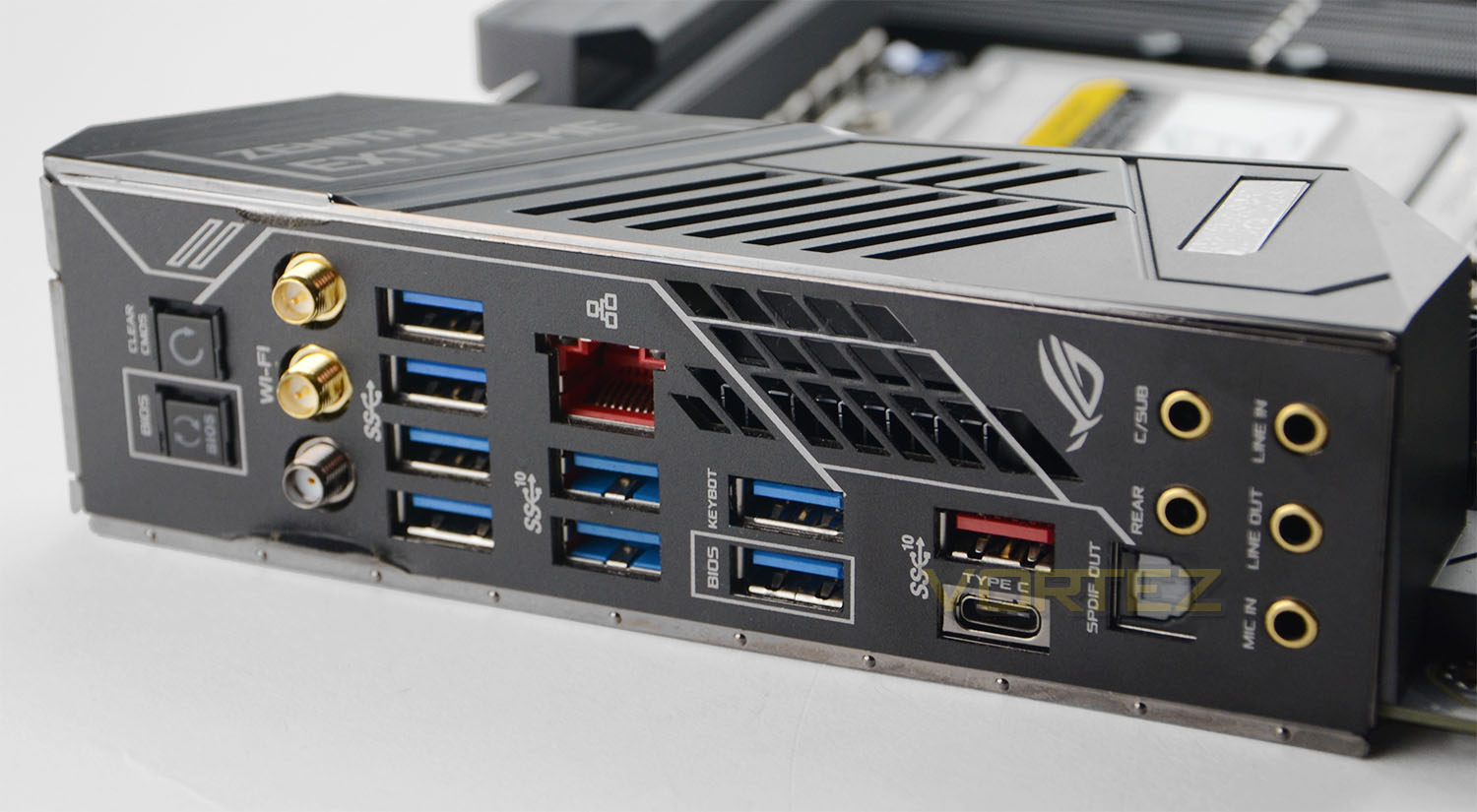
Next up there’s the rear I/O, and we must comment on how nice it is not to have to fiddle with an I/O shield when installing the Zenith into a chassis. Yes, the Zenith is a premium motherboard and you should expect premium features like this, but even so it’s a welcome inheritance from the ASUS signature Deluxe range.
As well as a surfeit of USB 3.1 ports there is a Gigabit Ethernet port (for 10Gbe you’ll need to use the suppled add-in card), Wi-Fi antenna connections, USB 3.1 Type-C and 7.1 channel audio. BIOS Flash is supported in a specific USB port, and one is also reserved for the keyboard (likely making it easier for the UEFI to pick it up).
Admittedly we’re still not sold that including CMOS Clear and BIOS Switch buttons are all that sensible on the rear IO panel, but they are there and easy to access.
Also present is additional venting, helping the fan do it job.
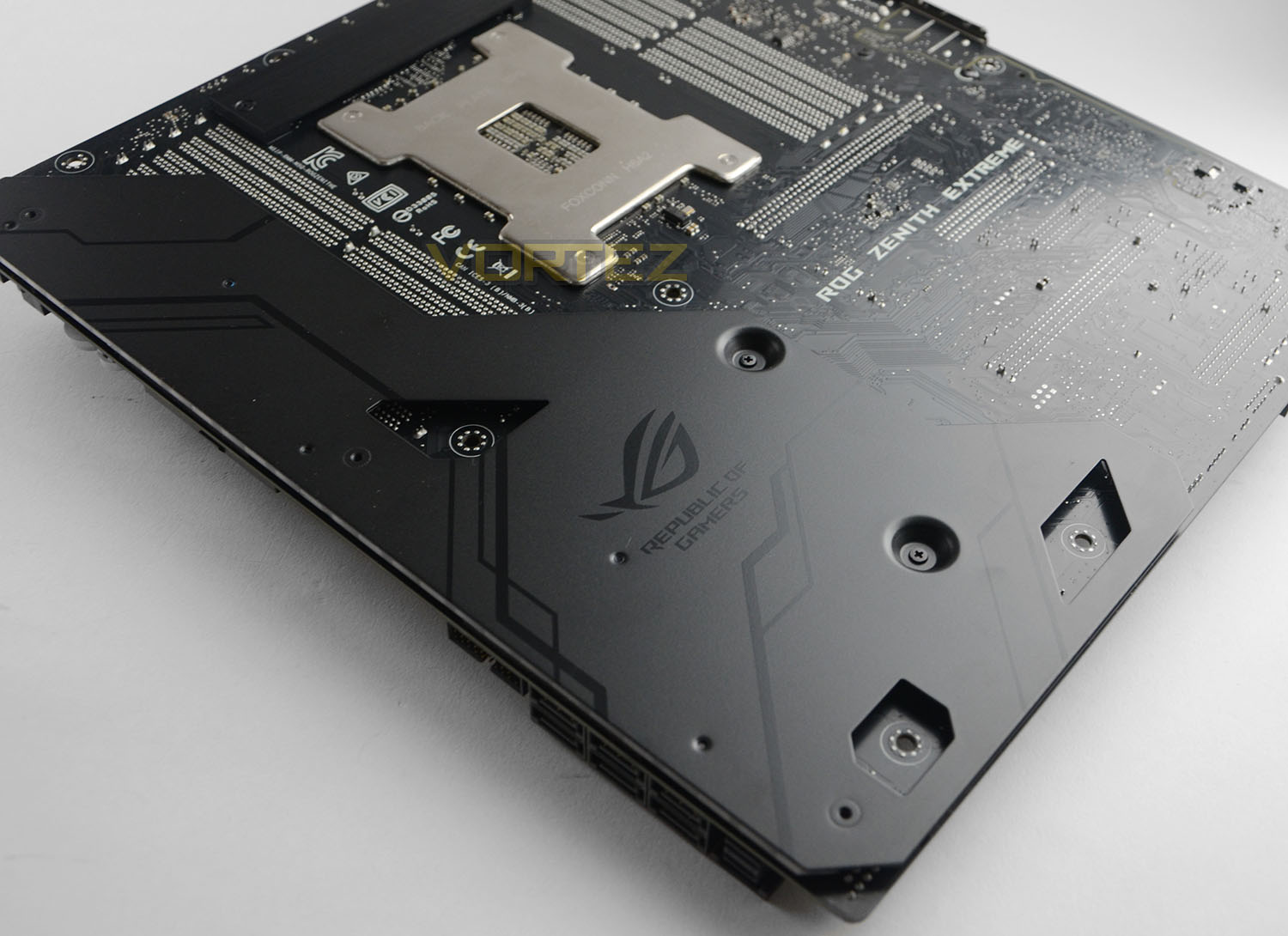
Finally, a black backplate adds rigidity to the motherboard in what is otherwise quite a vulnerable zone, and it looks pretty attractive to boot. You may also consider it as a convenient mounting location for RGB LED strips, providing ambient lighting that isn’t visible directly and also doesn’t need to be attached to the motherboard PCB directly.
All in all, exactly what you would expect: a thoroughly premium motherboard with high-end features and superior layout. The X399 Zenith Extreme is an EATX motherboard and so will need a larger than ATX chassis to accommodate it, but these are neither difficult to source nor terrible costly.
Test Setup & Software
CPU being tested
AMD Ryzen Threadripper (3.4GHz) X1950
TEST SETUP
Cooling Corsair Hydro Series H115i
Motherboard ASUS ROG X399 Zenith Extreme
Memory 32GB Corsair Vengeance LPX 3000MHz
Graphics Radeon RX 480 8GB
Storage Corsair LX 512GB SSD
PSU Corsair RM 1000 80 Plus Gold Certified PSU
Monitor AOC U2879VF
Capture Device Epiphan AV.iO 4K
COMPARED AGAINST
AMD Ryzen 7 1800X 3.6GHz) Summit Ridge
AMD FX-8350 (4.0GHz) PileDriver
Intel Core i7-7900X (3.3GHz) Skylake-X
Intel Core i7-7800X (3.5GHz) Skylake-X
Intel Core i5-7700K (4.2GHz) Kaby Lake
Intel Core i7-6950X (3.0GHz) Broadwell-E
Intel Core 7-6900K (3.2GHz) Broadwell-E
BENCHMARKS
Cinebench R15 – CPU/OpenGL Score
x264 HD 4.0 – 1st and 2nd pass encoding
SiSoftware SANDRA – CPU & Memory benchmarks
POV-RAY – CPU benchmarks
TrueCrypt – CPU benchmarks
AIDA64 – CPU benchmarks & Memory
PCMark 8 – Creative & Photoshop
PCMark 10 – Extended
3DMark FireStrike – 3D Benchmark
3DMark TimeSpy – 3D Benchmark
Games – Rise of the Tomb Raider & Total War: WARHAMMER
OTHER SOFTWARE
Temperature Analysis: Core Temp
Stress Testing Software: AIDA64 Stability Test
CPU Specification Monitoring: CPU-Z
Temperatures & Overclocking
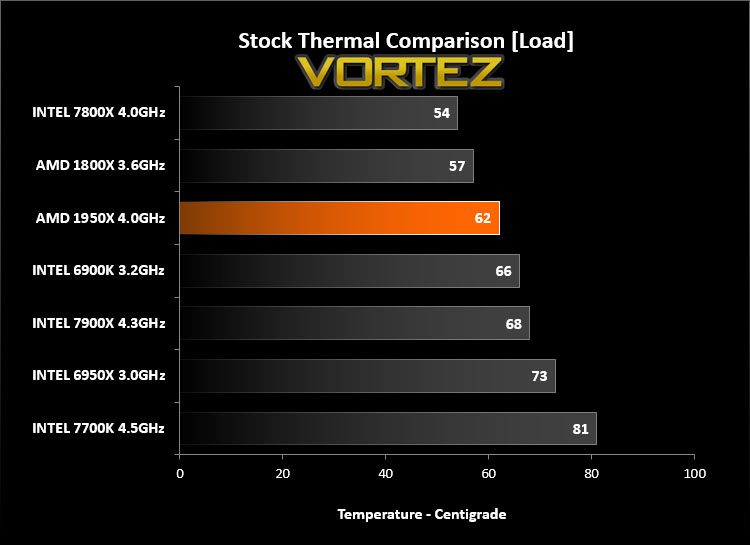
Above are the temperatures for each of the CPUs being tested – all at their stock frequencies but fully loaded. Along with Threadripper we’ve included some other HEDT processors and the current mainstream chips from Intel and AMD by way of the Core i7-7700K and Ryzen 7 1800X.
Due to differences in the manner in which temperatures are measured across CPU architectures, direct comparison between different CPUs can be a little misleading. Nonetheless AMD has done an excellent job with the thermal design for the 1950X – against other HEDT processors, this Threadripper model is able to achieve relatively low temperatures despite being populated by more cores/threads and operating at robust reference frequencies.
ASUS ROG for their part have contributed some excellent VRM cooling. Although not captured in our results, VRMs remained well under control in normal operation and during overclocking thanks to the robust heatsink/heatpipe arrangement as well as the integrated active (fan) cooling for these components.
OVERCLOCKING
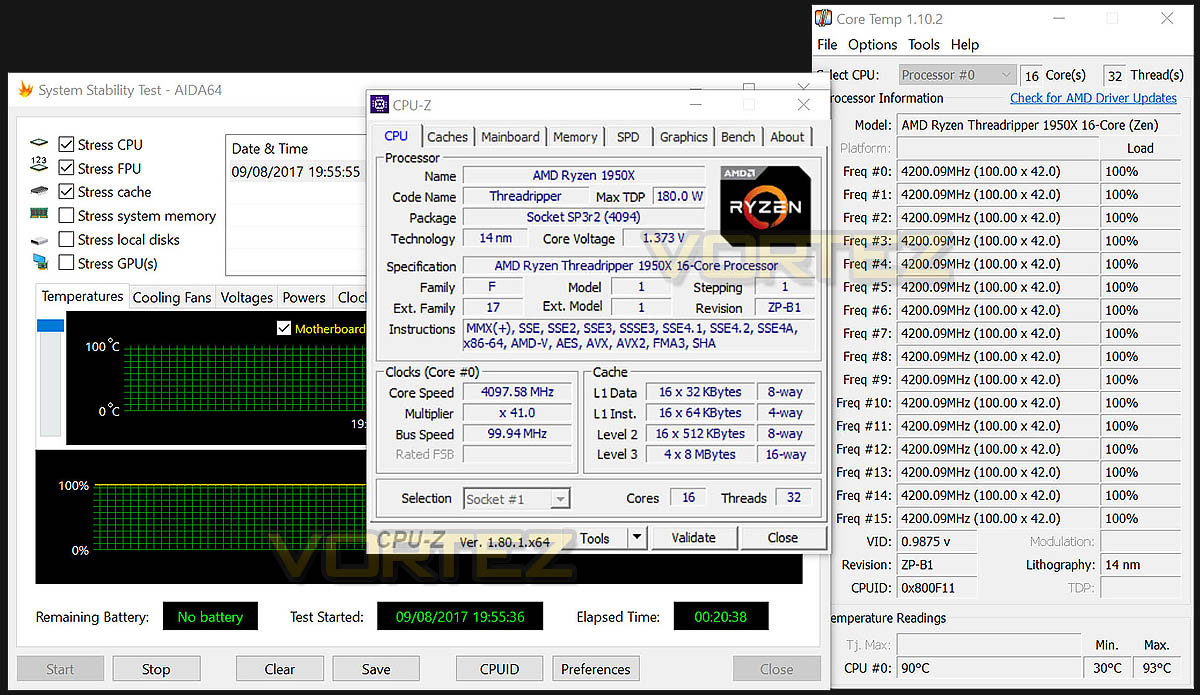
Working with the X399 Zenith Extreme has allowed us to fine tune small and intricate variables which would otherwise be absent on other boards. Our best achievement saw us reach 4.2GHz with the 1950X – impressively up from the 3.4GHz base clock – using 1.33v. Boosting the CPU to this frequency and voltage meant that the temperature increases to 90C after a substantial system load of 20 minutes, indicating that more robust water cooling is necessary with our CPU to push it further or maintain this level on a 24/7 period.
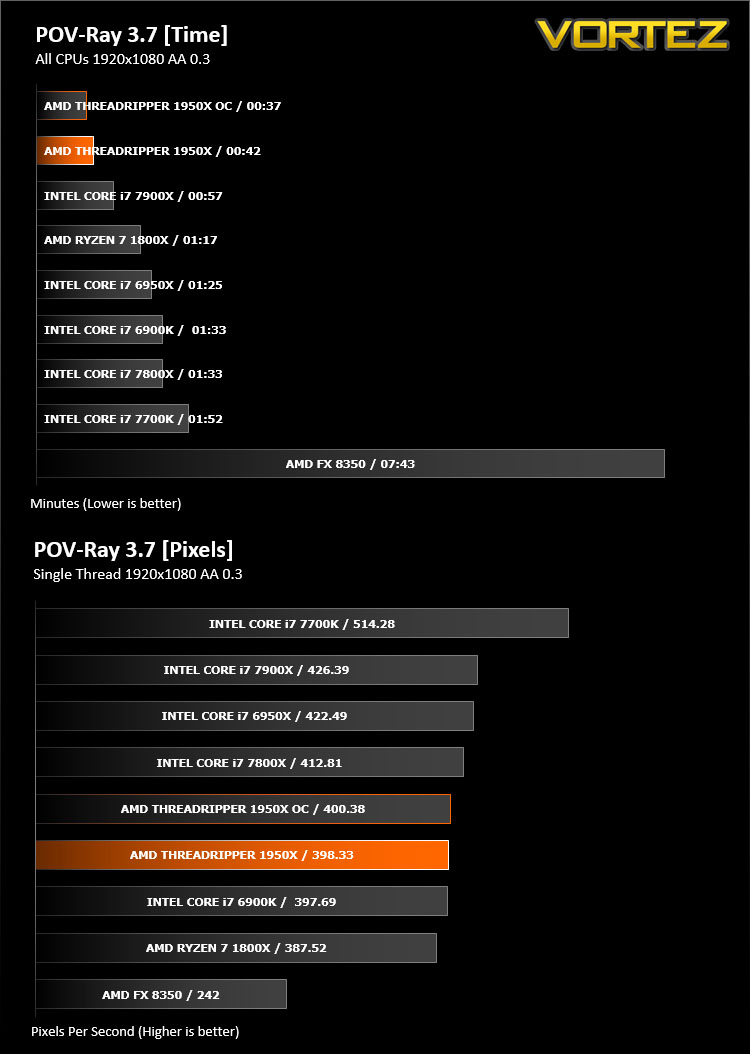
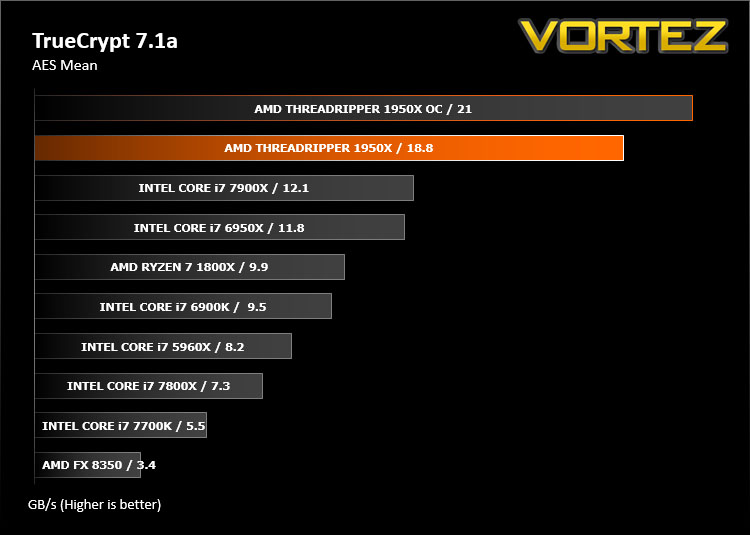
In this review we have benchmarked the 1950X at stock settings and overclocked, giving you a good indication as to the benefits of using this sort of overclock in synthetic benchmarks and day-to-day tasks.
Ray Tracing Performance – POV-Ray 3.7
Persistence of Vision Raytracer’s PovRay is a free and open source 3D animator application with versions for computers with different operating systems.
This product allows users to build their custom 3D worlds with excellent quality despite their computer’s hardware. It has adjustable options for levels of radiance, refraction, and reflection. Calculation time may vary depending on the computer model, but PovRay can adapt to many computer builds, and is supported by the open source community.
This product allows users to build their custom 3D worlds with excellent quality despite their computer’s hardware. It has adjustable options for levels of radiance, refraction, and reflection. Calculation time may vary depending on the computer model, but PovRay can adapt to many computer builds, and is supported by the open source community.
AES Encryption Performance – TrueCrypt 7.1a
TrueCrypt is a discontinued source-available freeware utility used for on-the-fly encryption (OTFE). It can create a virtual encrypted disk within a file or encrypt a partition or (under Microsoft Windows except Windows 8 with GPT) the entire storage device (pre-boot authentication).
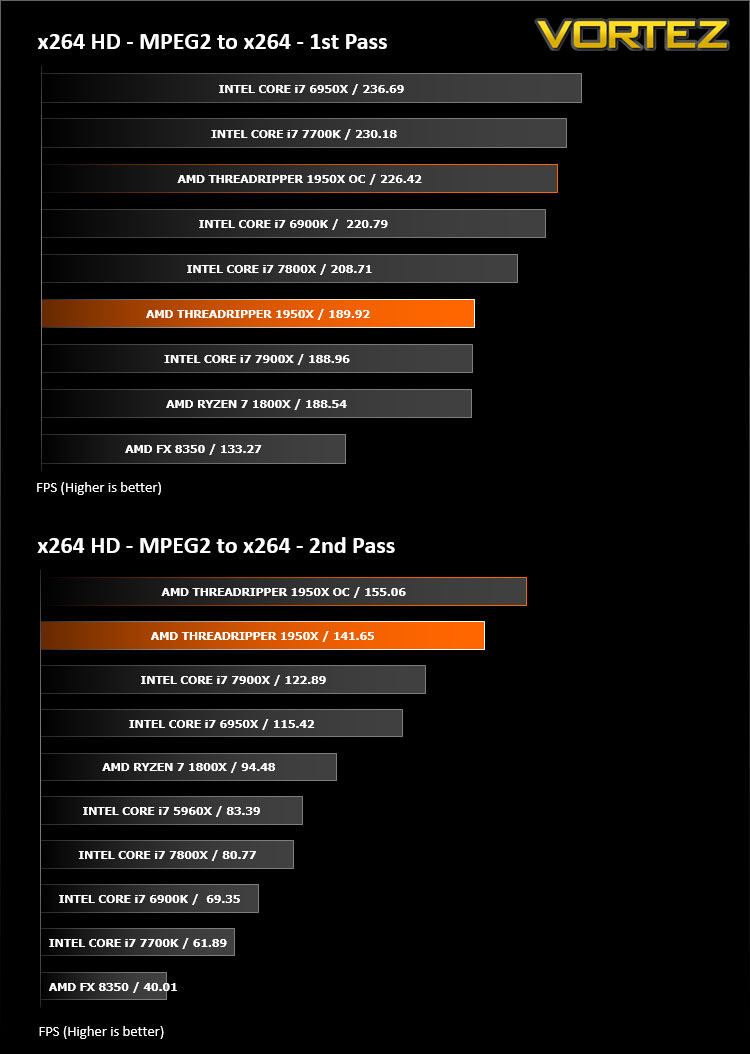
Encoding Performance – X264 HD
Simply put, this test measures how fast your machine can encode a short, DVD quality MPEG-2 video clip into a high-quality x264 video clip. What’s x264, you ask? It’s more or less the next-generation Xvid/DivX codec. I think it’s ideal for a benchmark because the application (x264.exe) reports fairly accurate compression results (in frames per second) for each pass of the video encoding process, and it uses multi-core processors very efficiently.
x264 HD gives results for 2 passes when compressing an MPEG-2 clip into x264. It presents 4 separate results for each pass giving a total of 8 – all results are given in FPS. For each pass I have averaged out the results.
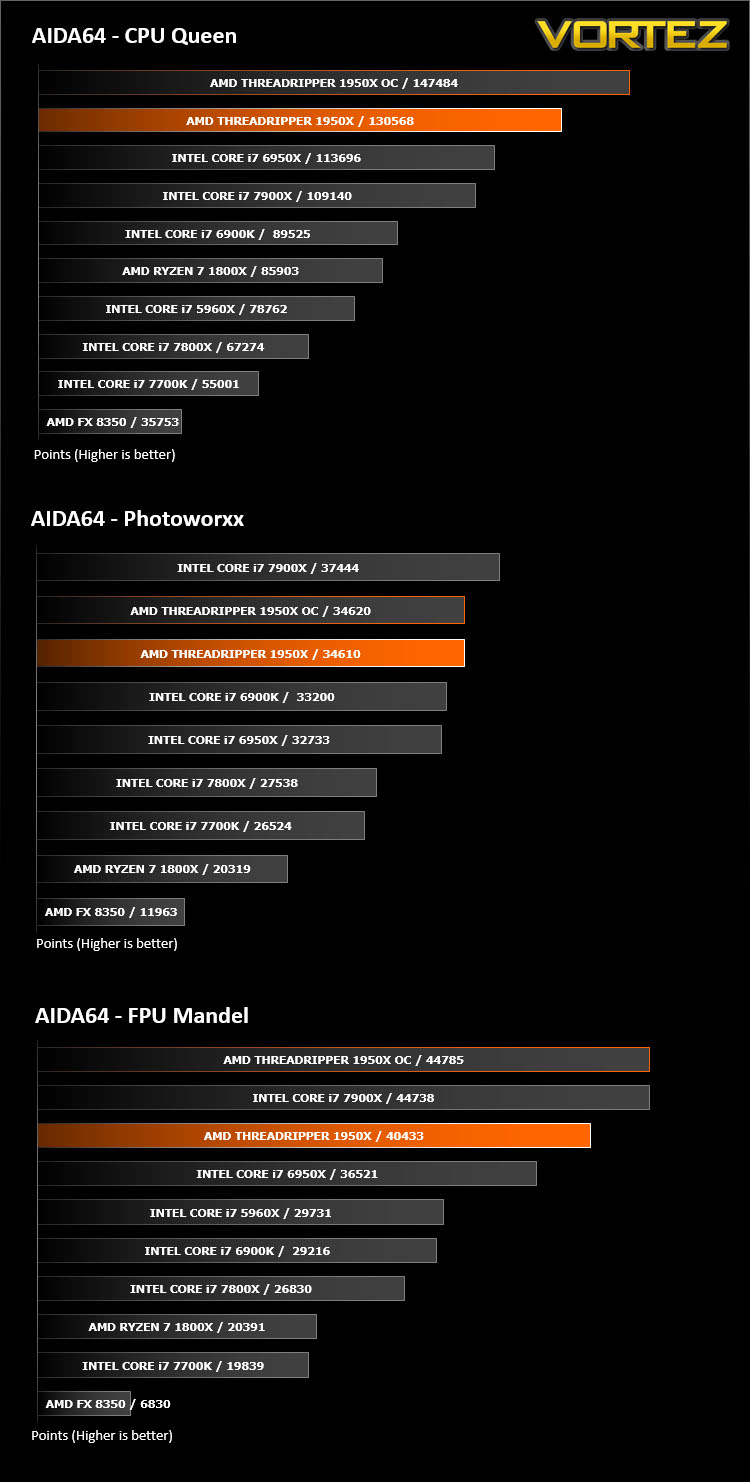
Processing Features Performance – AIDA64
AIDA64 Product Page
This simple integer benchmark focuses on the branch prediction capabilities and the misprediction penalties of the CPU. It finds the solutions for the classic “Queens problem” on a 10 by 10 sized chessboard. At the same clock speed theoretically the processor with the shorter pipeline and smaller misprediction penalties will attain higher benchmark scores. For example — with HyperThreading disabled — the Intel Northwood core processors get higher scores than the Intel Prescott core based ones due to the 20-step vs 31-step long pipeline. CPU Queen test uses integer MMX, SSE2 and SSSE3 optimizations.
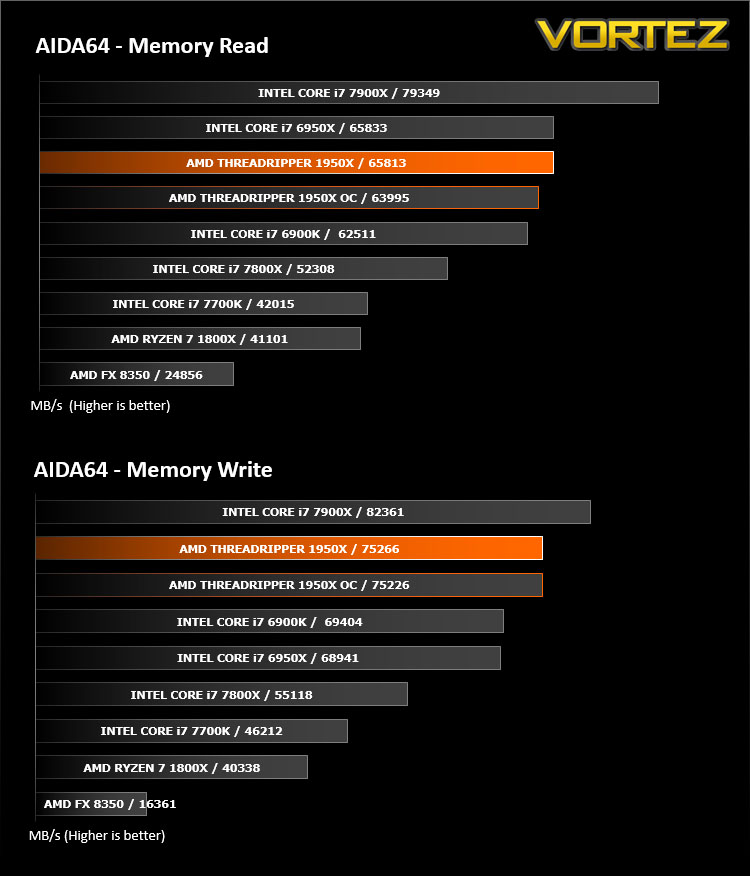
Memory Transfer Performance – AIDA64
AIDA64 Product Page
This simple integer benchmark focuses on the branch prediction capabilities and the misprediction penalties of the CPU. It finds the solutions for the classic “Queens problem” on a 10 by 10 sized chessboard. At the same clock speed theoretically the processor with the shorter pipeline and smaller misprediction penalties will attain higher benchmark scores. For example — with HyperThreading disabled — the Intel Northwood core processors get higher scores than the Intel Prescott core based ones due to the 20-step vs 31-step long pipeline. CPU Queen test uses integer MMX, SSE2 and SSSE3 optimizations.
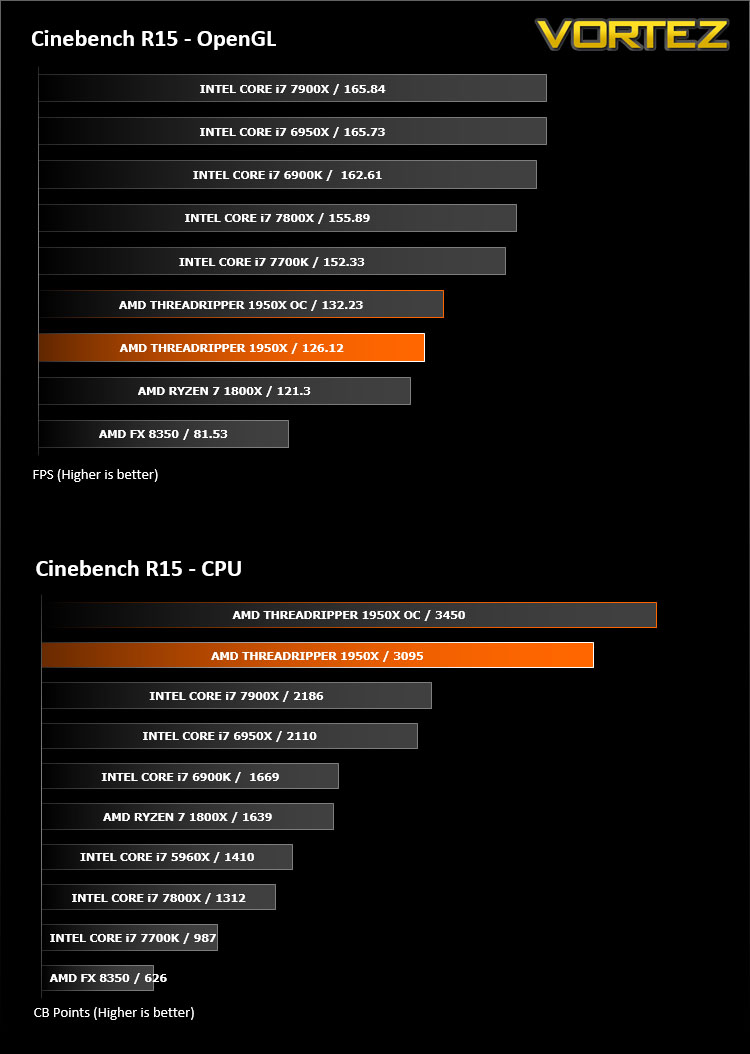
Processing Power Performance – Cinebench R15
CINEBENCH can measure systems with up to 64 processor threads. This test scene contains approximately 2,000 objects which in turn contain more than 300,000 polygons in total, and uses sharp and blurred reflections, area lights, shadows, procedural shaders, antialiasing, and much more. The result is displayed in points (pts). The higher the number, the faster your processor.
Bandwidth Performance – SiSoftware SANDRA
3DMark 11 Product Page
SANDRA isn’t always a benchmark that is included in hardware reviews but I believe it shouldn’t be ignored. SANDRA provides a vigorous package that tests your system in a rather large array of benchmarks. There are many aspects of benchmark that can be executed. We will be considering – CPU and memory tests.
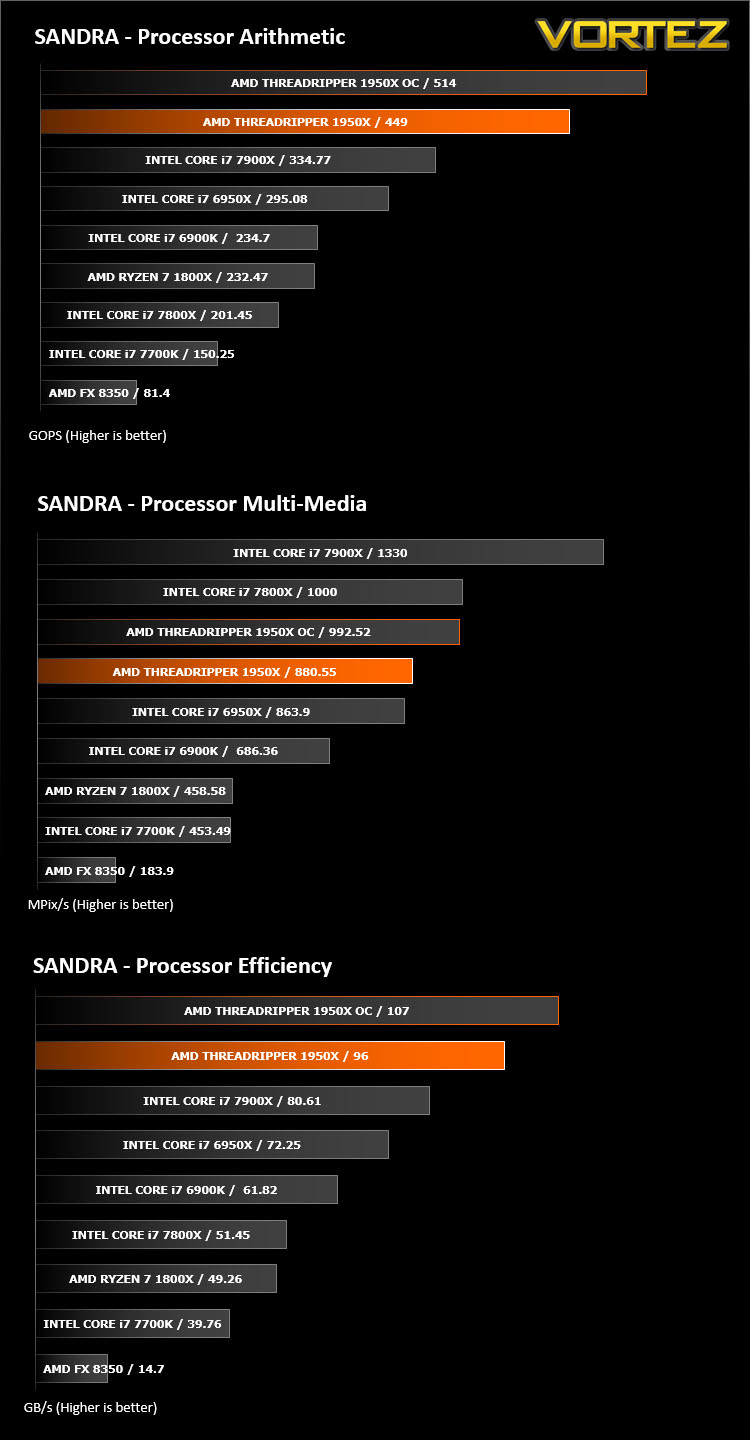
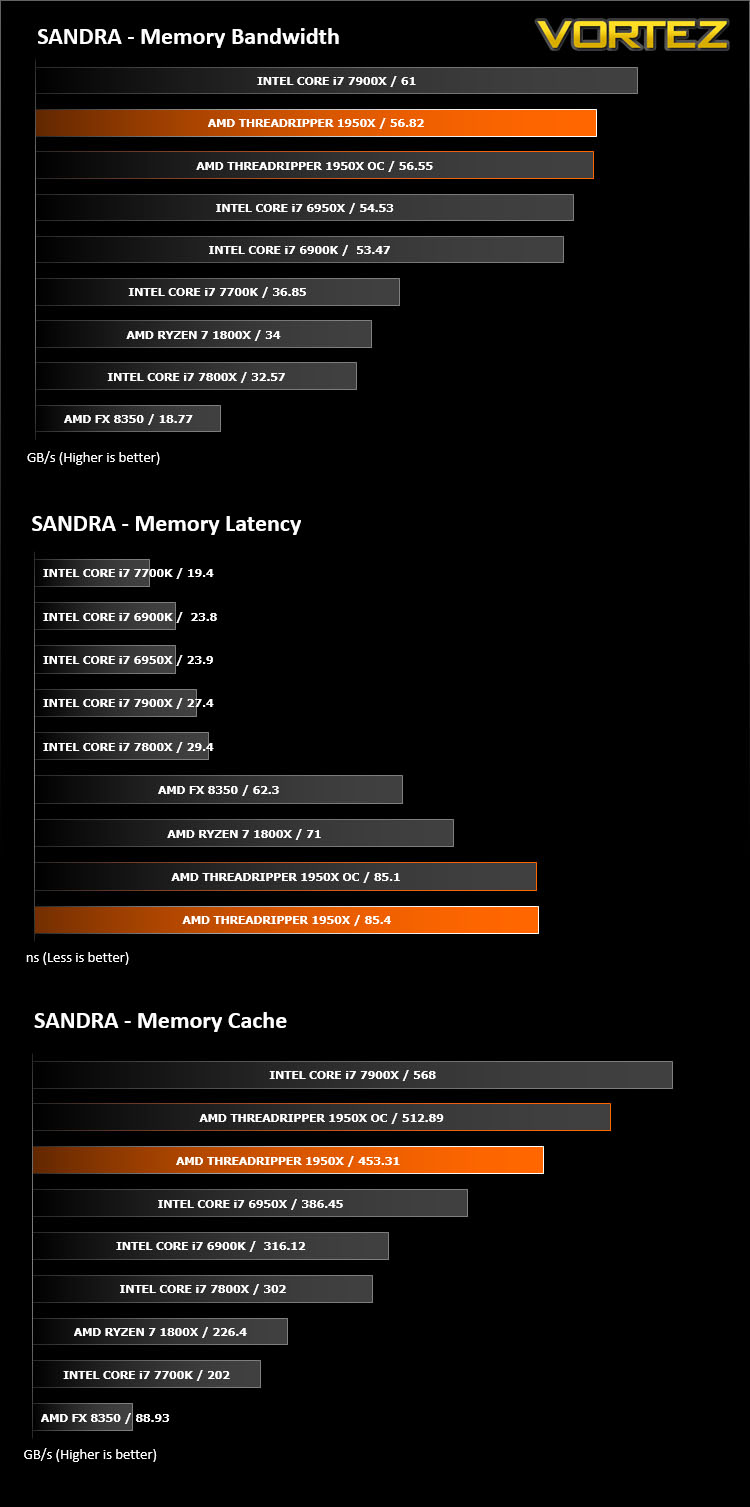
Image Editing Performance – PCMark 8 Photoshop
PCMark 8 Product Page
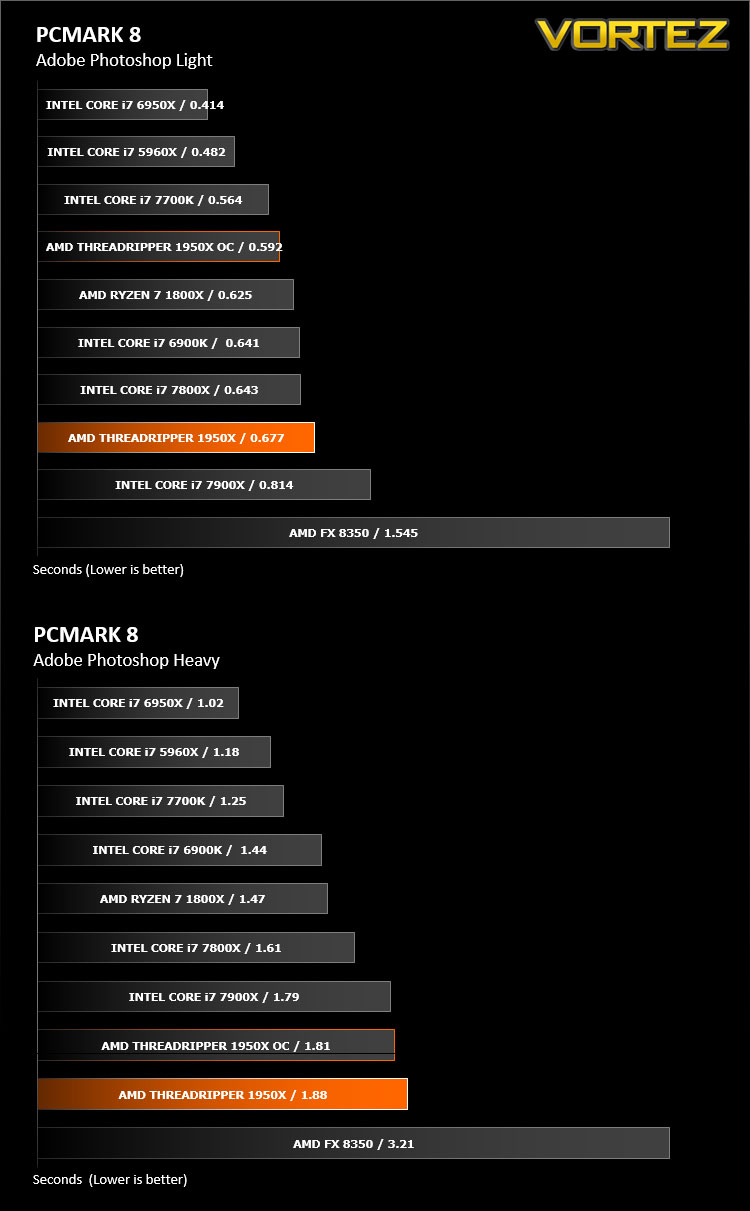
Developed in partnership with Benchmark Development Program members Acer, AMD, Condusiv Technologies, Dell, HGST, HP, Intel, Microsoft, NVIDIA, Samsung, SanDisk, Seagate and Western Digital, PCMark 8 is the latest version in FutureMark’s popular series of PC benchmarking tools. Improving on previous releases, PCMark 8 includes new tests using popular applications from Adobe and Microsoft.
Overall System Performance – PCMark 8 & PCMark 10
PCMark 8 Product Page
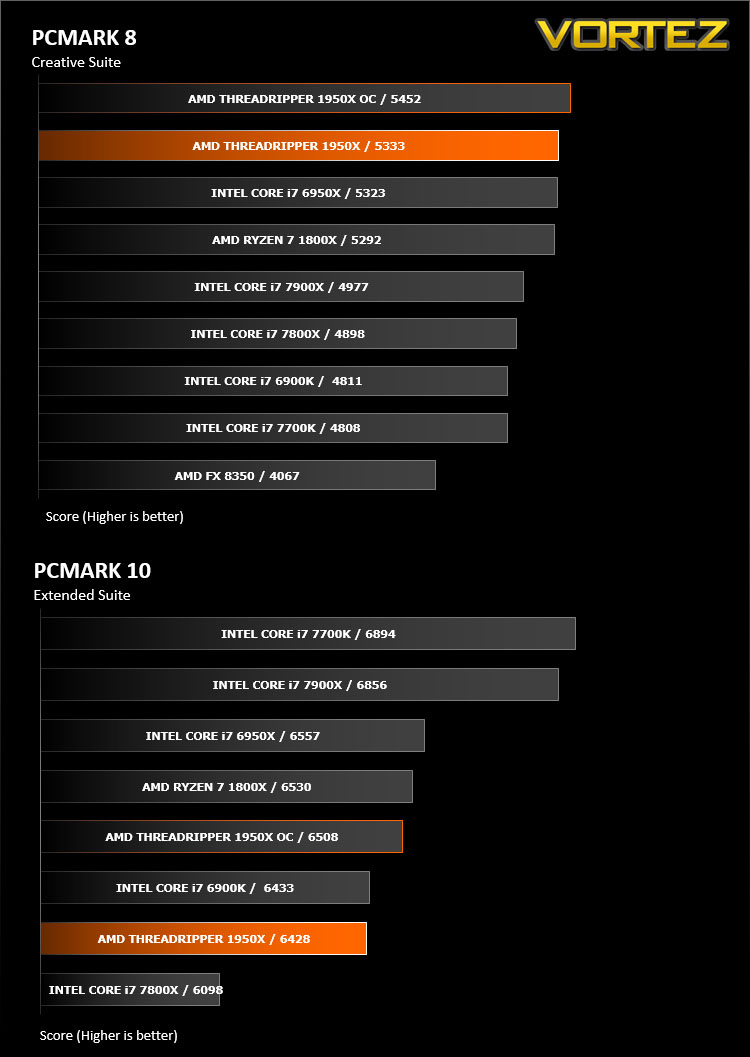
Developed in partnership with Benchmark Development Program members Acer, AMD, Condusiv Technologies, Dell, HGST, HP, Intel, Microsoft, NVIDIA, Samsung, SanDisk, Seagate and Western Digital, PCMark 8 is the latest version in FutureMark’s popular series of PC benchmarking tools. Improving on previous releases, PCMark 8 includes new tests using popular applications from Adobe and Microsoft.
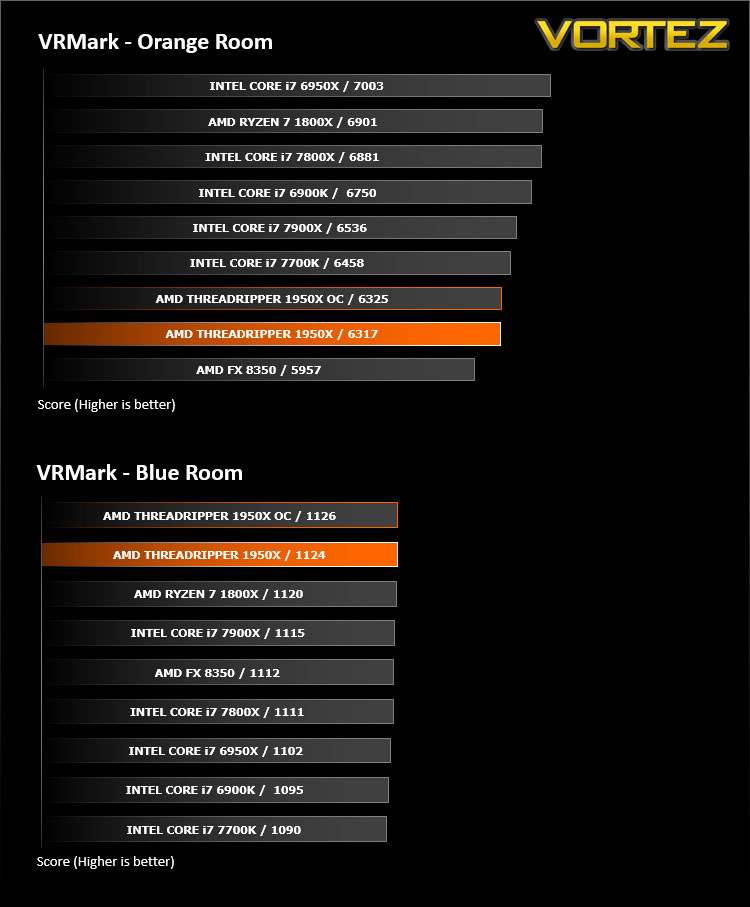
VR Performance – VRMark
VRMark Product Page
VRMark includes two VR benchmark tests that run on your monitor, no headset required, or on a connected HMD. At the end of each test, you’ll see whether your PC is VR ready, and if not, how far it falls short.
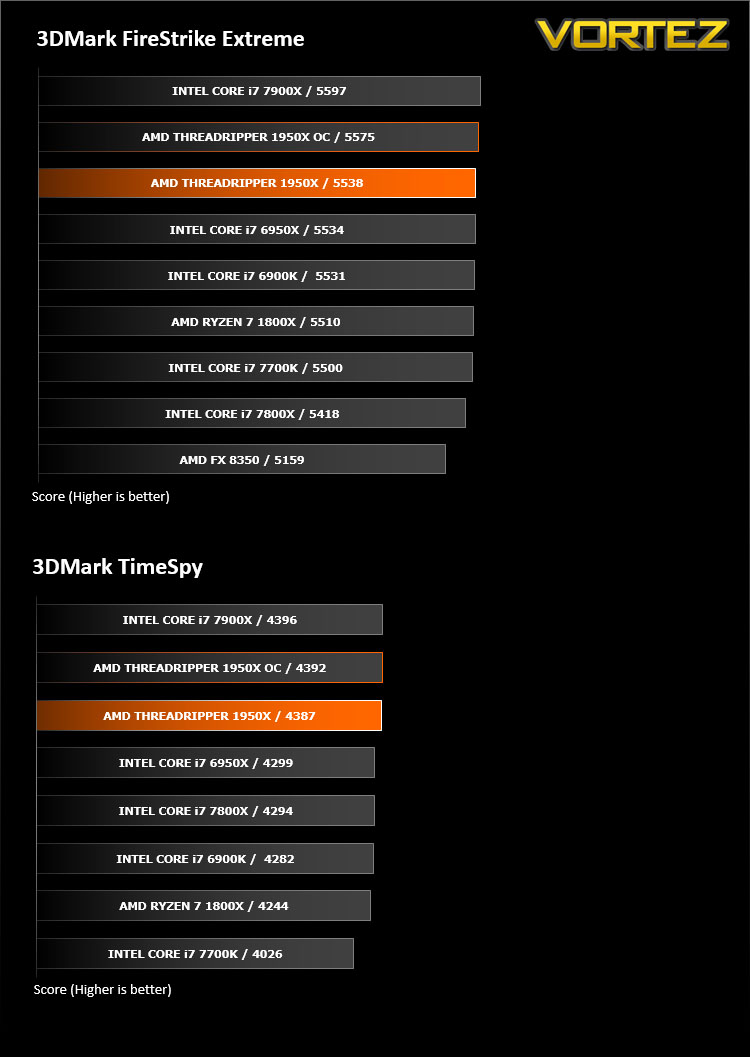
3D Performance – 3DMARK FireStrike & TimeSpy
3DMark FireStrike Product Page
Fire Strike is our new showcase DirectX 11 benchmark designed for high-performance gaming PCs. It is our most ambitious and technical benchmark ever, featuring real-time graphics rendered with detail and complexity far beyond what is found in other benchmarks and games today. Fire Strike will only be available in the Windows editions of 3DMark initially.
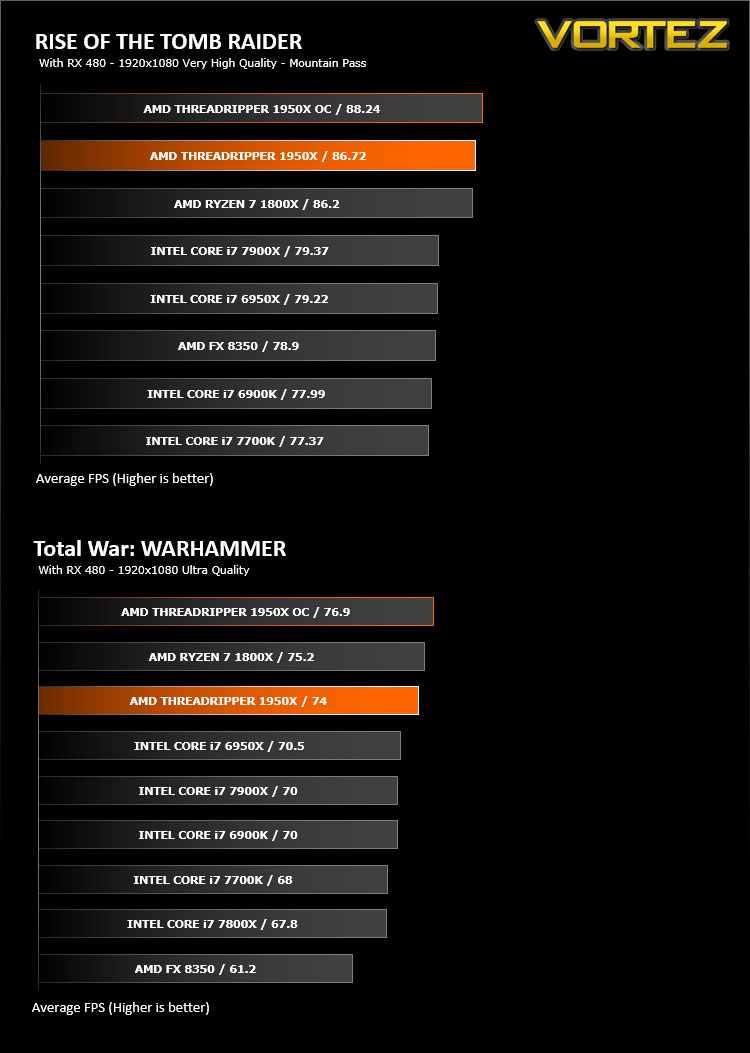
Gaming Performance – Tomb Raider & Total War: WARHAMMER
It’s important for us to perform a number of game benchmarks as well as the synthetic tests because gamers will want to know if there are any significant benefits. So here we have two recent gaming titles benchmarked with a Radeon RX 480 installed.
Conclusion
Motherboard options for AMD’s Threadripper/X399 platform remain somewhat sparse, with even a major player like ASUS only releasing two in the months since its launch. This likely shouldn’t be seen as a reaction to the capabilities of the platform, but rather a relatively small user-base which cannot at the moment justify the scores of SKUs you expect from a more mainstream segment. The Zenith Extreme targets the premium end of even this rarefied spectrum of users, and we urge you to approach it through that lens.
With that caveat out the way, the ROG X399 Zenith Extreme is unlikely to disappoint anyone who chooses it as the centre-piece of their AMD Threadripper system. Charged with producing an AMD alternative to the X299 Rampage VI Extreme, the Zenith pushes the boat out with an immense feature-set to rival any motherboard on the market today, and surpass the vast majority of them. Whether it be overclocking support including DDR4-4000 MHz memory (with validated modules), on-board features or even RGB LED lighting, no aspect is left unaccounted for.
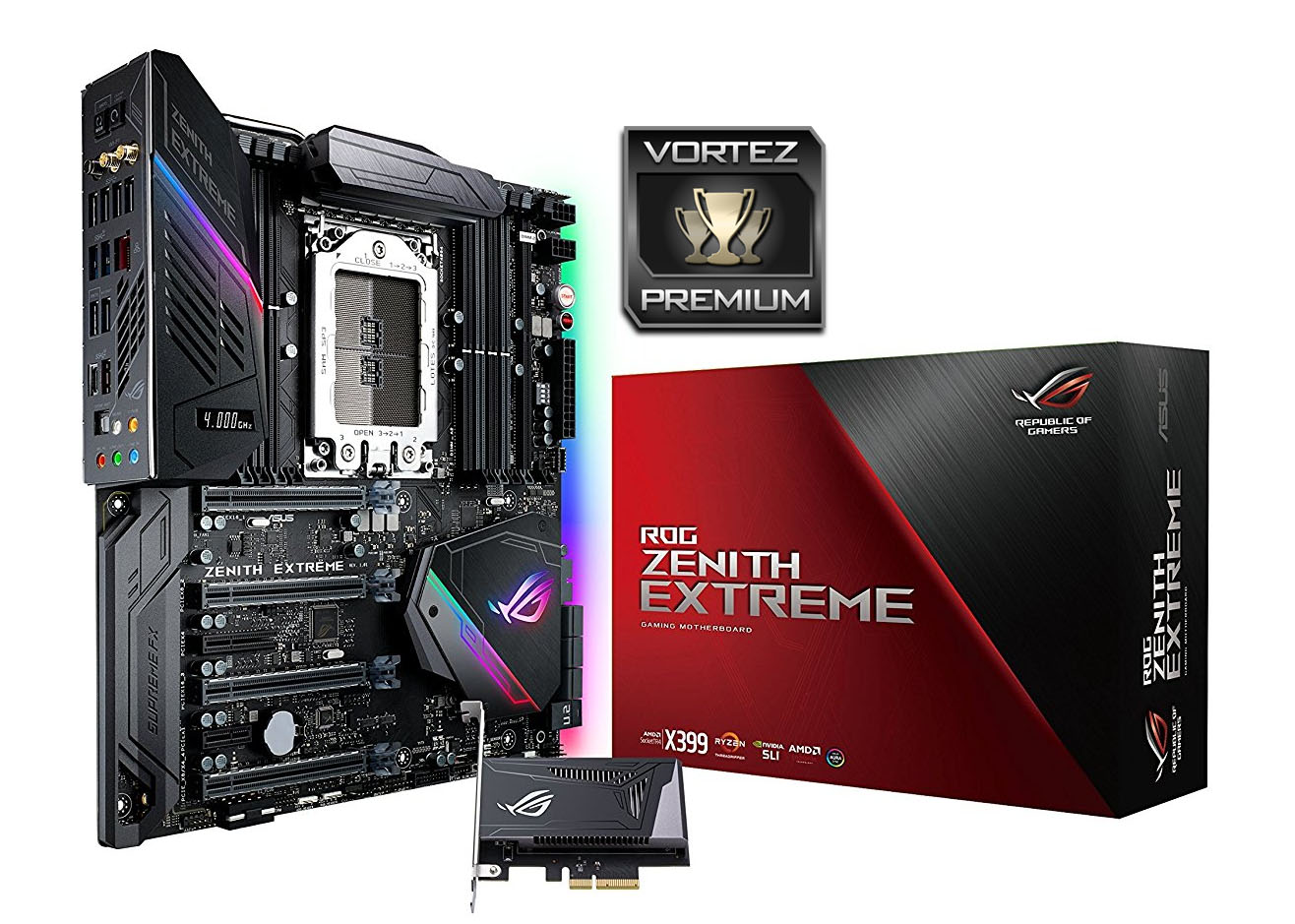
Perhaps the most impressive aspect of ASUS ROG’s design however is in tailoring its capabilities to those of the X399 chipset and Threadripper CPUs. This goes far beyond simply providing eight memory slots and four long PCI-Express slots, and also includes support for 4-way Multi-GPU x16/x8/x16/x8 configurations as well as triple-M.2 storage support.
The use of space is also worthy of a call-out. Their DIMM.2 innovation has been a feature of other ROG motherboards, but remains one of the best ways to add M.2 slot support (for long drives) without taking up valuable motherboard real-estate. That’s even more important on this motherboard given the sheer size of the TR4 socket, and is backed up by the positioning of a further M.2 slot under the ROG logo next to the SATA storage ports.
In fact, when it comes to the physical aspects of the Zenith Extreme, our only real concern of note is the reports of problems with the TR4 socket/mounting mechanism itself. We had no particular issues with our sample, and in all likelihood flaws are being filtered out as the platform matures, but the issue remains a concern. It’s noteworthy however that the Zenith is hardly unique amongst X399 motherboards for which this is a problem, and both ASUS and retailers have tended to be understanding with consumers encountering it.
We would also be remiss in not mentioning overclocking. Despite the relative immaturity of Threadripper ROG have made pushing the platform to the limit a breeze thanks to intuitive software and plenty of protection just in case you push a little beyond. Our testing allowed us to surpass the 4GHz barrier, and more expert overclockers equipped with the new TR4-specific cooling solutions will almost certainly advance further in short order. Furthermore Threadripper thrives on fast memory, and with 3200MHz+ support out the box – as well as 4000+ available in OC modes – the Zenith allows you to maximise performance beyond a laser focus on core clock speeds. This will however require suitable memory, so approach accordingly.
Although not captured in our results, we have to say that on-board VRM cooling proved to be excellent on this model. Given the concerns over the initial batch of Intel X299 motherboards, it’s reassuring to see such accomplished VRM cooling on X399, even if it does take a small fan to really achieve it. That fan may however be unnecessary for day-to-day running at reference speeds, so feel free to disable it at those times if it’s distracting.
As with all things Threadripper, the platform should only really be on your radar if you have a particular need for the multi-core horsepower it can bring to bear. More, much more than gaming, you will want to be encoding video, streaming, and otherwise ‘mega-tasking’ that system beyond all measure to really justify investing in it over (for instance) a Ryzen system. That said, you’re likely to find no better motherboard to help you leverage that horsepower, nor one that will have all the possible features you want now or in the future.
At £500 inc. V.A.T. the ROG Zenith is certainly at the premium end of the AMD X399 High End Desktop motherboard market, but it is choc-full of features from 802.11ac WIFI to RGB LED lighting, and is an extremely robust overclocker with great stability. If Threadripper is the only game in town and you have deep pockets to match extreme performance, the ROG X399 Zenith Extreme is surely the motherboard for you. The ASUS ROG X399 Zenith Extreme nets a well deserved Premium award!
Pros:
+ Great Overclocking
+ Luxurious feature set
+ Oozes quality
+ High-end VGA configuration support
+ High-end storage support through three M.2 + one U.2
+ RGB LEDs that synchronise with other ROG products
Cons.
– Price
– Early adoption of a new platform
– RGB LEDs that synchronise with other ROG products
– Lingering concerns surround the TR4 socket (as with other manufs.)
Other Points:
– Consider the ROG Strix X399-E as a more affordable option
+ Great Overclocking
+ Luxurious feature set
+ Oozes quality
+ High-end VGA configuration support
+ High-end storage support through three M.2 + one U.2
+ RGB LEDs that synchronise with other ROG products
Cons.
– Price
– Early adoption of a new platform
– RGB LEDs that synchronise with other ROG products
– Lingering concerns surround the TR4 socket (as with other manufs.)
Other Points:
– Consider the ROG Strix X399-E as a more affordable option