







Is the new TUF motherboard from ASUS a good choice for LGA1155 Sandy Bridge?
Product on Review: ASUS Sabertooth P67
Manufacturer and Sponsor: ASUS
SRP: £170 Inc. VAT
Street Price: £169.99 Inc. VAT

Sandy Bridge is now upon us and Intel has already had overwhelming success with this new platform since its release just last week. Consumers can finally get their hands on the new processors and new motherboards.
Arriving a little later than the plethora of Sandy Bridge boards now available to the consumer is the ASUS Sabertooth P67. The Sabertooth is taken from ASUS’ new TUF (The Ultimate Force) series which is specifically designed for the professional that is looking for a robust and fearless design. It may have some cut-down features that you would typically find on a RoG motherboard but it still has a rich feature-set that is going to attract a lot of attention. The design is like no other, and its going to divide people into the ‘love it, or hate it’ camps… the term used so often today “its like marmite you either love it or hate it” springs to mind.
The Sabertooth P67 we are going to take a look at today comes with the exciting new ASUS EFI BIOS which is streamlined to make tweaking your setup that bit easier but the significant feature that will be on most peoples mind when you mention Sabertooth P67 is the Thermal Armour that this board arrives with. This plastic shroud has dual purpose behind it, to protect the components and to aid cooling efficiency, or so ASUS claim. The design of the Sabertooth P67 is sure to make it stand out from amongst the other boards on the market, no-one else has come up with a design like it. Today we will be revealing whether this ‘Thermal Vest’ really does deliver what it claims.

ASUS Take:
Specifications (Click here for a full list of the Sabertooth P67 exclusive features)
CPU
– Intel® Socket 1155 for Intel® 2nd Generation Core™ i7 Processor/Core™ i5 Processor/Core™ i3 Processor/
– Support Intel® 32nm CPU
– Supports Intel® Turbo Boost Technology 2.0
Chipset
– Intel® P67 Express Chipset
Memory
– 4 x DIMM, Max. 32 GB, DDR3 1866/1800/1600/1333/1066 Non-ECC,Un-buffered Memory
– Dual Channel memory architecture
– Supports Intel® Extreme Memory Profile (XMP)
Expansion Slots
– 2 x PCIe 2.0 x16 (single at x16 or dual at x8/x8 mode)
– 3 x PCIe 2.0 x1
– 1 x PCI
Multi-GPU Support
– Supports NVIDIA® Quad-GPU SLI™ Technology
– Supports ATI® Quad-GPU CrossFireX™ Technology
Storage
– Intel® P67 Express Chipset
– 2 xSATA 6.0 Gb/s ports (brown)
– 4 xSATA 3Gb/s ports (black)
– Intel® Rapid Storage Technology Support RAID 0,1,5,10
– Marvell® PCIe SATA 6Gb/s controller
– 2 xSATA 6Gb/s ports (gray)
– JMicron® JMB362 SATA controller
– 1 xPower eSATA 3Gb/s port (green)
– 1 xExternal SATA 3Gb/s port (red)
LAN
– Intel® 82579 Gigabit LAN- Dual interconnect between the Integrated LAN controller and Physical Layer (PHY)
Audio
– Realtek® ALC892 8-Channel High Definition Audio CODEC
– Absolute Pitch 192khz/24bit True BD Lossless Sound
– BD Audio Layer Content Protection
– Supports Jack-Detection, Multi-streaming, and Front Panel Jack-Retasking
– Optical S/PDIF out port at back I/O
IEEE 1394
– VIA® VT6308P controller supports 2 x 1394a port(s) (one at mid-board; one at back panel)
USB
– NEC USB 3.0 controllers
– 4 x USB 3.0/2.0 ports (2 ports at mid-board for front panel support; 2 ports at back panel [blue])
– Intel® P67 Express Chipset
– 14 x USB 2.0/1.1 ports (6 ports at mid-board, 8 ports at back panel)
Exclusive TUF Features
“Ultimate COOL!” Thermal Solution
– TUF Thermal Armor
– TUF Thermal Radar
“TUF ENGINE!” Power Design
– 8+2 Digital Phase Power Design
– TUF Components (Alloy choke, Cap. & MOSFET; certified by military-standard)
– ASUS DIGI+ VRM Utility
– E.S.P. : Efficient Switching Power Design
“Safe & Stable!” Guardian Angel
– ESD Guards
– MemOK!
– Anti Surge
Other Special Features
– Front Panel USB 3.0 Support
– ASUS EFI BIOS EZ Mode featuring friendly graphics user interface
– AI Suite II
– ASUS Q-Connector
– ASUS Q-Shield
– ASUS Q-LED (CPU, DRAM, VGA, Boot Device LED)
– ASUS Q-Slot
– ASUS Q-DIMM
– ASUS O.C. Profile
– ASUS CrashFree BIOS 3
– ASUS EZ Flash 2
– ASUS MyLogo 2
– Multi-language BIOS
Back Panel I/O Ports
– 1 x PS/2 Keyboard/Mouse Combo port
– 1 x External SATA 3Gb/s port (red)
– 1 x Power eSATA 3Gb/s port (green)
– 1 x IEEE 1394a
– 1 x LAN(RJ45) port(s)
– 2 x USB 3.0/2.0 ports (blue)
– 8 x USB 2.0/1.1 ports
– 1 x S/PDIF Out (Optical)
– 8 -Channel Audio I/O
Internal I/O Connectors
– 1 x USB 3.0/2.0 connector(s) supports additional 2 USB ports (19-pin; moss green)
– 3 x USB 2.0/1.1 connector(s) support additional 6 USB ports
– 1 x MemOK! button
– 4 x SATA 6.0Gb/s connectors ( 2 x gray; 2 x brown)
– 4 x SATA 3.0Gb/s (black)
– 1 x IEEE 1394a connector
– 1 x CPU Fan connector(s) (4-pin)
– 2 x Chassis Fan connector(s) (1 x 4-pin; 1 x 3-pin)
– 1 x Power Fan connector(s) (3-pin)
– 1 x Assistant Fan connector (3-pin)
– 1 x S/PDIF Out connector
– 24-pin EATX Power connector
– 8-pin EATX 12V Power connector
– 1 x Front panel audio connector
– 1 x COM connector
– 1 x System Panel (Q-Connector)
– 1 x Clear CMOS jumper
BIOS
– 32 Mb Flash ROM , EFI AMI BIOS, PnP, DMI2.0, WfM2.0, SM BIOS 2.5, ACPI 2.0a, Multi-language BIOS, ASUS EZ Flash 2, ASUS CrashFree BIOS 3
Manageability
– WfM 2.0,DMI 2.0,WOL by PME,WOR by PME,PXE
Accessories
– User’s manual
– 2 x SATA 3.0Gb/s cables
– 2 x SATA 6.0Gb/s cables
– 1 x Q-Shield
– 1 x Q-Connecor (2 in 1)
– 1 x ASUS SLI bridge cable
– 1 x TUF Certification card
– 1 x TUF 5 Year Warranty manual (by region)
– 4 x screws for Assistant Fan
Support Disc
– Drivers
– Anti-virus software (OEM version)
– ASUS Update
– ASUS Utilities
Form Factor
– ATX Form Factor
– 12 inch x 9.6 inch ( 30.5 cm x 24.4 cm )
Packaging & First Look
ASUS have given the Sabertooth P67 some mean looking packaging. The box has metallic looking artwork and we can see that this board is from the TUF (The Ultimate Force) family. As per usual, the technical specifications are found on the reverse of the box and the front cover opens out to reveal key features.
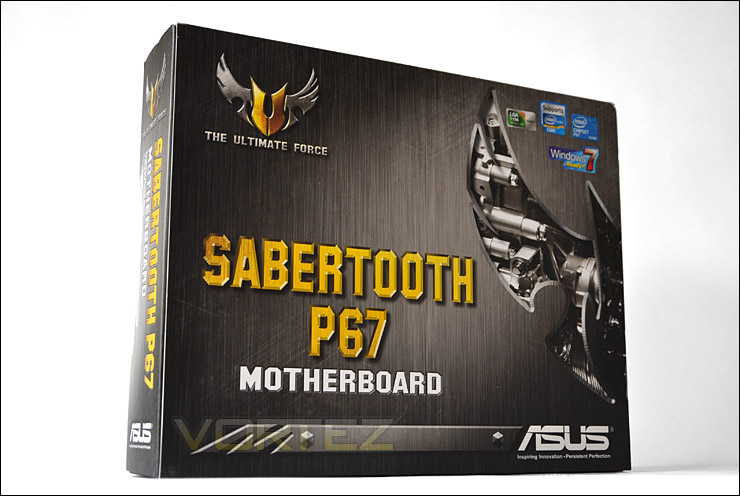
Sabertooth P67 packaging
Opening the box to reveal the bundle we can see there are a series of manuals and other bits. Included in the bundle we have:
+ User Guide
+ Thermal Radar & Digi+VRM
+ Quick Start Guide
+ Drivers CD
+ CrossfireX bridge
+ SATA 3G & 6G cables
+ Certificate of Reliability
As you will appreciate there are quite a number of items above. The Certificate of Reliability in particular is a nice touch, it shows that the capacitors, chokes and MOSFETs have all been tested for endurance.
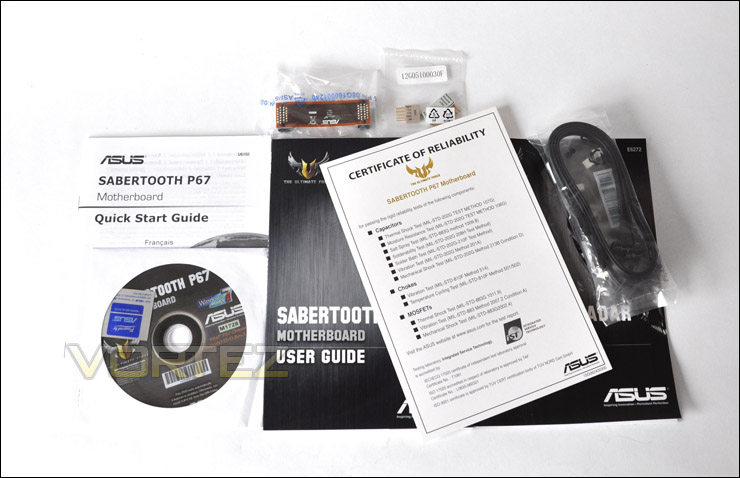
Sabertooth P67 bundle
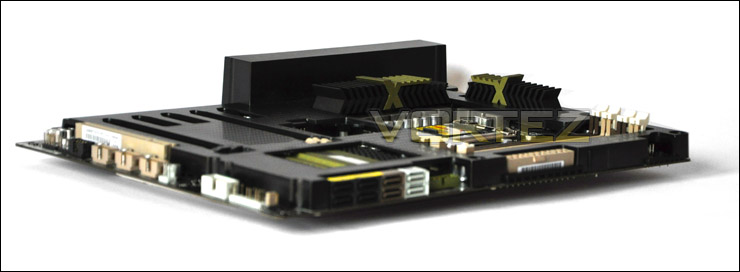
Our board is protected within an anti-static bag, but removing this from the packaging will instantly cause one eyebrow to be raised. The Sabertooth P67 is unlike anything you will have seen previously. Encasing all of the components and capacitors except all of the major lanes, ports and sockets there is a plastic shroud named the “TUF Tactical Vest”. This has a dual purpose of protecting the board but also, ASUS claim that it will encourage better, more efficient chipset cooling with the assistance of a top-down style CPU cooler. For the purpose of testing the efficiency of this cover I will be analysing performance with the Noctua NH-C14 with and without the TUF Tactical Vest installed a little later.
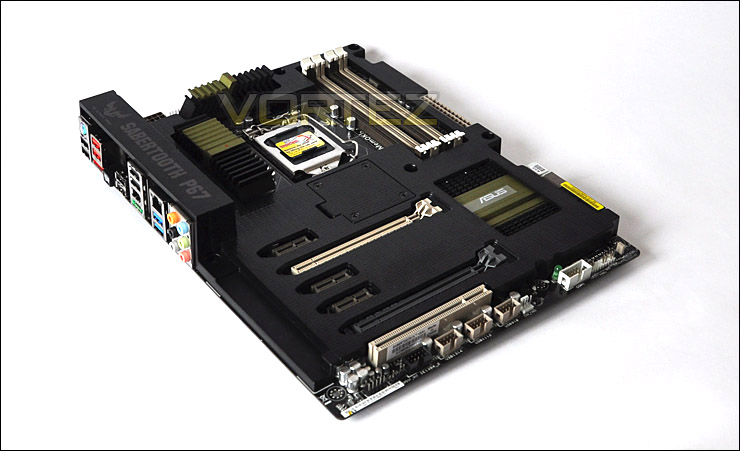
The Sabertooth P67 – unique in styling and appearance
Closer Look
So lets take a closer look at the Sabertooth P67. First of all the chipset. Of course this motherboard utilises the P67 chipset, LGA1155 Sandy Bridge socket. LGA1156 CPU coolers will fit on this board no problem due to LGA1155 and LGA1156 using the same dimensions. Covering the MOSFETs we have a rather aggressive military styled set of heatsinks that cover a 8+2 phase power design.
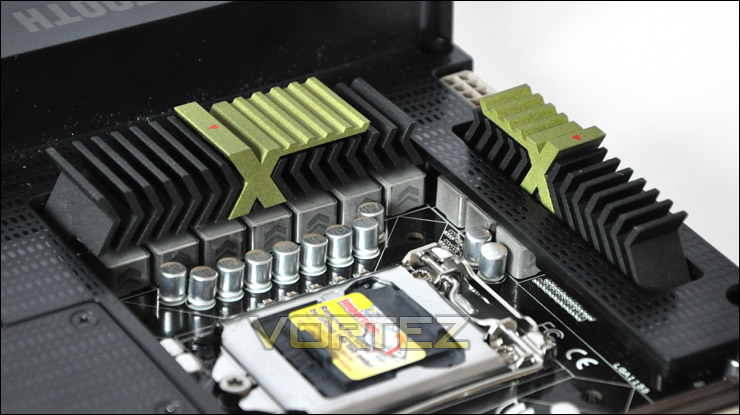
Military styling to the heatinks
Customary to the Sandy Bridge platform is dual channel support – DDR3. So we have 4 X DIMM slots that cater for 1066MHz all the way up to 1866MHz. Slightly lower than some of the other boards which usually allow up to 2100MHz (OC).
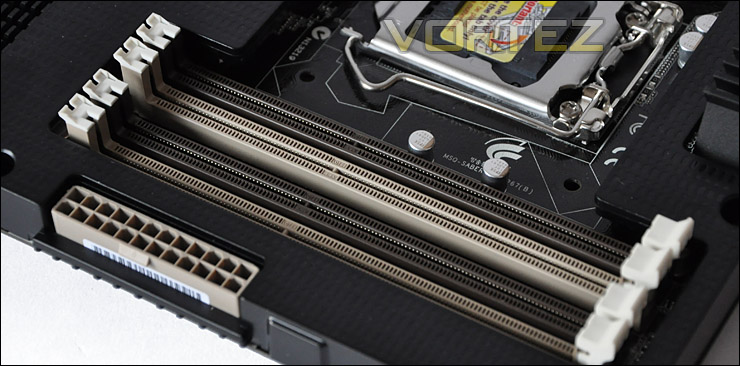
4 X DIMM slots for dual channel DDR3
Next to the SATA ports we have a USB 3.0 header that provides USB 3.0 functionality for the front of the case the board will be sitting in. Sadly though, as you will have noticed from the bundle a USB 3.0 bracket to combine with this header is absent from the package. So this will need to be bought separately.
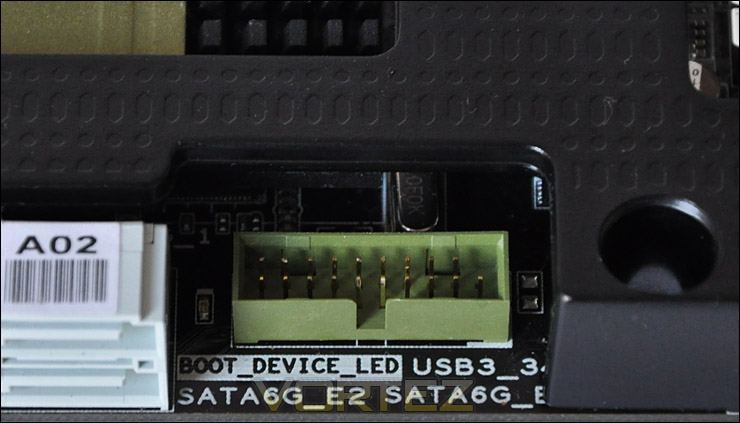
USB 3.0 header giving USB 3.0 functionality at the front of your case
Onto storage and we have 4 X 6Gbps SATA ports which are identified in white and brown. Next to these ports we have a further 4 SATA ports but these are 3Gbps.
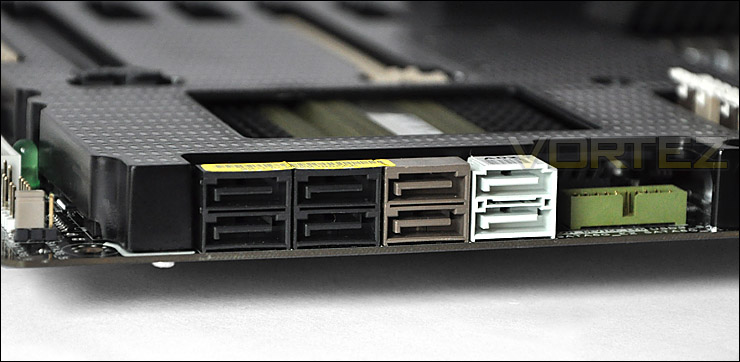
3G and 6G functionality for SATA
Neighbouring the SATA ports is the Southbridge heatsink which, as ASUS always implement – is rather large and prominent.
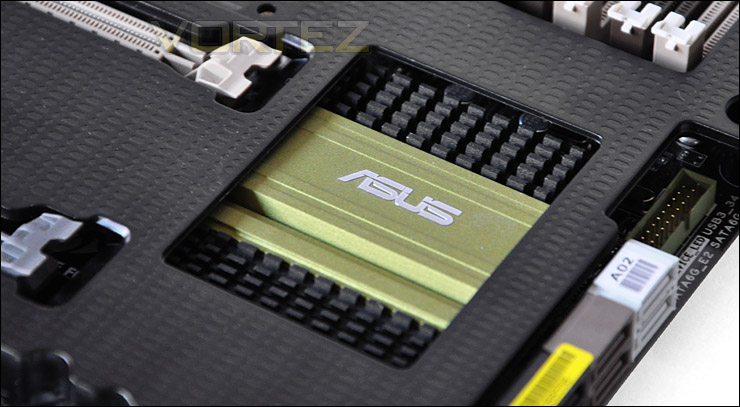
Southbridge heatsink is large
Closer Look (Continued)
For graphics and other devices we have 3 – 1x PCI-E 2.0 lanes, 2 – 16x PCI-E 2.0 lanes and a legacy PCI lane. Each of the 16x lanes will run at 16x if you are using a single card but when using dual graphics cards the speed will drop to 8x between both lanes.
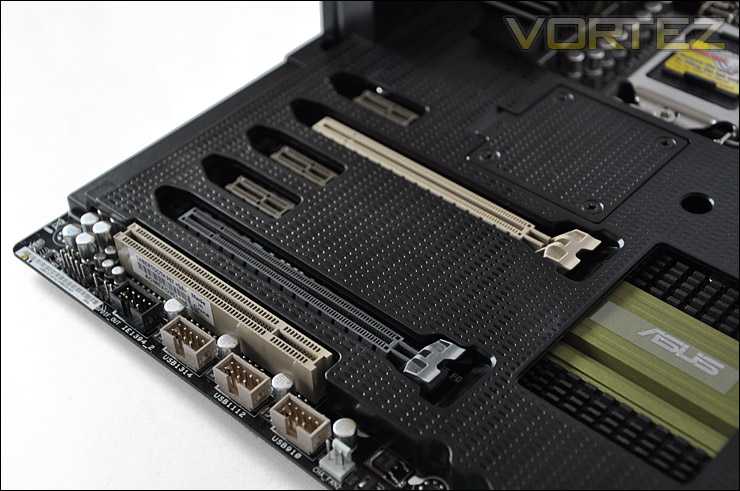
Southbridge heatsink is large
In the middle of the Tactical Vest is a small cover which can be removed to reveal a 3-pin fan header. Here you can mount a 50mm fan for additional cooling beside the graphics card. This cover will need to be removed to extract the Tactical Vest.
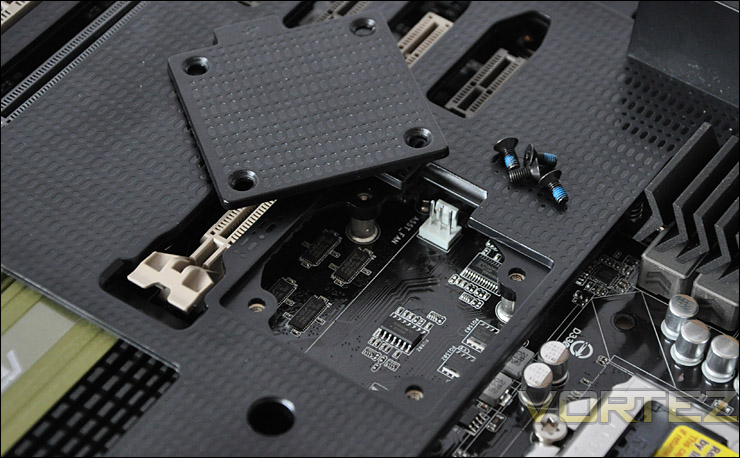
Space for 50mm fan to be mounted
With regards to I/O features we have there plenty of options. USB 2.0 in particular is abundant. From left to right we have:
+ PS2 Keyboard/Mouse
+ 2 X USB 2.0 (Black)
+ 2 X USB 2.0 (Red)
+ 1 X eSATA 3G (Red)
+ 1 X SPDIF Optical Audio
+ 2 X USB 2.0 (Black)
+ 2 X USB 2.0 (Black)
+ 1 X Firewire
+ 1 X eSATA 6G (Green)
+ 1 X Gigabit LAN RJ45
+ 2 X USB 3.0
+ 8 Channel Audio via Realtek 892
This entire back panel has a bridge running across the top courtesy of the Tactical Vest to give it additional protection.
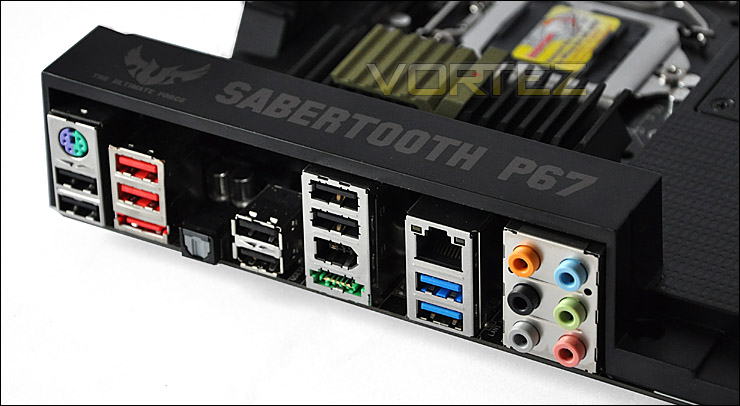
Lots of functionality at the rear panel
Out of interest I thought it would be useful to show the bare motherboard. To remove the Tactical Vest 12 screws need to be extracted – 4 from the middle cover and 8 from the underside of the board. I’m undecided what looks more attractive, with or without the cover. The colour-scheme is dull and lacks any vibrancy. Brown, green and beige are the colours of the 80s.
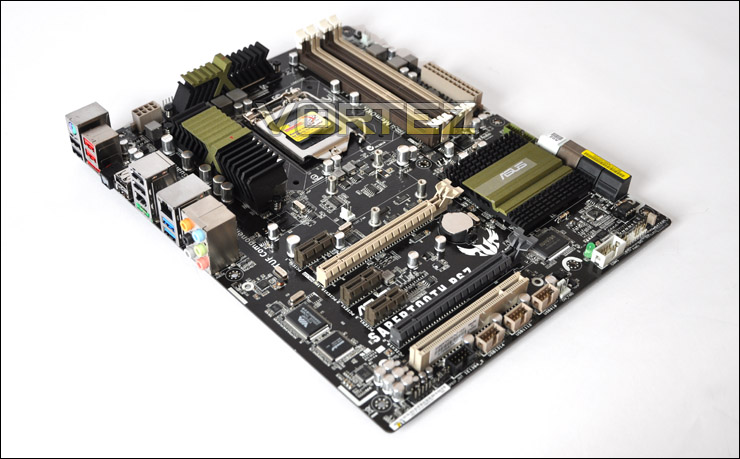
With the Tactical Vest off. Ugly!
ASUS AI Suite II & Thermal Radar
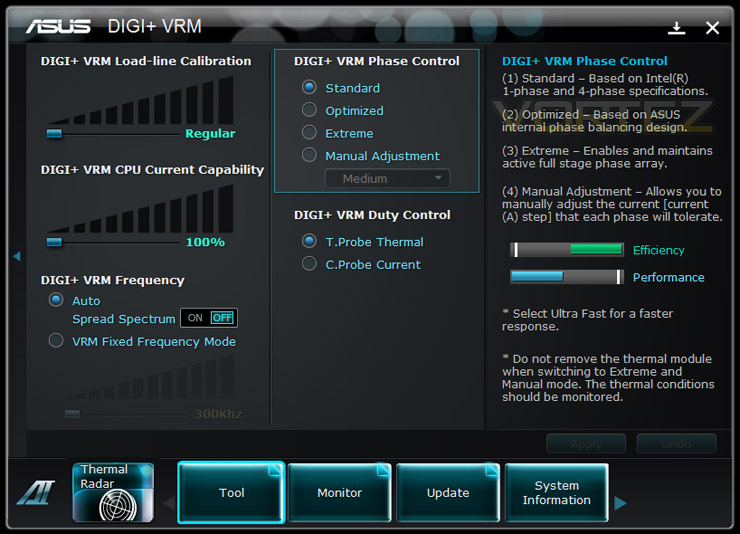
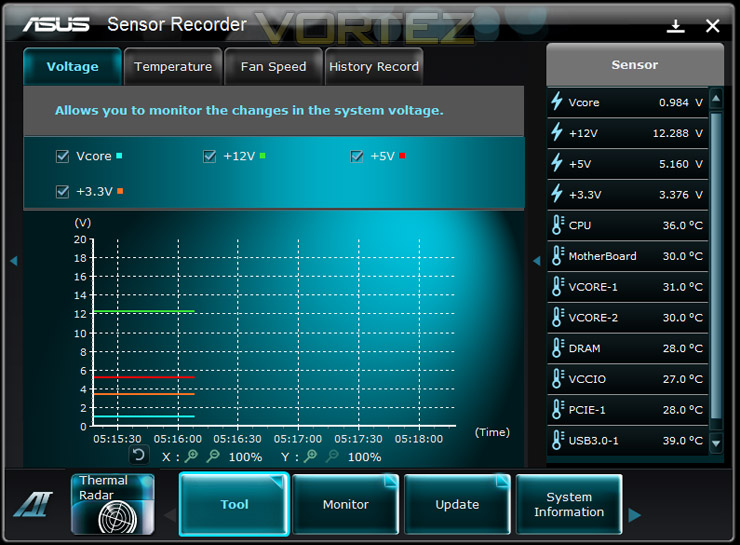
Bundled with the Sabertooth P67 is AI Suite II which if you haven’t already seen has had a major facelift and includes with the Sabertooth – Thermal Radar, DIGI+ VRM, and monitoring software for voltages, sensors and frequencies (Sensor Recorder).
DIGI+ VRM allows you to control the balance between efficiency and performance. Giving you the management over Phase Control above other elements. More information on DIGI+ VRM.
Thermal Radar
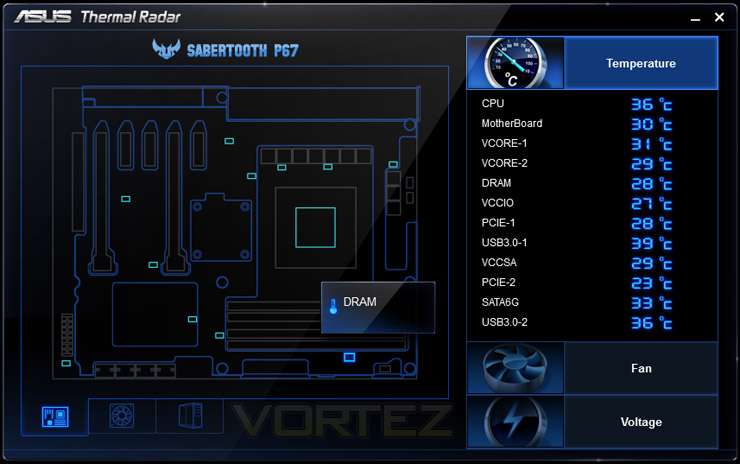
One of the fundamental innovations on the Sabertooth is the TUF Thermal Radar. 12 sensors are situated around the motherboard in strategic places – which are able to monitor crucial component temperatures. Below you can see each of the sensors and their location. From this GUI you can monitor temperatures of each sensor, fan speeds and voltages in real-time. Perfect for the professional that wants full control over system diagnostics, as this is who the Sabertooth P67 is really directed towards. As you will appreciate, Thermal Radar is very new, and certainly in the future I can see things advancing. Kick starting 2011, ASUS have launched their Sandy Bridge products with a bang.
Tactical Vest – Is it a gimmick?
The TUF Tactical Vest stands out as one of the primary features of our Sabertooth P67. It has dual purpose, meaning that it will protect the board and hopefully provide a more efficient method of cooling components . ASUS actually claim the following:
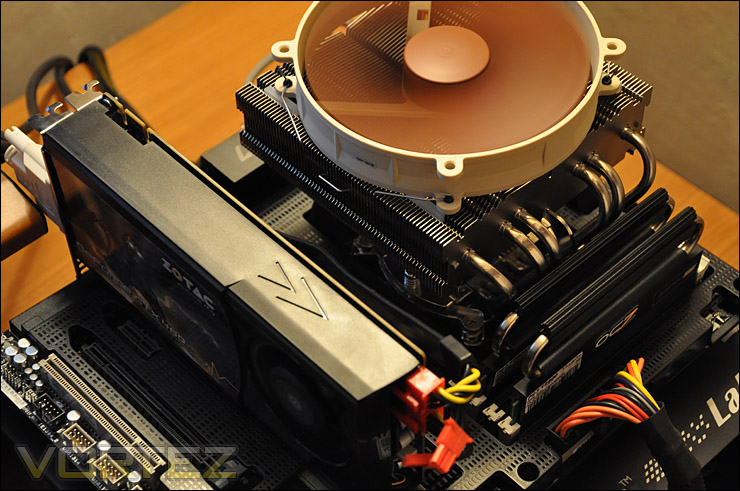
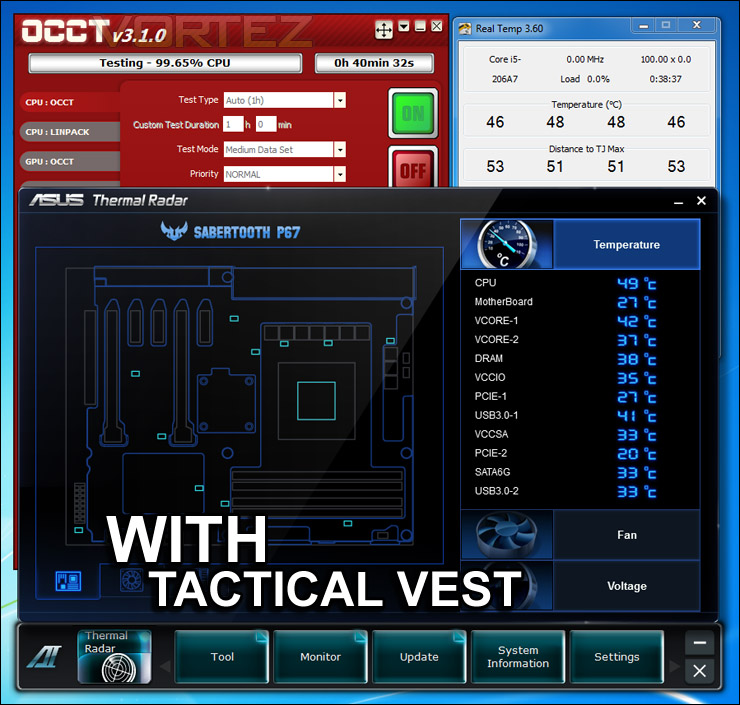
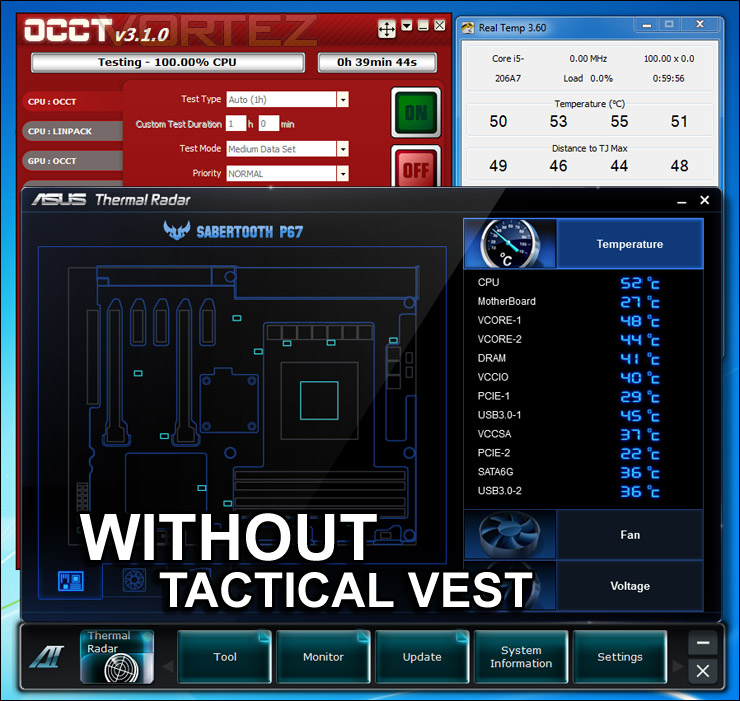
Sounds great doesn’t it? But does it really work? Well, we have installed a top flow designed CPU cooler for the purpose of this test – Noctua NH-C14. The test will consist of stressing the entire system, monitoring after 20 minutes have expired and then removing the Tactical Vest and again loading the system and monitoring after another 20 minutes. This should ascertain whether this really is an efficient tool for cooling our components or just another marketing ploy to draw in attention.
The results whilst not ground-breaking, show a marginal win for ASUS. I guess we have to understand that this is a new feature to be implemented on the motherboard, with some tweaks I’m sure that ASUS can deliver better results. With great airflow within the chassis, results will work in the Tactical Vest’s favour. The test below was performed on a Cooler Master Test Bench with additional cooling via dual Noctua NF-P14 fans flowing across the board.
Test Setup & Overclocking
CPU Intel Core i5 2500K (3.3GHz)
Motherboards
ASUS Sabertooth P67
ASUS P8P67 (LGA1155)
Foxconn P67A-S
ECS P67H2-A (Black Extreme)
Memory 4GB OCZ Reaper 1600MHz 8-8-8-26
CPU Cooler Noctua NH-C14
Graphics ZOTAC GTX 460
PSU OCZ Fatal1ty 750W
All P67 Sandy Bridge motherboards will be benchmarked against each other using the Intel Core i5 2500K. The maximum overclock will also be included within the proceeding benchmark tests to identify performance gains as a result of tweaking CPU clock speed via the multiplier.
Overclocking
As previously mentioned in our Intel Core i5 Sandy Bridge Roundup – overclocking is achieved by altering the multiplier rather than the BCLK. So the BCLK stays at 100MHz and the multiplier is modified. So if we have 100MHz on the BCLK and 40 for the multiplier this will obviously output 4GHz. We chose to use the Intel Core i5 2500K across each of the motherboard tests and indeed for the overclocking due to its unlocked multiplier.
With overclocking simplified on Sandy Bridge, this means that achieving the best overclock couldn’t be easier. CPU voltage and multiplier just need to be modified accordingly. I began slowly nudging up the multiplier from 33 (3.3GHz). Ultimately I managed to overclock the 2500K by 1000MHz giving a clock-speed of 4.3GHz. We have now tested the 2500K on a number of motherboards and it will not move past 4.3GHz, so we are certain that the CPU is limiting the overclock. For the moment, Intel have not responded to this – until then our motherboard reviews will only feature a max overclock of 4.3GHz. At least this will compare all of the boards overclocking performance benchmarks fairly and be interesting to compare scores at the same level etc.
Power Consumption
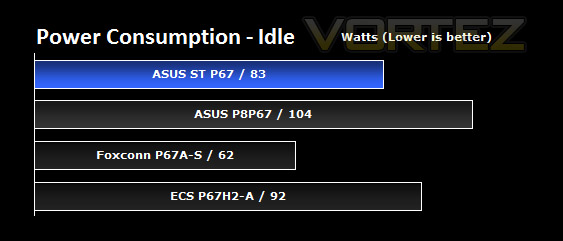
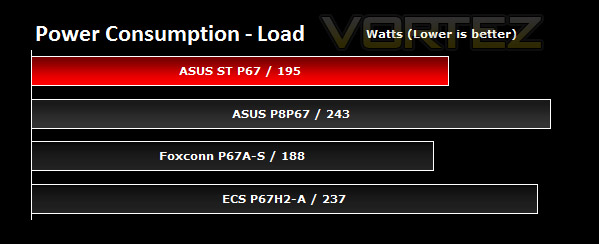
Suprisingly our Sabertooth P67 is much more energy efficient than the P8P67. Some 21W seperates the boards at idle operation whilst under load a whopping 48W. Out of the 4 P67 motherboards tested, the Sabertooth P67 comes a pleasant 2nd in regards to energy efficiency.
AIDA64
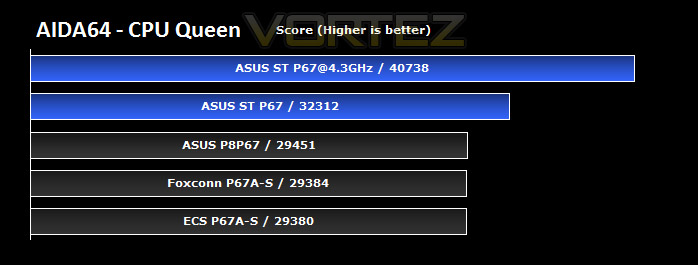
CPU Queen
As you may have seen in our ASUS P8P67 review, there was not a lot to separate the three boards on test. With the Sabertooth in the mix, we can see it outperforms the other ASUS offering as well as the Foxconn and ECS boards in this CPU-centric test.
Overclocking gives a decent boost to CPU performance, as may be expected. The Sabertooth makes sure all this extra power is being put to use.
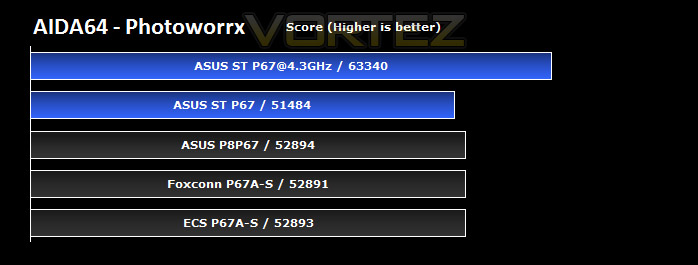
CPU Photoworrx
The stock performance of the Sabertooth is lower here than the P8P67, and indeed, other boards. Perhaps a subtle characteristic of the design of the board since the basic platform should be almost identical between all boards. Overclocking gives a good deal of extra performance however, which pushes the score much further.
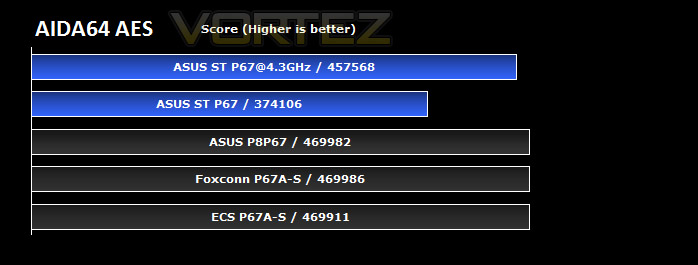
CPU AES
CPU AES test uses only the basic x86 instructions, and it’s hardware accelerated on VIA PadLock Security Engine capable VIA C3, VIA C7 and VIA Nano processors; and on Intel AES-NI instruction set extension capable processors. The test is HyperThreading, multi-processor (SMP) and multi-core (CMP) aware.
This test may be relevant to those who zip or compress large files, and once again, the stock Sabertooth results fall short of the lower end ASUS offering and other P67 boards. Overclocking does not bring the performance back to even the base level set by the other boards. The Sabertooth loses out here for reasons that are unclear.
FPU Mandel
The Sabertooth rather comfortably wins out over all the other boards in this test at stock settings. Overclocking yields even more impressive results, much higher than even our identical overclocked performance on the P8P67 (Shown here).
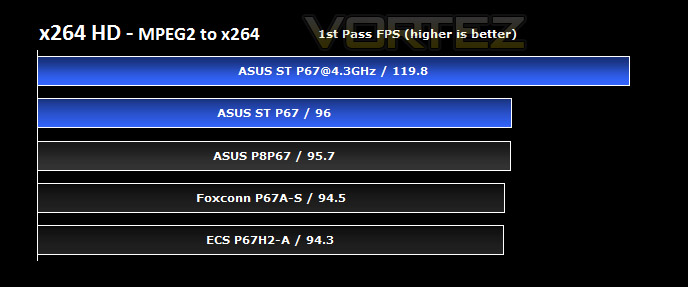
x264 HD
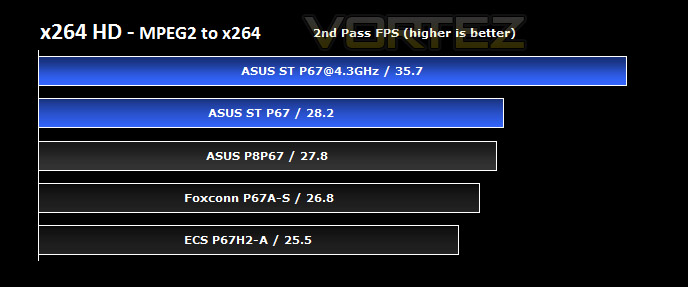
x264 HD gives results for 2 passes when compressing an MPEG-2 clip into x264. It presents 4 seperate results for each pass giving a total of 8 – all results are given in FPS. For each pass I have averaged out the results.
The P8P67 produced the best P67 performance in this test the last time round, now the Sabertooth is able to outperform the P8P67 and stretch the ASUS lead over the other boards tested. Overclocking with the Sabertooth gives very good gains, and if you encode frequently you’ll understand that this could save you some time. Overclocking performance on the Sabertooth is much better than we were able to achieve with the overclocked CPU in the P8P67 in this test.
Cinebench 11.5
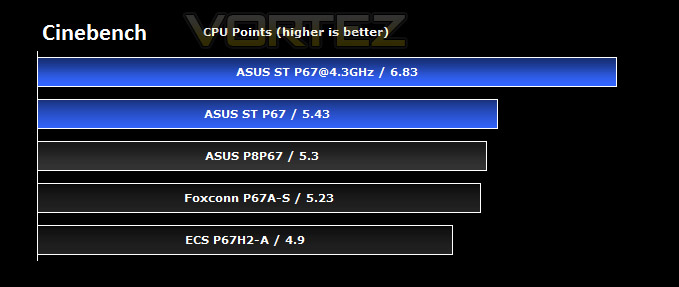
Cinebench produces neat and easy to understand results, giving a quite respresentative overall CPU performance. Here it indicates that the Sabertooth is able, once again, to outpace the lower end ASUS board and the other high end boards on test. Overclocking gives a very good boost in performance, and with an simple overclocking process I’d certainly advise you make the most of your new CPU if you’re lucky enough to have one. The benefits are clear.
SiSoftware SANDRA 2011
Processor tests
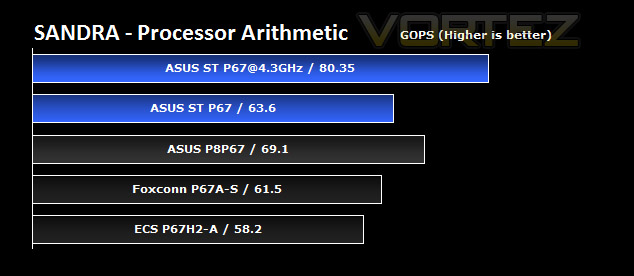
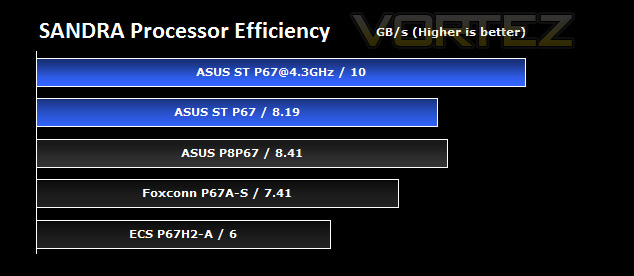
With the Foxconn P67 previously holding the top spot in this test, the Sabertooth comes along and wins out at stock settings, though in the processor efficiency test the more standard P8P67 pips it.
Overclocking in these tests gives a similar boost to which we saw in the P8P67 review, showing a good performance gain can be had when overlclocking by ~30%.
Memory tests
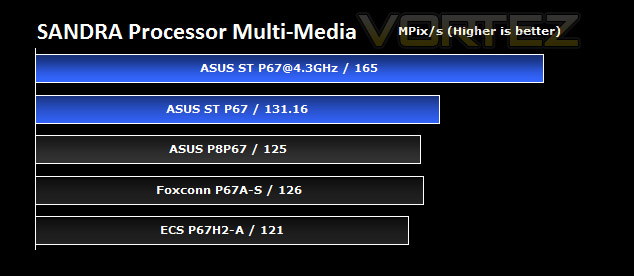
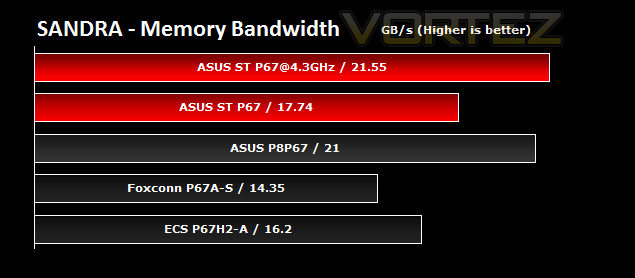
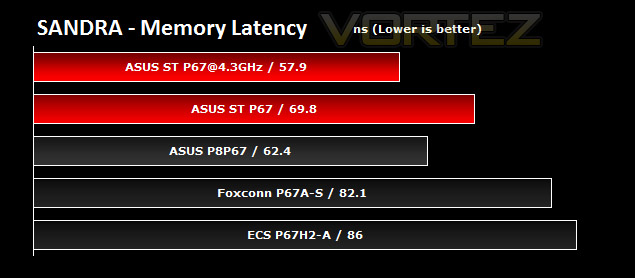
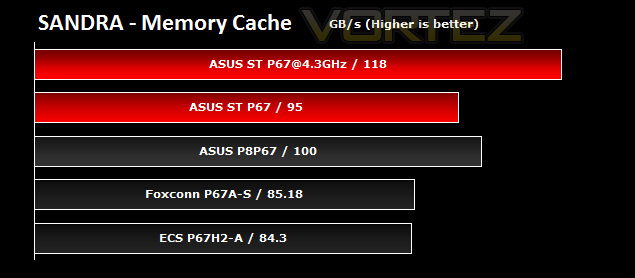
The memory bandwidth indicates that the sabertooth cannot match the performance of the P8P67 unless overclocked. An interesting observation, which is echoed in the memory latency and cache tests also. Memory performance may be the small achilles heel of the Sabertooth, though it still happily beats the Foxconn and ECS offerings.
Overclocking once again gives performance enhancements in line with what else has been seen so far.
3DMark 11
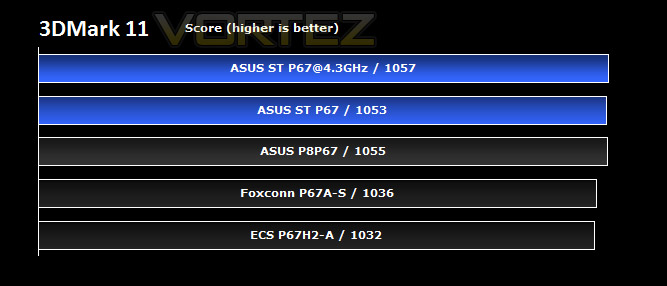
3DMark 11 was released at the end of last year and needs little introduction. For the test settings the Extreme preset is run with ‘benchmark only’ being selected.
Wow, this is a close one. The first ‘3D’ test puts the Sabertooth directly in line with the P8P67, with just 2 points difference. Overclocking gives another 4 points, suggesting our graphics card is holding back the result here, as may be expected in an intensive graphics-orientated benchmark.
DIRT 2
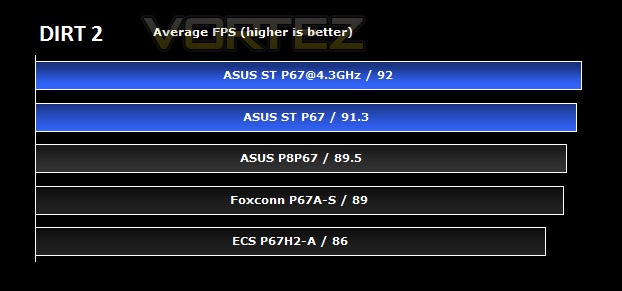
Here we can see the average frames per second for each P67 motherboard tested. The game was tested in maximum settings at 1680×1050 with 0xAA and 0xAF.
DiRT 2 is a favourite here at Vortez, and we can see that we’re getting super smooth framerates across all the boards on test using the decidedly mid-range GTX 460. No major issues with any in terms of raw performance.
The Sabertooth gives a small 1-2 frame per second advantage over the ASUS P8P67, whilst overclocking only makes a small difference, suggesting the GPU is going to be the main performance factor here.
Call of Duty Black Ops
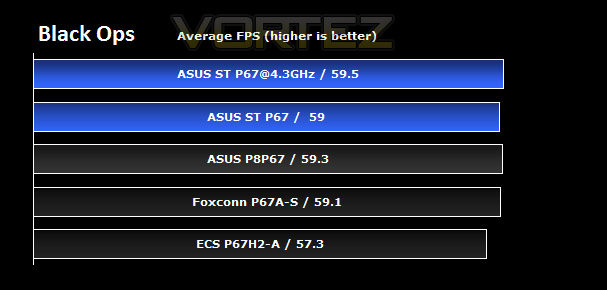
The game was tested on the highest settings at 1680×1050 0xAA 0xAF.
The test results here are all very close, with little difference in absolute performance between all P67 boards, suggesting once again we’re relying most on the GPU to provide the FPS. A 0.3 FPS difference between the Sabertooth and P8P67 is not even worth drawing any conclusions over; it is well within the margin of error on these tests.
Any of these boards will do a decent job with CoD: BO, as long as the GPU is limiting the performance there’s just nothing significant to pick between them.
Metro 2033
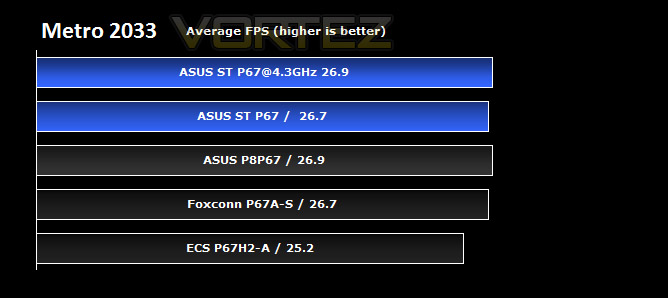
Tests were run at 1680×1050 0xAA 0xAF on the highest settings possible.
The demanding nature of Metro 2033 can produce a disparate performance in some of the boards, mainly the ECS, but the ASUS offerings are very closely matched, and the sabertooth produces an identical performance to the Foxconn board, and overclocking matches it to the P8P67. The results are so close, that it is hard to draw any conclusions from this.
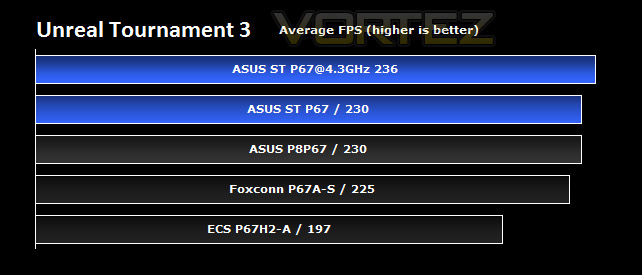
Unreal Tournament 3
Immediately you’ll notice that at the highest settings at 1680×1050 0xAA 0xAF the frame rates are extremely high; all the boards with this test setup perform well beyond what is needed for a smooth experience.
The two ASUS boards produce identical results, giving the best performance of any of the boards on test.
Overclocking gives a slight increase in this title, though as a percentage this is very small compared to the absolute frame rates we’re experiencing, therefore, overclocking won’t boost performance in this game very much, mainly because it’s just not that demanding by today’s standards.
Conclusion
The Sabertooth P67 is definitely a motherboard with lots of ambition. It sets itself apart from anything currently on the market with its unique looks and features. The Tactical Vest is and has already attracted a lot of attention, so even if it wasn’t to be a successful implementation it has still achieved the “look at me” award.
With looks unlike anything else currently at consumers finger tips the Sabertooth P67 has some fantastic features. We could talk for hours about the abundance of features on this board but some of those that clearly stand out are the Thermal Radar which allows you to get real-time updates on temperatures, voltages and fan speeds across the board. The TUF components – alloy chokes, robust – solid capacitors and MOSFETs which all come ‘military’ tested to ensure maximum endurance. Standard boards will come with iron based capacitors but these are alloy and allow for up to massive 40A. Durable under the most extreme of conditions. And then there’s the EFI BIOS which is revolutionary. Point and click, drag ‘n drop. Get to where you need to in a flash (pardon the pun).
The Sabertooth P67 really has a lot going for it. It does however match similar performance to that of the mainstream boards currently available for around the £100 mark. However the extra features and presentation really set it apart, if you need something that is going to need to sustain brute force then this is probably a better choice for you.
Priced at around £170 Inc. VAT the Sabertooth P67 is a feature-rich board, even if it does have some of the typical RoG features absent, such as onboard power/reset and Bluetooth. To some it will look rather ugly but to others it will look great. Personally I think the colour-scheme could be much better, but I guess ASUS are carrying across this rugged, military style with the TUF series.
+ Great performer
+ Lots of new features
+ EFI BIOS
+ Innovative
+ Very robust
Cons
– Similar performance to mainstream P67
– Colour scheme won’t suite all

