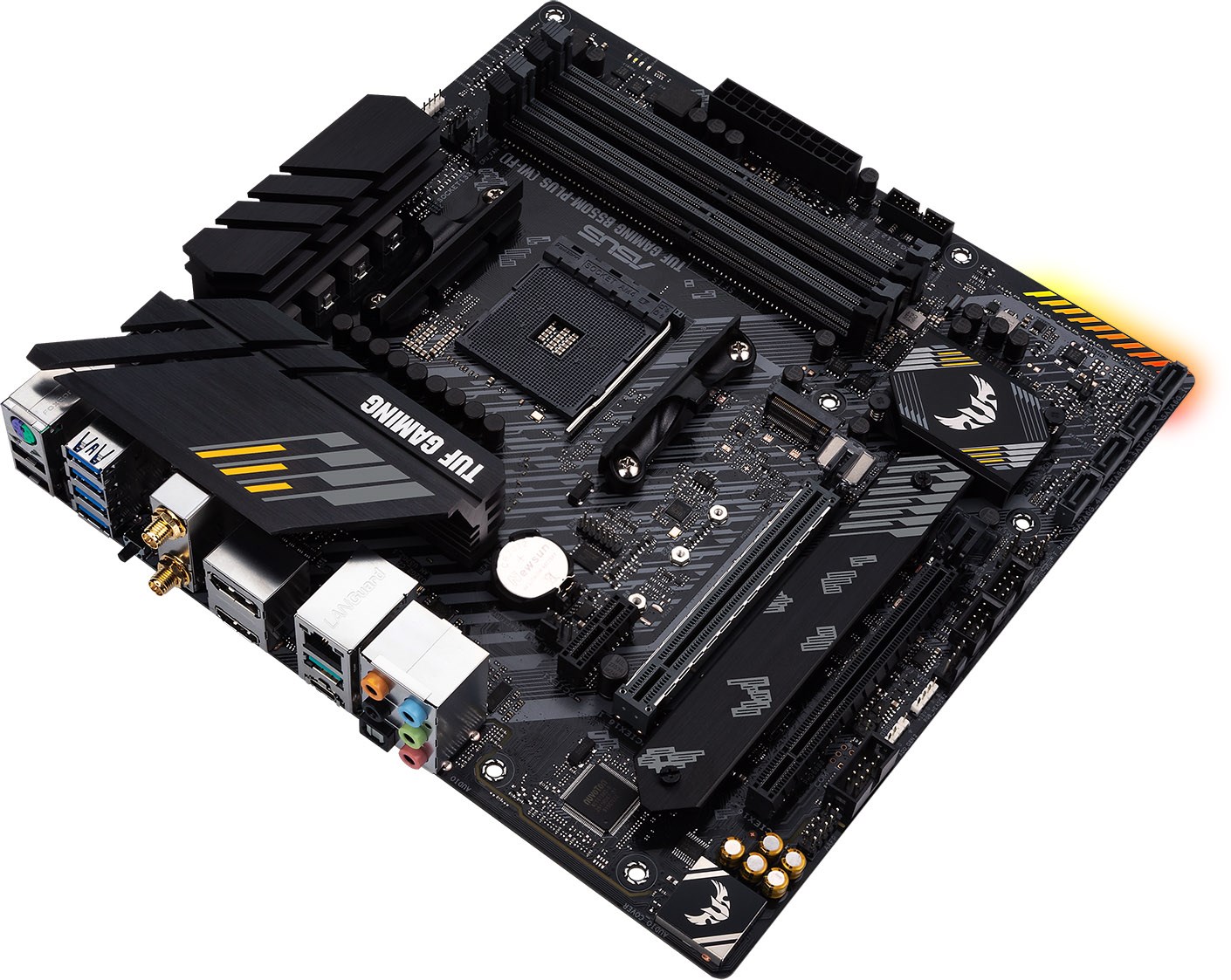
Part of the TUF Gaming Alliance, the B550M-Plus (Wi-Fi) offers a cohesive appearance, 2.5G ethernet, WiFi 6, a pair of M.2 slots and much more, all shoehorned into a Micro-ATX form factor.

Product on Review: ASUS TUF Gaming B550M-Plus (Wi-Fi)
Manufacturer: ASUS
Street Price: GBP £184.99 / USD $179.99
ASUS, most notable within the PC Gaming industry for their ROG range of products, also produce the TUF Gaming range, a more budget-friendly option that offers stability, durability and a whole host of features. The TUF Gaming alliance also collaborates with several trusted manufacturers to ensure compatibility across a wide range of components including cases, power supplies, CPU coolers, memory kits and much more, often all sharing the same colour scheme.
Part of ASUS’ B550 lineup, today we’re putting the B550M-Plus (Wi-Fi) under the microscope, examining the pros and cons and seeing what’s what.
As a quick introduction to B550, it’s essentially a chipset aimed more towards the budget end of the market, for those who still wish to take advantage of new and exciting features but are willing to make some sacrifices to save a buck. One of the biggest compromises is the lack of support for Zen and Zen+ CPUs, with only Zen2 (and future CPUs) supported. In regards to system connectivity, the B550 offers up to eight SATA III connections, with support for RAID 0, 1 and 10. We also see PCI-E specifications upgraded from the previous-gen flagship, the X470 chipset, with four PCI-E 3.0 lanes and eight PCI-E 2.0 lanes, while the X470 offered only eight PCI-E 2.0 and the B450 and B350 chipsets had to make do with only six PCI-E 2.0 lanes. We also get up to two USB 3.2 Gen. 2 ports, six USB 3.1 ports, six USB 2.0 ports and native overclocking support right out of the box.
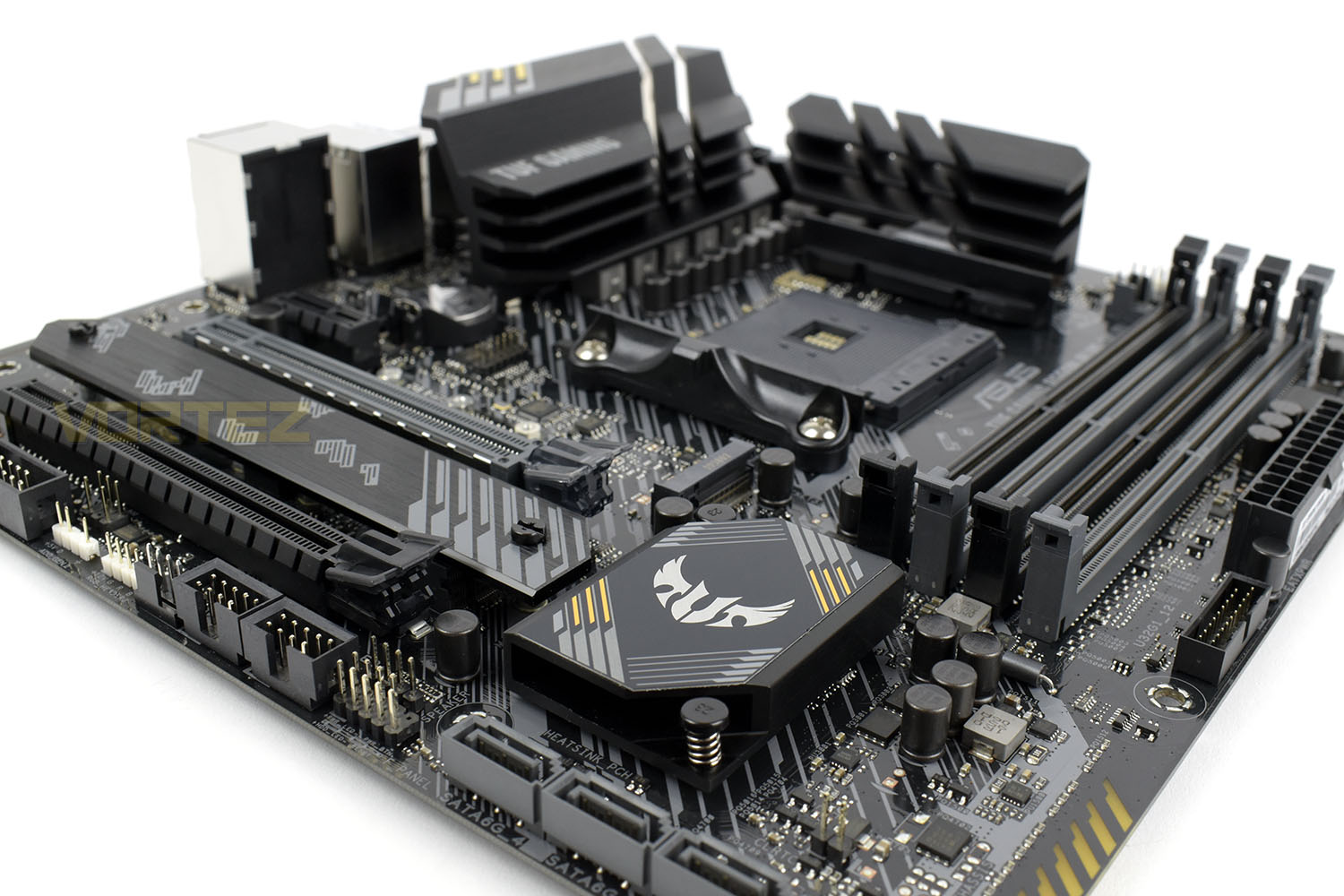
Rocking an 8+2 DrMOS power delivery with Digi+ VRM, a comprehensive range of heatsinks, Intel WiFi 6, 2.5G ethernet, Realtek S1200A onboard audio with AI-powered noise cancelling software for the microphone and subtle RGB lighting on the bottom-right of the board.
Priced at £184.99 (and the equivalent in your part of the world) the TUF Gaming B550M-Plus (Wi-Fi) doesn’t appear to strike that budget note we typically associate with the brand but we’re more than willing to give it a chance based on the hefty feature-set that it boasts.
ASUS on the B550M-Plus (Wi-Fi):
TUF Gaming B550M-Plus (Wi-Fi) distills essential elements of the latest AMD platform and combines them with game-ready features and proven durability. Engineered with military-grade components, an upgraded power solution and a comprehensive set of cooling options, this motherboard delivers rock-solid performance with unwavering gaming stability.
When you build with a TUF Gaming motherboard, you also benefit from the TUF Gaming Alliance — an ASUS collaboration with trusted industry partners that ensures easier building, best compatibility, and complementary aesthetics from components to case.
When you build with a TUF Gaming motherboard, you also benefit from the TUF Gaming Alliance — an ASUS collaboration with trusted industry partners that ensures easier building, best compatibility, and complementary aesthetics from components to case.
Technical Specifications
CPU
Build in AMD AM4 Socket 3rd Gen AMD Ryzen™ Processors *
* Refer to www.asus.com for CPU support list
Chipset
AMD B550
Memory
3rd Gen AMD Ryzen™ Processors
4 x DIMM, Max. 128GB, DDR4 4600(O.C)/4400(O.C)/4266(O.C.)/4133(O.C.)/4000(O.C.)/3866(O.C.)/3733(O.C.)/3600(O.C.)/3466(O.C.)/3333(O.C.)/3200/3000/2800/2666/2400/2133 MHz Un-buffered Memory *
Next Generation AMD Ryzen PRO Processors
4 x DIMM, Max. 128GB, DDR4 4800(O.C.)/4600(O.C)/4466(O.C.)/4400(O.C)/4266(O.C.)/4133(O.C.)/4000(O.C.)/3866(O.C.)/3733(O.C.)/3600(O.C.)/3466(O.C.)/3333(O.C.)/3200/3000/2800/2666/2400/2133 MHz Un-buffered Memory *
Dual Channel Memory Architecture
ECC Memory (ECC mode) support varies by CPU.
* Refer to www.asus.com for the Memory QVL (Qualified Vendors Lists).
Graphic
1 x DisplayPort 1.2
1 x HDMI 2.1(4K@60HZ)
Multi-GPU Support
Supports AMD 2-Way CrossFireX Technology
Expansion Slots
3rd Gen AMD Ryzen™ Processors
1 x PCIe 4.0 x16 (x16 mode)
AMD B550 Chipset
1 x PCIe 3.0 x16 (x4 mode) *1
1 x PCIe 3.0 x1 *1
* Support PCIe bifurcation for RAID on CPU function.
Storage
Total supports 2 x M.2 slots and 4 x SATA 6Gb/s ports
3rd Gen AMD Ryzen™ Processors :
1 x M.2 Socket 3, with M Key, Type 2242/2260/2280 (PCIE 4.0 x4 and SATA modes) storage devices support
AMD B550 Chipset :
1 x M.2 Socket 3, with M Key, Type 2242/2260/2280/22110(PCIE 3.0 x4 and SATA modes) storage devices support
4 x SATA 6Gb/s port(s),
Support Raid 0, 1, 10
LAN
Realtek RTL8125B 2.5Gb Ethernet
TUF LANGuard
Wireless Data Network
Intel® Wi-Fi 6 AX200
2×2 Wi-Fi 6 (802.11 a/b/g/n/ac/ax) support 1024QAM/OFDMA/MU-MIMO
Supports up to 2.4Gbps max data rate
Supports dual band frequency 2.4/5 GHz
Supports channel bandwidth: HT20/HT40/HT80/HT160
Supports PCIe interface
Bluetooth
Bluetooth v5.1*
*BT 5.1 function will be ready in Windows 10 build 19041 or later.
Audio
Realtek ALC S1200A 7.1 Surround Sound High Definition Audio CODEC
– Supports : Jack-detection, Multi-streaming, Front Panel Jack-retasking, up to 24-Bit/192kHz playback
Audio Feature :
– Exclusive DTS Custom for GAMING Headsets.
– Optical S/PDIF out port(s) at back panel
– Audio cover
– Audio Shielding
– Dedicated audio PCB layers
– Premium Japanese audio capacitors
USB Ports
Rear USB Port ( Total 8 )
2 x USB 3.2 Gen 2 port(s)(1 x Type-A +1 x USB Type-C®)
4 x USB 3.2 Gen 1 port(s)(4 x Type-A)
2 x USB 2.0 port(s)(2 x Type-A)
Front USB Port ( Total 6 )
2 x USB 3.2 Gen 1 port(s)(2 x Type-A)
4 x USB 2.0 port(s)(4 x Type-A)
Software Features
ASUS Exclusive Software
Armoury Crate
– Aura Creator
– Aura Sync
– AI Noise Cancelling Microphone
AI Suite 3
– Performance And Power Saving Utility
TurboV EVO
EPU
Digi+ VRM
Fan Xpert 2+
– EZ update
TUF GAMING CPU-Z
AI Charger
ASUS Turbo LAN
DAEMON Tools
DTS Custom for GAMING Headsets
Norton Anti-virus software (Free Trial for 60 days)
WinRAR
UEFI BIOS
ASUS EZ DIY
– ASUS CrashFree BIOS 3
– ASUS EZ Flash 3
– ASUS UEFI BIOS EZ Mode
ASUS Special Features
ASUS TUF PROTECTION
– ASUS DIGI+ VRM (Digital power design with Dr. MOS)
– ASUS Enhanced DRAM Overcurrent Protection
– ASUS ESD Guards
– TUF LANGuard
– ASUS Overvoltage Protection
– ASUS SafeSlot
– ASUS Stainless-Steel Back I/O
ASUS Q-Design
– ASUS Q-DIMM
– ASUS Q-LED (CPU [red], DRAM [yellow], VGA [white], Boot Device [yellow green])
– ASUS Q-Slot
ASUS Thermal Solution
– Aluminum M.2 heatsink
ASUS EZ DIY
– BIOS FlashBack™ button
– BIOS FlashBack™ LED
– Procool
AURA Sync
– Standard RGB headers
– Addressable Gen 2 RGB header
Back I/O Ports
1 x PS/2 keyboard/mouse combo port(s)
1 x DisplayPort
1 x HDMI
1 x LAN (2.5G) port(s)
2 x USB 3.2 Gen 2 (teal blue) (1 x Type-A+1 x USB Type-C®)
4 x USB 3.2 Gen 1 (blue) Type-A
2 x USB 2.0
1 x Optical S/PDIF out
5 x Audio jack(s)
1 x BIOS FlashBack™ Button(s)
1 x ASUS Wi-Fi Module
Internal I/O Ports
1 x CPU Fan connector(s)
1 x CPU OPT Fan connector(s)
2 x Chassis Fan connector(s)
2 x Aura RGB Strip Headers
1 x Addressable Gen 2 header(s)
1 x USB 3.2 Gen 1(up to 5Gbps) connector(s) support(s) additional 2 USB 3.2 Gen 1 port(s)
2 x USB 2.0 connector(s) support(s) additional 4 USB 2.0 port(s)
1 x M.2 Socket 3 with M Key, type 2242/2260/2280 storage devices support (SATA & PCIE 4.0 x 4 mode)
1 x M.2 Socket 3 with M key, type 2242/2260/2280/22110 storage devices support (SATA & PCIE 3.0 x 4 mode)
1 x SPI TPM header
4 x SATA 6Gb/s connector(s)
1 x 24-pin EATX Power connector(s)
1 x 8-pin EATX 12V Power connectors
1 x Front panel audio connector(s) (AAFP)
1 x Clear CMOS jumper(s)
1 x System panel connector
1 x COM port header
1 x Speaker connector
Accessories
User’s manual
I/O Shield
2 x SATA 6Gb/s cable(s)
1 x Supporting DVD
1 x TUF Gaming Sticker
1 x TUF Certification card(s)
1 x Wi-Fi moving antenna
1 x M.2 SSD screw package(s)
1 x M.2 Rubber Package(s)
BIOS
256 Mb Flash ROM, UEFI AMI BIOS
Manageability
WOL by PXE
Operating System
Windows® 10 64-bit
Form Factor
mATX Form Factor
9.6 inch x 9.6 inch ( 24.4 cm x 24.4 cm )
Note
*1 PCIEX16_2 will run x2 mode when PCIEX1 is used.
Build in AMD AM4 Socket 3rd Gen AMD Ryzen™ Processors *
* Refer to www.asus.com for CPU support list
Chipset
AMD B550
Memory
3rd Gen AMD Ryzen™ Processors
4 x DIMM, Max. 128GB, DDR4 4600(O.C)/4400(O.C)/4266(O.C.)/4133(O.C.)/4000(O.C.)/3866(O.C.)/3733(O.C.)/3600(O.C.)/3466(O.C.)/3333(O.C.)/3200/3000/2800/2666/2400/2133 MHz Un-buffered Memory *
Next Generation AMD Ryzen PRO Processors
4 x DIMM, Max. 128GB, DDR4 4800(O.C.)/4600(O.C)/4466(O.C.)/4400(O.C)/4266(O.C.)/4133(O.C.)/4000(O.C.)/3866(O.C.)/3733(O.C.)/3600(O.C.)/3466(O.C.)/3333(O.C.)/3200/3000/2800/2666/2400/2133 MHz Un-buffered Memory *
Dual Channel Memory Architecture
ECC Memory (ECC mode) support varies by CPU.
* Refer to www.asus.com for the Memory QVL (Qualified Vendors Lists).
Graphic
1 x DisplayPort 1.2
1 x HDMI 2.1(4K@60HZ)
Multi-GPU Support
Supports AMD 2-Way CrossFireX Technology
Expansion Slots
3rd Gen AMD Ryzen™ Processors
1 x PCIe 4.0 x16 (x16 mode)
AMD B550 Chipset
1 x PCIe 3.0 x16 (x4 mode) *1
1 x PCIe 3.0 x1 *1
* Support PCIe bifurcation for RAID on CPU function.
Storage
Total supports 2 x M.2 slots and 4 x SATA 6Gb/s ports
3rd Gen AMD Ryzen™ Processors :
1 x M.2 Socket 3, with M Key, Type 2242/2260/2280 (PCIE 4.0 x4 and SATA modes) storage devices support
AMD B550 Chipset :
1 x M.2 Socket 3, with M Key, Type 2242/2260/2280/22110(PCIE 3.0 x4 and SATA modes) storage devices support
4 x SATA 6Gb/s port(s),
Support Raid 0, 1, 10
LAN
Realtek RTL8125B 2.5Gb Ethernet
TUF LANGuard
Wireless Data Network
Intel® Wi-Fi 6 AX200
2×2 Wi-Fi 6 (802.11 a/b/g/n/ac/ax) support 1024QAM/OFDMA/MU-MIMO
Supports up to 2.4Gbps max data rate
Supports dual band frequency 2.4/5 GHz
Supports channel bandwidth: HT20/HT40/HT80/HT160
Supports PCIe interface
Bluetooth
Bluetooth v5.1*
*BT 5.1 function will be ready in Windows 10 build 19041 or later.
Audio
Realtek ALC S1200A 7.1 Surround Sound High Definition Audio CODEC
– Supports : Jack-detection, Multi-streaming, Front Panel Jack-retasking, up to 24-Bit/192kHz playback
Audio Feature :
– Exclusive DTS Custom for GAMING Headsets.
– Optical S/PDIF out port(s) at back panel
– Audio cover
– Audio Shielding
– Dedicated audio PCB layers
– Premium Japanese audio capacitors
USB Ports
Rear USB Port ( Total 8 )
2 x USB 3.2 Gen 2 port(s)(1 x Type-A +1 x USB Type-C®)
4 x USB 3.2 Gen 1 port(s)(4 x Type-A)
2 x USB 2.0 port(s)(2 x Type-A)
Front USB Port ( Total 6 )
2 x USB 3.2 Gen 1 port(s)(2 x Type-A)
4 x USB 2.0 port(s)(4 x Type-A)
Software Features
ASUS Exclusive Software
Armoury Crate
– Aura Creator
– Aura Sync
– AI Noise Cancelling Microphone
AI Suite 3
– Performance And Power Saving Utility
TurboV EVO
EPU
Digi+ VRM
Fan Xpert 2+
– EZ update
TUF GAMING CPU-Z
AI Charger
ASUS Turbo LAN
DAEMON Tools
DTS Custom for GAMING Headsets
Norton Anti-virus software (Free Trial for 60 days)
WinRAR
UEFI BIOS
ASUS EZ DIY
– ASUS CrashFree BIOS 3
– ASUS EZ Flash 3
– ASUS UEFI BIOS EZ Mode
ASUS Special Features
ASUS TUF PROTECTION
– ASUS DIGI+ VRM (Digital power design with Dr. MOS)
– ASUS Enhanced DRAM Overcurrent Protection
– ASUS ESD Guards
– TUF LANGuard
– ASUS Overvoltage Protection
– ASUS SafeSlot
– ASUS Stainless-Steel Back I/O
ASUS Q-Design
– ASUS Q-DIMM
– ASUS Q-LED (CPU [red], DRAM [yellow], VGA [white], Boot Device [yellow green])
– ASUS Q-Slot
ASUS Thermal Solution
– Aluminum M.2 heatsink
ASUS EZ DIY
– BIOS FlashBack™ button
– BIOS FlashBack™ LED
– Procool
AURA Sync
– Standard RGB headers
– Addressable Gen 2 RGB header
Back I/O Ports
1 x PS/2 keyboard/mouse combo port(s)
1 x DisplayPort
1 x HDMI
1 x LAN (2.5G) port(s)
2 x USB 3.2 Gen 2 (teal blue) (1 x Type-A+1 x USB Type-C®)
4 x USB 3.2 Gen 1 (blue) Type-A
2 x USB 2.0
1 x Optical S/PDIF out
5 x Audio jack(s)
1 x BIOS FlashBack™ Button(s)
1 x ASUS Wi-Fi Module
Internal I/O Ports
1 x CPU Fan connector(s)
1 x CPU OPT Fan connector(s)
2 x Chassis Fan connector(s)
2 x Aura RGB Strip Headers
1 x Addressable Gen 2 header(s)
1 x USB 3.2 Gen 1(up to 5Gbps) connector(s) support(s) additional 2 USB 3.2 Gen 1 port(s)
2 x USB 2.0 connector(s) support(s) additional 4 USB 2.0 port(s)
1 x M.2 Socket 3 with M Key, type 2242/2260/2280 storage devices support (SATA & PCIE 4.0 x 4 mode)
1 x M.2 Socket 3 with M key, type 2242/2260/2280/22110 storage devices support (SATA & PCIE 3.0 x 4 mode)
1 x SPI TPM header
4 x SATA 6Gb/s connector(s)
1 x 24-pin EATX Power connector(s)
1 x 8-pin EATX 12V Power connectors
1 x Front panel audio connector(s) (AAFP)
1 x Clear CMOS jumper(s)
1 x System panel connector
1 x COM port header
1 x Speaker connector
Accessories
User’s manual
I/O Shield
2 x SATA 6Gb/s cable(s)
1 x Supporting DVD
1 x TUF Gaming Sticker
1 x TUF Certification card(s)
1 x Wi-Fi moving antenna
1 x M.2 SSD screw package(s)
1 x M.2 Rubber Package(s)
BIOS
256 Mb Flash ROM, UEFI AMI BIOS
Manageability
WOL by PXE
Operating System
Windows® 10 64-bit
Form Factor
mATX Form Factor
9.6 inch x 9.6 inch ( 24.4 cm x 24.4 cm )
Note
*1 PCIEX16_2 will run x2 mode when PCIEX1 is used.
Packaging & Bundle
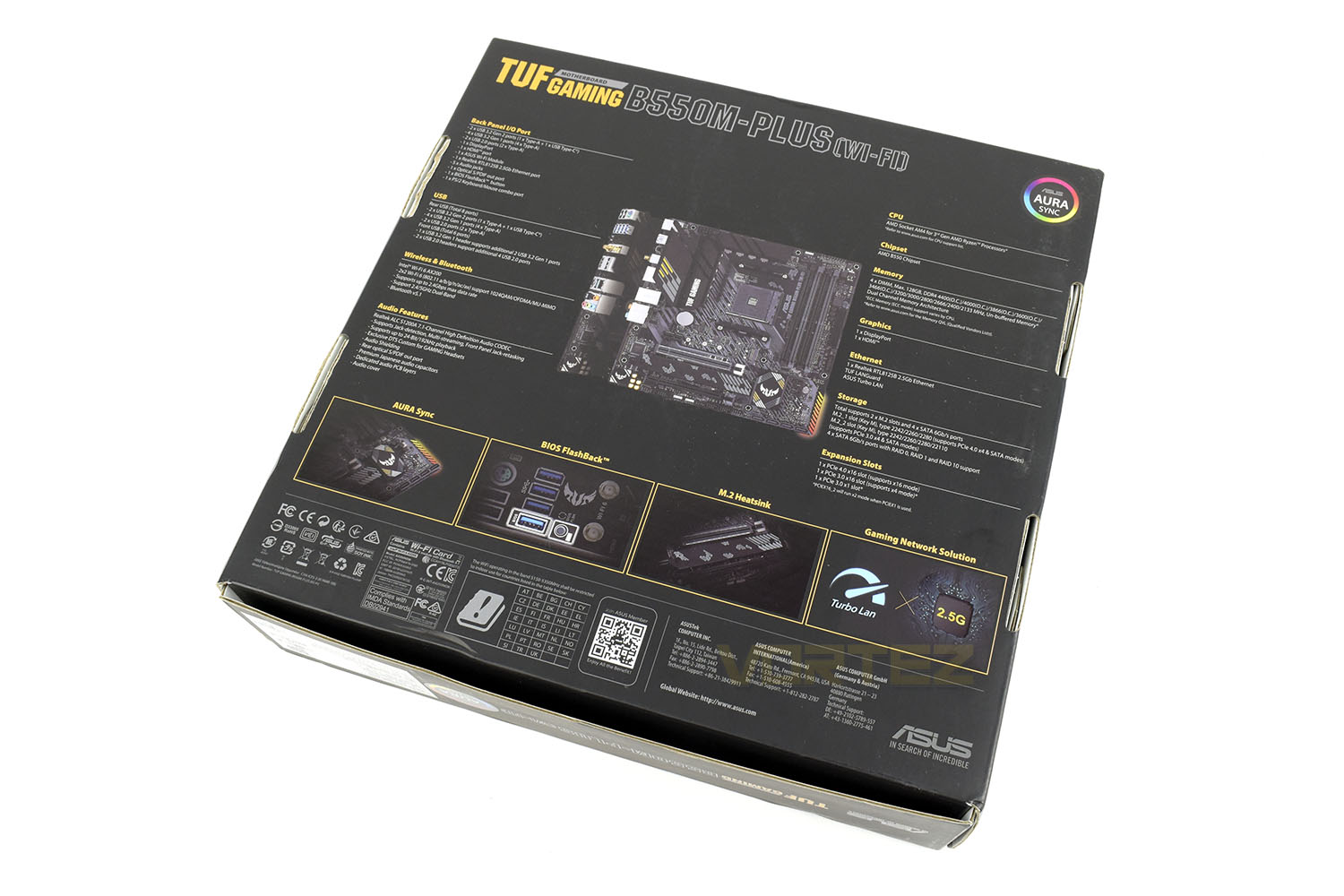
In a stealthy styled box, the B550M-Plus is shrouded in mystery behind a thin fog but there’s more than enough information plastered along the bottom row to whet your appetite.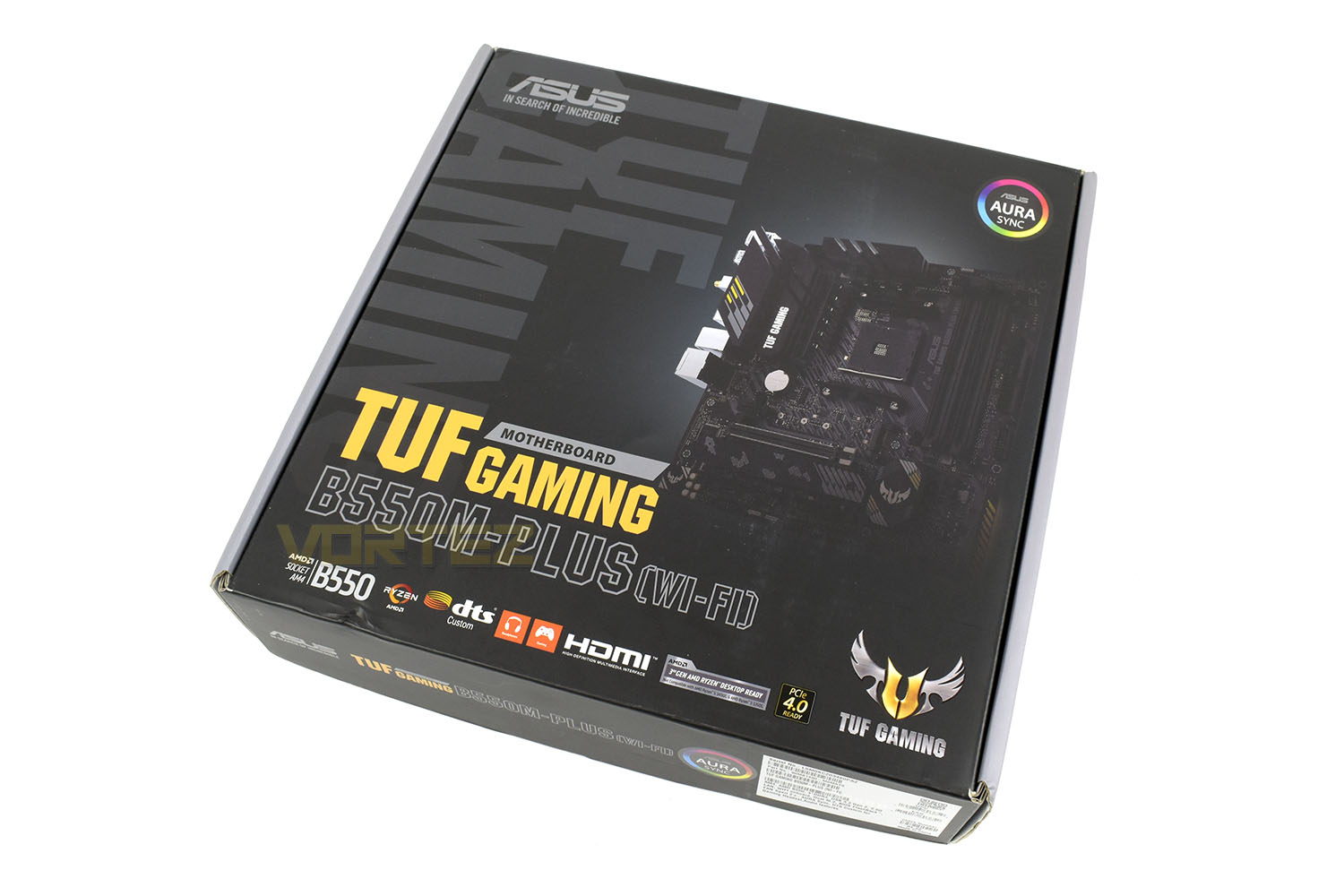
Setting the box on its front, the rear is plastered with information and annotations to give you a good overall look at the features that you can expect.
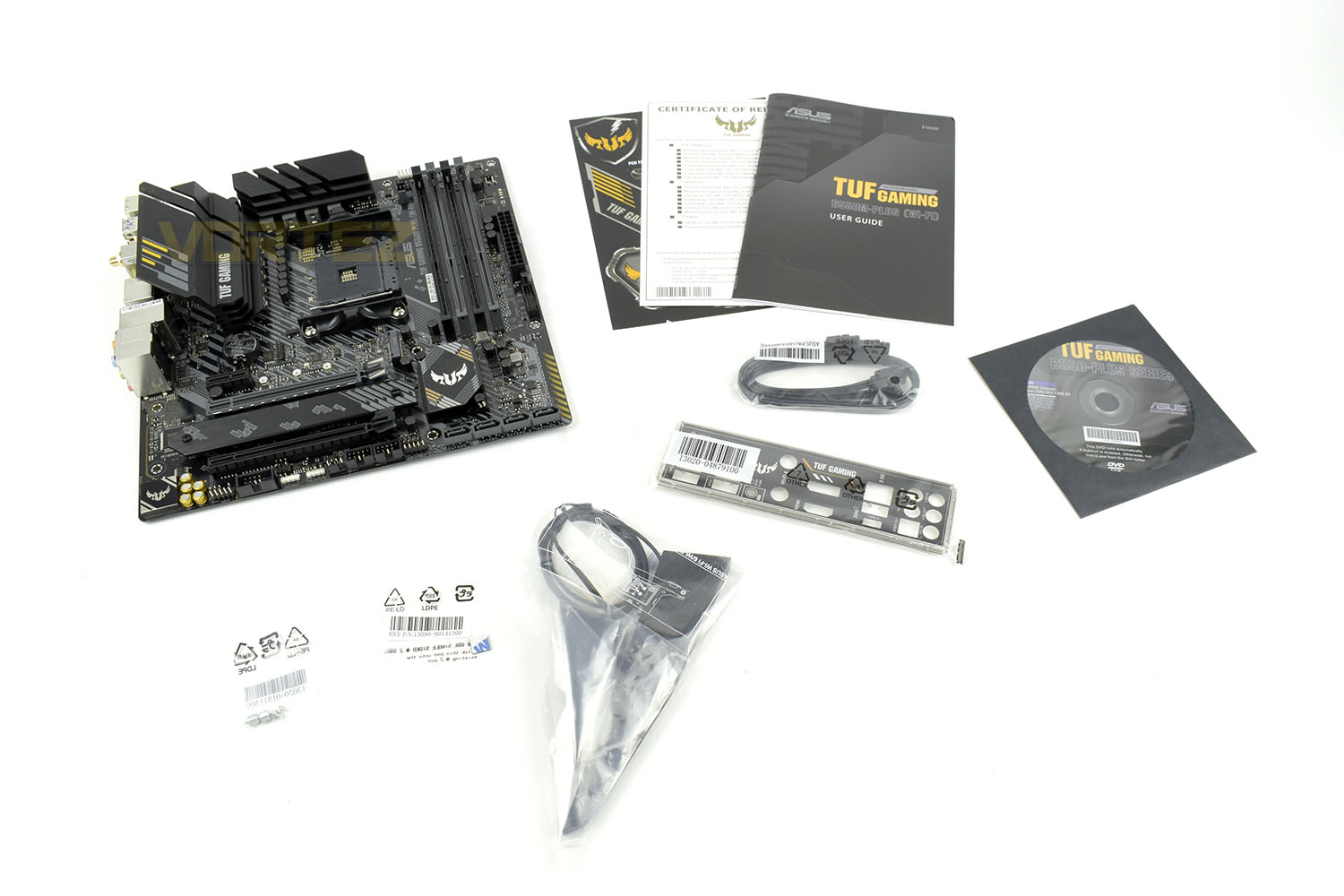
Chucked in with your B550M-Plus is a WiFi antenna, rear IO backplate, a couple of SATA cables, M.2 screws and standoffs, manuals and a driver CD.
Closer Look
Sporting the trademark black, white, grey and yellow colour scheme, the TUG Gaming B550M-Plus looks rather nice. The heatsink design all across the board is a mix of function and style, particularly around the CPU socket. The B550M-Plus conforms to the Micro-ATX form factor (244mm x 244mm).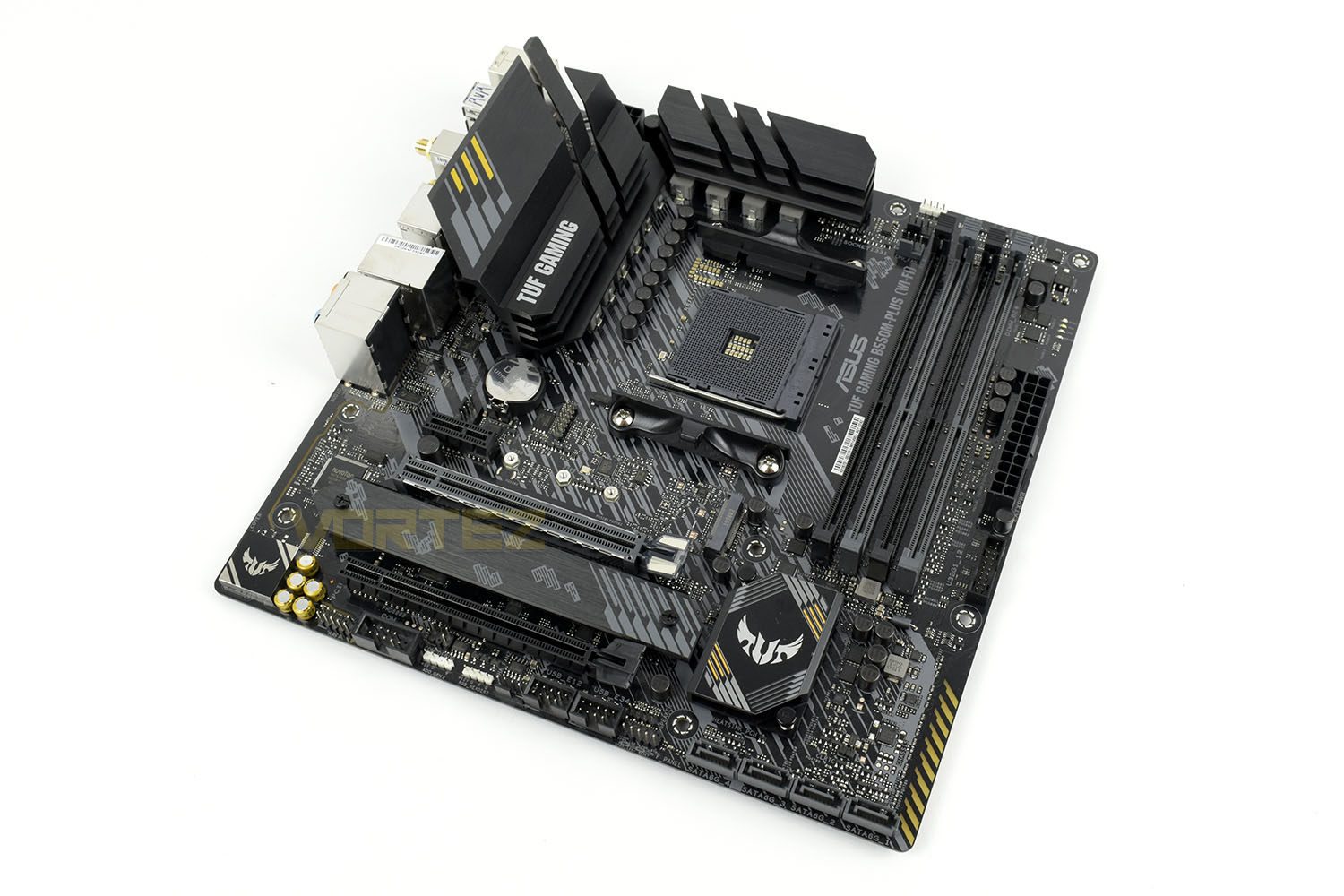
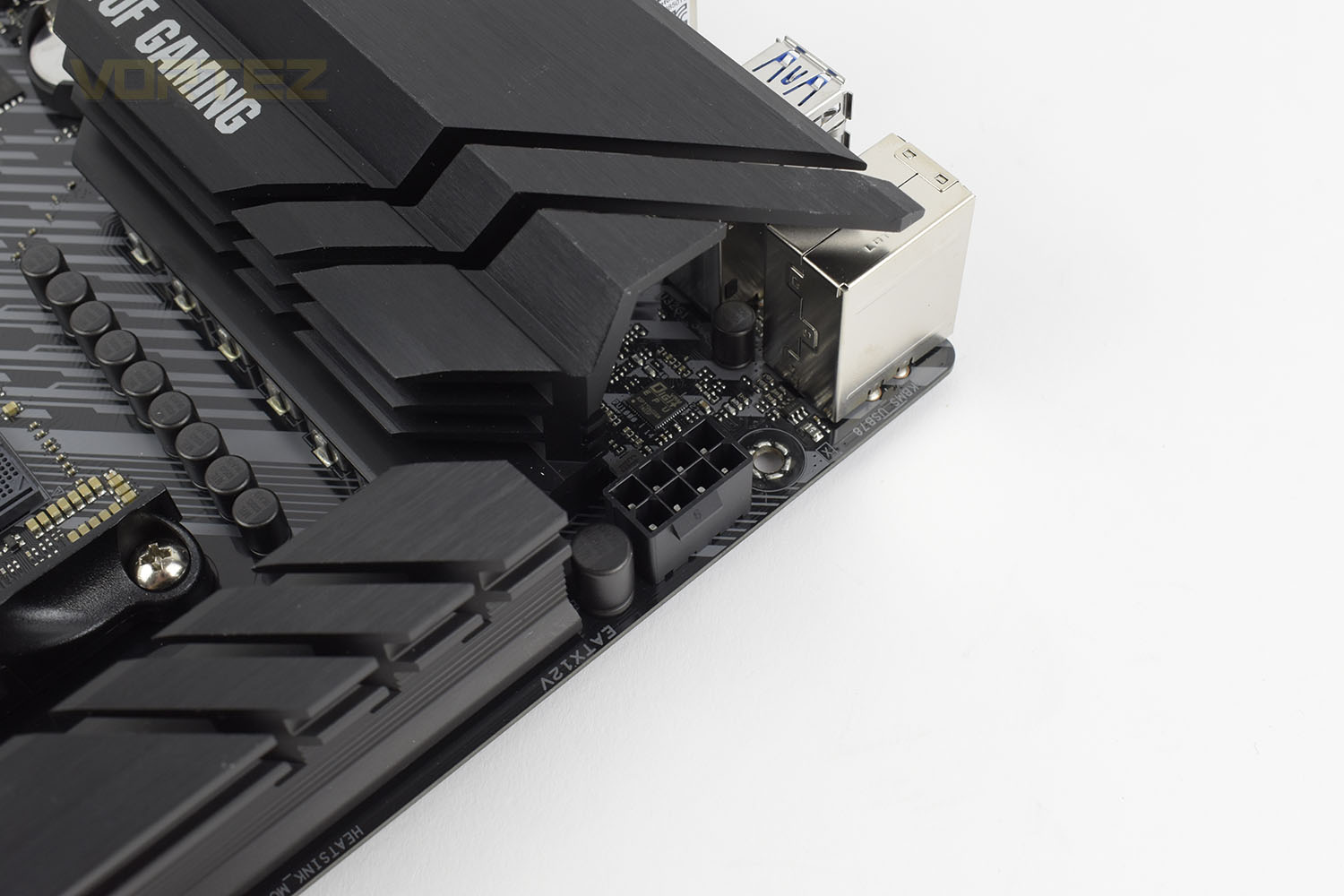
Honing in on the CPU socket, here we find an 8+2 DrMOS power stage which can deliver the power that 3rd Gen. Ryzen processors require while remaining efficient. The large metal heatsinks enable stable, consistent power delivery during heavy workloads by preventing excessive heat build up.
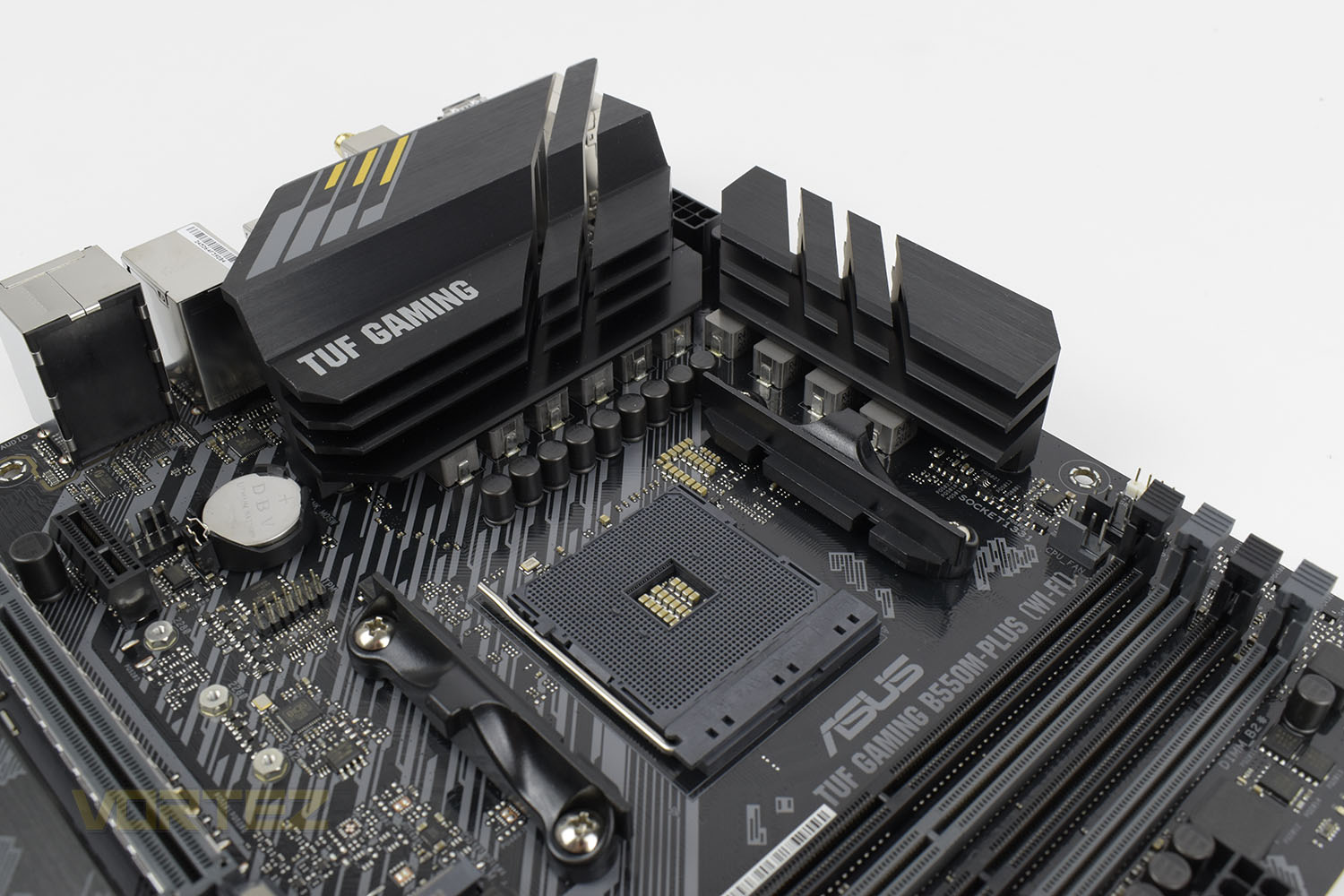
Further to the DrMOS power stages we also find a ProCool 8-pin CPU power connector which allows higher current flow with lower impedance to prevent heat build up.
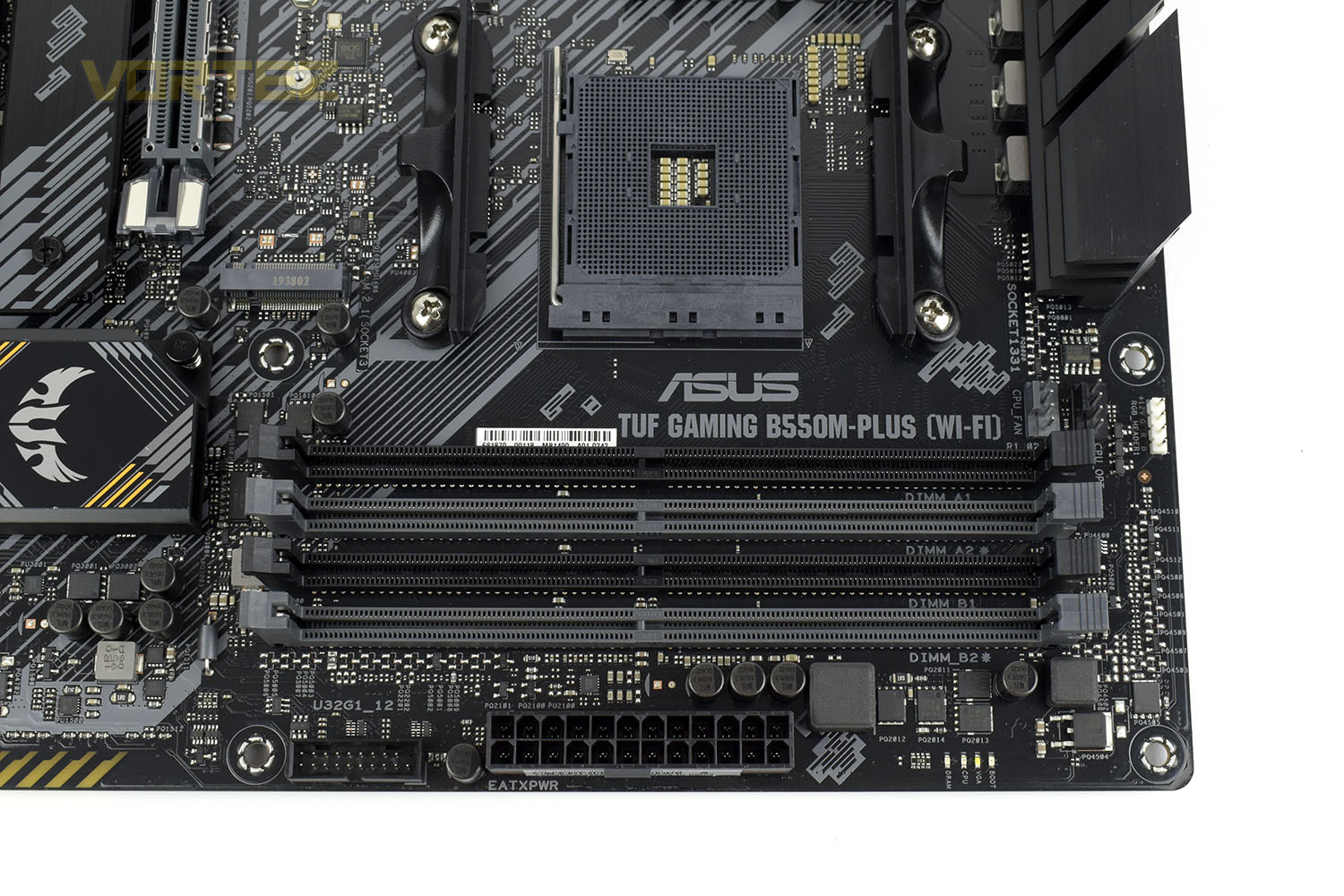
Four DIMM slots enable the board to support up to 128GB of DDR4 memory with frequency support up to 4800MHz.
Dotted around the DIMM slots are a couple of 4-pin PWM fan connections, a 4-pin RGB header, some basic debug LEDs for boot, VGA, CPU and DRAM and a front IO USB 3.2 Gen. 1 connection.
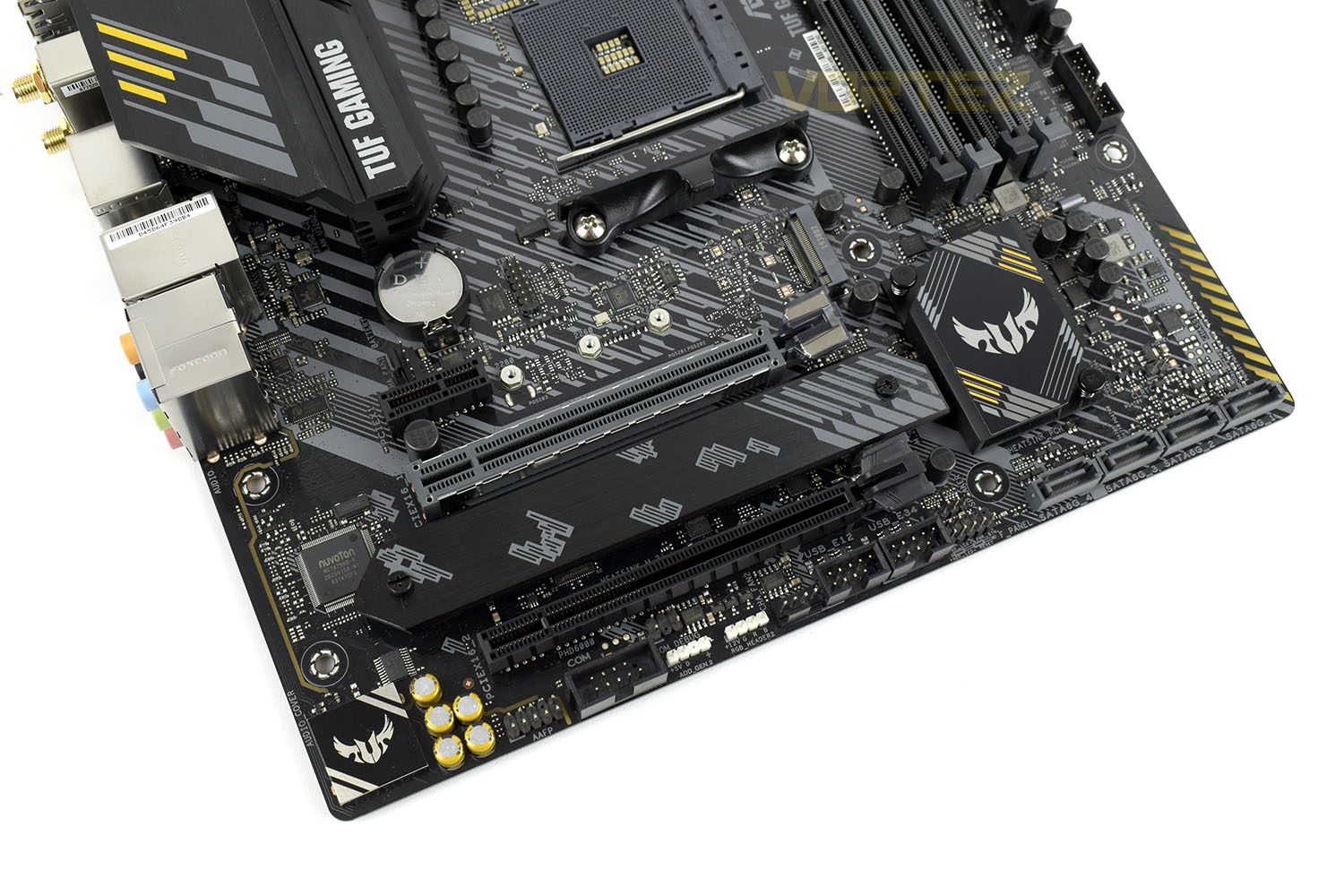
Being a Micro-ATX board, the usual limitation is the total PCI-Express slots. The B550M-Plus is no exception, but it’s not a bad compromise from our perspective.
You get a pair of M.2 NVMe slots, with the top one being capable of PCI-E 4.0 drives but not rocking any kind of attached heatsink. The bottom M.2 slot is limited to PCI-E 3.0 but lands with a lengthy heatsink in situ; it would’ve been nice if they designed the single heatsink to be compatible with either of the slots but something is better than nothing.
In regards to PCI-E slots, there’s a single 4.0 spec’ slot, the grey one, then a 3.0 x16 and 3.0 x1 slot flanking either side of it.
Closer Look (Continued)
Providing connections for your traditional storage, ASUS have a bank of four SATA 3.0 ports along the bottom-right corner of the motherboard. At this price point we’re used to seeing 90° connections, and typically six connections. Only getting four seems a little.. cheap.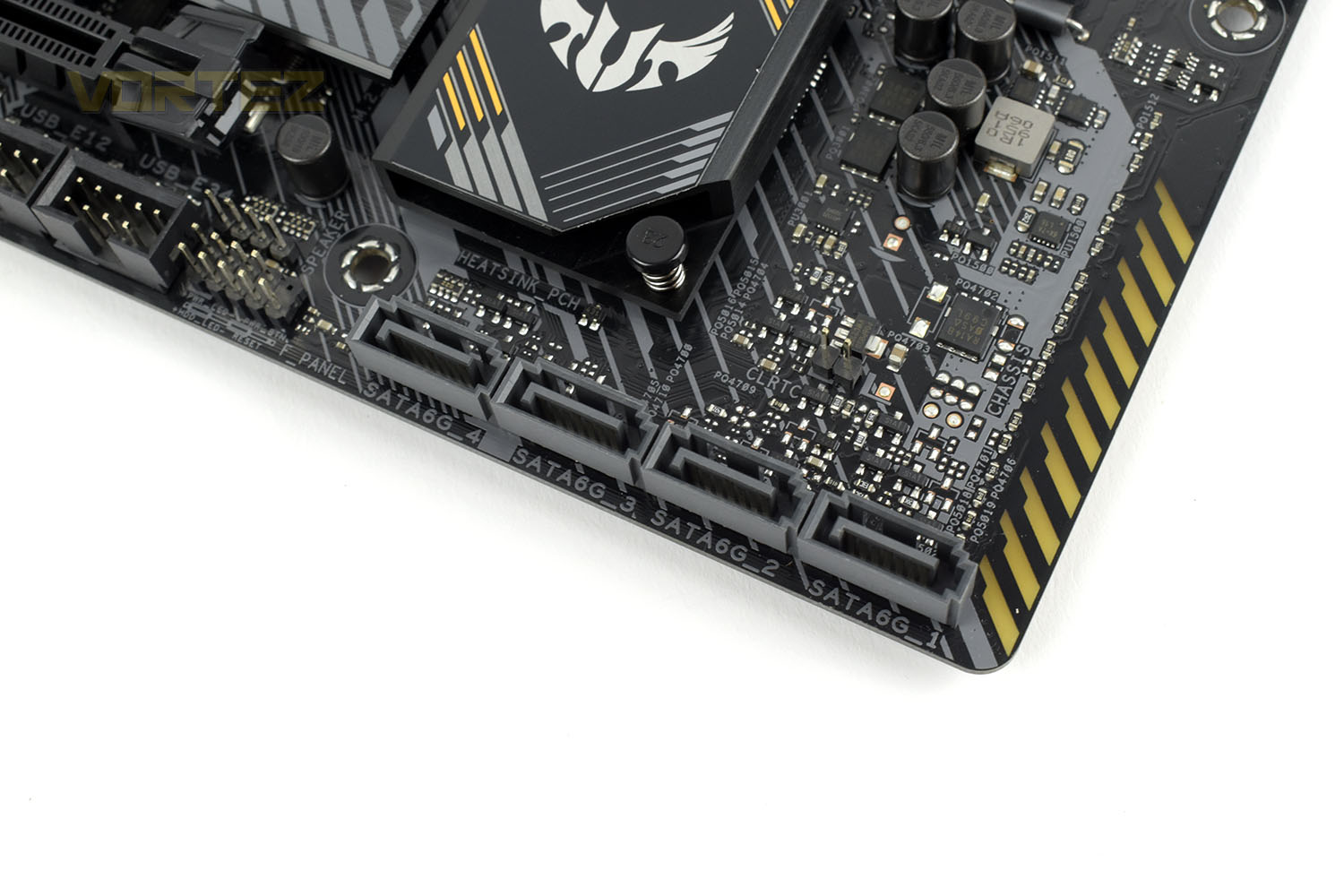
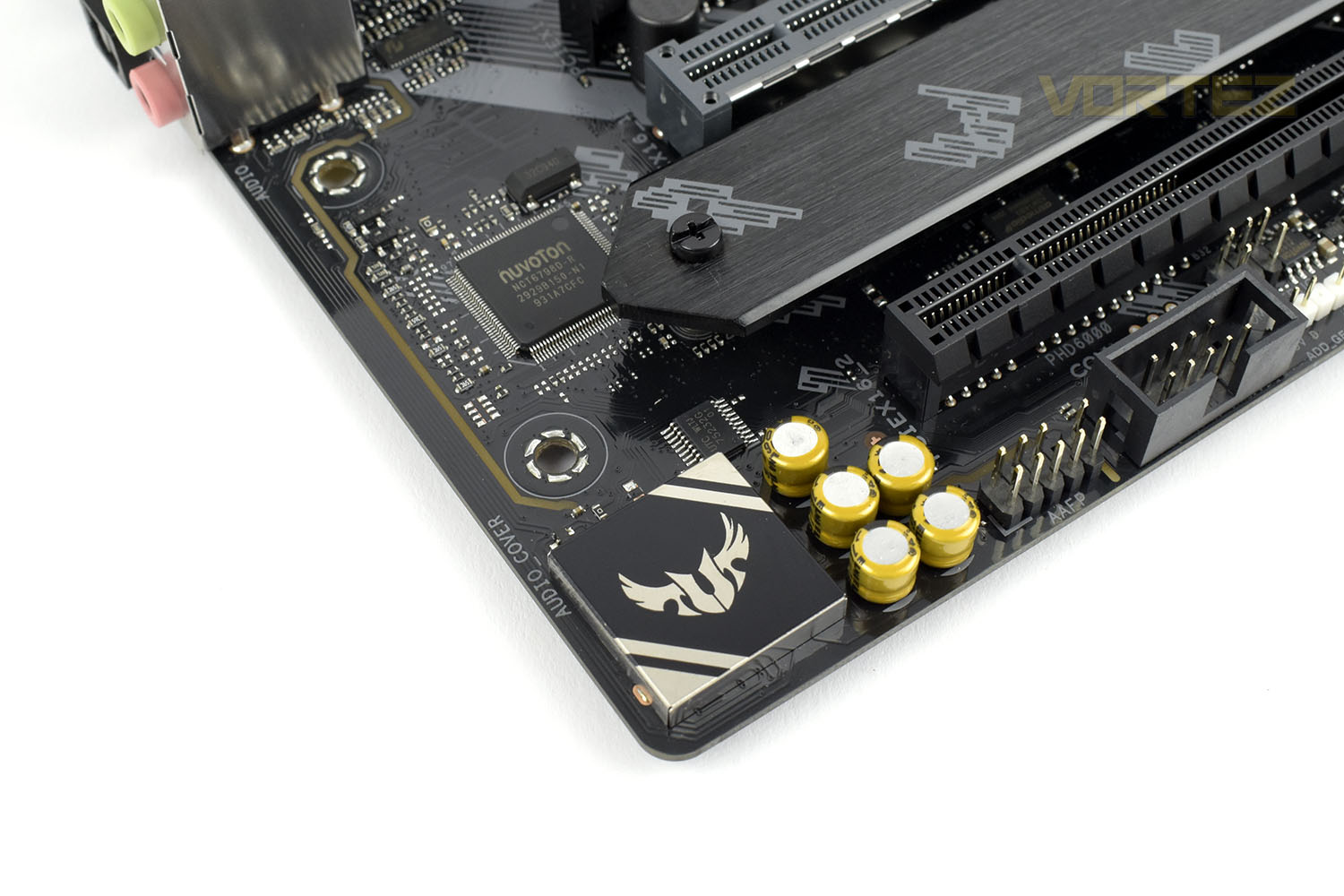
Under the TUF Gaming logo is the onboard audio processor running the Realtek S1200A codec, shielded from outside interference to preserve the best possible quality. The 5 Japanese audio capacitors alongside provide a warm, natural sound. This section is isolated from the rest of the board and has the right and left channels on separate layers, all in the effort of reducing interference for better quality audio.
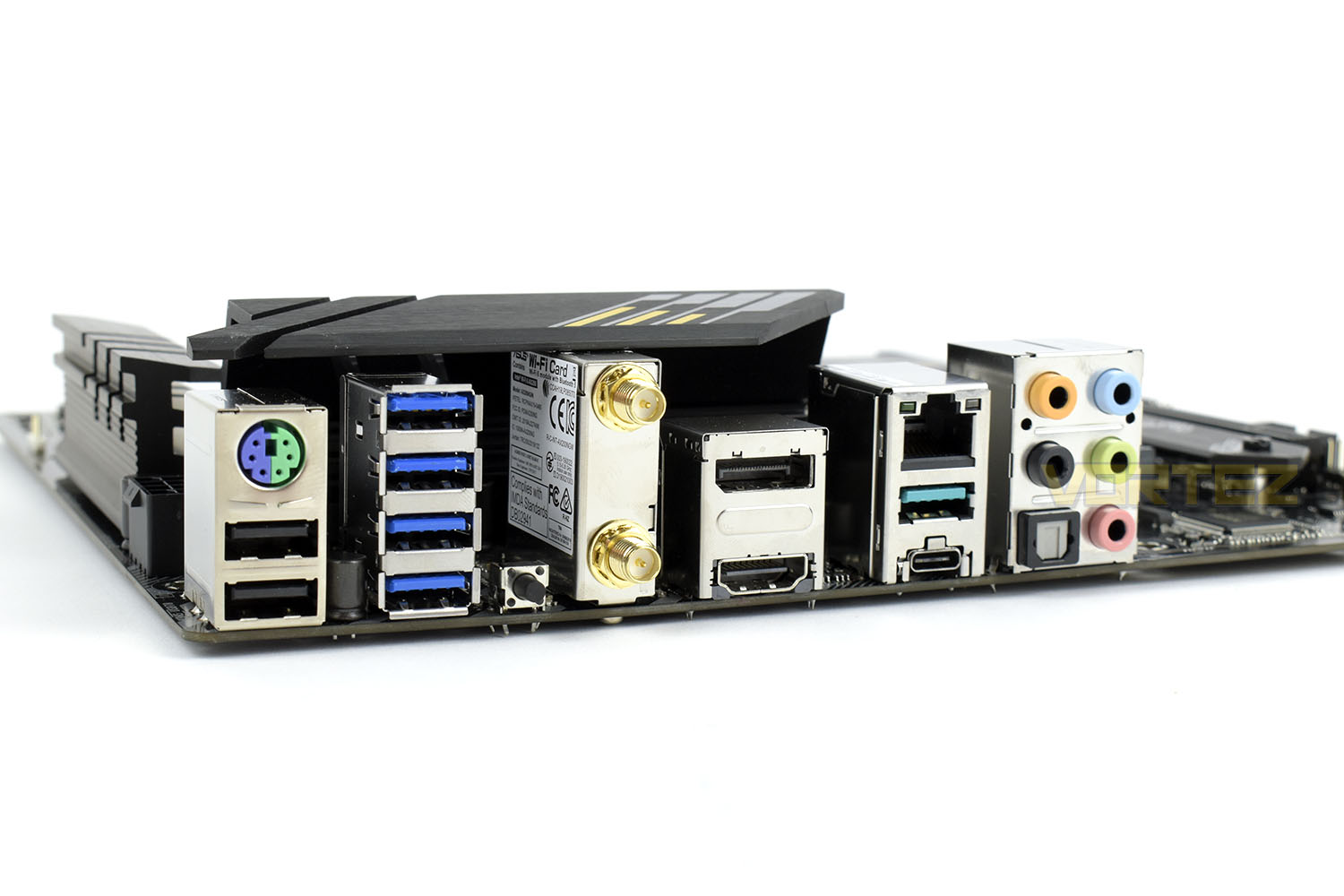
Looking at the rear I/O, the first thing you’ll notice is that you have to insert the backplate yourself. For £185 we absolutely expect this to be pre-attached but we’ll look by it for now.
Starting from the left we get:
1x PS/2 keyboard/mouse port
2x USB 2.0
4x USB 3.2 Gen. 1
1x BIOS FlashBack button
2x WiFi antenna connections
1x DisplayPort
1x HDMI
1x 2.5G ethernet
1x USB 3.2 Gen. 2 Type-A
1x USB 3.2 Gen. 2 Type-C
5x 3.5mm audio connections
1x S/PDIF out
BIOS
Opening up the BIOS you’re initially met with an overview page. This gives you almost all of the basics that you’d need, including the ability to turn on your D.O.C.P. settings (this is just ASUS’ name for Intel XMP).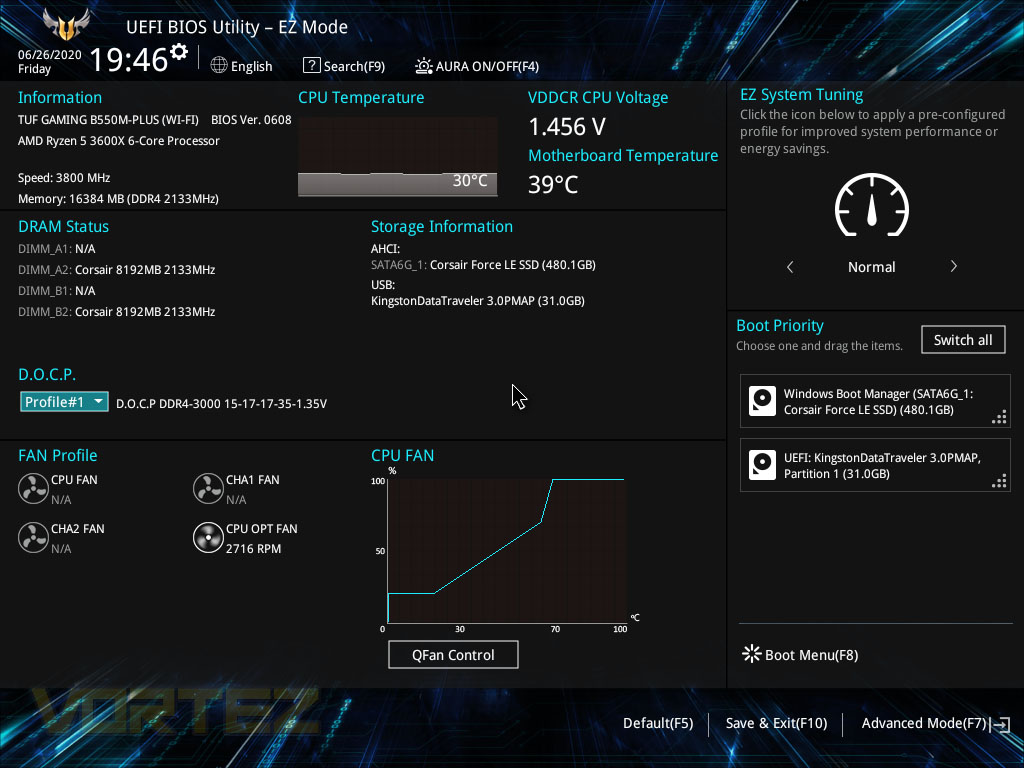
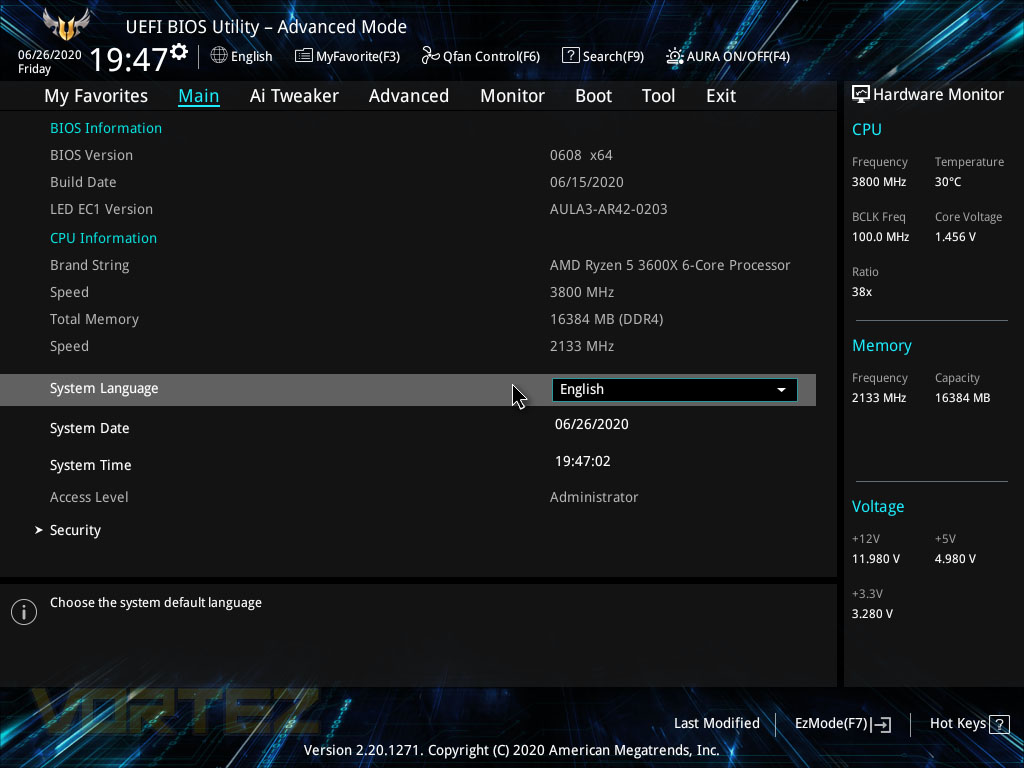
Pressing F7 will flick things into overdrive, giving a whole multitude of options and settings that open up all kinds, including overclocking, RGB settings, fan curves and boot options. On the right is the Hardware Monitor where the core basics can be observed at a glance.
On the main page you can see your BIOS version, CPU installed, as well as date and time.
In the AI Tweaker section, there’s a whole host of in-built overclocking features that are designed to extract extra performance from your system without the effort of manual overclocking. ASUS’ engineers know what they’re doing so let them do the heavy lifting for you. Of course, their options are a one-size-fits-all so if you really wish to get every last drop of power, bespoke tweaking will be required.
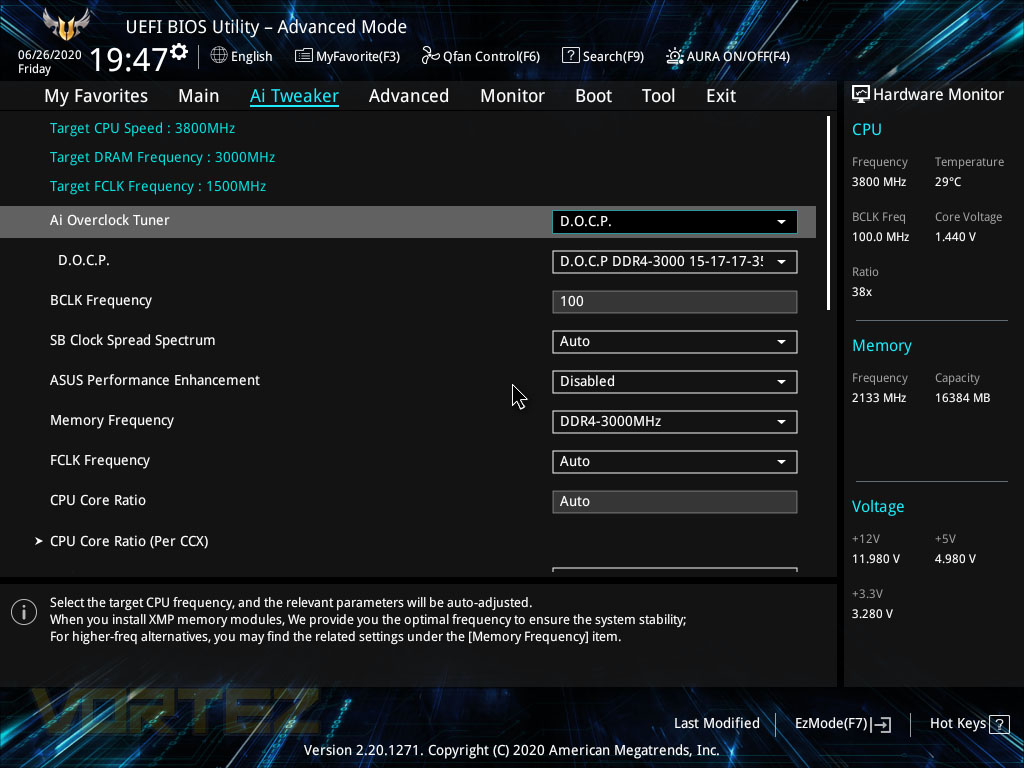
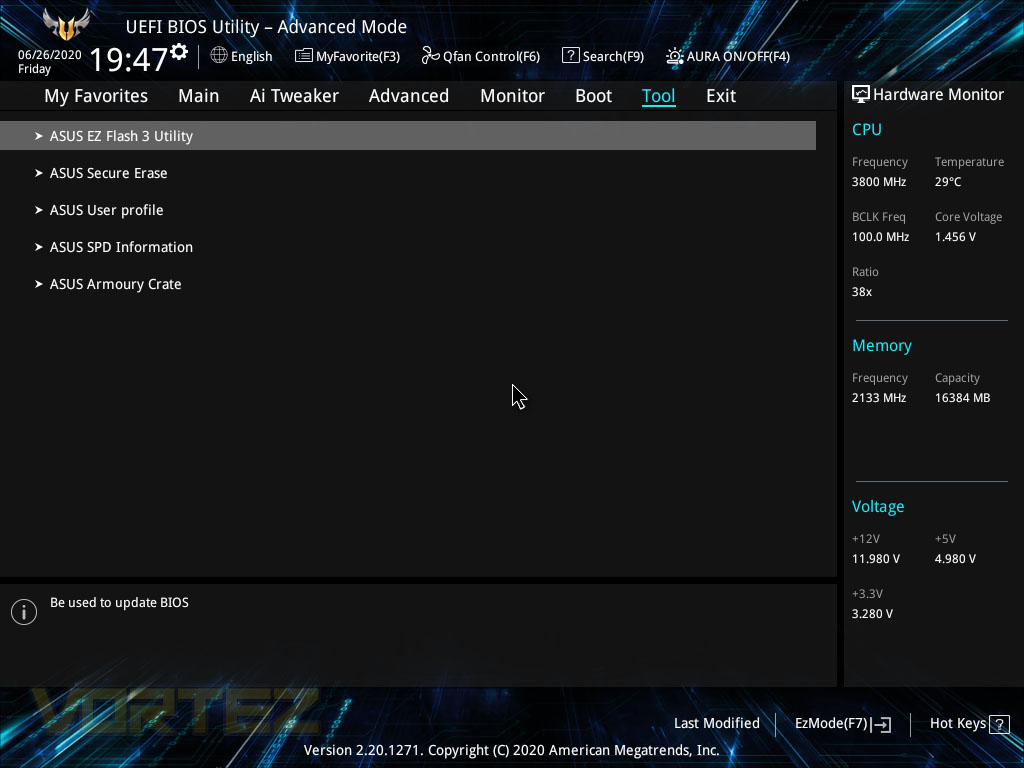
In the Tool tab you can flash your BIOS to get the latest stability improvements or added features, delete your SSD/HDD content with the Secure Erase feature or set up user profiles based on what you’d like to do with your system.
We really wish ASUS would use the term “XMP” like everyone else, but putting that aside, the BIOS works well and is stable, but our mouse just wouldn’t work with it for some reason.
Test Setup & Methodology
Notes: We’ve revamped our benchmark regime by removing a number of tests which reveal little, to no difference between each motherboard model. Gaming performance is one such area which has been removed due to the inability for each motherboard to offer any advantage over another. Instead, we have focussed on meaningful/tangible analysis which examines the VRM/chipset design, and the storage performance which will be far more informative to the end user.TEST SETUP
CPU AMD Ryzen 5 3600XCooling: Corsair Hydro Series H150i
Motherboard: As tested
Memory: 16GB Corsair Vengeance LPX 3000MHz
Graphics: AMD Radeon RX 480
Storage: Intel S3500 128GB SATA SSD + Western Digital SN750 EKWB 1TB
PSU: Corsair HX1050 80 Plus Gold Certified PSU
Monitor: AOC U2879VF
BENCHMARKS
PCMark 10 – Overall Extended ScoreSiSoftware SANDRA – SATA/PCIe Storage Tests
SiSoftware SANDRA – Processor Image Processing
OTHER SOFTWARE
Temperature Analysis: HWMonitorStress Testing Software: AIDA64 Stability Test
CPU Specification Monitoring: CPU-Z
Benchmarks: Power Consumption
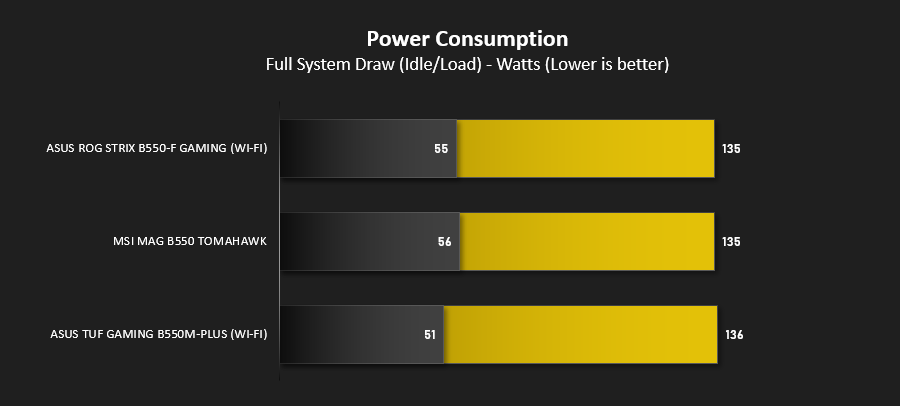
It’s interesting to note the power consumption across all motherboards. Although they are using the B550 chipset, energy results can fluctuate between manufacturers due to the features and specifications that are integrated. First of all, for the idle tests the system is cold booted into Windows and no additional applications are executed – the watts are noted on the external energy monitor we use and then the system is loaded with 3DMark FireStrike – watts are again monitored for the duration of the test and the highest rated wattage result is then noted down. Below are the results of this energy test.
Benchmarks: VRM & Chipset Cooling
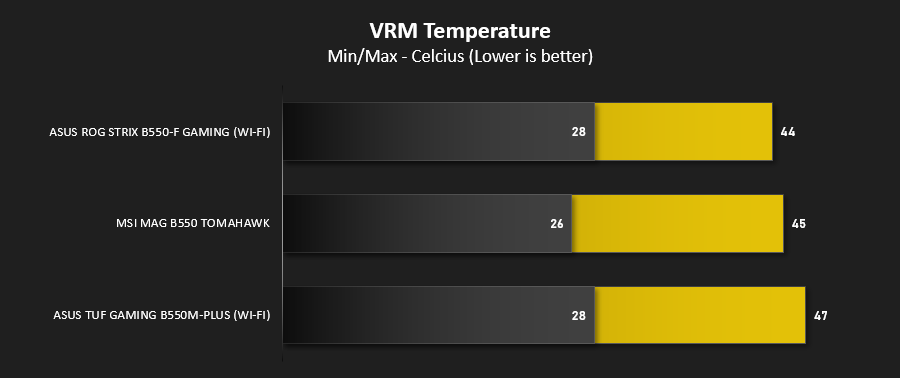
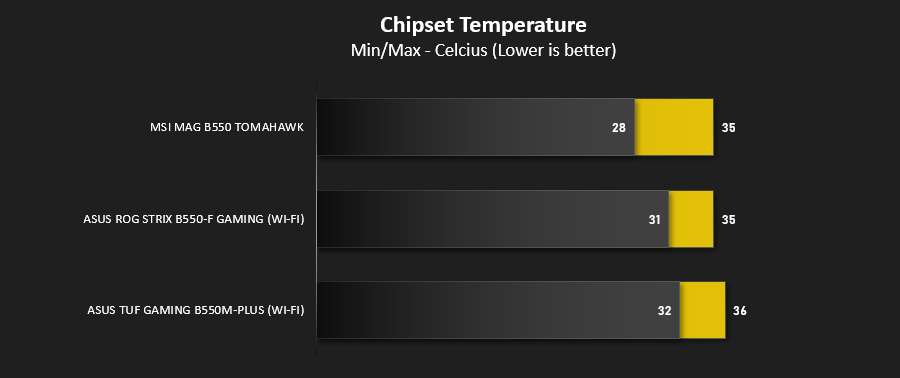
Each motherboard manufacturer designs their board with a unique set of heatsinks to cover key areas like the VRM/mosfets and the chipset itself. In these test we use HWMonitor to identify the minimum values for VRM and chipset and then we load up Aida64 stability test again and perform a 20 minute run, recording the maximum value for both attributes.
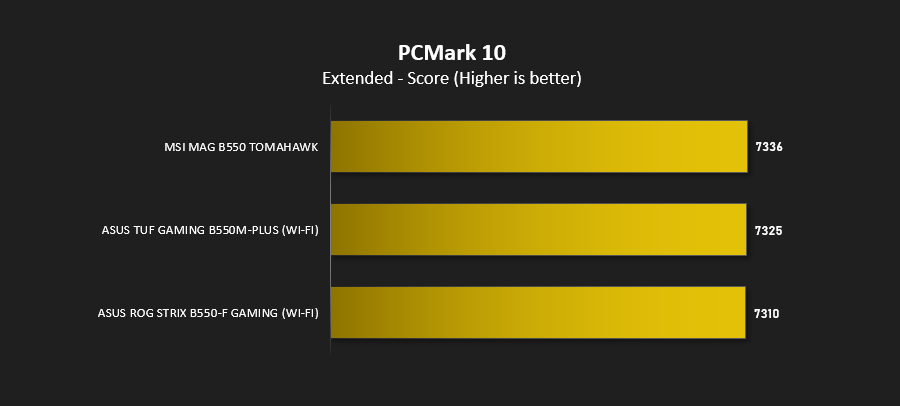
Benchmarks: PCMark 10
PCMark 10 features a comprehensive set of tests that cover the wide variety of tasks performed in the modern workplace. With a range of performance tests, custom run options, and the new Battery Life Profile, PCMark 10 is the complete PC benchmark for the modern office.
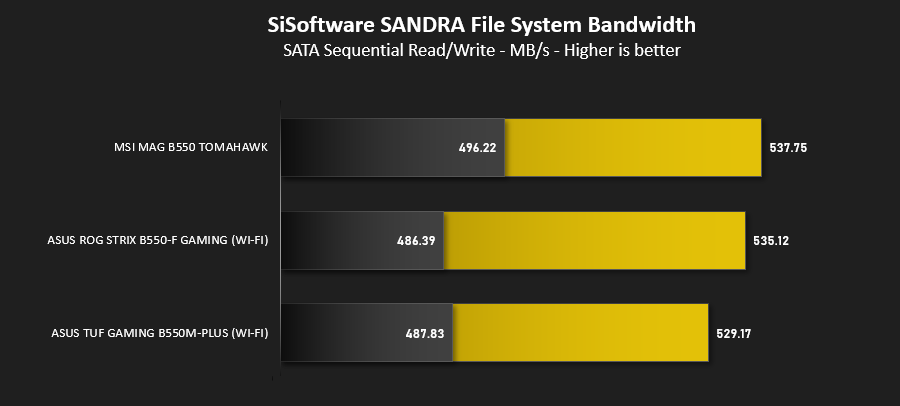
Benchmarks: SATA Performance
In order to ascertain the SATA performance for our motherboards we use SiSoftware SANDRA and the File System Bandwidth performance test. This allows us to obtain the sequential read/write transfer rates for the drive being tested – Intel S3500 128GB SSD.
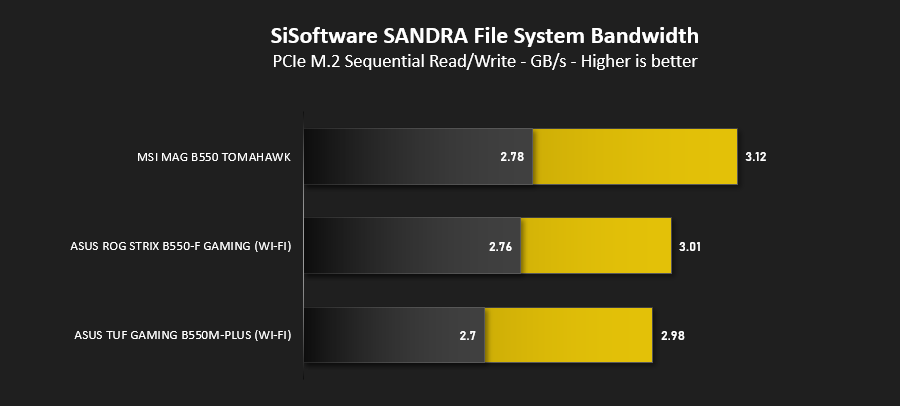
Benchmarks: PCIe M.2 Performance
In order to ascertain the PCIe M.2 performance for our motherboards we use SiSoftware SANDRA and the File System Bandwidth performance test. This allows us to obtain the sequential read/write transfer rates for the drive being tested – Western Digital SN750 EKWB 1TB.
Conclusion
ASUS are no stranger to producing motherboards for all price points and use-cases but the TUF Gaming B550M-Plus (Wi-Fi) is a difficult one to fathom.Starting off with the overall aesthetic of the board, the black and yellow colour scheme is subtle enough that it’ll blend into most systems, but also plenty prominent if you want to match things up with the multitude of TUF Gaming Alliance products available on the market.
Performance is something we briefly test, but mainly focus on power consumption and temperatures, where the largest differences are found between manufacturers and motherboards. Temperatures were of absolutely no concern thanks to the large metal heatsinks on the VRM and even the small chipset heatsink coped with the stress just fine.
Equipped with 2.5G LAN, WiFi 6, sporting a high-spec power phase with plentiful heatsinks and support for the latest Ryzen processors, a decent audio solution and a good selection of rear USB ports, the B550M-Plus offers plenty of performance and features but there’s also a great deal we consider to be missing.
At this price point, which quite frankly edges its way right into X570 territory, we expect certain features like a pre-mounted rear I/O shield, a pair of M.2 heatsinks, 90° SATA ports and front USB Type-C; none of which is present.
The B550M-Plus (Wi-Fi) is a good effort from ASUS but it feels way overpriced considering the features presented. A decent price cut would see us offer an award but as it stands we feel there are much better options available.
Pros
+ Decent performance
+ Good cooling capacity
+ Two M.2 NVMe slots
+ Subtle yet effective colour scheme
Cons
– Price
– Separate rear I/O shield
– Only one M.2 heatsink
– Straight up SATA connections
– No front USB Type-C
+ Decent performance
+ Good cooling capacity
+ Two M.2 NVMe slots
+ Subtle yet effective colour scheme
Cons
– Price
– Separate rear I/O shield
– Only one M.2 heatsink
– Straight up SATA connections
– No front USB Type-C
Click here for an explanation of our awards at Vortez.net.
Stay connected with the Vortez Social Media pages:
Join in with the discussions on Discord