







Features, looks, and performance. Three things every good motherboard should have. The X99 Deluxe is has all these and is more than equipped for Intel Haswell-E.

Product on review: ASUS X99-DELUXE
Manufacturer & Sponsor: ASUS
Street Price: £299 / $398.99
ASUS have ever been a benchmark brand to look towards for new component platforms, and so we have been extremely keen to look at their take on Intel’s high-end X99 Express platform for Haswell-E processors. The first may well be one of the best as it sits at the top of the ASUS consumer range; yes, we have the ASUS X99-Deluxe.
The X99-Deluxe sits atop a range comprising the X99-A, X99-S and X99-Deluxe. The range as a whole caters to consumers looking to spend between £190 and £300 on the motherboard alone, with the high-end Deluxe model increasing the amount of value-added constituent parts. Nonetheless, all share the core functionality of Intel’s X99 chipset in addition to any which ASUS deems essential to their product range. For those curious, the Republic Of Gamers sister brand pitches their Rampage V Extreme slightly higher even than the X99-Deluxe.
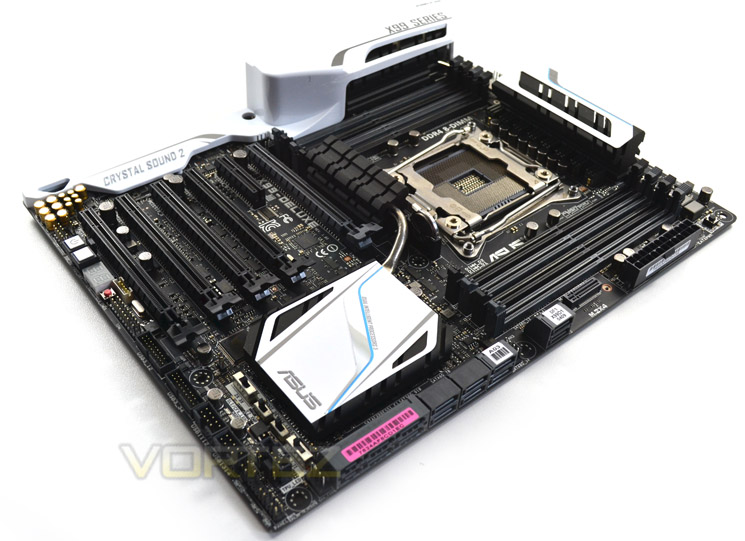
The X99-Deluxe differentiates itself from the rest of the mainstream range in a few subtle but important ways. The first and most obvious is the inclusion of an on-board 802.11ac wireless module, antenna and Bluetooth support, a rarity in the mainstream outside of compact form factors which have few expansion slots. Dual-Gigabit LAN also makes an appearance, as do a couple more USB 3.0 ports. Finally, there will be no scrabbling around for cables as ASUS bundle in eight SATA and an ASUS 2/3-way SLI bridge. Essentially, it’s as feature complete as you could want.
Also present on the X99-Deluxe and the rest of their X99 motherboard range (including the ROG Rampage V Extreme) is their OC Socket. This patent pending design is compatible with all LGA 2011-3 CPUs but interfaces with additional contact pads on the bottom of the Haswell-E CPU, unlocking access to deeper and more nuanced control over the platform as a whole. ASUS claim greater voltage stability, higher attainable DDR4 frequencies, and lower voltage requirements for equivalent CPU speed. We’ll discuss this feature in more detail later, but suffice it to say that ASUS deem it so important to their performance advantage of the competition that they have applied to patent the design.
About ASUS
ASUS takes its name from Pegasus, the winged horse in Greek mythology that symbolizes wisdom and knowledge. ASUS embodies the strength, purity, and adventurous spirit of this fantastic creature, and soars to new heights with each new product it creates.
Taiwan’s Information Technology industry has grown enormously over the last few decades and the country is now a dominant force in the global market. ASUS has long been at the forefront of this growth and while the company started life as a humble motherboard manufacturer with just a handful of employees, it is now the leading technology company in Taiwan with over 12,500 employees worldwide. ASUS makes products in almost every area of Information Technology too, including PC components, peripherals, notebooks, tablets, servers and smartphones.
Taiwan’s Information Technology industry has grown enormously over the last few decades and the country is now a dominant force in the global market. ASUS has long been at the forefront of this growth and while the company started life as a humble motherboard manufacturer with just a handful of employees, it is now the leading technology company in Taiwan with over 12,500 employees worldwide. ASUS makes products in almost every area of Information Technology too, including PC components, peripherals, notebooks, tablets, servers and smartphones.
Chipset Features
First and foremost, Intel’s latest chipset is aimed at the home ‘power’ user, be this performance enthusiast (read overclocker), extreme gamer or indeed for those who require the ultimate media encoding platform. So whatever your vice, Intel have all the bases covered with their latest chipset. This isn’t, of course, to say the Z97 based chipset is poor by comparison (it’s not), but if you want the ultimate – the very best of the best supporting Intel’s 8 core processor (5960X) – then X99 is the only option.
So what’s new with X99?
DDR4 Quad Channel Memory
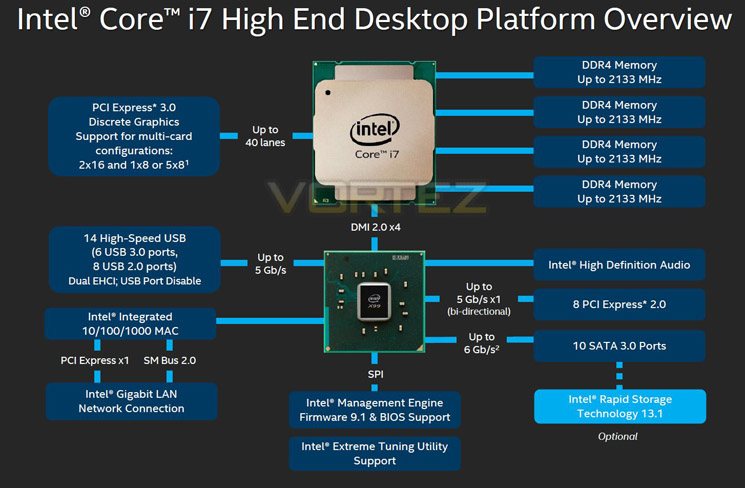
The above block diagram shows us that DDR4 is natively supported. Note that DDR3 is NOT supported (more on this later). While the block diagram shows a rated speed of up to 2133MHz, our test bench happily ran 16GB (4x4GB) Quad channel Corsair Vengeance LPX at 2666MHz. More recently niche 3000MHz and even 3333MHz DDR4 DIMMs are entering the market requiring high voltages and far deeper pocket, but it’s anticipated that eventually 4GHz DIMMs will be the high watermark at retail.
40 x PCI Express (PCIe) Lanes
Depending on CPU choice, the X99 chipset can support up to 40 lanes of PCIe in combinations of 2×16, 1×8 or 5×8. We also expect this figure to increase on some motherboards with the addition of PLX chips given sufficient demand. All of the PCIe lanes are now PCIe 3.0 compliant; while current generation GPU’s rarely saturate PCIe 2.0 it is nice to have that future proofing available, especially for SLI/Crossfire configurations.
USB 3.0
One of the heaviest criticisms of X79 was the lack of natively support USB 3.0 ports, especially when compared to its Z87/97 brethren. We are now happy to report that X99 will support 6 USB 3.0 ports along with 8 USB 2.0 ports. Of course, most motherboard manufacturers will also add the usual ‘aftermarket’ USB 3.0 support from components such as ASMedia and Marvel so transfer speeds of up to 5GB/s and port numbers in the double-digits can theoretically be achieved.
SATA 3.0 And Next Generation Storage
Despite having huge computational benefits, X79 was oft criticised by the lack of high speed SATA 6Gbps ports. This has been rectified with the X99 chipset supporting 10 x SATA 3.0 ports attaining a theoretical speed of 6Gb/s which can be enhanced using the latest Intel Rapid Storage driver to speeds of 10 Gb/s!
SATA of course has its limitations, which is where newer next generation storage technologies come in. First seen in limited quantities on Z87 and more widely on Z97, M.2 and SATA Express technologies unlock transfer speeds far in excess of SATA III. Support for PCIE storage remains sporadic – M.2 is starting to pick up but SATA Express is exceptionally rare – but it’s slowly proving to be a valid alternative to SATA 3 and mSATA. Many X99 motherboards support M.2 X4, which makes use of four PCIE lanes for up to a stunning 32Gbps bandwidth; however few M.2 drives come close to saturating even Gen 1’s ~8Gbps.
We must say that Intel have pulled out all the stops here. Clearly they have taken on board user feedback regarding the deficiencies of X79 by incorporating more modern storage and expansion options. No longer is the Enthusiast flagship the poor I/O brother to Z87/97. Perhaps the biggest draw though is the introduction of DDR4. This will see huge speed gains in almost every aspect of personal computing. With 8x8GB Dimms supported a mammoth 64GB of DDR4 will make the X99 chipset massively future proofed.
We will cover the overclocking capabilities of the new chipset and each motherboard specifically in the overclocking section but this area failed to disappoint too.
Overall, there is little to criticise here. While we would have liked 40 PCIe lanes regardless of CPU, we understand there has to be some compromise to keep costs down for the budget conscious so how many PCIe lanes you have available will be dictated by CPU choice and not the motherboard. The entry level 6 core i7-5820 will have 28 PCIe lanes at a cost of £299 (At the time of release), while the flagship 8 core i7-5960X and 6 core i7-5930K will both have the full blown 40 lanes available. Aside from lanes, cores cache and clockspeed, all of the X99 features will be available regardless of CPU choice and to this end we are grateful. We suspect that future additions to the CPU range will hit the middle ground while the 5960X will receive a speed bump although this is pure speculation at this point.
Which chip would we go for? Obviously if money was no object then the i7-5960X is the way to go, not only does it have the full 40 lanes available but it is a true 8 core (16 threads) CPU. The 5930K would be the obvious choice for the consumer and the CPU that we think will prove most popular due to the balance of speed vs. cost.
Whichever CPU you opt for though, you can be assured that the X99 chipset offers the very best available. It is powerful, feature packed and as you will see, the unrivalled component of choice for enthusiast users.
Technical Specification
SKU: ASUS X99-Deluxe
Chipset:- Intel® X99
Form Factor:- ATX
Dimensions:- 12 inch x 9.6 inch ( 30.5 cm x 24.4 cm )
CPU:
Intel® Socket 2011-v3 Core™ i7 Processors
Supports Intel® Turbo Boost Technology
Memory:
– 8 x DIMM, Max. 64GB, DDR4 3200(O.C.)/3000(O.C.)/2800(O.C.)/2666(O.C.)/2400(O.C.)/2133 MHz Non-ECC, Un-buffered Memory
– Quad Channel Memory Architecture
– Supports Intel® Extreme Memory Profile (XMP)
* Hyper DIMM support is subject to the physical characteristics of individual CPUs.
* Refer to www.asus.com for the Memory QVL (Qualified Vendors Lists).
Multi-GPU Support:
– Supports NVIDIA® Quad-GPU SLI™ Technology
– Supports NVIDIA® 3-Way SLI™ Technology
– Supports AMD Quad-GPU CrossFireX™ Technology
– Supports AMD 3-Way CrossFireX™ Technology
Expansion Slots:
40-Lane CPU:
– 5 x PCIe 3.0/2.0 x16 (x16, x16/x16, x16/x16/x8, x8/x8/x16/x8, x8/x8/x8/x8/x8 mode) *1
– 1 x PCIe 2.0 x4 (max at x4 mode) *2
28-Lane CPU:
– 3 x PCIe 3.0/2.0 x16 (x16, x16/x8, x8/x8/x8)
– 2 x PCIe 2.0 x16 (x1 mode)
– 1 x PCIe 2.0 x4 (max at x4 mode) *2
Storage
1 x M.2 Socket 3 (32Gbps), with vertical M Key design, type 2242/2260/2280 storage devices support (Support PCIE SSD only)
1 x M.2 Socket 3 (32Gbps) via PCIE Adaptor card.
Intel® X99 chipset:
– 1 x SATA Express port, compatible with 2 x SATA 6.0 Gb/s ports
– 8 x SATA 6Gb/s port(s),
– Support Raid 0, 1, 5, 10
– Supports Intel® Smart Response Technology, Intel® Rapid Recovery Technology
ASMedia® SATA Express controller:
– 1 x SATA Express port, compatible with 2 x SATA 6.0 Gb/s ports
LAN:
– Intel® I218V, 1 x Gigabit LAN Controller(s)
– Intel® I211-AT, 1 x Gigabit LAN
– Dual Gigabit LAN controllers- 802.3az Energy Efficient Ethernet (EEE) appliance
– Support Teaming Technology
– ASUS Turbo LAN Utility
Wireless Data Network:
– Wi-Fi 802.11a/b/g/n/ac
– Supports dual band frequency 2.4/5 GHz
– Support ASUS Wi-Fi Go! Utility
– Up to 1300Mbps transfer speed
Bluetooth:
– Bluetooth V4.0
Audio:
Realtek® ALC1150 8-Channel High Definition Audio CODEC featuring Crystal Sound 2
– Supports : Jack-detection, Multi-streaming, Front Panel Jack-retasking
– High quality 112 dB SNR stereo playback output (Line-out at rear) and 104 dB SNR stereo playback input (Line-in)
– High-fidelity audio OP AMP(s)
Audio Feature :
– DTS Ultra PC II
– DTS Connect
– Optical S/PDIF out port(s) at back panel
– BD Audio Layer Content Protection
– Audio Shielding: Ensures precision analog/digital separation and greatly reduced multi-lateral interference
– Dedicated audio PCB layers: Separate layers for left and right channels to guard the quality of the sensitive audio signals
– Audio amplifier: Provides the highest-quality sound for headphone and speakers
– Premium Japanese-made audio capacitors: Provide warm, natural and immersive sound with exceptional clarity and fidelity
– Unique de-pop circuit: Reduces start-up popping noise to audio outputs
– Top notch audio sensation delivers according to the audio configuration
– EMI protection cover to prevent electrical noise to affect the amplifier quality
USB Ports:
Intel® X99 chipset:
– 4 x USB 3.0/2.0 port(s) (4 at mid-board)
– 6 x USB 2.0/1.1 port(s) (2 at back panel, 4 at mid-board)
ASMedia® USB 3.0 controller:
– 10 x USB 3.0/2.0 port(s) (10 at back panel, blue)
Special Features
5-Way Optimization by Dual Intelligent Processors 5
– Whole system optimization with a single click! 5-Way Optimization tuning key perfectly consolidates TPU, EPU, DIGI+ Power Control, Fan Xpert 3, and Turbo App together, providing better CPU performance, efficient power saving, precise digital power control, whole system cooling and even tailor your own app usages.
ASUS 5X Protection:
– ASUS DIGI+ VRM – 8 Phase digital power design
– ASUS Enhanced DRAM Overcurrent Protection – Short circuit damage prevention
– ASUS ESD Guards – Enhanced ESD protection
– ASUS High-Quality 5K-Hour Solid Capacitors – 2.5x long lifespan with excellent durability
– ASUS Stainless Steel Back I/O – 3x more durable corrosion-resistant coating
ASUS TPU:
– Auto Tuning
– GPU Boost
– TPU switch
ASUS EPU:
– EPU switch
ASUS Digital Power Design:
– Industry leading Digital 8 Phase Power Design
– Industry leading Digital 4 Phase DRAM Power Design
– CPU Power Utility
– DRAM Power Utility
ASUS Wi-Fi GO!
– Wi-Fi GO! Function: Cloud GO!, Remote Desktop, Remote Keyboard & Mouse, File Transfer
– Wi-Fi GO! & NFC Remote app for portable smartphone/tablet, supporting iOS 7 & Android 4.0 systems
Chipset:- Intel® X99
Form Factor:- ATX
Dimensions:- 12 inch x 9.6 inch ( 30.5 cm x 24.4 cm )
CPU:
Intel® Socket 2011-v3 Core™ i7 Processors
Supports Intel® Turbo Boost Technology
Memory:
– 8 x DIMM, Max. 64GB, DDR4 3200(O.C.)/3000(O.C.)/2800(O.C.)/2666(O.C.)/2400(O.C.)/2133 MHz Non-ECC, Un-buffered Memory
– Quad Channel Memory Architecture
– Supports Intel® Extreme Memory Profile (XMP)
* Hyper DIMM support is subject to the physical characteristics of individual CPUs.
* Refer to www.asus.com for the Memory QVL (Qualified Vendors Lists).
Multi-GPU Support:
– Supports NVIDIA® Quad-GPU SLI™ Technology
– Supports NVIDIA® 3-Way SLI™ Technology
– Supports AMD Quad-GPU CrossFireX™ Technology
– Supports AMD 3-Way CrossFireX™ Technology
Expansion Slots:
40-Lane CPU:
– 5 x PCIe 3.0/2.0 x16 (x16, x16/x16, x16/x16/x8, x8/x8/x16/x8, x8/x8/x8/x8/x8 mode) *1
– 1 x PCIe 2.0 x4 (max at x4 mode) *2
28-Lane CPU:
– 3 x PCIe 3.0/2.0 x16 (x16, x16/x8, x8/x8/x8)
– 2 x PCIe 2.0 x16 (x1 mode)
– 1 x PCIe 2.0 x4 (max at x4 mode) *2
Storage
1 x M.2 Socket 3 (32Gbps), with vertical M Key design, type 2242/2260/2280 storage devices support (Support PCIE SSD only)
1 x M.2 Socket 3 (32Gbps) via PCIE Adaptor card.
Intel® X99 chipset:
– 1 x SATA Express port, compatible with 2 x SATA 6.0 Gb/s ports
– 8 x SATA 6Gb/s port(s),
– Support Raid 0, 1, 5, 10
– Supports Intel® Smart Response Technology, Intel® Rapid Recovery Technology
ASMedia® SATA Express controller:
– 1 x SATA Express port, compatible with 2 x SATA 6.0 Gb/s ports
LAN:
– Intel® I218V, 1 x Gigabit LAN Controller(s)
– Intel® I211-AT, 1 x Gigabit LAN
– Dual Gigabit LAN controllers- 802.3az Energy Efficient Ethernet (EEE) appliance
– Support Teaming Technology
– ASUS Turbo LAN Utility
Wireless Data Network:
– Wi-Fi 802.11a/b/g/n/ac
– Supports dual band frequency 2.4/5 GHz
– Support ASUS Wi-Fi Go! Utility
– Up to 1300Mbps transfer speed
Bluetooth:
– Bluetooth V4.0
Audio:
Realtek® ALC1150 8-Channel High Definition Audio CODEC featuring Crystal Sound 2
– Supports : Jack-detection, Multi-streaming, Front Panel Jack-retasking
– High quality 112 dB SNR stereo playback output (Line-out at rear) and 104 dB SNR stereo playback input (Line-in)
– High-fidelity audio OP AMP(s)
Audio Feature :
– DTS Ultra PC II
– DTS Connect
– Optical S/PDIF out port(s) at back panel
– BD Audio Layer Content Protection
– Audio Shielding: Ensures precision analog/digital separation and greatly reduced multi-lateral interference
– Dedicated audio PCB layers: Separate layers for left and right channels to guard the quality of the sensitive audio signals
– Audio amplifier: Provides the highest-quality sound for headphone and speakers
– Premium Japanese-made audio capacitors: Provide warm, natural and immersive sound with exceptional clarity and fidelity
– Unique de-pop circuit: Reduces start-up popping noise to audio outputs
– Top notch audio sensation delivers according to the audio configuration
– EMI protection cover to prevent electrical noise to affect the amplifier quality
USB Ports:
Intel® X99 chipset:
– 4 x USB 3.0/2.0 port(s) (4 at mid-board)
– 6 x USB 2.0/1.1 port(s) (2 at back panel, 4 at mid-board)
ASMedia® USB 3.0 controller:
– 10 x USB 3.0/2.0 port(s) (10 at back panel, blue)
Special Features
5-Way Optimization by Dual Intelligent Processors 5
– Whole system optimization with a single click! 5-Way Optimization tuning key perfectly consolidates TPU, EPU, DIGI+ Power Control, Fan Xpert 3, and Turbo App together, providing better CPU performance, efficient power saving, precise digital power control, whole system cooling and even tailor your own app usages.
ASUS 5X Protection:
– ASUS DIGI+ VRM – 8 Phase digital power design
– ASUS Enhanced DRAM Overcurrent Protection – Short circuit damage prevention
– ASUS ESD Guards – Enhanced ESD protection
– ASUS High-Quality 5K-Hour Solid Capacitors – 2.5x long lifespan with excellent durability
– ASUS Stainless Steel Back I/O – 3x more durable corrosion-resistant coating
ASUS TPU:
– Auto Tuning
– GPU Boost
– TPU switch
ASUS EPU:
– EPU switch
ASUS Digital Power Design:
– Industry leading Digital 8 Phase Power Design
– Industry leading Digital 4 Phase DRAM Power Design
– CPU Power Utility
– DRAM Power Utility
ASUS Wi-Fi GO!
– Wi-Fi GO! Function: Cloud GO!, Remote Desktop, Remote Keyboard & Mouse, File Transfer
– Wi-Fi GO! & NFC Remote app for portable smartphone/tablet, supporting iOS 7 & Android 4.0 systems
ASUS Exclusive Features:
– MemOK!
– AI Suite 3
– Ai Charger+
– USB Charger+
– M.2 & SATA Express
– Anti-Surge
– Onboard Button: Power/Reset
– ASUS UEFI BIOS EZ Mode featuring friendly graphics user interface
– USB 3.0 Boost
– Disk Unlocker
– Turbo LAN
– Crystal Sound 2
Interactive HomeCloud
– Media Streamer
ASUS EZ DIY:
– Precision Tweaker 2
– ASUS O.C. Tuner
– ASUS CrashFree BIOS 3
– ASUS EZ Flash 2
– ASUS USB BIOS Flashback
– Push Notice
ASUS Q-Design:
– ASUS Q-Shield
– ASUS Q-Code
– ASUS Q-LED (CPU, DRAM, VGA, Boot Device LED)
– ASUS Q-Slot
– ASUS Q-DIMM
– ASUS Q-Connector
Special Memory O.C. Design
Turbo App
Fan Xpert 3
Back I/O Ports
– 2 x LAN (RJ45) port(s)
– 10 x USB 3.0 (blue)
– 2 x USB 2.0
– 1 x Optical S/PDIF out
– 5 x Audio jack(s)
– 1 x USB BIOS Flashback Button(s)
– 1 x ASUS Wi-Fi GO! module (Wi-Fi 802.11 a/b/g/n/ac and Bluetooth v4.0
Internal I/O
– 1 x AAFP connector
– 2 x USB 3.0 connector(s) support(s) additional 4 USB 3.0 port(s) (19-pin)
– 2 x USB 2.0 connector(s) support(s) additional 4 USB 2.0 port(s)
– 2 x SATA Express connector: gray,
– 1 x M.2 Socket 3 with vertical M Key design, type 2242/2260/2280 storage devices support (Support PCIE SSD only)
– 1 x TPM connector(s)
– 8 x SATA 6Gb/s connector(s)
– 1 x CPU Fan connector(s) (1 x 4 -pin)
– 1 x CPU OPT Fan connector(s) (1 x 4 -pin)
– 4 x Chassis Fan connector(s) (4 x 4 -pin)
– 1 x S/PDIF out header(s)
– 1 x Thunderbolt header(s)
– 1 x 24-pin EATX Power connector(s)
– 1 x 8-pin ATX 12V Power connector(s)
– 1 x EZ XMP switch
– 1 x System panel(s) (Q-Connector)
– 1 x Chassis Intrusion connector(s)
– 1 x DRCT header(s)
– 1 x MemOK! button(s)
– 1 x Thermal sensor connector(s)
– 1 x TPU switch(es)
– 1 x EPU switch(es)
– 1 x CPU/DRAM overvoltage jumper(s)
– 1 x Power-on button(s)
– 1 x Reset button(s)
– 1 x Clear CMOS button(s)
– 1 x 5-pin EXT_FAN(Extension Fan) connector
– 1 x SLI/CFX switch (2/3-WAY adjustments)
BIOS
– 128 Mb Flash ROM, UEFI AMI BIOS, PnP, DMI2.7, WfM2.0, SM BIOS 2.7, ACPI 5.0, Multi-language BIOS,
– ASUS EZ Flash 2, CrashFree BIOS 3, F11 EZ Tuning Wizard, F6 Qfan Control, F3 My Favorites, Quick Note, Last Modified log,
– F12 PrintScreen, F3 Shortcut functions and ASUS DRAM SPD (Serial Presence Detect) memory information.
Manageability
WfM 2.0, DMI 2.7, WOL by PME, PXE
– AI Suite 3
– Ai Charger+
– USB Charger+
– M.2 & SATA Express
– Anti-Surge
– Onboard Button: Power/Reset
– ASUS UEFI BIOS EZ Mode featuring friendly graphics user interface
– USB 3.0 Boost
– Disk Unlocker
– Turbo LAN
– Crystal Sound 2
Interactive HomeCloud
– Media Streamer
ASUS EZ DIY:
– Precision Tweaker 2
– ASUS O.C. Tuner
– ASUS CrashFree BIOS 3
– ASUS EZ Flash 2
– ASUS USB BIOS Flashback
– Push Notice
ASUS Q-Design:
– ASUS Q-Shield
– ASUS Q-Code
– ASUS Q-LED (CPU, DRAM, VGA, Boot Device LED)
– ASUS Q-Slot
– ASUS Q-DIMM
– ASUS Q-Connector
Special Memory O.C. Design
Turbo App
Fan Xpert 3
Back I/O Ports
– 2 x LAN (RJ45) port(s)
– 10 x USB 3.0 (blue)
– 2 x USB 2.0
– 1 x Optical S/PDIF out
– 5 x Audio jack(s)
– 1 x USB BIOS Flashback Button(s)
– 1 x ASUS Wi-Fi GO! module (Wi-Fi 802.11 a/b/g/n/ac and Bluetooth v4.0
Internal I/O
– 1 x AAFP connector
– 2 x USB 3.0 connector(s) support(s) additional 4 USB 3.0 port(s) (19-pin)
– 2 x USB 2.0 connector(s) support(s) additional 4 USB 2.0 port(s)
– 2 x SATA Express connector: gray,
– 1 x M.2 Socket 3 with vertical M Key design, type 2242/2260/2280 storage devices support (Support PCIE SSD only)
– 1 x TPM connector(s)
– 8 x SATA 6Gb/s connector(s)
– 1 x CPU Fan connector(s) (1 x 4 -pin)
– 1 x CPU OPT Fan connector(s) (1 x 4 -pin)
– 4 x Chassis Fan connector(s) (4 x 4 -pin)
– 1 x S/PDIF out header(s)
– 1 x Thunderbolt header(s)
– 1 x 24-pin EATX Power connector(s)
– 1 x 8-pin ATX 12V Power connector(s)
– 1 x EZ XMP switch
– 1 x System panel(s) (Q-Connector)
– 1 x Chassis Intrusion connector(s)
– 1 x DRCT header(s)
– 1 x MemOK! button(s)
– 1 x Thermal sensor connector(s)
– 1 x TPU switch(es)
– 1 x EPU switch(es)
– 1 x CPU/DRAM overvoltage jumper(s)
– 1 x Power-on button(s)
– 1 x Reset button(s)
– 1 x Clear CMOS button(s)
– 1 x 5-pin EXT_FAN(Extension Fan) connector
– 1 x SLI/CFX switch (2/3-WAY adjustments)
BIOS
– 128 Mb Flash ROM, UEFI AMI BIOS, PnP, DMI2.7, WfM2.0, SM BIOS 2.7, ACPI 5.0, Multi-language BIOS,
– ASUS EZ Flash 2, CrashFree BIOS 3, F11 EZ Tuning Wizard, F6 Qfan Control, F3 My Favorites, Quick Note, Last Modified log,
– F12 PrintScreen, F3 Shortcut functions and ASUS DRAM SPD (Serial Presence Detect) memory information.
Manageability
WfM 2.0, DMI 2.7, WOL by PME, PXE
ASUS OC Socket
The ASUS OC Socket, present throughout the ASUS X99 mainstream and Republic Of Gamer motherboards, is a patent pending design modification of the standard LGA 2011-3 socket.
Haswell-E inherited the Fully Integrated Voltage Regulator (FIVR) design from the Haswell desktop platform, a component which splits one single input voltage into the voltage rails we’re been familiar with over previous CPU generations. In typical X99 platform implementations these individual rails, including VCore, VCCSA Voltage and CPU Cache Voltage, are effectively invisible to the BIOS and cannot be controlled independently. Overclocking and tweaking options have therefore been curtailed significantly with the introduction of an FIVR on Intel chips, preventing vendors from exposing additional control to enthusiasts and professionals.
This is where it gets interesting. Haswell-E CPUs have more contact pads exposed on the base than the previous generation of High End Desktop CPUs (IvyBridge-E and SandyBridge-E), but the pin layout of Intel’s LGA2011-3 socket specification is identical to that of LGA2011. In fact the major physical difference is the keying points, preventing non-compatible CPUs from being placed in the socket. What is the purpose of these pads, and what happens when you tap into them? ASUS wanted to find out.
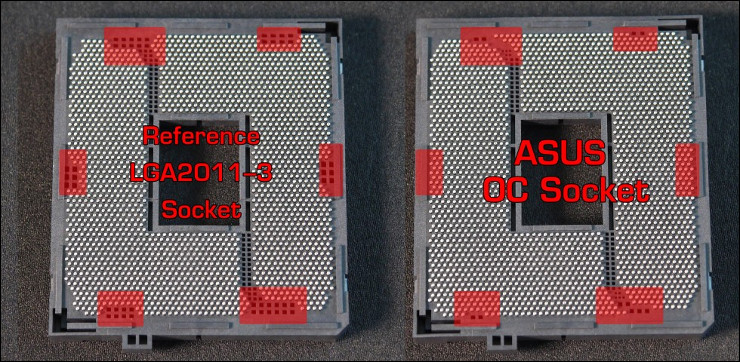
When developing their versions of the X99 motherboard ASUS took the step of altering the basic socket to include 60 more pins, providing contact with every pad on the Haswell-E’s base, a design which is now known as the ASUS OC Socket. During the development process it was discovered that by exposing these contact points they were able to monitor voltages locked off in previous HED CPUs, past the iron curtain of the FIVR. In tern, this also allowed ASUS to improve stability for these crucial voltages and reducing the main voltage pumped through the CPU.
Interfacing with these points also allows improved stability when using the 166 strap (sometimes called ‘gear ratio’) on OC Socket motherboards. By utilising the 166 strap – essentially a series of configuration options to have the best possible system stability with a 166MHz BCLK – an overclocker can push the CPU frequency higher with a lower multiplier. In testing ASUS ballparked 4.2GHz as the highest CPU frequency on the i7-5960X when utilising the 166 strap on a basic LGA2011-3 socket whilst 4.8GHz was possible using the OC Socket, a 14% improvement. Enthusiasts will welcome this additional tweaking option.
Also unique to the ASUS OC Socket is a higher cache bus frequency tuning range than standard and higher voltage level control over cache bus voltages. In theory this has the potential to improve subsystem performance for improving specific benchmark results when small percentages are the target, but will likely have significant stability ramifications.
It’s also claimed that OC Socket greatly improves DDR4 memory overclocking. ASUS have been able to hit 3GHz at 1.35V, rather than the more typical 1.6V, and boast better high-performance RAM support. Furthermore DDR4 RAM tends to have a spike in voltage required at POST which trails over time, and ASUS have implemented a BIOS option called ‘DRAM Eventual Voltage’ to set a target for this trailing off and hence save power.
Last but not least is the raising of the Maximum VCore limit imposed by Intel. Not recommended, and certainly not for daily use, it’s the removal of a barrier at the extreme end of the overclocking spectrum where watercooling is old hat and even LN2 is pushed.
As you can see, the espoused benefits of OC Socket are very significant for the enthusiast overclocker, perhaps even more so for the professional. Headline figures, such as being able to push 5GHz on air and 6GHz under LN2 with minimal effort are certainly impressive, and the platform as a whole will still undergo a number of UEFI revisions during its life-time. The reality is however that your absolute overclock will very much depend on the ‘silicon lottery’, but ASUS want to assure you that their motherboards have the best chance of letting you push your CPU to its true limits.
Packaging And Accessories
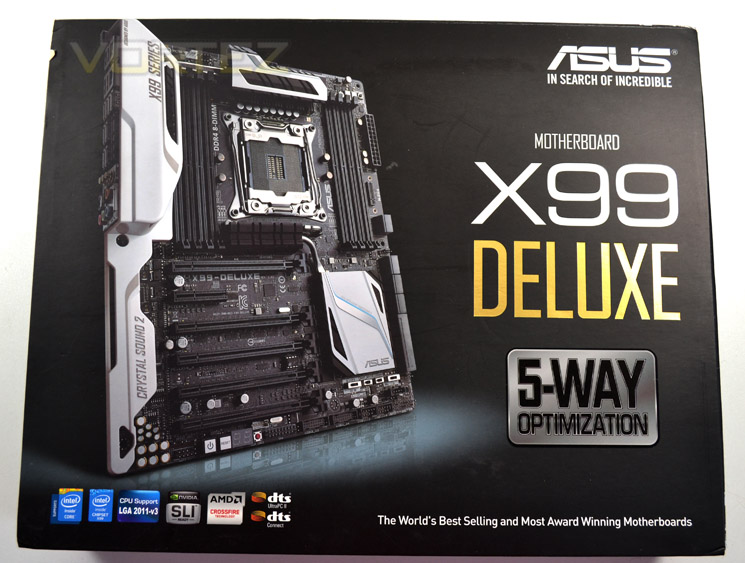
It’s interesting to contrast the X99-Deluxe’s packaging exterior with that of the recently reviewed MSI X99S Gaming 9. Whilst the latter puts branding front and centre, hiding away the motherboard, the X9-Deluxe emphasises the sexiness of the electronics on display, showing that it’s not just another cookie-cutter mainstream design.
The colour scheme matches that of the board inside, focussing on black and white with a hint of gold trim (as seen on the capacitor tops). Other manufacturers have tended to choose an almost dolly-mixture-esq combination of colours, so it’s nice to see ASUS have confidence in their chosen livery.
As we always like to see, fundamental compatibility information is clearly displayed on the front. Also mentioned are the dts-audio support, sure to be of interest considering that this is the fully-featured model.
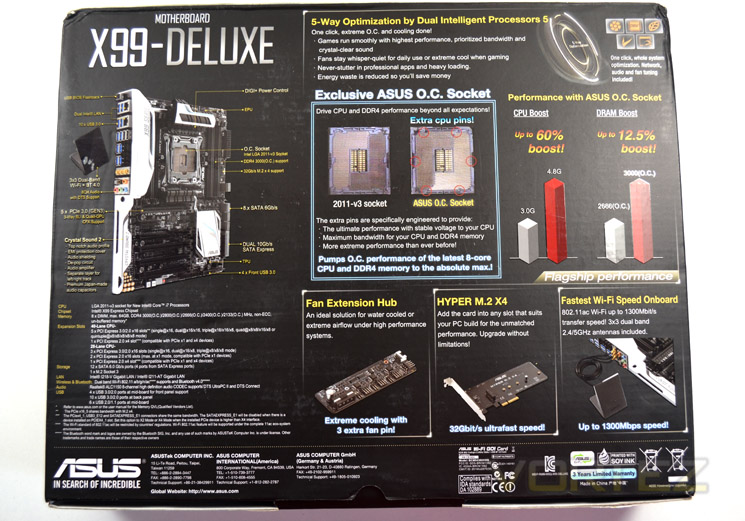
The bottom is very much the ‘business end’ of the X99-Deluxe’s packaging; ASUS have made this side extremely dense with detailed information on the motherboards’ feature set. Included are the much trumped OC Socket and 5-Way Optimisation, whilst M.2 X4 and Wireless LAN compatibility via an adaptor are also not hidden away.
For many just picking up the product on a shelf there could be some information overload, but anyone without easy access to the Internet when they’re purchasing will find almost every scrap of information they need.
Accessories
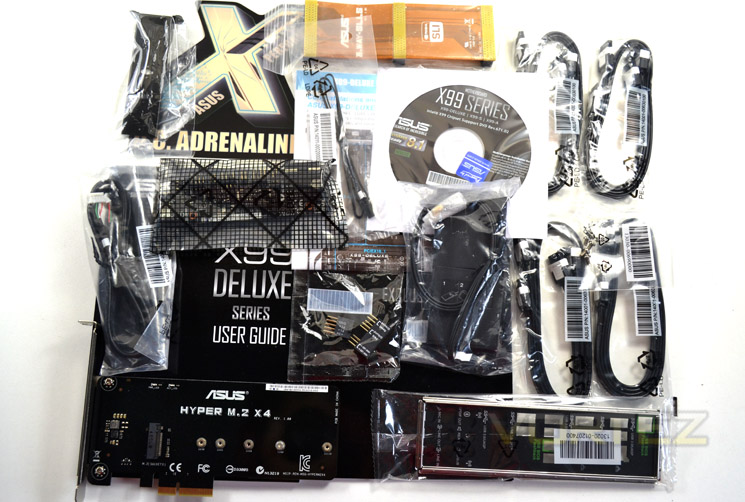
Comprehensive is certainly the word when it comes to the X99-Deluxe’s accessory bundle. In addition to the necessities – the ASUS I/O shield, M.2 bracket (with black PCB!) and user manual – ASUS have also included enough SATA cables for 8 discrete drives, an SLI bridge for multiple NVIDIA GPU systems, and a driver/utility disc set.
But that’s not all. The Deluxe model has an integrated wireless networking module which is augmented by ASUS 3T3R dual band Wi-Fi antenna antennas that’s compliant with all common 802.11 standards including ac. Fan control is aided by a fan extension card and 5-pin to 5-pin cable, adding three 4-pin PWM headers with sensor-based monitoring through software. And of course Thermistor cables are also included for temperature monitoring.
Deluxe? We’d say so. The full accessory list is below:
– User’s manual
– ASUS Q-Shield
– 8 x SATA 6Gb/s cable(s)
– 1 x ASUS 2-Way/3-Way SLI bridge
– 1 x M.2 X4 bracket
– 1 x ASUS 3T3R dual band Wi-Fi moving antennas (Wi-Fi 802.11a/b/g/n/ac compliant)
– 1 x Fan Extension Card (3 x 4-pin fan out)
– 1 x Q-connector(s) (2 in 1)
– 1 x 5-pin to 5-pin cable
– 1 x Thermistor cable(s)
Support Disc:
– Drivers, ASUS Utilities, EZ Update, Anti-virus software (OEM version)
– ASUS Q-Shield
– 8 x SATA 6Gb/s cable(s)
– 1 x ASUS 2-Way/3-Way SLI bridge
– 1 x M.2 X4 bracket
– 1 x ASUS 3T3R dual band Wi-Fi moving antennas (Wi-Fi 802.11a/b/g/n/ac compliant)
– 1 x Fan Extension Card (3 x 4-pin fan out)
– 1 x Q-connector(s) (2 in 1)
– 1 x 5-pin to 5-pin cable
– 1 x Thermistor cable(s)
Support Disc:
– Drivers, ASUS Utilities, EZ Update, Anti-virus software (OEM version)
First Look
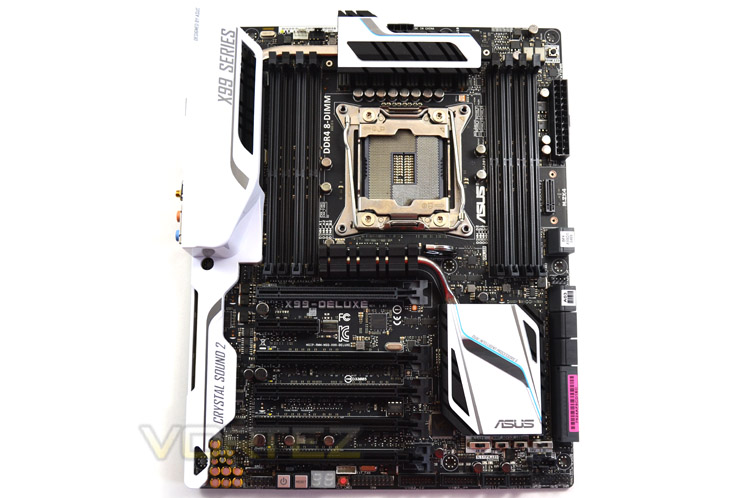
ASUS have opted for a black and white trim colour scheme on the X99-S and X99-Deluxe boards, presenting something a little different for those who like to show off their systems. For a slightly cleaner look whip off those serial number stickers, but don’t forget to keep them somewhere safe.
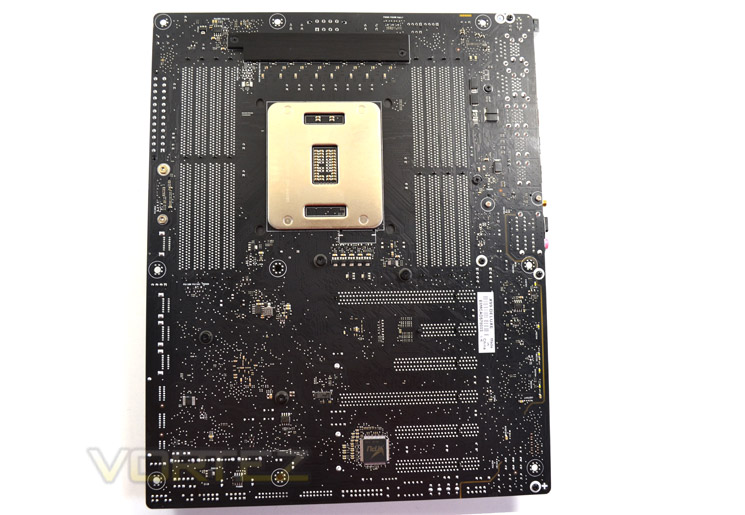
The swiftest glance at the underside reinforces just how much componentry is crammed into the X99-Deluxe. The paint finish, even here, is still of a high quality, and we’re pleased to note the inclusion of a metal backplate for the top-most VRM heatsink.
You can also see from this shot that ASUS uses different screw holes for the white I/O shield than the motherboard mounting holes, which was something of a flaw we found when reviewing the MSI X99S GAMING 9. Good to see that ASUS have gone with something a little more user-friendly.
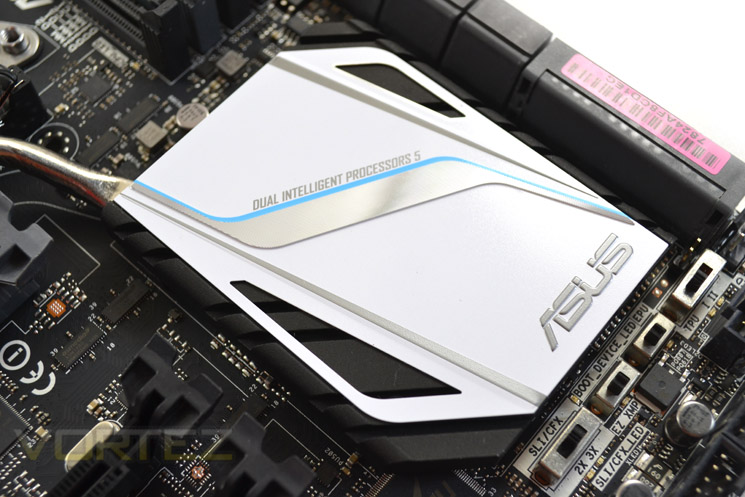
The white PCH heatsink will draw eyeballs in any system, but unlike competitor models this heatsink is connected to another (just above the top-most PCI-Express slot) via a heatpipe, aiding cooling of these components through better heat distribution. Note that that system isn’t connected to the other heatsinks above and to the left of the socket.
Just below the PCM is a set of additional switches controlling EPU, TPU, PCI-Express graphics and boot device configurations. By aiding in the diagnostic and configuration process these switches are significant in troubleshooting complex system configurations (both in hardware and power economy settings).
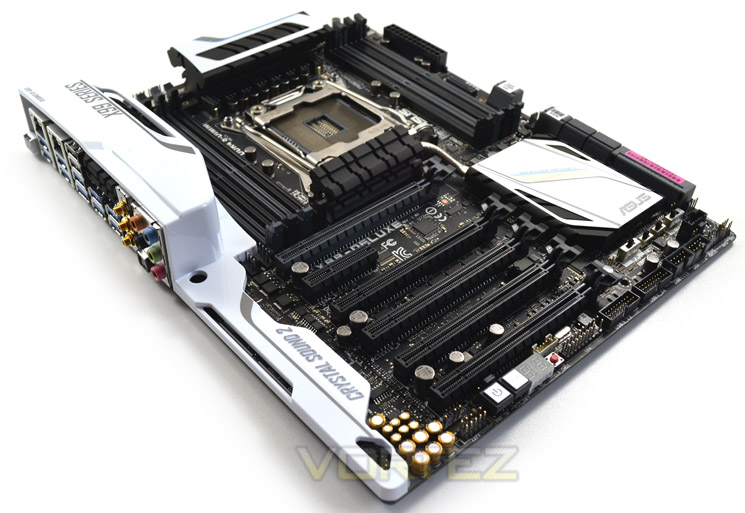
The ASUS X99-Deluxe is an alternative aesthetic option for those not looking for the ever more common black and red livery of a premium gaming laptop, nor the drab colouring of a typical mainstream entry. Even so, by cramming this amount of technology into an ATX form factor they’ve come up with a decidedly busy layout with plenty of componentry on show; rather than a blank canvas, it’s a motherboard you have to more carefully build around. Still, right out of the box or with a high-end water cooling setup, it won’t be difficult to create something really attractive to the eye.
Just… be careful with those stickers.
Closer Look (Socket Area)
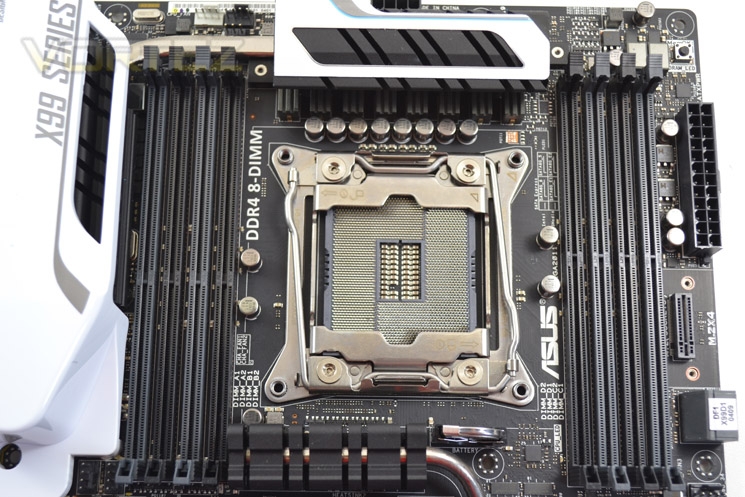
In contrast to motherboards heavily oriented towards extreme overclocking the ASUS X99-Deluxe doesn’t have the clearest of socket areas. This shouldn’t prove to be any sort of an issue for high-end consumer products such as LCS or air CPU cooling, but users of CO2/LN2 will find it a little more difficult to use. That said, ASUS target the Rampage V Extreme at these users. A tall VRM heatsink could pose a problem for especially wide tower-type air coolers, but otherwise there should be plenty of clearance for twin-tower designs such as the popular NH-D14 and Silver Arrow.
Note that the heat generated by the Haswell-E CPUs rewards high-end cooling, in particular bespoke water cooling loops, if a high frequency long-term overclock is targeted.
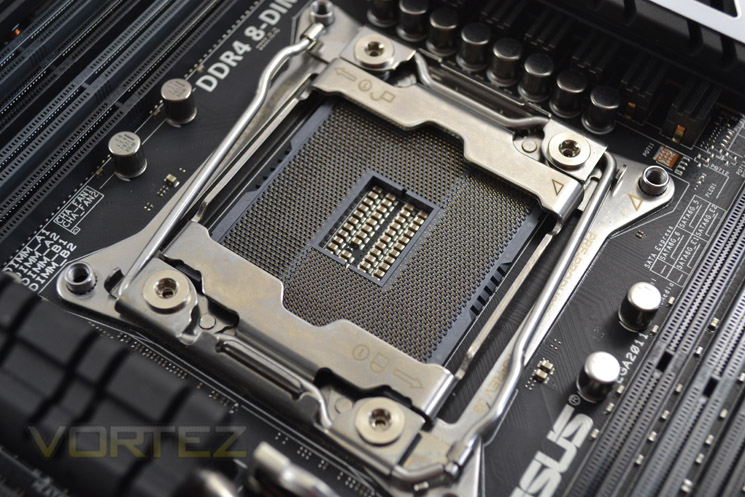
The new LGA2011-3 socket standard is near identical to prior LGA2011 sockets. The twin levers on the v.3 are angled slightly which may look a little odd but helps upon CPU installation. If you are familiar with this type of socket installation should pose no problems, however the relatively high clamping force means that those new to Intel’s enthusiast platform would do well to peruse the manual beforehand to prevent bent pins and broken.
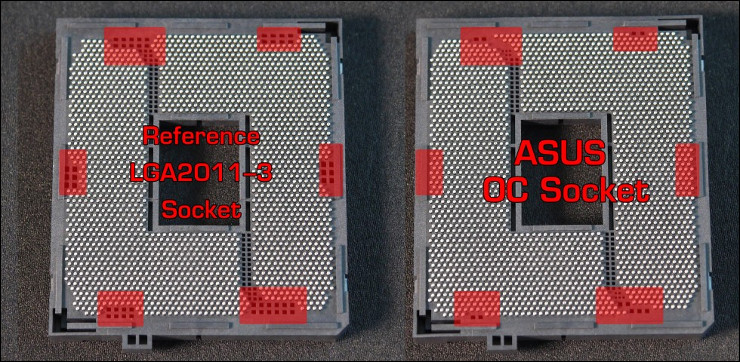
A closer look at ASUS’s OC Socket, which features 60 more pins than the standard LGA2011-3. It’s highly unlikely that this will pose any additional installation problems, and just like LGA2011-3 won’t accept non-Haswell-E CPUs.
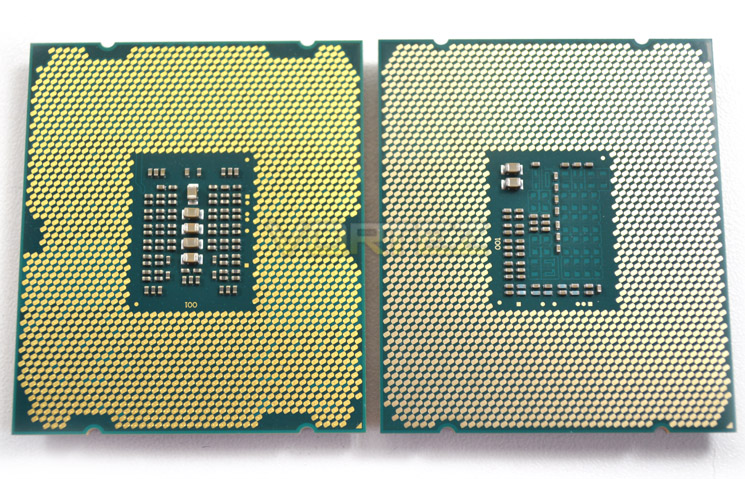
A quick comparison of the pad arrangement of the i7-5960X against the i7-4960X. Note the extra pads which the ASUS OC Socket can interface with, unlike competitor sockets which inherited the pin arrangement from LGA2011.
Closer Look (DDR4 area)
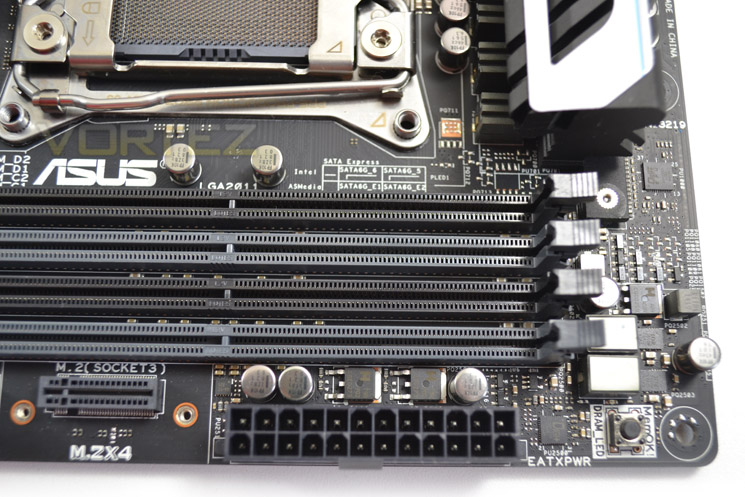
Quad-Channel memory is once again the order of the day, but unlike X79 we now need to move to DDR4. Of course, these slots aren’t backwards compatible with DDR3 but it’s useful to know that the module keying will prevent you come incorrectly using the wrong RAM. ASUS reuses their fixed post DIMM slots which some people have found makes installing RAM more easy.
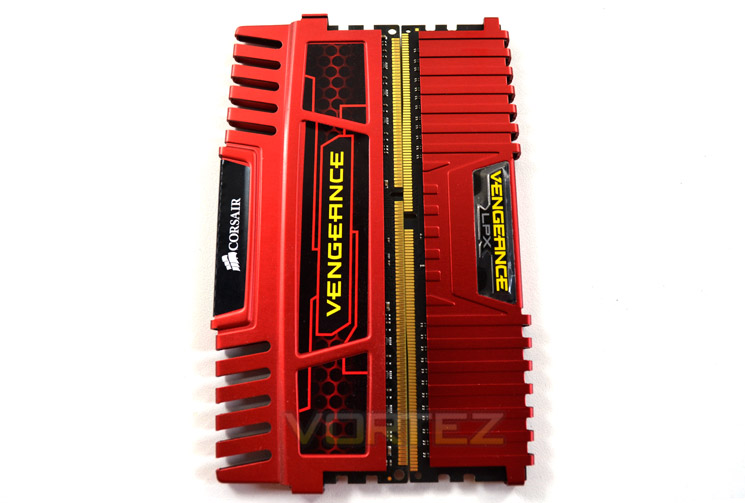
Commercial DDR4 DIMMs are currently restricted to 8GB per DIMM and so most consumer motherboards advertise support a maximum of 64GB. 16GB DIMMs are in the works however, and whilst the RAM is currently costly prices will fall over time.
ASUS X99 motherboards currently claim to support a maximum DDR4 frequency of 3200MHz (confirmed in our testing) in an overclocked mode, although the standard at launch has been closer to 2133MHz. In the future DIMMs up to 4000MHz may be possible, but as it stands the listed compatibilities will be more than sufficient for the vast majority. Note also that X99 motherboards make use of non-ECC, unbuffered DDR RAM.
Closer Look (Motherboard Features)
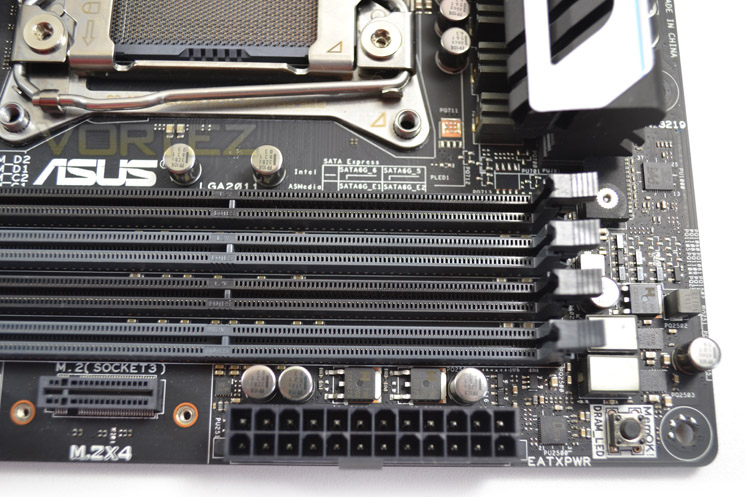
Located at the top-right, near the DIMM slots, is the 24-pin ATX power connector; an ideal location, but angling it 90 degrees would have allowed for a neater build. An 8-pin EPS-12V socket is positioned at the top behind the VRM heatsink, and a lack of additional auxilluary EPS-12V power speaks to the X99-Deluxe not being an extreme overclockers board.
The ASUS MemOK! Button just above the 24-Pin socket is terribly useful when overclocking at the limits of your memory, resetting your memory settings back to a failsafe mode.
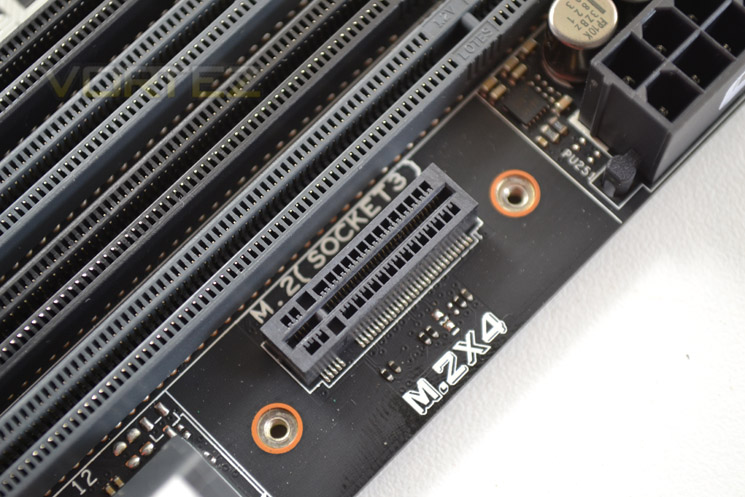
At the other side of the 24-Pin socket is the M.2X4 slot for vertically mounting M.2 SSDs. Typically M.2 mounts have been oriented to slot the drive in horizontally, parallel to the motherboard PCB; vertical mounts are a better use of surface space, but does leave the SSD (especially those of the 110mm+ lengths) relatively vulnerable to knocks. Of course the PCIE adapter is also included, but if you’re intending to make use of this feature it’s best to install the M.2 drive last.
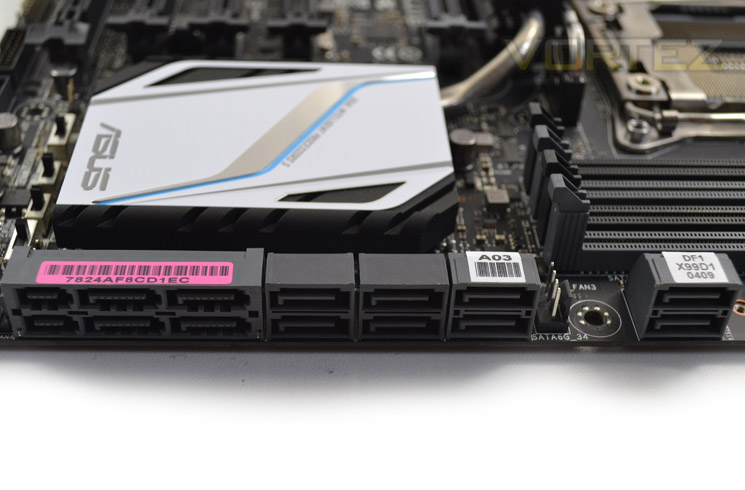
Moving down to storage, the X99-Deluxe has eight dedicated SATA III 6Gbps ports and two SATA-Express ports, capable of up to 10Gbps or alternatively useable as four SATA III ports. SATA-Express storage is provided by the Intel chipset and an ASMedia SATA-Express controller, with the Intel controller at the top of the stack.
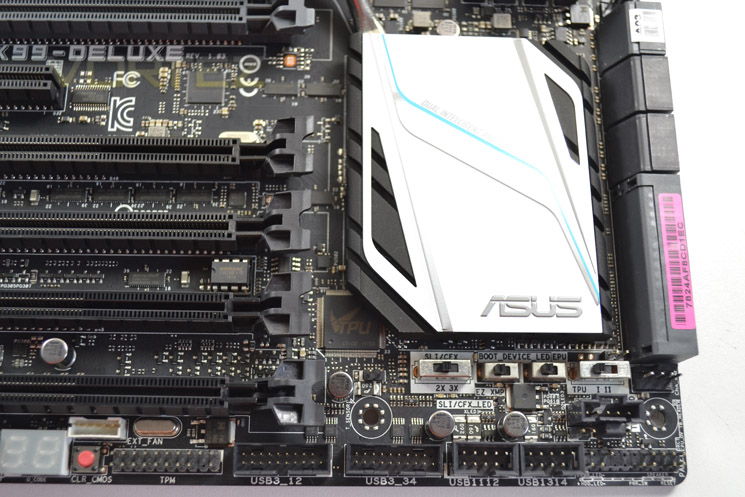
Next up is the bottom-right of the motherboard. We’ve mentioned the switches for advanced feature control outside of BIOS, but we can also make note of the two USB 3.0 and 2.0 headers for front panel I/O. Quite comprehensive, and locating these headers here should also help in cable management.
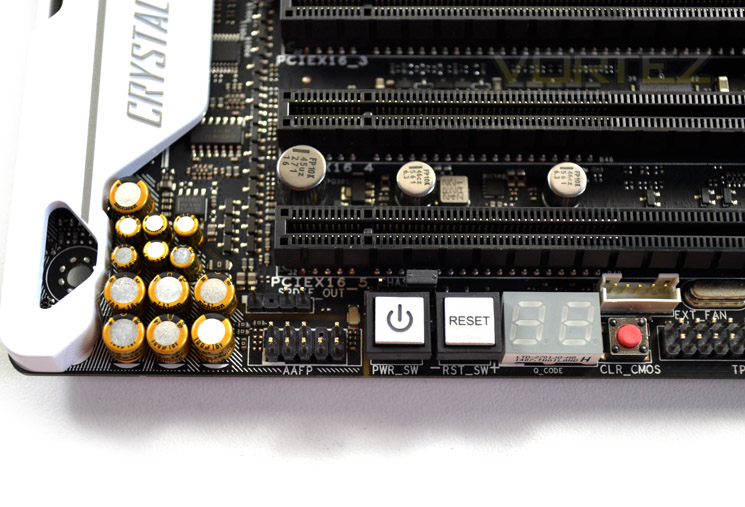
Plenty more components are present just below the PCIE slots. Reset, Power and Clear CMOS switches will be handy for anyone dropping the X99-Deluxe into a test-bench, and a troubleshooting LED display is always welcome. The white five-pin bracket is intended for the PWM fan expansion board, offering five more fan connectors but allowing you to route the cables behind your motherboard. And of course the array of Japanese capacitors is all dedicated to providing clear electrical signals for audio.
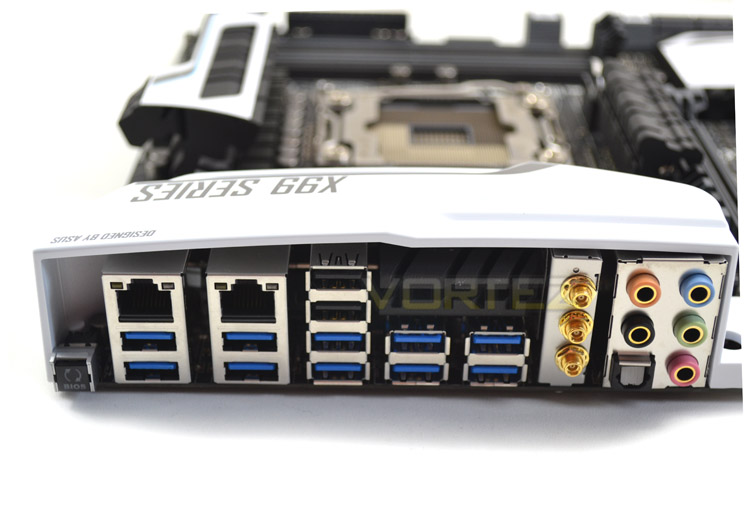
Simplicity is the order of the day in rear I/O, the majority of which is hidden would be hidden by the white cover when looking through a case window. Included are:
– 1 x Clear CMOS button
– 2 x LAN (RJ45) ports
– 10 x USB 3.0 ports
– 2 x USB 2.0
– 3 x Wireless antenna connectors
– 1 x Optical S/PDIF OUT connector
– 5 x OFC audio jacks
– 2 x LAN (RJ45) ports
– 10 x USB 3.0 ports
– 2 x USB 2.0
– 3 x Wireless antenna connectors
– 1 x Optical S/PDIF OUT connector
– 5 x OFC audio jacks
Note the lack of a legacy PS/2 port; USB has certainly come a long way but some gamers will be disappointed by the absence.
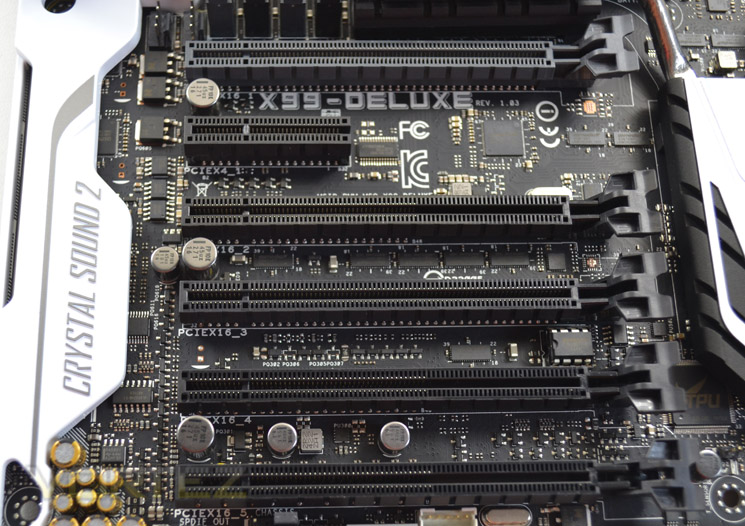
Finally, a look at the wider PCI-Express slot area. Six slots are present, five of which are sized at 16x and one at 4x. Two are wired for 16x operation and are separated by two clear slots, ideal for keeping plenty of space between cards hungry for unobstructed cool air; the other 16x slots are wired for up to 8x operation.
As far as card layout options go the X99-Deluxe is impossible to beat. Whether with two or three GPUs an ideal x16/x16 or x8/x8/x8 is possible, which is exceptionally rare on an ATX board. For that they have sacrificed a spot for the surface mounted M.2 SSD, moving it to a vertical slot at the edge, but that’s a fine trade-off.
Detailed Look
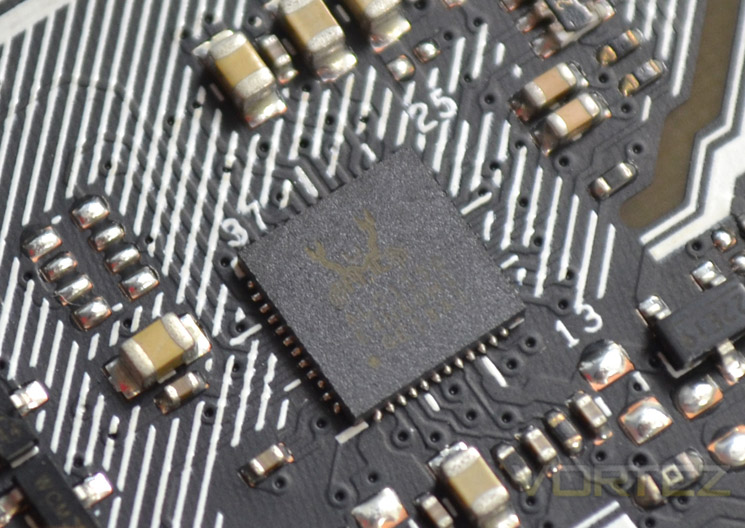
Audio comes courtesy of the Realtec ALC1150 codec augmented with ASUS’s Crystal Sound 2 technology. ASUS’s approach improves audio quality and fidelity through the use of seperate PCB layers for audio signals, high-quality Nichicon capicitors, left and right channel track separation and analogue/digital shielding. Metallic EMI is the final cherry, reducing noise from external electronics. Also supporting DTS Ultra II and DTS Connect for either high quality surround sound or bitstreamed DTS 7.1 audio, quality is the watchword for this integrated solution.
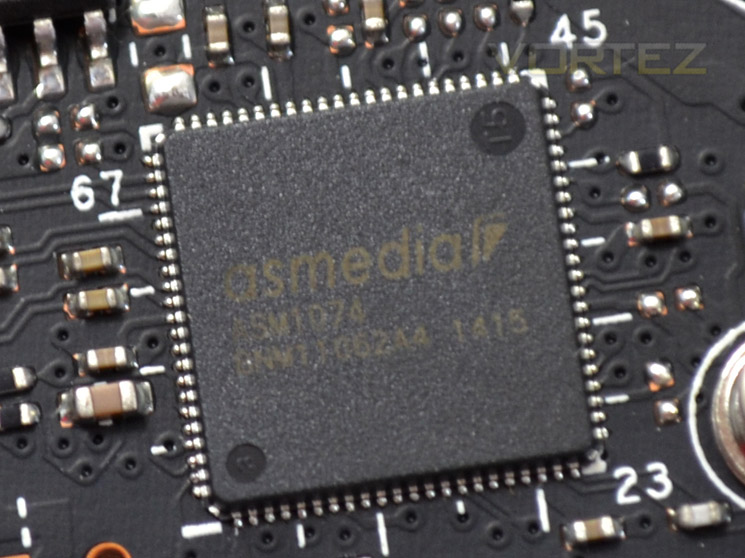
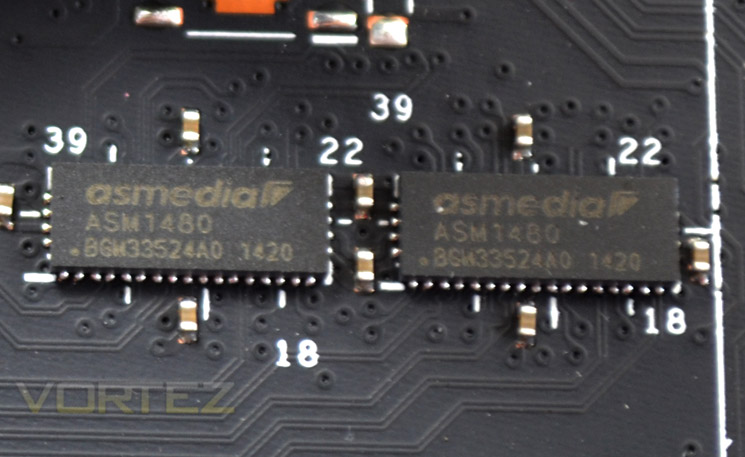
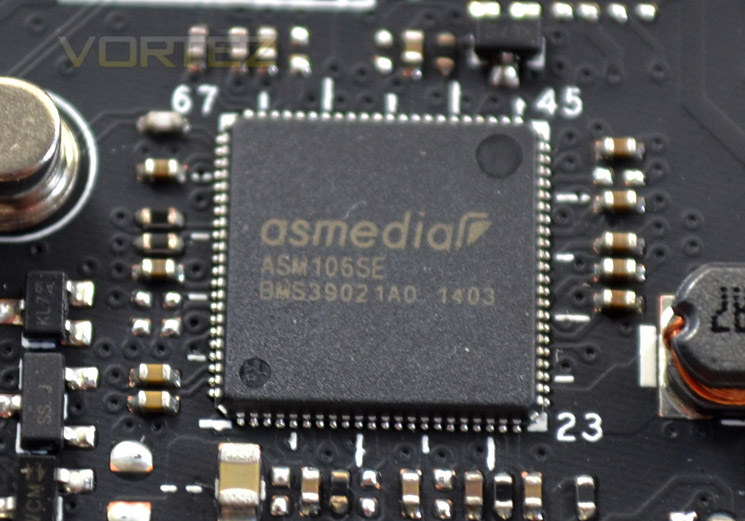
There are a smattering of ASMedia 1042 chips to be found on the motherboard which control some of the add-on USB 3.0 expansion ports. Also included are the ASM1074 (for further USB 3.0 expansion), the ASM106se (providing additional SATA-Express signalling) and quartet of ASM1480 16 channel to 8 channel PCIe 3.0 multiplexer/demultiplexers.
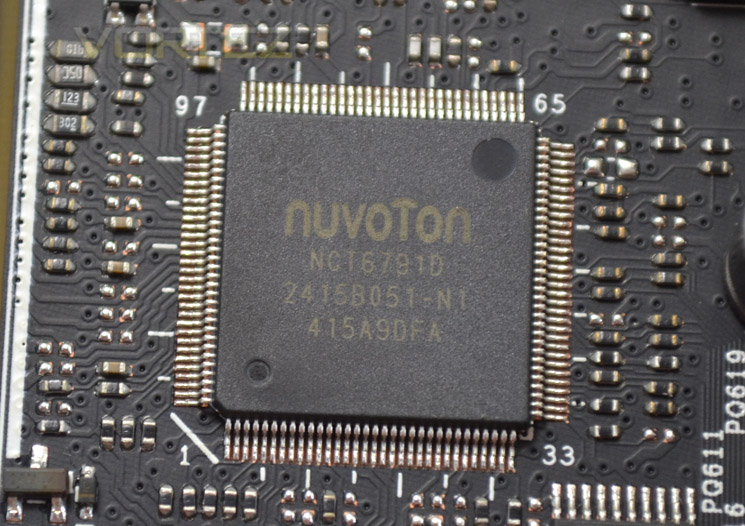
Above is the Super IO chip used on this mainboard, the Nuvoton NCT6792.
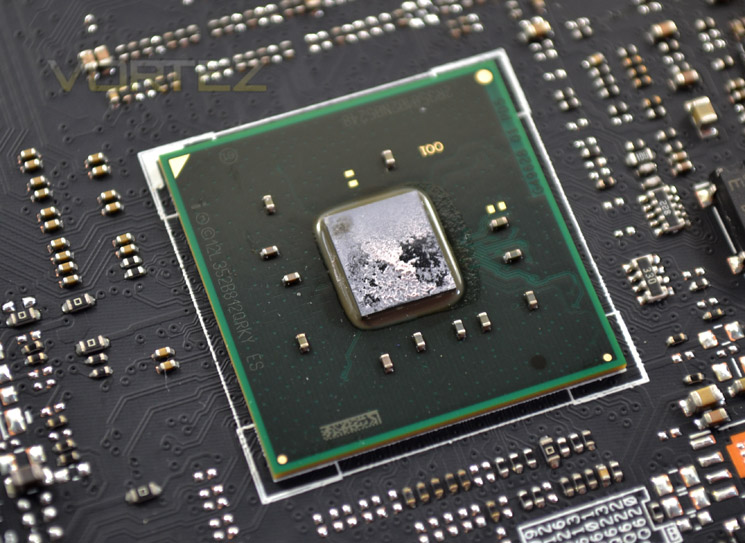
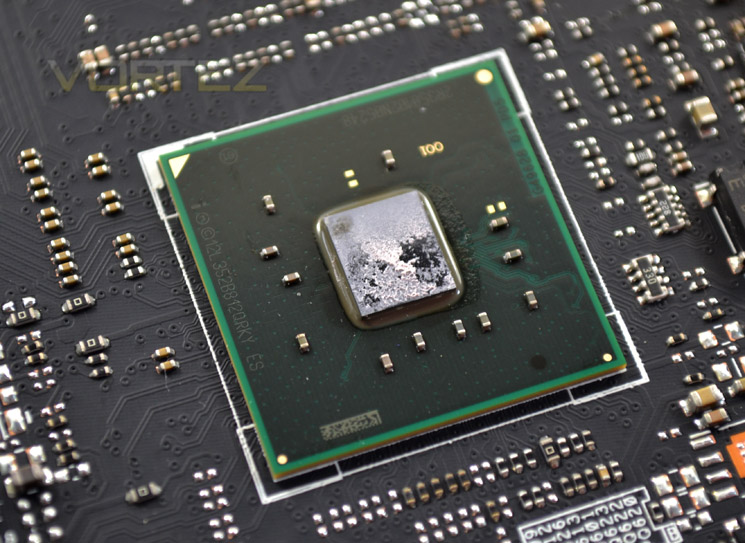
Perhaps the most important chip on the mainboard is the actual X99 chipset core. The example shown above had good contact to the heatsink and had cooling augmented by an additional heatsink just above the first PCIe x16 slot, with a heatpipe connecting the two.
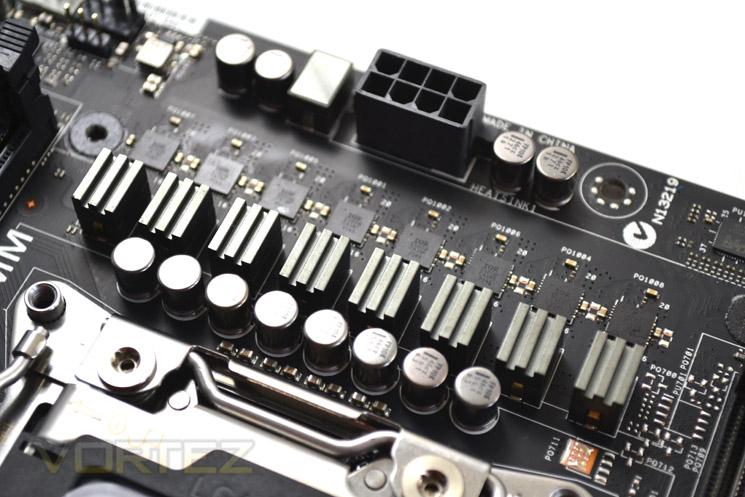
Finally, we come to the power circuitry of the mainboard. Eight phases of full digital power delivery is the order of the day, cooled of course by a fairly meaty heatsink. While far from the most complex power circuitry we have seen on a motherboard, core voltages were kept fairly constant allowing for stable overclocks. No doubt we will be testing more complex versions in the future but the heatsink didn’t get too hot during testing, thanks in part to the connect heatpipe to a further heatsink backing onto the I/O area.
Test Setup & Methodology
RAM: 16GB Corsair Vengeance LPX DDR4 @ 2666MHz 16-17-17-35 (CMK16GX4M4A2666C15R)
GPU: NVIDIA GTX 760
Power Supply: Corsair RM1000
Cooler: Corsair H105
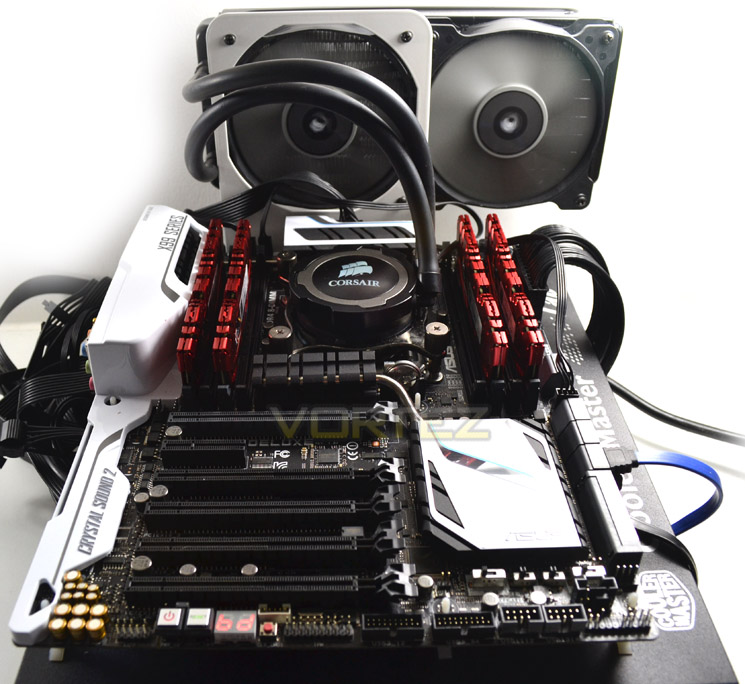
Motherboards
MSI X99S Gaming 9 AC
ASUS X99 Deluxe
MSI X99S Gaming 9 AC
Benchmarks
AIDA 64 – CPU & Memory/Cache Performance
SiSoft Sandra – Compute & Memory Performance
HandBrake – Encoding Performance
Pov-Ray – 3D Image processing Performance
Cinebench R15 – Image processing Performance
AS SSD SATA Performance
Futuremark 3DMark (Firestrike) – Graphical Performance
Futuremark PCMark 8 – Overall PC Performance
Battlefield 4, THIEF, Company Of Heroes 2 & GRID:2 – Gaming Performance
AIDA 64 – CPU & Memory/Cache Performance
SiSoft Sandra – Compute & Memory Performance
HandBrake – Encoding Performance
Pov-Ray – 3D Image processing Performance
Cinebench R15 – Image processing Performance
AS SSD SATA Performance
Futuremark 3DMark (Firestrike) – Graphical Performance
Futuremark PCMark 8 – Overall PC Performance
Battlefield 4, THIEF, Company Of Heroes 2 & GRID:2 – Gaming Performance
BIOS Exploration
Below are a few key screenshots of the BIOS:
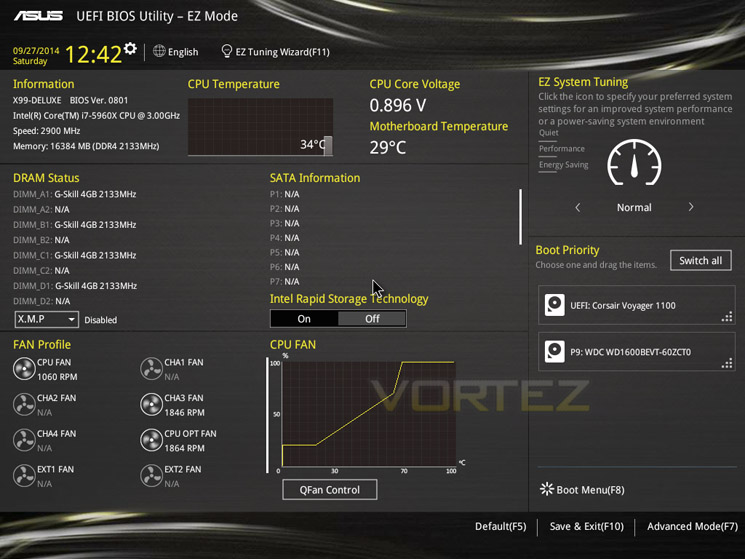
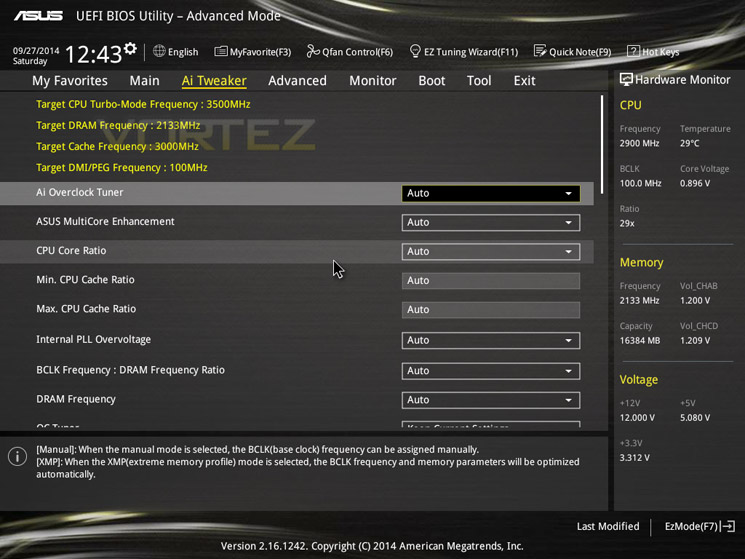
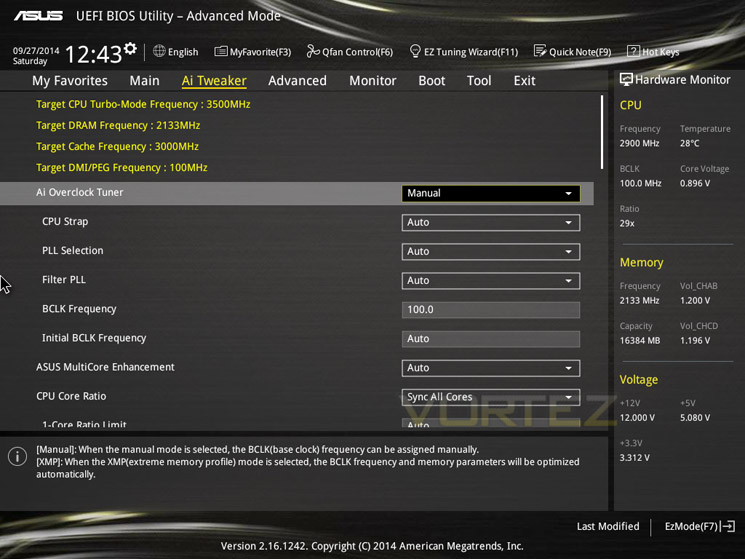
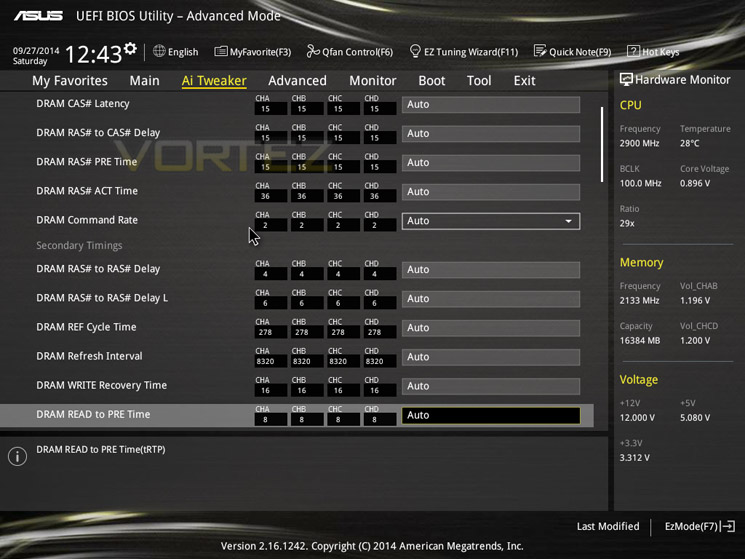
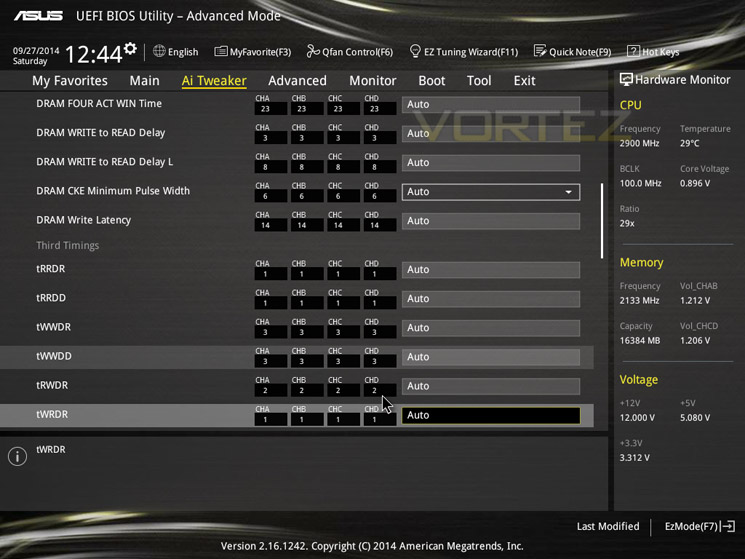
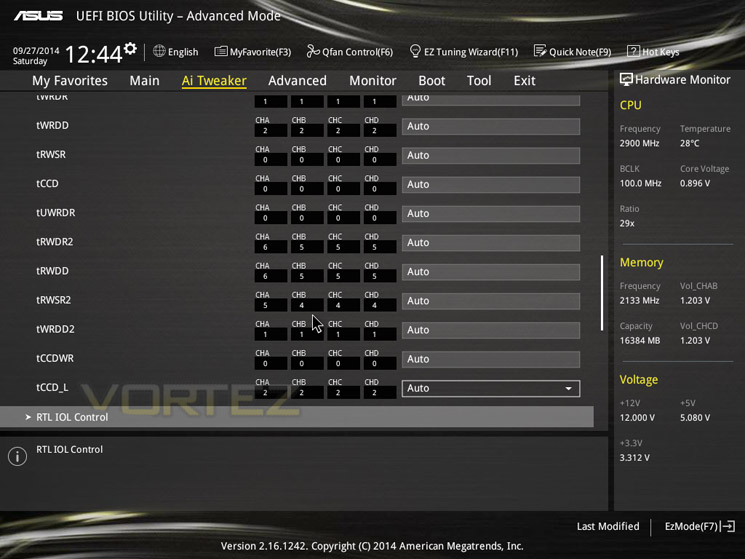
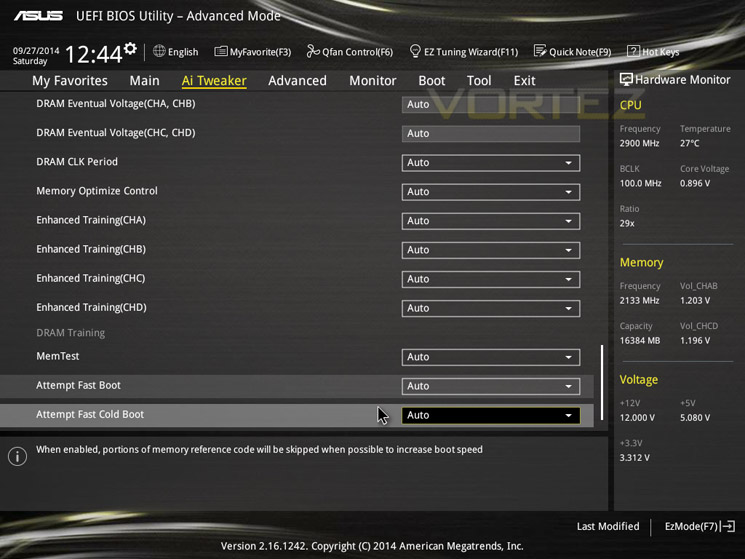
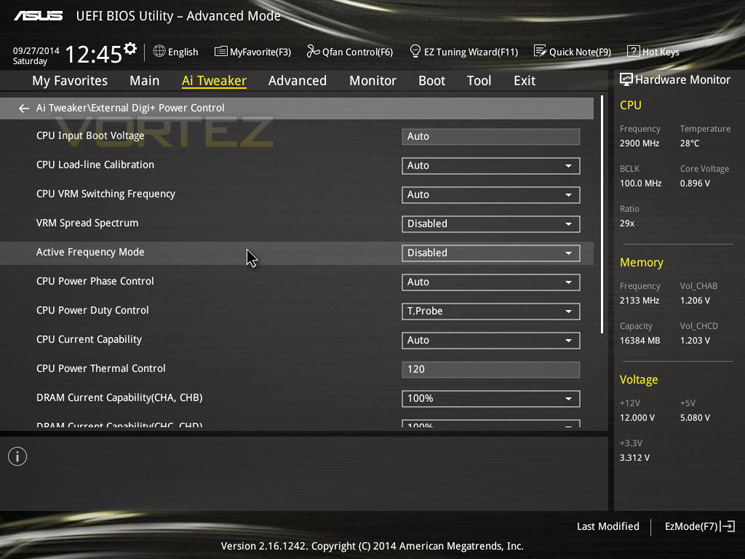
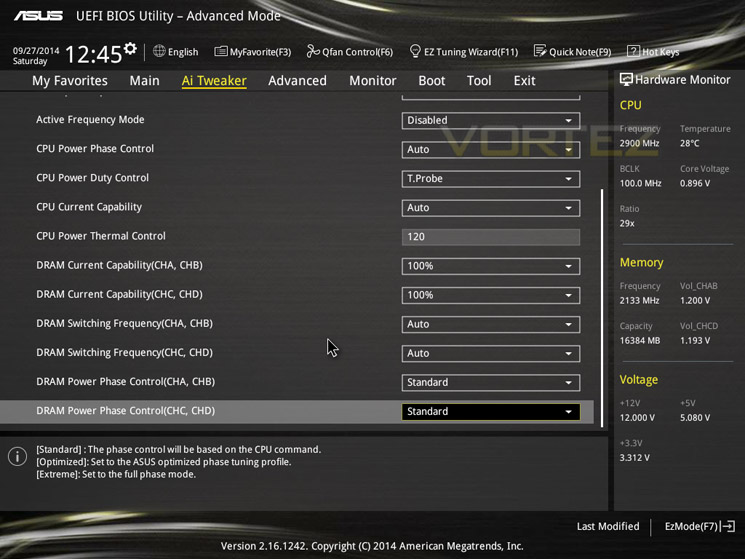
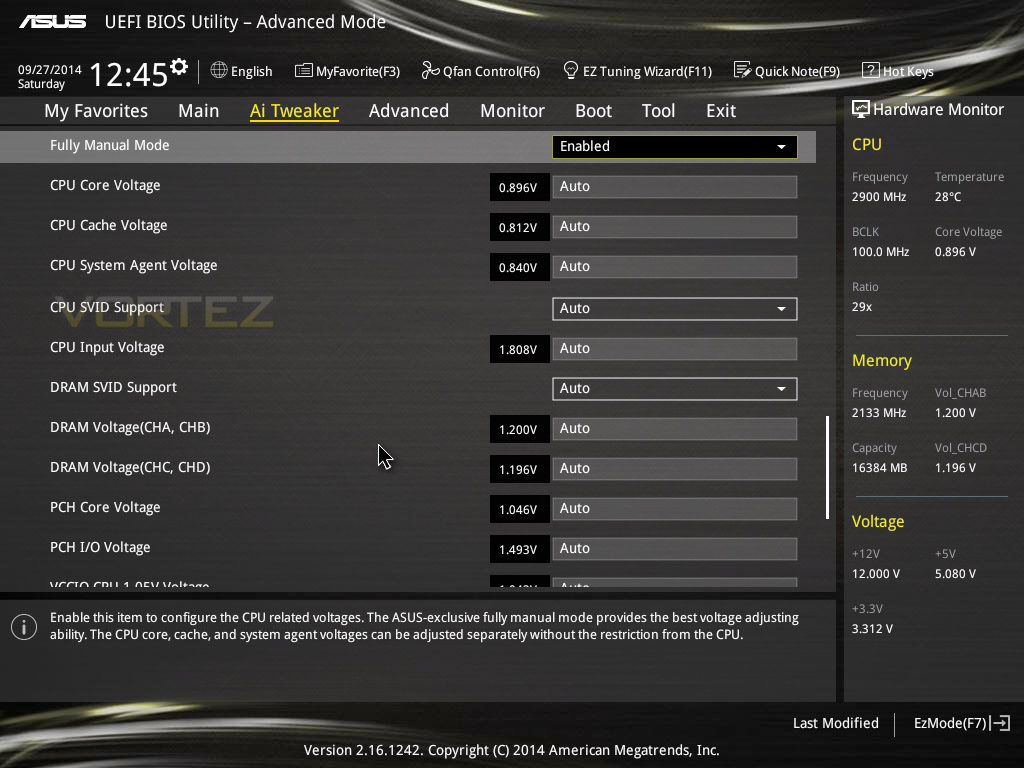
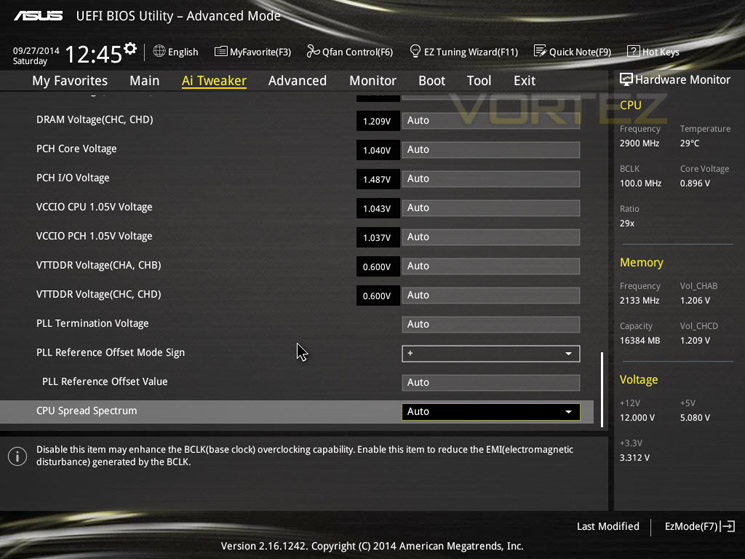
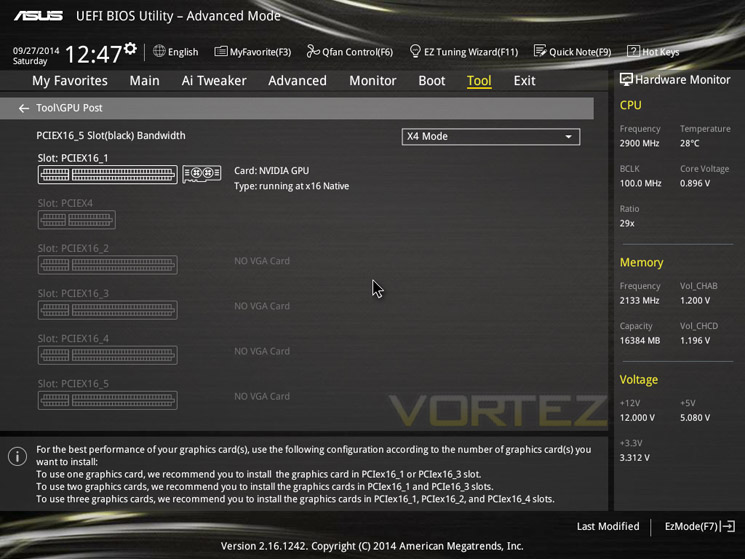
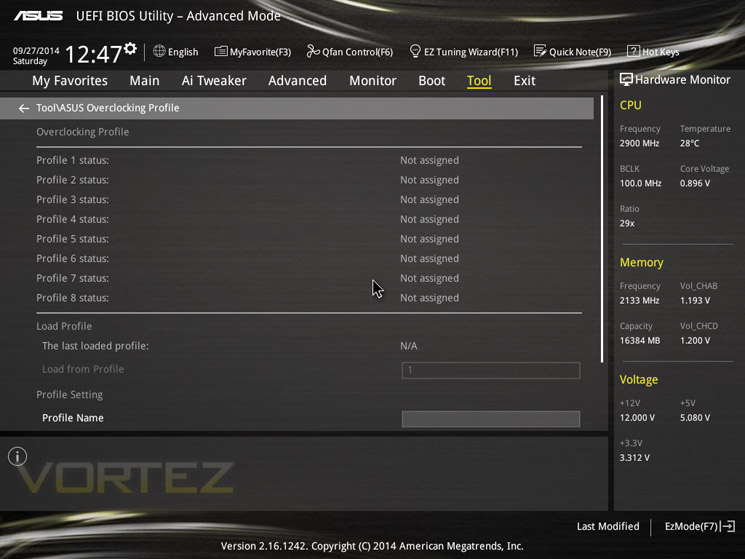
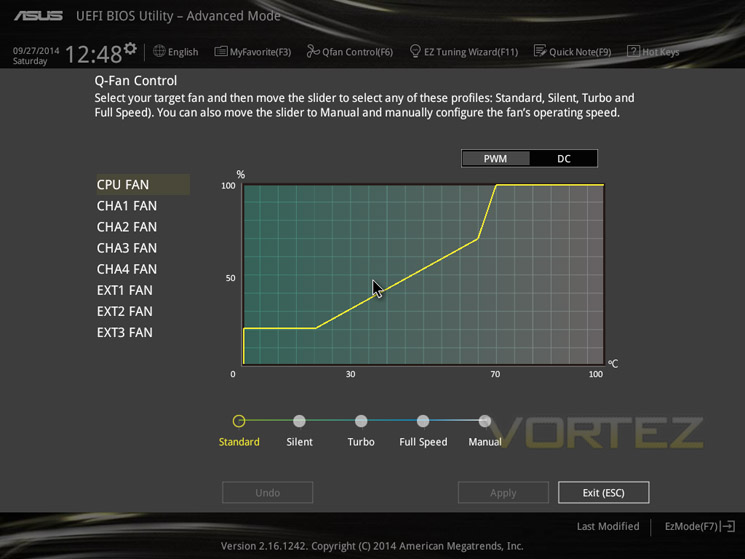
The BIOS of the ASUS X99 Deluxe works well in UEFI format as you would expect. We started off by using the original BIOS ‘501’ however soon realised that a later BIOS was released numbered 801. We tried a couple of ways of updating the BIOS such first using the USB flashback tool which is an ingenious utility to flash the BIOS without anything being attached to the motherboard other than the PSU. This worked great although it is a little disconcerting as you can never be 100% sure that the flash has ‘taken’. Regardless, I’m sure it will help those who do encounter a ‘bad’ flash through power loss and such like. Next up we flashed using the EZ_flash utility via the BIOS. Again, this worked perfectly and is our recommended method of flashing a BIOS as although ASUS do allow BIOS flashing via Windows, this is historically unreliable and has been known to frequently ‘brick’ a motherboard. Not wanting to do this we did however use the AI suite when concluding our review to check for the latest BIOS release (which at the time of writing was now 901). Strangely the AI Suite did not pick up on this latest BIOS release.
The BIOS itself is easy to navigate and for the most part pretty intuitive for novice and advanced users alike. Most overclockers will jump straight to hitting the F7 function key which will jump straight to the advanced settings of the motherboard. Our focus here is the AI settings which presents us with the overclocking settings.
There are the usual settings available to allow a basic overclock without unlocking anything else however, should you wish to delve a little deeper, switching auto to manual and indeed expert levels, a whole host of options become available. Settings can be adjusted via + and – keys or inputted manually. We liked the additional information box that tells us what we are changing and it was also useful to have the voltages colour coded white through yellow, purple and red depending on the levels set. White being safe; red being dangerous. It was also useful to have the hardware monitor viewable at all times too however did make the BIOS feel a little cramped at times. Another criticism was the colour scheme. Grey seemed a little bland and is certainly not as attractive as the blue, yellow and red offerings we have seen but this is just a minor point on the aesthetics.
Other quirks include having to scroll up to the top of the screen to reach the previous page as hitting ESC reveals a prompt to save and exit which is not ideal if you are only in a sub menu. Not all of the ‘hot keys’ are displayed either such as screen grab which fortunately is F12, the same as most other motherboards. Another slight irritation is having to unlock sub-menus even though you are in the ‘advanced’ section. We can see the need for this (to prevent those unfamiliar with overclocking from frying their hardware but we would prefer a separate section all together, say a ‘pro’ area in which all options are unlocked rather than having to set options to manual or expert etc before these ‘expert’ options become available.
Overall though, despite there being room for improvement in some areas we liked the BIOS. The overclocking options are truly mind boggling once you ‘unlock’ them but be warned, there are plenty of options here that can corrupt your OS instal or worse, toast your hardware so do your research before overclocking if you are unfamiliar.
GSKILL DDR4 3000
With ASUS shouting from the rooftops (and rightly so) regarding their patent pending OC Socket, we thought it only fair to remove all possible restrictions when testing this new feature out. It is for this reason we opted to use one of the fastest DDR4 kits on the market; the GSKILL Ripjaws 16GB (4×4) F4-3000C16Q. This kit is not only rated at 3000MHz but has some tight timings as well coming in at CL15-15-15-35. It will take 1.35v to attain these speeds which is higher than the 1.2v we are used to and it will also require a decent memory controller, especially if you are looking to over clock them further than the blistering pace they are already set at.
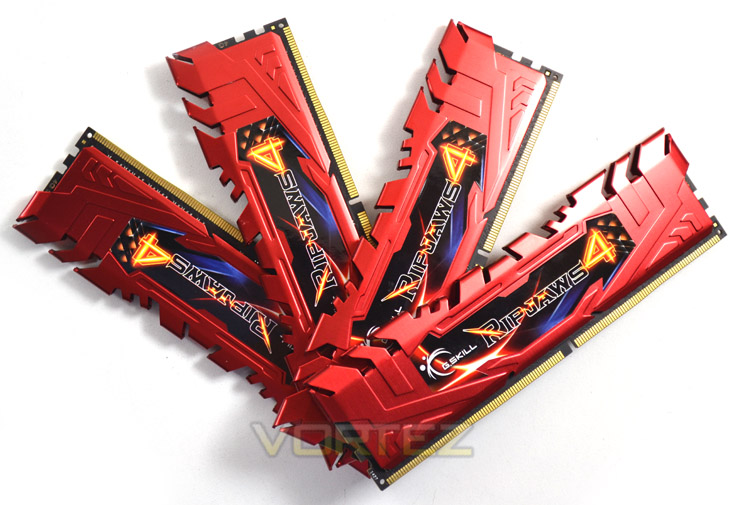
With the awesome performance afforded by Intel’s latest CPU and the ASUS X99 Deluxe, it would be criminal not to buy the fastest memory kit you can afford. After all the Haswell-E is aimed squarely at the enthusiast and enthusiasts care little for phrases such as ‘adequate’ or ‘mediocre’. Sadly, the very best usually comes with a high price tag and that is no different here. Costing around £400 it is anything but cheap however, with slower modules also costing upwards of £250 the high price is easier to swallow.
GSKILL give us the option of red, black and blue to match your PC setup too and despite having aluminium heatspreaders are not stupidly tall, measuring just 40mm in height.
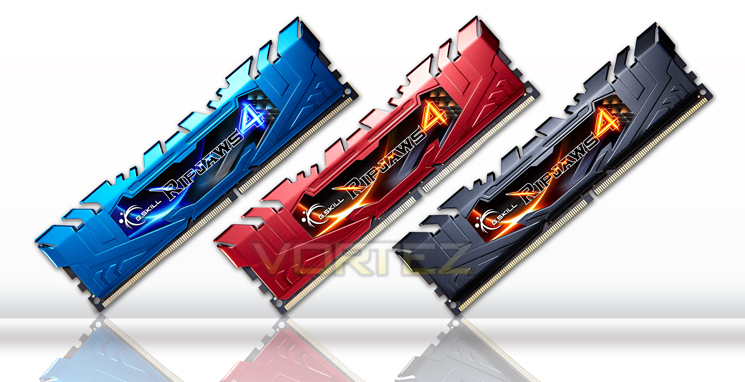
Since writing this review GSKILL have announced an even faster memory kit rated at 3333MHz CL16-16-16 which is astonishing but again, these won’t please the bank manager so don’t say we didn’t warn you! With this 3000MHz kit, we did manage to extract a little more performance but we will save that for our overclocking section to tell you exactly how we got on.
To get the latest information on these modules and many other GSKILL products visit the GSKILL website.
G.SKILL Ripjaws 4 series performance DDR4 memory is designed for the ultimate experience on the latest Intel X99 platform! Whether you are processing large amounts of data or intense gaming, experience smooth system performance with the newest next-generation PC memory technology! All Ripjaws 4 memory kits are tested with G.SKILL’s extensive suite of testing software to ensure maximum performance and stability. Make Ripjaws 4 the ideal choice for your DDR4 system!
Overclocking
Extreme Edition overclocking changed significantly between Sandy Bridge-E and Ivy Bridge-E, unlocking both BCLK and CPU strap changes. Haswell E changes very slightly again, melding some of the techniques of Ivy Bridge-E and Haswell thanks to a fully integrated voltage controller (FIVR) which splits the input into the required rails. Motherboard partners are implementing broader overclocking features and these look set to be key differentiators in the battle for X99 market share, and we’ll take a closer look at each during detailed motherboard reviews. For now we’re concerned merely with baseline functionality.
Our test system is being cooled by the high quality Corsair Hydro H105, a LCS cooler with 240mm radiator that’s approximate to a high end air cooler such as the NH-D15 or entry level water cooling.
Whether it was a spurious setting in our BIOS or not, for some bizarre reason with the defaults loaded in the BIOS, Speedstep refused to work. Instead what we have was a CPU that was running at a constant 3.5GHz. Not that this is a major concern as it was rock solid stable and we are overclocking anyway but despite our best efforts we couldn;t get either the multiplier of voltage to drop using BIOS 801. In 501 BIOS, Speedstep worked fine so this is perhaps a bug that needs ironing out (or further exploration of the BIOS).
Regardless, using 801 BIOS we set about finding our max ‘stable’ CPU overclock. We use the 32m setting of HyperPI as this fully loads all CPUs to 100% and while it is perhaps not the most intense CPU stressing tool, it does give a very good indication of what a CPU is capable of.
We couldn’t seem to get passed 4.7 (100×47) using 32m HyperPi regardless of what voltages we played with and despite dropping the bandwidth and slackening memry timings 4.7 appeared to be our maximum overclock which was backed up by our previous efforts on the MSI X99S Gaming 9 AC. We knew there was more to get however because stability fell over much later in the HyperPI process than with the MSI so we had a play with the CPU strap and multipliers and managed to obtain stability as per screenshot below:
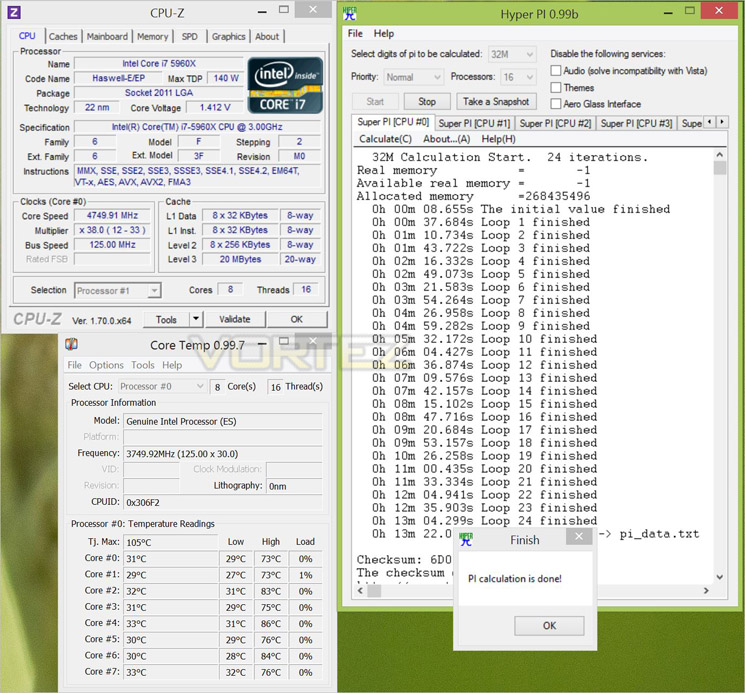
We couldn’t manage this with the MSI so this goes some way to proving that the OC socket can add that little bit of extra stability power to an overclock. To further exemplify the OC Sockets capability we decided to throw in a different set of memory rated at 3000MHz as we know this speed is difficult to attain.
XMP profiling wouldn’t allow us to boot without raising VSCAA a touch but once that was resolved we hit 3GHz no problem. Getting a little ambitious was slackened things back a little and tried for 3400MHz. sadly, this resulted in a none boot scenario so we tightened everything back up an went for 3200MHz.
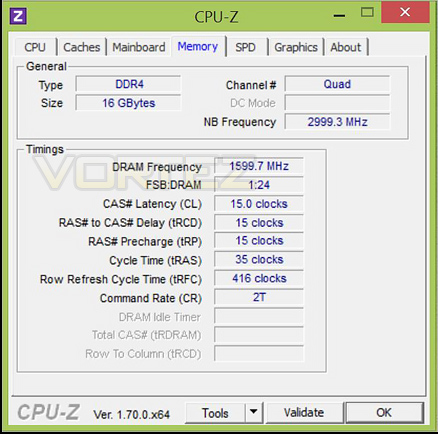
Bingo! 3200MHz DDR4. A little more tweaking and we managed to hit 1T timing too which is amazing.
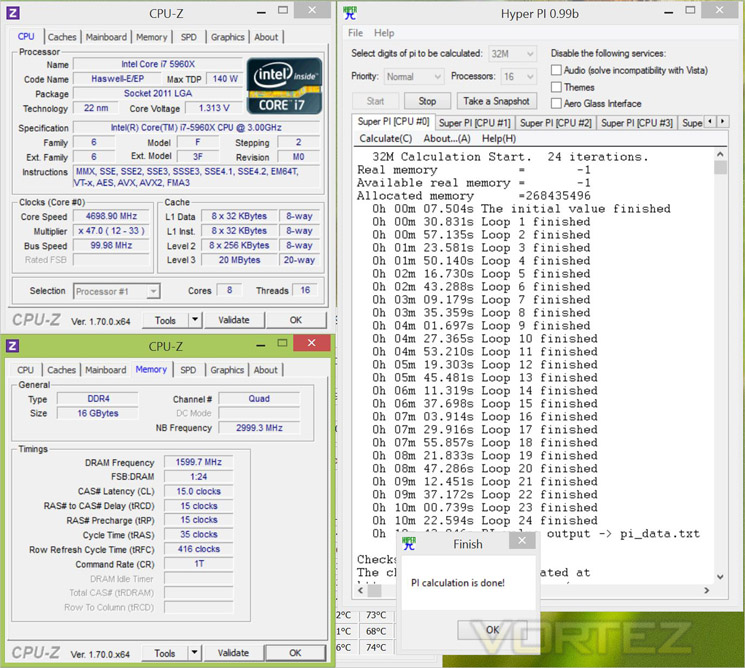
Sadly, temperatures seemed to be limiting our CPU overclock as while stable, temps above 80c made us feel pretty uncomfortable so we opted to drop a little off the overclock which allowed us to drop the voltage significantly in order to reduce CPU temperatures. So as an overall overclock we settled for 4.7GHz on all cores along with a blistering 3200MHz along with very with tight timings. A mighty overclock indeed.
Benchmarks: Power Consumption
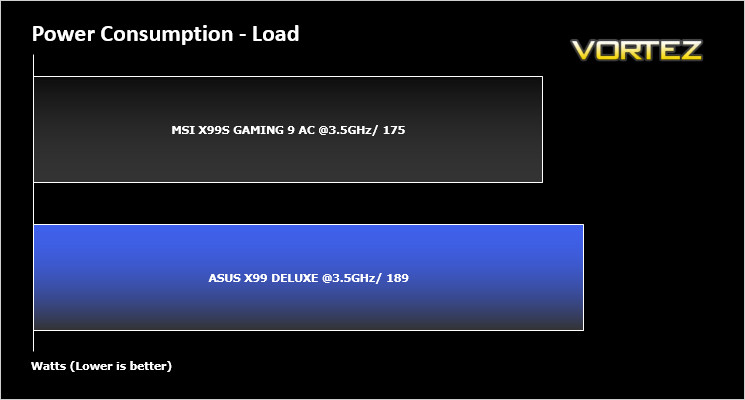
To complete our power consumption tests we enabled all of the key features on the mainboard and let the system rest for 10 minutes within a windows environement before taking a reading from the plug to the PSU. This gives us our system idle reading. to obtain our load results we ran HyperPI (32m) on all cores taking a reading after 5 minutes with all CPU cores loaded to 100%
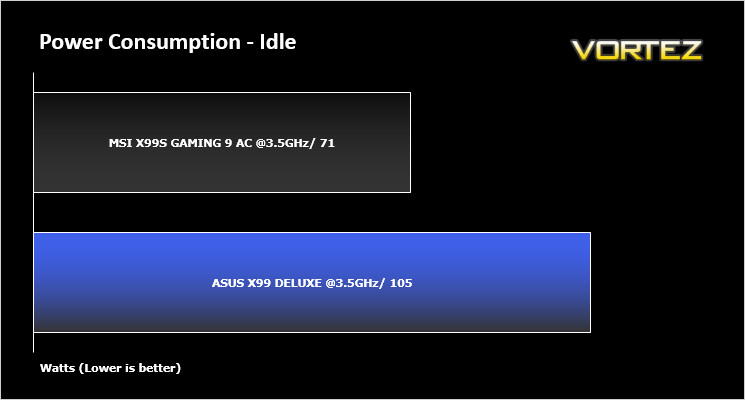
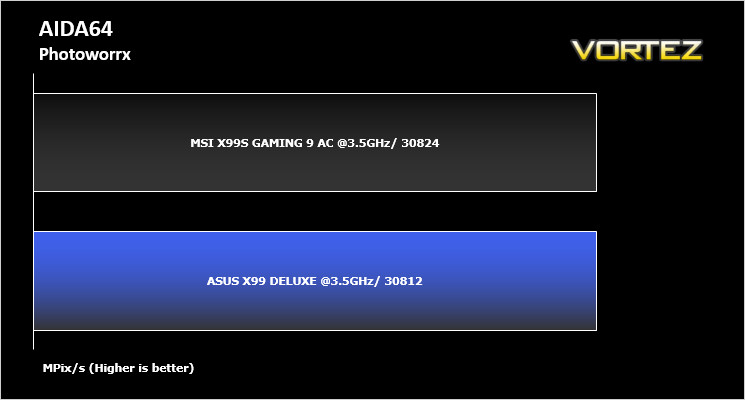
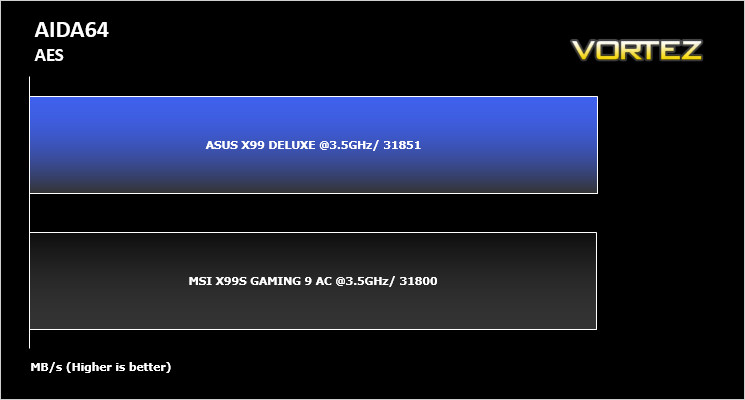
Benchmarks: AIDA64 CPU & Memory
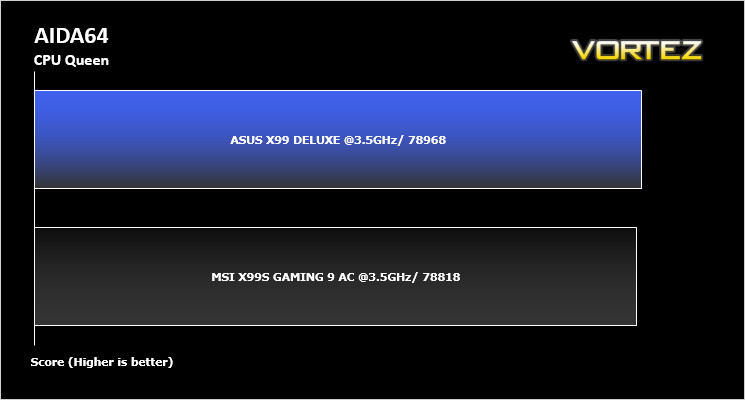
This simple integer benchmark focuses on the branch prediction capabilities and the misprediction penalties of the CPU. It finds the solutions for the classic “Queens problem” on a 10 by 10 sized chessboard. At the same clock speed theoretically the processor with the shorter pipeline and smaller misprediction penalties will attain higher benchmark scores. For example — with HyperThreading disabled — the Intel Northwood core processors get higher scores than the Intel Prescott core based ones due to the 20-step vs 31-step long pipeline. CPU Queen test uses integer MMX, SSE2 and SSSE3 optimizations.
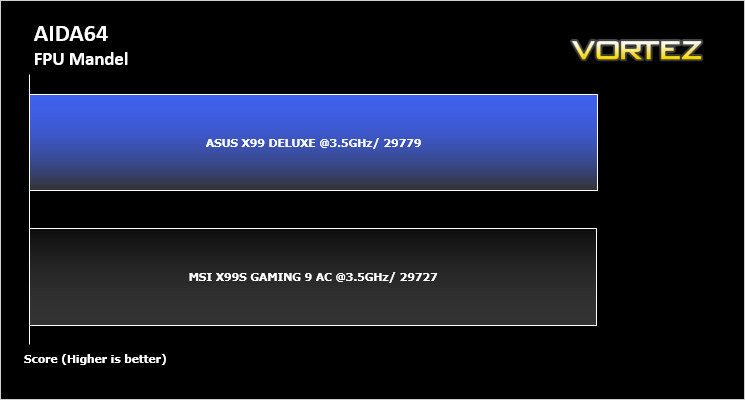
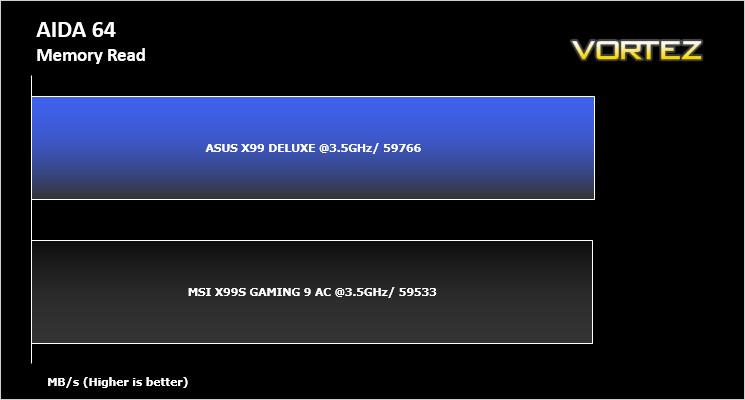
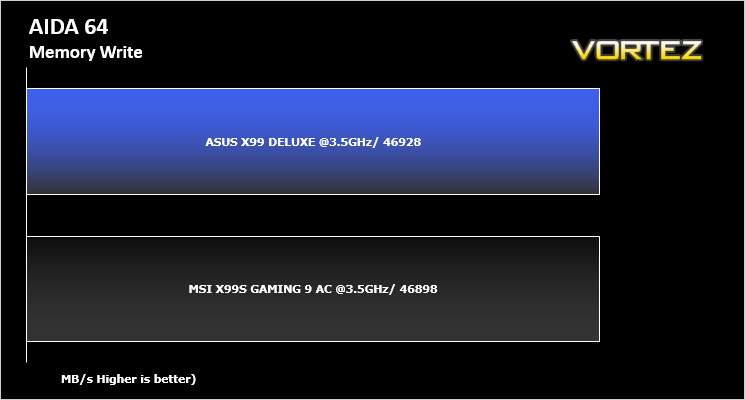
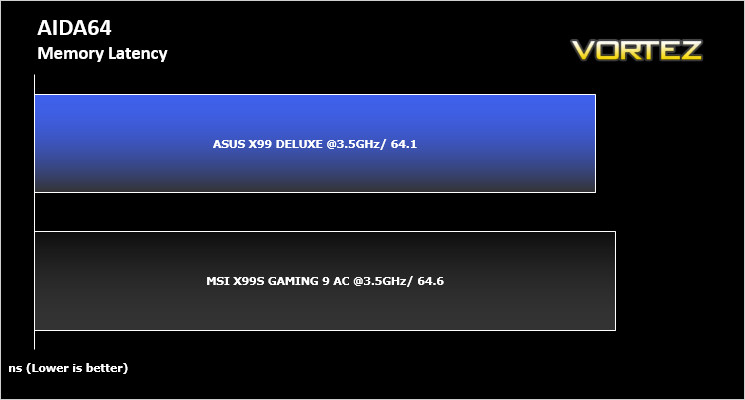
Benchmarks: SiSoft Sandra: CPU and Memory
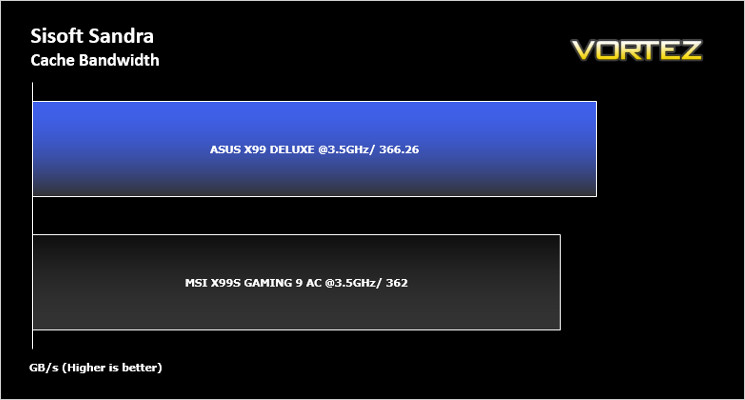
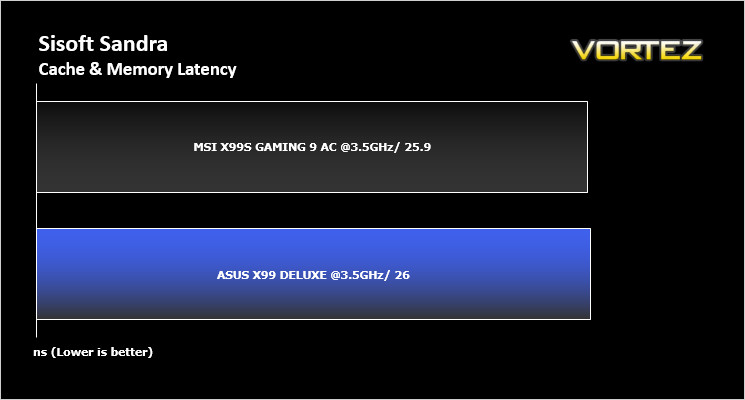
SANDRA isn’t always a benchmark that is included in hardware reviews but I believe it shouldn’t be ignored. SANDRA provides a vigorous package that tests your system in a rather large array of benchmarks. There are many aspects of benchmark that can be executed. We will be considering – CPU and memory tests.
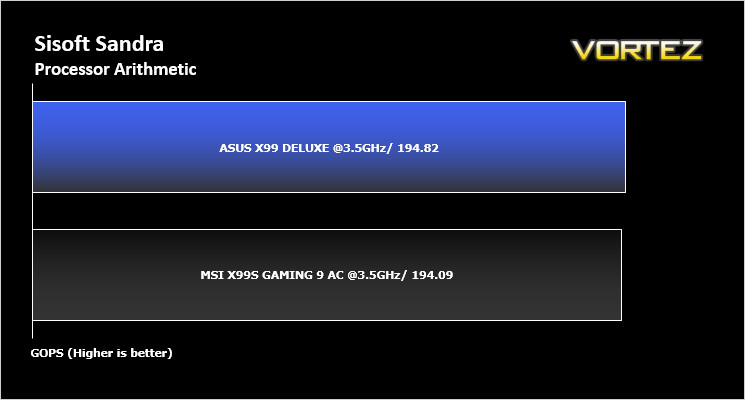
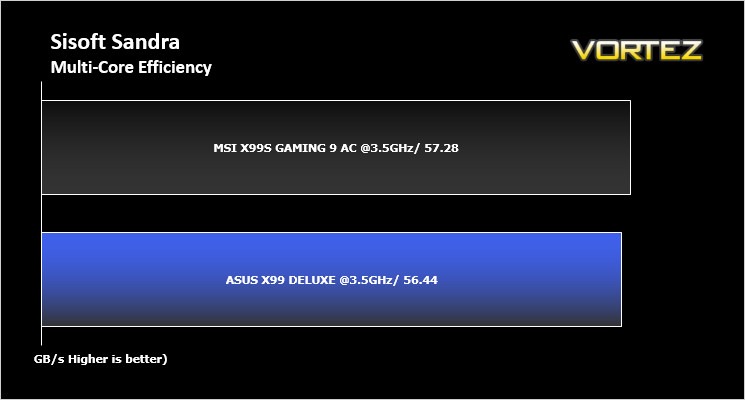
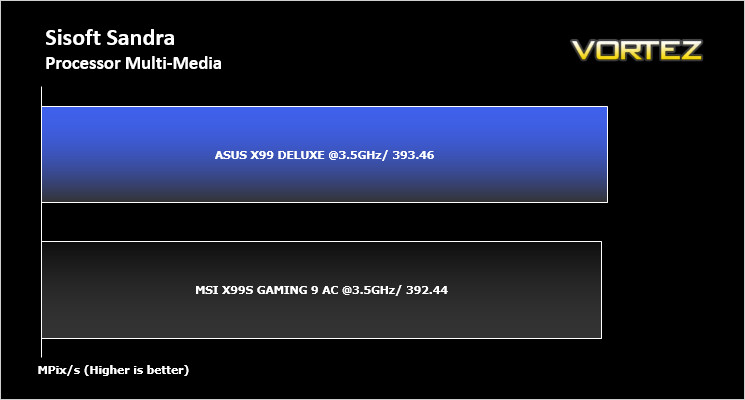
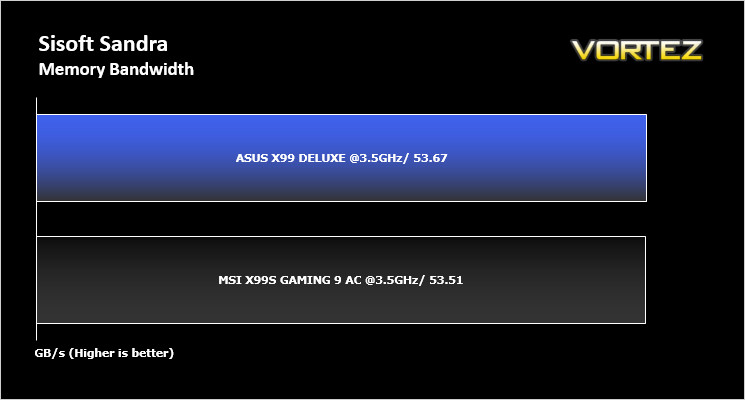
Benchmarks: Cinebench R15
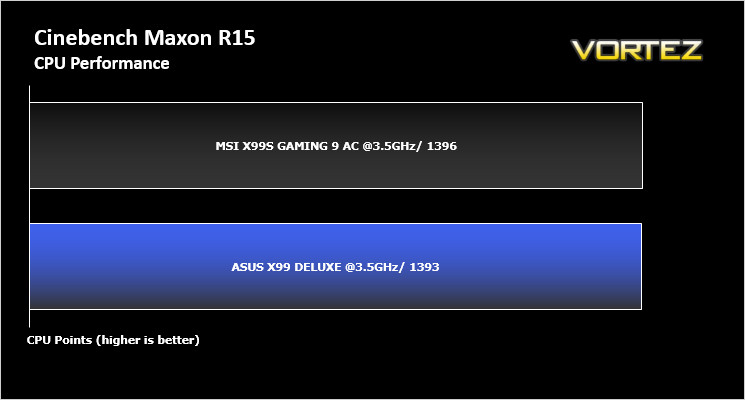
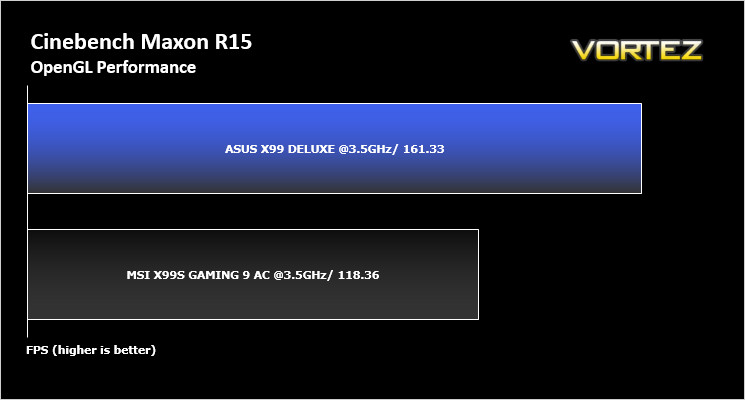
CINEBENCH can measure systems with up to 64 processor threads. This test scene contains approximately 2,000 objects which in turn contain more than 300,000 polygons in total, and uses sharp and blurred reflections, area lights, shadows, procedural shaders, antialiasing, and much more. The result is displayed in points (pts). The higher the number, the faster your processor.
Benchmarks: POV-Ray
The Persistence of Vision Raytracer, or POV-Ray, is a ray tracing program which generates images from a text-based scene description, and is available for a variety of computer platforms. It was originally based on DKBTrace, written by David Kirk Buck and Aaron A. Collins for the Amiga computers.
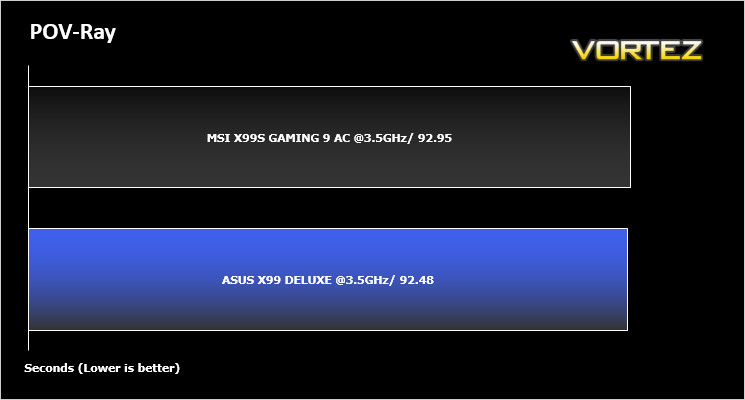
Benchmarks: Handbrake 0.9.9.1
HandBrake is an open source trancoding tool for converting video from nearly any format to a selection of modern, widely supported codecs. Strong multi-threading support tends to favour high core counts and hyperthreading support.
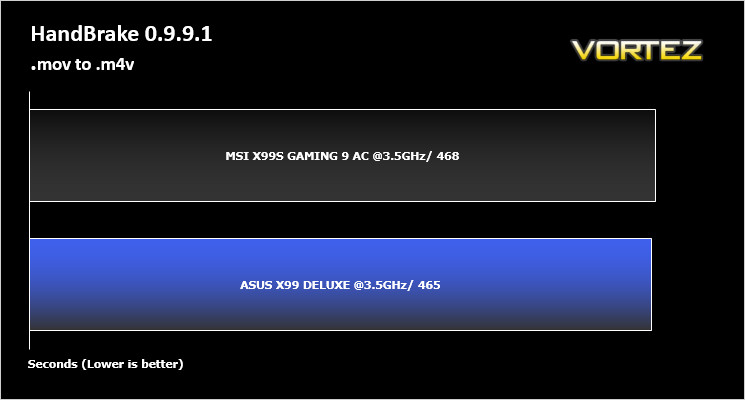
Benchmarks: AS SSD
AS SSD Benchmark is a straightforward tool for measuring the speed of your SSD drive.
Simply launch the program, choose your drive, click Start, and it’ll test your SSD’s read and write speed in a variety of ways, delivering a score for each when it’s done. And if that’s not enough, there are also additional file copy and compression-related benchmarks available from the Tools menu. (The author’s support page is German only, but if you need further English explanations then there’s a thread on the program at the OCZ Technology forum.)./quote]
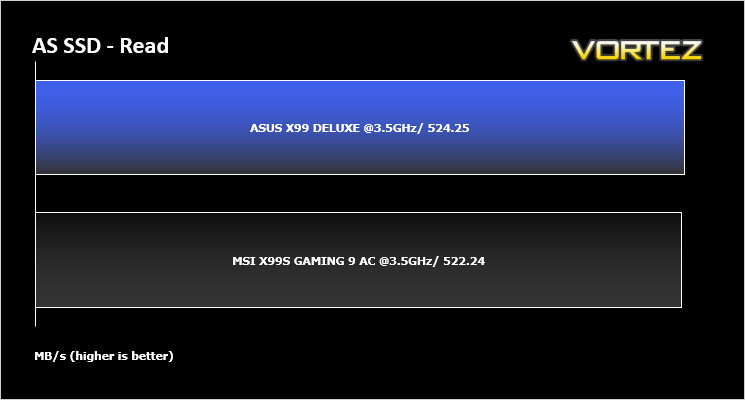
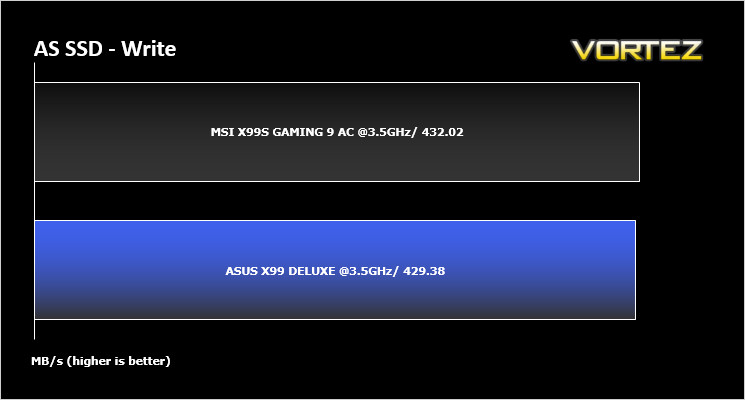
Benchmarks: Futuremark 3DMark Fire Strike
3DMark FireStrike Product Page
Fire Strike is Futuremark’s new showcase DirectX 11 benchmark designed for high-performance gaming PCs. It is our most ambitious and technical benchmark ever, featuring real-time graphics rendered with detail and complexity far beyond what is found in other benchmarks and games today. Fire Strike will only be available in the Windows editions of 3DMark initially.
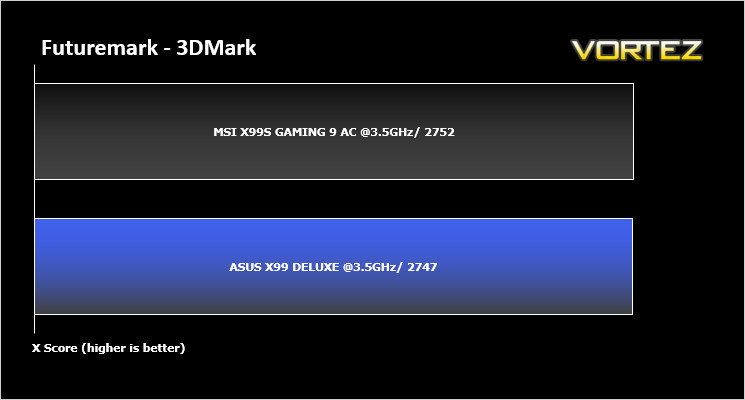
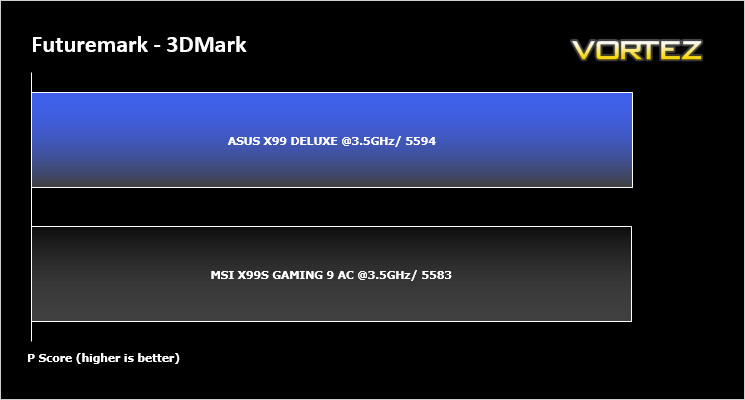
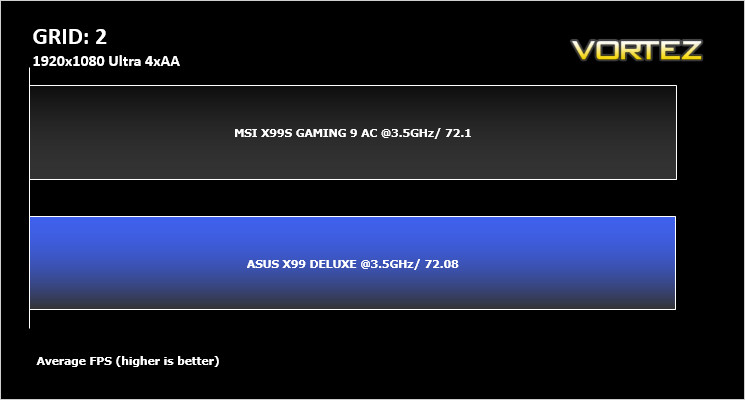
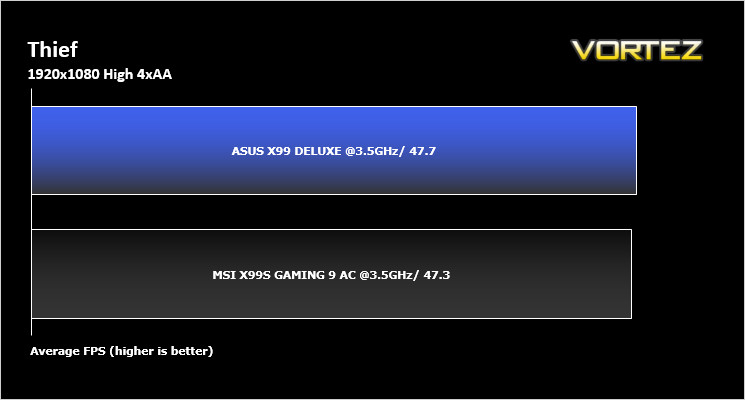
Benchmarks: Battlefield 4, THIEF, Company of Heroes 2, GRID 2
It’s important for us to perform a number of game benchmarks as well as the synthetic tests because gamers will want to know if there are any significant benefits. So here we have a selection of popular gaming titles, critically acclaimed and action-packed.
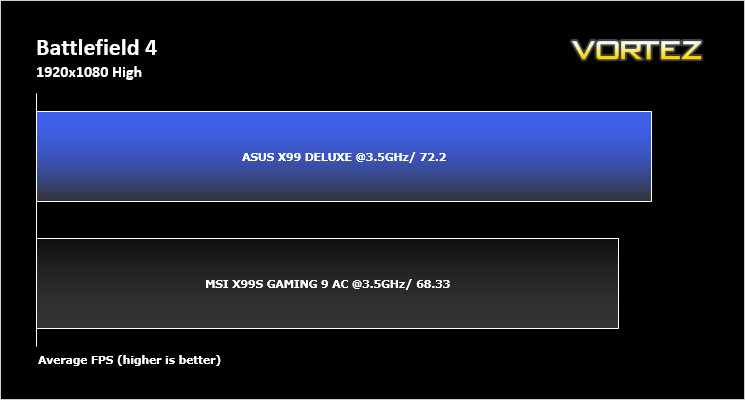
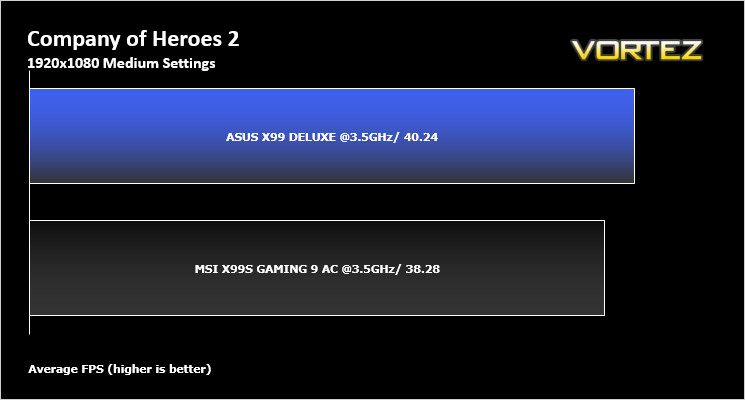
Conclusion
We must confess that when we received all of the information about ASUS’ OC Socket we were sceptical at best, tempted to write this feature off as a gimmick that will add nothing to the overclocking performance of a motherboard. We would have been wrong to do so because the OC Socket has allowed us to push our CPU and memory that little bit further than before. While it didn’t exactly astound us by the extra headroom it gave us one needs to bear in mind that when you are at the limit of an overclock (of which 4.7GHz appears to be our stable limit), anything that will give you the edge over the competition has to be a worthwhile investment. Whether it is the motherboard or actually the OC Socket itself that gives you this edge we cannot say for sure – that can only be determined by using the same motherboard without the OC Socket but as a package there can be no doubting that the ASUS X99 Deluxe delivers in the overclocking department.
The good news doesn’t stop there either because aesthetically, the board is very pleasing to the eye. White is becoming a very popular colour (or rather shade) in the realm of PC themes so it is great to see ASUS adding this colour rather than the usual blue or red and black we have become accustomed to. The motherboard is crammed full of features and while the CPU socket area is a bit too overcrowded for our liking, the huge amount of options the motherboard provides truly is ‘Deluxe’ in every sense of the word. If you are looking for a basic, no frills motherboard you will hate the ASUS X99 Deluxe because it has more ‘features’ than the Daily Sport with the same amount of eye candy!
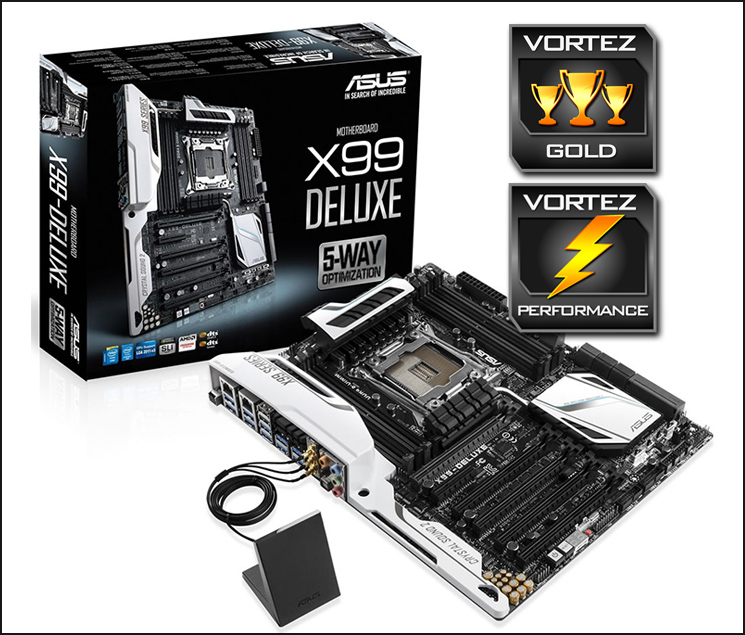
We could wax lyrical about the sheer amount of ‘toys’ the Deluxe provides but there simply is not space in this review to do so but rest assured, few other motherboards will have the same variety of features. What with the OC Socket and the resulting overclocks we attained on both CPU and memory, our Gold and Performance awards seem to be scant reward for such a well polished product. Well done ASUS!
We like the X99 Deluxe a lot. It has all of the bases covered. Whether you are looking for an overclocking motherboard, gaming station or the foundation for an entertainment PC, the ASUS X99 Deluxe delivers it all in one very strong package.
Pros
+ OC Socket
+ Voltage (BIOS) options
+ Great looks
+ Feature-packed
Cons
– Nothing worth mentioning
+ OC Socket
+ Voltage (BIOS) options
+ Great looks
+ Feature-packed
Cons
– Nothing worth mentioning

Click here for an explanation of our awards at Vortez.net.
Our thanks to ASUS, Corsair and Intel for providing some of the components crucial to this review
Our thanks to ASUS, Corsair and Intel for providing some of the components crucial to this review


