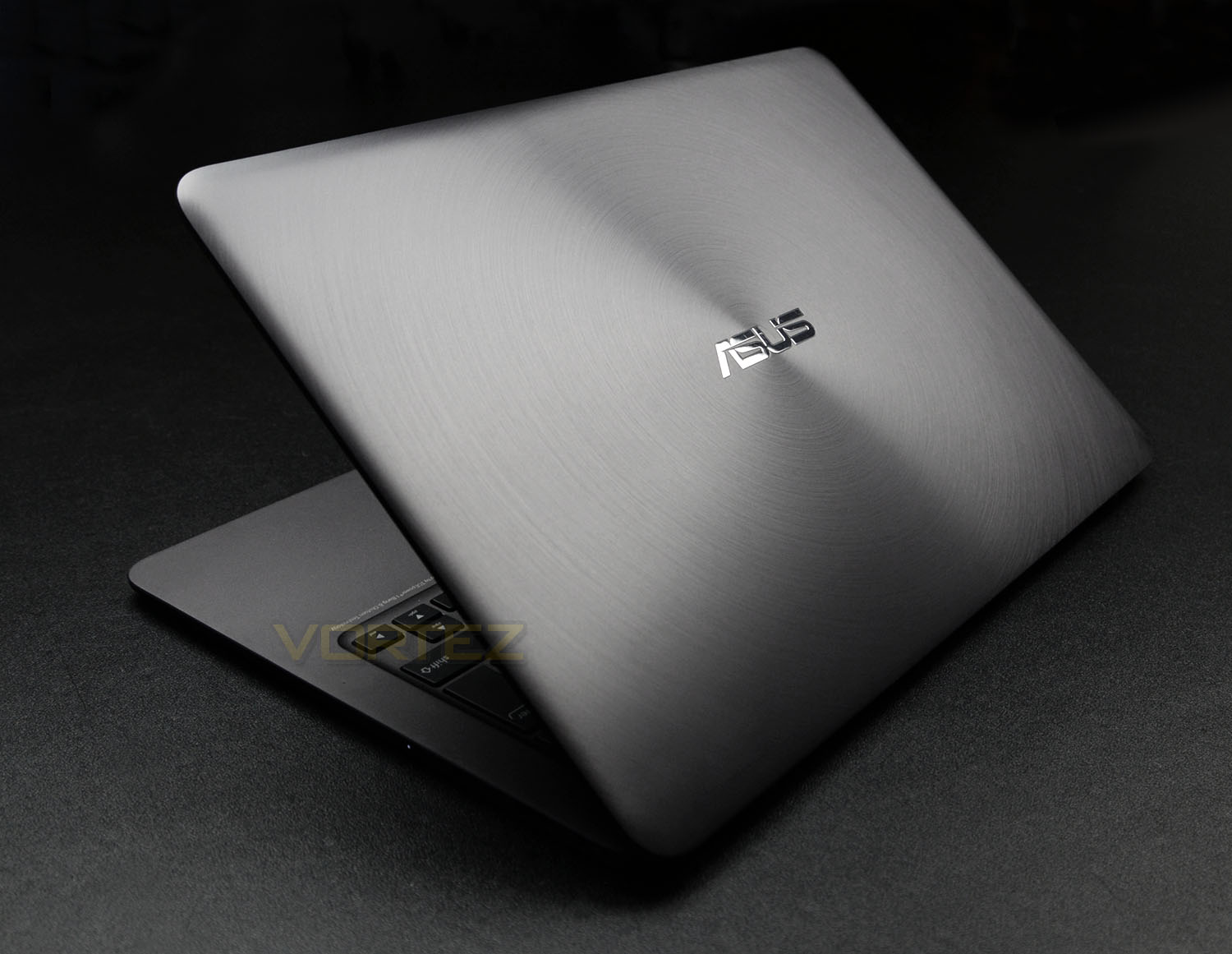
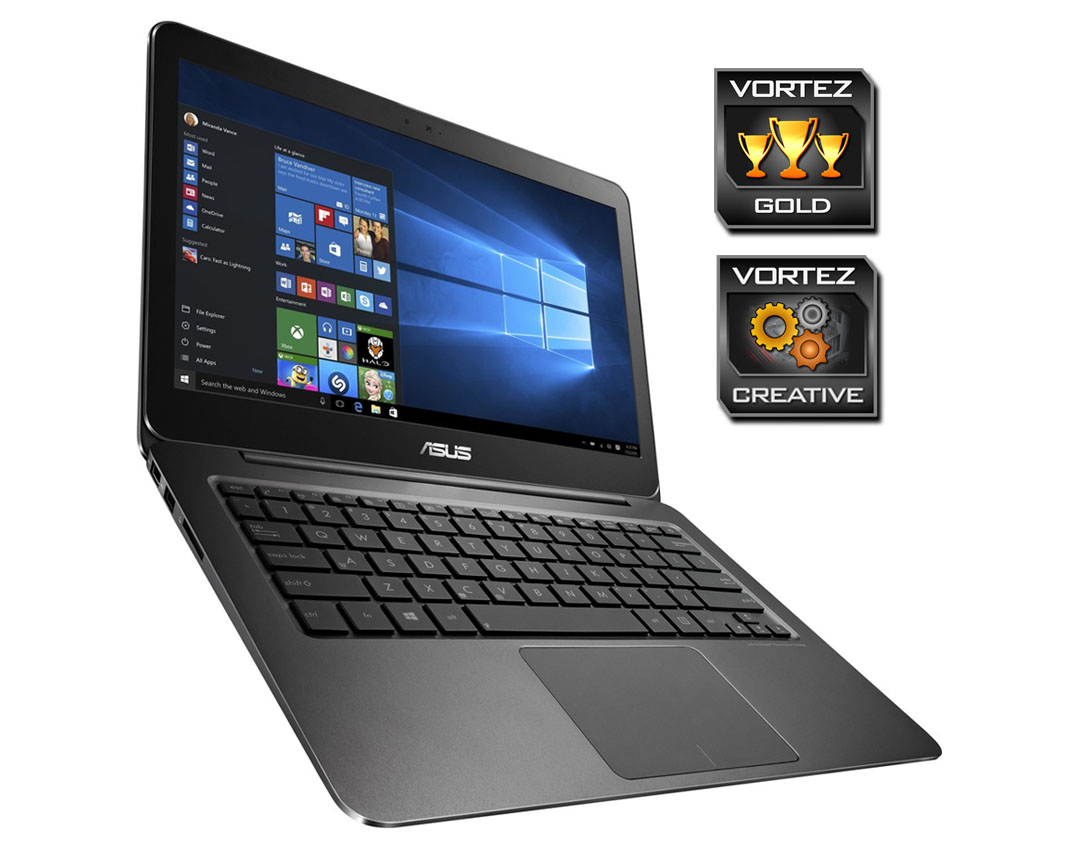
The Zenbook UX305CA is an all-aluminium Ultrabook which is completely fanless and features an Intel Skylake processor and a SATA-based SSD.

Product on Review: Zenbook UX305CA Ultrabook
Manufacturer & Sponsor: ASUS
Street Price: £550 GBP / $700 USD
The primary objective with any notebook/mobile system is portability and yet all too often we find these types of product bearing a weighty chassis and featuring bulky exteriors – hindering the transportation of such a device. The humble Ultrabook seeks to combat this issue by offering up a super-condensed unit, which is lightweight and still retains a solid hardware specification.
In the spotlight today is the new ASUS Zenbook UX305CA. This Ultrabook is based on Intel Skylake architecture and is available in a selection of different processor models and storage capacities. Our sample today features the Intel Core M3 6Y30 and a 128GB SSD. Not only is this sleek device compact and lightweight, but it also boasts a fan-less design for total silence.
ASUS on their UX305CA
ZenBook UX305CA is designed to go everywhere you go. Weighing a mere 1.2kg and just 1.23cm thin, it’s never a burden, always a delight. But it’s not just an amazingly-beautiful, lightweight laptop: it’s seriously powerful too, packed with the latest high-performance technology. With ZenBook UX305CA, you can do all the incredible things you’ve always wanted to do, wherever you are.
Technical Specifications
Below are the technical specifications supplied directly by ASUS:
Processor
Intel® Core™ M 6Y30 Processor
Operating System
Windows 10 Pro
Memory
LPDDR3 1600 MHz SDRAM 8 GB
Display
13.3″ 16:9 QHD+( 3200 x 1800)
Graphic
Integrated Intel® HD Graphics 515
Storage
SATA3
– 128GB SSD (M.2 2280)
Card Reader
2 -in-1 card reader ( SD/ SDXC)
Camera
HD 720p CMOS module
Networking
Integrated 802.11 ac
Interface
1 x Microphone-in jack
1 x Headphone-out jack
3 x USB 3.0 port(s) *3
1 x micro HDMI
1 x SD card reader
1X AC adapter plug
Audio
ICEpower®
Battery
45 Whrs Polymer Battery
Power Adapter
Output :
19 V DC, A, 45 W
Input :
100 -240 V AC, 50/60 Hz universal
Dimensions
324 x 226 x 12.3 mm (WxDxH)
Weight
1.2 kg (with Polymer Battery)
Security
USB Security Lock Cable Solution
Intel® Core™ M 6Y30 Processor
Operating System
Windows 10 Pro
Memory
LPDDR3 1600 MHz SDRAM 8 GB
Display
13.3″ 16:9 QHD+( 3200 x 1800)
Graphic
Integrated Intel® HD Graphics 515
Storage
SATA3
– 128GB SSD (M.2 2280)
Card Reader
2 -in-1 card reader ( SD/ SDXC)
Camera
HD 720p CMOS module
Networking
Integrated 802.11 ac
Interface
1 x Microphone-in jack
1 x Headphone-out jack
3 x USB 3.0 port(s) *3
1 x micro HDMI
1 x SD card reader
1X AC adapter plug
Audio
ICEpower®
Battery
45 Whrs Polymer Battery
Power Adapter
Output :
19 V DC, A, 45 W
Input :
100 -240 V AC, 50/60 Hz universal
Dimensions
324 x 226 x 12.3 mm (WxDxH)
Weight
1.2 kg (with Polymer Battery)
Security
USB Security Lock Cable Solution
Unboxing & Closer Look Video
For this review we’ve produced a video which reveals the packaging, bundle and a close, detailed overview of Zenbook UX305CA. Please check out the video below for a comprehensive look at this new product:
Benchmarks: Temperatures
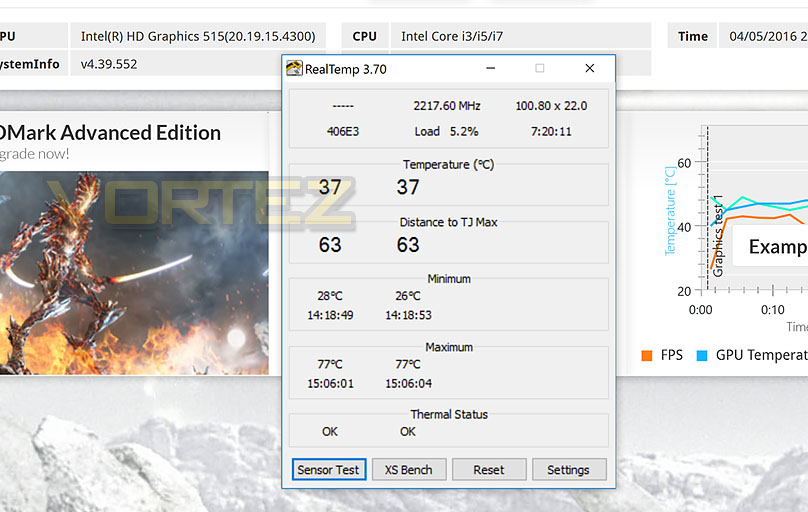
For our first benchmark test we observe the max. CPU/iGPU temperatures of the system during 3DMark. To report back on the temperatures we use RealTemp which record the peak figures.
Benchmarks: Boot Time & Battery Uptime
In this test we observe how fast the boot into Windows 10 is by using a digital stopwatch. Battery uptime is another important observation, for this we charge the notebook up to 100% and then disconnect the charging unit and leave Heaven 4.0 running on a continuous loop until the notebook loses all power.

Benchmarks: Cinebench R15 & x264 HD
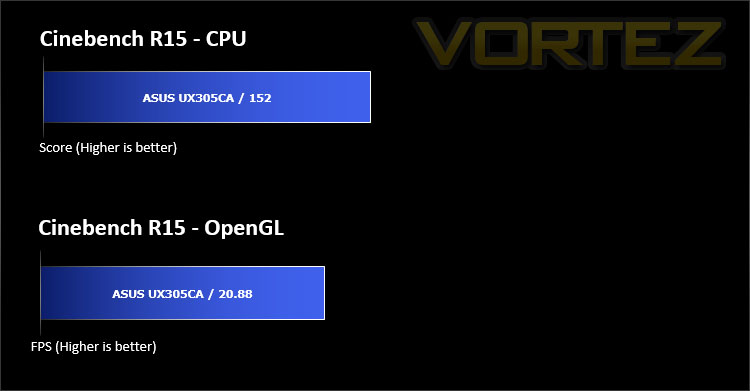
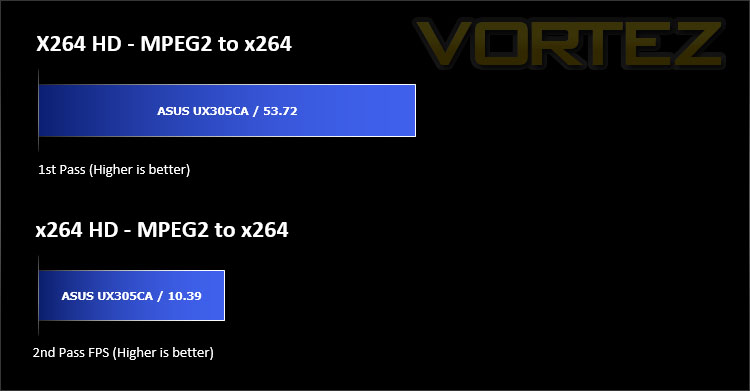
CINEBENCH can measure systems with up to 64 processor threads. This test scene contains approximately 2,000 objects which in turn contain more than 300,000 polygons in total, and uses sharp and blurred reflections, area lights, shadows, procedural shaders, antialiasing, and much more. The result is displayed in points (pts). The higher the number, the faster your processor is.
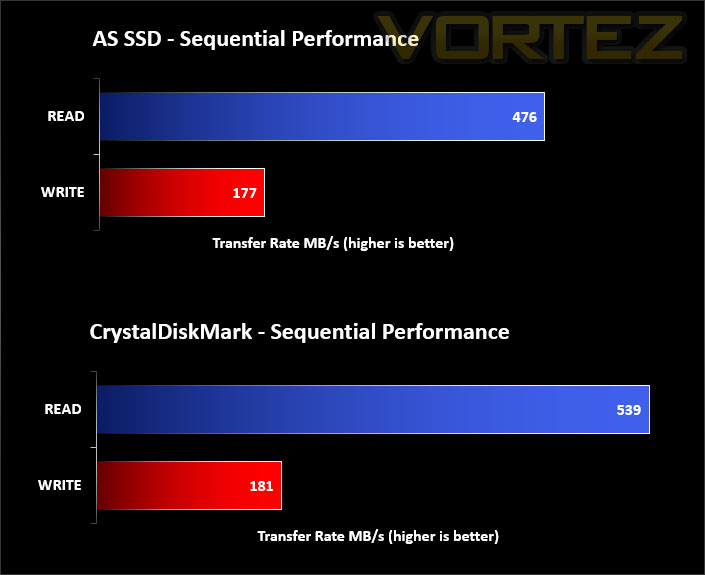
Benchmarks: AS SSD & CrystalDiskMark
Our Ultrabook features a SATA-based SSD – in both these storage benchmarks we test out the sequential read/write performance to identify how sustained transfer rates shape up.
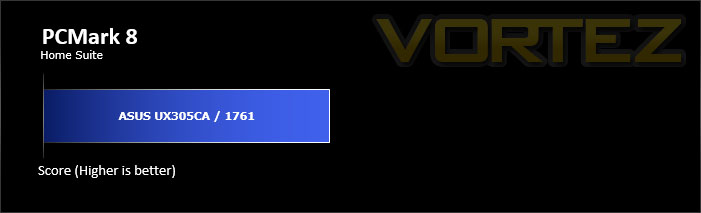
Benchmarks: PCMark 8
PCMark 8 combines performance benchmarking with battery life measurement and includes tests based on popular Adobe and Microsoft applications. Whether you are looking for long battery life, or maximum power, PCMark 8 will help you find the devices that offer the perfect combination of efficiency and performance for your needs. It’s the complete PC performance benchmark for home and business.
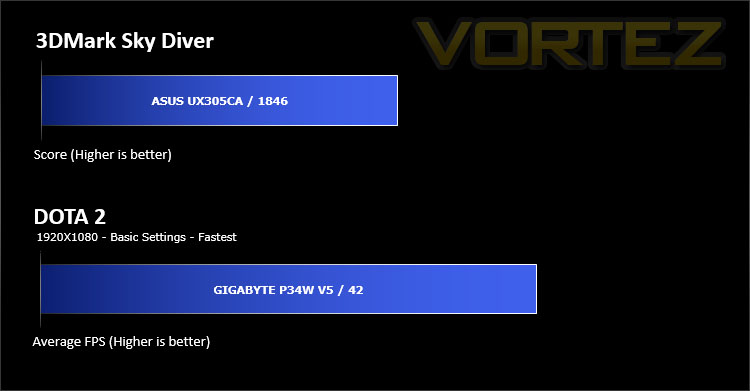
Benchmarks: 3DMark & DOTA 2
The new 3DMark includes everything you need to benchmark your hardware. With three all new tests you can bench everything from smartphones and tablets, to notebooks and home PCs, to the latest high-end, multi-GPU gaming desktops. And it’s not just for Windows. With 3DMark you can compare your scores with Android and iOS devices too. It’s the most powerful and flexible 3DMark we’ve ever created.
Conclusion
The UX305CA confirms how far Ultrabooks have come in recent years. Though we’re dealing with extremely tight dimensions and lightweight construction, we’re still able to home in on great hardware specifications; these factors do not impede mobile capabilities they once did.
With today’s Zenbook, there is a strong focus on minimalism with the styling following an elegant aesthetic. So in this particular department, UX305CA is likely to appeal to a larger audience; those of which are frequent travellers or simply require something which takes up very little space and weighs a mere killo.
There are a variety of models available under the UX305CA which feature different processors, different screen resolutions and an assortment of storage capacities. Our unit contained the Intel M3 6Y30 – a Skylake-powered dual-core processor, a QHD display offering 3200×1200 and a 128GB SSD. We found the CPU provided good all-round performance and the screen delivered a crisp, vibrant display, but the storage at 128GB is somewhat limiting – especially when you consider Windows 10 Pro with the few ASUS applications consumes up to approximately 60GB. The 256GB or even 512GB models are likely to be more highly favoured but if you are on a tighter budget and tend to keep data stored on portable drives then opting for the smaller capacity is unlikely to cause any issues.
One of the major attractions to the Zenbook UX305CA is the omission of any cooling fans within the chassis. By adopting a passively cooled processor and an SSD, the system is completely silent – something which is certainly a rarity these days, and at first it almost appears as a phenomenon or an odd occurrence; but one which is definitely welcomed. The expectation with such tight spacing and a lack of any cooling fans would lead you to believe the temperatures might soar under full sustained usage, but they’re more than acceptable.
Hitting shelves with a price-tag of £550 GBP / $700 USD, Zenbook UX305CA is accurately priced, looking at other Ultrabooks and considering the solid build-quality, hardware specification and other perks such as being noise-free.
The Zenbook UX305CA does not struggle to impress. Thanks to its all-aluminium design, this elegant Ultrabook is lightweight and compact – making it easy to take with you if you’re on the move. Furthermore, the system utilises a solid hardware specification with boasts a completely fan-less design.
VIDEO REVIEW – VORTEZ TV
Pros
+ Sleek, elegant design
+ All-aluminium
+ QHD display
+ Skylake-powered
+ Super-thin and lightweight
+ Ideal for travellers
+ Silent – completely fan-less
+ Card slot reader
+ Compact charging unit
Cons
– Power button is too close to DEL/backspace
– 128GB SSD doesn’t offer much space
+ Sleek, elegant design
+ All-aluminium
+ QHD display
+ Skylake-powered
+ Super-thin and lightweight
+ Ideal for travellers
+ Silent – completely fan-less
+ Card slot reader
+ Compact charging unit
Cons
– Power button is too close to DEL/backspace
– 128GB SSD doesn’t offer much space
Click here for an explanation of our awards at Vortez.net.