







We put this seven-button gaming mouse – Attitude One’s first & featuring customisable lighting and 1000Hz polling rate – under the spotlight.

Product On Review: Vintorez Gaming Mouse
Manufacturer: Attitude One
Street Price: ~£28 (inc. V.A.T.)
Attitude One are a relatively new manufacturer on the block. Founded in 2012, the US-based company have in a few short months compiled a well-rounded range to include diverse peripherals such as 7.1 headsets, keyboards and now mice. The Vintorez utilises an outer shell with a shape identical to the Aula Manum, but the mouse has been adapted by Attitude One to include a rubberised surface and 3500 DPI optical sensor.
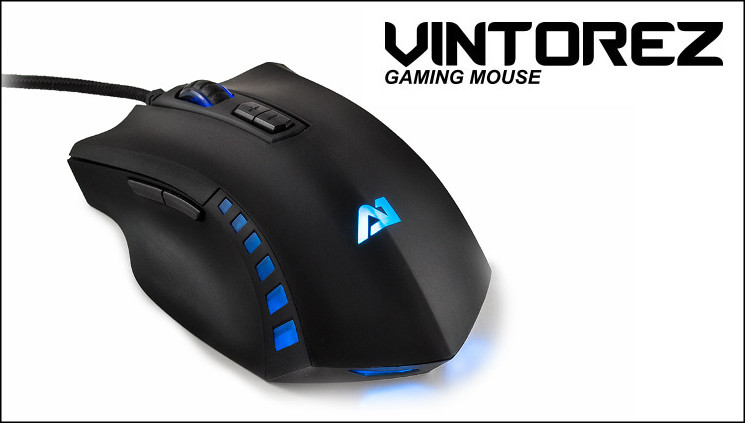
The Vintorez is Attitude One’s first gaming mouse, joining other gaming peripherals such as the Makarov keyboard and Tunguska headsets. Set at around 30-35 Euros or £25-30, it occupies a low to mid-range price position against some of the most well-regarded brands in the business. The design takes cues from the best by including a 3200 DPI optical sensor, flaring main buttons two thumb buttons and rubberised non-slip coating. In a relative rarity at the price point it also incorporates customisable LED illumination and DPI settings; mainstream features for gaming mice at a relatively budget price point.
For all the headline features however it’s going to be durability and comfort which will show just how good this mouse can be.
*Introduction edited to account for new information – Ed
Features and Technical Specifications
Tech. Specs
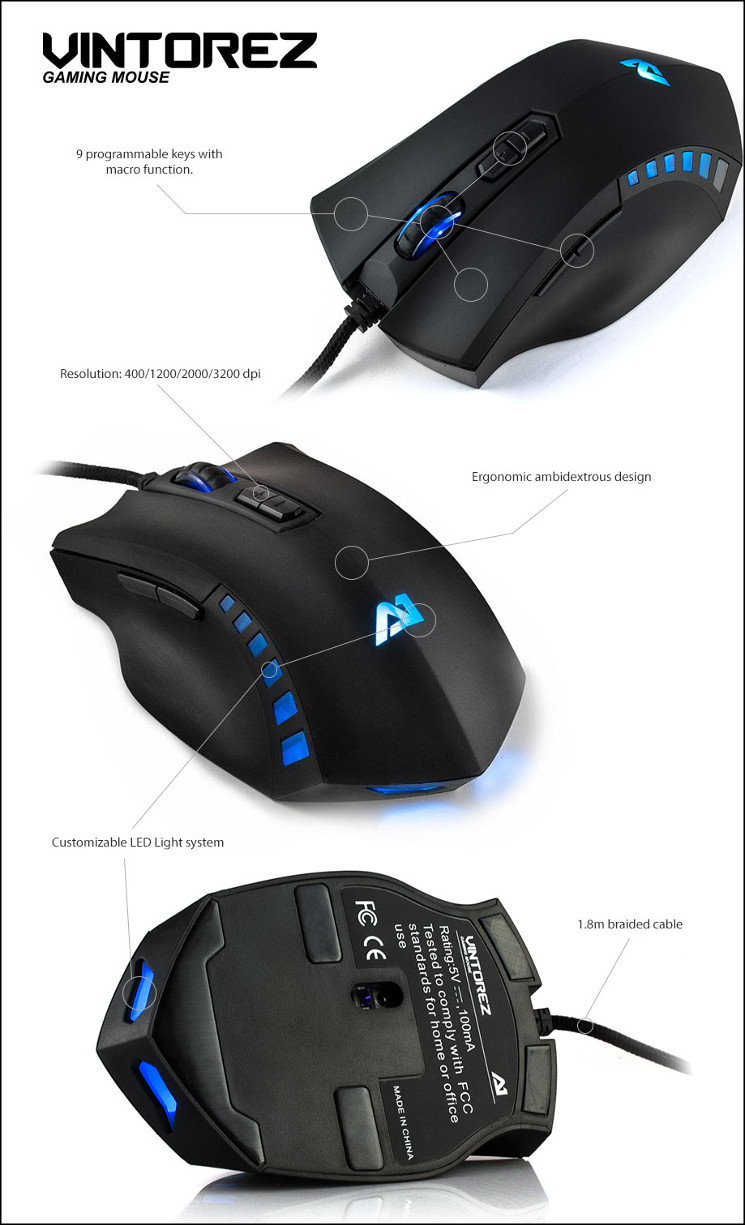
– 3200 DPI Optical Sensor
– Resolution: 400/1200/2000/3200 dpi
– Ergonomic Ambidextrous design
– Customisable LED Lighting
– 1.8m Braided Cable
– Dimensions: 125mm x 75mm x 40mm (L x W x H)
– Weight: ~103g excl. cable
Features
Packaging and First Look
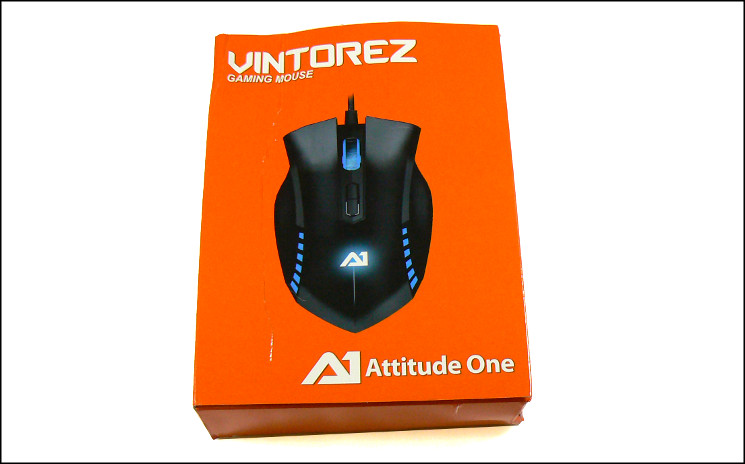
Unfortunately it appears that our Vintorez Gaming Mouse didn’t reach these isles unscathed. Slightly battered as it is (for which you can blame the courier, it’s not the fault of Attitude One), it gives us some idea of how well it protects the valuable contents in the event of a mishap.
The Vintorez packaging exterior has an extremely distinctive bright orange colouring which will catch the eye of anyone on the typical shelf. It utilises a door and window style to view the mouse inside, presenting both an idealised display of the mouse on the front and the actual mouse itself – reassuring for a newer brand. Front packaging also indicates that areas of the mouse are illuminated, which is quite a nice effect for the mouse itself.
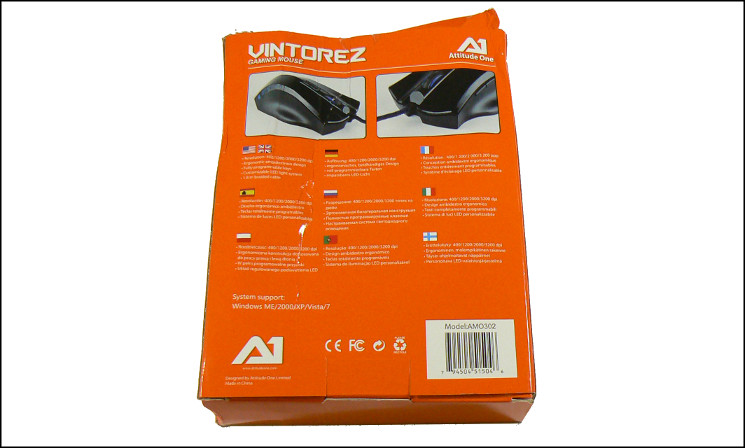
The rear includes a little more technical detail as well as a couple of angled shots of the mouse. Only five key features are detailed however, with no mention of the sensor style, 1000Hz support and other potential features which would be of interest to hard-core gamers. Support information is also limited to declaration of OS compatibility, which should be noted does not include Windows 8. It may be that new packaging is in the works, but even noting the nine languages displayed much more could be provided to the customer.
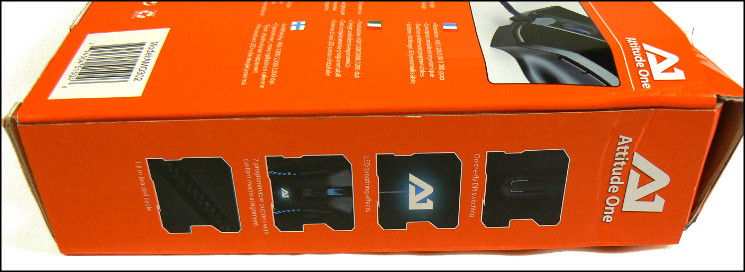
On the left panel Attitude One include three other features not explicitly listed on the rear: on-the-fly DPI switching, LED breathing effects and 7 programmable buttons for custom macro assignment. Any and all of these could, and indeed should be included on the rear.
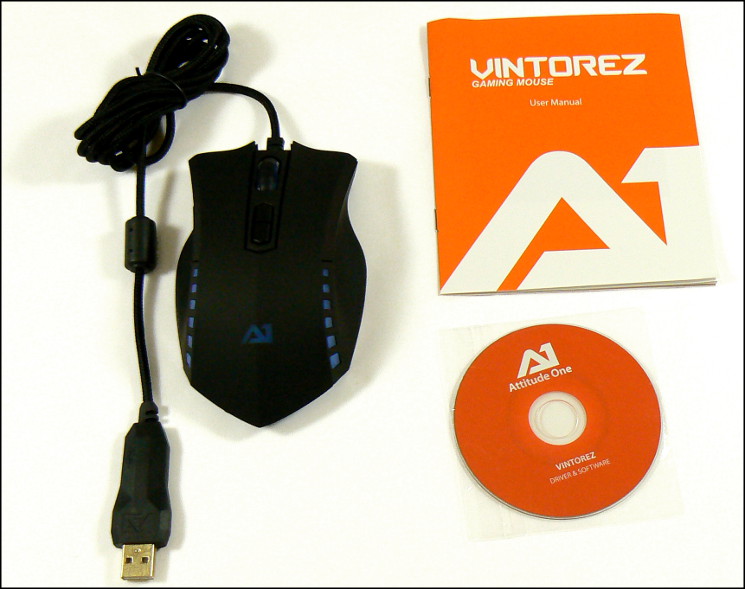
The packaging includes a software user manual, driver CD and the Vintorez itself. We should note that the software version on the CD appears to be a more up-to-date version than the website, indicating that Attitude One perhaps need to get their house in order in that regard.
Overall, despite the hits its taken the first impressions are fine. We would not be averse to more detail being listed for a buyer, but equally it’s not too bad for a mouse in this price bracket.
A Closer Look
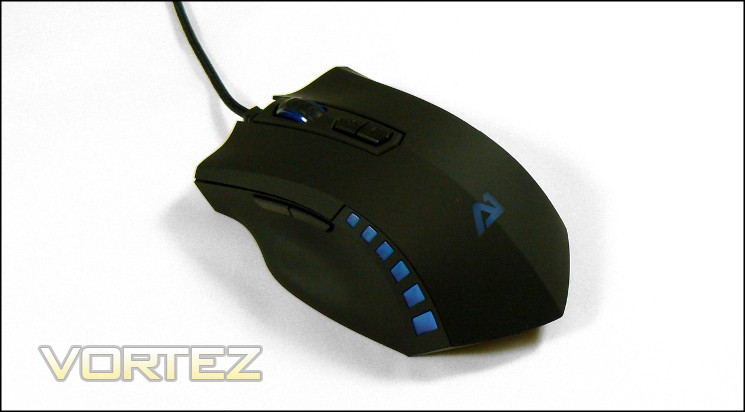
Time to take a closer look at the Vintorez, beginning with the mouse body. Attitude One have made use of a rubberised coating across almost the whole of the visible surface, resulting in an even matte black finish which is grippy to the touch. Etched out of the surface towards the rear are small windows into the translucent plastic below, through which lighting can shine if properly configured. Although it will discolour relatively quickly it should be easy to clean, which is a bonus.
Situated on the top are the majority of the Vintorez’s buttons, including two main buttons, mouse wheel and DPI switches. The main buttons flare outward, evoking comparisons with top-brand gaming mice if not quite having as much contouring to fingertip shapes. The wheel is lightly ratcheted and includes a transparent section for additional lighting; there’s a slight wobble to the wheel on its axis, but nothing to worry about.
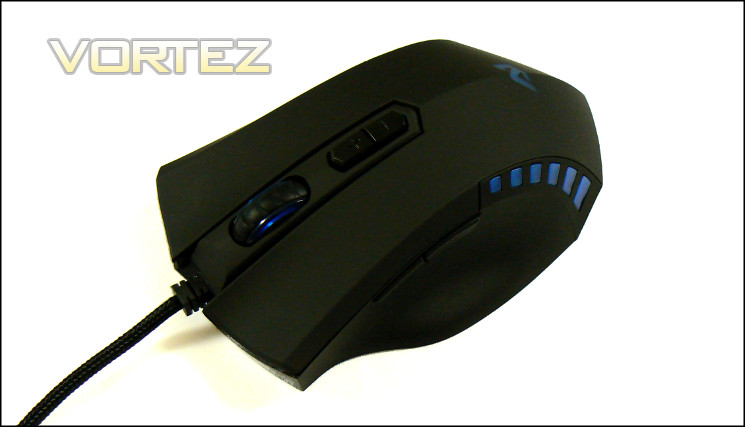
Although they defaulting to DPI level switching the two buttons below the mouse wheel can be configured to macros or other built-in functionality. They’ll be something of a stretch for those utilising a palm grip style, but claw grip gamers should at least be able to take advantage of the topmost one. They wobble a little in the housing, they’re still fairly robust with decent responsiveness and not too much travel distance.
A distinct ridge divides the rear body into two, an aesthetic choice in keeping with the slightly aggressive styling. It may have an impact on overall ergonomics, but that discussion will have to wait.
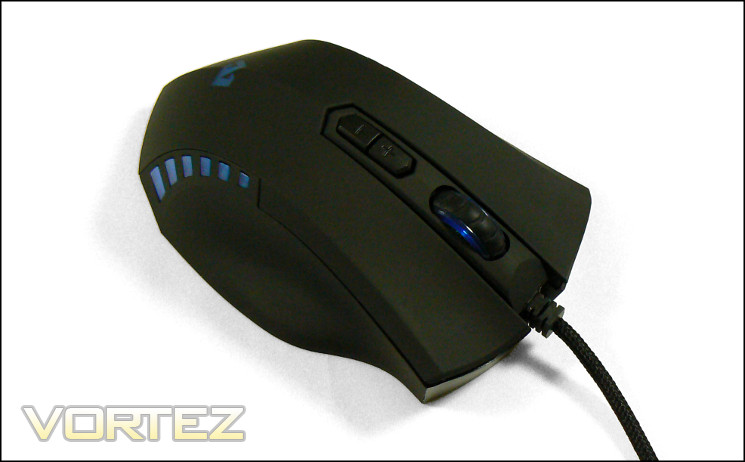
The Vintorez is symmetrical apart from two thumb buttons on the left. It should be well tailored to right-handed gamers, whilst being a little less suited to southpaws due to the reduced options. Whichever the preference, thumbs are supported by a slight ledge towards the floor and the continuation of the rubberised finish and generally true vertical nature of the side make gripping it for lifting easy.
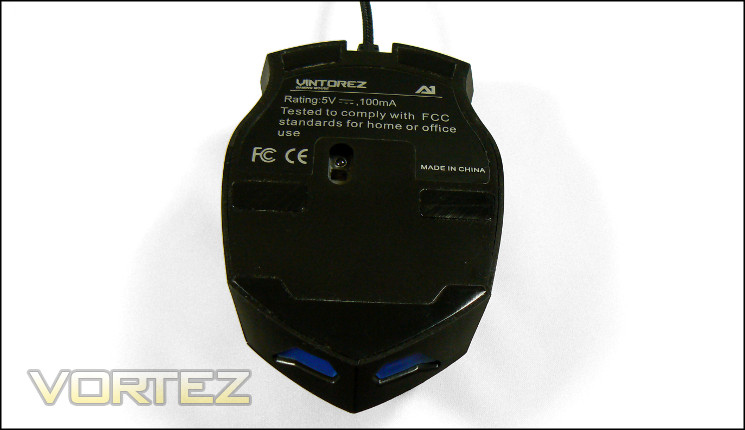
The floor of the Vintorez is virtually unadorned, including only simple testing information and certification logos. Five Teflon-coated skates is Attitude One’s low-friction design of choice, covering a significant portion of the floor and for our sample at least wasn’t uneven. The optical sensor isn’t quite centrally located, but close enough for an even mousing experience.
Two additional windows into the translucent plastic also make an appearance, allowing LED light to pass through and illuminating the underside. A pretty cool feature if showing off your mouse is your thing.
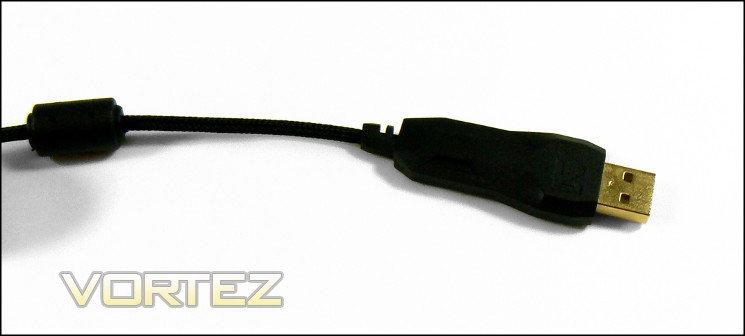
Rounding up the visible mouse features are the braided USB cable – a lovely indication of attention to detail – and oversized USB connector. Note that at a little over 55mm clearance required the over-sized USB connector may be incompatible with some system configurations where space behind the port is limited. The gold plated port is a nice touch, and we should also take note of the reinforced plastic housing around where the cable enters the mouse, reducing long-term risks of fraying and cable damage.
For now the Vintorez is looking pretty good for a mouse in its price class.
Lighting Customisation
Attitude One have designed the lighting on the Vintorez mouse for two distinct but complementary purposes.
On the one hand you have aesthetics. The Vintorez has an array of coloured LEDs aligned internally to shine the body where not obscured, as well as a further blue LED in the wheel. The LEDs can produce two green shades, two blue, red and purple, and are are indirectly controlled in the software under the Advanced Settings menu.
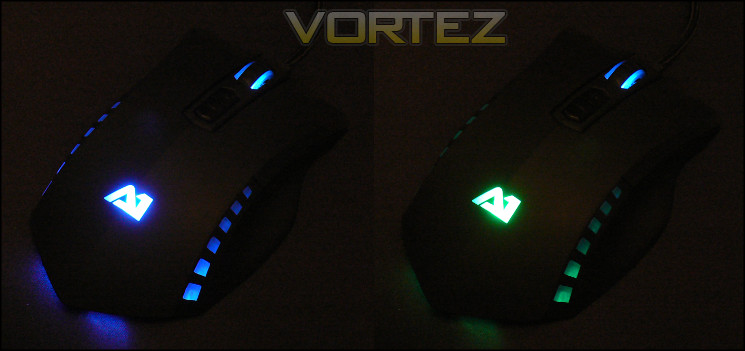
Unfortunately the Vintorez software is much more basic than we were hoping. Despite the six colours available we’re only presented with two options: whether to turn the light effect on and off, and whether you want a breathing effect as it transitions between colours. To not be able to choose a continuous colour seems like a huge omission and we really cannot fathom why it isn’t a configuration option. Furthermore the wheel LED is always lit, with no option to disable.
More worryingly, when set to ‘Breathing’ the mouse cursor freezes in place during colour transitions, indicating a rather significant issue with firmware. When this option is disabled however there appears to be no general issue with tracking, making it difficult for us find the underlying cause of the fault.
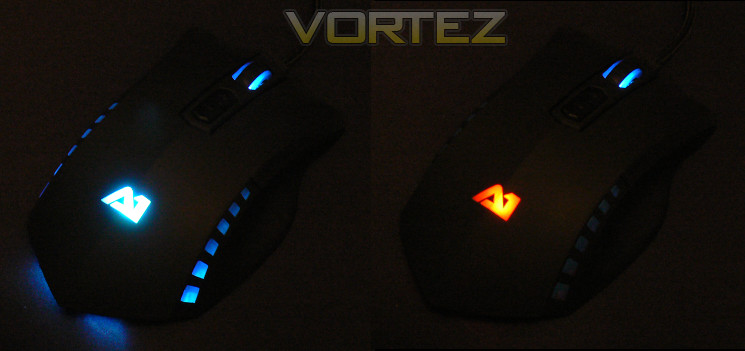
We mentioned that there was a secondary purpose for the lighting. In this case it’s for a DPI indicator, which is an extremely good idea. When the DPI level is changed, either in software or via the mouse button, the LED will flash a colour which indicates the DPI level.
Green – 1200DPI
Dark Blue – 2000 DPI
Light Blue – 3200DPI
The Vintorez falls a little flat given the promise it held upon reading the spec sheet. Adding functionality to hold a light on and choose specific colours would at the very least not only make the mouse more customisable but also add a means of identifying the active profile. As it stands, despite the otherwise welcome inclusion of neat DPI indicator, it’s just not quite as well rounded as one would hope. Perhaps later software and firmware revisions can improve matters.
Software
The Vintorez mouse settings are controlled through its own software suite. Although available directly from the Attitude One website, we found that the software on the supplied driver CD was up to date, perhaps indicating that the revision schedule isn’t particularly fast. Unfortunately there is no indicator of the exact software revision in the application itself.
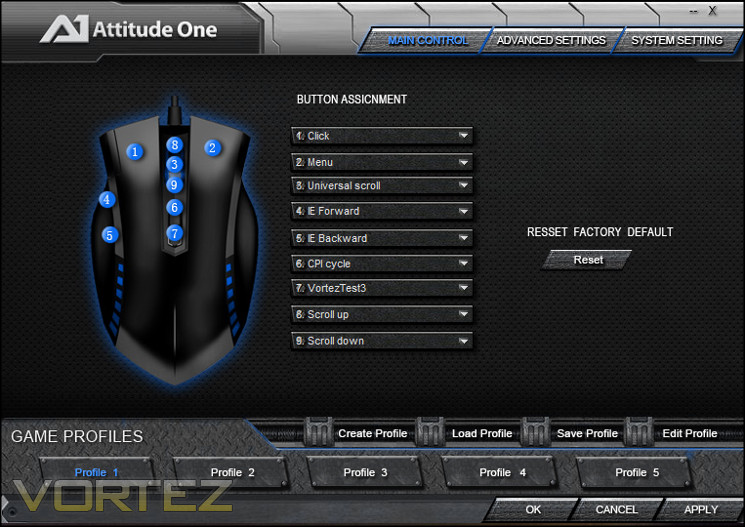
The software is presented as one main window, in the mould of that for many other vendors. Across the top are tabs for the three main configuration windows: Main Control, Advanced Settings and System Settings. At the bottom are tabs for selecting, loading, saving and editing profiles, although it should be noted that these profiles are not stored on the mouse itself.
Mouse settings are stored on a per-profile basis, and profiles can be saved to a file for backup purposes. They may also be bound to a particular executable, launching at the same time as that application launches; it’s a fairly nifty workaround if your software doesn’t allow quick profile switching. Unfortunately the profile label, i.e. “Profile 1” – “Profile 5” doesn’t update with the name you give the profile when you save it, which is once again something of an oversight.
Main Control
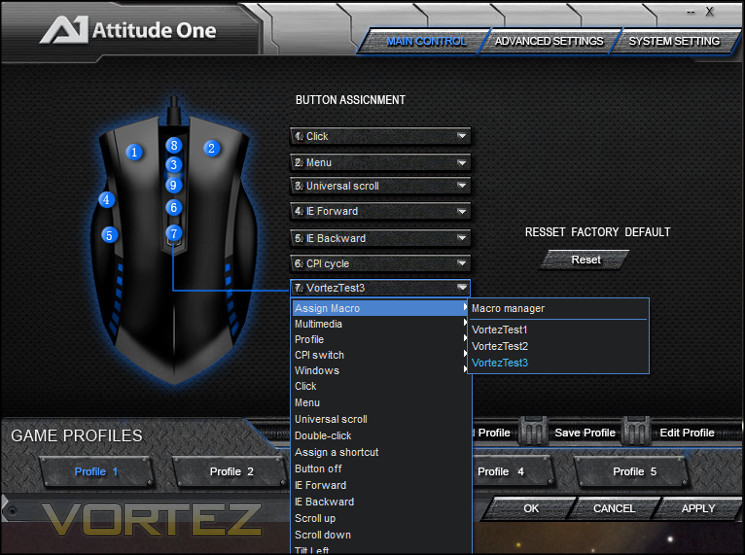
The first tab determines assignments for specific buttons and the mouse wheel function. Here is also where you can access the macro editor via the drop-down menu, but being able to access it directly would be a useful addition.
All of the seven buttons are independently assignable to core and macro functionality, although Attitude One have taken the sensible step of requiring that at least one be bound to left-click. As well as the standard functionality you would expect from any mouse Attitude One have included CPI (or Counts Per Inch, an analogue to DPI) and Profile cycling for extended usage cases.
In addition to the seven buttons, both MWheel Up and Down can be independently reassigned to macros or other mouse functions.
Macro Manager
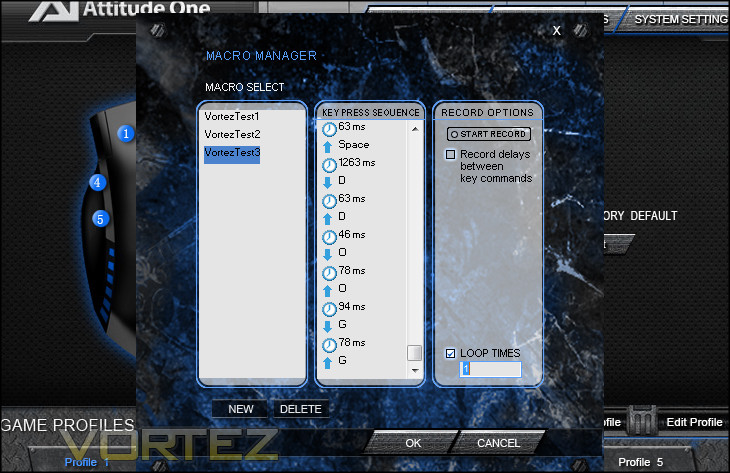
The Macro Manager allows you to create and store macros individually, although there is no way to back up individual macros. Each can be composed of at least 30 individual keypresses, a lack of limitation thanks to the macro being processed through an interpretive software layer. Timings between keystrokes can be inserted and edited either simply by recording the keystrokes as you go or editing them in later.
Coupled to the somewhat vanilla functionality Attitude One have allowed the insertion of a specific mouse events (e.g. Click etc.) into macros. This cannot trigger a recursive event, but may be handy for niche cases.
Advanced Settings
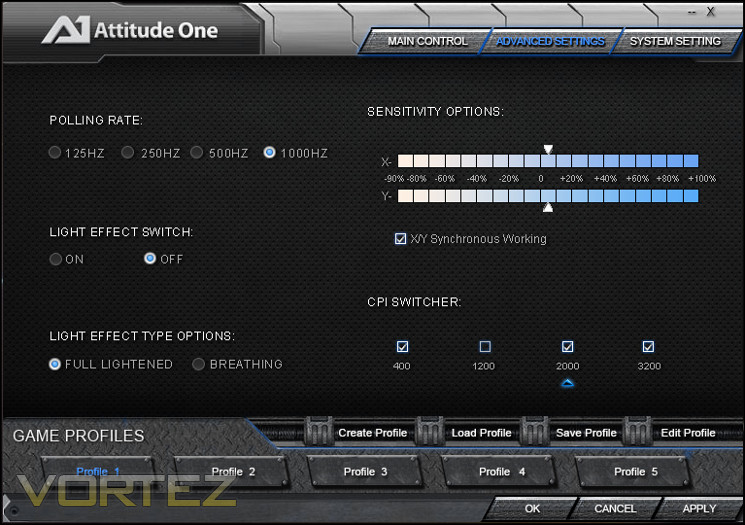
The Advanced Settings window controls some of the hardware options specific to the mouse. Included are settings for Polling Rate (up to 1000Hz), mouse sensitivity in both X and Y axis, CPI, and lighting options (explained previously).
Only pre-set CPI levels are possible with the Vintorez, although some fine control over movement speed is possible thanks to the inclusion of independent sensitivity controls. You may also selectively disable CPI levels by unchecking them, which can be extremely handy for situations where you need to quickly switch between two settings. Of course these are also on a per-profile basis.
System Setting
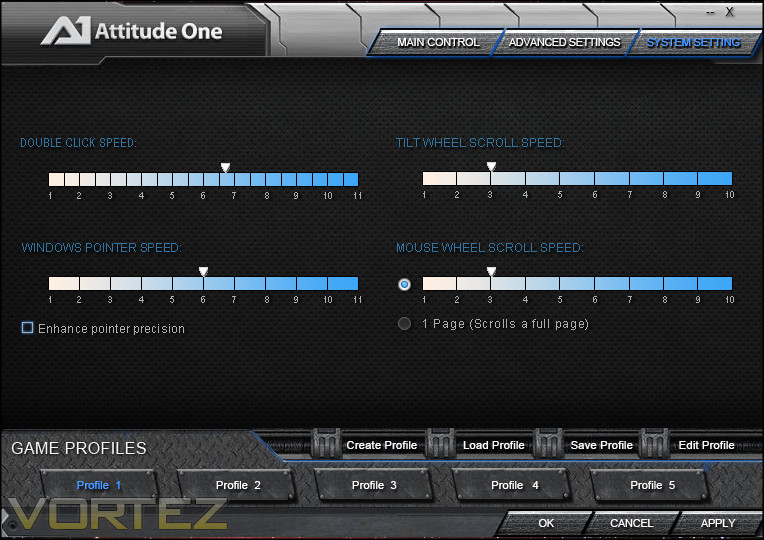
System Settings is a window specifically for in-OS application pointer settings. They mirror the standard configuration options available in a Windows OS, and behave as you would expect. Note ‘Enhance Pointer Precision’ will enable driver-level mouse acceleration, and so should be avoided.
Overall
Apart from needing a bit of proof-reading the Vintorez software is fairly good. The macro and button assignment capabilities are an exceptional inclusion at the price, and also including profiles and a solid macro manager unlocks much of the mouses potential.
Unfortunately tweaking your DPI is a little more difficult than you might expect, with only pre-set levels available. However those levels are well selected and can be disabled as required, allowing fast cycling through only those you require.
It’s not the most extensive software suite we have some across, but still in the price bracket you’re sometimes lucky to see anything even functional. Yes, there are improvements which can be made on both the aesthetic customisation and hardware setting side, but these gripes seem churlish in price bracket.
Performance
In testing we paired the Attitude One Vintorez with a standard cloth mousepad used in other recent reviews of optical and laser mice. It’s notable that optical mice tend to have a reputation for inaccuracy on glass pads, but also be able to cope with higher hand movement speed.
We found no general issues with the Vintorez’s tracking on the mousemat at a range of DPIs. Optical and laser sensors are known to
General Performance
Due to its rather hefty 103g weight, the Vintorez non-stick skates need to be both substantial and good quality. Luckily the five low-friction zones on the base provide suitable coverage for a smooth movement over the cloth mat, although it will tend to pick up dust a little more quickly than some. If using a hard base mat it’s useful to know that the skates of the Vintorez appear to be perfectly flat, leading to no wobble when mousing.
The major buttons on the Vintorez are on the heavier end of the spectrum and have a relatively high travel distance. Clicky as they are, they’re still not particularly loud once worn in. Its mouse wheel has a smooth movement with very lightweight ratcheting, with a wheel button that is much more sensitive than we were expecting and will probably cause a few false pushes when scrolling. It’s not necessarily problematic, but is something you should be aware of when assigning macros to that particular button.
The shoulder buttons are very solid and firmly placed in their respective sockets but with a little more travel distance than we would prefer. We cannot attest to long-term durability, but testing over an extended period didn’t cause them to become spongy or loose. We’re reasonably confident that you’ll see a good amount of use from it before the rigours of age set in.
Those who make plenty of use of macro functionality in their work life will find value in the Vintorez, although success is reliant on the software being installed. SOHO use therefore is well catered to, less so in an office with more draconian software restrictions. The mouse wheel is low-friction enough to make fast scrolling pain-free, but the main buttons are perhaps a little stiffer (and hence more noisy) than some may prefer.
Gaming Performance
As one might expect from a mouse designed with aesthetic verve and a strong feature list, the Vintorez is designed very much as a gaming mouse. Once again first-person shooters are the primary genre for the mouse, but the inclusion of macro capabilities and 7-button assignment freedom also begins to add to the functionality most useful for genres where customisation is important. But first, a bit of bookkeeping.
Through a series of simple tests we were not able to discern any in-built mouse acceleration, but does appear to exhibit some angle snapping. These are obviously important to any gamer who demands precision, but angle snapping is fairly rare in these days. That said, mice with angle snapping – often enabled as a software option in many – can still work exceptionally well in gaming with it; the MX518 is near legendary in the gaming community and yet featured it.
When testing we tried Team Fortress 2, World of Warcraft and Torchlight 2. Some additional time was spent with Starcraft 2, although not enough to provide any firm conclusions.
FPS Performance – Team Fortress 2
The shape of a mouse often defines both comfort and feature set, so it’s interesting that Attitude One have designed a mouse which is broadly symmetrical except for its two side buttons. Sides are angled slightly outwards from the top to the base, so lifting and controlled movement requires a fairly tight grip. Two side buttons are useful if not essential in FPS games, and Attitude One have eschewed a sniper button on this relatively budget mouse model.
A lightweight mouse wheel has meant that using it as a weapon selection tool can be a little inconsistent, with two steps frequently registered rather than one. Slightly more problematically is that the mouse button is easy to press when scrolling, hampering using it for alt-fire firing. The stiff side buttons require a little more force than some mice we have tested recently, such that you will need a strong wrist to ensure that aiming isn’t impacted. It is possible to rebind these buttons to non-critical functions such as DPI switching and the like, which opens up options for the mouse beyond those presented in-game.
As in the general use case the motion tracking of the Vintorez’s optical sensor was without perceptible flaw. Some may be disappointed by an 3200DPi optical sensor rather than laser, but why worry if tracking doesn’t throw up any issues? One potential niggle to advanced users will be the pre-set DPI levels, meaning that tweaking to your perfect speed for a range of DPI modes will be difficult.
RPG performance – World of Warcraft and Torchlight 2
RPGs benefit from multiple assignable buttons and excellent precision at higher DPI levels, and the Vintorez performs better than you might expect in this regard. Including software which allows manual assignment of buttons really helps in MMOs and RPGs, especially hotkey types such as World of Warcraft. Whether it be simple key assignment – where buttons are programmed to register as a simple keypress – or macro creation with the software, the software should perform admirably.
The two additional buttons on the crest of the mouse weren’t particularly easy to reach, and would be wholly unsuitable when using a palm grip. However if you have enough dexterity and a suitable grip then the two extra binds can be exploited, although we would suggest that it is for actions which need to occur only infrequently. Use as DPI switches rather than any other function is unnecessary; non-first person games generally benefit from a fixed DPI.
Software profiles for the Vintorez were obviously extremely useful, all the more so when playing a larger than average catalogue of titles. Launching each Profile simultaneous to launching the application obviously helps in organisation, but we would like to see the explicit ability to back-up potentially complex sets of macros.
We would put the Vintorez ahead of the curve for its price in MMOs thanks to the inclusion of software, although it should be stressed that settings are not stored on board the mouse. The same goes for RPGs. In the long term we would be slightly cautious about the durability of the side buttons given how heavy they are.
Conclusion
We’ve reviewed some quite high-end mice recently, so it’s always refreshing to come down a few notches in the market and see new mice being released with some quality and attention to detail. The Vintorez isn’t perfect, but the fundamentals are there with only a few points which could do with being addressed.
We discussed build quality, and although did find the main buttons a little looser than they could be the mouse was pretty solid. The side buttons, often poorly implemented even on those which cost more than double the asking price amount, are responsive and firmly located. The DPI switching buttons on the top of the mouse could be a little better located, but even so are not too bad for an infrequently used pair. The mouse wheel exhibits a little lateral movement, but less than many we have reviewed, and with the exception of a slightly sensitive button is perfectly serviceable.
Ergonomically and aesthetically the mouse will be pleasant for some, problematic for others. We’re not convinced by the ridge which runs the back the the outer shell, but we can’t say it is uncomfortable either so long as you use a standard two-finger grip (either claw or palm). The sides provide plenty of friction, and although the lighting isn’t nearly as comprehensive as it could have been – perhaps due to unrefined software or firmware – it’s nonetheless a nice touch.
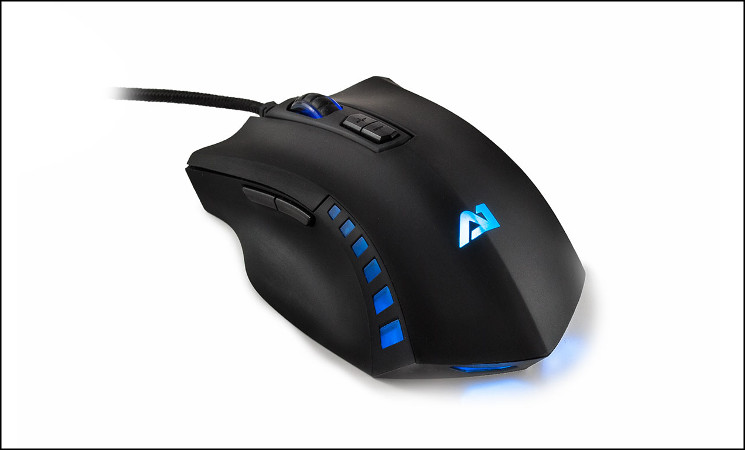
So, what does that mean overall? Despite the raw nature of the Vintorez we’re swayed by how much they’ve tried to cram into what much be a fairly tight bill. It does have it’s faults, most notably the freezing cursor issue we unearthed when the breathing mode lighting is enabled, but still nothing game-breaking. If they can smooth this out, add a little more lighting customisation such as fixed lighting and selectable colour and improve the website experience they could be on to a real budget gamer winner.
Attitude One’s first gaming mouse is a creditable attempt with strong design flair and feature set. Overall quality is fine, and it should be comfortable for a wide variety of grip types. Software and customisation options are a little lacking, but only compared to the mouse’s potential; it still surpasses options available from many other manufacturers at this price point. The specific faults we uncovered and need for software improvement mean a specific reward isn’t warranted, but Attiutude One could have an excellent budget gamer peripheral on their hands if a few tweaks and fixes are made.
+ Comfortable design
+ Non-slip rubberised coating
+ 7 programmable buttons + Programmable scroll wheel
+ Extensive macro options
+ Some lighting customisation
+ On-board profile and DPI switching
+ Price
Cons
– Fixed DPI settings
– Limited customisation
– Lighting mode causes severe cursor jerkiness
– Two main buttons don’t sit firmly in place
– Early software iteration
– Appears to exhibit angle snapping
Tips
= Keep hold of your driver disk as updates via the website are lagging behind

Click here for an explanation of our awards at Vortez.net. Our thanks go to Attitude One for providing this review sample.


