We put CCL’s budget overclocked full system to the test. Read more to see how it performs…
Manufacturer: CCL
Price (no OS): £579.99
Price (with OS): £666.89

Not everyone has the time, or the ability, to decide from the masses of available components and configurations which will best suit their requirements. This is where full systems come in. While they offer customers a narrower choice there are still systems for every type of user and price points. From casual internet users to gamers to video editors and encoders, everyone is catered for. While the computer’s base specification is set out, the customer has several options to slightly tweak the system to better match what they need from a new computer. These could be things like a larger HDD, BD-ROM or even a different case. While small things, they can make a big difference between going for a more suitable model with a slight tweak for something you need or going for a more expensive model which you may not make full use of but prefer a certain aspect of it.
Today’s full system is from CCL and is their cheapest overclocked socket 1156 computer from their gaming range. Before we take a look at it, a little bit about CCL:
| CCL Computers is located in Tong, Bradford and supplies computer systems and components to 4 main areas: • Education Sector • Corporate Sector • Computer Resellers • Private Individuals The company began trading in May 1995 and became established as a limited company in August 1996. CCL currently employ over 80 people which work in the many small departments within the company. These areas include sales, customer service, warehouse staff, returns and web department – just to name a few. Despite general industry downturn CCL have sustained continued growth year on year. The launch of the new CCL website in the autumn of 2004 has helped to continue this growth yet again. Our website, www.cclonline.com, currently attracts over 300,000 unique visitors every month and with continuous investment going into the website, CCL aim to satisfy even more customers in the future by making this process even more efficient. |
Specifications & Test Methodology
Specifications:
CPU: Intel Core i3-530 @ 4.0GHz
RAM: 4GB G.SkillRipjaws DDR3 1600MHz
Hard Drive: 500GB Hitachi Deskstar SATA Hard Drive
Graphics Card: ATI Radeon HD 5770 1GB
Motherboard: Gigabyte GA-H55M-UD2 Motherboard
Sound: 5.1 Channel Sound (On-Board)
Optical Drive: LG 22x DVD+/-RW
Case: XigmatekAsgard ATX
Power Supply: 460W Coolermaster
CPU Cooler: Titan Fenrir Performance Heatpipe Cooler
Test Methodology:
Due to this being a gaming system the majority of benchmarks will be for games though there will also be some synthetic ones. The benchmarks are as follows:
Batman: Arkham Asylum
Far Cry 2 – 3 loops of Ranch Short
Just Cause 2 – The Dark Tower
Colin McRae: Dirt 2 (DX11)
Unigine Heaven 2.1 (DX11)
3DMark Vantage
Cinebench 11.5
The Eclipse Cobra
CCL ships the Cobra system in the box of the Xigmatech Asgard, which means it is protected by polystyrene. Accompanying the full system is the box the motherboard originally came in. Included in this is a plethora of documentation and accessories, containing everything you need and possibly more! The contents of this box are:
– motherboard manual, driver disc and processor documentation
– XFX installation card, quick install guide, driver CD, XFX door hanger and Assassin’s Creed
– Titan Fenrir retention brackets for other sockets
– expansion slot blanking plates, 5.25” bay cover (removed for the DVD drive), an IDE cable, a 2x molex to 1x 6-pin connector and a Xigmatech case badge
– Windows 7 Home Premium 64-bit DVD
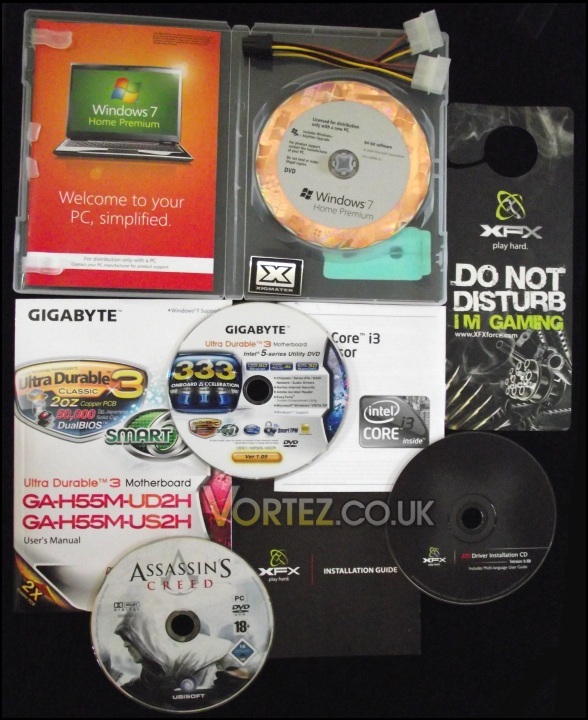
Some of the included documentation and accessories
Taking the case out of the box and removing the protective plastic bag, we can see the Xigmatech Asgard in all its glory. Looking at the front, the LG DVD drive occupies the top 5.25” bay with three empty ones below as well as a spare 3.5” bay. Further down are two USB 2.0 ports with a 3.5mm headphone jack and 3.5mm microphone jack in between them. On the left of these is the reset button with the power button being on the right. Some may notice the lack of power and HDD activity LEDs but they would be wrong. Embedded in the power button is a green LED which shows up through and similarly within the reset button is a red LED indicating HDD activity. Neither LED is bright and intrusive, instead being neat in removing them from the front panel but not totally removing them. At the bottom is a mesh grill to allow air to be pulled in by the 120mm Xigmatech intake fan while keeping out dust and dirt.
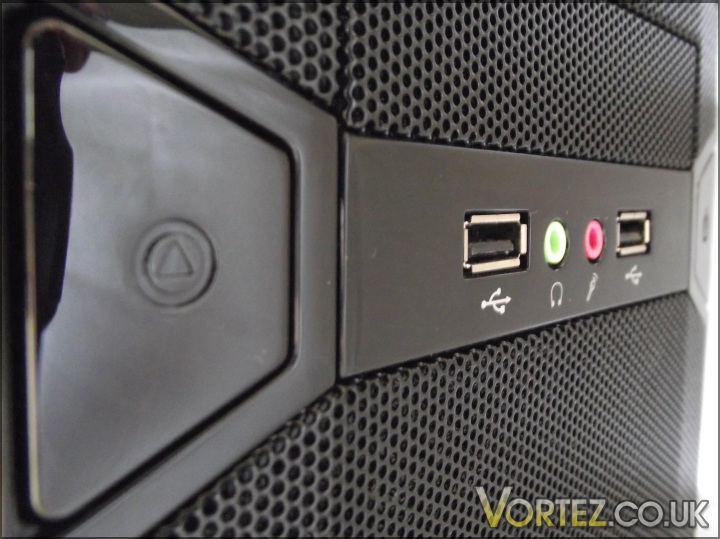
The reset buttons and front panel connectors
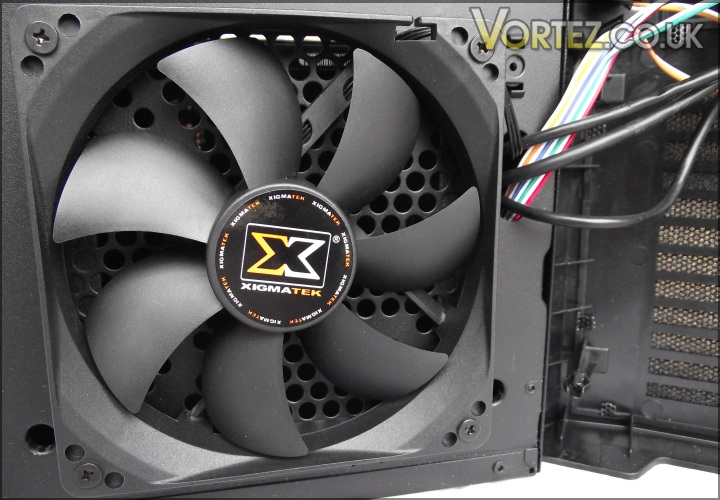
The included intake fan
Moving round to the back we can firstly see the rear of the Cooler Master power supply. Moving down onto the fairly busy I/O plate of the motherboard, where 6 USB2.0 ports are present, gigabit Ethernet, a choice of optical or analogue audio outputs, eSATA, firewire and though unused due to the XFX HD5770 various outputs for the onboard graphics (VGA, DVI, HDMI and Display Port). To the right of this is space for a 80, 90 or 120mm exhaust fan. At the bottom are the outputs for the 5770, which has Display Port, HDMI and two DVI connectors. You can even use all four of these for an Eyefinity set-up!
As is the norm, the right hand side of the case is fairly blank apart from a few small ventilation cut outs. On the left hand side is space for two 80, 90 or 120mm fans which can aid in cooling the graphics card, though with large CPU coolers such as the Titan Fenrir this is not always possible.
Continue to the next page to see inside the Cobra…
The Eclipse Cobra (Interior)
Two thumb screws make it easy to get the Cobra’s side off and bare all. Upon opening it up the first thing to catch your eye is the large CPU cooler required to keep the i3-530 at 4GHz. We shall later see how well the cooler performs but as mentioned earlier there is room for an exhaust fan. Next you can see how the cables are laid out, while not routed behind the motherboard tray like many enthusiasts like to, they are cable tied together to avoid them harbouring cooling performance.
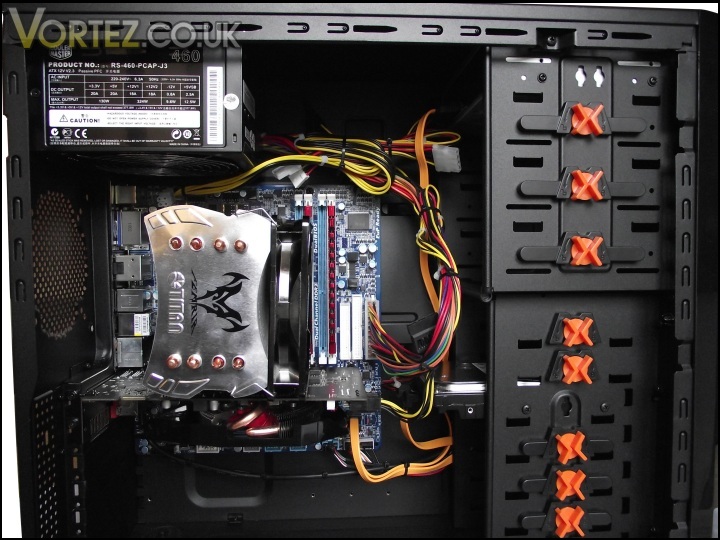
The view once opened…
Moving onto the components, CCL have favoured removing the tool less mounting methods for both the hard drive and DVD drive preferring two screws on each side. A reason for this decision may well be both are better secured for transit. As can be seen by the picture, there is plenty of room for more optical drives or other 5.25” bay devices as well as more hard drives or even an SSD! The Gigabyte motherboard has 5 SATAII ports, two of which are taken up by the LG DVD drive and Hitachi HDD, leaving three unused. One of these is blocked by XFX’s egg shaped cooler on the 5770 leaving two accessible and unused.
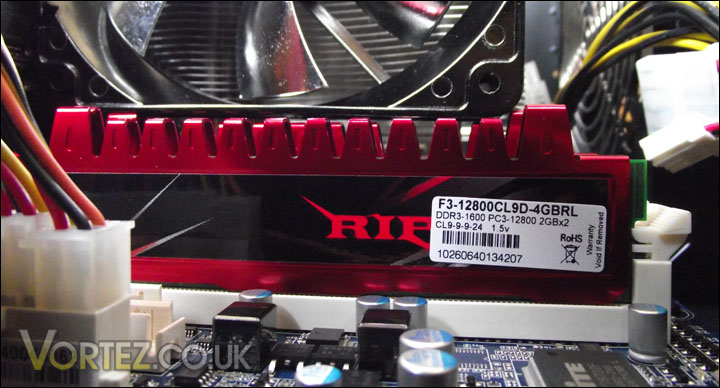
The Ripjaws in situ
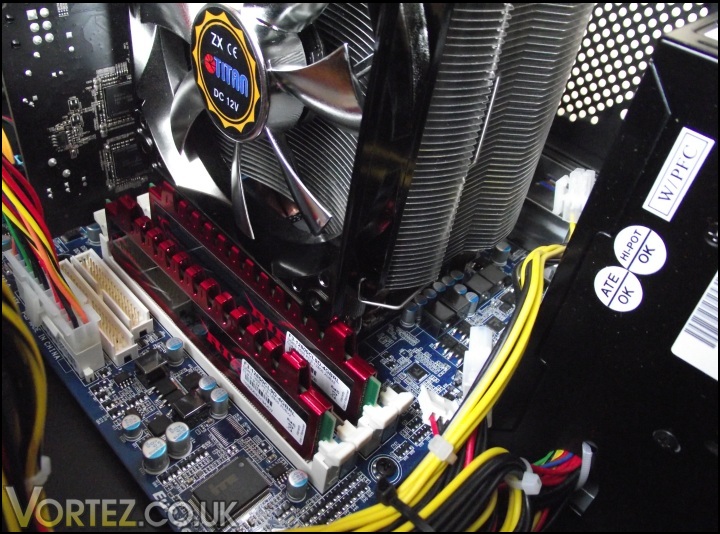
Looking from the top of the case towards the CPU cooler
In terms of expansion, the Eclipse Cobra allows for mild upgrades. A single PCI slot and PCIe x4 slot reside below the 5770 though placing anything in the PCI will practically be up against the graphics card’s cooler. Along the bottom of the motherboard are spare headers for more USB ports and a 1394 header. The system comes with 4GB of DDR3 RAM, rated at 1600MHz (CAS9) but there are two slots for another dual channel kit. The Cooler Master 460W power supply has plenty of connectors and grunt to support any of these upgrades. Should that not be enough, CCL will allow you to upgrade power supply all the way up to Corsair’s HX1000! Though, of course, this does come at a cost.
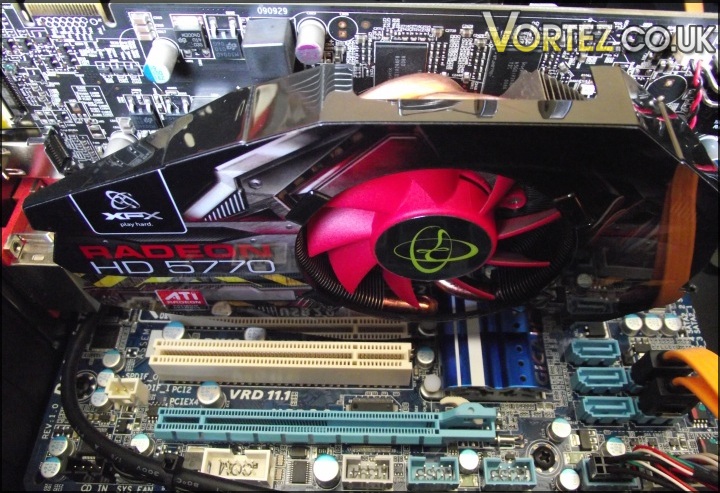
Limited expansion opportunities and SATA access
Now we’ve had a look at the interior and exterior, let’s see how the Eclipse Cobra performs…
3DMark Vantage & Cinebench
3DMark Vantage
This latest benchmark suite from Futuremark introduces DX 10 PhysX support. Despite being on the verge of DX 11 games arriving, Vantage is still the chosen benchmark amongst enthusiasts these days.
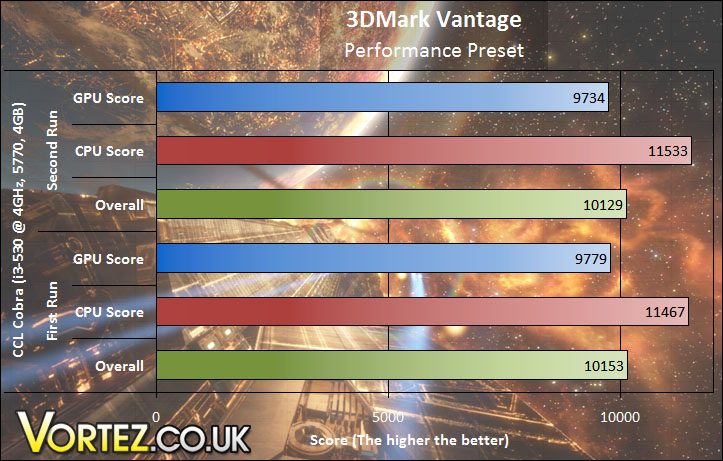
After running 3DMark Vantage twice on the performance preset you can see that the rough overall score for the CCL Eclipse Cobra is 10,140 marks. This score and the CPU/GPU scores match up with other results on Futuremark’s website.
Cinebench
Based on the MAXON animation software CINEMA 4D, Cinebench is a test suite that uses the system’s processing power to render a photorealistic 3D scene. This makes it an excellent benchmark to measure CPU performance.
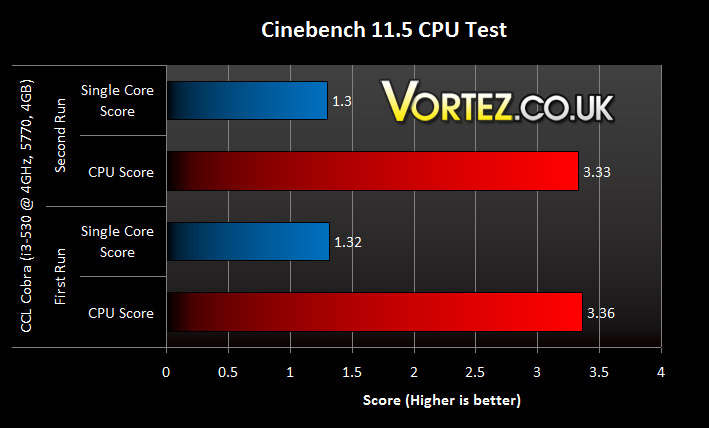
Similar to 3DMark Vantage I ran the Cinebench tests twice as it shows the results are a true representation of the computer’s power and not a one off terrible score or very good score. Running at 4GHz the i3-530 did very well in the Cinebench tests, especially considering the price of the system.
Batman: Arkham Asylum, Far Cry 2 & Just Cause 2
Batman: Arkham Asylum
The Dark Knight takes on his greatest challenge yet when he becomes trapped with all of his most dangerous villains inside the insane asylum of Gotham City – Arkham Asylum. The game exposes you to a unique, dark and atmospheric adventure that takes you to the depths of Arkham Asylum, Gotham’s psychiatric hospital for the criminally insane.
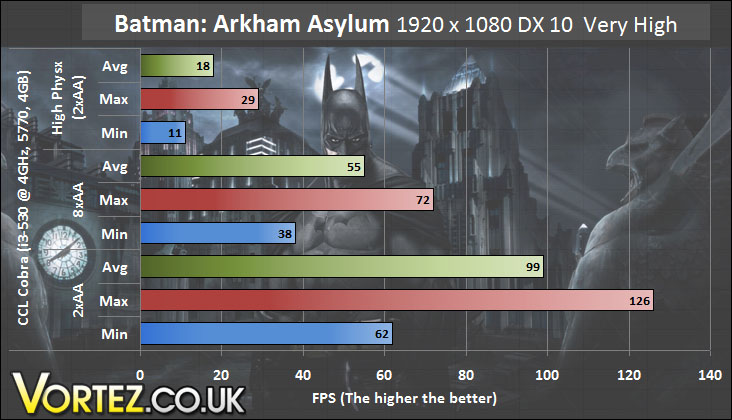
With the settings on very high and only 2xAA Batman: Arkham Asylum gave an average of 99 frames per second which is quite impressive for a budget gaming system. Upping the AA to 8x did cause the frame rate to drop a fair bit but with an average of 55 FPS the game is still perfectly playable.
Batman: Arkham Asylum is well known of its Physx effects and when an NVIDIA GPU is not present any Physx will run on the CPU. This causes a major performance hit as Physx is not designed to run on CPUs. This can be seen in the Physx test with only 2xAA where the average frame rate dropped from 99 to an unplayable 18.
Far Cry 2
One of the most hyped games of 2008, Far Cry 2 had some big shoes to fill. It was built to be the next best thing since well… Far Cry I suppose. Combining an open-world game play with highly detailed graphics, physics and AI, what more could we possibly want? The game puts us in the body of a malaria inflicted mercenary hunting down the “Jackal” in the heart of Africa, in a bid to stop an ongoing conflict between two rival factions. The storyline can be hard to follow sometimes but this is no game review, so let’s concentrate on the graphics and performance. After all, we all need to know if our hardware will be able to handle the scorching savannah burning at the hands of our flamethrowers.
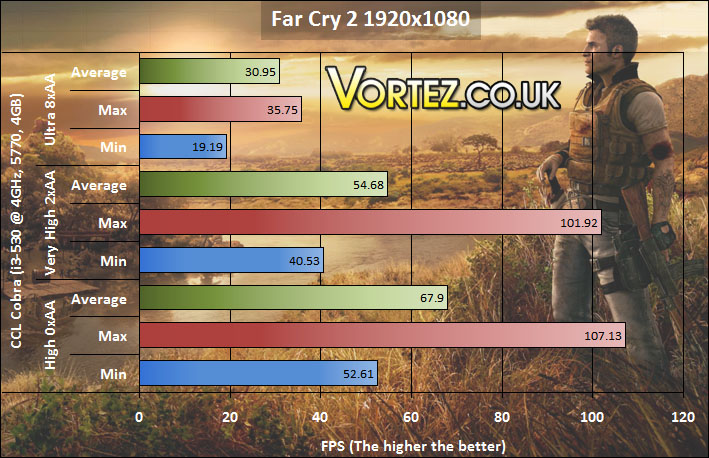
Running the benchmark in DX10 mode, the settings at high and 0xAA the Cobra performed fairly well. Changing the settings to very high with 2xAA reduces the average frame rate by just over 13 FPS while still remaining playable. Putting the settings to Ultra and 8xAA causes a fairly large drop but the game was on the main smooth enough to play.
Just Cause 2
The sandbox-style action game returns with you playing as protagonist Rico Rodriguez again. Set on the other side of the world to Just Cause 1, Rico is in Panau, Southeast Asia aiming to overthrow the dictator of Panau and confront his former mentor. With a 400 square mile map to free roam in and varied terrain of desert to alpine to rainforest there is plenty to see and do in Just Cause 2!
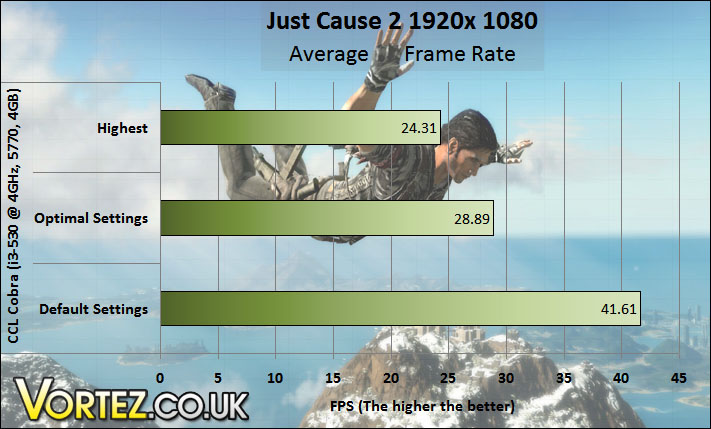
On default settings the game is reasonably smooth and similar can be said for optimal settings. But with all options on their highest setting the game did creep towards the non-smooth area with an average frame rate of just over 24 FPS.
Colin McRae: Dirt 2 &Unigine Heaven v2.1
Colin McRae: Dirt 2
DIRT is back and it’s bigger than ever. With an onslaught of famous X-Games competitors such as Ken Block and Dave Mirra, extreme is being brought back to rally. The game not only delivers outstanding gameplay in lush environments but also stunning visuals in the form of DirectX 11 implementation. If you want some fast paced, arcade style racing, then look no further than Colin McRae: DIRT 2.
The results here are very impressive indeed. From high with 2xAA to high with 8xAA there is only a two frame average difference and the minimums being above the sacred 60 FPS mark. Taking the settings to ultra with 8xAA only causes a hit of 1 frame per second meaning the game remained perfectly playable on maximum settings at 1920 x 1080 on the Eclipse Cobra!
Unigine Heaven v2.1
Unigine’s benchmark is to showcase the benefits of DX 11 and the use of tessellation as opposed to normal rendering techniques. The demo has impressive visuals which give an insight into what we can expect from gaming in the future.
With the shaders on the lowest setting and no AA the Cobra system managed a score of 902 with an average frame rate of 35.8. Adding some AA, 8x to be exact, and setting the shaders to high caused the score to nearly half and the frame rate to do similar with an average of 19.3.
It is known ATI’s DX11 GPUs are not as good at tessellation as NVIDIA’s so it comes as no surprise that turning extreme tessellation on really ruins smoothness and performance. The average dropped from 19.3 to 10.1 which shows how much the 5770 struggles to run tessellation.
Temperatures and Noise
Temperatures
Here you can see the temperatures of the CPU, GPU and HDD and their change between idle and load. The idle temperatures were taken after 15 minutes sat on the desktop and after at least 30 minutes of Furmark and LinX the load temperatures were taken. The GPU temperatures were taken using GPU-Z, HWMonitor for the HDD and CoreTemp for the CPU.
The CPU idled at 36 degrees (roughly 10-12 above ambient) and the Titan Fenrir kept it to no more than 85 degrees. After 30 or so minutes of Furmark the 5770 maxed out at 83 degrees which is an increase of 37 degrees over idle. Between taking the idle temps and the load temps the HDD showed no change at all and this was proved not to be a lucky measurement but the HDD’s temperature hadn’t changed up or down.
Noise
As I do not have an SPL meter I will explain what I am comparing the Cobra system to in terms of noise. Without hard facts and figures the topic of noise is subjective but I will do my best with the comparison and comments I make. During the idle and load tests for the temperatures I listened out to the computer.
When idle the computer is quiet and bordering on inaudible with the main source of noise being the hard drive seeking. But when loaded the CPU fan kicks in to keep those temperatures down. This becomes fairly loud though is something that will easily be drowned out by game sounds. If you want a quieter cooler then there are the options on the CCL configurator to use a Corsair H50. For more on the H50 you can see our review on it here.
Conclusion
As a budget gaming system the CCL Eclipse Cobra has plenty going for it. The majority of games remained perfectly playable,even with medium to high amounts of eye candy turned on, and for this the system really shines. A strong combination of components means that this computer is a fast performer for not only gaming but everyday tasks as well. The room to upgrade is there so buying a prebuilt system doesn’t stop you dead in your tracks later on or at the time of purchase with CCL’s configurator.
There were times in the benchmarks where performance took a hit but these are understandable. As mentioned earlier, with an ATI card present Physx will run off of the CPU where it is not optimised like it is for NVIDIA’s GPUs. It is also well known that the ATI 5xxx series of graphics cards are weak when it comes to tessellation so it’s no surprise that this caused such a performance hit in the Heaven benchmark. Noise may be an issue for some but as mentioned on the previous page the cooler can be swapped for a quieter one, albeit for a price.
The Eclipse Cobra
Performance in games is inspiring and just goes to show the myth of being required to spend thousands on a computer for decent performance is not true.
+ A strong CPU and GPU combo
+ Generally quiet
+ Plenty of USB ports and other connections
+ All documentation and accessories included
Cons:
– Partly limited in future expansion
And it is for this I give the CCL Eclipse Cobra Vortez’s Gold Award.