







The latest mechanical keyboard from Cooler Master’s gaming subsidiary, featuring Cherry MX Blue switches and removable faceplate, is unorthodox and awesome in its own right.

Product On Review: MECH Mechanical Gaming Keyboard
Manufacturer: CM Storm / Cooler Master
Price (MSRP): £129.95 (inc. V.A.T.)
It’s been some time since a CM Storm keyboard last graced our tests, but Cooler Master’s gaming arm haven’t been taking it easy in the intervening period. Earlier this month CM Storm revealed their new AL-series of peripherals, setting up a cohesive range of products sitting near the top of their range with a fascinating twist. Beginning with the MECH keyboard, and then continuing with the Reaper mouse and Pulse-R headset, this new range brings both aluminium design flourishes and the potential for greatly increased customisation. You will hopefully have read our thoughts on the Pulse-R already, but if you haven’t now is your chance.
In this review we’re looking at the keyboard of the range, the MECH. As the name suggests it is indeed a mechanical keyboard, with a switch type determined by the specific model you choose and the region in which you’re buying the keyboard. The ever-reliable Cherry switches are used throughout, with MX Blue, Brown and Red switch types all part of the available range. However the keyboard diverges significantly from the relatively vanilla keyboards CM Storm have produced in the past.
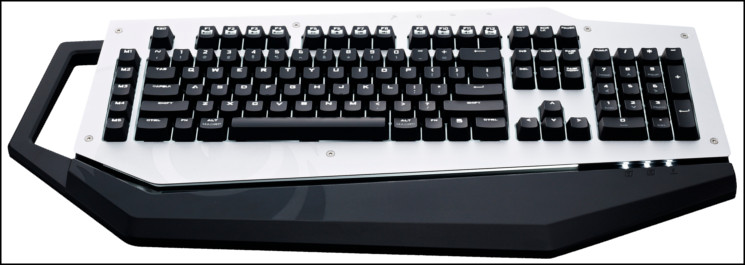
Firstly, it has an unorthodox shape designed to facilitate mobility, customisation and present an eyecatching first impression. Taking cues from a limited edition variant of the QuickFire mechanical keyboard, the aluminium faceplate of the MECH is removable, allowing the user to design their own, easily cover it in a vinyl print or some other use which we (and CM Storm) may not have thought of yet. Encouraging users to bring their own graphical design talents to personalise their peripherals is almost unheard of, and Cooler Master are not just pushing it with their keyboard, but with similar design attributes in the Reaper and Pulse-R.
The MECH still needs to go a long way to justify its near £130.00 price; we’re deeply aware of the extremely accomplished keyboards available were this your budget. However the MECH also brings with it dedicated macro engine and 128KB of on-board memory for 5 profiles and up to 75 macros, all processed in hardware. In terms of LAN gaming features the MECH also includes a USB soundcard and two-port USB 3.0 hub. It is, without fear of overstatement, one of the most feature-rich keyboards we have yet examined.
Can this offer value to the discerning consumer? We’ll have to see…
Features and Technical Specification
Features
All mechanical Cherry MX keyboard – Guaranteed 50+ million keystrokes
Powerful 32bit 72MHz Rapid Fire engine for quick hardware macro playback
Fully Programmable! Store up to 5 profiles and 75 macros on the keyboard
2 USB 3.0 Super Speed ports for Gaming Gear or Phone/Tablet charging
Full LED Backlight – 3 modes and 5 brightness levels
Multimedia and Win-key lock shortcuts
Embedded steel plate and Aluminium cover for maximum stability and durability
64-KRO – 64 simultaneous keypressed.
Powerful 32bit 72MHz Rapid Fire engine for quick hardware macro playback
Fully Programmable! Store up to 5 profiles and 75 macros on the keyboard
2 USB 3.0 Super Speed ports for Gaming Gear or Phone/Tablet charging
Full LED Backlight – 3 modes and 5 brightness levels
Multimedia and Win-key lock shortcuts
Embedded steel plate and Aluminium cover for maximum stability and durability
64-KRO – 64 simultaneous keypressed.
Technical Specification
Model Number –
SGK-7000-MBCL1-language (Blue switch)
SGK-7000-MBCM1-language (Brown switch)
SGK-7000-MBCR1-language (Red switch)
Key Switch – CHERRY MX Blue/ Brown/ Red
N Key Rollover – 64
Macro Key – 15 in each profile
Profiles – 5
Polling Rate – 1000 Hz/1ms
Backlight – All keys, 5 settings, 3 modes
Output – Dual USB 3.0 port and mini USB port for charging
Windows Key Lock – Yes
On-board Memory – 128k bytes
Media Keys – Yes (via F keys)
USB Cable – Removable
Dimensions – 553(L)x267(W)x43(H) mm
Weight – 1686 g / 3.71 lbs
Application software – Yes, download from: http://www.cmstorm.com/en/products/peripherals/MECH/?tab=support
SGK-7000-MBCL1-language (Blue switch)
SGK-7000-MBCM1-language (Brown switch)
SGK-7000-MBCR1-language (Red switch)
Key Switch – CHERRY MX Blue/ Brown/ Red
N Key Rollover – 64
Macro Key – 15 in each profile
Profiles – 5
Polling Rate – 1000 Hz/1ms
Backlight – All keys, 5 settings, 3 modes
Output – Dual USB 3.0 port and mini USB port for charging
Windows Key Lock – Yes
On-board Memory – 128k bytes
Media Keys – Yes (via F keys)
USB Cable – Removable
Dimensions – 553(L)x267(W)x43(H) mm
Weight – 1686 g / 3.71 lbs
Application software – Yes, download from: http://www.cmstorm.com/en/products/peripherals/MECH/?tab=support
Packaging and First Look
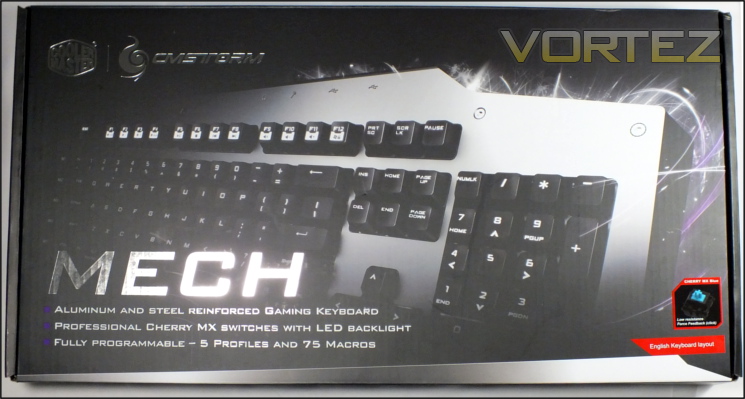
CM Storm certainly want to make a splash with their new AL-series, and have begun with eye-catching packaging which will have consistency across the range. Matte black, silver and purple seem to hit something primal in some consumers, and so it’s bound to figuratively leap off the shelves.
Interestingly, CM Storm have chosen to highlight the top-right of the keyboard rather than its entirety. Although something of a teaser, it may also be a desire to not scare potential users away due to its unconventional footprint. There are no surprises when it comes to the headline features – Aluminium and steel reinforced backplate, Cherry MX switches and fully programmable macro keys with profiles will always and forever be important to any potential owner.
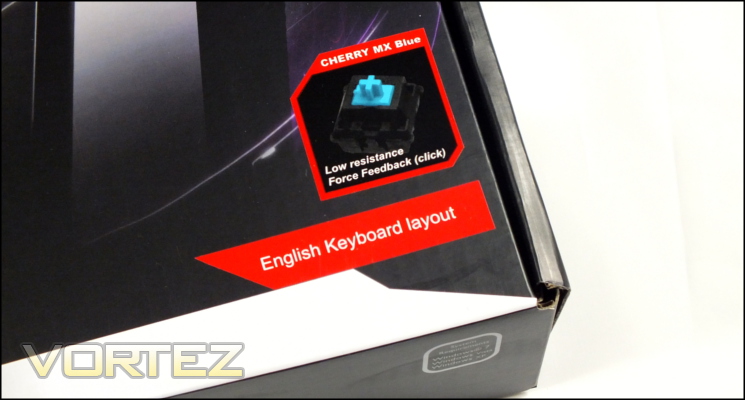
We also appreciate the layout and switch variant being prominent. Not all manufactures will state the regional layout so clearly, and whilst some also incorporate it into the keyboard image on the front in this case we could still tell at a glance that it was the correct UK layout. At present CM Storm haven’t revealed which switch types would be available in specific regions but we expect that Cherry MX Blues and Reds will be making their way to these shores.
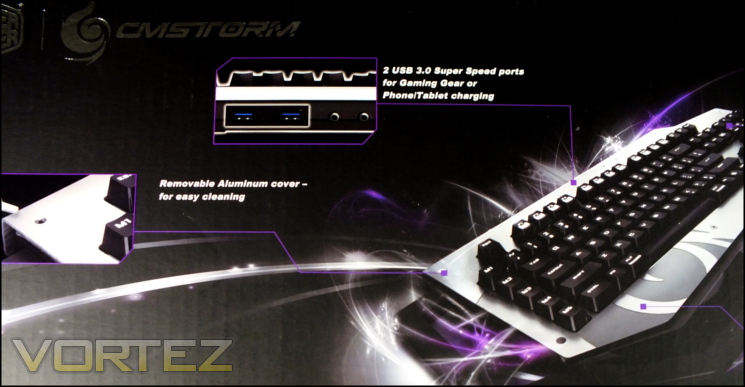
Moving to the rear, we have what is perhaps our first surprise – CM Storm haven’t included a full picture of their keyboard, preferring an angled view with stylised graphic. Not a problem for anyone who had spotted the keyboard online or on display, it nonetheless doesn’t quite inform those who are seeing it for the first time when browsing a store shelf.
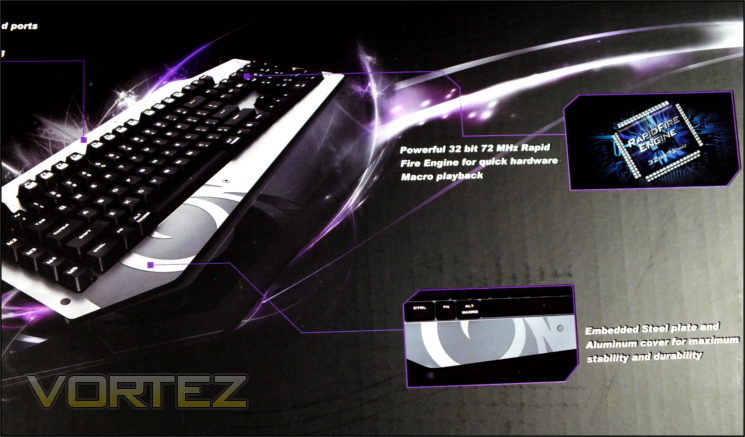
With that exception, the packaging rear provides a great shot of some of the key features including removable aluminium faceplate, USB 3.0 ports and onboard macro engine. The features list is a little more comprehensive, but still doesn’t quite encompass the whole of the keyboards capabilities. Given the amount of room on the rear they could easily add a couple more, for instance the on-board USB soundcard or micro-USB charging port of which there is no mention.
Very much absent are the system requirements and more complex technical specifications for the keyboard. For the latter you’ll need to go to the CM Storm website, however only a Windows OS is a listed requirement. Given the power needs of backlit mechanical keyboards, headsets and any other peripherals you choose to hook up to the keyboard will require a USB 3.0 port with robust power delivery.
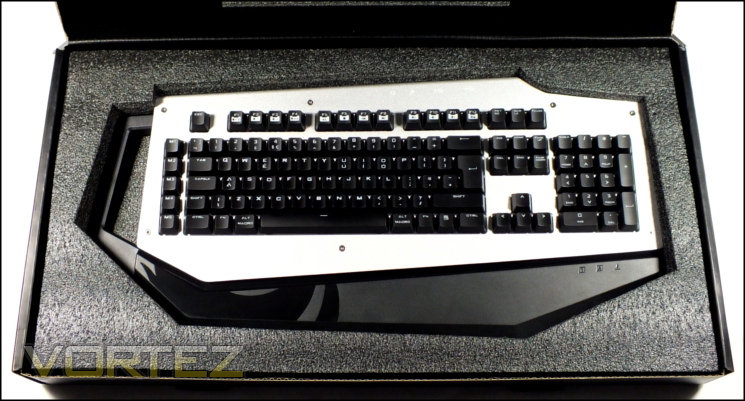
Ahh. So nice to see a welcoming unboxing experience for a premium peripheral. CM Storm ship the MECH in a cloth bag and the packaging is lined with at minimum 1.5cm thick cellulose foam, ensuring as much as possible that the keyboard is well protected in transit. Residing underneath the keyboard is a quick-start guide, USB 3.0 A-B cable, keycap remover and hex-key. You have therefore got all you need from the bundle, and for those who want to be mobile with the MECH they’ll find that a separate USB cable will make packing considerably easier.
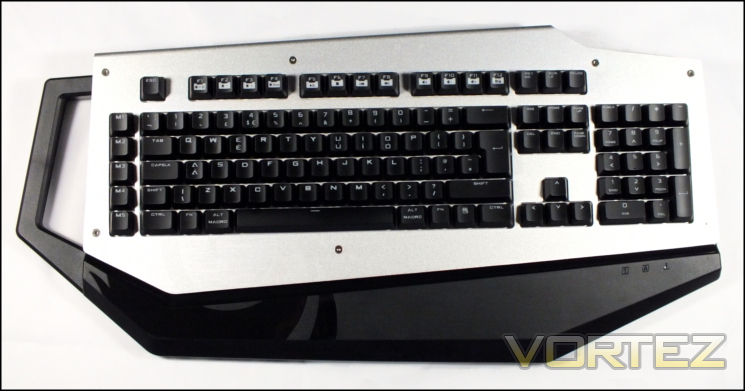
Our first view of the MECH, in all its glory. You’ll note although the keyboard layout is very standard, the chassis itself differs significantly from the standard rectangular design seen on past products including CM Storm mechanical keyboards. Here the plastic chassis includes an oversized handle, no doubt useful considering the keyboard’s 1.6kg net weight, and aluminium faceplate. A plastic section serves as makeshift wrist-wrest on the same plane as the faceplate. Etched into the aluminium and continued as a glossy pattern on the plastic frame is the stylised CM Storm swirling flame logo.
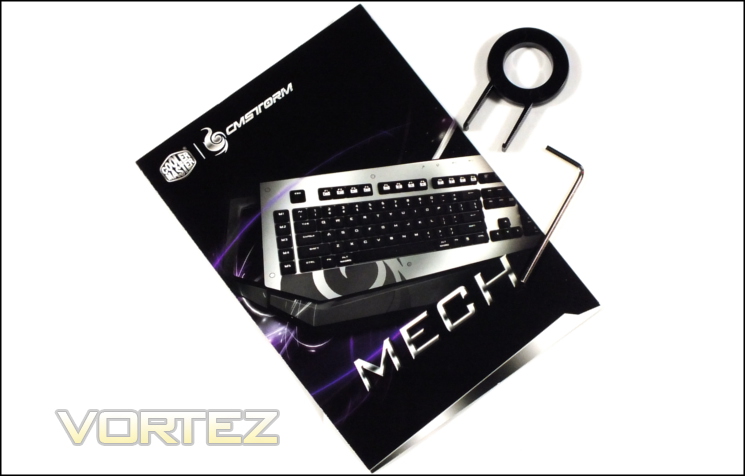
As bundles go, the MECH is fairly comprehensive and welcoming. CM Storm have also ensured that it’s well packed and will be undamaged by any but the most violent of impacts in shipping. Those who find it relevant will be pleased to see that the majority of the materials used are recyclable and those who prefer to slide it away for safe keeping will find it reasonably compact and long lasting. The included instruction sets go a little further than many quick-start guides that often amount to little more than telling you to plug it in, and so it’s a good idea to become familiar with their contents before diving in to the more advanced on-board functionality.
A Closer Look
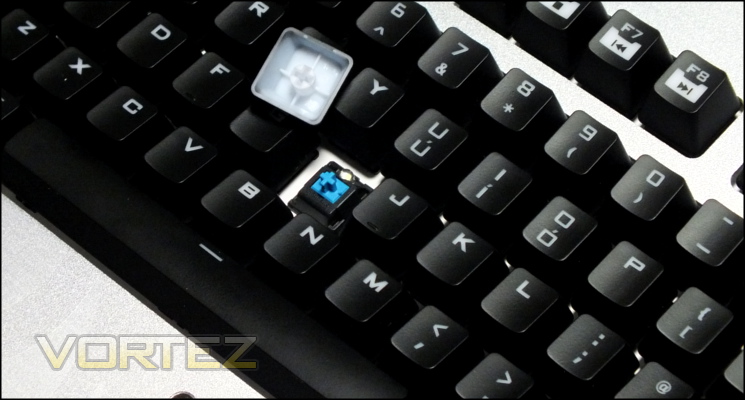
Levering off a keycap with the supplied keycap remover reveals the Cherry MX Blue switch which this model uses. An excellent primer for Cherry MX switch types is available at the Deskthority Wiki and suffice it to say that MX Blues differ quite substantially from the MX Reds of the mechanical keyboards we have reviewed most recently. MX Blues are clicky, tactile switches, meaning that for any keystroke they click when the actuation point is passed and you feel a brief resistance. MX Blues have the same actuation force as Reds, but the distinct feel compared to linear switch types will take some getting used to. Each key on the MECH has this mechanical switch, including the dedicated macro keys function keys.
MECH keycaps have a black paint which tends to be a little more sweat and grime resistant than some others and lettering which is etched out of the paint to reveal the white translucent plastic below. Through this the LED built into each switch’s housing will shine when illuminated, and the lettering itself is extremely sharp. We anticipate excellent long-term durability from the keycaps
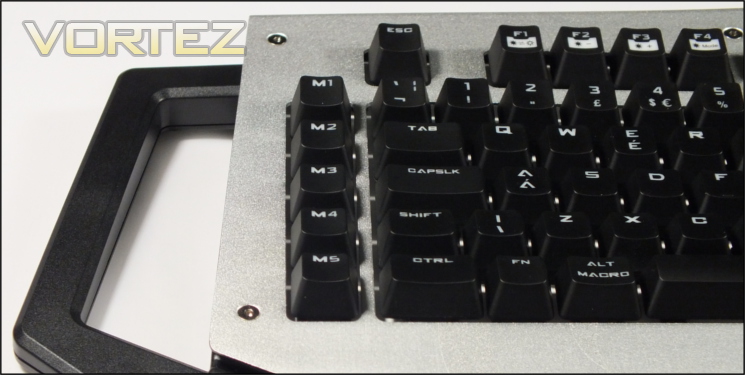
The MECH holds few surprises in terms of layout, which may well prove to be wise when considering how odd it is otherwise; a standard UK keyset is bolstered by five dedicated macro keys named M1-M5 on the left. F5 – F11 double as standard media keys in conjunction with the FN modifier key, with other Function keys also doubling as keyboard LED and Windows Lock controls. Due to the overall size of the chassis however the keyboard is not in any way compact – measuring 560 x 270mm it’s definitely on the large side.
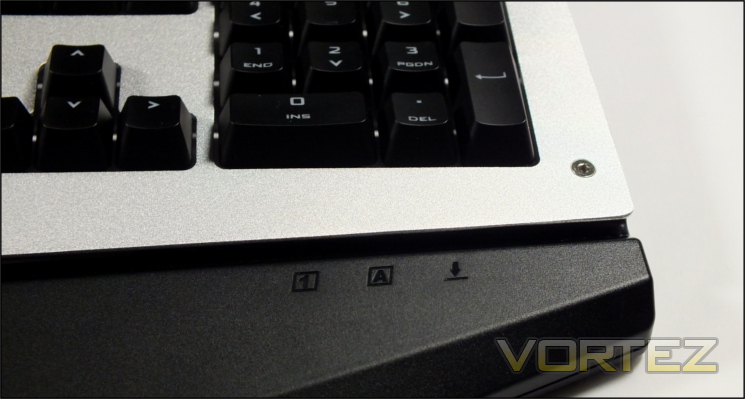
The Capslock, Scroll-lock and Numlock LEDs are recessed underneath the aluminium faceplate, becoming visable when reflected off the gloss plastic channel which runs the length of the keyboard. This channel is where dust and other particulates will tend to gather and will necessitate a fairly regular clean.
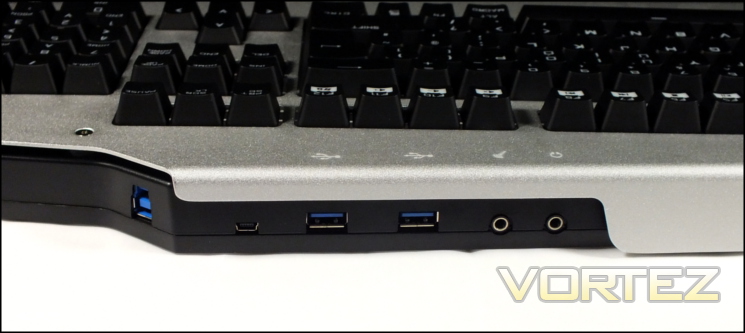
Located at the rear are the six connectors which allow the MECH to act as a peripheral hub. The on-board USB soundcard presents a headphone out and microphone in; not merely a passthrough from your PC, it will register as a discrete device in Windows audio properties. Next to them are two USB 3.0 ports, intended for any USB device including external storage, mice etc. Further along is is a micro-USB port; not mentioned on the packaging, it’s intended as a charging port for compatible devices. Four icons indicating the location of corresponding ports are etched into the faceplate so they can be located whilst seated.
Some way divorced from the other connectors is the USB 3.0-B port which connects the keyboard to the PC via the supplied USB cable. The cable will be angled to the right (as you look down) when plugged in; the keyboard is therefore naturally positioned to the left of your PC chassis. In general a ~1.5m cable should be ample no matter your particular setup, but in a pinch a longer one could be acquired separately. Unsurprisingly the included USB3.0 cable is thicker than the average, allow it to carry more current at safe levels than the usual USB 3.0 cable; it’s not braided however, instead being sheathed in a durable rubber.
Dotted around the keyboard are seven screws with hex-key heads. By unscrewing each of these you will be able to lift-off the faceplate and gain access to the backplate underneath. Obviously the faceplate concept itself has customisation potential, but it will also make cleaning the keyboard much more simple than it would otherwise be.
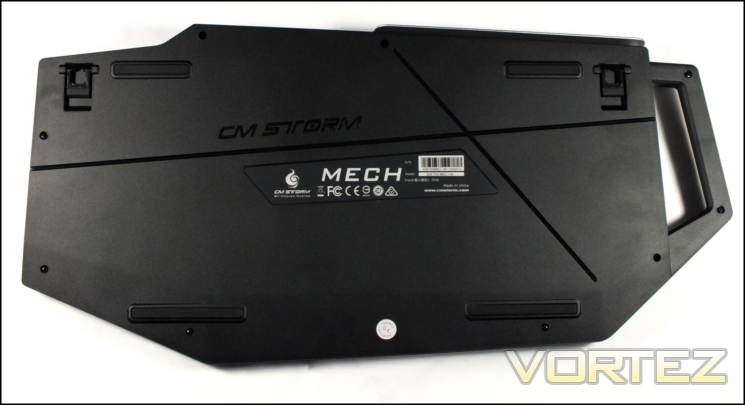
Four substantial rubber pads on the base of the keyboard hold it in place on a desk when in a low profile configuration. Two extendible feat angle the keyboard another five degree approximately, and both are also rubberised to ensure that it the keyboard stays still even when in this position. The ever so slightly disappointing part is the there are no recesses for cables, a feature we came to appreciate on the CM Storm Quickfire TK when routing headset cables especially.
General build quality is once again up to CM Storm’s high standards. The keyboard backplate has no flex to it, and the chassis itself is extremely firm. A textured finish for the aluminium aluminium faceplate is exceptional and should serve to mask any potential problems with fingerprints. Finally even the screws have a mirror shine.
Lighting and Customisation
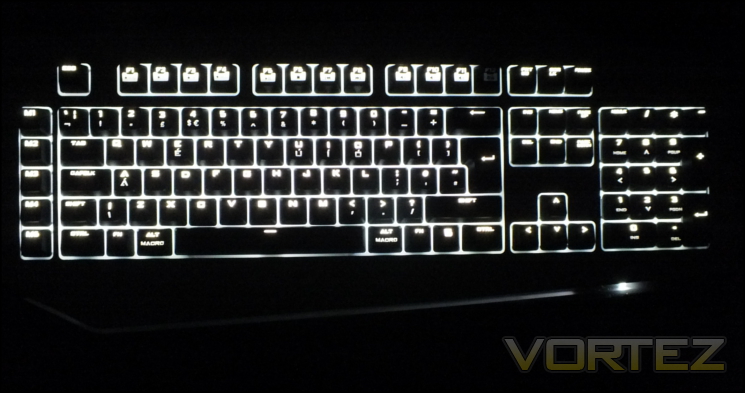
CM Storm have chosen white per-key LED lighting for the MECH and boosted the overall brightness when even reduced to a minimal level of illumination by integrating a white backplate. Lighting is controlled through the alternate functions of the keys F1-F4, enabled by pressing the FN keys on the left and right of the keyboard.
FN+F1 : Turn lighting on/off
FN+F2 : Decrease LED brightness
FN+F3 : Increase LED brightness
FN+F4 : Change Lighting Mode
FN+F2 : Decrease LED brightness
FN+F3 : Increase LED brightness
FN+F4 : Change Lighting Mode
Five brightness levels isn’t quite the most comprehensive of options, but they’re more than adequate with plenty of variance at the low end for those who have issues with blue/white specular light distracting them through their glasses. When shining through the keycap light is considerably biased towards the top of the key, but not to the extent that the symbols in the lower half are illegible.
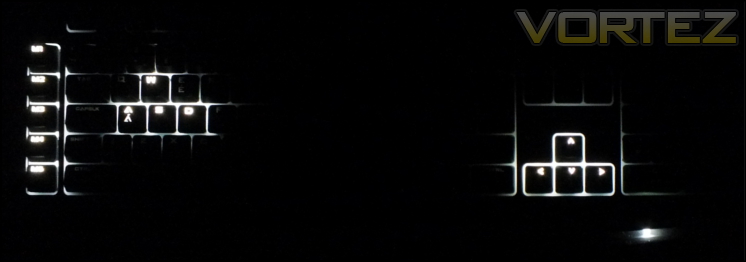
The MECH isn’t limited to simple on/off across the whole key set. In common with their Quickfire range two additional lighting modes also apply: gaming mode and a pulsing mode. Gaming mode illuminates only the macro, WASD and arrow keys, whilst pulsing mode will do just that – pulse the LEDs slowly from low to high intensity. Unfortunately lighting configuration isn’t stored on a per-profile basis, so it can’t be used as an indicator of active profile.
When it comes to mechanical keyboard lighting we have been spoiled quite recently. Were it not for those insights into what is now possible at this price point we’d say that the MECH has good lighting options, but now it can only be seen as relatively middle-of-the-road. Thank goodness that’s not all the keyboard is relying on.
—
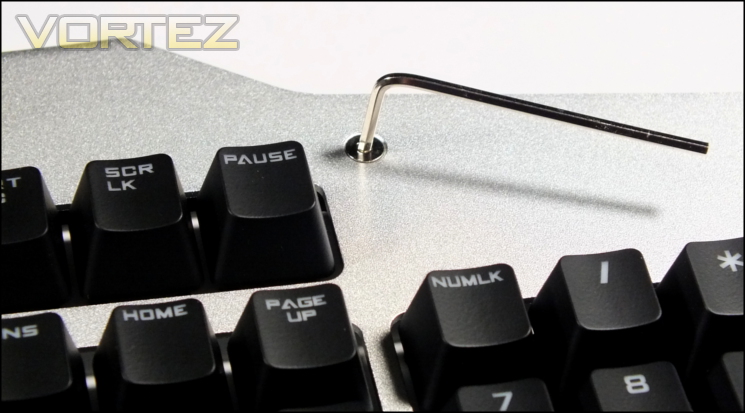
As a unique selling point a removable faceplate is certainly up there. Once the MECH’s screws are removed the entire faceplate can be lifted and replaced, although one should take care to protect the rather flexible piece of aluminium. Below that you gain access to the backplate, and cleaning becomes a doddle. It’s also nice to see that Cooler Master haven’t forgotten to earth the metal faceplate, just in case.
So what can you do with this rather unexpected flexibility? Well, for a start it’s likely that Cooler Master/CM Storm will be selling replacement/branded faceplate sets to fit your own preferences, but why be tied down? One of the more adventurous non-destructive case mods popular in recent years has been internal and external chassis coating in carbon fibre-effect vinyl, and there’s no reason why you couldn’t go for the same effect here.
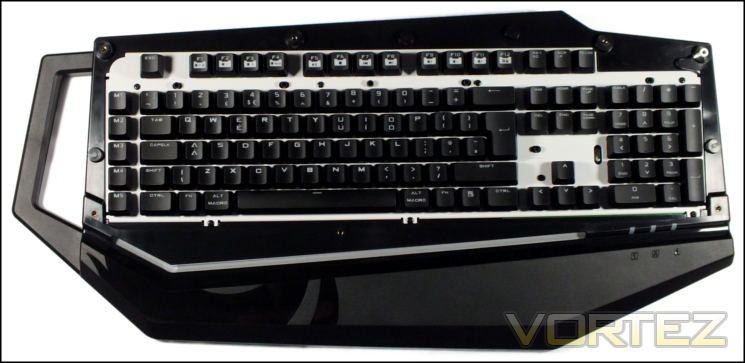
But why be limited to pre-cut vinyl pieces. There are printing shops around the UK which will print full colour graphics on vinyl for you to apply yourself if that’s something you feel comfortable doing. If you’re slightly more accomplished you could even design and cut your own faceplate.
It’s in this respect that the MECH is more customisable and flexible than the vast majority of keyboards currently available. Whilst not the most expert of mods – you probably won’t exactly be winning any prizes for it in expert circles – it does finally let a gamer truly personalise their keyboard with a small amount of skill and only a modest budget. For some, that will be priceless.
UPDATE:
You can check out the video below to see how the plate is removed, and a few fascia designs that CM Storm have developed in-house.
—
Moving to onboard features, CM Storm have taken the step of ensuring that as much functionality as possible can be accessed on the keyboard without having to rely on software. Many keyboard manufacturers only extend this to the lighting, but in both Windows-Key Lock and the macro system the MECH is ahead of the pack.
We’ve extolled the virtues being able to disable the Windows Key on gaming keyboards for some time, and doing it at the hardware level is a welcome additional step. To enable the lock simply press FN+F12 and you’ll be notified by a now illuminated F12 key. It was a feature we appreciate on the Quickfire TK and it should serve the MECH in good stead too.
By far the most powerful feature is the on-board macro record system and profile selection. The quick guide takes you through this functionality, but in essence you’re able to record macros in real-time through the use of FN+ALT shortcuts, and that recording is on a per-profile basis.
Profiles can also be switched using simple keyboard commands which is a feature that has been lacking in even high-end keyboards until now, with few notable exceptions. When switching profiles using FN+1-5 the keyboard will flash twice as a notification. It would be great to have some visual identifier of the active profile, but the shortcut is so swift it’s not a huge priority.
—
To sum up, aesthetic customisation on the MECH is excellent for an off-the-shelf product, whilst onboard functionality independent of software is very good too. We would like to see a little more lighting customisation and a means of quickly checking the current profile, but those are minor concerns. All in all, very creditable.
Software
As you would expect for a complicated macro-enabled keyboard CM Storm have a complementary software configuration utility which they call MECH AP. In common with many other manufacturers these days CM Storm don’t bundle a software CD, instead making it available from the official site under the MECH keyboard’s support tab. All CM Storm hardware which warrants it have their own AP software, however it hasn’t quite reached the stage of a unified utility; you will need the AP for each piece of CM Storm hardware you own.
We should note that the AP utility does not prompt for firmware updates or software utility updates; you will need to keep tabs on your current versions and manually update when necessary. Current software and firmware version are displayed on the bottom of the configuration window, so at least they’re not buried under layers of configuration menus.
Despite the complicated nature of the MECH and its additional features it is entirely plug and play, including the built-in USB soundcard and USB 3.0 hub. Additionally the website also provides the XEar 3D software utility from C-Media for the soundcard; it’s not absolutely necessary, but does include some limited equaliser effects and virtualised 7.1 audio. The software indicates that the keyboard’s specific audio chip is a C-Media C200.
The website’s keyboard support media also includes a user guide for the MECH AP utility, and the guide is surprisingly clear and concise. If you’re seeking to delve into the more complex functionality on offer it’s well worth the time to become familiar with it as the software alone can be confusing at times if approached unprepared.
The MECH AP software is split into three major tabs, defining the three most significant customisation categorisations: Storm CFG, Profiles and Macro Studio
Storm CFG
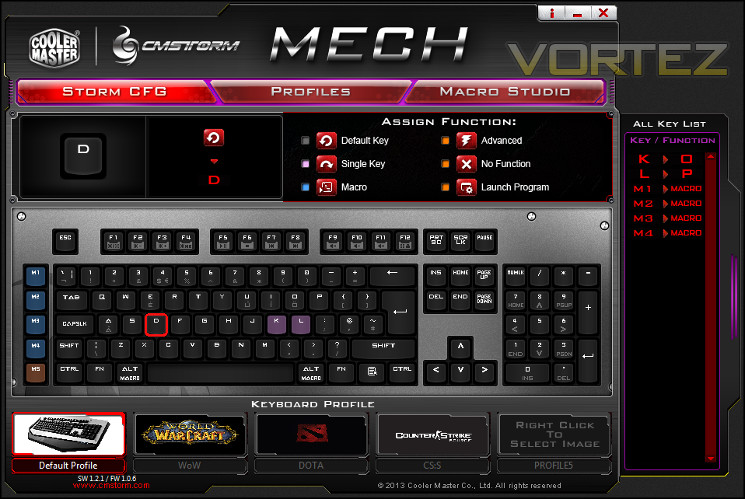
It won’t come as a shock to know that the Storm CFG window is where key assignments happen. At first it will seem a little daunting, but gradually the mists depart and it becomes clear how it works. Three sub-windows at the top are empty until a key is selected, at which time they’re populated with an image of the key, the current function of the key, and a context-sensitive menu where different assignment options are available.
Defining behaviour is simple, and once defined the change is reflected by highlighting the selected key in the virtual keyboard below. The highlight colour is user-defined, and can be used to reflect the specific class of assignment: for example blue for a macro, orange for a single key etc. Before you’re able to assign a macro you will need to create it, which we’ll come to shortly.
As well as in the keyboard image, any changes are reflected in the All Key List to the right. Single Key reassignments are defined explicitly in this list, whereas macro assignments only state that, not the specific macro bound. This is also the case in the sub-windows; in fact you need to click both the key and then ‘Macro’ in the ‘Assign Function’ window to clarify exactly which macro is bound to the key. This could be a much smoother process, there’s certainly enough space in each of the sub-windows to allow it.
At the bottom of the window are a series of five profile selectors representing each of the five profiles currently in on-board memory. Key assignments are stored on a per-profile basis, and these selectors can be used to navigate the active profile. As well as a name you can choose an image to associate with the profile in either jpg or bitmap.
Changes which you make to any assignment or profile are not applied until you close the MECH AP window.
Profiles
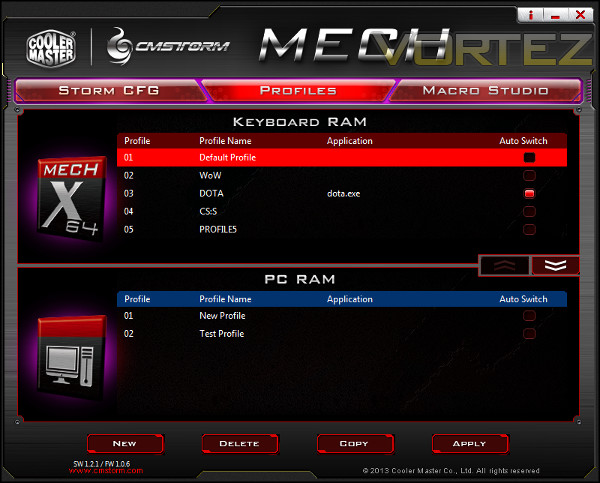
The second of the windows, Profiles, allows the quick management of both profiles stored on-board and those held on the PC. From here you can associate the profile with a particular application, and switch them between on-board and software-based operation. Only those specifically under Keyboard RAM will appear on the Storm CFG screen, but they changes won’t be uploaded to the keyboard before the application itself is closed.
Like the StormCFG Window it could do with a couple more development iterations to smooth out the functionality. An explicit Profile backup function would be useful, although it’s far less of a necessity on this keyboard than those without on-board RAM. Right-clicking to edit a property rather than double-clicking would also seem like a no-brainer. However all in all it’s pretty appropriate for the MECH keyboard.
Macro Studio
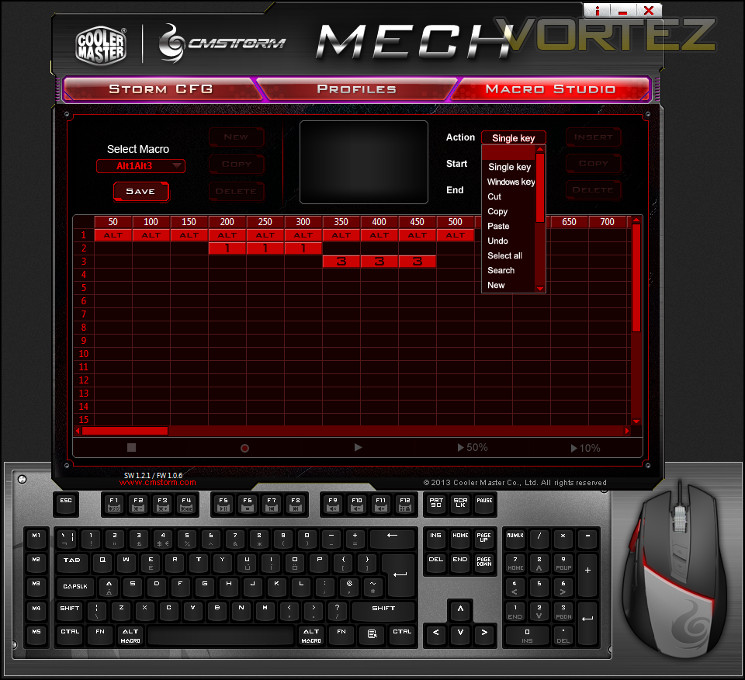
The final window is the Macro Studio, where as the name suggests macros are created, edited and where necessary deleted. The initial creation of a macro isn’t difficult – click New and then fill in the macro name. From there you have two approaches to choose from – manual creation or the use of a live recorder.
Manual Creation allows you to create a list of keystrokes with specific simulated actuation times. Either single keys or select common windows commands can be appended to a macro by selecting the key in the popup virtual keyboard and then clicking ‘insert’. Each keystroke entry has an associated upstroke and downstroke time (in milliseconds) which is then reflected in the timeline. Once finished the macro can be saved, after which it becomes available in the StormCFG window as a potential button assignment.
Live Recording through the software utility is pretty straightforward – simply click the record button, select the key delay option and then start typing. The keystroke list will be swiftly populated, after which it can then be edited by inserting new keys, editing key assignments or deleting strokes entirely.
Once complete editing a macro is a little more fiddly than one would want. The graphical representation of each keystroke displays in blocks of 50ms, but in reality the timings can be down to 1ms variances. For keys which are modified, by an Alt or Shift for example, making sure each keystroke overlaps properly is important; 50ms gridlines are therefore okay, but shaded blocks should have variable sizes representing down at least as far as the 10ms range.
Another quirk we should note that that when inserting a new keystroke its position on the list relative to other keystrokes will be updated only when you save the macro, not when you input each time point. This could be problematic if performing multiple edits. Macros can be up to 25 keystrokes in length, a restriction which is a compromise due to macros being stored in a fixed memory space on board the keyboard.
—
One further point needs to be made with regards to the keyboard software: in order to apply changes to the keyboard’s on-board profiles you need to close the MECH AP window. Given how UI’s have tended to be designed we were really expecting Apply and Discard buttons rather than the need to (somewhat unintuitively) close the window entirely. Perhaps this is intended to increase life-span of on-board flash storage by dissuading repeated writes, but even an ‘APPLY AND CLOSE’ button would make more sense. As it is, making small changes to key assignments and macros to quickly test takes more time and more focus than one would like in what should be a simple process.
Overall the software is certainly not the worst, presenting as it does slightly compromised functionality to account for on-board storage. The largest issue by far is how unintuitive it can be, especially with a need to constantly remember to close the window to apply changes. The fact that you cannot discard any changes you made to a profile in error will be the single largest issue many will have on a day-to-day basis, but it all stems from the UI really needing a few more iterations after rigorous user testing.
Performance
We paired the CM Storm MECH with a generic five button mouse in our tests, chiefly to understand how the software and macro systems of the MECH compensated for a mouse clearly poorly suited for use in the majority of MMO and MOBA titles. We were not disappointed.
The first hurdle was getting used to Cherry MX Blue switches. In the main MX Reds have been something of a standard amongst gaming keyboards, and for good reason. They provide a consistent, linear response throughout the keystroke, and is the closest approximation you would want to membrane-style switches many users will be graduating from. The Cherry MX Blues provide very noticeable audible and tactile feedback, whilst also retaining a consistent and predictable response across the whole keyset.
Some gamers will appreciate this feedback and it many respects it’s more comfortable to type on than MX Reds, with which your natural inclination will be to hammer the keystroke fully to the backplate rather than begin to ease off when you have hit the point of actuation. Those new to mechanical keyboards may even find the mechanism so far from what they’re used to that it’s actively unpleasant. In whichever way you approach it, typing will be loud even if you employ the o-ring dampening trick and should factor into your decisions if working/gaming in a communal area. If possible, we encourage everyone to try each type of mechanical switch before purchase.
In terms of the key surface, it appears to be a good quality finish with sharp lettering and plenty of illumination thanks to the LED backlight. The white backplate reflects more light upwards, allowing lower overall brightness to be used for an effective illumination of each key. That may sound inconsequential, but for those who have issues with white light diffraction through corrective lenses cutting down on the maximum LED brightness you’re exposed to does help in low-light conditions.
The MECH itself has good rigidity due to a steel backplate and reinforced ABS plastic. With raised feet there’s a very slight flex present when leant on with a lot of weight, but we didn’t experience any wobble or other instability in the platform unlike other recently reviewed products. The grip to the desk surface was excellent to boot thanks to the use of rubberised extendible feet and large rubber pads on the floor of the keyboard.
Macro keys are always useful, but it’s good to note that CM Storm are aware of the ideal locations and have designed their layout accordingly. There’s just enough of a gap between the main keyset and M-keys to differentiate effectively and as they’re also mechanical the feel is totally consistent with the rest of the keyboard.
NKRO/Anti-ghosting
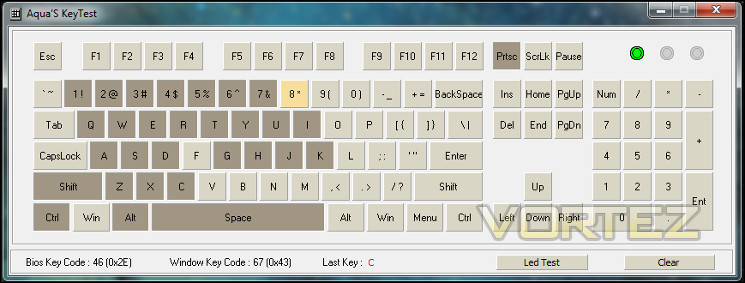
The MECH claims 64-Key rollover, and it delivers in most respects. When using the main key set, that is to say every key with the exception of M1-M5, in both testing and during gameplay none of the keys appear to interfere with the operation of another. Ghosting is much harder to assess with that number of simultaneous number of keypresses, but it certainly didn’t appear to register any unintended keypresses and most assuredly none in the critical Function-key block.
Where the MECH did fall down a little was with the dedicated macro keys and general macro handling. We’re aware from the software investigation that macro keys can only be bound to macros – a single sequence of timed keystrokes or button presses – rather than also exactly mimicing the dynamics of a single key in the standard keyset. When executing any macro all other input is disabled, including any key(s) you’re holding down at the time. By definition this breaks rollover, but also means that no additional modifiers such as CONTROL and ALT can be used with the macros or macro keys. If you’re aware of this limitation then it’s possible to plan around it in the design of your macros, but the fact that it will break continuous in-game movement via WASD is something of any issue.
It’s possible that this will be rectified in a future keyboard firmware update, but in the meantime CM Storm already have a work-around through the MECH AP software. The ‘Execute In AP’ functionality will process the macro without interrupting any keys you have held down already, exactly the functionality you need whilst also processing the keystroke modifiers at the same time. Unfortunately the software needs to be installed to use this functionality, limiting the value of on-board memory a little, but that’s a justifiable price to pay.
—
During extended gaming sessions the MECH performed admirably thanks to the MX Blue switches and stable design. MMO gaming in World of Warcraft and Guild Wars 2 presented few difficulties with the exception of those discussed above, and the longer than usual game sessions benefited from the way in which the keyboard stayed almost glued to the desk. A little more visual feedback on the active profile whilst in operation would have been useful, but isn’t essential.
When moving the keyboard to a local LAN event we found it to be exceptionally portable thanks to the built-in handle, despite the weight. The on-board memory proved to be well warranted – Counter Strike: Source bindings were ready to go, as were the DOTA2 macros which were necessary to create on-the-fly. These sorts of titles and also including RTS titles, where a rapid succession of keypresses are often necessary rather than continual pressing of one key whilst also needing an active macro, were those in which the MECH could really show its class.
We also wouldn’t discount the clicky nature of the Cherry MX Blues. They won’t be for everyone, but they shouldn’t be overlooked by those who would find tactile feedback reassuring. If you have exceptional manual dexterity it’s even possible to ‘ride’ the tactile bump, greatly decreasing reaction times.
—
Whatever the type of gamer you are, you should buy according to your needs. It’s pleasing to note that the MECH should suit most types of gamer, although they may need to adapt their play style to cater to the boards idiosyncrasies. Those living, working and playing in a communal area should definitely note that the MX Blue variant will be noisy, generally more so than other MX Red-based keyboards we have reviewed to date. In terms of living with the MECH though, it’s by far one of the most easy to get along with. Grime doesn’t show up so much, nor do finger prints on the aluminium faceplate. If you have an obsessive need to keep your desk clean the MECH, despite its appearance, may be much easier to cope with than the majority of other options.
Conclusion
When we entered into our review of the CM Storm MECH it was inevitable that there were going to be comparisons with the excellent Corsair Vengeance K95 that graced our desk so recently. Both are mechanical, both include macro keys, and both are around the same UK MSRP. As convenient as that would be, the keyboards target two different sorts of gamers, and it’s important to reinforce the distinction.
The CM Storm MECH really targets what is often termed the ‘Gamer Demographic’ who, MMO and FPS alike, value more than just the gameplay experience. They want customisation, personalisation; to go to a LAN and really show off both their peripherals and their rig. It’s for these power users, who are also serious gamers, that the Mech is really designed.
In creating a product for this audience CM Storm have married high quality components to a unique design in order to satisfy – at least as much as may be possible with an off-the-shelf keyboard – what they believe to be untapped demand. Crucially, they don’t rely on a gimmick; Cherry MX switches, a USB 3.0 hub and on-board soundcard are all value-added parts of a strong whole. It’s easy to underestimate how useful you may find them. From a pure performance perspective, the MECH should have all that a gamer needs, and additional features than they would value highly.
There are still a few kinks which need to be worked our in our mind before the MECH could reach legendary status. There’s no getting away from the face that the MECH AP software really needs work to make it more user friendly, whilst a few firmware tweaks would solve lingering doubts about effective macro execution being truly independent of software. For all that, if you’re willing to work within the boundaries you can still have an gameplay excellent experience.
Now that the MECH and rest of the AL-series are in stores we hope that CM Storm and Cooler Master follow-through with the promise of customisation potential. We’re talking more faceplates, more themed design, releasing the component dimensions of each removable portion on a AL-series device. I’m sure if they let design-oriented gamers run with it, the results will be awesome.
Too often peripherals for the stereotyped ‘gamer’ have compromised on build quality and component choices, but this is not the case with the CM Storm MECH. Cherry MX mechanical switches, macro keys and software-free functionality are married to a design which provides unique out-the-box looks and an unmatched aesthetic customisation potential. Amongst a field of excellent mechanical keyboards, the CM Storm Mech stands out. It could get no less than our Gold and Creative awards.
Pros
+ 100% Mechanical
+ 5 macro keys
+ 5 on-board profiles
+ Unmatched potential for personalisation
+ 32MHz macro engine
+ Software-free functionality
+ Built-in sound for teamspeak/general game sounds
+ USB 2-port 3.0 hub
+ 64-key RO
Cons
+ Quality doesn’t come cheap
+ No dedicated media keys
+ Non-standard footprint
+ Slightly weaker software than expected
Hint
+ Ensure that your USB port is robust when using high-power USB devices.
+ Other AL-series peripherals will allow you to tailor the look of your keyboard
+ 100% Mechanical
+ 5 macro keys
+ 5 on-board profiles
+ Unmatched potential for personalisation
+ 32MHz macro engine
+ Software-free functionality
+ Built-in sound for teamspeak/general game sounds
+ USB 2-port 3.0 hub
+ 64-key RO
Cons
+ Quality doesn’t come cheap
+ No dedicated media keys
+ Non-standard footprint
+ Slightly weaker software than expected
Hint
+ Ensure that your USB port is robust when using high-power USB devices.
+ Other AL-series peripherals will allow you to tailor the look of your keyboard

Click here for an explanation of our awards at Vortez.net. Thanks to CM Storm for providing this review sample.


