







Cooler Master’s CM Storm have upgraded the Sentinel gaming mouse to include a new laser and more memory.
Product on Review: CM Storm Sentinel Z3RO-G Gaming Mouse
Manufacturer and Sponsor: CM Storm (Cooler Master)
Street Price: Approx. £54 inc. VAT (at time of review)

You may remember during CeBIT we managed to snap a few photos of CM Storm’s new addition to their gaming mouse range – the Sentinel Z3RO-G. This new product joins their current line-up of gaming mice; Spawn, Inferno and Sentinel Advance, with the latter being the predecessor to the Z3RO-G. CM Storm have been pumping out products almost monthly with the latest being the CM Storm Enforcer Mid-Tower case that we reviewed just last month.
Today we are fortunate enough to be reviewing the CM Storm Sentinel Z3RO-G gaming mouse, an updated model from the Sentinel Advance that we reviewed back in 2009. The Sentinel Advance received a gold award from Vortez.net, so let’s see how the improved specification of the Z3RO-G fares.

CM Storm’s take:
The Sentinel Z3RO-G is, without a doubt, the most customizable mouse ever! Is the mouse too heavy or too light for your taste? CM Storm has the solution. In the bottom of the mouse reside five 4.5 gram weights which can easily be removed or added to your personalized mouse design. Wondering what DPI you have selected? The Sentinel Z3RO-G possesses an OLED screen under your hand which will tell you the DPI by X and Y axis, which may be toggled up to an amazing 5600, and may also include a personalized logo of your choice, like a clan emblem or the or the logo of the latest killer game in cyberspace.
Features:
• Twin laser engine to ensure extreme stability and ultra precise tracking performance.
• Onboard Sentinel-X 128Kb memory which safeguards your mouse settings and store up to 5 different game profiles.
• OLED Profile Management – Allows gamers to switch DPI and profiles on the fly with instant visual feedbacks.
• Weight Adjustment System – Five 4.5 gram metal weights allow you to select your ideal mouse weight with a 22.5 gram weight variation.
• Storm Tactics macro support allows the Sentinel’s intelligent firmware to record, replay and schedule keyboard and mouse actions.
• Included game in the box (Shattered Horizon)
• 2 Years Warranty
Technical Specifications
Available Color
– Black and Grey
Material
– Rubber Grip / ABS Plastic / Mesh Bezel / Metal Plate
Dimensions
– (W) 83.5 X (H) 135 X (D) 40 mm
Net Weight (g)
– 161.5 g
Sensor
– 5600 DPI Storm Tactical™ Twin-laser Sensor
X&Y Axis Configuration
– Independent and programmable
Maximum Tracking Speed
– 6.00 m/s 235 IPS
Maximum Acceleration
– 50g
Polling Time
– 1.0ms
Speed Measurement
– Real-time
Dynamic Surface Adaptation
– Tracks on all surfaces, ensures minimal lift-off distance
On-board Memory
– 128kb
Form Factor
– Right Hand Ergonomic
Button Assignment
– 8
Illumination IC controlled Illumination with 7 colors and variable lighting effects
DPI Display
– OLED
Weight System
– Yes, 4.5g X 5 pcs
Packaging & Bundle
Now that we know the specs, it’s time to take a look at the product. The Sentinel Z3RO-G comes in a fairly small box that matches the CM Storm’s main colour scheme of red and black. On the front of the box there is a glossy image of the mouse and a graphic to advertise Futuremark’s Shattered Horizon, which comes with free with the mouse. We don’t often see games bundled with mice, so this is a welcome addition, especially at this price point.
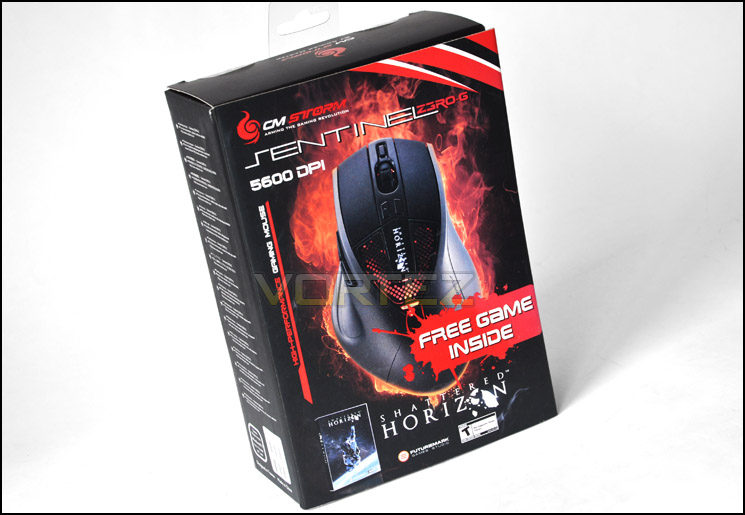
An attractive box – catching the eye
The box features a flip over cover held shut by Velcro. When opened it exposes the mouse in its plastic packaging, along with a pictures of the various features. On the back of the box the specifications are listed followed a description of the free game. All in all, some attractive packaging that whets the appetite of any enthusiast by allowing a glimpse at the unit itself. Top marks here.
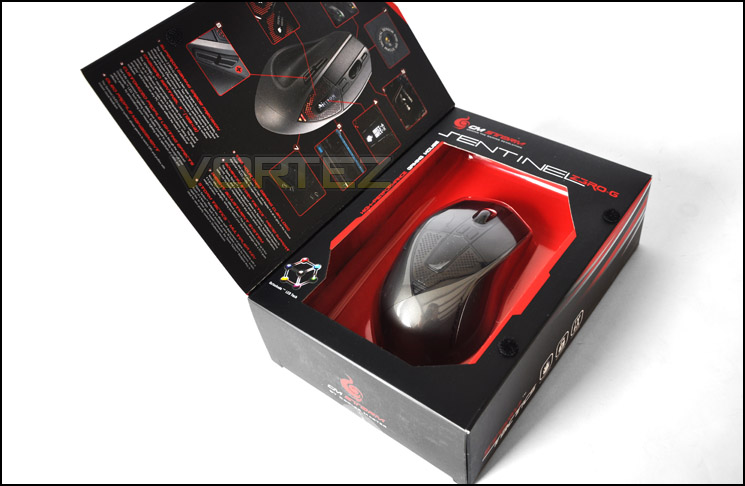
More information and first glimpse at the Z3RO-G
Once opened, the contents of the box include the mouse, replacement mouse feet, driver CD with Storm Tactic AP Software Rev 1.3 and a product code for the free game. Mice don’t typically come with a particularly large bundle, but the inclusion of replacement feet and a game are welcomed. It’s good to know that if the originals wear out, you can replace the feet easily. This may be a response to the increasing availability of generic replacement mouse feet on the market – clearly a problem that manufacturers of reliable mice needed to address. The only regular inclusion not here is a bag for transport.
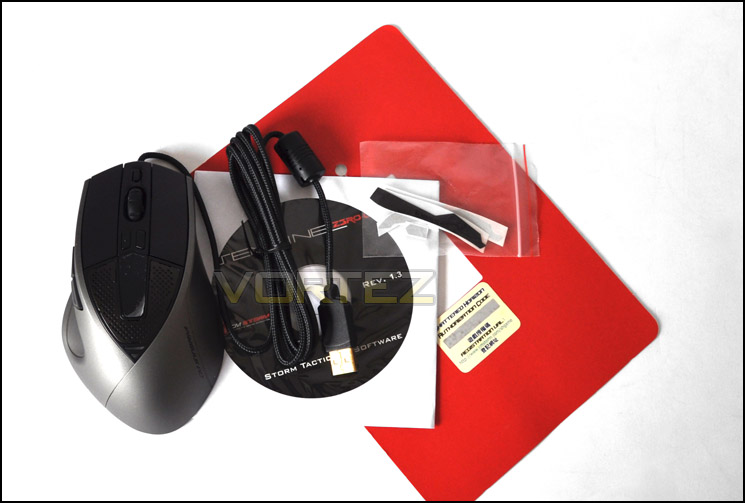
An interesting assortment of items within the bundle including a free game!
Now we’ve seen the packaging and the box’s content, let’s take a closer look at the mouse.
Closer Look
The first impression of the mouse is that it looks very sleek and futuristic, with the main change from the Sentinel Advance being the colour of the case. The Z3RO-G case is made of plastic with a special grey rubberised coating that gives it that soft touch feel. The mouse has an ergonomic design like most gaming mice and is purely designed for right-handed gamers (sorry lefties, no left-hand versions). Also featured are 8 buttons, including the standard left and right click and the scroll wheel acting as double-click when pushed to the side. The latter is an interesting feature – on the vast majority of mice this would simply scroll to the side. Personally, I think this is a great little feature I rarely have to scroll horizontally during normal usage. The next 2 buttons on the side of the mouse are common to many gaming mice and control browser navigation by default, and the two buttons on the top of the mouse control the DPI. The left button, featuring a raised bump for tactile feedback, increments the DPI up to a predefined level, with the right acting to decrease it. The default settings for the DPI are 800, 600, 400 and 200, which should provide a good range for most gamers. Remember there is up to 5600 DPI available via the Storm Tactical™ Twin-laser Sensor. The final button, located in front of the scroll wheel, cycles through the profile setting. The USB cable, in a similar fashion to many mice recently reviewed, is braided to a high quality and is 2m in length with a gold plated USB connector.
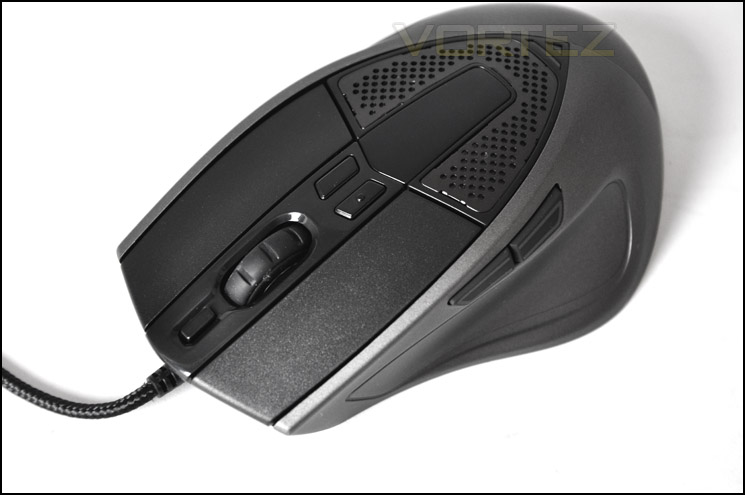
A sleek exterior with striking character
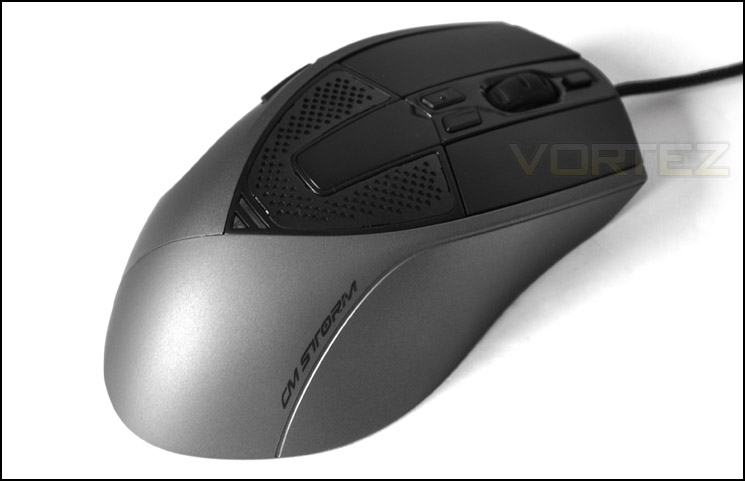
Colour-scheme will merge well with other peripherals
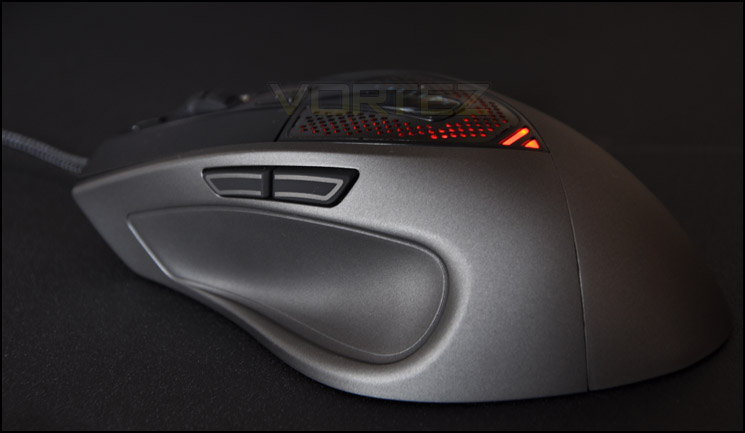
On the left side of the mouse the 2 browser navigation buttons can be observed as well as a groove and a slight lip where the user can rest their thumb. This improves the comfort of the mouse, something essential if you’re planning to use the mouse for extended periods. The 2 buttons shown can also act as macro buttons, enabling up to 36 different custom outputs. We’ll look at the software in-depth later.
The right side of the mouse is almost featureless, with no second set of shoulder buttons found on some other gaming mice. Unlike the CM Storm Spawn, there is no protrusion to rest your little finger, which can sometimes be a feature key to comfort depending on your grip style. This can be a deal-breaking feature for some, but also is not a common inclusion in many mice. CM Storm have opted to go with the flow and adopt what is a fairly generic overall shape, like the Sentinel Advance, but with the left side thumb rest area.
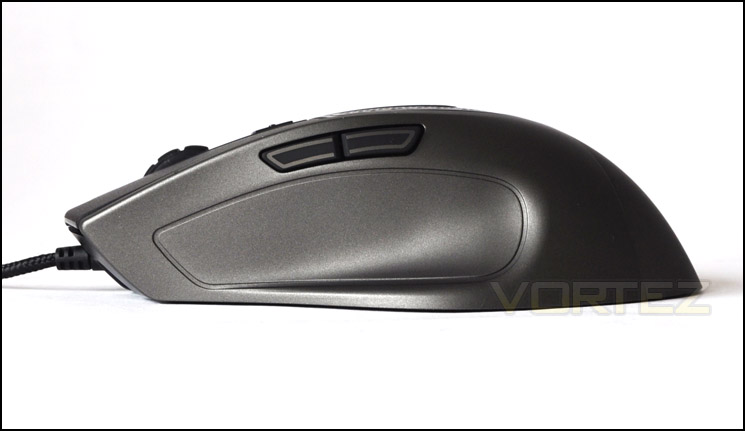
Left side of Z3RO-G
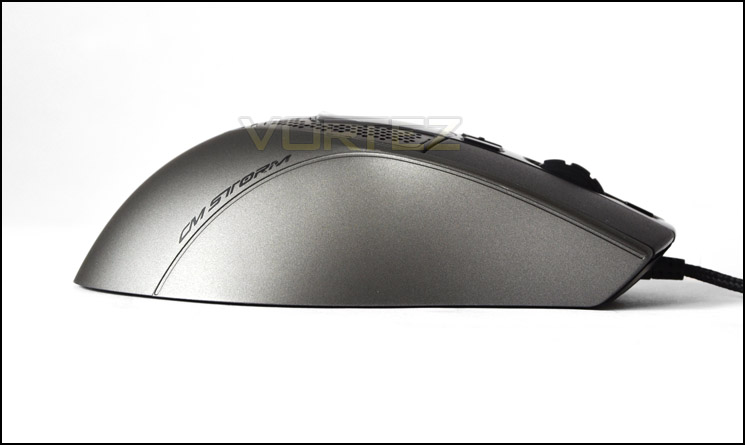
Right side of Z3RO-G
Underneath the mouse there is the “dual laser” that CM Storm claim provides increased accuracy, as well as the standard product sticker including serial and model number. What is fairly unique about this mouse are the two grooves at the front that contain a multitude of coloured LEDs, which can be changed using the software provided. A nice touch, enabling the user to match the colour of the mouse LEDs to their other hardware, primarily the keyboard. Also on the underside of the mouse is the weight management feature. Located at the rear of the mouse there is a plastic cover that can be unclipped to reveal the weights:
In the weight compartment there are 5x 4.5 gram weights totalling 22.5g. The five weights are firmly held in by a foam surrounding. However, trying to remove the weights is fairly difficult as there is not much grip and it’s difficult not to damage the surrounding foam. Whilst this might be a slight flaw in the design, it shouldn’t be a show-stopping issue as most users will change the weight only a few times in the lifetime of the mouse, usually in the process of finding their optimum setting.
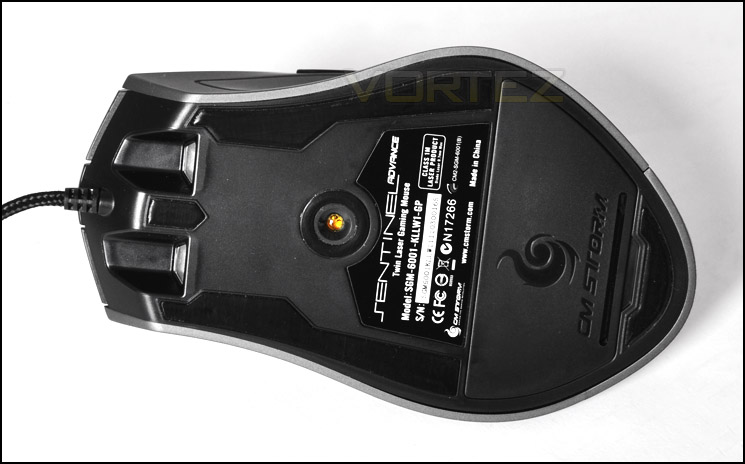
5600 DPI Storm Tactical™ Twin-laser Sensor
Weight system to customise feel of Z3RO-G
Comparison – other popular gaming mice
Due to the almost identical appearance of the Z3R0-G to CM Storm’s Sentinel Advance, a previous photo is shown that compares the Sentinel Advance to a selection of other popular gaming mice. The mice that were used for comparison in a previous review are:
+ ROCCAT Kova[+]
+ CM Storm Spawn
+ ROCCAT Kone[+]
+ Logitech G9x
+ Logitech MX518
+ CM Storm Sentinel (same appearance as Z3RO-G)
As mentioned in a previous review the Kova[+] is the only mouse in this selection that is suitable for both right and left-handed users. From the photos it’s possible to see that the Sentinel Advance (in this case the Z3RO-G), is a fairly wide mouse with the only exception being the CM Storm Spawn, which is shorter and wider. This means that the fairly generic design of the Z3R0-G makes it suitable for almost anyone except left-handers.


Software
Out of the box, the mouse features 5 identical preconfigured profiles. In order to customise the settings and make the full use of 5600 DPI available, you need to install the software from the Driver CD (or via the website). Initially, I had a few problems installing the software whereby the main program executable file was not installed. A simple way around this is to just copy the .exe file off the CD, this however could prove an issue for some users, and so I would strongly recommend sourcing the latest version of the software from the CM Storm website before you plug in. When you run the program you are presented with this screen:
On this screen you get the options of optimising the sensor for FPS or RTS games, or to simply keep the current settings. By selecting FPS, the program will set the defaults to 100 – 1000 DPI, and for RTS it will be set at 1025 – 5600 DPI. These are handy options for novice users, but seasoned gamers will likely adopt their own configuration, especially since the DPI settings for FPS seem low, with the most common and useable DPI being around 1600-1800 for most FPS gamers. Once you have selected which optimisation you want, it will then run the main program. You are presented with a plethora of options on the main page: The software has 7 tabs:
+ Main control
+ Colour control
+ Storm tactics
+ Macro
+ Script
+ Library
+ Support/update
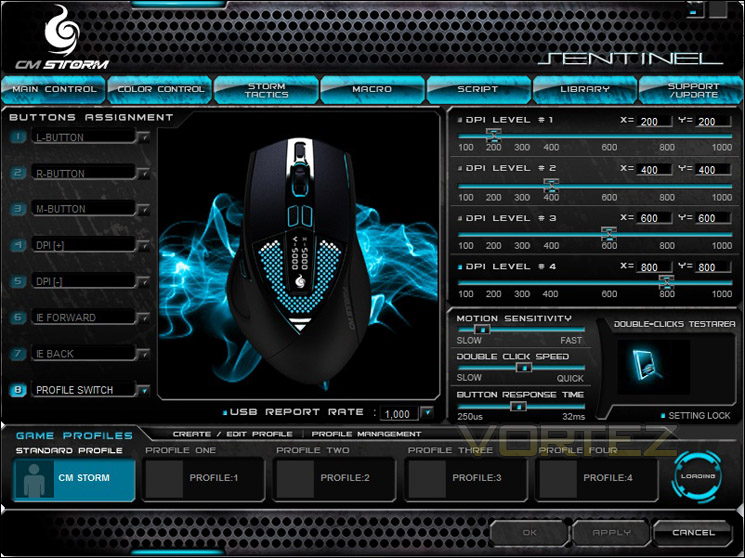
On the main control screen it is possible to customise the buttons, DPI profiles and the 5 different mouse profiles. As mentioned previously, this mouse features the ability to change the X and Y axis independently, a feature that CM Storm claim to be unique to their range of mice. Razer also feature this attribute on their mice. Other options include double-click speed and the associated motion sensitivity and button response time. You can also alter the USB report rate up to 1000 Hz, typical of high end mice.
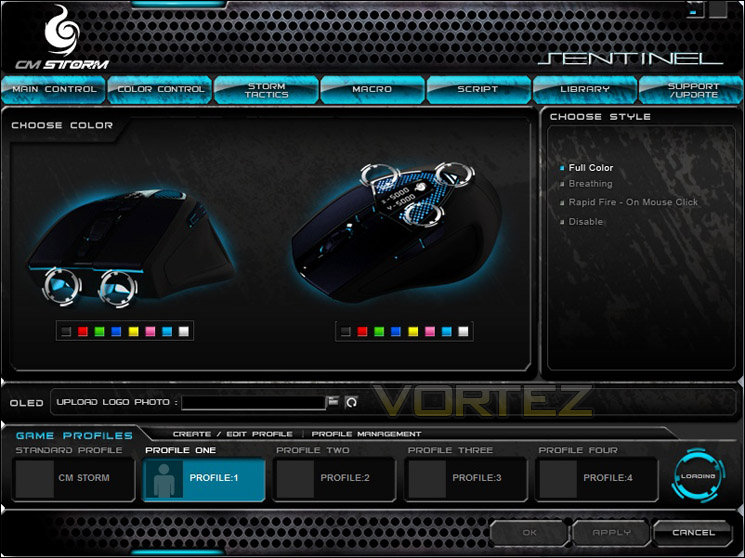
The next tab of interest is the colour control. On this screen it is possible to change the colour of the top LEDs and the LEDs at the front of the mouse. From this screen it is also possible to upload a 32 x 32 bmp image to the mouse, although the image will only be displayed when you change the DPI, so you will have to endure the constant “Shattered Horizon” image during normal use. There are a total of 7 colours (black just turns it off) for the top LEDs and the front, which can be used in any combination. You can also choose a style for the LEDs: Solid, “breathing”, which pulsates and rapid fire – where it flashes when you click. You can also disable them entirely, which may be a welcome option for gamers who leave their machines on overnight in the same room they sleep.
In the Storm Tactics tab you can customise the various macros that can be activated when holding down the Storm tactics button (which must be pre-assigned). As mentioned previously, this allows you to access up to 36 additional commands. The Macro and Script tabs are where you can program various commands that are executed when a previously assigned key is pushed. A very useful feature if you play MMORPGs or any other game that can benefit from complex macro implementation. The library tab is where you can export your configuration or import another one. You can then switch between them – a useful feature if the computer is shared by more than one person. Finally, the Support/Update tab is where you can access CM Storm’s website for support, or update the firmware on the mouse. Currently, there is only one version of firmware available and due to the mouse only being released recently, there is not a support option on CM Storm’s website (at the time of going to press). Expect this to change very quickly come release.
There were, however, several issues with the software and firmware. The first has already been mentioned – installation was problematic. Secondly, the program reset the sensitivity settings each time it was accessed, a frustrating issue that needs to be resolved quickly. Finally, the LEDs also became stuck on breathing mode, with none of the other options having an effect; another issue that is likely to frustrate users, but should be able to be rectified fairly easily with a driver, software or firmware update. As it stands, these present serious issues to the usability of the bundled software.
Performance
When hooked up, the mouse jumps to life with a red glow. Unique to this mouse is a small OLED screen, as seen above, which is covered with clear plastic. This sits just forward of the palm, depending on your grip. By default, the screen displays a stylised Shattered Horizon logo; the free game which comes with the mouse. If either of the two buttons to adjust the DPI are pressed, the new DPI is displayed on this screen as well. It’s good to know exactly what DPI you’re at, although this is only really useful before playing, as you may not be able to see the screen whilst gripping the mouse. With this mouse it is also possible to have independent X and Y axis DPI settings, and both are then displayed on screen. On the fly DPI changing then only works for one axis at a time. Also, by holding down the DPI[-] for several seconds, you can change the DPI in increments of 25. This is a very useful feature for fine tuning the DPI, and the mouse is also able to store this to its active profile.
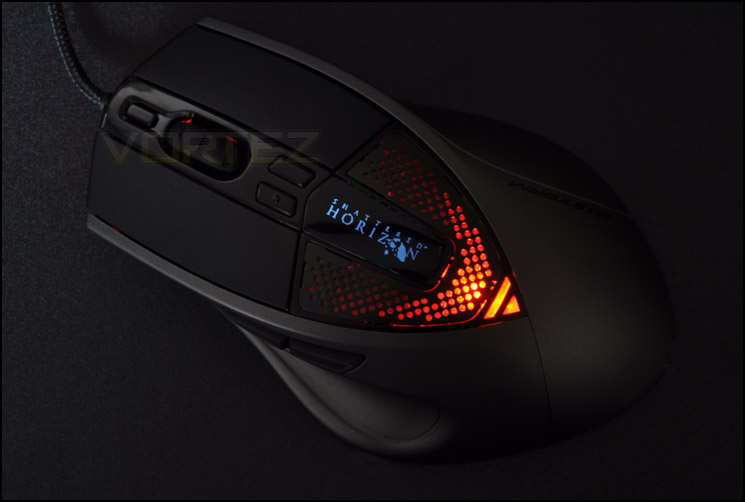
OLED screen displaying DPI and customised logos
Now that we’ve discussed how the Z3RO-G looks and the features of its driver software, it’s time to put it through its paces and see how it performs. The mouse was tested using under normal use and gaming, on a QPAD Heaton Pro Gaming Hardtop Plastic Mouse Pad.
For general use the mouse glides effortlessly due to its large Teflon feet. By adjusting the DPI to 3200, traversing even dual screens is a breeze. The mouse’s ergonomic design means the grip on the mouse is pleasant to use and after several hours of use there is no discomfort. Using Photoshop and similar programs is made much easier with the ability to reduce DPI on the fly when doing the finer edits. However, when browsing webpages, the scroll wheel has fairly high resistance which makes it more difficult to scroll long pages.
To test gaming performance, Battlefield: Bad Company 2 and Counter Strike: Source were used: Playing Bad Company 2 was superb with the Z3RO-G, whilst it did take a while to configure the mouse and to determine the optimal DPI, once these were established it was a vast improvement over my Logitech G5. The mouse is a lot more comfortable to hold and the design means I won’t be getting any more blisters on my little finger! Switching between the different DPI modes meant flying a Blackhawk with the highest DPI was very easy to control and when on foot, dropping the DPI to 2400 was perfect. The only negative point is the scroll wheel, whilst not frequently used, has a fairly high resistance to turn. Counter Strike: Source presented a similar experience to Bad Company 2. The mouse had a very nice feel to it with the rubberised plastic coating. It glided smoothly on the pad which made it very easy to make those ever-so-important headshots. The resistance in the mouse wheel actually made it easier than other mice to select weapons. So somewhat of a double-edged sword regarding the tactility of scrolling.
So now we’ve seen how it performs, it is time to come to come to a conclusion.
Conclusion
The Z3R0-G is of a very high build quality and with a sleek, futuristic design it will look great on any enthusiast’s desktop. It can even match the lighting style of your other peripherals. Jam-packed full of features, you’re getting a lot for your money and the improved memory space over the Sentinel Advance means you can store all your configurations on the mouse without having to transfer it PC to PC. The improved laser has the added advantages of reading on any surface tested as well as providing a large range of DPI settings to please almost any user. The large amount of customisation provided makes the mouse one of the most flexible we’ve reviewed so far, and clearly CM Storm are attempting to create a product here that can satisfy almost all users.
The only let downs of the mouse are the means of holding the weights, the high resistance of the scroll wheel and the buggy software, an issue which of course is verifiable. The OLED screen is very nice, but poorly implemented; hopefully with future updates it will become more useful as it certainly has a lot of potential to really set this mouse apart when it comes to customisation. Long term build quality may come into question due to the slightly unreliable nature of the CM Sentinel Advance, but this cannot be tested in such a short time here. We hope that CM Storm have taken the underlying problems of their previous offerings into account with this new model.
Overall, this mouse is a small improvement over the Sentinel Advance, but with the negative points considered, especially the buggy software (which if was improved would be awarded higher) I will give this mouse the coveted Vortez Silver Award!
Pros
+ Comfortable, Ergonomic design
+ On the fly DPI adjustments and display
+ Configuration storage on mouse
+ Highly customisable
Cons
– High resistance scroll wheel
– Right-hand only
– Software has bugs that need fixing
+ Comfortable, Ergonomic design
+ On the fly DPI adjustments and display
+ Configuration storage on mouse
+ Highly customisable
Cons
– High resistance scroll wheel
– Right-hand only
– Software has bugs that need fixing


