







Cooler Master are back again with an updated version of their Hyper 212 cooler. With compatibility across a range of sockets including LGA1156, let’s see how the cooler fares.
Product on Review:Cooler Master Hyper 212 PlusManufacturer:Cooler Master
MSRP:£34.99
Street Price:£20.99

Cooler Master is renowned for their innovation in the cooling department, giving us products such as the highly popular V8 and V10 cooling solution. Today however, they have gone back to a more traditional “block” tower. This is not necessarily a bad thing by all means, as it’s a try and tested method but the best thing about this cooler is its price. Coming at under £20 retail, the Cooler Master Hyper 212 Plus is targeted at the mainstream/budget market. Despite this, Cooler Master have developed a product that includes features of higher end CPU coolers, such as “Direct contact” heat pipes, a PWM fan and enough clips for 2 fan push/pull cooling action. The best advertised feature is without doubt its compatibility with all socket types from the past 5 years including the all new LGA1156 socket! The Cooler Master Hyper 212 Plus will be pitted against some of the best CPU coolers on the market so get to it!
Firstly, a few words on Cooler Master:
Our Mission
Cooler Master was founded with the mission of providing the industry’s best thermal solutions. Since its establishment a decade ago, the company has remained faithful to this mission, emerging as a world leader in products and services for companies dealing with devices where heat issues must be resolved.
In pursuing this mission, Cooler Master is absolutely committed to delivering solutions that precisely meet customer requirements for features, performance, and quality. Moreover, we strive to be a reliable long-term partner for our customers that they can truly depend on. It aims to be the first and foremost name that comes to mind for companies around the world seeking thermal solutions, and seeks to build such a reputation through outstanding technology, sophisticated design, and superior service.
Cooler Master’s current business encompasses a comprehensive lineup of thermal solutions for a full range of applications. Its products range from heat sinks and fans to component housing, chassis, and ducting for computers, industrial machinery, telecommunications equipment, and many other devices.
A critical component of Cooler Master’s ability to successfully pursue its mission is an unstinting commitment to quality, as demonstrated by the ISO 9001 certification granted to its main manufacturing plant in Taiwan. It has also enforced ISO guidelines and is in the process of applying for ISO 9002 certification at its second and third plants, located in China. Cooler Master has also implemented a number of analytical and testing protocols to ensure top quality, including at subcontractors, to further ensure thorough quality control. Moreover, Cooler Master’s dedication to quality extends beyond manufacturing to every aspect of its operation, including service.
Cooler Master strives on providing innovative and speed with their products whilst maintaining a level of customer satisfaction above that of its competition.
For more information on the company check here: Cooler Master Website
Cooler Master have been a highly successful company in the past and they still hold a firm grasp of the needs enthusiasts have for highly effective cooling solution. Now it’s time for the Hyper 212 Plus CPU cooler to be put to the test.
Features and Specifications
Features
• Well-balanced cooling performance
1. Computer aided heatsink design provides fin optimization with perfect balance between high and low speed operation.
2. 4 x Direct Contact heat-pipes for seamless contact between CPU surface and cooler to provide excellent heat dissipation.
3. Wide-range PWM 120mm fan with unique blade design for excellent airflow and anti-vibration pads
4. Upgradable to dual fans and swapping of fans with extra fan-clips included to increase cooling performance.
5. Compact heatsink dimension for ease of install and maximum compatibility in all cases.
• Fan mounting using clips for easy installation and swapping.
• Versatile all-in-one mounting solution for Intel Socket LGA775/1156/1366 and AMD Socket 939/AM2/AM2+/AM3.
• Silent operation with minimal noise level at 13 dBA.
Specifications
Supported Processors
Intel®:
Socket LGA1366 / 1156 / 775:
CoreTM i7 Extreme / CoreTM i7 / CoreTM i5 / CoreTM i3 / CoreTM2 Extreme / CoreTM2 Quad / CoreTM2 Duo / Pentium® / Celeron®
AMD:
Socket AM3 / AM2+ / AM2AMD AM2/AM2+/AM3:
PhenomTM II X4 / PhenomTM II X3 / PhenomTM II X2 / PhenomTM X4 / PhenomTM X3 / AthlonTM II X4 / AthlonTM II X3 / AthlonTM II X2 / AthlonTM X2 / AthlonTM / SempronTM
Physical Specifications
• Dimensions: 120 x 79.7 x 158.5 mm (L x W x H)
• Weight: 626g
• Heat pipes: 4pcs
• Heatsink material: Aluminium fins
• Fan dimensions: 120 x 120 x 25 mm (W x H x D)
• Fan Speed: 600 – 2000 R.P.M. (PWM)
• Fan Airflow: 21.2 – 76.8 CFM
• Air pressure (mmH2O): 0.40 – 3.90 mmH2O
• Bearing Type: Long life sleeve bearing
• Fan life expectancy: 40,000 hours
• Fan Noise Level (dB-A): 13 – 32 dBA
• Connector: 4-pin
The Cooler Master Hyper 212 Plus sports some very impressive specifications. It’s dense aluminium fin design and heat pipes puts its weight on par with the Thermolab Baram. Although its dimensions are much smaller than the Noctua NH-U12P and the Thermolab BARAM, especially in terms of width, it had a very effective fan to compensate for this. High air pressure means that air flow across the tightly spaced aluminium fins will not be impeded as much. To maximise on the small design, Cooler Master opted for the Direct Touch approach with its heat pipes for greater heat conductivity.
Packaging
The Cooler Master Hyper 212 Plus comes in a fairly standard cardboard box package. The picture of the cooler stands out over the white background and the purple showcases the traditional Cooler Master colours. The key features are also illustrated on the bottom left of the box.
On the back, the features are listed in greater details with more illustrations of how the associated feature is useful in real world situations. The dimensions are shown to give the consumer an idea of the size and whether it will fit in their case.
The side tabulates all the specifications which on the whole are fairly impressive.
Inside the box, the heatsink, fan and extras sit snugly in an open plastic box. All the screws, wire clips and mounting kits are nicely packaged in clear plastic bags.
The whole bundles include the heatsink, the 2000rpm 120mm fan, the back plate, the retention plate, the appropriate stand-offs and nuts, some thermal grease and the manual.
Closer Look
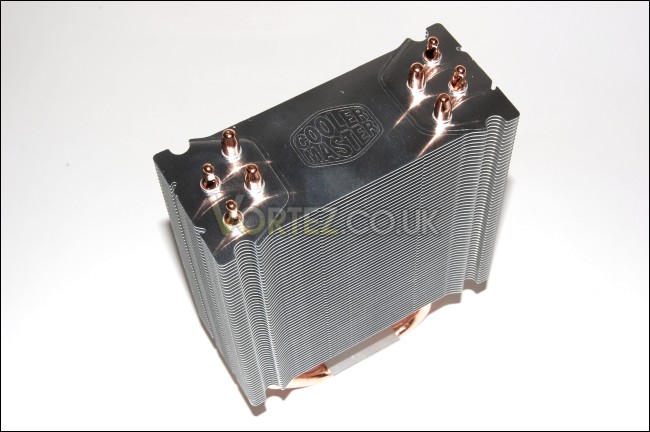
Here we have the heatsink itself. It is surprisingly compact despite the tower design. In terms of the height and width, it is comparable to the Noctua NH-U12P but the Cooler Master Hyper 212 Plus is much narrower. On the side, you can see the 4 grooves to attach the 4 wire clips helping support up to 2 fans.
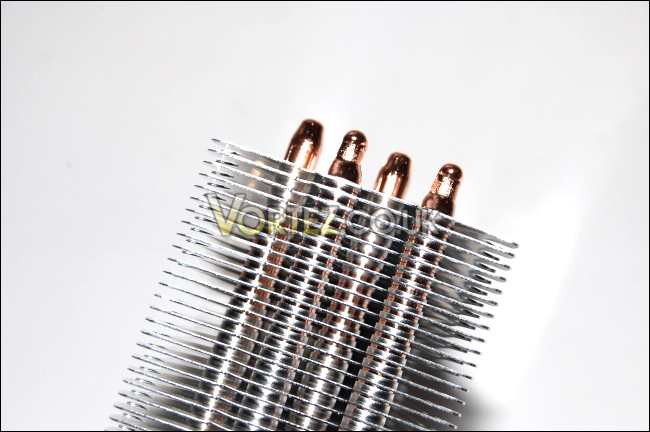
The 56 fins are spaced very closely for a greater heat dissipation surface area. Because of the fan has been designed to handle high air pressure to push air without impedance.
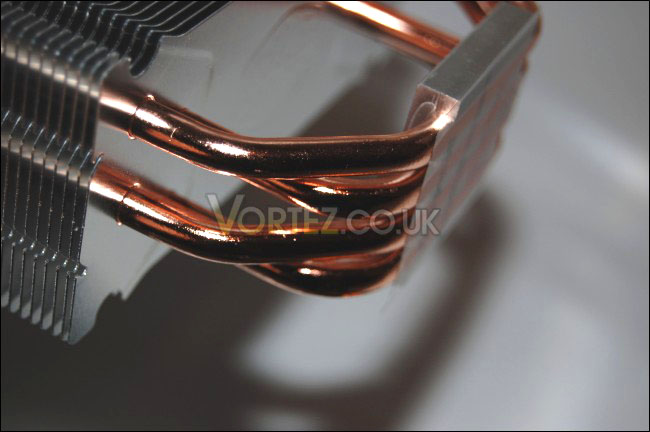
The U-shaped heat pipe design is a more typical approach with coolers these days and since it works very well, Cooler Master employed this method. They have a pair of heat pipes running parallel on each side, using the surface space more effectively.
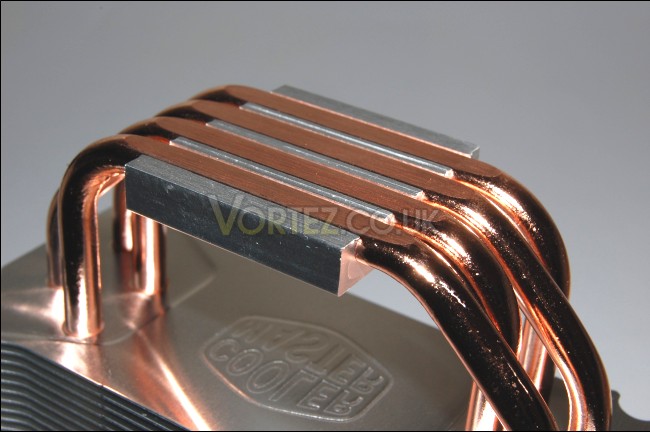
The size of the base is approximately the same as an i7 chip, which aren’t small by any means. Therefore, the base will cover any CPU fully for maximum heat transfer. To capitalize on this, the heat pipes are exposed to comes into direct contact with the CPU. This is becoming a very popular design and for good reason. The base has a flat finish with no gap between the heat pipe and the aluminium block. Because of the Direct Touch feature, the base remains small height wise.
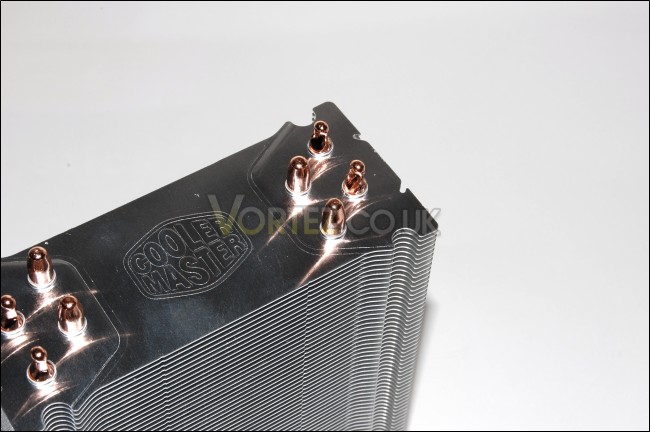
The heat pipes are spread out evenly on the surface to dissipate as much heat as possible. The Cooler Master logo is engraved at the top as a finishing touch.
Installation
This retention bracket is a very cleverly designed little thing. Coolermaster’s innovative touches comes to light here seeing as how the bracket brings the cooler support to all socket types. In the middle, the two arms pivot around a central screw and the inner circular rim has 3 notches into which the arms click into. The three notches ensures that the arms of the bracket are not loose when positioned for the appropriate mounting setup. At the end of each arms are three holes, into which the screws can be positioned. All that needs to be done is to lift the spring loaded screw and slide it across. This makes installation a very easy task.
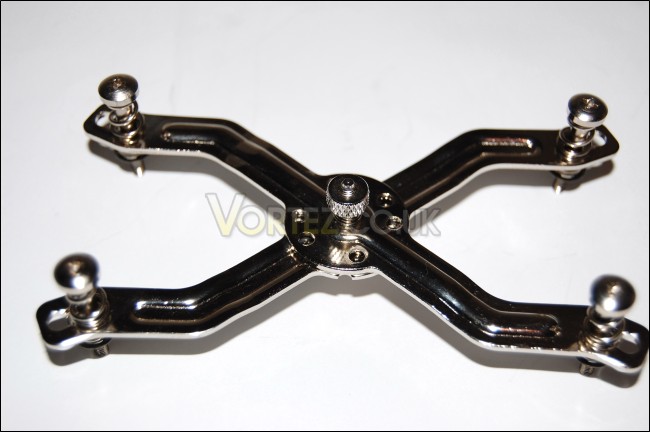
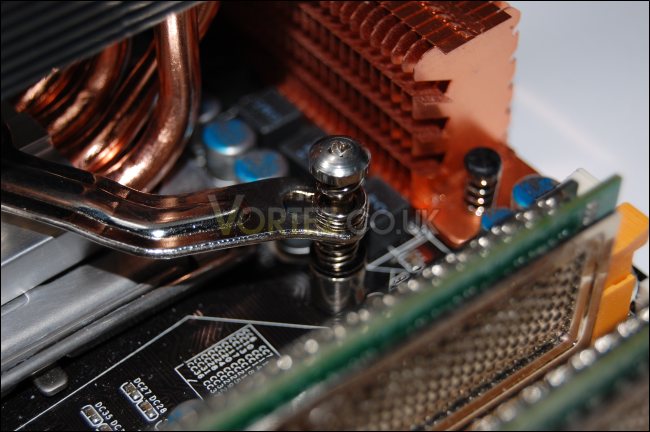
To mount the cooler, the stand-offs have to be placed into mounting holes from the top and these should also go through the back plate at the bottom of the motherboard. To secure them, simply use the nuts provided. The back plate has several mounting holes for different setups yet again. Once this done, just place the retention bracket through the cooler and screw the arms into the stand offs.
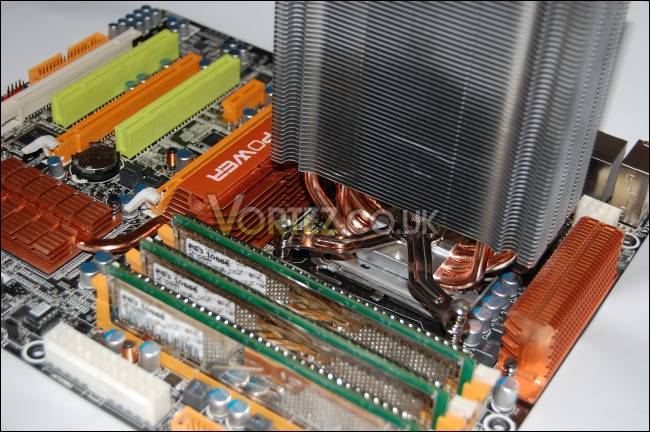
The mounting is very secure and doesn’t require too much effort to install. It’s also good to see cheaper solutions using the back plate method rather than the flimsy push pin method.
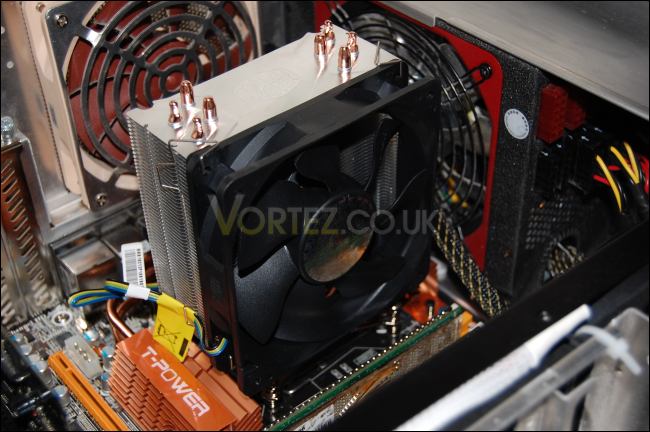
Another clever touch is the way the wire clips are used to hold the fans. Notice the two notches on the otherwise straight wire clip, these can be used as handles to secure the clip into the heatsink grooves. Highly convenient and much easier to install than with other CPU coolers.
Testing
Test Setup
CPU – Intel Core i7 920 – 4.0ghz
RAM – 6GB (3x2GB) OCZ platinum DDR3 1333mhz
Motherboard – Biostar T-Power x58
Graphics card – Gainward 896MB GTX260 216
Power Supply – Enermax Revolution 85+ 850W
Hard Drive – Samsung F1 320GB
Western Digital Caviar WD3200AAKS 320GB
Drivers – ForceWare 185.66
CPU Coolers
Noctua NH-U12P SE1366
Thermolab Baram (with 2 Noctua NF-P12 fans)
CoolIT Domino A.L.C
Sunbeam Core Contact Freezer
Coolermaster Hyper 212 Plus including test with 2 Noctua NF-P12 fans
Program Suite
Core Temp 0.99.5
LinX stress Test
PC Wizard
How I tested
Testing will be based on temperatures recorded by Coretemp and PC wizard after 20 passes of LinX stress test. The absolute temperatures recorded in the tables are averages of the 4 cores and the delta value provided for a fair comparison, taking into account ambient temperatures. The test will be run at stock speed and at an overclocked speed of 4ghz.
Results
Stock Performance
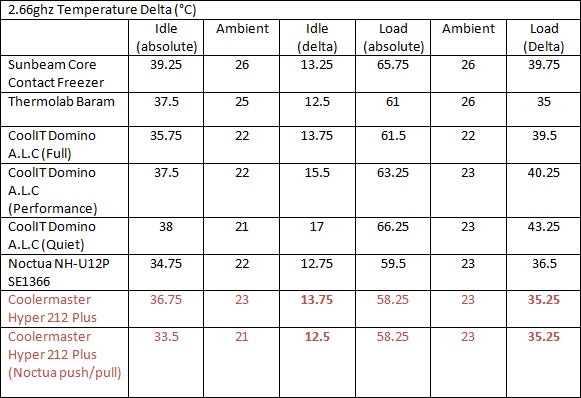
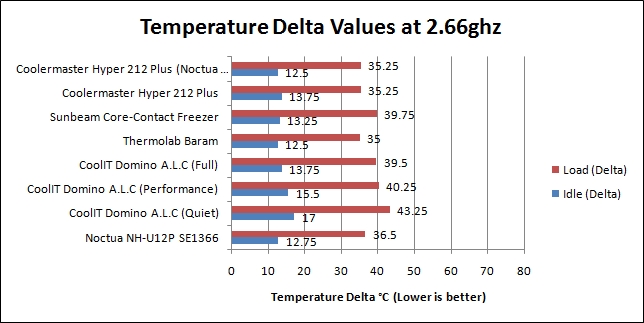
The Cooler Master performs surprisingly well here, besting the Noctua NH-U12P despite the smaller sized heatsink. The 4 heat pipes and Direct Touch technology handles the i7 very well at both idle and load. The similar Sunbeam Core Contact Freezer lagged behind the Hyper 212 Plus by over 4 degrees here, showing exactly how well Cooler Master have designed their cooler. When we compare the push/pull setup against the stock fan, we can appreciate just how good the stock 2000rpm Cooler Master fan is. While the 2 Noctua fans may be quieter rotating at only 1300-1400rpm, they are considerably more expensive for little or no gain. Another Cooler Master fan attached for a push/pull setup may have improved results further but this was not available for testing. If anything, the specifications listed for the Coolermaster fan look accurate. Even at idle, the PWM fan keeps the CPU very cool while running at a lower 1000rpm
Overclocked Performance
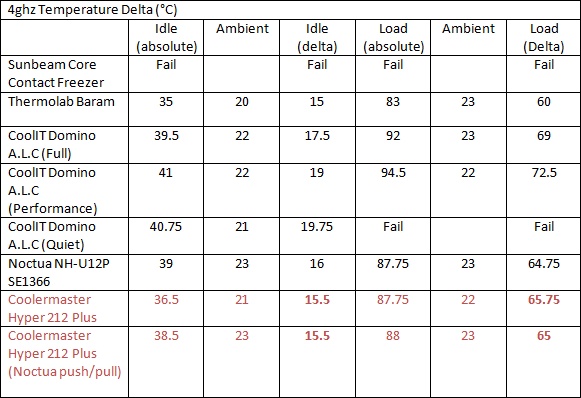

Let me start by saying that this CPU cooler is aimed at budget consumers but we all know that getting the best bang for your buck is one thing that’s on every price conscious person’s mind. Therefore looking at the results, we can appreciate the tremendous job Cooler Master have done in creating a cooler that performs nearly on par with the much more expensive and high end Noctua NH-U12P cooler. At 4ghz, the size of the Hyper 212 Plus does become its limiting factor, losing the lead it had over the Noctua at stock speeds. Under idle conditions, it lags a mere 0.5 degrees behind the leading Thermolab Baram and under load, this lag extends to 5.75 degrees, 1 degree behind the Noctua NH-U12P. When comparing the stock fan with the 2 Noctua fan setup, the results are remarkably close, and certainly doesn’t warrant buying 2 fans to replace the stock one.
Noise
For a 2000rpm fan, it was not intrusive at all and matched the noise levels of the scythe s-flex case fans. Unlike the Sunbeam Core Contact Freezer’s fan, it did not have a whining noise at full speed. Cooler Master is able to achieve this with their curved fan blade design that sports excellent airflow as well as high air pressure specifically for restricted conditions such as heatsinks.
Conclusion
Normally when I get a product to test, I get a first impression and with the Cooler Master, I held my reservations due to its surprisingly compact size. Upon looking more closely at the Direct Touch technology and the fan, I still was not sure as to whether this cooler would really handle an overclocked i7 but after testing it, I\\\’m glad to say that my initial thoughts were completely wrong! From the results, it is very clear that the Cooler Master Hyper 212 Plus is a winner in its class. In fact, it was competing very closely with the Noctua NH-U12P with the best thing being that it only costs a fraction of the other coolers on test.For the consumer on a tight budget, not only will they be getting a good cooler, but they will be able to overclock their i7 to an impressive 4ghz with no problems at all. Now you may be thinking that someone buying an i7 setup will mostly likely not be in a position where they will be scraping the bottom of the barrel for a few pennies to spend on a cooler. And you may be right, but the fantastic feature of the Cooler Master Hyper 212 Plus is that it will work on any setup including the all new Lynnfield socket LGA1156!
Pros:
• Excellent cooling performance
• Stock PWM fan performs quietly and effectively
• Costs under £20
• Direct Touch feature
• Compact to fit in any case
• Compatibility with all popular socket types including LGA1156
• Option for 2 fans
Cons:
• Not the best cooler (harsh seeing as it\\\’s priced so much lower than the other but I couldn\\\’t think of anything else wrong with it!)
I was thoroughly impressed by Cooler Master\\\’s offering and as such the Hyper 212 Plus deserves the Vortez Hardware Silver Award.

