







Cooler Master have sent us the Hyper TX3 CPU cooler for review. It looks the part so lets see how it performs!
Product on Review: Hyper TX3
Manufacturer: Cooler Master
Street Price: around £15

Cooler Master have provided their new Hyper TX3 for review.
Over the years they’ve provided some nicely priced, decent performing cooling solutions ranging from air cooling to water cooling. Along the way we’ve seen some very interesting and imposing designs including monsters like the GeminII and V12.
Here’s a little about the company:
Cooler Master was founded with the mission of providing the industry’s best thermal solutions. Since its establishment a decade ago, the company has remained faithful to this mission, emerging as a world leader in products and services for companies dealing with devices where heat issues must be resolved.
In pursuing this mission, Cooler Master is absolutely committed to delivering solutions that precisely meet customer requirements for features, performance, and quality. Moreover, we strive to be a reliable long-term partner for our customers that they can truly depend on. It aims to be the first and foremost name that comes to mind for companies around the world seeking thermal solutions, and seeks to build such a reputation through outstanding technology, sophisticated design, and superior service.
Cooler Master’s current business encompasses a comprehensive lineup of thermal solutions for a full range of applications. Its products range from heat sinks and fans to component housing, chassis, and ducting for computers, industrial machinery, telecommunications equipment, and many other devices.
A critical component of Cooler Master’s ability to successfully pursue its mission is an unstinting commitment to quality, as demonstrated by the ISO 9001 certification granted to its main manufacturing plant in Taiwan. It has also enforced ISO guidelines and is in the process of applying for ISO 9002 certification at its second and third plants, located in China. Cooler Master has also implemented a number of analytical and testing protocols to ensure top quality, including at subcontractors, to further ensure thorough quality control. Moreover, Cooler Master’s dedication to quality extends beyond manufacturing to every aspect of its operation, including service.
Cooler Master strives on providing innovative and speed with their products whilst maintaining a level of customer satisfaction above that of its competition.
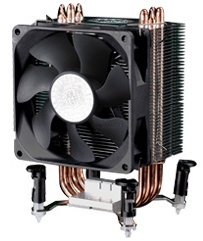
The Hyper TX3 is not one of the larger Cooler Master designs but it does tick one of their most important ‘feature’ boxes by being incredibly affordable.
Let’s take a closer look!
Specifications
The Hyper TX3 offers Direct Contact heat-pipes which Cooler Master state is their original design. Add to this the broad list of CPU compatibility and nice price and it looks like a winning combination.
Full details are below:
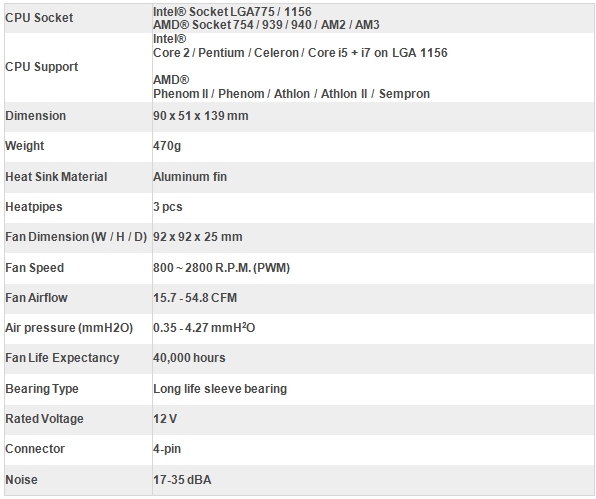
Also, the ability to add an extra fan to the mix using the supplied additional fan brackets should hopefully increase cooling performance too.
Packaging and cooler
The Hyper TX3 is supplied in a simply styled formed plastic pack. As well as including useful additional information the lower section of the packaging contains the box carrying all additional accessories.
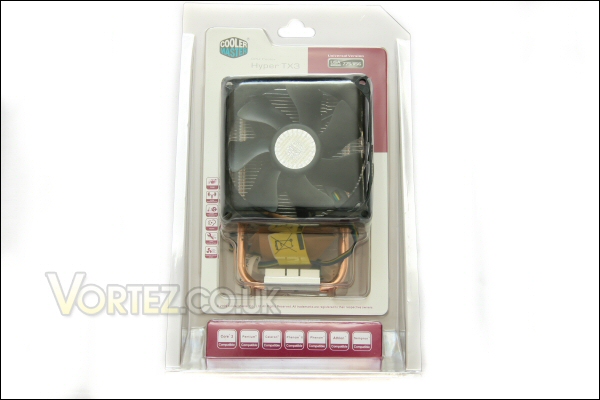
Box front.
The rear of the packaging is quite sparse providing a simple view of the tightly packed aluminium fin array.
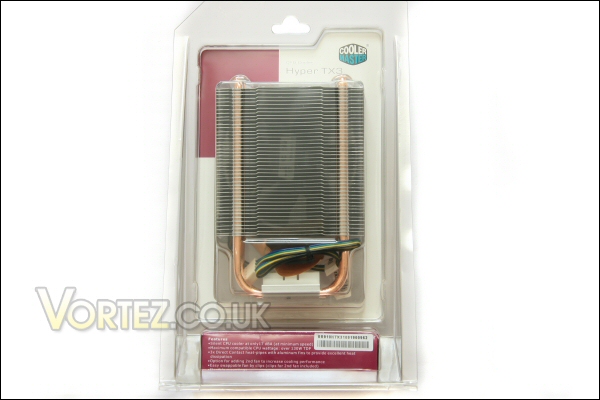
Box rear.
Upon opening we find the following:
Instruction and warranty documentation
Cooler Master branded thermal paste
4x fan brackets
AMD and Intel socket mounts
Screws needed to secure the Intel pin assembly to the TX3
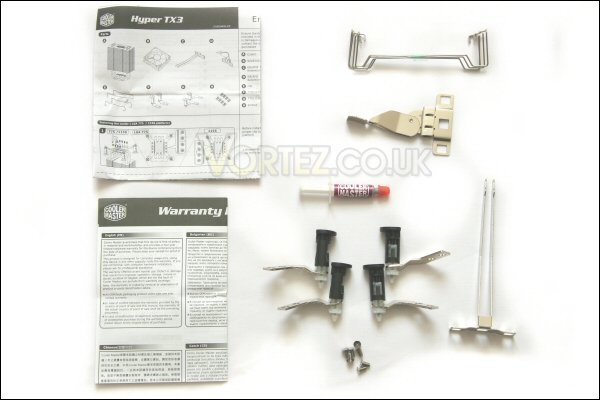
Bundled extras.
The supplied fan is a 92mm PWM model rated to run from 800rpm to 2800rpm and has a non-standard curved and slightly flared blade design.
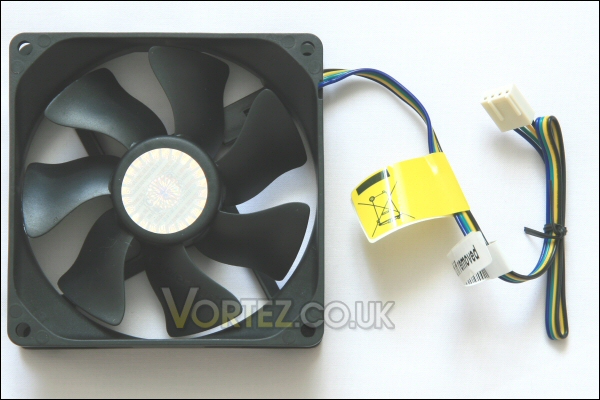
Fan front.
Turning the fan over we can see that Cooler Master have chosen to physically attach silicone pads to the corners of the unit. Once mounted this should provide some damping and decoupling properties which should help keep vibration noise to a minimum.
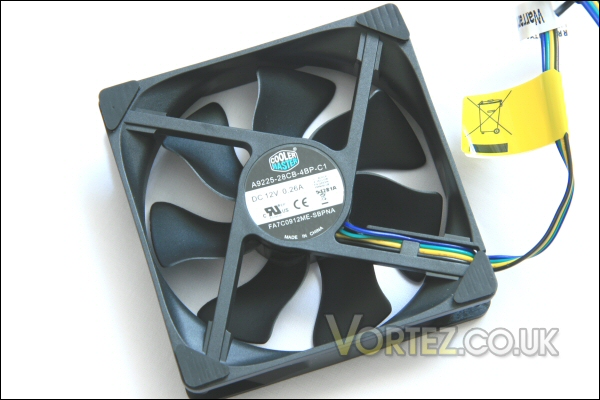
Silicone pads are evident on the rear of the Hyper’s fan.
Cooler continued
Now we can look at the heatsink itself. It’s a triple heatpipe tower design with densely packed aluminium fins.
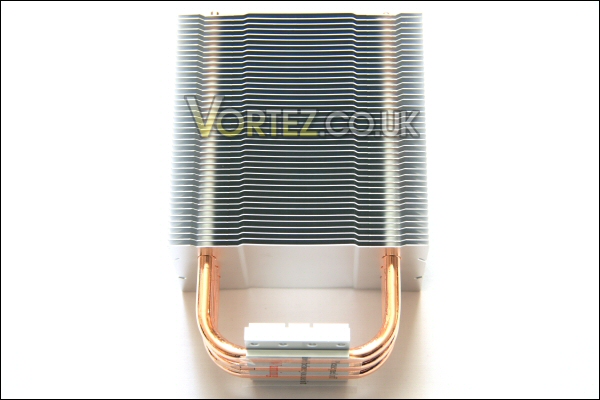
The Hyper TX3 itself.
As you can see the top of the heatsink carries a stamped impression of Cooler Masters own brand logo. Here you can also see the three heatpipes protruding through the top of the TX3.
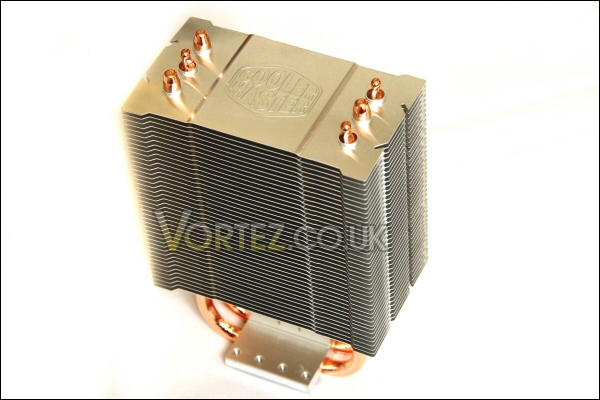
The all important branding.
The base comes with a protective plastic cover fitted. This should avoid any scratches during transit and handling whilst also stopping any unwanted contact with the base before thermal paste application and heatsink install.
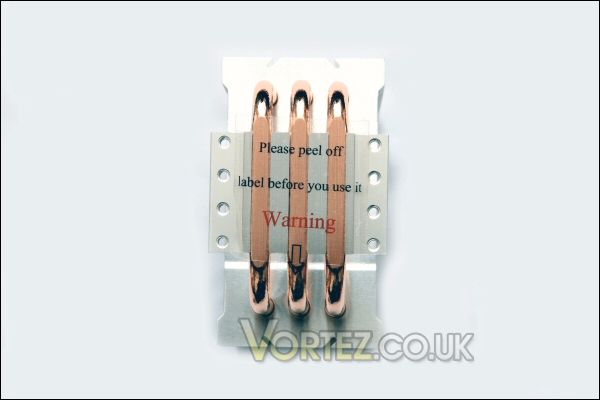
A carefully protected base.
Once removed you can clearly see the three heat-pipes – there are machining marks over the entire surface and some deep crevices where the heat-pipes meet the aluminium base itself. Hopefully this shouldn’t effect performance but we’ll see what happens during testing. What i can say is that the base is flat so should provide good contact over the majority of the surface.
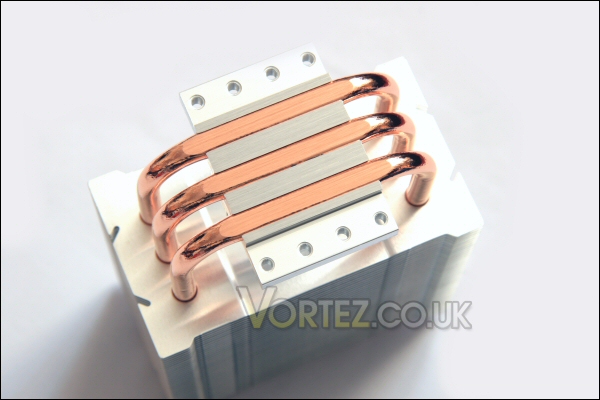
The direct contact heat-pipes.
Mounting parts and installation
The Hyper TX3 is a very flexible design when it comes to socket mounting. With the exception of the very large i7 LGA1336 socket type from Intel all modern desktop chip types are covered by this cooler.
The base itself is a simple affair with a square channel cut out to make a free orientation design when mounting onto AMD sockets.
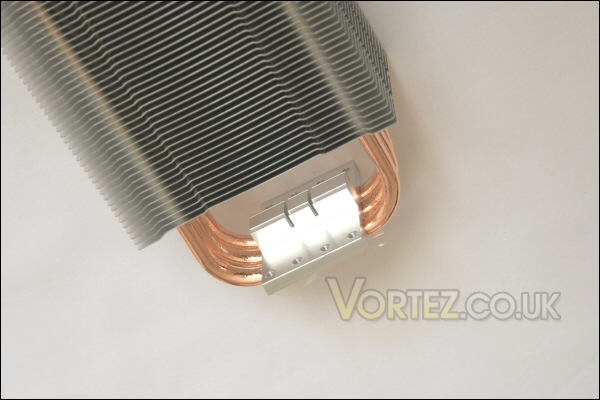
The simply designed base of the Hyper TX3.
With the bracket in place you can see it would be a simple job to install onto an AMD board in whatever orientation you desire.
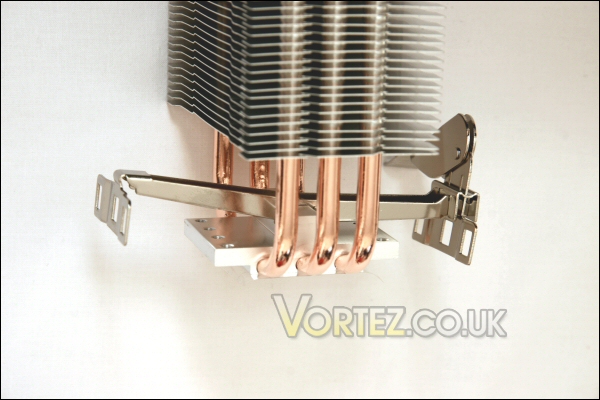
AMD retention bracket in place.
LGA775 and LGA1156 installation is a touch more involved. For each socket Cooler Master have included an aligned screw hole in the supplied ‘Intel push pin’ brackets. Screw it on using the correct hole and you’re good to go – these are being used on an LGA1156 so they’re screwed in on the broadest layout.
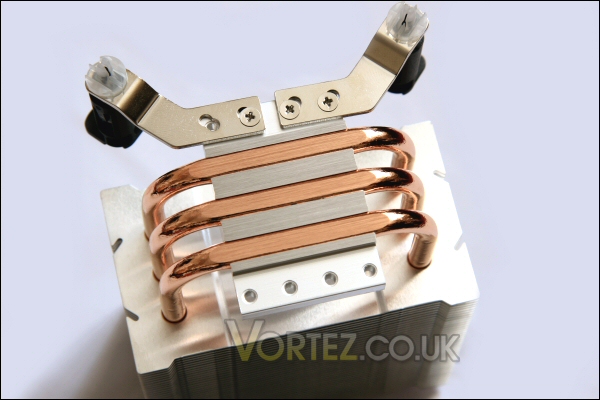
Simply screw the push pin mounts in place.
Fan mounting is equally straight forward – the simple but well designed bracket allows straightforward installation. The silicone wedges really help to give a secure placement.
The image here shows the heatsink installed onto an ASUS Maximus III Gene i5 LGA1156 motherboard.
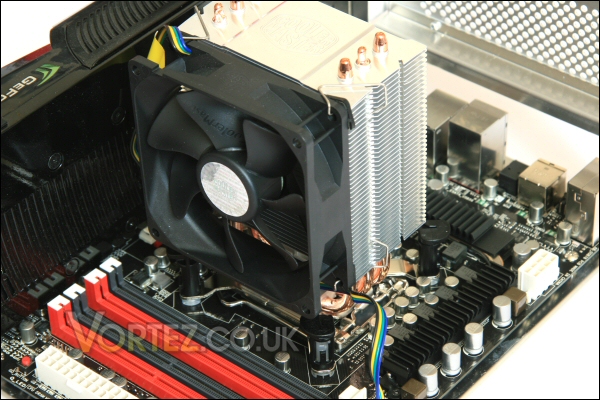
The Hyper TX3 in place.
Although not ideal (i prefer bolt through installs to give the best possible contact) i found the push pin installation perfectly acceptable and very secure. I also installed onto an AM2 motherboard with no issues. Very impressed.
Test setup
CPU: e6600
RAM: 4gb Geil PC6400 C4 DDR2
Motherboard: Gigabyte G33 Micro ATX
HDD: 250gb WD 7200rpm SATA HDD
Optical drive: LG Bluray/HDDVD Multidrive
PSU: Hiper Type-R 580w
Case: Lian Li V350
Additional testing on Intels new i5 hardware using the following equipment:
CPU: Core i5-750
RAM: 4gb Kingston HyperX DDR3
Motherboard: Asus Maximus III Gene
Only done to see how well the TX3 cooled a new ‘performance’ chip type. No other coolers were used with this since i had no other compatible coolers available.
Coolers
Intel stock cooler
Akasa AK-956SF
Akasa AK-965
Cooler Master Hyper TX3
Testing
OCCT was used in all instances to test the temperature performance of all coolers here.
The ambient temperature was a fairly constant 20c. I tested idle and load temperatures across all cores (2 for the e6600 and 4 in the case of the i5 750) after the temperatures had stabilised at a constant value.
On the Core i5 rig i also included dual fan temperatures for the Hyper TX3 with an additional 92mm Coolink SWiF2 model running at 1500rpm.
Results
Overall the performance at stock seemed very good to me.
It was also quiet during operation too – the PWM fan doing a good job of throttling when not needed.
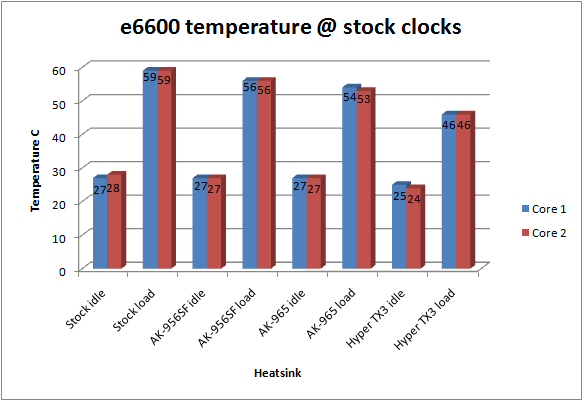
e6600 @ stock.
Overclocked the story was much the same with the Hyper TX3 returning much better temperatures than the similarly priced opposition.
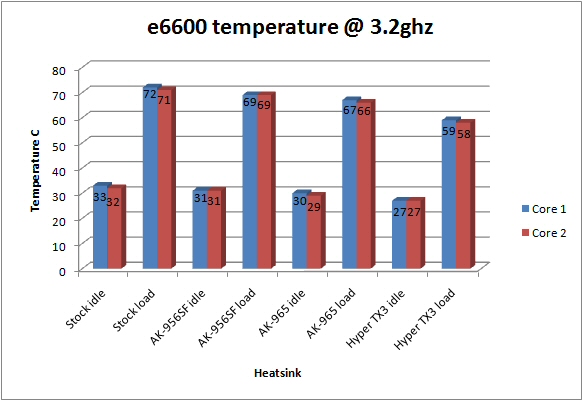
e6600 overclocked.
Moving on to the Core i5 PC i continued to be impressed by the performance on offer form such a low priced heatsink.
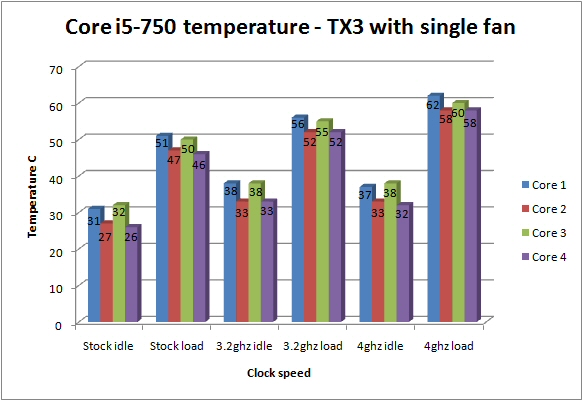
Hyper TX3 with a single fan.
Great temperatures across the board… even at 4ghz!
Doubling up the fan duties the performance increase was quite surprising. Roughly a 5c drop across the board meaning the Core-i5 750 @ 4ghz sat below 60c at full load.
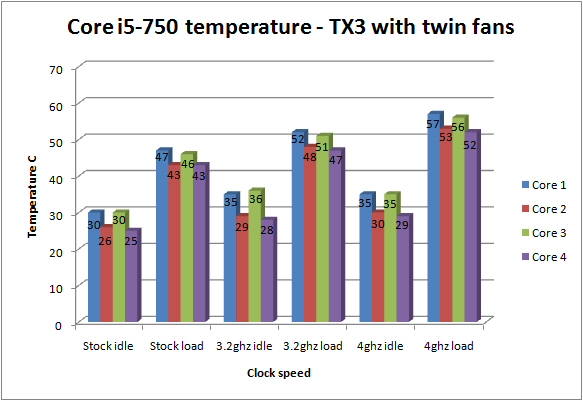
Hyper TX3 with dual fans.
Conclusion
Well i\\\’ve been very nicely surprised by the performance delivered by the Hyper TX3 here.I would not have expected a sub £15 part to offer the cooling performance the graphs show.
The Cooler Master Hyper TX3.
There\\\’s virtually nothing i can complain about. It\\\’s quiet running, incredibly affordable, nice looking, fairly compact, surprisingly capable and well specified.
Pros
+ Compatible with all current sockets apart from LGA 1366
+ Very competitively priced
+ Exceptional performance for the price
+ Dual fan brackets
+ Quiet running
+ Easy to install
+ 2 Year Warranty
Cons
– A bolt through kit (might improve performance but may also effect price)
To conclude… i love it and feel it thoroughly deserves the Gold award i present it with!
Vortez Hardware would like to thank Cooler Master for supplying the Hyper TX3 CPU cooler for review. Discuss this review on our forums.


