Cooler Master are well-respected within the PC industry so when they claim this is their new leading fan, you sit up and listen. Let’s see what the MasterFan SF120M is all about.

Product on Review: Cooler Master MasterFan SF120M
Manufacturer: Cooler Master
Street Price: GBP £24.99 / USD $24.99
Based in Taiwan, Cooler Master are a computer hardware manufacturer who specialise in cases, power supplies, cooling equipment and peripherals. Since they were founded in 1992, they’ve gone from strength to strength to be one of the most trusted brands in the industry.
Cooler Master’s portfolio of fans is nothing short of enormous, and today we look at their latest addition which they claim is their best yet, the MasterFan SF120M. This fan is aimed towards absolute performance with less focus on the appearance and a total omission of RGB lighting.
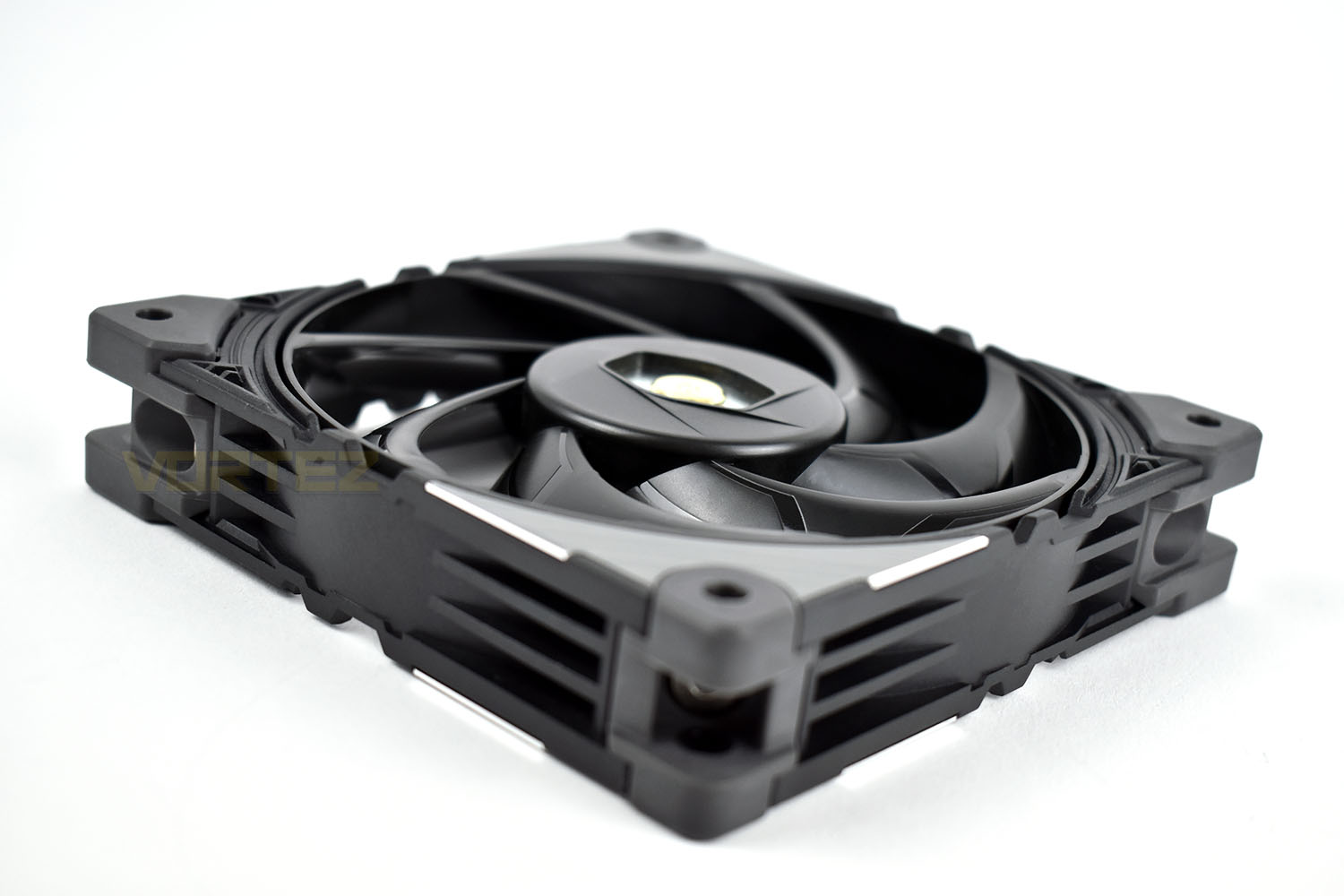
To produce their best fan yet, Cooler Master have invested time and effort into the tiny optimisations required for such a feat. Things like a connected fan blade design, anti-vibration motor and pads, an integrated 3-speed fan control and double ball-bearings.
Priced at £24.99 in the UK and $24.99 in the US, with equivalent prices elsewhere, the SF120M goes toe-to-toe with the best, including Noctua’s NF-A12x25 and Corsair’s ML120 Pro RGB, so it’s going to need to perform well, let’s hope Cooler Master’s work has paid off.
Cooler Master on the MasterFan SF120M:
MasterFan SF120M is an innovation leading fan from Cooler Master that comes with patented anti-vibration motor and damping frame design. The performance, stability, and durability of this fan comes from the industrial grade materials used during the production process. The double ball-bearing reduces the rotational friction for enhanced performance and longevity of the fan. Premium metallic shields are integrated into the fan frame for an industrial grade toughness to the fan. Along with multi-fan connection design and fan speed control, the SF120M is the obvious choice for performance and durability.
Technical Specifications
PRODUCT NUMBER: MFZ-B2NN-20NPK-R1
DIMENSIONS (L X W X H): 120 x 120 x 25 mm / 4.7 x 4.7 x 1 inch
FAN BEARING TYPE: Dual Ball Bearing
FAN MTTF: 280,000 Hours
FAN POWER CONNECTOR: 4-Pin (PWM)
FAN RATED VOLTAGE: 12V DC
FAN RATED CURRENT: 0.12 A
FAN SAFETY CURRENT: 0.3A
FAN POWER CONSUMPTION: 1.44 W
FAN SPEED: H: 650-2000 RPM ± 10%, M: 650-1600 RPM ± 10%, L: 650-1200 RPM ± 10%
FAN AIRFLOW: H: 62 CFM (Max), M: 46 CFM (Max), L: 35 CFM (Max)
FAN AIR PRESSURE: H: 2.40mm (H2O (Max), M: 1.63mm (H2O (Max), L: 0.93mm (H2O (Max)
FAN NOISE LEVEL: H: 5.5-22 dBA, M: 5.5-20 dBA, L: 5.5-12 dBA
FAN WEIGHT: 205g / 0.45lbs
WARRANTY: 5 years
SERIES: MasterFan
COOLER TYPE: Case Fan
DIMENSIONS (L X W X H): 120 x 120 x 25 mm / 4.7 x 4.7 x 1 inch
FAN BEARING TYPE: Dual Ball Bearing
FAN MTTF: 280,000 Hours
FAN POWER CONNECTOR: 4-Pin (PWM)
FAN RATED VOLTAGE: 12V DC
FAN RATED CURRENT: 0.12 A
FAN SAFETY CURRENT: 0.3A
FAN POWER CONSUMPTION: 1.44 W
FAN SPEED: H: 650-2000 RPM ± 10%, M: 650-1600 RPM ± 10%, L: 650-1200 RPM ± 10%
FAN AIRFLOW: H: 62 CFM (Max), M: 46 CFM (Max), L: 35 CFM (Max)
FAN AIR PRESSURE: H: 2.40mm (H2O (Max), M: 1.63mm (H2O (Max), L: 0.93mm (H2O (Max)
FAN NOISE LEVEL: H: 5.5-22 dBA, M: 5.5-20 dBA, L: 5.5-12 dBA
FAN WEIGHT: 205g / 0.45lbs
WARRANTY: 5 years
SERIES: MasterFan
COOLER TYPE: Case Fan
Packaging & Bundle
Sporting Cooler Master’s typical colour scheme of black and purple, the MasterFan SF120M is encased in a long, shallow box. The front shows quite clearly what’s inside with the product’s title written underneath.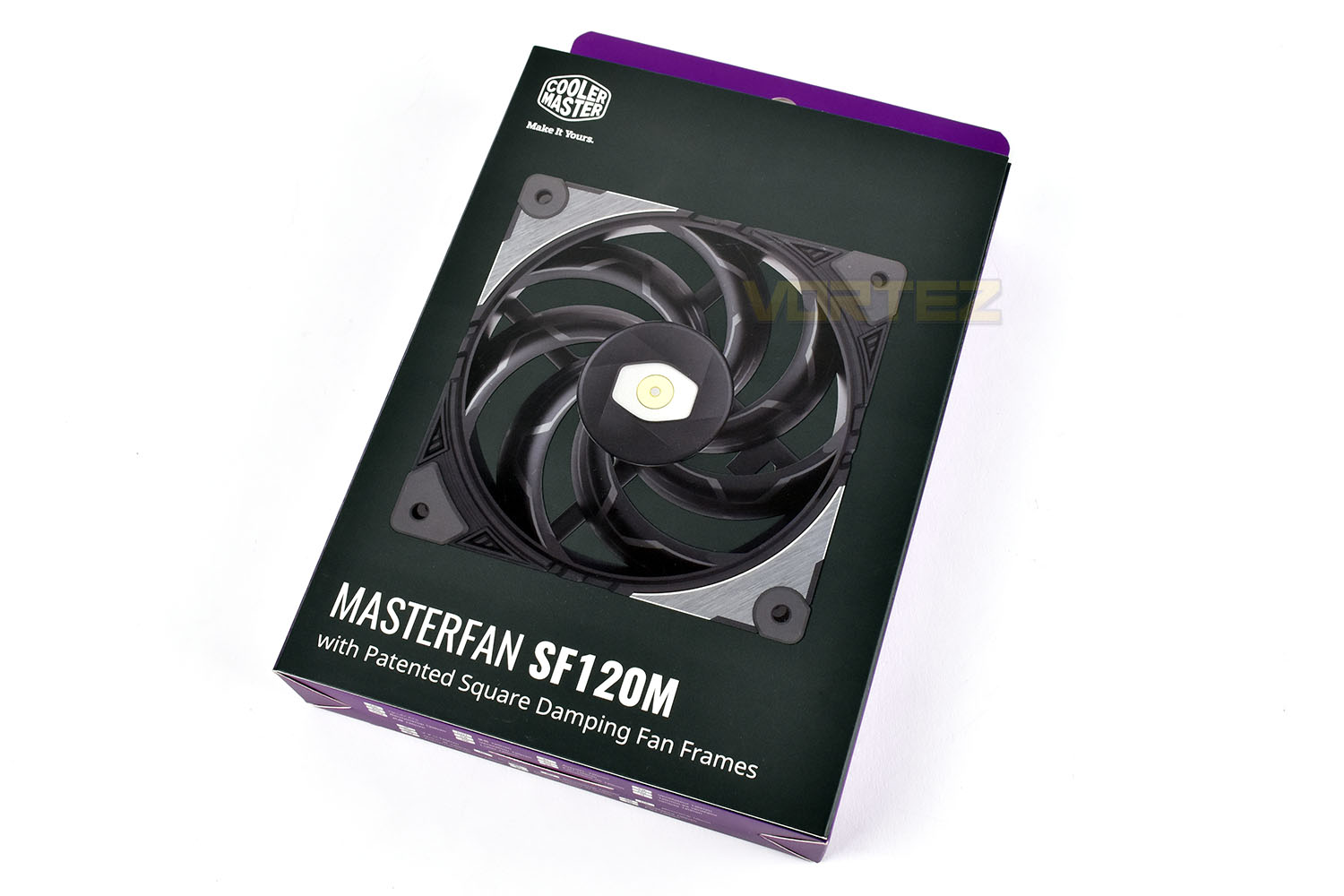
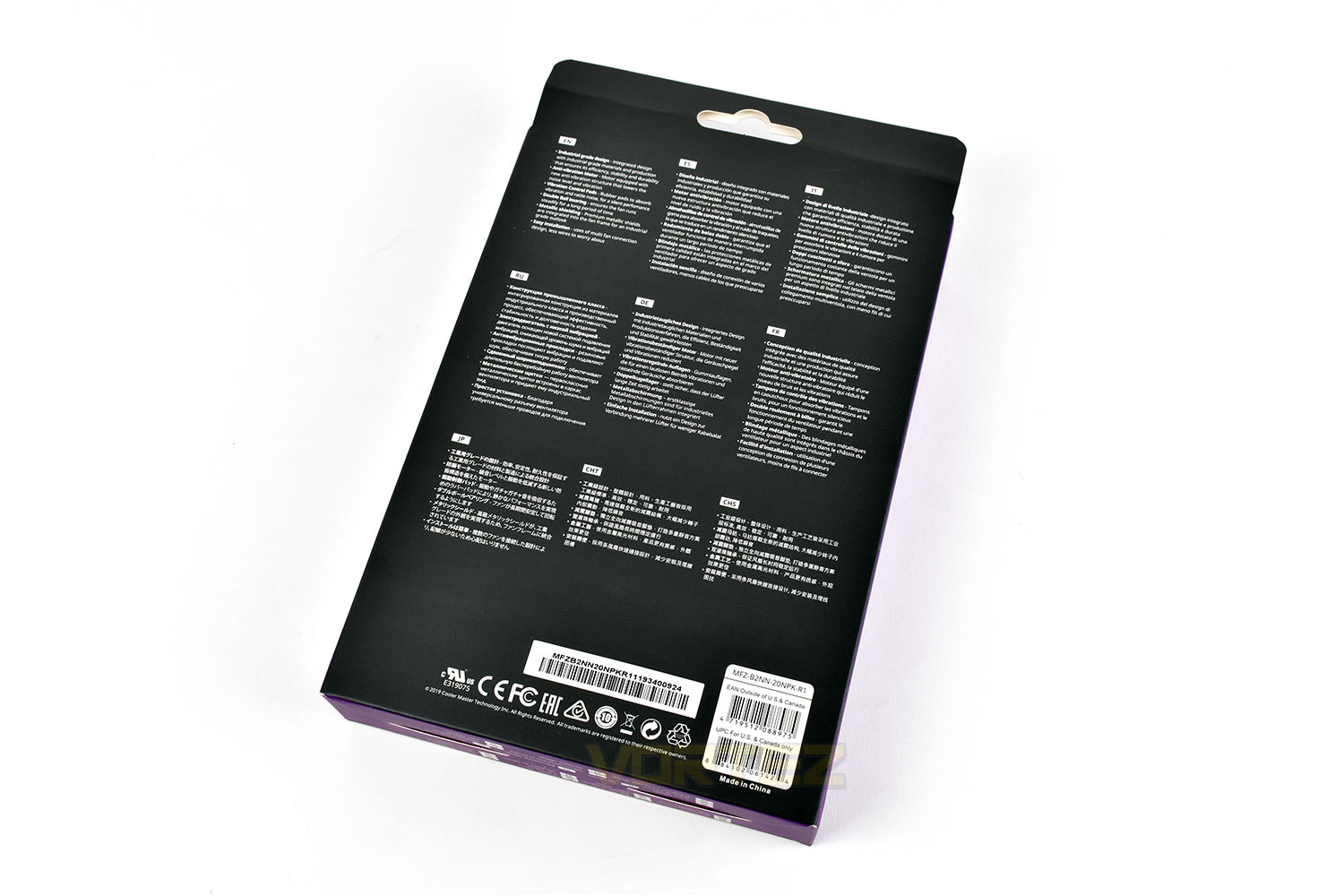
The reverse is a rather boring affair, as far as packaging goes, with only a multilingual summary of the fan’s features.
If you open the front ‘door’ of the packaging, you get a small glimpse at the fan and a much more in-depth description of the technology and specifications inside.
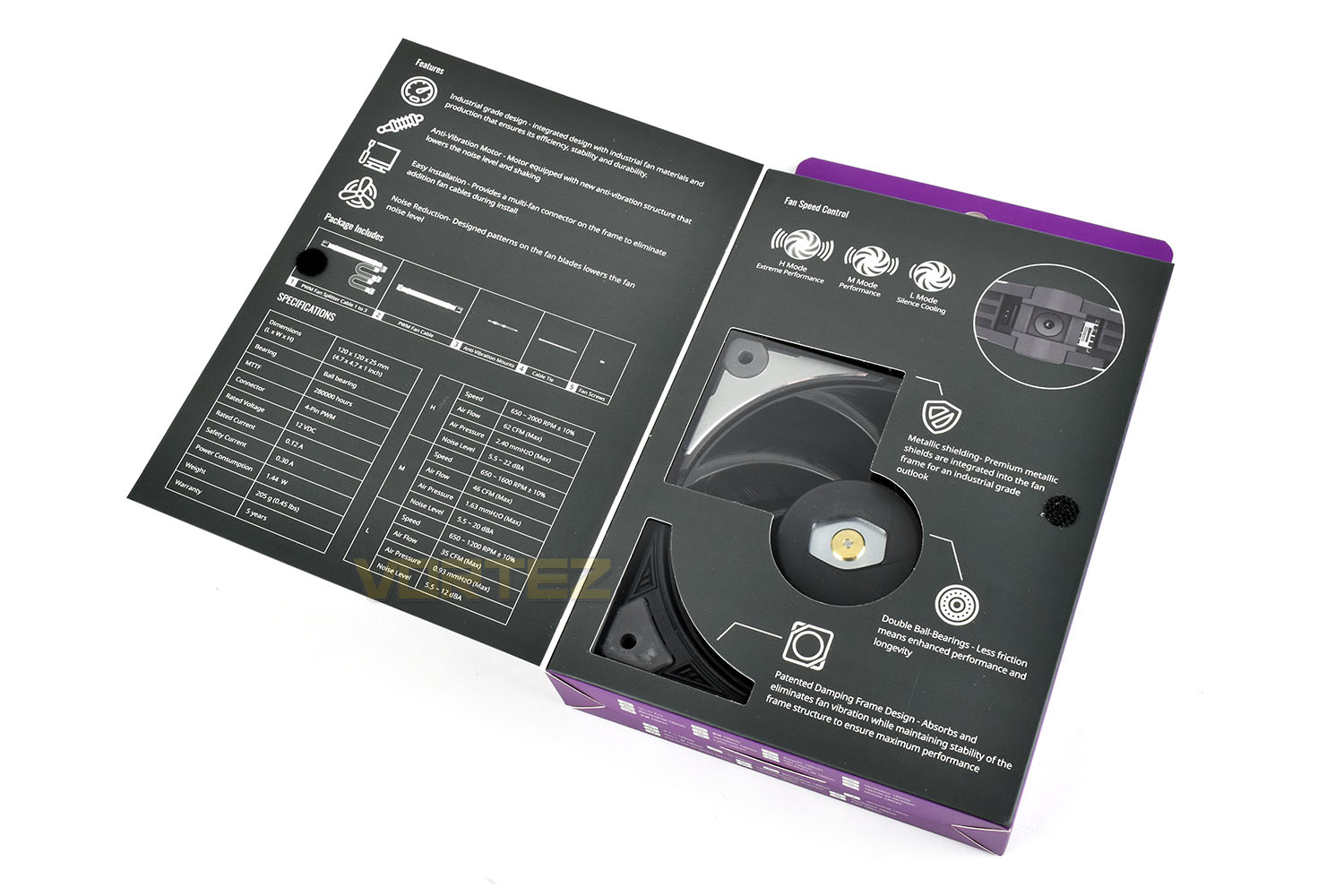
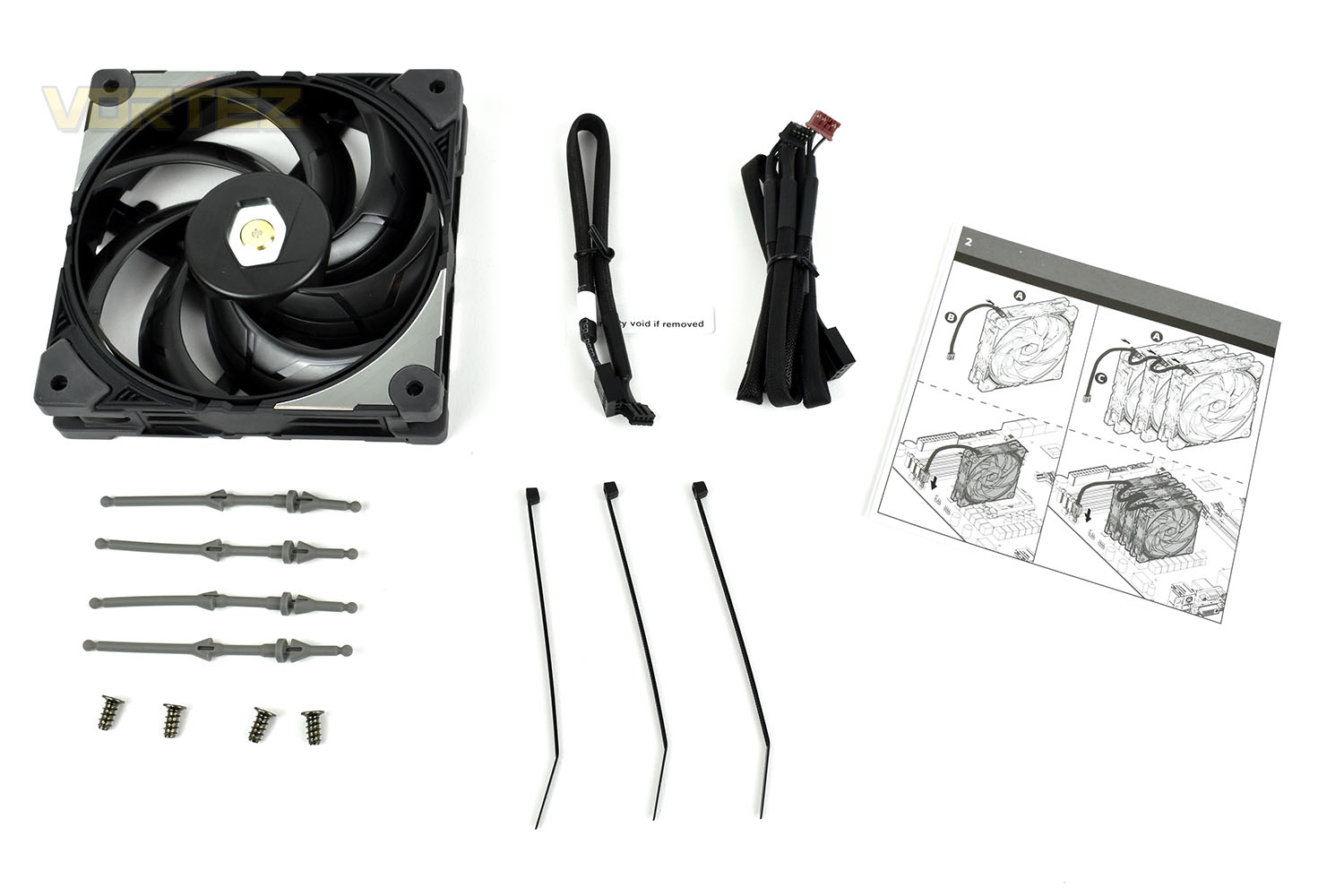
Laying out all of the included bits and pieces, there’s the 120mm SF120M case fan, 4 anti-vibration rubber fan mounts, 4 mounting screws, 3 cable ties, an instruction leaflet and a pair of cables. The two cables serve the same purpose, give or take. They’re both 4-pin PWM cables but if you’re using a single fan, or want to control them individually, the shorter cable is the one you’ll use. Whereas with the longer cable, you can daisy chain three of the fans together to help with cable routing and fan management.
Closer Look
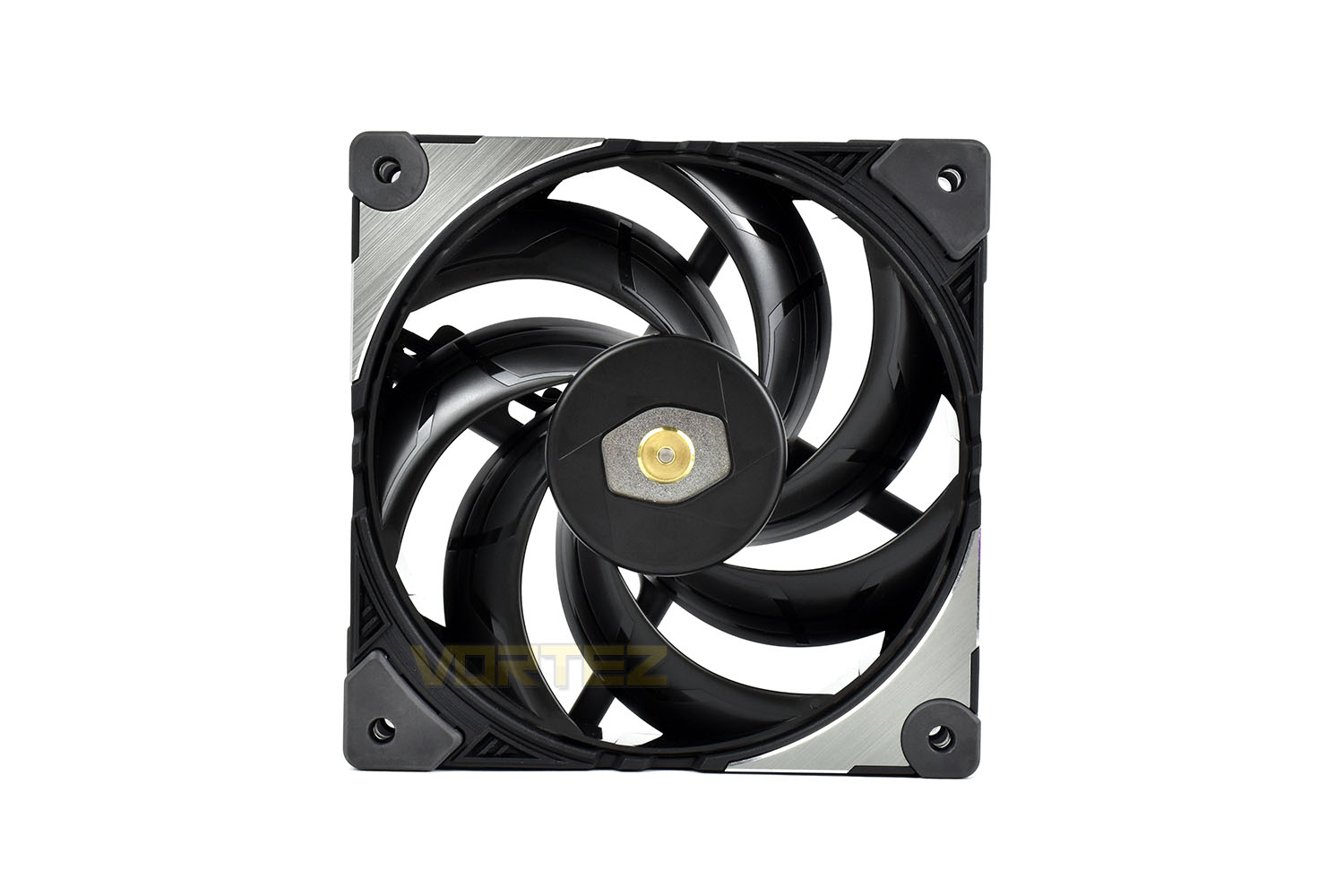
Unlike almost every fan on the market, the blades making up the impeller are interconnected at both ends. This manufacturing technique helps to stiffen the structure to prevent flexing, allowing tighter tolerances and in turn, reduced noise output and increased airflow. A win-win, you could say.The motor in the centre is strengthened by copper bushings and is suspended on a double ball-bearing system for increased longevity and reduced friction/noise. The motor has also been designed with an anti-vibration structure that further lowers noise.
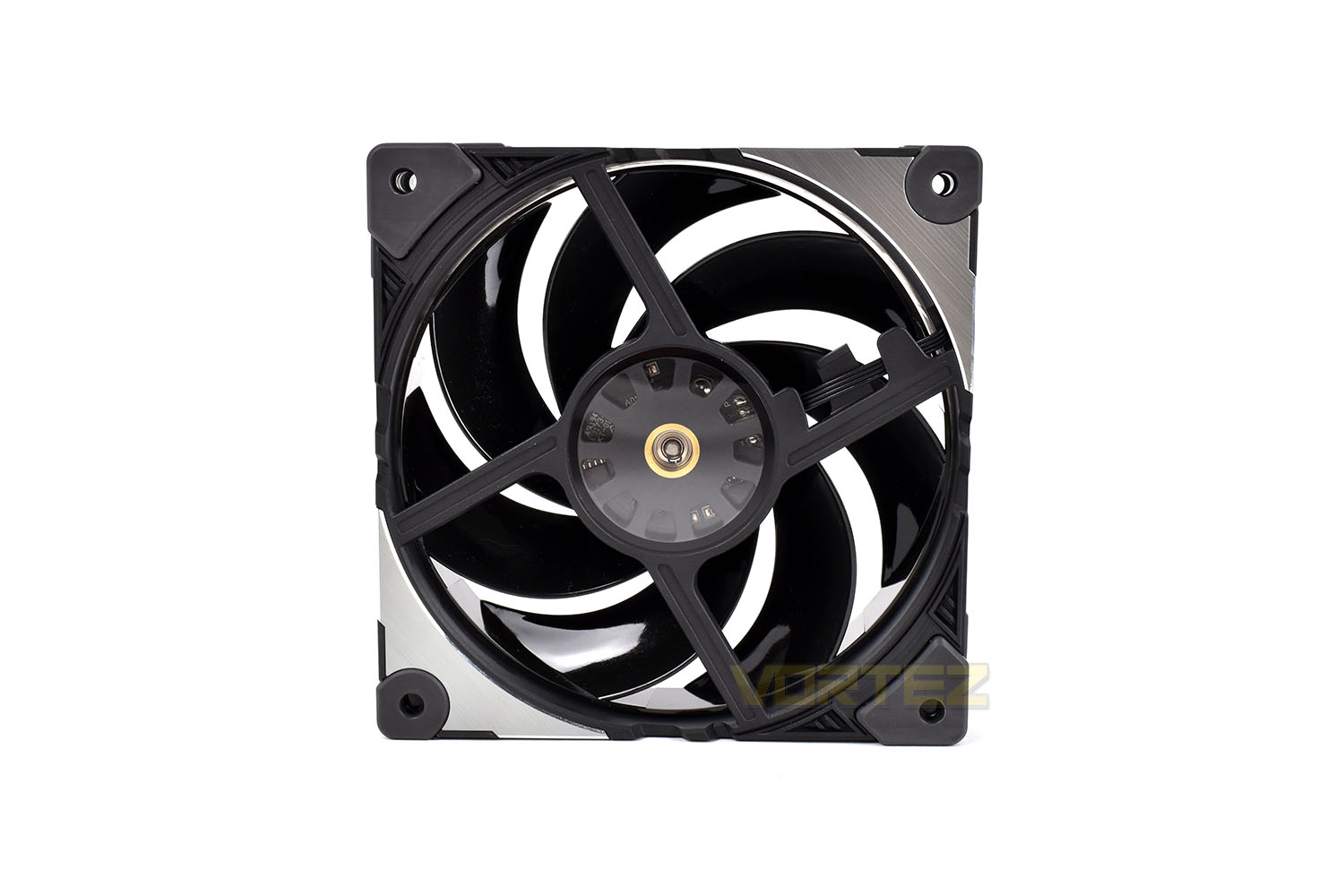
The outer structure has been stiffened substantially with the use of robust plastics and metallic segments for an industrial grade toughness. That same stiffness would also work against the fan by transmitting noise directly into the chassis or cooler onto which it’s mounted, so to combat that, Cooler Master have equipped the SF120M with rubber damping on each corner.
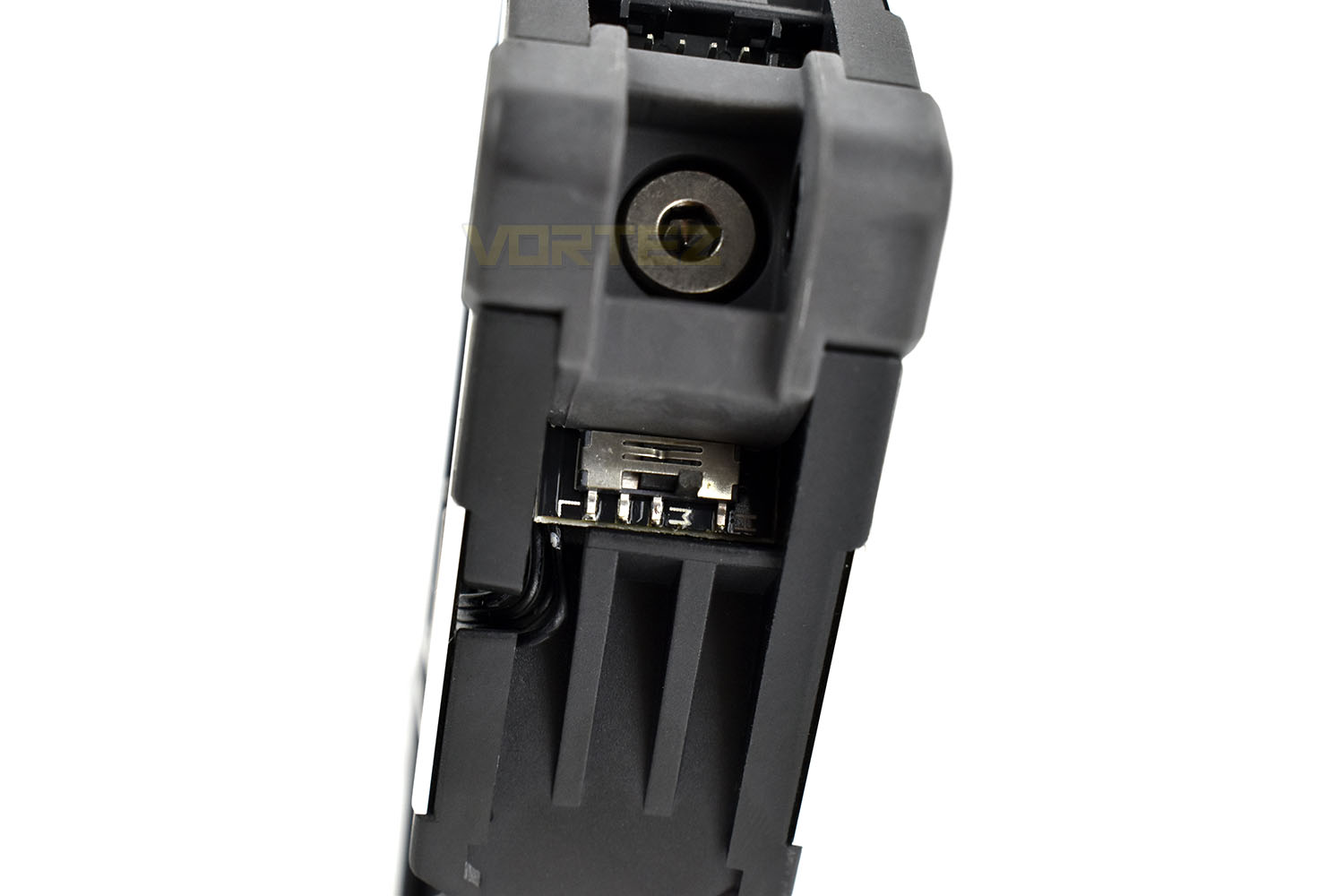
Another rather unique feature, is the ability to choose the operating range of the fan. There’s a 3-way toggle switch that alters the performance characteristics of the fan.
H – 650 – 2000RPM
M – 650 – 1600RPM
L – 650 – 1200RPM
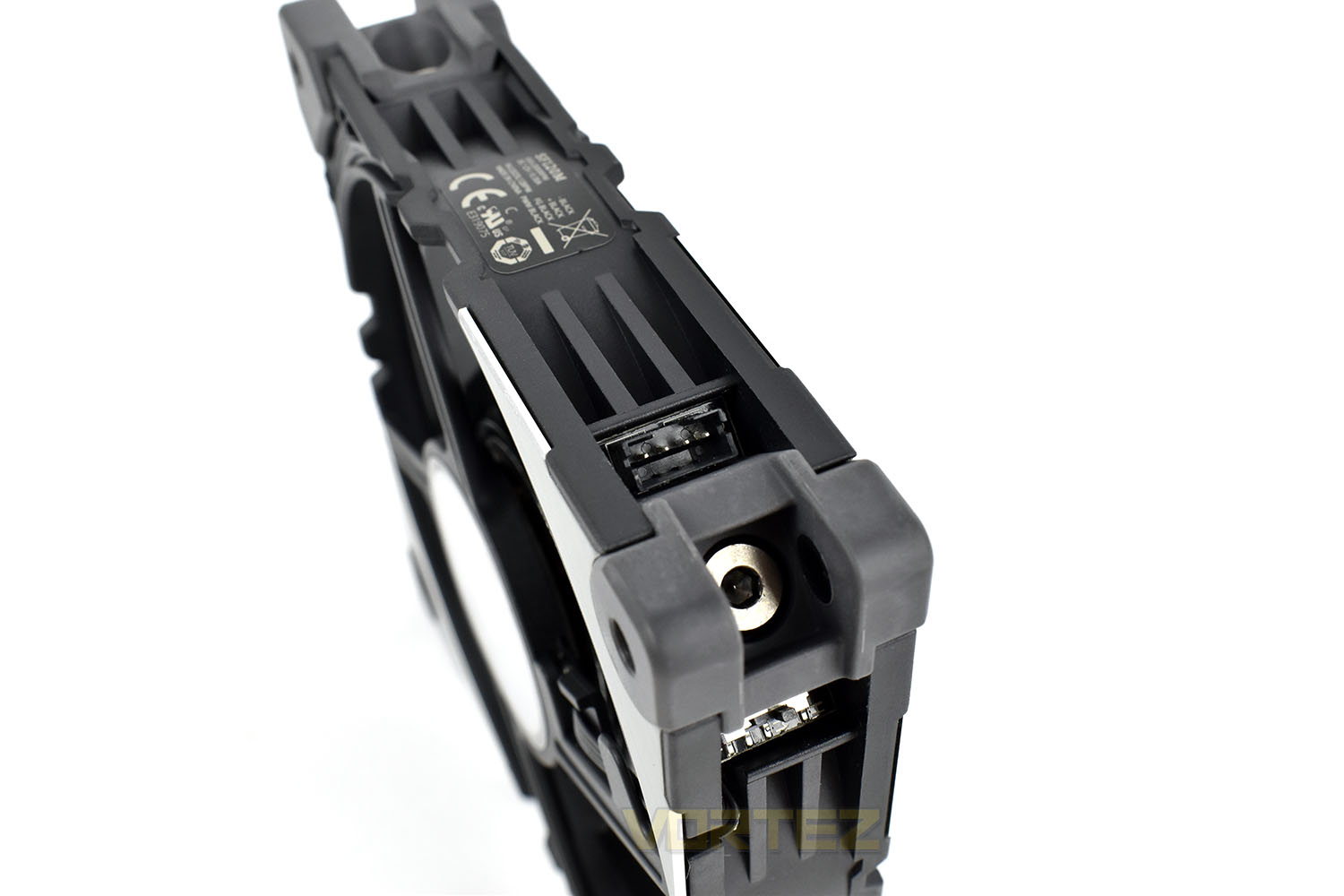
As we mentioned on the previous page, bundled with the fan is two 4-pin PWM cables, allowing you to daisy chain fans together for better cable management and speed profiling. They connect onto the small connection that you can see here.
Test Setup & Methodology
Due to popular demand, we have retired the long-standing cooling rig that we once used and replaced it with a shiny new system with an Intel Core i7 9700K at its heart. This should benefit you, the reader, in a couple of ways. The first being it can provide you with results on a CPU that is currently available to buy and secondly, the mounting instructions on our installation page will be far more relevant than the outgoing LGA 2066 was, with its pre-installed backplate.We perform two individual testing routines with each CPU cooler that we receive – temperatures and acoustics. The system used is as follows and all tests are performed at stock frequencies.
Processor – Intel Core i7 9700K
Motherboard – GIGABYTE Z390 AORUS MASTER
Memory – Corsair Vengeance RGB PRO 16GB – 2666MHz – C16
Video Card – XFX AMD Radeon RX560
Power Supply – Corsair RM650x
Storage Drive – Western Digital Black SN750 1TB NVMe SSD
Case – Corsair Crystal Series 280X RGB
Monitor ASUS ROG SWIFT PG278Q
Motherboard – GIGABYTE Z390 AORUS MASTER
Memory – Corsair Vengeance RGB PRO 16GB – 2666MHz – C16
Video Card – XFX AMD Radeon RX560
Power Supply – Corsair RM650x
Storage Drive – Western Digital Black SN750 1TB NVMe SSD
Case – Corsair Crystal Series 280X RGB
Monitor ASUS ROG SWIFT PG278Q
We test our fans at both 1000 RPM and maximum RPM, or if the fan only has one setting, it’s only included in the maximum RPM graphs.
Firstly, we’ll test acoustics, both as a case fan, mounted on the rear of our Corsair Graphite 760T chassis, and as a radiator fan on the Corsair H100i Pro RGB. (with the pump turned down to 1,100 RPM and all other case fans disabled). We measure the average dB(A) noise levels over 60 seconds in a quiet room with an ambient noise level of around 24dB(A). Acoustics are measured from the same point within the case (20cm from the fan), with every effort taken to ensure test parameters are as close as possible during every test.
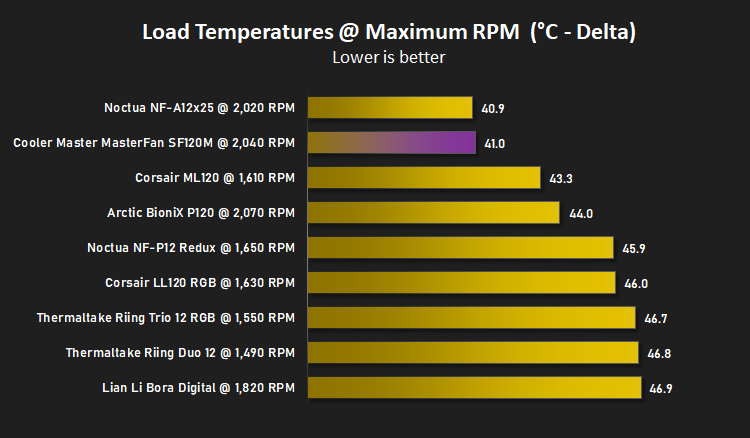
We then test the fan’s performance both at 1000 RPM and maximum RPM by running an AIDA64 20-minute stress test while running only a single 120mm fan on the 240mm radiator of the Corsair H100i Pro RGB. This allows us to test single fans as well as multi packs by only relying on a single 120mm fan. We mount the fan under the radiator, inside the case, blowing through the radiator. We measure the average core temperature over a 60-second period and minus the ambient room temperature from this. That leaves us with a Delta °C measurement which is applied to the graphs. Our average room temperature is kept as close to 21°C as possible, roughly the room temperature of most homes and offices. Obviously, if you live in a warmer climate with warmer room temperatures, you can expect higher temperatures.
To ensure the fans RPM are measured consistently, we use the Noctua NA-FC1 fan control unit, allowing the speed of our fans to be infinitely adjusted and monitored via a nearby header on the motherboard.
Benchmarks – Thermal Results
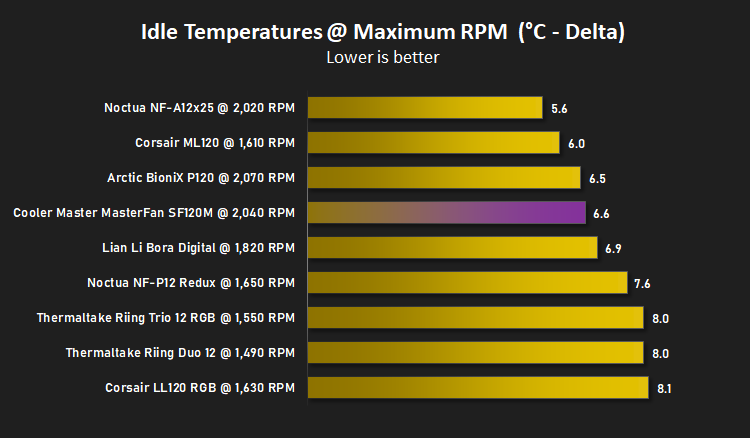
For thermal results we have all case fans running and only a single 120mm fan on our Corsair H100i Pro RGB radiator. We then measure the thermal results at idle, both at 1000 RPM and maximum RPM: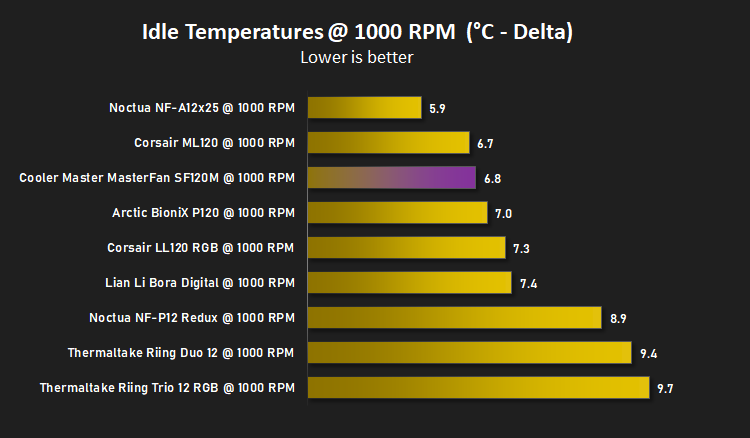
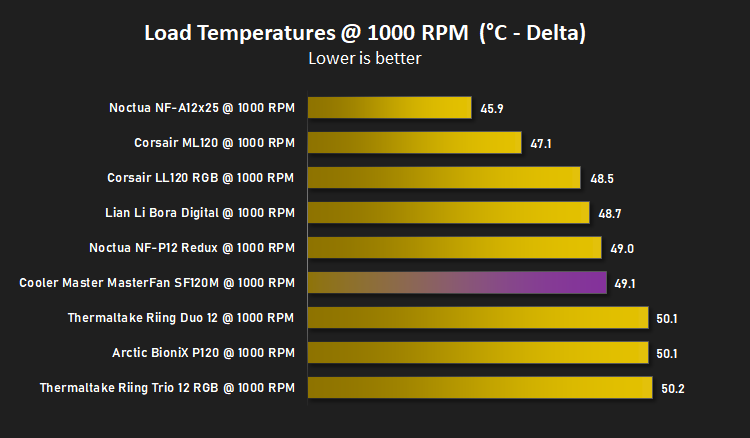
And then again after a 20 minute Stability Test within AIDA64:
Benchmarks – Acoustic Results
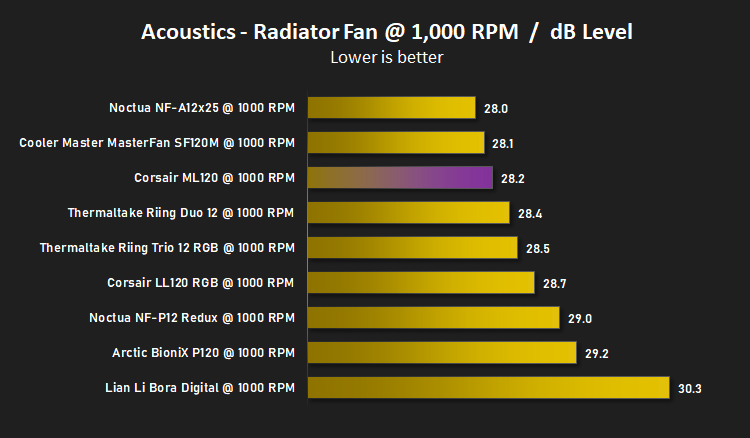
For our acoustic results, all other fans in the case are disabled and the Corsair’s H100i Pro RGB’s pump is turned down to quiet (roughly 1100 RPM) and measure the fan noise at 1000 RPM, both as a case fan and as a radiator fan: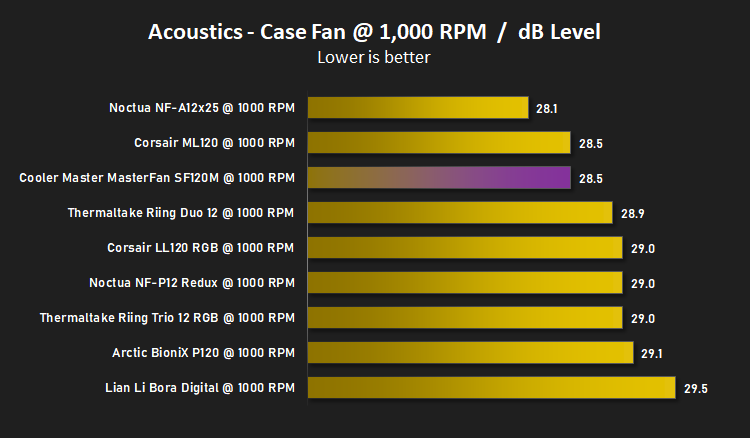
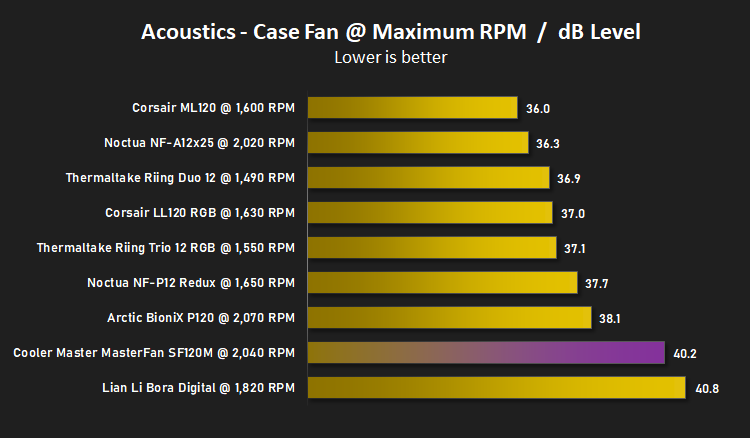
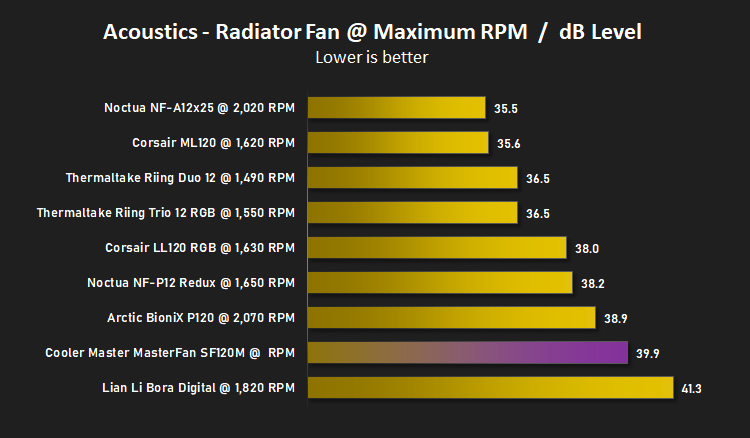
And then again at maximum RPM:
Conclusion
Despite looking at plenty of Cooler Master equipment over the years, we’ve never evaluated one of their fans, because of that, we had no clue how this would perform.The SF120M has a rather unique appearance with its asymmetrical design. The metallic inserts, curved blades, interconnected frame and black colour scheme all add up to a very decent looking fan, particularly if you’re not a fan of that RGB nonsense all the kids are doing.
A couple of features we really liked were the removeable PWM cable, allowing you to daisy chain up to three together on the same motherboard header, or wire them up individually. Handy if you’re using these on a watercooling radiator or in banks of two or three. However, if we were to find fault with the swappable cables, the length of the single cable was far too short to be useful in a lot of scenarios, at only 200mm in length.
The speed select is another nifty feature for keeping your system quiet, allowing you to select from 1200, 1600 or 2000 maximum RPM; the base RPM remains at 600 for all three settings. The selector isn’t easy to get to once the fan’s installed, mind you.
The pricing, set at £24.99 in the UK and the same across the pond, put it firmly in the sights of the Corsair ML120 and Noctua NF-A12x25, two fans that we’d already tested. The graphs paint a bit of a mixed picture, with it evidently moving a lot of air at its 2040 RPM maximum speed but also making quite a lot of noise at the same time, however, we then tested it locked to its medium setting which didn’t really impact its ability to cool the CPU but it did drop its noise output considerably. So, with that information, you could run this fan on its medium setting unless you absolutely need all of its performance, for extreme overclocks or high performance machines.
Overall, the CM MasterFan SF120M is a good fan with great cooling capabilities but it does get a touch noisy at 2000 RPM. The removeable fan cable and unique design are endearing features though.
Pros
+ Removeable cable
+ Solid cooling performance
+ Good build quality
+ 5-year warranty
+ Many bundled extras
Cons
– Pricey
– Noisy at full speed
+ Removeable cable
+ Solid cooling performance
+ Good build quality
+ 5-year warranty
+ Many bundled extras
Cons
– Pricey
– Noisy at full speed
Click here for an explanation of our awards at Vortez.net.
Stay connected with the Vortez Social Media pages: