







It’s the turn of Cooler Master to show their worth in the arena of the all-in-one liquid CPU coolers. Can the new Seidon 120M ALC tackle the opposition?

Manufacturer and Sponsor: Cooler Master
Street Price: £45 (At time of review)
ALCs (All-contained Liquid Coolers) are now regarded as a mainstay in the cooling market, bridging the gap between air cooling and custom water-cooling. Cooler Master are new to this arena and today sees their first attempt at bringing to market a 120mm offering to the enthusiast spotlight.
The Seidon series is a new venture for Cooler Master, and the 120M is the first instalment for what promises to be a successful undertaking for the cooling giants. The abundance of all-in-one coolers that are currently available take third parties for their pump design but Cooler Master have actually engineered their very own product in their own factories. This is certainly a bold move and will undoubtedly cause anticipation not just for enthusiasts and reviewers but for other manufacturers too. So what are we waiting for? Let’s begin our review.
Cooler Master on Seidon 120M
The Seidon 120M is Cooler Master’s latest, incredibly compact watercooling kit that aims to bring watercooling to the masses. It fits in virtually every case, is compatible with every available Intel and AMD platform, and as easy to install as a heatsink. It comes factory filled, sealed and tested with a two year zero maintenance guarantee. Thanks to a 120mm PWM fan with a wide RPM range Seidon can operate silently or unleash a powerful cooling storm at your command.
Technical Specifications
Dimensions
Ø 70 x 27mm (Ø 2.75 x 1.1 inch)
Radiator Dimensions
150.3 x 118 x 27mm (5.9 x 4.6 x 1.1 inch)
Radiator Material
Aluminum
Fan Dimensions
120 x 120 x 25 mm (4.7 x 4.7 x 1 in)
Fan Speed
600~2400 RPM (PWM) ± 10%
Fan Air Flow
19.17 ~ 86.15 CFM ± 10%
Fan Air Pressure
0.31 ~ 4.16 mm H2O ± 10%
Fan Life Expectancy
40,000 hours
Fan Noise Level (dB-A)
19 ~ 40 dBA
Fan Bearing Type
Rifle bearing
Fan Connector
4-Pin
Fan Rated Voltage
12 VDC
Fan Rated Current
0.3A
Fan Power Consumption
3.6W
Pump Life Expectancy
70,000 hrs
Pump Noise Level
17dBA
Pump Connector
3-Pin
Pump Rated Voltage
12 VDC
Pump Load Current
0.15A
Pump Power Consumption
1.8W
Ø 70 x 27mm (Ø 2.75 x 1.1 inch)
Radiator Dimensions
150.3 x 118 x 27mm (5.9 x 4.6 x 1.1 inch)
Radiator Material
Aluminum
Fan Dimensions
120 x 120 x 25 mm (4.7 x 4.7 x 1 in)
Fan Speed
600~2400 RPM (PWM) ± 10%
Fan Air Flow
19.17 ~ 86.15 CFM ± 10%
Fan Air Pressure
0.31 ~ 4.16 mm H2O ± 10%
Fan Life Expectancy
40,000 hours
Fan Noise Level (dB-A)
19 ~ 40 dBA
Fan Bearing Type
Rifle bearing
Fan Connector
4-Pin
Fan Rated Voltage
12 VDC
Fan Rated Current
0.3A
Fan Power Consumption
3.6W
Pump Life Expectancy
70,000 hrs
Pump Noise Level
17dBA
Pump Connector
3-Pin
Pump Rated Voltage
12 VDC
Pump Load Current
0.15A
Pump Power Consumption
1.8W
Packaging, Bundle & Fan
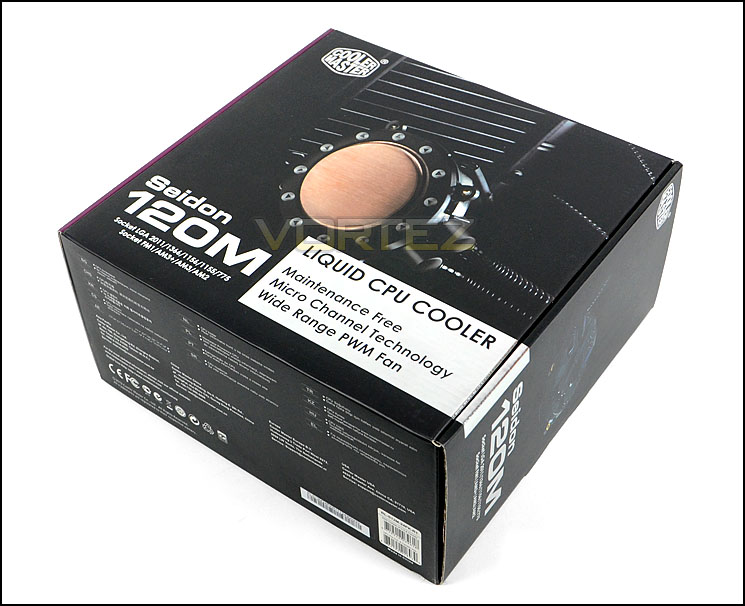
Seidon 120M is presented in a large box which features a clear depiction of the cooler on the front. The front of the box also details significant features, whilst the sides and rear list more technical details for those who wish to know more about Seidon 120M.
Inside, the cooler and its components are well protected inside an eggshell box. Each item is separately sealed to ensure pristine condition.
Packaging for Seidon 120M
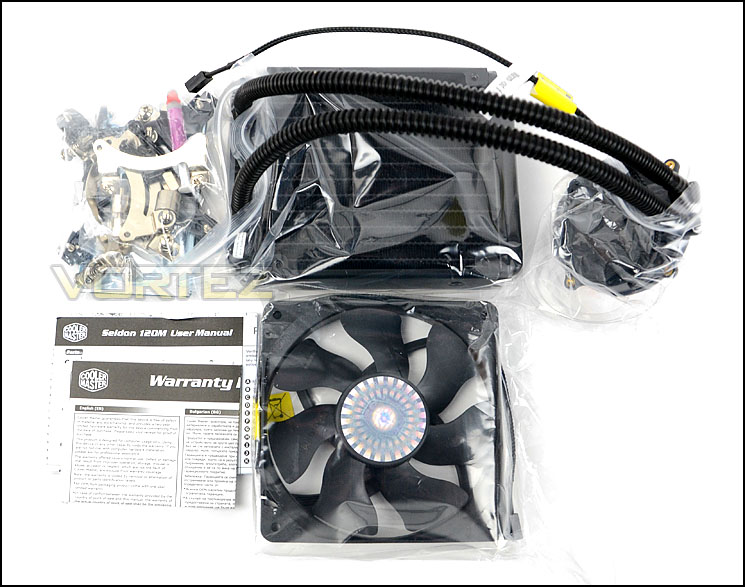
Included within the bundle for Seidon 120M is the radiator and pump, 120mm cooling fan, mounting kit for various socket types, an instructions guide and warranty document.
Included items within the bundle
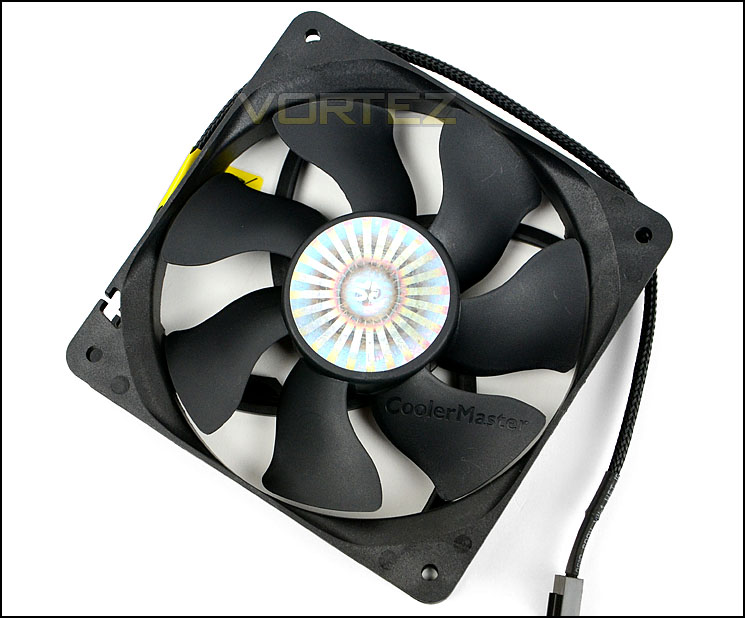
One of the included items is the 120mm cooling fan. This is to be attached to the radiator to provide efficient heat dissipation. This is a seven blade cooling fan with a maximum speed of 2400RPM, the model for this particular fan is DF1202512RFUN, from the blade master series – the same fan found with other Cooler Master CPU coolers such as V8. The cable is braided black and has a 4-pin connector.
120mm cooling fan included
Closer Look
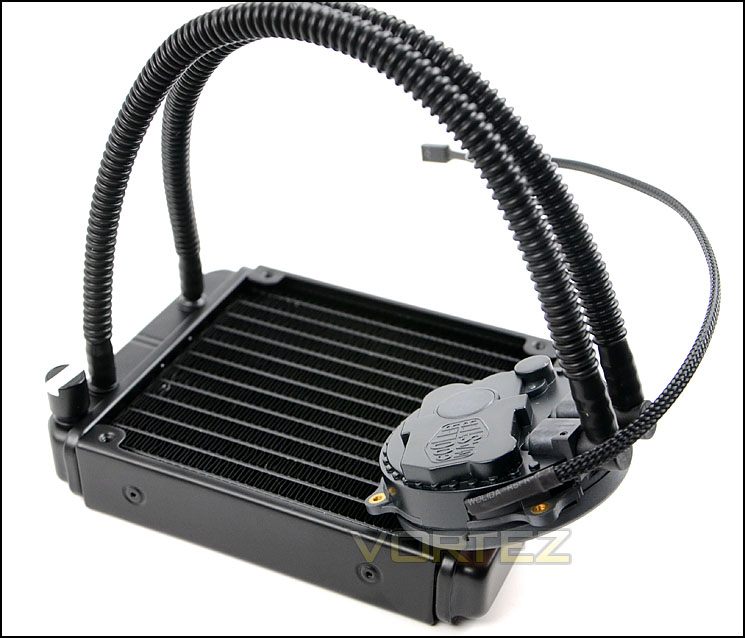
Being an all-in-one, closed loop CPU cooler Seidon 120M has a pump and radiator. The radiator is aluminium and measures 150.3 x 118 x 27mm – ideal for installing into the space which occupies the rear exhaust in the typical computer chassis.
The tubes which connect the pump to the radiator are a brittle/hard plastic and can be rotated to allow for various orientations.
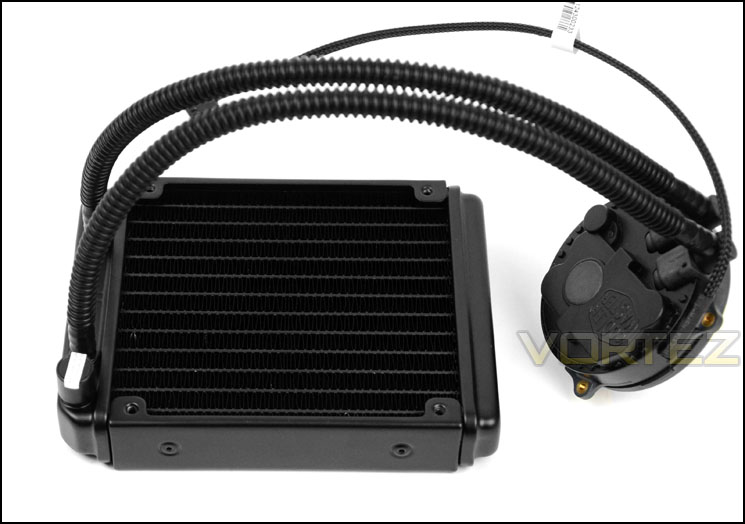
An overview of Seidon 120M
The pump is low-profile to assist with clearance and features the Cooler Master insignia with respective blue LED. Four screw holes are found on pre-attached brackets for installation with the provided kit. Unlike other brands which use a third-party for pump manufacturing, Cooler Master have developed this pump in their own factories. The pump requires a 3-pin fan header in order to generate power.
Seidon 120M’s pump consumes 1.8W and has approximately 17dBA for noise levels.
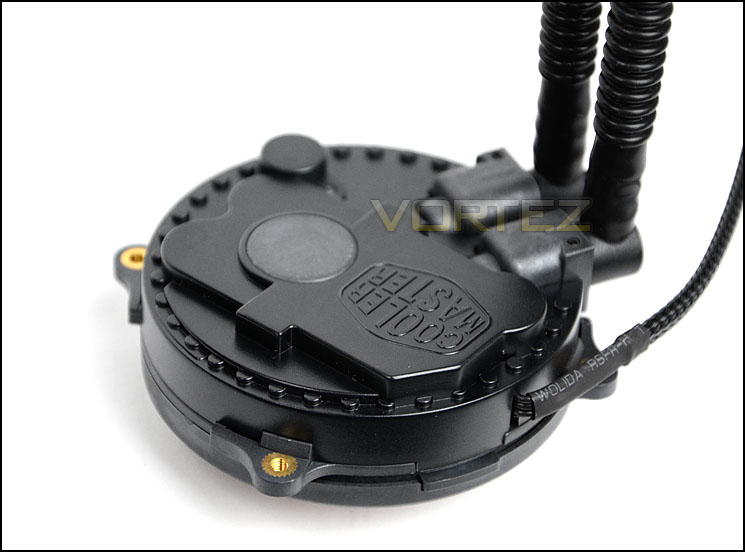
Cooler Master have designed their own pump
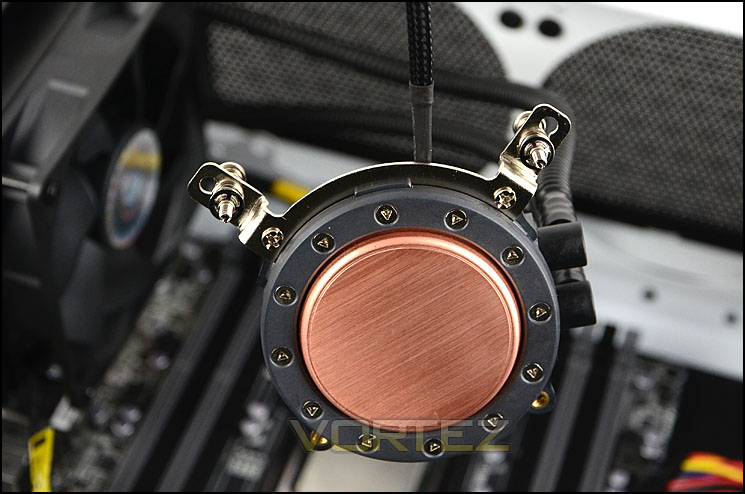
Observing the underside of the pump, the baseplate is constructed of copper and rather than having a shiny, reflective surface this has a dull, brushed finish. The surface area of this baseplate can entertain such sockets as LGA 2011 which is considerably large.
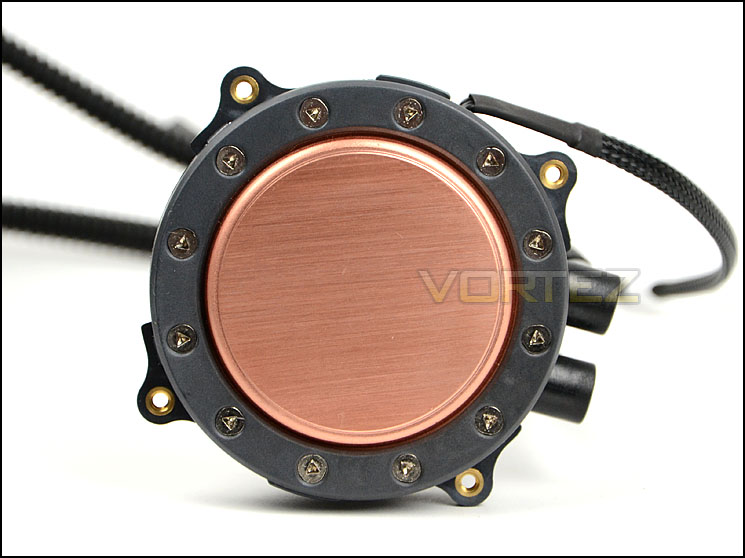
A large copper baseplate to make contact with CPU
Installation Process
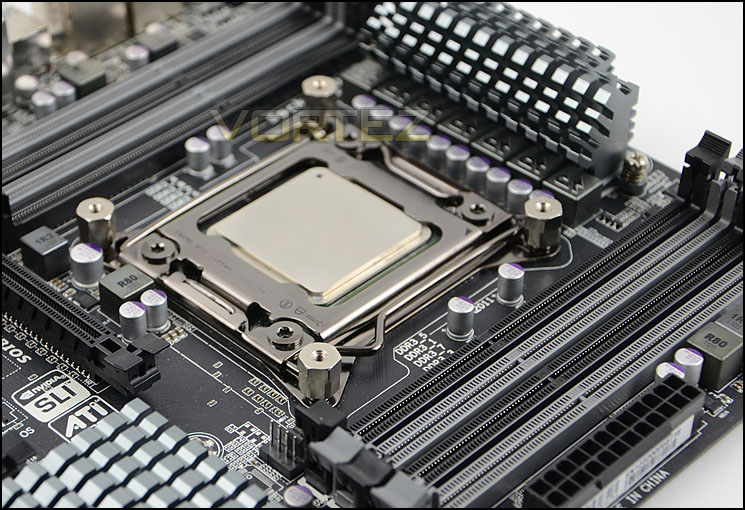
In order to demonstrate the installation process for Seidon 120M we are installing the cooler on the Intel LGA2011 socket.
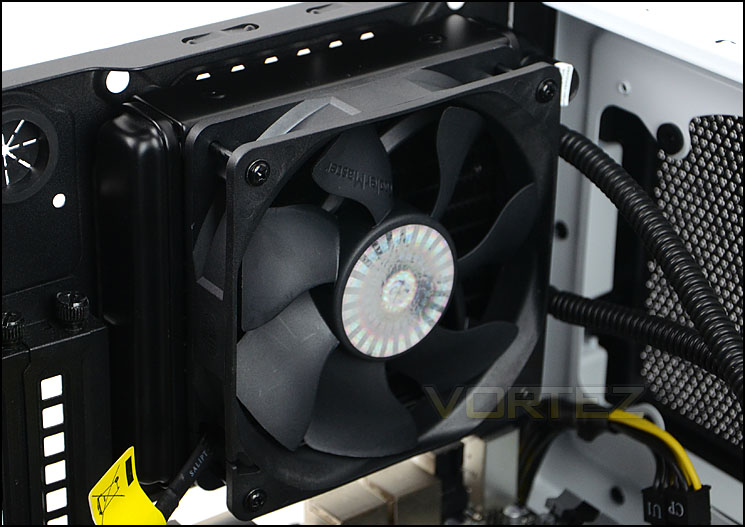
The first step in the installation process for Seidon 120M is to attach the four stand-offs to the mounting holes on the mounting plate. Cooler Master provide a socket to tighten these stand-offs, making it easy to securely attach them with plenty of pressure. Once these are in place, its then time to attach the radiator and cooling fan into the space which occupies the back of the case. All of the screws are provided and installation is very easy to complete for these two items. We install the cooling fan as a push – exhaust. All that is left to do is to then attach two mounting brackets to the pump as pictured below. Once these brackets are attached to the pump and after thermal paste is applied, it can then be securing attached to the CPU.
In very few steps, the Seidon 120M can be installed within any system that has a 120mm rear exhaust mounting position.
Test Setup & Methodology
Test System
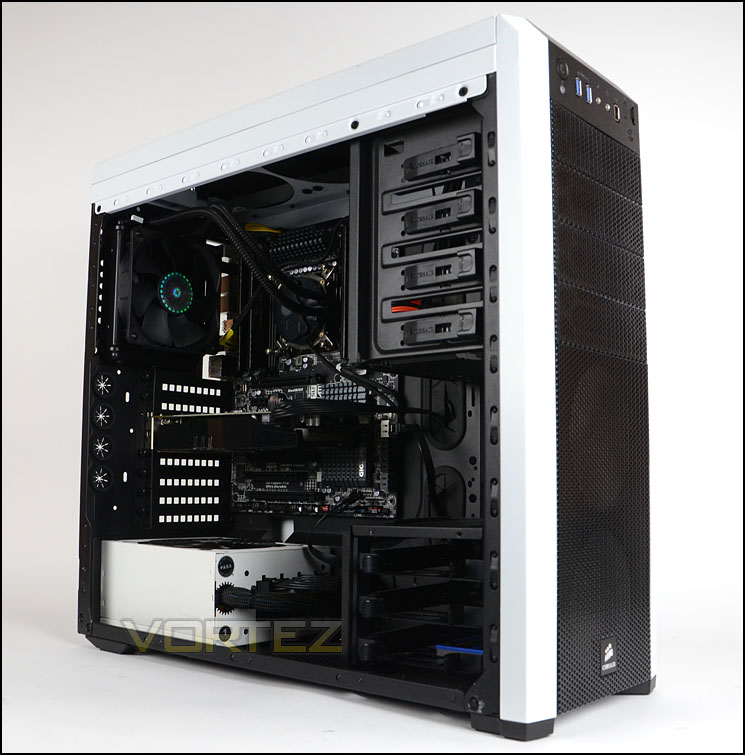
CPU – Intel Core i7-3930K (3.6GHz)
Motherboard – GIGABYTE X79-UP4
Memory – 8GB Corsair Vengeance LP 1600MHz CL9
Graphics – Sapphire Radeon HD 6850 1GB
PSU – NZXT Hale90 650W
Hard Drive – Kingston HyperX 240GB SATA III SSD
Case – Corsair Carbide 500R White
Motherboard – GIGABYTE X79-UP4
Memory – 8GB Corsair Vengeance LP 1600MHz CL9
Graphics – Sapphire Radeon HD 6850 1GB
PSU – NZXT Hale90 650W
Hard Drive – Kingston HyperX 240GB SATA III SSD
Case – Corsair Carbide 500R White
CPU Coolers
Alpenföhn Matterhorn Pure(120mm Wingboost: 300-1200RPM)
Alpenföhn K2 (120mm Wingboost: 500-1500RPM, 140mm Wingboost: 300-1100RPM)
Alpenföhn Gotthard (140mm Wingboost: 300-1100RPM)
Noctua NH-D14 (120mm NF-P12 PWM + 140mm NF-P14 PWM: up to 1200RPM)
Thermalright SilverArrow SB-E Extreme (Dual TY-143 fans – 600-2500RPM)
Corsair Hydro H100 (Dual 120mm fans – low: 1300RPM, mid: 2000RPM, high: 2600RPM Push Config)
SilverStone HE01 (140mm PWM fan – 500RPM-1200RPM – 500RPM-2000RPM)
be quiet! Dark Rock Pro 2 (135mm + 120mm PWM Fans – up to 1500RPM and 1700RPM)
Thermaltake Water 2.0 Pro (Dual 120mm PWM fans – up to 2000RPM)
Corsair Hydro Series H100i (Dual 120mm fans – up to 2700RPM Push Config)
Be Quiet! Shadow Rock TopFlow(1x 135mm PWM fan – up to 1500RPM)
SilverStone HE02 (Passive – optional fan used: Noctua NF-F12 120mm PWM)
Corsair H55 (Single 120mm fan – 1700RPM Exhaust Push)
Cooler Master Seidon 120M (Single 120mm fan – Up to 2500RPM Exhaust Push)
Program Suite
Real Temp – Maximum temperature analysis
LinX 0.6.4 – Applies thorough stress test to CPU
CPU-Z – Confirmation of CPU frequency/voltage
AIDA64 Extreme Edition – Confirmation of temperatures/fan speeds
Testing methodology
Testing will be based on temperatures recorded by Real Temp after 20 passes of LinX stress test. The maximum absolute temperatures will be recorded after the test and averaged over the 6 cores. The delta is then calculated by subtracting the ambient temperature recorded near the intake fans from the average temperature calculated. Tests are conducted with the Intel i7 3930K at its default 3.6GHz stock speed and overclocked to 4.6GHz @ 1.42V. The tests are done inside the Corsair Carbide 500R chassis to simulate real world conditions. To keep the tests standardised we are using Noctua’s NT-H1 thermal paste on all coolers.
CPU coolers are reviewed as they come out of the box – with their factory cooling fans, as the manufacturer intended and as the consumer expects.
Additional tests include a passive test where the cooling fans are taken away from the heatsink and a comparison between the cooler used with stock thermal paste against our Noctua NT-H1 paste.
A kind thank you to Noctua for supplying us with NT-H1 thermal compound.
Results – Stock Performance
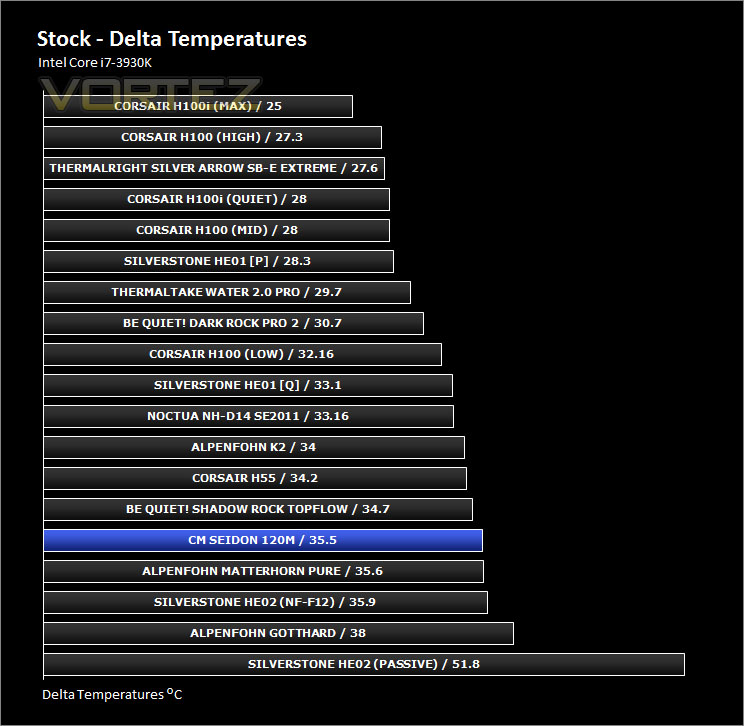
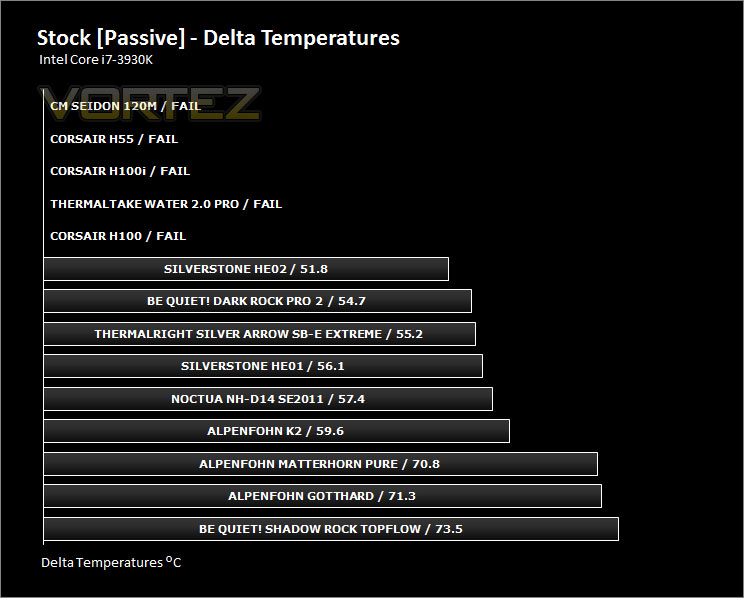
With the CPU at stock settings, the cooling performance matches that of the better value for money air coolers we have tested. Whilst the results aren’t significantly pleasing, they are still relatively good. The fan operates at 1000RPM during this test, presenting little noise.
Results – Overclocked Performance
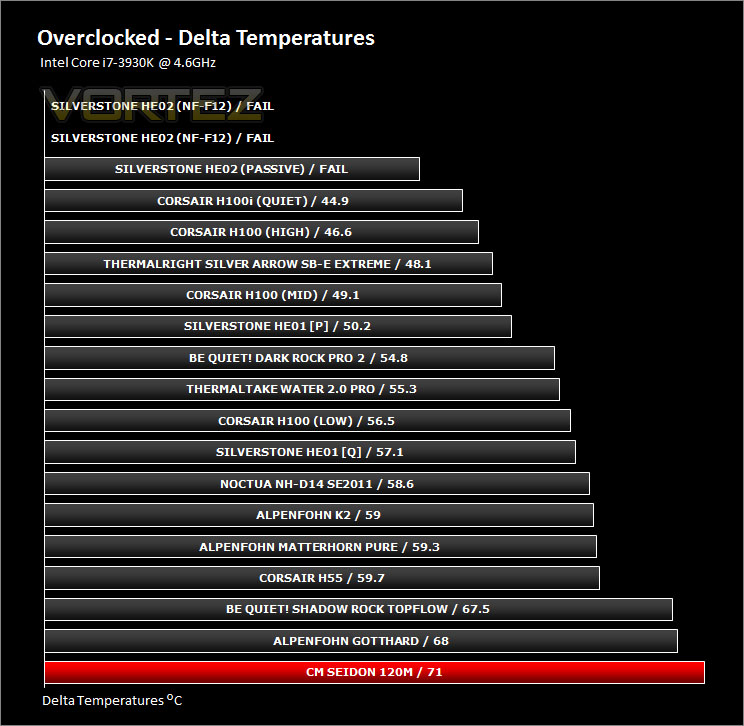
Overclocking the 3930K pushes the boundaries and indeed the capabilities of this CPU cooler. The results show that Seidon 120M is not suited to this type of usage, especially when the CPU is under such a significant increase in frequency. The fan moves up to 1600RPM during this test and is certainly noticeable.
Results – Passive Performance
In similar fashion to other liquid coolers, Seidon 120M failed to work passively – a cooling fan is essential.
Results – Thermal Paste Comparison
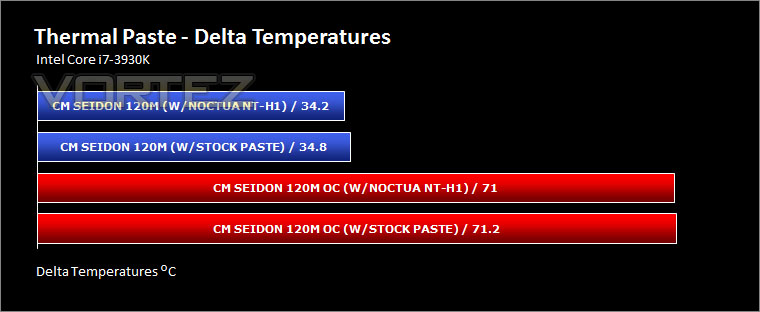
Most CPU coolers come accompanied with thermal paste provided by the manufacturer. For our CPU cooling tests we use Noctua’s NT-H1, so to offer up some interesting analysis we test the thermal paste which is provided with Seidon 120M to see which gives the best results during stock and overclocked performance
Conclusion
Seidon 120M is Cooler Master’s first attempt at an all-in-one liquid CPU cooler. The usual slurry of 120mm offerings come by way of Asetek but Cooler Master’s candidate boasts its own engineering and development, the real question is – does this hold any benefits?
The build quality of this entire unit is very good and the installation procedure is one of the easiest we have encountered. Certainly for the LGA 2011 process, it took next to no time to fit and the mounting is very secure indeed. Thanks to the low-profile nature of this cooler, memory clearance and cable clutter is a thing of the past – so if you do have tall heatsinks you have no restrictions at all.
On the performance front, Seidon 120M gives reasonable results but compared with other units of a similar stature there is a bit of a difference. Seidon 120M matches the top-down air coolers we have tested, so the results aren’t astounding by any means but they are still going to be better than using a stock reference cooler both for noise and thermal results. Furthermore, overclocking isn’t really Seidon 120M’s hallmark. The results with our Intel Core i7-3930K showed quite a toasty outcome.
Onto the topic of cost; Seidon 120M is priced very competitively. In fact it is one of the most affordable all-in-one liquid coolers currently on the market and just this alone is a pleasing attribute in itself and will be certain to draw in attention.
Seidon 120M is a milestone for Cooler Master. Being their own all-in-one cooler, without the aid of a third party, they can be pleased with what they have achieved. Sadly though the results we discovered mean Seidon 120M delivers average results for Intel’s demanding SB-E. With an onslaught of more coolers on the horizon for this series, we hope the best is yet to come.
Pros
+ Easy to install
+ Good build quality
+ Low-profile pump
+ Very affordable
Cons
– Average performance
– Not ideal for overclocking
+ Easy to install
+ Good build quality
+ Low-profile pump
+ Very affordable
Cons
– Average performance
– Not ideal for overclocking

Click here for an explanation of our awards at Vortez.net.


