







Today we have yet another exclusive for you courtesy of Coolink who have sent us their new flagship cooler, the Corator DS.
Product on Review: Coolink Corator DSManufacturer and Sponsor: Coolink
MSRP: EUR 49.90 / USD 59.90
Street Price: £49.98

Many believe that the air cooling market is stagnating and that we have reached the peak of what we can achieve with the tower heatsink design. But over the last few months, if we have learnt anything from manufacturers, it’s that innovation is the driving force to make any break through and the last few weeks have certainly showed that the market is still alive and going strong. Back in November, we saw the release of the Noctua NH-D14, and before hand, Prolimatech and Corsair managed to successfully intimidate leading manufacturers such as Noctua and Thermalright. Today, Coolink are attempting to do the same thing and with their years of experience, they hope to deliver excellent performance to the mass market.
The Corator DS is the brain child of Coolink and while it may appear similar to the Noctua NH-D14 on first glance, rest assured that Coolink use their own innovations to not only cut costs but to deliver unparalleled performance. Coupled with the previously reviewed SWiF2-120P PWM fan, the Corator DS certainly looks promising. Unlike Noctua, Coolink hope that this cooler will not be reserved to the ultra enthusiasts who would normally fork out a lot of money to shave off a few degrees from their CPUs. Priced below most high end coolers, the Corator DS looks like an even more attractive offering with wider appeal amongst users.
A bit about Coolink:
 team and ultra-modern production plants in Taiwan ensure continuous progress, efficient manufacturing conditions and strict quality standards.
Kolink’s retail brand Coolink stands for an effective conjunction of no-frills performance, excellent quality and attractive pricing. While Coolink held a strong presence in the Asian market ever since the late 90ies, it was not until 2005 that the brand was introduced to the European market on a large scale. After the launch of Coolink-Europe.com in late 2005, Coolink quickly became a well recognized brand for high-quality cooling components in Europe too.
For those who may be wondering, Coolink also falls under the Rascom umbrella, who deal with Noctua products. Rascom is responsible for the distribution, marketing, PR and customer support for both Coolink and Noctua, whereas Kolink deal with the manufacturing and quality control. Inevitably, Noctua and Coolink do share some know-how. However, for the most part, the two companies develop their products individually and Coolink don’t have the compromise of having to create silent products. Ok, let’s take a closer look at the Corator DS.
Features and Specifications
Feature and SpecificationsCoolink’s own overview of the cooler:
Thanks to four large 8mm heatpipes, a dual fin stack design and a PWM controlled SWiF2 120mm fan, the Corator DS achieves an optimal balance between outstanding cooling performance and quiet operation.
The Corator DS’ high-end package is topped off with the SecuFirm™2 multi-socket mounting system and a tube of Coolink’s award-winning Chillaramic thermal compound.
Features
Four 8mm heatpipes :
Four large, high capacity 8mm heat pipes that make direct contact with the processor’s integrated heat spreader ensure excellent heat dissipation and optimum heat distribution over the two asymmetrical fin stacks of the Corator DS.
Asymmetrical dual fin stacks :
Featuring wider fin spacing on the first of its two fin stacks, the Corator’s dual stack design was fine-tuned for maximum airflow efficiency and quiet operation in combination with the supplied SWiF2-120P fan. Altogether, the Corator’s 70 finds provide a surface area of more than 7500cm2 for optimal heat dissipation.
Gapless Direct Touch technology :
Introducing Coolink’s exclusive GDT-technology, the Corator DS’s gapless all copper contact area ensures superior heat transfer and even spreading of the thermal compound for excellent cooling performance with high-end processors or in overclocked environments.
]SWiF2-120P high-performance 120mm fan:
The included SWiF2-120P fan features a high-performance hydro-dynamic bearing for outstanding durability and superb running smoothness as well as an innovative 11-blade impeller design that provides excellent airflow, especially at low fan speed.
PWM fan speed control :
Thanks to the support of PWM, the SWiF2-120P fan can be controlled by your motherboard automatically according to the current CPU load and thus remains whisper quiet at typical usage, unleashing its full power only when needed.
SecuFirm™2 multi-socket mounting system :
Guaranteeing superior reliability and contact pressure, the new SecuFirm 2 mounting system for AMD (AM2(+)&AM3) and Intel (LGA775, 1156, 1366) platforms is even more convenient to install than its predecessor.
Chillaramic thermal compound:
Coolink’s award winning Chillaramic thermal compound is a high-performance solution that combines low thermal resistance, great long-term stability and highly convenient application. With an amount of 2g, the included tube is sufficient for several applications.
Specifications
Size
The Corator DS sports some very unique features and excellent specifications. It improves on many previous designs and technologies as we shall see later on, such as the gapless direct touch technology and the dual fin stacks. Combined with a high performance fan and brilliant thermal compound (possible review to follow), Coolink provides an amazing product. At 1040g, it’s slightly lighter than the Noctua NH-D14 with just the middle fan attached. This is probably due to the less dense asymmetrical fin array but thankfully the weight is secured on the motherboard with the brilliant SecuFirm 2 mounting bracket that does a stellar job with the heavier NH-D14. On initial looks, the surface area across the fins is 80cm2 less than our old favourite, the Thermolab Baram so it will be interesting to see how they both compare.
Packaging and Content
The Corator DS comes packaged in a attractive white box with brilliant funky art work all over. It’s a normal cardboard box and on the front, we can see the cooler standing proudly with the background art depicting a modern setting. The graffiti gives a sense of speed and that of mainstream appeal rather than the premium feel of the Noctua NH-D14’s box. Both use similar packaging, which isn’t surprising given that distribution is under the responsibility of Rascom in both cases. A few of the Corator’s key features are shown as illustration at the bottom left of the box. The imaginative art goes to show the wide reaching target audience Coolink aim to satisfy.
Turning the box around, we are met with the specifications of the Corator DS which we saw on the last page. The same art theme is used here and it is certainly very striking and effective. The specifications listed are limited but the input power/current and voltage range of operation are given. The fan uses a mere 3.96W of power at 0.33A, and the voltage range is from 7-13V, giving it some lee way from normal 12V operation. Coolink also illustrates the size of the cooler here.
At the back, Coolink shows snapshots of the Corator’s features such as the Gapless Direct Touch Technology, the pre-installed cooler mounting bracket, the dual fin arrays and the SWiF2-120P fan.
Finally we also have the features listed with a brief description of how each contribute to a more refined design that help in optimal heat dissipation and efficiency. Some of them are unique to the Corator DS, for instance the asymmetrical dual fin stacks and the direct touch technology being implemented on the cooler. Overall, the packaging is superb and very informative. It will definitely appeal to the western market.
Inside the main packaging, there are 2 more boxes, one containing the bundle, and the other holding the cooler itself. It is very securely packed so that it is safe in transit. The holes in the boxes make them very accessible and easy to remove from the outer box. It is these small design features that really differentiate quality manufacturers from less innovative ones and if Coolink are to make a name for themselves in the European market, then they have to continue this trend.
Once the outer top and bottom boxes are removed, another one is revealed housing the heatsink and fan. By removing the flap insert and opening the cardboard side, we finally get to the Corator DS, beautifully presented and intact. The fan is already attached to the heatsink but it has to be removed for installation later on.
Closer Look
The Corator DS
The cooler is a very attractive design and the aluminium and copper construction makes for a robust cooler. Immediately we see many of the features advertised by Coolink such as the obvious dual fin stacks, the four heat pipes and the SWIF2 120P fan sandwiched between the radiators. We instantly get the feel that the cooler is aiming for sheer performance. To save costs, Coolink have opted against nickel plating their cooler.
Looking at the side, we see the two radiators more clearly. In terms of size, it is very similar to the NH-D14 but the fin designs are very different. The fan is placed in the middle using 2 wire clips. They are very to install but there is one issue. To install the heatsink, the fan has to be removed first, but once installed inside the case, it can be very hard to access the wires to clip on the fan at the bottom. However, if you are installing the heatsink outside the case, then this is not a problem at all. The actual radiators are the same in size but have slightly different characteristics.
The asymmetrical fin stack using a 30/40 fin configuration
As we look more closely at the fins, we can see the asymmetrical fin array. By having one stack with only 30 fins and the other with a denser 40 fin array, Coolink aim to increase airflow when combined with the fan. The cooler has to be oriented such that the fan sucks air through the 30 fin array and pushes it through the denser stack. Because of this, the fan has to have a high airflow and static pressure, which it does with its high RPM operating speed and 11 blade design. This design is very efficient since the single fan can work more effectively pulling air through a less densely stacked array. The NH-D14 does not need the less dense fin array because the front NF-P12, with its high static pressure, acts as a “push” fan.
Looking at the fan through the fin array
The way the heat pipes are spread out within the fin stacks makes for a higher surface area for heat dissipation and all the pipes are exposed to the airflow. This is a more effective design than the Prolimatech Megahalem where the heat pipes are lined up in the direction of airflow so that only the front pipe ends up being exposed. The fan rests in the middle and we can see that it is oriented to push air through the denser fin array at the back.
The base and heat pipes
The Corator DS utilizes 4 8mm thick heat pipes for maximum heat transfer. They all spread out from the base to cover a greater surface area of each fin. What is interesting is the base. The copper heat pipes are in direct contact with the CPU hence the Direct Touch Technology but unlike other iterations of this technology, Coolink uses a gapless design. One of the main downfall of other Direct Contact Technology is that there is normally a gap between the base of the heat pipes and the material that holds them together. As a result, the coolers can’t make maximum contact with the CPU heat spreader, and when applying thermal, instead of applying a small blob that can effectively spread out under pressure, the pastes always ends up along the gaps. This always meant that special case had to be taken when applying thermal compounds and using thin lines along the base of each heat pipe was always necessary. However, Coolink’s method means that the cooler faces none of the issues above. The base can be treated as a normal one with the benefits of Direct Touch. The base itself is fairly flat but lacks a mirror finish.
The top of the 4 8mm thick heat pipes
Coolink have opted for each end of the heat pipe to go through their own radiator. At the top of each stack are 2 rounded ends and 2 grooved ones. They are spread out across the top for more heat to dissipate radially. The powerful PWM fan is then able to carry the heat generated away from the radiators.
Closer Look (Continued)
The heatsink again
The heatsink is fairly big with its 155 x 140 x 121mm dimensions that makes it comparable to the Noctua NH-D14. The gap in the middle is only wide enough for a 25mm thick fan. Unlike the sharp razor-like fins of the NH-D14, the Corator DS’s fins have edges that undulate gently all around.
Two anti-vibration strips
To dampen the fan, the Corator DS makes use of anti vibration strips along the radiator on which the fan sits. Small grooves on the sides ensures that the fan stays secure.
The pre-installed mounting bracket
A small bracket is attached to the base of the heatsink for installation onto the SecuFirm 2 mounting system. Its location does mean that the fan has to be removed so a screwdriver can reach down. Unfortunately this is not provided like it was with the NH-D14.
The bundle
The bundle includes two sets of mounting kit, one labelled AMD and the other, Intel. The Intel bag contains the motherboard back plate, 4 long screws that feed through the motherboard, 4 plastic spacers and 2 mounting bars onto which the cooler screws onto. The AMD bag has its own set of brackets but no back plate. The SecuFirm 2 mounting kit is compatible with all recent AMD and Intel sockets including AM2(+)/AM3, LGA775/1156/1366. Also bundled is 2g of the Chillaramic thermal compound.
The fan
The fan is the vibrantly coloured SWiF2-120P PWM fan. It operates between 800-1700 RPM although during testing, it did reach 1900 RPM! The Pulse Width Modulation function allows the motherboard to control the fan speed based on load, so it should remain quiet during normal operation. As such, it requires a 4 pin header on the motherboard for full PWM functionality.
A Coolink strap and case badge
To top off Coolink’s brilliant offering, they bundled a nice fluorescent strap and a flexible case badge. It sure beats the generic stickers manufacturers often bundle with their products.
Test Setup
CPU – Intel Core i7 920 – 4.0ghz
RAM – 6GB (3x2GB) OCZ platinum DDR3 1333mhz
Motherboard – Biostar T-Power x58
Graphics card – Gainward Geforce GTX260 216 896MB
Power Supply – Enermax Revolution 85+ 850W
Hard Drive – Samsung F1 320GB
Western Digital Caviar WD3200AAKS 320GB
Drivers – Nvidia Forceware 196.34
CPU Coolers:
Coolink Corator DS including tests with dual fan setups
Tuniq Propeller 120(High speed fan)
Noctua NH-C12P SE14
Prolimatech Megahalem
Noctua NH-D14 (U.L.N.A and default speed)
Noctua NH-U12P SE1366
Thermolab Baram (with 2 Noctua NF-P12 fans)
CoolIT Domino A.L.C
Sunbeam Core Contact Freezer
Coolermaster Hyper 212 Plus including test with 2 Noctua NF-P12 fans
Alpenföhn Nordwand including test with 2 Noctua NF-P12 fans
Tuniq Tower 120 Extreme (Low/med/high speed)
Program Suite:
Core Temp 0.99.5
LinX stress Test
PC Wizard
How I tested:
Testing will be based on temperatures recorded by Coretemp and PC wizard after 20 passes of LinX stress test. The absolute temperatures recorded in the tables are averages of the 4 cores and the delta value provided for a fair comparison, taking into account ambient temperatures. The test will be run at stock speed and at an overclocked speed of 4ghz.
Installation
Installing the Corator DS is a very easy, straight forward task.If you have previously used the SecuFirm kit, then this will be very familiar.
Intel Systems
•Firstly insert the 4 bolts in the appropriate position on the Intel backplate. There are three sets of holes for LGA775/1156/1366 systems.
•Install the back plate through the motherboard making sure you use the rubber inlay if you have an LGA775 motherboard.
•Place the plastic spacers onto the bolt and install the mounting bar. on top, ensuring that the circular rim faces outwards.
•Tighten is with the 4 thumbscrews and proceed with placing the heatsink on top.
•Use the screwdriver provided to tighten the cooler on to the mounting bars.
AMD systems
•If your motherboard has a backplate, place the spacers above the mounting holes with the mounting bars on top.
•Thread the 4 long screws through the holes and tighten them.
•Finish by installing the cooler, and tightening the pre-installed screws until they stop.
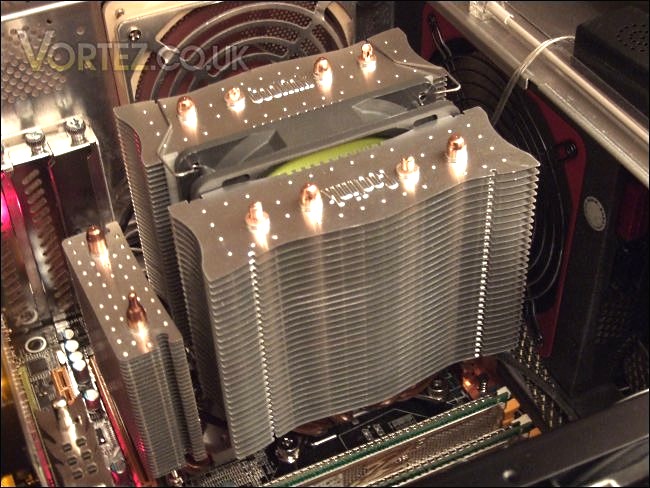
The sheer size of the cooler does mean that the front fin stack hang above one of the RAM slots. This will not be a problem if you only use 3 DIMMS on an X58 platform or if your RAM sticks have low profile heat spreaders.
Results
2.66GHz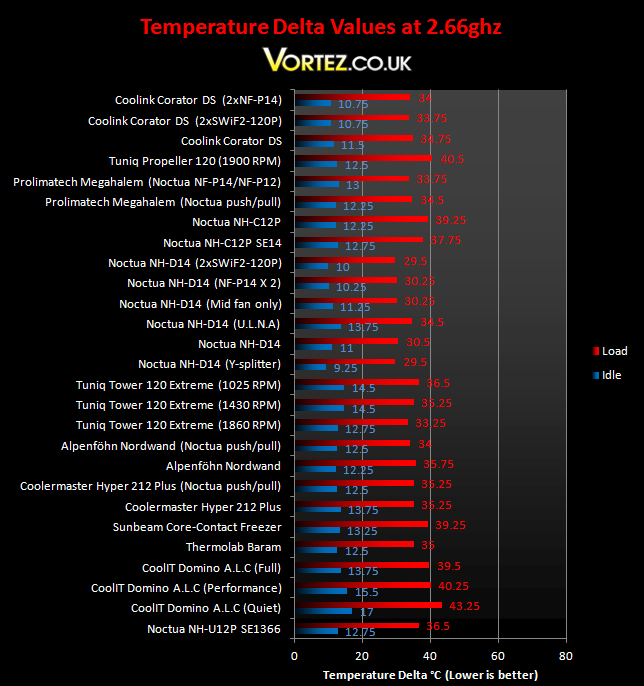
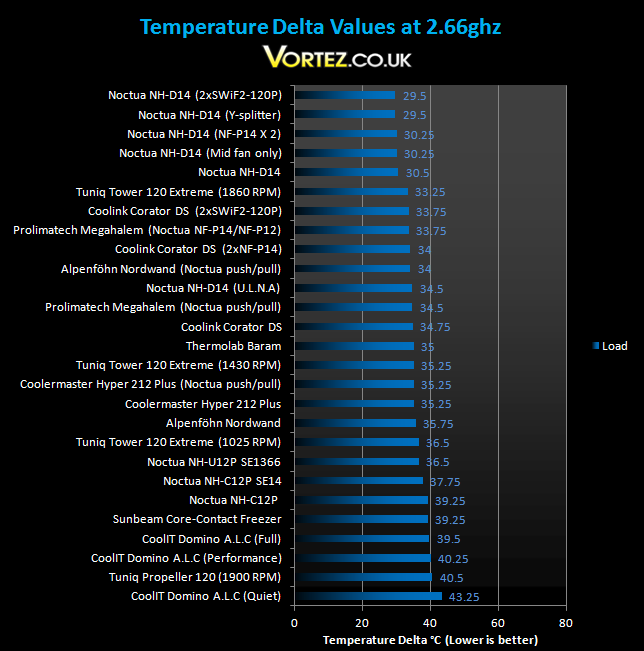
At stock speed, the Corator DS performs admirably. With just the one fan attached, it proved superior to the Thermolab Baram, and a mere 2.5 degrees behind the push/pull Prolimatech Megahalem setup under load. The three Corator DS configurations yielded some of the best idle temperature deltas on our list, matching the might NH-D14, an impressive feat for a cooler whose price would not make you believe so. Adding a second fan to the Corator DS cooler proved to be quite effective but not enough to top the charts under load. However, a stock Core i7 is not enough for the cooler to truly flex its muscles.
Result (Overclocked)
4GHz
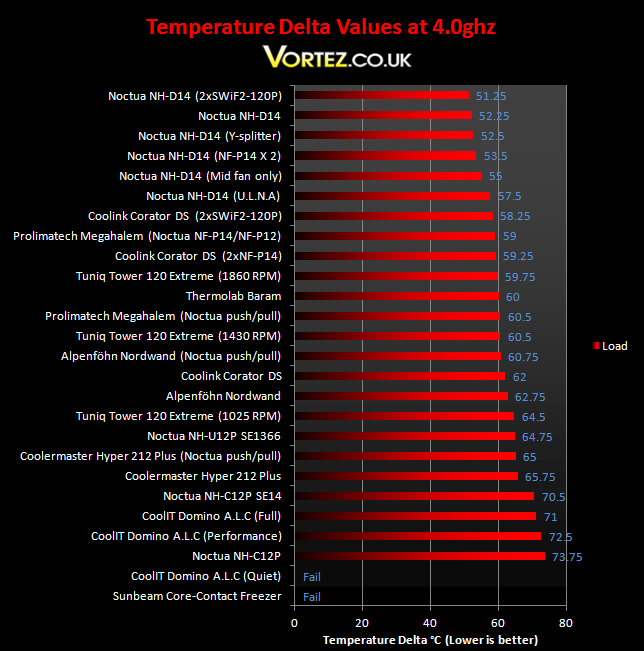
Finally, we come to where it really counts, the 4GHz battleground. The Coolink Corator DS keeps up its tremendous performance with a temperature delta of 62 degrees, coming just ahead of the Alpenföhn Nordwand. Both coolers are priced similarly, and based on that, Coolink are offering a great price/performance ratio here. The Tuniq Tower proves to be slightly better despite operating at a lower fan speed. Last time, when we tested the Noctua NH-D14, one of the observations was that using only the middle fan, the cooler still delivered the similar performance to a dual fan setup. I expected the same to hold true for the Corator DS but I was wrong. Attaching another SWiF2-120P to the 30 fin stack, more cooling potential was unlocked and the temperature dropped 3.75 degrees! Operating at a blistering 1700 RPM, the SWiF2-120Ps were more effective than 2 x NF-P14s attached. The Chillaramic thermal paste also contributed to the excellent performance we see here. A quick test between the Arctic MX-3 and the Chillaramic thermal paste on the NH-D14 proved that the latter was better.
My main concern with the cooler however is that only one set of wire clips is provided and if Coolink provided another set, it would give users the freedom to attach another fan without requiring any modifications.
Noise
Silence is not Coolink’s primary concern and I can attest to that when benchmarking the Corator DS with the SWiF2-120P. According to PC Wizard and BIOS, the fan was operating at 1900 RPM, 200 RPM above the specifications. While the noise was not intrusive, there was a distinct whirring from the fan. Coolink addresses this through the PWM functionality of the fan so the cooler remains quiet during typical usage. Using a second fan and a 4-pin Y-splitter, the fan speeds reduced to 1700 RPM.
Conclusion
ConclusionWhen I first received the Coolink Corator DS, my initial thought was that it was merely a cheaper Noctua NH-D14, and that\’s not necessarily a bad thing. But the Corator DS cannot be considered an imitation because the dual radiator design is one that many companies are beginning to implement. Coolink goes a long way at trying to differentiate their offering to other coolers. Its unique Gapless Direct Touch Technology perfects a design that was originally flawed and the asymmetrical fin stacks is an innovative method of improving airflow and subsequently heat dissipation. On top of those features, they supply a brilliant fan, something that even leading manufacturers fail to do, thereby deceiving customers with lower pricing.
Performance wise, Coolink delivered what they promised. From the charts, it provided unparalleled idle temperature deltas and under load it was better than its main competitor, the Alpenföhn Nordwand. A single fan extracting heat from two radiators appeared to be holding back the heatsink\’s potential so I attached a second one and performance rocketed. Well… 3.75 degrees may not seem like much but for overclocking, every degree counts. It also placed the cooler above everything else bar the mighty Noctua NH-D14. However, considering the price difference, I was more than pleased with the results, as should anyone considering the Corator DS. There\’s no better way to break into the European market than doing so in style with the Corator DS.
Pros
[+]Class leading performance and efficiency
[+]Excellent compatibility with modern motherboards including LGA1156
[+]Very well priced
[+]Supplied with a SWiF2-120P fan
[+]Very easy to install
[+]Attractive finish
[+]Excellent packaging
Cons
[-]Size may be an issue
[-]Only two wire clips provided for fans
There\’s no doubt that the Coolink Corator DS thoroughly deserves the Vortez Hardware Gold Award.
To discuss this product, please use our forums


