CoolIT are back with their new re-designed A.L.C CPU cooler, so let’s how a look how it fares against the competition!
Product on Review: CoolIT ECO A.L.C CPU CoolerManufacturer and Sponsor: CoolIT Systems
MSRP: $74.99 USD
Street Price: £55.99
All contained liquid cooling systems have been all the rage lately thanks to their cooling potential, ease of installation, size and cost. With the competition growing in this market, CoolIT are back to show the world that they are still the pioneers of this technology and as such have released the ECO A.L.C. Their previous Domino A.L.C solution showed that CoolIT were innovators in their field but performance was somewhat lacking in our own review given the power hungry i7 920. The ECO is aimed at rectifying this problem, while delivering the solution at a lower cost.
With the traditional heatsink design becoming ever bigger to increase efficiency, an All Liquid Cooling (A.L.C) solution is growingly appealing to users who want the benefits of liquid cooling accommodated in a smaller space, without the hassle of a custom setup. Of course, a custom water cooling setup will no doubt be better but CoolIT are pitting their solution against similarly priced air cooling solutions instead. The likes of Noctua and Thermalright have set a high benchmark so it will be interesting to see how the ECO fares in this highly competitive market.

| About CoolIT Systems: For years, CoolIT has been working with leaders in the computer industry to research, design, and provide an affordable new cooling product that provides a comprehensive solution for end users while exceeding high OEM standards. This carefully designed and patented technology unleashes the full potential of a PC, providing superior cooling performance while reducing system level noise and improving reliability of vital components. This small, but potent, pre-assembled product can also be easily installed inside any standard chassis. The CoolIT MTEC Technology can be found in the top names in performance computing like Dell, Alienware, Velocity Micro, MAINGEAR, Hypersonic, Biohazard, Ultra, Ultraforce, Systemax, BFG, Commodore Gaming, War Machine and Shuttle. Aside from the current product offering, there are several additional products poised for release in the coming months to service the demanding cooling requirements of high performance video cards, multi-processor computers, and servers. Leveraging the technology CoolIT Systems is a world leader in supplying electronics cooling products, with an excellent reputation in the design, development, and manufacturing of liquid cooling systems using our patented MTEC™ based technology. Our innovative products exceed strenuous performance requirements and provide solid value to our customers. To provide our customers with world-class products, our highly experienced engineering team offers complete lab and testing facilities including the latest design and analysis software and hardware. |
Let’s see how CoolIT Systems’ engineering prowess translates into performance.
Features and Specifications
Features
| A Revolutionary Leap in Design Delivers Industry Leading Reliability and Performance The ECO Advanced Liquid Cooling (A.L.C.) system is an elegantly engineered ultra low profile thermal solution positioned at an economical price point. CoolIT’s engineers have focused on offering a superior proprietary cooling technology that delivers the ultimate performance in a compact design. The whisper quiet ECO cooler is widely compatible with the majority of PC cases featuring a 120mm fan and can be installed in 3 easy steps. CoolIT’s selection and design of each component has been scrutinized to ensure the ECO provides industry leading performance and reliability resulting in the ultimate maintenance free cooling solution. Quiet Work & Play Environment Innovative system utilizing CoolIT’s new, advanced pump quietly cools excessive temperatures so the full potential of high-end PCs can be realized without sacrificing a quiet environment. |
Specifications
| CoolIT CPU FHE (Fluid Heat Exchanger) A Copper Micro-Channel Fluid Heat Exchanger that maximizes the cooling power on the CPU. CoolIT Proprietary Pump Quiet, compact, long life CFF1 pump Ceramic bearing Life Cycle: 50,000 Hours MTTF CoolIT Coolant CoolIT Systems low toxicity with anti-corrosion/anti fungal additives CoolIT Radiator Custom engineered for low noise high heat dissipation. CoolIT Fan High reliability, Quiet 12V Speed: 1800 RPM MAX CoolIT CPU Thermal Grease CoolIT Systems Pro Advanced Thermal Compound(A.T.C) is pre-applied for easy installation. CoolIT 2 Year Manufacturer Warranty A pre-filled, factory sealed, liquid loop of carefully chosen components offer years of worry-free cooling. Universal Retention System Out of the box support provided for Intel 775, 1156, 1366 and AMD AM2, AM2+. AM3 sockets. |
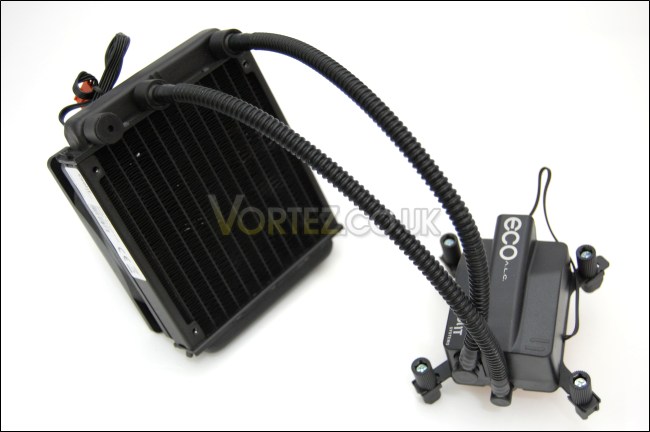
Unlike the Domino A.L.C, the ECO does not come with the LCD display or three operating modes. This is restricted to its bigger brother, the “Vantage”. However, what it lacks in extras, it makes up in design and functionality, promising better performance than the Domino. One key difference is the integration of the pump into the CPU mounting block.
CoolIT continue their trend of ensuring compatibility on all modern systems so installation is easy. The whole system is all contained for minimal problem when installing, making this very user friendly. Furthermore, the fan and radiator will fit in any case with 120mm fan mounting holes at the back, ensuring adequate space for airflow in the case.
Packaging and Content
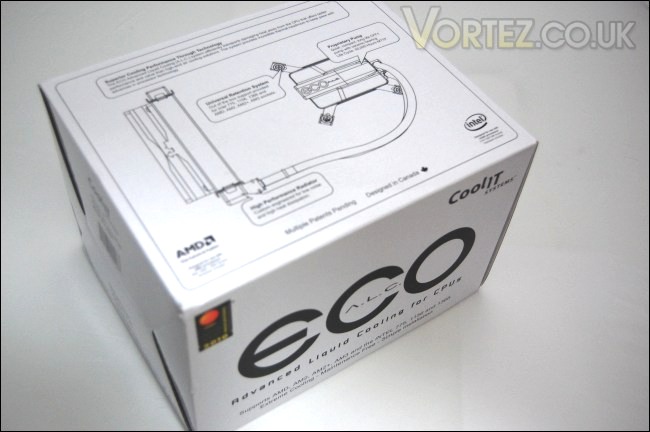
The CoolIT ECO A.L.C packaging
The packaging takes the minimalistic approach unlike the Domino, with its white box and limited use of colour. This does give it a more professional attire and yet all the relevant information can still be found throughout with visual illustrations of the cooler. The size is standard and comparable to most other packaging traditional CPU coolers come in. The box ensures maximum protection during transit.
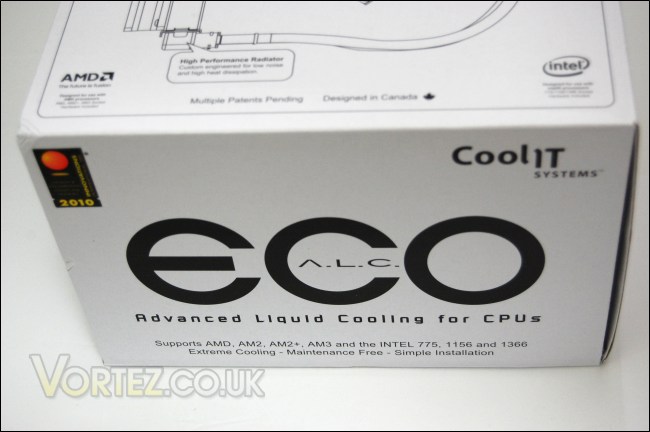
Front of the box
On the front, the model is printed in bold, with the CoolIT logo in the corner. A few key features are listed such as socket compatibility and the fact that the cooler offers “extreme cooling” while still remaining simple to install. These immediately grab the attention of possible buyers/users. CoolIT have done a good job keeping the front tidy and concise.
Features and specifications
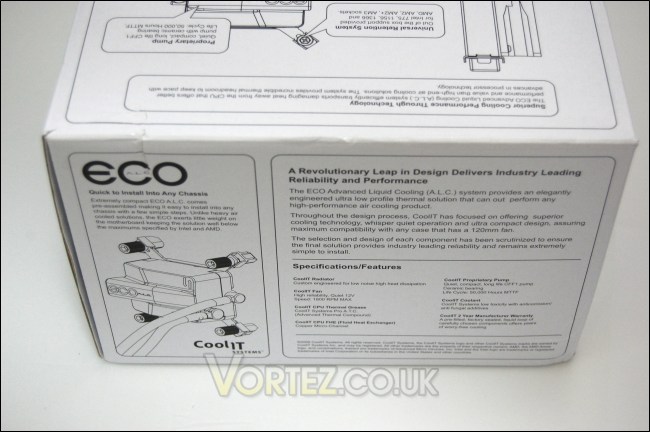
Onto the back of the box, CoolIT lists all the specifications and features with a small illustration of how easy it is to install the cooler. CoolIT also state how their solution doesn’t exert as much force on the motherboard as other CPU coolers, a trend many people have been concerned with when buyer ever bigger heatsinks.
Handy illustrations and features
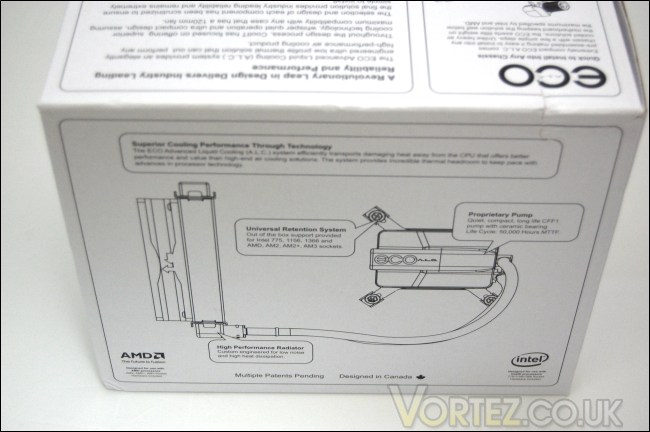
The side of the box further illustrates the different features of the ECO, promoting its ability for superior cooling through technology and innovation. For a cooler of this size and price, the ECO packs a lot of different components in an easy to use package.
Handy illustrations and features continued…
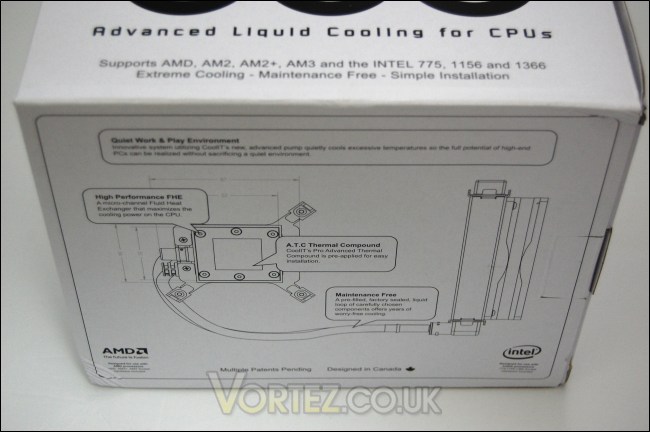
On the next face of the box, there are more illustrations accompanied by description of the features and how they are implemented in the cooler. According to CoolIT’s words, the cooler is meant to offer excellent cooling power while remaining quiet, a claim that should surely be the Holy Grail for any potential users. We’ll see if these claims are true later on.
Opening the box
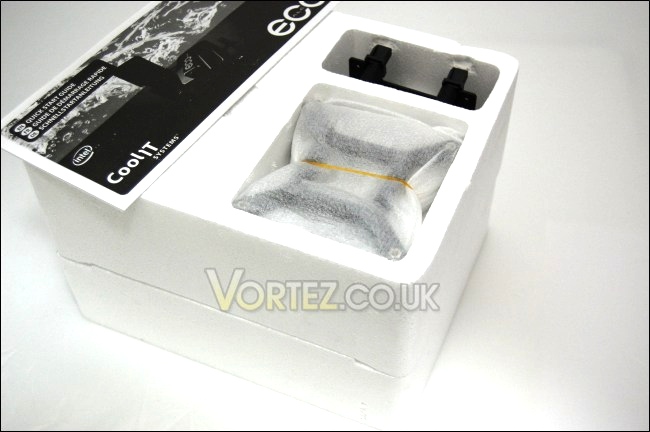
Finally on opening the box, we are greeted with two polystyrene foam covers that house the cooler securely during transit. At the top are two cut outs for the motherboard back plates and the AMD CPU block retention bracket. The lack of tools and screws in the bundle show how CoolIT have integrated the mounting system on the ECO to be as user friendly as possible and this is reflected in the installation process.
Closer Look
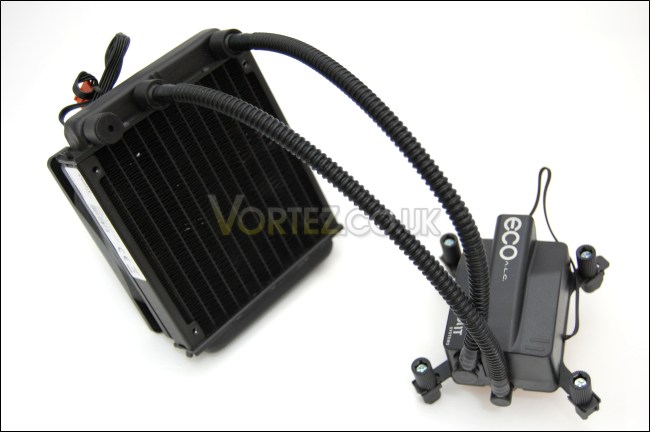
The CoolIT ECO A.L.C
Without the LCD panel that came with the Domino, the ECO ends up being a more compact design that makes it much easier to install in any chassis sporting 120mm fan mounting holes. The result is a very clean and professional finish. The metallic and plastic construction is sturdy.
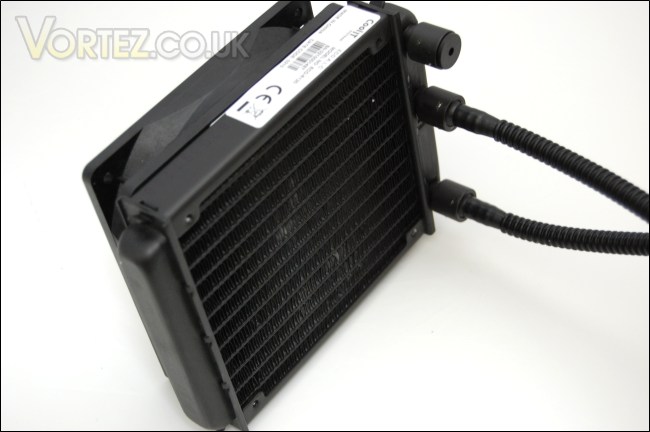
The radiator
The radiator uses a corrugated pattern to increase surface area for heat dissipation, as is the case with all radiators. The fin spacing is 2.5mm, ensuring a densely packed configuration. Unfortunately, the metal is flexible and bend easily if knocked. The fan is mounted on the back of the radiator while the reservoir is on the side.
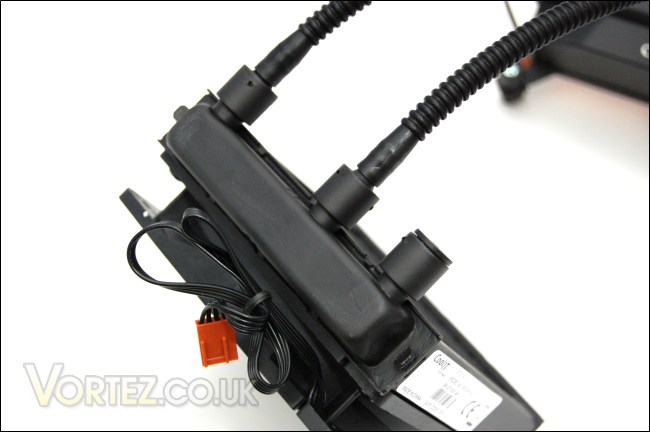
The reservoir
The reservoir is attached directly to the radiator to minimize the space taken up by the system, and heat can dissipate straight across the radiator this way. The material is tough so it can withstand high pressures and temperatures. On first look, the barbs seem flimsy unlike the high quality metal ones used in custom water cooling systems. However, on closer inspection they are of strong metallic construction, integrated to the reservoir to cope with high pressures without fear of leaking. This demonstrates the advantage of a non modular system. The connection between the hoses and barbs are tight and secure to further prevent leaks.
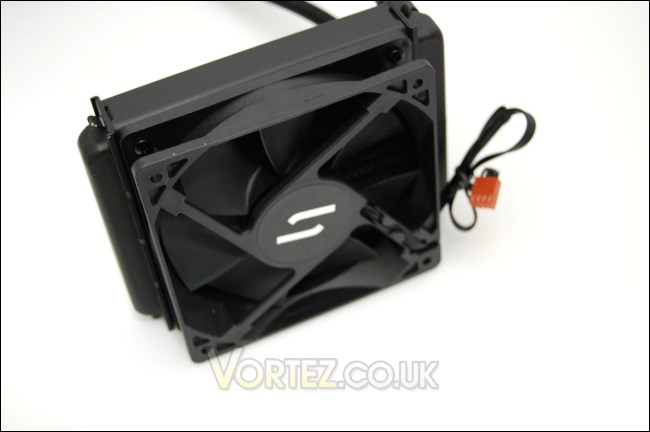
The 120mm exhaust fan
The 7 bladed PWM fan acts as a pull exhaust fan attached to the radiator. It has a maximum rotational speed of 1800 RPM by design and makes use of a 4 pin fan header for PWM functionality. Unlike the Domino, the fan is screwed on rather than attached using rubber mounts which makes removing the fan harder with the ECO. However the other side of the radiator does have holes to mount another fan for a push/pull setup.
The pump
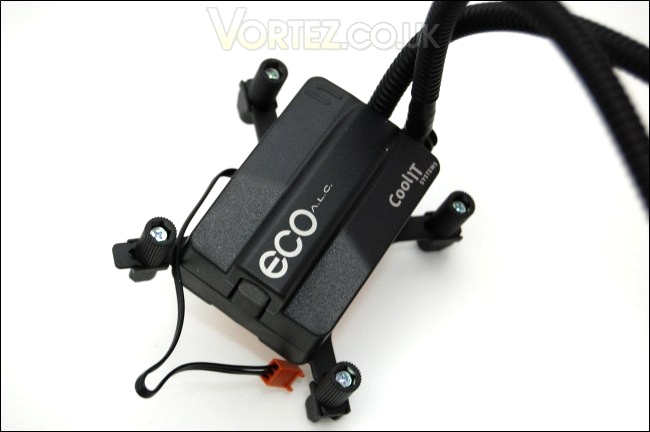
Another difference with the ECO is the integration of the 12v pump to the CPU mounting block. The ceramic bearing ensures a long life cycle, while remaining compact and quiet. The pump comes with a 3 pin header that allows it to be connected to the motherboard. It is recommended to not plug it into a 4 pin connector on the motherboard to avoid fluctuations in the pump speed.
The hose and barb fittings
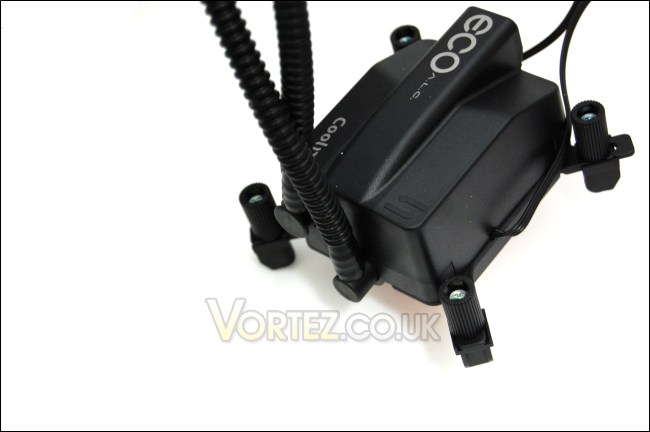
On the side, we can see where the 2 hoses connect up to the pump. Again, the sturdy finish will prevent leakage and they have been designed so that the barbs can rotate, allowing more flexibility when installing into a case.
Closer Look (Continued)
The tubing
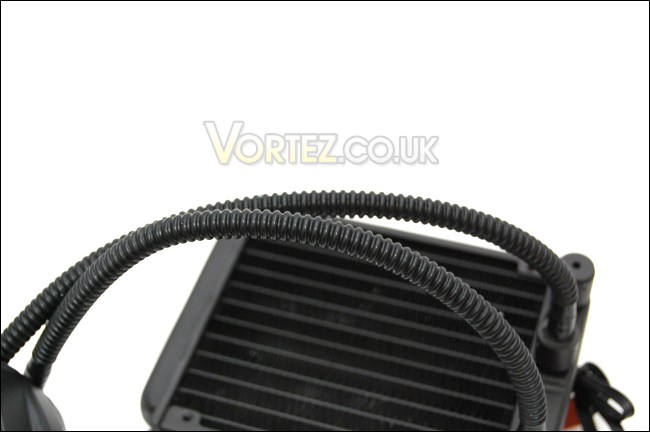
The hoses are quite stiff when trying to install but very durable so the risk of damaging it is minimal. The design of the system, with the pump integrated into the CPU block and the reservoir to the radiator, means that only 2 tubes have to be used making it very user friendly. The hoses are approximately 30cm in length so it is recommended to use the radiator in the place of the case’s exhaust fan where the tubing will easily reach.
The Fluid Heat Exchanger
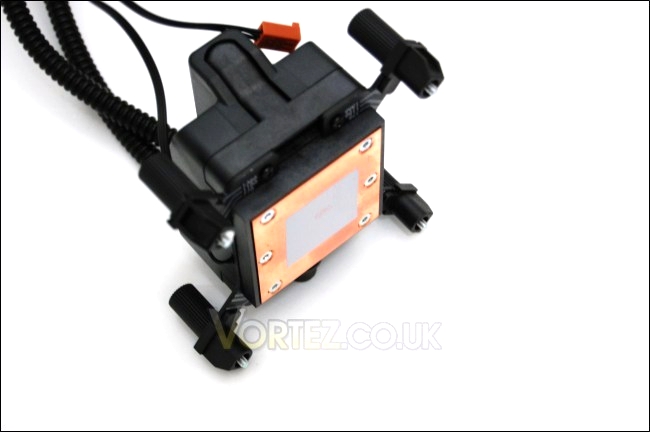
The CPU block or Fluid Heat Exchanger as CoolIT call it, is made of copper for optimal heat transfer. The base has a flat finish but lacks a mirror finish. The large surface area ensures maximum contact with any sized CPUs. CoolIT’s high performance thermal compound comes pre-applied for a quick and easy installation.
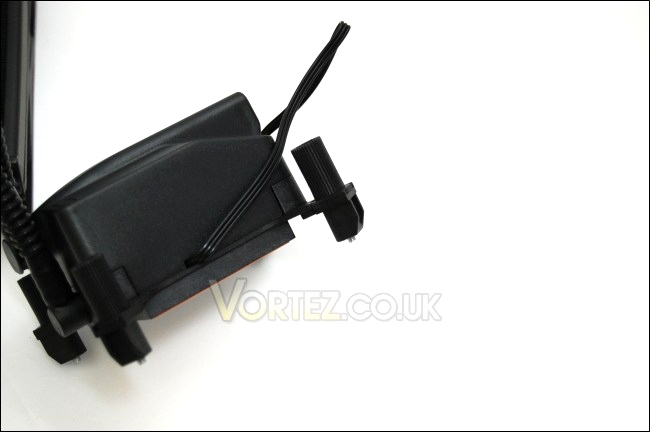
The retention bracket
At the base, the ECO makes use of pre-fitted brackets for installation. By default, the Intel bracket is installed but the AMD ones are bundled. To replace them, simply unscrew the brackets from below and install the other sets. The Intel bracket comes with LGA775/1156/1366 socket compatibility while the AMD set comes with AM2(+)/AM3 compatibility.
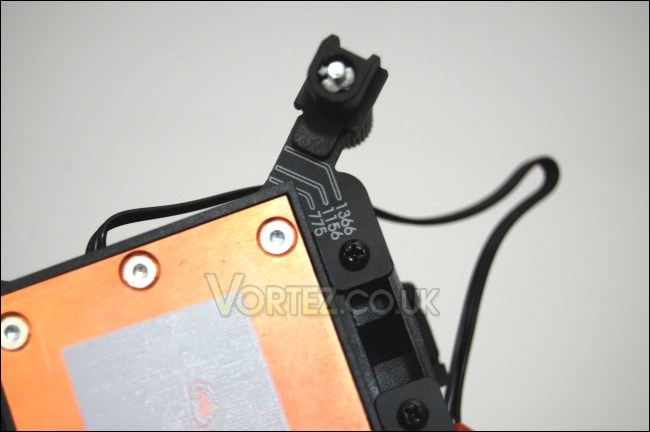
Retention clips
The bracket uses a unique universal retention system that allows the user to quickly change to the socket they will be installing the ECO on. The sockets are marked at the bottom so the user simply has to pull the retainer and slide it into position making sure the two side grooves are facing outwards. The side groove is a clever touch to make sure that the retention will always be positioned straight.
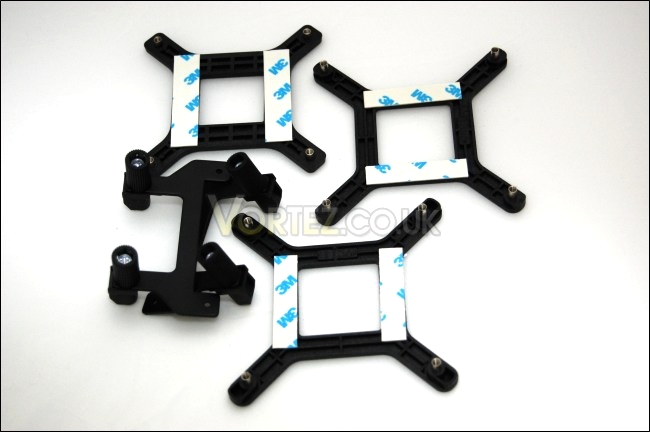
Motherboard backplates
As mentioned before, three motherboard back plates are provided for Intel LGA775/1156/1366 systems whereas AMD motherboards will normally have an integrated back plate. The AMD retention brackets are also supplied.
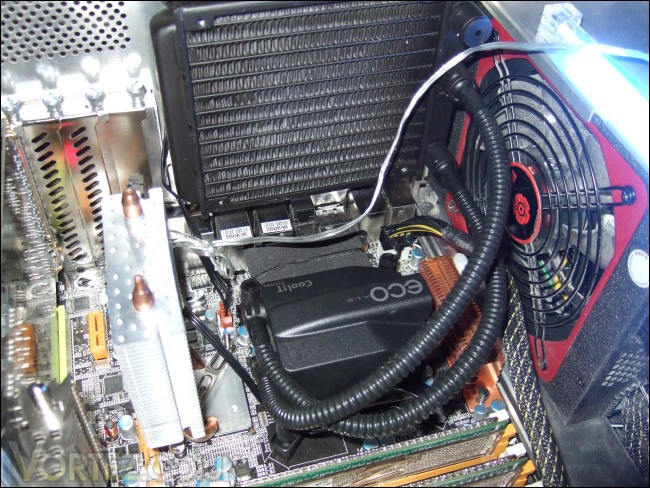
Installed!
Once installed, we can see that it doesn’t take up a lot of the motherboard’s real estate, ensuring plenty of space for adequate airflow and other components. This makes the CoolIT ECO ideal for both small M-ATX cases and larger cases alike.
Test Setup
Test Setup
CPU – Intel Core i7 920 – 4.0ghz
RAM – 6GB (3x2GB) OCZ platinum DDR3 1333mhz
Motherboard – Biostar T-Power x58
Graphics card – Gainward Geforce GTX260 216 896MB
Power Supply – Enermax Revolution 85+ 850W
Hard Drive – Samsung F1 320GB
Western Digital Caviar WD3200AAKS 320GB
Drivers – Nvidia Forceware 196.34
CPU Coolers:
CoolIT ECO A.L.C including tests using 2 Noctua NF-P12s and 2 SWiF2-120Ps
Thermalright Venomous X using 2 Noctua NF-P12s and 2 SWiF2-120Ps
Coolink Corator DS including tests with dual fan setups
Tuniq Propeller 120(High speed fan)
Noctua NH-C12P SE14
Prolimatech Megahalem
Noctua NH-D14 (U.L.N.A and default speed)
Noctua NH-U12P SE1366
Thermolab Baram (with 2 Noctua NF-P12 fans)
CoolIT Domino A.L.C
Sunbeam Core Contact Freezer
Coolermaster Hyper 212 Plus including test with 2 Noctua NF-P12 fans
Alpenföhn Nordwand including test with 2 Noctua NF-P12 fans
Tuniq Tower 120 Extreme (Low/med/high speed)
Program Suite:
Core Temp 0.99.5
LinX stress Test
PC Wizard
How I tested:
Testing will be based on temperatures recorded by Coretemp and PC wizard after 20 passes of LinX stress test. The absolute temperatures recorded in the tables are averages of the 4 cores and the delta value provided for a fair comparison, taking into account ambient temperatures. The test will be run at stock speed and at an overclocked speed of 4ghz.
Installation
Installation is a straightforward process. Contrary to what other sites or early users may have reported, the ECO has no issues and simply requires that the CPU block is tightened fully to the backplate. With an integrated universal retention bracket and the appropriate motherboard backplate, users do not have to resort to mounting the cooler using a plethora of screws and tools.
1.) Place the appropriate backplate behind the motherboard making sure each corner has gone through the motherboard mounting holes.
2.) Ensure that the correct Intel/AMD retention bracket is installed to the CPU block/Fluid Heat Exchanger and that the clips on each corner are set to the right socket.
3.) Install the CPU block on top of the motherboard, making sure each corner screw is lined up with the mounting holes and the backplate.
4.) Tighten the clips by twisting or use a screwdriver to do so. It is important that the clips are screwed on fully until it is no longer possible to twist further. This is to make sure that the FHE is in full contact with the CPU underneath.
5.) Install the radiator and fan in the place of the case’s exhaust fan, ensuring that the CoolIT fan is at the back pulling air through the radiator.
6.) Plug the pump and fan cables to the motherboard making sure that the 12v pump cable isn’t connected to a regulated fan header.
It is possible to remove the fan and add your own but the screws are very small and hard to access without a thin screwdriver or a penknife. Furthermore, a secondary fan can be mounted on the other side of the radiator for faster heat dissipation. On the whole, installation was very intuitive and the only problem is the flexibility of the tubing when trying to mount the radiator and fan at the back of the case.
Here’s a video from CoolIT showing the mounting procedure:
Results
Stock
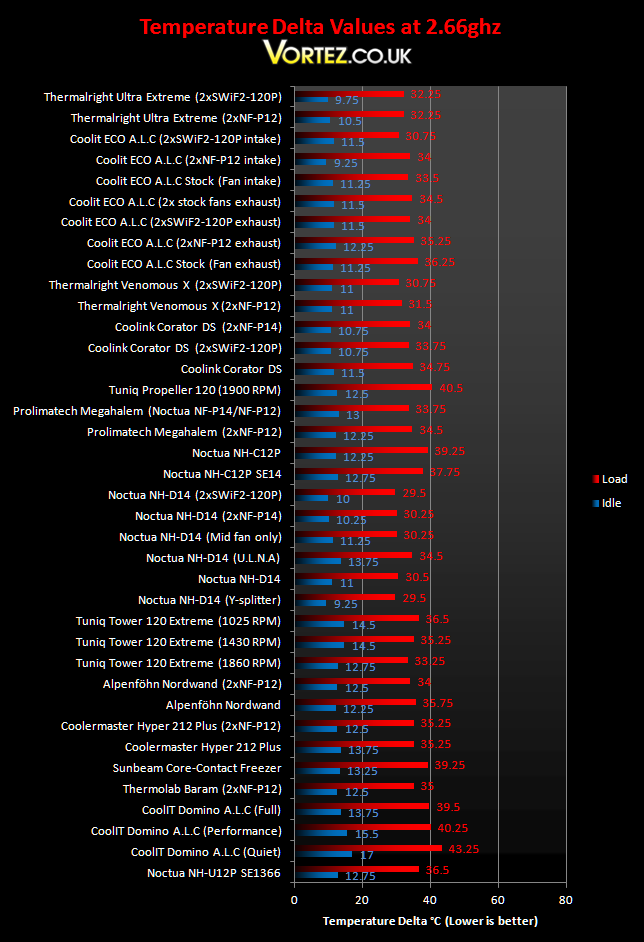
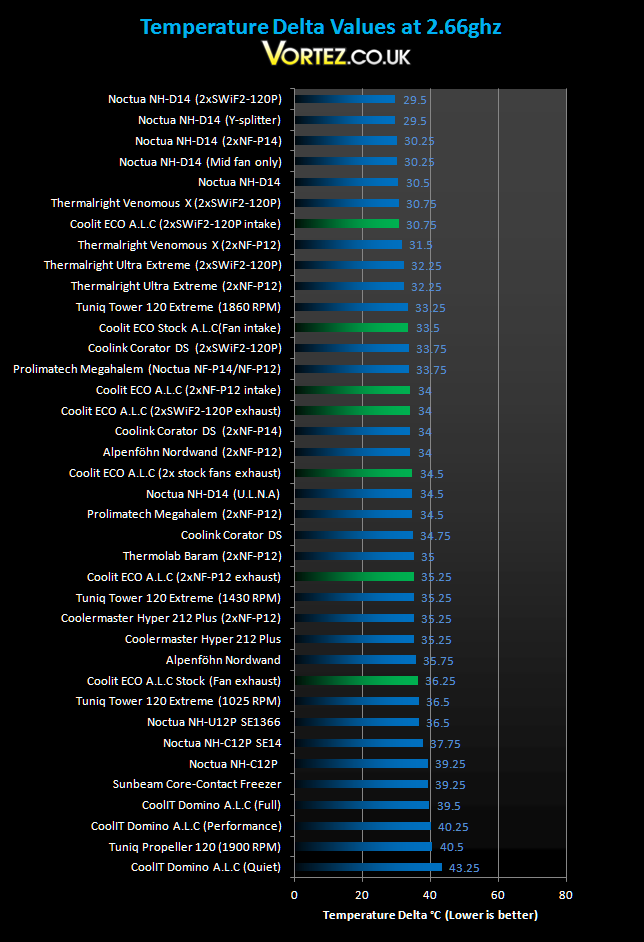
Temperatures at stock speed are relatively low using the stock configuration. While it doesn’t match up to the bigger, more efficient air coolers, it still manages to significantly reduce the temperature compared to the old Domino A.L.C. The ECO is also better than the popular Noctua NH-U12P and the more compact NH-C12P SE14. Idle temperatures are also impressive, even besting the Prolimatech Megahalem with 2 fans. Once another fan is attached to the ECO, performance takes a turn for the better. Using to Noctua fans reduces noise levels dramatically and provides cooler operation. For all out brute cooling, attaching a second CoolIT fan or 2 Coolink fans makes the ECO one of the best solutions at the expense of noise.
*Update*
Following requests to testing the CoolIT ECO with the fans in an intake configuration, I conducted a few more tests. Having the fan as intakes certainly made a big improvement to temperatures at stock speed. Using two Coolink fans as intakes improved temperatures by 3.25 degrees and similar using one single fan, the temperatures drops by 2.75 degrees. This puts the ECO in the same realms as the better air cooling solutions.
Results (Overclocked)
4GHz
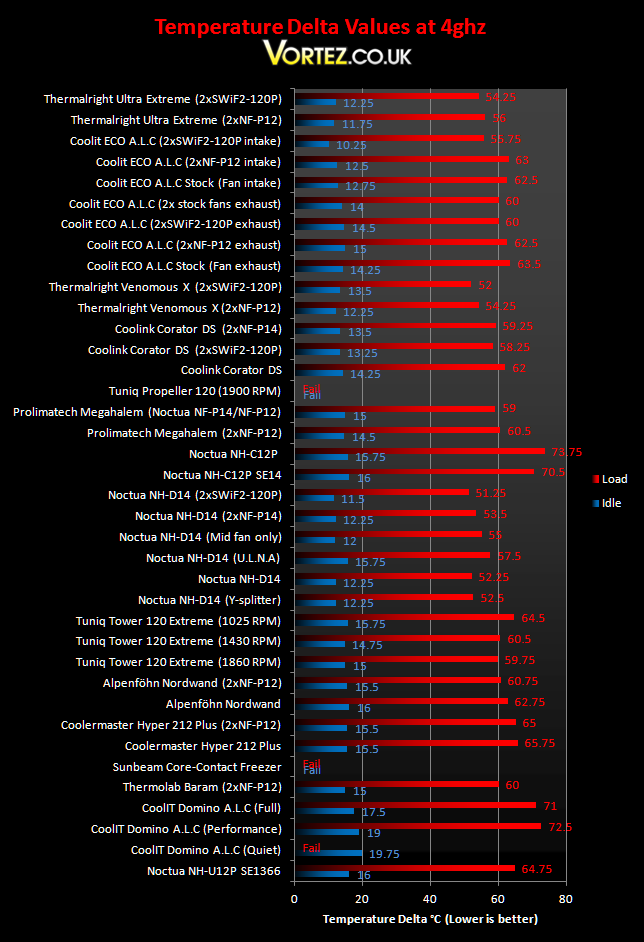
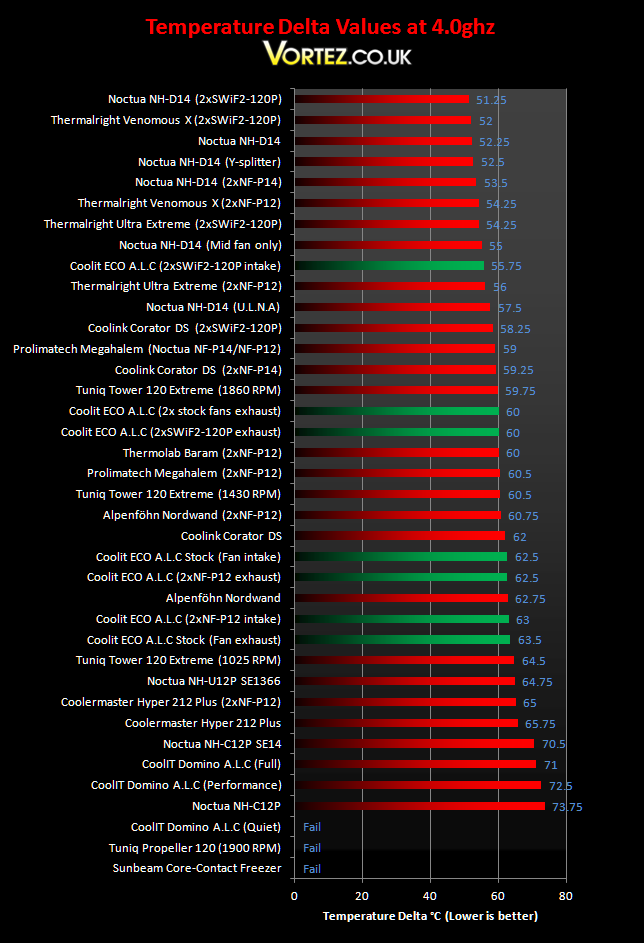
At 4GHz, the stock ECO performs much better than its predecessor despite the lower fan speed. It even outperforms the Noctua NH-U12P. However, it is outclassed by other air coolers such as the Alpenföhn Nordwand, which is cheaper and quieter. The bigger heatsinks are simply in a league of their own when compared to the CoolIT ECO. Its true potential shines through in a dual fan configuration. Using two of the stock fans, temperatures are lowered by 3.5 degrees, matching the impressive Thermolab Baram and Prolimatech Megahalem. This still doesn’t put the ECO in the same league as the Thermalright Venomous X or the Noctua NH-D14 but given the size difference, we didn’t expect it to.
*Update*
Again we see some improvements with the fans acting as intake ones rather than the default exhaust configuration. With the single fan, the temperatures decrease by 1 degree but surprisingly with the two Noctua fans, the temperatures are slightly worse. The most significant change is with the two Coolink SWIiF-120P fans. As intake fans, there’s a 4.25 degrees change that again pits the ECO against the likes of the Thermalright Ultra Extreme. However, the main problem with this setup is the adverse results on the motherboard temperatures. Instead of operating at the regular 50 degrees, the Northbridge temperatures shot up into the mid 60s.
Noise
Noise is one of the ECO’s biggest downfall. At 1900 RPM, the fan was audible throughout testing. As you can imagine, running two of the stock fans was even louder. This was made worse by the fact that the two didn’t run totally in sync with the use of the Y-splitter so every few seconds, constructive interference amplified the whirring noise. Both fans operated at around 1800 RPM whereas a single fan setup ran at 1900 RPM. However, the pump was much quieter and after the initial rush of liquid when the system starts, it was inaudible over the fan. The stock fans were more efficient than the Coolink SWiF2-120P, which despite running at a higher 1900 RPM didn’t show an improvement. Two Noctua NF-P12 fans solved the noise problem but cooling was only slightly better than the stock system.
Conclusion
CoolIT have been busy since the introduction of the Domino and with growing competition in the market, they have managed to deliver a much improved end product over its predecessor. The ECO is one of the solutions in their new line of A.L.C products, marketed to compete with high end air cooling solutions. At that, it does a good job. The ECO performs better than the aging NH-U12P, which still remains more expensive, and is significantly better than the Domino and Noctua\’s top down coolers. However, adopting a push-push fan configuration allows the ECO to shine, matching the Thermolab Baram and Alpenföhn Nordwand, and even the revered Prolimatech Megahalem.
Performance comes at a price and that\’s noise. The 1800 RPM fan is audible even during general usage and adding a second fan to improve cooling consequently increases noise levels. The consolation factor is that the pump is inaudible. Despite this, the CoolIT ECO has several advantages over its competition. Its compact design allows user to install it in restricted cases and the weight doesn\’t put any strain on the motherboard, something we have become accustomed to seeing with ever larger heatsinks. In that sense, it becomes a better and more viable solution than the Noctua and Tuniq top down coolers.
On the whole, the CoolIT ECO A.L.C is a good cooler. What it might lack in performance compared to the bigger and more expensive air coolers, it makes up in ease of installation and with its compact design. With the ability to perfectly cool an i7 at 4GHz, the ECO demonstrates that bigger is not necessarily better.
*Update*
With the CoolIT ECO A.L.C tested with the fans as intakes instead of the recommended exhaust setups, we see a slight improvement in the core temperatures. It is most noticeable at stock speeds and with the Coolink SWiF-120P fans attached. However, this was to the detriment of the Northbridge temperatures which rose in the process. So, my conclusion remains the same on the product. It remains a fantastic product with emphasis on ease of installation that it definitely upholds.
Pros
+Very well packaged
+Sleek and robust
+Compact and all contained
+Easy to install and maintenance free
+Good cooling performance
+Price
Cons
-Performance still behind top end air coolers
-Noise
The CoolIT ECO A.L.C deserves the Vortez Hardware Silver award.