







Today, we have something a bit different in our thermal compound review. Coollaboratory defied all convention and has created a liquid metal thermal compound, so let’s see how it does!
Product on Review: Coollaboratory Liquid Metal ProManufacturer and Sponsor: Coollaboratory
MSRP: Not mentioned on website
Street Price: £7.49
It is no mystery that metals have some excellent thermal properties, being able to conduct heat away very efficiently. You don’t have to look far to see evidence of this, with copper and aluminium leading the way in most thermal dissipation solutions, namely heatsinks. However, heatsinks alone have never been effective without an interface between itself and the component to maximise heat transfer. Thermal compounds have filled this role for a very long time, with the function of filling any gaps in the interface and for the most part, they have been ceramic or solid metal based. Metal based thermal compounds have been high popular in the past for their high thermal conductivity but conversely, those metal based compounds have one big inherent disadvantage, electrical conductivity. In a bid to make thermal compounds less electrically conductive, it’s possible to say that manufacturers have been unable to create the perfect product. This is where Coollaboratory comes in.

Coollaboratory have taken a step away from the convention and have created a liquid metal solution, seemingly discounting electrical conductivity from the equation! Consisting solely of a liquid metal alloy, and no non-metallic adhesive such as silicone and oxides, they promise to deliver the best thermal conductivity possible. Of course, this may present itself as a risk due to its electrical conductivity but the belief is that through careful application, this will pose no issue.
A few words on Coollaboratory as taken from their site:
Coollaboratory is a young and innovative company settled in Saxony-Anhalt (Germany). The solution of thermo-dynamic problems takes centre-stage in corporate philosophy, as well as the development of corresponding products, which confine or remedy the problems. In place Coollaboratory concentrates on the range of alloys off liquid metal and the development of new or revised cooling concepts.
In 2. quarter 2005 Coollaboratory released, as first product, the worldwide first liquid metal heat conduction paste under the name “Coollaboratory Liquid Pro”. That beat, the until then known reference pastes on based on metal-oxide and other non-metallic materials clearly, and pointed the way in which Coollaboratory struck in for the future. The development department of the company Coollaboratory researches on different ranks and has aimed at dissolving the partly serious problems in the thermo-dynamic with new and innovative products.
Coollaboratory has a niche product targeting a big market. It is this kind of risk that pave way to innovation and success so let’s see if the Liquid Metal Pro being reviewed here can de-throne our current title holder, the Arctic MX-3.
Features and Specifications
Features
Coollaboratory Liquid Pro is the first heat conducting medium, which is worthy of its name. It is the first heat conduction paste that consists of 100% liquid metal alloy. It is liquid at room temperature (like mercury), but it is absolutely non-toxic and has a high moistening ability for several materials (Cooper, nickel, gold, silver) in current PC systems besides aluminium.
Coollaboratory Liquid Pro contain no non-metallic additives (like silicone, oxides etc.) at all. It also does not contain any solid particles. Due to these properties, Coollaboratory Liquid Pro surpasses the best high performance heat conducting pastes by a factor of 9-10 in heat conductivity and standard white silicon metal oxide paste by a factor of 100.
Specifications
•Syringe volume: 0.30ml containing 0.15ml of the Liquid Metal
Coollaboratory are shy in revealing details on the specifications and properties of the Liquid Pro but one thing that we can deduce is the material being used. Being a liquid metal, the only two possibilities are Mercury and the less known Gallium. Both can be found as liquid at room temperature and Gallium, the only non-toxic one of the two is likely to be metal used in the paste, albeit as an alloy.
Packaging and Content
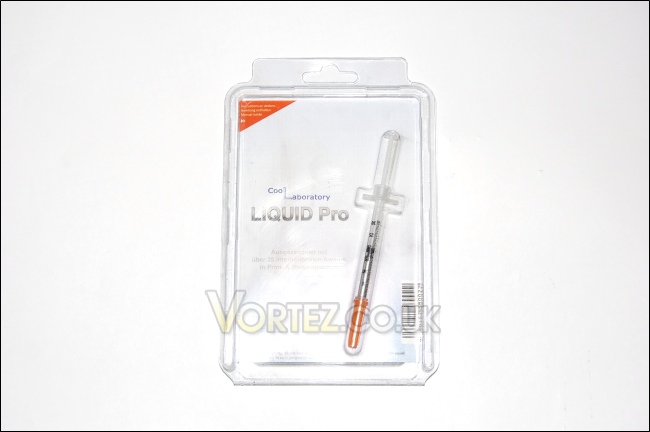
The front cover of the Coollaboratory Liquid Metal Pro
The packaging is yet again a typical hard plastic cover, used for most thermal paste tubes these days. The only difference is that the cover can be opened cleanly by lifting the top cover, without using scissors or blades to cut through. A definite step up from other products which can be a nightmare to open up
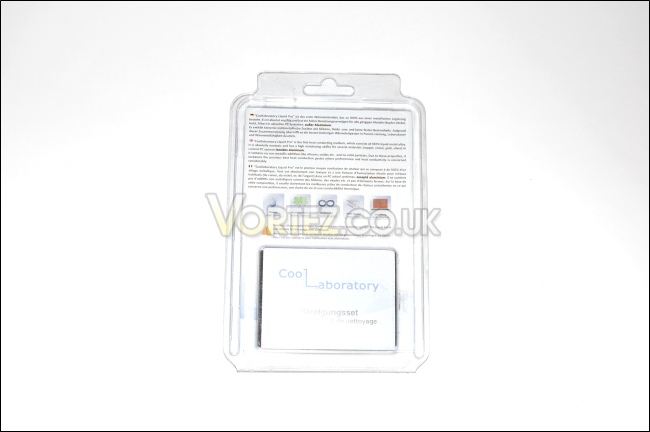
The back cover
The back cover holds the cleaning kit and provides some information on the features, although no actual figures are given concerning the specifications. The only way of knowing whether it is good or not is to therefore try it!
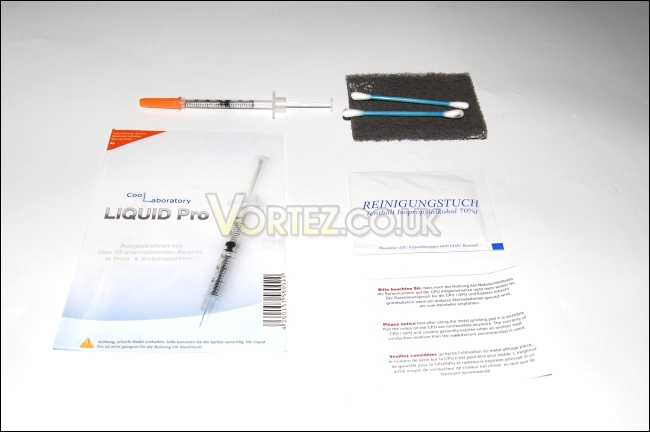
This isn’t a first aid kit…
For a small package, it certainly offers a healthy bundle. Alongside the actual syringe is the manual on how to best apply the paste, taking notice of the necessary precautions, 2 cotton buds, 1 metal grinding pad and another warning label, reassuringly describing how you might lose your warranty on the CPU and cooler. More on that later!
The piece of paper advises you on how to best clean the Liquid Metal Pro if required
For a small package, it certainly offers a healthy bundle. Alongside the actual syringe is the manual on how to best apply the paste, taking care of the necessary precautions, 2 cotton buds, 1 metal grinding pad and another warning label, reassuringly describing how you might lose your warranty on the CPU and cooler. More on that later!
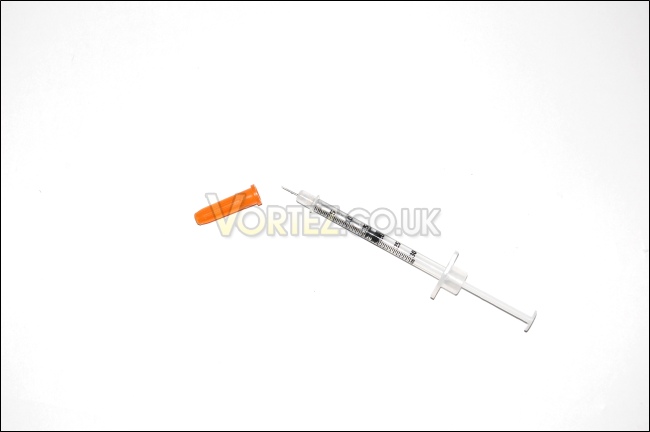
The syringe is a very thin long tube measuring 12cm in length
The syringe is not exactly your typical thermal paste tube and you will probably be more acquainted with this if you are in the medical profession or partake in other shady businesses. As such, be very careful with it and always place the cap back on when finished! The reason for this type of tube is due to its liquid content, which would otherwise just flow out
Installation
InstallationYou wouldn’t think that applying thermal paste would require a dedicated page and you would be right but this paste does have its quirk which I thought would be worth mentioning. Firstly, applying the paste is actually very easy. In fact, it’s the easiest material I’ve had the joy of applying. Simply squeeze a tiny blob onto the CPU, and use the cotton bud to gently press it and spread it evenly on top. On first site, the liquid metal appears a silvery “solder like” blob and moving it about gives it that Terminator 2 feel. As soon as you press it and spread it, a smooth shiny layer is created.
For illustration:


A word of warning though, the Liquid Metal Pro is electrically conductive so make sure that it doesn’t make contact with any circuitry and as Coollaboratory advises, do not use it with coolers having aluminium bases. Here’s a list of compatible coolers: http://www.coollaboratory.com/compatibility_en.pdf
Removing the paste
After 48 hours of usage, the Liquid Metal consolidates onto the CPU and cooler, allowing for excellent contact and heat transfer but this comes with a downsize. Should you be one of those people who routinely changes cooler, cleaning the Liquid Metal can be a pain. After removing the cooler, you will notice that the paste is no longer a fluid but instead it seems to be incorporated onto the CPU and cooler. The excess can easily be wiped off using a cloth but the rest requires the use of the metal grinding pad. As the name suggests, what you are effectively doing, is lapping the top of the component so don’t be worried if you can no longer see the writing on the CPU. This will mostly likely void your warranty and Coollaboratory’s only words regarding this are that any other conduction medium would void the warranty of the component anyway. How a manufacturer would ever find out if a thermal paste other than their own was used, bar the Liquid Metal Pro, is beyond my imagination. The up side is that the Liquid Metal does not actually require to be cleaned and it is even possible to apply regular thermal paste on top of it because of the nature of the material!
More information on how to apply and remove the paste can be found here
Without further wait, let’s get to what we’re actually here to see, the performance!
Test Setup
CPU – Intel Core i7 920 – 4.0ghz
RAM – 6GB (3x2GB) OCZ platinum DDR3 1333mhz
Motherboard – Biostar T-Power x58
Graphics card – Gainward 896MB GTX260 216
Power Supply – Enermax Revolution 85+ 850W
Cooling – Noctua SE 1366 NH-U12P
Hard Drive – Samsung F1 320GB
Western Digital Caviar WD3200AAKS 320GB
Drivers – ForceWare 190.40
Thermal pastes:
Tuniq TX-3
Tuniq TX-2
Noctua NT-H1
Arctic MX-2
Thermolab Baram paste
GELID GC-2
GELID GC-Extreme
Arctic MX-3
Coollaboratory Liquid Metal Pro
Program Suite:
Core Temp 0.99.5
LinX stress Test
PC Wizard
How I Tested:
Each paste was applied as recommended by the manufacturers and were test over a period of 48 hours to observe if they required any curing time. An initial test was done at stock (2.66ghz) speed and overclocked (4ghz) speed. The idle and load temperatures were measured using coretemp by looking at the minimum temperature while idling and the maximum temperature after 20 passes of LinX. This was repeated after 48 hours.
Due to varying temperatures, an average temperature was calculated and the ambient temperature was subtracted to obtain a delta value. This is presented in the graphs.
Results
CPU at 2.66ghz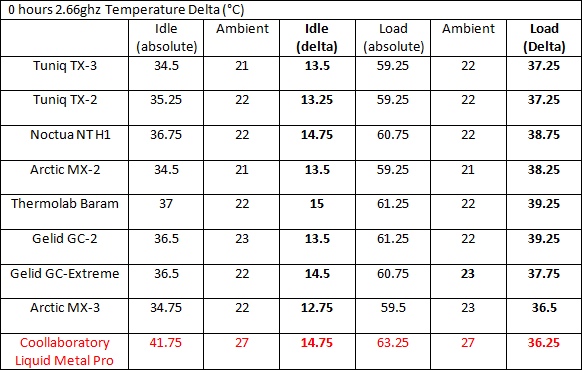
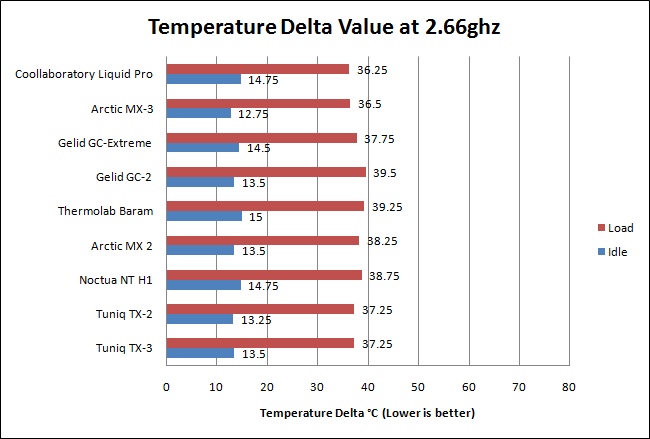
The Coollaboratory is already off to a flying start, beating the almighty Arctic MX-3 under load. The idle temperature delta was less remarkable but that’s not what we’re interested in.
CPU at 4ghz
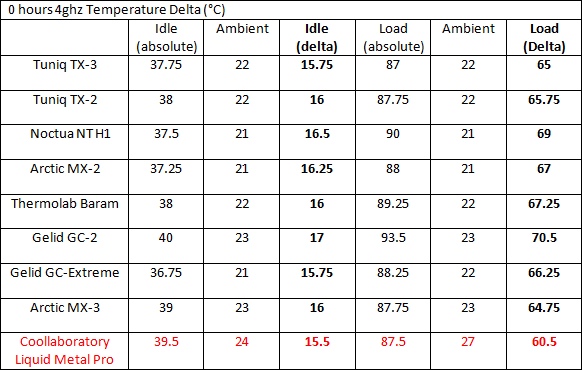
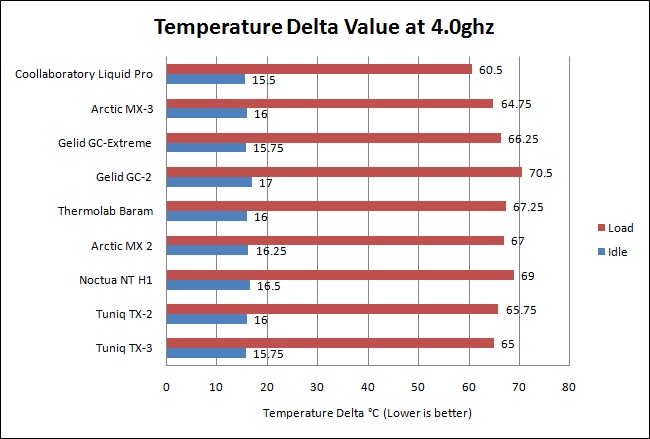
The Coollaboratory Liquid Metal Pro really flexes its muscles at 4ghz, gaining a 4 degrees afvantage over the Arctic MX-3, which we already described as being in a league of its own! Despite the complications of the Liquid Metal application, it’s well worth it seeing gains over some of the best thermal pastes out there. The metal alloy is very effective at transferring heat to the cooler.
CPU at 2.66ghz after 48 hours
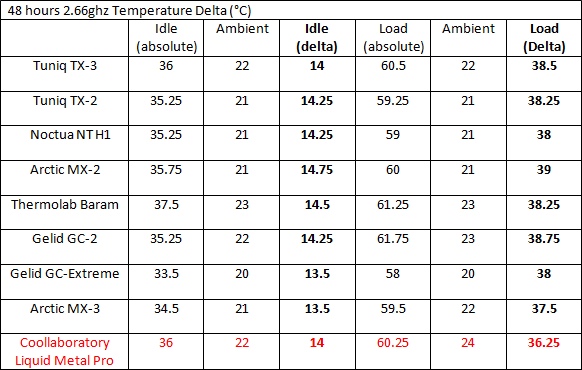
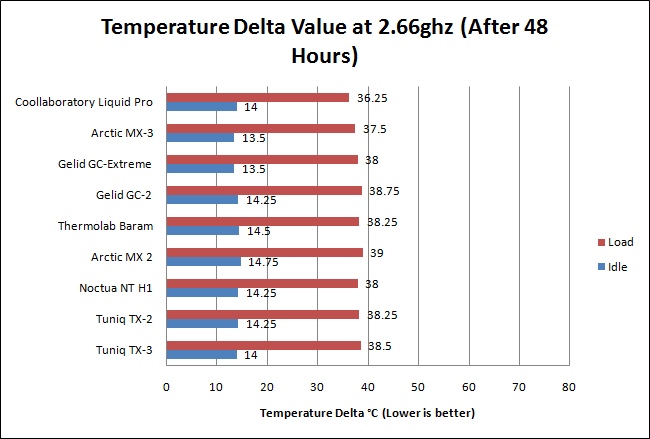
At stock CPU speeds, the Liquid Metal Pro still retains its title under load condition but the temperature gain is only 1.5 degrees over the Arctic MX-3, no easy feat by any means!
CPU at 4ghz after 48 hours
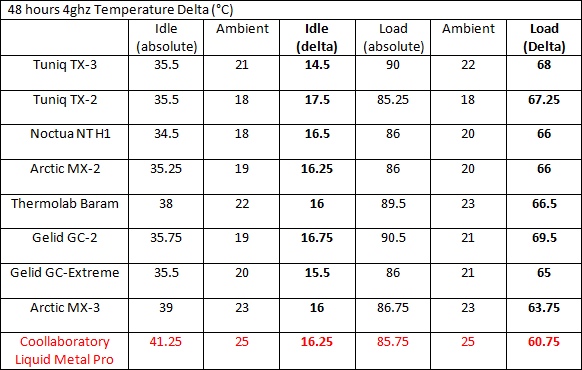
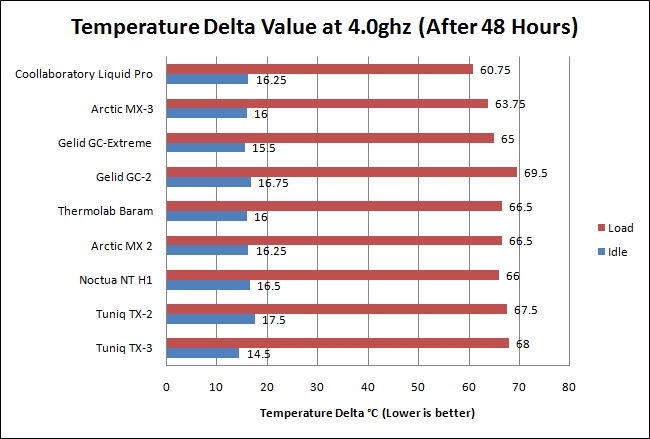
48 hours later and while the Arctic MX-3 performs slightly better, the Coollaboratory Liquid Metal Pro redefines the meaning of non-curing. The performance stays pretty much the same, thereby retaining its lead over thermal pastes. At idle conditions, however, it doesn’t match up to the Tuniq TX-3.
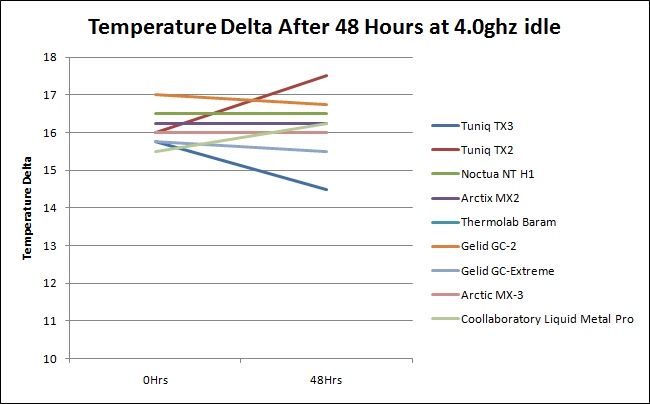
There’s a slight degradation in performance noticed with the Coollaboratory Liquid Metal Pro but this could well be within the margins of error. Since this only concerns idle temperatures, it’s nothing to worry about.
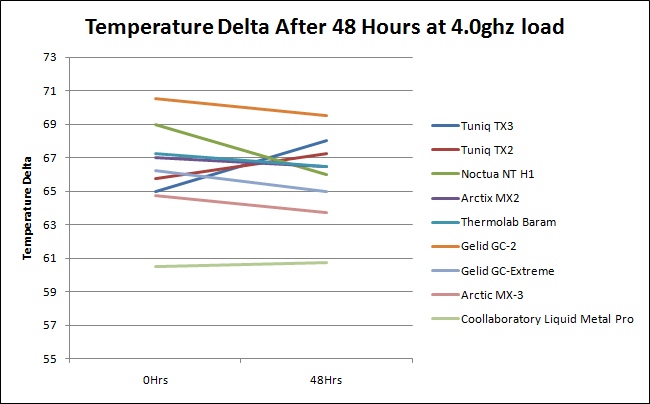
Impressively, the Coollaboratory’s performance only changes by 0.25 degrees. More remarkably however, is that its line is below the main cluster, signifying much better performance than anything else!
Conclusion
Another product, another review, another winner. For a long time, the limiting factor with thermal pastes has been electrical conductivity, and considering the fact that they\\\’ll be used with close proximity to circuitry, it is no surprise that manufacturers have tried to bypass or limit the use of metal in their pastes. Most, as a result tend to be metal oxides, consolidated with non-metal additives. Coollaboratory on the other hand have taken a different route. They created a thermal material based solely on a metal alloy, overcoming those unneeded precautions linked to electrical conductivity. Their idea is that careful application should be enough to prevent any malicious outcome and the reward for taking this risk is remarkable!Looking at the results, it is as clear as daylight that no other thermal paste solution can outperform the Liquid Metal Pro. Not only did the Coollaboratory Liquid Metal Pro beat the previously reviewed Arctic MX-3, but it did so by a wide margin of up to 4 degrees!
Applying the Liquid Metal is also a piece of cake as long as the extensively mentioned precautions are taken so that\\\’s a bonus point. Removing it is another story as previously mentioned so take this into consideration before buying it but in most cases, you will have no need to remove it anyway.
Pros:
•Best thermal interface material reviewed
•Only requires a tiny drop during application
•Bundled cleaning kit
•Easy application
Cons:
•The syringe is very sharp
•Precaution required when applying the Liquid Metal
•Removing the paste requires grinding and may void the warranty on the component
•Does not work with aluminium coolers
Despite the cons, this is the best thermal material I have tested and as long as the necessary steps are taken, it rewards you with marvellous cooling performance. The Coollaboratory Liquid Metal Pro deservedly earns itself the Vortez Hardware Gold Award!
To discuss this product further, please visit out forums.
