Looking for a new mid-tower with durability, strong features and excellent cable management? Enter the 4000D.

Product on Review: 4000D Mid Tower
Manufacturer: CORSAIR
Street Price: GBP £80 | USD $80 | AUD $129
[Intro to case – brief features, intended audience]
From a humble beginning as an affordable DDR memory module manufacturer over 25 years ago, Corsair has built an empire that now spans almost every aspect of desktop computing. Be it peripherals, memory or even full systems, Corsair have their fingers, thumbs and sometimes whole hands in many different pies. And arguably this success can be traced back to the introduction eleven years ago of their first PC chassis, the Obsidian 800D.
Today the component manufacturer are harking back to their enclosure roots with the 4000-series, a new mid-tower chassis range with echoes of the past but more than an eye on the future. It arrives at a time when Corsair’s case lineup has never been more complex (some might even say bloated), and has been billed as the start of a streamlining and simplification of their portfolio as a whole.
Three members of the 4000-series launch today to satisfy subtly different requirements. The 4000D, which is the model on review, is joined by the 4000X and 4000D Airflow, two models which focus on looks (with tempered glass panelling) and high air flow (with perforated front panelling) respectively. Future Corsair cases will follow a similar pattern of feature variants based on a new frame design that dictates internal layout and motherboard compatibility.
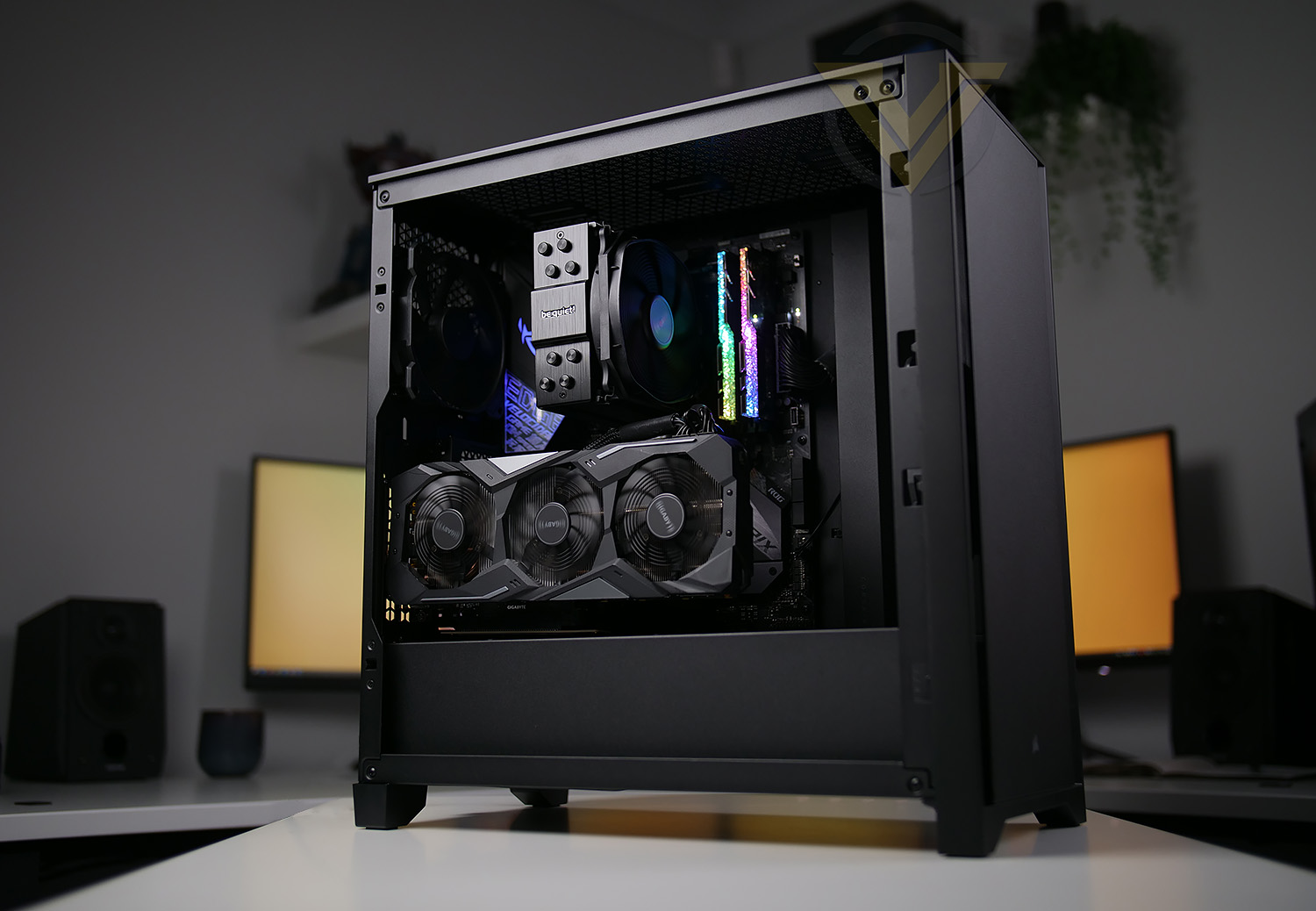
Veterans will take one look at the 4000D and immediately see aesthetic similarities with the legendary Obsidian 800D, including flush front facia and squared off feet. Its external dimensions are much smaller though, most suited to mainstream ATX motherboards and conventional air cooling/AIOs. Befitting a brand new series however are the features, ripe for 2020 and beyond.
The 4000-series marks the debut of Corsair’s RapidRoute cable management, which incorporates an indentation in the motherboard tray and velcro retaining ties for more comfortable cable routing. A PSU shroud (with SSD mounting points) hides away additional cabling and maintains a clean internal aesthetic. Vertical PCIe card mounting is now supported as an option rather than afterthought. And the range incorporates USB Type-C front panel connectivity as standard. All told, it’s a considerable revision to prior Corsair mainstream enclosures.
Joining the 4000-series are also a new series of 120mm fans dubbed ‘AirGuide’. They more effectively channel air to and around hot components, reducing ‘dead air’ within the chassis and aiding overall cooling.
The 4000-series hits the mainstream in the extremely competitive $80/£80 – $120/£120 range, so Corsair will need to rely on more than their considerable brand clout to attract consumers away from the plethora of excellent options already available. Does the 4000D start as they mean to go on? Lets take a look.
Corsair on their 4000D
The CORSAIR 4000D is a distinctive, yet minimalist, mid-tower ATX case with easy cable management and exceptional cooling. A highly durable solid steel front panel and dedicated ventilation channels combine to offer great looks and airflow, accompanied by two included 120mm AirGuide fans designed with anti-vortex vanes that enhance cooling.
Technical Specifications
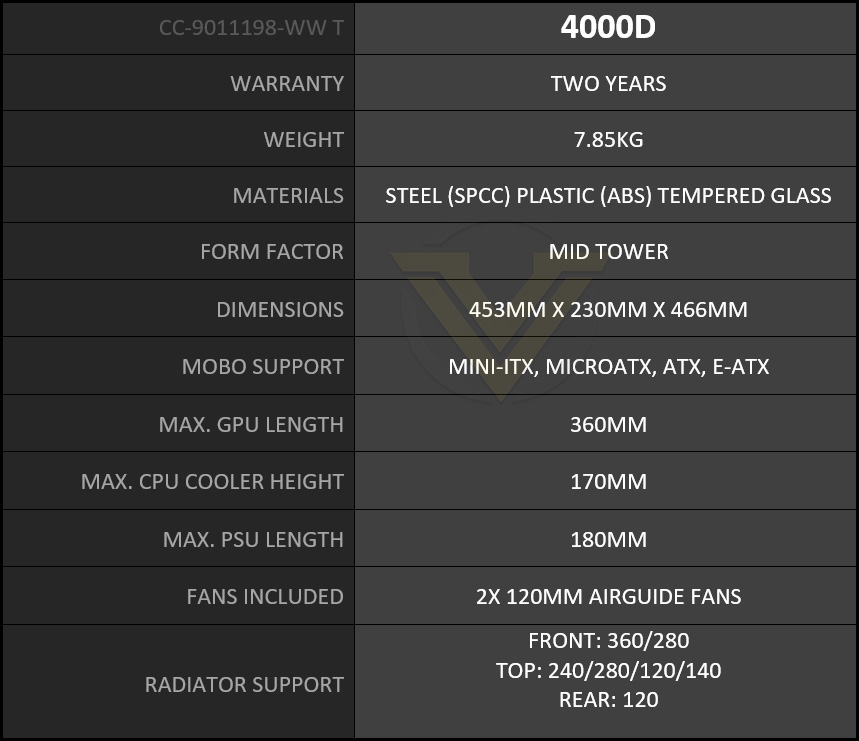
Below are the technical specifications surrounding the 4000D supplied by Corsair
Closer Look Video
For this review we’ve also created a YouTube video which highlights all of the key features, shows a full system install and identifies the good/bad points regarding this computer case. Click the video below or go to the Corsair 4000D Video Review.
Thermal Performance Testing
Inside 4000D there are two 120mm cooling fans, one is positioned as an intake at the front and the other is positioned as a rear exhaust. This configuration (push-pull) is highly favoured for good airflow.
To discover the thermal performance of 4000D we will record idle temperatures after 20 minutes from a cold boot. We will then stress the system and temperatures will again be monitored after 30 minutes have elapsed.
For the purpose of accurate analysis, the idle and load temperatures for CPU will be recorded and the range between idle and load will be calculated to determine how efficient cooling is.
NOTE: Ambient temperature is 20C
The below system configuration is different to that which is displayed/installed within the pictures. We use this below configuration for historic comparison.
System Components
CPU Intel Pentium K G3258 @ 4GHz
Motherboard GIGABYTE Z87X-D3H
CPU Cooler Cooler Master Hyper 212 EVO (Different to cooler in pictures)
Graphics NVIDIA GTX 760
Memory 4GB Kingston HyperX DDR3
HDD Samsung Spinpoint 500GB SATA-II
PSU DeepCool DQ750
Motherboard GIGABYTE Z87X-D3H
CPU Cooler Cooler Master Hyper 212 EVO (Different to cooler in pictures)
Graphics NVIDIA GTX 760
Memory 4GB Kingston HyperX DDR3
HDD Samsung Spinpoint 500GB SATA-II
PSU DeepCool DQ750
Noise
The noise emitted from 4000D can be regarded as “low-noise”. As per our video, we reported around 43dB from overall system noise (includes GPU, and CPU cooler).
Conclusion
After spending some considerable time with 4000D it being apparent early in the process that Corsair has fulfilled key characteristics that make a computer case great. 4000D is visually attractive, it has been engineered with top-class build quality and contains a strong feature-set.
Whether you go with the black or white versions of the 4000D or 4000D AIRFLOW, both cases are easy on the eye. AIRFLOW will obviously focus more on the cooling ability with noise as a trade-off, while the standard 4000D (which we’ve reviewed) seeks to deaden the noise somewhat and opt for a smooth, sleek aesthetic. Corsair are also launching another SKU which is named 4000X, this model features tempered glass, 3x RGB cooling fans and a controller but is notably more expensive.
Build quality at this price-point can be hit n’ miss, with some vendors choosing to compromise. Even Corsair themselves have done this in the past, but with the 4000D, they clearly avoid this. Our case in question has been designed to have a solid chassis and robust panels.
The most significant of all 4000D’s attributes is the cable management. Within, system builders will find the RapidRoute cable management tool, which, even though it is simple in design, will streamline the process of keeping the internals clean and tidy. By equipping the case with a cavity and integrating cable ties, it’s never been easier to tie down those unruly cables!
We found 4000D to emit low-noise thanks to the thick panels and included fans. Cooling is good, but if you prefer something with more grunt then the AIRFLOW version is clearly the better choice. Our only criticisms with the 4000D would be the lack of USB functionality which sees us receive just one USB Type-A. We also feel that a closed off panel up at the top (similar to the front) would have been more coherent on such an enclosure.
4000D arrives with a price-tag of $80 USD | £80 GBP | $129 AUD – which can be regarded as a low-to-mid range solution. There is a lot of competition at this price point but we’re confident that 4000D will do well due to its strengths!
4000D has all the ingredients for an excellent computer chassis. Those who want a solid case with plenty of great features, without spending too much cash should definitely take a look at this!
Pros
+ Elegant, refined styling
+ Arrives with two AirGuide cooling fans
+ Includes USB 3.2 Gen2 Type-C
+ Easy to install kit
+ Excellent build quality
+ Superb cable management
+ Can host high-end kit
Cons
– Would have liked to see a closed off panel at top
– Just one type-A USB on front panel
+ Elegant, refined styling
+ Arrives with two AirGuide cooling fans
+ Includes USB 3.2 Gen2 Type-C
+ Easy to install kit
+ Excellent build quality
+ Superb cable management
+ Can host high-end kit
Cons
– Would have liked to see a closed off panel at top
– Just one type-A USB on front panel
Click here for an explanation of our awards at Vortez.net.
Stay connected with the Vortez Social Media pages: