







Corsair have added another chassis to their Carbide Series – the new 330R is a silent case with a professional design and attractive price-point.

Product on Review: Carbide Series 330R
Manufacturer and Sponsor: Corsair
Street Price: £75 (At time of review)
Last month Corsair announced two new cases to join their price conscious Carbide series. At the end of June we reviewed the Air 540 so today we turn to the sibling of the budget oriented 300R – 330R.
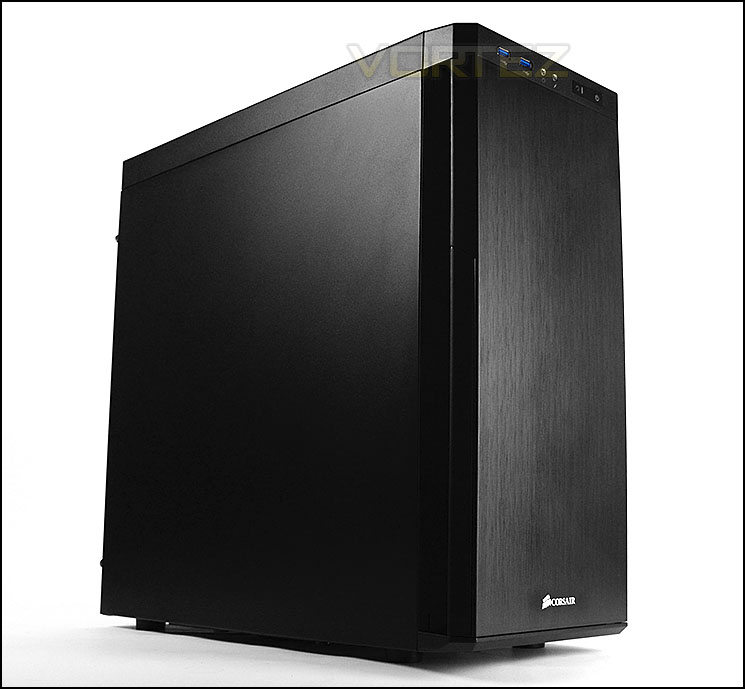
330R is a mid-tower computer chassis with professional and stylish looks. Being primarily designed as a silent case, 330R has closed off panels and special noise damping material to aid noise reduction. Whilst bringing a plethora of features and a classy appearance, many would presume this case is expensive but Corsair have priced 330R to be significantly lower than many other rivals of the same calibre in a bid to steal the spotlight – have Corsair done enough to take pole position?
Corsair on their 330R
The Carbide Series 330R Quiet PC Case is designed for systems that will go into media rooms, bedrooms, dorm rooms, or any place where both silence and performance are essential. Sound dampened doors and panels and clever intake fan design are combined with generous expansion room and builder-friendly features to allow you to build a silent PC that can pack a lot of power for gaming and high-definition media streaming.
Packaging & First Look
330R is presented in an eco-friendly box which we have seen time and again from Corsair and the Carbide Series. On the front there is an illustration of the case and a list of the fundamental features. Around the back there is a schematic diagram showing a break-down of the case and its significant characteristics; with the technical specifications being found on the side.
Inside, the case is covered in a clear plastic sheet and held in place via dual polystyrene pillars for extra protection during transit.
The packaging for 330R
Unveiling the 330R we are instantly met with a rather reserved and non-descript computer case. The styling is in tune with the discreet styling found on many a silent chassis and 330R is designed specifically with this in mind. Both side panels are solid steel and have no significant features but we really like how minimalist 330R appears on the eye.
330R unveiled and in full glory
Minimalist and professional styling
Exterior
Turning our attention to the finer details of the external aspects we first come to the front. This has a brushed aluminium front panel which acts as a door. This door pivots from the left side.
Around the back there is an opening at the bottom for mounting the PSU and above this there are seven PCI expansion slot covers with ventilation holes and thumbscrews for easy removal. Further above, there are three circular cut-outs for tubing but there are no rubber grommets, these are simply placeholders which need to be snapped out in order to be used. Above this there is a 120mm rear exhaust fan.
The front and back of 330R
Opening up the front door reveals further details and features. The inside of the door has been furnished with synthetic padding to help provide noise damping and maintain the attribute of a silent case. Behind this door there are three perforated 5.25” drive bay covers and in the lower region there is a removable dust filter which can be easily taken out and cleaned. Behind this dust filter is a 140mm intake cooling fan which pulls in air and drives it across the system. The front here can accommodate two 120/140mm cooling fans.
The features behind the door
At the top of the front section are the front panel controls which include dual USB 3.0 ports (via internal motherboard header), headphone and microphone jacks, activity LED and power/reset buttons. We expect more USB ports at the front so this is slightly disappointing from a case of 330R’s calibre.
The front panel connectivity with two USB 3.0 ports
At the top of 330R there is a large plastic fascia which is detachable from the top of the chassis – this cover assists with further noise damping by sealing the perforated section and with it having another large synthetic sheet of padding this will extend noise reduction significantly. It also has the added bonus of preventing dust from falling into the case. This cover has six clips to help it fix in place and easily detach.
The perforated mesh section can house dual 120/140mm cooling fans and a 240/280mm water cooling radiator. So the popular Corsair H100i will fit inside here.
The top section of 330R with detachable cover
On the underside of our case there are four plastic feet and a large dust filter which has magnets helping it attach to the underside of the case without any clips or screws. This dust filter can be removed without having to turn the case on its side.
The underside of 330R with magnetic dust filter
Interior
Both side panels are fixed into place via dual thumbscrews. The side panels are steel and are significantly thick with more synthetic noise damping material to keep those noise levels to a minimum.
More noise damping material on inside of both side panels
Removing the side panels reveals the layout, space and features inside 330R. This case can house M-ATX and ATX motherboards and is powder coated black. There are numerous tool-free design features and some accommodation for cable management – though we are somewhat disappointed to see there are no rubber grommets for the cut-outs on the motherboard tray.
A look inside 330R
Behind the motherboard tray
Moving in for a closer look at the various features we first arrive at the PSU region. Unfortunately there is no anti-vibration padding in this area which helps to keep vibration to a minimum and also prevent scratching from occurring. We can’t understand why such a feature is absent from a case of this stature. It may be a small oversight but this is an attribute which can be found even on budget cases.
The underside has a detachable dust filter to help collect any unwanted dirt and prevent any dust from entering the system.
The PSU region inside 330R
Interior (Continued)
Further up there are seven PCI expansion slot covers which have the ventilation to help airflow inside – all of the covers also have accompanying thumbscrews for easy removal. Honeycomb mesh can be seen to the immediate left to help with ventilation. Above the PCI covers are three circular grommets – these grommets will need to be hollowed out to be used.
A total of seven PCI expansion slots
Positioned at the back of 330R is a 120mm rear exhaust fan – this forms the basis for taking warm air out of the case. At the top of 330R there are mounting holes for attaching dual 120/140mm cooling fans or 240/280mm water cooling radiator. So those of you with the popular Hydro Series will be able to install Corsair H100i inside here.
120mm rear exhaust cooling fan and mounting options at the top
Over on the other side there are three 5.25” drive bay covers with the usual tool-free design mechanisms. A tension clip simply needs to be flicked in order to secure an optical drive.
Three options for 5.25” drives
Beneath this sits the HDD storage which consists of a single cage hosting four HDD trays which can house 3.5” and 2.5” drives. For 3.5” drives there is no need to attach any screws since these trays have pins in the sides to fix the drive into place. For 2.5” drives screws just need to be applied to the underside.
Behind this HDD cage, further up and above the storage section, sits a 140mm front intake cooling fan which brings cool air into 330R.
HDD storage consists of one cage with a 140mm cooling fan
Installation
The installation phase of any case is fundamental in demonstrating how good a case really is since it helps to identify any strengths and weaknesses.
We’re pleased to say that 330R allowed for a hassle-free installation thanks to the space and options found inside. As you can see, it handled our ATX test system with ease – the only aspects we’d like to see improvements in, is the cable management cut-outs. There are no rubber mounts to help conceal the mess from bundling cables behind the motherboard tray. Aside from this we’re pleased with how 330R responds to hardware being placed inside the chassis.
The installation is complete – lots of space
Cable management behind the motherboard tray
Clearance – CPU cooler, GPU, WC, Cable Management
Clearance options found within a case is of particular interest to system builders as it reveals what can and cannot fit inside the case.
Inside 330R CPU coolers with a height of 160mm can be installed within the chassis, so this includes the popular Noctua NH-D14. Pictured is Noctua’s NH-U12P which is 158mm in height.
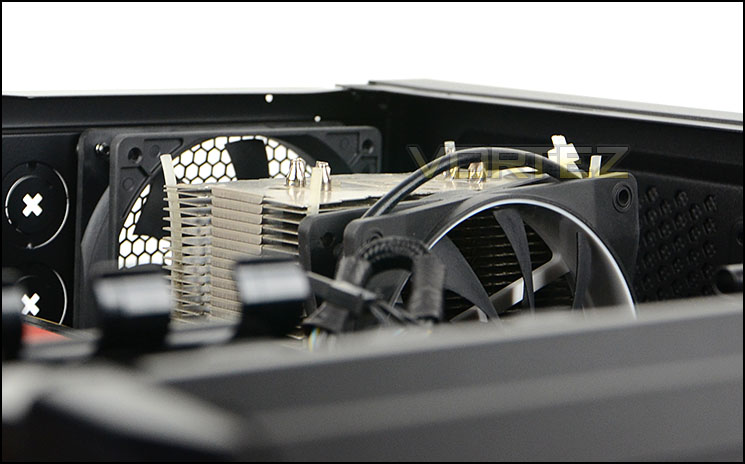
Clearance for flagship CPU coolers
Corsair have given support for unlimited graphics card clearance for those wanting to go with a single card solution, placed in the top PCI-E slot but there is a slight limitation if you are planning to house dual graphics card configurations – 330R can house cards up to 11” in length.
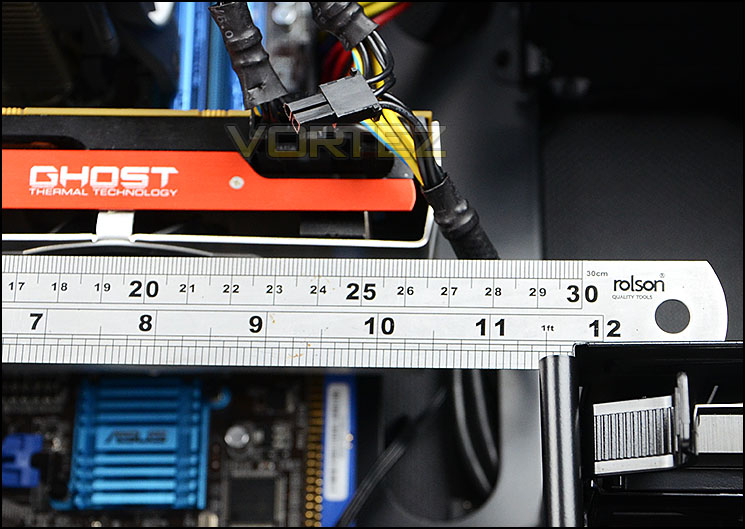
Up to 11” for dual graphics configurations
Water cooling we have already covered earlier in the review – 330R can house 240/280mm water cooling radiators including the popular Hydro Series H100i. There is approximately 5.5cm of clearance between the top of the case and the edge of the motherboard.
Turning our attention to the cable management, behind the motherboard tray there is up to 2cm of clearance for cable management which helps to give enough space for all major cables including the thicker 24-pin ATX.
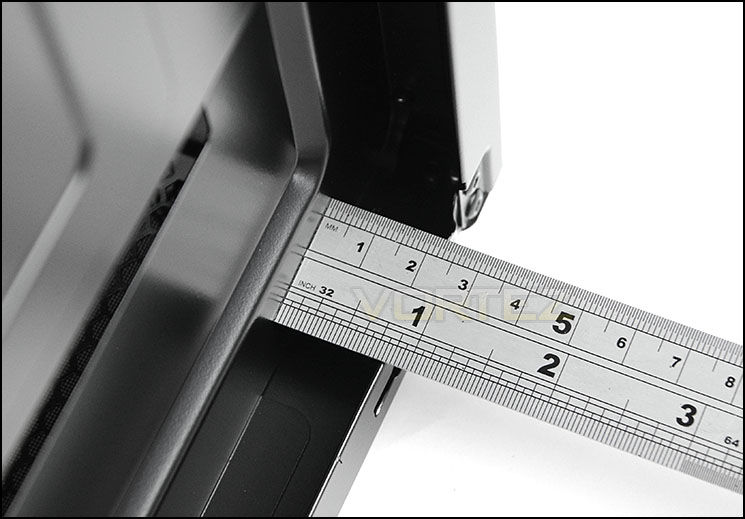
Generous clearance behind the motherboard tray for cable management
Thermal Performance Testing
Inside 330R there are just two pre-installed cooling fans positioned in key airflow positions. 330R uses a push/pull configuration with 140mm intake cooling fan at the front and a 120mm exhaust cooling fan at the rear.
To discover the thermal performance of the 330R we will record idle temperatures after 20 minutes from a cold boot. We will then stress the system and temperatures will again be monitored after 30 minutes have elapsed.
For the purpose of accurate analysis the idle and load temperatures for CPU and GPU will be recorded and the range between idle and load will be calculated to determine how efficient cooling is.
NOTE: Ambient temperature is 20C
System Components
CPU AMD Phenom II X6 1055T 2.8GHz
Motherboard ASUS M4A89TD PRO
Graphics NVIDIA GTX 480 (Different from card pictured)
Memory 4GB Kingston HyperX DDR3
HDD Samsung Spinpoint 500GB SATA-II
PSU FSP AURUM GOLD 650M
Motherboard ASUS M4A89TD PRO
Graphics NVIDIA GTX 480 (Different from card pictured)
Memory 4GB Kingston HyperX DDR3
HDD Samsung Spinpoint 500GB SATA-II
PSU FSP AURUM GOLD 650M
Noise
Being designed for silence, 330R attains exactly this. Thanks to the low-noise fans, thick side panels and noise damping material very little noise makes it out side of the chassis.
Conclusion
Bringing our thoughts to a close we can whole heartedly say that we really like the new 330R. Corsair have brought to market a solid mid tower silent solution which has some key advantages over its sibling the 300R.330R is equipped for silent usage and its styling brings a classy appearance which is minimalist and professional. We really like what Corsair have done with the top of the case and its detachable cover, this has a dual purpose in helping to keep noise to a minimum and also alleviates dust entering the system. We also really like the synthetic noise damping material Corsair have used throughout the case and that they have chosen to place it in so many different areas – this indeed results in low-noise.
We found the build quality to be very good, with the overall layout and execution of features again, very good. Inside, big CPU coolers, long graphics cards and even ALCs such as Hydro series H100i can all fit which will be music to enthusiast’s ears.
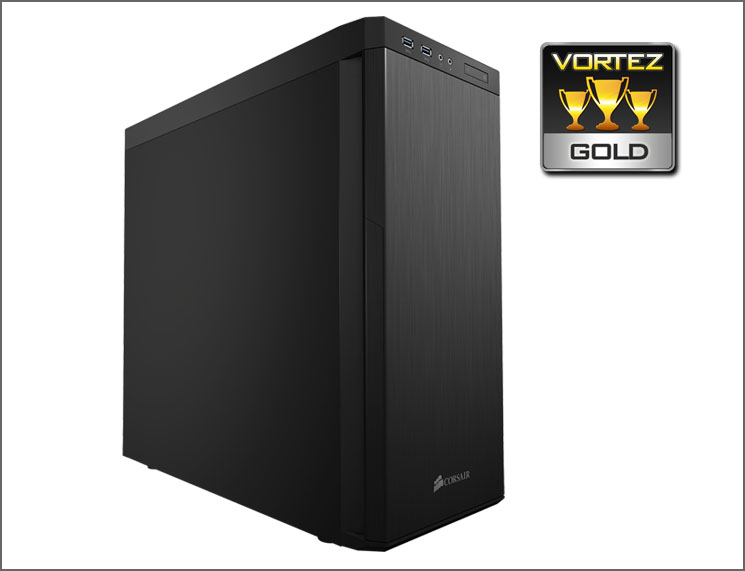
There are however a few areas which can be improved without much effort required. The cable management cut-outs come without any rubber grommets, this may be only a minor detail to feedback on but it really does help with cable management and maintaining a clean and tidy computer system and it’s something we expect from a case of 330R’s calibre. We also feel that there should be anti-vibration padding for the PSU – something which is pretty much obligatory for case design nowadays and we were surprised to see it absent. These drawbacks do not diminish what is a superb case though and we can certainly recommend it.
Priced at £75 the 330R is a good value for money silent case which could triumph over some of the popular choices in this category. The price is reasonable and this will only strengthen the justification for adding it to the short-list.
We found the 330R to be a superb silent mid-tower which has plenty of features to keep the demands of various types of enthusiast satisfied. Backed by classic styling, thoughtful design and great pricing we can confidently recommend 330R.
VIDEO REVIEW – VORTEZ TV
Pros
+ Professional styling
+ Well executed features
+ Good quality noise damping material + lots of it!
+ Whisper quiet
+ Good clearance options
+ Reasonably priced
Cons
– No cable management grommets
– No anti-vibration rubber padding for PSU
+ Professional styling
+ Well executed features
+ Good quality noise damping material + lots of it!
+ Whisper quiet
+ Good clearance options
+ Reasonably priced
Cons
– No cable management grommets
– No anti-vibration rubber padding for PSU

Click here for an explanation of our awards at Vortez.net.


