







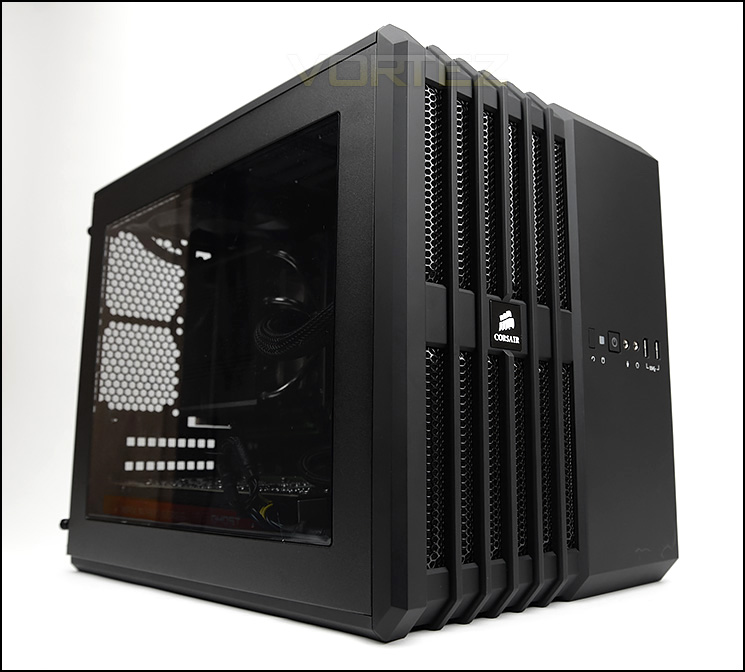
Another computer chassis joins the AIR range within the Carbide Series – AIR 240 is designed for Mini-ITX and Micro ATX systems and uses a cube design.

Product On Review: Carbide AIR 240
Manufacturer & Sponsor: Corsair
Street Price: £69 GBP / $120 USD
Last year Corsair introduced a new case within their Carbide series and it’s fair to say this new offering was a great success for them. Fast forward some six months and they are back again with yet another new addition to the family, the smaller brother to the AIR 540. Building on the success of this exciting and innovative computer chassis, Corsair has engineered a much more condensed workspace for those who are building with small form factors.
AIR 240 employs distinct characteristics from AIR 540 but primarily focusses on Micro ATX and Mini-ITX systems. This cube-shaped case can accommodate a wide selection of high-end hardware and does so with numerous tool-free mechanisms.
Furthermore, this petite counter-part can even house a 240mm radiator in various spots throughout the chassis to bring plenty of flexibility.
Corsair on their AIR 240
Are you the fence about building a Mini-ITX or MicroATX computer, but hesitate due to cooling concerns? Confidently use either motherboard in the cube-shaped Carbide Series Air 240 PC case — specifically built with optimal airflow in mind. The innovative internal layout – complete with multiple cable routing options — features an unobstructed pathway for fresh air to travel between intake fans and hot components. This is a whiz kid case built for long-lasting reliability — all while being able to host a colossal graphics card with ease. Enjoy plenty of room for a high-end water-cooling setup (with 240mm radiators) if that’s your thing. Front panel USB 3.0 ports give you quick peripheral connectivity when you need it most
Technical Specifications
Form Factor
Mini-ITX, Micro-ATX
Dimensions (H x W x D)
397mm x 260mm x 320mm (15.6” x 10.2” x 12.6”)
Drive Bays
3x 2.5”/3.5” in rear removable drive cage
3x 2.5” in internal removable drive cage
Cooling
Front
2x 120mm AF120L fans
Rear
Supports 2x 80mm fans
Top
1x 120mm AF120L fan (supports 2x 120mm fans)
Side
Supports 1x 120mm fan
Bottom
Supports 2x 120mm fans Radiator Support Front Up to 240mm
Side
– Bottom Up to 240mm (Mini-ITX only)
Expansion Slots
4 I/O Port 2x USB 3.0 Headphone and Mic
Power Supply Standard
ATX (not included)
Clearances
Heatsink 120mm
PSU 225mm
Graphics 290mm
Mini-ITX, Micro-ATX
Dimensions (H x W x D)
397mm x 260mm x 320mm (15.6” x 10.2” x 12.6”)
Drive Bays
3x 2.5”/3.5” in rear removable drive cage
3x 2.5” in internal removable drive cage
Cooling
Front
2x 120mm AF120L fans
Rear
Supports 2x 80mm fans
Top
1x 120mm AF120L fan (supports 2x 120mm fans)
Side
Supports 1x 120mm fan
Bottom
Supports 2x 120mm fans Radiator Support Front Up to 240mm
Side
– Bottom Up to 240mm (Mini-ITX only)
Expansion Slots
4 I/O Port 2x USB 3.0 Headphone and Mic
Power Supply Standard
ATX (not included)
Clearances
Heatsink 120mm
PSU 225mm
Graphics 290mm
Packaging & First Look
Packaging for AIR 240
AIR 240 arrives in the usual Corsair packaging – the double-reinforced cardboard box is eco-friendly and has an illustration of the case on the front along with key features. Around the back there is a breakdown of the different elements of AIR 240.
Inside, the case is covered in a clear plastic sheet and given extra protection via two polystyrene pillars, ensuring a safe arrival to its destination address.
Large Perspex window
Compartment on the reverse side
AIR 240 follows a similar design to that of the AIR 540 – the case has a cube design with two chambers. Being the smaller counter-part, AIR 240 supports both Micro ATX and Mini-ITX form factors.
On the prominent side there is a large Perspex window which gives a clean view of the internal components inside. Because the case is split into two chambers, on the reverse side the side panel has a lower section comprising of perforated mesh and a magnetic dust filter to correspond to the power supply unit which sits behind the motherboard tray.
Overall, the look and quality of this case is brilliant. Over the page we’ll take a look at the exterior design in closer detail.
Exterior
The front and back of AIR 240
At the front of AIR 240 the left section contains an area of perforated mesh to assist the front cooling fans with pulling in air from the outside. Running down the middle there is a Corsair badge and the front panel connectivity. Unlike many other cases, AIR 240 has no 5.25” drive bay – this is an interesting move by Corsair, and is one that is likely to be appreciated by most system builders who are building in a compact chassis like this.
Around the back, on the left there is an opening for mounting the PSU and above this there is a honeycomb cover for gaining access to the primary HDD cage. On the other side, within the other chamber there are four PCI expansion slot covers which all have ventilation but do not have any thumbscrews – Corsair has incorporated a tool-free clip system. Above this there are two spots for mounting 80mm cooling fans.
The front panel connectivity
Casting our eye at the front panel in closer detail we can see various controls as well as the Corsair badge – this can be rotated so that the case can be positioned in different orientations.
From left to right we have: reset button, activity LED, power button, headphone/microphone jacks, dual USB 3.0 ports.
The top section of AIR 240
The top after removing the panel
At the top of the case the ventilated design continues to wrap around to the back of AIR 240.
The top panel is actually removable and after detaching this we can view the mounting options. Corsair has already installed a AF120L at the top but there is allocation for two 120mm fans at the top here – meaning we can also install a 240mm radiator (more on this in the clearance section of this review).
The underneath of AIR 240
Flipping AIR 240 over, to our surprise there are no feet for the case to sit on but rather a follow on with the ventilated design. As with the other panels on this case, the underside is detachable after removing some thumbscrews.
The reason for the exclusion of feet on this side is because AIR 240 can be rotated and orientated in any position you desire since the case badge can be rotated.
Interior
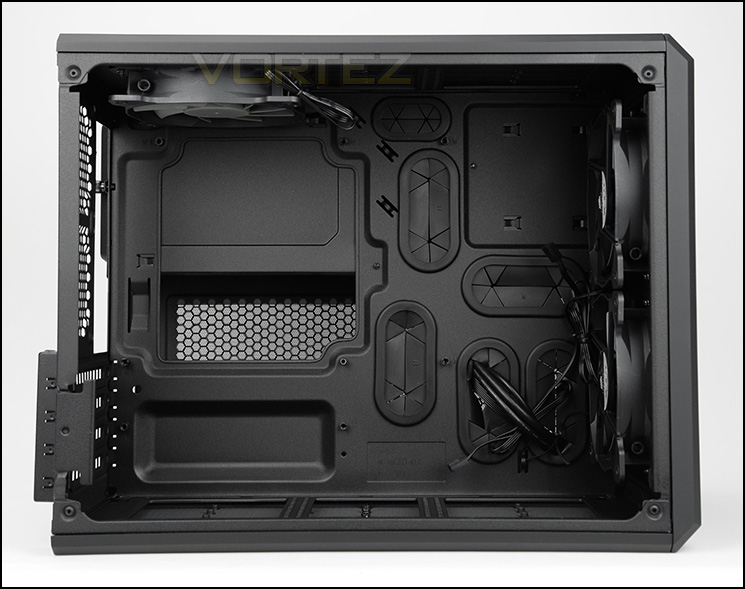
Micro ATX and Mini-ITX form factor support
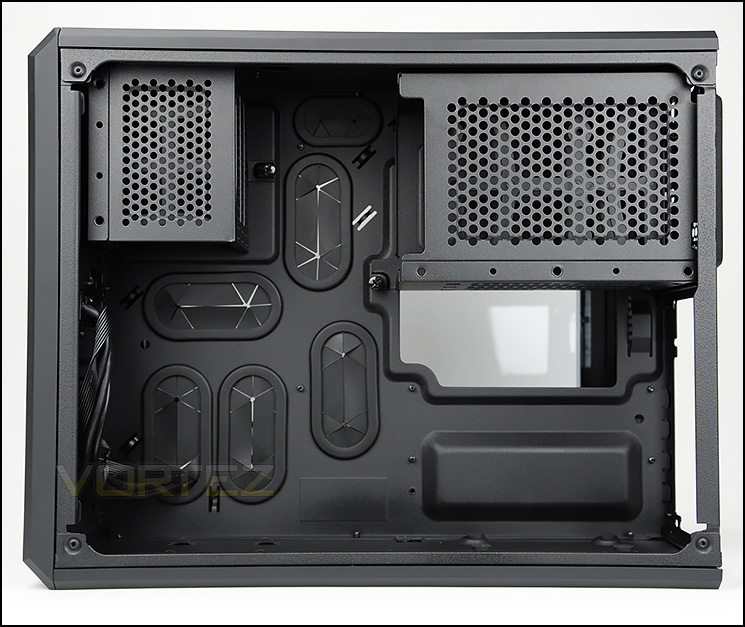
Secondary chamber with HDD storage and PSU support
Both side panels on AIR 240 are fixed into place with two thumbscrews. After removing these panels we can finally take a look inside the chassis. AIR 240 supports Micro ATX and Mini-ITX form factors and has two chambers – the prominent side accommodates the motherboard only, whilst the reverse side supports the HDD storage and power supply. Corsair has furnished both sides with tool-free mechanisms and rubber grommets for cable management.
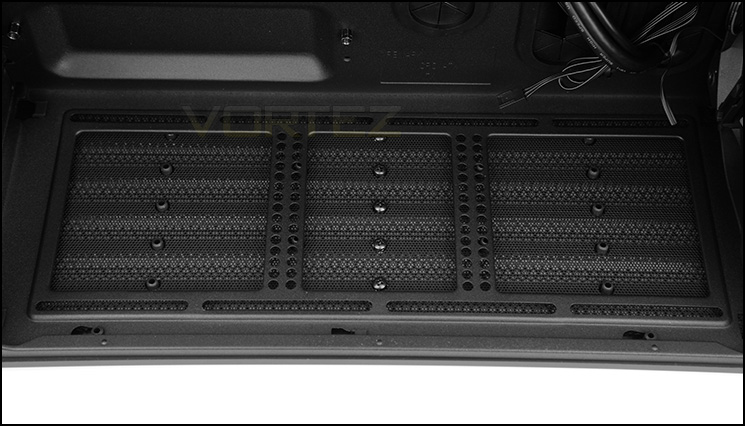
Cooling fan support at the bottom of the case
At the bottom of AIR 240 there is allocation for mounting two 120mm cooling fans or a 240mm radiator (if you are using Mini-ITX only).
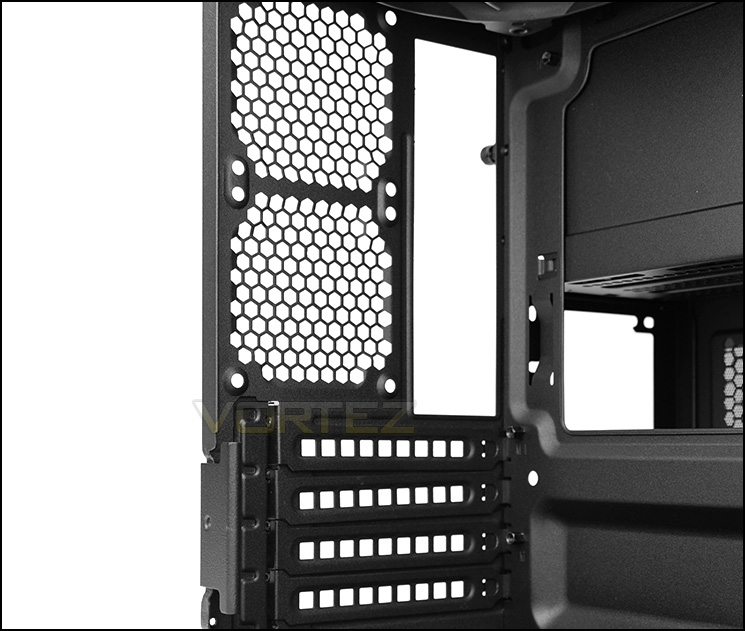
Multi-GPU support
AIR 240 comes with four PCI express covers which all have ventilation and Corsair has opted to engineer a tool-free clip to securely fix the covers into place rather than using thumbscrews.
Above this there are two optional spots for 80mm cooling fans.
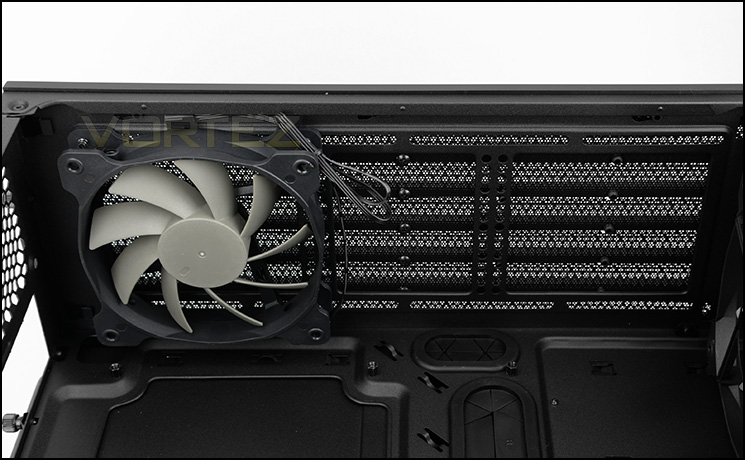
Pre-installed AF120L at the top
Up at the top of the chassis there is space for mounting two 120mm cooling fans or a 240mm radiator. Corsair include an AF120L fan which is configured to push air out of the case.
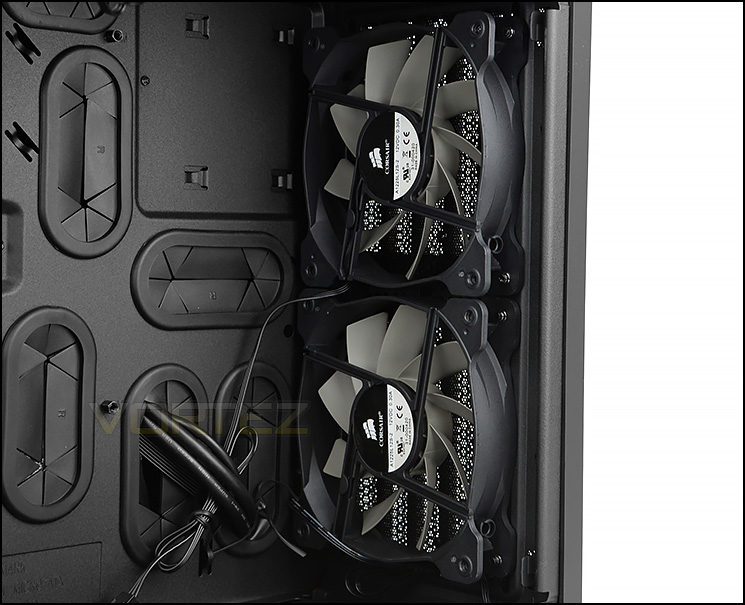
Dual AF120L cooling fans at the front
Placed at the front of the chassis there are two AF120L cooling fans which are configured to be intakes, bringing cool air into AIR 240. Behind the front panel there is a detachable dust filter which can be washed/cleaned. Since we can install two 120mm fans at the front there is support for a 240mm radiator.
Interior (Continued)
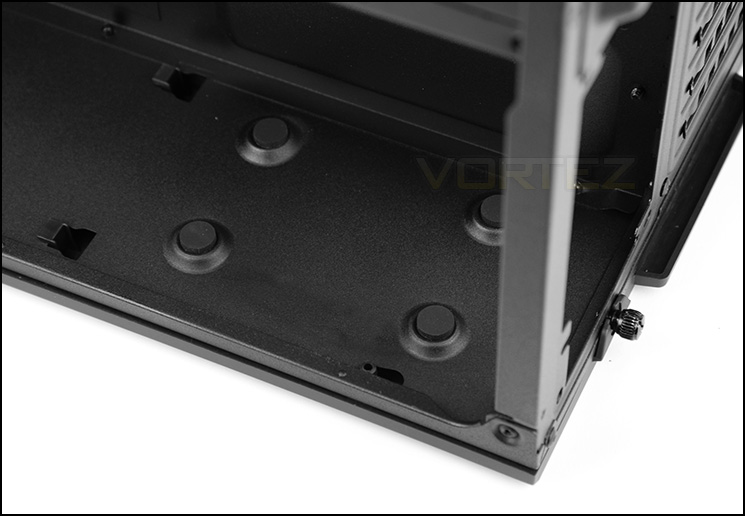
The PSU is mounted behind the motherboard tray
In the secondary chamber, behind the motherboard tray there is space to mount a PSU with a maximum clearance of 225mm. Corsair has included four rubber pads for anti-vibration and the side panel has a detachable dust filter since the fan on the PSU will sit facing away from the motherboard tray.
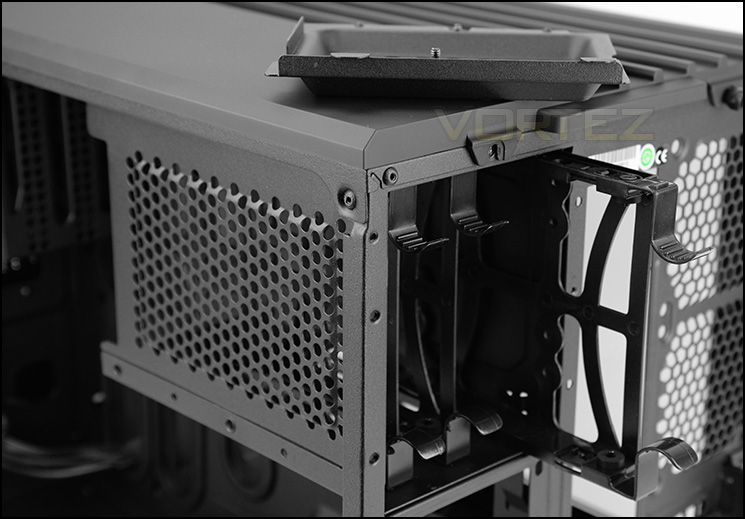
Primary storage for 2.5” and 3.5” drives
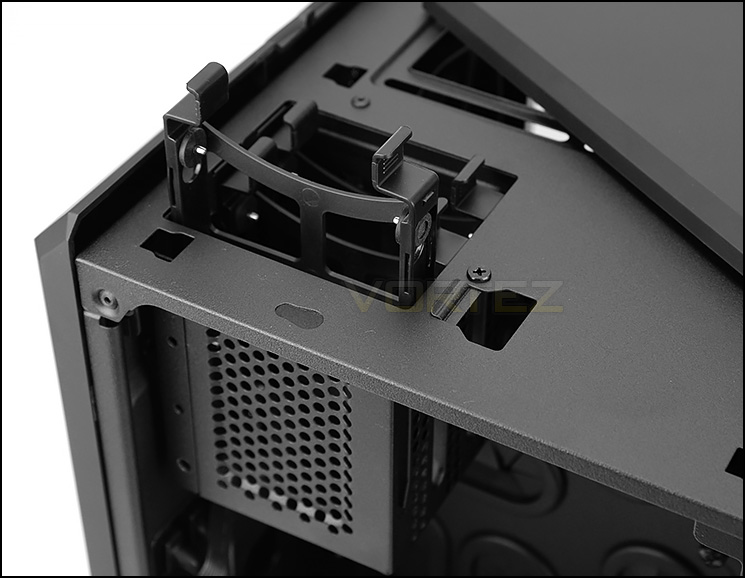
Support for 2.5” drives
Storage is all taken care of in this secondary chamber too. The primary cage sits towards the back of the chassis and is completely detachable if desired. To gain access to this cage, the cover facing the rear has to be removed. After removing we can use three trays which can host 2.5” and 3.5” drives.
Towards the front of the case there is another cage, this one is smaller but again can be completely detached. To gain access to this particular cage the top panel must be detached and after doing this we can make use of three trays for installing smaller, 2.5” drive such as an SSD.
On the next page we’ll be installed our Micro ATX test system inside AIR 240.
Installation
Our Micro ATX test system installed within AIR 240
Clean and tidy behind the motherboard tray
Looking at an empty chassis is one thing, but installing kit inside it is essential as it helps to identify what components are compatible.
Taking the largest form factor, we have installed our Micro ATX test system inside AIR 240. As you can see, even with this motherboard installed there is still plenty of space towards the front.
Thanks to the dual chamber design, the system is clean and tidy and the overall installation process is without any problems. The design implementations within this chassis are great and it offers plenty of flexibility.
Installing HDDs is easy
AIR 240 has options for mounting both 2.5” and 3.5” drives. Installing them is very easy thanks to the tool-free trays which Corsair provide for both cages. The drives simply slot into the trays – with pins attaching to the sides, so there is no need to get the screwdriver out.
Clearance – CPU Cooler, Graphics Card, Water Cooling
In this next section, we’ll be identifying the clearance limitations within AIR 240 in a number of key locations. This helps system builders understand what hardware will fit inside the chassis.
CPU Cooler
Lower profile coolers are required
Inside AIR 240, we can install CPU coolers with a maximum height of approximately 130mm. This will restrict the options available and system builders are likely to have to go down the low-profile route for air cooling. Pictured inside our build, we have Noctua’s NH-L12.
Graphics Card
Good clearance for graphics cards
Since there are no HDD cages to obstruct graphics cards inside AIR 240, we can house multi-GPU configurations without any hassle and this case can accommodate cards with a maximum length of approximately 290-300mm (11.5-12”). Pictured is XFX’s HD7970 DD which is 10.5”.
Water Cooling
Space at the top of AIR 240 for 240mm radiators
Up at the top of AIR 240 there are fan mounts for 2x120mm which paves the way for 240mm radiators to be installed. Pictured, we have installed Corsair’s H100i.
There is also allocation at the front of the case for the same configuration since there are 2x120mm mounting holes. Furthermore, the bottom of the case can also house the same unit but only if uses are installing a Mini-ITX motherboard. With Micro ATX installed, a radiator at the bottom causes an obstruction.
So to summarise – AIR 240 can have a 240mm radiator installed at the top, front and bottom of the chassis.
Clearance at the front also
Thermal Performance Testing
Inside AIR 240 there are three 120mm cooling fans (AF120L). One at the top and two at the front. We’ve seen and experience similar configurations before and we usually get good results from a push/pull type orientation.
To discover the thermal performance of the AIR 240 we will record idle temperatures after 20 minutes from a cold boot. We will then stress the system and temperatures will again be monitored after 30 minutes have elapsed.
For the purpose of accurate analysis the idle and load temperatures for CPU and motherboard will be recorded and the range between idle and load will be calculated to determine how efficient cooling is.
NOTE: Ambient temperature is 20C
System Components
CPU Intel Core i5 3570K
CPU Cooler Noctua NH-L12
Motherboard GIGABYTE G1 Sniper M3
Graphics XFX HD7970 Black Edition
Memory 4GB Kingston HyperX 1600MHz
HDD Kingston HyperX 240GB
PSU FSP Aurum 650M
CPU Cooler Noctua NH-L12
Motherboard GIGABYTE G1 Sniper M3
Graphics XFX HD7970 Black Edition
Memory 4GB Kingston HyperX 1600MHz
HDD Kingston HyperX 240GB
PSU FSP Aurum 650M
Noise
AIR 240 is designed to offer great thermal performance and to achieve this noise comes at a slight sacrifice. Combine the fast spinning cooling fans and the perforated areas, noise is something which is noticeable. Noise leaks out of the case and may be disruptive for some, so this is something to bear in mind.
Conclusion
Since its arrival last year, the AIR 540 has been a very popular choice due to its fresh approach to computer case design. Since this case is able to handle the bigger form factors of EATX and ATX, it was inevitable that hardware advocates would desire a similar design for Micro ATX and Mini-ITX and thus we have the AIR 240.
AIR 240 continues the brilliance of its bigger brothers by delivering attractive aesthetics and maintaining not just great, but excellent build quality. The concept of the dual chamber design is one that we are personally really like because it makes the job of installing kit fast and easy and also ensures cable management is clean and tidy. It’s nice to be able to get in and alter the storage configuration without having to access the prominent side for example.
Corsair has designed AIR 240 so that all of the panels can be detached from the chassis and this further reinforces the flexibility of this new case. The countless tool-free design mechanisms throughout, again make the task of getting kit in and out of the case much easier and we really like the tool-less clip for securing the PCI slots.
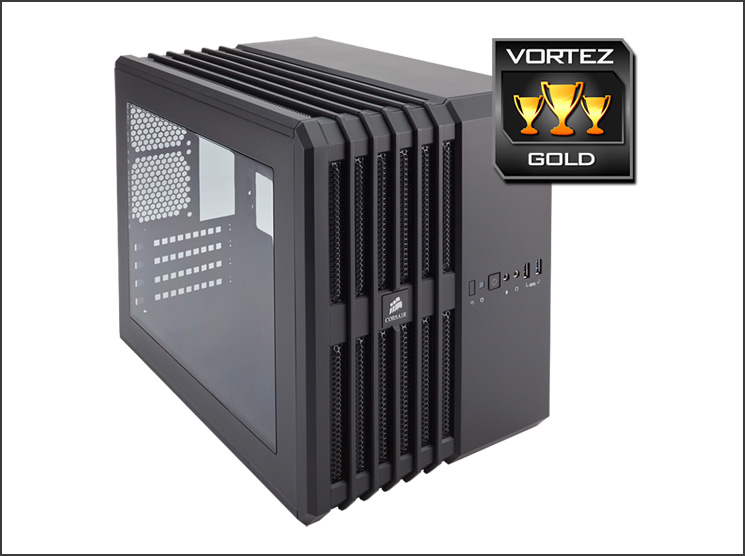
Inside AIR 240 there are variety of different locations for mounting 240mm radiators – there is space at the top, front and bottom. So, enthusiasts who are planning to drop in one of Corsair’s Hydro Series coolers will have a number of options to go with.
Our only reservations come from the noise emitting from the case when the system is fully powered. Due to the open design with plenty of ventilation and the inclusion of three cooling fans it isn’t any wonder why this is so but on the flip side the air cooling is very good and Corsair achieve what they intend to with this design. There is also a limitation on the CPU cooler height which is something to bear in mind if you are planning to go down the air cooling route instead of a liquid cooler.
At a cost of £69 GBP / $120 USD, the AIR 240 is a good value for money computer chassis for Micro ATX and Mini-ITX systems and is certainly a reliable design with lots of flexibility.
The AIR series finally has a case which primarily focusses on the smaller form factors – AIR 240 follows in the footsteps of AIR 540 by offering innovation, flexibility and great air cooling.
Pros
+ Attractive design
+ Excellent build quality
+ Three AF120L fans included
+ Modular – all panels can be detached
+ Easy to install kit
+ Tool-free design throughout
+ Variety of locations for 240mm radiators
+ Cable management is easy to arrange
Cons
– Quite an open design – noisy
– CPU cooler height limitation of 120-130mm
+ Attractive design
+ Excellent build quality
+ Three AF120L fans included
+ Modular – all panels can be detached
+ Easy to install kit
+ Tool-free design throughout
+ Variety of locations for 240mm radiators
+ Cable management is easy to arrange
Cons
– Quite an open design – noisy
– CPU cooler height limitation of 120-130mm

Click here for an explanation of our awards at Vortez.net.


