







Appealing to those on a tight budget, we review a Carbide Series mid tower from the SPEC range. Will the quality come as a compromise?

Product On Review: Carbide Series SPEC 01
Manufacturer & Sponsor: Corsair
Street Price: £34 GBP / $54 USD
Known for their excellent computer cases, Corsair are now a household name in this competitive arena. Whilst there are many series to choose from within their portfolio of cases, they aren’t synonymous with being particularly affordable and so Corsair has decided to switch the focus and appeal to the lower-end of the market with the new SPEC range which is found within the Carbide Series.
SPEC 01 is aimed at those on a very strict budget and yet it promises to deliver on the visual appearance, feature-set and quality. Can this new mid-tower steal the limelight for entry-level system builders? Join us as we evaluate this new computer chassis.
Corsair on their Carbide SPEC 01
Carbide Series SPEC-01 is proof that great looks, smart design, and durable construction don’t need to be pricy, and that basic doesn’t need to be boring. You get aggressive styling, a huge side panel window for admiring your components, and an LED-lit front intake fan that draws cool air directly to your graphics cards.
Technical Specifications
Warranty
Two years
Weight
4.8kg
Color
Black
Case Form Factor
Mid-tower
Dimensions
447mm x 200mm x 428mm
Case Motherboard Support
Mini ITX, Micro ATX, ATX
Maximum GPU Length
414mm
Maximum CPU Cooler Height
150mm
Maximum PSU Length
230mm
Case Expansion Slots
7
Case Drive Bays
(x2) 5.25in
(x4) Combo 3.5in/ 2.5in
Case Power Supply
ATX (not included)
External Connections
(x1) USB 2.0
(x1) USB 3.0
(x1) Headphone Port
(x1) Microphone Port
Fan Mount Locations
Front: (x2) 120/140mm
Top: (x2) 120mm
Rear: (x1) 120mm
Fans Included
Front: (x1) 120mm
Radiator Mount Locations Rear
120mm
Compatible Corsair Liquid Coolers
H55, H60, H75, H80
Two years
Weight
4.8kg
Color
Black
Case Form Factor
Mid-tower
Dimensions
447mm x 200mm x 428mm
Case Motherboard Support
Mini ITX, Micro ATX, ATX
Maximum GPU Length
414mm
Maximum CPU Cooler Height
150mm
Maximum PSU Length
230mm
Case Expansion Slots
7
Case Drive Bays
(x2) 5.25in
(x4) Combo 3.5in/ 2.5in
Case Power Supply
ATX (not included)
External Connections
(x1) USB 2.0
(x1) USB 3.0
(x1) Headphone Port
(x1) Microphone Port
Fan Mount Locations
Front: (x2) 120/140mm
Top: (x2) 120mm
Rear: (x1) 120mm
Fans Included
Front: (x1) 120mm
Radiator Mount Locations Rear
120mm
Compatible Corsair Liquid Coolers
H55, H60, H75, H80
Packaging & First Look
Recyclable cardboard for packaging
SPEC 01 arrives in a large eco-friendly cardboard box. There is an illustration of the case on the front and on the reverse there is a breakdown of the technical specifications.
Inside, the case is covered in clear plastic sheet and securely fixed in place with dual polystyrene pillars to protect SPEC 01 during transit.
Large Perspex window
Extracting the case from its packaging we can finally get our first look of SPEC 01. This case adopts aspects of design from both the elegant and gamer camps for its styling. The prominent side features a large Perspex window which sits on a convex ledge, this offers a view inside the enclosure so that you can keep an eye on the system.
Convex panel for better cable management
On the alternate side we have a solid side panel which also has a convex area marked out to provide additional clearance for cable management. Both side panels are fixed into place with dual thumbscrews.
On the next page we’ll explore the external design and features of SPEC 01 in more detail.
Exterior
The front and back of SPEC 01
The entire front section of SPEC 01 uses a plastic fascia which has a series of strips in the middle, helping to provide ventilation for the single 120mm LED cooling fan which is positioned as an intake just behind the fascia. At the front 2x 120mm or 2x 140mm cooling fans can be installed. At the top there are 2x 5.25” drive bay covers and the front panel connectivity has been placed at very top of this frontage.
Around the back there is an opening at the bottom for mounting a PSU and then above this there are a total of seven PC expansion slot covers, each having ventilation. In the upper region there some perforated mesh and mounting holes for adding in an optional 120mm cooling fan – by default we do not have one included.
Functionality for front panel
Located at the top of SPEC 01 are various ports and buttons. These include the following (left to right):
• Power button
• 1x USB 2.0 port
• Headphone/Microphone jacks
• 1x USB 3.0 port
• Reset button
While there may not be a great deal of options to choose from, the basics are covered and it’s good to see we have at least one USB 3.0 port and that it uses an internal motherboard header to interface.
Mounting options for dual 120mm cooling fans
Taking our attention to the top of SPEC 01 we can see there a large steel panel which has a perforated mesh region. This mesh can accommodate 2x 120mm cooling fans – by default these fans aren’t included.
So we’re beginning to see that this case can house numerous options if the cooling requires improving.
The underneath of SPEC 01
Flipping SPEC 01 over and onto its side we can see the underside has four plastic feet. Usually we find cases are equipped with rubber padding instead, but this is absent and therefore the case may be more susceptible to slipping compared to a rubber footed enclosure. The underside features a removable dust filter in the region where the PSU fan resides – this can be removed while the case is stood upright but can be tricky to perform since the clearance underneath is limited.
Interior
A view of the internal design
Each of the side panels use dual thumbscrews to securely fix them onto the chassis – upon removing we are met with a neat and tidy internal layout. SPEC 01 can accommodate ATX, M-ATX and Mini ITX motherboard form factors and the inside is completely blackened – even the I/O cables, which is great to see from an entry level case. There are also a number of tool-free mechanisms to ensure the installation is as easy as possible.
The reverse side, behind the motherboard tray
Over on the alternate side, SPEC 01 has a number of cable management cut-outs on the motherboard tray but unfortunately there are no rubber grommets included but this is obviously one the cut-backs which Corsair has to make in order to hit that low-price.
PSU mounting spot at the bottom of the case
At the bottom of SPEC 01 there is space to mount the PSU and Corsair have included four rubber pads to help cushion the unit once its installed and also bring in some anti-vibration properties. The underside of the case features a removable dust filter to work in conjunction with cooling fan on the PSU.
Multi-GPU support
Moving up, we have a total of seven PCI expansion slot covers which all have ventilation cut-outs to help encourage airflow inside the case and each cover uses a standard screw to fix it to the chassis – there are no thumbscrews.
Interior (Continued)
Optional cooling locations at the rear and top of SPEC 01
Although by default SPEC 01 is absent of any cooling fans at the rear and top of the chassis there are areas marked out to host such devices. At the rear we can install a 120mm cooling fan and at the top we can install 2x 120mm cooling fans. Later in the review we’ll discover whether a radiator can fit at the top since there is 240mm support.
Tool-free mechanisms for optical drives
Over at the front of SPEC 01 we have 2x 5.25” drive bays and both have a handy tool-free mechanism which we have seen on other, more expensive Corsair cases. We’re pleased to see such a feature appear on this case as it makes installing optical drives much easier.
Hard drive storage and LED cooling fan at front
Located at the front of the case is a 120mm LED (red) cooling fan, this is configured to be an intake and will bring cool air into the chassis. There is space to mount 2x 120mm or 2x 140mm at the front.
Next to this cooling fan is the HDD storage cage. This cage can accommodate up to four drives which are 2.5” or 3.5” – in the next section of this review we’ll show how this is achieved.
Installation
Our ATX test system installed inside SPEC 01
Since the ATX form factor is the biggest SPEC 01 can accommodate we installed this sized system within the case. Space is rather tight inside the case but the essential components which need clearance such as the CPU cooler and graphics card both fit within SPEC 01 we are glad to report.
One of the shortcomings of this case is that the CPU power cable (E-ATX/EPS) has to trail across the motherboard in order to reach the slot – there is no cut-out at the top of the motherboard tray for it to feed behind.
Limited space but still tidy
Behind the motherboard tray on the other side there is very little space between the back of the tray and the side panel, therefore cable management can be tricky – it takes some planning and patience.
SPEC 01 supports 2.5” and 3.5” drives
There are four spaces to cater for storage inside the case and each drive has to be installed within a tray as pictured above. These trays are tool-free for 3.5” drives (pins simply slot into mounting holes on the sides) but for 2.5” drives, screws need to be attached to the underside.
Clearance – CPU Cooler, GPU, WC, Cable Management
Recognising the clearance limitations within a computer case is essential for system builders as it identifies which hardware fits and which doesn’t.
CPU Cooler
Just enough space for our CPU cooler
Although Corsair state in the technical specifications 150mm for the maximum CPU cooler height, our Noctua NH-U12P managed to just about fit within the chassis. Bigger coolers such as the Noctua NH-D14 which are 160mm in height will struggle to fit with the side panel attached.
Graphics
Generous space for graphics cards
For those using a single graphics card within SPEC 01, there is unlimited clearance for anything currently on the market but if a dual-graphics configuration is installed the HDD cage limits the maximum length to approximately 11” / 280mm.
So for most enthusiasts, this case is ideal for any graphics card.
Water Cooling
Very little space at the top of SPEC 01
Corsair specifically state that the Hydro H55, H60, H75, H80 will fit inside SPEC 01. All of these models are 120mm and therefore use the rear cooling fan region. Although there are mounting holes for a 240mm radiator at the top, the clearance between the top of the case and the top of the motherboard is extremely tight as per our picture and so it isn’t suitable to house a radiator plus the mandatory cooling fans.
Corsair H100i installed at the front of SPEC 01
Meanwhile, at the front of the case a 240mm radiator plus cooling fans can be installed such as the one pictured above (Hydro H100i) by compromising on HDD storage – the cage must be removed in order to cater for such a cooling configuration.
Cable Management
Tight clearance behind the motherboard tray
Clearance between the back of the motherboard tray and side panel is a prerequisite for good cable management and in this region there is very little space unfortunately. Measuring this area there is 0.8cm, but it’s important to remember there is approximately another 1cm from the convex side panel – even so, cable management can be tricky and as we mentioned earlier, requires patience and thoughtfulness.
Thermal Performance Testing
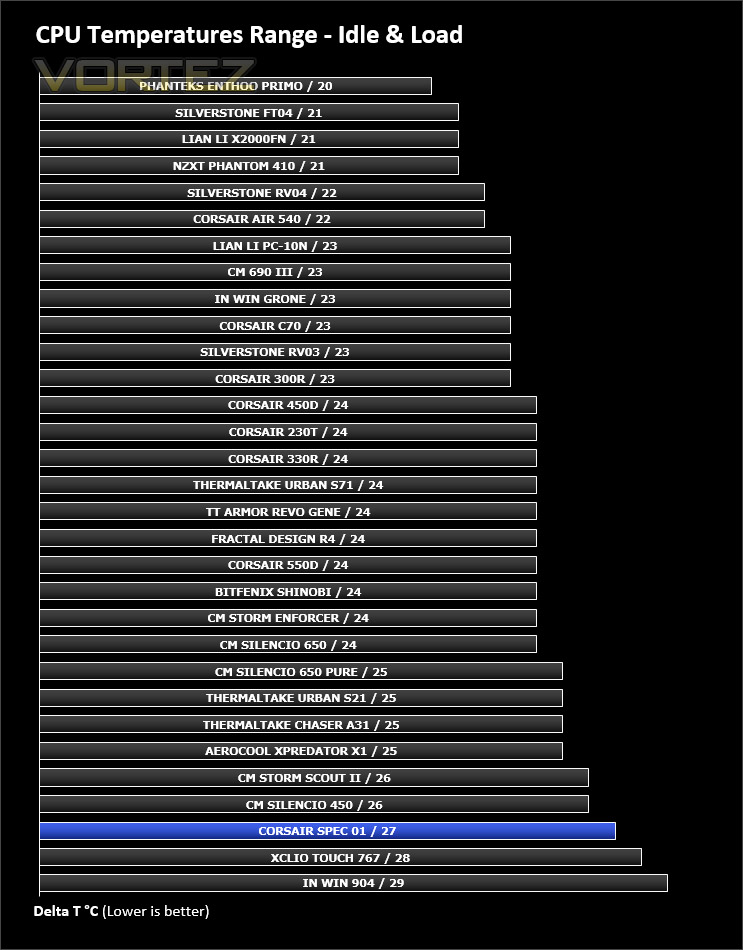
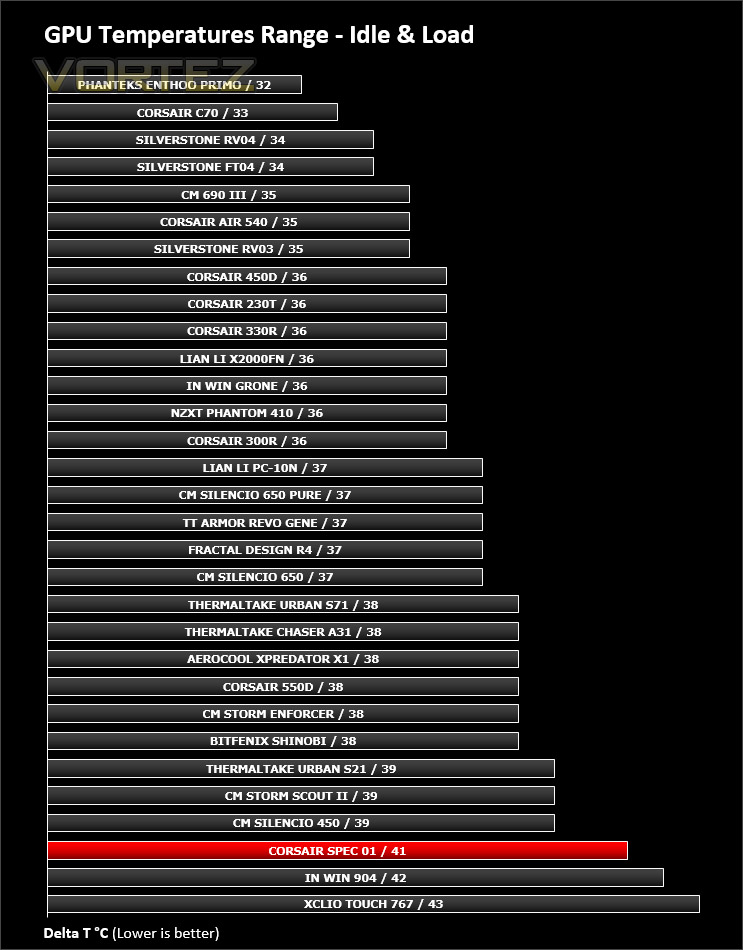
SPEC 01 features just a single 120mm cooling fan which is positioned at the front of the case and is configured to be an intake – the lack of push/pull arrangement inside the case could have a negative impact on temperatures when we compare against other cases.
To discover the thermal performance of SPEC 01 we will record idle temperatures after 20 minutes from a cold boot. We will then stress the system and temperatures will again be monitored after 30 minutes have elapsed.
For the purpose of accurate analysis the idle and load temperatures for CPU and GPU will be recorded and the range between idle and load will be calculated to determine how efficient cooling is.
NOTE: Ambient temperature is 20C
System Components
CPU AMD Phenom II X6 1055T 2.8GHz
Motherboard ASUS M4A89TD PRO
Graphics NVIDIA GTX 480 (Different from card pictured)
Memory 4GB Kingston HyperX DDR3
HDD Samsung Spinpoint 500GB SATA-II
PSU FSP AURUM GOLD 650M
Motherboard ASUS M4A89TD PRO
Graphics NVIDIA GTX 480 (Different from card pictured)
Memory 4GB Kingston HyperX DDR3
HDD Samsung Spinpoint 500GB SATA-II
PSU FSP AURUM GOLD 650M
Noise
Since SPEC 01 only has one cooling fan, noise is kept to a minimum. Monitoring the noise emitted from that single fan results in very little disturbance.
Conclusion
It’s fair to assume that Corsair are known for their costly enclosures and whilst this isn’t an issue for some, it is for others – particularly in troubling economic times. And so, changing the focus to entry level computer cases is a worthwhile venture for Corsair as there is certainly a market for it.
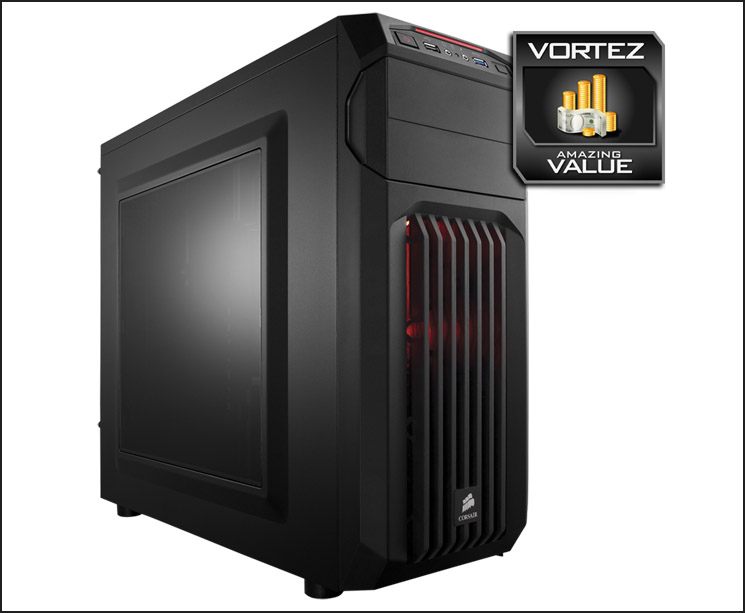
SPEC 01 may not be everyone’s cup of tea but we have to remind ourselves of the cost of this case throughout our summarising of it. Yes, there are plastic elements and yes there are specific features absent but Corsair have actually been rather thoughtful with this enclosure. SPEC 01 may be basic but it isn’t boring.
Inside, Corsair has been resourceful by furnishing the interior with tool-free mechanisms for installing kit and have included mounting placements for up to five cooling fans. The quality and finish of SPEC 01 is surprisingly good compared to other options out there at this price-point.
There may be limited support for water cooling but then would you really spend £75 / $100 on a Hydro Series H100i and house it inside such an inexpensive case? That said, the graphics card compatibility is actually very good and provides accommodation for any card currently on the market.
The cost of SPEC 01 is where things get very interesting. This case can be purchased for a mere £34 / $54 – making it one of the most affordable options in the low-end price bracket. You’ll struggle to find a case which matches SPEC 01 in features and quality for this price.
With SPEC 01 in the spotlight there’s very little to criticise. This case is astounding for the price and we can see it being very popular for system builders who are on extremely tight budgets.
VIDEO REVIEW – VORTEZ TV
Pros
+ Easy on the eye
+ Affordable to all
+ Great feature-set for price
+ Can add up to five cooling fans
+ Excellent graphics card support
Cons
– Default cooling performance isn’t great
+ Easy on the eye
+ Affordable to all
+ Great feature-set for price
+ Can add up to five cooling fans
+ Excellent graphics card support
Cons
– Default cooling performance isn’t great

Click here for an explanation of our awards at Vortez.net.


