A brand new wireless mouse from CORSAIR, boasting an 18K DPI sensor, 2000Hz polling rate, nine-zone RGB lighting and up to 50 hours on one charge.

Product on Review: CORSAIR Dark Core RGB PRO SE
Manufacturer: CORSAIR
Street Price: GBP £99.99 / USD $89.99 / AUS $169.00
CORSAIR show no signs of slowing down, releasing new bits and pieces every few weeks, keeping their customers constantly supplied with the latest and greatest, with today’s review featuring the Dark Core RGB PRO SE.
The Dark Core arrives in two quite similar flavours, The RGB PRO and the RGB PRO SE. Both feature a custom PixArt PAW3392 18,000 DPI sensor, 2000Hz polling rate, nine-zone RGB lighting, Slipstream Wireless Technology, and Bluetooth for better power efficiency. The only difference between the two (aside from the price) is Wireless Qi charging, rendering the cable a thing of the past; thanks to the wireless Qi charging standard, this should be compatible with most phone charging pads, if you happen to already have one on your desk or case.
One of the key features with the Dark Core is its hyper-fast wireless technology, offering 0.5ms response times to keep up with the fastest gaming monitors on the market today and into the future.

CORSAIR claim battery life is up to 50 hours but that drops down to as little as 16 hours if you enable some features, such as RGB backlighting and CORSAIR Slipstream.
Allowing you to get comfortable, the “pinky side” of the mouse is interchangeable with an included optional piece while large portions of the mouse are adorned in soft-touch, textured plastic sections.
Priced at £99.99/$89.99/$169.00, the Dark Core RGB PRO SE (£89.99/$79.99/$129.00 non-SE) comes up against a lot of tough competition, but with CORSAIR’s expertise within the peripheral market, they stand every chance. Let’s test things out and see how we get on.
CORSAIR on the Dark Core RGB PRO:
The new DARK CORE RGB PRO is part of CORSAIR’s ongoing effort to deliver more diverse options to players of all kinds to help them achieve top performance in any genre. This is a premium wireless gaming mouse ideal for players of FPS/MOBA game genre, equipped with cutting-edge technology available only from CORSAIR. From the proprietary hyper-fast SLIPSTREAM WIRELESS Technology, to a custom 18,000 DPI optical sensor optimized for wireless, to 2,000Hz USB hyper-polling for blazingly fast response times.
Technical Specifications
Wireless Connectivity: Hyper-fast, sub-1ms 2.4GHz SLIPSTREAM CORSAIR WIRELESS TECHNOLOGY, Bluetooth® 4.2 + LE
Wired Connectivity: USB 2.0 Type-A to PC, USB-C to mouse
Battery Charging: Charges via USB to computer
Battery Type: Built-in lithium-polymer, rechargeable
Battery Life:
2.4GHz SLIPSTREAM WIRELESS: Up to 16hrs w/ standard lighting and 36hrs w/out backlighting
Bluetooth: Up to 18hrs w/ standard lighting and 50hrs w/out backlighting
Sensor: Pixart PAW3392, Optical
Sensor Resolution: 100 – 18,000 DPI, with 1 DPI steps
Onboard Profiles: Three
Backlight: Nine-Zone RGB
Buttons: Eight
USB Report Rate: 1,000/2,000Hz
Color: Black
Mouse Feet: PTFE
Cable: 1.8 m / 6 ft., braided, fixed
iCUE (Software): Supported
Dimensions: 127.0(L) x 89.0(W) x 43.0(H) mm / 5.00”(L) x 3.50”(W) x 1.69”(H)
Weight: 133g / 0.31 lbs. (w/o cable and accessories)
Warranty: Two years
Wired Connectivity: USB 2.0 Type-A to PC, USB-C to mouse
Battery Charging: Charges via USB to computer
Battery Type: Built-in lithium-polymer, rechargeable
Battery Life:
2.4GHz SLIPSTREAM WIRELESS: Up to 16hrs w/ standard lighting and 36hrs w/out backlighting
Bluetooth: Up to 18hrs w/ standard lighting and 50hrs w/out backlighting
Sensor: Pixart PAW3392, Optical
Sensor Resolution: 100 – 18,000 DPI, with 1 DPI steps
Onboard Profiles: Three
Backlight: Nine-Zone RGB
Buttons: Eight
USB Report Rate: 1,000/2,000Hz
Color: Black
Mouse Feet: PTFE
Cable: 1.8 m / 6 ft., braided, fixed
iCUE (Software): Supported
Dimensions: 127.0(L) x 89.0(W) x 43.0(H) mm / 5.00”(L) x 3.50”(W) x 1.69”(H)
Weight: 133g / 0.31 lbs. (w/o cable and accessories)
Warranty: Two years
Packaging & Bundle
Providing no surprises at all, the mouse lands in a black and yellow box with a large, clear image of the device on the front. There’s a brief description at the bottom but we really need to flip the mouse over for anything more.
Due to CORSAIR going with many different languages on one package, the amount of information isn’t huge but it’s enough, particularly for the majority of buyers who will purchase this from their retailer of choice, online, where there’s more than enough room for all the info.

Keeping things simple, CORSAIR bundle a 1.8M braided USB Type-A to Type-C cable, which can be used for data and charging, a spare finger-grip for the right-hand-side of the mouse, a tiny USB dongle and plenty of literature to read through if you find yourself bored.

Closer Look
First impressions of the mouse are mixed but overall good, the design is busy with funky elements, including textured plastic sections that look like an expensive baffled jacket directly alongside glossy, reflective pieces that contrast nicely.
The left edge of the mouse, where the thumb rests, is equipped with three indicator LEDs to show different profiles and DPI settings. Above the thumb are the typical forwards/backwards buttons which can be configured within the software to do almost anything.

Spinning the mouse around 180°, the smooth plastic section covering most of the side can be removed and swapped out for a textured replacement which more closely resembles the left side of the mouse.

Hidden away under the scrollwheel, at the front of the mouse, is the USB Type-C connector. This can be used to connect the mouse for data and charging, turning it into a wired device with no battery concerns, or to charge the device up after your gaming sessions. We’ve found that several different Type-C cables can be used with this, thanks to CORSAIR not designing this region to only accept their proprietary connector.
You’ll also notice that next to the left click there are a couple of smaller buttons on the edge of the mouse. These are used for DPI switching as standard, but can be configured for in-game functions if that’s more useful for you.

On top of the device is a profile toggle button with an LED indicator in front of that.

Closer Look (Continued)
Taking a look at the Dark Core’s underbelly, it’s immediately dominated by PTFE pads to allow the mouse to move around smoothly.Towards the rear is the communication toggle switch between Slipstream 2.4GHz, USB and Bluetooth.
Mounted relatively far forwards is the PixArt PAW3392 sensor, capable of 100 – 18,000 DPI which can be tweaked in increments of 1, giving you an insanely vast range of DPI options to get things dialled in perfectly for your needs.

One thing that CORSAIR do very nicely that perhaps goes largely unnoticed is the quality of their USB cables. The 1.8M braided cable sports a small Velcro strap and thanks to it’s thick gauge is relatively tangle proof.

Finally, we’ll take a look at the removeable side piece. Tucked away in here is a small receptacle for the USB dongle, very handy if you plan to cart the mouse around anywhere because such a small dongle would easily go missing.
Swapping out the side pieces is very easy and changes how the mouse feels quite a bit. By offering the choice CORSAIR have certainly opened up the target audience of the mouse.


Software
After spending far too long getting the software to launch, and then to function properly, we’ve recorded a demo video below.CORSAIR’s iCUE software has received a lot of praise from us in the past, but this most recent experience has marred that somewhat. Firstly, updating to the latest version (3.27.68) caused the software to launch for 2-3 seconds and then close. There was no error message, no available further updates, Windows was fully up to date and a re-install didn’t resolve the issue, I couldn’t figure it out. Then I found a post on the CORSAIR forums suggesting that the latest update ties in ASUS in some fashion. The instructions were simple – delete the ASUS folder within the Plugins section of the iCUE install directory; all of a sudden, we’re up and running from something as simple as that.
However, we weren’t out of the woods just yet. The next issue manifested itself as “error” when trying to update the firmware on the mouse and dongle. Different ports were tried, as well as different cables, but nothing would get it to play ball.
At this point, another PC was wheeled into action. We got the same issue at the start, where the ASUS folder needed to be deleted, but then finally, we got the dongle and mouse to update on the second PC.
At this point, the frustration was beginning to set in, but we were getting ready to have a good look around the options in the iCUE software to then record our demo video. There was then another issue where the preview image of the mouse, which you can see on some of the pages such as Actions and Lighting Effects, would appear as a black square. Restarting the software fixes this but it does re-occur from time to time.
All things considered; CORSAIR have really dropped the ball on this latest release. Hopefully they can get on top of things and resolve the issues quickly.
Performance Testing
Moving on from the software, on the face of things, the mouse itself certainly lives up to CORSAIR’s reputation, their build quality is rarely anything other than excellent, especially in the last few years where they seem to have really upped their game. The dongle and mouse are pre-paired from the factory so getting up and running is about as fast as it’s possible to be. We also had over half a charge sitting in the mouse which was nice.While the mouse has a Bluetooth and wired mode, we’ll base all of our testing on the CORSAIR Slipstream wireless technology, because you’d just buy a cheaper/lesser mouse if you planned to use it wired or with Bluetooth. CORSAIR’s Slipstream has been seen before in other reviews, but for the first time we see it upgraded to a 2000Hz polling rate, offering 0.5ms response times and 2000 position updates per second. Mere mortals, like myself, may not be able to feel the difference, even though it’s twice as ‘fast’, but with monitors now approaching 300Hz, and with more frames due in the future, competitive eSports gamers might just gain an advantage over their enemies. Not only is the Slipstream technology faster, it also shifts radio frequency on-the-fly to ensure a strong and stable connection, while a smart protocol layer intelligently retransmits data packets for a level of redundancy, ensuring your movements always reach the computer. We didn’t necessarily notice anything going on, but that’s exactly how it should function; silently in the background.

Comfort is super important with a mouse, quite often it’s your primary means of input with your PC, and with certain games like RTS or FPS games, you’ll rarely put it down. Maintaining a comfortable gaming posture is therefore essential, and we’re glad to say the Dark Core RGB PRO offers that in spades. The interchangeable side piece giving the option of a pinky-rest, as well as the smooth, textured plastic all works well together to present a mouse perfectly suitable for a palm grip, however, the choice of putting the glossy strip around the back of the mouse presented a weird issue where it would feel consistently different to the rest of the mouse, making your hand feel greasy/wet despite being washed and clean; this only appeared as an issue for someone with smaller hands but it’s an issue non-the-less.
The layout of the buttons on the mouse has clearly been the topic of many a meeting, they felt just about perfect to myself; the switches underneath are provided by OMRON so they felt great to click too. Thumb buttons are something which can be particularly handy in certain games, so having both placed in such a fashion that they can be equally utilised is quite a task, however CORSAIR have managed that. The same goes for the two additional buttons alongside the left-click. These are typically used to adjust the DPI on the fly, but having found a DPI setting that I liked, those quickly got changed to a different function in-game using the iCUE software. Easy to set up and easy to use – perfect.
Battery life is a little lacklustre, at 50 hours if you keep all of the LEDs turned off and use Bluetooth transmission. That drops down to a maximum of 18 hours if you ‘use it properly’. While that’s more than enough for even the most mammoth of gaming sessions, it does require you to charge it several times a week if you enjoy your gaming or use your PC for work as well (which a lot of people are right now). We were a little bit excited by CORSAIR’s inclusion of the open Qi Wireless charging standard, touted to work with most wireless charging bases, but found that all 3 of the charging bases here didn’t appear to work. We don’t have the CORSAIR MM1000 mousepad with the built-in charger to test that out either, which was a shame. Wireless charging is absolutely the future, much less janky than plugging in a cable every night.
Conclusion
As you’d expect from CORSAIR, the Dark Core RGB PRO SE performs admirably, and there are plenty of reasons why you should consider one, but it’s not perfect.Firstly, comfort and build quality is excellent. The mouse feels rock solid, with a lovely left and right click, provided by OMRON, and with the placement of the buttons on the mouse, it’s easy to use for long periods of time.
Using the mouse in the games we threw at it was a largely positive experience. The OMRON switches, PixArt sensor, Slipstream wireless technology and overall design of the mouse showed that CORSAIR really know what they’re doing, with years and years of experience in the game now; we’d like to get rid of that glossy section at the back though.
iCUE has been one of the best software suites for us for a long time, providing a really easy-to-use, centralised location to tweak all of CORSAIR’s products, but this most-recent experience has left a bitter taste. This trend seems to be sweeping throughout the peripherals market, bundling in bloated software that’s becoming increasingly complex and increasingly and buggy as a result. We do hope CORSAIR can remedy this situation; being unable to tweak any of the products you own, after buying into one eco-system, is a seriously frustrating situation to find yourself in.
Pricing, at £100 in the UK and equivalent elsewhere, puts it squarely against some seriously good competition, including the Logitech G903 which can be found for way less than it’s RRP, but you do get 2000Hz polling and 18K DPI to play with on the CORSAIR side of things, plus nine-zone RGB lighting if you’re a fan of LEDs.
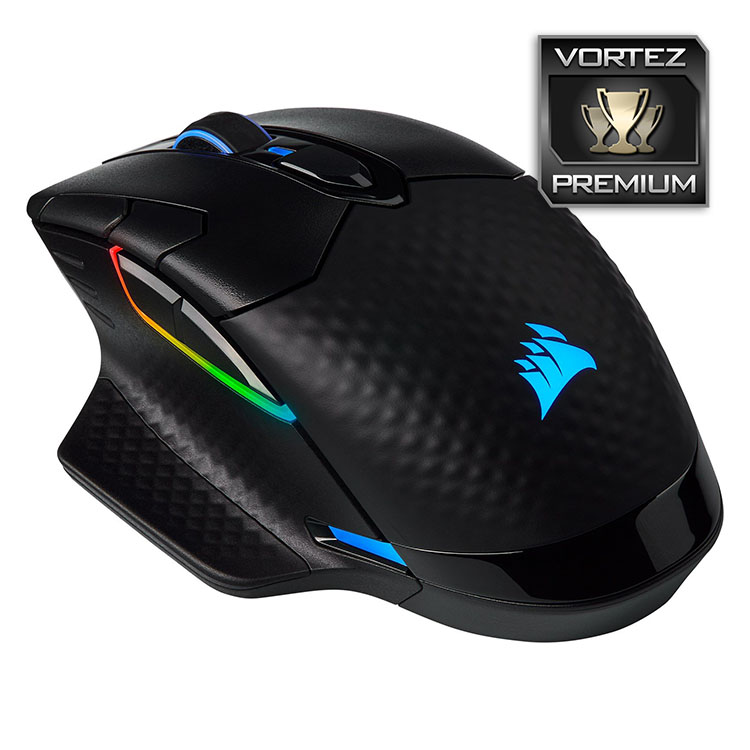
The CORSAIR Dark Core RGB PRO SE is a comfortable, capable and technology-packed mouse that will see you through many a campaign, but the software needs looking at.
Pros
+ Brilliant quality
+ Looks great when fully lit
+ Nine-zone RGB lighting
+ Type-C USB
+ Flawless wireless transmission
+ Option to use Bluetooth
+ Excellent PixArt sensor
Neutral
+- Pricey
Cons
– Let down by the software
– Not the best battery life
– Won’t charge on any of our Qi wireless chargers
– Awkward glossy plastic feels odd in the hand
+ Brilliant quality
+ Looks great when fully lit
+ Nine-zone RGB lighting
+ Type-C USB
+ Flawless wireless transmission
+ Option to use Bluetooth
+ Excellent PixArt sensor
Neutral
+- Pricey
Cons
– Let down by the software
– Not the best battery life
– Won’t charge on any of our Qi wireless chargers
– Awkward glossy plastic feels odd in the hand
Click here for an explanation of our awards at Vortez.net.
Stay connected with the Vortez Social Media pages:
Join in with the discussions on Discord