







A new level of customisation is upon us. K70 RGB is a mechanical gaming keyboard with 16.8 million per-key LED modification, full N-KRO support with brushed aluminium.

Product On Review: K70 RGB Mechanical Keyboard
Manufacturer & Sponsor: Corsair Gaming
Street Price: £145 GBP / $170 USD
This Summer we’ve had the pleasure of being involved in numerous Corsair product launches as the brand broadens their portfolio of products but today we aren’t just looking at a new gaming peripheral but a new sub-division. Today, Corsair unveil their new gaming brand – a new division of Corsair which celebrates the movement from PC hardware manufacturer to PC gaming brand.
Never has there been a bigger push in the direction of eSports. In the last 5 years gaming has grown significantly – there are more events, more gamers and more games. Corsair Gaming are desperately wanting to be a part of this by getting involved in the community, with developers and industry partners.
K70 RGB is a mechanical gaming keyboard which incorporates Cherry MX RGB switches. This keyboard opts for a traditional layout that omits the bank of macro-keys found on the larger K95. Sharing the original K70’s core design and build quality, the K70 RGB takes keyboard lighting to the next level with per-key modification and an extensive software suite complete control. Dedicated media keys as well as a 100% anti-ghosted matrix, full key rollover and a 1000Hz reporting rate all combine for fast, accurate input for gaming.
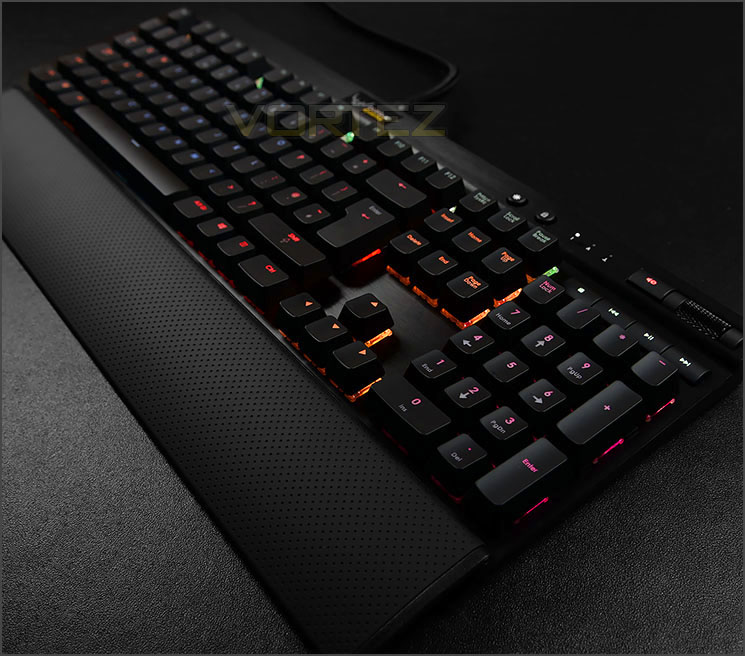
Corsair Gaming on their K70 RGB
The Corsair Gaming K70 RGB is the next evolutionary addition to our line of 100% fully mechanical gaming keyboards. Featuring the world’s first German-engineered Cherry MX RGB key switches as part of a limited-time Corsair exclusive, the K70 RGB allows for 16.8 million per-key color animated backlighting by utilizing an onboard ARM processor and a powerful lighting controller that uses new Corsair Gaming software to display fully customizable lighting effects such as gradient and ripple patterns. The software will also allow for powerful key sequencing actions across multiple modes and profiles in conjunction with the lighting.
Features & Technical Specifications
• 100% German-made Cherry MX Red/Blue/Brown RGB mechanical key switches for ultimate performance
• 16.8M color backlighting per key for virtually unlimited customization
• Aircraft-grade anodized brushed aluminum chassis for superior strength, durability, and rigidity
• Custom display controller for fast and fluid 16.8M multicolor animation
• In development – Advanced point-and-click scripting and SDK to enable gamers and developers to integrate effects and lighting features into games
Key Switch
Cherry MX RGB Red/Blue/Brown Mechanical Switches
Backlighting
RGB (16.8 Million Colors)
Macro Playback
Yes
Onboard Memory
Yes
Multimedia Keys
Yes
Report Rate
1000 Hz (USB)
Rollover
104-Key with 100% Anti-Ghosting
Warranty
2 Years
Cherry MX RGB Red/Blue/Brown Mechanical Switches
Backlighting
RGB (16.8 Million Colors)
Macro Playback
Yes
Onboard Memory
Yes
Multimedia Keys
Yes
Report Rate
1000 Hz (USB)
Rollover
104-Key with 100% Anti-Ghosting
Warranty
2 Years
Packaging & Bundle
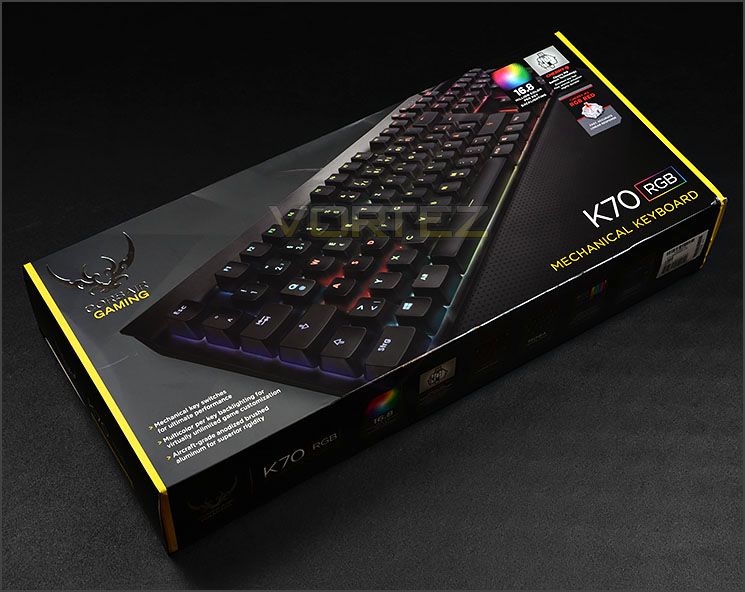
Packaging for K70 RGB
In “new look” packaging for the Corsair Gaming division, K70 RGB is presented in an attractive box which has a depiction of the keyboard on the front and a list of the fundamental features. Corsair Gaming’s packaging follows a black and yellow type theme with a new emblem.
Over on the reverse the significant features are given further details – explaining their use and pinpointing them on the keyboard with a schematic diagram.

The few items included within bundle
There are actually very few items included with the keyboard as part of the bundle. The three items consist of two pieces of documentation: a warranty guide and a brief instructions guide plus an interchangeable wrist rest.
Closer Look
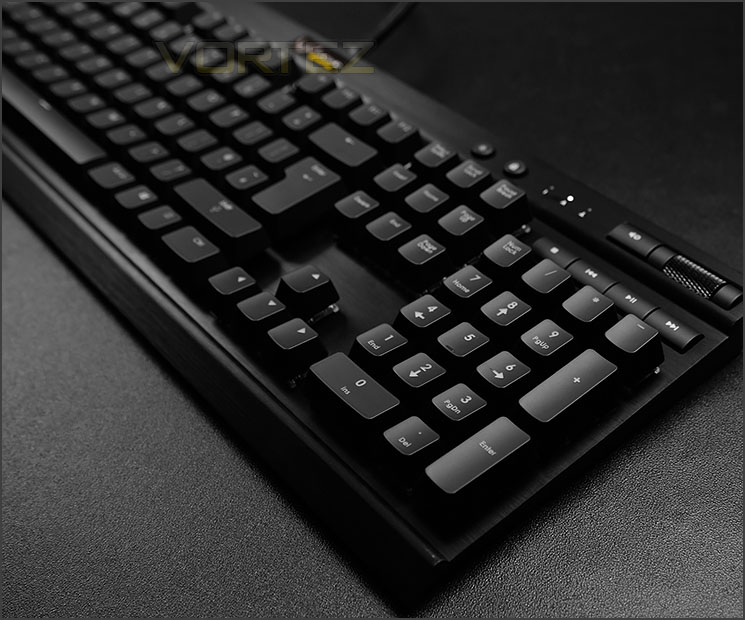
Super sleek and elegant design
K70 RGB is the epitome of elegance. The basis for this keyboard is sturdy brushed aluminium – this material not only looks and feels professional it offers a superior level of robustness and quality.

Aluminium construction with a QWERTY layout
This particular model of keyboard is available in a range of different switches. Our sample uses the Cherry MX RGB red switch but gamers can choose from brown and blue also.
K70 RGB follows a QWERTY layout design with standard keys in the usual places except for a number of additional keys in the upper right section of the keyboard.
Our keyboard supports 100% anti-ghosting with full N-KRO.

Folding feet on underside
The reverse of K70 RGB is plastic and features two folding feet on either side which alters the height of the keyboard. Corsair Gaming have also included rubber strips next to these feet to prevent the unit from slipping on smooth surfaces.

Exceptional quality
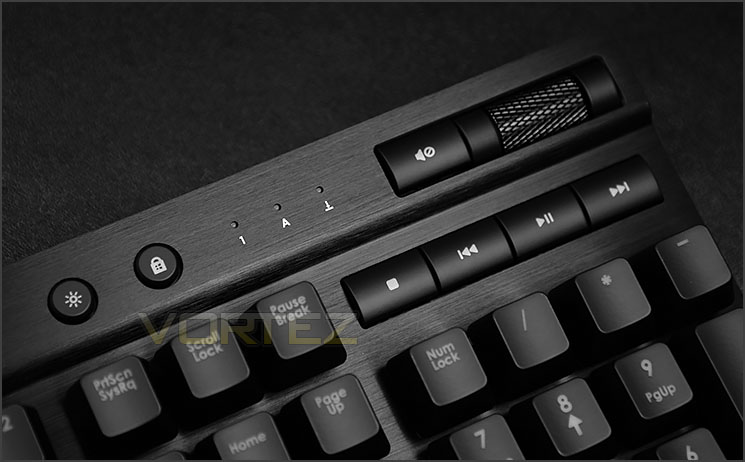
Multimedia controls
In the upper-right region of K70 RGB there are a number of useful buttons to take advantage of. Firstly there is a LED brightness control button which allows the intensity to be altered in steps – including to switch off the lighting altogether. Directly next to this button there is a windows disable key for use when gaming to prevent accidental pressing.
Corsair Gaming has streamlined the multimedia controls on K70 RGB by using some compact buttons which complement the overall design of the keyboard. There is a mute audio, stop, previous track, play/pause and next track buttons. Beside the mute audio button there is a scrolling barrel for adjusting the volume, allowing the user to decrease or increase the level of volume on-the-fly.
Closer Look (Continued)
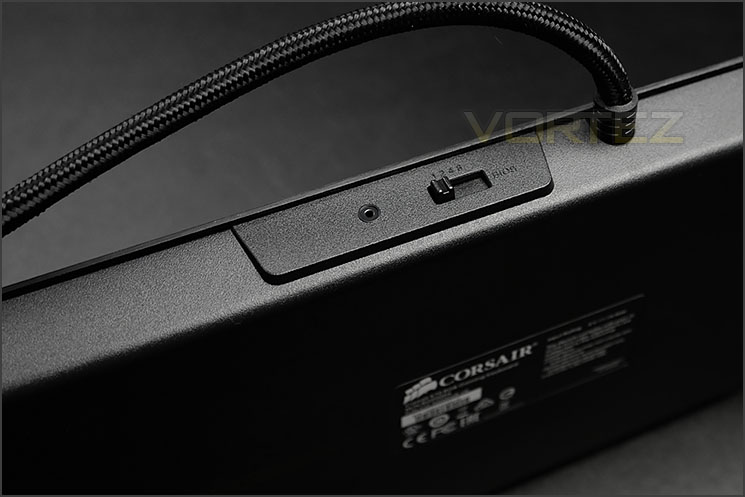
BIOS mode switch
In close proximity to the thick cabling coming from K70 RGB, there is a firmware reset button – this is a pinhole type button which needs a thin, sharp implement to in order to press.
Next to this there is a BIOS mode switch. This switch allows compatibility for older motherboards which perhaps do not support gaming keyboard. This switch also ensures compatibility for KVM switches too. The different modes modifies the refresh rate of the keyboard – most gamers will opt for the 1st setting (1ms or 1000Hz).

Detachable soft-touch wrist rest
As part of the bundled items Corsair Gaming include a detachable soft-touch wrist rest which enhances the ergonomic design of K70 RGB. For prolonged usage, some users prefer to have support for the wrist/palm area – so having this feature is very handy.

RGB switches can be partly seen

A closer look at the Cherry MX RGB switch
Compared to the usual Cherry MX switches we find on a vast majority of mechanical keyboards, the new design with Cherry MX RGB eschews the black housing of a typical Cherry MX switch in favour of clear plastic, allowing light from the circuit board below to shine through. A specially crafted lens formed in the housing focuses the light through the keycap, improving overall brightness and keycap character clarity. Finally the circuit-board underpinning the switches will have one SMD-LED per switch, capable of the 16.7m colours in RGB-space.
Corsair Gaming offer Cherry MX RGB red, blue or brown switches – our sample uses the red variant and is regarded preferable for gaming.

Twin USB connectors with thick braided cabling
The K70 RGB makes use of a substantially thick braided cable which splits off into two thinner cables which both have USB connectors. Usually, keyboards with twin USB connectors require the secondary cable to be plugged in for extra power for features such as onboard USB hubs but since K70 RGB doesn’t have any extra functionality in this manner, we can only imagine the extra connection is mandatory for the advanced LED functionality.
Software & Lighting
At the beginning of the year Corsair showcased their Cherry MX RGB keyboard and ever since avid fans have been eargerly waiting for these keyboards to hit the market. The software which interfaces with the keyboard has been undergoing major development which has caused some slight delays – Corsair Gaming wanted to ensure the application which controls such a keyboard to be 100% stable and we can only admire such effort because the software which works in conjunction with K70 RGB is nothing short of extensive.
As you can see from our video above, the software which handles the K70 RGB offers comprehensive customisation of just about every aspect of the keyboard you could want. At an advanced level technical users will be pleased to see extra options but even basic users who want to apply a few commands or tweak the lighting can do so in a few easy steps.
The software offers per-key lighting patterns as shown in our demonstration. Different configurations can be loaded into the keyboard or specific patterns can be manually set up. By dragging over a region of keys and creating a group, the user can then choose one of the 16.8 million colours on offer – furthermore, animation type effects with ripples or waves can be applied too.
Those who want to create their own macros will be pleased to know there is a detailed macro programming tool which is indepth – providing additional options that other keyboards on the market shy away from.
Lighting

K70 RGB uses exclusive Cherry MX RGB switches
By partnering with Cherry, Corsair Gaming has been exclusively working on the Cherry MX RGB switch. As we’ve already mentioned the new RGB design does away with the black housing of a typical Cherry MX switch in favour of clear plastic, allowing light from the circuit board below to shine through. A specially crafted lens formed in the housing focuses the light through the keycap, improving overall brightness and keycap character clarity.
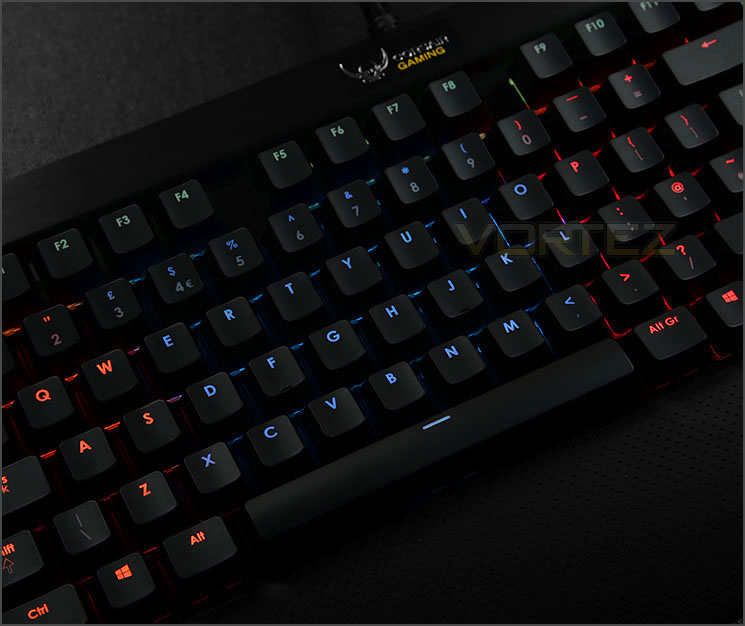

Per-key colour customisation is on offer with K70 RGB – something which is almost certainly unheard of at this particular time. Thanks to the Cherry MX RGB switches, lighting is vibrant and via the software, tweaking specific zones according to preference is extremely easy. Having a palette of 16.8 million colours is likely to satisfy even the fussiest gamers.
Performance

Moving from a standard membrane to a mechanical keyboard and especially one which uses Cherry MX Red switches will feel a rather strange at first and will take some getting used to. Generally this type of switch is more suited to gaming due to the lightness of actuation, but for general usage within windows, typing up documents and web browsing K70 RGB still does a good job – personally I still prefer the Cherry Brown for a better balance between both types of use.
Since K70 RGB follows a standard QWERTY layout, keys aren’t placed in obscure locations which is helpful if you are transferring from another keyboard.
For both general use and gaming we found the K70 RGB to be a good keyboard to use and we encountered no problems throughout our duration with this unit. The ability to disable the windows key on-the-fly from the button located at the top of the keyboard is a great feature to have and is really helpful in avoiding the annoyance of accidentally hitting this key whilst in-game.

K70 RGB comes equipped with full NKRO (N-Key Rollover). Corsair Gaming actually state that K70 RGB has 104-key rollover. We tested whether this claim stood true and sure enough with Aqua’S KeyTest there were no problems with simultaneous presses on the keyboard.
It’s worth noting that the 104 key press claim is only a minimum guarantee – it’s not a maximum, so the keyboard could indeed recognise even more.
Conclusion
Since their debut at CES 2014, the Cherry MX RGB, under the exclusive guise of Corsair Gaming’s lineup of new mechanical keyboards has been unprecedented. Never has there been such a strong following for a group of keyboards. Avid hardware and gaming advocates have been eagerly wanting to get their hands on this new kit for a very long time and it’s clear to see why after our first-hand experience with the K70 RGB.
Adorned in luxurious brushed aluminium, the K70 RGB is not only an office appliance to admire but it’s also sturdy and durable too. This is Corsair Gaming’s first product to launch under the new division and we like that they have chosen to retain a level of elegance, even on a mechanical gaming keyboard. K70 RGB follows the standard QWERTY layout but has some additional buttons in the far-right corner for added functionality – on offer are buttons to control the LED lighting, disable the windows key and manage the audio levels. It may only be subtle but the inclusion of independent multimedia buttons is a novel idea because it means that such modifications can be done on-the-fly without having to minimise the game or application and press Shift + F1 or ALT + F1 – like many other keyboards.
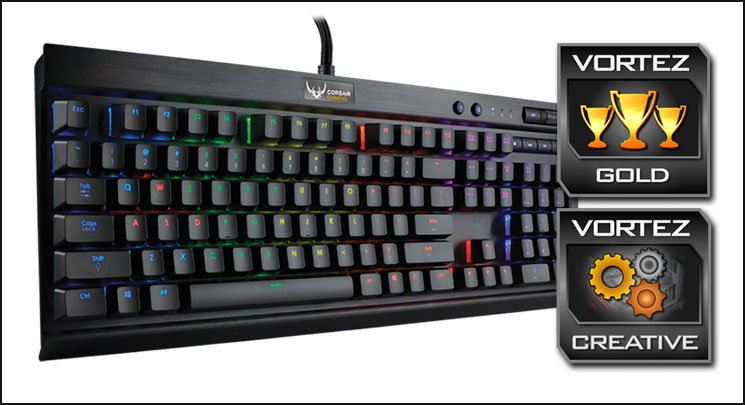
The overriding, standout feature with K70 RGB lies in its name. Corsair Gaming has partnered with Cherry to bring Cherry MX RGB switches to the table and as a result Corsair Gaming’s new K70 RGB has exclusive rights to this exciting new innovation. By combining intuitive software which is extremely thorough and using these RGB switches, gamers can now modify their keyboard with per-key LED lighting. Any key on K70 RGB can have its colour altered and on offer is a palette covering up to 16.8 million colours. Other mechanical keyboards which offer LED lighting simply accompany the Cherry MX switch with an LED and the customisation of the colour is restrained to the entire keyboard but this is not so with K70 RGB and as such specific zones can be given certain colours and these configurations can in turn be assigned to profiles for different games or applications.
From launch the K70 RGB can be found for £145 GBP / $170 USD. As an outright cost this will appear high for a keyboard but then we ponder on the unique features of K70 RGB and compare it against rival offerings in the same price-range – it’s clear to see a distinct advantage in what Corsair Gaming are offering.
Laden with quality and finesse K70 RGB brings a new level of customisation to mechanical keyboards. You can confidently push aside other mechanical keyboards on the shortlist, K70 RGB has all the hallmarks for a solid gaming peripheral and will exceed expectations.
VIDEO REVIEW – VORTEZ TV
Pros
+ Appealing to the eye
+ Brushed aluminium
+ Per-key LED lighting
+ 16.8 million colours to choose
+ Detailed software suite
+ Thorough customisation
+ Full N-KRO
+ On-the-fly buttons – LED, Disable Windows Key
+ Independent multimedia buttons
+ Detachable wrist rest
Cons
– 100% brightness needs more intensity
– Matt keys do tarnish with sweat
+ Appealing to the eye
+ Brushed aluminium
+ Per-key LED lighting
+ 16.8 million colours to choose
+ Detailed software suite
+ Thorough customisation
+ Full N-KRO
+ On-the-fly buttons – LED, Disable Windows Key
+ Independent multimedia buttons
+ Detachable wrist rest
Cons
– 100% brightness needs more intensity
– Matt keys do tarnish with sweat

Click here for an explanation of our awards at Vortez.net.


