Corsair have sent us their latest cooler from their Hydro Series, which is aimed at redefining the all-contained liquid cooling solution.
Product on Review: Corsair H50 CPU Cooler
Manufacturer and Sponsor: Corsair
MSRP: $79USD
Street Price: £62.15
When I reviewed the CoolIT Domino A.L.C last year, I mentioned that CoolIT had better watch out because of a competitor building an alternative solution. That competitor was Corsair with their H50 liquid cooling solution. A growing problem with the traditional high end tower heatsink coolers today is their sheer size and subsequently their weight. Corsair saw this as an opportunity to delve into the cooling market and bring innovation to enthusiasts through an all contained solution we now know as the H50.

The Hydro 50 is the result of a joint effort between Asetek and Corsair. Those who have previously experienced building custom water cooling setups will no doubt be familiar with Asetek’s products. They have also been behind more exotic products such as VapoChill in the past and as such, they have a rich heritage of delivering enthusiast level products. However, since their focus was shifted to the OEM market, their name became less well known amongst casual users. In order to leverage their expertise to the consumer market, they teamed up with Corsair who already had a very strong global channel and loyal consumer base. Some could say it was a marriage made in heaven! Combining Asetek’s latest cold plate technology and radiator with Corsair’s brand name, we now have the H50. Corsair’s attention to detail and demand for best performance also means that further improvements were made to the cooler to exceed expectations. This is hopefully what we will see today.
Products to Meet the Demands of Performance Computing
Corsair has been a leader in the design and manufacture of high-speed modules since 1994. Our focus has always been on supporting the special demands of mission-critical servers and high-end workstations, as well as the performance demands of extreme gamers. While maintaining this core focus, in recent years, we’ve also brought our expertise, technology leadership and legendary quality and reliability to memory and other technology products for the more mainstream consumer.
Flash Memory, Liquid Cooling and Power Supplies
Corsair has expanded beyond memory modules to offer performance liquid cooling units and blocks under our Corsair Nautilus brand and power supplies under our HX Series brand.
In addition, we offer a line of specialty Flash memory. From our ultra-rugged Flash Survivor™ family to the multi-award winning durable Flash Voyager™ family, Corsair has quickly established itself as an industry leader for USB drives.
Founded in 2000, Asetek is a world leading thermal management solution provider of vapour phase, vapour chamber and liquid cooling solutions. These solutions are designed for OEM integration, servers/data centres, PC enthusiasts, gamers, and professionals who demands exceptional performance, maximum reliability and low noise. Asetek R&
 works with state-of-the-art lab facilities and thermal simulation tools in its design process.
 For a decade, Asetek has developed the very strong brand names VapoChill® and WaterChill™, to become the preferred choice of enthusiast grade cooling solutions. The VapoChill® and WaterChill™ product lines have won more than 200 international press awards.
With headquarters in Denmark, a marketing and FAE office in San José, California, a QA and sourcing office in China, and a sales office in Taiwan, Asetek works actively with world leading companies within the industry to ensure maximum reliability, cost effectiveness, and performance for its products, while providing global logistical support for its customers.
Corsair are renowned for quality, service and performance so let’s see how well these translate to the H50.
Features and Specifications
First off, let’s see what Corsair have to say about the H50:The Hydro Series H50 provides CPU cooling performance that traditional air coolers just can’t match. The pre-filled, closed loop system is easy to install and takes up minimal space inside your PC’s case.
Features
| •Pre-filled, closed-loop system is easy to install •Copper CPU cooling plate for maximum cooling performance •Integrated pump and reservoir is sealed for zero maintenance and improved leakage protection •Large 120mm radiator for fast heat dispersion •High-efficiency, low-noise 120mm fan for drawing cool air across the radiator •Two-year warranty •Includes mounting brackets for Intel LGA775/1156/1366 and AMD AM2/3 |
Specifications
| Model: CWCH50 Cold Plate material: Copper Fan Specs: 120mm, 1700 RPM Radiator Material: Aluminium Radiator Dimensions: 120x152x27mm (WxHxD) Tubing: Low-permeability for near-zero evaporation |
Seeing as its direct competitor is the CoolIT ECO, it is inevitable that I will be comparing the two continuously throughout the review. From the features and specification, we can already see the similarities in their design approach. Both use a 120mm radiator, a copper block attached to the pump, similar tubing and include brackets for both Intel and AMD systems. They also come with two years warranty for peace of mind.
The key differences that Corsair believe will give them the advantage over the ECO are the CPU block and pump, and the unique orientation of the fan. Instead of using the fan as an exhaust, it is oriented to pull in cool air from the outside. This may seem counter intuitive on initial looks, especially when it will most likely be installed at the exhaust vent inside a case but the advantage of this design is that cool air will be brought in from outside the case. Of course, this will not necessarily be the case when heat output from a graphics card is considered, which will add heat outside the back of the case. This will be investigated later on during the tests. Another difference is the slower fan that hopes to be quieter than the ECO’s one.
The all contained system ensures ease of installation, making this a very user friendly product. The 120mm fan at the back also means that that the cooler can be installed in any case with 120mm fan mounting holes at the back/top.
Packaging and Content
Front of the box
Corsair package their H50 in a typical cardboard box, shrink wrapped for further protection during transit. The box is fairly elongated to house the cooler in such a way that the tubes are not bent inside, making it easier for users to install. The design of the box is very striking on first look, with the famous Corsair branding in the corner and “H50” printed on the side. Unlike some of the packaging we get, Corsair has opted for a more visual approach, hence the cooler itself displayed at the front, ensuring that users know exactly what to expect. Of course, it wouldn’t be water cooling without the splashing water in the background…The H50 forms part of Corsair’s Hydro Series of products which is mentioned on the front. On the whole, the box appears clean and looks professional, as we would expect from Corsair.
Back of the box
Moving on to the back of the box, Corsair lists some of the key specifications of the H50 cooler such as the copper CPU plate, the large 120mm radiator, and the highly efficient fan. They have even included a small graph showing the cooler’s advantages over other forms of cooling, conveniently missing out on the details. To show Corsair’s global presence, all the information is listed in 6 languages. In the top right corner, Corsair indicates that the H50 is “Powered by Asetek” which I mentioned earlier in the introduction.
Requirements and specifications
Turning to the side, Corsair lists the requirements and specifications of the radiator. Unlike the earlier revisions, Corsair’s latest one is compatible with all recent Intel and AMD platforms including LGA775/1156/1366 and AM2/3 sockets. Again this is listed on the box to further inform potential users.
Side of the box
A common theme throughout the packaging is the H50 moniker printed on every side. It certainly helps in giving the box a neat look as well as emphasizing the product itself. The 3 key characteristics of the cooler; ‘cool, quiet and easy to install’ is another running theme that aims to satisfy the customers’ needs.
‘STOP’ sign
Upon opening the top lid of the box, we are greeted firstly by a ‘STOP’ sign. The sheet tells the user to not return the product to the store but to instead contact Corsair directly in the event of a fault. This emphasizes the quality of service we are now accustomed to with Corsair. In addition to the sign are the installation guides for each socket mounting.
Inside the box
Finally, we get to the actual product. The H50 cooler is neatly packaged in a tough plastic enclosure for extra security during transit. As mentioned earlier, the tubing is kept straight so that the user can manipulate it to fit their case easier. This is a welcomed attribute compared to the CoolIT ECO, which was packaged with the tubing bent already, thereby limiting the user’s ability to easily bend it to conform to their case.
Closer Look
The bundle
The H50 comes bundled with an assorted array of mounting brackets and screws for all recent Intel and AMD motherboards. Included in the bundle are:
2x motherboard backplates for Intel and AMD,
2x retention rings,
2x adhesive backings,
8x mounting inserts,
4x metal backplate inserts,
4x mounting screws,
4x long screws for installation,
1x 120mm Corsair fan,
1x H50 cooler.
The quick user guides
Along with the ‘STOP’ sign are four sheets listing all the appropriate parts required for installation on each socket type (LGA775/1156/1366 and AMD AM2/3). Each vary slightly but Corsair have ensured ease of use by making separate sheets available to the user to avoid confusion. Also included is a quick install guide with step by step instruction for installation.
The manual
The quick start guide is a very easy to understand set of instructions that detail every step both visually and in writing.
The H50!
The Corsair H50 is very similar to the design of the CoolIT ECO at first glance. Both are all contained units that have been pre-filled for ease of installation. They also use an integrated pump and reservoir configuration that aim to be leak free and require zero maintenance. Furthermore, both utilise a 120mm radiator and fan for efficient heat dissipation. However, it is the subtle difference that Corsair hopes to gain an advantage with. One key difference is the design of the CPU block and pump unit that has a cylindrical shape as opposed to the block design of the ECO. The retention bracket is also separate to the unit.
The radiator
As with all water cooling radiators, the H50 uses a corrugated pattern to increase surface area for heat dissipation. The fin spacing is the same as the ECO’s coming at 2.5mm, thus a densely packed configuration. One improvement over the ECO is that the metal remained undamaged and not bent out of shape during transit. The way Corsair designed it means that users can’t accidently bend the metal. In all, it gives the H50 a much cleaner finish. There are four holes at the back of the radiator to accommodate a 120mm fan.
The H50 casing and radiator
The gap between the radiator housing and the corrugated metal ensures that users don’t damage the finish when mounting the system. There are four more holes at the front to install another fan for a push/pull configuration.
Closer Look (Continued)
The hose fittings and reservoir
Here the tubing goes straight into the reservoir which is attached to the radiator for faster heat transfer. Instead of the larger barbs used in the CoolIT ECO, Corsair opts for smaller fittings. They are tough enough to withstand the high pressures and temperatures but lack the robustness of proper metallic barbs used in custom water cooling loops. The advantage of the closed loop is that users don’t have to constantly maintain the system and the possibility of leakages through user error is minimised. The fluid used in the system is de-ionised water with a propylene-glycol additive to prevent corrosion of the components.
The H50 with the fan atached
The H50 comes with a fan that is designed to be mounted at the back of the radiator. Another major contrast to CoolIT’s solution is the fact that the fan acts as an intake fan rather than an exhaust. The reason for this is that the fan will bring in cool air from the back to dissipate heat away from the radiator more efficiently thanks to a higher thermal gradient. The disadvantage of this is that the system mounts to the exhaust port in most cases so using the fan as an intake will prevent heat from escaping the case. If the user’s case has exhaust fans at the top, then this isn’t an issue. In my own case, my only exhaust bay was taken up by the H50 radiator so the only way heat could be pumped out was through the power supply at the top, which isn’t an ideal solution. We will investigate later if changing the orientation of the fan will impact performance. The fan uses a 4 pin connector and runs at 1700RPM, 100 less than the ECO’s fan.
The tubing
The tubing is again very similar to the CoolIT ECO’s but they are slightly more flexible on the H50. Being a system based on the Asetek LCLC, which was originally designed for OEM integration, Corsair promises incredible amounts of durability and reliability on their H50. Only two tubes are required thanks to the integration of the pump to the cold plate and the reservoir to the radiator. This minimises the possibility of problems arising and improves user friendliness.
The pump
The pump on the H50 is integrated with the CPU block. The casing has a strong plastic construction with the Corsair logo printed on top for a sleek finish. This casing can be removed easily by unscrewing it from the base but it is not recommended. The pump itself uses a 3 pin connector that can be connected to the motherboard. Another neat feature of the H50 are the braided cables that again adds to the appeal of the H50.
The cold plate/water block
The tubing runs straight to the pump and the fittings inside are similar to those found on the radiator. By having the fittings enclosed in the casing, Corsair ensures extra protection from damage. The base is a copper cold plate for maximum cooling performance and it comes with Shin-Etsu thermal compound pre-applied. The base isn’t completely flat but instead has small micro-grooves similar to the base of the Noctua coolers we have tested here. The thermal paste acts as an excellent interface for efficient heat transport away from the CPU.
Corsair H50 vs. CoolIT ECO
In comparison to the CoolIT ECO, the Corsair H50 definitely has a sleeker design and more professional finish but looks are not everything and it’s the performance difference that we are here to see.
Test Setup
CPU – Intel Core i7 920 – 4.0GHz
RAM – 6GB (3x2GB) OCZ platinum DDR3 1333MHz
Motherboard – Biostar T-Power x58
Graphics card – XFX HD5870 1024MB
Power Supply – Enermax Revolution 85+ 850W
Hard Drive – Samsung F1 320GB
Western Digital Caviar WD3200AAKS 320GB
Drivers – ATI Catalyst 10.4
CPU Coolers:
Corsair H50 including tests using 2 Noctua NF-P12s and 2 SWiF2-120Ps
CoolIT ECO A.L.C including tests using 2 Noctua NF-P12s and 2 SWiF2-120Ps
Thermalright Venomous X using 2 Noctua NF-P12s and 2 SWiF2-120Ps
Coolink Corator DS including tests with dual fan setups
Tuniq Propeller 120(High speed fan)
Noctua NH-C12P SE14
Prolimatech Megahalem
Noctua NH-D14 (U.L.N.A and default speed)
Noctua NH-U12P SE1366
Thermolab Baram (with 2 Noctua NF-P12 fans)
CoolIT Domino A.L.C
Sunbeam Core Contact Freezer
Coolermaster Hyper 212 Plus including test with 2 Noctua NF-P12 fans
Alpenföhn Nordwand including test with 2 Noctua NF-P12 fans
Tuniq Tower 120 Extreme (Low/med/high speed)
Program Suite:
Core Temp 0.99.5
LinX stress Test
PC Wizard
How I tested:
Testing will be based on temperatures recorded by Coretemp and PC Wizard after 20 passes of LinX stress test. The absolute temperatures recorded in the tables are averages of the 4 cores and the delta value provided for a fair comparison, taking into account ambient temperatures. The test will be run at stock speed and at an overclocked speed of 4GHz.
One specific area of interest amongst the community has been to see the performance difference between using the fans as intakes or as exhausts. Here at Vortez Hardware, we aim to answer all those pending questions other reviews are not addressing so my tests will include results for both fan configurations.
Installation
My first impression was that installation of the H50 was not as intuitive as other coolers but Corsair do an excellent job with their user guides detailing the procedure step by step. Installation was more fiddly than with the CoolIT ECO because of the separate mounting brackets and plastic inserts but on the whole, it was a straightforward task. One positive note is the inclusion of the long screws that make mounting the fan to the radiator a very easy process.1.) Choose the appropriate backplate and place the 4 metal backplate inserts in the right holes. The holes are labelled for socket 775/1156/1366 on the Intel backplate.
2.) Attach the adhesive pads to the backplate and install it to the back of the motherboard making sure each corner has gone through.
3.) Insert 4 mounting inserts to each corner of the appropriate retention bracket. For socket 1156/1366, use the inserts with the two holes and for sockets 775/AM2/3, use the inserts with just the one hole. When installing the insert, ensure that the small clip is to the inside.
4.) Install the 4 mounting screws into the outer most holes of the inserts and line up the retention ring with the backplate on the front of the motherboard. Screw each corner in slightly so that they are in place but don’t tighten them just yet.
5.) Attach the 120mm fan to the case as an intake and place the radiator on top.
6.) Install the CPU block in the retention ring and twist it so that it is latched onto the bracket. Once secured, tighten the screws on the retention bracket. Do not over tighten as it may damage the plastic inserts.
7.) Plug the pump and fan cables to the motherboard.
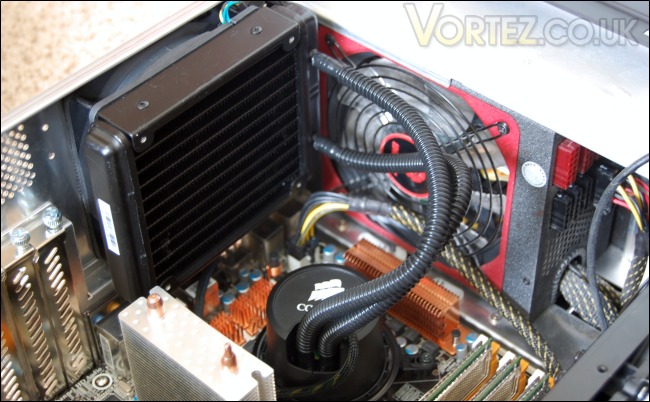
As with the CoolIT ECO, a second fan can be installed and Corsair make the process easier by providing longer screws. The hoses are approximately 30cm in length so the best position to attach them would be at the top or back of the case.
For a more in depth video covering the installation and mounting kit provided, check out this video from Corsair:
Results
Stock
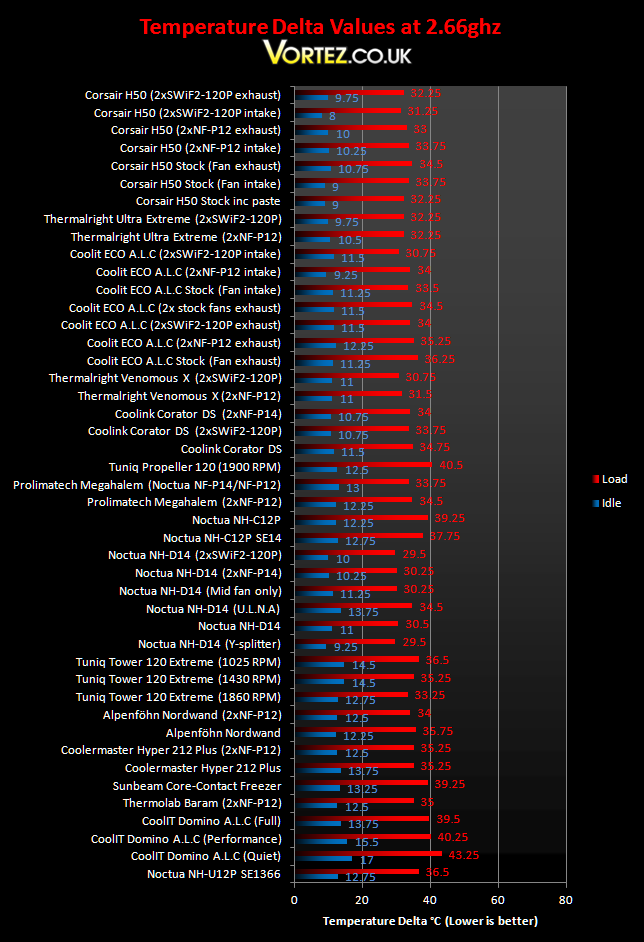
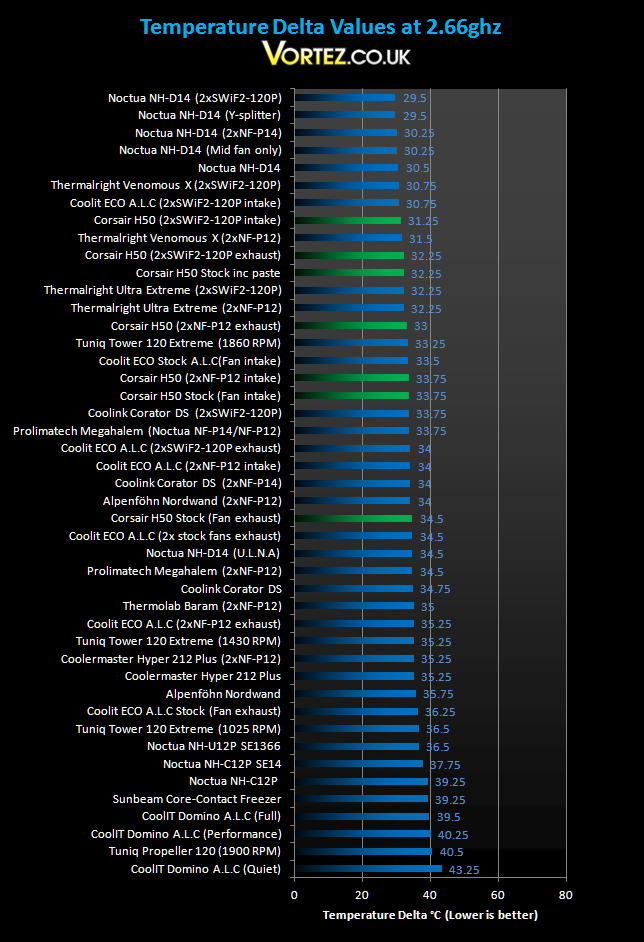
The Corsair H50 yields some very good temperature results at stock speed and some of the best idle temperatures! The stock configuration with the pre-applied thermal paste outperforms the mighty Thermalright Ultra Extreme but using the usual thermal paste to give a fairer comparison of the coolers themselves, we see the performance dropping. It’s impressive to see that even the worse results from the H50 managed to outpace the CoolIT ECO using a push/pull configuration. Using two quieter Noctua NF-P12s on the H50 gave us some very respectable temperatures considering the drop in noise level experienced compared to the stock fan. With two SWiF2-120P fan, the H50 could only be bested by the Noctua NH-D14 and Thermalright Venomous X, certainly a very impressive result for such a compact cooler but at the expense of a quiet system.
*Update*
The chart has been updated with the CoolIT ECO A.L.C intake configuration results.
Results (Overclocked)
4GHz
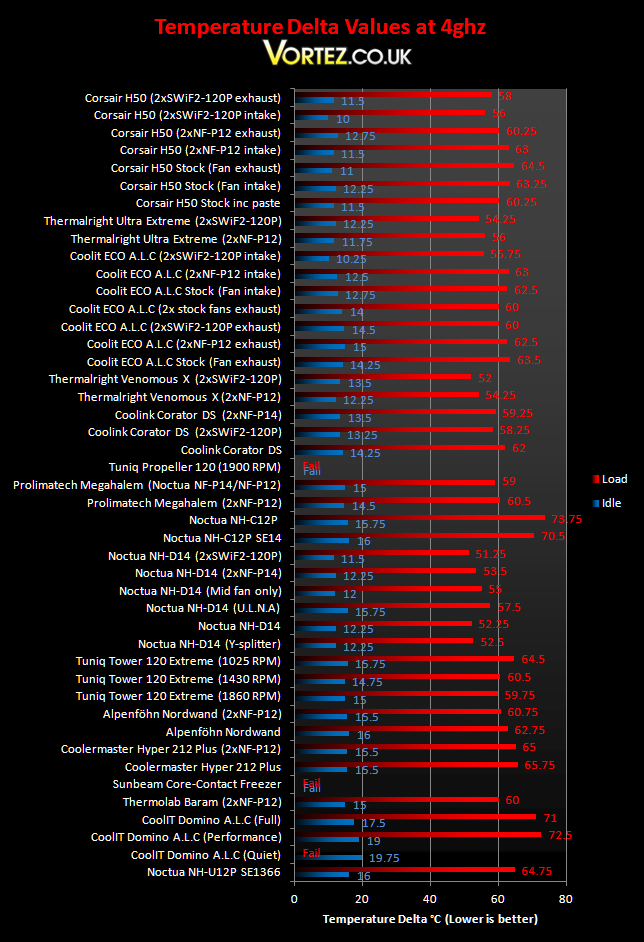
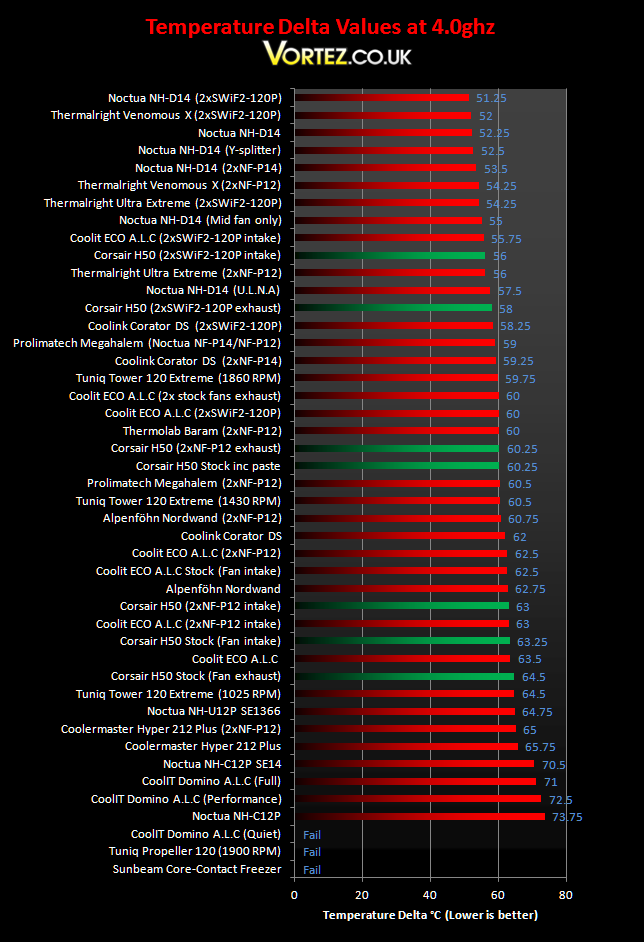
On the overclocked i7, the results become a lot more interesting and more varied as well. Starting with the stock configuration, the H50 performs admirably even outperforming the Prolimatech Megahalem. However, changing the thermal paste (as we did with the ECO as well), we see another drop in cooling performance. This goes to show that the Shin-Etsu compound that comes pre-applied is excellent and should not be changed. One observation was that the radiator got warm to the touch during operation suggesting that the pump and water were transferring heat efficiently but was not being dissipated fast enough by the one fan on the radiator. So two fans were installed in both the intake and exhaust configuration. The decrease in temperature was very impressive compared to the gains a push/pull setup had on the CoolIT ECO. With two Coolink fans, the H50’s performance was comparable to the Thermalright Ultra Extreme. Idle temperatures were also brilliant, reflecting the results we saw at stock speed.
*Update*
The chart has been updated with the CoolIT ECO A.L.C intake configuration results.
In depth comparison
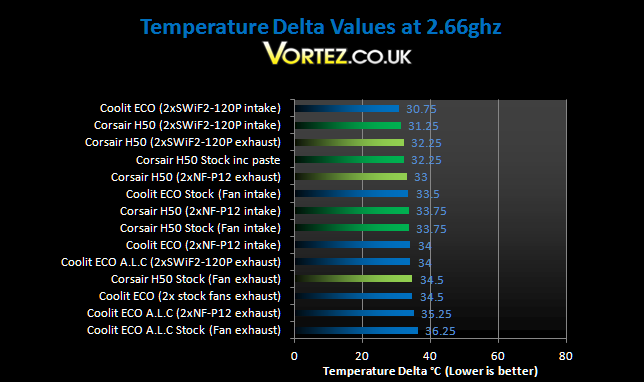
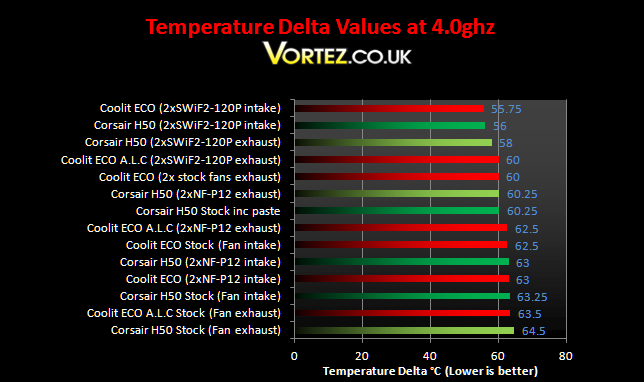
Looking closer at the Corsair H50 vs. the CoolIT ECO results, we get a better idea which is the best of the two and it’s firmly the H50. Using the stock configuration, the H50’s is better, especially with the fan in its default intake position. However this difference is marginal until we use a push/pull setup where the gains are higher on the H50. If we compare both when using the dual Noctua/Coolink fans, the H50 fares better and nets a lead of up to 4 degrees over the ECO.
Another test readers wanted to see were the exhaust vs. intake tests. We can safely say that Corsair’s decision to use the fan as an intake was the right choice as reflected in the results. Using a single fan, they show that having it as an intake gave superior cooling potential both on the overclocked system and at stock. The same can be observed with the SWiF2-120P fan. Conversely, we see the opposite with the Noctua fans mounted. None-the-less, the H50 proved to be ahead CoolIT’s solution throughout.
It is interesting to note that changing the fan orientation to act as an exhaust didn’t have a major impact on the motherboard temperatures. In fact, in some instances the temperatures increased. Despite not having other exhaust fans in my case apart from the power supply, using the fan as an intake did not increase the motherboard temperatures. This demonstrates that drawing cool air in from the back is definitely the recommended approach.
Noise
We now come to one of the major downfalls of the H50. Spinning at a veracious 1700RPM (1650RPM recorded on my motherboard), the fan isn’t as quiet as Corsair market it out to be. It was definitely audible above my other case fans including the Scythe S-Flex 1600RPM. However, it was quieter than the CoolIT ECO. Corsair stresses that the stock fan has a good static pressure and the fact that the stock configuration was comparable to using two Noctua NF-P12s shows that this is indeed the case. To achieve the best results, the two Coolink fans were used but as mentioned before, it was not quiet at all! Unless the user normally wears headphones or regularly plays music, the noise will drive anyone insane. The pump on the other hand was close to being silent. Apart from the gurgling water from the initial rush of water through the hoses, the system itself was very quiet.
*Update 19.05.2010*
I have now added the results with the fans oriented as intakes on the CoolIT ECO A.L.C. Comparing apples to apples, the Corsair H50 lags behind the CoolIT ECO by 0.75 degrees and 1 degree in the intake and exhaust configurations respectively. This isn’t surprising given the lower fan speed on the Corsair. With the two Noctua NF-P12 fans, the results are neck and neck showing that both systems are as efficient as each other and similarly with two SWiF-120P fans, the difference is only slight. As exhaust fans, the Corsair H50 still performs better with the Noctua NF-P12s and the Coolink SWiF-120P fans. On the whole, the new results demonstrate that the difference between the Corsair and the CoolIT solutions are not as clear cut as previously thought. Given both solutions in their default configuration, the H50 is still marginally ahead.
Conclusion
So there we have it, the Corsair H50. The cooler certainly lives up to the expectations of the Corsair branding. In many ways, I\’ll probably end up repeating what I said on the CoolIT ECO but Corsair have gone a step ahead with the help of Asetek to deliver a slightly better end product. Performance wise, it matched many of the high end air coolers such as the Noctua NH-U12P, Alpenföhn Nordwand, Prolimatech Megahalem and the Thermolab Baram. When a push/pull configuration was employed, the H50 delivered even better results pitting it against the like of the Thermalright Ultra Extreme. The system coped very well both under stock condition and with an overclocked i7 making it an overclocker\’s choice without doubt.
But that isn\’t to say that the H50 is a perfect product. Like the CoolIT ECO, it is let down by the noise it produces. For a product marketed as being quiet, it\’s disappointing to see that it was audible throughout testing. While remaining quieter than CoolIT\’s solution, it does also come at a higher premium. Furthermore, it required two high RPM fans to truly show its potential. Fans with good static pressures are definitely recommended for push/pull setups but often this will sacrifice quietude. The result is that other air cooling solutions such as the Noctua NH-D14 and the Thermalright Venomous X still reign supreme with their ability to deliver excellent temperatures even when using slower fans. This conveniently brings me to my next point and that\’s ease of installation. An all contained unit ensures that the system is maintenance free and with Asetek\’s engineering expertise, the H50 promises to be very reliable. The compact design is a clear advantage it holds over the aforementioned air coolers so those worried about the weight of tower heatsinks on their motherboard should consider the H50.
To conclude, the H50 is an excellent product taking innovation to the next level compared to the CoolIT ECO. Saying this, the H50 does hold a premium but the performance benefits reflects the price. To say that the ECO has lost its place in the market would be wrong because both come at unique price points to justify their performance.
*Update 19.05.2010*
With the new CoolIT ECO A.L.C results added in using the intake fan configurations, it becomes harder to choose one solution over the other. Both the Corsair H50 and CoolIT ECO A.L.C perform very similarly. While the ECO ends up cheaper in most shops, the H50 compensates for its premium with a cleaner looking product using pre braided cables and a perfectly finished radiator (no out of shape fins). In their default configurations, the Corsair still comes out slightly ahead.
Pros
+ Very well packaged
+ Sleek and robust
+ Compact and all contained
+ Easy to install and maintenance free
+ Good cooling performance
+ Highly efficient in a push/pull configuration
Cons
– Performance still behind top end air coolers
– Noise
The Corsair H50 deserves the Vortez Hardware Silver award.