CORSAIR’s HS-Series of headsets has a new member, bringing with it 50mm custom-tuned alongside 2.4GHz Slipstream Wireless technology and Dolby Atmos for a high end gaming experience.

Product on Review: HS80 RGB Wireless
Manufacturer: CORSAIR
MSRP:
– US: $149.99 excl Tax
– UK: £139.99 inc. V.A.T.
– EU: €149.99 inc. Tax
– AUS: $219.00 inc. Tax
Introduction
CORSAIR are continuing to make their presence felt in the arena of PC gaming peripherals following a broad refresh of their keyboard and mouse lineup in 2020/21. They’ve refined their look and introduced new technologies, all while under the gun of very tricky global market conditions. Today sees the introduction of yet another new member to their catalogue, this time adding a enthusiast wireless headset to an already potent portfolio available worldwide.
The CORSAIR HS80 RGB WIRELESS headset joins their HS-series as both a new leader and the start of a fresh new look. It supplants the HS70 – itself available in wireless form – but steers well clear of the flagship VIRTUOSO series in both price and style.
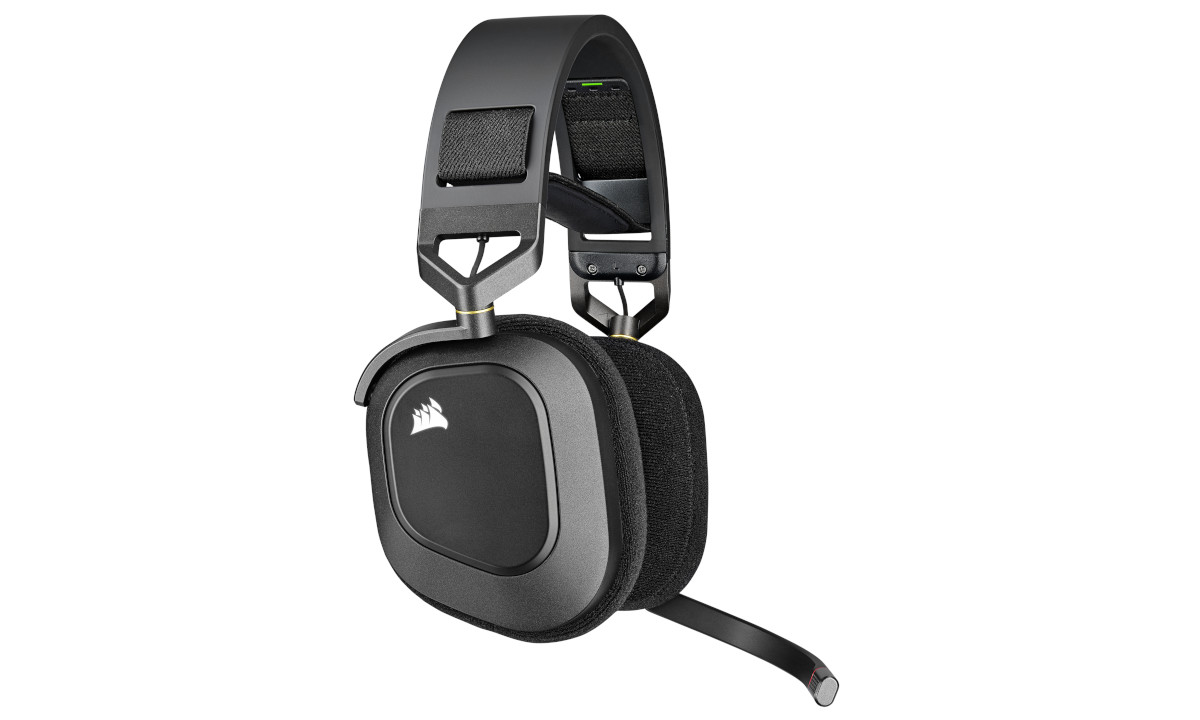
Gone are the circular cups of the HS and VIRTUOSO series in favour of a quadrangle shape evocative of the VOID series. The microphone is now integrated rather than detachable, and a strap offers adjustable comfort below a solid headband arch. Machined aluminium components should offer the rigidity necessary for a gaming headset, and will no doubt be appreciated by the gamer with more discerning tastes. It’s a radical redesign and re-envisioning of the style and functionality of the HS-Series – if these changes follow through to the next generation.
Of course this new HS80 is a wireless design, and CORSAIR are utilising their own SLIPSTREAM WIRELESS technology to provide low-latency transmit/receive between headset and PC (or console). SLIPSTREAM is a 2.4GHz wireless implementation that should both minimise power draw and offer sufficient bandwidth for bidirectional audio, always a touchy subject for wireless headsets.
Adding some extra spice is support for Dolby Atmos 3D Spatial Audio. The proprietary technology creates a virtual 3D soundstage for better, more representative surround-sound and a more immersive overall experience. This is augmented by Corsair’s custom 50mm neodymium drivers that allegedly unlocks a frequency response from 20Hz to 40kHz – 20kHz higher than typical gaming headsets.
At an MSRP of US$149.99 / £139.99 the most familiar competitor will be the Logitech G G935, but the likes of SteelSeries, ASUS and Razer all have similar products at both £100 and £150 inc. V.A.T. price points. CORSAIR’s own VOID ELITE RGB may be their most pressing concern however; not as a competitor, but rather a bar in quality and performance they need to clear to justify this HS80’s place in their range.
About the HS80 RGB WIRELESS Headset
CORSAIR is pleased to introduce the HS80 RGB WIRELESS, the latest addition to its award-winning HS family of highperformance gaming headsets. The HS80 RGB WIRELESS incorporates cutting-edge SLIPSTREAM WIRELESS technology with 24-bit audio support, Dolby Atmos® spatial audio, and a broadcast-grade omni-directional microphone for exceptional voice clarity.
Crafted from premium materials including machined aluminum, the HS80 RGB WIRELESS combines class-leading audio performance with an all-new design inspired by the iconic CORSAIR VOID series. Featuring new floating headband architecture and plush premium fabric ear pads, this the HS80 RGB WIRELESS makes a strong case for the most
comfortable CORSAIR headset ever.
Crafted from premium materials including machined aluminum, the HS80 RGB WIRELESS combines class-leading audio performance with an all-new design inspired by the iconic CORSAIR VOID series. Featuring new floating headband architecture and plush premium fabric ear pads, this the HS80 RGB WIRELESS makes a strong case for the most
comfortable CORSAIR headset ever.
Technical Specifications
Audio Driver: Custom 50mm Neodymium
Frequency Response: 10Hz – 40kHz
Impedance: 32 Ohms @ 2.5kHz
Sensitivity: 109 dB (+- 3dB)
Wireless Frequency: 2.4GHz
Wireless Range: up to 60 feet (20 metres)
Battery Life: up to 20 hrs
Mic Type: Omni-directional broadcast-grade (integrated)
Mic Impedance: 2.2k Ohms
Mic Freq. Response: 100Hz – 10kHz
Mic Sensitivity: -40dB (+- 3dB)
Dimensions: 205mm x 97mm x 183mm
Weight: 367g
Warranty: 2 years
Cable: 2m USB Type-A to Type-C
Frequency Response: 10Hz – 40kHz
Impedance: 32 Ohms @ 2.5kHz
Sensitivity: 109 dB (+- 3dB)
Wireless Frequency: 2.4GHz
Wireless Range: up to 60 feet (20 metres)
Battery Life: up to 20 hrs
Mic Type: Omni-directional broadcast-grade (integrated)
Mic Impedance: 2.2k Ohms
Mic Freq. Response: 100Hz – 10kHz
Mic Sensitivity: -40dB (+- 3dB)
Dimensions: 205mm x 97mm x 183mm
Weight: 367g
Warranty: 2 years
Cable: 2m USB Type-A to Type-C
The HS80 RGB WIRELESS leverages CORSAIR’s Slipstream wireless technology, allowing communication between PC and headset to intelligently jump between 2.4GHz wireless channels and find the optimum available. Slipstream is a low-latency protocol which, when measured with compatible CORSAIR mice, averaged just 867 microseconds.
The supplied HS80 wireless receiver can also operate in Multipoint mode, connecting to other compatible Slipstream peripherals to minimise the number of occupied USB ports.
Dual Mode
The HS80 can operate in wired mode when connected to the supplied USB cable. Ostensibly used for charging, the cable will also carry signalling and fully unlock support for High-Fidelity 24bit/96kHz Sound. In wireless mode the HS80 is limited to 24-bit 48kHz audio (defined as ‘Studio Quality’ by the Windows OS).
Integrated Microphone
In a departure from previous high-end HS-series headsets Corsair have opted to integrate the microphone into the headset rather than engineer it to be detachable. The microphone is automatically muted when the pivoting arm is in an upright position, and its status is indicated by a red LED ring on its tip.
The microphone is omnidirectional and so will pick out sound from around your workspace including keystrokes and mouse clicks.
Dolby Atmos
Dolby Atmos is Dolby’s newest spacial audio virtualisation technology. Its chief innovation is in adding height channels that allows greater vertical separation between sounds and defining individual sounds as 3D objects. Initially developed for commercial cinemas, its adoption for the consumer market has driven the sale of up-firing speakers and other tools that give vertical audio channels.
Authoring tools created for the protocol provide content creators with the tools to define a sound landscape in a more precise manner, while a series of algorithmic processes create more accurate sound-stages for the humble stereo headset or more high-end home surround system. The technology is licenced to speaker, cinema receiver and preamp manufacturers, and multiple home set-top boxes such as the AppleTV also support the tech; this hardware then mixes the audio stream into a form suitable for the speaker configuration being used.
Packaging and First Look
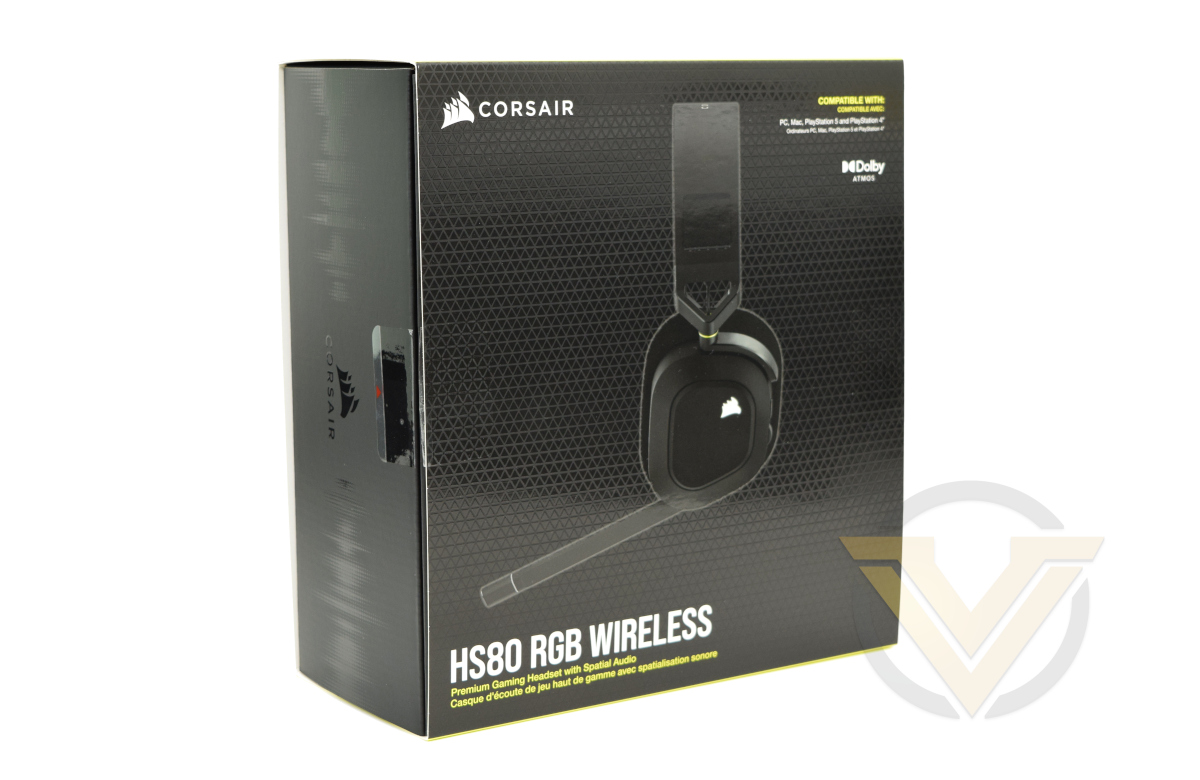
The famous black and yellow returns for the HS80 RGB WIRELESS. Described on the front as a ‘Premium Gaming Headset’, the headset is very obviously not collapsed down inside for easy shipping and a smaller packaging footprint. Compatibility information is also front an centre as the front relays PC, Playstation and MacOS support as well as Dolby Atmos.
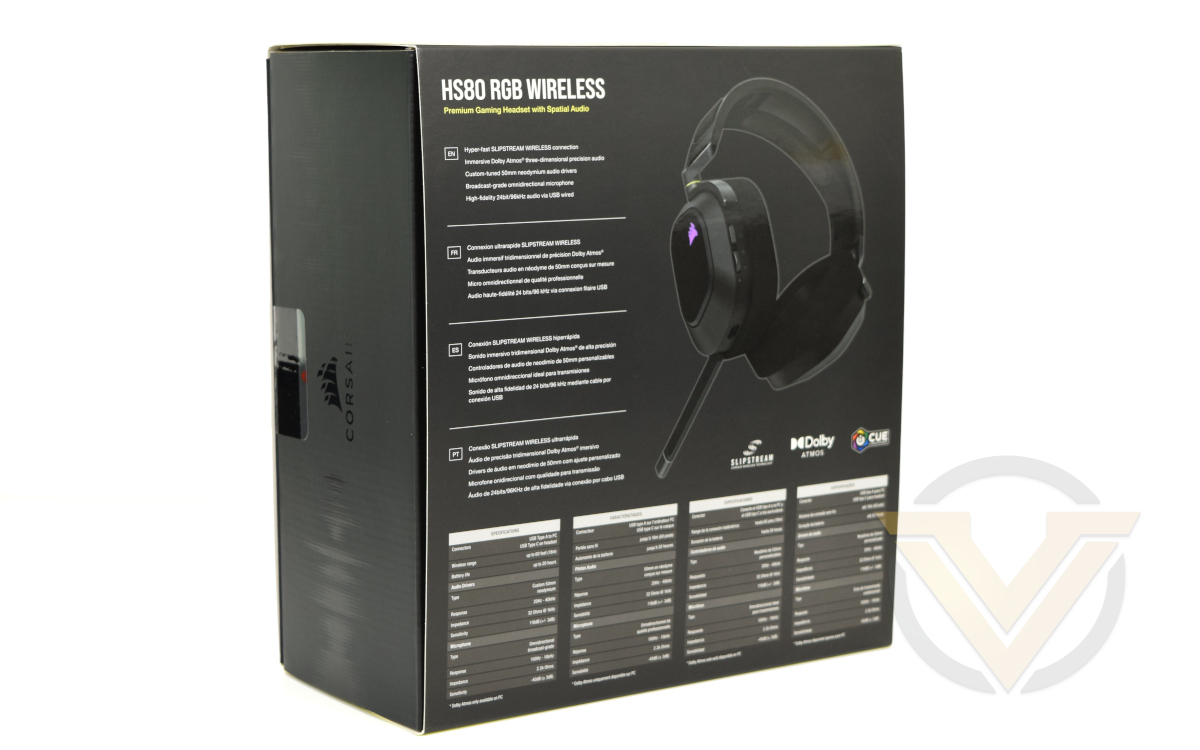
Moving to the rear gives us quite a bit more information on the specifics of the headset. Key features such as Slipstream Wireless support, Dolby Atmos, 50mm neodymium drivers and 24-bit/96kHz audio. And thankfully they make it clear that the latter is available only when connected in USB wired mode.
Below these features are the real meat however: much more detailed specifications. Connectors, battery life, audio specs and even wireless range are all here. As is a single footnote – “Dolby Atmos only available on PC“.
Product contents are spelled out on the bottom: the headset, wireless receiver, USB Type-A to Type-C cable and some documentation. No frills, to put it mildly.
CORSAIR have used a minimum of cushioning for the HS80, instead relying on a moulded plastic to hold it in place securely. A thin layer of foam separates the headset from the cardboard front.
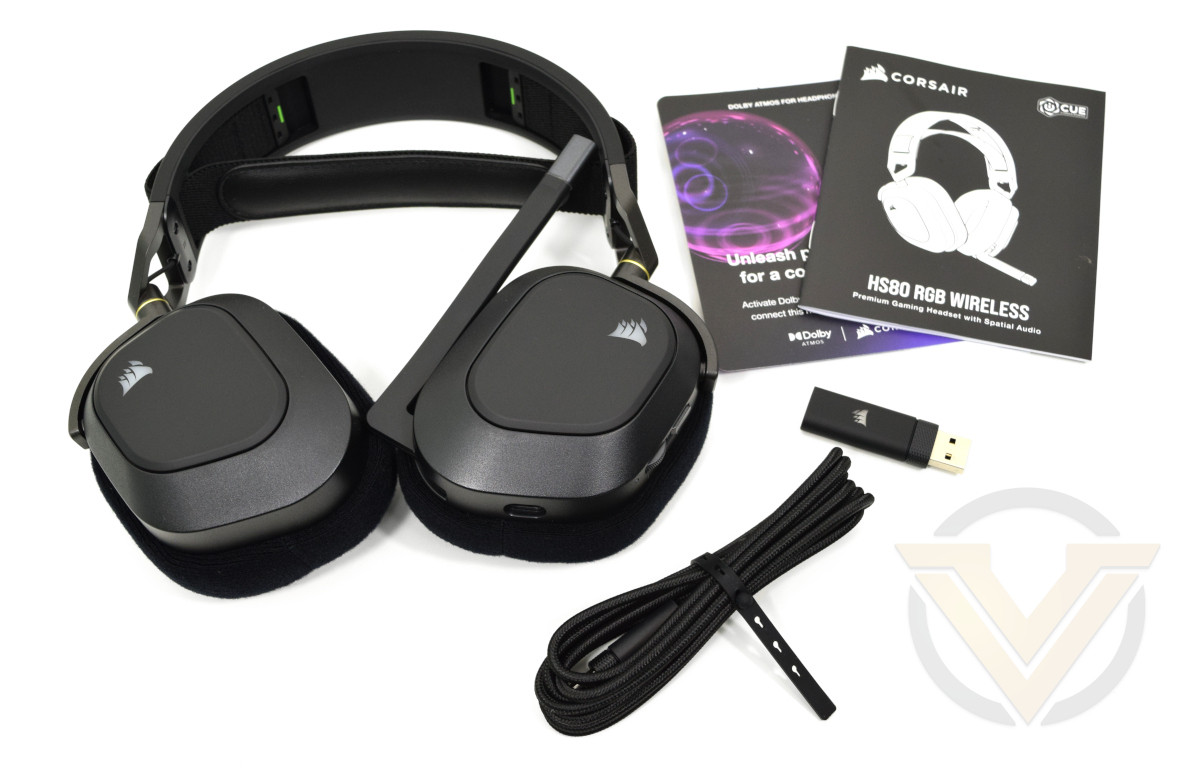
Our first look at the HS80 RGB WIRELESS shows a relatively modest headset as far as premium gaming designs go. An all-black exterior is certainly stylish, but the joints and supporting arch are reassuringly chunky. As unboxing experiences go this wasn’t such a bad one.
Closer Look
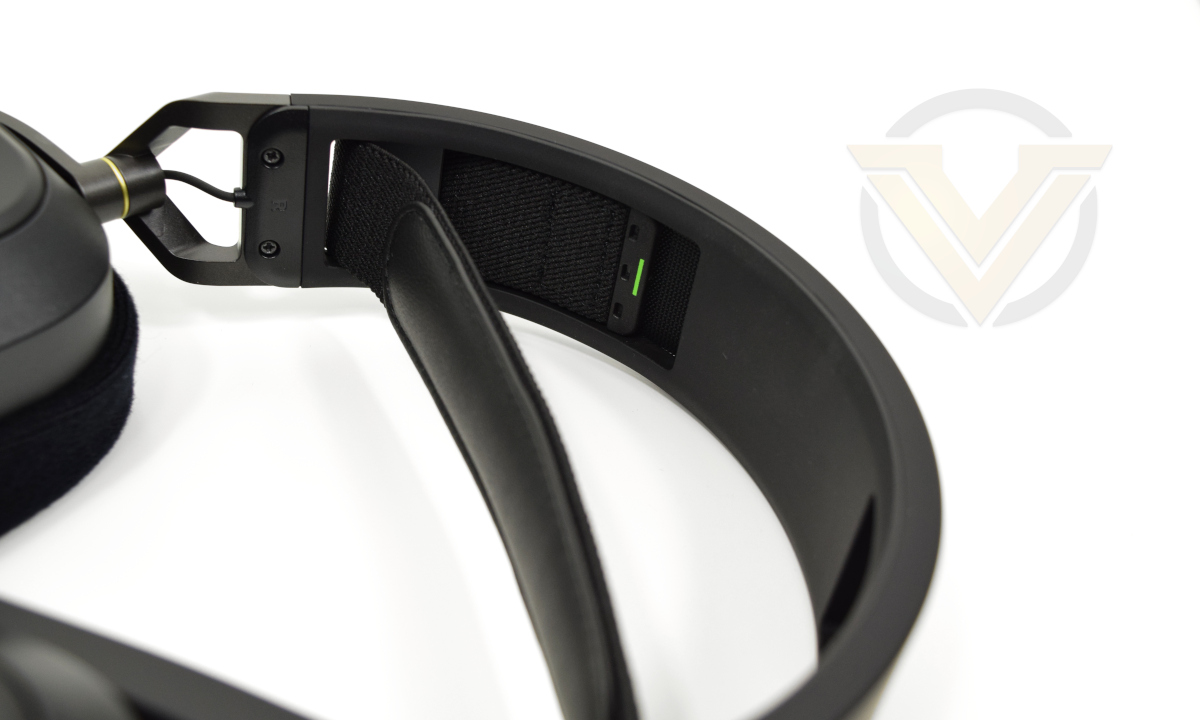
The HS80 RGB Wireless changes the HS-series look considerably, switching from a round or oval cup shape to a quadrangle. It’s something of a mid-point in design between the HS and VOID series headsets, and looks very restrained for a gaming headset. The cups are closed-back, serving to isolate and amplify sound whilst also offering some noise reduction from the outside world.
First major change is the elasticated band rather than sliding extenders to fit the headset to your head. Band has a soft leather pad stuffed with foam. Simpler mechanism less prone to failure due to the extenders’ tracks breaking or being worn out.
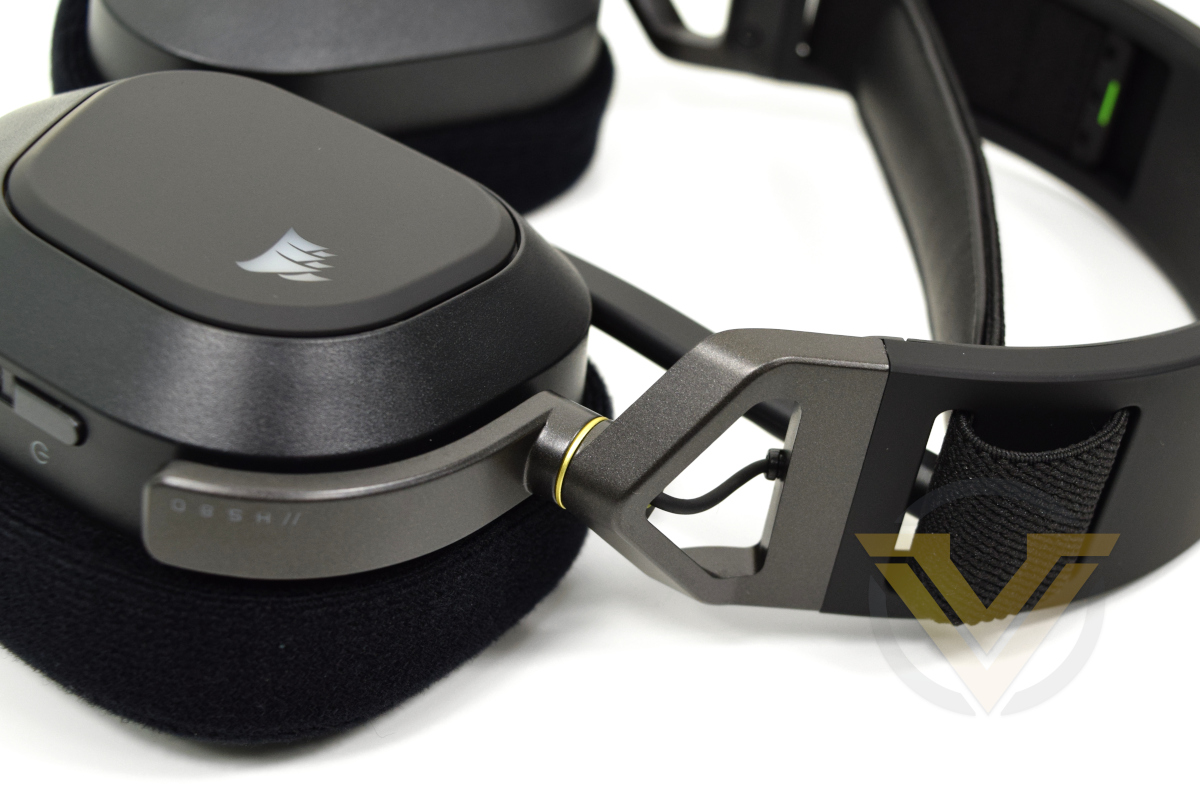
Corsair have heavily reinforced the joint between headphone band and cup. Now composed of two machined aluminium pieces with a yellow metal washer between the two, they allow for two axes of restricted movement to help orient the cup parallel to the head. The slightly more than 90-degrees of freedom in the main axis also allow the headset to lie flat for long-term storage.
As a consequence of this design the wire connecting the two headset cups is exposed briefly, but has been sheathed and painted black to not spoil the aesthetics.
Just below the point at which the aluminium joint meets the left-hand cup are two control elements. The first is an on/off button, the second is a volume control dial that will also cycle the active equaliser profile when pushed. Just below that is a battery and charging status indicator LED.
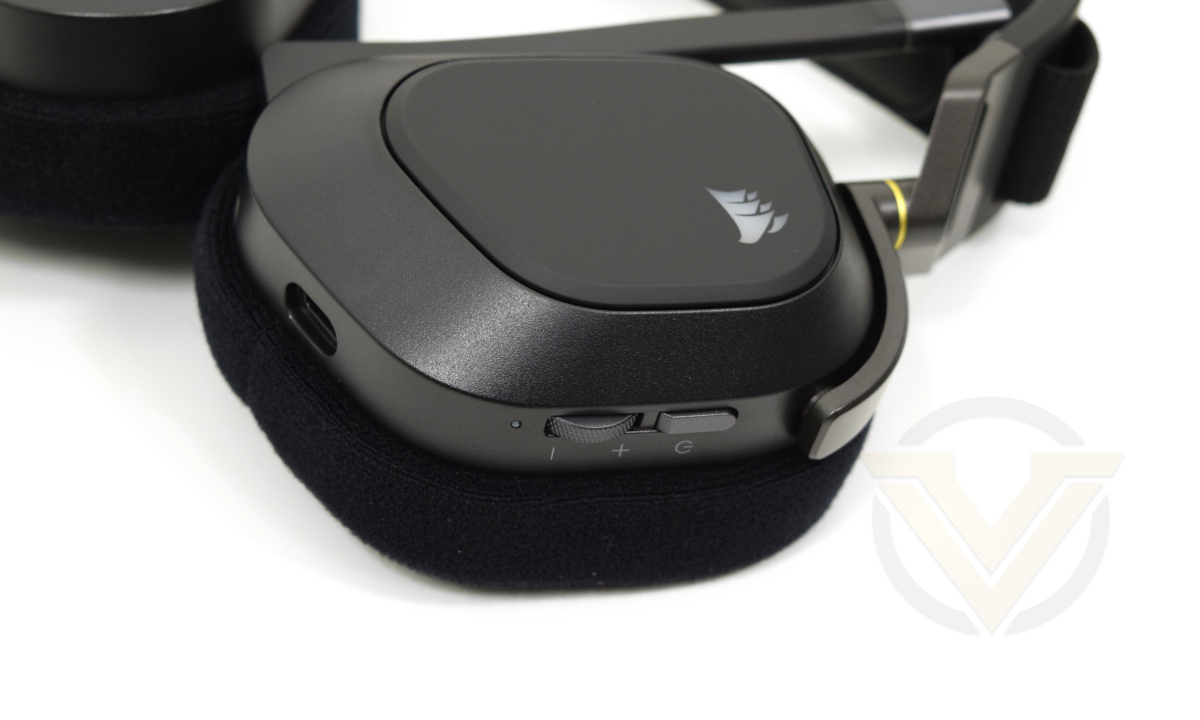
By continuing around the left cup we come to the wired connector that also serves as a charging port. Corsair have opted for a USB Type-C connector deeply recessed into the frame which is more durable than the common micro-USB port, and hence more suitable for the mixed wired/wireless use case profile for this headset in particular.
Finally we come to the pose-able microphone arm. It’s integrated into the cup, non-removable and articulated to swing down to just below the horizontal. Between the arm and the microphone itself is a small LED ring that is red when the microphone is muted and white when active, although the latter mode can be disabled in software.
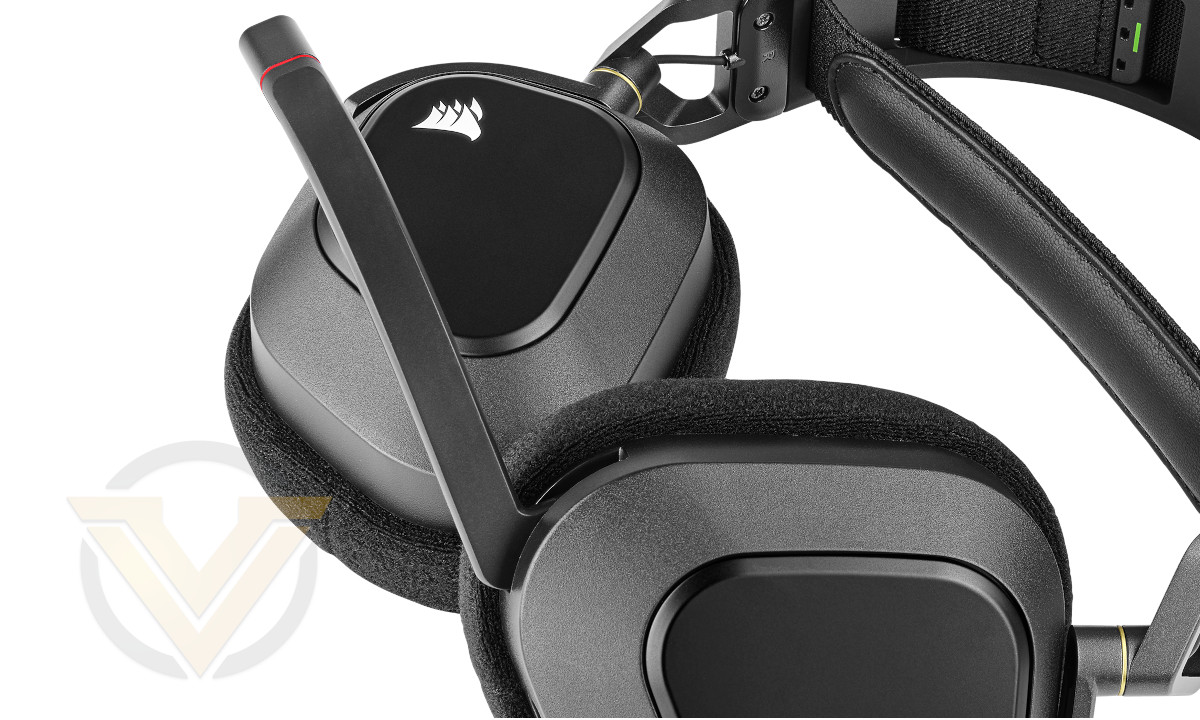
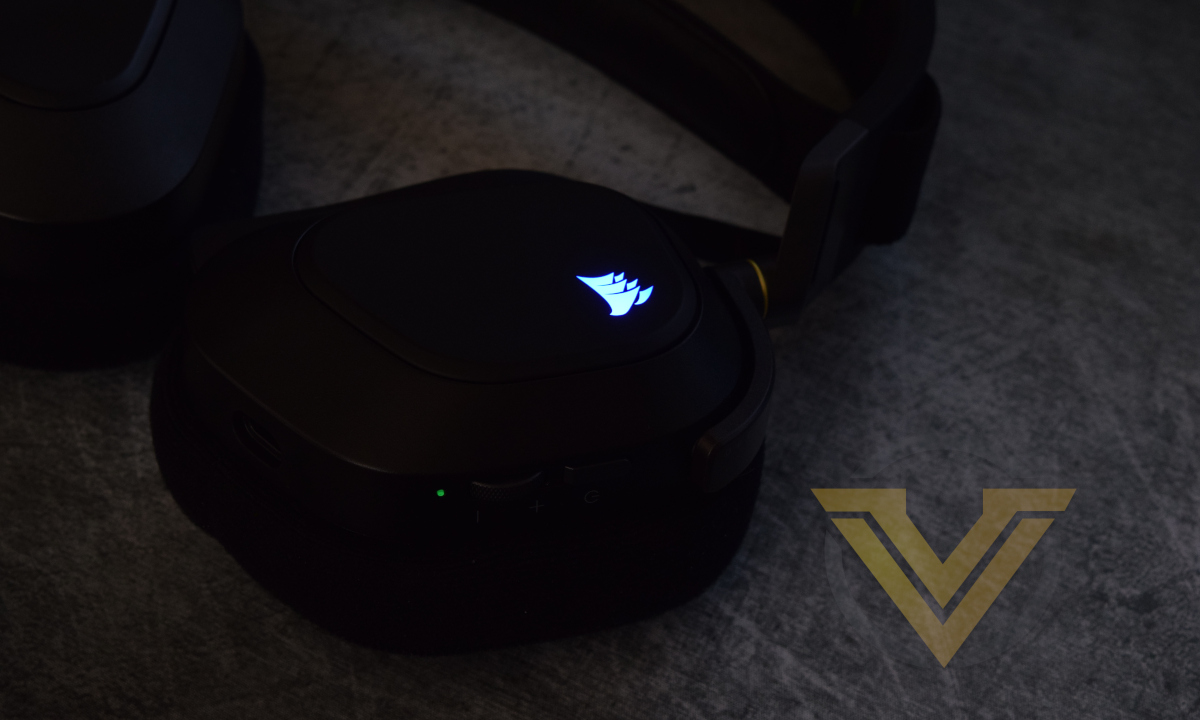
On the cup on both left and right side is an illuminated RGB CORSAIR logo, which are the only LEDs that have full RGB customisation options.
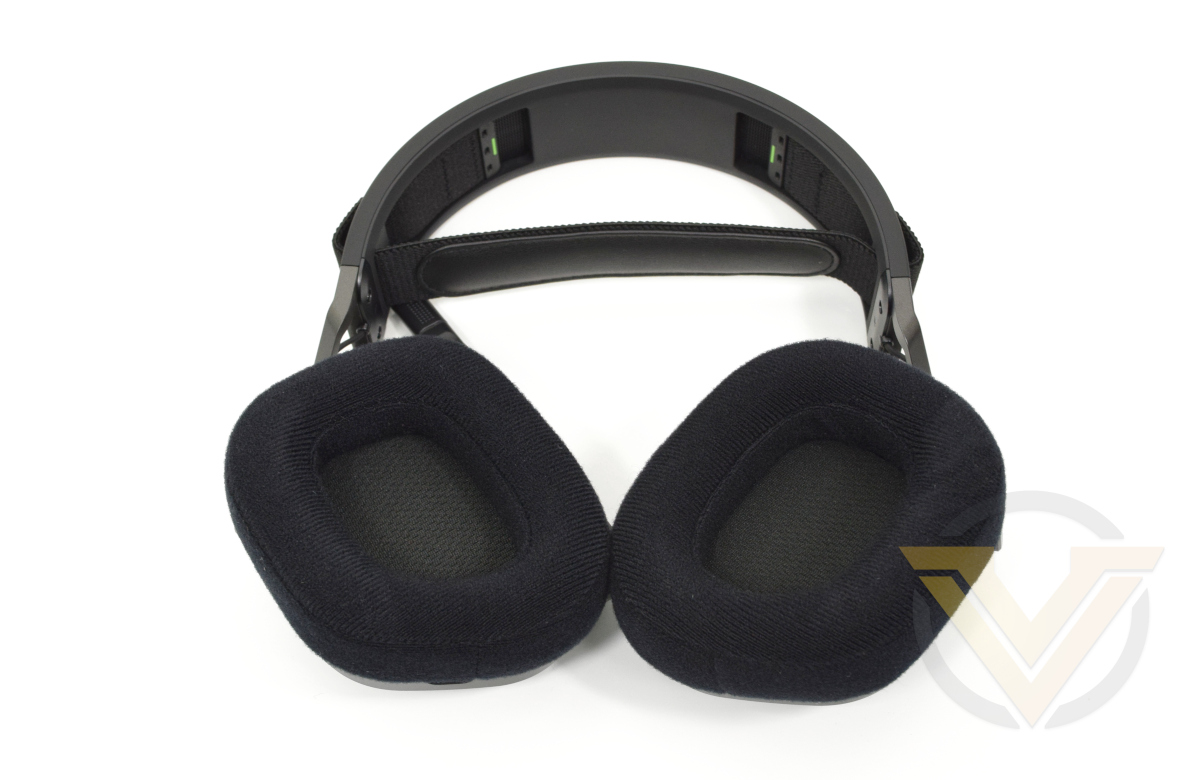
The headset cushions are a 2.5cm deep memory foam covered in breathable fabric, while a further fabric layer sits between the drivers and your ear. That should be plenty to keep things comfortable. There doesn’t seem to be an easy way to remove the cushions without using a lot of force, but we imagine that CORSAIR do intend to make them replaceable in the long term as they have done with other members of the HS series.
The USB Type-A to Type-C cable uses a thick connector on each end and a braided other sheathe for additional durability. The cable is 2m long so should be plenty to stretch between PC and sitting location, especially if using a front-panel USB port.
The bundled USB Receiver will also take up a USB port on either the front or back panel. Its CORSAIR logo will flash red when pairing, and then glow a more gentle when when paired with a device and operating normally.
Software & Lighting
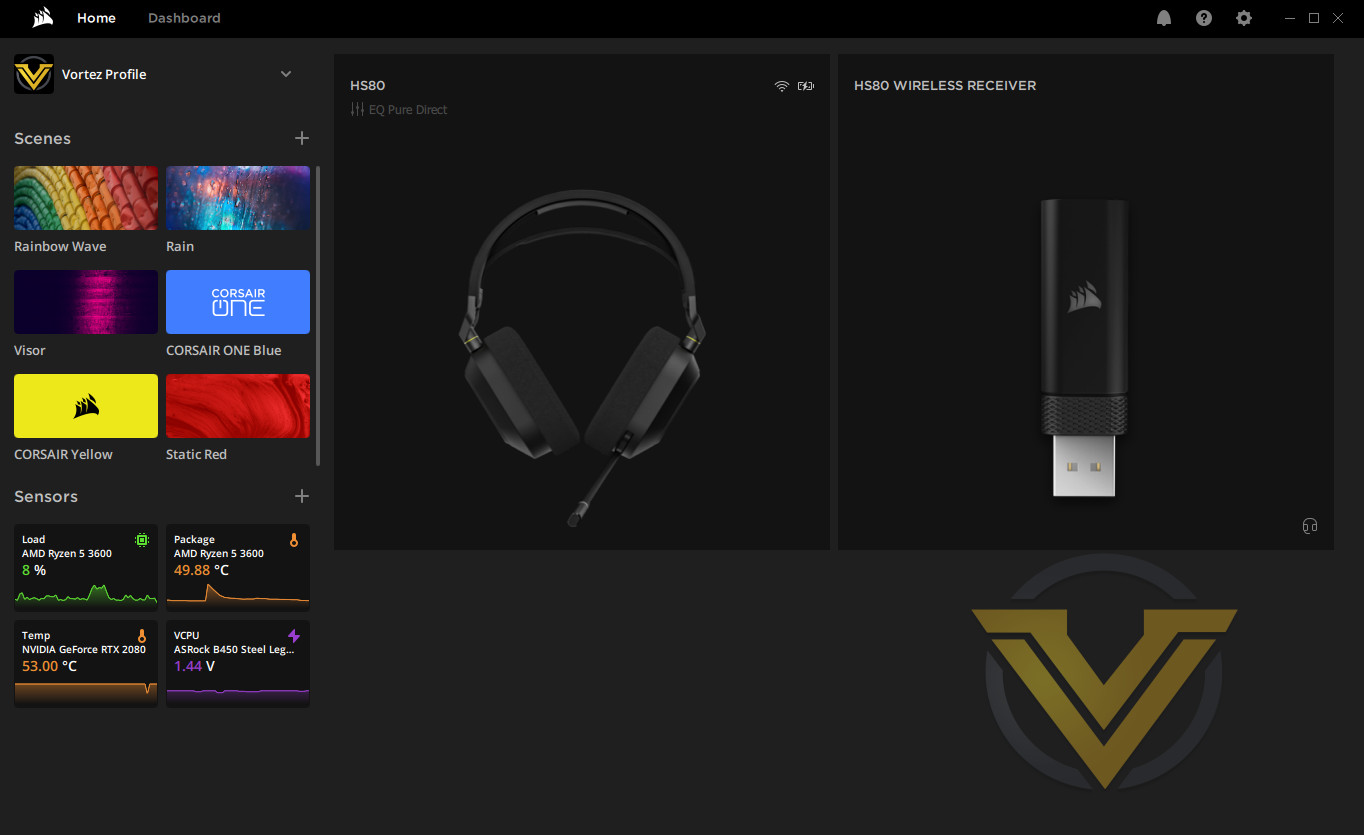
The iCUE unified app, in common with most modern CORSAIR peripherals, is the foundation of software and driver support for the HS80. This headset will work straight away out of the box if required, but realistically you’ll want to download and install the latest version of this software to get it humming optimally.
On installation iCUE prompts for a firmware update (v5.6.39 in our case) to the headset. This requires it be plugged in directly rather than flashed wirelessly, also giving the opportunity to give the headset its first charging cycle.
Once installed the Wireless Receiver and HS80 headset appear as separate devices on the iCUE Home Page alongside other iCUE compatible peripherals. The page will also indicate the charging status of the headset, as well as the current active EQ profile. Both devices each have their own configuration page, although the amount of config. tools available will vary significantly.
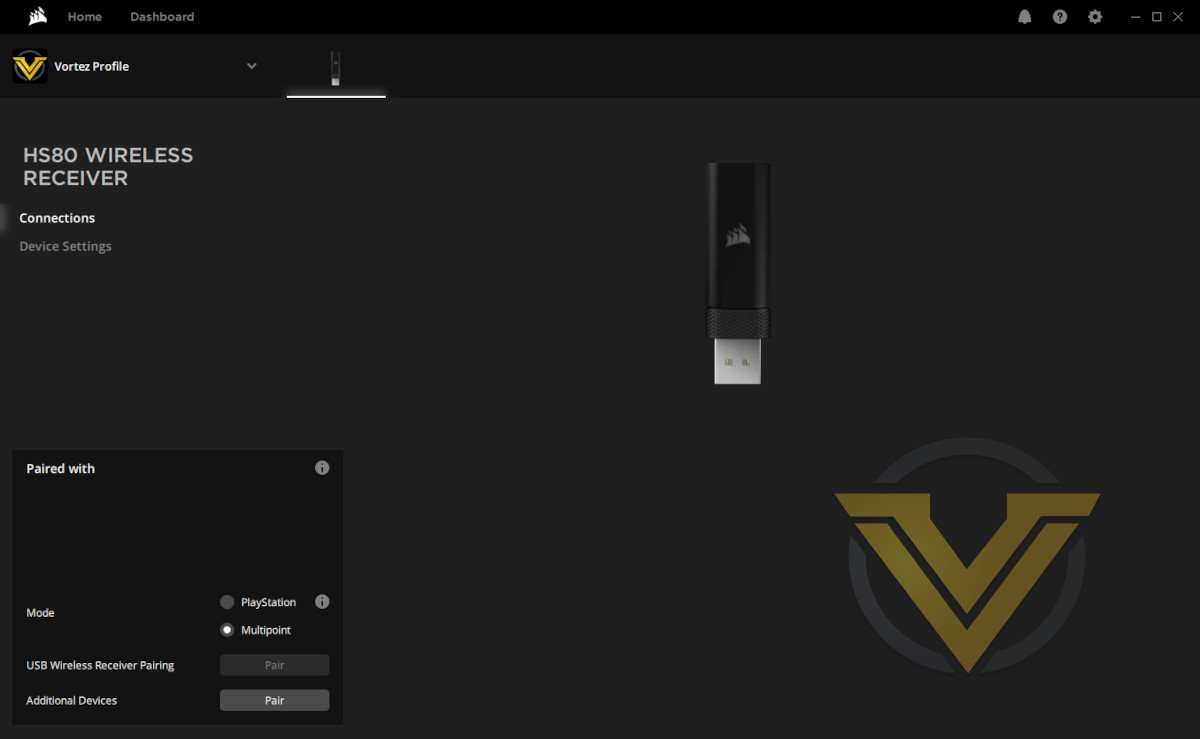
The Wireless Receiver has a very basic configuration page designed to manage wireless device pairing and firmware updates. As a Slipstream Multipoint receiver it can manage communications with multiple Slipstream-compatible devices, the pairing of each being handled sequentially when in Multipoint mode. Alternatively it can be set up in a single-pairing mode best used for Playstation support (which is also its default configuration).
Clicking Device Settings checks for Receiver firmware updates and prompts the user to make one if recommended.
Moving to the headset’s page, its configuration tools are split into three distinct sections.
Lighting Effects is straightforward enough, allowing you to set a static colour of the CORSAIR logo or apply a basic lighting effect to it; left and right cups are treated as a single lighting zone however and so cannot be configured separately.
Alternatively, you can gather compatible iCUE devices together with a Lighting Link, spreading a particular lighting effect across multiple devices. Effects include Colour Pulse, Spacial Rainbow and Colour Wave, and might be most effective when the headset is hanging from a stand close to the rest of your peripherals. CORSAIR don’t currently have a means of positioning each device within a 2D virtual space to ensure all timings and relative orientations match up, but it’s still not a bad selection of effects.
The simple nature of the lighting available on the headset makes more complex effects redundant but we would have appreciated the ability to configure a custom light spectrum to cycle through rather than just alternating colours.
—
The Equaliser section presents basic equaliser controls and a handful of preset, as well as master volume controls for both Microphone and Sidetone. More EQ profiles can be added and modified as desired, while the dial button on the headset itself can be used to cycle through the preset profiles. Unfortunately there’s no way to selectively disable an EQ profile from that cycling process without deleting it entirely.
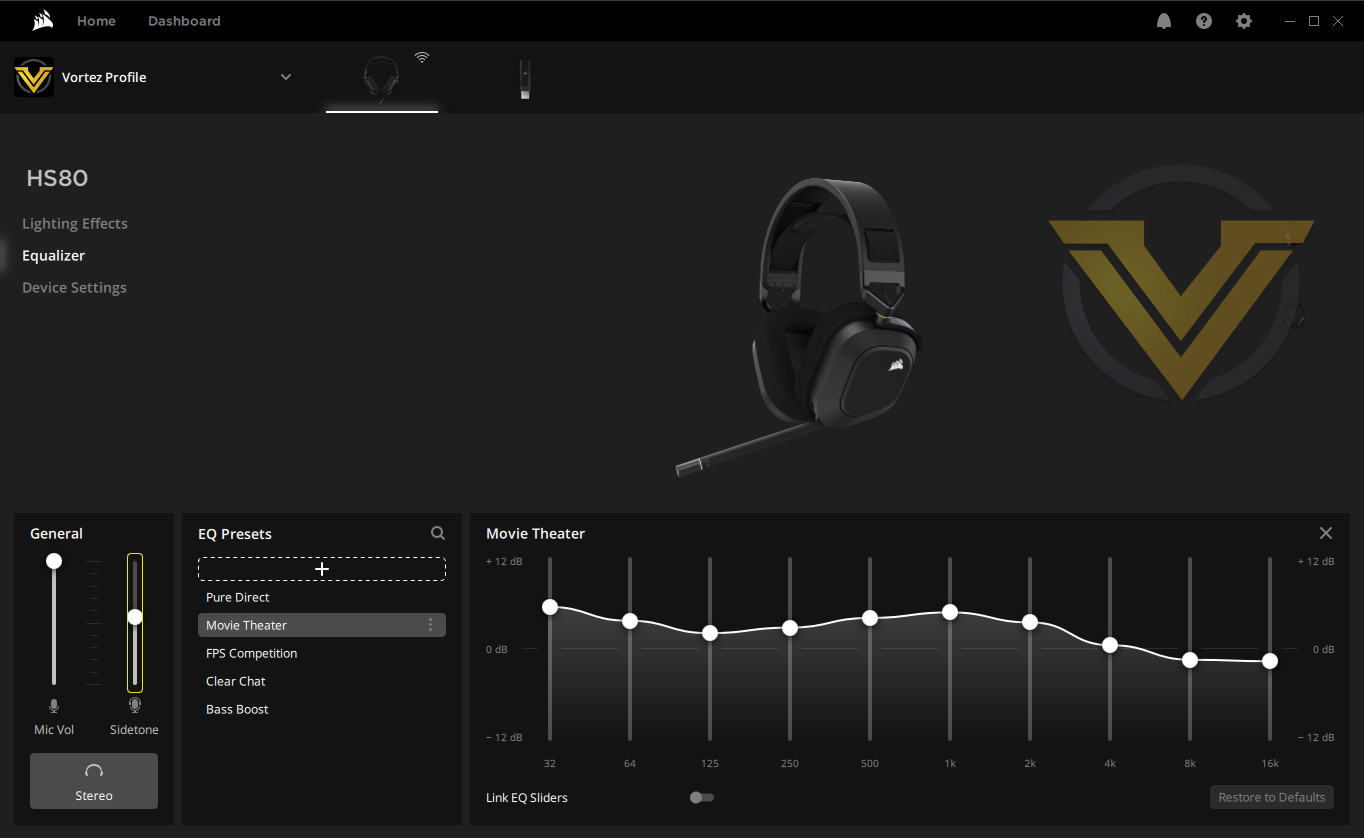
If Windows 10 is operating in a Spatial Sound mode (right-click the speaker icon in the taskbar and mouse over Spatial Sound for options) the EQ options are unavailable. Similarly, the microphone needs to be in an unmuted position to set volume levels for Mic and Sidetone.
—
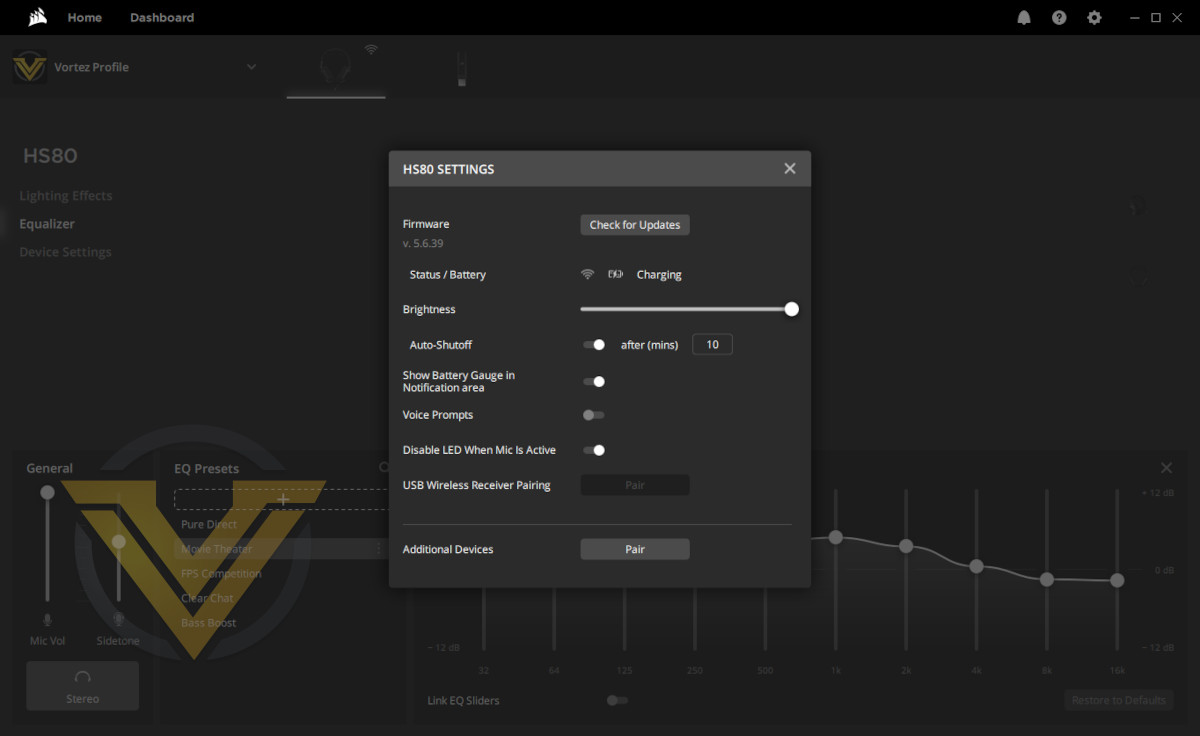
Last but not least, the Device Settings option for the HS80 brings a new window to the fore that contains settings that don’t easily fit elsewhere. They include wired/wireless and charging status, battery level (if not charging), CORSAIR logo LED brightness, and the ability to disable the microphone LED when the mic isn’t muted. Each will be important for tailoring your experience with the HS80 to your own needs, particularly some very specific features like voice notifications that could easily be turned off by default.
If we’re honest here, the options available in CORSAIR’s software seem limited or not fully fleshed out in this instance. Why, for instance, is there no option to disable the microphone when in a muted position, which might be preferable when streaming or to save battery power? Shouldn’t the Brightness slider also be replicated in the Lighting section? Disabling EQ profiles seems like a no-brainer, as does being able to associate an EQ profile with a particular application. But it goes beyond that.
Other major oversights are that there’s no option to Boost microphone dB levels, set audio quality, or activate spatial sound configurations including Dolby Atmos, through iCUE. Each are features that the HS80 is sold on, but the level of control and access CORSAIR’s own software offers is minimal to non-existent. Perhaps this is down to the Windows 10 API restricting access to these features, but fundamentally it’s the anthesis of our quality expectations from this manufacturer.
One of the more frustrating aspects of using the software is that sometimes it’s not clear whether the headset is operating wirelessly or with the wired connection when plugged in. The only way to ensure that the wired mode is in use is to select it from the Speaker taskbar icon or Windows Sounds device selection screen. Again, given that 24-bit 96kHz audio quality is available exclusively through a wired connection, a simple toggle or automated switching that prioritises wired mode would be useful.
And finally, the HS80 disappears from the iCUE Home Page and the configuration page closes when the headset goes into wireless standby/powersaving mode. It’s a tiny niggle, but it’s happened enough times for us to be a little annoyed by it.
All told, the HS80’s iCUE software is serviceable, but there’s clear scope for improvement in the long run.
Performance
As noted, the HS80 RGB WIRELESS doesn’t require the iCUE software but it is recommended. Either the iCUE software or 3rd party tools can be used to set up custom equalisation profiles that will significantly change the texture of the audio as desired, but we defaulted to the Pure Direct (0dB EQ) profile in iCUE except when using the Dolby Atmos spatial sound virtualisation.
The first pleasing aspect of out time with the HS80 was how comfortable it was, despite weighing in at a hefty 367g. The approx. 30% more weight than the EPOS H3 we reviewed earlier this year was noticeable but it didn’t feel egregious through longer gaming sessions. Tension in the headband is relatively light, and with a soft foam cup surrounding the ear there was blessedly little compression to worry about even from day one.
The ~2.5cm cavity surrounding the ear was sufficient to keep them from rubbing against the driver assembly behind the fabric, maintaining comfort over time. Hopefully CORSAIR will offer earpad replacements in the long term, when general wear and foam compression could mean that’s no longer the case.
The elastic in the supporting band combines with the tension in the headband to make the headset feel like its matching your head movements with a hint of delay. It feels a little strange, even when simply walking or moving up/down a staircase, which could make it less suitable for the most active gaming sessions or gaming/listening to music while exercising.
Despite a nice, chunky tactile button, the HS80 (when in wireless mode) requires that it be pushed and held for a couple of seconds to turn it on and off (with a chime to indicate success on that score). That really isn’t necessary, and could just as easily be a single firm push for on and off.
At default settings the HS80’s audio output is good, with distortion becoming audible only at very high volumes and when reproducing particularly complex musical pieces. The default soundstage was narrow, emphasising mid-tones and higher over a flat bass that clearly biases towards videogame sound composition and voice comms rather than music. The bass is however more punchy than the EPOS H3, even without biasing in that direction.
Games with the most subtle sound cues gain the most from this default EQ profile, helping the player pick out footsteps and ricochet pings, whereas those with more brutalist sound such as arcady shooters and racers tend to miss out. Any title where the soundtrack is a major factor in your minute by minute enjoyment will benefit from just a few tweaks to the EQ here and there for a fuller and richer audio landscape. Stereo separation was excellent, generating clearly directional sound without additional spatial virtualisation
Voice Comms however are crystal clear thanks in part to this default bias towards midtones. They cut through ambient noise well, but can turn a little mushy when overlaid on top of loud and busy sound in-game environments. It should be close to perfect for most home gaming situations, but competitive gamers may prefer a more lightweight design without wireless.
The headset had clear audible responses from the advertised 20Hz through to at least 13kHz, which is the effective limit of the reviewer’s hearing in a dirty sound environment. The age and gender of the user is a significant factor in determining the upper limit of your hearing perception, but advertising a frequency response of up to 40kHz when 20kHz is the generally accepted limit to human hearing outside of a sound isolation lab is curious to say the least.
When not playing sound the headset is effectively silent, with none of the low-frequency noise that can sometimes crop up in budget headsets and speakers. The volume dial meanwhile synchronises with the device OS sound levels rather than isolating to the headset itself.
Finally, the sound isolation is good, but not the best we’ve experienced. The fabric pads are just sufficient to let a small amount through without through deadening, and there’s no active noise cancellation integrated into the headset.
Microphone
CORSAIR claim that the HS80 is equipped with a broadcast-quality microphone. Without such a microphone to hand we instead compared it to our trusty RODE NT-USB, a discrete microphone we’ve used in the past for video review voice-overs.
There was a problem however. When connected wirelessly there’s no means of setting a dB Boost level in Windows settings. The option was completely absent with the consequence that recording and voice communication software had to be run at 100% volume to pick up anything meaningful.
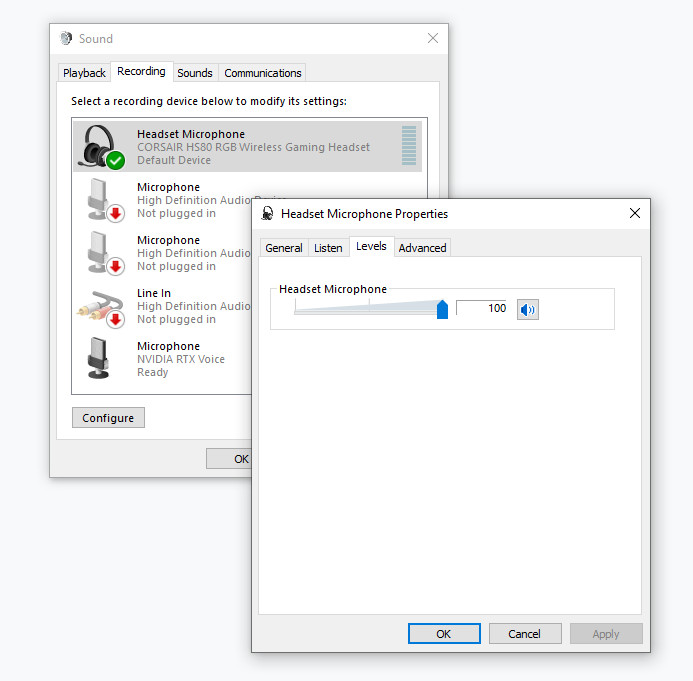
The Microphone Properties window doesn’t have a Microphone Boost field when connected wirelessly
This is a known issue on previous generations of CORSAIR wireless headsets, and users have developed a work-around using Equalizer APO as a tool to proxy as a pre-amp boost for the microphone. Given how involved the process would be, and that something audible was still being produced, we utilised the headset in its standard configuration without 3rd party apps.
General voice clarity was quiet but good, but the tell-tale increased compression common to wireless headsets was still very much present. You certainly won’t be using this setup to record professional voiceover audio, but it’s easily clear enough for in-game voice comms. We did also notice that some of the sidetone came through with a little distortion that isn’t picked up in recording.
Those of us with a lisp or other speech impediment will be pleased to know that ‘S’s and ‘P’s don’t hiss and pop aggressively when speaking at normal volumes, indicating that the microphone has great filtering for an integrated microphone. It won’t eliminate your lisp, but nor should it accentuate it through post-processing.
The HS80’s microphone was however very sensitive to local environmental sounds, particularly mechanical keyboards and mouse clicks. That is the sort of issue which could become a problem when gaming, and might necessitate 3rd-party noise cancellation such as NVIDIA Broadcast if you want to spare your team-mates.
Conclusion
We have at times been very hard on the HS80 RGB WIRELESS in this review, and in part that’s down to our high expectations of CORSAIR’s hardware and software team. It’s jarring whenever they fail to meet the standards they’ve set themselves, and this is marketed as a Premium Gaming Headset after all. So how do we feel about it in the broader scope of the market today?
From a hardware perspective it’s difficult not to be impressed. It has a design that should prove to be much more durable in the long-term in virtually all aspects, particularly the articulated joints and USB connectors. It’s also very comfortable, despite the added weight incurred by larger drivers, a battery and charging circuitry.
Audio clarity is also very good, although the HS80 does lean heavily on equalisation for immersive experiences. Without either tweaked EQ or spatial surround the stereo sound stage seems very narrow, with none of the richness you find through the default configurations for other headsets and speakers. When gaming however that’s more than fine; clarity should always be a primary factor in any sort of curated or competitive environment.
With that in mind, Dolby Atmos really did add some extra punch to the proceedings. None of the frequency clarity is lost so far as we could tell, but positioning within the virtual soundstage was much more clear. We can’t judge whether it’s better or worse than other spatial sound virtualisation tools at this point, but its inclusion in the HS80’s package doesn’t appear to be a minor footnote from our experience.
And of course we must also mention the microphone. It’s… okay. Certainly no worse than other headset mics we’ve used in terms of clarity, even if it does pick up more environmental noise than some. The low volume issue we had appears to be endemic among CORSAIR’s wireless headsets with no clear solution, only the workaround described, but at maximum volume we were able to just about have a satisfying experience in-game.
Satisfying is however not the word we’d use when describing the software. It’s not buggy, or faulty; it just fails to operate in a seamless way that would allow a novice (or really anyone without familiarity Windows 10’s sound system shenanigans) to take full advantage of their new hardware. Simple aspects like setting audio quality for wired and wireless modes, automatically handing over the headset from wireless to wired mode when plugging it in, providing a more detailed battery reading than High/Medium/Critical; each is AWOL. Windows may be standing in the way of some of these, but surely not all.
The wireless signalling is good, although we were never able to practically reach the up to 60ft range boasted by CORSAIR in a home environment with plenty of 2.4GHz devices all clamouring for bandwidth. A battery duration of up to 20 hours would be challenging to reach however, and any sort of active RGB lighting obliterates playback duration to single figure hours.
And so our final judgement is that the HS80 RGB WIRELESS is a wireless headset with excellent hardware features and build quality that, at the time of this launch, is still rough around the edges due to underdeveloped software and an end-user experience that needs work. The market should expect more when approaching £150, even though it’s not a trivial matter for a wireless headset. The great news is that this is fixable, and could even be part and parcel of general iCUE improvements rolled out over time.
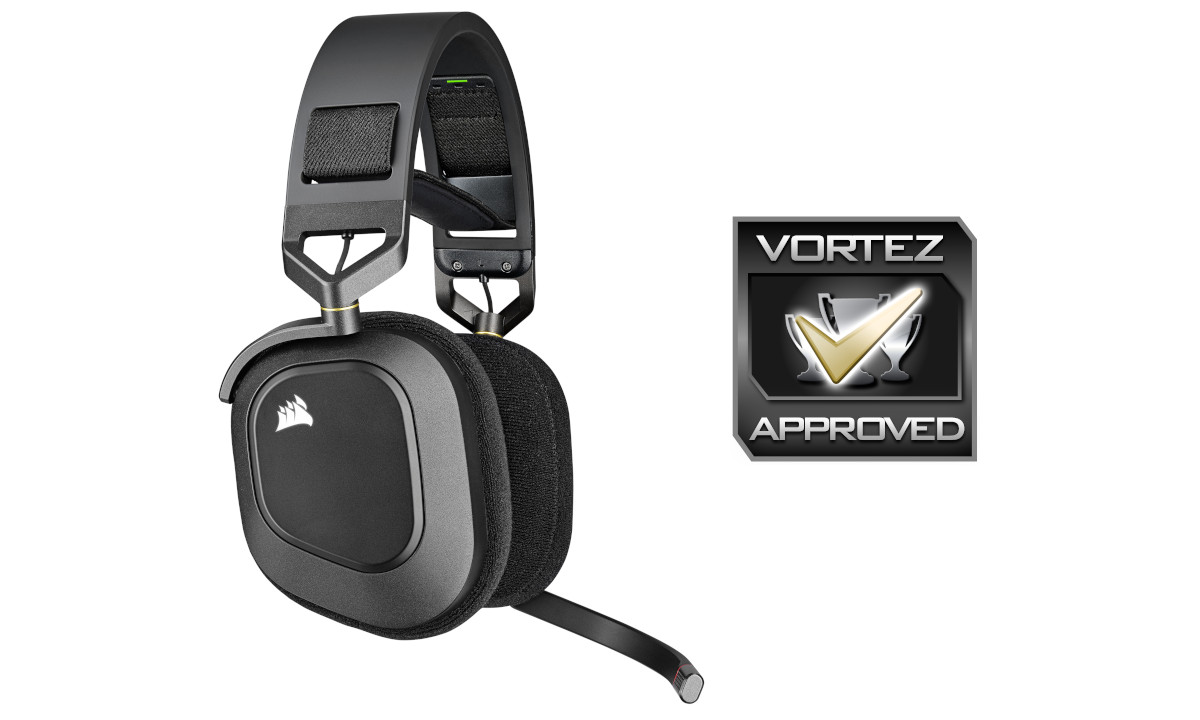
The HS80 RGB WIRELESS is a creditable heir to the legacy of CORSAIR’s HS-series gaming headset, solidly constructed and with compelling audio features. It is however let down by undercooked software and a sometimes frustrating user experience. It’s earned our Approved award on the strength of the hardware but more work is necessary for a truly rounded experience.
Pros
+ Durable premium construction
+ Comfortable
+ Closed-back design
+ USB Type-C connector
+ Good wireless signalling
= Compatible with the iCUE suite for configuration of system-wide lighting
Cons
– Frustrating idiosyncrasies software
– Odd hardware interactions
– Quiet microphone without boosting through 3rd party apps.
+ Durable premium construction
+ Comfortable
+ Closed-back design
+ USB Type-C connector
+ Good wireless signalling
= Compatible with the iCUE suite for configuration of system-wide lighting
Cons
– Frustrating idiosyncrasies software
– Odd hardware interactions
– Quiet microphone without boosting through 3rd party apps.
Click here for an explanation of our awards at Vortez.net.
Stay connected with Vortez social media pages: