







Corsair’s first Hydro Series to feature a 38mm thick 240mm radiator. Can the inclusion of this and dual SP120L PWM fans top our CPU cooler chart?

Product On Review: Hydro Series H105
Manufacturer and Sponsor: Corsair
Street Price: £87 GBP / $129 USD
ALCs (All-contained Liquid Coolers) are now regarded as a mainstay in the cooling market, bridging the gap between air cooling and custom water-cooling. Corsair have taken on this lucrative segment and confidently asserted themselves are a reliable source for countless enthusiasts.
New for 2014, Corsair have revised their renowned Hydro Series with the H105 by developing the first 38mm thick 240mm radiator and introducing a much improved mounting mechanism. Knowing that enthusiasts love to coordinate their computer systems, Corsair has also included interchangeable accent rings for the top of the pump and as can be expected dual SP120L PWM 120mm fans also make an appearance.
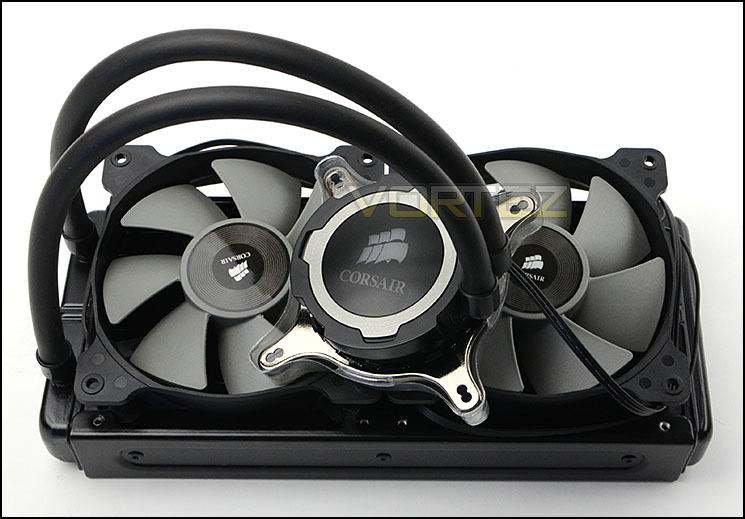
Corsair on their H105
Hydro Series H105 provides extreme CPU cooling performance. The 240mm top-mounted high-capacity radiator is paired with high-performance SP120L fans for powerful heat dissipation you need for highly overclocked CPUs. And, PWM fan speed fan control lets you select the precise level of cooling power you need.
Installation is easy, with an all-new mounting bracket that provides quick, tool-free assembly. The three included red, gray and blue accent rings let you match your H105 to your fan or motherboard color scheme. And, like all Hydro Series liquid CPU coolers, the H105 is completely self-contained, with no filling or maintenance required.
WarrantyFive years Cold Plate MaterialCopper Fan Specification120mm (x2) Socket SupportAMD AM2, AMD AM3, AMD FM1, AMD FM2, Intel LGA 1150, Intel LGA 1155, Intel LGA 1156, Intel LGA 1366, Intel LGA 2011 Radiator MaterialAluminum TubingLow-evaporation, easy-bend tubing for quick installation and better compatibility
Installation is easy, with an all-new mounting bracket that provides quick, tool-free assembly. The three included red, gray and blue accent rings let you match your H105 to your fan or motherboard color scheme. And, like all Hydro Series liquid CPU coolers, the H105 is completely self-contained, with no filling or maintenance required.
WarrantyFive years Cold Plate MaterialCopper Fan Specification120mm (x2) Socket SupportAMD AM2, AMD AM3, AMD FM1, AMD FM2, Intel LGA 1150, Intel LGA 1155, Intel LGA 1156, Intel LGA 1366, Intel LGA 2011 Radiator MaterialAluminum TubingLow-evaporation, easy-bend tubing for quick installation and better compatibility
Technical Specifications
Radiator dimensions
272.5mm x 120mm x 38mm
Fan dimensions
120mm x 120mm x 25mm
Fan speed
800 RPM – 2700 RPM (+/- 10%)
Airflow
73 CFM
Noise Level
37.7 dBA
Static pressure
3.9 mm/H20
Power Draw
0.34A
Compatibility
Intel™ LGA 1150, 1155, 1156, 1366, and 2011
AMD™ sockets FM1, FM2, AM2, and AM3
272.5mm x 120mm x 38mm
Fan dimensions
120mm x 120mm x 25mm
Fan speed
800 RPM – 2700 RPM (+/- 10%)
Airflow
73 CFM
Noise Level
37.7 dBA
Static pressure
3.9 mm/H20
Power Draw
0.34A
Compatibility
Intel™ LGA 1150, 1155, 1156, 1366, and 2011
AMD™ sockets FM1, FM2, AM2, and AM3
Packaging, Bundle & Fans
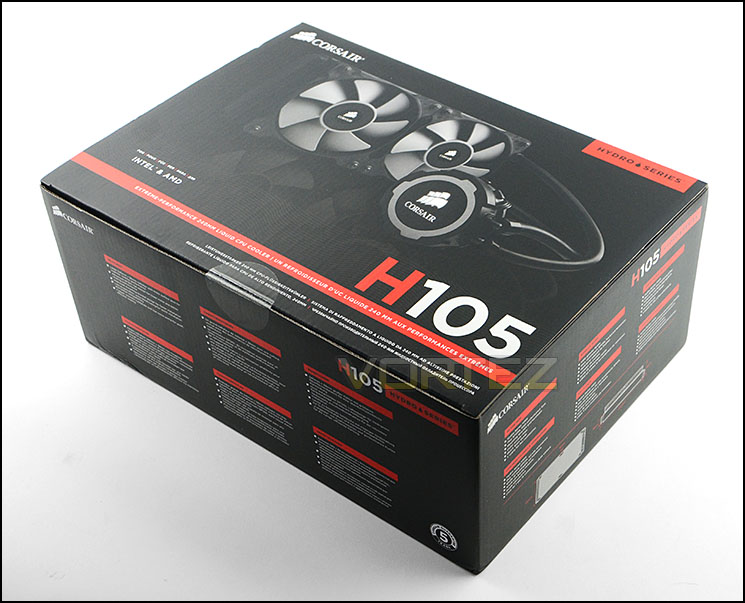
Packaging for H105
The packaging for H105 is very much in keeping with other Corsair products, especially their cooling solutions. Arriving in a large box, there is a depiction of the cooler on the front and over on the sides of the box there is technical information.
Inside, the included items that make up the bundle are carefully arranged inside an eggshell type box and each have their own protective bag.
Bundled with H105 are the following items:
• Two SP120L high performance fans
• Mounting bracket and hardware
• Colour accent rings
• Quick Start Guide
• Y cable for fan connection
H105 has all the components and kit for an assortment of sockets which include: Intel™ LGA 1150, 1155, 1156, 1366, and 2011 and for AMD™: sockets FM1, FM2, AM2, and AM3.
Corsair has decided to provide interchangeable accent rings so that the pump can be switched from the default silver ring to red or blue depending on your specific system configurations.
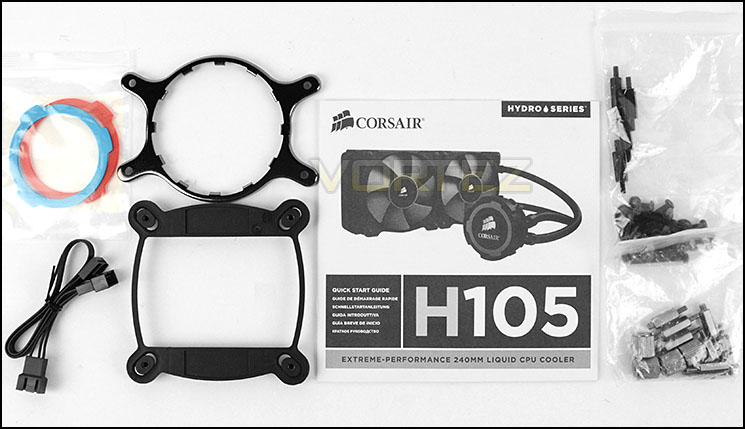
Accessories bundle included with H!05
Included with H105 are two 120mm cooling fans which are to be attached to the 240mm radiator. The fans use a 7-blade design and is based on Air Series SP120 capable of up to 2700RPM. They are also specifically designed for radiators, unlike the fans often seen bundled with other ALCs.
The corners on these fans are rubberised to allow for anti-vibration and the shape enable both to interconnect when side-by-side. Cabled to these fans is a 3-pin connector, this can be plugged directly into a motherboard header or used with the provided Y-cable.
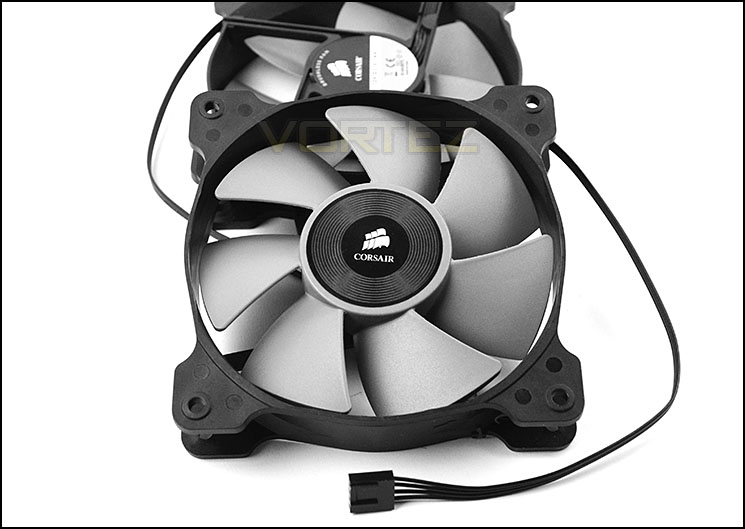
Two Air Series SP120s are included
Closer Look
H105 uses a 240mm radiator which is slightly thicker
Having the ability to accommodate dual 120mm cooling fans, the H105’s radiator is 240mm but is slightly thicker than the H100/H100i radiator – being 38mm thick. Corsair have spread out the banks of corrugated aluminium fins on this unit compared to the previous H100i and there are just 9 sections compared to 12 on the predecessor. As such, there is a vast surface area to dissipate heat with the help of the two 120mm fans to transfer the heat away.
Being a liquid cooler means there is already fluid inside the tubes/radiator. Corsair have used a mixture of distilled water with Propylene Glycol .The tubes which link between the pump and radiator allow this liquid to flow to and from by connecting to compartments within the radiator. Liquid flows into one and out of the other once it has cycled through the entire radiator.
CPU block with interchangeable ring
The rubber tubing which joins the block to the radiator can pivot to allow flexibility when installing.
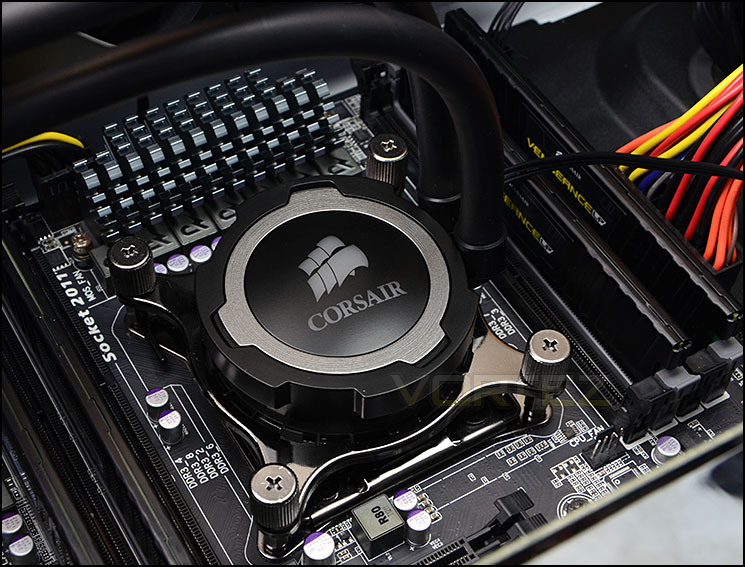
Stepping away from the previous pump/block mount with and installation method, Corsair have improved this unit considerably by streamlining the installation process. The pump itself features the Corsair logo which illuminates white once powered up and as previously mentioned the silver ring is interchangeable with the red and blue options provided in the bundle.
Unlike the H100i which uses a square shaped block, H105 has a circular copper baseplate and as is customary a nice slaver of thermal paste is pre-applied so that you have the ideal amount applied and can get up and running quickly. The pump uses a 3-pin header but requires 12V so the CPU fan header my not suffice (as we found out) – a SYS fan header should be adequate.
Circular copper baseplate
Installation Process
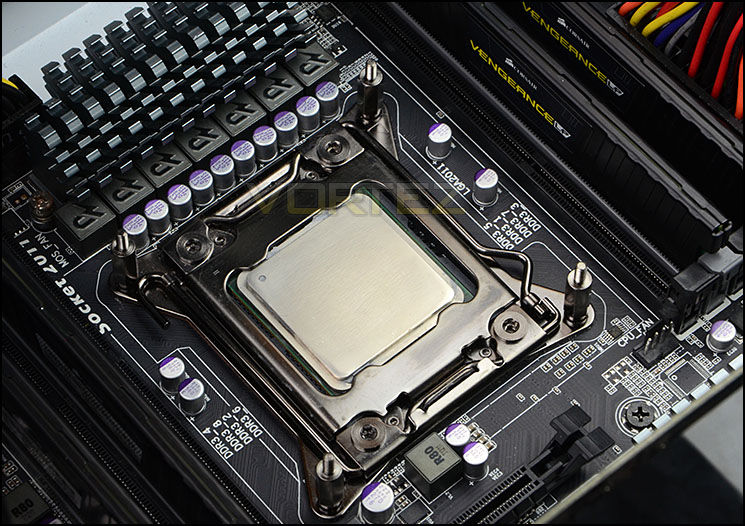
In order to demonstrate the installation process for H105 we are installing the cooler on the Intel LGA2011 socket.
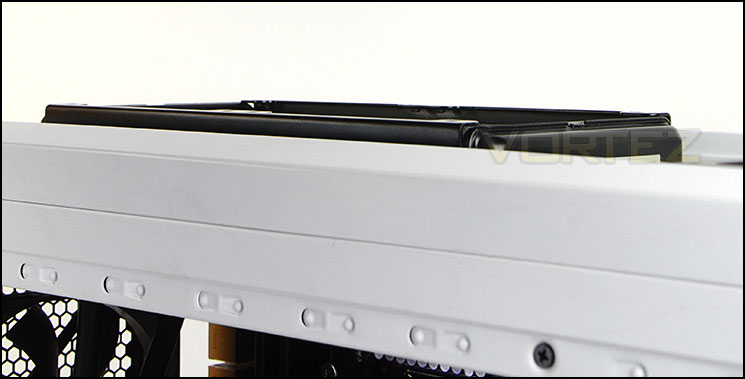
The first step in the installation process is to attach the four standoff screws to the socket plate. Once these are tightened the radiator and cooling fans can be installed. Installing is simple, a set of extended screws pass through both the radiator and the cooling fans to typically mount at the top of the computer chassis. Depending on the clearance you may need to have the cooling fans inside the main area and the radiator hidden in the roof – this is the route we took, but even so, because the radiator is now thicker (38mm thick) the removable fascia does not fix in place on the 500R unfortunately. (See picture at bottom of this page). Once the radiator and fans are tightened and in place the only thing left to do is attach the block/pump to the CPU. We recommend tightening each screw in a diagonal succession and tighten by one turn until you have each screw attached and then fully tighten to apply even pressure to the CPU. It’s also worth noting, we could not use the CPU fan header for the 3-pin pump cable because it does not supply 12V so a SYS fan header had to be used instead.

NOTE:
As you can see, the 38mm thickness of this new H105 steps out of the roof cavity on the 500R and thus the fascia cover will not fix in place. We are assured that newer Corsair cases now have allocation for this thicker radiator.
Test Setup & Methodology
Test System
CPU – Intel Core i7-3930K (3.6GHz)
Motherboard – GIGABYTE X79-UP4
Memory – 8GB Corsair Vengeance LP 1600MHz CL9
Graphics – Sapphire Radeon HD 6850 1GB
PSU – NZXT Hale90 650W
Hard Drive – Kingston HyperX 240GB SATA III SSD
Case – Corsair Carbide 500R White
Motherboard – GIGABYTE X79-UP4
Memory – 8GB Corsair Vengeance LP 1600MHz CL9
Graphics – Sapphire Radeon HD 6850 1GB
PSU – NZXT Hale90 650W
Hard Drive – Kingston HyperX 240GB SATA III SSD
Case – Corsair Carbide 500R White
CPU Coolers
Alpenföhn Matterhorn Pure(120mm Wingboost: 300-1200RPM)
Alpenföhn K2 (120mm Wingboost: 500-1500RPM, 140mm Wingboost: 300-1100RPM)
Alpenföhn Gotthard (140mm Wingboost: 300-1100RPM)
Noctua NH-D14 (120mm NF-P12 PWM + 140mm NF-P14 PWM: up to 1200RPM)
Thermalright SilverArrow SB-E Extreme (Dual TY-143 fans – 600-2500RPM)
Corsair Hydro H100 (Dual 120mm fans – low: 1300RPM, mid: 2000RPM, high: 2600RPM Push Config)
SilverStone HE01 (140mm PWM fan – 500RPM-1200RPM – 500RPM-2000RPM)
be quiet! Dark Rock Pro 2 (135mm + 120mm PWM Fans – up to 1500RPM and 1700RPM)
Thermaltake Water 2.0 Pro (Dual 120mm PWM fans – up to 2000RPM)
Corsair Hydro Series H100i (Dual 120mm fans – up to 2700RPM Push Config)
Be Quiet! Shadow Rock TopFlow(1x 135mm PWM fan – up to 1500RPM)
SilverStone HE02 (Passive – optional fan used: Noctua NF-F12 120mm PWM)
Corsair H55 (Single 120mm fan – 1700RPM Exhaust Push)
Cooler Master Seidon 120M (Single 120mm fan – Up to 2500RPM Exhaust Push)
Zalman CNPS11X Extreme (Single 120mm fan – Up to 1950RPM)
Phanteks PH-TC12DX (Dual 120mm fans – 600-1800RPM)
Noctua NH-U14S (Single 140mm cooling fan – 300-1500RPM)
SilverStone TD03 (Dual 120mm fans – 1500-2500RPM)
Thermaltake]Thermaltake NiC C5 (Dual 120mm fans – 1000RPM – 2000RPM)
Raijintek EreBoss (Single 140mm fan – 1100RPM – 1600RPM)
GamerStorm Lucifer (Single 140mm fan – 800-1500RPM)
Cooler Master V8 GTS (Dual 140mm fans – 600-1600RPM)
Antec KUHLER H2O 1250 (Dual 120mm cooling fans – 600-2400RPM)
Corsair H75 (Dual 120mm cooling fans – 600-2000RPM)
CRYORIG R1 Ultimate (Dual 140mm cooling fans – 700-1400RPM)
Corsair Hydro Series H105 – (Dual 120mm fans – up to 2700RPM Push Config)
Program Suite
Real Temp – Maximum temperature analysis
LinX 0.6.4 – Applies thorough stress test to CPU
CPU-Z – Confirmation of CPU frequency/voltage
AIDA64 Extreme Edition – Confirmation of temperatures/fan speeds
Testing methodology
Testing will be based on temperatures recorded by Real Temp after 20 passes of LinX stress test. The maximum absolute temperatures will be recorded after the test and averaged over the 6 cores. The delta is then calculated by subtracting the temperature recorded near the intake fans from the average temperature calculated. Tests are conducted with the Intel i7 3930K at its default 3.6GHz stock speed and overclocked to 4.6GHz @ 1.42V. The tests are done inside the Corsair Carbide 500R chassis to simulate real world conditions. To keep the tests standardised we are using Noctua’s NT-H1 thermal paste on all coolers.
CPU coolers are reviewed as they come out of the box – with their factory cooling fans, as the manufacturer intended and as the consumer expects.
Additional tests include a passive test where the cooling fans are taken away from the heatsink and a comparison between the cooler used with stock thermal paste against our Noctua NT-H1 paste.
A kind thank you to Noctua for supplying us with NT-H1 thermal compound.
Results – Stock Performance
Almost matching the same result as the current leader, H105 delivers outstanding performance but this does come at a price – noise. At almost 2000RPM during stock settings, the PWM fans can be easily heard.
Fan Speed: 1900RPM throughout stock performance testing.
Results – Overclocked Performance
Again, showing consistency the H105 sits at the top of the league even when a substantial overclock is applied to the CPU. Pushing the limits of our Intel Core i7-3930K also pushes the cooling fans to their maximum fan speed at 2600RPM – running at 90-100% means there is considerable noise to contend with.
Fan Speed: 2600RPM throughout overclocked performance testing.
Results – Passive Performance
As we have found with many ALCs, without the aid of a cooling fan the radiator and pump simply cannot effectively cool the CPU even at stocking settings, H105 failed its passive test but this comes as no surprise.
Results – Thermal Paste Comparison
Most CPU coolers come accompanied with thermal paste provided by the manufacturer. For our CPU cooling tests we use Noctua’s NT-H1, so to offer up some interesting analysis we test the thermal paste which is already applied to the water block (Dow-Corning) to see which gives the best results during stock and overclocked performance.
As you can see from the results, the quality of the paste which is pre-applied on H105 is very good. It almost matches that of the reliable Noctua NT-H1.
Conclusion
It’s quite evident that H105 (just like the Hydro coolers before it) can achieve some of the best thermal performance results in both the liquid and air cooling arena. As we have demonstrated throughout our rigorous tests, at both stock and overclocked performance the H105 was able to effectively cool our Intel Core i7-3930K and top the cooling charts.
In this next phase, Corsair has given H105 a new mounting bracket design which translates to a quick and easy install. Certainly for LGA 2011 we were up and running in around 15 minutes. But it isn’t just the efficiency of the installation process that has impressed us, the build quality and extensive mounting accessories leave you completely satisfied. Furthermore, all of this is backed by a confident 5 years warranty should anything go wrong.
The extreme performance does come at a cost though – by having the fan speed adjust automatically via PWM the noise levels sore, particularly when a substantial overclock is applied. Pushing the limits of our Intel Core i7-3930K meant the cooling fans almost maxed out at 2600RPM. But of course, these cooling fans can be connected to PWM headers and the speeds can be adjusted to the user’s needs and setting the fan speeds to 1200-1500RPM will still achieve good results but will bring down the noise to tolerable levels.
At a cost of £87 GBP / $129 USD, H105 is in line with other 240mm liquid CPU coolers and quite frankly Corsair’s offering manages to outperform all of the options we have reviewed and we have no qualms in recommending you buy one of these units.
The Hydro Series is now a well-established division for Corsair, and it’s clear to see why. H105 tops our cooling charts, comes with a much improved mounting mechanism and is backed by a satisfying 5 years warranty. We have no reservations in handing out our prestigious gold award.
Pros
+ Excellent thermal performance
+ Great build quality
+ Quick and easy to install
+ Interchangeable pump accent rings
+ 5 Years warranty
+ Support for multiple sockets
Cons
– Quite loud when fans operate between 1700-2700RPM
+ Excellent thermal performance
+ Great build quality
+ Quick and easy to install
+ Interchangeable pump accent rings
+ 5 Years warranty
+ Support for multiple sockets
Cons
– Quite loud when fans operate between 1700-2700RPM

Click here for an explanation of our awards at Vortez.net.


