CORSAIR breaks new ground through 4000Hz USB polling alongside their first optical switch designs, but does the K100 justify its position as their next flagship keyboard.

Product On Review: K100 RGB Optical-Mechanical Gaming Keyboard
Manufacturer: CORSAIR
MSRP (inc. V.A.T. where applicable): UK: £229.99 / EU: €249 / US: $229.99 / AUS: $399
Consumer keyboards, you’d have thought, wouldn’t change all that much from one generation to another. A few tweaks here and here, maybe a new switch variant; it’s all the same under the skin. Surely?
For the past seven years CORSAIR have responded resoundingly to that rhetoric with one word: “No”. Beginning in 2013 with the Vengeance K70 they set the standard in design and quality in the consumer space, being the first to bring new technologies to market where they could, and striving to be the best when that wasn’t possible. They have, by hook or by crook, been trend setters rather than followers, and reaped the rewards with a brand presence second to none. Today they once again shake up enthusiast and prosumer segments alike with a new flagship mechanical keyboard: the K100 RGB.
While the looks will be familiar – a brushed aluminium unibody frame is by now a hallmark of CORSAIR enthusiast-class keyboards – the underlying tech. has been ramped up to 11 with the debut of 4000Hz USB polling and OPX Optical-mechanical switches throughout, once again staking a claim to being the most advanced keyboard on the market today. Joining them are comprehensive lighting options, Elgato integrated macro keys and greater on-board iCUE support than ever before. Even the detachable wrist-rest is a plush, premium design.
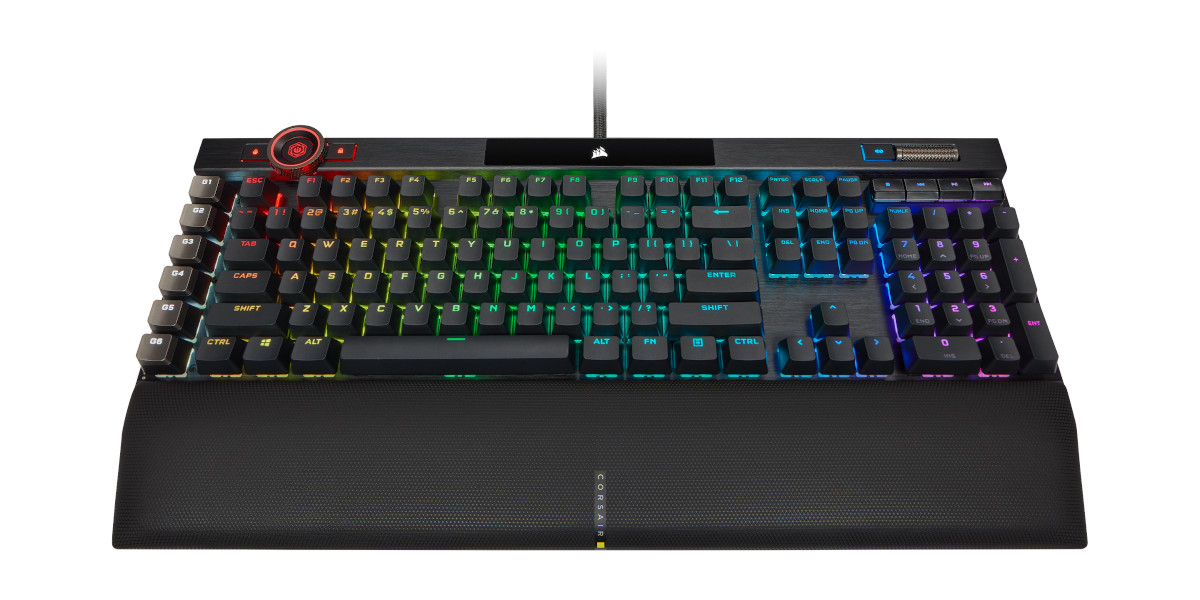
Arriving on the market at an MSRP of £229.99 or regional equivalents (see above), this optical switch-equipped model is released alongside a sibling that eschews them in favour of fan-favourite Cherry MX Speed Silver variants. Both launch at the same price, firmly at the top of a by-now wide-ranging catalogue of consumer mechanical and membrane gaming keyboards.
CORSAIR on the K100 RGB
Harness the power of iCUE software to customize an endlessly versatile programmable control wheel, synchronized RGB lighting, and six dedicated macro keys that can execute macros or streaming commands via Elgato Stream Deck software. A magnetic detachable memory foam palm rest offers the comfort to play for hours, while 8MB of onboard storage lets you save up to 200 macro and lighting profiles.
At an MSRP of US$229.99, the K100 RGB delivers unparalleled performance and features.
Technical Specifications
Keyswitches:
– CORSAIR OPX*,
– optical-mechanical,
– 45g actuation force,
– 1.0mm actuation distance
Backlight:- Individually lit and per-key programmable LED Color RGB, 16.8 million colors
Keycaps:- 104/105/108-Key PBT double-shot keycap set, 1.5mm thick, backlight compatible
Connectivity:- 2 x USB 3.0 Type-A
USB Pass-through:- 1 x USB 2.0 Type-A
USB Report Rate:- Up to 4,000Hz
Matrix:- Full key rollover (NKRO) with 100% anti-ghosting
On-Board Profiles:- Yes, up to 200
Media Keys:- Yes, five dedicated hotkeys (play/pause, stop, next track, last track, mute) and volume roller (volume up and down)
Macro Keys:- Yes, six dedicated keys with textured 2-piece ABS keycaps
Brightness Key:- Yes
Windows Lock Key:- Yes
Adjustable Height:- Yes, two tilt heights
Palm Rest:- Full length, detachable magnetic cushioned with memory foam cushion
iCUE (Software):- Supported in Windows 10 and macOS 10.15
Cable:- 1.82m / 6ft, braided fiber
Dimensions:- 470(L) x 166(W) x 38(H) mm / 18.51(L) x 6.54(W) x 1.5(H) in
Weight:- 1.31kg / 2.89lbs
*Also available as an MX Speed Silver variant
Hardware Features
The K100 RGB commands a premium price, and so it behoves us to dedicate time to the core innovations offered.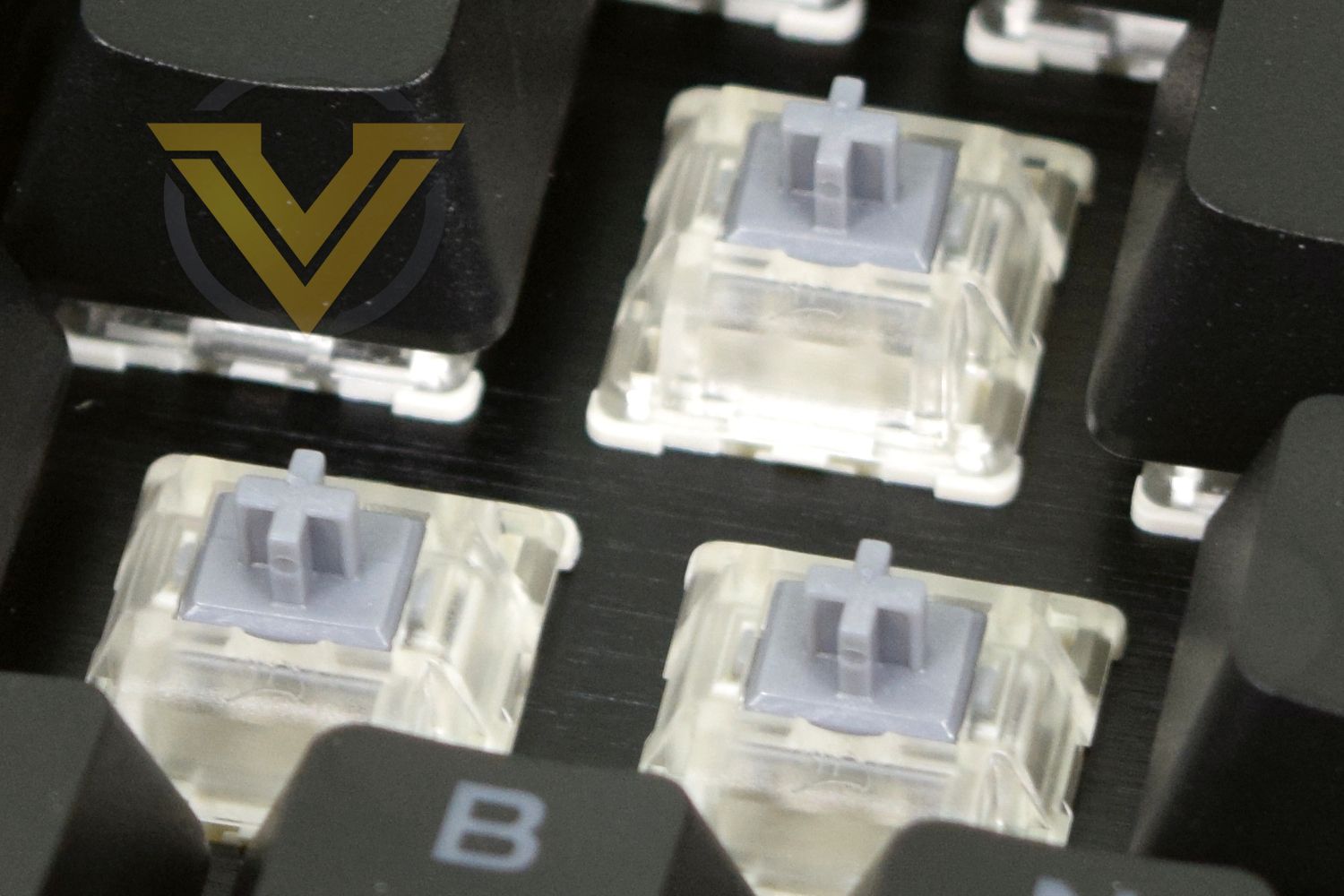
OPX Optical Switches
CORSAIR are silent about their OEM for this new optical-mechanical switch currently exclusive to the K100 RGB, but the inverse is true of its technical specifications.
OPX Optical mechanical switches utilise a beam of infrared light to detect key actuation rather bridging two metal contacts. The benefits are two-fold: far higher durability certifies the switch for over 150m keypresses; and no debounce processing is required in the switch signal leading to greater reliability/faster response times.
The switches are strictly on/off; they’re not analog and don’t continuously measure stroke distance unlike some other optical switch brands. This relative lack of complexity means that CORSAIR can opt to use the switch throughout rather than only the WASD-zone.
Differences between standard linear mechanical and OPX switches are broadly imperceptible to the end-user, leading to CORSAIR tailoring the design to match the dynamics of preferred switches as closely as possible. In this instance they have chosen to draw parallels with the Cherry MX Speed Silver to arrive at a linear switch with 45n actuation force, 1mm actuation and 3.2mm total travel distance to the backplate.
OPX Optical switches utilise a clear housing that, thanks to RGB LEDs, illuminates keycap lettering and generates underglow for each key. The switch stem is shaped to match the standard Cherry MX ‘+’ configuration, making previous custom keycap designs compatible with this keyboard.
For the time being no tactile or MX Silent equivalents of the OPX switches are available, but we wouldn’t count out the latter should it prove popular.
AXON Hyper-processing Technology
CORSAIR’s evocatively named ‘AXON Hyper-processing Technology’ refers to a new onboard controller that manages all aspects of the K100 RGB’s operation, from reporting switch actuation to on-board lighting effects and more besides. It’s also part and parcel of another central plank to the K100’s design: 4000Hz USB and switch polling rates.
Peripherals have, for over a decade, been somewhat restricted by the limitations of the USB bus that maximizes polling rates at 1000Hz (i.e. 1 ms). That’s still exceptionally fast when the typical human reaction time to audio-visual stimuli is on the order of 170ms, but a renewed interest in minimising click-to-screen latency from game developers and GPU architects has put pressure back on peripheral manufacturers.
The K100 transitions to a USB 2.0 datapath, unlocking up to 4000Hz polling on the USB bus, and through the AXON processor maintains that rate on the switch side too. A multi-threaded processor architecture allows the AXON to control all other aspects of the keyboard without impeding performance, pushing up the complexity of the underlying hardware and firmware. This is something that CORSAIR need to get right, or it could all fall apart very quickly.
4000Hz polling is particularly valuable when no debounce processing is necessary (as with OPX optical switches), allowing more of the latency savings to be realised. But this is still on the order of fractions of a millisecond.
And while they have their eyes fixed firmly on the future, they’re not forgetting legacy systems. The K100 also has a USB 1.1 datapath fallback mode for motherboards (and particularly older UEFI BIOS revisions) that aren’t equipped to handle this feature. Note however that this mode will limit some other aspects of the keyboards functionality.
iCUE Control Wheel
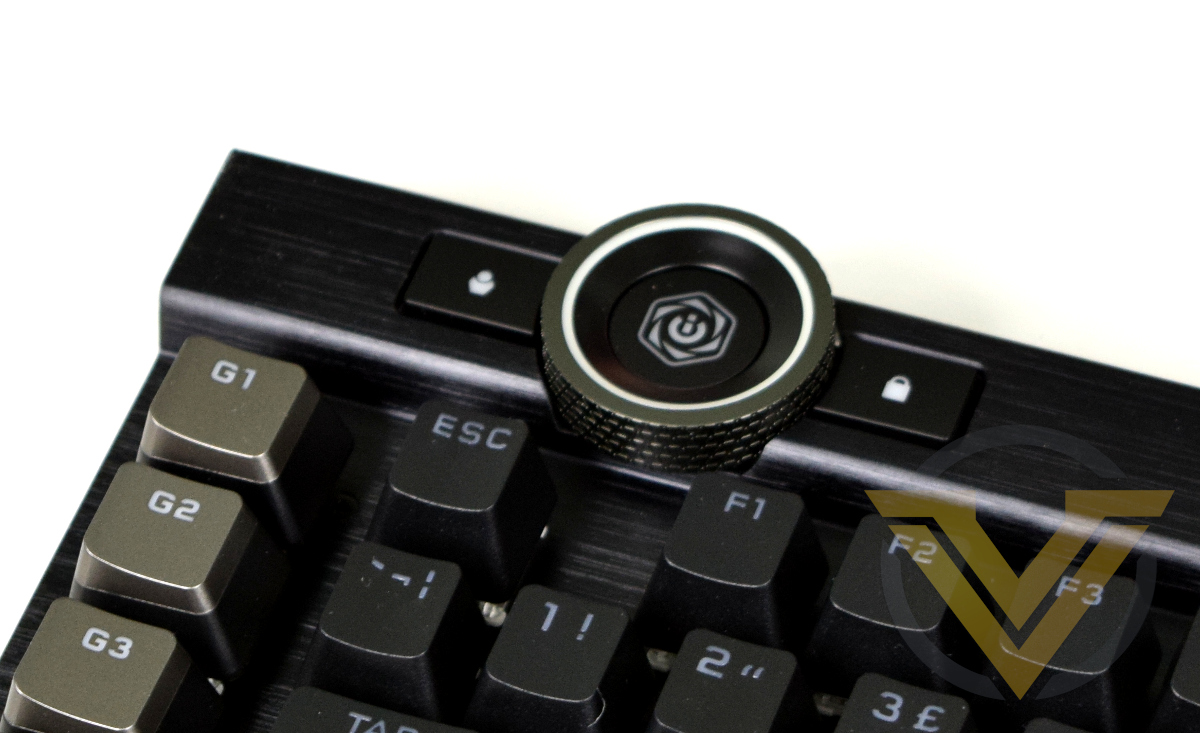
Making its debut on the K100 KGB is the iCUE Control Wheel, a new dedicated control surface that takes some of the pressure off dual-use Function keys and opens up new areas of customisation.
The wheel is a scrolling device with four adjustable and user-definable modes that can act as a quick short-cut for appropriate functions. CORSAIR have supplied eight preset modes – four of which are already loaded on the keyboard – and they’re exactly what you might expect: scroll, zoom, alt-tab application switching, track selection etc.
The defaults may be a little uninspiring but the potential for custom modes – particularly in games – is immense. This is one aspect where CORSAIR’s iCUE SDK can really come up trumps and let loose the nascent programming and scripting skills of the gaming community.
And, of course, the controller is illuminated. This is 2020 after all. But no, the central logo isn’t an OLED panel; CORSAIR will no doubt be feverishly at work on designing one for future designs though.
iCUE Nexus Companion Compatibility
The K100 RGB is compatible with CORSAIR’s iCUE Nexus, which has been designed to clip on to the rear of the K100 and act as a auxiliary touch-screen display and control. Operation with this $80 peripheral is beyond the scope of this review but you can read more about the device here.
Packaging, Bundle and First Look
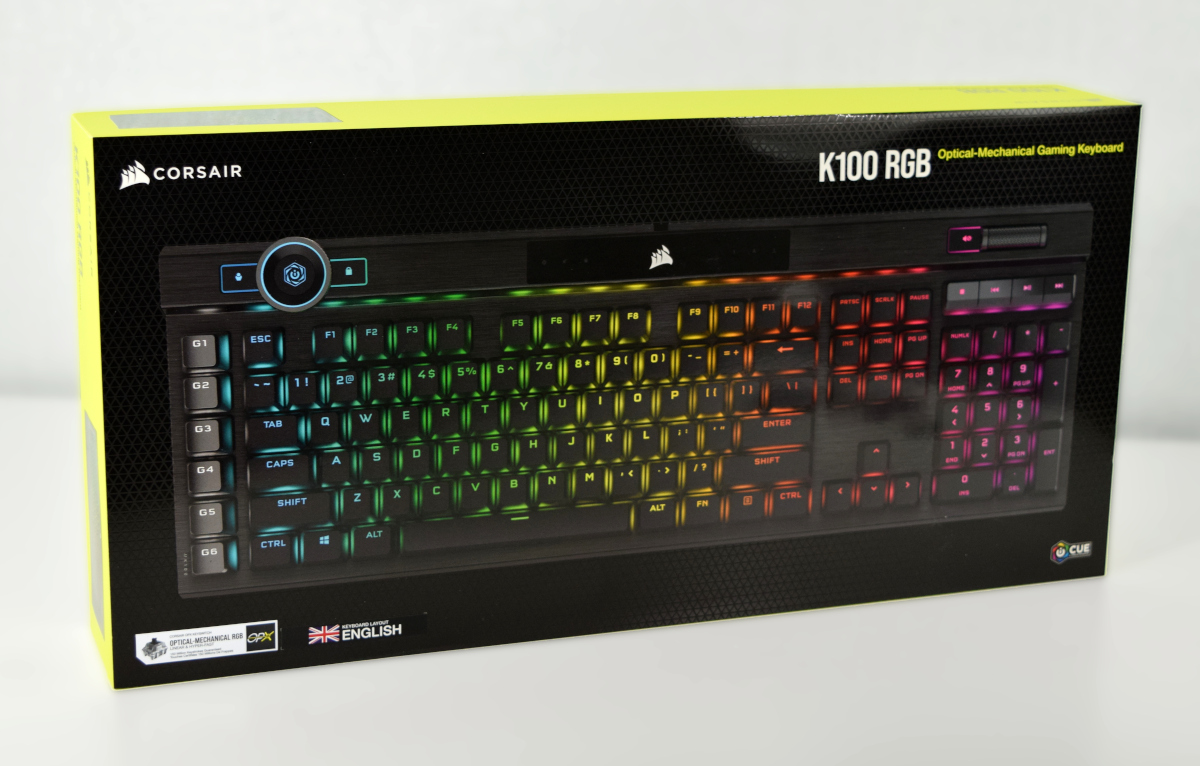
CORSAIR’s packaging is as eye-catching as usual but also serves to inform consumers about the most important features. The keyboard image has a generic US layout yet both the switch type and regional layout is clearly marked on the front. That’ll be important at retailers where both the Optical-mechnical and ordinary mechanical variants are likely to be sold side-by-side, as well as rare locations where more than one regional layout is sold.
Also listed along the bottom edge are many of the features of the K100 in eight relevant languages. No mention is made of requiring a second free USB port for USB 2.0 passthrough, which might catch a few customers out. The rear goes into a little more detail on the keyboard’s features, but doesn’t exactly drown anyone in info.
A gloss finish cardboard construction may make it a little rough to recycle but the packaging’s compact design doesn’t waste space on the unnecessary.
Included accessories
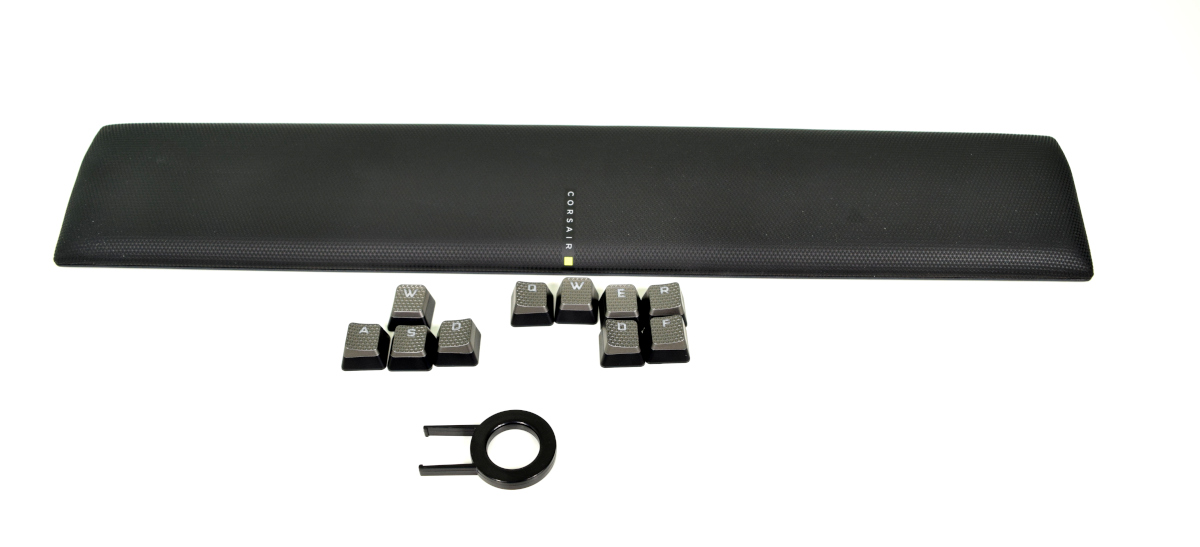
Alongside the keyboard are 10 replacement PBT double-shot keycaps with textured finish (WASD & QWERDF), a keycap remover, and a plush wrist-rest. No driver CD is included, so you’ll want an internet connection to pick up the latest iCUE software installer for advanced use and lighting configuration.
The wrist-rest is filled with memory foam, allowing it to retain shape long-term, and finished with soft leatherette. It attaches to the keyboard via two strong magnets.
An included keyboard cover that protects the product during shipping can also double as a dust protector if you’re so inclined.
First Look
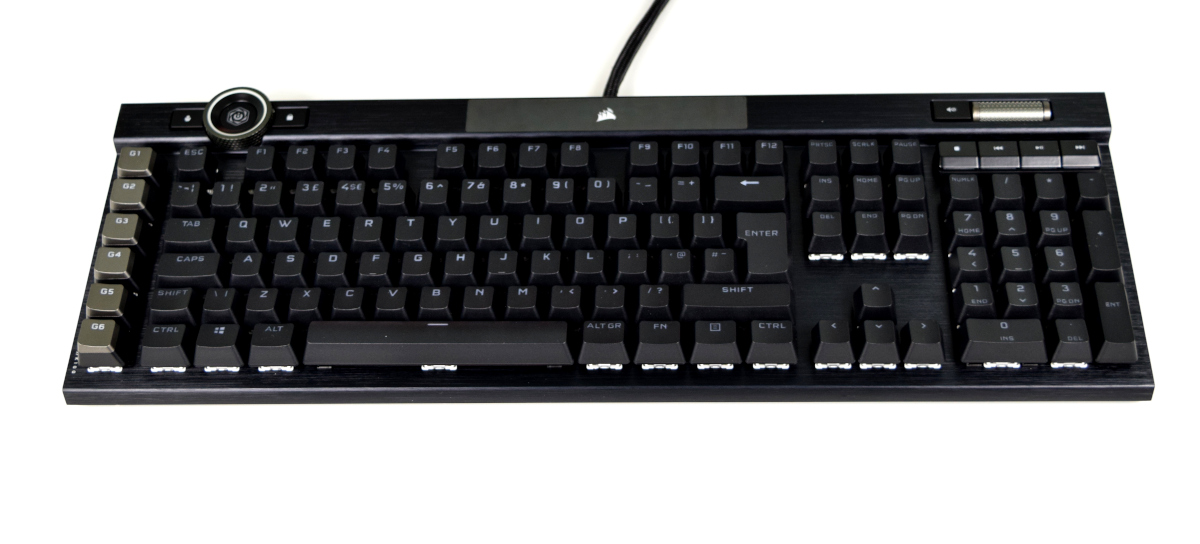
At first glance the K100 clearly has DNA that goes all the way back to the K70 and through the K95 Platinum. A wide squared-off frame and prominent ridge at the back have been hallmarks of their K-series keyboards, and even the volume wheel returns.
Differences crop up fairly quickly however. Most notable is the iCUE Control Wheel at the left-rear, but even the central indicator panel for Caps/Num/Scroll locks has been changed from pinhole LED and embossed logo. Compared to the K95 there’s clearly been a step-change in frame design.
Closer Look
CORSAIR have revised the keycap typeface compared to the K95 Platinum. It’s now less stylised, far clearer and makes less use of non-standard abbreviations for functions like Home and Page Up (shortening four letters to three never did make that much sense).
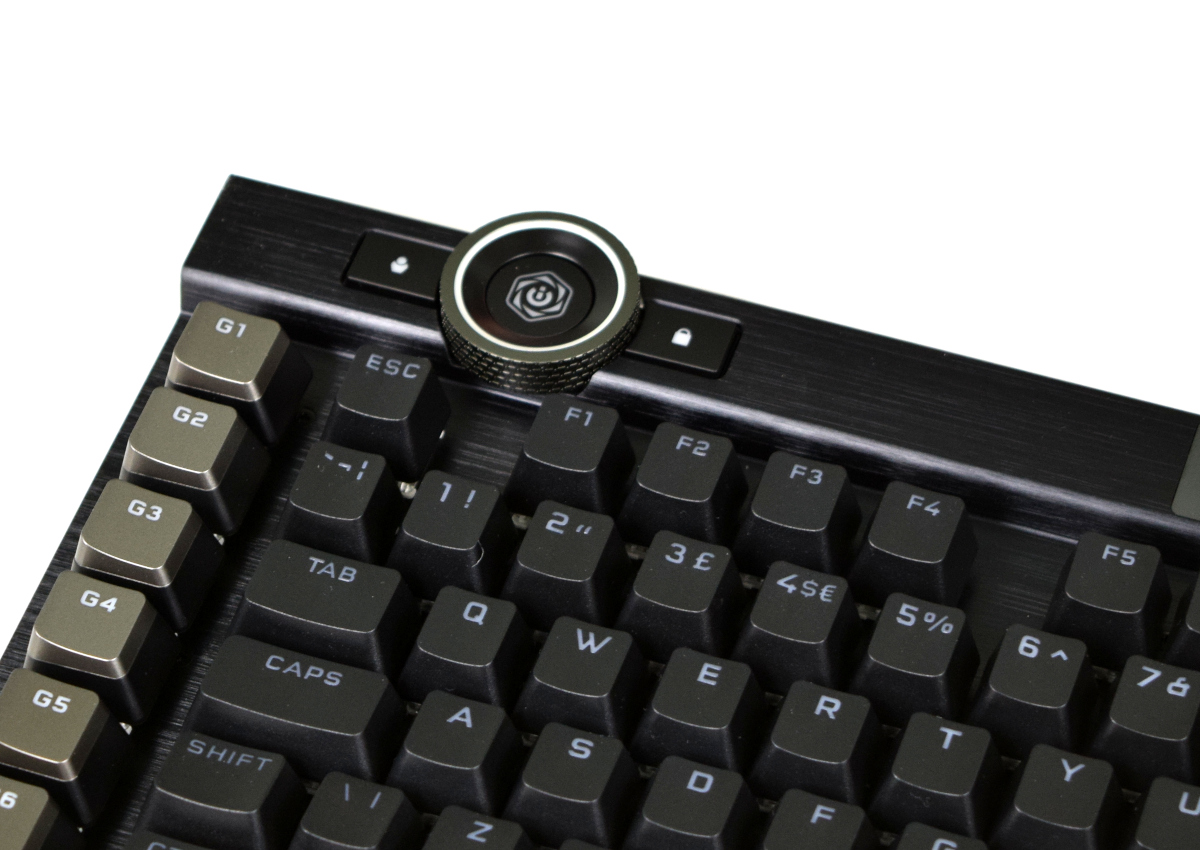
The macro keys located on the left hand side are equipped with non-standard keycaps (shaped with a noticeable curve and high on one edge), and G4-6 are noticeably higher than CAPS, SHIFT and CTRL keys (the difference is less accentuated on G1-3, but still present). This may aid somewhat in developing muscle memory for striking these non-standard, but that will likely depend on the user.
Note that, unlike the K95 Platinum, textured variants of these keycaps are not included in the package.
The illuminated iCUE Control Wheel is recessed into the frame, and could prove to be something of a dust trap over time. The central button cycles through control modes, whilst the left and right buttons control the active onboard profile and the Windows Key lock respectively.
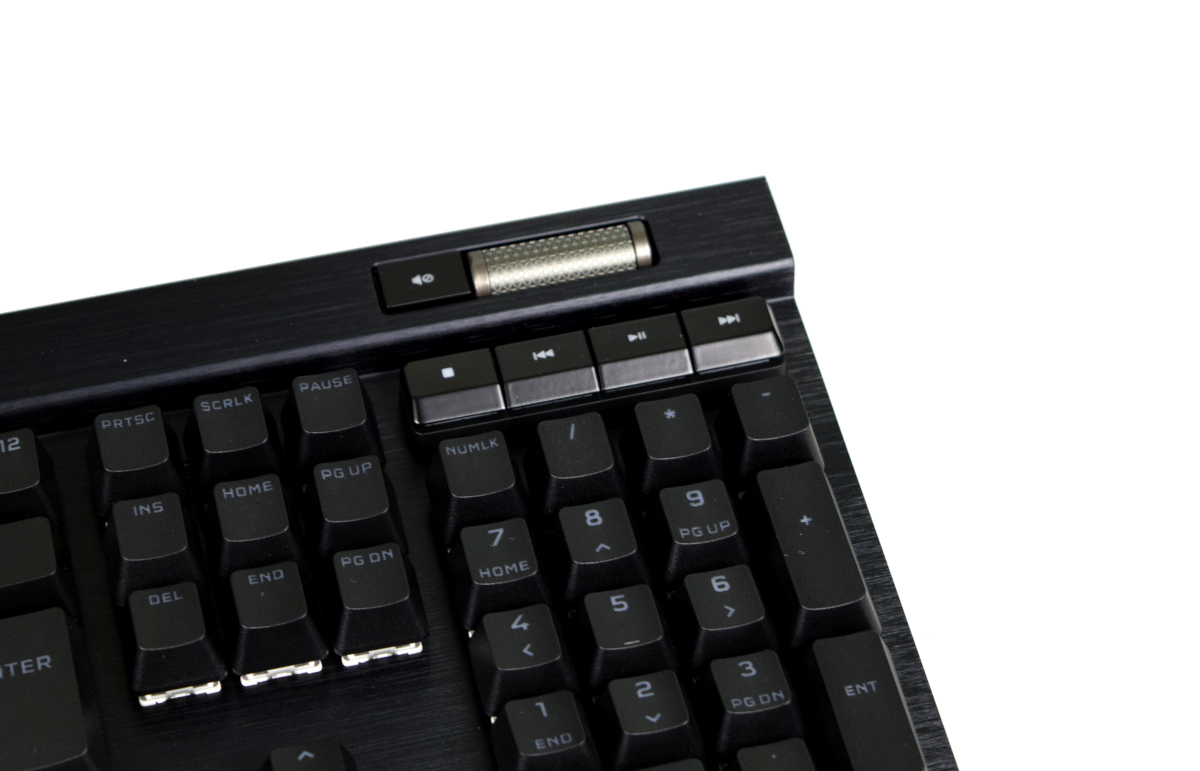
Media keys are raised from the aluminium frame and located well out of the way of more heavily trafficked areas.
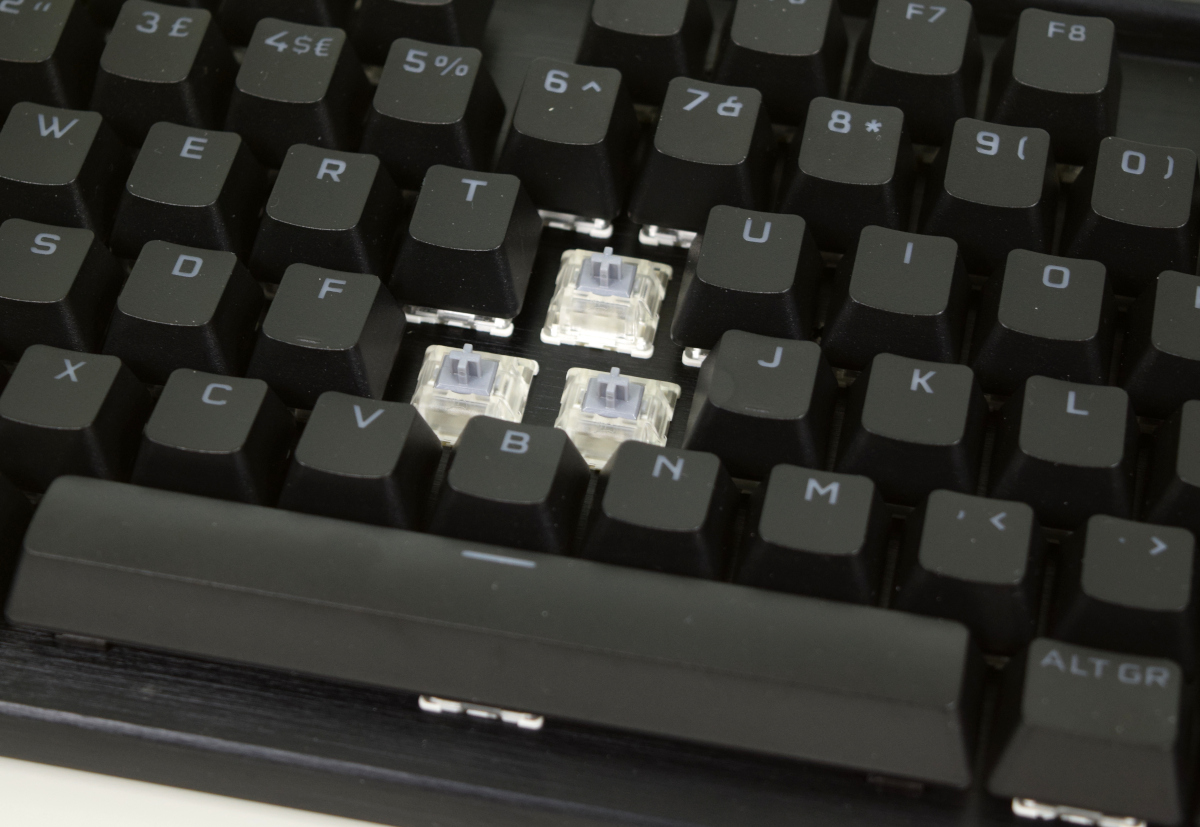
Removing the keycaps lays bare the OPX optical-mechanical switches. They have a clear housing and grey stem, making them difficult to distinguish from MX Speed Silvers at first glance. The clearest feature that sets them apart is a lack of visible metal contacts through the casing.
One under-appreciated aspect of CORSAIR’s keyboard designs is how easy they are to clean. Removing each keycap is easy, and the unibody chassis dispenses with the usual nooks and crannies where crumbs, dust and hair can build up.
Closer Look (2)
A side-on view of the K100 shows the elevation provided by the feet and new lighting zones along the edge. Identical lighting is present on the opposite side.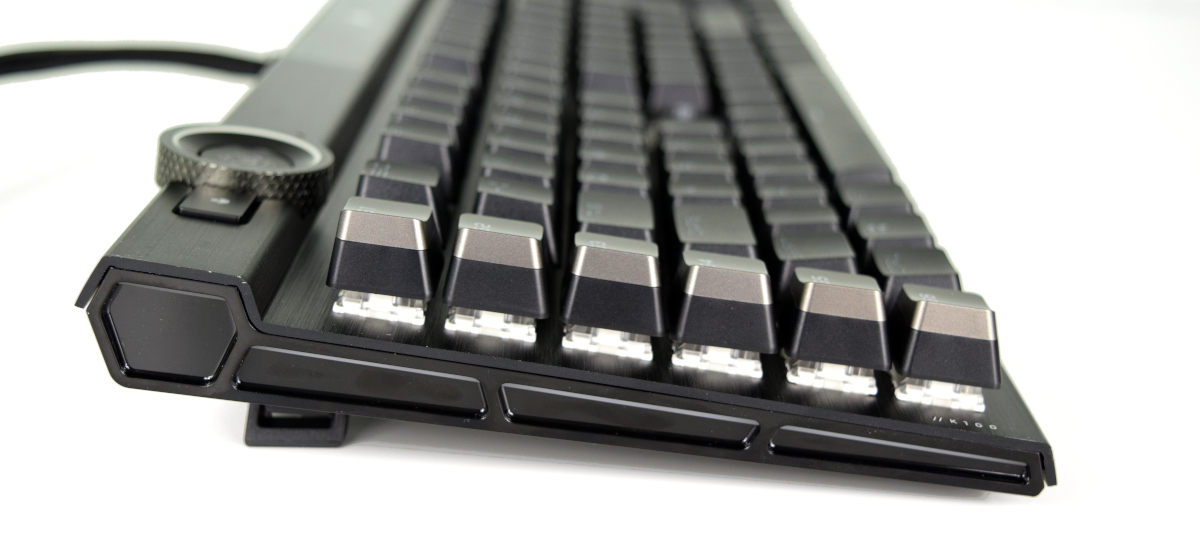
Moving to the rear exposes both the USB 2.0 passthrough and rear LED lighting zone. Although there are 22 LEDs, the diffuse cover neatly makes them appear to be continuous rather than discrete blocks.
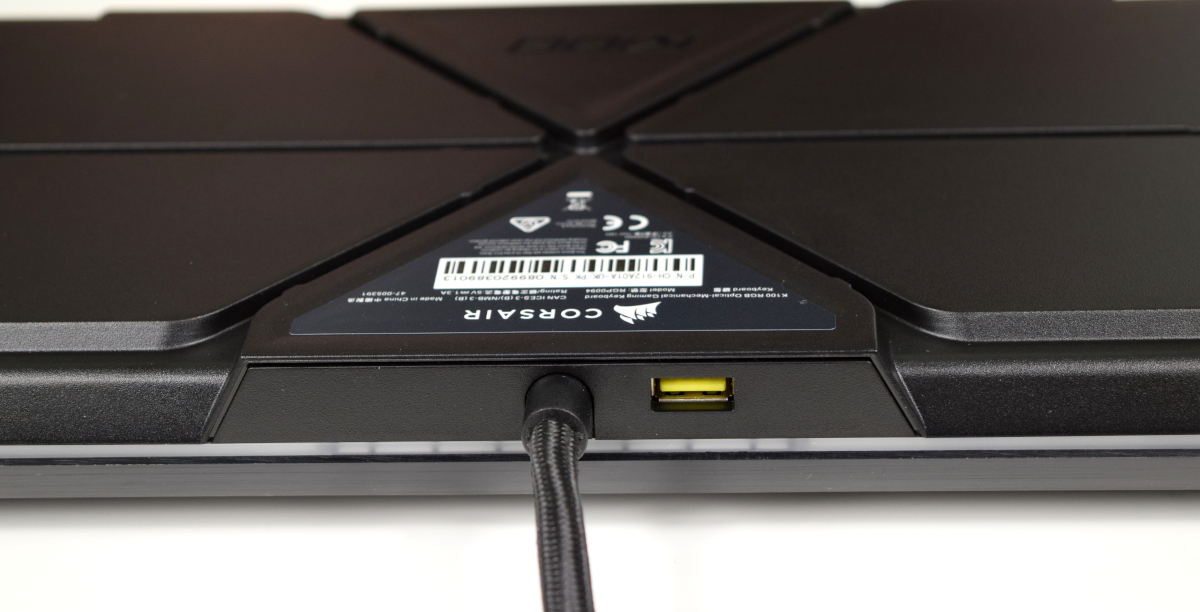
The floor of the keyboard has channels carved into it for cabling, and incorporates more channels than the K95 Platinum before it. Two magnetic attachment points for the wrist-rest are located in the front, finally eschewing the clips that were always a little prone to wear.
All in all, the K100 is remarkably well appointed design with exceptional build quality. The only slight frustration is the wrist-rest, which has just a bit of downwards play when leaning on it.
Software & Lighting
The K100 makes use of CORSAIR’s iCUE software, which my colleague detailed thoroughly in his review of the K95 Platinum XL earlier this year.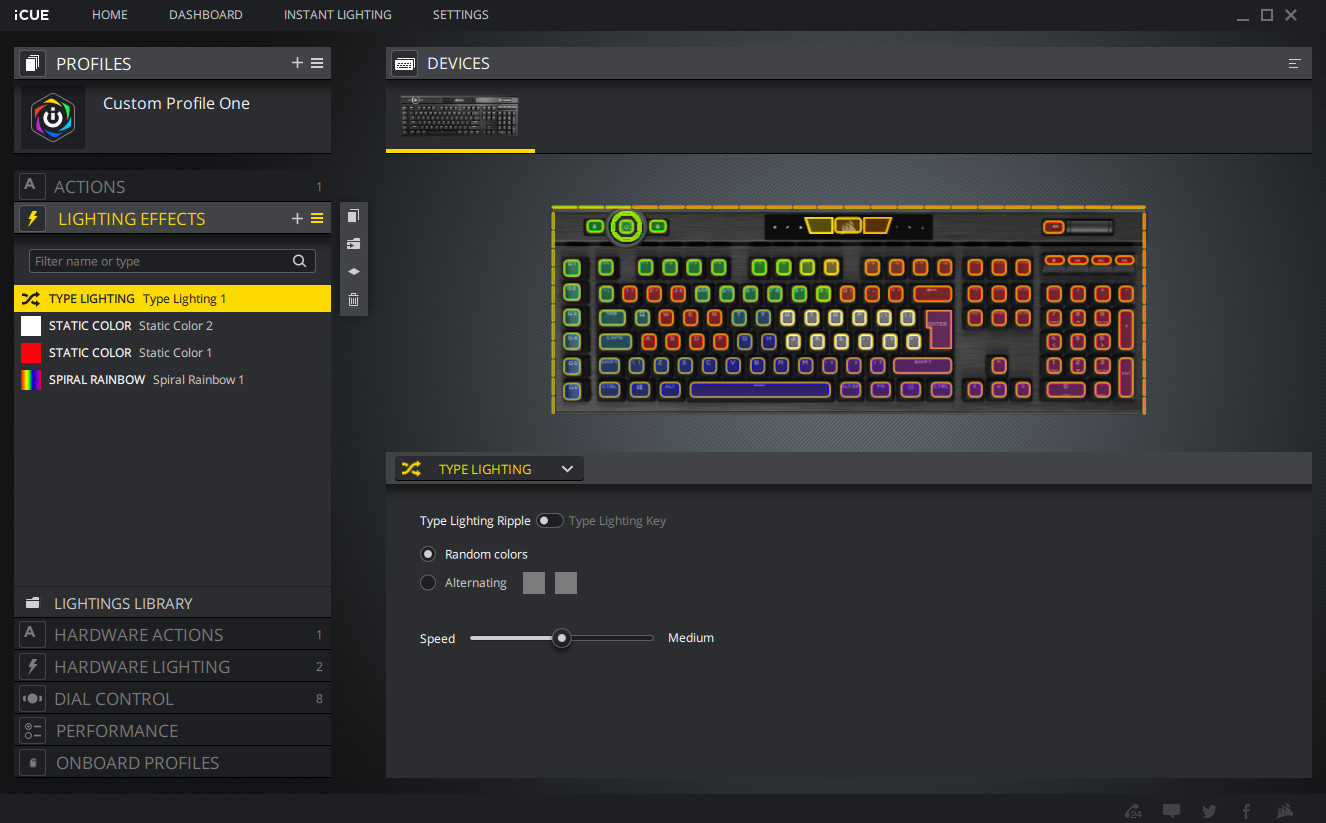
Profiles on the K100 are defined a little differently than previous members of CORSAIR’s range. When operating independent of iCUE software the keyboard reverts to the Hardware Lighting and Hardware Actions definitions for each of the eight on-board profiles. When attached to a system with iCUE installed the software profile takes precedence. This reflects the higher complexity allowable in software-level profiles as well as iCUE lighting synchronisation across multiple compatible peripherals.
In addition to lighting and macro configuration options, the software can also act as a sensor dashboard for system components such as GPU and CPU, monitoring and logging metrics such as temperature and % load. An on-screen overlay dubbed iCUE Space can also be used in a similar manner when gaming, although configuration options for this feature are a little sparse.
Device Settings including USB polling rates, firmware updates, sensor logging and Dashboard background images are available in the Settings Tab.
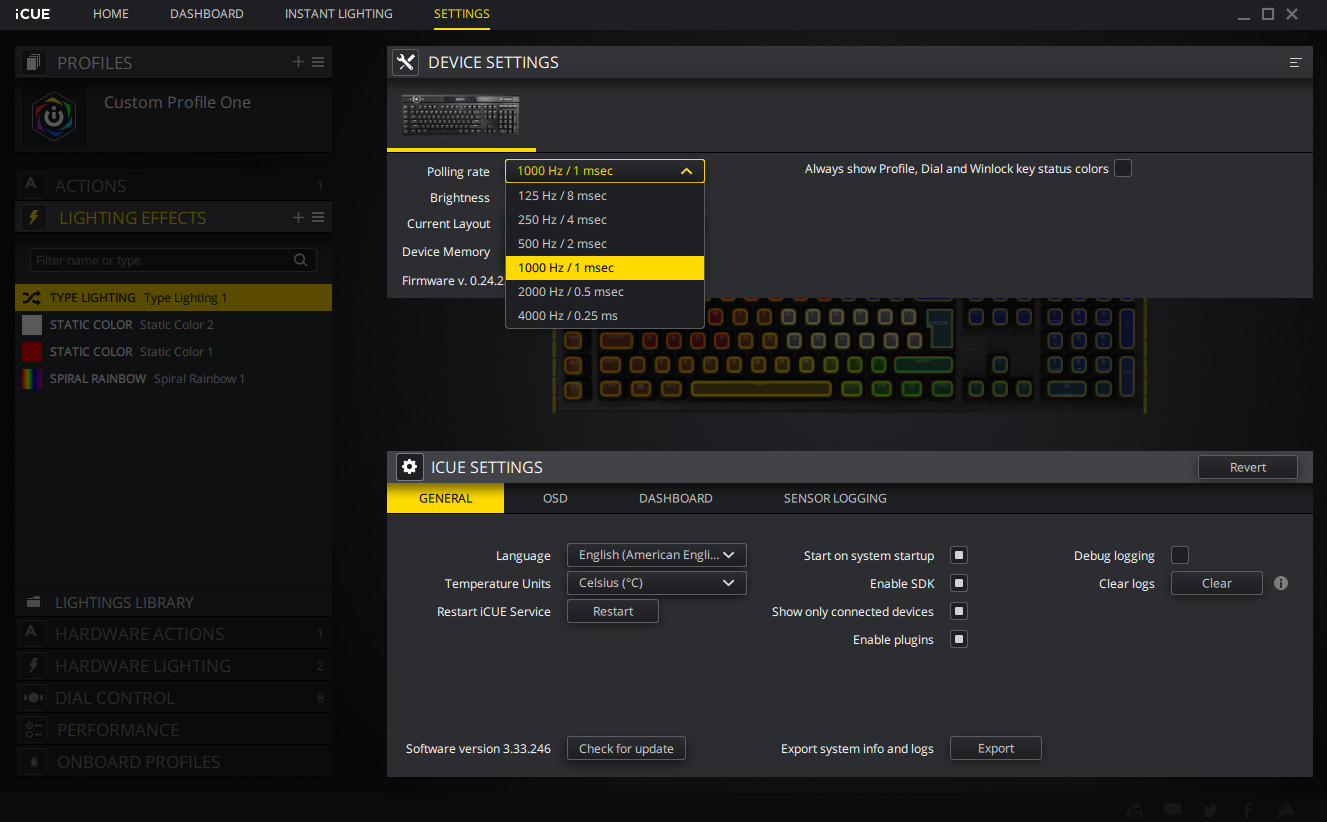
One feature we’d love to see as part of the default iCUE suite is a Microphone Mute Action that can be bound to any key. We understand that this is something of a limitation with default Windows 10 behaviour, and that the Elgato software makes it possible with a custom plugin, but we feel that the popularity of streaming would make this feature all the more beneficial as part of the included software toolkit.
Unlike many of their competitors, CORSAIR’s supporting software is a tremendous asset to their product range rather than a millstone around their necks. The fact that the K100 can operate more than adequately without it – and on games consoles – is just the cherry on top.
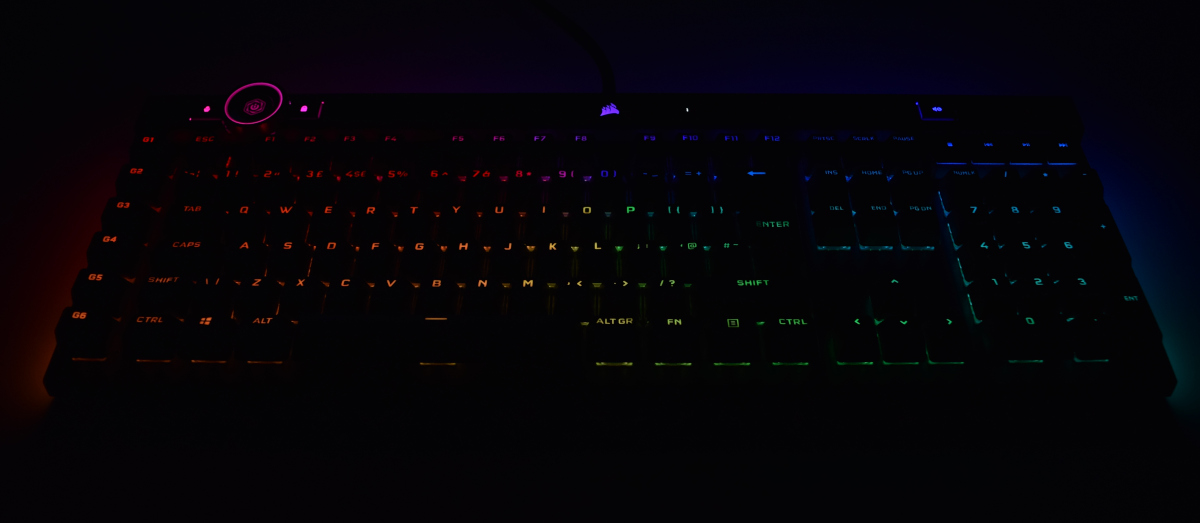
The configured lighting biases a little towards the blue end of the spectrum compared to what’s defined in the settings, but responsive updates as you’re adjusting the balance make it relatively easy to match what you’re after. As with the K95 its maximum LED brightness was a little lower than expected but not in a manner that’s frustrating.
Three distinctly new edge lighting zones appear on the K100 which weren’t present on the K95. Left, right and rear edges are all included and configurable in iCUE with colour banding matching the rest of the keyboard LEDs. Perspex covers diffuse the lighting for a broadly even effect when illuminated, but with clear distinctions between each section when no lighting is active.
The central CORSAIR logo is also illuminated with three separate configurable sections, allowing the creation of transitional effects that wouldn’t be possible with just one LED.
Optional Accessory
Keyboards come with a variety of different accessories but within Corsair’s iCUE eco-system, the company has an exciting product which can be paired up with the K100 which is called iCUE NEXUS.
In simple terms, this device can attached to the keyboard and offers touch-screen functionality. That functionality spans from tweaking hardware options, viewing hardware stats to configuring shortcuts, launching programs/games or even excecuting macros. For more info on the iCUE NEXUS visit the product page.
Performance
The K100 was ready to go straight out of the box, requiring none of the rigmarole associated with some other launches such as mandatory software and firmware updates. Lighting was active immediately and fully configurable once the iCUE software had been installed. Connecting both USB cables wasn’t required, but pass-through functionality would mean that the second is necessary.
The keyboard sits flat on the desk, taking up plenty of real-estate thanks to the inclusion of both number pad and dedicated macro keys. Despite the extended width there’s absolutely no flex in the frame when striking each key and no hit of wobble with legs flat or extended. Rubber pads on the feet and base make it resist slippage effectively but don’t give rise to a spongy depressible frame.
A refined aesthetic and configuration of subtle lighting schemes would make the K100 at home in an office if preferred, and we wish you the best of luck in persuading your workplace to comp it as a business expense.
The sample provided was equipped with OPX optical-mechanical switches that feel very similar to the Cherry MX Speed Silver linear switch variant. The reported actuation point is almost identical – 1mm vs 1.2mm – and keystroke has a similar depth. Users who find Cherry MX Red’s a little slow to respond or strike the backplate hard on a full keypress may enjoy this faster type, and MX Speed veterans will be right at home immediately.
We have found that more resistive and tactile switches such as the Cherry MX Brown type to be slightly preferable for general typing, and OPX switches are more sensitive to accidental keypresses if you leave your fingers resting on the keys. This is a matter of personal preference however, and not necessarily a down-side of the K100 (excepting that a tactile alternative isn’t currently available).
By the same token, gaming was an absolute joy. We booted up World of Warcraft and incorporated a selection of keybinds and macros to the extra keys and found the adjustment from an older keyboard with MX Blues and similar Macro key layout extremely straight-forward. The AXON management system handled anti-ghosting and NKRO effectively, with no phantom keypresses noticeable. We were still at a loss when it came to leveraging the iCUE Control Wheel to its fullest extent however.
A similar experience was had with Hades, our latest ARPG Roguelite addiction that can be especially hard on the spacebar when using keyboard, mouse and default keybinds. A slight vertical play in the spacebar was almost imperceptible despite the punishment laid on it.
You’d be forgiven for finding it difficult to tell the difference between 1000Hz and 4000Hz polling, which is possibly not the conclusion CORSAIR were after. It’s certainly a technical achievement, especially when also juggling on-board macros and lighting, but we simply weren’t equipped to notice any performance improvement between the two modes. We can however state that there were no issues with running at the higher rate on our AMD Ryzen B450 test system.
The keyboard has lost nothing in terms of comfort in its transition to a memory-foam wrist-rest and new attachment system, but linear keys can still be some of the hardest on your fingers. In the absence of a cushioned MX Silent variant picking up some O-rings should dampen impacts nicely. The wrist-rest is removable if preferred, and the new attachment system shouldn’t be quite as fragile as the old clip-on method. The slight amount of movement in the rest is a little disappointing, but far from a deal-breaker.
And finally, CORSAIR still have those dedicated media keys licked. The volume wheel is smooth with no discernable click points and each button offers positive feedback when pressed. The same can be said of the iCUE Control Wheel which is similarly pleasing to the touch. Each of these control points also being almost infinitely configurable through preset functions and macros makes it all the more satisfying.
Conclusion
In January my colleague was very impressed with CORSAIR’s K95 Platinum XT, their then flagship. Today we have to admit that the K100 RGB is at least as equally as impressive.CORSAIR’s keyboards have always oozed quality, and over the years any rough edges have been smoothed out to deliver an exceptional overall product that has both a professional and fun aesthetic. The same goes for the software, which is now one of the most comprehensive and refined suites on the market. In fact, CORSAIR’s biggest issue in recent years has been developing advancements over the previous generation that went further than window-dressing.
With that backdrop it’s surprising that CORSAIR found as many technical leaps to take as they have. Broader switch options are almost something of a given, but it’s the AXON controller and associated advancements that justify the brand new SKU. Add additional lighting zones and the iCUE Control Wheel and it genuinely feels like a substantial upgrade over the K95 Platinum XT, befitting its position as the new flagship.
OPX Optical-mechanical switches may be a headline feature but you’ll be taking advantage of them more for the durability than any difference in feel from the MX Speed Silver variant. That in itself is no bad thing given the popularity of the latter of course; either are preferable to now-common MX Reds due to lower actuation distances and shorter keystroke. Additional switch variants similar to the MX Silent and Brown would be appreciated but also a lot to expect from day one with a brand new product.
One surprise is that CORSAIR opted to not use the more vibrant Capellix LEDs present in their coolers and case fans this September. Despite their omission however we observed good transitions between RGB colours and brightness levels, making for very pleasant lighting effects if the full RGB experience floats your boat. A downside is a distinct blue shift to the LEDs which makes configuring a clean white light a little tricky, and could indicate some issues with factory calibration.
CORSAIR still reaps the rewards from their Elgato acquisition, allowing streamers to manage transitions and other aspects of their stream through built-in functionality that would typically be the province of a dedicated Stream Deck. While not as fancy a solution it will both do the job in a pinch, and also keeps your hands on your keyboard during in-game action.
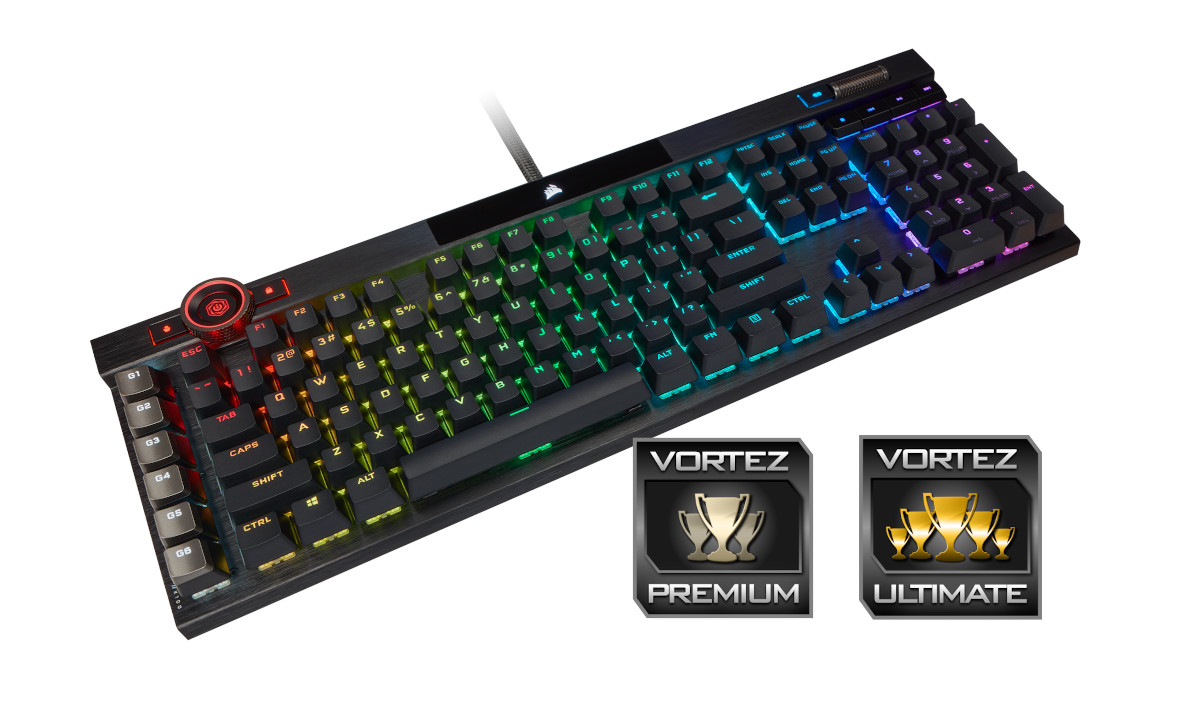
It’s fair to say that the iCUE Control Wheel is still in the initial stages of development on a software level. As a tool it’s still in search of that killer app(s) to tie it to and really run riot, but the foundations are there for a compelling feature of the future. There’s an outside chance that Star Wars: Squadrons could have a place for it (e.g. shield/weapon/engine power balancing, throttle etc) if a keyboard & mouse control scheme offers a good general experience.
Finally, we come to the price. At £229.99 it’s £30 more than the K95 Platinum XL, but builds on every aspect of its predecessor to a more advanced solution overall. New features are meaningful additions and there’s a lot to get to grips with for both relatively casual users and the prosumer/competitive gaming crowd. It’s a considered purchase of course, but we can’t imagine anyone being in the slightest bit disappointed when they have their hands on one.
The K100 RGB is a fantastic evolution of CORSAIR’s keyboard range, and the introduction of highly durable OPX optical-mechanical switches bolsters its credentials as the new flagship design. Also boasting 4000Hz USB polling, greater iCUE integration than any keyboard before it and fantastic looks and build quality, this £230 monolith to excess stakes a claim as the Ultimate peripheral.
+ Cutting edge technology
+ Attractive looks for home or office
+ More RGB customisation than you can shake a stick at
+ New control hardware for tinkerers and scripters
+ Elgato stream software integration
+ USB 1.1 fallback mode
+ Additional doubleshot textured keycaps
+ Very comfortable memory foam magnetic wrist-rest
+ Full anti-ghosting/NKRO
+ Impressive software with integration of other iCUE devices
Cons
– Premium Price
– RGB backlighting could be brighter
– Lighting has a slight blue hue
– Short stroke linear switch type only
– USB 2.0 passthrough only
Click here for an explanation of our awards at Vortez.net.
Stay connected with the Vortez Social Media pages:
Join in with the discussions on Discord