CORSAIR’s flagship keyboard has undergone a revamp, with added features, a brand new palm rest, and new Elgato Stream Deck support.

Product on Review: CORSAIR K95 RGB Platinum XT
Manufacturer: CORSAIR
Street Price: GBP £209.99 / USD $199.99 (excl. tax) / AUS $329.00
CORSAIR, a no-holds-barred juggernaut in the computer gaming industry are going from strength to strength, with the K95 being their flagship gaming keyboard for several years now; but today we look at the latest evolution, with some welcome new features.
The K95, being the flagship offering, is a no-compromise approach to producing a gaming keyboard, there’s RGB backlighting, macro keys, multimedia buttons, bespoke function buttons, a selection of Cherry MX keyswitches and CORSAIR’s renowned build quality, to name but a few, but with the Platinum XT, we get an all-new plush leatherette palm rest and, thanks to Corsair’s acquisition of Elgato back in the summer of 2018, we see full Elgato software support for the macro keys.
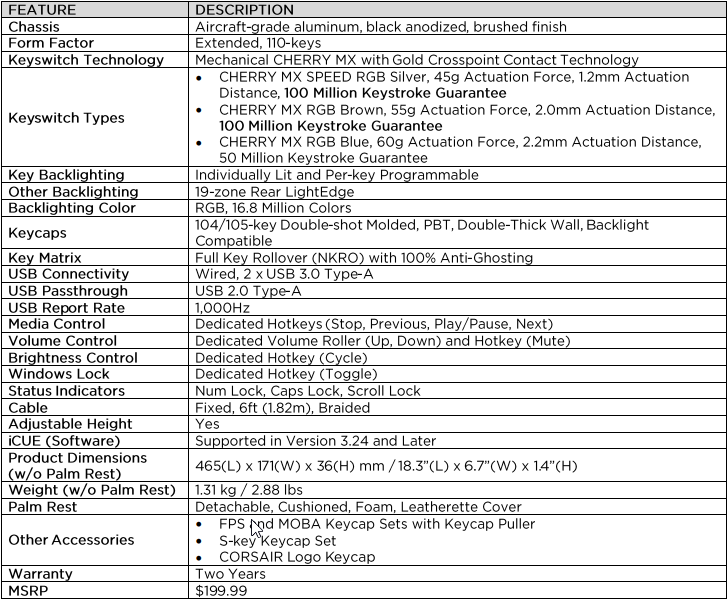
Adding a new element of reliability to your keyboard, CHERRY have worked hard to improve the lifespan of their MX range of keyswitches, with the CHERRY MX Speed, offering an ultra-fast 1.2mm actuation, and MX Brown, with a tactile bump and quiet operation, options on the K95 both sporting a guaranteed 100 million activations. However, the keyboard can also be spec’d with the CHERRY MX Blue keyswitches, but you’ll only find a 50 million activations guarantee on those.

Bolstering the performance is 100% anti-ghosting with full N-key rollover, a USB passthrough port, 8MB of onboard storage to take your profiles with you, an anodised brushed aluminium frame for stiffness, PBT double-shot keycaps that resist wear and fading over long periods and additional keycaps to customise the typical “gaming keys” (WASD etc.)
Almost 3 years ago we looked at the Corsair K95 RGB PLATINUM with a similar design and style, which achieved one of the highest ratings ever given, with both the Platinum and Elite awards handed over; the only negative point that Tony found was the price. The price has remained largely the same but there’s even more features packed in this time to warrant the massive pricetag. Let’s get testing.
CORSAIR on the CORSAIR K95 RGB Platinum XT:
The CORSAIR K95 RGB Platinum XT Mechanical Gaming Keyboard immerses youir desktop in dynamic RGB lighting with per-key illumination. Precision-moulded PBT double-shot keycaps, 100 million keystroke-guaranteed CHERRY MX SPEED RGB Silver and MX RGB Brown keyswitches, and an anodized aluminium frame offer extraordinary build quality. Six dedicated macro keys establish an in-game advantage, with the added benefit of Elgato Stream Deck software integration. A detachable cushioned leatherette palm rest offers plush comfort, while dedicated multimedia keys, an aluminium volume roller, and a USB pass-through port put convenient control within reach. Powerful iCUE software gives you control over your lighting, macros, key remaps, and more. With 100% anti-ghosting with N-key rollover and onboard storage for five profiles, the K95 RGB Platinum XT leys you play with a full deck.
Technical Specifications
Packaging & Bundle
The black and yellow styling follows on from the rest of their equipment, but the front of the box tells you everything you need to know at a glance: UK Layout, CHERRY MX Speed switches and iCUE support.
The reverse side shows the keyboard from the same angle as the front, only with the blue macro keys installed, to signify the Elgato association. We can also see here the mention of support on the Xbox One, letting you step up your gaming on the console side of things.

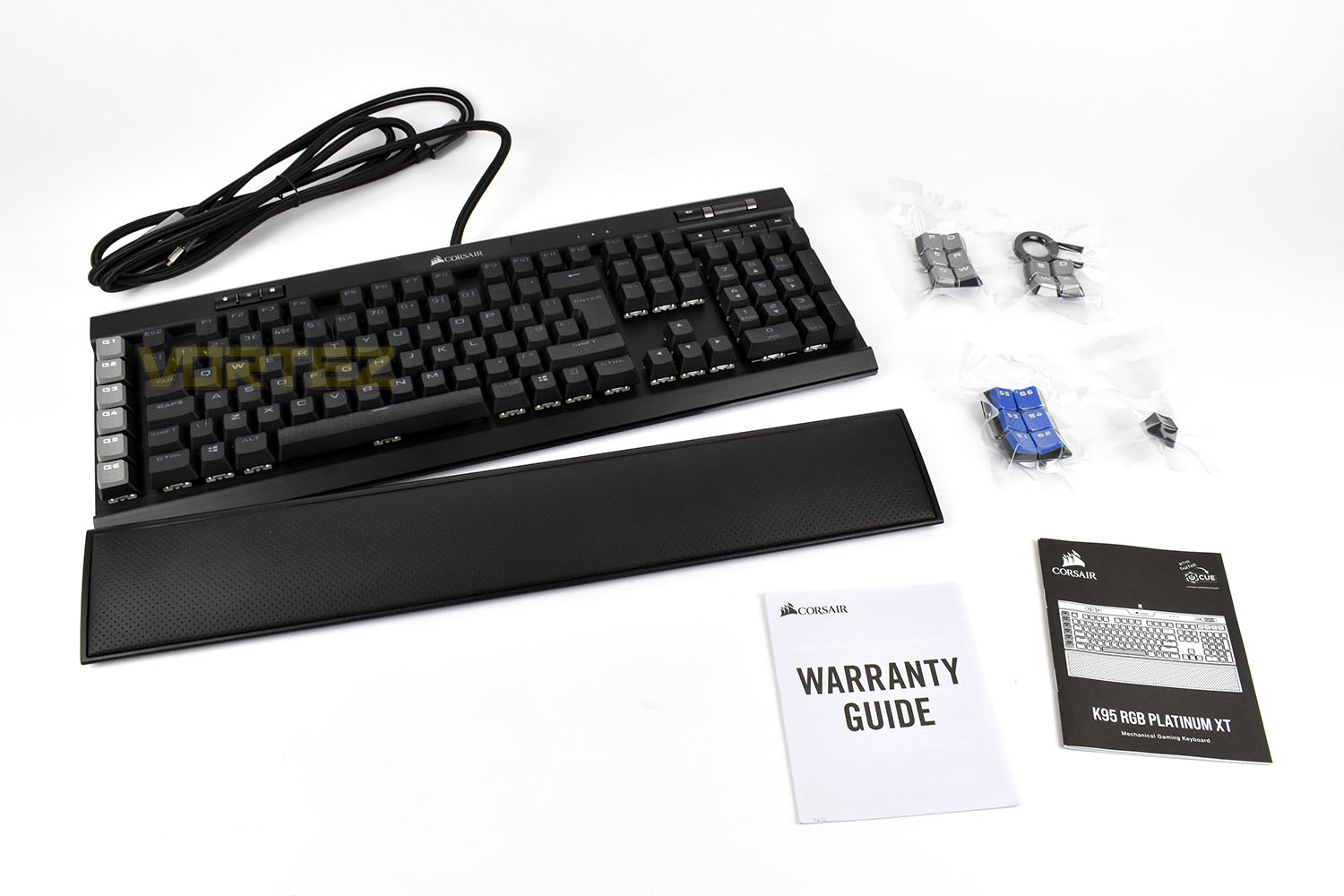
Bundled in with your K95 is a detachable, plush leatherette palm rest, two sets of textured and shaped keycaps for FPS and MOBA games, a keypuller and an instruction manual.
Closer Look
If you already own a CORSAIR K95, or are familiar with them, the size and style won’t be a surprise at all, however they do seem to be sticking with just 6 macro keys, instead of the 18 they had on the original. The keyboard measures in at 170mm x 465mm.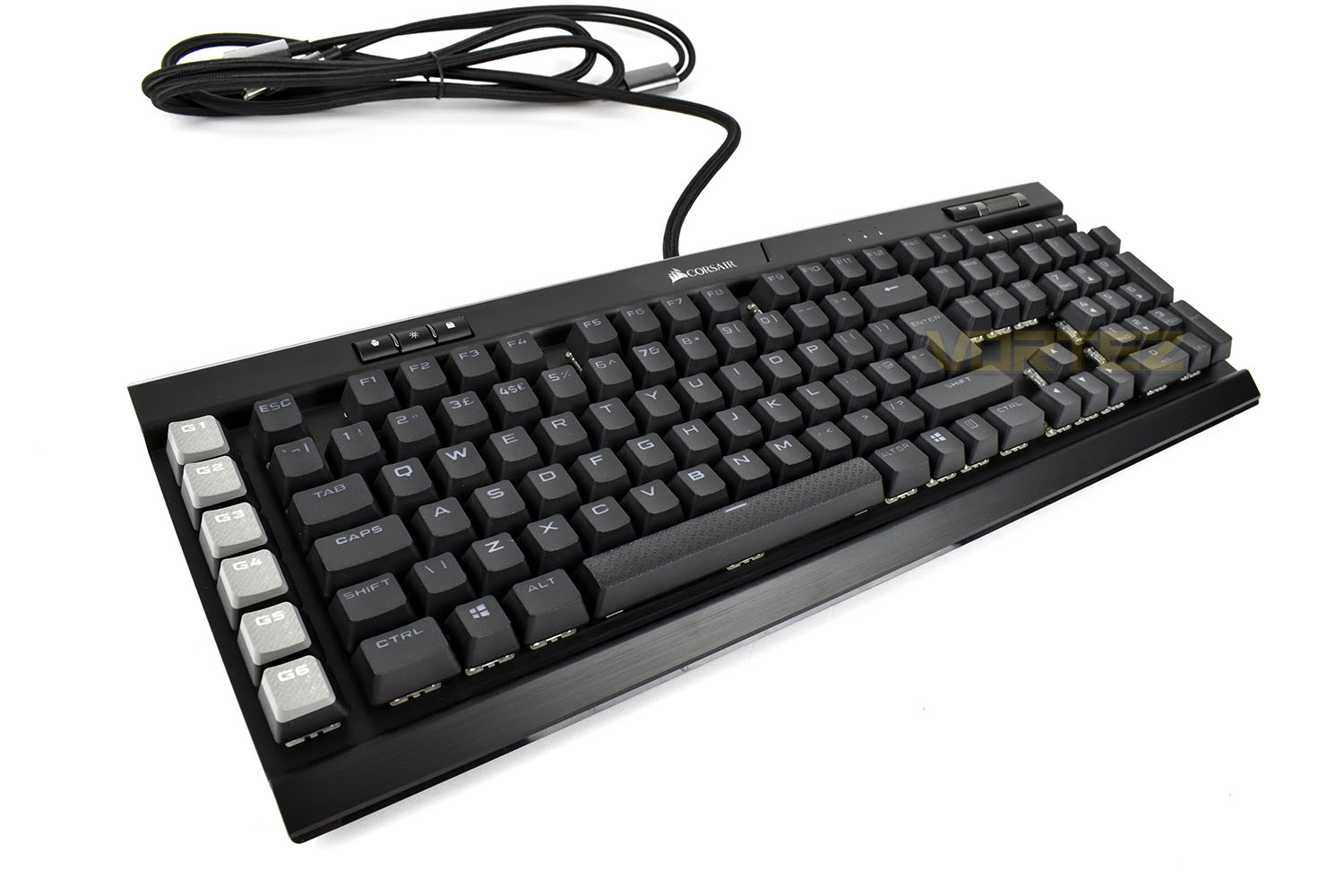
CORSAIR like to use their large, bold font on their keycaps, with the K95 RGB Platinum XT being no exception. The number 4 houses both the Dollar and Euro signs, for those that might not know about that key combination; not something we’ve seen on anything else before.
You might also notice that all of the key’s shift modifiers are pushed alongside the key’s main function, which will illuminate both functions with the RGB backlighting.

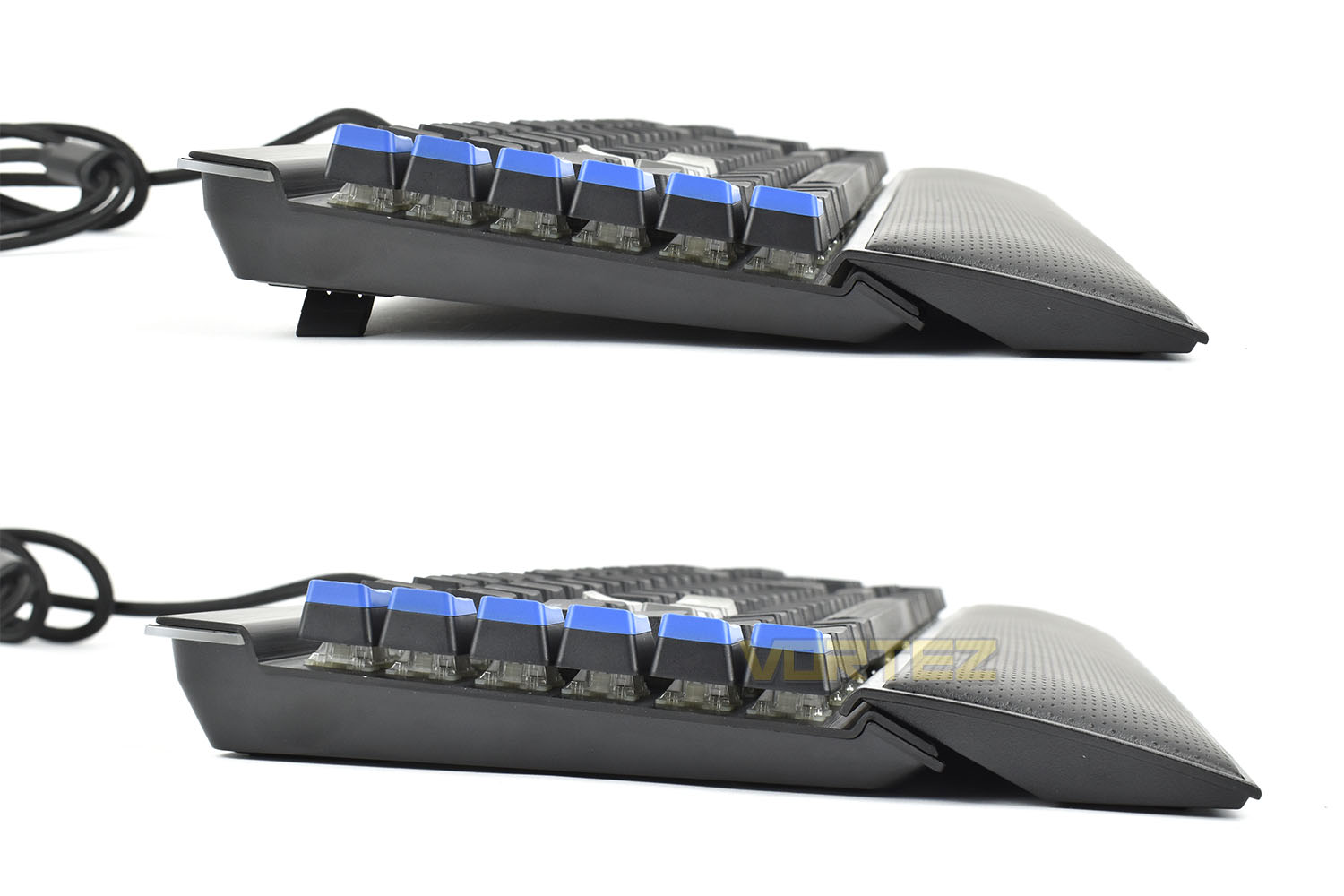
Looking at the keyboard from the left, it’s possible to see the extent to which the raiser feet push the rear of the keyboard up, from 29mm to 42mm at its highest point.
In the top-right section of the keyboard is the multimedia keys and volume controls. The aluminium wheel is weighted instead of being notched to provide a different kind of feedback.
The media keys are taller than one some other keyboards, because of where they sit. You might struggle to see the keys if they were flush with the keyboard so having them raised up like they are, it’s possible to see them from even the most acute of angles.
A little further left on the top strip are the NUM Lock, CAPS Lock and Scroll Lock indicator LEDs.

At the other end of the top strip is a trio of buttons, the left-most is a profile switch which engages the internal 8MB of memory to toggle through different profiles that can be assigned to different games or workflows.
The middle button is the RGB illumination brightness with off, dim, medium and bright as the options.
On the right is the lock button, this can be configured within the CORSAIR iCUE software to lock certain keys; this is useful if you’re playing a game and want to lock things like the Windows key which could drop you right out of your game at the worst possible time.

Closer Look (Continued)
Along the left edge of the keyboard are 6 macro keys, with their own custom, textured keycaps. These can be configured to do almost anything you can think of through the iCUE software.
CORSAIR also equip you with a pack of replacement switches, in blue, with numbers, so they’ll match up with the features within the Elgato software. Of course, if you prefer the grey keys then there’s no actual reason why you need to swap them, it’s purely just for show. These keys can function in a very similar way to those on a bespoke Elgato Stream Deck, only lacking the OLED displays on each key, of course.

On the top of the keyboard, just by the cable exit is a USB 2.0 passthrough. This is handy for plugging in a headset or phone charger, anything that you need to hand, really.

Lifting up a keycap using the included keypuller, you can see that our sample uses the CHERRY MX Speed switches, with their shallower activation point they can shave off vital milliseconds from a keystroke, which might just give you an edge on your opponent in the heat of battle. The CHERRY MX Speed and CHERRY MX Brown switches both boast a whopping 100 million keystroke lifespan while the CHERRY MX Blue option is limited to just 50.

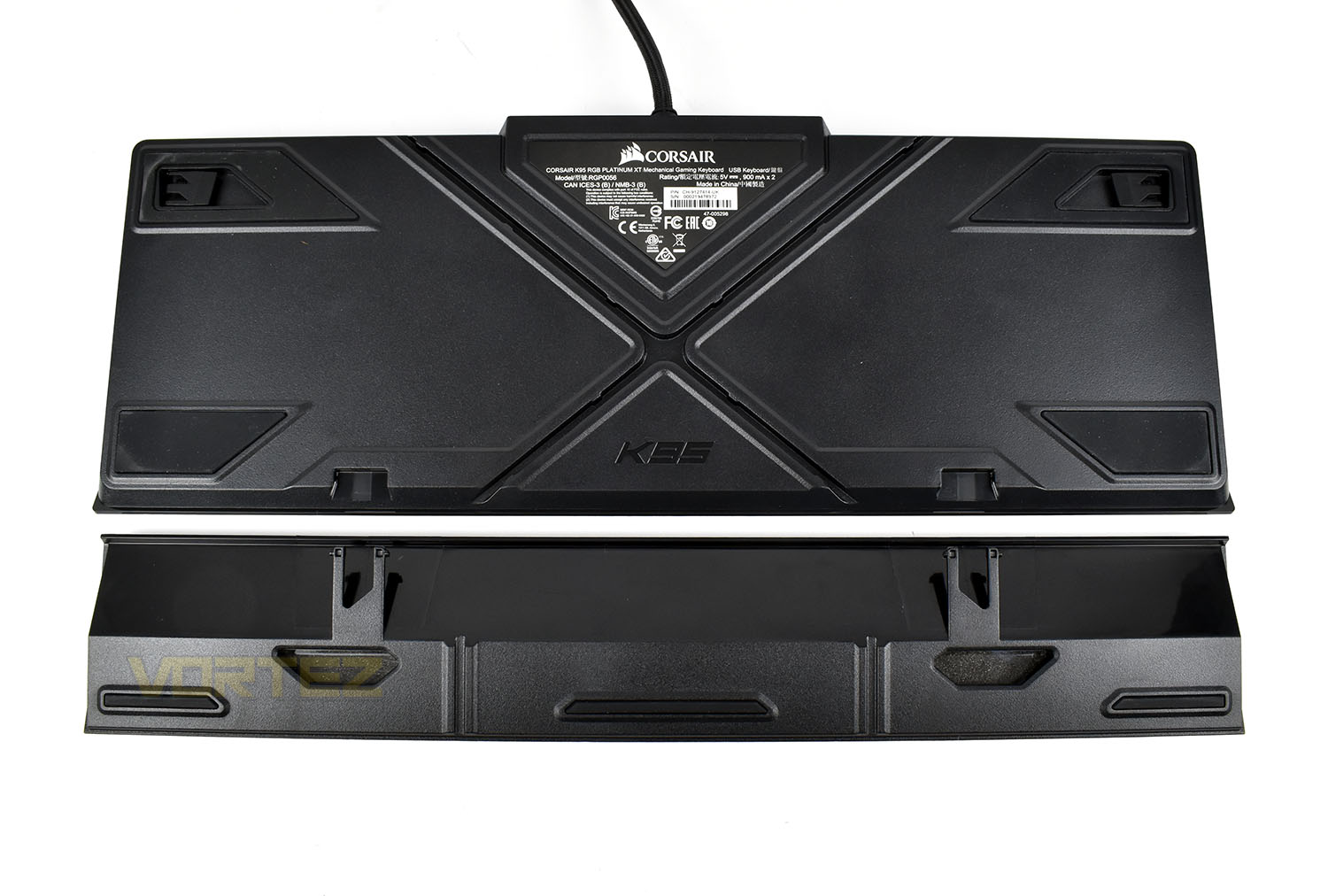
Finally, flipping the keyboard on its belly, we can see the massive rubber pads on the base, designed to keep things stationary on all surfaces. The kickstand feet in the top corners, as we saw earlier, raise the keyboard by roughly 13mm.
The X in the middle of the keyboard is designed to offer an easy way of routing your headset through and under the keyboard without causing a see-saw effect and while others might rely on magnets, CORSAIR has held strong with using plastic clips for the palm rest, locking it into place.
Software
Unusually, for a keyboard review, there’s more than one piece of software to review. Of course, there’s CORSAIR’s iCUE software which controls the majority of the keyboard’s functions but the Elgato software also comes into play this time, for the six keys on the left.We’ll start off with the CORSAIR iCUE software:
As you can see, nothing has changed hugely since previous versions; it’s still easy to use, looks good, responds quickly and overall is just a great piece of software.
Next up is the Elgato software, the same Elgato Stream Deck software that you would use for one of their bespoke Stream Decks.
The software clearly shows that the keys can be assigned any function you fancy, with the only real downside being the lack of the LCD displays on top of the buttons, however, as a next-best-thing, Elgato have added an Action Bar into their software (this can be closed down if you wish) that you can drag anywhere on the screen to remind of what each of the 6 buttons does.

Performance Testing
Unlike some keyboards that arrive with a 6-month-old Firmware and take 5 minutes to set up, the CORSAIR K95 RGB Platinum XT was as simple as plugging in and away it went, with the latest version of the iCUE software installed, obviously. The lighting lit up immediately and started showing off what it can do. To fully utilise the keyboard, you will require two USB 2.0 ports, one for the keyboard itself and the other for the USB 2.0 passthrough.First impressions with the keyboard were dominated by just how much real estate the thing requires, it’s by no means a small keyboard, but it does offer brilliant comfort and a no-compromise approach to giving you the weapons you need to win games. The keyboard feels well-made, as do all of CORSAIR’s keyboards it has to be said, and resists movement on the desk well, thanks to the large rubber pads on the base and its heavy weight.

The sample we were provided is loaded with the CHERRY MX Speed switches, these are tuned to provide a fast and linear switch that shaves off valuable milliseconds, with it’s 1.2mm actuation point as opposed to the typical 2mm, to give you the edge in your games; while that’s all well and good, the typing experience isn’t the best we’ve experienced so you’ll be wanting to go for the CHERRY MX Blue or Brown keyswitches if you plan to use it for a lot of typing. However, for gaming, there isn’t really a better choice. We loaded up the latest Call of Duty: Modern Warfare and War Thunder, two games we’re very fond of at the moment, and both performed perfectly. We then switched out the ordinary, flat keycaps and replaced the WASD keys with their checker-plate alternatives. These keycaps are curved and raised slightly to make sure you know exactly where your fingers are, and thanks to the textured top, your fingers won’t slip about like they might otherwise.
The keyboard offers full anti-ghosting to ensure your keypresses are always registered regardless of how many you press at once, including the multimedia keys and profile switch etc.
Comfort. This is something I’ve wanted to see for a long, long time on a CORSAIR keyboard, a removable, plush, leatherette palm rest with actual proper cushioning. Some users prefer not to use a wrist rest and that’s fine, it’s optional, but those of us who do like to keep our wrists straight and have somewhere to lean, this is one of the nicest we’ve experienced (beaten only by the Razer BlackWidow Elite’s palm rest, but only just.) The hard plastic, even with the reversible insert that you got with the previous K95, just wasn’t up to scratch.
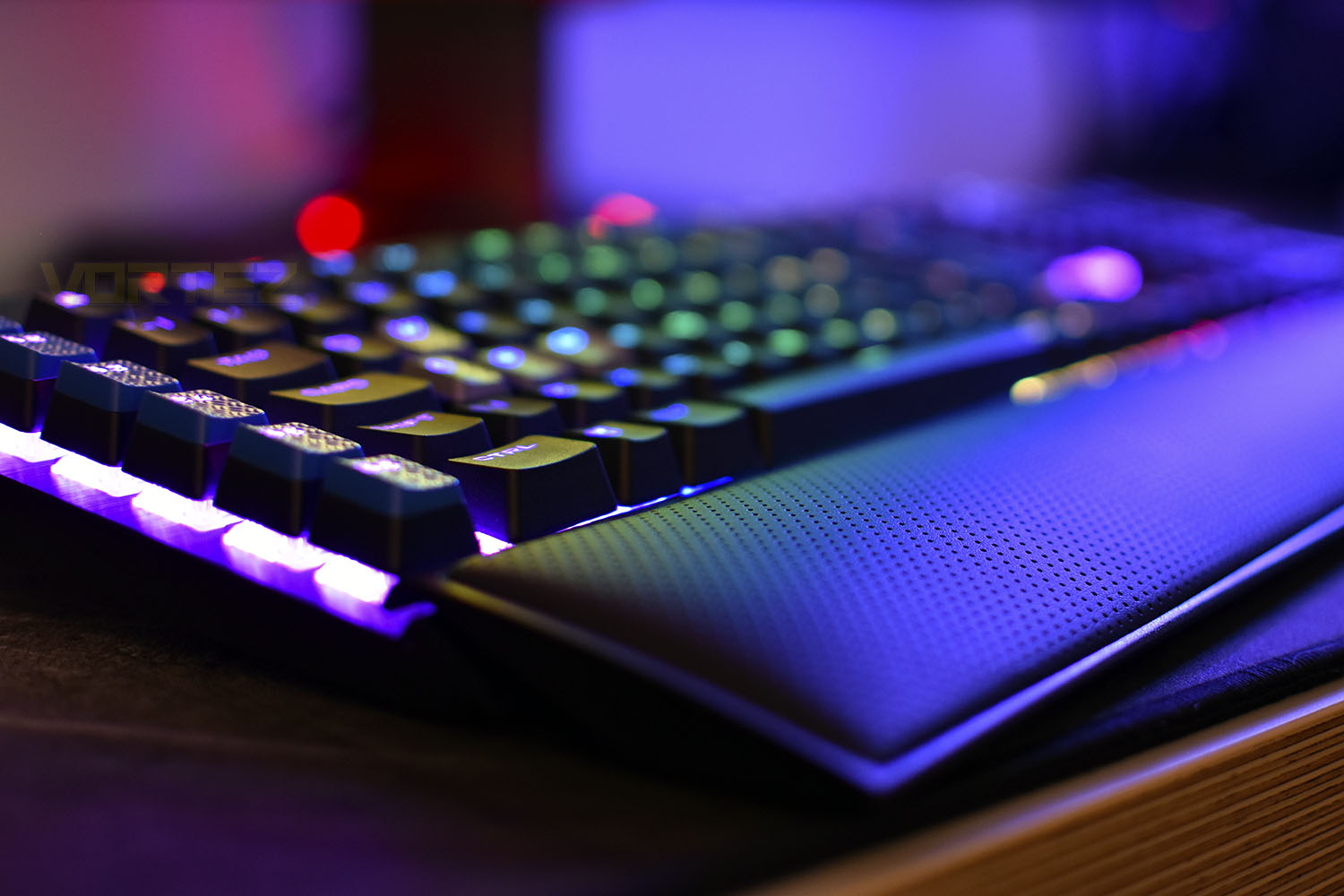
The RGB lighting is somewhere we expected this keyboard to excel. CORSAIR have strived to produce their CAPELLIX LEDs (which are brighter, more vibrant, less power hungry etc) but we don’t see those in the K95 Platinum XT, sadly. This is largely down to CHERRY using their own RGB LEDs within the key’s housing but we suspect the partnership between CORSAIR and CHERRY to be strong enough that a deal could be brokered. Sadly, because of that, the RGB lighting isn’t quite bright enough for a keyboard in 2020, we’ve seen much brighter and more vibrant keyboards from other manufacturers in recent months/years. Having said that, the iCUE software does give plenty of options for effects, and thanks to CORSAIR’s dominance within the PC Gaming sector, you are able to tie in lighting effects across fans, mice, headsets, RGB strips, mousepads, the whole works, for that proper synchronised approach.
One thing that CORSAIR have got down to a T is the volume wheel and multimedia keys, they’re visible even from the most acute of angles to the keyboard and the aluminium scroll wheel feels amazing, it’s weighted perfectly and lacks the notchy feel of other implementations that we’ve seen. The only criticism we have here is the mushy synapse buttons that have been used here; we’d like to see CORSAIR do something about this in the future to imitate something a little closer to the CHERRY MX keyswitches used everywhere else.
Conclusion
Considering the £210/$200/$330 (UK/US/AUS) pricetag, CORSAIR really couldn’t leave anything in the dressing room, they needed to go the whole hog here; but we’re pleased to tell you, they’ve done a cracking job!First off, build quality. CORSAIR have this aspect of their peripherals absolutely nailed at this point, everything we receive to review is packaged well, comes with the right accessories, and everything is finished to a premium standard. We have absolutely zero concerns regarding the longevity of this keyboard.
Gaming on the K95 Platinum XT was as good as it gets, particularly in FPS games with the WASD replacement keys in place. The 1.2mm actuation point of the speed keys paired with the cushioned wrist rest was excellent, truly excellent. While we don’t have it here, we fully suspect that if you planned to use the PC for a lot of typing as well as gaming, the CHERRY MX Brown option would be the best way to go.
Sadly, the RGB lighting was quite bright enough for us, but the effects built into the software, the transition in colour and the ability to pair this up to masses of different components does somewhat make up for that. We love the lightbar across the top as well, it’s something different and adds another section that you can either love or hate.
The Elgato integration, due to CORSAIR taking ownership of them in 2018, is an excellent way to add real value to the keyboard. Sure, the macro options were all well and good, but Elgato’s expertise in this section are specialised and much more valuable. A 6-button Elgato Stream Deck Mini is £80, and sure it has the LCD screens on the buttons, but once you know what each of them do, those LCD screens become redundant anyway, so you could argue that this saves you £80, if you were going to buy a Stream Deck Mini.
Finally, the plush palm rest. This is, and I’m not mincing my words here, the final piece of the puzzle that CORSAIR keyboards were missing. I’ve often said I would love to own one but the hard plastic wrist rest killed the deal each time, but now they’ve resolved that ‘issue’, I’m buying one, with CHERRY MX Brown keyswitches.
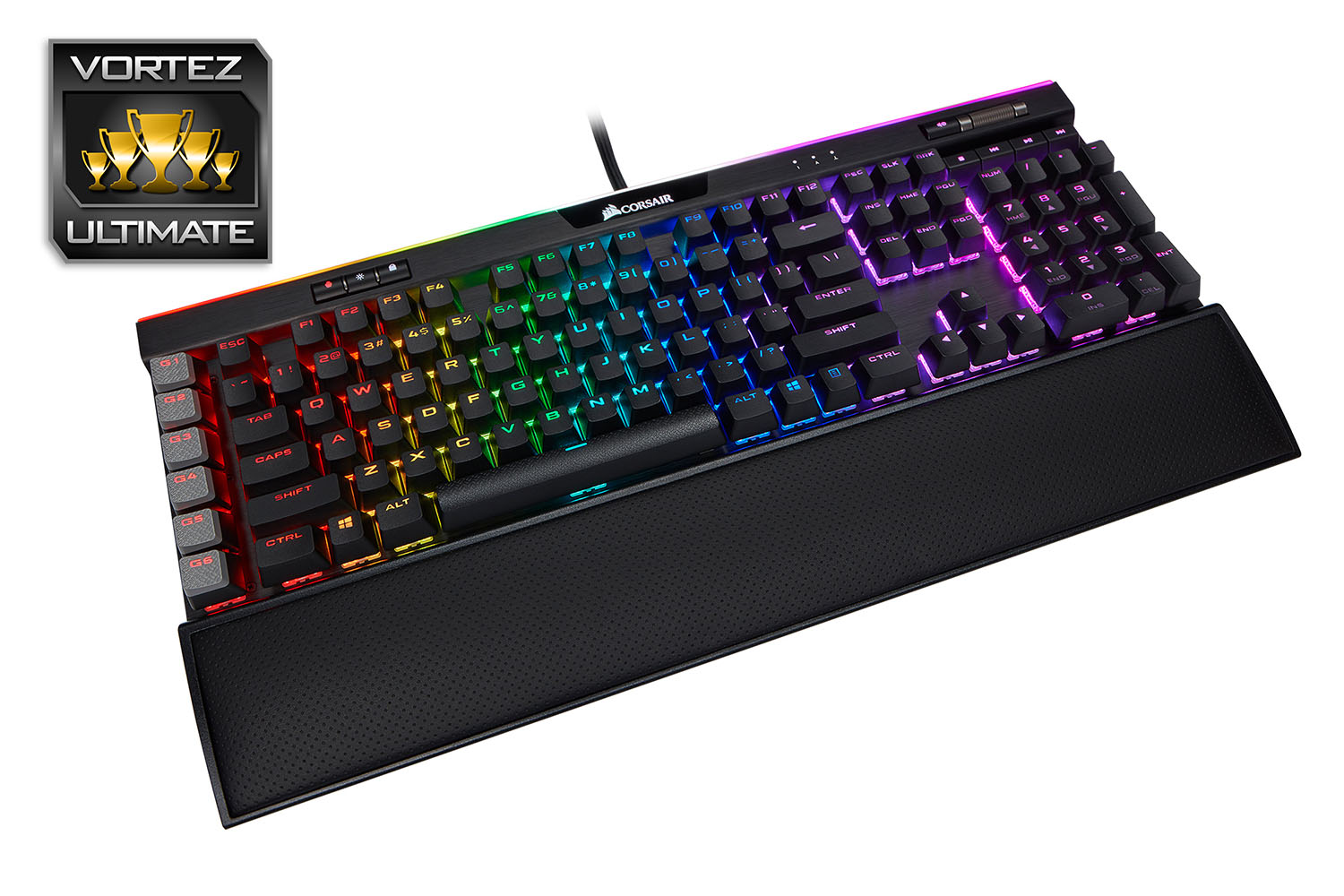
The K95 RGB Platinum XT, and this was an easy conclusion to make, is the best keyboard I’ve used to date. Great software support, Elgato built-in, CHERRY MX Brown switch availability, a plush wrist rest, stunning design and rock solid build quality.
Pros
+ Beautiful design
+ Extra comfortable thanks to the wrist rest
+ CORSAIR build quality
+ Great software
+ Elgato support
+ Extra keycaps included
+ Full anti-ghosting
+ Has a USB passthrough
+ Choice of CHERRY MX Speed, Brown or Blue
Cons
– RGB backlighting isn’t the brightest
– Only USB 2.0 passthrough
– Relies on two pieces of software
+ Beautiful design
+ Extra comfortable thanks to the wrist rest
+ CORSAIR build quality
+ Great software
+ Elgato support
+ Extra keycaps included
+ Full anti-ghosting
+ Has a USB passthrough
+ Choice of CHERRY MX Speed, Brown or Blue
Cons
– RGB backlighting isn’t the brightest
– Only USB 2.0 passthrough
– Relies on two pieces of software
Click here for an explanation of our awards at Vortez.net.
Stay connected with the Vortez Social Media pages:
Join in with the discussions on Discord