The SABRE RGB PRO returns, this time in wireless form, but can a mouse on the larger size keep the weight down and stay competitive in its transition to cable-free gaming?

Product on Review: SABRE RGB PRO WIRELESS CHAMPION SERIES
Manufacturer: CORSAIR
MSRP:
– UK: £89.99 inc. V.A.T.
– US: $109.99 excl Tax
– EU: €99.99 inc. Tax
– AUS: AU$169.00 inc. Tax
Introduction
In 2021 we can say with some confidence that there’s no more competitive segment in the PC market than the peripheral segment. Dozens upon dozens of models; lightweight to heavyweight; per-genre adaptations; aesthetics and lighting; pick a niche there are multiple models catering to it, all contributing to a very healthy state of affairs with room for minnows through to major players. And that’s where we come to the manufacturer of the latest hardware tested for review, CORSAIR.
Earlier this year CORSAIR launched the SABRE RGB PRO, a fresh take on the range of the same name with a heavy emphasis on low weight yet larger dimensions. It is part of an ongoing refresh to their product lineup being undertaken through the past year or so similar like the KATAR PRO and HS80, implementing new technologies and more generally adapting to changing consumer preferences.
The SABRE RGB PRO WIRELESS builds on the foundations laid by the SABRE RGB PRO in a very real sense. The shape and low-weight focus remains the same, but core components are changed to better suit the twin tenets of mobility and flexibility while maintaining or even extending its gaming credentials.
In common with the KATAR PRO WIRELESS the SABRE RGB PRO WIRELESS integrates both Bluetooth 4.2 + LE and CORSAIR’s own SLIPSTREAM 2.4 GHz technology. The former makes it more broadly compatible with non-desktop devices, particularly Chromebooks and Apple iOS hardware, while the latter is a proprietary low-latency protocol that’s ideal for twitch gaming. A battery life span of up to 90 hours means it can keep on trucking for extended sessions without worrying too greatly about running out of power before you’re ready to charge it.
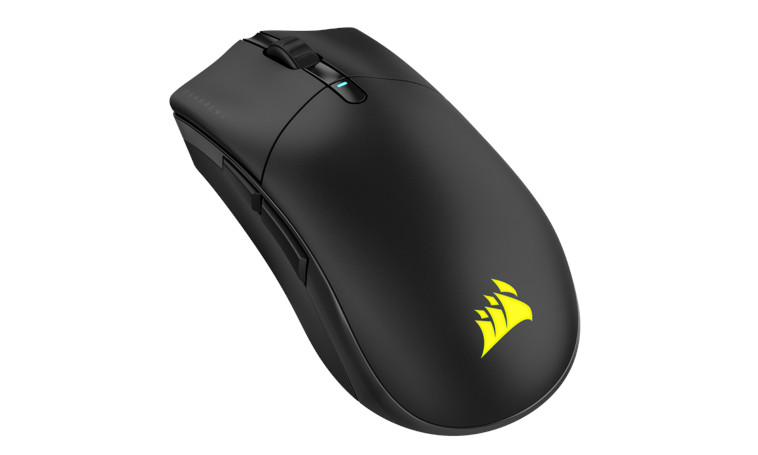
Pushing the gaming angle further is a new custom optical sensor dubbed the MARKSMAN that’s been developed in conjunction with imaging specialists PixArt. Operating at a resolution of up to 26000 DPI, tracking at up to 650 IPS and capable of handling acceleration of 50G without breaking a sweat, the MARKSMAN is a considerable on paper upgrade from the PixArt PMW3392 of the SABRE’s wired counterpart.
The SABRE RGB PRO WIRELESS arrives as part of CORSAIR’s CHAMPION SERIES, a category of peripherals with pretensions towards Esports representation. They all boast top performing components and, with the range now relatively broad, the overall theme is offering plenty of variety for high calibre gamers with varying preferences in shape, weight and performance dynamics.
The SABRE RGB PRO WIRELESS has a £40 premium over the wired model, coming in at $109.99 or £89.99 inc. V.A.T. in the UK. Its competition among wireless mice in the £60-£90 bracket is fierce, particularly when judging by today’s street price rather than MSRP; Logitech, SteelSeries and Razer all have popular and entrenched models available today in the same ballpark. The SABRE will be hard pressed to pull ahead, needing some compelling secret sauce in addition to RGB iCUE lighting and a high tech. sensor.
About the CORSAIR SABRE RGB PRO WIRELESS
The CORSAIR SABRE RGB PRO WIRELESS Gaming Mouse is designed for and tested by esports pros, weighing an ultra-light 79g and equipped with SLIPSTREAM WIRELESS technology to achieve lightning-fast response times and 2,000Hz hyper-polling. CORSAIR QUICKSTRIKE buttons provide zero gap between the primary mouse buttons and their switches for fast and responsive clicks. The SABRE RGB PRO WIRELESS boasts a 26,000 DPI MARKSMAN optical sensor customizable in 1 DPI steps, with a dedicated button to cycle through five DPI presets on-the-fly. Finished with high-quality materials such as 50 million click-rated OMRON switches and 100% PTFE glide pads, the SABRE RGB PRO WIRELESS cuts through the competition. At an MSRP of $109.99 USD, the SABRE RGB PRO WIRELESS CHAMPION SERIES is tournament primed and ready.
Technical Specifications
Model: SABRE RGB PRO WIRELESS CHAMPION SERIES
Colour: Black
Sensor: CORSAIR MARKSMAN
DPI: 26,000 DPI optical sensor; 1 DPI resolution steps
Polling Rate: up-to 2000Hz
Tracking: 650 IPS tracking
Acceleration: up to 50G
Connectivity:
– 2.4GHz CORSAIR SLIPSTREAM
– Bluetooth 4.2 + LE
– USB 2.0 (Optional, USB-A to USB-C, braided 1.8m cable)
Battery:
– Integrated lithium-polymer charged via supplied USB-A to USB-C cable
– Up-to 60 hrs life (SLIPSTREAM without RGB lighting)
– Up-to 90 hrs life (Bluetooth without RGB lighting)
Programmable Buttons: 6*
Switch Technology: OMRON microswitches
Onboard Profiles: 3
Lighting: 2-Zone RGB (single zone addressable*)
Dimensions: 129.0mm(L) x 70.0mm(W) x 43.0mm(H)
Weight: 79g
Warranty: Two Years
Colour: Black
Sensor: CORSAIR MARKSMAN
DPI: 26,000 DPI optical sensor; 1 DPI resolution steps
Polling Rate: up-to 2000Hz
Tracking: 650 IPS tracking
Acceleration: up to 50G
Connectivity:
– 2.4GHz CORSAIR SLIPSTREAM
– Bluetooth 4.2 + LE
– USB 2.0 (Optional, USB-A to USB-C, braided 1.8m cable)
Battery:
– Integrated lithium-polymer charged via supplied USB-A to USB-C cable
– Up-to 60 hrs life (SLIPSTREAM without RGB lighting)
– Up-to 90 hrs life (Bluetooth without RGB lighting)
Programmable Buttons: 6*
Switch Technology: OMRON microswitches
Onboard Profiles: 3
Lighting: 2-Zone RGB (single zone addressable*)
Dimensions: 129.0mm(L) x 70.0mm(W) x 43.0mm(H)
Weight: 79g
Warranty: Two Years
Two aspects of the SABRE RGB PRO WIRELESS’s design stand out among a laundry-list of features that aren’t uncommon on a mouse of this class.
CORSAIR MARKSMAN Sensor
This 26,000 DPI sensor debuts with the SABRE RGB PRO WIRELESS, and we suspect that it will not be the last we see of their new design. It’s developed in partnership with PixArt, manufacturer of other high quality optical sensors for gaming mice and with whom they’ve negotiated similar semi-custom sensor models in the past.
From a raw DPI standpoint the MARKSMAN surpasses even Logitech’s HERO sensor (which is capable of 25,600 DPI in its most recent iteration), and we imagine that’s no coincidence. But what’s more impressive are those headline figures for maximum acceleration and speed: 50G and 650 IPS put it comfortably to the head of its class.
The MARKSMAN sensor is the strongest justification for the mouse’s inclusion in CORSAIR’s CHAMPION SERIES.
Wireless Flexibility
CORSAIR SLIPSTREAM is the SABRE’s primary wireless mode, a proprietary 2.4GHz technology that maintains low latency between transmitter and receiver. Such is the strength of the technology that in this iteration the hardware supports a higher than normal polling rate – 2000Hz – as a further support for low latency operation.
A subset of SLIPSTREAM wireless receivers and devices also support multipoint pairing, allowing more than one device to be paired with a receiver. In theory, this can cut down on the number of required USB ports significantly, but as we’ll see the pairing process can make this a little more tricky than one expects.
Bluetooth meanwhile is more oriented towards workplace productivity rather than gaming, broadening support outside of desktops and laptops with a surplus of USB ports. Bluetooth LE is a Low Energy variant of the protocol, reducing power consumption with supported receivers at a cost to performance attributes.
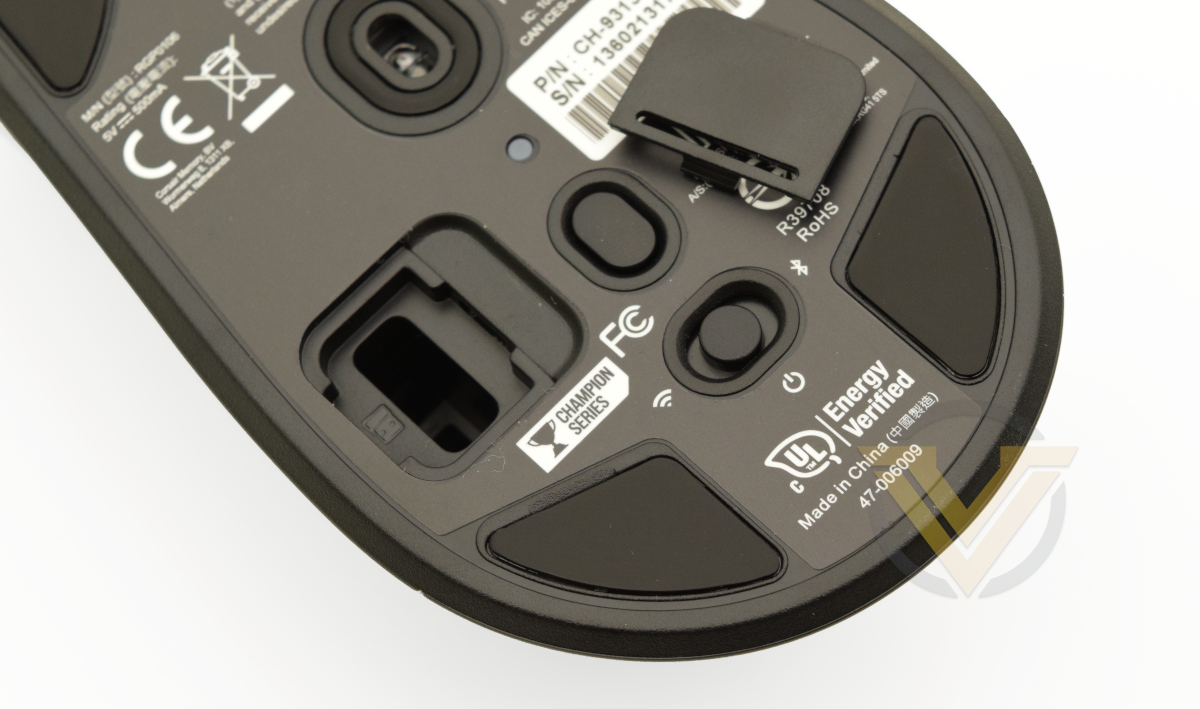
When not in use the compact SLIPSTREAM USB receiver can be tucked away inside a compartment accessible on the floor of the mouse.
Wired Backup
The SABRE PRO RGB WIRELESS is also bundled with a 1.8m long USB-A to USB-C charging cable that also facilitates a wired mode (with full functionality otherwise). CORSAIR appear to be transitioning to USB-C ports across their peripherals where it can be supported on the device itself, potentially as a means of future-proofing the range for a time when the USB-C standard (and USB-C to USB-C cables) has become ubiquitous across PCs, Macs and other platforms.
Other Highlights
CHAMPION features continue with OMRON microswitches, a proven brand for long-term reliability, consistency and durability. The wireless SABRE RGB PRO also on-board memory for three profiles that don’t require iCUE software to operate, making it an excellent candidate for console gaming across multiple games with diverse genres. Underscoring that, on-the-fly DPI adjustment allows you to tune mouse sensitivity through the hardware itself.
Discrepancies
CORSAIR sent us a Reviewers Guide alongside the mouse to better spell out its specifications and explain some of the features where the functionality might not be obvious. This isn’t uncommon, but we should make note of the fact that there were two significant discrepancies between the listed specs and the specs exposed in the iCUE software (v4.15.153).
The mouse was described as having 7 programmable buttons, but iCUE only identifies 6: Left and Right Click, Middle Click, DPI Toggle, Forward, and Back. Furthermore, the Left Mouse Button is only programmable once another button has been set to the LMB default. It’s possible that the Profile Switching button at the base of the mouse is intended as the seventh but there are no options to rebind or otherwise modify it through iCUE at present.
Secondly, two Lighting Zones are advertised through the Guide but only one – the RGB Logo – is visible in normal use. Technically the indicator LEDs located on the DPI Toggle button or above the Profile Switch button on the bast might be ‘lighting zones’, but they’re configurable only as an indicator of the current active DPI Stage/Profile (and then only for ~5 seconds). Given the tools available and CORSAIR’s prior classifications of ‘Lighting Zones’ as highly configurable and semi-independent mouse attributes, customers would have every right to feel disappointed over the disingenuous listing if replicated on the official website at launch.
Errors do crop up from time to time in reviewers guides so we’re fairly relaxed at this point, but the final published tech. specs needs to reflect the actual capabilities of the device in question.
Packaging and First Look
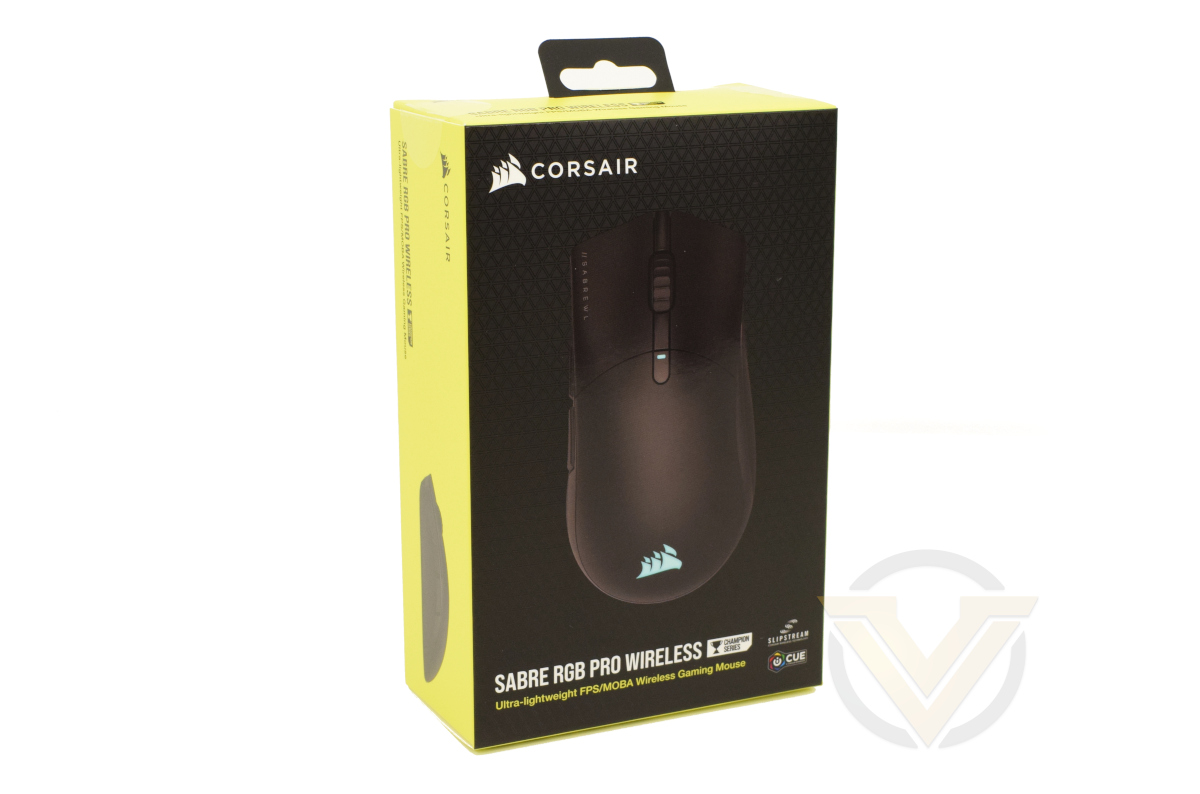
Packaging for the SABRE RGB PRO WIRELESS is almost identical to that of the non-wireless model from the front at least. You don’t get a lot of information on the features of this model however – not even Bluetooth support is mentioned here – which somewhat undersells the design.
CORSAIR SLIPSTREAM and iCUE are both subtly called out but aside from those technologies the only major feature highlighted is the mouse’s lightweight nature. There’s more however on the back.
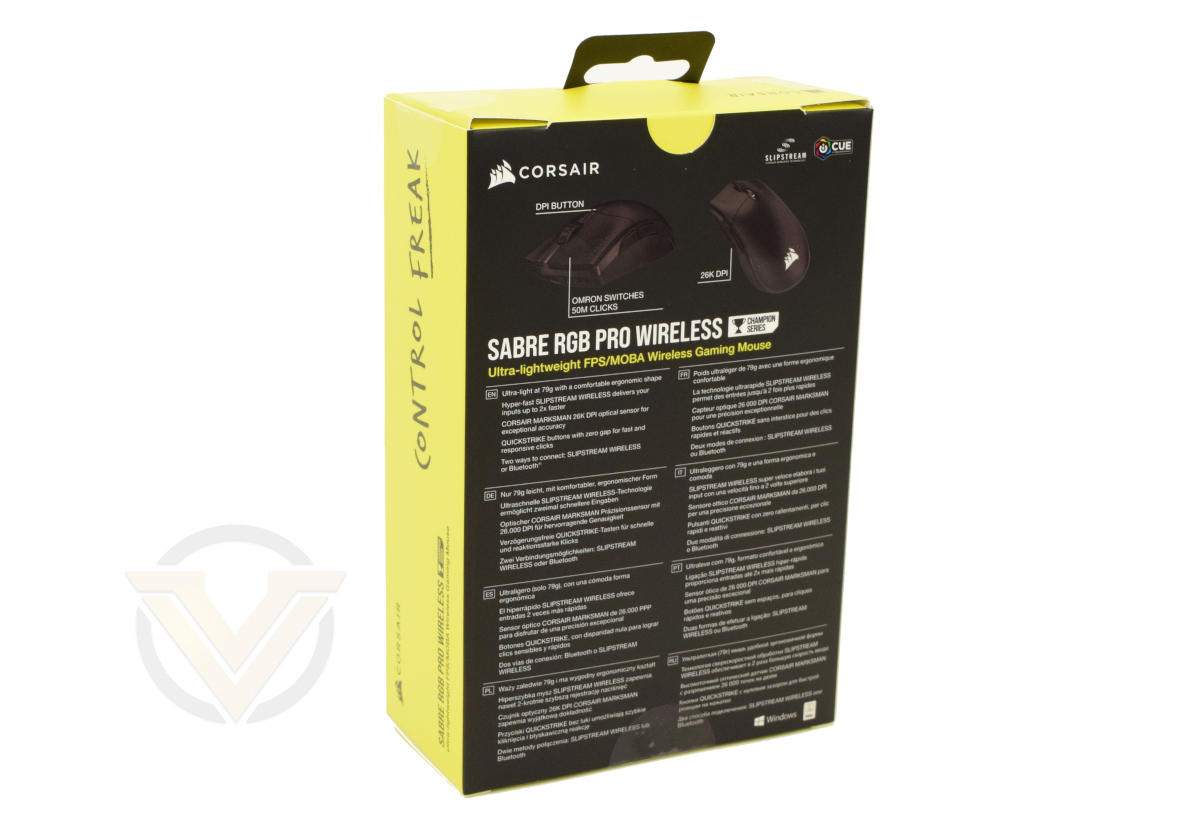
OMRON switches and the 26K DPI optical sensor are the two headlines on the rear packaging, while a handful more are also listed just below. Inferred rather than stated outright is that the SABRE RGB PRO WIRELESS is a rechargeable mouse with integrated battery, even the fact that it connects with a USB-A to USB-C cable goes unmentioned.
Given how important it can be to many consumers, it’s curious that CORSAIR don’t highlight the expected battery life of the mouse. While up-to 90 hours on Bluetooth (or much less with SLIPSTREAM) might not be much to boast about, it’s still important information to convey.
CORSAIR relies on a set of four icons on the packaging base to indicate what’s inside rather than itemising its contents: the mouse, a compact USB receiver, cable and documentation. At no point do they mention what sort of a cable it is.
The majority of the packaging is cardboard and (in theory) recyclable plastics, but we wouldn’t be against seeing the elimination of single-use plastics like those surrounding the USB connectors.
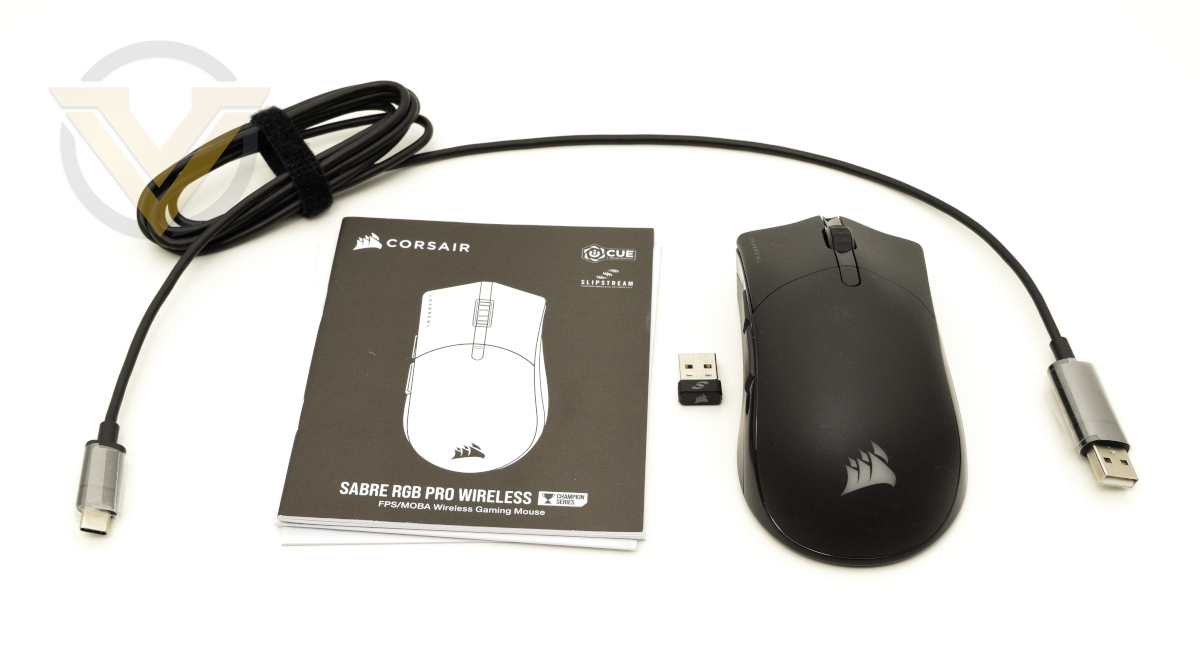
And here’s our first look at the SABRE RGB PRO WIRELESS and included accessories.
The documentation includes a fairly detailed instruction manual that lays out how to get started with the mouse and takes you around its key physical attributes. Alongside it is the obligatory warranty guide in plenty of languages.
CORSAIR are continuing to divert information from packaging and onto the official product website, which in of itself it’s too much of an issue on a product like this. They could come unstuck on more complex devices however, or simply by omitting information that is implied to be present but not confirmed outright.
Closer Look
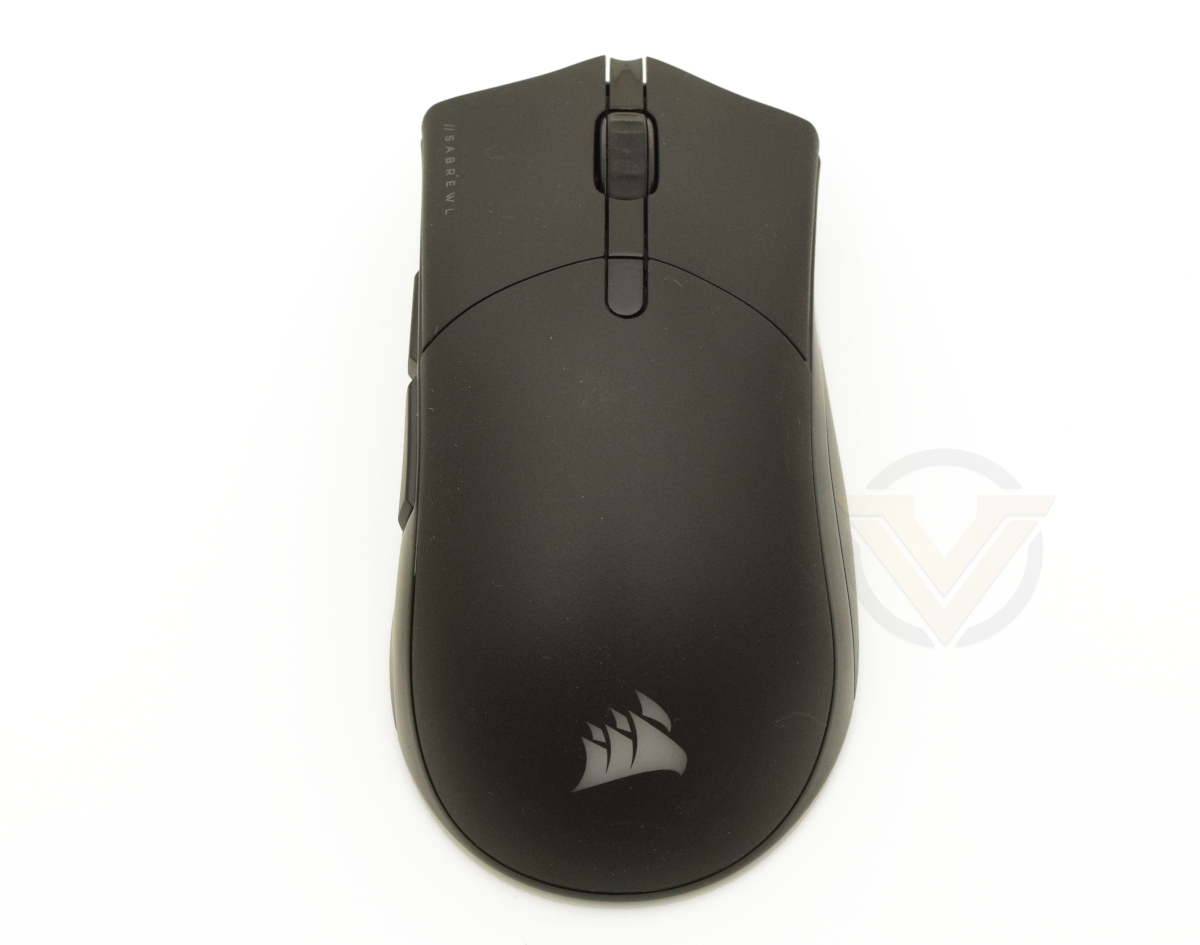
The SABRE RGB PRO WIRELESS has a shape that’s essentially identical to that of the non-wireless variant: asymmetric and flaring at both ends with amble palm support. It is large in comparison to the majority of modern mice but not uncomfortably so, and may be preferred by gamers with larger hands or a grip that’s suited to this size.
From the top down there’s the LMB and RMB, mouse wheel, DPI cycling switch (the shiny section below the wheel and both main buttons) and the illuminated CORSAIR RGB logo at the bottom of the shell. Another LED is present on the DPI Cycling Button but, as an indicator LED that’s illuminated for brief periods of time, its usage is functional rather than aesthetic in nature.
“//SABREWL” is printed on the left edge of the LMB, which is a bit of trim that’s a distinctive flourish CORSAIR have been adding to their most recent peripheral releases.
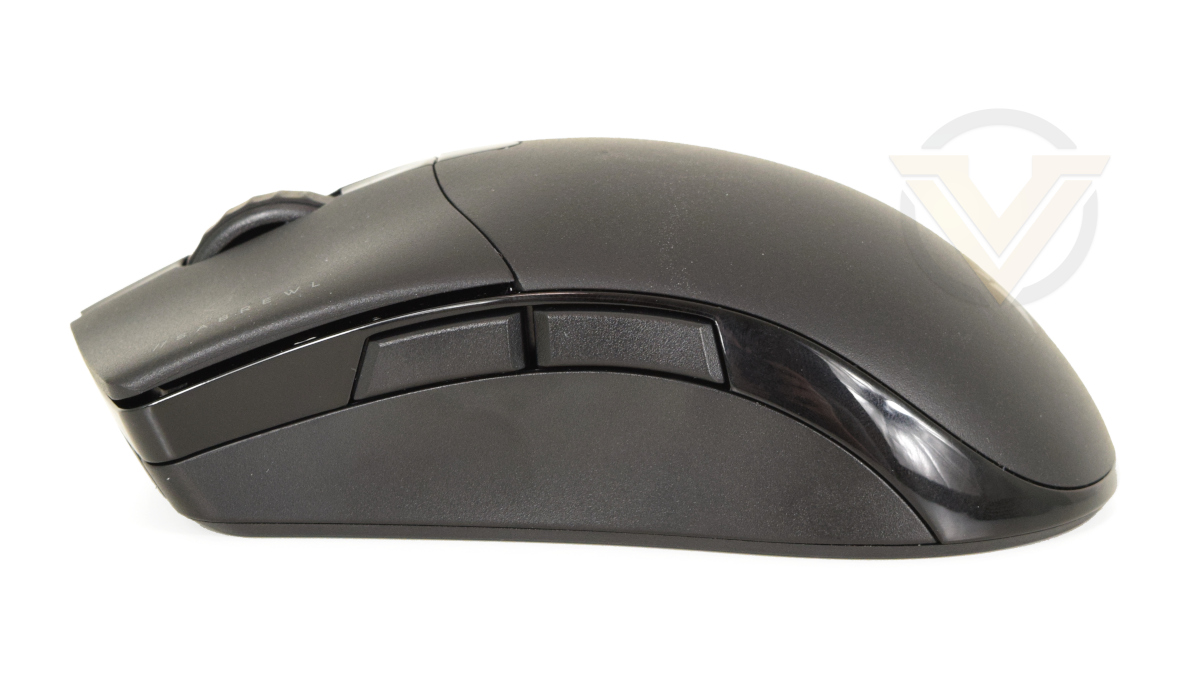
The side is once again shaped like non-wireless SABRE PRO, with two very slightly separated thumb buttons and some glossy plastic trim running around the perimeter. The sidewall section below the thumb buttons is just slightly concave, contoured to a thumb and making it easier to grip the mouse and lift it off the mousing surface.
One change from the original model however is the lack of DPI stage indicator LEDs at the leading edge. That functionality has been moved to the top of the mouse, likely saving a couple of crucial grams, and it’s fair to say that the older implementation wasn’t perfect as an ‘at a glance’ indicator – it had a great location, but telling the DPI stage from the number and location of 1-2 illuminated LED bars (rather than just colour) in a fraction of a second didn’t really work well.
The opposite side has no buttons and the same glossy plastic trim running around the edge. The side wall is angled outward rather than inward, supporting fingers and palm but also making lifting the mouse slightly more difficult than it would otherwise be. You’ll be relying on the inherent grippiness of the plastic surface to lift the mouse, and either way will be lifting unevenly rather than optimally horizontal.
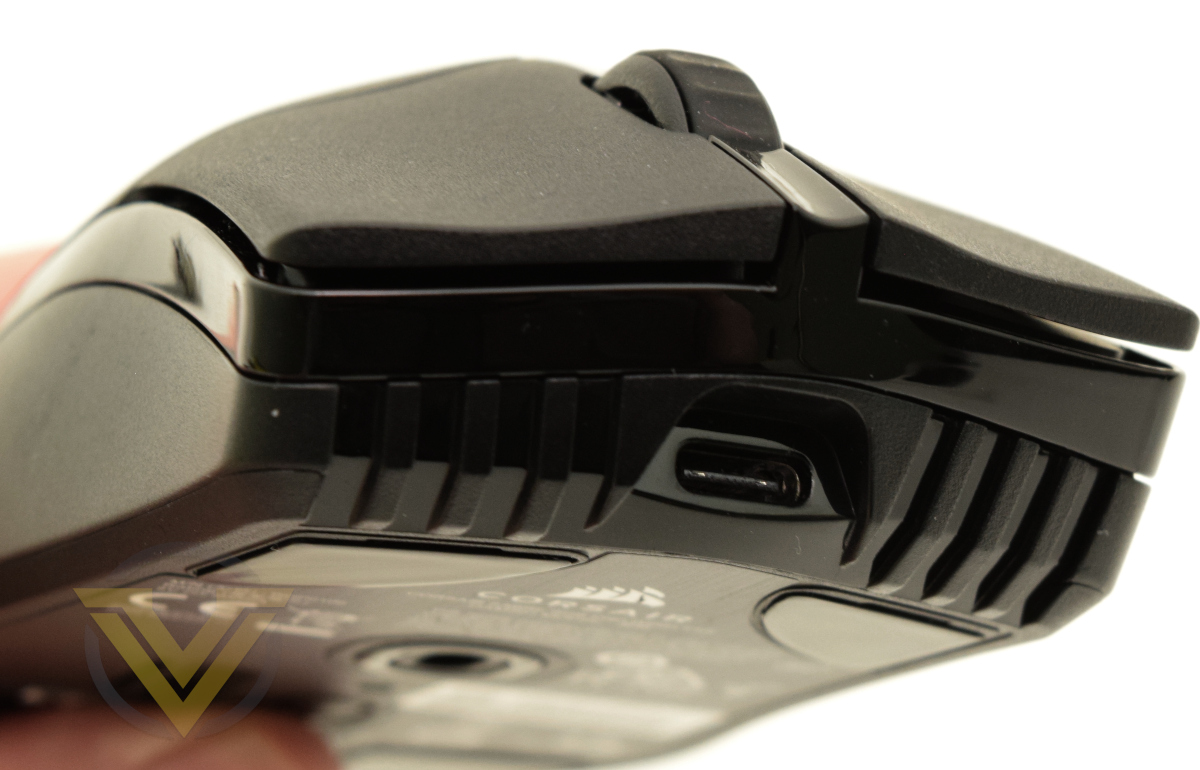
A USB Type-C connector port is positioned front and centre recessed within a slightly narrowed entryway; most but not necessarily all USB-C cables should fit the port (and certainly the cable shipped with the mouse). It’s ideally located for using the mouse when it’s charging, maintaining overall balance for continued use when gaming, browsing etc.
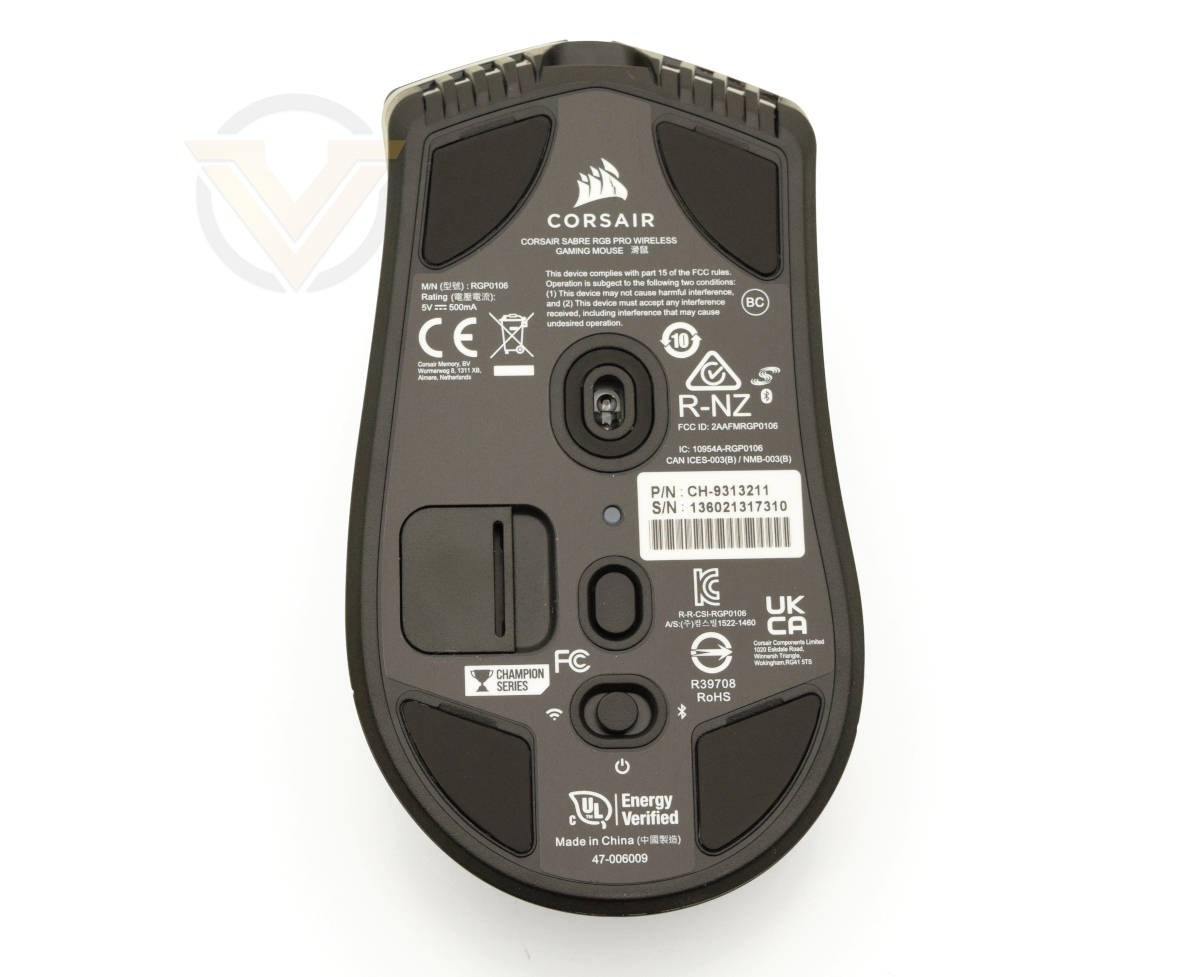
The base is a little more busy than the wired SABRE RGB PRO. Four friction-free skates will keep the mouse sliding freely on most mousing surfaces despite the mouse base’s large surface area, while a further section surrounds the optical sensor and protects the opening from lint and catching on fabric surfaces.
To the left and below the sensor is a compartment for storing the USB mini-reciever. It’s very slightly recessed into the base and so shouldn’t catch on uneven surfaces, but expect to have it cause a little more wear on fabric mouse mats. Be gentle with the clip holding it in place however as it’s not the most rugged of designs.
Next to it is the dedicated Profile Switching button with an indicator LED just above it. This LED can be set to different colours on a per-profile basis for both onboard and software profiles, and briefly flashes when the active profile is changed.
Below this button is a 3-way switch setting the wireless mode (with a central ‘Off’ position). When set to off the mouse will still operate when connected via the included cable.
Software and Lighting
The SABRE RGB PRO series, like the vast majority of CORSAIR’s peripheral lineup, leverages the iCUE software suite for device configuration and lighting setup. While the mouse can be used immediately out of the box with no additional software installed, pairing it with iCUE unlocks more functionality and synergies with other members of the range.The latest version of iCUE is required to operate all the features of the SABRE RGB PRO WIRELESS; those running prior versions will need to update, but assignment and lighting profiles should still be fully carried forward without additional steps.
Tests were performed with iCUE v4.15.153.
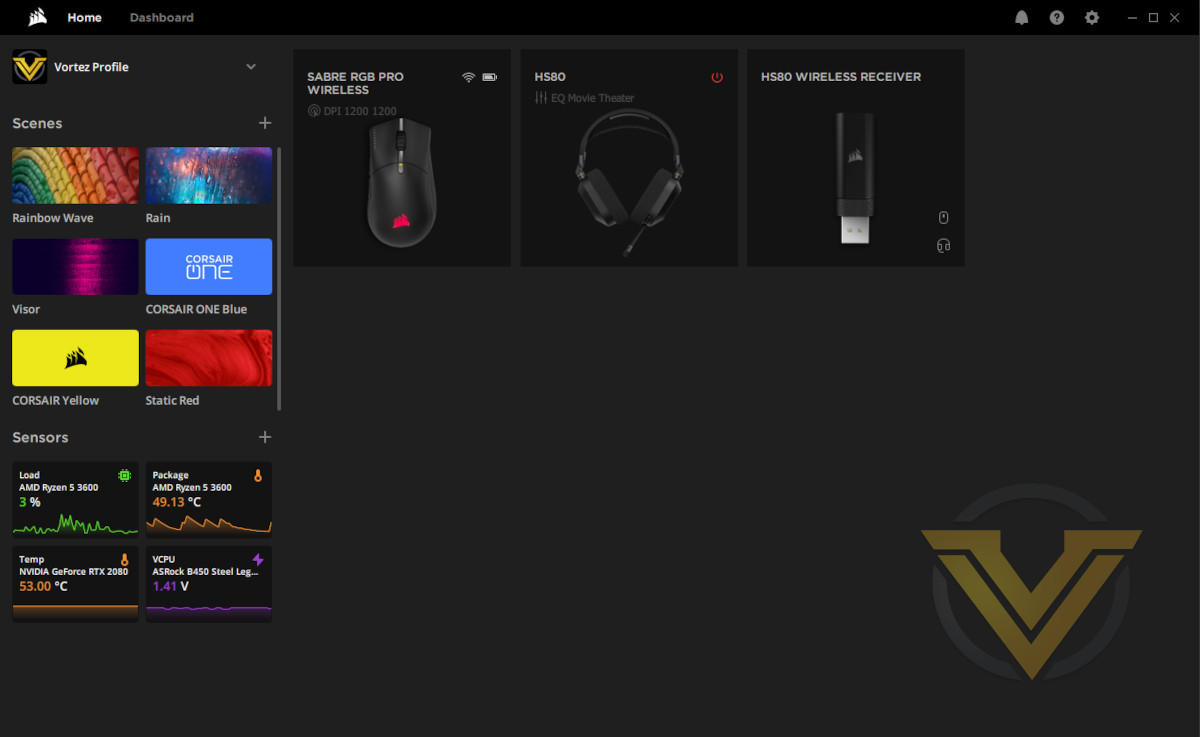
Upon installation and startup you’re greeted with a Home screen that lays out each connected iCUE compatible device, some quick lighting ‘scene’ configurations that you can apply to these peripherals, any sensor data you might be tracking (such as CPU temperature and VCORE), and a drop-down menu for the current active profile. Device configuration is set up on a per-profile basis that will override any onboard hardware profiles.
A small indicator icon also indicates the connection status and battery charge level of any attached wireless devices, the latter of which can also be replicated in the Windows 10 notification bar. Battery levels are High/Medium/Low/Critical rather than percentages.
If a wireless receiver is installed then a small icon indicates the connected devices. Here the HS80 and SABRE RGB PRO are both connected to a single receiver through Multipoint pairing.
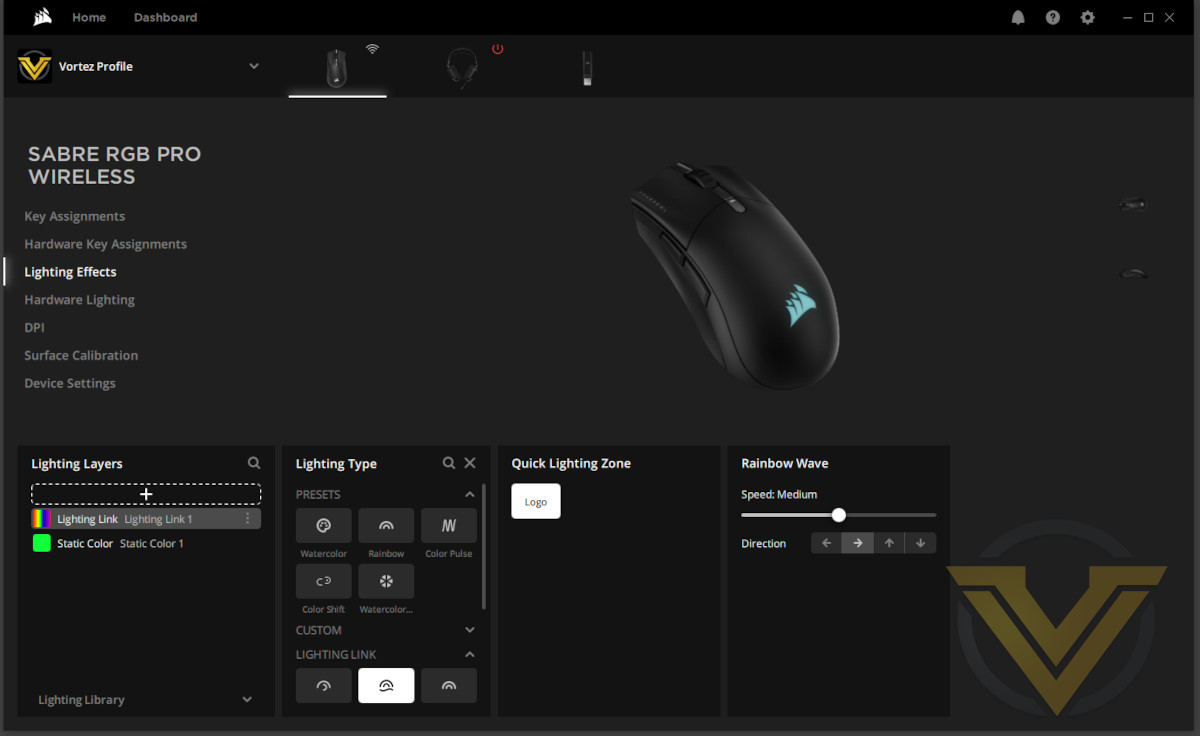
Clicking on each device brings up its main configuration page. The SABRE RGB PRO WIRELESS has seven configuration sub-categories:
Key Assignments allows you to remap each of the six buttons to keystrokes, macros and other inputs. It’s very similar to methods for rebinding other CORSAIR peripheral keys and buttons, and it’s possible to retain the default button behaviour while layering another assignment on top of it if desired.
Hardware Key Assignments is similar in style but serves as a holding page for button assignments prior to being uploaded to onboard memory. Note that the non-wireless SABRE RGB PRO had no extended onboard memory for multiple profiles so this feature wasn’t available.
Lighting Effects configures the Logo’s RGB Lighting with a static colour, pre-defined effect, or custom layered effect. The SABRE RGB PRO WIRELESS has one configurable lighting zone, whereas the SABRE RGB PRO had both the logo and an illuminated mouse wheel.
Hardware Lighting is another holding page, this time for a lighting schemes stored on an onboard profile. Both Assignments and Lighting are active only when not connected to a PC with iCUE installed.
DPI is where you’re able to set and selectively disable the SABRE’s five DPI stages. Each stage can be identified by a custom colour that the indicator LED will briefly flash once the Stage is active.
Two additional hardware profiles are also available for when the mouse is in standalone modes. A Sniper Stage can be configured too with functionality bound to a mouse button.
Surface Calibration sets the sensor up to scan the mousing surface and configure firmware settings based on readings for quality, uniformity etc.
Device Settings is something of a catch-all for anything not appropriate for the other categories. Functionality such as notifications, USB polling rate, Battery Status and more can be found here.
Through Device Settings profiles can be uploaded to onboard memory, comprising both button assignments and lighting of the current active settings configured under Hardware Key Assignments and Hardware Lighting. The SABRE RGB PRO WIRELESS can accommodate up to three profiles in internal memory, cycled through the button at the base of the mouse.
Hardware Key Assignments is similar in style but serves as a holding page for button assignments prior to being uploaded to onboard memory. Note that the non-wireless SABRE RGB PRO had no extended onboard memory for multiple profiles so this feature wasn’t available.
Lighting Effects configures the Logo’s RGB Lighting with a static colour, pre-defined effect, or custom layered effect. The SABRE RGB PRO WIRELESS has one configurable lighting zone, whereas the SABRE RGB PRO had both the logo and an illuminated mouse wheel.
Hardware Lighting is another holding page, this time for a lighting schemes stored on an onboard profile. Both Assignments and Lighting are active only when not connected to a PC with iCUE installed.
DPI is where you’re able to set and selectively disable the SABRE’s five DPI stages. Each stage can be identified by a custom colour that the indicator LED will briefly flash once the Stage is active.
Two additional hardware profiles are also available for when the mouse is in standalone modes. A Sniper Stage can be configured too with functionality bound to a mouse button.
Surface Calibration sets the sensor up to scan the mousing surface and configure firmware settings based on readings for quality, uniformity etc.
Device Settings is something of a catch-all for anything not appropriate for the other categories. Functionality such as notifications, USB polling rate, Battery Status and more can be found here.
Through Device Settings profiles can be uploaded to onboard memory, comprising both button assignments and lighting of the current active settings configured under Hardware Key Assignments and Hardware Lighting. The SABRE RGB PRO WIRELESS can accommodate up to three profiles in internal memory, cycled through the button at the base of the mouse.
Hardware Key Assignments, Hardware Lighting and Surface Calibration can only be applied to the SABRE mouse if connected via cable, likely to reduce the chances of firmware corruption. The same goes for uploading entire profiles to the mouse.
The current iteration of iCUE for the SABRE RGB PRO WIRELESS is best described as ‘rough around the edges’, lacking polish and with somewhat limited functionality beyond the core of what you’d expect from a gaming mouse.
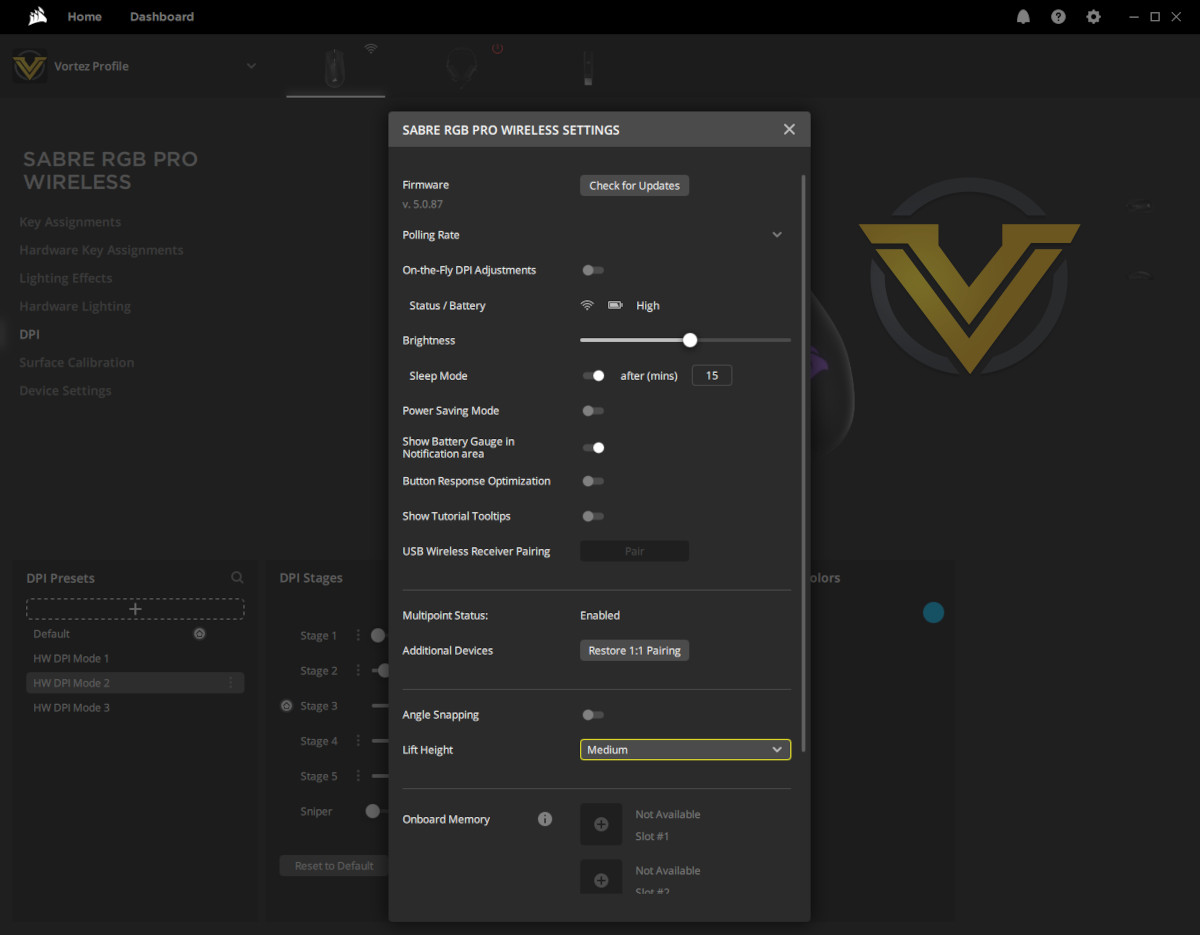
A good example is the simple process of remapping a button. Click any of the boxes labelled ‘Right Click’ etc. and nothing happens; click the button on the graphical representation of the mouse and it’s highlighted, but no more than that. To remap it you need to either right-click the box and select ‘Remap’ or click the + underneath Assignments. It works but it’s clunky, when it should be a smooth and simple process given the sheer amount of free space in each configuration section.
Another is the lack of configurable power management settings. For example, the default Power Saving mode is a software on/off software toggle rather than a mode you can set to activate once the battery hits a Low Power threshold, and you have no control over what the mode actually does.
Third, on-board profile won’t show up unless the USB cable is connected. We don’t mean they’re ‘visible but greyed out’, they’re simply not shown at all.
There are plenty of other instances of similar oversights we could point to, but hopefully you get the picture. We expect that CORSAIR will be taking another look at this UI version of iCUE in the not too distant future.
Multipoint Pairing
Multiple SLIPSTREAM devices can be paired simultaneously to a single SLIPSTREAM wireless receiver through a Multipoint mode. The process is straightforward:
1) Connect each peripheral you wish to pair to the PC via their cable, as well as the wireless receiver itself, simultaneously,
2) Set them to USB Mode,
3) On the Receiver’s Connections category set the Mode to Multipoint,
4) Next to additional devices click Pair.
2) Set them to USB Mode,
3) On the Receiver’s Connections category set the Mode to Multipoint,
4) Next to additional devices click Pair.
To set up two wireless devices in Multipoint you will need a total of three USB ports, then one more for each additional paired device. This could be an issue for laptops and compact desktop systems without sufficient spare USB ports, and it would be ideal if devices could be added piecemeal instead.
It should also be noted that pairing was a little haphazard initially, and did require a full system restart with all devices connected via USB before iCUE could begin the process without immediately halting/crashing.
Lighting
The SABRE RGB PRO WIRELESS features a single lighting zone – the CORSAIR logo – which doesn’t really lend itself to the creation of complex lighting schemes from a single device. That being said, when used in conjunction with other CORSAIR peripherals it can form a part of a wider lighting scheme spanning multiple devices and also incorporating your desktop tower. Alternatively, the logo can be used as a subtle indicator lighting to denote profile switching or other discreet notification you want to convey (CPU temp for instance).
The iCUE lighting system utilises a layering system through which a visible effect is constructed. Each layer defines the behaviour of lighting – timings, colour, opacity etc. – that can be on constantly or only temporarily active. Linked Lighting synchronises lighting effect layers across multiple iCUE devices, ensuring that timings are appropriate for wave, rotation and similar effects.
Hardware lighting options are restricted to a greater degree and iCUE software is not available to manage linked lighting schemes and synchronised timings. Standard presets remain available however, adding vibrant dynamic illumination to the mix as a high-quality baseline feature. Unlike some keyboards however there’s no way to cycle through these available effects on the mouse itself, except through the use of the three onboard hardware profiles.
Importing lighting profiles from the iCUE community ecosystem adds a further dimension and potentially far more complexity than the default effects iCUE provides.
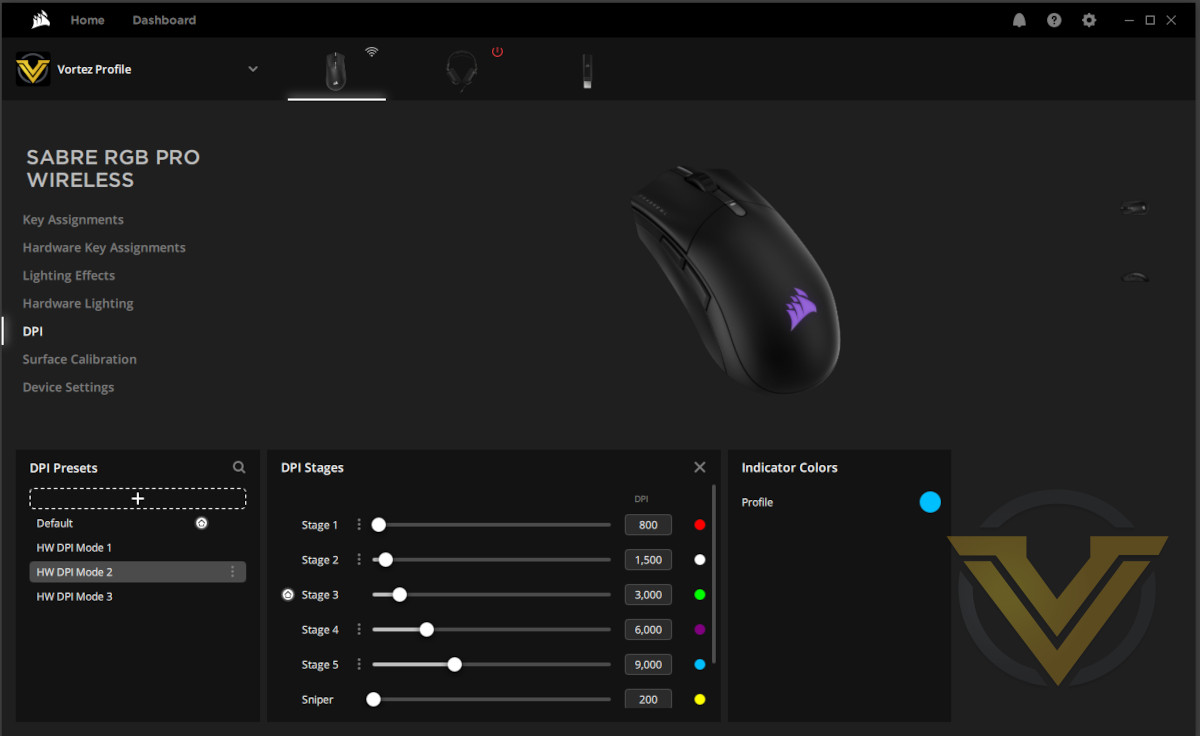
Although not listed under the Lighting sections, both the DPI Stage indicator LED and the Profile indicator LED can be configured with different static colours associated with each Stage and/or Profile.
Setting the Stage colour is a simple process of clicking small coloured circle next to each Stage in iCUE and selecting a colour (or inputting an RGB hex code). The profile indicator meanwhile, which really should be under the Lighting Effects/Hardware Lighting sections, is just to the right of this block and set in a similar way.
Finally, overall LED brightness is set in the Device Settings section as CORSAIR clearly feel that it’s power management rather than aesthetic feature.
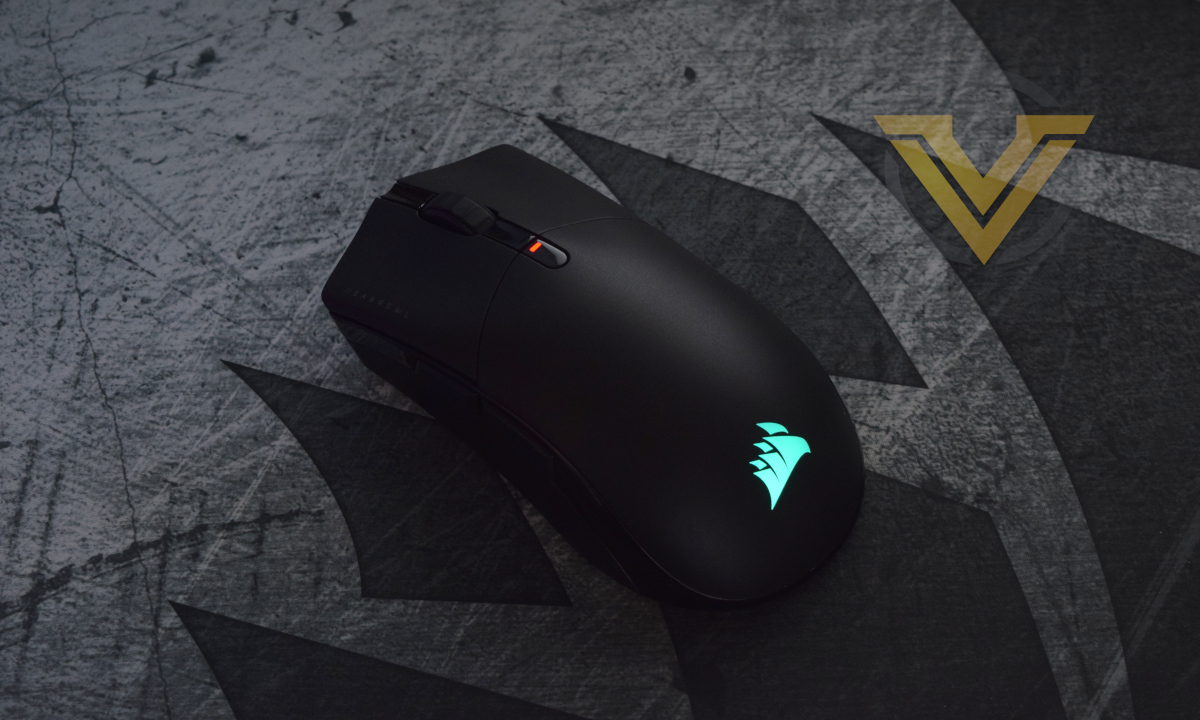
CORSAIR peripheral lighting continues to be an attractive feature across the range, even if it has an outsized impact battery life. It’s all about end-user customisation, a feature that has risen significantly in prominence in the past half decade years.
Performance
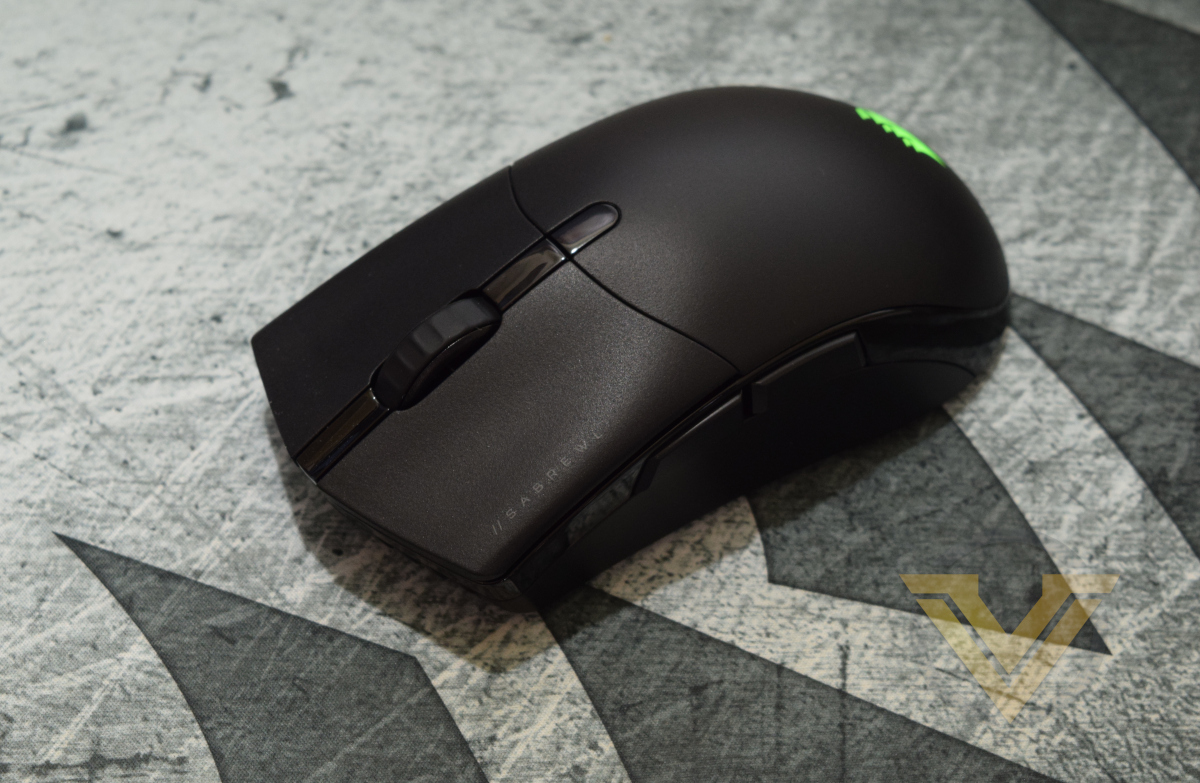
We spent a brief but concentrated week with the SABRE RGB PRO WIRELESS as our daily mouse for work and gaming, a little less than its wired sibling as we were already more than acclimated to the SABRE shape. There were still a few idiosyncrasies to deal with, particularly the installation and set-up process, but that was still plenty of time to be confident in our final conclusions.
In the SABRE RGB PRO review we remarked on the dissonance between the design’s large shape and its low weight. The wireless model is a practically identical shape, but being 10g heavier feels closer to expectations built up over years of using gaming mice of wildly differing shapes and sizes. And yet, it’s still surprisingly lightweight for a wireless mouse with integrated battery.
First impressions were somewhat mixed. Initial setup with the latest iCUE software went well but (as noted earlier) pairing it in Multipoint mode alongside CORSAIR’s HS80 headset proved to be a little tricky, requiring at least one restart before iCUE would happily detect both in wired mode and pair to a single receiver. Reverting back to separate receivers was easy however, and once set up transmission was flawless throughout.
Once again we were struck by the responsiveness of the QUICKSTRIKE LMB and RMB, both of which are pre-tensioned such that the button is sitting flush with its OMRON switch. This time however neither button developed the wobble present with the wired SABRE; it’s our hope that this bodes well for long-term durability in these two critical buttons, but time will tell on that score.
The side buttons are just as good as the wired SABRE RGB PRO, and a huge step up over the KATAR PRO and PRO XT. They’re large and responsive with clear separation between ‘front’ and ‘back’, and remained relatively crisp after some punishing hours of play in World of Warcraft. Their design might be best for gamers who have difficulty differentiating between the two side buttons, particularly those who are relatively new to PC gaming but want to play at a high proficiency level over time.
Its mouse wheel by contrast is unfortunately a step back. The wheel of the wired model wasn’t the best, but if anything its wireless counterpart feels even more like it’s slipping into place rather than rotating evenly with notches at regular intervals. That said, the middle mouse button itself has a satisfying click and the wheel doesn’t seem to be unstable when pressed.
In SLIPSTREAM mode with lighting enabled the battery life is adequate but unexceptional. Charging overnight every other day seemed like the sweet spot; pushing deep into a third day (>20hrs use) kicked in the warning lights, coaxing us to put it into wired mode anyway. If used exclusively for evening gaming sessions you can probably get away with a once a week charge cycle, particularly if you hold off on the LED lighting.
Sensor tracking and wireless signal stability was exceptionally good throughout our time with the mouse, and a far cry from the early issues present with the wired SABRE RGB PRO and RAZER’s Orochi more recently. There was no skipping or stuttering, nor evidence of angle snapping, just smooth and reliable mousing.
Finally, expect some drag when using this mouse on fabric mouse mats. It’s lightweight but has a very large footprint that even a fully Teflon underbody wouldn’t be able to overcome, so temper your expectations accordingly.
Gaming
Some high-octane DOOM Eternal action was once again on the menu to test out the SABRE RGB PRO WIRELESS, but we complemented it with another fist-full of hours with GGG’s Path of Exile and a briefer period in World of Warcraft: Shadowlands[.
Initially, we set up the SABRE in Slipstream Multipoint mode to test for interference in either device when used for extended periods. We later switched to dedicated wireless modes for each, and set the SABRE PRO WIRELESS up at a USB polling rate of 2000Hz – not quite the 4000Hz or even 8000Hz its wired sibling is capable of, but still faster than the 1000Hz norm.
PoE and DOOM Eternal gameplay tested the quality and response of the main mouse buttons in particular, and we were pleased to note that the response was uniform throughout and sharp in the moment. A strong push-back on the QUICKSTRIKE buttons makes it hard to accidentally actuate when resting your finger on either, which is a definite plus given how tight to the switch each are held. Repeated quick clicks are registered effectively, while holding down either button doesn’t encourage your finger into a rocking motion or slide it off the switch to prematurely disengage.
The DPI Stage switching button is very difficult to use rapidly in a regular palm grip as you’re reaching too far back, but is slightly easier in claw and fingertip grips. Judging the active DPI Stage by indicator LED colour took some getting used to but it’s easier than the three bar solution used by the wired SABRE RGB PRO; it would just be nice to have a combination of the two – a single coloured indicator LED located towards the LMB’s leading edge.
Just like the wired SABRE, lifting the mouse when necessary was a little more laborious than we would like. It needs to be gripped harder than the low weight would suggest due to a right side that angles away rather than inward; the glossy band running under the buttons and around the back of the mouse helps somewhat, but not in a way that we were comfortable relying on.
A few long sessions with WoW tests the effectiveness of the wider buffet of the buttons used with greater frequency or in regular rotations similar to MOBA gameplay, particularly the side and middle mouse buttons. In this instance they were very good, exactly as responsive as necessary with a strong return force. Forward felt slightly different from backward but the back button rollover we detected with the SABRE RGB PRO appeared to be absent. The DPI Cycle button was more recessed into the mouse than we would like for regular usage with remapped functionality, and probably shouldn’t be relied upon as your ‘6th button’ for MMO and MOBA gameplay.
The middle button also offers a stable, crisp click during gameplay, but the wheel was the opposite. Over time it developed an irregular feel in one or two notches across the wheel, and consistently seemed to be slipping into place during gaming sessions lasting more than 45mins. Rarely it would report a two-notch movement rather than one, which was a issue with weapon switching in FPS multiplayer.
So performance wise the SABRE RGB PRO WIRELESS left us feeling more confident than the wired version despite a slightly higher weight, and that’s high praise indeed for wireless gaming, but some reservations remain.
Conclusion
Despite some minor misgivings outlined in the review last April, our overall experience with the wired version of the SABRE RGB PRO was a generally positive one and we were looking forward to getting to grips with this new model to see if it could hold up, taking advantage of its hefty build that could surely easily accommodate the additional complexity necessitated by wireless communications. Unfortunately we continue to have a mixed opinion of CORSAIR’s wireless lineup.
The SABRE RGB PRO WIRELESS is still a chunky rodent, ideal for those with larger hands who want to enjoy lightweight mousing but dislike the diminutive stature of most modern FPS-focussed gaming mice. Claw grip or palm, it will support you adequately whatever the size of your hand; a traditional fingertip grip however should only be attempted if you have digits on the longer side. And it doesn’t give too much away on the scales either; at just 79g it’s considerably lighter than Razer’s Deathadder Wireless, Logitech’s G703 and the Steelseries Rival 3, each of which could be considered a competitor.
Overall build quality is good, without being stellar. The mouse wheel is by far the weakest component, even feeling like a step down from that on the wired model due to its poorer consistency and more mushy feel. The QUICKSTRIKE LMB and RMB by contrast were if anything better than their non-wireless counterparts; both responded crisply and with only the tiniest amount of lateral wobble on either.
The MARKSMAN sensor was also significantly better than the prior best straight out of the box. Zero tracking issues on the MM350 PRO mousemat and zero obvious negative acceleration built into the sensor dynamics from day one means it gets both thumbs up from us.
Wireless functionality is good and yet the setup procedure for Multipoint pairing to a single SLIPSTREAM receiver could do with some work. The number of USB ports required to pair more than two devices might be fine for desktop, but there are plenty of ultrathin laptops that would struggle to have even three USB ports available on the chassis. Bluetooth 4.2 + LE connectivity is a welcome addition indeed, bolstering a good battery life out to a maximum well over 75 hours; just be aware that it’s best for productivity, gaming will suffer from even the small amount of latency this mode introduces.
Nonetheless, blunting the effectiveness of this SABRE is the iCUE software. We’ve long held CORSAIR’s iCUE to be one of the better peripheral software suites but the most recent iteration has started to undermine the user-friendliness of their hardware. Core functionality is present but often strangely placed within the UI; clear logical steps that could expand on mouse functionality haven’t been taken; no polling rate information is shown in Multipoint mode; compatibility prompts should be shown prior to making a particular set of configuration changes rather than after. We called it unpolished but fixable, and stand by that description.
So can we recommend the SABRE RGB PRO WIRELESS? On balance, yes, but with sterner caveats than its wired sibling in addition to its unusually large size. Greater functionality means interfacing more with the software, and that means more time spent with what’s by far its weakest aspect. On the other hand console gamers will once again enjoy software-free on-the-fly DPI adjustments, and everyone will appreciate the mouse’s low weight.
CORSAIR’s SABRE RGB PRO WIRELESS is a fine addition to their 2021 portfolio that’s let down by its undercooked iCUE software module. An oversized but lightweight frame is great for competitive gamers with larger hands, the new sensor has eliminated some teething issues with the prior generation, and dual wireless modes offer flexibility in a crowded market where it’s not guaranteed. Slotting in amongst fierce competition, you’ll want to try this new SABRE before acquiring it for your personal armoury.
Pros
+ Good sensor
+ Two wireless modes including Bluetooth
+ Low weight for a rechargeable wireless mouse
+ Large size caters to under-served market segment
+ On-board memory
+ Vibrant lighting
+ Future-proof USB-C connector on the mouse
Cons
– iCUE software is increasingly a weak link
– Mouse wheel is a step down in quality from the non-wireless model
+ Good sensor
+ Two wireless modes including Bluetooth
+ Low weight for a rechargeable wireless mouse
+ Large size caters to under-served market segment
+ On-board memory
+ Vibrant lighting
+ Future-proof USB-C connector on the mouse
Cons
– iCUE software is increasingly a weak link
– Mouse wheel is a step down in quality from the non-wireless model
Click here for an explanation of our awards at Vortez.net.
Stay connected with the Vortez Social Media pages:
Join in with the discussions on Discord