







The flagship mechanical keyboard from Corsair is here, featuring 18 macro keys, key-by-key illumination and Cherry MX Red switches.

Product On Review: Vengeance K95 Mechanical Gaming Keyboard
Manufacturer and Sponsor: Corsair
Street Price: £129.99 inc. V.A.T.
By any objective measure Corsair are swiftly becoming a peripheral juggernaut, matching their prowess in the chassis, PSU and memory markets. In June we had the pleasure of reviewing the Vengeance K70, a mechanical keyboard based broadly on the K65 but for the first time with both mechanical switches throughout and an updated lighting system. It earned our Silver Award, missing out on Gold by the tiniest of slivers, and now it’s the turn its bigger brother. Will it impress us as much – or more – than the K70? Only time will tell…
The Vengeance K95 was also part of a broader range update Corsair began earlier this year, an update which included other input devices and audio peripherals. Just as the K70 is an evolution of the K65, so the K95 is the next step for a design ushered in by the K90. Whilst the Vengeance K70 could be said to specialise in First Person Shooters as a part of its gaming pedigree, the K95 has been substantially adapted to MMOs and similar titles that benefit from macro keys and a wide selection of key bindings. In common with the K70 Corsair have also augmented the design by using Cherry MX switches for every key, making it a marked improvement over its predecessor.
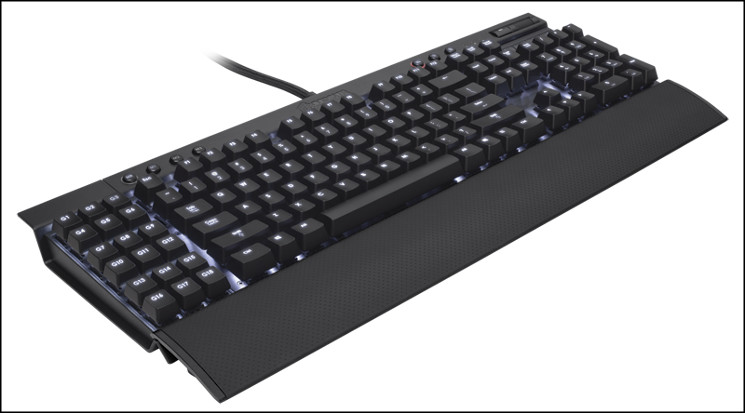
About The Corsair Vengeance K95
The Vengeance K95 Fully Mechanical Gaming Keyboard is made for serious gamers. Cherry MX Red key switches have super-fast reaction times and low operating force, and the key-by-key customizable lighting lets you adjust brightness and illuminate bindings. 100% anti-ghosting with full key rollover on USB ensures that the K95 will keep up. The 18 G-keys are programmable on the fly, so you can adapt and react. And Vengeance K95 has onboard memory, so you can take your K95 with you and play your best on any system.
All of this technology is housed in a professional-grade black anodized aluminum chassis for superior strength and stability.
The Vengeance K95 Fully Mechanical Gaming Keyboard is made for serious gamers. Cherry MX Red key switches have super-fast reaction times and low operating force, and the key-by-key customizable lighting lets you adjust brightness and illuminate bindings. 100% anti-ghosting with full key rollover on USB ensures that the K95 will keep up. The 18 G-keys are programmable on the fly, so you can adapt and react. And Vengeance K95 has onboard memory, so you can take your K95 with you and play your best on any system.
All of this technology is housed in a professional-grade black anodized aluminum chassis for superior strength and stability.
In the UK the Vengeance K95 is priced at £129.99, only £10 more than it’s macro-key free rival. The price differential was something we questioned in our review of the K70, highlighting the increased functionality advertised for the K95 versus that shown by the K70. Although this may seem strange at first, it’s notable that the K95 does not come with the contoured, textured keycaps and keycap puller. Naturally this will keep the price down, relatively speaking, and they can be bought separately if you’d prefer.
Features And Technical Specifications
Features
The beauty of a 100% mechanical layout
In the world of high-performance gaming gear, there are few things that match the feeling of using a well-designed keyboard with mechanical key switches. Vengeance gaming keyboards use Cherry MX Red switches, hailed by gamers worldwide to be the best of the best. They combine great key feel with super-fast reaction times and smooth, linear travel with low operating force.
Vengeance K95 takes the next step with a 100% mechanical layout – there’s a Cherry MX Red switch underneath every key. So, you’ll get that optimal tactile feedback and responsiveness, no matter your fingers go.
100% Cherry MX Red mechanical key switches:- You get smooth, linear key response for ultra fast double and triple taps without the audible click.
Black anodized brushed aluminum chassis:- A professional-grade look and feel, plus the rugged durability you need for hours of gaming.
Key-by-key customizable backlighting:- The brilliant white LEDs have adjustable brightness and key-by-key programmability to light up just the keys you need.
100% anti-ghosting with full key rollover on USB*:- Every keystroke translates into accurate gameplay—even when multiple keys are pressed. There’s no signal degradation, and it keeps up with you, no matter how fast you play.
18 customizable G-Keys with on-the-fly programming:- You can quickly and easily record up to 54 key sequences for faster play.
On board profile storage:- Set up once, play everywhere – your settings are stored in the keyboard’s memory, so you don’t need to start over when you take your gaming to go.
In the world of high-performance gaming gear, there are few things that match the feeling of using a well-designed keyboard with mechanical key switches. Vengeance gaming keyboards use Cherry MX Red switches, hailed by gamers worldwide to be the best of the best. They combine great key feel with super-fast reaction times and smooth, linear travel with low operating force.
Vengeance K95 takes the next step with a 100% mechanical layout – there’s a Cherry MX Red switch underneath every key. So, you’ll get that optimal tactile feedback and responsiveness, no matter your fingers go.
100% Cherry MX Red mechanical key switches:- You get smooth, linear key response for ultra fast double and triple taps without the audible click.
Black anodized brushed aluminum chassis:- A professional-grade look and feel, plus the rugged durability you need for hours of gaming.
Key-by-key customizable backlighting:- The brilliant white LEDs have adjustable brightness and key-by-key programmability to light up just the keys you need.
100% anti-ghosting with full key rollover on USB*:- Every keystroke translates into accurate gameplay—even when multiple keys are pressed. There’s no signal degradation, and it keeps up with you, no matter how fast you play.
18 customizable G-Keys with on-the-fly programming:- You can quickly and easily record up to 54 key sequences for faster play.
On board profile storage:- Set up once, play everywhere – your settings are stored in the keyboard’s memory, so you don’t need to start over when you take your gaming to go.
Technical Specs
* Cherry MX Red Mechanical Switches
– 45g actuation force
– 2mm to actuation and 4mm to bottom
– Rated 50 million operations
– Gold contacts
* Three banks of 18 macro key assignments and live macro record
* Up to 1000Hz USB polling rate
– Selectable 8ms, 4ms, 2ms, 1ms and BIOS compatibility mode
* White LED Backlighting with key-by-key programmability
* Aluminium unibody construction
* Dedicated multimedia keys
* Windows lock key
* Dimensions: 502mm x 165mm x 38mm (without wrist rest)
* Weight: 1.35kg (without wrist rest)
– 45g actuation force
– 2mm to actuation and 4mm to bottom
– Rated 50 million operations
– Gold contacts
* Three banks of 18 macro key assignments and live macro record
* Up to 1000Hz USB polling rate
– Selectable 8ms, 4ms, 2ms, 1ms and BIOS compatibility mode
* White LED Backlighting with key-by-key programmability
* Aluminium unibody construction
* Dedicated multimedia keys
* Windows lock key
* Dimensions: 502mm x 165mm x 38mm (without wrist rest)
* Weight: 1.35kg (without wrist rest)
*Note that the claim of 100% NKRO over USB differs from the claims on the packaging, which assets 20-key rollover support.
Packaging And First Look
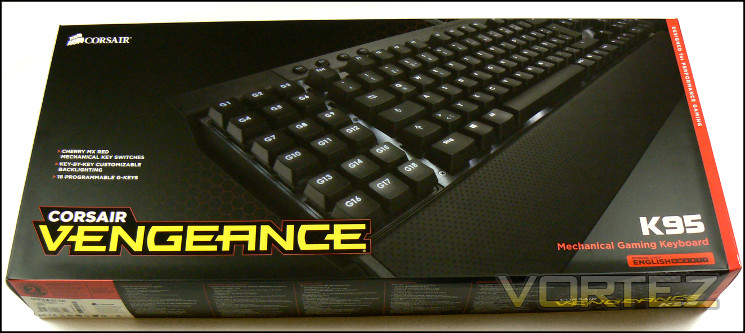
In terms of packaging, the Vengeance K95 is outwardly almost identical to that of the K70, perhaps quite unsurprisingly. Corsair are forging a strong brand with the Vengeance gaming line and a consistent look is one of the most powerful tools in a marketers arsenal. As before, Corsair highlight the features which differentiates the K95 from similar keyboards through the use of bullet points, and in this case an image focussed on the G-Keys.
As always, we appreciate the inclusion of technical specifications and system requirements on the outer packaging. Corsair haven’t scrimped on this, and so the end-user should be well informed about their prospective purchase. Placing the regional layout prominently is also a plus, especially given that layout is reflected in the keyboard image shown.
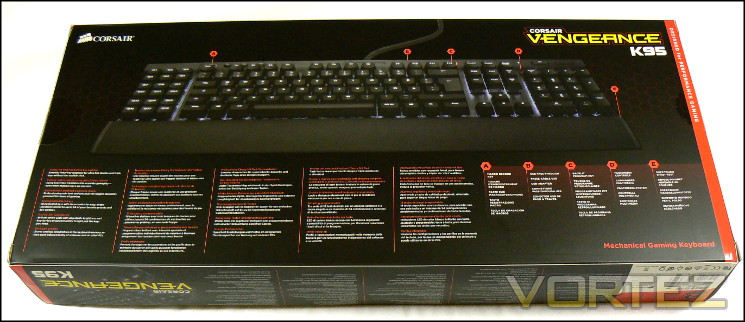
Moving to the rear, Corsair have taken the opportunity to both describe the key features and show where on the keyboard some of them reside. Given how daunting the K95 could look to newcomers not used to advanced layouts it’s a pretty succinct way of communicating the information. Apart from the major features mentioned – mechanical switches, anti-ghosting and key-by-key backlighting – many gamers will be particularly pleased to note that profiles can be stored onboard. This makes the keyboard broadly independent of the system software, and can be easily transferred to operate seamlessly on another PC.
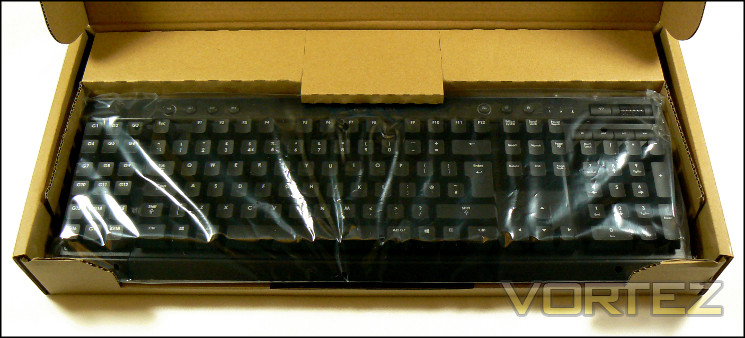
Sliding the outer sleeve off, you’re presented with the inner cardboard box. The two layers of packaging will of course help to protect the keyboard inside, reducing the chances that the brushed aluminium finish will be harmed in the event of a problem in shipping. Corsair being Corsair, they ensure that recycling the packaging as and when you dispose of it is as easy as possible.
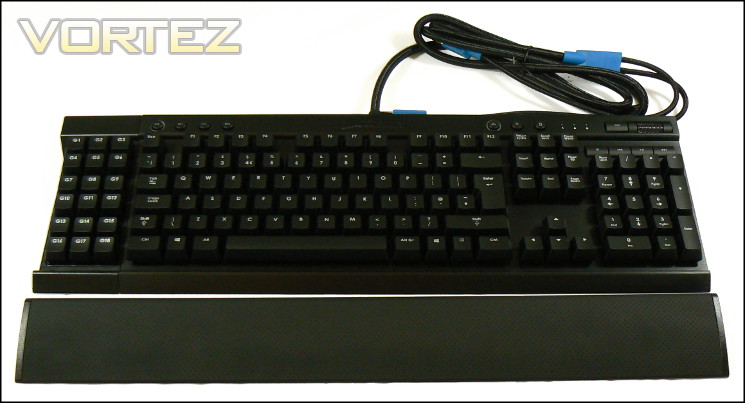
Keyboard, wrist-rest and screws are of course bagged separately and securely. Interestingly, compared to the K70 the bundle is fairly sparse; there are no extra textured keycaps nor even a keycap remover. This is an indication of how Corsair kept the costs of the K95 down relative to the K70, and for those who just want the vanilla experience without value-added accoutrements nothing is really lost.
You will also receive a User Guide in the bundle, filled with information on operating the macro system and key-by-key backlighting which is not easily found on the official website. Drivers are not included – you will need to download the latest version from the website – and that’s swiftly becoming an industry norm.
All told, the Vengeance K95 relies on you being blown away by the keyboard itself rather than additional optional features. That’s certainly not an issue to us, especially as it appears to have kept the overall price down below the eye-watering level, but those used to a little more extravagance could be disappointed.
A Closer Look

The Vengeance K95 takes obvious design queues from the K90 before it, and this particular version matches the anodised black of the K70 we reviewed earlier. Common throughout the K-series keyboard range is the aluminium chassis, which in the case of the K70 is of a unibody design. However the K95 includes an additional ABS plastic annex with recessed steel backplate forming the G-Key zone. With the exception of those keys, the layout of the K95 is really quite standard. Only a few other layout tweaks have been made versus a standard mechanical keyboard, accommodating a more high-end set of media controls in addition to buttons for the macro and lighting features.

The G-Key zone, populated by an array of 18 keys labelled G1-18, just as rigid as the main section thanks to a steel backplate. However the finish doesn’t match the beautiful brushed aluminium of the rest of the chassis, which goes some way towards reducing its aesthetic allure. Each of the keys are on a slightly lower plane than the main keys and have slightly different shaped keycaps, differentiating them by touch from the rest. They’re also all underpinned with Cherry MX Red switches, once again a relative rarity even amongst mechanical keyboards.
Aligned along the top-left lip of the Vengeance K95’s aluminium chassis section are the four ‘M’ keys. In tern, these are intended for recording macros and switching between the three key assignment states. Rather than having three different profiles loaded onto the keyboard the K95 has these macro assignment states (or M-States) per Profile, denoted as M1, M2 and M3. Each may have unique assignments for the G-Keys on the left of the keyboard, as well as LED brightness levels and key-by-key backlighting configurations across the whole of the keyboard.
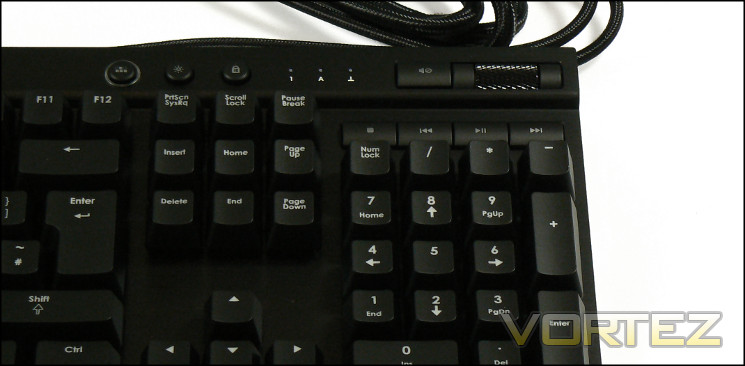
Speaking of lighting, the opposite side of the keyboard is where the LED lighting controls are positioned. These, and the rest of the media keys located in the same area, are identical to that for the K70, including the slightly idiosyncratic means of customising the lighting (see next page). Despite not also being mechanical these switches still have a quality feel, especially in the case of the volume wheel which has a reassuring resistance to movement.
Located on the rear is the USB polling rate switch and passthrough port. A hardware switch for polling is another uncommon solution, indicating just how versatile a keyboard can be even when the software configuration utility isn’t installed. We should note that our testing system (an MSI P67 Big Bang Marshall /w Ivybridge Core-i5 CPU) didn’t require the BIOS setting for accessing the UEFI, but it’s a reassuring feature for legacy machines nonetheless.
Finally when it comes to the visible components there’s the extra-long wrist rest. Matching the style of that on previous K-series motherboards, it’s not the deepest design and really serves mainly to shield the user from the edge of the aluminium chassis rather than provide maximum wrist support. Even so, it is soft, comfortable and unlike the K70’s is screwed into place.
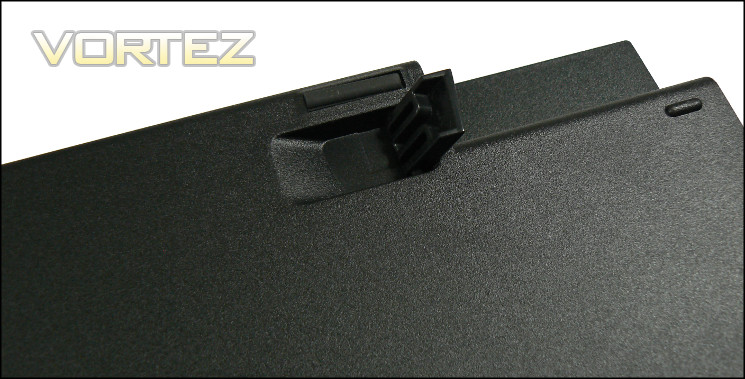
The floor is probably the one major oversight on the K95. As with the K70 there are few rubber sections to provide a non-slip surface, and none on the extendible feet. More problematically, when the feet are retracted there is a noticeable wobble on the keyboard and marked lack of grip to the desk from the left hand side. This is down to the pad in that section being hard plastic rather than rubber and raised very slightly above the nearest rubber foot (about 5cm away). It’s the one quality failing we’ve seen, and easily rectified if necessary. No doubt Corsair are aware and will be addressing it. That said, with feet extended the K95 provides a perfectly stable typing platform in our experience.
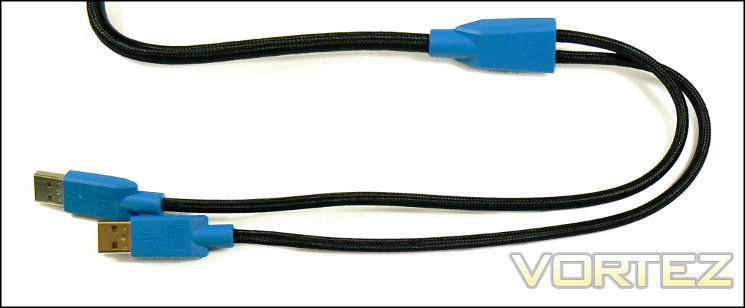
Rounding off the visible features is the USB cable, a double-end design which incorporates both the keyboard’s USB signalling connector and a connector for USB passthrough. The entire cable is sheathed in a heavyweight braid which, despite being soft to the touch, is durable and will do an excellent job protecting the more fragile wires inside. The cable entry-point into the keyboard chassis is reinforce with plastic, and so shouldn’t cause any appreciable fraying in the long term.
Lighting And Additional Customisation
This version of the Vengeance K95 has white per-key backlighting. This colour may pose a problem for those with corrective lenses, potentially causing considerable glare in low-light conditions and something of a distraction in less than ideal circumstances. Three brightness levels mitigates our concern, but doesn’t eliminate it entirely. It could be worse, they could be blue LEDs, but they’re far more likely to be dazzling than then red LEDs of the Vengeance K70.
Lighting

If you don’t delve into the user guide you might assume that the lighting options for the K95 aren’t much more than the basic. However as well as standard control for brightness, the K95 mirrors the K70 in that there are a series of lighting modes determining how the lighting behaves.
Pressing the Backlight Control Key cycles through two modes: full illumination or a specific pattern. Full illumination is self-explanatory, whereas the specific pattern illuminates only certain keys, with 1-6, WASD & Arrow Keys being the default. All lighting configuration is made on the hardware itself, rather than relying on software.
Holding the Backlight Control Key for five seconds causes the outline to flash red repeatedly, during which time pressing any key toggles whether it should be on or off in the backlight pattern. This pattern is stored in keyboard memory, and can be used to highlight specific keys during gaming in addition to or instead of standard WASD.
Finally, by pressing CTRL & the Backlight Control you’ll enter a further mode. From that point on any unlit keys you strike will briefly flash on for a second or so. We’re not entirely sure why Corsair have opted to include this niche feature, but it’s a cool effect which may have a few applications in demonstrations under low-light conditions.
All modes are subject to the three brightness levels selected by the brightness key. The chosen lighting mode and per-key lighting config. is stored along with the key assignments as part of the M1-M3 options.
Polling Rate
USB polling rate – the rate at which the system polls for input from the USB bus – can be altered through the switch on the rear of the keyboard. This switch has five modes: {1,2,4,8} and BIOS. Each of 1-8 determine the response time in milliseconds between updates (polling rate is 1000 divided by this number, measured in Hertz), whilst BIOS sets the keyboard to a compatibility mode to reduce conflicts with older motherboards.
High level professional gamers will tend to have the figure dialled right down to 1ms for optimum performance, whilst us mere mortals will generally feel out a preference over time. We didn’t run into situations where the BIOS compatibility mode was necessary, but it’s a worthy addition nonetheless.
Windows Lock Key
Often present in software and far more rare on the keyboard itself is a Windows lock key. When pressed it lights up and locks out the Windows key, ensuring that a miss-click doesn’t drop you out of your game or worse yet crash it. Note that like the LED Backlight Program Key, when locked it will remain illuminated even if the backlight brightness is set to off.
Although the Vengeance K95 requires software to make the most of the macro editing and profile capabilities, the configuration options available without interacting with software are extremely impressive. We also find it welcome that Corsair have maintained continuity of operation between different keyboard models. Once again, we particularly appreciate the potential of the per-key lighting options, both for practical demonstrations and key highlighting in MMO gaming. With those features outlined it’s time to take a look at the software side of the equation.
Software
Unlike the Vengeance K70 the K95 has a software suite, and it’s been designed chiefly for the configuration of the G-Keys. The appearance and layout matches the software utilities of the M65 and M60 mice reviewed previously, which should come as no surprise. We should note that if the software for both Corsair mouse and K95 keyboard are installed they will appear in one unified utility with individual configuration panes. Different hardware can be selected in the top-right of the main software screen, where an icon representing each connected compatible hardware device is located.
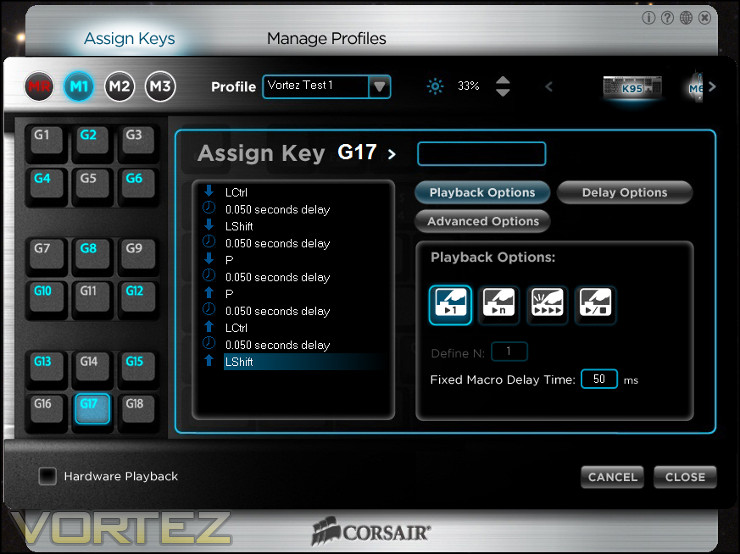
We used the latest software revision at the time of testing: K95 Gaming Software Update – SW V1.0.0.4
In the case of the Vengeance K95 there are two main configuration screens: Assign Keys and Manage Profiles. The meat of the work goes on in Assign Keys, which is where macros can be created and assigned to the keyboard’s G-Keys. Manage Profiles on the other hand allow the creation of new profiles, which can then be uploaded to the keyboard if desired.
Assign Keys
It’s hard to imagine a design for this window which could be more simple. On the left, where the G-Keys would be located on the physical keyboard, is the 3 x 6 G-Key array. In a bar above that are four buttons, also mirrors the keyboard layout and representing Macro Recording and the selection of each of the Profile ‘M-States’. You also select the active Profile and brightness level from this top bar.
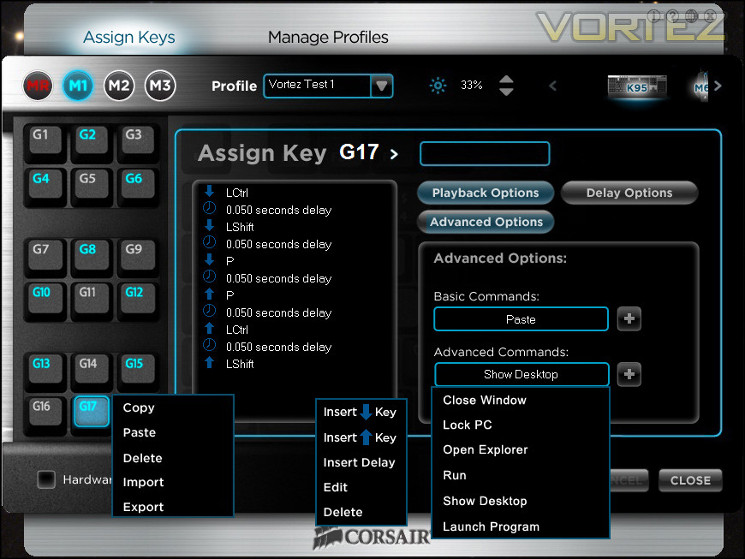
Right-clicking on the G-Key brings up a small menu for exporting or importing each macro. Coupled with profile backups, this is one of the most robust macro handling systems we have seen.
Pressing MR and then selecting a G-Key starts the recording of a macro, ceasing once MR is pressed for a second time. It’s worth noting that this mimics the keyboard operations when using Live Record functionality, and is a great example of Corsair reinforcing learning in their products by mirroring their operation. The maximum length of a macro is
A macro can be created with or without delays recorded between keypresses, and individual delays can be edited in software. Alternatively a G-Key can be assigned to a specific Windows task (Copy/Paste/Select All etc.) or individual keystrokes. The macro/assignment can also be set with specific repeat options, including a set number of loops per keypress or looping whilst the key is held down. We were able to assign a macro with over fifty keystrokes to a G-Key, and in total there are 54 assignments possible per profile.
Modes M1-M3 have separate assignments, and are perfect for games or other applications that have very varied modes. The primary, secondary and tertiary talent specs. of character classes in MMORPGs immediately came to mind, but other workflow patterns would almost certainly be able to benefit from it too. Building this in at the hardware level is excellent, and sets the K95 in a class of its own when it comes to mechanical keyboards we have tested.
Manage Profiles
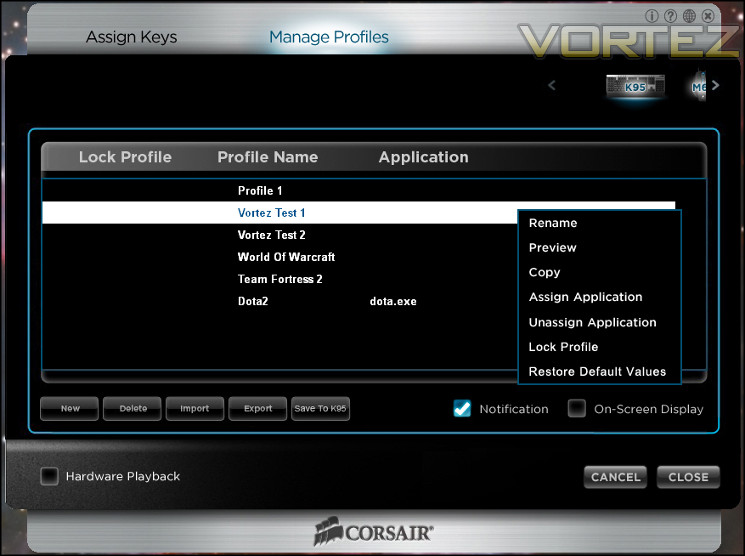
By comparison, this window is bland but functional. Here you create profiles, edit them, back them up and if desired associate them with a particular application to be launched concurrently. If you intend to run K95 on a separate machine without software configuration utility installed you can choose to save a profile to the K95, placing all macros within the keyboard’s on-board memory and eliminating the need for an interpretive software layer.
In terms of the competition, the Vengeance K95 lacks very little of importance. Perhaps the most obvious is the lack of synergy between Mouse and Keyboard – as it stands interactions with the keyboard won’t affect an attached Corsair mouse, and visa-versa. Being able to set up the M1-M3 states to also reflect new mouse macro configurations would be quite powerful conceptually. Other than that, the software doesn’t allow the selective reassignment of any non-G-Key, nor configuration of the lighting (which all happens in hardware). Neither is a deal-breaker, and as we’ve commented in the past this sort of full-customisation of non-macro keys is a little redundant if the software title is even average in having a PC-optimised control scheme.
So that’s the Corsair K95 software – simple, robust and powerful. We’ve seen more in-depth tools for other keyboards in the past, but it’s tailored near-perfectly for the hardware. Those who have experience with other Corsair peripheral config utilities should find it a breeze to use, and newcomers won’t have any problems so long as they remember they have a right-click on their mouse. Yes. there’s more which could in theory be added, but that might undermine the simplicity which makes it so usable.
Performance
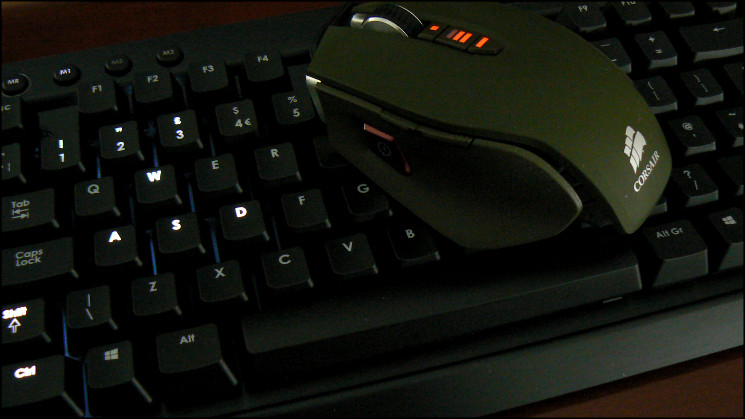
We paired the Vengeance K95 with the Gold Award winning Corsair M65, reviewed way back in March. In spite of the lack of explicit synergy between the two, either in software or Corsair-specific hardware features, we felt that the pairing would solidify our understanding in how such a keyboard could compensate for a mouse not necessarily tailored to every game type.
Once again the choice of Cherry MX Red mechanical switches provided an extremely consistent response across the whole keyboard. Even larger keys – types which manufacturers often find difficult to garner a response which is close to that of the rest of the keyset – felt satisfying and in keeping with the rest of the keyboard. The choice of Cherry MX Red will polarise consumers who have a great attachment to a particular Cherry MX switch type, but until further types are included Red’s are a good mainstream choice.
The keycaps typeface is clear with and without LED illumination, and illumination levels are suitable for any conceivable environment. The finish on the keycaps is a black paint which is relatively grippy, but not unpleasant to the touch. The G-key keycaps are slightly shorter, and so actuate a little differently to the main keyset. Both engage at 50% down the stroke, but whilst the main keys hit the backplate with a audible tap the G-keys are more muted. It’s by no means problematic, but could be slightly disconcerting to those expecting exactly the same response.
We mentioned the slight unevenness when laid flat earlier, so we don’t quite have initial glowing reports across the board. In all likelihood this is purely a batch or single sample issue, and is easily solved, but it’s disappointing for such a premium product. Even so, using the K95 with feet extended is our preferred position, and there were no issues in our extending testing in this arrangement. If you have a super-slick desk the plastic finish on the feet may cause some instability, but in general the K95 should be fine for most users in this regard.
Moving on to the specific keyboard functionality, the macro system and M-states are superb additions over the Vengeance K70. This isn’t the first ‘Live’ macro record function we have seen on a keyboard, but it is equal to the best of them for simplicity. The way it interacts with M1-M3 states is logical, and once you get the hang of it there is nothing to stop you from creating macros as and when you need them – in game or otherwise. You can even take advantage of the lighting to log where you have created each macro, and of course they’re reflected in the configuration utility UI.
Anti-Ghosting/NKRO
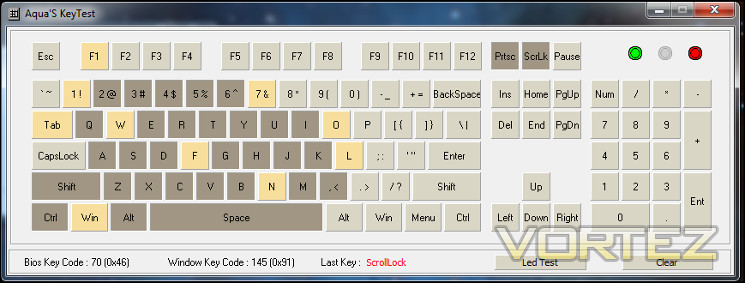
The Vengeance K95 claims up to 20-key roll over across the whole keyset, which is quite an impressive claim for a USB keyboard (although thankfully increasingly common). We continue to use Aqua’s Keytest as a quick-test for NKRO, focussing on the core gaming section around the WASD keys. The main aim is to ensure that as many relevant keys as possible can be pressed simultaneously such that every input in a fast-paced gaming session is recorded accurately.
Here the Vengeance K95 performed exceptionally, with no issues reported around the crucial WASD keys and NKRO extending further into the centre of the keyboard too. Some testing with the G-Keys also indicated that they too were unaffected by ghosting or interfering with the registering of other keys. By some margin therefore the K95 has the best NKRO characteristics of all the keyboards we have tested.
—
In a more general sense, the K95’s macro functionality and G-keys really open up the possibilities for the gaming and work-based productivity. We couldn’t count the number of times where we set up add-hoc macros between in-game MMO encounters, and with particular reference to MMOs we found the M1-M3 states provided logical partitions between class specs in World of Warcraft, Rift and other hotkey-based titles. In theory 18 is perhaps a little too many, but the grid array means that you’re not limited to a particular layout. There’s just enough difference in height between the G-Keys and main keyset to easily differentiate between without making them a stretch. Plus, they’re mechanical; it’s difficult to see a downside.
RTS and non-MMO RPGs will also benefit from the M-states and macro keys. Asymmetric RTS titles such as Starcraft can configure one M-State per race for example, whereas RPG titles can of course set them to classes. Most significant for very high level gamers however is the firm linear response, allowing quick taps and the same speed across the bank of G-Keys as the main keyboard set.
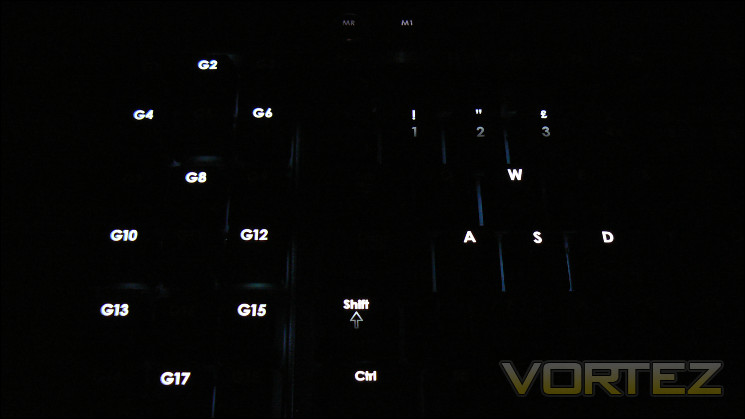
Key-by-key illumination again proved to be an interesting feature, especially when using macro keys for the first time. Being able to only light up active macro keys made learning and adapting to new keybinds more streamlined, and the aesthetic benefits are also quite interesting. We’re sure that some LAN gamers will be looking at the latest K-series keyboard with a keen interest.
For many gamers the macro keys will be an unnecessary addition to their keyboard, in which case the K70 would be ideal at a similar budget. However those with broader interests which encompasses a wide range of gaming genres and work practices should put the K95 right at the top of contention in any keyboard short-list if they can stretch to the asking price.
—
There is one final point to be made. Cleaning the K95 should be easy thanks to keycaps which wipe clean relatively easily, but you will need to source a keycap to really get into the nooks and crannies. Aluminium being aluminium, you’ll want to avoid fingerprints on the metal surfaces, but the finish is robust enough to wipe them away so long as they don’t linger and etch in.
Conclusion
Sometimes we have to tie ourselves in knots to explain our findings and justify our awards, but for the first time in a while that’s not the case. The Vengeance K95 is just that good.
It is sometimes difficult to reconcile the expense of a mechanical keyboard with the value-added nature of the features included. Such was the case with the K70, which despite being an excellent keyboard asked a lot for the £120. With the Vengeance K95 much of decision is devoid of stress. Whether MMO, FPS or frankly any genre of game is your preference you’re more than adequately catered to.
Macro keys are of course very welcome but eighteen could be overkill if gaming trends towards a simplified input design. The Vengeance K70 differs from the competition in that the layout allows you to set up a key assignment pattern to your own particular tastes, rather than relying on one vertical or horizontal line of macro keys. They’re all mechanical keys, so there is no issue with expected longevity. Being on a slightly different elevation to the main keys also helps to orientate your fingers in the short term, and shouldn’t be a distraction in the long term.
The value of macro keys can be appreciated by those who play a MMORPG titles on a regular basis, but their potential is truly unlocked by multiple profiles. Corsair’s K95 has three on-board and extremely easily selected key assignment states, allowing you to switch up configurations at will. The per-key backlighting is also assigned on a per-profile basis. Couple that flexibilty with some of the best NKRO characteristics in its class and the K95 is arguably the best of all worlds.
We should temper our enthusiasm a little however. The aesthetics are marred slightly by the brushed aluminium not extending to the macro key backplate, and the white LEDs are a little problematic to those with corrective glasses in low-light conditions. The choice of solid plastic extendible feet and a plastic pad on the macro block for when the legs are not extended are somewhat baffling, and in this case make using the keyboard a little tricky without legs in place.
All these quibbles are relatively minor though.
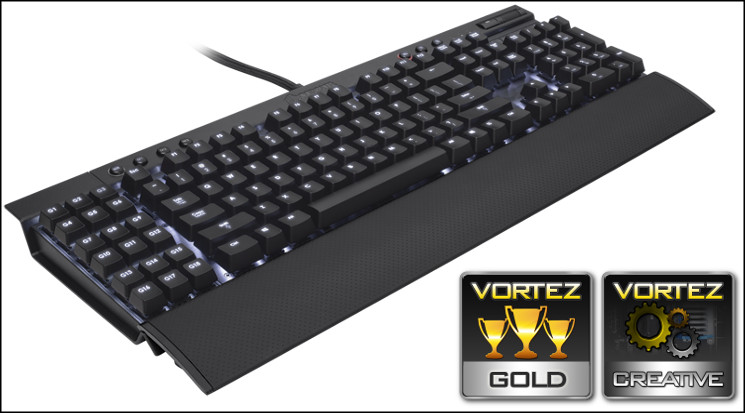
The Vengeance K95 is an exceptional keyboard which more than justifies its place as the flagship in Corsair’s updated keyboard range. Solid construction backs up an attractive design, and those with a varied gaming palette will appreciate the daunting macro and profile options. Cherry MX Red mechanical switches will suit the majority of gamers in all fields, and the backlighting options are exemplary. Matching premium components to intuitive software and innovative features, the Corsair Vengeance K95 is without doubt a Vortez Gold & Creative Award winner.
Pros
+ Fully featured
+ Mechanical Switches
+ 18 Macro Keys (all mechanical)
+ Per-key backlighting, including macro keys, for personalised configurations
+ Easy-switch on board profiles
+ Multiple lighting modes
+ Brushed-Aluminium chassis
Cons
– Non-slip feet aren’t as good as they should be
– Currently only one switch and colour option
+ Fully featured
+ Mechanical Switches
+ 18 Macro Keys (all mechanical)
+ Per-key backlighting, including macro keys, for personalised configurations
+ Easy-switch on board profiles
+ Multiple lighting modes
+ Brushed-Aluminium chassis
Cons
– Non-slip feet aren’t as good as they should be
– Currently only one switch and colour option

Click here for an explanation of our awards at Vortez.net.


