







After our mixed feelings over the K60 gaming keyboard, we shift our focus to the M60 FPS Laser Gaming mouse also hailing from Corsair.

Product on Review: Vengeance® M60 Performance FPS Gaming Mouse
Manufacturer and Sponsor: Corsair
Street Price: £51.98 inc. VAT
Mice are a very personal peripheral. There are however some mice that can rightly be called ‘classics’. The Microsoft Intellimouse Explorer 3.0 and Logitech MX18 to name a couple. So what’s the secret to making a ‘classic’ mouse that proves popular with all gamers? Well first and foremost is has to perform, that much is a given. It also has to feel comfortable, capable of standing up to hours upon hours of gaming abuse. Gone are the days of 3 button gaming mice though as for a mouse to carry the ‘gaming’ moniker, it has to have numerous buttons and lights along with macro settings backed up with adjustable software. The Corsair M60 falls into the latter description of a gaming mouse by having all of those attributes. Will this be enough for the Corsair to be hailed a ‘classic’ though?
The Corsair M60 is the first mouse from Corsair and priced at around £50 it is aimed squarely at the performance gaming market – perhaps the most competitive mouse market. So for someone to stump up that kind of cash they are going to want a very good, nay excellent product capable of nopt only matching the competition but beating it into submission. As we saw with the GIGABYTE AIVIA M8600, first entrances into this market by reputable manufacturers are not always a raging success so while Corsair are extremely popular in other markets, they will not be forgiven should their first mouse not provide the performance expected.
Here’s what Corsair had to say about their Vengeance range of peripherals:
The gear that brings your gaming to the highest performance
Incredible responsiveness. Precise accuracy. Customizable, reliable controls. Intelligent design. The smallest details and the highly crafted refinements that make all the difference. Vengeance gaming peripherals aren’t typical gaming devices, but elite mice, keyboards and headsets that allow you to perform at your highest level. Brought to you by Corsair — people enthusiastic about performance gaming.
The Corsair Advantage
With a long history of building enthusiast-grade memory and components, we’ve earned a reputation for quality, compatibility, and performance. Need help? We’re available by phone call, email or web forum.
Incredible responsiveness. Precise accuracy. Customizable, reliable controls. Intelligent design. The smallest details and the highly crafted refinements that make all the difference. Vengeance gaming peripherals aren’t typical gaming devices, but elite mice, keyboards and headsets that allow you to perform at your highest level. Brought to you by Corsair — people enthusiastic about performance gaming.
The Corsair Advantage
With a long history of building enthusiast-grade memory and components, we’ve earned a reputation for quality, compatibility, and performance. Need help? We’re available by phone call, email or web forum.
Specification
– 5700 DPI — Avago Technologies ADNS-9500 LaserStream Gaming Sensor
– Adjustable DPI in 100 DPI increments
– 1000Hz/500Hz/250Hz/125Hz (1ms/2ms/4ms/8ms) selectable response time
– Tracking up to 165 inches per second, up to 30g acceleration, and automatic frame rate control
– Adjustable lift distance — five selectable levels to fit your play style
– Surface quality detection
– 8 individually programmable buttons
– Side mounted sniper button provides user settable DPI change while pressed for enhanced precision targeting
– Comfortable ergonomic design with soft-touch surfaces and grip improving textures
– Omron left and right click switches rated for eight million operations
– Aluminium metal frame and base for improved rigidity and mass distribution
– Solid metal, weighted scroll wheel with rubberized scroll surface for improved finger traction control and feel
– Ultra Low Friction PTFE pads for smooth performance and accurate gliding
– 1.8m lightweight non-tangle cable
– Two years Warranty
– Adjustable DPI in 100 DPI increments
– 1000Hz/500Hz/250Hz/125Hz (1ms/2ms/4ms/8ms) selectable response time
– Tracking up to 165 inches per second, up to 30g acceleration, and automatic frame rate control
– Adjustable lift distance — five selectable levels to fit your play style
– Surface quality detection
– 8 individually programmable buttons
– Side mounted sniper button provides user settable DPI change while pressed for enhanced precision targeting
– Comfortable ergonomic design with soft-touch surfaces and grip improving textures
– Omron left and right click switches rated for eight million operations
– Aluminium metal frame and base for improved rigidity and mass distribution
– Solid metal, weighted scroll wheel with rubberized scroll surface for improved finger traction control and feel
– Ultra Low Friction PTFE pads for smooth performance and accurate gliding
– 1.8m lightweight non-tangle cable
– Two years Warranty
Packaging & First Look
Packaging
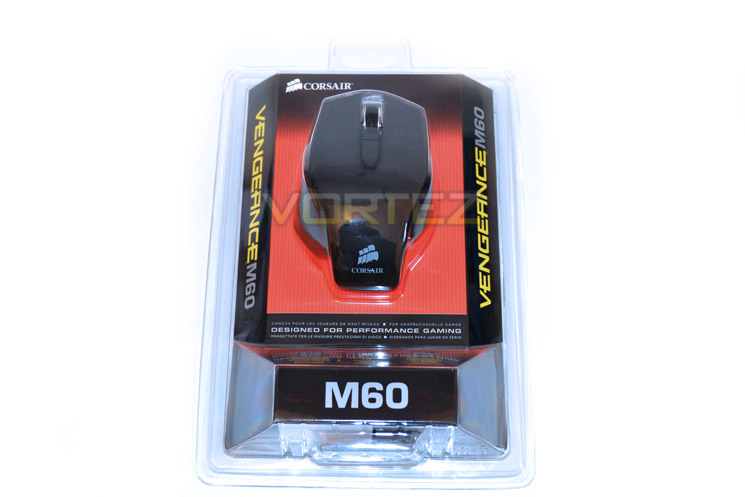
The packaging is nothing to write home about with just a blister pack protecting the contents. The clear plastic does however allow the prospective purchaser to mould their hands around the mouse profile and of course, allow them to see the product first hand. To the rear of the package, the main features of the mouse are discussed briefly in multiple languages with a picture showing the mouse weight adjustment.
Accessories
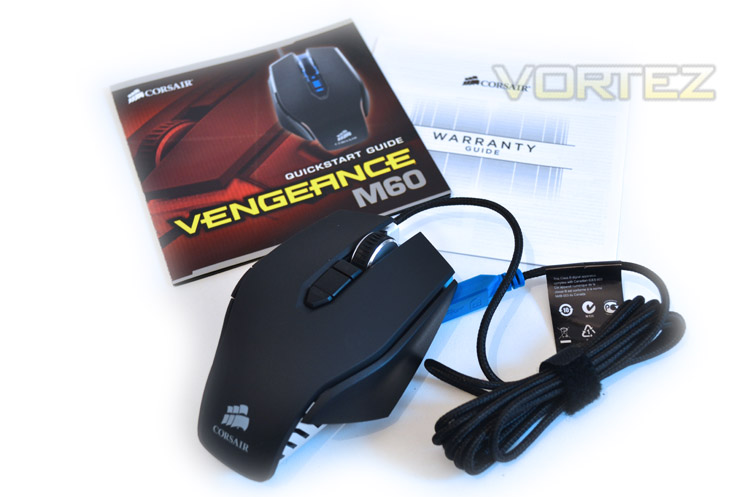
Despite the mouse needing driver software for complete functionality, it is plug-n-play with the latest version of Windows. The driver/software is available from Corsair and will be covered later in the review. Other than a small product leaflet directing you to plug the mouse into an available USB port and to download the latest driver along with a warranty booklet giving 2 years piece of mind there are no other accessories included.
Right Profile
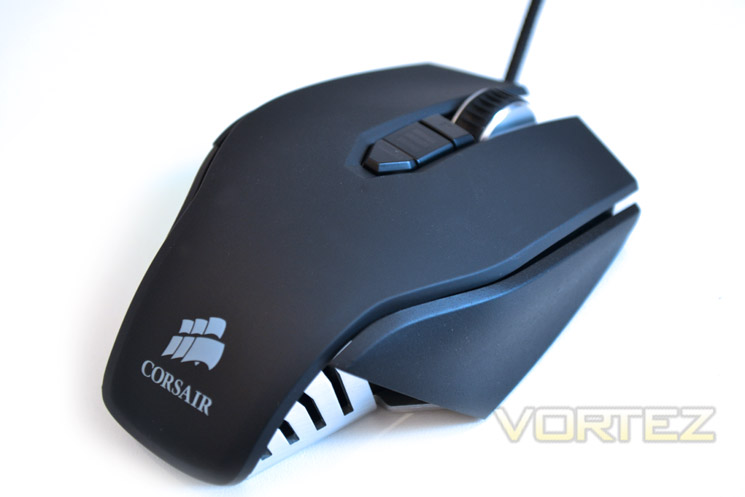
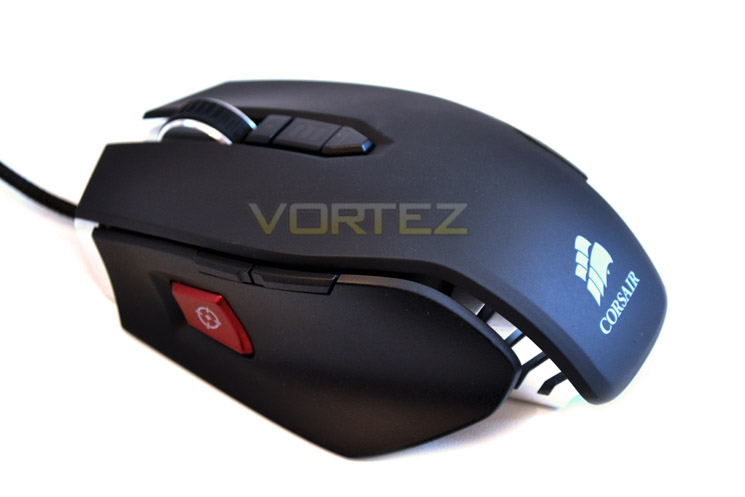
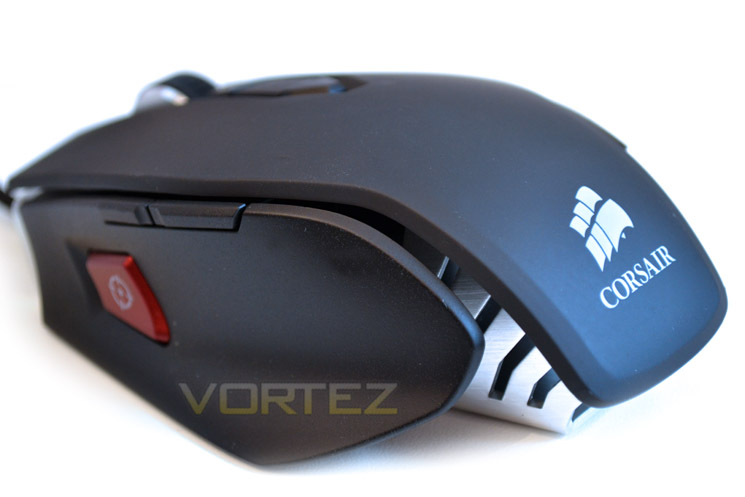
Here we get a first glance of the M60 gaming mouse from Corsair. First impressions are good the Corsair mouse certainly looks the part. The overall matt black appearance contrasts well with the aluminium base and rubberised mousewheel. The middle buttons do not appear to stand proud from the unit and despite the mouse clearly being aim towards right handers, it looks ergonomically sound.
Left Profile
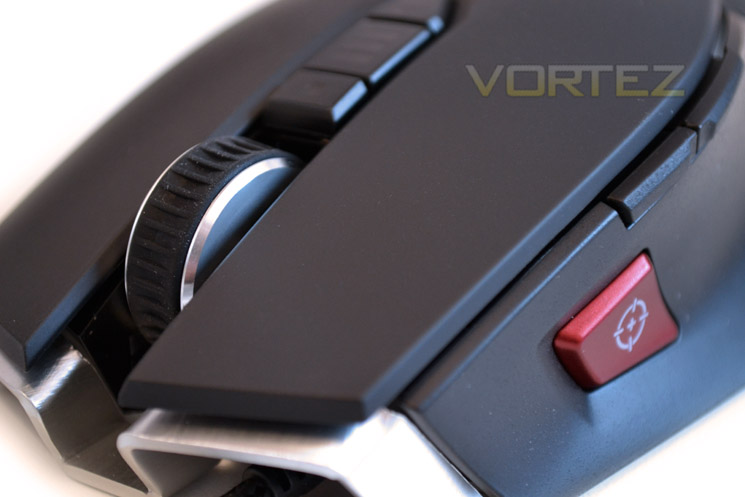
The ‘business end’ side the mouse features 2 discreet buttons and a large red button adorned with a crosshair. Again we see that the matt plastic is built upon what appears to be vented aluminium. With the rear of the mouse cut away it certainly looks individual and while not as obtuse as the Saitek R.A.T range of peripherals, the M60 looks to be very performance orientated by design.
Braided cable
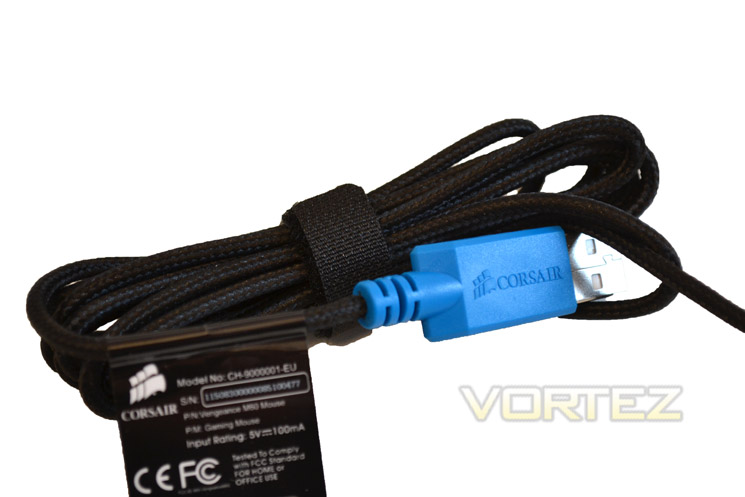
The 1.8m cable is fully braided with dense weave material. Not as flexible as bare silicon wire, the braided cable does however afford greater protection and again, looks very nice indeed. At the end of the cable you will find a USB connection which is nickel plated steel rather than the gold plating we are now accustomed to. As I have stated previously, gold plating, while looking pretty, offers nothing over your standard USB connector. Of course manufacturers will claim it offers longer durability and a better connection but in my many years of experience I have yet to have USB connector fail on me or have any evidence to suggest that gold plating offers any tangible advantage over the standard USB plating process.
Let’s delve a little deeper and see what tricks the M60 mouse has to offer…
Closer Look
M60 Top
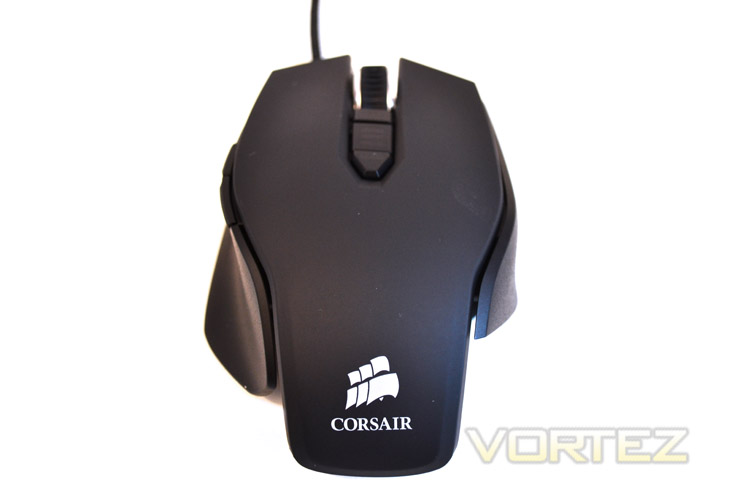
From a bird’s eye view, we can see that the Corsair M60 is profiled to be used right handed with the sculpted thumb insert and right, rear section notable by its absence. The lines of the mouse are however near perfect if you fall into the right-handed category. The mouse is relatively wide in comparison to other mice on the market measuring 75mm at its widest point and 118mm long despite the rear section being cut away. Ergonomically, the mouse feels great in the palm but may be a little too large to suit those looking for a ‘claw-grip’ styled mouse.
M60 Front
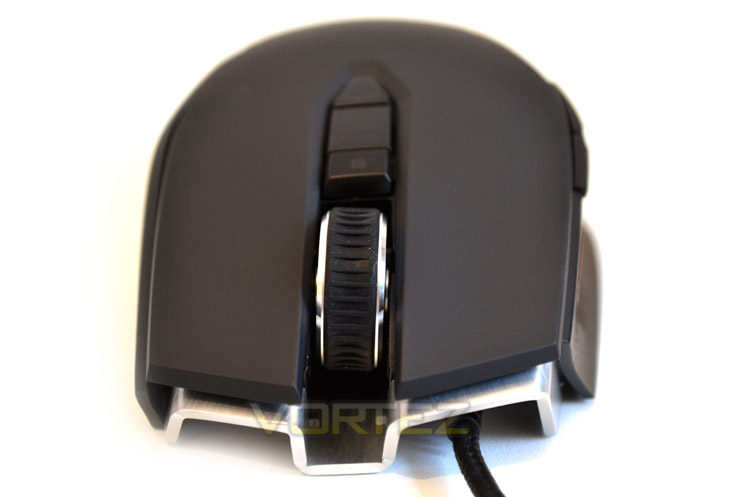
Here we see the front of the mouse. Starting from the base upwards we see that the aluminium base protrudes ever so slightly beneath the main mouse buttons. Also worthy of note is that the cable is attached to the right hand side of the mouse which is the best place for it to be as this will help prevent the cable getting in the way while in operation. Moving up, the main mouse buttons are lightly sculpted for great comfort and grip. These buttons while plastic have a rubber coating which not only feels good but should also assist during gaming should you tend to sweat a little.
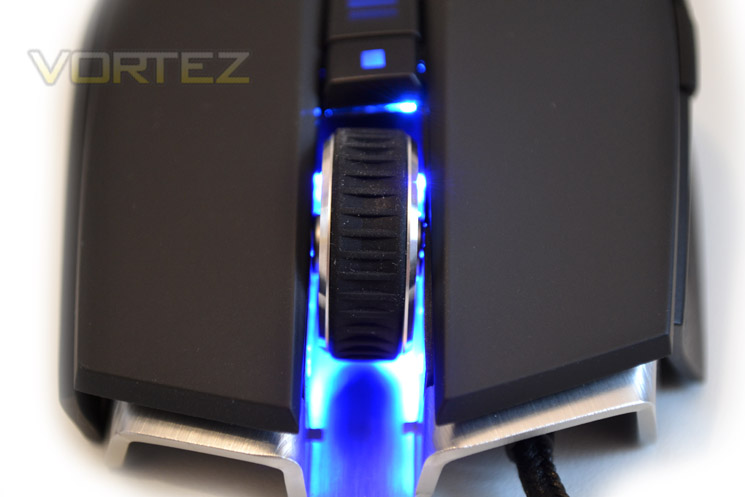
The mouse wheel appears to be ever so slightly out of parallel with the rest of the mouse but it is actually the mouse that slopes to the right along with the middle mouse buttons. This may look slightly odd but in practice works very well indeed. The mouse wheel is aluminium with a textured rubber sheath and is notched rather than ‘smooth’ in operation which is perfect for quick, accurate weapon selection while in game!
Aluminium Frame
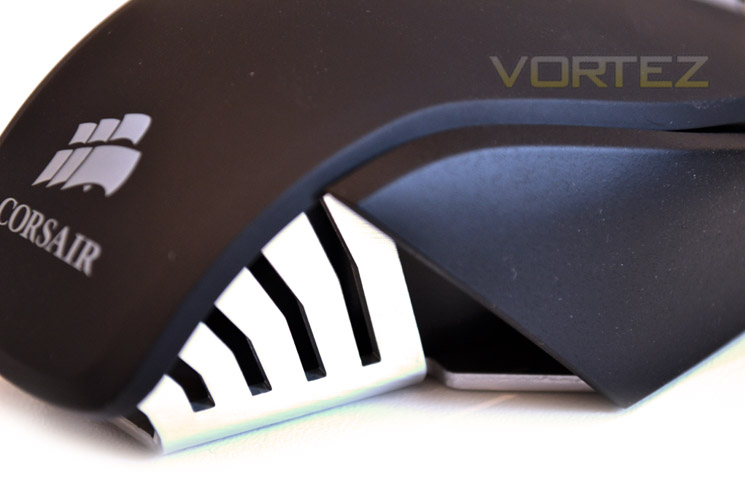
The base and indeed the frame of the mouse is aluminium. Mouse gaming mice are plastic throughout and while this keeps the mouse light, plastic does nothing for the durability. Of course, aluminium is heavier than plastic so if you prefer a light mouse, this is perhaps not the best choice. If however you like something with a bit of weight to it, the K60 feels very solid and will serve you well.
M60 Base
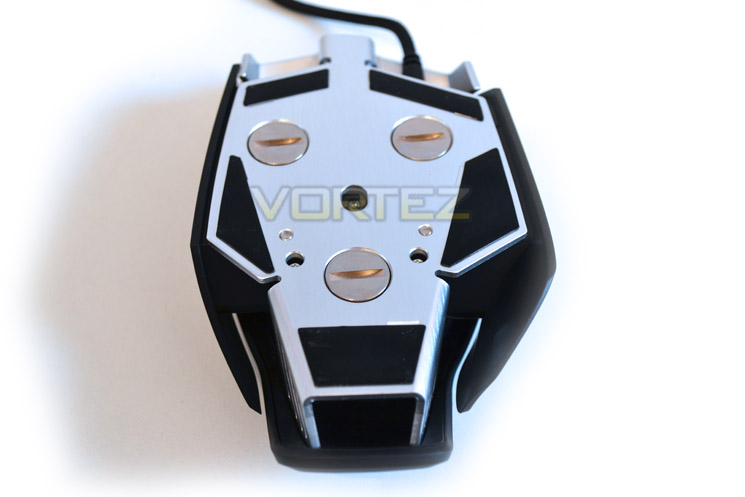
Attached to the aluminium base are 5x Teflon pads to ensure the rodent slides on nearly any surface with ease. Unfortunately there were no spare pads included with the package which was a shame but any normal replacement pads should suffice should the stock versions eventually wear out thanks to the flat base. You will also notice the mouse laser situated towards the centre of the unit. This is an Avago Technologies ADNS-9500 LaserStream Gaming Sensor capable of a maximum 5700DPI. IF that is too sensitive for you then the downloadable software allows you to configure the sensitivity in 100 DPI increments.
Sniper Button
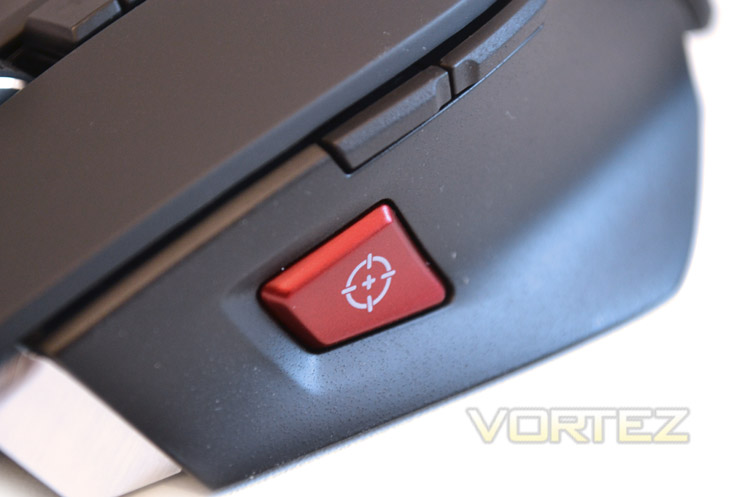
In the sculpted thumb rest area of the the mouse are the two page forward/backward buttons which follow the line of the mouse from front to back. These buttons are neither too pronounced to hit accidentally nor too shallow to require focused effort. Of greater interest is the Sniper button. This button instantly lowers the DPI to a pre-configured (lower) value when pressed and held in place. Upon releasing the button, the DPI would return to normal. Adjusting the sensitivity on the fly along with having it in such a convenient place is a genius move from Corsair and will certainly appeal to those snipers we love to hate on the Battlefield.
Weight Adjustment
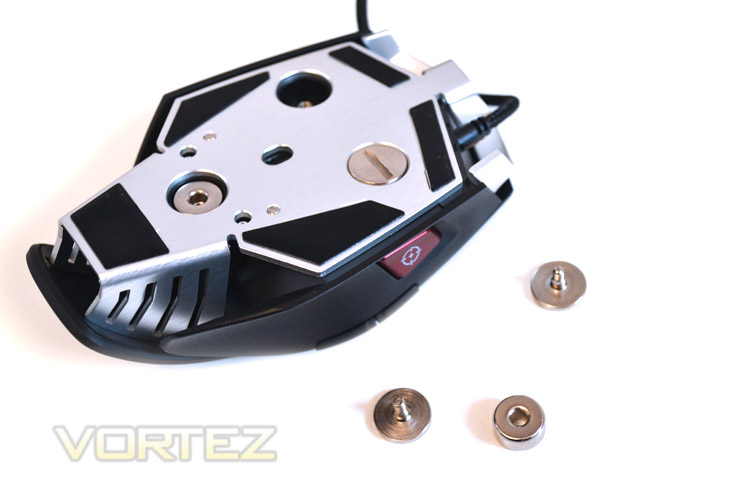
The mouse in stock form is a hefty piece of equipment which I personally prefer. If however you wish to adjust the weight, or indeed the balance of the mouse then the weights can be removed individually. Unfortunately, you will need a flat head screwdriver or long finger nails to do this but in all honesty, once you have the mouse setup to your liking it is unlikely you will ever need to adjust the weight again.
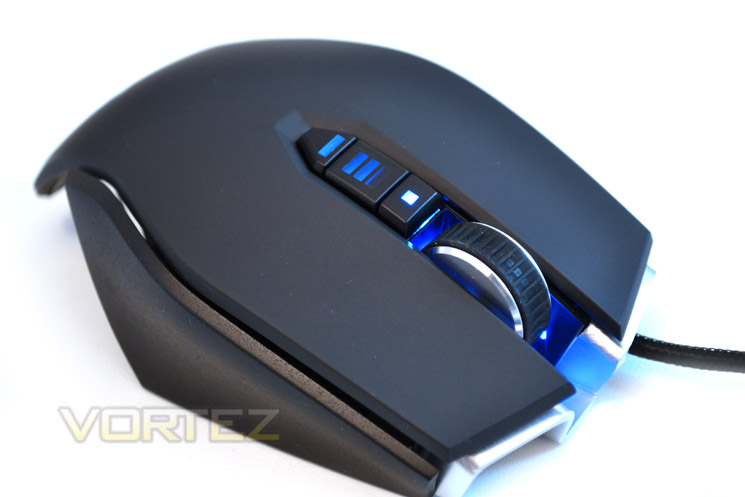
Lights
After plugging the mouse into our test setup we were greeted with a soft blow glow emanating from the front of the mouse. I’m not ashamed to say I’m a sucker for lights and the blue of the Corsair, while discreet enough not to be distracting, does give off an air of quality during dim conditions.
Enough of the conjecture! Let’s move on to the Software set and performance of today’s review item…
Software
Corsair appears to be using a single console that can be adapted for any of their compatible Vengeance peripherals, currently including the K90 and of course today’s review item, the M60. Each peripheral is chosen towards the top right of the software suite and will have specific windows to control that particular piece of hardware. The aptly named Corsair Vengeance Gaming Software for the M60 is spread over three tabs:Assign Buttons
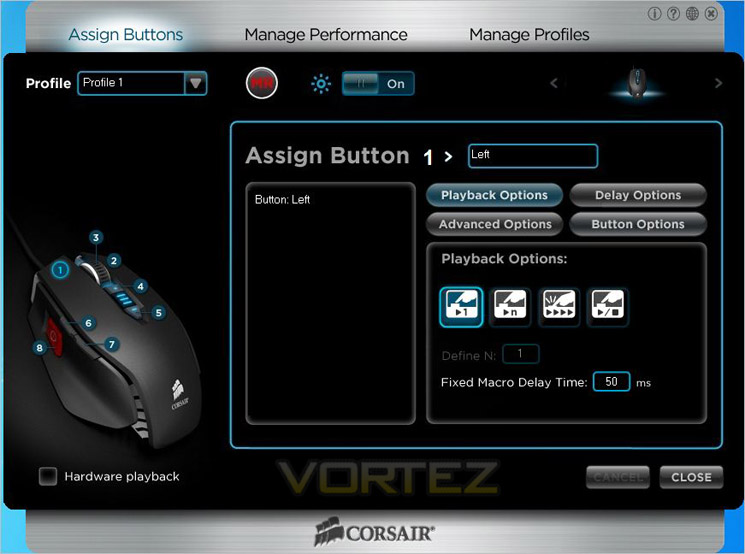
The Assign Buttons tab is where the majority of tweaking will occur as this is where you will dedicate functionality to the mouse by choosing what each of the 8 mouse buttons do. With the main buttons programmed you can delve into the world of Macro programming. While the M60 does not have as many buttons as the M90 (designed for MMO/RTS gamers) each of the 8 buttons are programmable with a Macro with each Macro being able to be controlled via four different methods – Play once, play infinite, play multiple times or start/stop. The delay time between macro settings can also be adjusted in milliseconds so you have plenty of scope to create those glitch exposing bunny hops, weapon change/reload configurations or whatever preference of macro you can think of.
While the lighting is blue only, it can be turned off if you prefer at the flick of a switch in the software suite under the Assign Buttons tab along with adjusting previously saved profiles.
Manage Performance
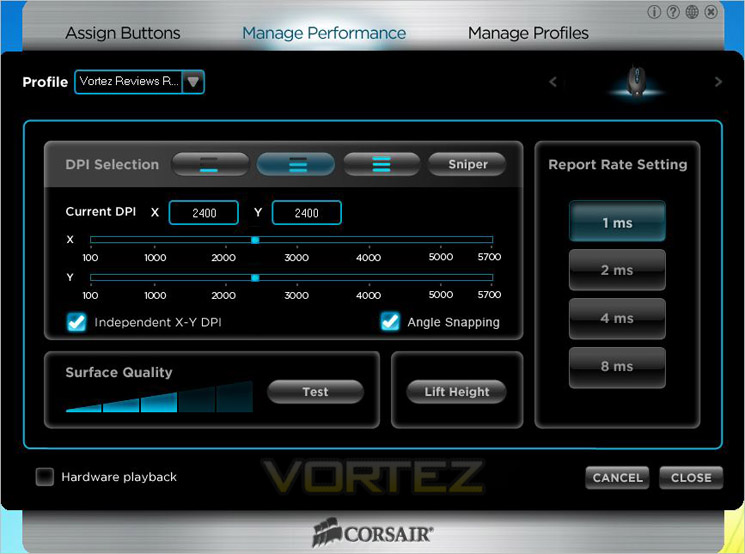
To tweak the M60’s sensitivity you would head to the Manage Performance Tab where there are all manner of settings available. The mouse has three main DPI settings adjustable ‘on-the-fly’ using the up/down middle mouse buttons and a further ‘on-the-fly’ DPI setting for the Sniper button. The DPI is configured using a slider which moves in increments of 100 and has a range of 100 to the M60’s maximum setting of 5700 DPI. Not only that but each axis can have a different setting so the right to left movement could be more sensitive than the up/down motion or vice versa which is great for those who like to dabble in piloting choppers or the jet whores!
Yet another feature of the software console is the hardware playback function. This allows the mouse rather than software to playback macro settings because some games can see software based macro’s as hacks so this is a workaround ensures you do not get inadvertently get kicked from the server for using a macro.
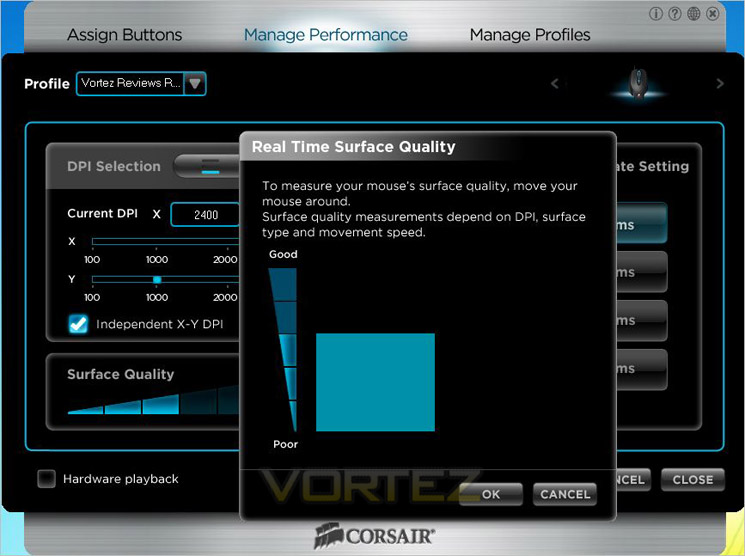
If you feel your mouse pad surface is letting you down then why not let your mouse be the judge of that? The Vengeance gaming suite is capable of monitoring the gaming surface quality and during testing it did actually work very well. A cloth coated rubber backed mouse mat was reported to be of ‘medium’ quality whereas an Icemat 2.0 was classified as good. While this doesn’t really have any functional benefit it will at least let you know not to blame the mouse if your surface is poor!
Yet another feature of the M60 is ‘Angle Snapping’. ‘Angle Snapping is the means of the mouse correcting our twitchy movements. Open MS paint and draw a straight line (using freehand tool) and I would wage you cannot do many if any at all.
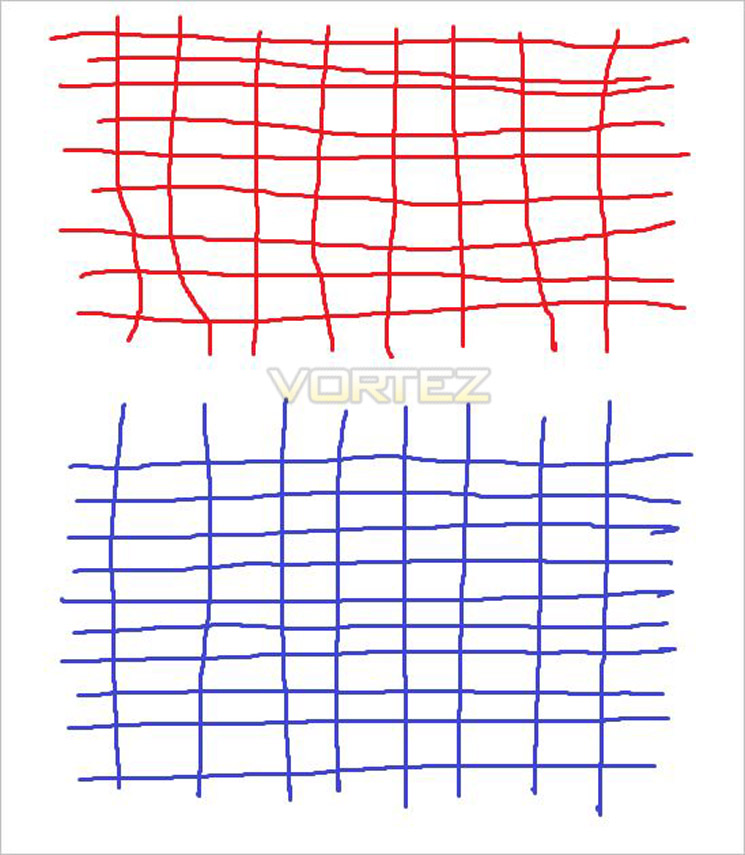
Red= disabled Blue=Enabled
With Angle snapping enabled the mouse predicts that you wish to move in a straight line. Of course this effect has some impact in gaming – particularly useful for snap shooting. Imagine firing in one direction then a quick swivel 180 degrees should in theory allow you keep the same height (perfect for headshots?).
You can see this in action in the picture above. With angle snapping enabled (blue) the lines are much more linear than the red (disabled). The angle snapping of the M60 was not as severe as other mice I have tested but it does appear to work fairly well. I conducted this test a few times for fear of the angle snapping results simply being a result of the ‘placebo’ effect but for the most part, angle snapping seemed to work well on the M60.
Manage Profiles
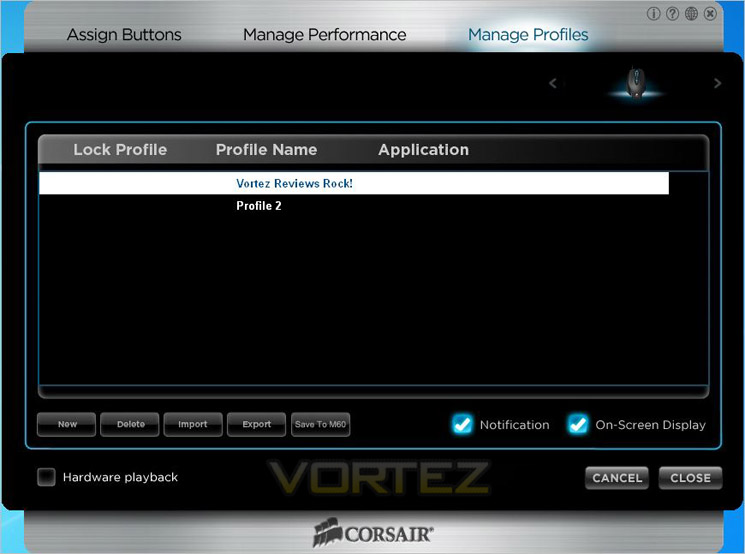
Profile management is exactly what it says on the tin. This is where you can back-up, import, export your profiles. An infinite amount of profiles can be created and reloaded at your leisure with each profile name being briefly displayed on-screen once loaded onto the mouse.
Let’s see how these features translate to performance as we analyse the mouse under gaming conditions…
Performance Testing
General UseAs an everyday mouse, the Corsair Vengeance M60 is very easy to get along with. The additional buttons don’t get in the way at all and is perhaps slightly better than our current ‘king of mice’ – the SteelSeries Sensei in that because the Corsair M60 doesn’t have the additional buttons to the right hand side, there are no inadvertent operations. The mouse feels great to hold, even with all of the weights in-situ and thanks to the ergonomics, does not become tiresome in use. For photo processing and editing the M60 is also very good thanks to the angle snapping feature (which can be turned off if you don’t like this feature). Overall, as an everyday mouse the Corsair Vengeance M60 is useful, if somewhat over exasperated for this purpose.
Gaming
Here is where the Corsair Vengeance M60 comes into its own. The first test was battlefield 3 where the Corsair mouse performed admirably. I found the sniper button particularly useful, especially as sniping is not my chosen ‘profession’. I found that aiming while dropping the sensitivity momentarily gave me greater opportunities of head shots and as a result my accuracy improved dramatically. It should be noted that the sniper button is much stiffer than the other buttons on the mouse and for good reason. Not once did I inadvertently click the sniper button because not only is it placed perfectly (just ahead of the thumb but it also requires more force and a conscious effort to operate. Piloting was also very good as increasing the DPI on-the-fly meant I could go from infantry foot soldier to air combat ace instantly. O.K, maybe I’m no Tom Cruise but the M60 certainly assisted me in getting off the ground and not crashing into the nearest tree!
Performance in Skyrim was also excellent with the macro settings becoming much more useful. The mouse was accurate throughout with excellent tracking and lift-off capability. Obviously this is dependent on what you have set in the gaming profiles. The question has to be asked as why you would need a mouse with up to 5700DPI? While I can see the need for high DPI on say a triple head monitor display with a huge resolution, even at 5700 you would have to be a magician to keep the cursor under control. I find anything over 2000DPI pretty much unusable and my preference for normal ground pounding combat to be 1000DPI. If anyone can play with any degree of performance with a DPI setting of 5700 they must the reactions of a psychic cat and a mouse pad the size of a postage stamp! I also find it puzzling why anyone would want to slow the polling rate down in the software, surely the fastest connection speed to the PC is the optimum setting? While some very old PC’s may struggle with the polling rate, anything from the past decade would surely be able to keep up. After all why spend more money on a mouse than you PC is worth? The M60 has a maximum polling rate of 1000MHz (1ms) but this can be dropped to 125MHz (8ms). As with any high end product, the option is there if you want it so Corsair cannot be criticised for this but I feel it’s more a case of ‘willy-waving’ than any useable feature to advertise a DPI of 5700! In fairness though we would criticise Corsair if they didn’t have this feature when other mice in the same league do.
The left and right mouse buttons are a pleasure to use, if a little over sensitive with each button requiring the slightest of touches thanks to the Omron switches. Sensitivity aside though, these are rated to be good for 8million presses – plenty of kills to be had there then! The aluminium scroll wheel is very comfortable to use and also precise with its tactile operation but sadly there are no left/right tilting options available. Hardly a deal breaker but a missing feature nonetheless.
Overall then, the Corsair M60 is nigh on perfect for FPS gaming. Those who want more buttons on a mouse would do well to check out the Corsair M90 which is aimed (excuse the pun) at MMO/RTS gamers whereas the M60 is nigh on the perfect weapon for First Person Shooters. The mouse is ergonomically perfect for right handers, especially those who favour the palm grip due to the height of the mouse and thanks to the aluminium uni-body along with removable weights, the weight distribution is excellent.
It’s time I wrapped this review up by giving my thoughts and appraisal in the conclusion…
Conclusion
The Corsair Vengeance M60 FPS laser gaming mouse is a fantastic first attempt at a mouse. You might say it is close to perfection – it really is that good. The Corsair K60 gaming keyboard we reviewed earlier gave me mixed feelings on whether Corsair should stick to what they know and that entering into the gaming peripheral market was a step too far however, after giving the M60 gaming mouse a thorough workout I am pleased to report that Corsair have created a product that is ergonomically sound, looks fantastic and performs at the highest level. With a plethora of features including macro capability, on-the-fly DPI adjustment, tactile mouse wheel and a very useful ‘sniper’ button, the M60 should be given serious consideration by any FPS gamer.As you will find in my reviews, I like to give the good and the bad news to you and as usual, the Corsair M60 does come with a few little problems, albeit minor. Firstly, the weights are difficult to remove. While it can be argued that once the weight is setup, you would have little need to re-adjust again however as with the ridiculously high DPI of 5700, the option would be nice to have. Needing a flat head screwdriver to remove/add weights (not all of us have long finger nails) is not the best design ever created, especially when you consider other manufacturers weights can be removed much more easily. I was also disappointed that the mouse did not have enough on-board memory to save more than one profile. Without this feature any profiles you create (including macro settings) are stored on the PC that has the software installed not on the mouse itself. While this may not affect the majority of users, it becomes a useless feature for those who intend to use the mouse at LAN events. Having little on-board memory means you are stuck with the one profile that was last uploaded to the mouse.
That said, the little issues I have found are hardly worth beating the drum about because for the most part, the Corsair Vengeance M60 is a fantastic mouse and the Corsair technicians should be very proud of their achievements because if my experience is anything to go by, this mouse will sell by the truck load. I loved the aluminium unibody and while it adds a little weight when compared to the plastic mice available, the product does not feel overly heavy rather it feels robust and purveys an air of quality and reliability. The switchgear used is excellent throughout with the main mouse buttons being sensitive to the touch, the side buttons not being intrusive, the sniper button requiring focussed operation and the mouse wheel being accurate thanks to the tactile feedback. The price is competitive and performance above par with other mice of this nature, in actual fact it is perhaps fair to say that at £50 you would be hard pushed to find a mouse that is as feature packed and performs as good as the Corsair M60.
With this in mind, there can be no other award suitable other than our prized Gold and approved awards as minor faults aside, this mouse is an excellent example of how a gaming mouse should look, perform and cost. An all round excellent product from Corsair – you would be foolish not to have this at the top of your gaming mouse list!
Pros
+ Very comfortable to use
+ Excellent performance
+ Removable weights
+ On-the-fly DPI adjustment
+ Sniper Button
+ Aluminium body
+ User friendly software
Cons
– Not enough on-board memory
– Difficult to remove weights
+ Very comfortable to use
+ Excellent performance
+ Removable weights
+ On-the-fly DPI adjustment
+ Sniper Button
+ Aluminium body
+ User friendly software
Cons
– Not enough on-board memory
– Difficult to remove weights


Click here for an explanation of our awards at Vortez.net. Thanks to Corsair for providing today’s review sample.


